brake Acura ILX Hybrid 2013 User Guide
[x] Cancel search | Manufacturer: ACURA, Model Year: 2013, Model line: ILX Hybrid, Model: Acura ILX Hybrid 2013Pages: 365, PDF Size: 8.63 MB
Page 74 of 365
73
uuIndicatorsu
Continued
Instrument Panel
Indicator
Name
On/Blinking
Explanation
Message
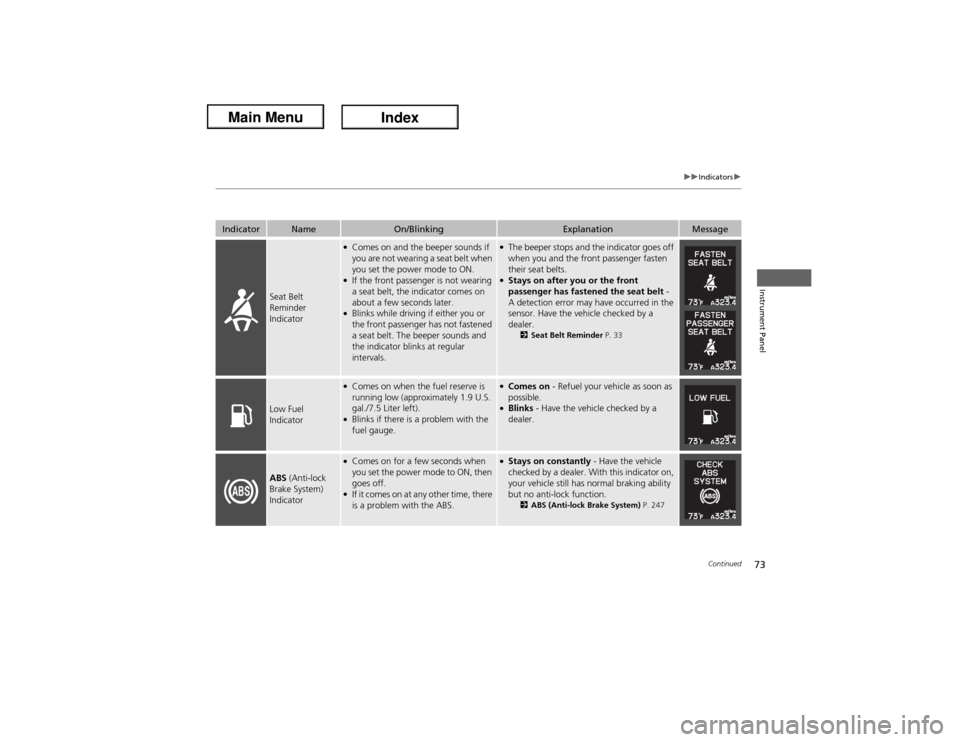
Seat Belt
Reminder
Indicator
●Comes on and the beeper sounds if
you are not wearing a seat belt when
you set the power mode to ON.●If the front passenger is not wearing
a seat belt, the indicator comes on
about a few seconds later.●Blinks while driving if either you or
the front passenger has not fastened
a seat belt. The beeper sounds and
the indicator blinks at regular
intervals.
●The beeper stops and the indicator goes off
when you and the front passenger fasten
their seat belts.●Stays on after you or the front
passenger has fastened the seat belt -
A detection error may have occurred in the
sensor. Have the vehicle checked by a
dealer.
2Seat Belt Reminder P. 33
Low Fuel
Indicator
●Comes on when the fuel reserve is
running low (approximately 1.9 U.S.
gal./7.5 Liter left).●Blinks if there is a problem with the
fuel gauge.
●Comes on - Refuel your vehicle as soon as
possible.●Blinks - Have the vehicle checked by a
dealer.
ABS (Anti-lock
Brake System)
Indicator
●Comes on for a few seconds when
you set the power mode to ON, then
goes off.●If it comes on at any other time, there
is a problem with the ABS.
●Stays on constantly - Have the vehicle
checked by a dealer. With this indicator on,
your vehicle still has normal braking ability
but no anti-lock function.
2ABS (Anti-lock Brake System) P. 247
Page 75 of 365
74
uuIndicatorsu
Instrument Panel
Indicator
Name
On/Blinking
Explanation
Message
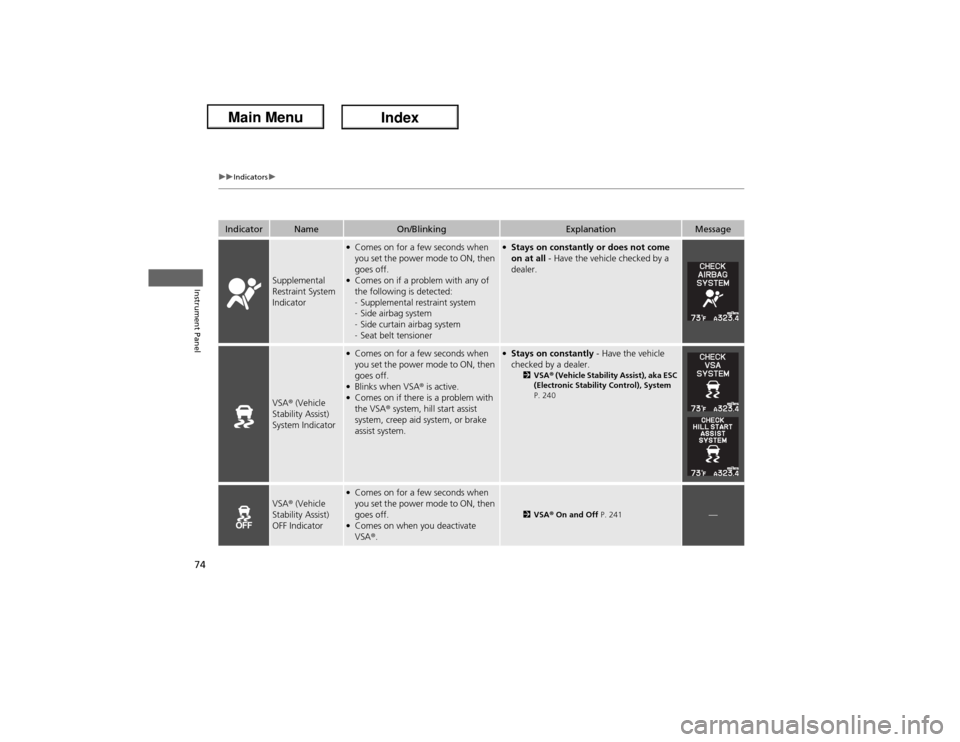
Supplemental
Restraint System
Indicator
●Comes on for a few seconds when
you set the power mode to ON, then
goes off.●Comes on if a problem with any of
the following is detected:
-Supplemental restraint system
-Side airbag system
-Side curtain airbag system
-Seat belt tensioner
●Stays on constantly or does not come
on at all - Have the vehicle checked by a
dealer.
VSA® (Vehicle
Stability Assist)
System Indicator
●Comes on for a few seconds when
you set the power mode to ON, then
goes off.●Blinks when VSA® is active.●Comes on if there is a problem with
the VSA® system, hill start assist
system, creep aid system, or brake
assist system.
●Stays on constantly - Have the vehicle
checked by a dealer.
2VSA® (Vehicle Stability Assist), aka ESC
(Electronic Stability Control), System
P. 240
VSA® (Vehicle
Stability Assist)
OFF Indicator
●Comes on for a few seconds when
you set the power mode to ON, then
goes off.●Comes on when you deactivate
VSA®.
2VSA® On and Off P. 241
—
Page 84 of 365
83
uuIndicatorsuMulti-Information Display Warning and Information Messages
Continued
Instrument Panel
Message
Condition
Explanation
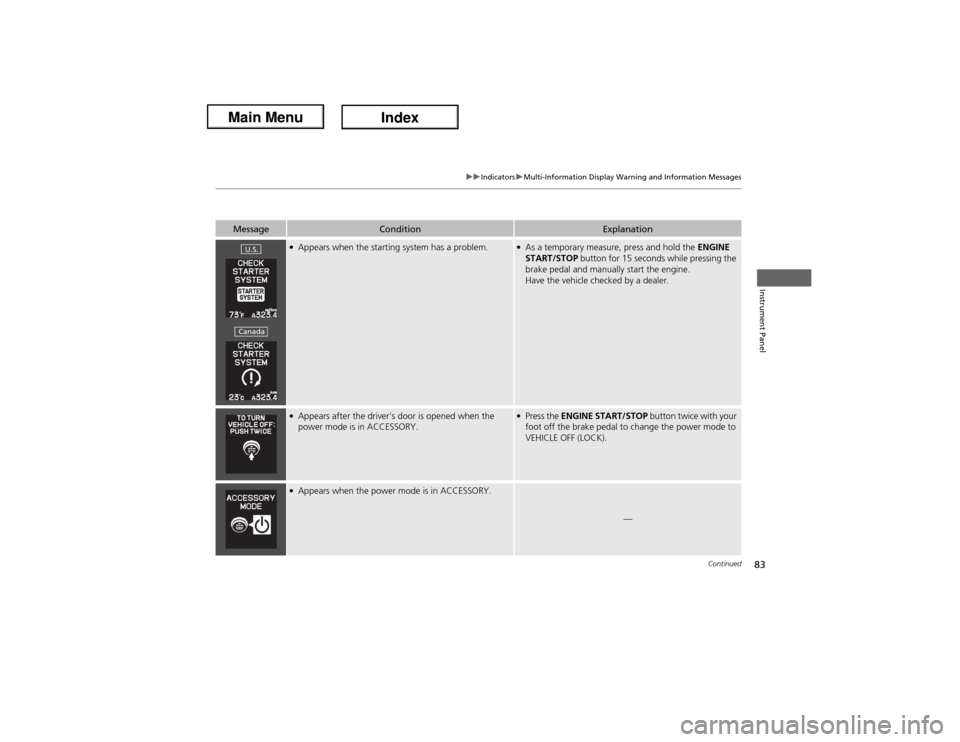
●Appears when the starting system has a problem.
●As a temporary measure, press and hold the ENGINE
START/STOP button for 15 seconds while pressing the
brake pedal and manually start the engine.
Have the vehicle checked by a dealer.
●Appears after the driver’s door is opened when the
power mode is in ACCESSORY.
●Press the ENGINE START/STOP button twice with your
foot off the brake pedal to change the power mode to
VEHICLE OFF (LOCK).
●Appears when the power mode is in ACCESSORY.
—
U.S.Canada
Page 114 of 365
113
uuLocking and Unlocking the DoorsuAuto Door Locking/Unlocking
Controls
Auto Door Locking/UnlockingYour vehicle locks all doors and unlocks the driver’s door automatically when a
certain condition is met.■Drive lock mode
All doors lock when the vehicle’s speed reaches about 10 mph (15 km/h).■Park unlock mode
The driver’s door unlocks when the shift lever is moved into
(P with the brake pedal
depressed.
■Auto Door Locking■Auto Door Unlocking
1Auto Door Locking/Unlocking
You can turn off or change to another auto door
locking/unlocking setting using the multi-information
display.
2Customized Features P. 95
Page 125 of 365
124Controls
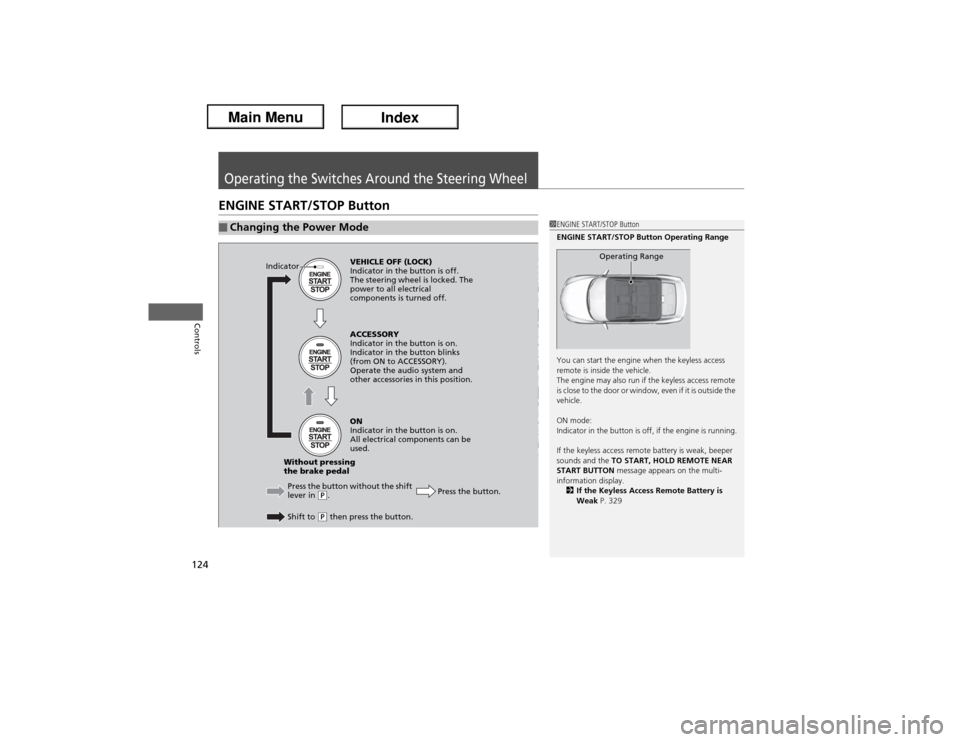
Operating the Switches Around the Steering WheelENGINE START/STOP Button■Changing the Power Mode
1ENGINE START/STOP Button
ENGINE START/STOP Button Operating Range
You can start the engine when the keyless access
remote is inside the vehicle.
The engine may also run if the keyless access remote
is close to the door or window, even if it is outside the
vehicle.
ON mode:
Indicator in the button is off, if the engine is running.
If the keyless access remote battery is weak, beeper
sounds and the TO START, HOLD REMOTE NEAR
START BUTTON message appears on the multi-
information display.
2If the Keyless Access Remote Battery is
Weak P. 329
Operating Range
VEHICLE OFF (LOCK)
Indicator in the button is off.
The steering wheel is locked. The
power to all electrical
components is turned off.
Press the button without the shift
lever in
(P.
Shift to (P then press the button.Press the button. Without pressing
the brake pedalACCESSORY
Indicator in the button is on.
Indicator in the button blinks
(from ON to ACCESSORY).
Operate the audio system and
other accessories in this position.
ON
Indicator in the button is on.
All electrical components can be
used. Indicator
Page 130 of 365
129
uuOperating the Switches Around the Steering WheeluFog Lights
Controls
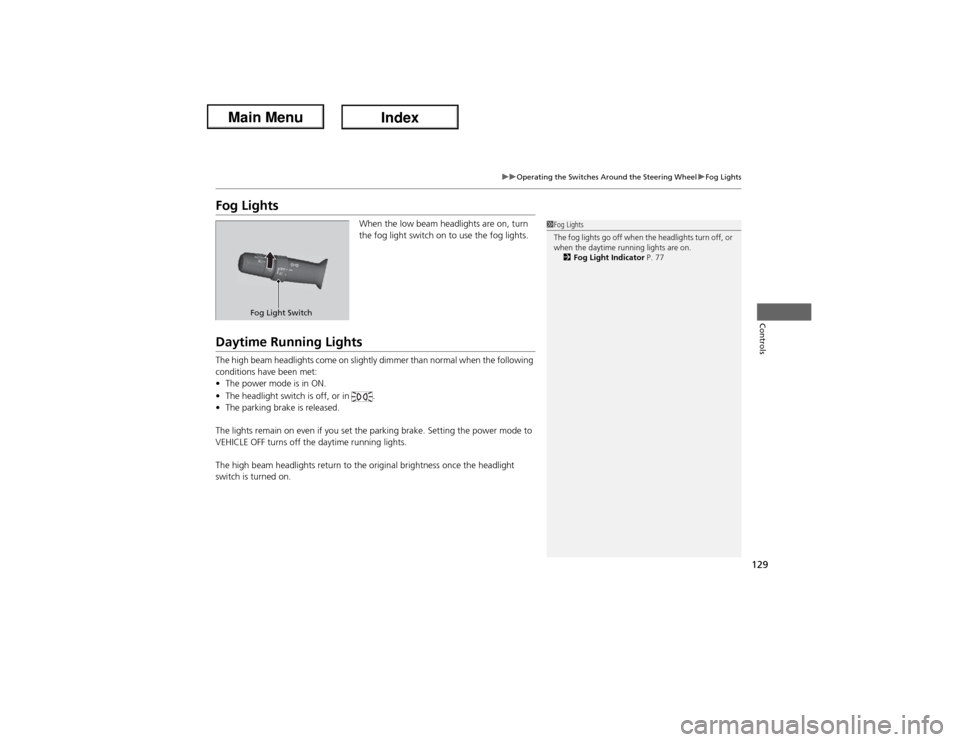
Fog Lights
When the low beam headlights are on, turn
the fog light switch on to use the fog lights.
Daytime Running LightsThe high beam headlights come on slightly dimmer than normal when the following
conditions have been met:
•The power mode is in ON.
•The headlight switch is off, or in .
•The parking brake is released.
The lights remain on even if you set the parking brake. Setting the power mode to
VEHICLE OFF turns off the daytime running lights.
The high beam headlights return to the original brightness once the headlight
switch is turned on.
1Fog Lights
The fog lights go off when the headlights turn off, or
when the daytime running lights are on.
2Fog Light Indicator P. 77
Fog Light Switch
Page 220 of 365
219
Driving
This chapter discusses driving, refueling, and information on items such as accessories.
Before Driving
Driving Preparation .......................... 220
Maximum Load Limit........................ 223
Towing a Trailer
Towing Your Vehicle ........................ 225
When Driving
Starting the Engine .......................... 226
Precautions While Driving................. 229
Automatic Transmission (CVT) .......... 230
Shifting ............................................ 231
ECON Button ................................... 236
Cruise Control ................................. 237
VSA® (Vehicle Stability Assist), aka ESC
(Electronic Stability Control), System .. 240TPMS (Tire Pressure Monitoring System) ... 242
Tire Pressure Monitoring System (TPMS) -
Required Federal Explanation ......... 243
Braking
Brake System ................................... 245
ABS (Anti-lock Brake System) ........... 247
Brake Assist System.......................... 248Parking Your Vehicle
When Stopped ................................ 249
Auto Idle Stop ................................. 250
Multi-View Rear Camera
*................ 253
Refueling
Fuel Information .............................. 254
How to Refuel ................................. 255
Fuel Economy
Improving Fuel Economy .................. 256
Accessories and Modifications
Accessories ...................................... 257
Modifications................................... 257
* Not available on all models
Page 222 of 365
Continued
221
uuBefore DrivinguDriving Preparation
Driving
•Store or secure all items on board properly.
uCarrying too much cargo, or improperly storing it, can affect your vehicle's
handling, stability, stopping distance, and tires, and make it unsafe.
2Maximum Load Limit P. 223
•Do not pile items higher than the seat height.
uThey can block your view and may be thrown forward in the event of sudden
braking.
•Do not place anything in the front seat footwells. Make sure to secure the floor
mat.
uAn object or unsecured floor mat can interfere with your brake and accelerator
pedal operation while driving.
•If you have any animals on board, do not let them move around in the vehicle.
uThey may interfere with driving and a crash could occur.
•Securely close and lock all doors and the trunk.
2Locking/Unlocking the Doors from the Inside P. 111
•Adjust your seating position properly.
uAdjust the head restraint, too.
2Adjusting the Seats P. 135
2Adjusting the Head Restraints P. 138
•Adjust the mirrors and steering wheel properly for your driving.
uAdjust them while sitting in the proper driving position.
2Adjusting the Mirrors P. 133
2Adjusting the Steering Wheel P. 132
■Interior Checks
1Interior Checks
The headlight aim is set by the factory, and does not
need to be adjusted. However, if you regularly carry
heavy items in the trunk, have the aiming readjusted
at a dealer or by a qualified technician.
Page 227 of 365
226Driving
When DrivingStarting the Engine
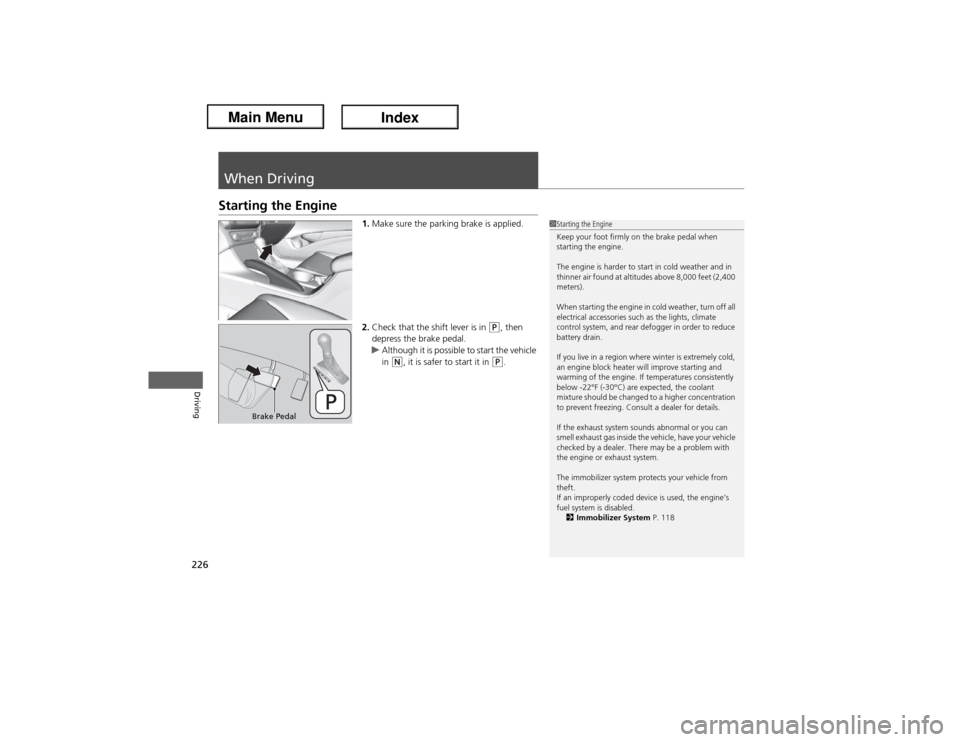
1.Make sure the parking brake is applied.
2.Check that the shift lever is in
(P, then
depress the brake pedal.
uAlthough it is possible to start the vehicle
in
(N, it is safer to start it in
(P.
1Starting the Engine
Keep your foot firmly on the brake pedal when
starting the engine.
The engine is harder to start in cold weather and in
thinner air found at altitudes above 8,000 feet (2,400
meters).
When starting the engine in cold weather, turn off all
electrical accessories such as the lights, climate
control system, and rear defogger in order to reduce
battery drain.
If you live in a region where winter is extremely cold,
an engine block heater will improve starting and
warming of the engine. If temperatures consistently
below -22°F (-30°C) are expected, the coolant
mixture should be changed to a higher concentration
to prevent freezing. Consult a dealer for details.
If the exhaust system sounds abnormal or you can
smell exhaust gas inside the vehicle, have your vehicle
checked by a dealer. There may be a problem with
the engine or exhaust system.
The immobilizer system protects your vehicle from
theft.
If an improperly coded device is used, the engine’s
fuel system is disabled.
2Immobilizer System P. 118
Brake Pedal
Page 228 of 365
Continued
227
uuWhen DrivinguStarting the Engine
Driving
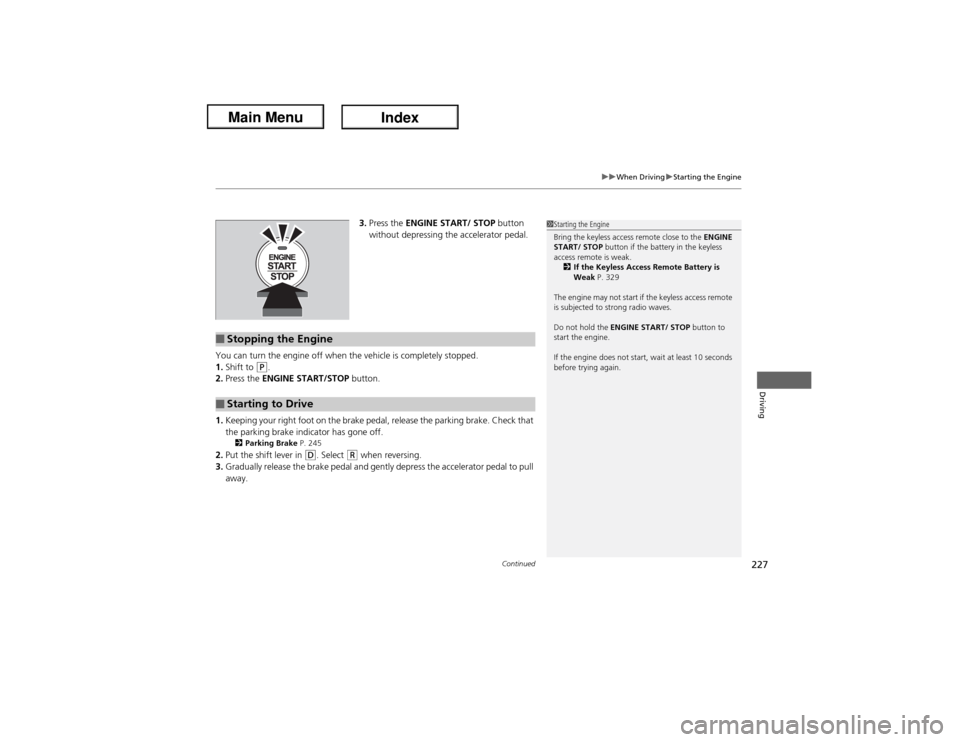
3.Press the ENGINE START/ STOP button
without depressing the accelerator pedal.
You can turn the engine off when the vehicle is completely stopped.
1.Shift to
(P.
2.Press the ENGINE START/STOP button.
1.Keeping your right foot on the brake pedal, release the parking brake. Check that
the parking brake indicator has gone off.
2Parking Brake P. 245
2.Put the shift lever in
(D. Select
(R when reversing.
3.Gradually release the brake pedal and gently depress the accelerator pedal to pull
away.
1Starting the Engine
Bring the keyless access remote close to the ENGINE
START/ STOP button if the battery in the keyless
access remote is weak.
2If the Keyless Access Remote Battery is
Weak P. 329
The engine may not start if the keyless access remote
is subjected to strong radio waves.
Do not hold the ENGINE START/ STOP button to
start the engine.
If the engine does not start, wait at least 10 seconds
before trying again.
■Stopping the Engine■Starting to Drive