turn signal Acura ILX Hybrid 2013 Owner's Manual
[x] Cancel search | Manufacturer: ACURA, Model Year: 2013, Model line: ILX Hybrid, Model: Acura ILX Hybrid 2013Pages: 365, PDF Size: 8.63 MB
Page 4 of 365
3Quick Reference Guide
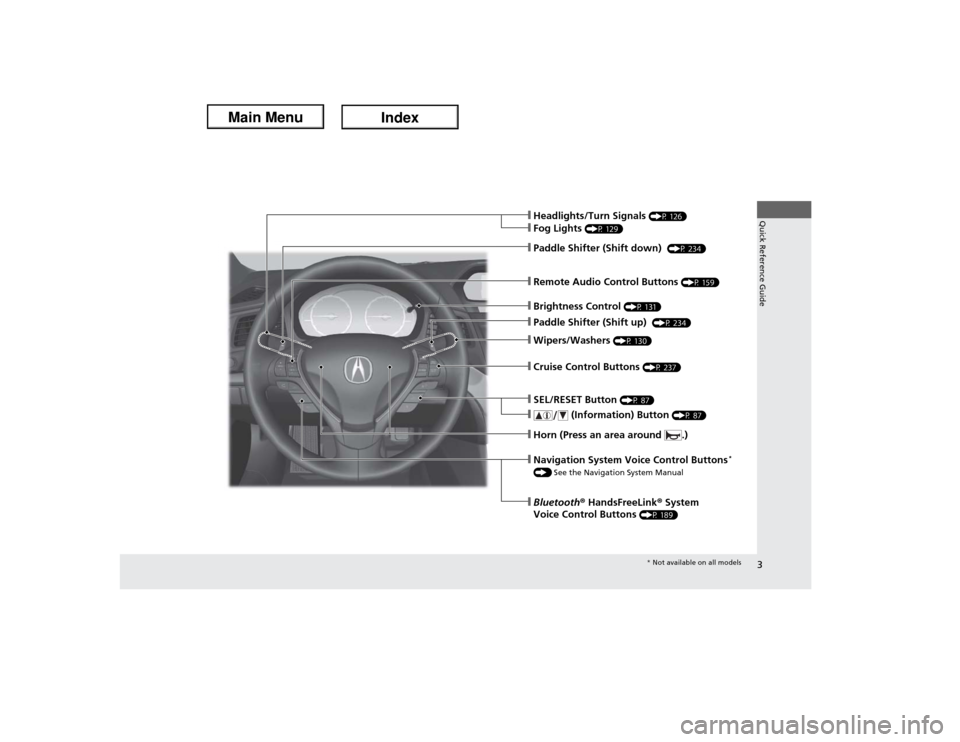
❙Wipers/Washers
(P 130)
❙Cruise Control Buttons
(P 237)
❙Paddle Shifter (Shift down)
(P 234)
❙Remote Audio Control Buttons
(P 159)
❙Paddle Shifter (Shift up)
(P 234)
❙SEL/RESET Button
(P 87)
❙
(Information) Button
(P 87)
❙Brightness Control
(P 131)
❙Headlights/Turn Signals
(P 126)
❙Fog Lights
(P 129)
❙Horn (Press an area around .)❙Bluetooth® HandsFreeLink® System
Voice Control Buttons
(P 189)
❙Navigation System Voice Control Buttons
*
() See the Navigation System Manual
* Not available on all models
Page 7 of 365
Visual Index
6Quick Reference Guide
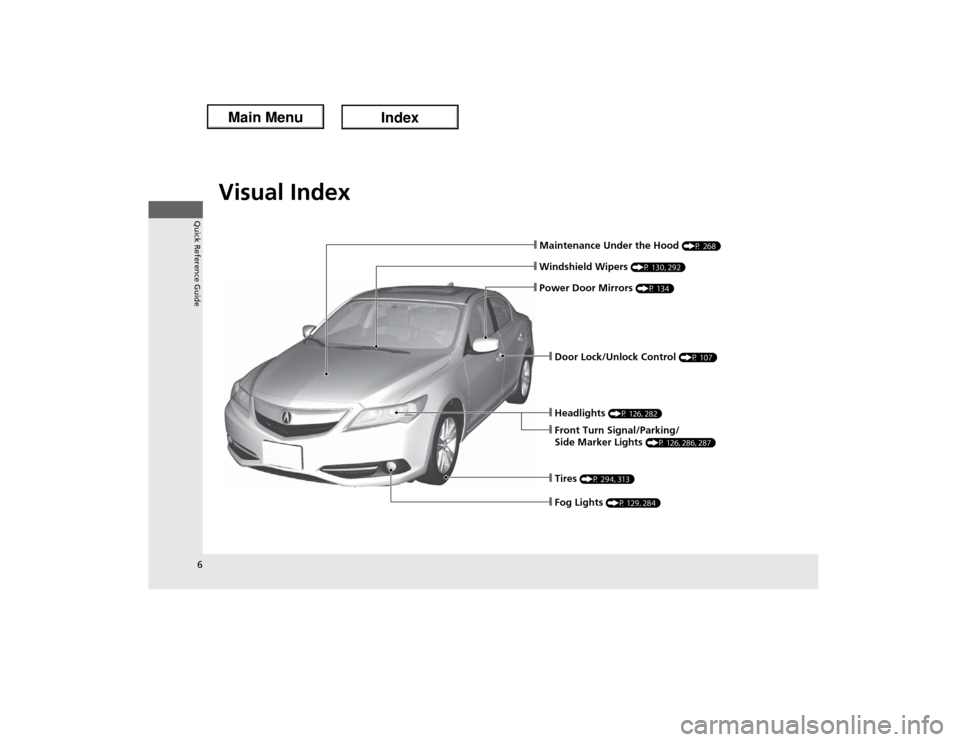
❙Maintenance Under the Hood
(P 268)
❙Windshield Wipers
(P 130, 292)
❙Headlights
(P 126, 282)
❙Front Turn Signal/Parking/
Side Marker Lights
(P 126, 286, 287)
❙Tires
(P 294, 313)
❙Door Lock/Unlock Control
(P 107)
❙Power Door Mirrors
(P 134)
❙Fog Lights
(P 129, 284)
Page 8 of 365
7Quick Reference Guide
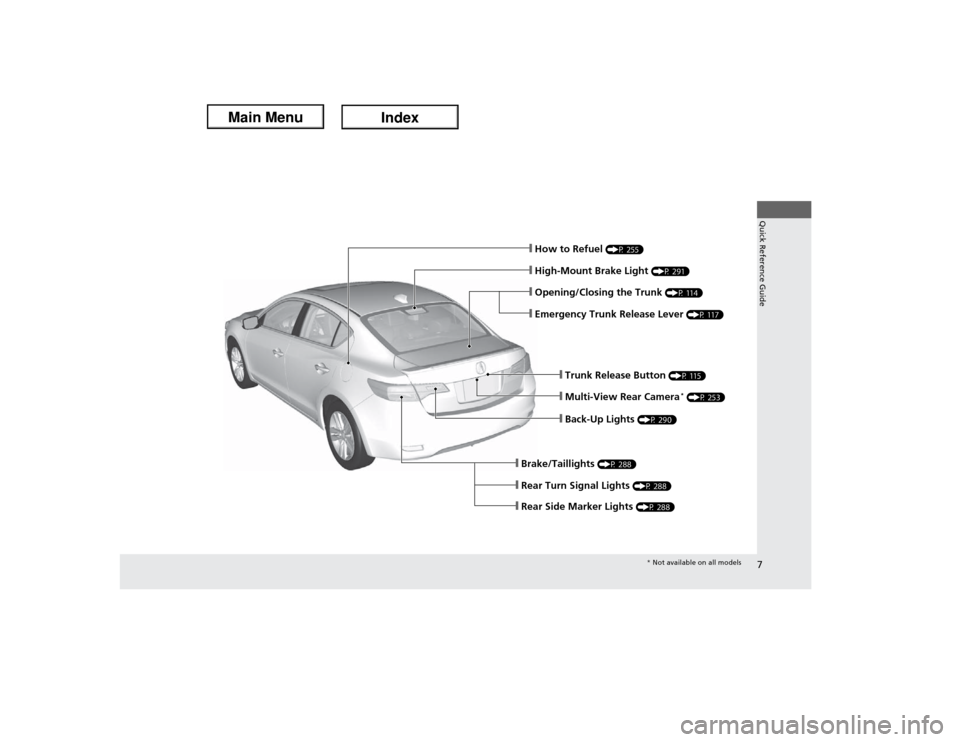
❙Trunk Release Button
(P 115)
❙Back-Up Lights
(P 290)
❙Multi-View Rear Camera
* (P 253)
❙Brake/Taillights
(P 288)
❙Rear Side Marker Lights
(P 288)
❙Rear Turn Signal Lights
(P 288)
❙High-Mount Brake Light
(P 291)
❙How to Refuel
(P 255)
❙Opening/Closing the Trunk
(P 114)
❙Emergency Trunk Release Lever
(P 117)
* Not available on all models
Page 14 of 365
13Quick Reference Guide
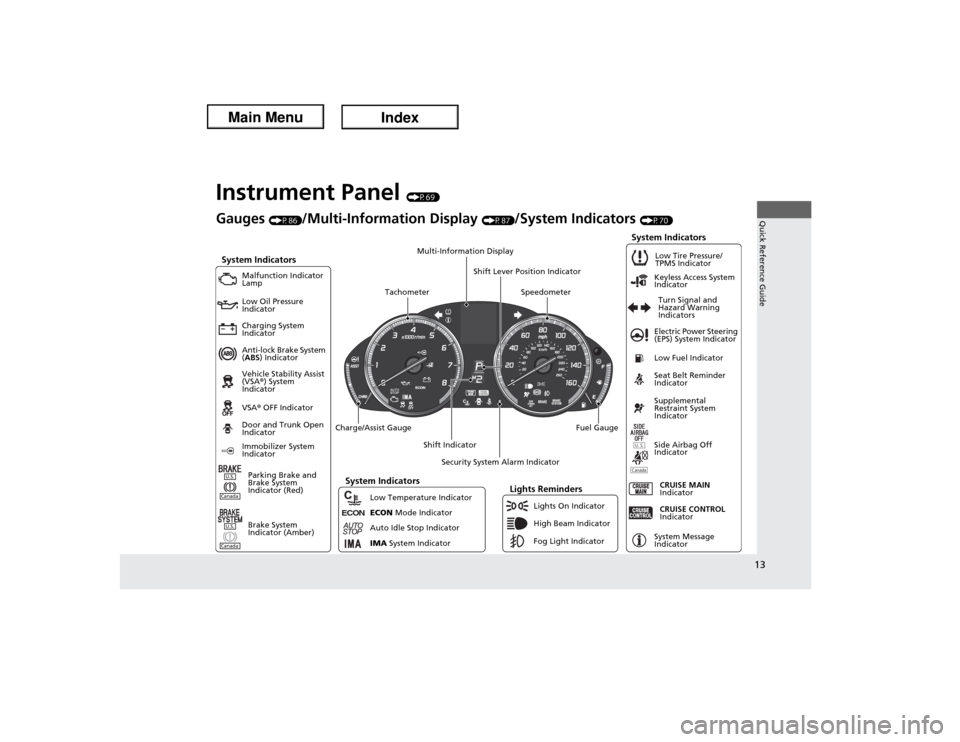
Instrument Panel
(P69)
Canada
ECO
N
Gauges
(P86)
/Multi-Information Display
(P87)
/System Indicators
(P70)
System Indicators
Malfunction Indicator
Lamp
Low Oil Pressure
Indicator
Charging System
Indicator
Anti-lock Brake System
(ABS) Indicator
Vehicle Stability Assist
(VSA®) System
Indicator
VSA® OFF IndicatorElectric Power Steering
(EPS) System Indicator
Lights Reminders
Lights On Indicator
High Beam Indicator
Fog Light Indicator Immobilizer System
IndicatorSeat Belt Reminder
Indicator
System Indicators
CRUISE CONTROL
Indicator
System Message
Indicator Parking Brake and
Brake System
Indicator (Red)Supplemental
Restraint System
Indicator
Side Airbag Off
Indicator Door and Trunk Open
Indicator
CRUISE MAIN
Indicator Low Fuel IndicatorLow Tire Pressure/
TPMS Indicator
Turn Signal and
Hazard Warning
Indicators Keyless Access System
Indicator
Charge/Assist Gauge
Security System Alarm Indicator
Fuel Gauge
Tachometer
Multi-Information Display
Speedometer
Shift Lever Position Indicator
Shift Indicator
Low Temperature Indicator
ECON Mode Indicator
Auto Idle Stop Indicator
IMA System Indicator
U.S.
Brake System
Indicator (Amber)
CanadaU.S.
System Indicators
Page 15 of 365
14Quick Reference Guide
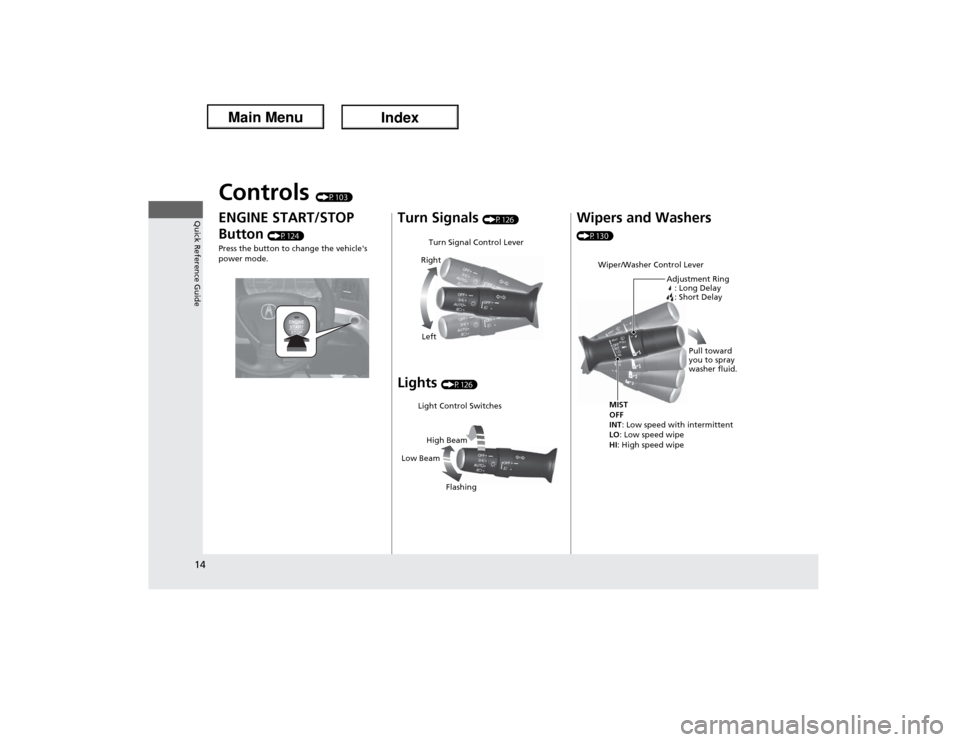
Controls
(P103)
ENGINE START/STOP
Button
(P124)
Press the button to change the vehicle's
power mode.
Turn Signals
(P126)
Lights
(P126)
Turn Signal Control Lever
Right
LeftLight Control Switches
Low BeamHigh Beam
Flashing
Wipers and Washers (P130)
Wiper/Washer Control Lever
Adjustment Ring
: Long Delay
: Short DelayMIST
OFF
INT: Low speed with intermittent
LO: Low speed wipe
HI: High speed wipePull toward
you to spray
washer fluid.
Page 17 of 365
16Quick Reference Guide
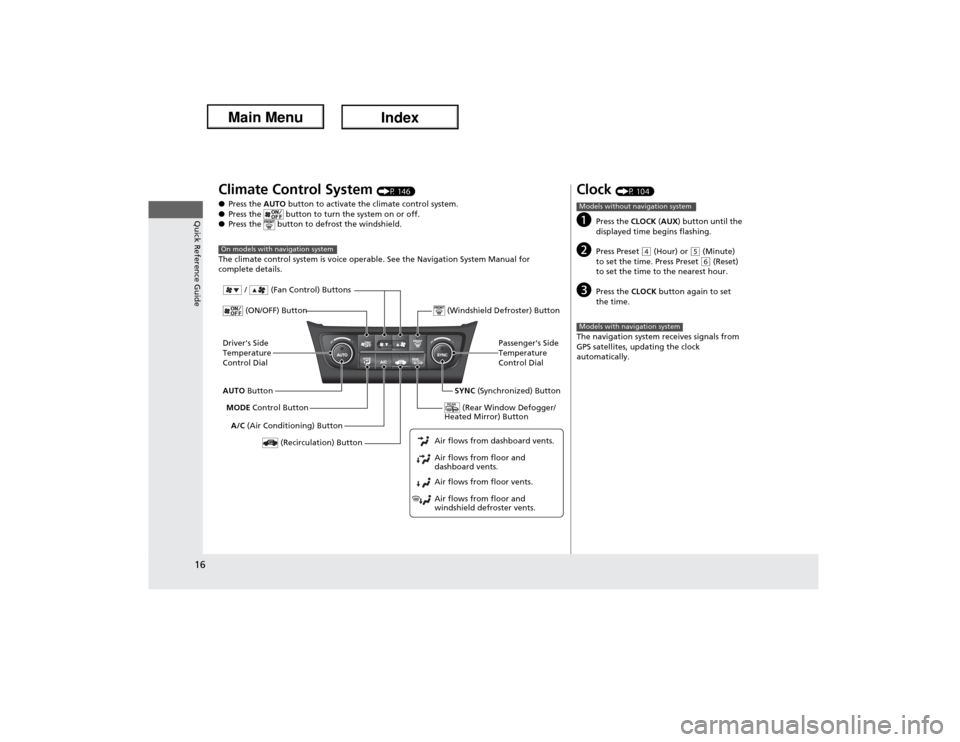
Climate Control System
(P 146)
●Press the AUTO button to activate the climate control system.
●Press the button to turn the system on or off.
●Press the button to defrost the windshield.
The climate control system is voice operable. See the Navigation System Manual for
complete details.
On models with navigation systemDriver's Side
Temperature
Control Dial
A/C (Air Conditioning) Button
Air flows from floor and
windshield defroster vents. Air flows from floor vents. Air flows from floor and
dashboard vents. Air flows from dashboard vents.AUTO Button
(Recirculation) Button
Passenger's Side
Temperature
Control Dial
MODE Control Button
(ON/OFF) Button
SYNC (Synchronized) Button (Windshield Defroster) Button
/ (Fan Control) Buttons
(Rear Window Defogger/
Heated Mirror) Button
Clock
(P 104)
a
Press the CLOCK (AUX) button until the
displayed time begins flashing.
b
Press Preset
(4 (Hour) or
(5 (Minute)
to set the time. Press Preset (6 (Reset)
to set the time to the nearest hour.
c
Press the CLOCK button again to set
the time.
The navigation system receives signals from
GPS satellites, updating the clock
automatically.
Models without navigation systemModels with navigation system
Page 78 of 365
77
uuIndicatorsu
Continued
Instrument Panel
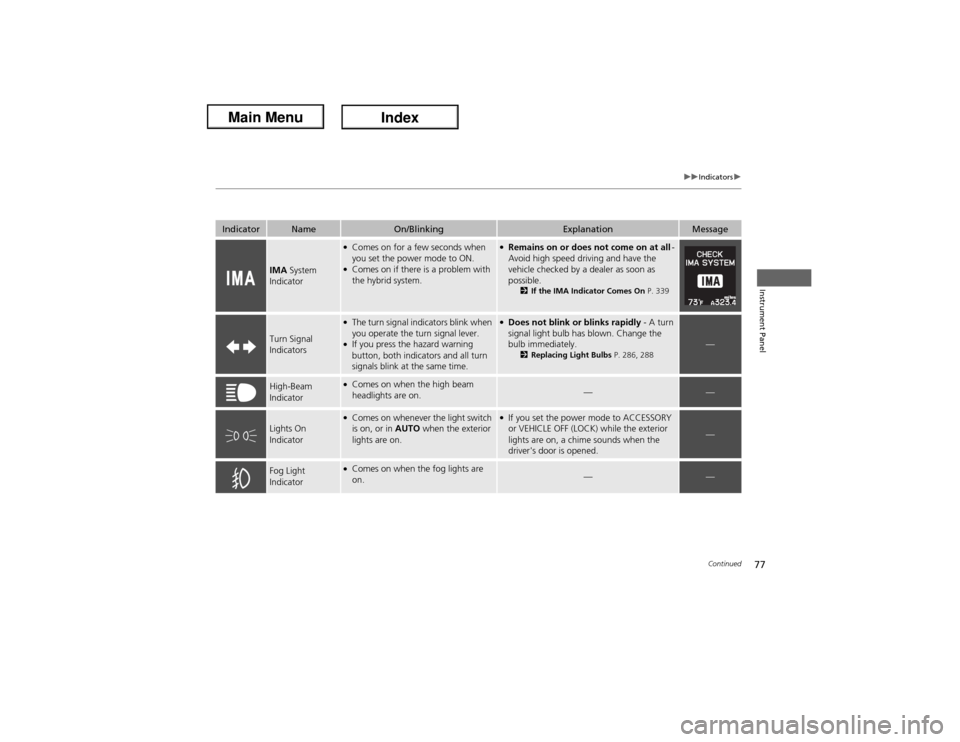
Indicator
Name
On/Blinking
Explanation
Message
IMA System
Indicator
●Comes on for a few seconds when
you set the power mode to ON.●Comes on if there is a problem with
the hybrid system.
●Remains on or does not come on at all -
Avoid high speed driving and have the
vehicle checked by a dealer as soon as
possible.
2If the IMA Indicator Comes On P. 339
Turn Signal
Indicators
●The turn signal indicators blink when
you operate the turn signal lever.●If you press the hazard warning
button, both indicators and all turn
signals blink at the same time.
●Does not blink or blinks rapidly - A turn
signal light bulb has blown. Change the
bulb immediately.
2Replacing Light Bulbs P. 286, 288
—
High-Beam
Indicator
●Comes on when the high beam
headlights are on.
—
—
Lights On
Indicator
●Comes on whenever the light switch
is on, or in AUTO when the exterior
lights are on.
●If you set the power mode to ACCESSORY
or VEHICLE OFF (LOCK) while the exterior
lights are on, a chime sounds when the
driver's door is opened.
—
Fog Light
Indicator
●Comes on when the fog lights are
on.
—
—
Page 104 of 365
103
Controls
This chapter explains how to operate the various controls necessary for driving.
Setting the Clock.............................. 104
Locking and Unlocking the Doors
Key Types and Functions .................. 105
Low Keyless Access Remote Signal
Strength......................................... 106
Locking/Unlocking the Doors from the
Outside .......................................... 107
Locking/Unlocking the Doors from the
Inside ............................................. 111
Childproof Door Locks ..................... 112
Auto Door Locking/Unlocking .......... 113
Opening and Closing the Trunk....... 114
Security System
Immobilizer System .......................... 118Security System Alarm...................... 118
Opening and Closing the Windows.... 120
Opening and Closing the Moonroof... 123Operating the Switches Around the
Steering Wheel
ENGINE START/STOP Button............. 124
Turn Signals ..................................... 126
Light Switches.................................. 126
Fog Lights ........................................ 129
Daytime Running Lights ................... 129
Wipers and Washers ........................ 130
Brightness Control ........................... 131
Rear Defogger/Heated Door Mirror Button...132
Adjusting the Steering Wheel........... 132Adjusting the Mirrors
Interior Rearview Mirror ................... 133
Power Door Mirrors ......................... 134
Adjusting the Seats
Adjusting the Seat Positions ............. 135
Interior Lights/Interior Convenience
Items
Interior Lights .................................. 141
Interior Convenience Items .............. 142
Climate Control System
Using Automatic Climate Control .... 146
Synchronized Mode .............................. 148
Automatic Climate Control Sensors ...... 149
Page 127 of 365
126
uuOperating the Switches Around the Steering WheeluTurn Signals
Controls
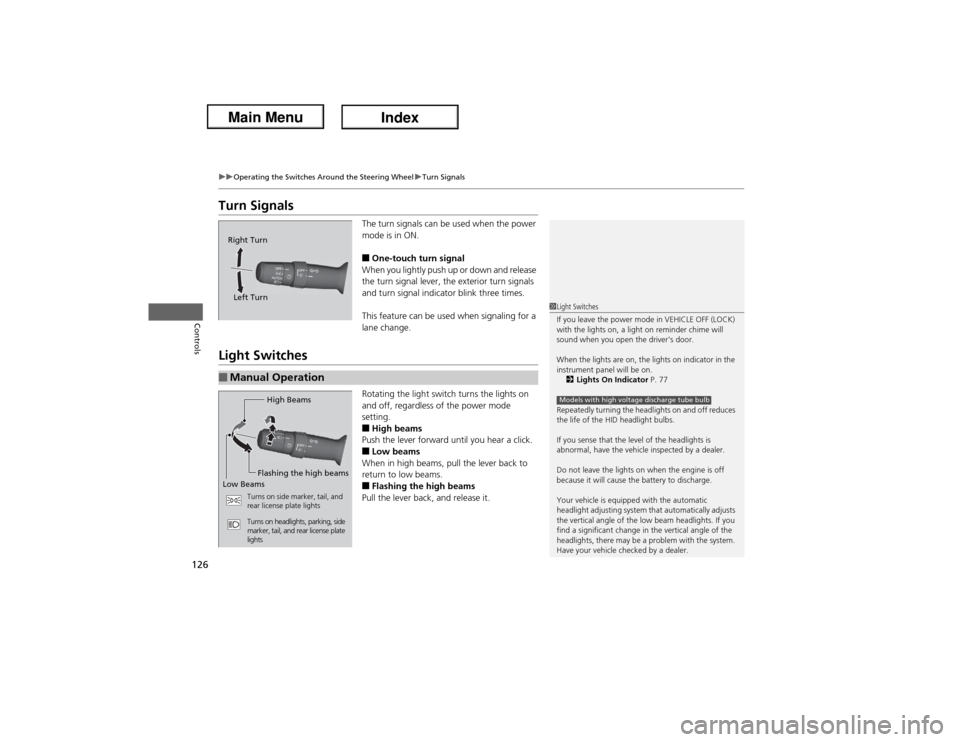
Turn Signals
The turn signals can be used when the power
mode is in ON.■One-touch turn signal
When you lightly push up or down and release
the turn signal lever, the exterior turn signals
and turn signal indicator blink three times.
This feature can be used when signaling for a
lane change.
Light Switches
Rotating the light switch turns the lights on
and off, regardless of the power mode
setting.■High beams
Push the lever forward until you hear a click.■Low beams
When in high beams, pull the lever back to
return to low beams.■Flashing the high beams
Pull the lever back, and release it.
Right Turn
Left Turn■Manual Operation
1Light Switches
If you leave the power mode in VEHICLE OFF (LOCK)
with the lights on, a light on reminder chime will
sound when you open the driver’s door.
When the lights are on, the lights on indicator in the
instrument panel will be on.
2Lights On Indicator P. 77
Repeatedly turning the headlights on and off reduces
the life of the HID headlight bulbs.
If you sense that the level of the headlights is
abnormal, have the vehicle inspected by a dealer.
Do not leave the lights on when the engine is off
because it will cause the battery to discharge.
Your vehicle is equipped with the automatic
headlight adjusting system that automatically adjusts
the vertical angle of the low beam headlights. If you
find a significant change in the vertical angle of the
headlights, there may be a problem with the system.
Have your vehicle checked by a dealer.Models with high voltage discharge tube bulb
High Beams
Flashing the high beams
Low Beams
Turns on side marker, tail, and
rear license plate lights
Turns on headlights, parking, side
marker, tail, and rear license plate
lights
Page 162 of 365

161
uuAudio System Basic OperationuPlaying the AM/FM Radio
Continued
Features
Playing the AM/FM RadioSCAN Button
Press to sample each of the strongest stations
on the selected band for 10 seconds. To turn
off scan, press the button again. VOL/ (Volume/Power) Knob
Press to turn the audio system on and off.
Turn to adjust the volume.
A.SEL (Auto Select) Button
Press to scan both bands and store the
strongest station in each preset. To turn
off auto select, press the button again. This
restores the presets you originally set.
SETUP Button
Press to display menu items.
Selector Knob
Turn to tune the radio frequency.
CATEGORY Bar
*
Press either side to display
and select an RDS category. FM/AM Button
*
Press to select a band. FOLDER Bar
*
Press either side to display and select an
RDS category.FM Button
*
Press to select a band.AM Button
*
BACK Button
Press to go back to the previous display.SKIP Bar
Press to search up and down the selected
band for a station with a strong signal.Preset Buttons (1-6)
To store a station:
1. Tune to the selected station.
2. Pick a preset button and hold it until
you hear a beep.
To listen to a stored station, select a band,
then press the preset button.
* Not available on all models