driver seat adjustment Acura Integra 2000 Sedan Owner's Manual
[x] Cancel search | Manufacturer: ACURA, Model Year: 2000, Model line: Integra, Model: Acura Integra 2000Pages: 273, PDF Size: 4.4 MB
Page 54 of 273

Instrument
s an d Control s
This section gives information about the controls and displays that
contribute to the daily operation of
your Acura. All the essential controls
are within easy reach.
Control Locations............................ 52
Indicator Lights................................ 53
Gauges.............................................. 57
Speedometer................................ 57
Tachometer.................................. 57
Odometer...................................... 57
Trip Meter.................................... 57
Fuel Gauge................................... 58
Temperature Gauge....................
58
Maintenance Require
d
Indicator.................................... 59
Controls Near the Steering
Wheel........................................ 60
Headlights.................................... 61
Instrument Panel Brightness.....
62
Turn S
ignals.................................
62
Windshield Wipers.
..................... 63
Windshield Washers..................
. 63
Hazard Warning...........................
64
Rear Windo
w Defogger.............. 64
Steering Wheel Adjustment....... 65
Steering Wheel Controls................ 66
Cruise Control.............................. 66
Keys and Locks................................ 69
Keys............................................... 69
Immobilizer System..................... 69
Ignition Switch............................. 70
Power Door Locks....................... 72
Childproof Door Locks............... 73
Trunk............................................ 73
Glove Box..................................... 75
Seat Adjustments............................. 75
Driver's Seat Height
Adjustment............................... 76
Driver's Lumbar Support............ 76
Head Restraints........................... 77
Folding Rear Seat............................ 77
Power Windows............................... 79
Moonroof.......................................... 80
Mirrors.............................................. 81
Adjusting the Power Mirrors..... 81
Parking Brake.................................. 82
Digital Clock..................................... 83
Beverage Holder.............................. 84 Console Compartment.................... 85
Cigarette Lighter............................. 85
Ashtrays............................................ 86
Interior Lights.................................. 87
Instrument s an d Control s
Page 79 of 273
Sea
t Adjustment s
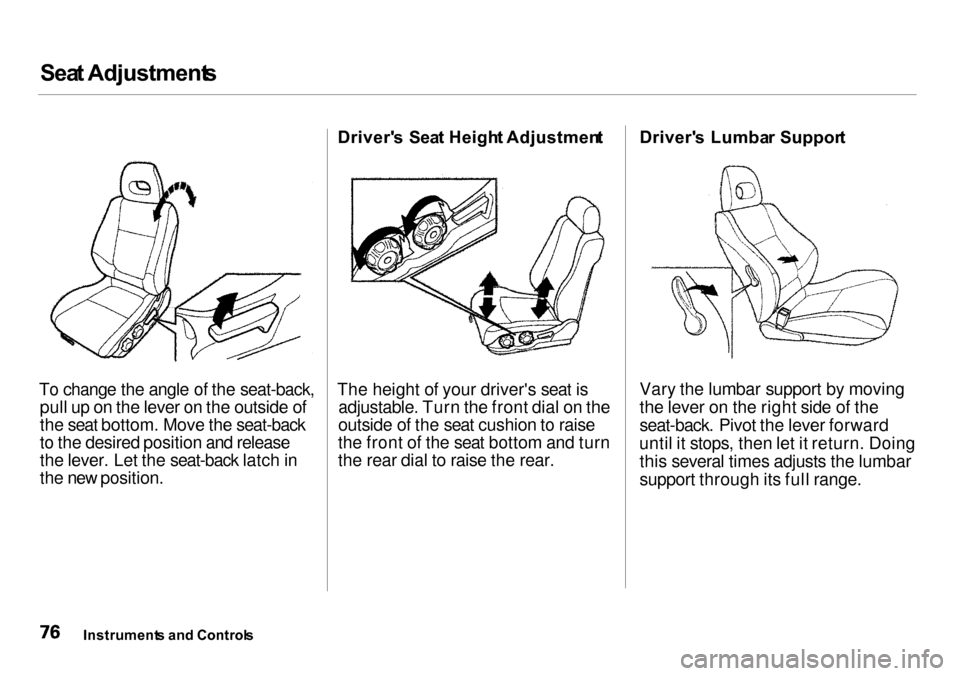
To change the angle of the seat-back, pull up on the lever on the outside of
the seat bottom. Move the seat-back
to the desired position and release
the lever. Let the seat-back latch in
the new position. Driver'
s Sea t Heigh t Adjustmen t
The height of your driver's seat is adjustable. Turn the front dial on the
outside of the seat cushion to raise
the front of the seat bottom and turn
the rear dial to raise the rear. Driver'
s Lumba r Suppor t
Vary the lumbar support by moving
the lever on the right side of the
seat-back. Pivot the lever forward
until it stops, then let it return. Doing this several times adjusts the lumbar
support through its full range.
Instrument s an d Control s
Page 203 of 273
Light
s
Headligh t Aimin g
The headlights were properly aimed when your car was new. You should check their aim if you regularly carry
heavy items in the trunk or pull a
trailer. Each headlight assembly has
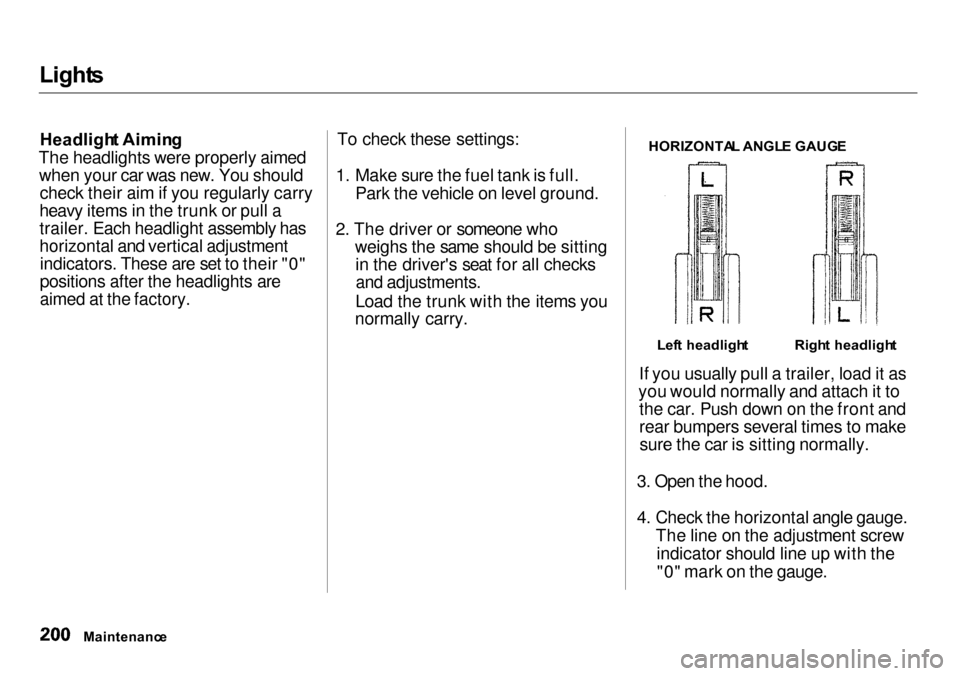
horizontal and vertical adjustment indicators. These are set to their "0"
positions after the headlights are
aimed at the factory. To check these settings:
1. Make sure the fuel tank is full. Park the vehicle on level ground.
2. The driver or someone who weighs the same should be sittingin the driver's seat for all checksand adjustments.
Load the trunk with the items you
normally carry.
HORIZONTA
L ANGL E GAUG E
If you usually pull a trailer, load it as
you would normally and attach it to the car. Push down on the front and
rear bumpers several times to makesure the car is sitting normally.
3. Open the hood.
4. Check the horizontal angle gauge. The line on the adjustment screwindicator should line up with the"0" mark on the gauge.
Maintenanc e
Righ
t headligh t
Lef t headligh t