parking brake Acura RDX 2020 Owner's Guide
[x] Cancel search | Manufacturer: ACURA, Model Year: 2020, Model line: RDX, Model: Acura RDX 2020Pages: 657, PDF Size: 33.2 MB
Page 414 of 657

413Continued
Driving
When Driving
Starting the Engine
1.Make sure the parkin g brake is applied.
u The Parking Brake and Brake System
indicator (red) comes on for 30 seconds
when you press the electric parking
brake switch.
u The parking brake must be applied to
start the engine.
2. Depress the brake pedal.
u Although it is possible to start the vehicle
in
(N with the parking brake is applied, it
is safer to start it in
(P.
3. Press the ENGINE START/STOP button
without depressing the accelerator pedal.
1 Starting the Engine
Keep your foot firmly on the brake pedal when
starting the engine.
The engine is harder to start in cold weather and in thinner
air found at altitudes above 8,000 feet (2,400 meters).
When starting the engine in cold weather, turn off all
electrical accessories such as the lights, climate
control system, and rear de fogger in order to reduce
battery drain.
If you live in a region where winter is extremely cold,
an engine block heater will improve starting and
warming of the engine. Consult a dealer for details.
If the exhaust system sounds abnormal or you can
smell exhaust gas inside the vehicle, have your vehicle
checked by a dealer. There may be a problem with
the engine or exhaust system.
Bring the keyless access remote close to the ENGINE
START/STOP button if the batte ry in the keyless
access remote is weak. 2 If the Keyless Access Remote Battery is
Weak P. 608
The engine may not start if the keyless access remote
is subjected to strong radio waves.
Do not hold the ENGINE START/STOP button to
start the engine.
If the engine does not start, wait at least 30 seconds
before trying again.
Electric Parking
Brake Switch
Brake Pedal
20 ACURA RDX-31TJB6111.book 413 ページ 2020年2月11日 火曜日 午後2時6分
Page 418 of 657

417
uuWhen Driving uStarting the Engine
Driving
1. Depress the brake pedal and press the ENGINE START/STOP button
simultaneously.
2. Keeping your right foot on the br ake pedal, put the transmission into
(D. Select
(R when reversing.
3. With the parking brake applied, release the brake pedal and gently depress the
accelerator pedal.
u Make sure the Parking Brake and Brake System indicator (red) goes off.
2Parking Brake P. 492
2 If the Transmission System Indicator Blinks along with the Warning
Message P. 620
■Hill start assist system
Hill start assist keeps the brake engaged br iefly to help prevent the vehicle from
rolling on inclines as you move your foot from the brake pedal to the accelerator.
Put the transmission into
(D or (S when facing uphill, or (R when facing downhill,
then release the brake pedal.
■Starting to Drive1 Starting to Drive
You can also release the parking brake by pulling the
electric parking brake sw itch while depressing the
brake pedal. When facing downhill, you can start
your vehicle more smoothly by manually releasing it
with the electric parki ng brake switch than by
releasing it with th e accelerator pedal.
The engine stops when th e transmission position is
changed from
( P before the ENGINE START/STOP
button is pressed. Follow step 1 when starting to
drive.
When the engine was started using the keyless access
remote*
When the engine was started using the keyless access remote*
When the engine was started in any case
1 Hill start assist system
Hill start assist may not prevent the vehicle from
rolling downhill on a very st eep or slippery slope, and
will not operate on small inclines.
Hill start assist is not a replacement for the parking
brake.
Hill start assist will operate even when VSA ® is
switched off.
* Not available on all models
20 ACURA RDX-31TJB6111.book 417 ページ 2020年2月11日 火曜日 午後2時6分
Page 421 of 657

420
uuWhen Driving uShifting
Driving
Shifting
Change the gear position in acco rdance with your driving needs.
■Shift button positions
1Shifting
To prevent malfunc tion and unintended
engagement:
•Do not spill any liquids on or around shift buttons.
•Do not place or drop any objects on or around shift
buttons.
•Do not let passengers or ch ildren operate the shift
buttons.
The beeper sounds and the message appears on the
multi-information display when you depress the
accelerator pedal with the gear position in
( N.
2 Multi-Information Display Warning and
Information Messages P. 97
Change the gear position to
( D or (R with the brake
pedal depressed.
3WARNING
The vehicle can roll aw ay if left unattended
without confirming that Park is engaged.
A vehicle that rolls away could cause a crash
resulting in seriou s injury or death.
Always keep your foot on the brake pedal
until you have confirmed that
( P is shown
on the gear position indicator.
Reverse
Used when reversing
Park
Used when parking, be fore turning off or
starting the engine
Neutral
Transmission is not locked
Drive/S Position
Each time you press the button, the
mode switches between Drive and S Position
mode.
Used for:
●Normal driving (gears change between
1st and 10th automatically)
●Temporarily driving in the sequential
mode
●Automatically changing gears between
1st and 8th (8th gear is used only at high
speed)
●Driving in the sequential mode
D/S
Drive
S Position
20 ACURA RDX-31TJB6111.book 420 ページ 2020年2月11日 火曜日 午後2時6分
Page 456 of 657
455
uuAcuraWatchTMuCollision Mitigation Braking SystemTM (CMBSTM)
Continued
Driving
■Vehicle conditions
• Headlight lenses are dirty or the h eadlights are not properly adjusted.
• The outside of the windshield is blocked by dirt, mud, leaves, wet snow, etc.
• The inside of the windshield is fogged.
• An abnormal tire or wheel condition (wrong sized, varied size or construction,
improperly inflated, compact spare tire
*, etc.).
• When tire chains are installed.
• The vehicle is tilted due to a heavy load or suspension modifications.
• The camera temperature gets too high.
• Driving with the parking brake applied.
• When the radar sensor behind the emblem gets dirty.
• The vehicle is towing a trailer.
* Not available on all models
20 ACURA RDX-31TJB6111.book 455 ページ 2020年2月11日 火曜日 午後2時6分
Page 463 of 657
uuAcuraWatchTMuAdaptive Cruise Control (ACC) with Low Speed Follow
462
Driving
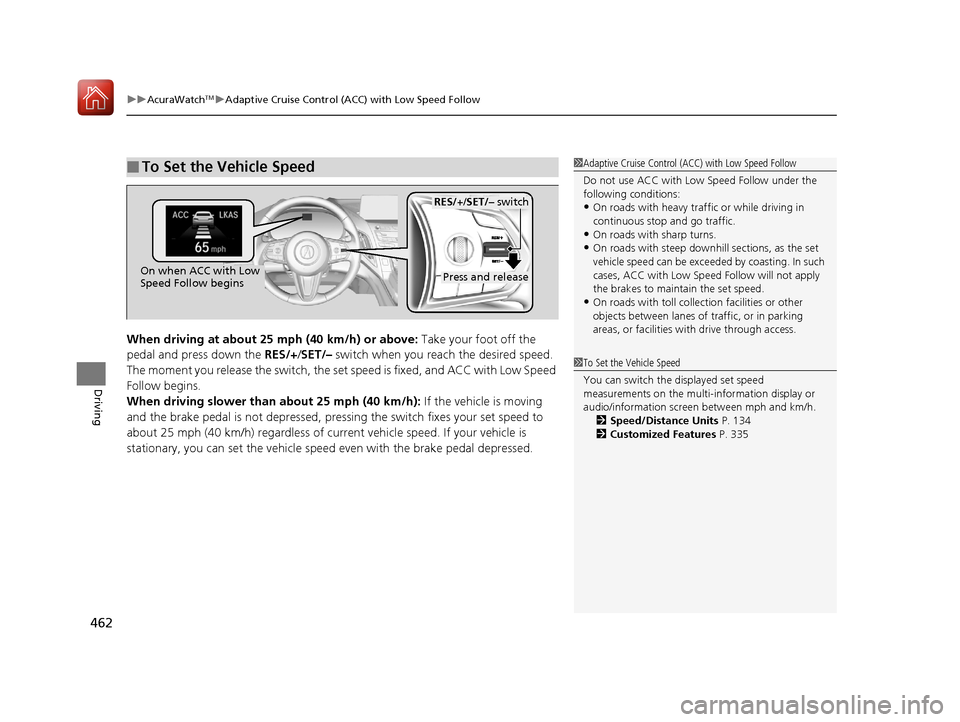
When driving at about 25 mph (40 km/h) or above: Take your foot off the
pedal and press down the RES/+/SET/– switch when you re ach the desired speed.
The moment you release the switch, the set speed is fixed, and ACC with Low Speed
Follow begins.
When driving slower than about 25 mph (40 km/h): If the vehicle is moving
and the brake pedal is not depressed, pressi ng the switch fixes your set speed to
about 25 mph (40 km/h) regardless of current vehicle speed. If your vehicle is
stationary, you can set the vehicle speed even with the brake pedal depressed.
■To Set the Vehicle Speed1 Adaptive Cruise Control (ACC) with Low Speed Follow
Do not use ACC with Low Speed Follow under the
following conditions:
•On roads with heavy traf fic or while driving in
continuous stop and go traffic.
•On roads with sharp turns.
•On roads with steep downhill sections, as the set
vehicle speed can be exceeded by coasting. In such
cases, ACC with Low Speed Follow will not apply
the brakes to maintain the set speed.
•On roads with toll collection facilities or other
objects between lanes of traffic, or in parking
areas, or faci lities with driv e through access.
1To Set the Vehicle Speed
You can switch the displayed set speed
measurements on the multi- information display or
audio/information screen between mph and km/h. 2 Speed/Distance Units P. 134
2 Customized Features P. 335
On when ACC with Low
Speed Follow beginsPress and release
RES/+/SET/– switch
20 ACURA RDX-31TJB6111.book 462 ページ 2020年2月11日 火曜日 午後2時6分
Page 468 of 657
Continued467
uuAcuraWatchTMuAdaptive Cruise Control (ACC) with Low Speed Follow
Driving
The system may automatically shut off and the ACC with Low Speed Follow
indicator will come on under certain conditions. Some examples of these conditions
are listed below. Other conditions may reduce some of the ACC with Low Speed
Follow functions.
2 Front Sensor Camera P. 489
■Environmental conditions
Driving in bad weather (r ain, fog, snow, etc.).
■Roadway conditions
Driving on a snowy or wet roadway (obscure d lane marking, vehicle tracks, reflected
lights, road spra y, high contrast).
■Vehicle conditions
• The outside of the windshield is blocked by dirt, mud, leaves, wet snow, etc.
• An abnormal tire or wheel condition (Wrong sized, varied size or construction,
improperly inflated, compact spare tire
*, etc.).
• The camera temperature gets too high.
• The parking brake is applied.
• When the radar sensor cover is dirty.
• The vehicle is tilted due to a heavy load or suspension modifications.
• When tire chains are installed.
■ACC with Low Speed Follow Conditions and Limitations1ACC with Low Speed Follow Conditions and Limitations
Have your vehicle checked by a dealer if you find any
unusual behavior of the system (e.g., the warning
message appears too frequently).
* Not available on all models
20 ACURA RDX-31TJB6111.book 467 ページ 2020年2月11日 火曜日 午後2時6分
Page 475 of 657
uuAcuraWatchTMuAdaptive Cruise Control (ACC) with Low Speed Follow
474
Driving
■Automatic cancellation
The beeper sounds and a me ssage appears on the multi-information display when
ACC with Low Speed Follow is automaticall y canceled. Any of these conditions may
cause the ACC with Low Speed Fo llow to automatically cancel:
• Bad weather (rain, fog, snow, etc.)
• When the radar sensor behind the emblem gets dirty.
• The vehicle ahead of you cannot be detected.
• An abnormal tire condition is detected, or the tires are skidding.
• Driving on a mountainous road, or driving off road for extended periods.
• Abrupt steering wheel movement.
• When the ABS, VSA ® or CMBS
TM is activated.
• When the ABS or VSA ® system indicator comes on.
• When the vehicle is stopped on a very steep slope.
• When you manually apply the parking brake.
• When the detected vehicle within the ACC with Low Speed Follow range is too
close to your vehicle.
• The camera behind the rearview mirror, or the area around the camera, including
the windshield, gets dirty.
• When the Maximum Load Limit is exceeded.
• When passing through an enclos ed space, such as tunnel.
The ACC with Low Speed Follow automatic canc ellation can be also triggered by the
following causes. In these cases, the pa rking brake will be automatically applied.
• The driver’s seat belt is unfasten ed when the vehicle is stationary.
• The vehicle stops for mo re than 10 minutes.
• The engine is turned off.
1Automatic cancellation
Even though ACC with Low Speed Follow has been
automatically canceled, you can still resume the prior
set speed. Wait until the condition that caused ACC
with Low Speed Follow to cancel improves, then
press the RES/+/SET/– switch up or down.
20 ACURA RDX-31TJB6111.book 474 ページ 2020年2月11日 火曜日 午後2時6分
Page 493 of 657
492
Driving
Braking
Brake System
Use the parking brake to keep the vehicle stationary when parked. When the
parking brake is applied, you can ma nually or automatically release it.
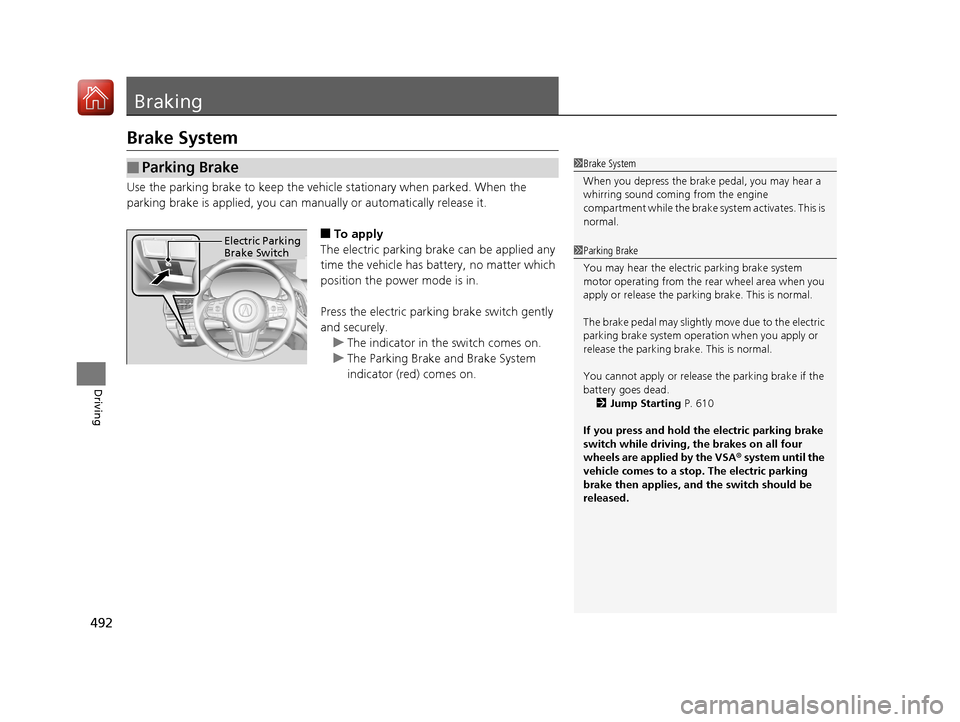
■To apply
The electric parking brake can be applied any
time the vehicle has battery, no matter which
position the power mode is in.
Press the electric parking brake switch gently
and securely. u The indicator in the switch comes on.
u The Parking Brake and Brake System
indicator (red) comes on.
■Parking Brake1Brake System
When you depress the brak e pedal, you may hear a
whirring sound coming from the engine
compartment while the brake system activates. This is
normal.
1 Parking Brake
You may hear the electric parking brake system
motor operating from the re ar wheel area when you
apply or release the parking brake. This is normal.
The brake pedal may slightly move due to the electric
parking brake system opera tion when you apply or
release the parking br ake. This is normal.
You cannot apply or release the parking brake if the
battery goes dead.
2 Jump Starting P. 610
If you press and hold the electric parking brake
switch while driving, the brakes on all four
wheels are applied by the VSA ® system until the
vehicle comes to a stop. The electric parking
brake then applies, and the switch should be
released.Electric Parking
Brake Switch
20 ACURA RDX-31TJB6111.book 492 ページ 2020年2月11日 火曜日 午後2時6分
Page 494 of 657
Continued493
uuBraking uBrake System
Driving
■Automatic parking br ake feature operation
If the automatic parking brake feature has been activated:
• The parking brake is applied automatically when you set the power mode to
VEHICLE OFF.
• To confirm that the parking brake is applied, check if the Parking Brake and Brake
System indicator (red) is on.
2 Activating and deactivating the automatic parking brake feature P. 495
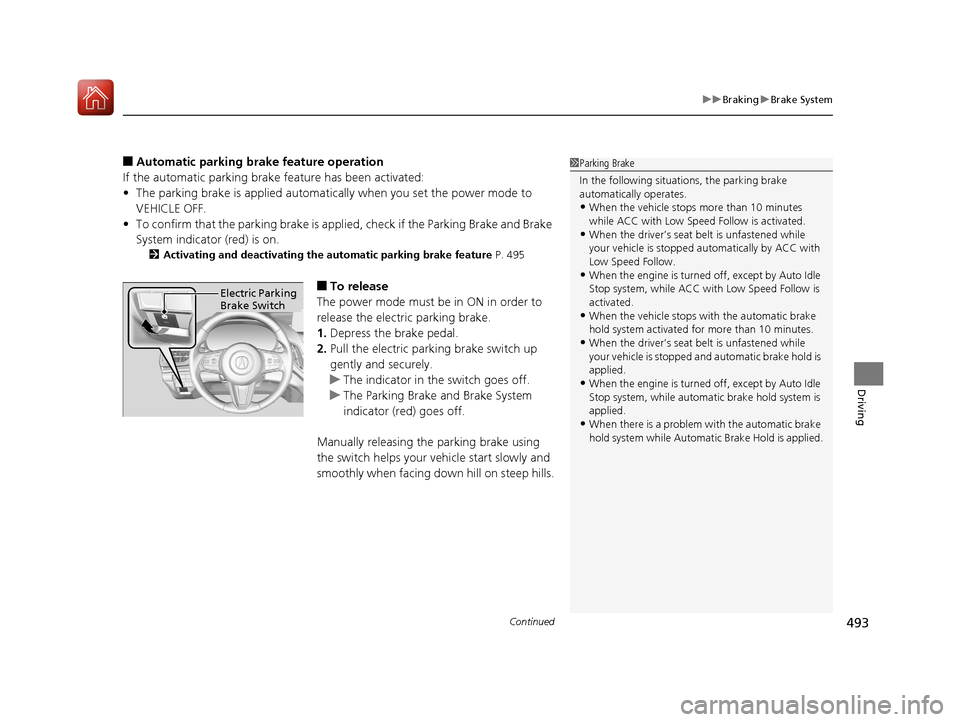
■To release
The power mode must be in ON in order to
release the electric parking brake.
1. Depress the brake pedal.
2. Pull the electric parking brake switch up
gently and securely.
u The indicator in the switch goes off.
u The Parking Brake and Brake System
indicator (red) goes off.
Manually releasing the parking brake using
the switch helps your vehicle start slowly and
smoothly when facing down hill on steep hills.
1 Parking Brake
In the following situations, the parking brake
automatically operates.
•When the vehicle stops more than 10 minutes
while ACC with Low Speed Follow is activated.
•When the driver’s seat belt is unfastened while
your vehicle is stopped au tomatically by ACC with
Low Speed Follow.
•When the engine is turned off, except by Auto Idle
Stop system, while ACC with Low Speed Follow is
activated.
•When the vehicle stops with the automatic brake
hold system activated for more than 10 minutes.
•When the driver’s seat belt is unfastened while
your vehicle is stopped a nd automatic brake hold is
applied.
•When the engine is turned off, except by Auto Idle
Stop system, while automatic brake hold system is
applied.
•When there is a problem with the automatic brake
hold system while Automatic Brake Hold is applied.
Electric Parking
Brake Switch
20 ACURA RDX-31TJB6111.book 493 ページ 2020年2月11日 火曜日 午後2時6分
Page 495 of 657

uuBraking uBrake System
494
Driving
■To release automatically
Depressing the accelerator pedal releases the parking brake.
Use the accelerator pedal to release th e brake when you are starting the vehicle
facing uphill, or in a traffic jam.
Gently depress the accelerator pedal.
When on a hill, it may require more
accelerator input to release.u The Parking Brake and Brake System
indicator (red) goes off.
You can release the parki ng brake automatically when:
• You are wearing the driver’s seat belt.
• The engine is running.
• The transmission is not in
(P or (N.
1Parking Brake
If the parking brake cannot be released
automatically, release it manually.
When the vehicle is travel ing uphill, the accelerator
pedal may need to be pressed farther to
automatically release the electric parking brake.
The parking brake cannot be released automatically
while the following indicators are on:
•Malfunction indicator lamp•Transmission system indicator
The parking brake may not be released automatically
while the following indicators are on:
•Electric parking brak e system indicator
•VSA® system indicator•ABS indicator
•Supplemental restraint system indicator
Accelerator Pedal
20 ACURA RDX-31TJB6111.book 494 ページ 2020年2月11日 火曜日 午後2時6分