air condition Acura RLX 2014 User Guide
[x] Cancel search | Manufacturer: ACURA, Model Year: 2014, Model line: RLX, Model: Acura RLX 2014Pages: 518, PDF Size: 15.83 MB
Page 328 of 518
327
Continued
Features
AcuraLink®
*
Is a subscription-based service that provides convenient features such as voice
communication in case of emergency, online security, one-on-one operator
assistance, and the transmission of important messages regarding your vehicle’s
status.
For information on traffic rerouting and traffic information updates, provided by the
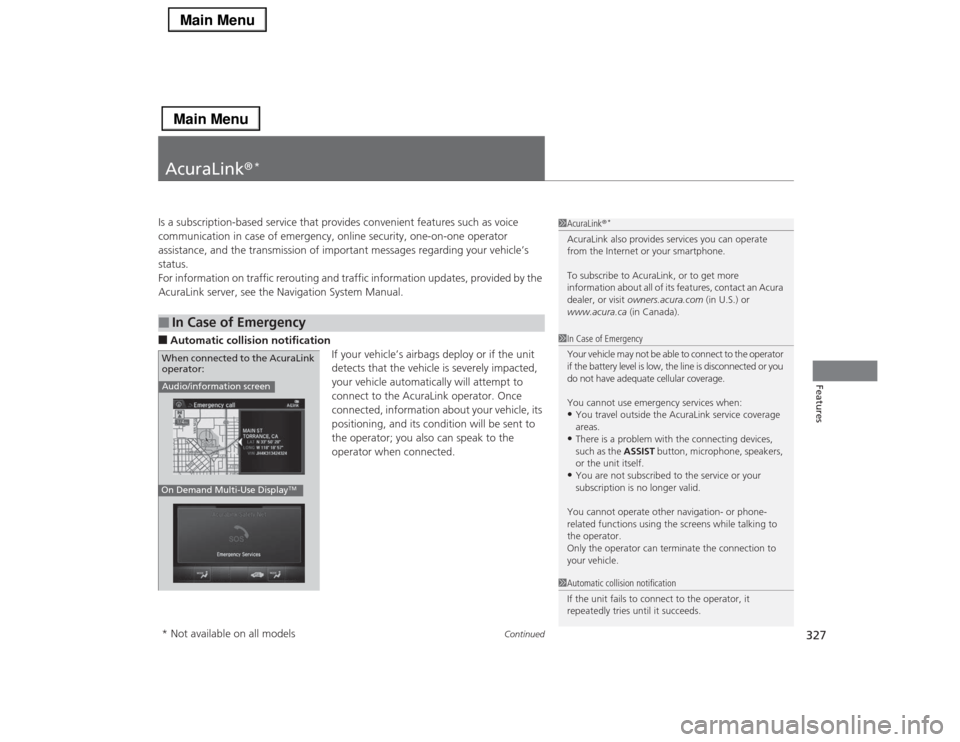
AcuraLink server, see the Navigation System Manual.■Automatic collision notification
If your vehicle’s airbags deploy or if the unit
detects that the vehicle is severely impacted,
your vehicle automatically will attempt to
connect to the AcuraLink operator. Once
connected, information about your vehicle, its
positioning, and its condition will be sent to
the operator; you also can speak to the
operator when connected. ■
In Case of Emergency
1AcuraLink®
*
AcuraLink also provides services you can operate
from the Internet or your smartphone.
To subscribe to AcuraLink, or to get more
information about all of its features, contact an Acura
dealer, or visit owners.acura.com (in U.S.) or
www.acura.ca (in Canada).1In Case of Emergency
Your vehicle may not be able to connect to the operator
if the battery level is low, the line is disconnected or you
do not have adequate cellular coverage.
You cannot use emergency services when:•You travel outside the AcuraLink service coverage
areas.•There is a problem with the connecting devices,
such as the ASSIST button, microphone, speakers,
or the unit itself.•You are not subscribed to the service or your
subscription is no longer valid.
You cannot operate other navigation- or phone-
related functions using the screens while talking to
the operator.
Only the operator can terminate the connection to
your vehicle.
1Automatic collision notification
If the unit fails to connect to the operator, it
repeatedly tries until it succeeds.
Audio/information screenOn Demand Multi-Use Display
TM
When connected to the AcuraLink
operator:* Not available on all models
Page 337 of 518

336Driving
Before DrivingDriving PreparationCheck the following items before you start driving.
•Make sure there are no obstructions on the windows, door mirrors, exterior
lights, or other parts of the vehicle.
uRemove any frost, snow, or ice.
uRemove any snow on the roof, as this can slip down and obstruct your field of
vision while driving. If frozen solid, remove ice once it has softened.
uWhen removing ice from around the wheels, be sure not to damage the wheel
or wheel components.
•Make sure the hood is securely closed.
uIf the hood opens while driving, your front view will be blocked.
•Make sure the tires are in good condition.
uCheck air pressures, and check for damage and excessive wear.
2Checking and Maintaining Tires P. 437
•Make sure there are no people or objects behind or around the vehicle.
uThere are blind spots from the inside.■
Exterior Checks
1Exterior ChecksNOTICEWhen doors are frozen shut, use warm water around
the door edges to melt any ice. Do not try to force
them open, as this can damage the rubber trim
around the doors. When done, wipe dry to avoid
further freezing.
Do not pour warm water into the key cylinder.
You will be unable to insert key if the water freezes in
the hole.
Heat from the engine and exhaust can ignite
flammable materials left under the hood, causing a
fire. If you’ve parked your vehicle for an extended
period, inspect and remove any debris that may have
collected, such as dried grass and leaves that have
fallen or have been carried in for use as a nest by a
small animal.
Also check under the hood for leftover flammable
materials after you or someone else has performed
maintenance on your vehicle.
Page 366 of 518

Continued
365
uuWhen DrivinguForward Collision Warning (FCW)
*
Driving
■Automatic shutoff
FCW may automatically shut itself off and the FCW indicator comes and stays on when:
•The temperature inside the system is high.
•The windshield is blocked by dirt, mud, leaves, wet snow, etc.
Once the conditions that caused FCW to shut off improve or are addressed (e.g.,
cleaning), the system comes back on.
1Forward Collision Warning (FCW)
*
Never apply a film or attach any objects to the
windshield that could obstruct the FCW camera’s
field of vision.
Scratches, nicks, and other damage to the windshield
within the FCW camera’s field of vision can cause the
system to operate abnormally. If this occurs, we
recommend that you replace the windshield with a
genuine Acura replacement windshield. Making even
minor repairs within the camera’s field of vision or
installing an aftermarket replacement windshield
may also cause the system to operate abnormally.
After replacing the windshield, have a dealer
recalibrate the camera. Proper calibration of the FCW
camera is necessary for the system to operate
properly.
BeepThe camera is located
behind the rearview mirror.
The beeper sounds and the BRAKE message
appears in the multi-information display until
a possible collision is avoided.
Models with
navigation system
Models without
navigation system
1Automatic shutoff
To help reduce the likelihood that high interior
temperatures will cause the camera system to shut off,
when parking, find a shady area or face the front of the
vehicle away from the sun. Also, do not use a reflective
sun shade that can concentrate heat on the camera.
If the Can Not Operate: Camera Too Hot/CAN
NOT OPERATE message appears:•Use the climate control system to cool down the
interior and, if necessary, the defroster mode when
windows are fogged.•Start driving the vehicle to lower the windshield
temperature, which cools down the area around
the FCW camera.
* Not available on all models
Page 370 of 518
369
uuWhen DrivinguLane Departure Warning (LDW)
Driving
LDW may not activate or may not recognize lanes, and may activate even when
keeping in the middle of a lane, under the following conditions.■
LDW Limitations
Condition
●When you drive in bad weather (rain, fog, etc.).●A heavy load in the rear or modifications to the suspension tilts your vehicle.●An abnormal tire condition is detected (wrong tire size, flat tire, etc.).●When the windshield is blocked by dirt, mud, leaves, wet snow, etc.●When the temperature inside the system is high.●A sudden change between light and dark such as an entrance or exit of a tunnel.●You drive into the sunlight (e.g. at dawn or dusk).●When the windshield is dirty or cloudy.●When you drive in the shadows of trees, buildings, etc.●When you drive on a wet road surface following another vehicle.uThe camera may perceive the tire tracks in the water as lane lines.
●When there is snow or wheel tracks on the side of the road.●When the road has many repaired area or an erased lane line.●When the vehicle is running over painted signs or crosswalk markings.●When you drive in a lane with worn-out lane markings.
Page 371 of 518
370
uuWhen DrivinguLane Keeping Assist System (LKAS)
*
Driving
Lane Keeping Assist System (LKAS)
*
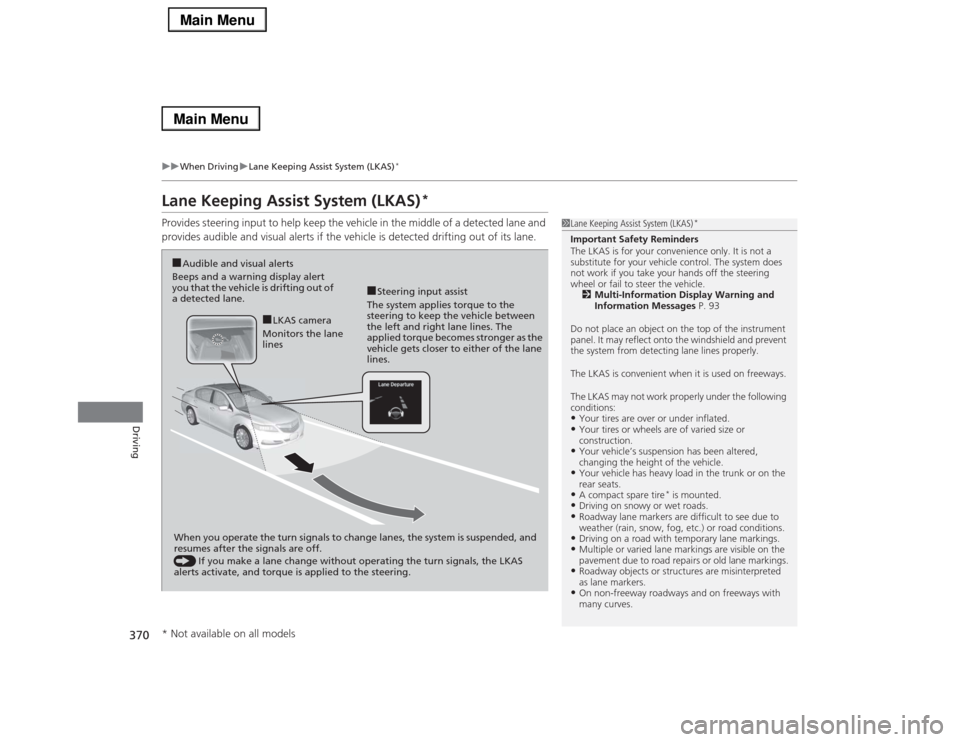
Provides steering input to help keep the vehicle in the middle of a detected lane and
provides audible and visual alerts if the vehicle is detected drifting out of its lane.
1Lane Keeping Assist System (LKAS)
*
Important Safety Reminders
The LKAS is for your convenience only. It is not a
substitute for your vehicle control. The system does
not work if you take your hands off the steering
wheel or fail to steer the vehicle.
2Multi-Information Display Warning and
Information Messages P. 93
Do not place an object on the top of the instrument
panel. It may reflect onto the windshield and prevent
the system from detecting lane lines properly.
The LKAS is convenient when it is used on freeways.
The LKAS may not work properly under the following
conditions:•Your tires are over or under inflated.•Your tires or wheels are of varied size or
construction.•Your vehicle’s suspension has been altered,
changing the height of the vehicle.•Your vehicle has heavy load in the trunk or on the
rear seats.•A compact spare tire
* is mounted.
•Driving on snowy or wet roads.•Roadway lane markers are difficult to see due to
weather (rain, snow, fog, etc.) or road conditions.•Driving on a road with temporary lane markings.•Multiple or varied lane markings are visible on the
pavement due to road repairs or old lane markings.•Roadway objects or structures are misinterpreted
as lane markers.•On non-freeway roadways and on freeways with
many curves.
■Steering input assist
The system applies torque to the
steering to keep the vehicle between
the left and right lane lines. The
applied torque becomes stronger as the
vehicle gets closer to either of the lane
lines.
■Audible and visual alerts
Beeps and a warning display alert
you that the vehicle is drifting out of
a detected lane.
When you operate the turn signals to change lanes, the system is suspended, and
resumes after the signals are off.
() If you make a lane change without operating the turn signals, the LKAS
alerts activate, and torque is applied to the steering.
■LKAS camera
Monitors the lane
lines
* Not available on all models
Page 372 of 518
Continued
371
uuWhen DrivinguLane Keeping Assist System (LKAS)
*
Driving
The system can be used when the following conditions are met.
•The lane you are driving has detectable lane markers on both sides, and your
vehicle is in the center of the lane.
•The vehicle speed is between 45 – 90 mph (72 – 145 km/h).
•You are driving on a straight or slightly curved road.
•The turn signals are off.
•The brake pedal is not depressed.
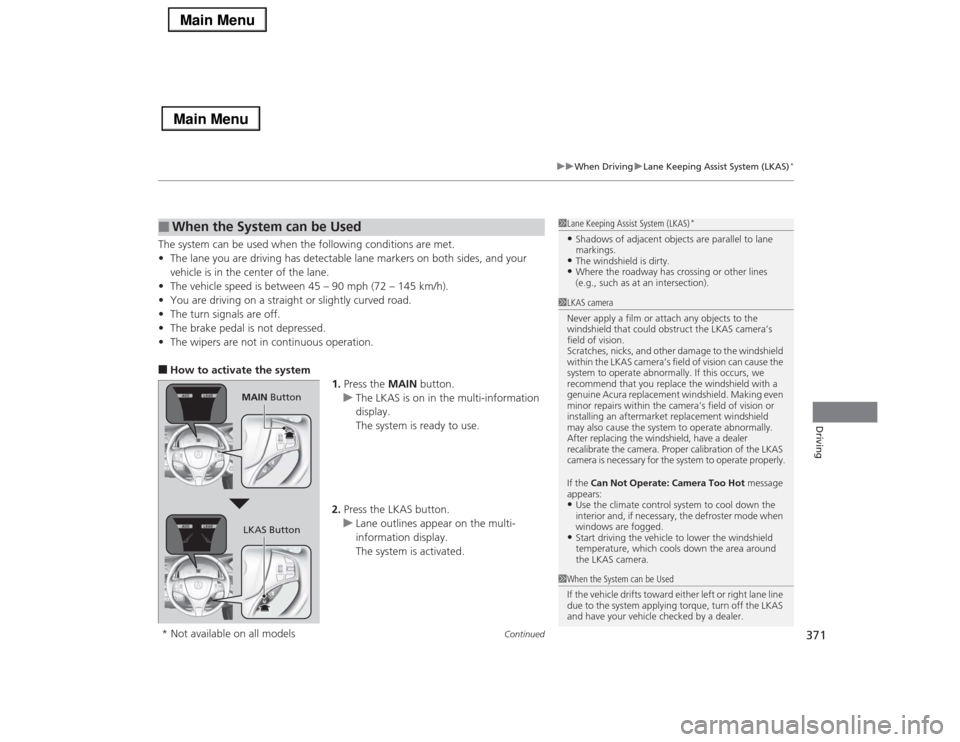
•The wipers are not in continuous operation.■How to activate the system
1.Press the MAIN button.
uThe LKAS is on in the multi-information
display.
The system is ready to use.
2.Press the LKAS button.
uLane outlines appear on the multi-
information display.
The system is activated.■
When the System can be Used
1Lane Keeping Assist System (LKAS)
*
•Shadows of adjacent objects are parallel to lane
markings.•The windshield is dirty.•Where the roadway has crossing or other lines
(e.g., such as at an intersection).
1LKAS camera
Never apply a film or attach any objects to the
windshield that could obstruct the LKAS camera’s
field of vision.
Scratches, nicks, and other damage to the windshield
within the LKAS camera’s field of vision can cause the
system to operate abnormally. If this occurs, we
recommend that you replace the windshield with a
genuine Acura replacement windshield. Making even
minor repairs within the camera’s field of vision or
installing an aftermarket replacement windshield
may also cause the system to operate abnormally.
After replacing the windshield, have a dealer
recalibrate the camera. Proper calibration of the LKAS
camera is necessary for the system to operate properly.
If the Can Not Operate: Camera Too Hot message
appears:•Use the climate control system to cool down the
interior and, if necessary, the defroster mode when
windows are fogged.•Start driving the vehicle to lower the windshield
temperature, which cools down the area around
the LKAS camera.
1When the System can be Used
If the vehicle drifts toward either left or right lane line
due to the system applying torque, turn off the LKAS
and have your vehicle checked by a dealer.
MAIN Button
LKAS Button
* Not available on all models
Page 375 of 518

374
uuWhen DrivinguLane Keeping Assist System (LKAS)
*
Driving
The system may not detect lane markings and the position of your vehicle properly
under the following conditions.■
LKAS Limitations
Condition
●The vehicle interior is reflected onto the front windshield.●Headlight lenses are dirty or the headlights are not properly adjusted.●The windshield is fogged.●Driving on snowy or wet roads.●The ambient brightness suddenly changes (e.g., at the entrance or exit of a tunnel).●You drive into the low sun (e.g., at dawn or dusk).●A strong light is reflected onto the roadway.●Roadway lane markers are difficult to see due to weather (rain, snow, fog, etc.) or road conditions.●Driving on a road with temporary lane markings.●Multiple or varied lane markings are visible on the roadway due to road repairs or old lane markings.●Roadway objects or structures are misinterpreted as lane markers.●There is little contrast between lane lines and the roadway surface.●The vehicle in front of you is driving near the lane lines.●Driving over bumps.●Where marked lanes merge or split.●Where the lane is extremely narrow, wide or changing.●Where the road is hilly or the vehicle is approaching the crest of a hill.
Page 376 of 518

375
uuWhen DrivinguVehicle Stability Assist (VSA®), aka Electronic Stability Control (ESC), System
Continued
Driving
Vehicle Stability Assist (VSA®), aka Electronic Stability Control (ESC), SystemVSA® helps to stabilize the vehicle during cornering if the vehicle turns more or less
than what was intended. It also assists in maintaining traction on slippery surfaces.
It does so by regulating engine output and selectively applying the brakes.
When VSA® activates, you may notice that the
engine does not respond to the accelerator.
You may also notice some noise from the
hydraulic system. You will also see the
indicator blink.■
VSA® Operation
1Vehicle Stability Assist (VSA®), aka Electronic Stability Control (ESC), System
The VSA® may not function properly if tire type and
size are mixed. Make sure to use the same size and
type of tire, and the air pressures as specified.
When the VSA® system indicator comes on and stays
on while driving, there may be a problem with the
system. While this may not interfere with normal
driving, have your vehicle checked by a dealer
immediately.
VSA® cannot enhance stability in all driving situations
and does not control the entire braking system. You
still need to drive and corner at speeds appropriate
for the conditions and always leave a sufficient
margin of safety.
The main function of the VSA® system is generally
known as Electronic Stability Control (ESC). The
system also includes a traction control function.
VSA® System
Indicator
Page 397 of 518
uuBrakinguCollision Mitigation Braking System
TM (CMBS
TM)*
396Driving
The CMBS
TM may activate even when you are aware of a vehicle ahead of you, or
when there is no vehicle ahead. Some examples of this are:
■When Passing
Your vehicle approaches another vehicle ahead of you and you change lanes to pass.■At an intersection
Your vehicle approaches or passes another vehicle that is making a left or right turn.■Through a low bridge at high speed
You drive under a low or narrow bridge at high speed.■Speed bumps, road work sites, train tracks, roadside objects, etc.
You drive over speed bumps, steel road plates, etc., or your vehicle approaches train
tracks or roadside objects [such as a traffic sign and guard rail] on a curve.■
With Little Chance of a Collision
1Collision Mitigation Braking System
TM (CMBS
TM)*
Avoid the following conditions that may cause the
radar aim to be temporarily out of range and prevent
the CMBS
TM from working properly.
•A heavy load in the rear or modifications to the
suspension tilts your vehicle.•The tire pressures are not correct, the tire sizes are
incorrect, the tire types are different, and/or the
tires are not in good condition.
For the CMBS
TM to work properly:
Always keep the radar sensor cover clean.
Never use chemical solvents or polishing powder for
cleaning the sensor cover. Clean it with water or a
mild detergent.
Do not put a sticker on the emblem or replace the
emblem.
Take your vehicle to a dealer if you need the radar
sensor to be repaired, or removed, or the radar
sensor cover is strongly impacted.
* Not available on all models
Page 407 of 518

406Driving
Accessories and ModificationsAccessoriesWhen installing accessories, check the following:
•Do not install accessories on the windshield. They can obstruct your view and
delay your reaction to driving conditions.
•Do not install any accessories over areas marked SRS Airbag, on the sides or backs
of the front seats, on front or side pillars, or near the side windows. Accessories
installed in these areas may interfere with proper operation of the vehicle’s
airbags or may be propelled into you or another occupant if the airbags deploy.
•Be sure electronic accessories do not overload electrical circuits or interfere with
proper operation of your vehicle.
2Fuses P. 485
•Before installing any electronic accessory, have the installer contact a dealer for
assistance. If possible, have a dealer inspect the final installation.ModificationsDo not modify your vehicle or use non-Acura components that can affect its
handling, stability, and reliability.
Overall vehicle performance can be affected. Always make sure all equipment is
properly installed and maintained, and that it meets federal, state, province,
territory, and local regulations.
1Accessories and Modifications
Acura Genuine accessories are recommended to
ensure proper operation on your vehicle.
3
WARNING
Improper accessories or modifications can
affect your vehicle’s handling, stability, and
performance, and cause a crash in which
you can be seriously hurt or killed.
Follow all instructions in this owner’s
manual regarding accessories and
modifications.