service ACURA TL 1995 Service Manual PDF
[x] Cancel search | Manufacturer: ACURA, Model Year: 1995, Model line: TL, Model: ACURA TL 1995Pages: 1771, PDF Size: 62.49 MB
Page 715 of 1771
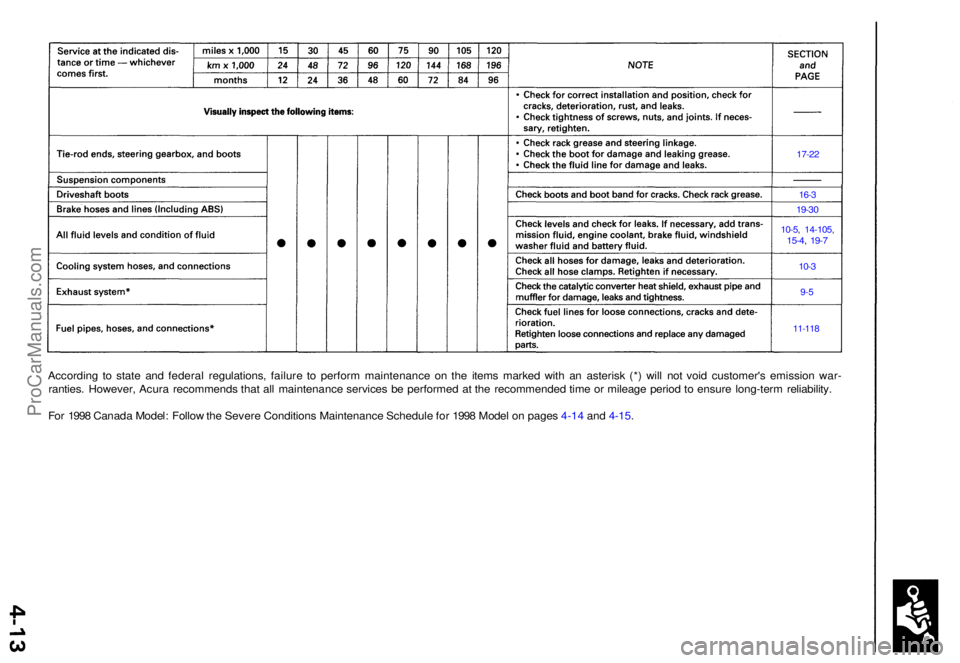
According t o stat e an d federa l regulations , failur e t o perfor m maintenanc e o n th e item s marke d wit h a n asteris k (* ) wil l no t voi d customer' s emissio n war -
ranties . However , Acur a recommend s tha t al l maintenanc e service s b e performe d a t th e recommende d tim e o r mileag e perio d t o ensur e long-ter m reliability .
Fo r 199 8 Canad a Model : Follo w th e Sever e Condition s Maintenanc e Schedul e fo r 199 8 Mode l o n page s 4-1 4 an d 4-15 .
17-22
16-3
19-3 0
10-5, 14-105 ,15-4, 19- 7
10- 3
9-5
11-11 8
ProCarManuals.com
Page 717 of 1771
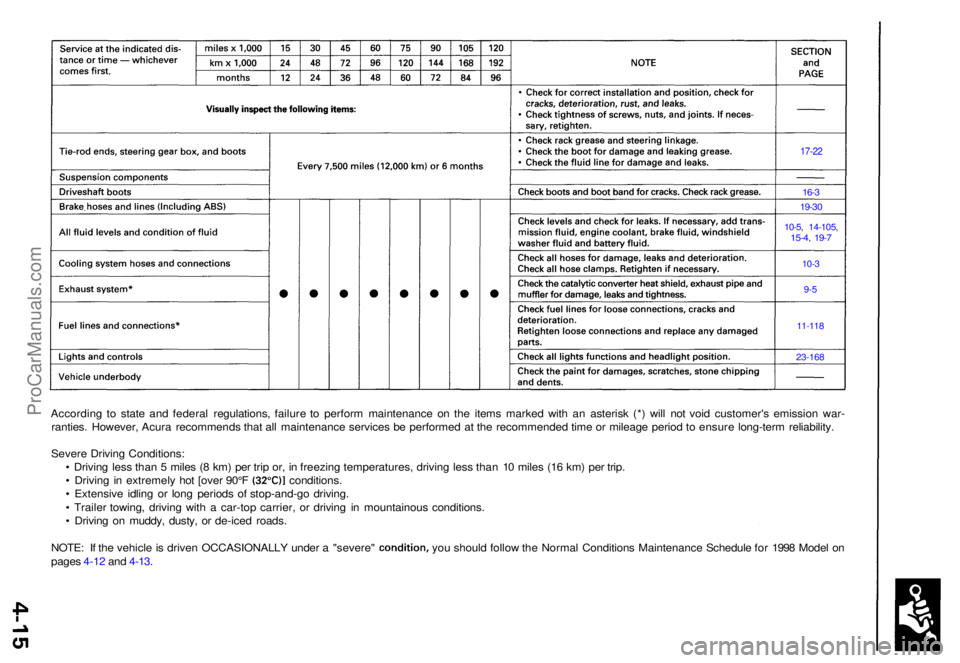
According t o stat e an d federa l regulations , failur e t o perfor m maintenanc e o n th e item s marke d wit h a n asteris k (* ) wil l no t voi d customer' s emissio n war -
ranties . However , Acur a recommend s tha t al l maintenanc e service s b e performe d a t th e recommende d tim e o r mileag e perio d t o ensur e long-ter m reliability .
Sever e Drivin g Conditions :
• Drivin g les s tha n 5 mile s ( 8 km ) pe r tri p or , i n freezin g temperatures , drivin g les s tha n 1 0 mile s (1 6 km ) pe r trip .
• Drivin g i n extremel y ho t [ove r 90° F (32°C) ] conditions .
• Extensiv e idlin g o r lon g period s o f stop-and-g o driving .
• Traile r towing , drivin g wit h a car-to p carrier , o r drivin g i n mountainou s conditions .
• Drivin g o n muddy , dusty , o r de-ice d roads .
NOTE: I f th e vehicl e is drive n OCCASIONALL Y unde r a "severe " condition , you shoul d follo w th e Norma l Condition s Maintenanc e Schedul e fo r 199 8 Mode l o n
page s 4-1 2 an d 4-13 .
17-2 2
16-3
19-3 0
10-5, 14-105 ,15-4, 19- 7
10- 3
9-5
11-11 8
23-16 8
ProCarManuals.com
Page 757 of 1771
Camshaft
Inspection
NOTE:
• Do not rotate the camshaft during inspection.
• Remove the rocker arms and rocker shafts.
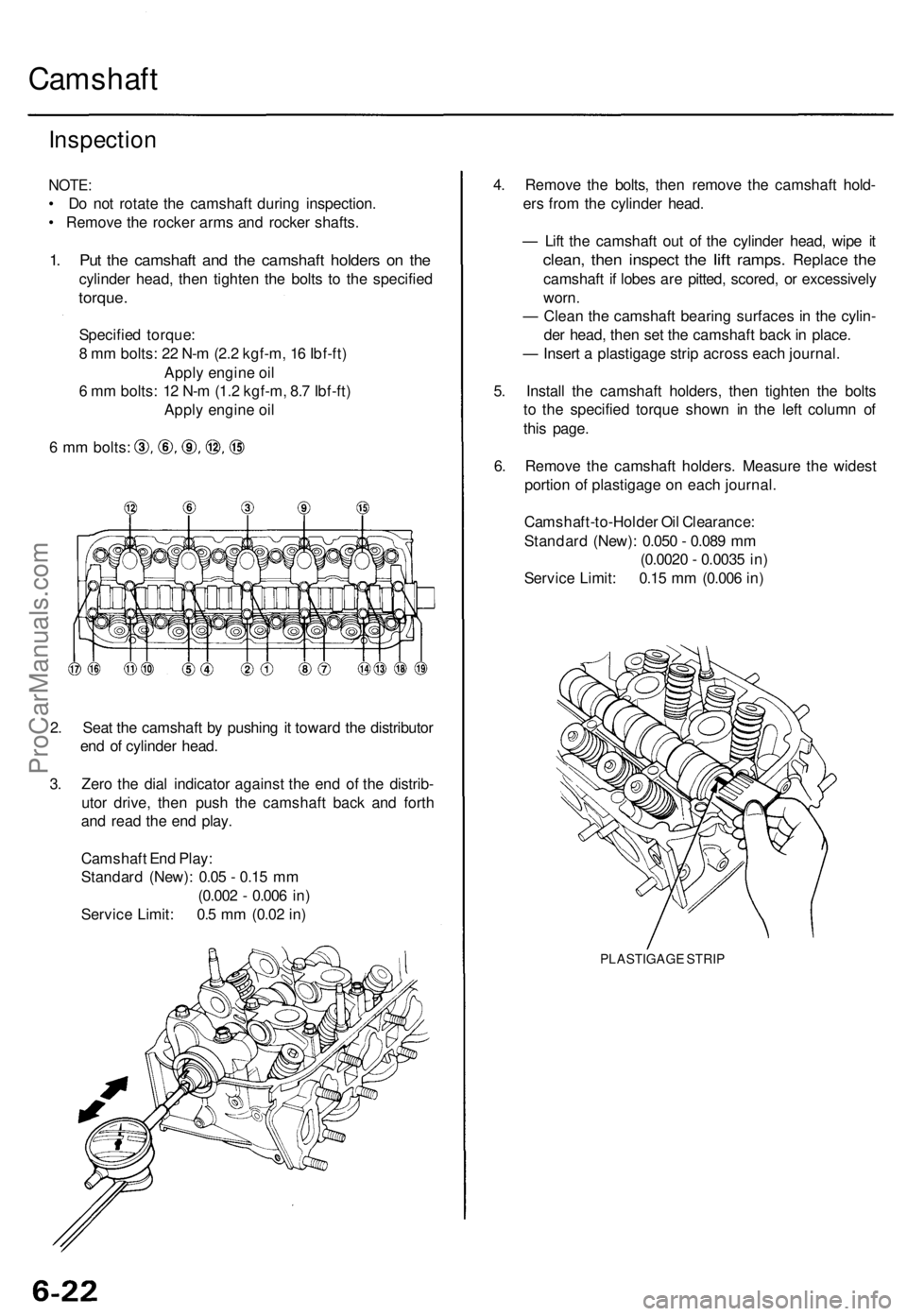
1. Put the camshaft and the camshaft holders on the
cylinder head, then tighten the bolts to the specified
torque.
Specified torque:
8 mm bolts: 22 N-m (2.2 kgf-m, 16 Ibf-ft)
Apply engine oil
6 mm bolts: 12 N-m (1.2 kgf-m, 8.7 Ibf-ft)
Apply engine oil
6 mm bolts:
2. Seat the camshaft by pushing it toward the distributor
end of cylinder head.
3. Zero the dial indicator against the end of the distrib-
utor drive, then push the camshaft back and forth
and read the end play.
Camshaft End Play:
Standard (New): 0.05 - 0.15 mm
(0.002 - 0.006 in)
Service Limit: 0.5 mm (0.02 in)
4. Remove the bolts, then remove the camshaft hold-
ers from the cylinder head.
— Lift the camshaft out of the cylinder head, wipe it
clean,
then
inspect
the
lift
ramps.
Replace
the
camshaft if lobes are pitted, scored, or excessively
worn.
— Clean the camshaft bearing surfaces in the cylin-
der head, then set the camshaft back in place.
— Insert a plastigage strip across each journal.
5. Install the camshaft holders, then tighten the bolts
to the specified torque shown in the left column of
this page.
6. Remove the camshaft holders. Measure the widest
portion of plastigage on each journal.
Camshaft-to-Holder Oil Clearance:
Standard (New): 0.050 - 0.089 mm
(0.0020 - 0.0035 in)
Service Limit: 0.15 mm (0.006 in)
PLASTIGAGE STRIPProCarManuals.com
Page 758 of 1771
7. If the camshaft-to-holder oil clearance is out of tol-
erance:
— And the camshaft has already been replaced, you
must replace the cylinder head.
— If the camshaft has not been replaced, first check
the total runout with the camshaft supported on
V-blocks.
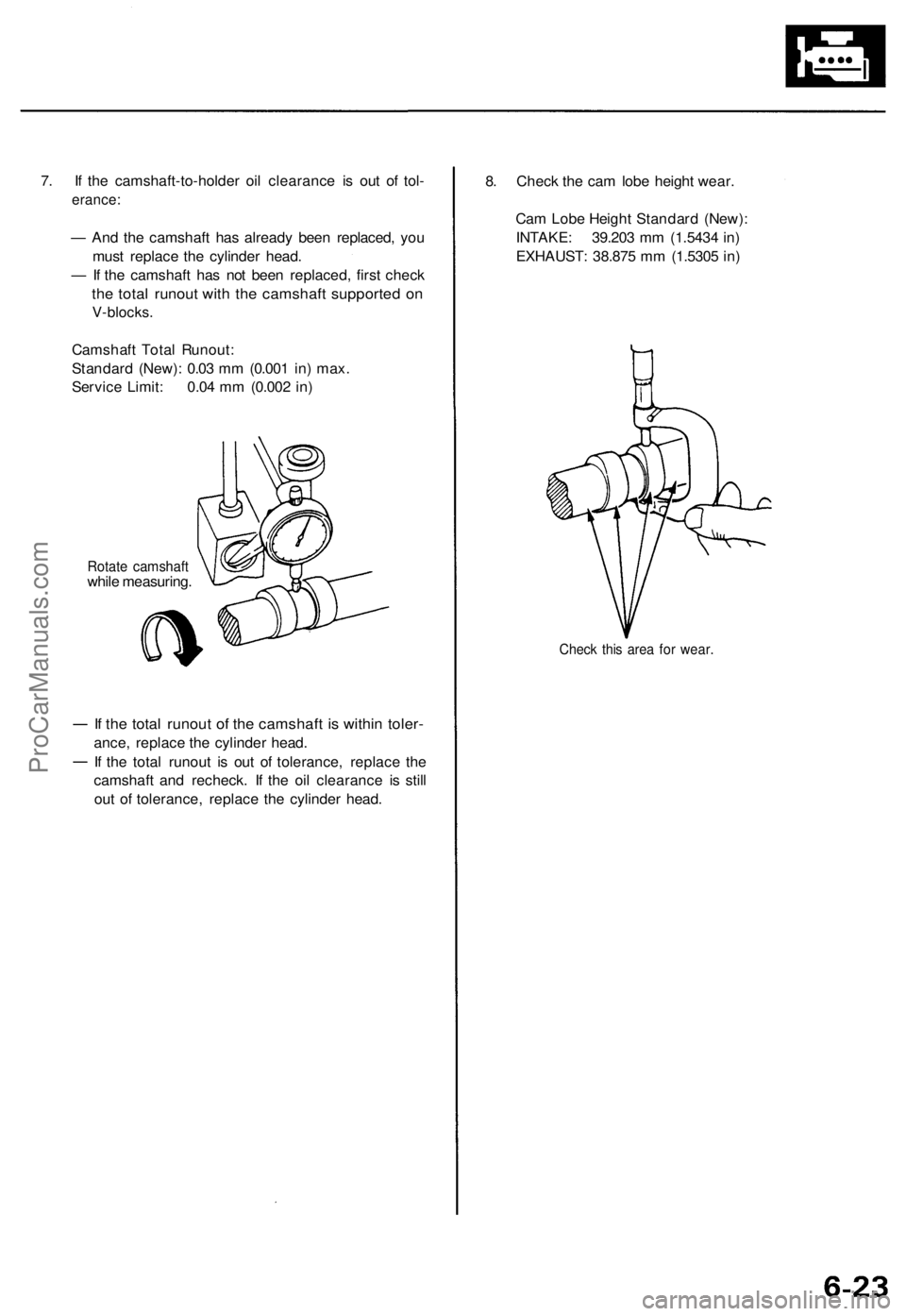
Camshaft Total Runout:
Standard (New): 0.03 mm (0.001 in) max.
Service Limit: 0.04 mm (0.002 in)
Rotate camshaft
while measuring.
If the total runout of the camshaft is within toler-
ance, replace the cylinder head.
If the total runout is out of tolerance, replace the
camshaft and recheck. If the oil clearance is still
out of tolerance, replace the cylinder head.
8. Check the cam lobe height wear.
Cam Lobe Height Standard (New):
INTAKE: 39.203 mm (1.5434 in)
EXHAUST: 38.875 mm (1.5305 in)
Check this area for wear.ProCarManuals.com
Page 759 of 1771
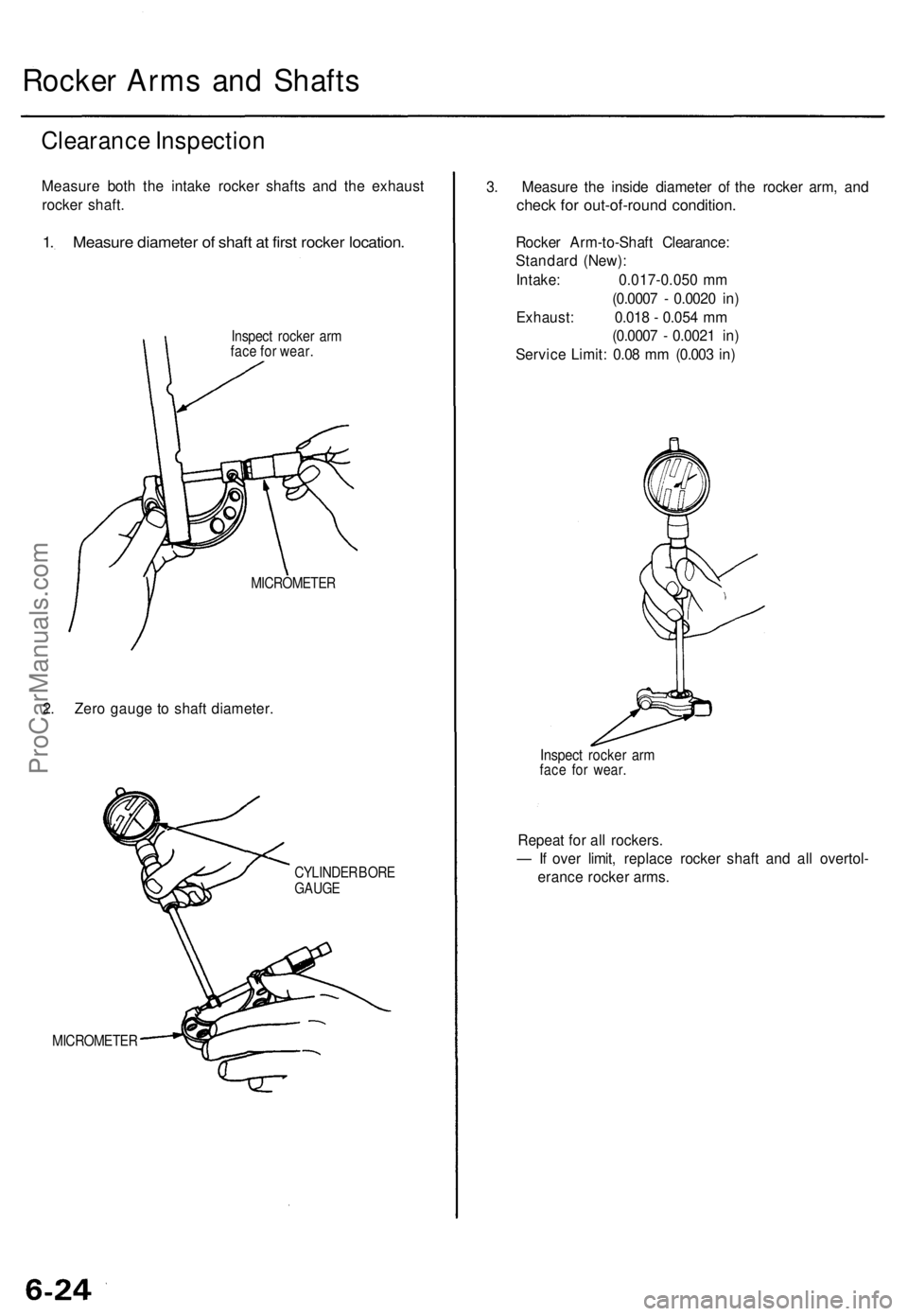
Rocker Arms and Shafts
Clearance Inspection
Measure both the intake rocker shafts and the exhaust
rocker shaft.
1. Measure diameter of shaft at first rocker location.
Inspect rocker arm
face for wear.
MICROMETER
2. Zero gauge to shaft diameter.
CYLINDER BORE
GAUGE
MICROMETER
3. Measure the inside diameter of the rocker arm, and
check for out-of-round condition.
Rocker Arm-to-Shaft Clearance:
Standard (New):
Intake: 0.017-0.050 mm
(0.0007 - 0.0020 in)
Exhaust: 0.018 - 0.054 mm
(0.0007 - 0.0021 in)
Service Limit: 0.08 mm (0.003 in)
Inspect rocker arm
face for wear.
Repeat for all rockers.
— If over limit, replace rocker shaft and all overtol-
erance rocker arms.ProCarManuals.com
Page 763 of 1771
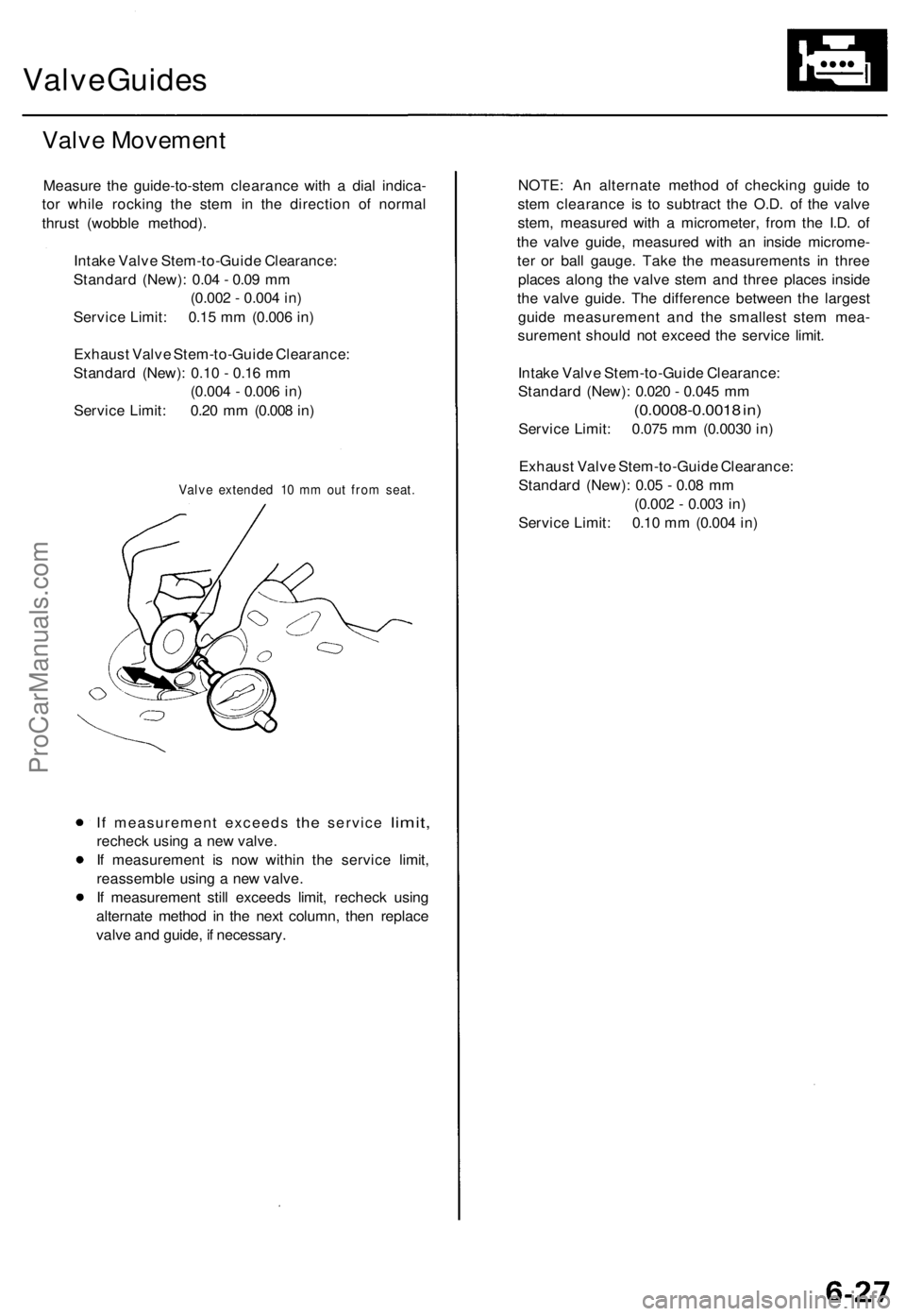
Valve Guides
Valve Movement
Measure the guide-to-stem clearance with a dial indica-
tor while rocking the stem in the direction of normal
thrust (wobble method).
Intake Valve Stem-to-Guide Clearance:
Standard (New): 0.04 - 0.09 mm
(0.002 - 0.004 in)
Service Limit: 0.15 mm (0.006 in)
Exhaust Valve Stem-to-Guide Clearance:
Standard (New): 0.10 - 0.16 mm
(0.004 - 0.006 in)
Service Limit: 0.20 mm (0.008 in)
Valve extended 10 mm out from seat.
If
measurement exceeds
the
service
limit,
recheck using a new valve.
If measurement is now within the service limit,
reassemble using a new valve.
If measurement still exceeds limit, recheck using
alternate method in the next column, then replace
valve and guide, if necessary.
NOTE: An alternate method of checking guide to
stem clearance is to subtract the O.D. of the valve
stem, measured with a micrometer, from the I.D. of
the valve guide, measured with an inside microme-
ter or ball gauge. Take the measurements in three
places along the valve stem and three places inside
the valve guide. The difference between the largest
guide measurement and the smallest stem mea-
surement should not exceed the service limit.
Intake Valve Stem-to-Guide Clearance:
Standard (New): 0.020 - 0.045 mm
(0.0008-0.0018 in)
Service Limit: 0.075 mm (0.0030 in)
Exhaust Valve Stem-to-Guide Clearance:
Standard (New): 0.05 - 0.08 mm
(0.002 - 0.003 in)
Service Limit: 0.10 mm (0.004 in)ProCarManuals.com
Page 781 of 1771
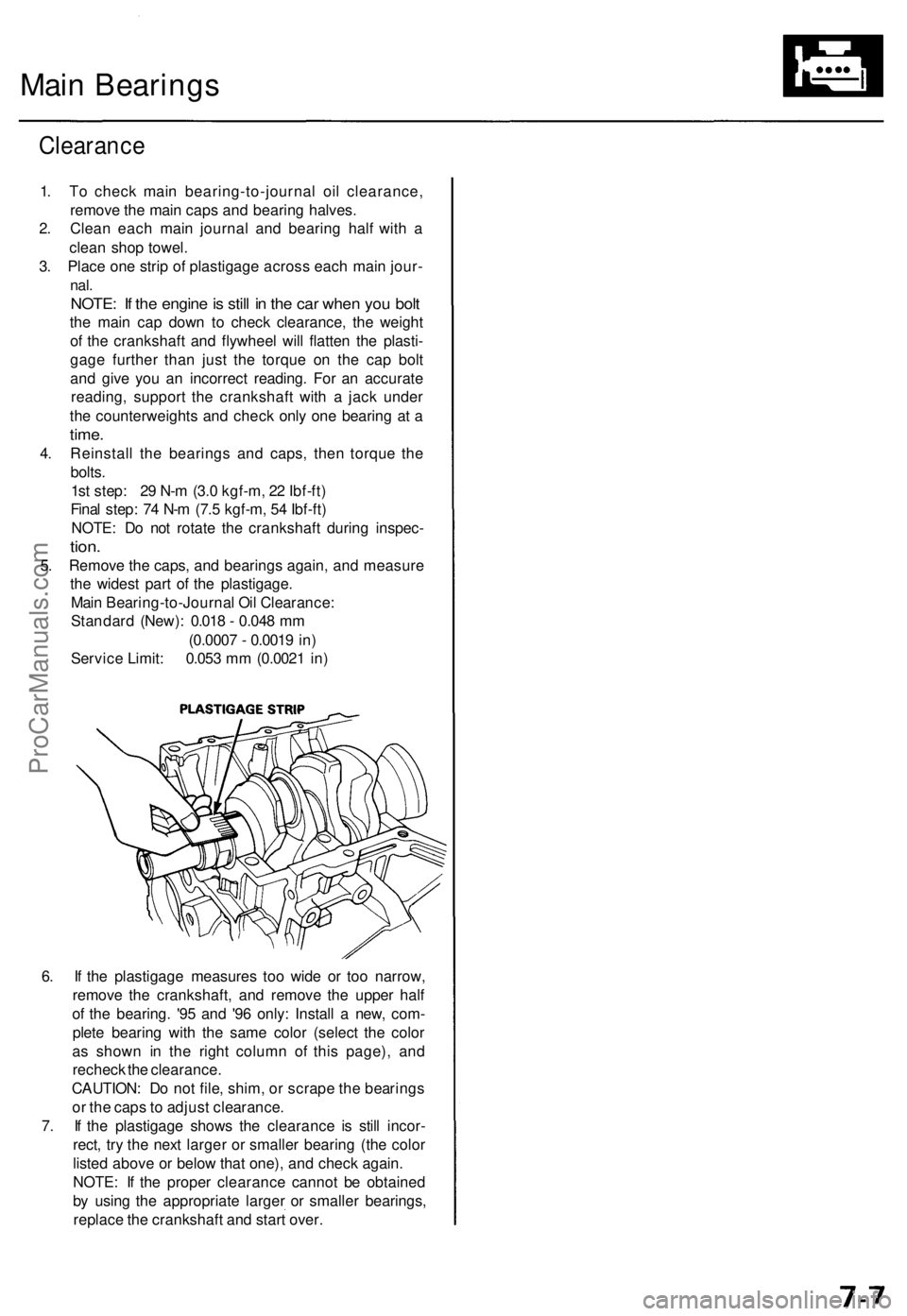
Main Bearings
Clearance
1. To check main bearing-to-journal oil clearance,
remove the main caps and bearing halves.
2. Clean each main journal and bearing half with a
clean shop towel.
3. Place one strip of plastigage across each main jour-
nal.
NOTE: If the engine is still in the car when you bolt
the main cap down to check clearance, the weight
of the crankshaft and flywheel will flatten the plasti-
gage further than just the torque on the cap bolt
and give you an incorrect reading. For an accurate
reading, support the crankshaft with a jack under
the counterweights and check only one bearing at a
time.
4. Reinstall the bearings and caps, then torque the
bolts.
1st step: 29 N-m (3.0 kgf-m, 22 Ibf-ft)
Final step: 74 N-m (7.5 kgf-m, 54 Ibf-ft)
NOTE: Do not rotate the crankshaft during inspec-
tion.
5. Remove the caps, and bearings again, and measure
the widest part of the plastigage.
Main Bearing-to-Journal Oil Clearance:
Standard (New): 0.018 - 0.048 mm
(0.0007 - 0.0019 in)
Service Limit: 0.053 mm (0.0021 in)
6. If the plastigage measures too wide or too narrow,
remove the crankshaft, and remove the upper half
of the bearing. '95 and '96 only: Install a new, com-
plete bearing with the same color (select the color
as shown in the right column of this page), and
recheck the clearance.
CAUTION: Do not file, shim, or scrape the bearings
or the caps to adjust clearance.
7. If the plastigage shows the clearance is still incor-
rect, try the next larger or smaller bearing (the color
listed above or below that one), and check again.
NOTE: If the proper clearance cannot be obtained
by using the appropriate larger or smaller bearings,
replace the crankshaft and start over.ProCarManuals.com
Page 784 of 1771
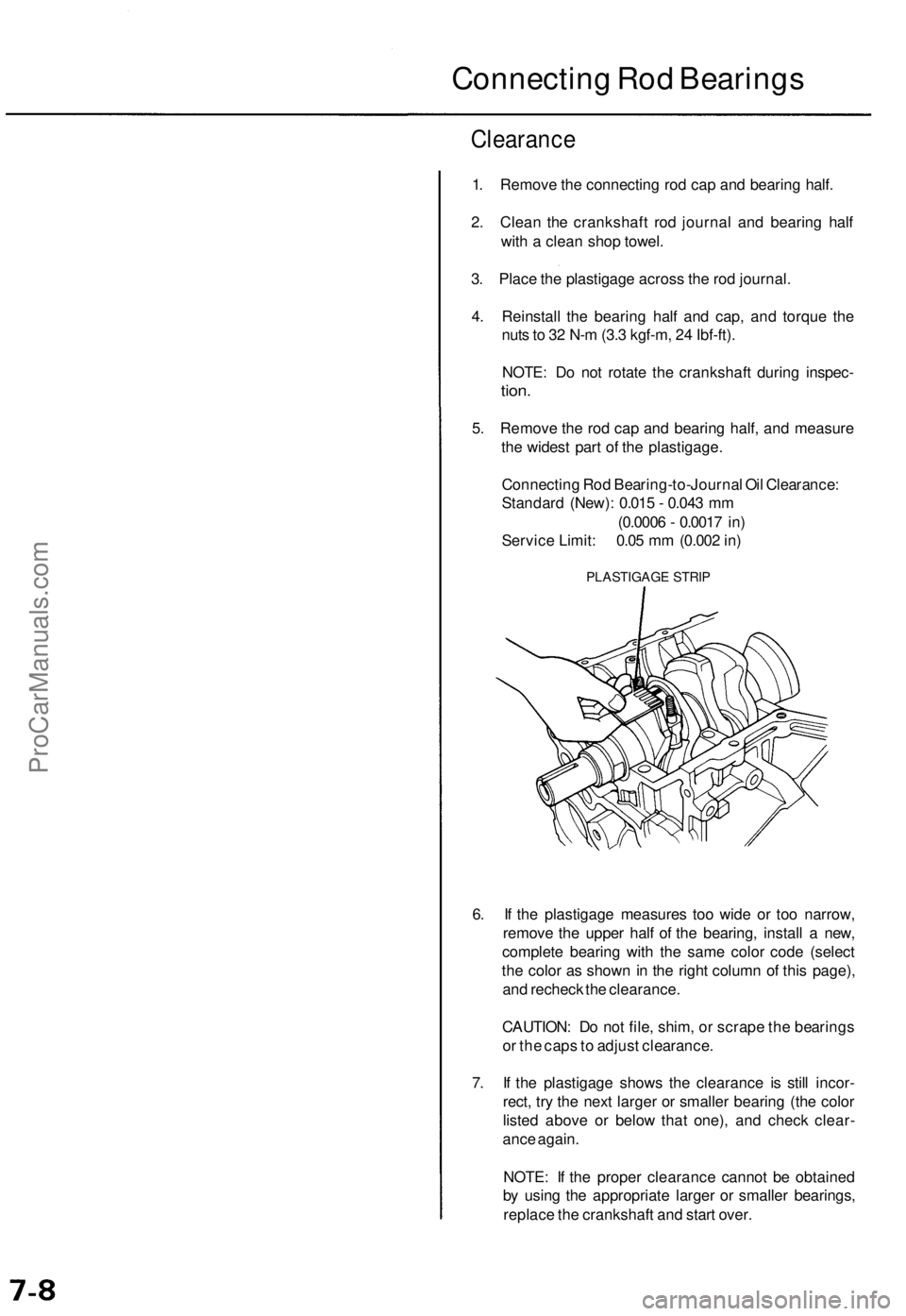
Connecting Rod Bearings
Clearance
1. Remove the connecting rod cap and bearing half.
2. Clean the crankshaft rod journal and bearing half
with a clean shop towel.
3. Place the plastigage across the rod journal.
4. Reinstall the bearing half and cap, and torque the
nuts to 32 N-m (3.3 kgf-m, 24 Ibf-ft).
NOTE: Do not rotate the crankshaft during inspec-
tion.
5. Remove the rod cap and bearing half, and measure
the widest part of the plastigage.
Connecting Rod Bearing-to-Journal Oil Clearance:
Standard (New): 0.015 - 0.043 mm
(0.0006 - 0.0017 in)
Service Limit: 0.05 mm (0.002 in)
PLASTIGAGE STRIP
6. If the plastigage measures too wide or too narrow,
remove the upper half of the bearing, install a new,
complete bearing with the same color code (select
the color as shown in the right column of this page),
and recheck the clearance.
CAUTION: Do not file, shim, or scrape the bearings
or the caps to adjust clearance.
7. If the plastigage shows the clearance is still incor-
rect, try the next larger or smaller bearing (the color
listed above or below that one), and check clear-
ance again.
NOTE: If the proper clearance cannot be obtained
by using the appropriate larger or smaller bearings,
replace the crankshaft and start over.ProCarManuals.com
Page 807 of 1771
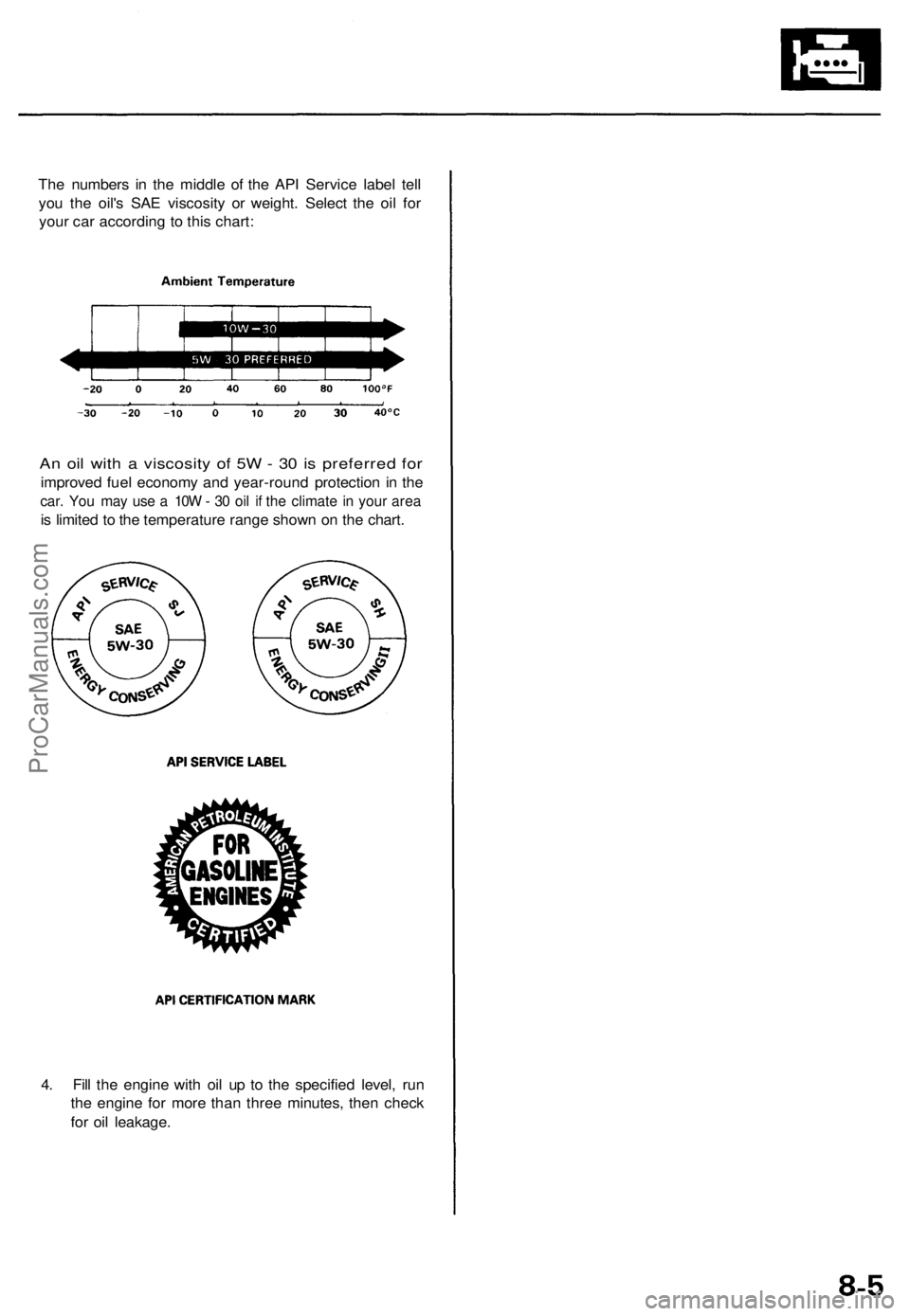
The numbers in the middle of the API Service label tell
you the oil's SAE viscosity or weight. Select the oil for
your car according to this chart:
An oil with a viscosity of 5W - 30 is preferred for
improved fuel economy and year-round protection in the
car. You may use a 10W - 30 oil if the climate in your area
is limited to the temperature range shown on the chart.
4. Fill the engine with oil up to the specified level, run
the engine for more than three minutes, then check
for oil leakage.ProCarManuals.com
Page 833 of 1771
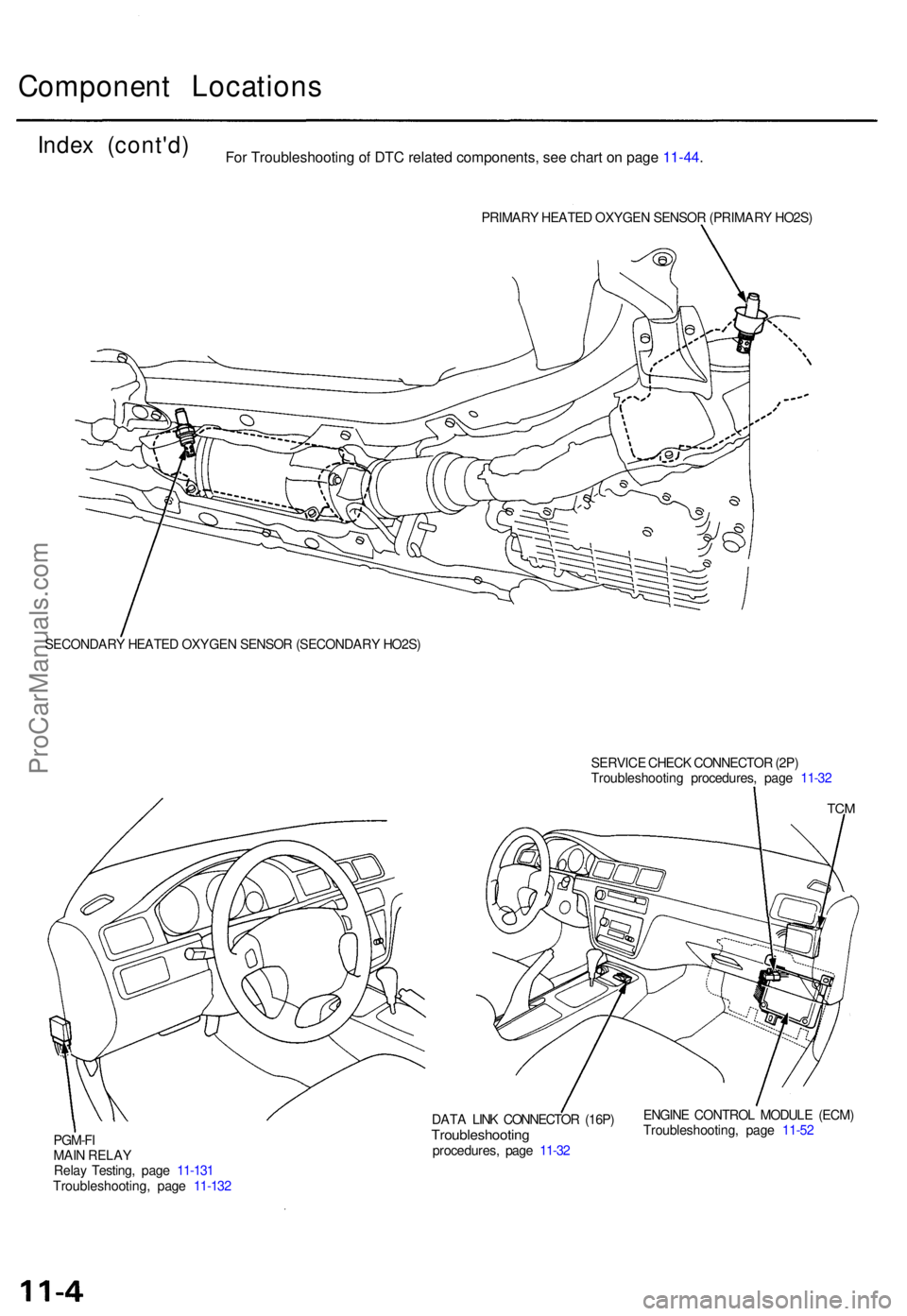
Component Location s
Index (cont'd )
PRIMARY HEATE D OXYGE N SENSO R (PRIMAR Y HO2S )
SECONDAR Y HEATE D OXYGE N SENSO R (SECONDAR Y HO2S )
SERVICE CHEC K CONNECTO R (2P )
Troubleshootin g procedures , pag e 11-3 2
PGM-F I
MAI N RELA Y
Rela y Testing , pag e 11-13 1
Troubleshooting , pag e 11-13 2
TCM
ENGIN E CONTRO L MODUL E (ECM )
Troubleshooting , pag e 11-5 2
DAT
A LIN K CONNECTO R (16P )
Troubleshootin gprocedures, pag e 11-3 2
For Troubleshooting of DTC related components, see chart on page 11-44.
ProCarManuals.com