parking Acura TLX 2019 Owner's Guide
[x] Cancel search | Manufacturer: ACURA, Model Year: 2019, Model line: TLX, Model: Acura TLX 2019Pages: 591, PDF Size: 34.5 MB
Page 357 of 591
355
Driving
This chapter discusses driving and refueling.
Before Driving................................... 356
Towing a Trailer ................................ 361
When Driving
Starting the Engine .......................... 362
Precautions While Driving................. 369
Automatic Transmission
*................. 370
Dual Clutch Transmission*............... 370
Shifting ............................................ 371
Shifting ............................................ 378
Auto Idle Stop
*................................ 382
Integrated Dynamics System............. 387
Models with electronic gear selector
Models with shift lever
Front Sensor Camera ....................... 388
Adaptive Cruise Control (ACC) with Low Speed Follow (LSF) ......................... 390
Road Departure Mitigation (RDM) System ... 404Lane Keeping Assist System (LKAS) .. 409Vehicle Stability Assist® (VSA®), aka Electronic
Stability Control (ESC), System ............... 417
Agile Handling Assist ....................... 419
Precision All-Wheel SteerTM (P-AWS ®)
System*......................................... 419
Blind spot inform ation (BSI) System*.... 420
Super Handling-All Wheel DriveTM (SH-
AWD® )*......................................... 423 Tire Pressure Monitoring System (TPMS)
with Tire Fill Assist.......................... 424
Tire Pressure Monitoring System (TPMS) -
Required Federal Expl anation ........... 426
Braking .............................................. 428
Parking Your Vehicle ........................ 445
Multi-View Rear Camera
*................ 456
Surround View Camera System*..... 458
Refueling ........................................... 459
Fuel Economy and CO
2 Emissions .... 462
* Not available on all models
19 ACURA TLX-31TZ36400.book 355 ページ 2018年2月16日 金曜日 午後12時22分
Page 364 of 591

362
Driving
When Driving
Starting the Engine
1.Make sure the parking brake is applied.
u The electric parking brake indicator
comes on for 15 seconds when you pull
up the electric parking brake switch.
2. Depress the brake pedal.
3. Press the ENGINE START/STOP button
without depressing the accelerator pedal.
1 Starting the Engine
Keep your foot firmly on the brake pedal when
starting the engine.
The engine is harder to st art in cold weather and in
thinner air found at altitudes above 8,000 feet (2,400
meters).
When starting the engine in cold weather, turn off all
electrical accessories such as the lights, climate
control system, and rear de fogger in order to reduce
battery drain.
If you live in a region where winter is extremely cold,
an engine block heater will improve starting and
warming of the engine. Cons ult a dealer for details.
If the exhaust system sounds abnormal or you can
smell exhaust gas inside the vehicle, have your vehicle
checked by a dealer. There may be a problem with
the engine or exhaust system.Models with electronic gear selector
Electric Parking
Brake Switch
Brake Pedal
19 ACURA TLX-31TZ36400.book 362 ページ 2018年2月16日 金曜日 午後12時22分
Page 365 of 591

Continued363
uuWhen Driving uStarting the Engine
Driving
1. Make sure the parkin g brake is applied.
u The electric parking brake indicator
comes on for 15 seconds when you pull
up the electric parking brake switch.
2. Check that the transmission is in
(P, then
depress the brake pedal.
u Although it is possible to start the vehicle
in
(N, it is safer to start it in (P.
3. Press the ENGINE START/STOP button
without depressing the accelerator pedal.
1 Starting the Engine
Bring the keyless access remote close to the ENGINE
START/STOP button if the batte ry in the keyless
access remote is weak. 2 If the Keyless Access Remote Battery is
Weak P. 538
The engine may not start if the keyless access remote
is subjected to strong radio waves.
Do not hold the ENGINE START/STOP button to
start the engine.
If the engine does not star t, set the power mode to
OFF and wait at least 30 se conds before trying again.
The immobilizer system pr otects your vehicle from
theft.
If an improperly c oded device is used, the engine’s
fuel system is disabled. 2 Immobilizer System P. 152Models with shift lever
Electric Parking
Brake Switch
Brake Pedal
19 ACURA TLX-31TZ36400.book 363 ページ 2018年2月16日 金曜日 午後12時22分
Page 369 of 591
Continued367
uuWhen Driving uStarting the Engine
Driving
1. Depress the brake pedal and press the ENGINE START/STOP button
simultaneously.
2. Keeping your right foot on the br ake pedal, put the transmission into
(D. Select
(R when reversing.
3. With the parking brake applied, release the brake pedal and gently depress the
accelerator pedal.
u Make sure the electric parki ng brake indicator goes off.
2Parking Brake P. 428
2 If the Transmission System Indicator Blinks along with the Warning
Message P. 552
■Starting to Drive1Starting to Drive
You can also release the parking brake by pressing
the electric parking brake sw itch while depressing the
brake pedal.
When facing downhill, you can start your vehicle
more smoothly by manually releasing it with the
electric parking brake switch than by releasing it with
the accelerator pedal.
The engine stops when the gear position is changed
from
( P before the ENGINE START/STOP button is
pressed. Follow the step 1 when starting to drive.
When the engine was started using the two-way
keyless access remote*
When the engine was started using the two-way keyless access remote*
When the engine was started in any case
* Not available on all models
19 ACURA TLX-31TZ36400.book 367 ページ 2018年2月16日 金曜日 午後12時22分
Page 370 of 591
uuWhen Driving uStarting the Engine
368
Driving
■Hill Start Assist System
Hill start assist keeps the brake engaged br iefly to help prevent the vehicle from
rolling on inclines as you move your fo ot from the brake pedal to the accelerator.
Change the gear position to
(D when facing uphill, or (R when facing downhill,
then release the brake pedal.
1 Hill Start Assist System
Hill start assist may not prevent the vehicle from
rolling downhill on a very st eep or slippery slope, and
will not operate on small inclines.
Hill start assist is not a replacement for the parking
brake.
Hill start assist will operate even when VSA ® is
switched off.
19 ACURA TLX-31TZ36400.book 368 ページ 2018年2月16日 金曜日 午後12時22分
Page 373 of 591
371
uuWhen Driving uShifting
Continued
Driving
Shifting
Change the gear position in accordance with your driving needs.
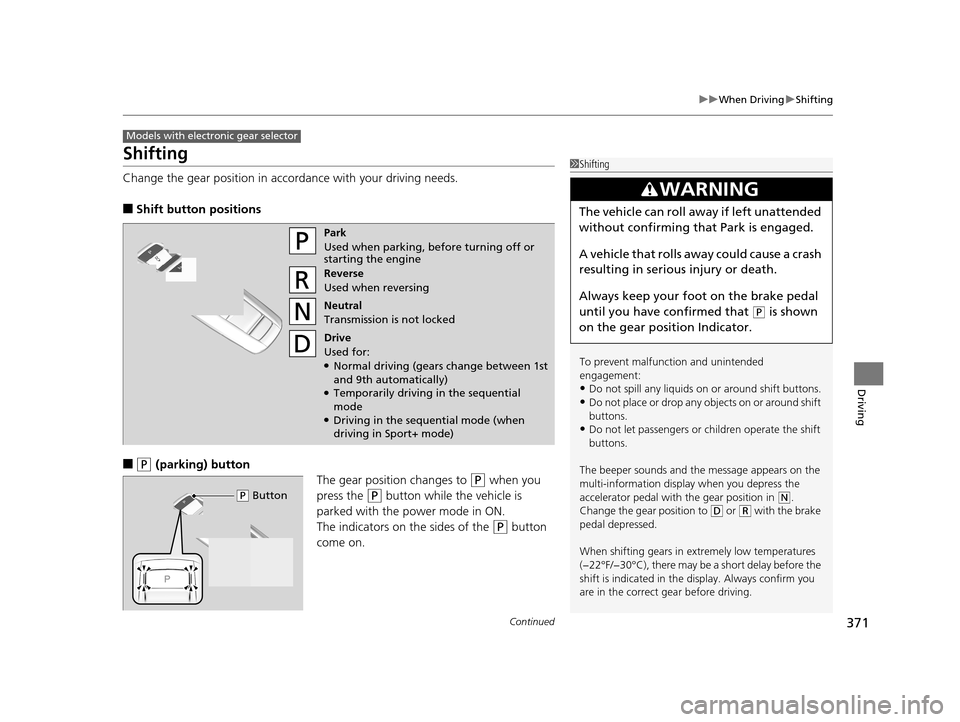
■Shift button positions
■(P (parking) button
The gear position changes to
(P when you
press the
(P button while the vehicle is
parked with the power mode in ON.
The indicators on the sides of the
(P button
come on.
Models with electronic gear selector
1 Shifting
To prevent malfunc tion and unintended
engagement:
•Do not spill any liquids on or around shift buttons.
•Do not place or drop any objects on or around shift
buttons.
•Do not let passengers or ch ildren operate the shift
buttons.
The beeper sounds and the message appears on the
multi-information display when you depress the
accelerator pedal with the gear position in
( N.
Change the gear position to ( D or (R with the brake
pedal depressed.
When shifting gears in extremely low temperatures
(−22°F/−30°C), there may be a short delay before the
shift is indicated in the di splay. Always confirm you
are in the correct gear before driving.
3WARNING
The vehicle can roll aw ay if left unattended
without confirming that Park is engaged.
A vehicle that rolls away could cause a crash
resulting in seriou s injury or death.
Always keep your foot on the brake pedal
until you have confirmed that
( P is shown
on the gear position Indicator.
Park
Used when parking, before turning off or
starting the engine
Reverse
Used when reversing
Neutral
Transmission is not locked
Drive
Used for:
●Normal driving (gears change between 1st
and 9th automatically)
●Temporarily driving in the sequential
mode
●Driving in the sequential mode (when
driving in Sport+ mode)
( P Button
19 ACURA TLX-31TZ36400.book 371 ページ 2018年2月16日 金曜日 午後12時22分
Page 380 of 591
378
uuWhen Driving uShifting
Driving
Shifting
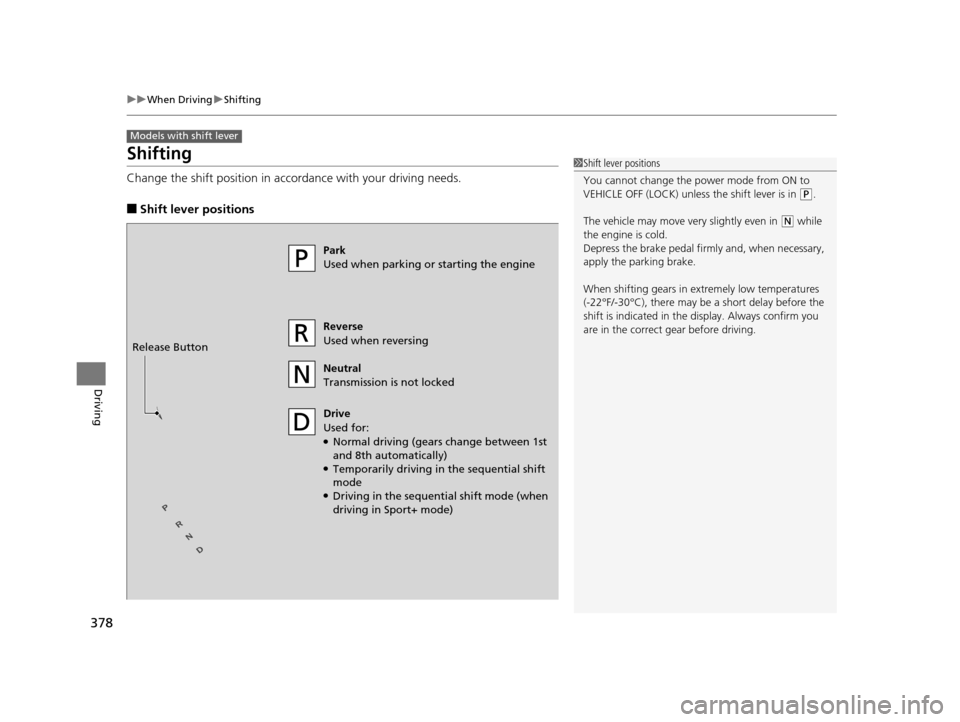
Change the shift positi on in accordance with your driving needs.
■Shift lever positions
Models with shift lever
1Shift lever positions
You cannot change the power mode from ON to
VEHICLE OFF (LOCK) unless the shift lever is in
(P.
The vehicle may move ve ry slightly even in
(N while
the engine is cold.
Depress the brake pe dal firmly and, when necessary,
apply the parking brake.
When shifting gears in extremely low temperatures
(-22°F/-30°C), there may be a short delay before the
shift is indicated in the di splay. Always confirm you
are in the correct gear before driving.
Park
Used when parking or starting the engine
Reverse
Used when reversing
Neutral
Transmission is not locked
Drive
Used for:
●Normal driving (gears change between 1st
and 8th automatically)
●Temporarily driving in the sequential shift
mode
●Driving in the sequential shift mode (when
driving in Sport+ mode)
Release Button
19 ACURA TLX-31TZ36400.book 378 ページ 2018年2月16日 金曜日 午後12時22分
Page 390 of 591

388
uuWhen Driving uFront Sensor Camera
Driving
Front Sensor Camera
The camera, used in systems such as LKAS, RDM, ACC with LSF, CMBSTM, and auto
high-beam, is designed to detect an obje ct that triggers any of the systems to
operate its functions.
This camera is located behind the rearview
mirror.
To help reduce the likelihood that high interior
temperatures will cause the camera’s sensing
system to shut off, when parking, find a shady
area or face the front of the vehicle away from
the sun. If you use a reflective sun shade, do
not allow it to cover the camera housing.
Covering the camera can concentrate heat on
it.
■Camera Location and Handling Tips
1 Front Sensor Camera
Never apply a film or attach any objects to the
windshield, hood, or front grill that could obstruct
the camera’s field of vision and cause the system to
operate abnormally.
Scratches, nicks, and othe r damage to the windshield
within the camera’s fiel d of vision can cause the
system to operate abnormall y. If this occurs, we
recommend that you replac e the windshield with a
genuine Acura replacement windshield. Making even
minor repairs within the ca mera’s field of vision or
installing an aftermarke t replacement windshield
may also cause the system to operate abnormally.
After replacing the winds hield, have a dealer
recalibrate the camera. Pr oper calibration of the
camera is necessary for the system to operate
properly.
Do not place an object on the top of the instrument
panel. It may reflect onto the windshield and prevent
the system from detecting lane lines properly.
Front Sensor
Camera
19 ACURA TLX-31TZ36400.book 388 ページ 2018年2月16日 金曜日 午後12時22分
Page 393 of 591
Continued391
uuWhen Driving uAdaptive Cruise Control (ACC) with Low Speed Follow (LSF)
Driving
■How to activate the system1Adaptive Cruise Control (ACC) with Low Speed Follow (LSF)
When the MAIN button is pressed, both ACC with
LSF and the Lane Keeping A ssist System (LKAS) are
either turned on or off.
ACC with LSF may not work properly under certain
conditions. 2 ACC with LSF Conditions and Limitations
P. 395
When not using ACC with LSF: Turn off adaptive
cruise by pressing the MAIN button. This also will
turn off the Lane Keeping Assist System (LKAS).
Do not use ACC with LSF under the following
conditions.
•On roads with heavy traf fic or while driving in
continuous stop and go traffic.
•On roads with sharp turns.
•On roads with steep downhill sections, as the set
vehicle speed can be exceeded by coasting. In such
cases, ACC with LSF will not apply the brakes to
maintain the set speed.
•On roads with toll collection facilities or other
objects between lanes of traffic, or in parking
areas, or faci lities with driv e through access.
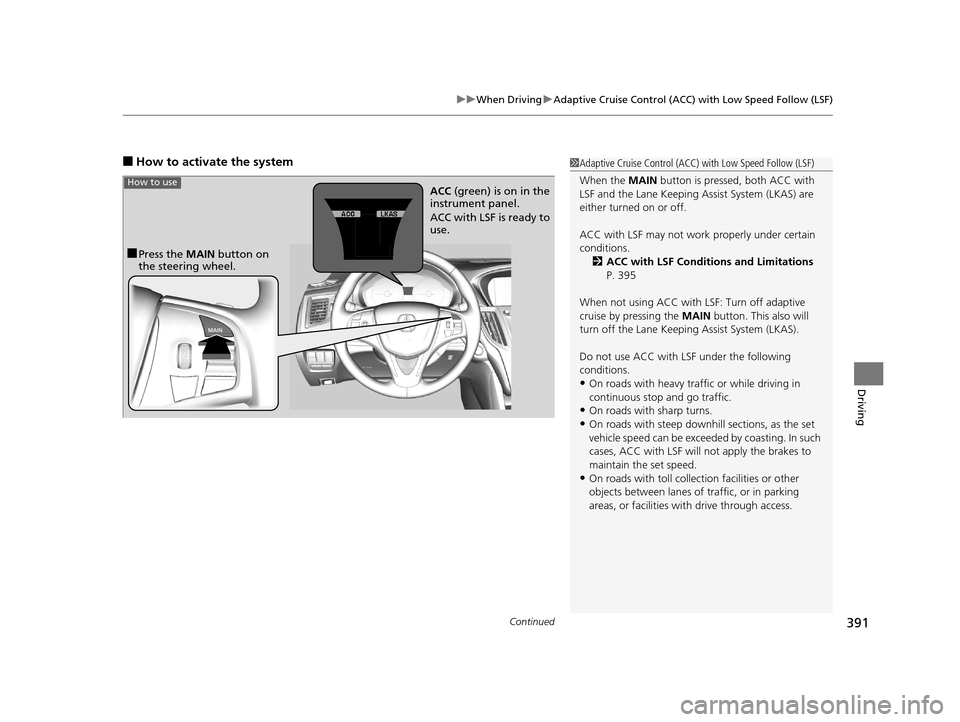
■Press the MAIN button on
the steering wheel. ACC
(green) is on in the
instrument panel.
ACC with LSF is ready to
use.
How to use
19 ACURA TLX-31TZ36400.book 391 ページ 2018年2月16日 金曜日 午後12時22分
Page 397 of 591
Continued395
uuWhen Driving uAdaptive Cruise Control (ACC) with Low Speed Follow (LSF)
Driving
The system may automatically shut off and the ACC indicator will come on under
certain conditions. Some examples of these conditions are listed below. Other
conditions may reduce some of the ACC functions.
2 Front Sensor Camera P. 388
■Environmental conditions
Driving in bad weather (r ain, fog, snow, etc.).
■Roadway conditions
Driving on a snowy or wet roadway (obscure d lane marking, vehicle tracks, reflected
lights, road spra y, high contrast).
■Vehicle conditions
• The outside of the windshield is blocked by dirt, mud, leaves, wet snow, etc.
• An abnormal tire or wheel condition (Wrong sized, varied size or construction,
improperly inflated, compact spare tire
*, etc.).
• The camera temperature gets too high.
• The parking brake is applied.
• When the front grille is dirty.
• The vehicle is tilted due to a heavy load or suspension modifications.
• When tire chains are installed.
■ACC with LSF Conditions and Limitations1ACC with LSF Conditions and Limitations
The radar sensor for ACC with LSF is shared with the
Collision Mitigati on Braking System
TM (CMBSTM).
2 Collision Mitigation Braking SystemTM
(CMBSTM) P. 436
You can read about handling information for the
camera equipped with this system. 2 Front Sensor Camera P. 388
Always keep the radar sensor cover clean.
Never use chemical solvents or polishing powder for
cleaning the sensor cover. Clean it with water or a
mild detergent.
Do not put a sticker on the radar sensor cover or
replace the radar sensor cover.
If you need the radar sensor to be repaired, or
removed, or the radar se nsor cover is strongly
impacted, turn off the system by pressing the MAIN
button and take your vehicle to a dealer.
Have your vehicle checked by a dealer if you find any
unusual behavior of the system (e.g., the warning
message appears too frequently).
* Not available on all models
19 ACURA TLX-31TZ36400.book 395 ページ 2018年2月16日 金曜日 午後12時22分