key battery Acura ZDX 2012 User Guide
[x] Cancel search | Manufacturer: ACURA, Model Year: 2012, Model line: ZDX, Model: Acura ZDX 2012Pages: 370, PDF Size: 10.06 MB
Page 159 of 370
Continued157
uuInterior Lights/Inter ior Convenience Items uInterior Convenience Items
Controls
The accessory power sockets can be used when the ignition switch is in ACCESSORY
q or ON w*1.
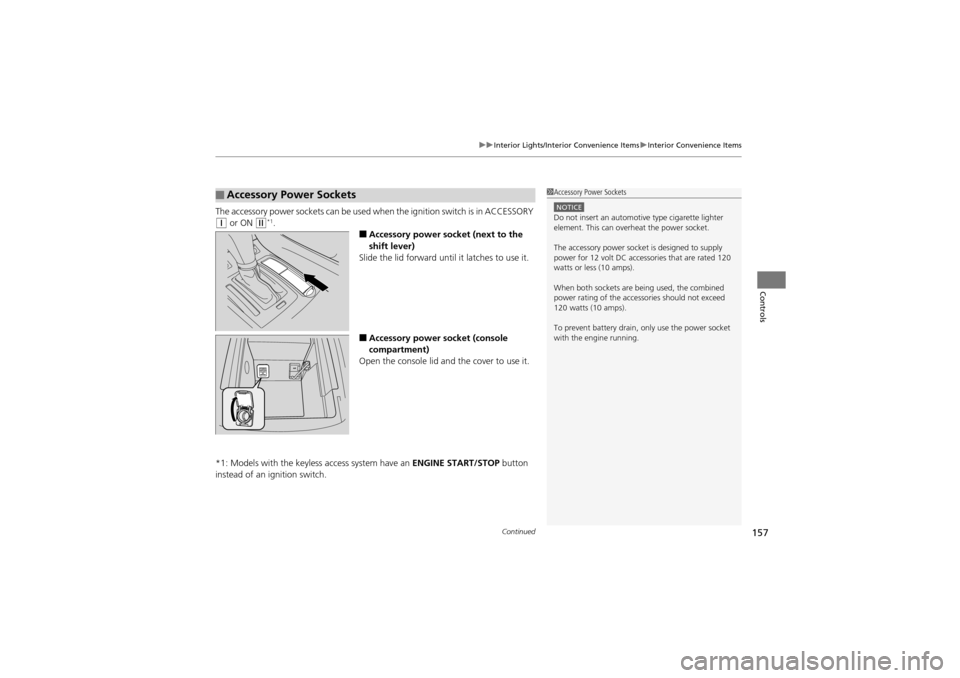
■Accessory power socket (next to the
shift lever)
Slide the lid forward until it latches to use it.
■Accessory power socket (console
compartment)
Open the console lid and the cover to use it.
*1: Models with the keyless access system have an ENGINE START/STOP button
instead of an ig nition switch.
■Accessory Power Sockets1Accessory Power Sockets
NOTICEDo not insert an automotive type cigarette lighter
element. This can overheat the power socket.
The accessory power socket is designed to supply
power for 12 volt DC accessories that are rated 120
watts or less (10 amps).
When both sockets are being used, the combined
power rating of the accessories should not exceed
120 watts (10 amps).
To prevent battery drain, only use the power socket
with the engine running.
Page 162 of 370
uuInterior Lights/Interior Convenience Items uInterior Convenience Items
160
Controls
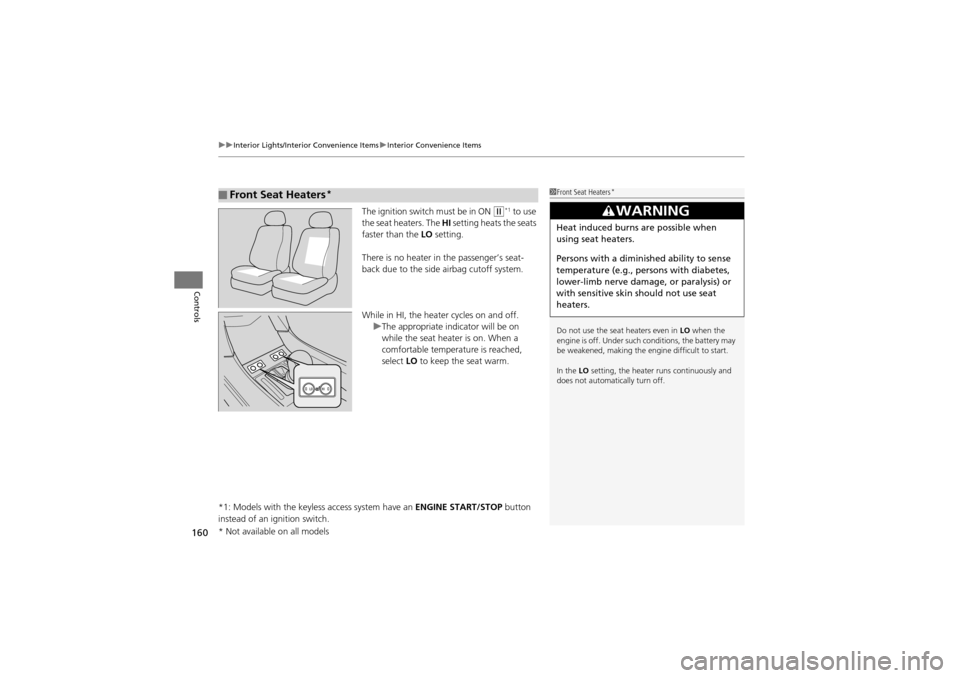
The ignition switch must be in ON w*1 to use
the seat heaters. The HI setting heats the seats
faster than the LO setting.
There is no heater in the passenger’s seat-
back due to the side airbag cutoff system.
While in HI, the heater cycles on and off. uThe appropriate indicator will be on
while the seat heater is on. When a
comfortable temperature is reached,
select LO to keep the seat warm.
*1: Models with the keyless access system have an ENGINE START/STOP button
instead of an ignition switch.
■Front Seat Heaters*1 Front Seat Heaters*
Do not use the seat heaters even in LO when the
engine is off. Under such conditions, the battery may
be weakened, making the engine difficult to start.
In the LO setting, the heater runs continuously and
does not automatically turn off.
3WARNING
Heat induced burns are possible when
using seat heaters.
Persons with a diminished ability to sense
temperature (e.g., persons with diabetes,
lower-limb nerve damage, or paralysis) or
with sensitive skin should not use seat
heaters.
* Not available on all models
Page 164 of 370
uuInterior Lights/Interior Convenience Items uInterior Convenience Items
162
Controls
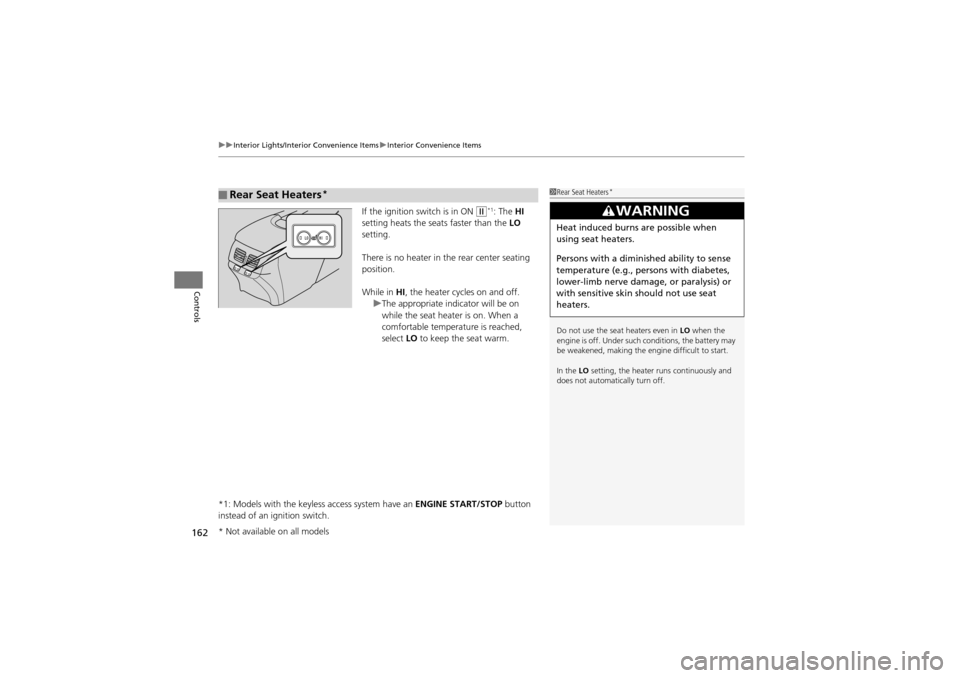
If the ignition switch is in ON w*1: The HI
setting heats the seats faster than the LO
setting.
There is no heater in the rear center seating
position.
While in HI, the heater cycles on and off.
u The appropriate indicator will be on
while the seat heater is on. When a
comfortable temperature is reached,
select LO to keep the seat warm.
*1: Models with the keyless access system have an ENGINE START/STOP button
instead of an ignition switch.
■Rear Seat Heaters*1 Rear Seat Heaters*
Do not use the seat heaters even in LO when the
engine is off. Under such conditions, the battery may
be weakened, making the engine difficult to start.
In the LO setting, the heater runs continuously and
does not automatically turn off.
3WARNING
Heat induced burns are possible when
using seat heaters.
Persons with a diminished ability to sense
temperature (e.g., persons with diabetes,
lower-limb nerve damage, or paralysis) or
with sensitive skin should not use seat
heaters.
* Not available on all models
Page 201 of 370
199
uuBluetooth® HandsFreeLink ®u HFL Menus
Continued
Features
HFL Menus
The ignition switch must be in ACCESSORY q or ON w*1 to use HFL.
*1: Models with the keyless access system have an ENGINE START/STOP button
instead of an ig nition switch.1HFL Menus
To use HFL, you must first pair your Bluetooth-
compatible cell phone to the system while the vehicle
is parked.
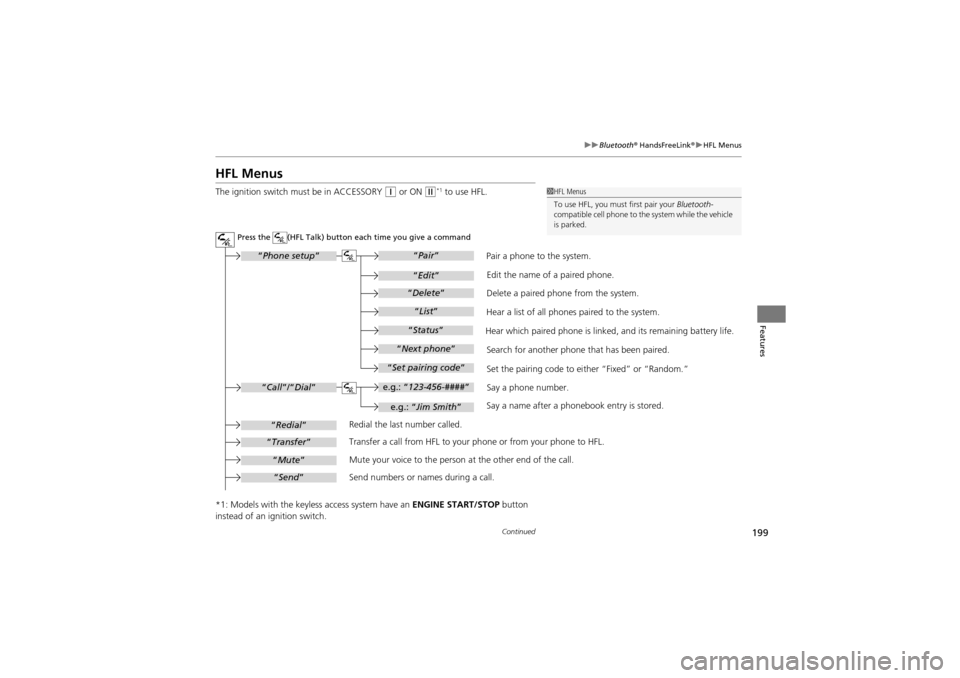
Redial the last number called.
Transfer a call from HFL to your phone or from your phone to HFL.
Mute your voice to the person at the other end of the call.
Send numbers or names during a call. Pair a phone to the system.
Say a name after a phonebook entry is stored.Say a phone number.
Set the pairing code to ei
ther “Fixed” or “Random.”
Search for another phone that has been paired. Edit the name of a paired phone.
Delete a paired phone from the system.
Hear a list of all phones paired to the system.
Hear which paired phone is linked, and its remaining battery life.
Press the (HFL Talk) button each time you give a command
e.g.: “ 123-456-#### ”
“Phone setup”
“Call ”/“Dial ”
“Redial”
“Transfer”
“Mute”
“Send ”
“Pair ”
“Edit ”
“Delete ”
“List ”
“Status ”
“Next phone ”
“Set pairing code ”
e.g.: “Jim Smith ”
Page 205 of 370
Continued203
uuBluetooth ® HandsFreeLink ®u HFL Menus
Features
You can make calls using any phone number or a name in the HFL phonebook, and
redial the last number called.
■Direct dialing a phone number
1. Say “Call” or “Dial.”
2. Say the number you want to dial after the prompts.
3. Say “Call” or “Dial” after the prompts.
■From the HFL phonebook
1. Say “Call” or “Dial.”
2. Say the name stored in the HFL phonebook after the prompts.
3. Follow the HFL prompts.
■To redial the last number called by HFL
Say “Redial.”
■To end a call
Press the (HFL back) button.
■Making a Call1 Making a Call
Press the button and wa it for a beep before
giving a command.
HFL uses a Class 2 Bluetooth, with has a maximum
range of about 30 feet (10 meters).
HFL allows you to talk up to 30 minutes after you
remove the key from the ig nition switch. However,
this may weaken the vehicle’s battery.
Page 225 of 370
223Continued
Driving
When Driving
Starting the Engine
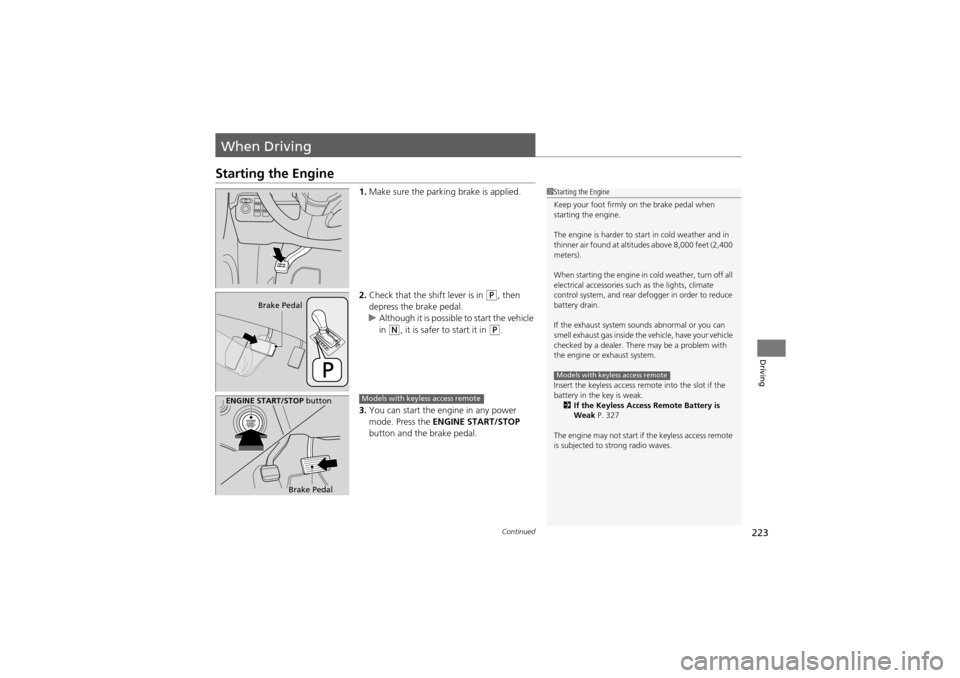
1.Make sure the parking brake is applied.
2. Check that the shift lever is in
P, then
depress the brake pedal.
u Although it is possible to start the vehicle
in
N, it is safer to start it in P.
3. You can start the engine in any power
mode. Press the ENGINE START/STOP
button and the brake pedal.
1 Starting the Engine
Keep your foot firmly on the brake pedal when
starting the engine.
The engine is harder to start in cold weather and in
thinner air found at altitu des above 8,000 feet (2,400
meters).
When starting the engine in cold weather, turn off all
electrical accessories such as the lights, climate
control system, and rear defogger in order to reduce
battery drain.
If the exhaust system sounds abnormal or you can
smell exhaust gas inside the vehicle, have your vehicle
checked by a dealer. There may be a problem with
the engine or exhaust system.
Insert the keyless access remo te into the slot if the
battery in the key is weak. 2 If the Keyless Access Remote Battery is
Weak P. 327
The engine may not start if the keyless access remote
is subjected to strong radio waves.
Models with keyless access remote
Brake Pedal
ENGINE START/STOP button
Brake Pedal
Models with keyless access remote
Page 312 of 370
310
Maintenance
Remote Transmitter Care
Replacing the Button Battery
If the indicator does not come on when the button is pushed, replace the battery.
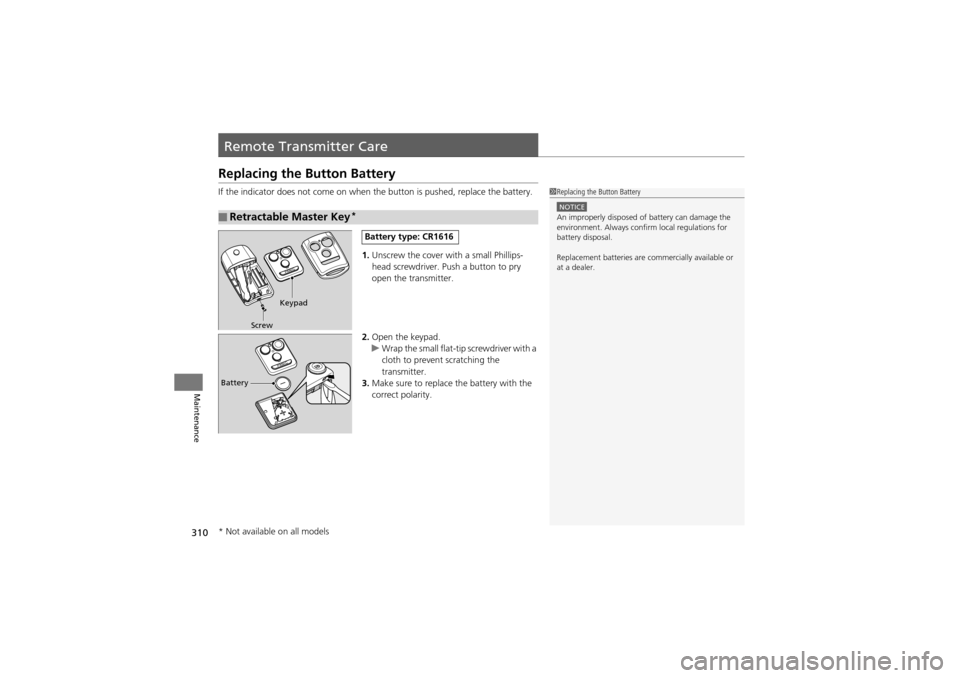
1. Unscrew the cover with a small Phillips-
head screwdriver. Pu sh a button to pry
open the transmitter.
2. Open the keypad.
u Wrap the small flat-tip screwdriver with a
cloth to prevent scratching the
transmitter.
3. Make sure to replace the battery with the
correct polarity.
■Retractable Master Key*
1Replacing the Button Battery
NOTICEAn improperly disposed of battery can damage the
environment. Always conf irm local regulations for
battery disposal.
Replacement batteries are commercially available or
at a dealer.
Keypad
Screw
Battery type: CR1616
Battery
* Not available on all models
Page 313 of 370
311
uuRemote Transmitter Care uReplacing the Button Battery
Maintenance
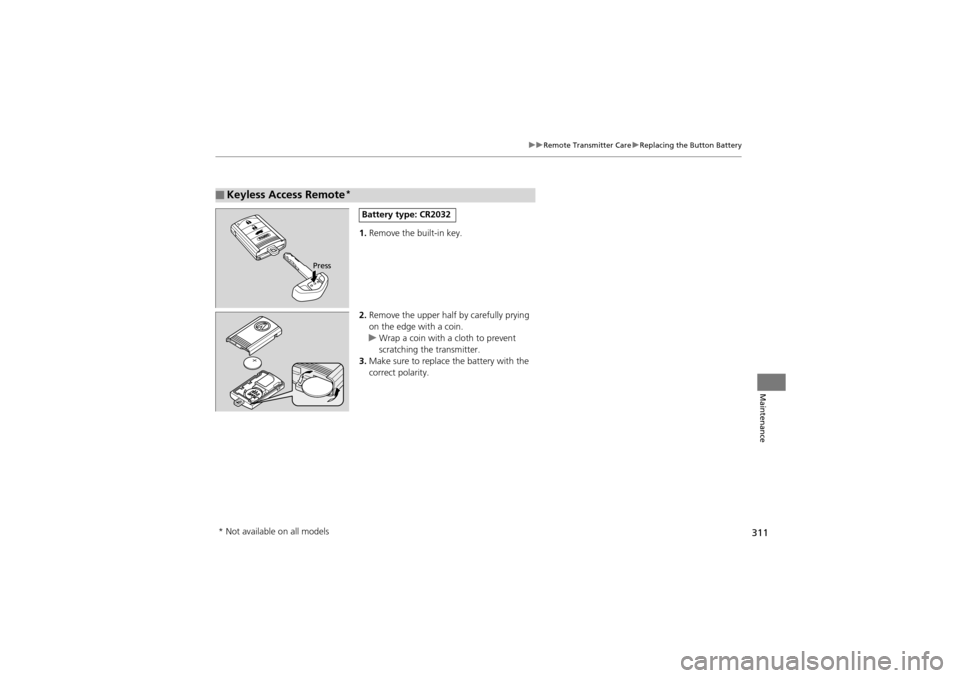
1. Remove the built-in key.
2. Remove the upper half by carefully prying
on the edge with a coin.
u Wrap a coin with a cloth to prevent
scratching the transmitter.
3. Make sure to replace the battery with the
correct polarity.
■Keyless Access Remote*
Press
Battery type: CR2032
* Not available on all models
Page 319 of 370

317
Handling the Unexpected
This chapter explains how to handle unexpected troubles.
Tools
Types of Tools .................................. 318
If a Tire Goes Flat Changing a Flat Tire ......................... 319
Engine Does Not Start
Checking the Engine ........................ 326
If the Keyless Access Remote Battery is Weak ..........................................327
Emergency Engine Stop ................... 328
Jump Starting .................................... 329
Shift Lever Do es Not Move.............. 331 Overheating
How to Handle Overheating............. 332
Indicator, Coming On/Blinking
If the Low Oil Pressure Indicator Comes On ............................................. 334
If the Charging System Indicator Comes
On ................................................. 334
If the Malfunction Indicator Lamp Comes On or Blinks ................................... 335
If the Brake System Indicator (Red) Comes On .................................. 336
If the ECPS Indicator* Comes On ..... 336 If the Low Tire Pres
sure/TPMS Indicator
Comes On or Blinks ....................... 337
Fuses Fuse Locations ................................. 338
Circuit Protected and Amps for Each Fuse............................................ 340
Inspecting and Changing Fuses ........ 343
Emergency Towing ........................... 344
When You Cannot Unlock the Fuel Fill Door ................................................. 346
When You Cannot Open or Close the Tailgate ............................................ 347
* Not available on all models
Page 328 of 370
326
Handling the Unexpected
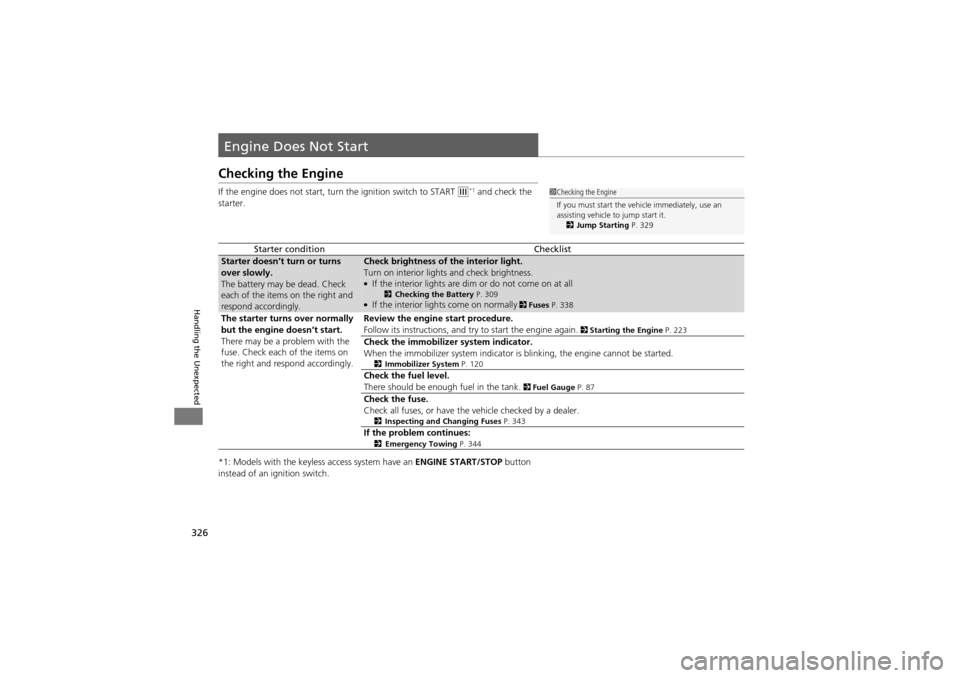
Engine Does Not Start
Checking the Engine
If the engine does not start, turn the ignition switch to START e*1 and check the
starter.
*1: Models with the keyless access system have an ENGINE START/STOP button
instead of an ignition switch.
Starter conditionChecklist
Starter doesn’t turn or turns
over slowly.
The battery may be dead. Check
each of the items on the right and
respond accordingly.Check brightness of the interior light.
Turn on interior lights and check brightness.
●If the interior lights are dim or do not come on at all2 Checking the Battery P. 309●If the interior lights come on normally 2 Fuses P. 338
The starter turns over normally
but the engine doesn’t start.
There may be a problem with the
fuse. Check each of the items on
the right and respond accordingly.Review the engine start procedure.
Follow its instructions, and try to start the engine again.
2 Starting the Engine P. 223
Check the immobilizer system indicator.
When the immobilizer system indicator is blinking, the engine cannot be started.
2Immobilizer System P. 120
Check the fuel level.
There should be enough fuel in the tank.
2 Fuel Gauge P. 87
Check the fuse.
Check all fuses, or have the vehicle checked by a dealer.
2Inspecting and Changing Fuses P. 343
If the problem continues:2Emergency Towing P. 344
1Checking the Engine
If you must start the vehi cle immediately, use an
assisting vehicle to jump start it.
2 Jump Starting P. 329