reset Alfa Romeo 147 2008 Owner handbook (in English)
[x] Cancel search | Manufacturer: ALFA ROMEO, Model Year: 2008, Model line: 147, Model: Alfa Romeo 147 2008Pages: 291, PDF Size: 5.52 MB
Page 75 of 291
GETTING TO KNOW YOUR CAR
73
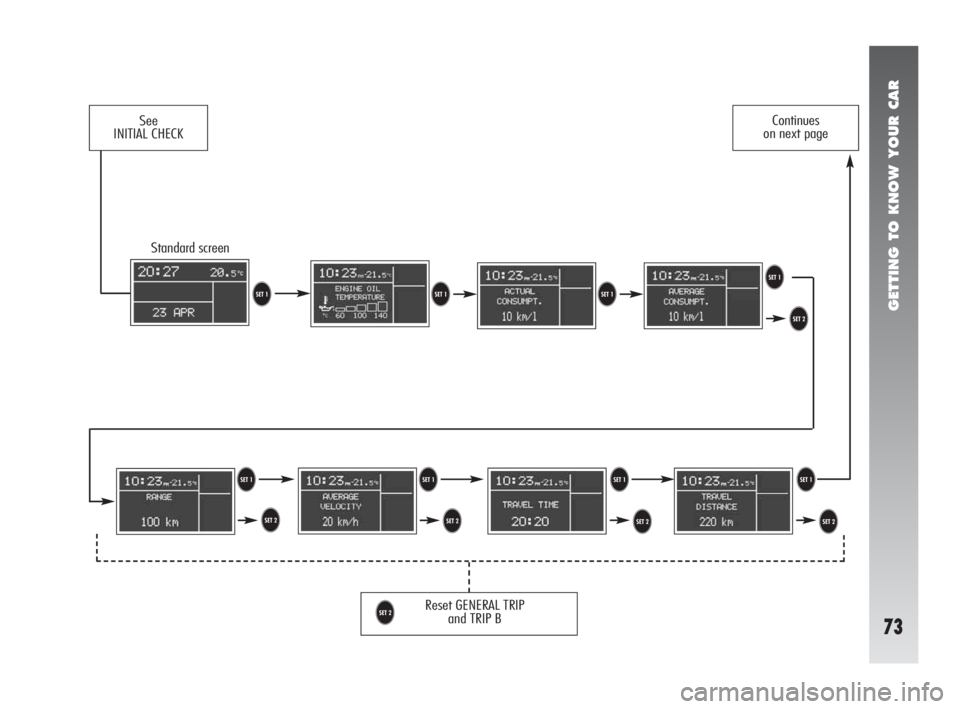
Standard screen
Reset GENERAL TRIP
and TRIP B
U
See
INITIAL CHECKContinues
on next page
TT
U UT
UT
U
TTTT
U
Page 76 of 291
GETTING TO KNOW YOUR CAR
74
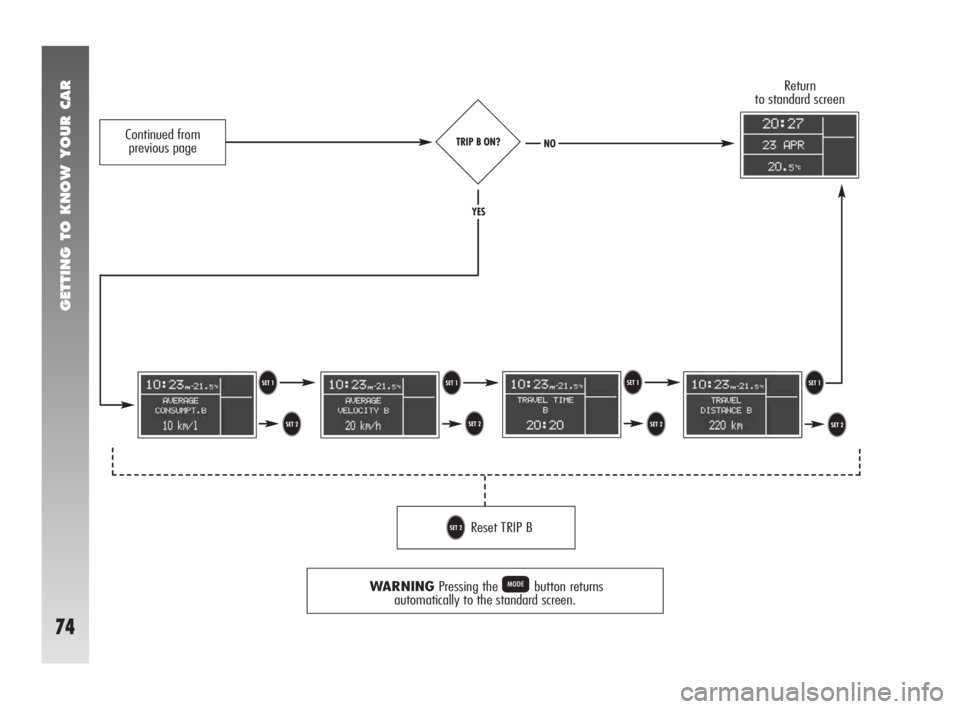
TRIP B ON?
WARNINGPressing the Pbutton returns
automatically to the standard screen.
T T
U U U
U TT
Reset TRIP BU
Return
to standard screen
YES
NOContinued from
previous page
Page 109 of 291
GETTING TO KNOW YOUR CAR
107
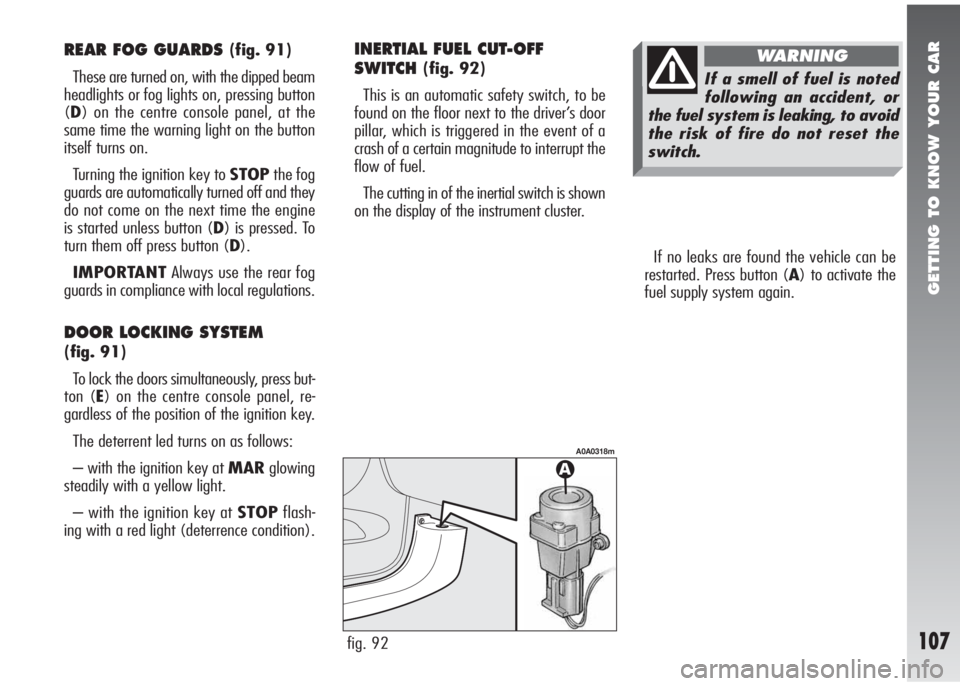
If no leaks are found the vehicle can be
restarted. Press button (A) to activate the
fuel supply system again.
fig. 92
A0A0318m
REAR FOG GUARDS (fig. 91)
These are turned on, with the dipped beam
headlights or fog lights on, pressing button
(D) on the centre console panel, at the
same time the warning light on the button
itself turns on.
Turning the ignition key to STOPthe fog
guards are automatically turned off and they
do not come on the next time the engine
is started unless button (D) is pressed. To
turn them off press button (D).
IMPORTANTAlways use the rear fog
guards in compliance with local regulations.
DOOR LOCKING SYSTEM
(fig. 91)
To lock the doors simultaneously, press but-
ton (E) on the centre console panel, re-
gardless of the position of the ignition key.
The deterrent led turns on as follows:
– with the ignition key at MARglowing
steadily with a yellow light.
– with the ignition key at STOPflash-
ing with a red light (deterrence condition).
INERTIAL FUEL CUT-OFF
SWITCH
(fig. 92)
This is an automatic safety switch, to be
found on the floor next to the driver’s door
pillar, which is triggered in the event of a
crash of a certain magnitude to interrupt the
flow of fuel.
The cutting in of the inertial switch is shown
on the display of the instrument cluster.If a smell of fuel is noted
following an accident, or
the fuel system is leaking, to avoid
the risk of fire do not reset the
switch.
WARNING
Page 142 of 291
GETTING TO KNOW YOUR CAR
140
RADIO PRESETTING
SYSTEM
(for versions/markets where
applicable)
The car, if not delivered with sound sys-
tem, is fitted with a glove compartment on
the instrument panel (fig. 136a).
Sound system presetting system includes
the following:
– sound system power cables;
– front and rear speaker power cables;
– aerial power cable;
– sound system housing;
– aerial on car roof.The sound system shall be installed in the
proper housing occupied by the glove com-
partment that can be removed by pressing
the two retaining tabs fitted in the glove
compartment: here are the power cables.
If after buying the car you
want to install the sound
system, contact first Alfa
Romeo Authorised Services whose
qualified personnel, in addition to
suggesting the most suitable de-
vices, will evaluate the overall
electric absorption to safeguard the
battery. Excessive loadless ab-
sorption could damage the battery
and lose warranty.
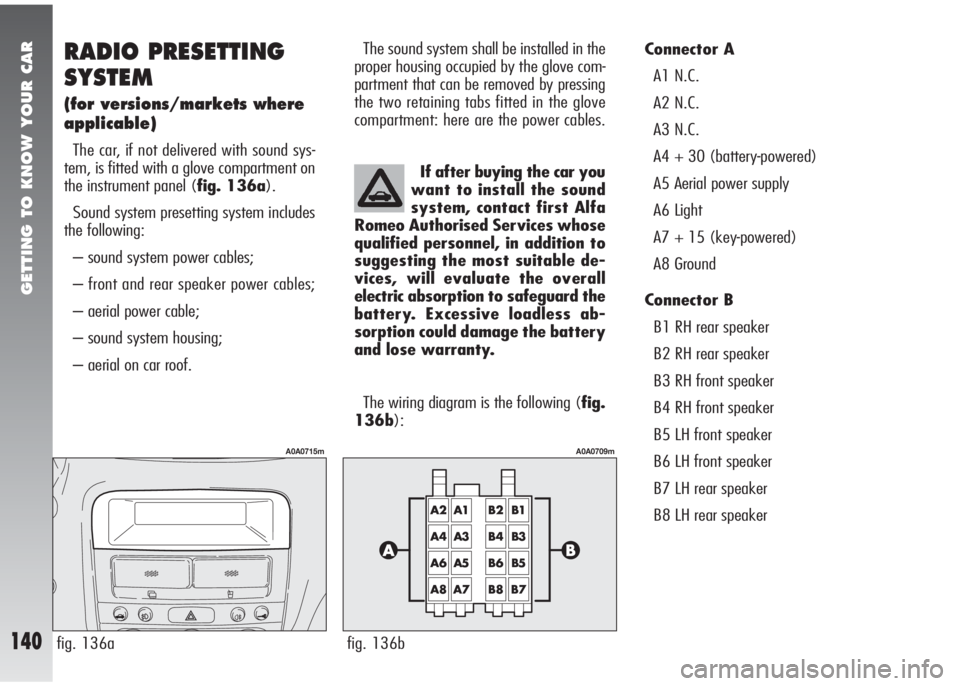
The wiring diagram is the following (fig.
136b):Connector A
A1 N.C.
A2 N.C.
A3 N.C.
A4 + 30 (battery-powered)
A5 Aerial power supply
A6 Light
A7 + 15 (key-powered)
A8 Ground
Connector B
B1 RH rear speaker
B2 RH rear speaker
B3 RH front speaker
B4 RH front speaker
B5 LH front speaker
B6 LH front speaker
B7 LH rear speaker
B8 LH rear speaker
fig. 136a
A0A0715m
fig. 136b
A0A0709m
Page 147 of 291
GETTING TO KNOW YOUR CAR
145
Entering the secret code
Entry of the secret code is required to al-
low the radio to work after the first con-
nection to the vehicle electric system or to
a different Body Computer than the original
one.
Connecting the radio to the car supply, the
display will show the wording “CODE” for
about 2 seconds, followed by four dashes
“- - - -”.
The secret code comprises four figures from
1 to 6, each corresponding to one of the
dashes.
To enter the first digit of the code, press
the corresponding key of the preset stations
(from 1 to 6). Enter the other code digits in
the same way.
If the four figures are not entered within
20 seconds, te display shows the word
“CODE” for 2 seconds and then four dash-
es “- - - -”. This is not to be considered
as an incorrect code entry.
After entering the fourth digit (within 20
seconds), the radio starts to work.If a wrong code is entered, the radio
sounds a “beep”, the display shows the
word “CODE” for 2 seconds and then four
dashes “- - - -” to inform the user that it
is necessary to enter the correct code.
Every time the user enters a wrong code,
the waiting time increases gradually (1 min,
2 min, 4 min, 8 min, 16 min, 30 min, 1h,
2h, 4h, 8h, 16h, 24h) until reaching a max-
imum of 24 hours.
The waiting time will be shown on the dis-
play with the word “WAIT”. When this
goes off it is possible to start the new code
entry procedure.
Code Card
This is the document that certifies posses-
sion of the radio. The Code Card contains
the radio model, serial number and secret
code.
IMPORTANTKeep the Code Card care-
fully to be able to give the related data to
the competent authorities in the event of
theft.GLOSSARY
AF (Alternative frequency)
Function that allows the radio to stay tuned
on the FM station selected also passing
through areas served by transmitters with
different frequencies.
In fact the RDS system keeps the intensi-
ty and quality of the signal received under
control, automatically switching tuning on
the frequency of the transmitter that is send-
ing the strongest signal.
Autostore/Travelstore
Function with which it is possible to auto-
matically store radio stations.
Balance (Channel balancing)
Function with which it is possible to ap-
propriately adjust the sound from the right
or left speakers
Bass
This function adjusts the bass tones.
CD-Changer
Multiple Compact Disc player.
Page 148 of 291
GETTING TO KNOW YOUR CAR
146
CLR (Clear)
Function with which it is possible to clear
all the tracks of the CD stored with the TPM
function.
EON (Enhanced Other Network)
Function that allows the radio to tune au-
tomatically on a different radio station than
the one being listed to which broadcasts traf-
fic information.
Fader
Function with which it is possible to ap-
propriately adjust the sound from the front
or rear speakers.
Hicut (Treble reduction)
Function with which it is possible to reduce
the treble tones, in accordance with the sig-
nal transmitted.Distant/Local (Sens Dx/Loc)
These are the two levels of reception sen-
sitivity.
1) Distant (maximum sensitivity), which
makes it possible to tune all the stations that
can be received.
2) Local (minimum sensitivity), which
makes it possible to tune only those stations
with sufficiently strong signals, such as for
example local stations.
Loudness
A function that automatically emphasises
the bass and treble tones when listening, at
low level. It is cut off with the volume set
to the maximum.
Mix
This function is used to randomly select a
Compact Disc among those present in the
loader and all the tracks on this Compact
Disc are played in random sequence.MSS
(Searching previous/next track)
With this function it is possible to listen to
the next or previous track on the cassette.
Mute
Function which, if activated, for example
in the presence of a cell phone in the car,
brings the volume to zero when a phone call
is being made/received.
Presettings
Number of radio stations that can be stored
manually or automatically.
PTY (Program Type)
This function allows the presetting of a cat-
egory of programmes such as for instance,
news bulletins, music, sport, etc. The set au-
tomatically gives priority to the type of pro-
gramme selected when transmission starts,
interrupting the one in progress.
Page 151 of 291
GETTING TO KNOW YOUR CAR
149
11. 5-MIXFunction select button:
– Call station no. 5
– Store station no. 5
– Random CD track playing
12. 4-RPTFunction select button:
– Call station no. 4
– Store station no. 4
– Continuous CD track play-
ing
13. BN-ASRadio frequency range select
function (FM1, FM2, FMT,
MW, LW) - Autostore
14. SRC-SCOperating mode select but-
ton Radio - Compact Disc -
CD-Changer and Scan func-
tion (hearing stations in se-
quence)
15. 3-IIFunction select button:
– Call station no. 3
– Store station no. 3
– CD playing pause
16. 2-CLRFunction select button:
– Call station no. 2
– Store station no. 2
– CLR function (CD track stor-
age clearing)17. 1-TPMFunction select button:
– Call station no. 1
– Store station no. 1
– TPM function (storing CD
playing sequence)
18. AUD-LDSound function select but-
ton: bass tones, treble
tones, right/left and
front/rear balancing and
Loudness (except versions
with BOSE HI-FI system)
19. VOL-Volume lowering button
20. ON-
zFunction select button:
– Set on/off
– Mute on/off
21. VOL+Volume highering button
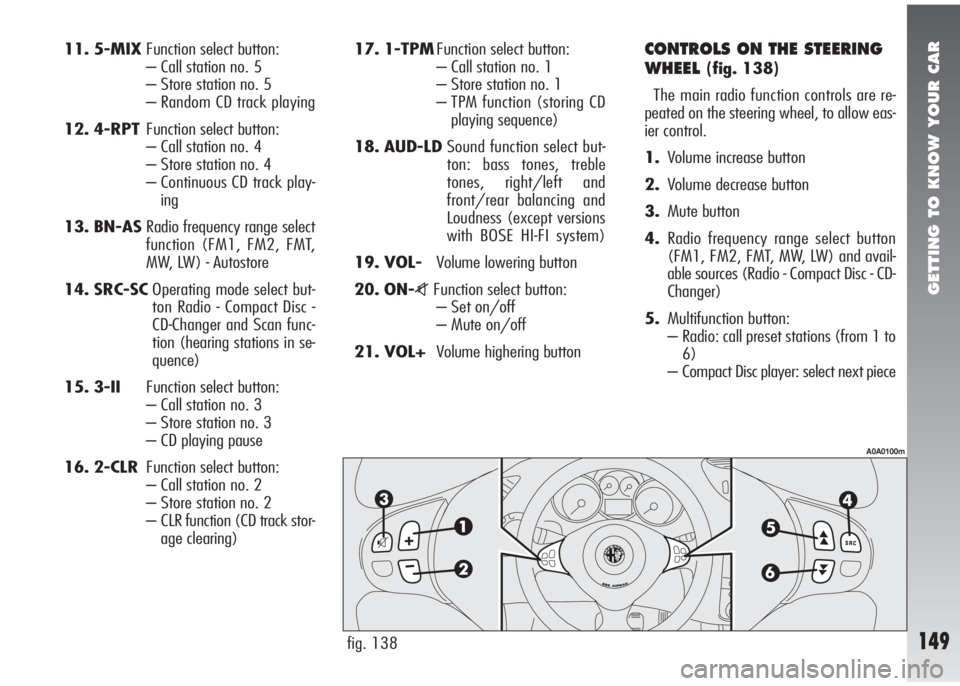
CONTROLS ON THE STEERING
WHEEL
(fig. 138)
The main radio function controls are re-
peated on the steering wheel, to allow eas-
ier control.
1.Volume increase button
2.Volume decrease button
3.Mute button
4.Radio frequency range select button
(FM1, FM2, FMT, MW, LW) and avail-
able sources (Radio - Compact Disc - CD-
Changer)
5.Multifunction button:
– Radio: call preset stations (from 1 to
6)
– Compact Disc player: select next piece
fig. 138
A0A0100m
Page 152 of 291
GETTING TO KNOW YOUR CAR
150
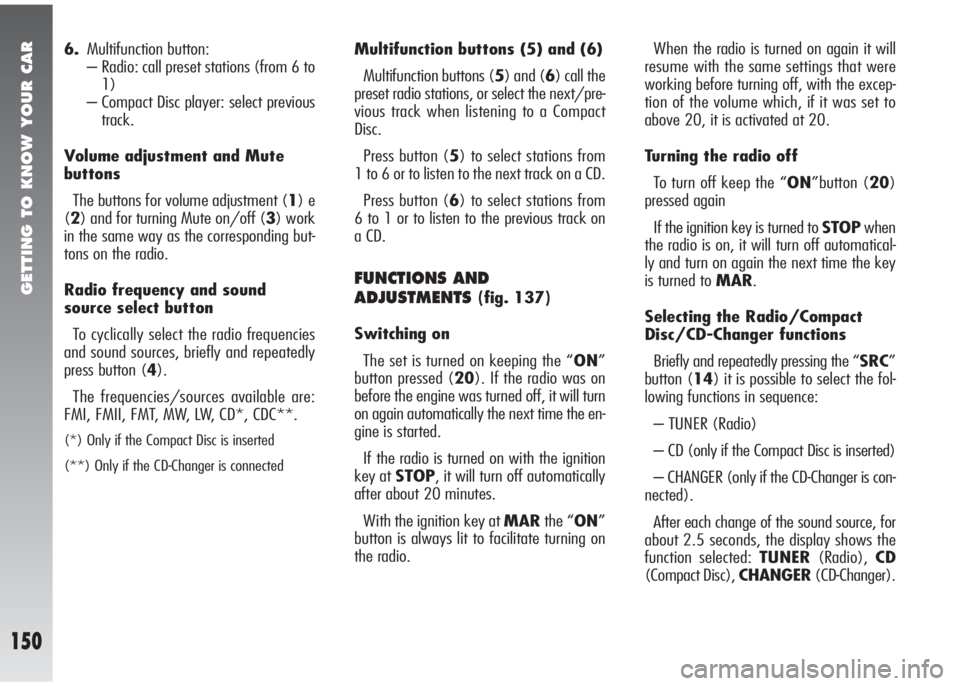
6.Multifunction button:
– Radio: call preset stations (from 6 to
1)
– Compact Disc player: select previous
track.
Volume adjustment and Mute
buttons
The buttons for volume adjustment (1) e
(2) and for turning Mute on/off (3) work
in the same way as the corresponding but-
tons on the radio.
Radio frequency and sound
source select button
To cyclically select the radio frequencies
and sound sources, briefly and repeatedly
press button (4).
The frequencies/sources available are:
FMI, FMII, FMT, MW, LW, CD*, CDC**.
(*) Only if the Compact Disc is inserted
(**) Only if the CD-Changer is connected
Multifunction buttons (5) and (6)
Multifunction buttons (5) and (6) call the
preset radio stations, or select the next/pre-
vious track when listening to a Compact
Disc.
Press button (5) to select stations from
1 to 6 or to listen to the next track on a CD.
Press button (6) to select stations from
6 to 1 or to listen to the previous track on
a CD.
FUNCTIONS AND
ADJUSTMENTS
(fig. 137)
Switching on
The set is turned on keeping the “ON”
button pressed (20). If the radio was on
before the engine was turned off, it will turn
on again automatically the next time the en-
gine is started.
If the radio is turned on with the ignition
key at STOP, it will turn off automatically
after about 20 minutes.
With the ignition key at MARthe “ON”
button is always lit to facilitate turning on
the radio.When the radio is turned on again it will
resume with the same settings that were
working before turning off, with the excep-
tion of the volume which, if it was set to
above 20, it is activated at 20.
Turning the radio off
To turn off keep the “ON”button (20)
pressed again
If the ignition key is turned to STOPwhen
the radio is on, it will turn off automatical-
ly and turn on again the next time the key
is turned to MAR.
Selecting the Radio/Compact
Disc/CD-Changer functions
Briefly and repeatedly pressing the “SRC”
button (14) it is possible to select the fol-
lowing functions in sequence:
– TUNER (Radio)
– CD (only if the Compact Disc is inserted)
– CHANGER (only if the CD-Changer is con-
nected).
After each change of the sound source, for
about 2.5 seconds, the display shows the
function selected: TUNER(Radio),CD
(Compact Disc), CHANGER(CD-Changer).
Page 154 of 291
GETTING TO KNOW YOUR CAR
152
Soft Mute function
When the Mute function is turned on or
off, the volume lowers or increases gradu-
ally (Soft Mute function). The Soft Mute
function is also activated when one of the
six presetting buttons, the “BN” button
(13) or “ON” button (20) is pressed.
Tone adjustment
Proceed as follows:
– briefly and repeatedly press the “AUD”
button (18) until the display shows the
wording “BASS” or “TREBLE” (Bass or
Treble select function)
– press “
▲” (6) to increase the basses
or trebles or “
▼” (8) to lower them.
Pressing the buttons briefly, the change
is gradual by steps. Pressing them longer,
the change is fast.
For a few seconds the display shows the
levels of the basses/trebles (from -6 to +6).
After about 5 seconds from the last ad-
justment the display returns to the main ra-
dio screen. Balance adjustment
Proceed as follows:
– briefly and repeatedly press the “AUD”
button (18) until the display shows the
wording “BALANCE” (Balance function
select)
– press “
▲” (6) to increase the sound
from the right speakers or “
▼” (8) to in-
crease the sound from the left speakers.
Pressing the buttons briefly, the change
is gradual by steps. Pressing them longer,
the change is fast. For a few seconds the
display shows the balancing levels from R+9
to L+9 (“R” = right, “L” = left). After
about 5 seconds from the last adjustment,
the display returns to the main radio screen.
Fader adjustment
Proceed as follows:
– briefly and repeatedly press the “AUD”
button (18) until the display shows the
wording “FADER” (Fader select function)
– press “
▲” (6) to increase the sound
from the rear speakers or “
▼” (8) to in-
crease the sound from the front speakers.Pressing the buttons briefly the change is
gradual by steps. Pressing them longer, the
change is fast. For a few seconds the dis-
play shows the fader levels from R+9 to
F+9 (“R” = rear, “F” = front).
After about 5 seconds from the last ad-
justment the display returns to the main ra-
dio screen.
Loudness Function
(except versions with
BOSE HI-FI system)
The Loudness function improves the sound
volume when listening at low level, in-
creasing the basses and trebles. It is cut off
when the volume is set to maximum. To
switch the function on/off keep the “AUD”
(18) pressed until hearing the “beep”. The
function condition (on or off) is shown on
the display for a few seconds by “LOUD
ON” or “LOUD OFF”.
On versions with BOSE HI-FI system the
Loudness function is activated automatical-
ly by the amplifier.
Page 156 of 291
GETTING TO KNOW YOUR CAR
154
Presetting buttons
The buttons with the symbols 1 to 6
(“17”, “16”, “15”, “12”, “11”,
“10”) make it possible to choose the fol-
lowing presettings:
– 18 in the FM band (6 in FM1, 6 in
FM2, 6 in FMT)
– 6 in the MW band
– 6 in the LW band
– 6 types of PTY programming (only in
the FM mode when PTY is selected).
To call a preset station, choose the required
frequency band and then press briefly (less
than 1 second) the corresponding preset but-
ton (from 1 to 6). For a few seconds the
display will show the number of the station
preset and the related frequency before
showing the frequency band and the name
of the RDS station.
Storing the last station heard
The radio automatically keeps in storage
the last station heard for each reception
band, which is then tuned when the radio is
turned on or the reception band is changed.Automatic tuning
Briefly press (less than 1 second) “
▲”
(6) or “
▼” (8) to start automatically
searching the tuning for the next station that
it is possible to receive in the direction cho-
sen.
if “
▲” (6) or “▼” (8) is pressed for
longer (over 1 second) quick searching
takes place: upon having tuned in to the first
well receivable station, the tuner stops for
about 1 second (in Mute) before quick
searching continues. When the button is re-
leased, the tuner stops on the next receiv-
able station.
If the TA function is on (traffic information),
the tuner only searches stations which broad-
cast traffic bulletins.
If the PTY function is on, the tuner only
searches PTY stations. When searching the
display alternatively shows the type of pro-
gramme and the word “SEARCH”.
If the station on which the tuner stops is
one of the stations stored with the preset
buttons, the display will show the presetting
number for a few seconds.Manual tuning
This allows manual station searching in the
chosen band.
– Select the band with the “BN” button
(13): FM1, FM2, FMT, MW or LW.
– Briefly and repeatedly press “¯¯” (4)
or “
˙˙” (7).
– Pressing the button longer (over 1 sec-
ond) obtains fast forward searching , which
is stopped when the button is released.
To turn on manual tuning search it is nec-
essary to turn off the PTY and AF (alterna-
tive frequencies) functions, if on.
If the station tuned is a station stored with
the preset buttons, the display will show the
presetting number for a few seconds.