engine Alfa Romeo Brera/Spider 2008 Owner handbook (in English)
[x] Cancel search | Manufacturer: ALFA ROMEO, Model Year: 2008, Model line: Brera/Spider, Model: Alfa Romeo Brera/Spider 2008Pages: 270, PDF Size: 3.93 MB
Page 24 of 270
23
SAFETY
DEVICES
WARNING
LIGHTS AND
MESSAGES
IN AN
EMERGENCY
CAR
MAINTENANCE
TECHNICAL
SPECIFICATIONS
INDEX
DASHBOARD
AND
CONTROLS
CORRECT USE
OF THE CAR
IMPORTANTUnder certain conditions
(heavy slopes, for instance), the reading
on the gauge may differ from the actual
amount of fuel in the tank and changes
in level may be indicated late. This con-
dition falls within the regular operating log-
ics of the fuel gauge.The turning on of the warning light u
(together with a message on the dis-
play) indicates that the coolant fluid
temperature is too high; in this case,
stop the engine and contact Alfa Romeo
Authorized Services.
IMPORTANTThe temperature of the
engine coolant may rise towards the
maximum values (red sector) when the
car is driven at low speeds, uphill, fully
laden or during towing, especially if the
ambient temperature is high.
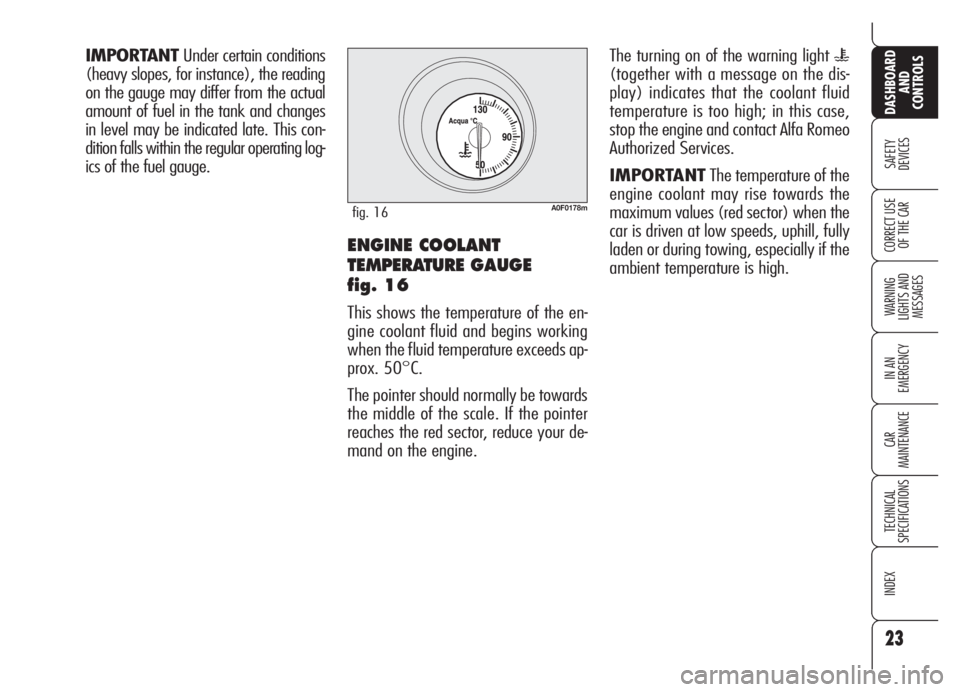
A0F0178mfig. 16
ENGINE COOLANT
TEMPERATURE GAUGE
fig. 16
This shows the temperature of the en-
gine coolant fluid and begins working
when the fluid temperature exceeds ap-
prox. 50°C.
The pointer should normally be towards
the middle of the scale. If the pointer
reaches the red sector, reduce your de-
mand on the engine.
Page 25 of 270
24
SAFETY
DEVICES
WARNING
LIGHTS AND
MESSAGES
IN AN
EMERGENCY
CAR
MAINTENANCE
TECHNICAL
SPECIFICATIONS
INDEX
DASHBOARD
AND
CONTROLS
CORRECT USE
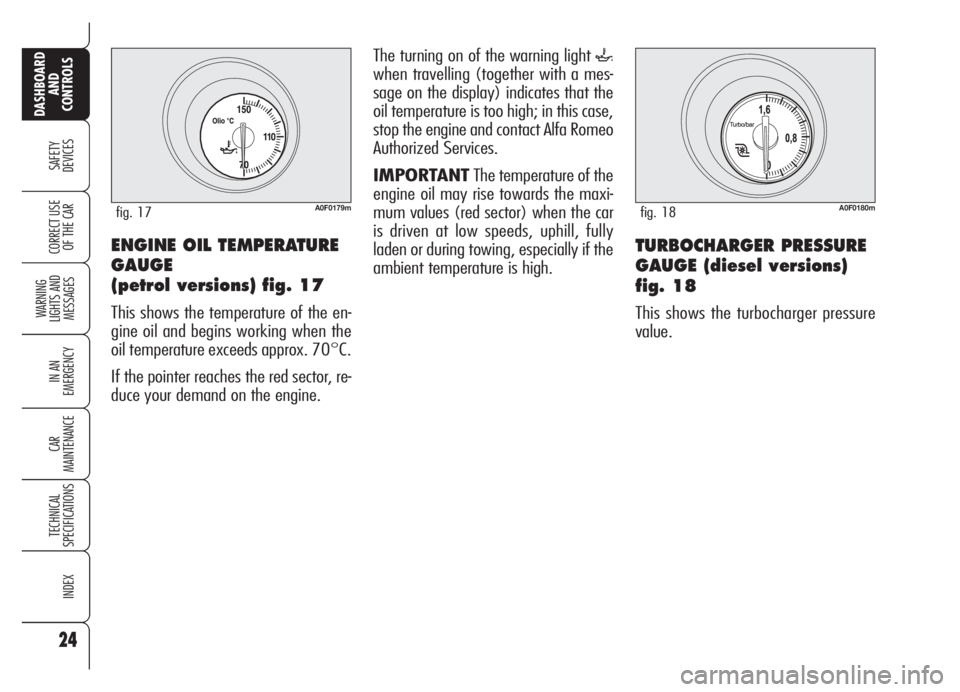
OF THE CARENGINE OIL TEMPERATURE
GAUGE
(petrol versions) fig. 17
This shows the temperature of the en-
gine oil and begins working when the
oil temperature exceeds approx. 70°C.
If the pointer reaches the red sector, re-
duce your demand on the engine.
A0F0179mfig. 17
The turning on of the warning light `
when travelling (together with a mes-
sage on the display) indicates that the
oil temperature is too high; in this case,
stop the engine and contact Alfa Romeo
Authorized Services.
IMPORTANTThe temperature of the
engine oil may rise towards the maxi-
mum values (red sector) when the car
is driven at low speeds, uphill, fully
laden or during towing, especially if the
ambient temperature is high.
A0F0180mfig. 18
TURBOCHARGER PRESSURE
GAUGE (diesel versions)
fig. 18
This shows the turbocharger pressure
value.
Page 26 of 270
25
SAFETY
DEVICES
WARNING
LIGHTS AND
MESSAGES
IN AN
EMERGENCY
CAR
MAINTENANCE
TECHNICAL
SPECIFICATIONS
INDEX
DASHBOARD
AND
CONTROLS
CORRECT USE
OF THE CAR
AUTOMATIC INSTRUMENT
PANEL LIGHT DIMMER
To give max. visibility and comfort un-
der whatever driving conditions (e.g.:
lights on in daylight, tunnels, etc…), the
speedometer is fitted with a sensor for
adjusting automatically, after fitting the
electronic key into the ignition device and
pressing button START/STOP, the
light intensity of the instrument panel dis-
play, sound system display, climate con-
trol system display, radionavigation sys-
tem display (where provided), and in-
struments (i.e.: fuel level gauge, engine
oil temperature gauge for petrol versions
or turbocharger pressure gauge for diesel
versions, and engine coolant temperature
gauge).
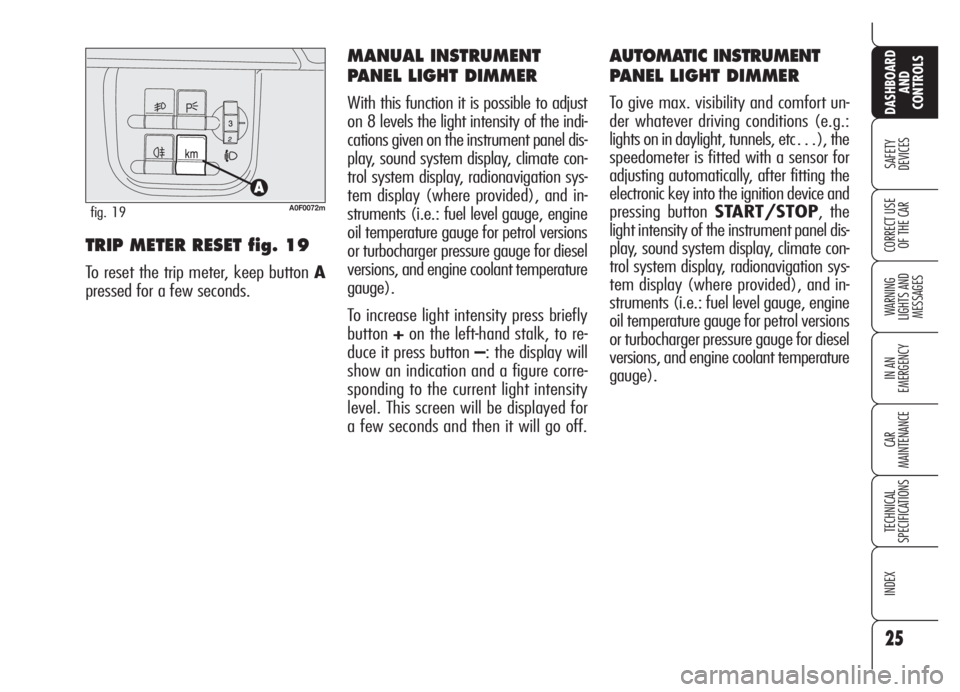
TRIP METER RESET fig. 19
To reset the trip meter, keep button A
pressed for a few seconds.
MANUAL INSTRUMENT
PANEL LIGHT DIMMER
With this function it is possible to adjust
on 8 levels the light intensity of the indi-
cations given on the instrument panel dis-
play, sound system display, climate con-
trol system display, radionavigation sys-
tem display (where provided), and in-
struments (i.e.: fuel level gauge, engine
oil temperature gauge for petrol versions
or turbocharger pressure gauge for diesel
versions, and engine coolant temperature
gauge).
To increase light intensity press briefly
button+on the left-hand stalk, to re-
duce it press button –: the display will
show an indication and a figure corre-
sponding to the current light intensity
level. This screen will be displayed for
a few seconds and then it will go off.
A0F0072mfig. 19
Page 27 of 270
26
SAFETY
DEVICES
WARNING
LIGHTS AND
MESSAGES
IN AN
EMERGENCY
CAR
MAINTENANCE
TECHNICAL
SPECIFICATIONS
INDEX
DASHBOARD
AND
CONTROLS
CORRECT USE
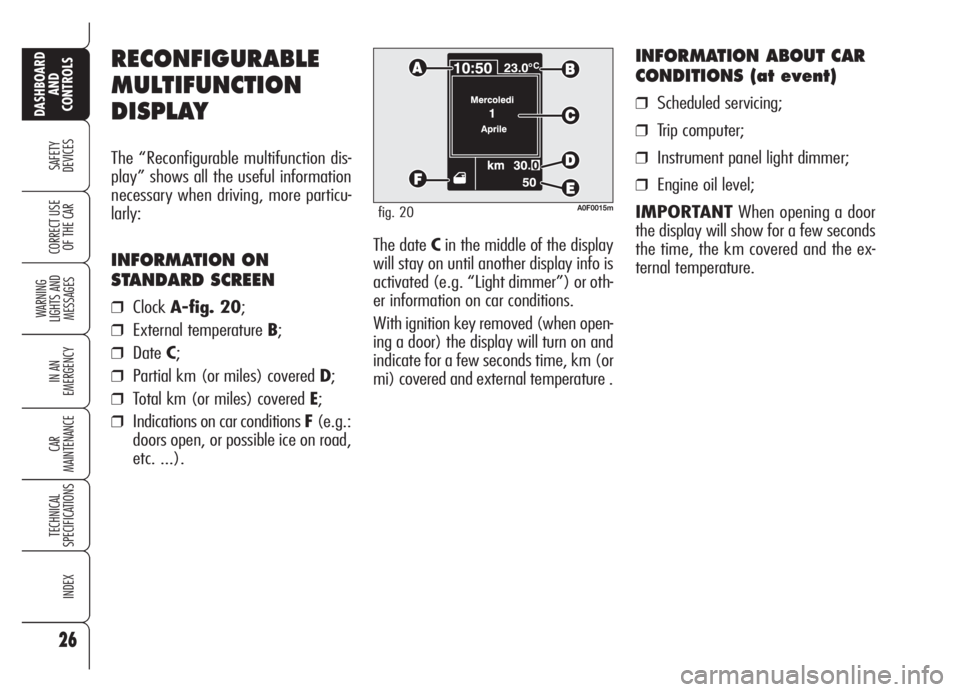
OF THE CARThe date Cin the middle of the display
will stay on until another display info is
activated (e.g. “Light dimmer”) or oth-
er information on car conditions.
With ignition key removed (when open-
ing a door) the display will turn on and
indicate for a few seconds time, km (or
mi) covered and external temperature .
INFORMATION ABOUT CAR
CONDITIONS (at event)
❒Scheduled servicing;
❒Trip computer;
❒Instrument panel light dimmer;
❒Engine oil level;
IMPORTANTWhen opening a door
the display will show for a few seconds
the time, the km covered and the ex-
ternal temperature.
RECONFIGURABLE
MULTIFUNCTION
DISPLAY
The “Reconfigurable multifunction dis-
play” shows all the useful information
necessary when driving, more particu-
larly:
INFORMATION ON
STANDARD SCREEN
❒ClockA-fig. 20;
❒External temperature B;
❒DateC;
❒Partial km (or miles) covered D;
❒Total km (or miles) covered E;
❒Indications on car conditions F(e.g.:
doors open, or possible ice on road,
etc. ...).
A0F0015mfig. 20
Page 29 of 270
28
SAFETY
DEVICES
WARNING
LIGHTS AND
MESSAGES
IN AN
EMERGENCY
CAR
MAINTENANCE
TECHNICAL
SPECIFICATIONS
INDEX
DASHBOARD
AND
CONTROLS
CORRECT USE
OF THE CAR
Selecting “Date” and “Clock”:
❒briefly press button MENUto select
the first value to change (e.g. hours
/minutes or year /month /day);
❒operate buttons +or–(by single
press) to select the new setting;
❒briefly press button MENUto store
new setting and go back to the pre-
viously selected option of the main
menu, if this is the last one you will
go back to the previously selected
option of the main menu.
ENGINE OIL
LEVEL INDICATION
Fitting the electronic key into the igni-
tion device, the display will show for a
few seconds the engine oil level. At this
stage, to clear this indication and to go
to next screen, press button MENU.
Low/excessive oil level will be indicat-
ed by a dedicated warning message on
the display.
IMPORTANT Check the proper en-
gine oil level on the dipstick (see para-
graph “Checking levels” in section “Car
maintenance”).
IMPORTANTProper engine oil level
shall be checked with the car on level
ground.
IMPORTANTFor proper oil level in-
dication, after fitting the key, wait for
about 2 seconds before starting the en-
gine.
IMPORTANTEngine oil level could in-
crease after a long stop. Selecting an option of the main
menu with submenu:❒briefly press button MENUto dis-
play the first submenu option;
❒operate buttons +or–(by single
press) to scroll all submenu options;
❒briefly press button MENUto select
the displayed submenu option and
to enter the corresponding setup
menu;
❒ operate buttons +or–(by single
press) to select the new setting of this
submenu option;
❒ briefly press button MENUto store
the new setting and go back to the
previously selected submenu option.
Page 39 of 270
38
SAFETY
DEVICES
WARNING
LIGHTS AND
MESSAGES
IN AN
EMERGENCY
CAR
MAINTENANCE
TECHNICAL
SPECIFICATIONS
INDEX
DASHBOARD
AND
CONTROLS
CORRECT USE
OF THE CAR
Values displayed
Average consumption
Represents the indicative average of con-
sumptions from the beginning of the
new mission.
Current consumption
This value shows instant fuel consump-
tion (this value is updated second by
second). If parking the car with engine
on, the display will show “- - - -”.
Average speed
This value shows the car average speed
as a function of the overall time elapsed
since the start of the new mission.
Travel time
This value shows the time elapsed since
the start of the new mission (driving
time).Range
This value shows the distance in km (or
mi) that the car can still cover before
needing fuel, assuming that driving con-
ditions are kept unvaried.
The display will show “- - - -“ in the fol-
lowing cases:
❒value lower than 50 km (or 30 mi);
❒car left parked with engine running
for long.
IMPORTANTThe variation of the au-
tonomy value can be influenced by dif-
ferent factors: driving style (see what is
described in paragraph “Driving style”
in the chapter “Correct use of the car”),
type of route (highways, urban, moun-
tain, etc…), use conditions of the car
(load transported, tire pressure, etc…).
What was described previously must be
taken in consideration when planning
a trip.
Travel Distance
This value shows the distance covered
from the start of the new mission.
Each time the battery is connected and
each time a new mission is started (re-
set), the display will show “0.0”. The “General Trip” displays the figures
relating to:
❒Average consumption
❒Current consumption
❒Average speed
❒Travel time
❒Range
❒Travel Distance
“Trip B” displays information concern-
ing :
❒Travel Distance B
❒Average consumption B
❒Average speed B
❒Travel time B.
Page 53 of 270
52
SAFETY
DEVICES
WARNING
LIGHTS AND
MESSAGES
IN AN
EMERGENCY
CAR
MAINTENANCE
TECHNICAL
SPECIFICATIONS
INDEX
DASHBOARD
AND
CONTROLS
CORRECT USE
OF THE CAR
QUICK WINDSCREEN
AND FRONT SIDE WINDOW
DEMISTING/DEFROSTING
(MAX-DEF function)
To turn this function on press button -
: the button leds -,√and(will turn
on. To turn this function off press again
button
-the button led will turn off.
After demisting/defrosting, turn this
function off to keep perfect comfort con-
ditions.
Window demisting
Climate control system
√is very use-
ful to speed up window demisting and
it is therefore to be turned on in the
event of considerable moisture. In any
case it is recommended to perform the
following preventive demisting proce-
dure:
❒turn air recirculation off (if on);
❒turn knob Cto second speed;
❒turn knob BtoQ.
HEATED REAR WINDOW
AND DOOR MIRROR
DEMISTING/DEFROSTING
To turn this function on press button (
the button led will turn on. To turn this
function off press again button .
On certain versions, turning this function
on will also activate windscreen de-
frosting in the windscreen wiper area.
This function is timed and switches off
automatically after few minutes, or by
pressing again the button or by turning
the engine off. It will not be switched
on automatically when restarting the en-
gine.
IMPORTANTDo not apply stickers on
the inside of the heated rear window
over the heating filaments to avoid dam-
age that might cause it to stop work-
ing properly.
WARMING THE PASSENGER
COMPARTMENT
Proceed as follows:
❒turn knob Ato the required tem-
perature;
❒turn knob Cto the required speed;
❒turn knob Bto the required distrib-
ution:
N: to warm the feet of front and rear
passengers;
M: to warm the feet and keep the face
cool (bilevel function);
Q: to warm the feet and at the same
time demist the windscreen;
❒turn air recirculation off (if on).
Page 58 of 270
57
SAFETY
DEVICES
WARNING
LIGHTS AND
MESSAGES
IN AN
EMERGENCY
CAR
MAINTENANCE
TECHNICAL
SPECIFICATIONS
INDEX
DASHBOARD
AND
CONTROLS
CORRECT USE
OF THE CAR
LO function (LOW)
(highest cooling power)
It is switched on by setting a tempera-
ture lower than 16°C on the display;
this setting is shown on the display. This
function can be switched on when you
wish to cool the passenger compartment
as quickly as possible, by taking the
greatest advantage from the system po-
tential.
The function cuts off air heating, switch-
es on both internal air recirculation (to
prevent hot air from entering the com-
partment) and the climate control com-
pressor, brings air distribution to
¯/˙
and the fan speed is controlled auto-
matically by the system. With the function switched on, howev-
er, all the manual settings can be made.
To switch the function off, you only need
to turn the ring of knob B/Eof the tem-
perature set to a value greater than
16°C; the opposite display will show
16°C.
Pressing button AUTO, the display will
show a temperature of 16°C and re-
turns to an operating condition with au-
tomatic temperature adjustment. This function should not be ac-
tivated when the engine is cold,
to prevent air not warm enough
from entering the passenger
compartment.
With the function switched on, howev-
er, all the manual settings can be made.
To switch the function off, you only need
to turn the ring of knob (BorE) of the
temperature set to a value lower than
32°C; the opposite display will show
32°C.
Pressing button AUTO, the display will
show a temperature of 32°C and re-
turns to an operating condition with au-
tomatic temperature adjustment.
Page 59 of 270
58
SAFETY
DEVICES
WARNING
LIGHTS AND
MESSAGES
IN AN
EMERGENCY
CAR
MAINTENANCE
TECHNICAL
SPECIFICATIONS
INDEX
DASHBOARD
AND
CONTROLS
CORRECT USE
OF THE CAR
FAN SPEED ADJUSTMENT
Press buttons +/–to increase or to de-
crease the fan speed.
The fan speed is shown by the lit bars on
the display:
❒min fan speed = one bar lit;
❒max fan speed = 6 bars lit;
At starting, if climate control system is
operating in automatic mode, the fan
speed is kept at minimum until the en-
gine has started.
With compressor on and engine running,
the fan speed cannot fall below the min.
speed.
The fan can be cut off (all bars off) on-
ly if the climate control compressor has
been switched off by pressing button
√.
To restore automatic fan speed control
after a manual adjustment, press but-
tons AUTO. AUTO will also go off if the system (spe-
cially when compressor is turned off
manually) cannot reach or cannot keep
the required temperature.
Button
√will not turn off AUTO if the
system can keep the required comfort.
It is inadvisable to use
air recirculation on
rainy/cold days as it would
considerably increase the pos-
sibility of windows misting up
inside.
WARNING
AUTOMATIC OPERATION
(AUTO BUTTON)
Pressing button AUTO, the display will
show a temperature of 16°C and re-
turns to an operating condition with au-
tomatic temperature adjustment:
❒fan speed;
❒air distribution in passenger com-
partment;
❒air recirculation;
❒compressor;
and it will cancel all the previous man-
ual adjustments.
Wording FULL will disappear from the
display of the involved area (driver or
front passenger side) when performing
whatever operation (excluding temper-
ature change.
Page 60 of 270
59
SAFETY
DEVICES
WARNING
LIGHTS AND
MESSAGES
IN AN
EMERGENCY
CAR
MAINTENANCE
TECHNICAL
SPECIFICATIONS
INDEX
DASHBOARD
AND
CONTROLS
CORRECT USE
OF THE CAR
The MAX-DEF function activates the fol-
lowing operations:
❒rear panel turning off (where pro-
vided);
❒air flow increase;
❒air distribution at DEF;
❒outside air intake;
❒compressor activation;
❒AQS function deactivation (where
provided)
❒rear window heating activation.
When the MAX-DEF function is on, the
only manual operations possible are
manual adjustment of the fan speed and
switching heated rear window off.IMPORTANTIf the engine is not
warm enough, the function will not en-
gage the predefined fan speed imme-
diately, to limit the flow to the passen-
ger compartment of air that is not warm
enough to demist the windows.
Pressing again one of the following but-
tons:
v,√, AUTO, MONO or -the
system switches off the MAX-DEF func-
tion, resuming the system operating
conditions prior to turning it on, in ad-
dition to activating the last function re-
quired, if any.
IMPORTANTDo not activate the
MAX-DEF function with the engine off to
prevent running down the battery.
QUICK FRONT WINDOW
DEMISTING/DEFROSTING
(MAX-DEF function)
Pressing button -the climate control
automatically activates timed operation
of all the functions required to quicken
demisting/defrosting of the windscreen
and front side windows and, on certain
versions, windscreen demisting in the
windscreen wiper area.
The MAX-DEF can be turned on also with
engine off. When this function is on the
circular led around the button will turn
on.