ESP AUDI A3 2015 User Guide
[x] Cancel search | Manufacturer: AUDI, Model Year: 2015, Model line: A3, Model: AUDI A3 2015Pages: 288, PDF Size: 71.46 MB
Page 54 of 288
52 Seat s a nd s tor ag e
Seats and storage
General information
Important information
& WARNING
Refer to the chapter Driving Safely
r::!>poge 121, Driving safety for important
information, t ips, suggestions and warn
ings that you should read and follow for
your own safety and the safety of your pas sengers.
Why is your seat adjustment so important?
The safety belts and the airbag system con
only provide maximum protection if the front
seats ore correctly adjusted.
There are various ways of adjusting the front
seats to provide safe and comfortable support
for the driver and the front passenger. Adjust
your seat properly so that :
- you can easily and quickly reach all the
switches and controls in the instrument
panel
- your body is properly supported thus reduc
ing physical stress and fatigue
- the safety belts and airbag system can offer
maximum protection
r::!> page 140.
In the following sections, you will see exactly
how you can best adjust your seats .
There are special regulations and instructions
for insta lling a child seat on the front pas
senger's seat. Always follow the information regarding child safety provided in
r::!> page 166, Child Safety .
& WARNING
Incorrect seating position of the dr iver and
all other passengers can result in serious
personal in jury.
- Always keep your feet on the f loor when
the vehicle is in motion - never p ut your
feet on top of the instrumen t panel, out of the window or on top of the seat c
ush
ion. This applies espec ially to the passen
gers. If your seating position is incorrect,
you increase the risk of injury in the case
of sudden braking or an accident .
If the
airbag inflates and the seating position is incorrect, this could result in pe rsonal
inj ury or even death.
- It is important for both the drive r and
front passenger to keep a distance of at least 10 inches ( 25 cm) between them
selves and the steering wheel and/or in
strument panel. If you're sitting any
closer than this, the airbag system can not protect you properly. In addition, the
front seats and head restraints must be
adjusted to your body height so that they
can give you max imum protect ion.
- Always try to keep as much distance as
possible between yourself and the steer
ing wheel o r instrument panel.
- Do not adjust the driver's or front pas
senger's seat whi le the vehicle is moving.
Your seat may move unexpectedly, caus
ing sudden loss of veh icle cont ro l and
pe rsonal injury. If you adjust yo ur seat
while the veh icle is moving, yo u are ou t
of posit ion .
Driver's seat
The correct seat position is important for safe
and relaxed driving.
We recommend that you adjust the dr iver's
seat in the fo llow ing manne r:
.. Adjust the seat in fore and aft direction so
that you can easily push the peda ls to the
floor wh ile keeping your knees sl ightly bent
r::!> &. in Why is your seat adjustment so im
portant? on page 52.
.. Ad just the bac krest so tha t when you sit
w ith your back against the backrest, you can
still hold the top of the steering wheel.
.. For adjustab le head restraints: adjust the
head restra int so the upper edge is as even
as poss ible with the top of your head. If that
is not possible, try to adjust the head ..,.
Page 60 of 288
58 Seats and storage
Glove compartment
Fig. 52 Glove compa rt m en t
Open ing /closing
,,. To open the glove compartment, pull the
handle in the direct ion of the arrow.
,,. To close the glove compartment, swing the
lid upward until it clicks into place .
The glove compartment can be locked using
the vehicle key.
A WARNING
Always leave the lid on the glove compart ment cover closed while driving to reduce
the risk of in ju ry .
Additional storage compartments
There are add itiona l storage compartments,
compartments and holders at other locations
in the vehicle :
- In the upper part of the glove compart
ment .
- In the center console under the center arm rest* .
- On the back of the right front seat. The com
partment can hold a max i mum weight of 2
lbs (1 kg) .
- Garment hooks on the B -pillar
c:> A .
A WARNING
-Always remove objects from the instru
me nt pane l. Any items not stored could
s li de aro und inside the vehicle while driv
ing or when accelerating or when apply
ing the brakes or when driving a round a
corner .
-
-When you are dr iving make sure that
anyth ing you may have placed in the cen
ter conso le or other storage locations
cannot fall out into the footwells . In case
of sudden braking you would not be able
to b rake or accele rate .
- A ny articles of clothing that you have
hung up m ust not interfere with the dr iv
e r's vi ew. The coat hooks are des igned
only for lightweight cloth ing. Neve r hang
a ny cloth ing wi th hard, pointed o r heavy
objects in the pockets on the coat hooks.
During s udden braking or in an accident -
especia lly if the airbag is deployed -
these objects cou ld injure any passen
gers inside the vehicle.
- To reduce the risk of persona l in ju ry in an
accident or s udden stop, always keep the
g love compartment closed wh ile driving.
- Read and follow all WARNINGS
<=> page 161, Important safety instruc
tions on the side airbag system.
- Hang clothes in such a way that they do
not impair the driver's vision.
- The coat hooks must on ly be used for
lightweight clothing. Do not leave any heavy or sharp edged objects in the pock
ets which may interfere w ith the s ide cur
tain airbag deployment and can cause
pe rsonal injury in a crash .
- Do not use coat hange rs fo r hanging
cloth ing o n the coat hooks as th is can in
terfere w ith prope r deployment of the
side curt ain air bags in an a cciden t.
- Do not hang heavy objects on the coat
hooks, as they could cause pe rsonal in
jury in a sud den stop.
- For strength-re lated reasons, the mount
i n g hooks ca n only be used to secure ob
jects weigh ing up to 10 lb . (5 kg) . Heavi
er objects will not be adequate ly sec ured
- there is a risk of injury.
Page 63 of 288
-Always store objects in the luggage com
partment and use suitable straps, partic
ularly with heavy objects.
- When you transport heavy objects, al
ways remember that a change in the cen
ter of gravity may result in a change in
the vehicle's handling characteristics .
- Follow all warnings
q page 121, Driving
safety.
(D Tips
The tire pressure must be adjusted to the
load -see the tire pressure sticker located
on the driver's side B-pillar.
General information
_& WARNING
Refer to the chapter Driving Safely
qpage 121, Driving safety for important
information, tips, s uggestions and warn
ings that you should read and fo llow for
your own safety and the safety of your pas sengers.
Increasing the size of the luggage
compartment
The rear seat backrests can be folded forward
either separately or together .
Fig. 55 Backrest: release lever (left sid e, e)(ample)
Folding the backrest forward
.,. Push the corresponding head restraint
downward
¢ page 55 .
.,. Press the release lever @in the d irection of
the arrow .
.,. Fold the backrest forward.
Seats and storage 61
Folding the backrest back into the upright
position
.,. Fold the backrest down until it latches se
curely
q _&. . When you can no longer see
the red mark on the pin @, the seat is latch
ed.
A WARNING
-- The backrest must be securely latched
for the safety belt in the center seat to
function correctly. -
-The backrest must be securely latched so
objects cannot slide forward out of the
luggage compartment during sudden
braking .
- Always check whether the latch is fully
engaged by pulling the seatback for
ward .
- Never allow safety belts to become dam
aged by being caught in door or seat
hardware .
- Torn or frayed safety belts can tear and
damaged be lt hardware can break in a
crash. Inspect the belts periodically.
Belts showing damage to webbing, bind
ings, buck les, or retractors must be re
placed.
(D Note
- If you move the front seat back when the
rear seat backrest is folded forward, you
cou ld damage the head restraints on the
rear seat. If necessary, remove the rear
seat head restraint before moving the
front seat back
- Make sure the safety belt is not pinched
in the backrest lock and damaged when
the rear seat backrest if folded back.
Other objects should be removed from
the rear bench seat to protect the back
rest from damage.
Page 66 of 288
64 Warm and cold
Warm and cold
Climate control system
Description
Different systems cou ld be installed.
- manual climate control system* or
- automatic climate control system*
The
clim ate co ntrol system * cools and re
moves humidity from the air in the vehicle in
terior. It is the most effective when the win
dows and panorama sunroof* are closed. If
there is a build-up of heat inside the vehicle,
ventilation can help to speed up the cooling process . For this reason, the windows and
panorama sunroof can be opened from the
outside
r::} page 3 9, Convenience opening/
closing.
The pollutant filter removes pollutants such
as dust and pollen from the air .
A WARNING
Reduced visibility is dangerous and can
cause accidents.
-
- For safe dr iv ing it is very important that
all windows be free of ice, snow and con
densation.
- Completely fami liarize yourself with the
proper use and function of the heating
and ventilation system and especia lly
how to defog and defrost the windows .
- Never use the windshie ld w iper/w asher
system in freezing weather until you
have warmed the windshield first, using
the heat ing and ventilation system . The washer sol
ution may freeze on the wind
shie ld and reduce visib ility.
@ Note
- If you suspect that the air conditioner
has been damaged, switch the system
off to avoid further damage and have it
inspected by a q ualified dealership.
- Repairs to the Audi air conditioner re
quire specia l technical know ledge and
special tools. Contact an authorized Aud i
dealer for ass istance.
@ For the sake of the environment
By reducing the amount of f uel you use,
you also reduce the amount of pollutants
emitted into the air.
(1) Tips
- To prevent interference with the heat ing
and cooling output and to prevent the
w indows from fogging over, the air in
take in front of the windshield must be
free of ice, snow or leaves.
- Condensation from the cooling system*
can drip a nd form a puddle of wa ter un
der the vehicle . This is normal and does
not mean t here is a leak.
- The energy ma nagement system may
switch the seat h eating* or rear window
defroster off temporar ily. These systems
are available again as soon as the energy
balance has been resto red.
- Air escapes through vents under the rear
w indow. When plac ing items of cloth ing
on the luggage compartmen t cover, en
sure t hat the openings are not covered .
Page 79 of 288
& WARNING
-Do not press the accelerator pedal inad
vertently when the vehicle is stationary and the engine is running and a gear is
selected. Otherwise the vehicle will start
to move immediately and could result in
a crash.
- If the power supply fails, the released
parking brake can no longer engage. In
this case, park the vehicle on level ground and secure it by placing these
lector lever in the P position (automatic
transmission). See your authorized Audi dealer or qualified repair facility.
(D Note
If the symbol . in the display or the indi
cator light. (USA models)/ . (Canada
models) in the instrument cluster flashes,
there is a malfunction in the brake system.
Please refer to the detailed description of
the indicator lights¢
page 18.
-If the indicator light . (USA models)/
• (Canada models) or
Ill turns on,
there may be a malfunction in the park
ing brake ¢
page 19.
(D Tips
-You can set the parking brake at any time
-even with the ignition turned
off. To re-
lease the parking brake, the ignition
must be turned on and the brake pedal
must be pressed.
- If driver 's door is opened while the igni
tion is switched on, the parking brake
sets automatically. This prevents unin
tended rolling of the vehicle .
- Occasional noises when the parking
brake is set and released are normal and
are not a cause for concern.
- When the vehicle is parked, the parking
brake goes through a self -test cycle at
regular intervals. Any noises associated
with this are normal.
- If there is a power failure, the parking
brake will not set if it is released, and it
will not release if it is set ¢,&. . See your
Driving 77
authorized Audi dealer or qualified repair
facility.
· Parking
.. Press the brake ped al to stop the vehicle .
.. Pull the switch @ ¢
page 76 , fig . 68 to set
the parking brake.
.. Place the selector lever in the P position .
.. Turn the engine off¢.&_ .
.,. Turn the steering wheel when parking on in
clines so that the wheels will roll into the
curb if the vehicle starts moving.
& WARNING ~ -
-Always take the vehicle key with you
when leaving the vehicle, even for a short period of time. This applies partic
ularly when children remain in the vehi
cle. Otherwise children could start the
engine, release the parking brake or op
erate electrical equipment such as power
windows, which increases the risk of an
accident .
- No one should remain in the vehicle
when it is locked, especially children.
Locked doors make it more difficult for
emergency workers to get into the vehi
cle, which puts lives at risk.
Starting from a stop
The start assist function ensures that the
parking brake is released automatically upon starting.
Stopping and applying the parking brake
.. Pull the switch@¢ page 76, fig . 68 to set
the parking brake.
Starting and automatically releasing the
parking brake
Requirement: The driver's door must be
locked and the driver's safety belt must be
fastened.
.. When you press the accelerator pedal , the
parking brake is automatically released and
your vehicle begins to move.
•
Page 81 of 288
-Starting on inclines in stop-and-go traf
fic: To help prevent the vehicle from roll
ing back when starting, press and hold
the brake pedal for several seconds when
the vehicle is stationary .
(D Tips
You can find out if your vehicle is equipped
with Hill Hold by checking at an authorized
Audi dealer or qualified repair facility .
Speed warning system
Introduction
The speed warning system helps you to stay
under a specified maximum speed.
The speed warning system warns you if you
are exceeding the maximum speed that you
have set. You will hear a warning tone when
your speed exceeds the stored value by ap proximately 3 mph (3 km/h). An indicator
light . (USA models) . (Canada models) in
the instrument cluster display also turns on at
the same time. The indicator light./.
turns
off when the speed decreases below the
stored maximum speed .
Setting a threshold is recommended if you
would like to be reminded when you reach a
certain maximum speed. Situations where you may want to do so include driving in a country
with a general speed limit or if there is a
specified maximum speed for winter tires .
@ Tips
Even though your vehicle is equipped with
a speed warning system, you should still
watch the speedometer to make sure you
are not driving faster than the speed limit.
Setting the threshold
You can set, change and delete the threshold
in the MMI.
"' Select: Systems or Car systems > Driver as
sist> Speed warning .
Driving 79
You can set any threshold between 20 mph (30 km/h) and 150 mph (240 km/h). Settings
can each be adjusted in increments of 6 mph
(10 km/h).
Cruise control system
Description
Applies to vehicles: with cruise control system
The cruise control system makes it possible to
drive at a constant speed starting at 15 mph
(20 km/h).
The speed is kept constant by modifying en
gine power or through an active brake inter
vention.
.&_ WARNING ~
- Always pay attention to the traffic
around you when the cruise control is in
operation. You are always responsible for
your speed and the distance between
your vehicle and other vehicles.
- For reasons of safety, cruise control
should not be used in the city, in stop
and-go traffic, on winding roads and
when road conditions are poor (such as ice, fog, gravel, heavy rain and hydro
planing) -you could have an accident.
- Switch the cruise control
off temporarily
when driving in turning lanes, highway
exits or in construction zones.
- Please note that unconsciously "resting"
your foot on the accelerator pedal pre
vents the cruise control from braking.
This is due to the control system being
overridden by the driver's acceleration.
- If a brake system malfunction such as
overheating occurs when the cruise con
trol system is switched on, the braking
function in the system may be switched
off. The other cruise control functions re
main active as long as the indicator light
II (US models) !l'I (Canadian models)
ison.
~ •
Page 82 of 288
80 Driving
@ Tips
-The cruise control system is idea l for
stretches with speed limits . The driver is
responsible for adhering to the correct
speed.
- The cruise control remains active when
shifting gears.
- The brake lights turn on when the brakes
are activated.
Switching on
Applies to vehicles: with c ruise cont ro l syste m
0
f
~
0
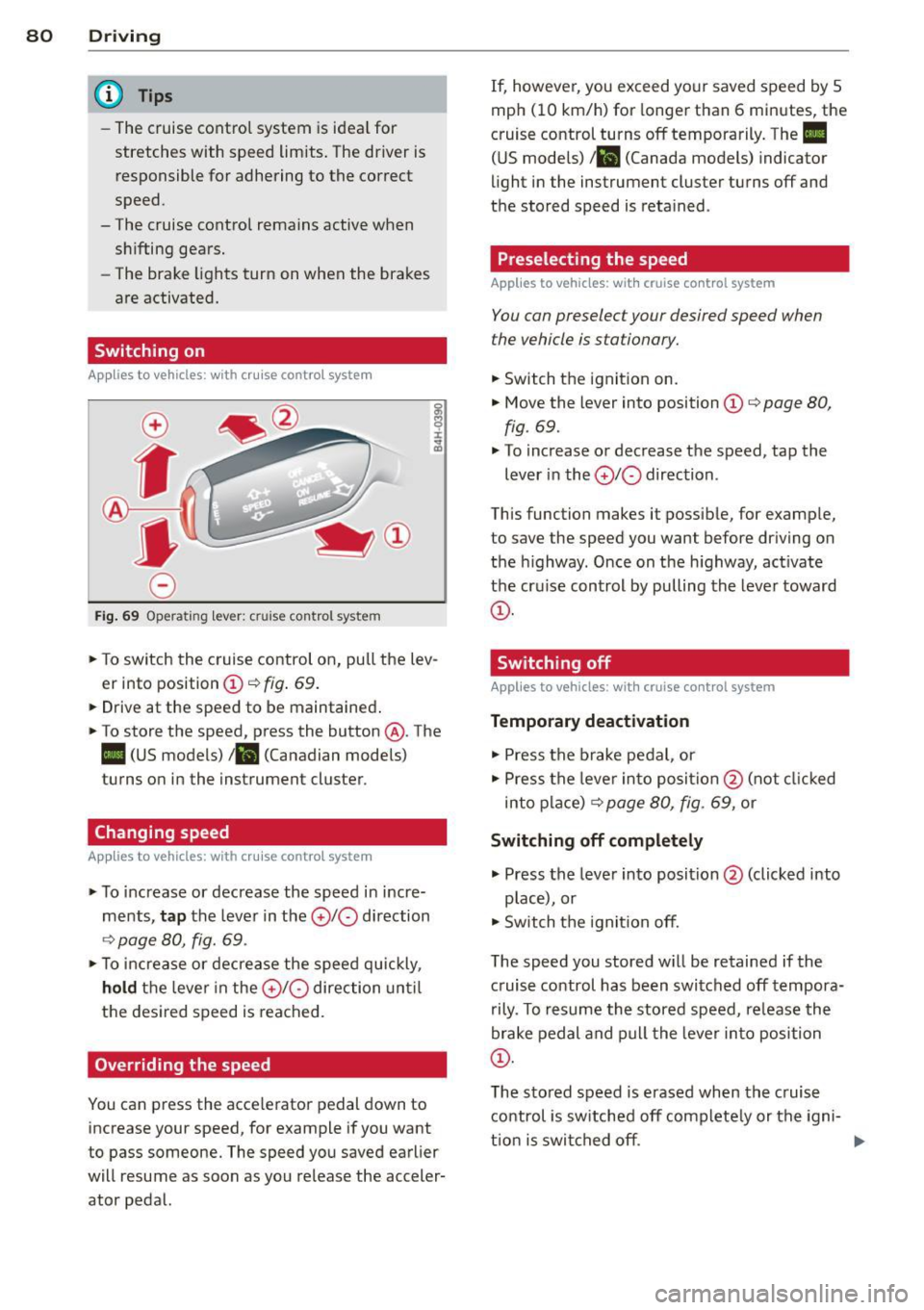
Fig. 69 Operating lever: cruise control system
., To switch the cruise control on, pull the lev
er into position
CD ¢ fig . 69.
... Drive at the speed to be maintained .
., To store the speed, press the button @. The
II (US models) !Bl (Canadian models)
turns on in the instrument cluster.
Changing speed
Applies to vehicles: with cruise contro l syste m
., To increase or decrease the speed in incre
ments,
tap the lever in the 010 direction
¢ page 80, fig. 69 .
., To increase or decrease the speed quickly,
hold the lever in the 010 direction until
the desired speed is reached.
Overriding the speed
You can press the acce lerator pedal down to
increase your speed, for example if you want
to pass someone. The speed you saved earlier
will resume as soon as you release the acceler
ator pedal. If, however, you exceed your saved speed by
5
mph (10 km/h) for longer than 6 minutes, the
cruise control turns off temporarily. The
II
(US models) 1 81 (Canada models) indicator
light in the instrument cluster turns off and
the stored speed is retained .
Preselecting the speed
Applies to vehic les: wit h cruise co ntrol system
You can preselect your desired speed when
the vehicle is stationary.
., Switch the ignit ion on .
., Move the lever into position
CD ¢ page 80,
fig . 69.
., To increase or decrease the speed, tap the
lever in the
010 direction .
This function makes it possible, for example,
to save the speed you want before driving on
the highway . Once on the h ighway, act ivate
the cru ise control by pulling the lever toward
CD -
Switching off
App lies to vehicles: wi th cruise co n trol system
Temporary deactivation
., Press the brake pedal, or
., Press the lever into position @(not clicked
into place)
¢ page 80, fig. 69, or
Switching off completely
., Press the lever into position@(clicked into
p lace), or
., Switch the igni tion off.
The speed you stored w ill be retained if the
c ruise control has been switched off tempora
rily . To resume the stored speed, re lease the
brake pedal and pull the lever into position
CD.
The stored speed is erased when the cruise
control is switched off complete ly or the igni-
t ion is switched off. ..,
Page 84 of 288
82 Audi adaptive cruise control
Audi adaptive cruise
control
Introduction
Ap plies to vehicles: with Audi adaptive cruise co ntrol
The adaptive cruise control system is a combi
nation of speed and distance regulation. It as
sists the driver by both regulating the speed
and maintaining a distance to the object
ahead, within the abilit ies of the system. If
the system detects an object, adaptive cruise
con trol can brake and accelerate your vehicle.
This together with the automatic transmis
sion* makes driving more comfortable both
on long stretches of highway and in stop-and
go traffic.
General Information
General information
A ppl ies to vehicles: with Audi adaptive cruise co ntrol a nd
Audi pre se nse fro nt
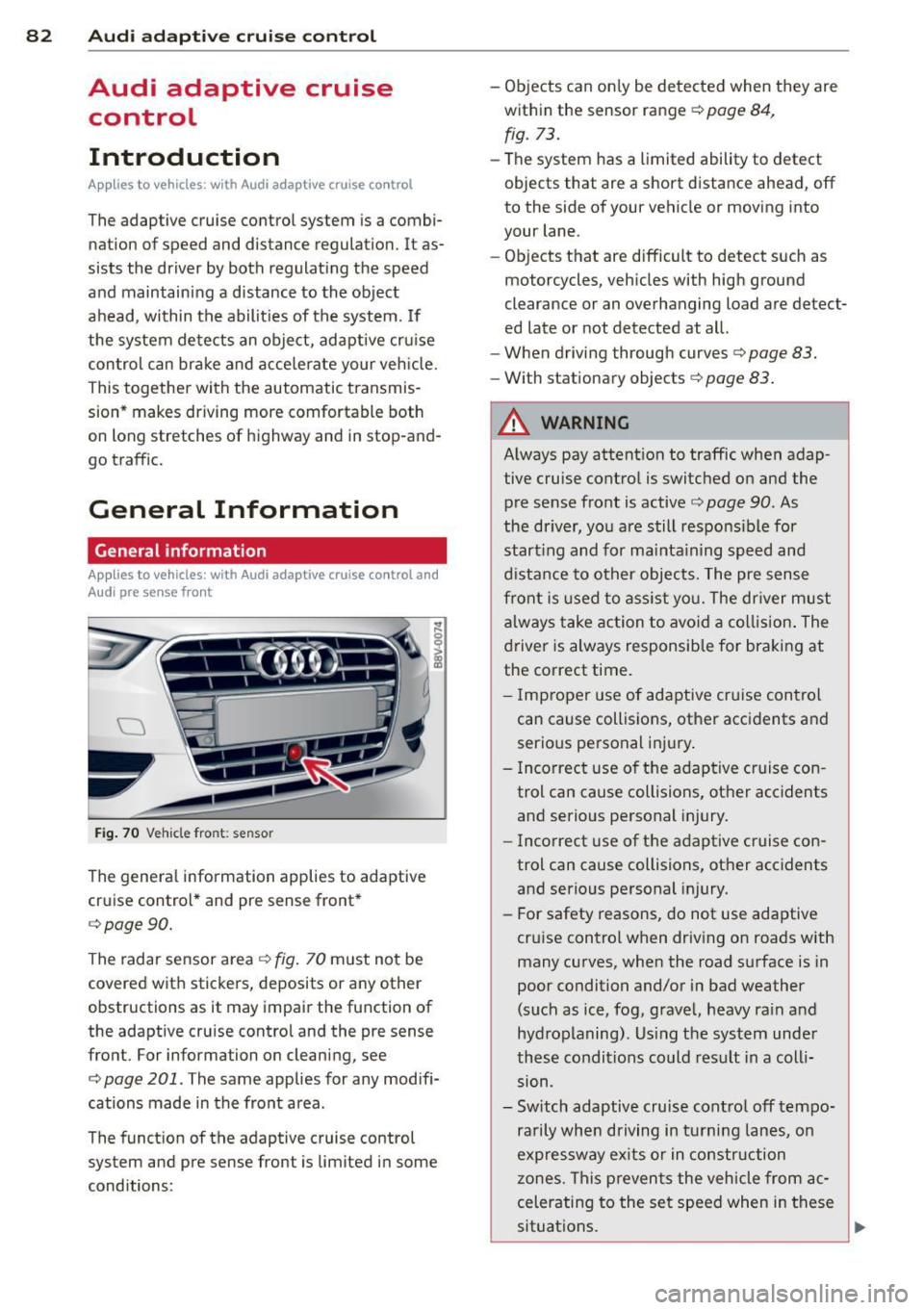
Fig. 70 Vehicle fro nt: sensor
The general information applies to adaptive
cruise control* and pre sense front*
c:>page90.
The radar sensor area c:>fig. 70 must not be
covered with stickers, deposits or any other
obstructions as it may impair the function of
the adaptive cru ise control and the pre sense
front. For information on cleaning, see
c:> page 201 . The same applies for any modifi
cations made in the front area .
The function of the adaptive cruise control
system and pre sense front is limited in some
conditions: -
Objects can only be detected when they are
within the sensor range
c:> page 84,
fig. 73.
-The system has a limited ability to detect
objects that are a short distance ahead, off
to the side of your vehicle or moving into
your lane.
- Objects that are difficult to detect such as
motorcycles, vehicles with high ground
clearance or an overhanging load are detect
ed late or not detected at all.
- When driving through curves
c:> page 83.
-With stationary objects r=;, page 83 .
A WARNING
-
Always pay attent ion to traffic when adap
tive cruise control is switc hed on and the
pre sense front is active
c:> page 90. As
the driver, you are still responsible for
start ing and for maint.;1 ining speed and
distance to other objects. The pre sense
front is used to assist you. The driver must
always take action to avoid a collision. The
driver is always responsible for braking at
the correct time.
- I mp roper use of adaptive cruise con trol
can cause collisions, other accidents and
serio us personal injury.
- Incorrect use of the adaptive cruise con
trol can cause collisions, other acc idents
and serio us personal injury.
- Incorrect use of the adaptive cruise con
trol can cause collisions, other accidents
and serio us personal injury.
- For safety reasons, do not use adaptive
cru ise control when driv ing on roads with
many curves, when the road surface is in
poor condition and/or in bad weather
(such as ice, fog, gravel, heavy ra in and
hydroplaning). Us ing the system under
these conditions could result in a colli
sion .
- Sw itch adaptive cruise contro l off tempo
ra rily when driving in turning lanes, on
expressway ex its or in construction
zones. This preven ts the vehicle from ac
celerating to the set speed when in these
situations .
Page 85 of 288
-The adaptive cr uise control system will
not brake by itself if you put your foot on
the accelerator pedal. Doing so can over
ride the speed and d istance regulation .
- When approaching stationary objects
such as stopped traffic, adaptive cruise
control will not respond and pre sense
front will have lim ited function.
- The adaptive cru ise control system and
pre sense front do not react to people,
animals, objects cross ing the road or on
coming objects.
- The function of the rada r senso rs can be
affected by reflective objects such as guard ra ils, the entra nce to a tunnel,
heavy rain or i ce.
- Never follow a veh icle so closely that you
cannot s top your vehi cle safe ly. The
adap tive cruise cont ro l c anno t slow or
brake the ve hicle safe ly when you follow
another vehicle too closely. Always re
member that the automatic braking
function cannot bring the veh icle to a
sudden or emergency stop under these
condit ions .
- To prevent unintended operation, always
switch ACC off when it is not being used.
(D Note
The sensor can be disp laced by impacts or
damage to the bumper, whee l housing and
underbody. The adaptive cruise control
and pre sense front may become impaired
as a resu lt . Have your authorized Aud i
dea le r or q ual ified repa ir facility check
their function.
Audi ad apti ve crui se control 83
In curves
App lies to vehicles: wit h Aud i adapt ive c ruise contro l and
A udi pre sense front
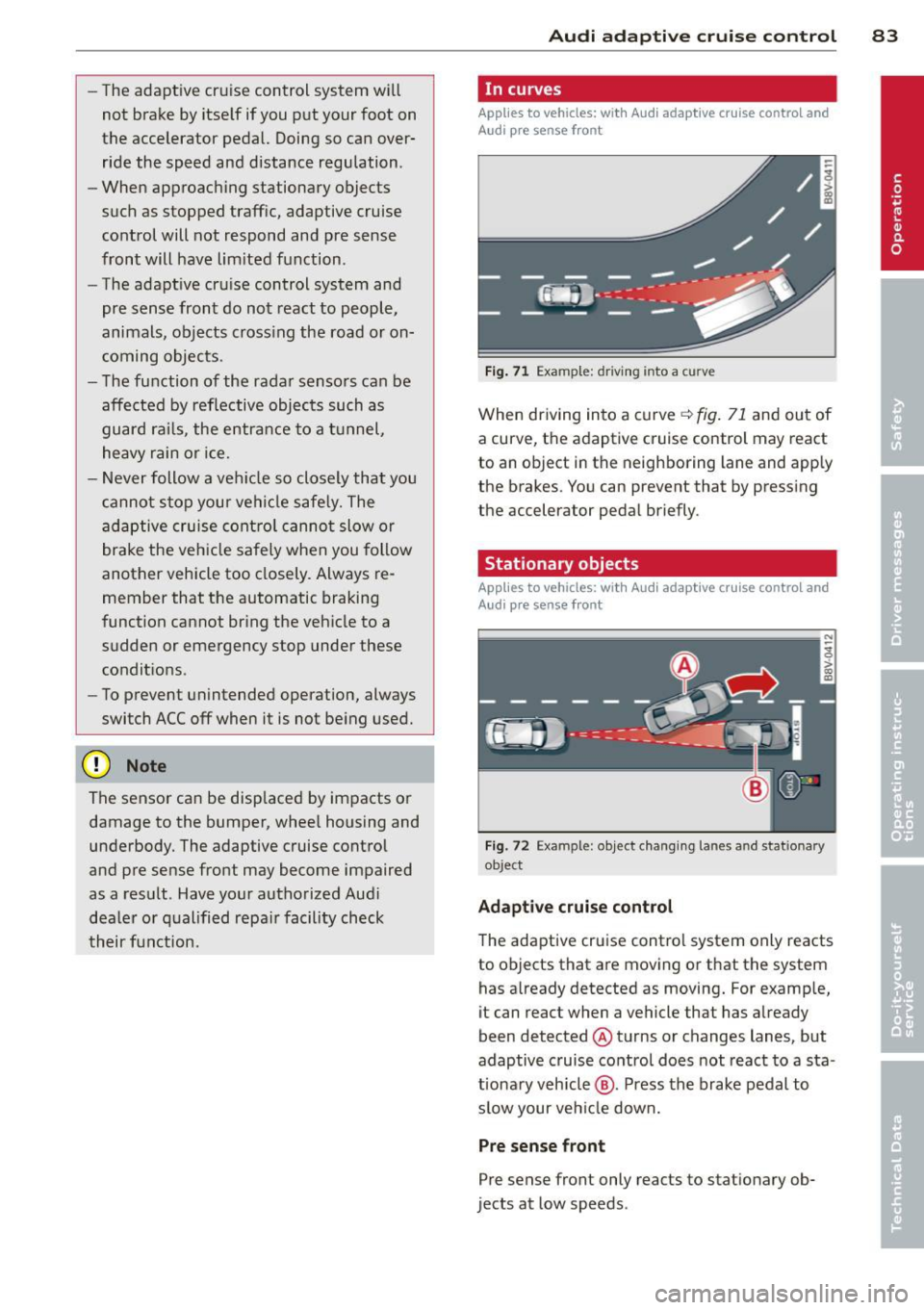
Fig . 71 Example : dr iving into a cu rve
When dr iving into a curve r=.> fig. 71 and out of
a curve, the adaptive cruise control may react
to an object in the neighboring lane and apply
the brakes. You can prevent that by pressing
the accelerator pedal briefly.
Stationary objects
App lies to vehicles: wit h Aud i adapt ive cr uise contro l and
Aud i pre sense front
Fi g. 72 Example: object ch ang ing lanes a nd stat ionary
ob ject
Adaptiv e crui se cont rol
The adaptive cruise control system only reacts
to objects that are moving or that the system
has already detected as moving. For example,
it can react when a vehicle that has already
been detected @turns or changes lanes, but
adaptive c ruise contro l does not react to a sta
t iona ry veh icle @. Press the brake pedal to
s low your vehicle down.
Pre sense front
Pre sense front only reacts to stationary ob
jects at low speeds .
Page 89 of 288
.. To resume cruise control, release the lever
or take your foot off the acce lerator pedal.
Interrupting cruise control while driving
.. Move the lever into position @. The mes
sage
ACC: standby appears . Or
.. press the brake pedal.
.. To resume the stored speed, move the lever
into position @.
Interrupting cruise control when stopped
Applies to vehicles w ith an automatic trans
mission:
.,. Push the lever away from you into position
@ . The message
ACC: standby appears.
.. To resume cruise control, press the brake
pedal and pull the lever toward you into po
sition @.
_& WARNING
It is dangerous to activate cruise contro l
and resume the stored speed when the
current road, traffic or weather conditions
do not permit th is . This could result in a
crash .
Setting the distance
Appl ies to vehicles: with Audi adaptive cruise co ntrol
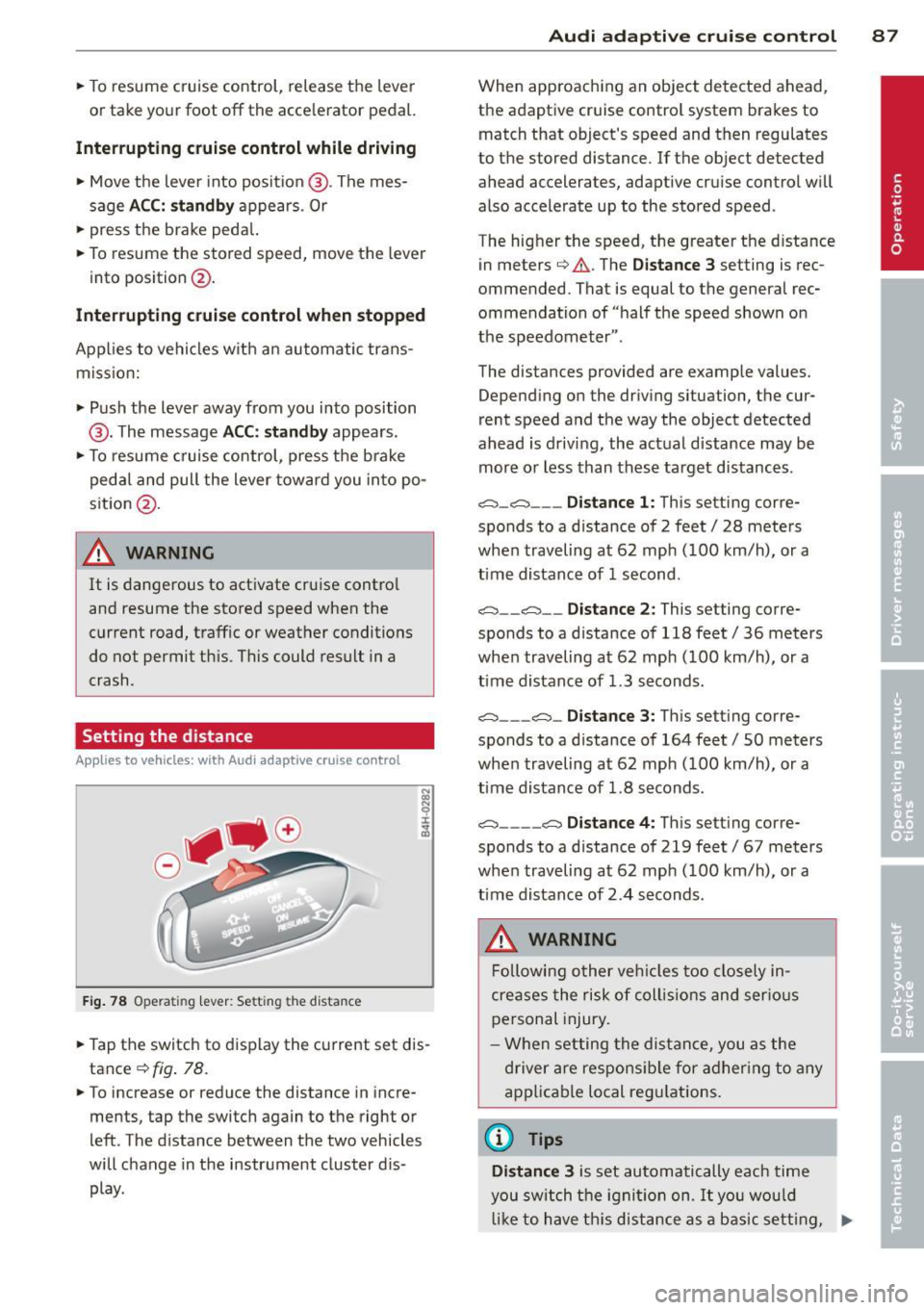
Fig. 78 Opera tin g lev er: Se tting the d ista nce
-
.. Tap the switch to display the current set dis
tance
¢ fig . 78.
.. To increase or reduce the distance in incre
ments, tap the switch again to the right or
left . The distance between the two vehicles
will change in the instrument cluster d is
play .
Audi adaptive cruise control 87
When approaching an object detected ahead,
the adaptive cruise control system brakes to
match that object's speed and then regulates
to the stored distance . If the object detected
ahead accelerates, adaptive cru ise control w ill
also accelerate up to the stored speed .
The hig her the speed, the greater the distance
in meters ¢
A. The Distance 3 setting is rec
ommended. That is equal to the general rec
ommendation of "half the speed shown on
the speedometer ".
The distances provided are example values. Depending on the driving situation, the cur
rent speed and the way the object detected
ahead is driving, the actual distance may be
more o r less than these target distances .
o:;:::::,_o:;:::::, ___ Distance 1: This setting corre-
sponds to a d istance of 2 feet/ 28 meters
when traveling at 62 mph (100 km/h), or a
time distance of 1 second .
o:;:::::, __ o:;:::::, __ Distance 2: This setting corre
sponds to a d istance of 118 feet/ 36 meters
when traveling at 62 mph (100 km/h), or a
time distance of 1.3 seconds.
o:;:::::, ___ o:;:::::,_ Distance 3: This setting corre-
sponds to a d istance of 164 feet/ 50 meters
when traveling at 62 mph (100 km/h), or a
time distance of 1.8 seconds.
o:;:::::, ____ o:;:::::, Distance 4: This setting corre-
sponds to a d istance of 219 feet/ 67 meters
when traveling at 62 mph (100 km/h), or a
time distance of 2 .4 seconds.
_& WARNING
Following other vehicles too closely in
cre ases the risk of collisions and serious
personal injury.
- When setting the distance, you as the
driver are responsible for adhering to any
applicable local regulations .
(D Tips
Distance 3
is set automatically each time
you switch the ignition on.
It you would
like to have th is distance as a basic setting, .,..