display AUDI A3 CABRIOLET 2015 User Guide
[x] Cancel search | Manufacturer: AUDI, Model Year: 2015, Model line: A3 CABRIOLET, Model: AUDI A3 CABRIOLET 2015Pages: 302, PDF Size: 73.83 MB
Page 32 of 302
30 Driver in formation sy ste m
On-Board Diagnostics
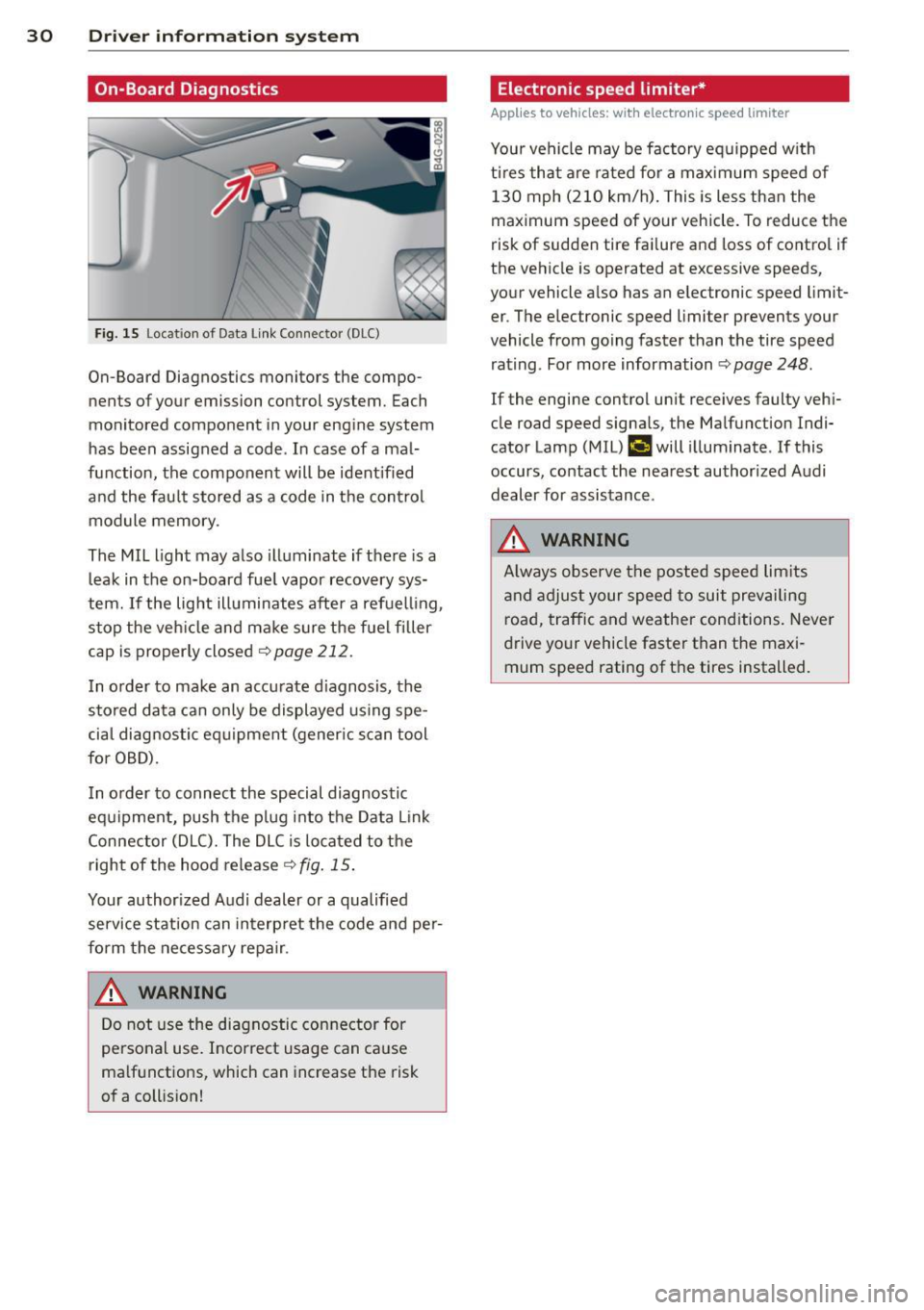
Fig. 15 Lo cat ion of D ata Link Connec tor (D LC)
On-Board Diagnostics monitors the compo
nents of your emission con trol system. Each
monitored component in your engine system
has been assigned a code . In case of a mal
function, the component will be ident ified
and the fau lt stored as a code in the control
module memory .
The MIL light may also illuminate if there is a
leak in the on-board fue l vapor recovery sys
tem.
If the lig ht illuminates after a refuelling ,
stop the veh icle and ma ke sure the fuel filler
cap is proper ly closed
<> page 212.
I n o rder to make an accurate d iagnosis, the
stored data can only be displayed using spe
cia l diagnostic eq uipment (gener ic s can tool
for OBD).
I n o rder to connect the special diagnostic
equipment, push the p lug i nto the Data Link
Connector (DLC). The DLC is located to the
right of the hood release¢
fig. 15 .
Your author ized A udi dealer or a qualified
service station can interp ret the code and pe r
form the necessary repa ir .
A WARNING
Do not use the diagnostic con nector for
personal use. Incorrect usage can ca use
ma lf u nctions, which can increase the risk
of a coll ision!
-
Electronic speed limiter*
Applies to vehicles: with electronic speed limiter
Your vehicle may be factory eq uipped w ith
t ir es that are rated fo r a max imum speed of
130 mph (210 km/h) . This is less than the
maximum speed of your vehicle. To reduce the
risk of sudden tire fa ilure and loss of contro l if
the vehicle is operated at excessive speeds,
your vehicle a lso has an electronic speed limit
er . The elec tronic speed limi ter prevents your
vehicle from going faster than the tire speed rating . For more information ¢
page 248.
If the engine control unit receives faulty veh i
cle road speed signa ls, the Malfunction Ind i
cator Lamp (M IL)
¢..fi will illuminate . If this
occurs, contact the nea rest authorized A udi
dealer for assistance .
A WARNING
Always observe the posted speed lim its
a nd adjust your speed to suit prevai ling
road, traffic and weather cond itions. Never
d rive your vehicle faster than the maxi
mum speed rating of the tires installed. -
Page 35 of 302
LED and batteries in the remote control
key
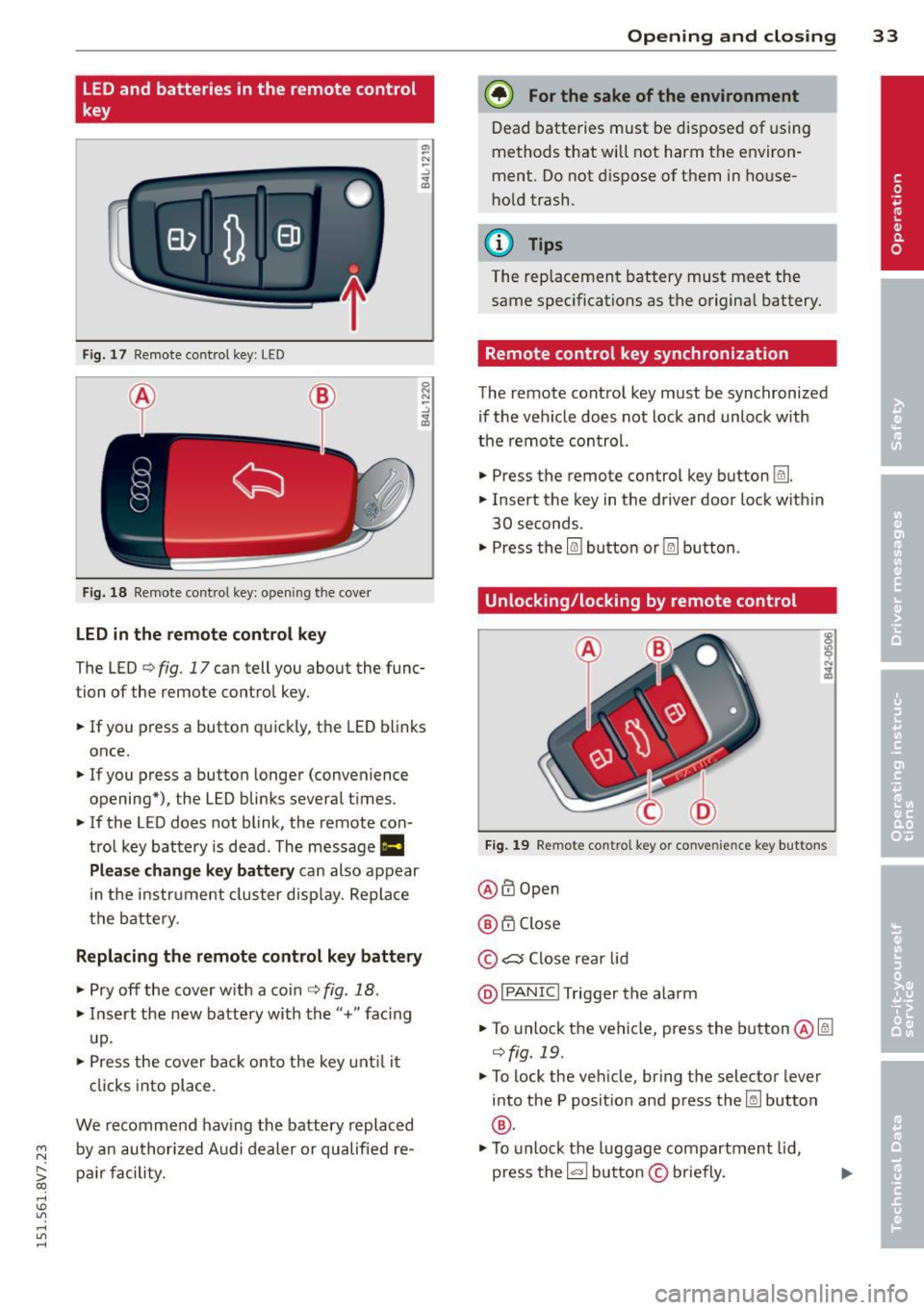
Fig. 17 Remote control key: LED
Fig. 18 Remote control key: opening the cover
LED in the remote control key
The LED ¢ fig. 17 can tell you about the func
tion of the remote control key .
.. If you press a button quickly, the LED blinks
once .
.. If you press a button longer (convenience
opening*), the LED blinks several t imes .
.. If the LED does not blink, the remote con
trol key battery is dead. The message
1111
Plea se change key battery can also appear
in the instrument cluster display. Replace
the battery .
Replacing the remote control key battery
.. Pry off the cover w ith a coin¢ fig. 18.
.. Insert the new battery with the"+" facing
up.
.. Press the cover back onto the key until it
clicks into place.
We recommend having the battery replaced
~ by an authorized Audi dealer or qualified re-
S;: pair facility. co
rl I.O
"' rl
"' rl
Opening and closing 33
@) For the sake of the environment
Dead batteries must be disposed of using
methods that will not harm the environ
ment. Do not dispose of them in house
hold trash.
{!) Tips
The rep lacement battery must meet the
same specifications as the origina l battery.
Remote control key synchronization
The remote control key must be synchronized
if the veh icle does not lock and unlock w ith
the remote control.
.. Press the remote control key button
Im .
.. Insert the key in the driver door lock w ith in
30 seconds.
"' Press the
l@J button or~ button.
Unlocking/locking by remote control
Fig. 19 Remote control key or convenience key buttons
@ ffi Open
@ 6".i Close
© c:s Close rear lid
@I PANIC I Trigger the alarm
.. To unlock the vehicle, press the button@lm
¢fig. 19 .
"'To lock the vehicle, bring the selector lever
into the P posit ion and press the~ button
®·
"'To unlock the luggage compartment lid,
press the~ button
© briefly.
Page 43 of 302

....,
N
r--. > co
rl I.O
"' rl
"' rl
Power top
Automatic power top
General information
The power top opens and closes automatical ly . When open, the power top is stored com
pletely in the power top compartment. The
power top can be opened or closed at speeds
up to 30 mph (SO km/h).
Under normal conditions, the power top is
wind and waterproof. In rare cases, small
droplets of water may form under extreme
weather conditions such as torrential or pro longed rain. That is normal and no cause for
concern.
Follow the care instructions to keep the power
top free of leaks and to maintain its appear
ance
c::> page 204, Core and cleaning. Also ob
serve the following:
- Op en and stow the power top only when it is
clean and dry . Sharp-edged dirt particles can
cause damage to the rear window and the
power top. Stowing the power top when it is
damp can create imprints in it, and if it is
left that way for long periods of time, mil
dew and other damage can form.
- Do not leave the power top open for several
weeks or the creases in it may become dis
colored.
- Remove ice and snow before opening the
power top. Do not use any sharp edged ob
jects to remove ice and snow or the power
top could be scratched or damaged. The rear
window may be cleared with a standard ice
scraper.
- Do not open the power top when the tem
perature is below 32 °F (0 °C). The fabric in
the power top loses elasticity in sub-ze ro
temperatures.
_& WARNING
- When positioning the power top, avoid
contact with the supports or other mov
ing parts. Make sure all of the windows
.
Power top 41
are lowered. Otherwise you could pinch
your hands.
- Never drive when the power top is not
locked correctly. The wind from driving
could cause the power top to open. This
can result in injuries and damage to the
vehicle.
Opening and closing the power top
Fig. 27 Center console: power top switch
Requirement: The power top storage com
partment must be lowered
c::> page 43 and
the luggage compartment lid must be closed.
.. Switch the ignition on.
.. To open or close the power top, pull or press
the button @during the entire process.
T he status of the power top is shown in the in
strument cluster display when operating the
power top switch.
You can close the power top when the wind
deflector is installed
~ page 44.
A message will appear in the instrument clus
ter if the power top cannot be opened or
closed
c::> page 43.
A WARNING
- When operating the power top, make
sure the function is not affected by wind
or other factors and that it does not in
terfere with other drivers.
- Never drive when the power top is not
locked correctly. The wind from driving
could cause the power top to open. This
can result in injuries and damage to the
vehicle.
-
Page 45 of 302

....,
N
r--. > co
rl I.O
"' rl
"' rl
,&_ WARNING
Read and follow the im po rt an t sa fety p re
cautions i n
c::> & in Opening and closing
the power top on page 41 .
Power top storage compartment
Fig. 2 9 Luggage compar tm en t: powe r to p sto rage
co mpa rt ment lowe red
F ig. 30 Luggage compart men t: power top storage
compartme nt ra ised
The power top storage compa rtment must b e
l owe red to open the power top . To avo id dam
a ge, make sure that a re no sensi tive o bje cts in
the s tor age compartmen t's range of mo tion .
Raising the power top storage
compartment
"P ress the trim on the hand le in the d irect io n
of the arrow to raise t he power top s torage
compartment
c::> fig. 2 9.
Lowering the power top storage
compartment
" Press the trim on the handle in the direct io n
of the arrow to lower the power top s torage
compartment
c::> fig. 30 .
The power top storage comp artmen t can be
ra ised when the
power top i s closed . This pro-
Power top 43
vides more cargo space in the luggage com
partment.
T he
open power top is sto red and pr otec ted in
t he power top s torage compar tment . The
power top storage compa rtment cannot be
raised when the power top is open. Because of
th is, the cargo area in the luggage compart
ment is smaller when the powe r top is open
than when it is closed.
Messages
Soft top: pl ease close trunk lid
This message appears in the instrument cl us
ter display if the luggage compartment is not closed w hen the power top is operated . Close
the luggage compart ment lid.
Soft top : please lower soft top compartment
T his mess age ap pears if the power top stor
age compartment is not lowered when ope n
ing t he power top. Lower the power top stor
age compartment ¢
page 43.
Soft top: operation not pos sible
T h is message appears w hen t here is a mal
func tion. T he powe r top can be o pe ra ted man
u ally
c::> page 4 5 .
Soft top: operation not pos sible at pres ent
If the power top is operated continually for a
long period of time, the overload protect ion
activates for app rox imately 15 to 30 mi nutes .
You can o pen or close the powe r top aga in af
te r that.
Soft top: operation not possible at present .
Engine must be running
The power top is a utomat ica lly deactivated if
the battery vo ltage is low. Yo u can open or
close t he power top again after start ing the
engine.
Soft top : operation not possible at present .
Outside temperature too low
The powe r top w ill not open when the tem per-
atu re is be low - 15
°C. ~
Page 51 of 302
....,
N
r--. > co
rl I.O
"' rl
"' rl
Lights and Vision
Exterior Lighting
Switching lights on and off
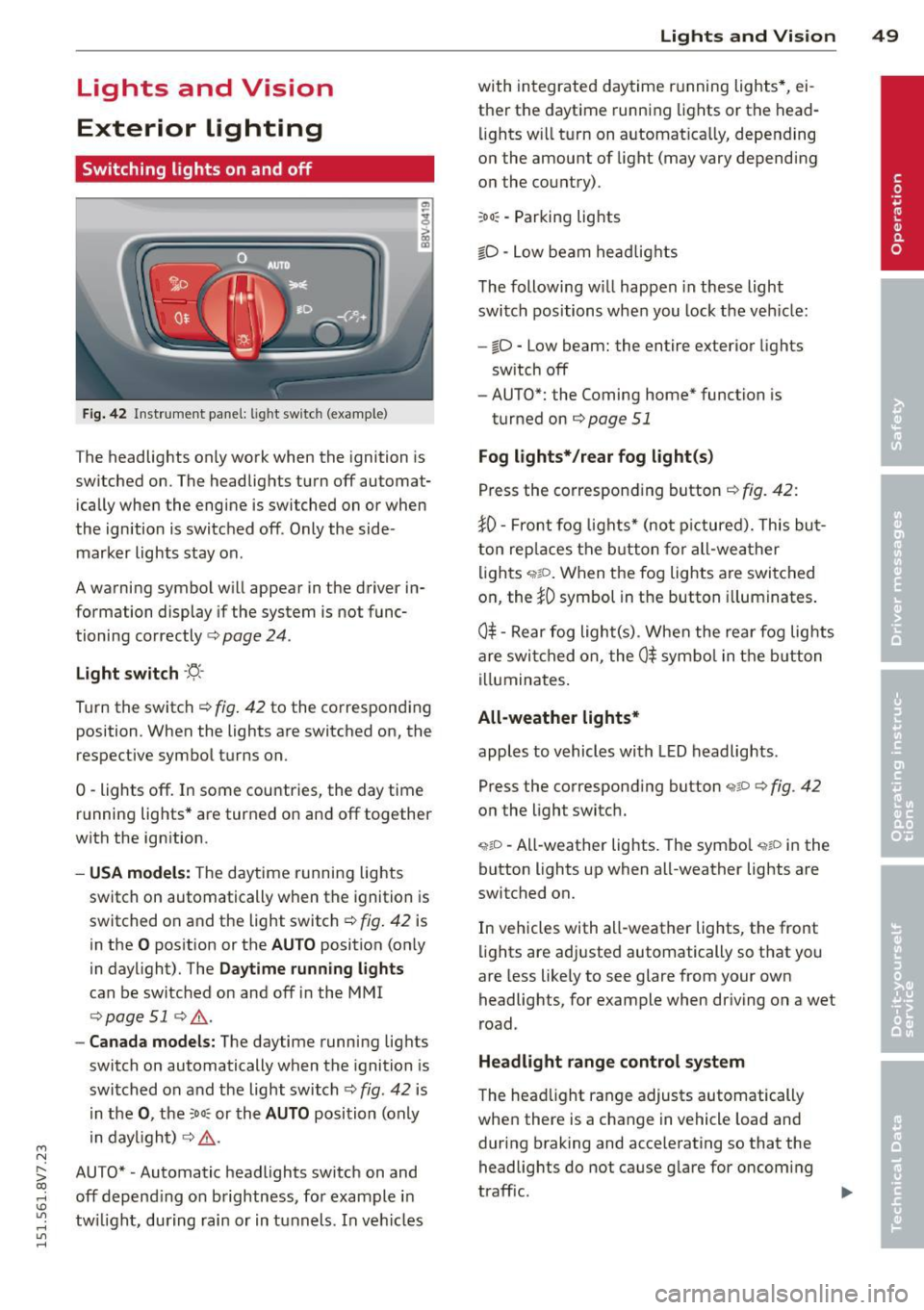
Fig. 42 Instrument panel: lig ht switc h (example)
The headlights only work when the ignition is
switched on. The headlights turn off automat ically when the engine is switched on or when
the ignition is switched off. Only the side marker lights stay on .
A warning symbol will appear in the driver in
formation display if the system is not func
tioning correctly <=>
page 24.
Light switch ·'ti- ·
Turn the switch¢ fig. 42 to the corresponding
position . When the lights are switched on, the
respective symbol turns on.
0 -lights off. In some countries, the day time
running lights* are turned on and off together
with the ign ition.
- USA models: The daytime running lights
switch on automatically when the ignition is
switched on and the light switch¢
fig. 42 is
in the
O position or the AUTO position (on ly
in daylight). The
Daytime running lights
can be switched on and off in the MMI
¢ page 51 ¢ ,& .
-Canada models: The daytime running lights
switch on automatically when the ignition is
switched on and the light switch¢
fig. 42 is
in the
0, the :Do: or the AUTO position (only
in daylight) ¢
,&.
AUTO* • Automatic headlights switch on and
off depend ing on brightness, for example in
tw ilight, during rain or in tunnels. In vehicles Lights
and Vision 49
with integrated daytime running lights*, ei
ther the daytime running lights or the head
li ghts will turn on automat ically, depending
on the amount of light (may vary depending
on the country).
: Do : -Parking lights
iD -Low beam headlights
The following w ill happen in these light
switch positions when you lock the vehicle:
-io -Low beam: the entire exterior lights
sw itch off
- AUTO*: the Coming home* function is
turned on ¢
page 51
Fog lights*/rear fog light(s)
Press the corresponding button¢ fig. 42:
JO· Front fog lights* (not pictured). This but
ton replaces the button for all-weather
lights
q;!D . When the fog lights are switched
on, the
JO symbol in the button illuminates.
0$ -Rear fog light(s) . When the rear fog lights
are switched on, the
0$ symbol in the button
illuminates.
All-weather lights*
apples to vehicles with LED headlights.
Press the corresponding button
<;?P c;, fig. 42
on the light switch.
~io -All-weather lights . The symbol <;;t,;D in the
button lights up when all-weather lights are
switched on.
In vehicles with all-weather lights, the front
lights are adjusted automatically so that you
are less likely to see glare from your own
headlights, for example when driving on a wet
road .
Headlight range control system
The head light range adjusts automatically
when there is a change in vehicle load and
during braking and accelerating so that the
headlights do not cause glare for oncoming
traff ic.
Page 54 of 302
52 Lights and Vision
Daytime running lights*
USA models:
The d ay time runni ng lights can
b e sw itche d on o r off using the MM I. Select
on or off .
Canada models:
T his funct ion can be switche d
off. They ac tiva te a utomat ic all y ea ch tim e the
igni tion is swit ched on. This menu item is
shown with a "gray backg ro und" .
Travel mode*
The headlight beam is asy mme trical. This pro
vides s tronger illum ina tio n on the s ide of the
ro ad o n wh ich you are driv ing. In vehicles wi th
Xenon headlights* with turning light* or LED
headlights* ,
you must adjust the hea dlights
when yo u are d riving in a country w here the
traffic direction is opposite from you r own
country. Othe rwise, oncom ing traffic w ill be
b lin ded by the gla re from the head lights. An
ad justment is not needed in vehicles with Xe
non head lights without t urning lights .
To prevent glare:
- Trave l mode m ust be act ivated in veh icles
with Xenon headlights* and turning light * or
LED headlights *. Select: the iME NUI b utton
> Car > Systems * contro l butto n > Vehicle
settings
> Exterior lighting > Light for driv
ing on left ,
for example .
After you have adjusted the headlights, the
following message will appear:
B Headlight converter active for driving on
left. Range reduced!
(D Tips
W hen trave l mode is activ ate d, a display in
the dr iver inf orm ation system i ndicates
this each time you switch t he ignit ion on .
Interior lighting
Interior l ight s
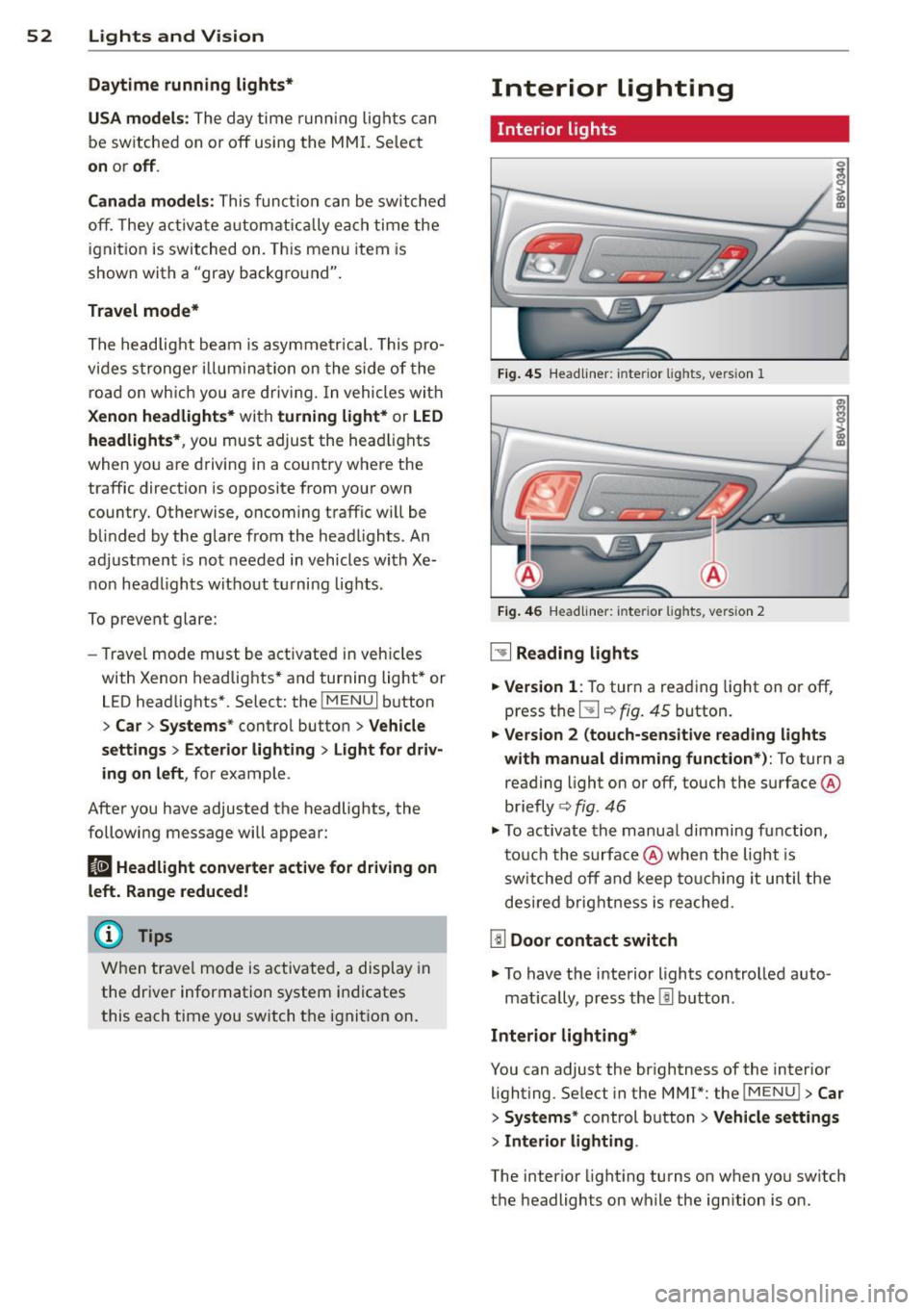
Fig. 4 5 Headliner: in te rior lights, vers ion 1
Fi g. 46
Headli ne r: int eri or ligh ts, versio n 2
~ Reading lights
.. Version
1: To tur n a reading light on or off,
press the
5J ¢ fig. 45 button.
.. Version 2 (touch-sensitive reading lights
with manual dimming function*):
To turn a
reading light on or off , touch the surface @
briefly ¢
fig. 46
.. To activate th e manua l dimming function,
t ouc h the surface @when the light is
s w itched off and keep to uchi ng it until the
des ired brig htn ess i s reached.
[ID Door contact switch
.. To have the interio r lights controlled auto -
mat ica lly, press the
l!l b utton .
Interior lighting*
You can adjust the brightness of the interior
lighting. Se lect in the MMI*: the iME NUI
> Car
> Systems* control b utton > Vehicle settings
> Interior lighting .
The interior light ing turns on when yo u sw itch
t h e headlights on while the ign ition is o n.
Page 59 of 302
....,
N
r--. > co
rl I.O
"' rl
"' rl
-If electrolyte fluid enters the eyes, f lush
them thoroughly with a large amount of
clean water for at least 15 minutes and
then seek medical attention .
- If electrolyte fluid comes into contact
with the skin, flush the affected area
with clean water for at least 15 m inutes
and then clean with soap and water and
seek medical attention. Clean affected cl othing and shoes tho roughly before
wearing aga in.
- If the fluid was swallowed and the per
son is conscious, f lush the mou th wi th
water for at least 15 minutes. Do not in duce vomiting unless this is recommend
ed by medical professionals . Seek medi
cal attention immediately .
(D Note
If the glass on an automatic dimming m ir
ror breaks, electroly te can leak o ut. This
liquid damages plastic surfaces . Clean this
liquid as quickly as poss ible with a wet
sponge.
@ Tips
- If the light reaching the rearv iew mirror
i s obstructed, the automatic dimming
mirror will not function correctly,
- The automatic dimming mirro rs do not
dim when the interior lighting is turned
on or the reverse gear is selected.
Digital compass
Switching the compass on and off
Applies to vehicles: with d ig ital compass
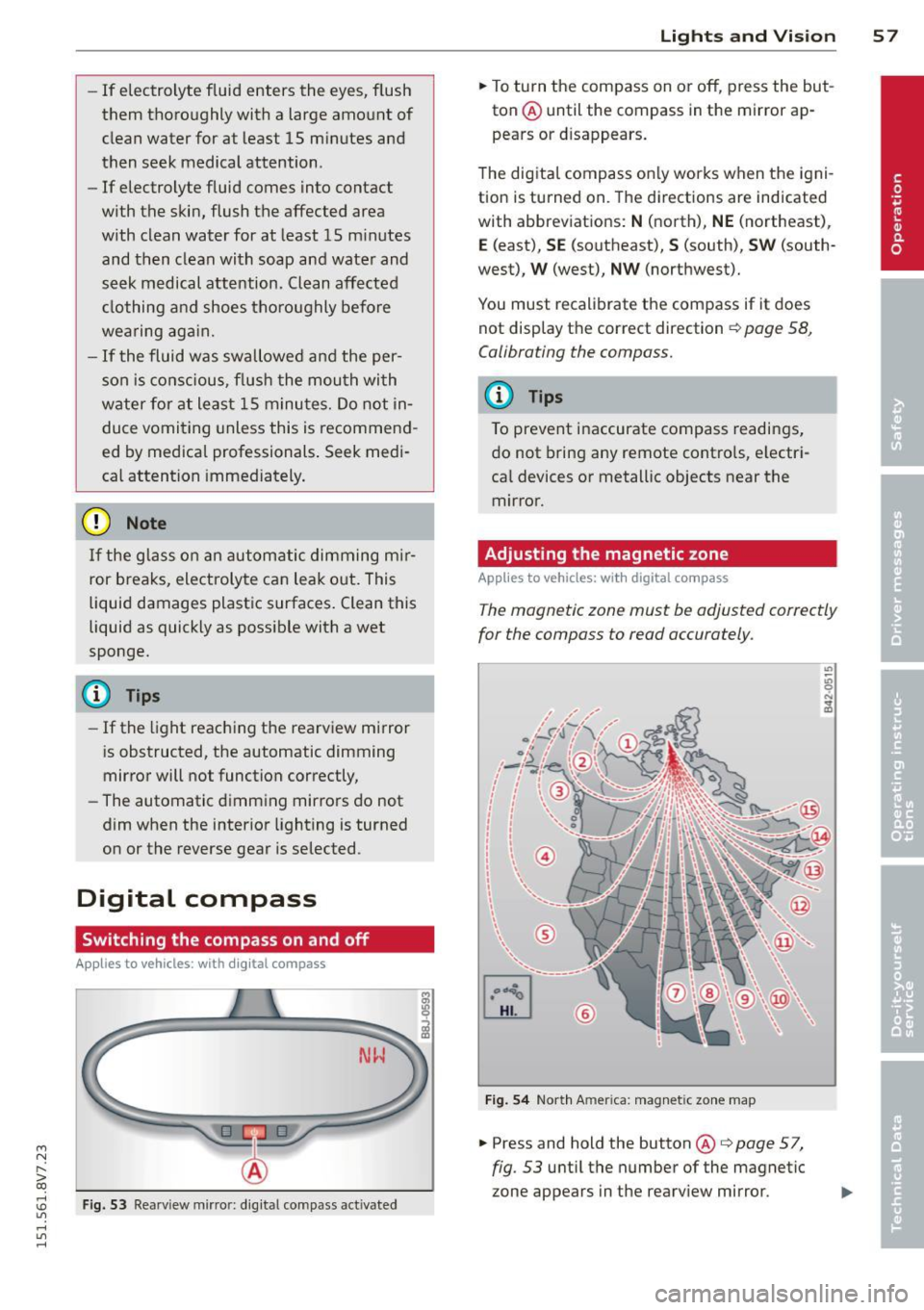
Fig. 53 Rearview m irro r: d ig ital compass activated
Lights and Visi on 5 7
.. To turn the compass on or off, press the but
ton @until the compass in the mirror ap
pears or d isappears.
T he digita l compass on ly wor ks when the igni
tion is turned on. The di rections are indicated
with abbreviat ions:
N (north), NE (northeast),
E (east), SE (southeast),
S (south) , SW (south
west) ,
W (west), NW (northwest).
You must recalibrate the compass if it does not display the correct direction
¢ page 58,
Calibrating the compass.
(D Tips
To prevent inaccurate compass readings,
do not bring any remote contro ls, e lectri
ca l devices or metallic objects near the
mirror.
Adjusting the magnetic zone
App lies to vehicles: wit h digital compass
The magnetic zone must be adjusted correctly
for the compass to read accurately.
F ig . 5 4 North A merica: mag net ic zo ne map
.. Press and hold the button @ i:> page 5 7,
fig. 53 until the number of the magnetic
zone appears in the rearv iew mirror.
Page 60 of 302
58 Light s a nd V is ion
• Press the button @repeated ly to select the
correct magnetic zone. The selection mode
turns off after a few seconds.
Calibrating the compass
Applies to vehicles: with dig ital compass
You must recalibrate the compass if it does
not display the correct direction .
• Press and ho ld the button @~ page 57,
fig . 53
until a C appears in the rearview mir
ror.
• Drive in a circle at about 5 mph ( 10 km/h)
until a direction is disp layed in the rearview
mirror .
A WARNING
- To avoid endangering yourself and other
dr ivers, calibrate the compass in an area
whe re there is no traffic.
- The digital compass should only be used
as an or ientat ion aid. If you want to
check the compass while dr iving, you
must still pay attention to traff ic, the
road, the weather and any other possible
hazards.
Page 75 of 302
M N
" > co ,...., \!) ..,.,
activates the "eco" mode*1>. I n "eco" mode*,
a ll settings are lowered slightly to save fuel.
When in "eco" mode* ,
eco is shown in the dis
play. To ex it "eco" mode*, press the
!AU TO !
button again .
I• I • I S etting the temperatu re
The temperature can be adjusted individually
for the driver and front passenger using the
dials . Temperatu res between 60 °F (+16 °C)
and 84 °F (+28 °C) can be set . Outs ide of this
range,
Lo or Hi will appear in the climate con
trol system display. In both settings, the cli mate control runs with constantly at the max
i mum cooling or heating level. The tempera
ture is not regu lated.
Syn chroni zation: By pressing the !AU TO I but
ton for two seconds , the temperat ure setting
for the driver is transferred to the front pas
senger's side. This applies a temperature
change to the front passenger's side.
~ Adjusting the blower
To prevent the windows from fogging over,
the blower shou ld always run at a low speed.
You ca n adj ust the volume of air generated by
the blower to you r preference. To have the
b lower regu la ted automatically, press the
!AU TO! button.
Adjusting th e air d istribution
The a ir distribution is adjusted with the~, [Ml
and ~ buttons. To have the air d istr ibut io n
r eg ulated automatically, press the
!AUTO ! but
ton .
The ro und air vents in the cockpit are adjusta
b le
~ page 74.
To keep the w indows from fogging in damp
weather, we recommend opening the side air
vents and t ilting them to the side
~ page 7 4, Adjusting the air vents.
Foot vents are located under the front seats
and adjustable vents on the end of the center
console to heat the rear of the vehicle.
,....,
"' l) This func tio n is not ava ilable in a ll coun tri es . ,....,
Warm and c old 73
~ Switching th e defro ster on and off
T he w indshield and side windows are defrost
ed or cleared of condensation as quickly as
poss ible . The maximum amount of air flows
main ly from the vents below the windshield.
Recircu lation mode switches off. The tempera
ture is controlled automatically. In the
[i] set
ting, the
! AIC ! cooling mode sw itches on auto
matically, depending on the outside air tem
perature .
The
! AU TO ! button sw itches the defroster off.
l""'I Sw itching recirculation mode on and
off
The recircu lation mode can be turned on man
ually or automatically* .
- Switching manual recirculation mode on and
off: Press the~ button. The LED light up
when switched on.
- Automatic* recircu lation mode: The recircu
lation mode must be activated in the MMI.
Select: the
I MENU I button >C ar> Sys tems *
contro l bu tton> A C> Auto recirculat ion .
The a ir quality sensor that is des igned for
diesel and gasoline exhaust automatically
sw itches the rec irculat ion mode on or off
depending on the leve l of po llutants in the
outs ide air .
In recirculation mode, the air inside the vehi
cle is circulated and filtered . This prevents the
unfiltered air outs ide the veh icle from e nter
ing the vehi cle interior. We recommend
switching recircu lation mode on when driving
th rough a tunne l or when sitting in traffic
~ .&. .
The 1- 1 button, IAU TO ! or the [i] bu tton
switches rec irculation mode off.
The system switches to recirculation mode
whe n driving in reve rse when the engine is
cold.
•
Page 84 of 302
82 Driving
Electromechanical
parking brake
Operating
The electromechanical parking brake replaces
the hand brake.
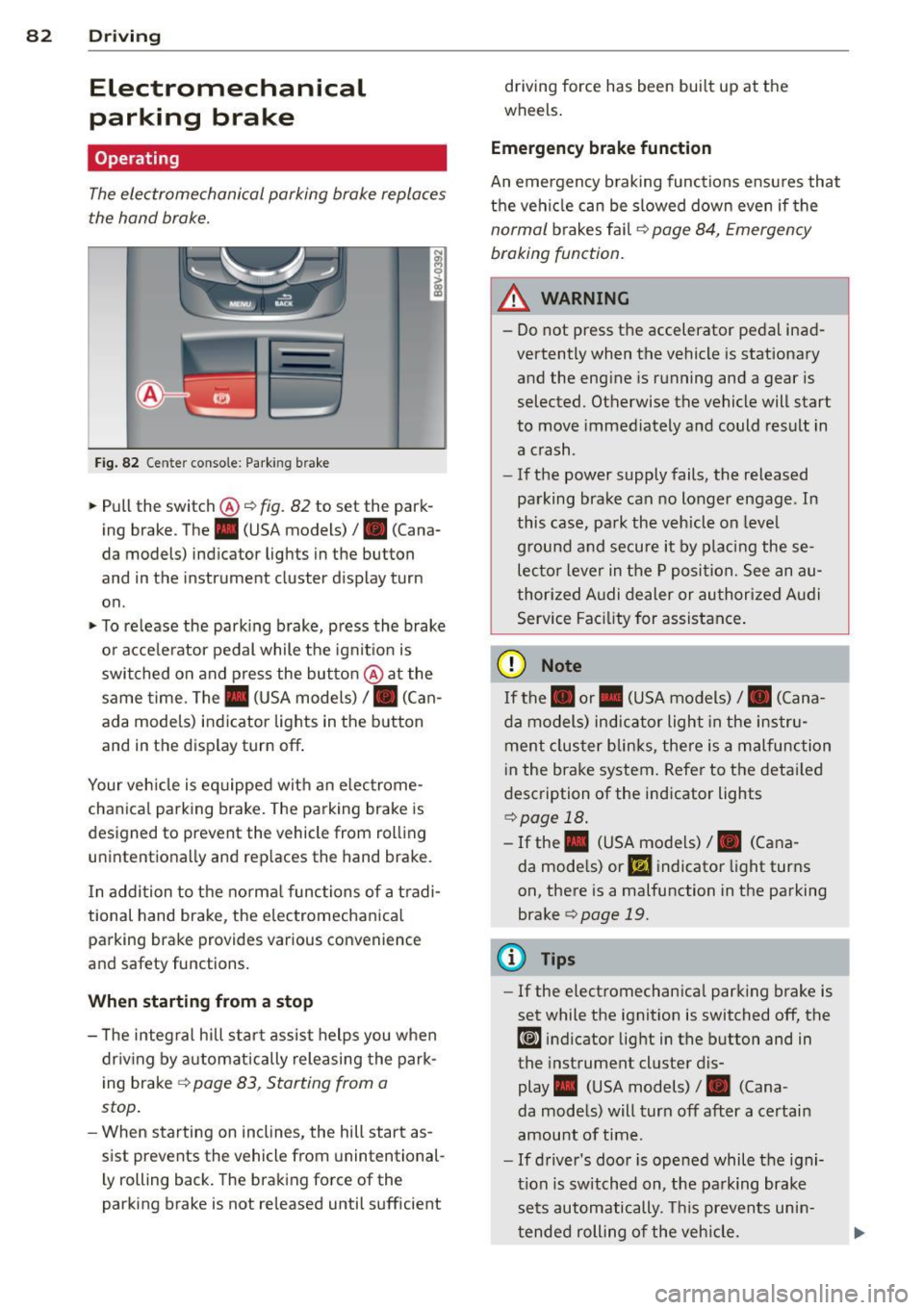
Fig. 82 Ce nter conso le: Park ing brake
~ Pull the switch@~ fig. 82 to set the park
ing brake . The . (USA models)/ . (Cana
da models) indicator lights in the button
and in the instrument cluster display turn
on .
~ To release the parking brake, press the brake
or acce le rator pedal while the ignit ion is
switched on and press the button @at the
same time. The. (USA models)
I. (Can
ada models) indicator lights in the button
and in the display turn off .
Your veh icle is eq uipped with an electrome
chanical parking brake. The parking brake is
designed to prevent the vehicle from rolling unintentionally and replaces the hand brake.
I n addition to the normal functions of a tradi
tional hand brake, the electromechanical parking brake provides various convenience
and safety functions.
When starting from a stop
- T he integral hill start assist helps you when
dr iving by automatically releasing the park
ing brake ~
page 83, Starting from a
stop .
-When starting on inclines, the hill start as
sist prevents the vehicle from unintentional
l y rolling back. The braking force of the
parking brake is not released until sufficient driving force has been built up at the
wheels.
Emergency brake function
An emergency braking functions ensu res that
the vehicle can be slowed down even if the
normal brakes fail~ page 84, Emergency
braking function.
_.&. WARNING
- Do not press the accelerator pedal inad
vertently when the vehicle is stationary
and the engine is running and a gear is
selected. Otherwise the vehicle will start
to move immediately and could result in
a crash .
- If the power supply fails, the released
parking brake can no longer engage . In
this case, park the vehicle on leve l
g round and secure it by placing these
lecto r lever in the P position. See an au
thorized Audi dealer or authorized Audi
Service Facility for assistance.
(D Note
If the. or. (USA models) I. (Cana
da models) indicator light in the instru
ment cluster blinks, there is a malfunction
i n the brake system. Refer to the detai led
description of the indicator lights
~page 18.
- If the . (USA models) I. (Cana-
da models) or
Ill indicator light turns
on, there is a malfunction in the parking
brake
c> page 19.
(D Tips
- If the electromechanica l parking brake is
set while the ignition is switched off, the
¢@'A indicator light in the button and in
the instrument cluster dis-
play . (USA models) /. (Cana-
da models) will turn off after a certain
amount of time.
- If driver's door is opened while the igni
tion is switched on, the park ing brake
sets automatically. This prevents unin
tended rolling of the vehicle.