mirror AUDI A3 SEDAN 2017 User Guide
[x] Cancel search | Manufacturer: AUDI, Model Year: 2017, Model line: A3 SEDAN, Model: AUDI A3 SEDAN 2017Pages: 400, PDF Size: 67.32 MB
Page 142 of 400
Assistance systems
warn you about detected vehicles that it has clas
sified as critical.
@ Tips
You can adjust the brightness on of the dis
play on the rearview mirror¢
page 141.
General information
App lies to: ve hicles w ith Audi side assist
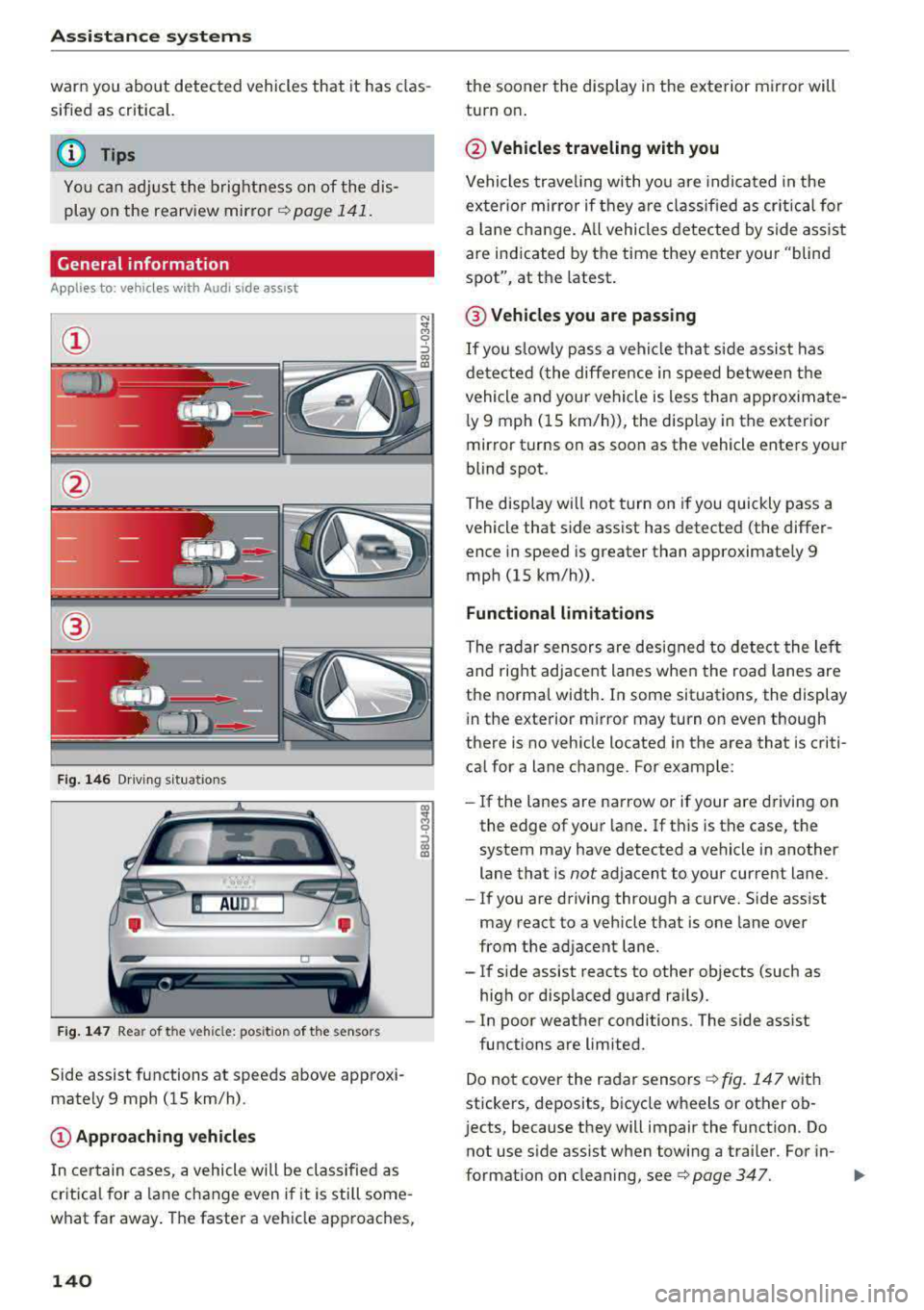
@
Fig. 146 Driving s it u ations
Fig. 147 Rear of the veh icle: pos it ion of the sensors
Side assist functions at speeds above approxi
mately 9 mph (15 km/h) .
@Approaching vehicles
In certain cases, a vehicle will be classified as
critical for a lane change even i f it is still some
what far away. The faster a vehicle approaches,
140
the sooner the display in the exterior mirror will
turn on .
@Vehicles traveling with you
Vehicles traveling with you are indicated in the
exter ior mirror if they are classified as critical for
a lan e change . All vehicles detected by side assist
are indicated by the time they enter your "blind
spot", at the latest .
@ Vehicles you are passing
If you slow ly pass a vehi cle that side assist has
detected (the differe nce in speed between the
vehicle and your vehicle is less than approximate
l y 9 mph (15 km/h)), the disp lay in the exterior
mirror turns on as soon as the vehicle enters your
blind spot.
The display wi ll not turn on if you quickly pass a
vehicle that side assist has detected (the differ ence in speed is greater than approximate ly 9
mph (15 km/h)) .
Functional limitations
The radar sensors are designed to detect the lef t
and right adjacent lanes when the road lanes are
the normal width . In some situations, the display
in the exterior m irror may turn on even though
there is no vehicle located in the area that is criti
ca l for a lane change. For example:
- If the lanes are narrow or if your
are dr ivin g on
the edge of your lane. If this is the case, the
system may have detected a vehicle in another
lane that is
not adjacent to your cur rent lane.
- If you are driving through a curve. Side ass ist
may react to a vehicle that is one lane over
from the adjacent lane.
- If side assist reacts to other objects (such as
high or displaced guard ra ils).
- In poor weather conditions. The side ass ist
functions are limited.
Do not cover the radar
sensors ¢ fig. 147 with
stickers, deposits, bicycle wheels or other ob
j ects, because they will impair the function. Do
not use s ide assist when towing a trai ler. For in-
format ion on cleaning,
see ¢ page 347. .,..
Page 143 of 400
CXl CXl .... N r--N .... 0 N > 00
A WARNING 1=
- Always pay attention to traffic and to the
area around your vehicle. Side assist cannot
replace a dr iver's attention. The dr iver alone
is always responsible for lane changes and
similar driving maneuvers.
- In some situat ions, the system may not
function or its funct io n may be limited. For
example:
- If vehicles are approaching or being left
behind very quickly. The display may not
turn on in time.
- In poor weather conditions such as heavy
rain, snow or heavy mist.
- On very wide lanes, in tight curves, or if
there is a rise in the road surface. Vehicles
in the adjacent lane may not be detected
because they are outside of the sensor
range.
(D Note
The sensors can be displaced by impacts or
damage to the bumper, wheel housing and
underbody. Th is can impa ir the system. Have
an authorized Audi dealer or authorized Audi
Serv ice Facility check their function .
(Di Tips
If the window glass in the driver's door or
front passenger's door has been tinted, the
disp lay in the exterior mirror may be incor
rect.
Switching on/off
A ppl ies to: ve hicles with Audi side assis t
The system can be switched on/off in the Info
tainment system.
-
If the system is activated, the displays in the ex
terior mirrors will turn on briefly when the ign i
tion is sw itched on .
.,. Select in the Infotainment system: !MENUI but
ton
> Vehicle > left control button > Driver as
sistance
> Audi side assist . Off switches the
system off.
Assistance systems
Setting the display brightness
Applies to : vehicles wi th Audi side ass ist
The display brightness can be adjusted in the In
fotainment system .
.. Select in the Infotainment system: I MENU! but
ton
> Veh icle > left control button > Driver as
sistance
> Audi side assist .
The display brightness adjusts automatically to
the brightness of the surroundings, both in the
information and in the warning stage. In very
dark or very bright surround ings, the automatic
adjustment will set the display to the minimum
or max imum level. In such cases, you may notice
no change when adjusting the brightness, or the
change may only be noticeab le once the sur
roundings change.
Adjust the br ightness to a level where the display
in the information stage will not disrupt yo ur
view ahead. If you change the brightness, the dis
play in the exterior mirror will briefly show the
brightness level in the information stage. The
brightness of the warning stage is linked to the
brightness in the information stage and is adjust
ed along with the information stage.
Q') Tips
- Side ass ist is not act ive while you are mak
ing the adjustment.
- Your settings are automatically stored and
assigned to the remote control key being
used.
141
Page 148 of 400
Parking systems
Parking systems
General information
A ppl ies to: ve hicles w ith parking system plus/rearview cam
era
Depending on your vehicle's equipment , various
parking aids will help you when parking and ma
neuvering.
The
parking system plus assists you when park
ing by audibly and visually indicating objects de
tected
in front of and behind the vehicle
¢page 147.
The rearview camera shows the area behind the
vehicle in the Infotainment system display. This display assists you when you are cross or parallel parking. The parking system plus functions are
also available ¢
page 148.
A WARNING
-
-Always look for traffic and check the area
around your vehicle by looking at it directly
as well. The parking system cannot replace
the driver's attention. The driver is always
responsible when entering or leaving a park
ing space and during similar maneuvers .
-Please note that some surfaces, such as
clothing, are not detected by the system .
-Sensors and cameras have blind spots in
which people and objects cannot be detect
ed . Be especially cautious of small children
and animals .
-Always pay attention to the area around the
vehicle -us ing the rearview mirror, too.
-The sensors can be displaced by impacts or
damage to the radiator grille, bumper,
wheel housing and the underbody . The park
ing system may be impaired as a result.
Have an authorized Audi dealer or author
ized Audi Service Facility check their func
tion .
(D Note
-Some objects are not detected or displayed
by the system under certain circumstances:
-objects such as barrier chains, trailer draw
bars, vertical poles or fences
146
-objects above the sensors such as wall ex
tensions
-objects with certain surfaces or structures
such as chain link fences or powder snow
-If you continue driving closer to a low ob
ject, it may disappear from the sensor range. Note that you will no longer be
warned about this obstacle.
-Keep enough distance from the curb to re
duce the risk of damage to the rims.
(D Tips
-T he system may provide a warning even
though there are no obstacles in the cover age area in some situations, such as:
-certain road surfaces or when there is tall
grass .
-external ultrasonic sources such as from
cleaning vehicles.
-in heavy rain, snow, or thick vehicle ex
haust.
-We recommend that you practice parking in
a traffic-free location or parking lot to be
come familiar with the system . When doing
this, there shou ld be good light and weath
er conditions.
-You can change the volume and pitch of the
signals as well as the display¢
page 150.
-What appears in the infotainment display is
somewhat time-delayed .
-The sensors must be kept clean and free of
snow and ice for the parking aid to operate .
Page 151 of 400
a, a, ..... N
" N ..... 0 N > 00
-Only use the rearview camera to assist you if
it shows a good, clear p icture. For examp le,
the image may be affected by the sun sh in
ing into the lens, dirt on the lens, or if there
is a malfunction.
- Use the rearview camera only if the luggage
compartment lid is completely closed . If the
luggage compartment l id is open the orien
tation lines and blue su rfaces are hidden .
Make su re any objects you may have mount
ed on the luggage compar tme nt lid do not
block the rearview camera.
- T he came ra lens enlarges and distorts the
field of v is ion. The object appea rs both al
tered and inaccurate on the screen.
- In cert ain situations, people or objec ts in
the display appear closer or farther away:
- For objects that do not touch the ground,
such as the bumper of a parked vehicle, a
tra iler hitch or the rear of a truck . Do not
use the orientation lines in this case.
- If driven from a level surface onto an in
cline , or a downward slope.
- If driven toward protrud ing objects .
- If the veh icle is carry ing too much load in
the rear.
(D Note
- Always read and follow the applicable warn
i ngs
<* 0 in General information on
page 146 .
-The orange-colored orientatio n lines in the
Infotainment display show the veh icle path
based on the steering wheel angle. The
front of the vehicle swings out more than
the rear of the veh icle. Ma inta in p lenty of
distance so that an exterio r mirror or a cor
ner of the veh icle does not co llide with any
obstacles.
Switching on /off
Appl ies to: ve hicles with rearv iew camera
Switching on
• S hift into reverse , or
• Press the P' 1! bu tton in the center console
~ page 147 , fig. 152 . A short confirmat ion
Parking systems
tone sounds and the LED in the button turns
on.
Switching off
• Dr ive faste r th an 6 mp h (10 km/h), o r
• Press the p, q! button, or
• Switch t he ignit ion off .
(0 Tips
- The visu al display in the righ t part of the
display sho uld help you de te ct the c riti cal
vehicle area .
- Yo u can ch ange the vol ume o f the signa ls
and the display ¢
page 150.
Perpendicular par king
Applies to: veh icles w ith rearv iew camera
This view may be used when parking in a garage
or in a parking space.
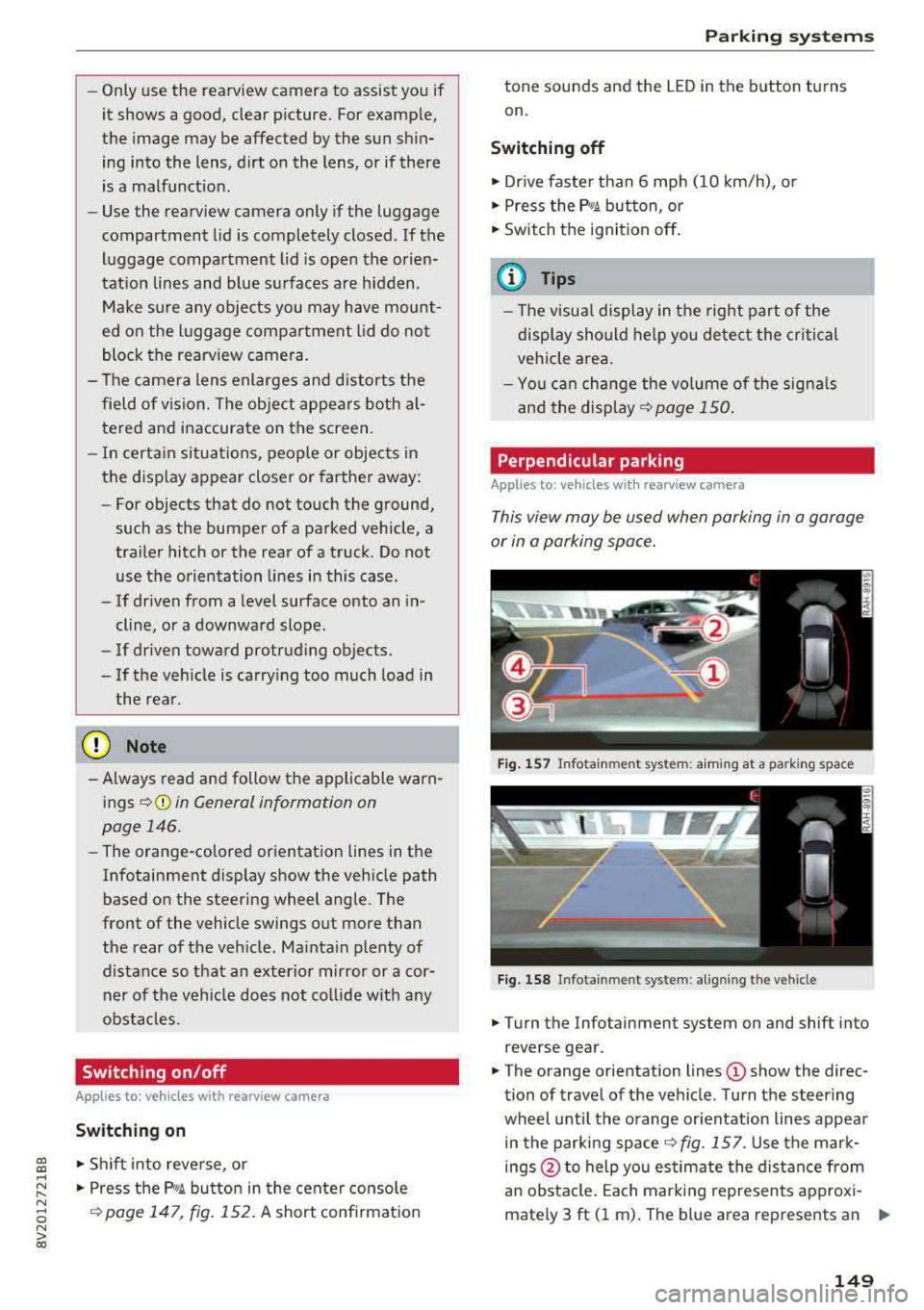
Fi g. 157 In fota inme nt sys tem: a im ing at a par king space
Fig . 1 58 In fotai nment syste m: alig ning t he vehicl e
.. Turn the Infotainment system on and shift into
reverse gear .
• The orange orientation lines (D show the direc
tion of travel of the vehicle . Turn the steering
wheel unti l the orange or ientation lines appea r
in the parking
space ~ fig. 157. Use the mar k
ings @to help you es timate the distance from
an obsta cle. Each marking represents approxi
mately 3 ft (1 m) . The b lue area represents an
.,..
149
Page 249 of 400
CXl CXl .... N ,.__
N .... 0 N > 00
Driving safety
Basics
Safe driving habits
Please remember -safety first!
This chapter contains important information,
tips, instructions and warnings that you need to
read and observe for your own safety, the safety
of your passengers and others . We have summar
ized here what you need to know about safety
belts, airbags, child restraints as well as child
safety. Your safety is for us
priority number 1. Al
ways observe the information and warnings in
this section - for your own safety as well as that
of your passengers.
The information in this section applies to all
model versions of your vehicle. Some of the fea
tures descr ibed in this sections may be standard
equipment on some models, or may be optional
equipment on others. If you are not sure, ask
your authorized Audi dealer.
A WARNING
- Always make sure that you follow the in
structions and heed the WARNINGS in this
Manual. It is in your interest and in the in
terest of your passengers .
-
-Always keep the complete Owner's Litera
ture in your Audi when you lend or sell your
vehicle so that this important information
will always be available to the driver and
passengers.
- Always keep the Owner's literature handy so
that you can find it easily if you have ques
tions.
Safety equipment
The safety features are part of the occupant re
straint system and work together to help reduce the risk of injury in a wide variety of accident sit
uations.
Your safety and the safety of your passengers
should not be left to chance. Advances in tech
nology have made a var iety of features available
to help reduce the risk of injury in an accident.
Driving safety
The following is a list of just a few of the safety
features in your Audi:
- sophisticated safety belts for driver and all pas
senger seat ing pos itions,
- safety belt pretensioners,
- safety belt height adjustment systems for the
front seats*,
- front airbags,
- knee airbags for the front seats*
- side airbags in the front seats and outer rear seats*,
- side curtain airbags with ejection mitigation features*,
- special LATCH anchorages for child restraints,
- head restraints for each seating position,
- adjustable steering column.
- pre sense* (preventat ive passenger protection)
These individual safety features, can work to gether as a system to help protect you and your
passengers in a wide range of accidents . These
features cannot work as a system if they are not
always correctly adjusted and correctly used.
Safety is everybody's responsibility!
Important things to do before driving
Safety is everybody 's job! Vehicle and occupant
safety always depends on the informed and care
ful driver .
For your safety and the safety of your passen
gers,
before driving always:
.,. Make sure that all lights and signals are operat
ing correctly .
.,. Make sure that the tire pressure is correct.
.,. Make sure that all windows are clean and afford
good visibility to the outside .
.,. Secure all luggage and other items carefully
¢ page 66, ¢ page 65.
.,. Make sure that nothing can interfere with the
pedals.
.,. Adjust front seat, head restraint and mirrors correctly for your height .
.,. Instruct passengers to adjust the head re
straints according to their height .
247
Page 353 of 400
CXl CXl .... N ,.__
N .... 0 N > 00
-Never use abrasive cleaning materials or
alcohol to clean the camera lens. This
could cause scratches and cracks.
-Power top
-Remove bird droppings immediately.
-Never use gasoline, spot remover, ben-
zene, paint thinner or other solvents to re
move.
-Door windows
-Remove snow and ice on windows and ex-
terior mirrors with a plastic scraper. To
avoid scratches, move the scraper only in
one direction and not back and forth.
-Never remove snow or ice from door win
dows and mirrors using warm or hot water
because this could cause cracks to form.
-To avoid damage to the rear window de
fogger, do not apply any stickers on the heating wires on the inside of the window.
-Decorative parts/trim
-Never use chrome care or cleaning prod-
ucts.
-Paint
-To reduce the risk of scratches, the vehicle
must be free of dirt and dust before pol
ishing or waxing.
-To prevent paint damage, do not polish or
wax the vehicle in direct sunlight .
-To reduce the risk of paint damage, do not
polish away rust spots .
-Remove cosmetics and sunscreen immedi
ately- these could damage the paint.
-Displays/instrument cluster
-The displays/instrument cluster and the
trim surrounding them must not be
cleaned with dry cleaning methods be
cause they could be scratched.
-Make sure that the instrument cluster is
switched off and has cooled off before
cleaning it.
-Make sure no fluids enter the spaces be
tween the instrument cluster and the
trim, because that could cause damage.
-Controls
-Make sure that no fluids enter the con-
trols, because this could cause damage.
-Safety belts
Care and cleaning
-Do not remove the safety belts to clean
them.
-Never clean safety belts or their compo
nents chemically or with corrosive fluids
or solvents and never allow sharp objects
to come into contact with the safety belts.
This could cause damage to the belt web bing .
-If there is damage to the webbing, the
connections, the retractors or the buckles
,
have them replaced by an authorized Audi
dealer or authorized Audi Service Facility .
-Textiles/artificial leather/ Alcantara
-Never treat artificial leather/Alcantara
with leather care products, solvents , floor
polish, shoe polish, spot remove or similar
products.
-Have a specialist remove stubborn stains
to prevent damage.
-Never use steam cleaners, brushes , hard
sponges, etc. when cleaning.
-Do not turn on the seat heating* to dry the
seat.
-Objects with sharp edges, such as zippers
or rivets on clothing or belts, can cause
damage to the surface.
-Open hook and loop fasteners, for exam
ple on clothing, can damage seat covers .
Make sure hook and loop fasteners are
closed.
-Natural leather
-Never treat leather with solvents, floor
polish, shoe polish, spot remover or simi
lar products.
-Objects with sharp edges, such as zippers
or rivets on clothing or belts, can cause
damage to the surface.
-Never use steam cleaners, brushes, hard
sponges, etc . when cleaning.
-Do not turn on the seat heating* to dry the
seat.
-To help prevent the leather from fading,
do not leave the vehicle in direct sunlight
for long periods of time. If leaving the ve
hicle parked for long periods of time, you
should cover the leather to protect it from
direct sunlight.
Ill>
351
Page 367 of 400
a, co ..... N
" N ..... 0 N > 00
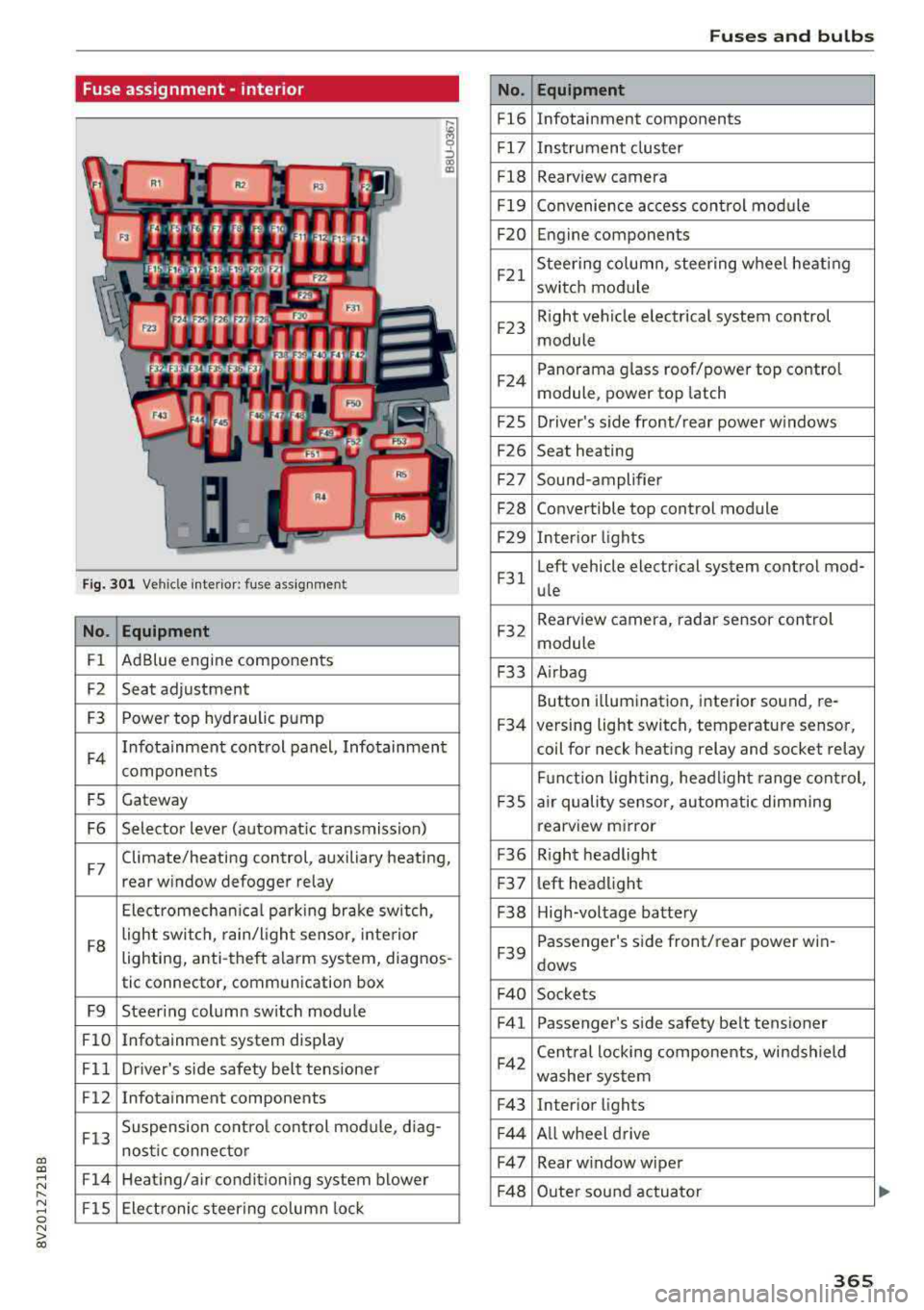
Fuse assignment -interior
Fig. 301 Vehicle interior: fuse assignment
No. Equipment
Fl Ad
Blue engine components
F2 Seat adjustment
F3 Power top hyd
raulic pump
F4 Infotainment control panel, Infotainment
components
FS Gateway
F6 Selector lever (automat ic transmission)
F7 Climate/heating control, auxiliary heating,
rear window defogger relay
Electromechan ica l parking brake sw itch,
F8 light switch,
rain/light sensor, inte rior
lighting, anti-theft alarm system, diagnos -
tic connector, communication box
F9 Steering column sw itch module
Fl0 Infotainment system display
Fll Dr iver's side safety belt tens ioner
F12 Infotainment components
F13 Suspension
control control module, diag-
nostic connector
F14 Heating/air conditioning system blower
FlS Electronic steering column lock
No .
Fl6
F 17
Fl8
F 19
F20
F21
F2 3
F24
F 2S
F26
F 27
F28
F2 9
F 31
F32
F33
F34
F 3S
F36
F3 7
F38
F39
F 40
F41
F42
F43
F44
F47
F4 8
Fuses and bulbs
Equipment
Infotainment components
Instrument cluster
Rearview camera
Convenience access cont rol module
Engine components
Steering column, steering wheel heating
switch module
Right vehicle electrical system control
module
Panorama glass roof/power top control
module, power top latch
Driver's s ide front/rear power w indows
Seat heating
Sound-amplifier
Convertible top control module
Interior lights
Left vehicle electrical system control mod-
ule
Rearview camera, radar sensor control
module
A irbag
Button i llumination, interior sound, re-
versing light switch, temperature sensor,
coil for neck heating relay and socket relay
Fu nct ion lighting, headl ight range control,
a ir quality sensor, automatic dimming
rearview mirror
R ight headlight
l eft headlight
High-voltage battery
Passenger's s ide front/rear power win -
dows
Sockets Passenger's side safety belt tensioner
Cen tral locking components, windshield
washer system
Interior lights
Al l wheel drive
Rear w indow wiper
Outer sound actuator
365
Page 377 of 400
CXl CXl .... N ,.__
N .... 0 N > 00
Gross Axle Weight Rating
The G ross Axle We igh t Rating is the max imum
l oad that can be applied at each axle of the vehi
cle~.& .
Vehicle capacity weight
The vehicle capac ity we ight (max. load) is listed
e ithe r o n the dr iver's side B-pillar o r inside the
f u el fi ller flap.
& WARNING
-T he actual Gross Ax le Weight Rating at the
front and rear axles sho uld not exceed the
permissible weights, and their comb inat ion
must not exceed the Gross Vehicle We ight
Rat ing.
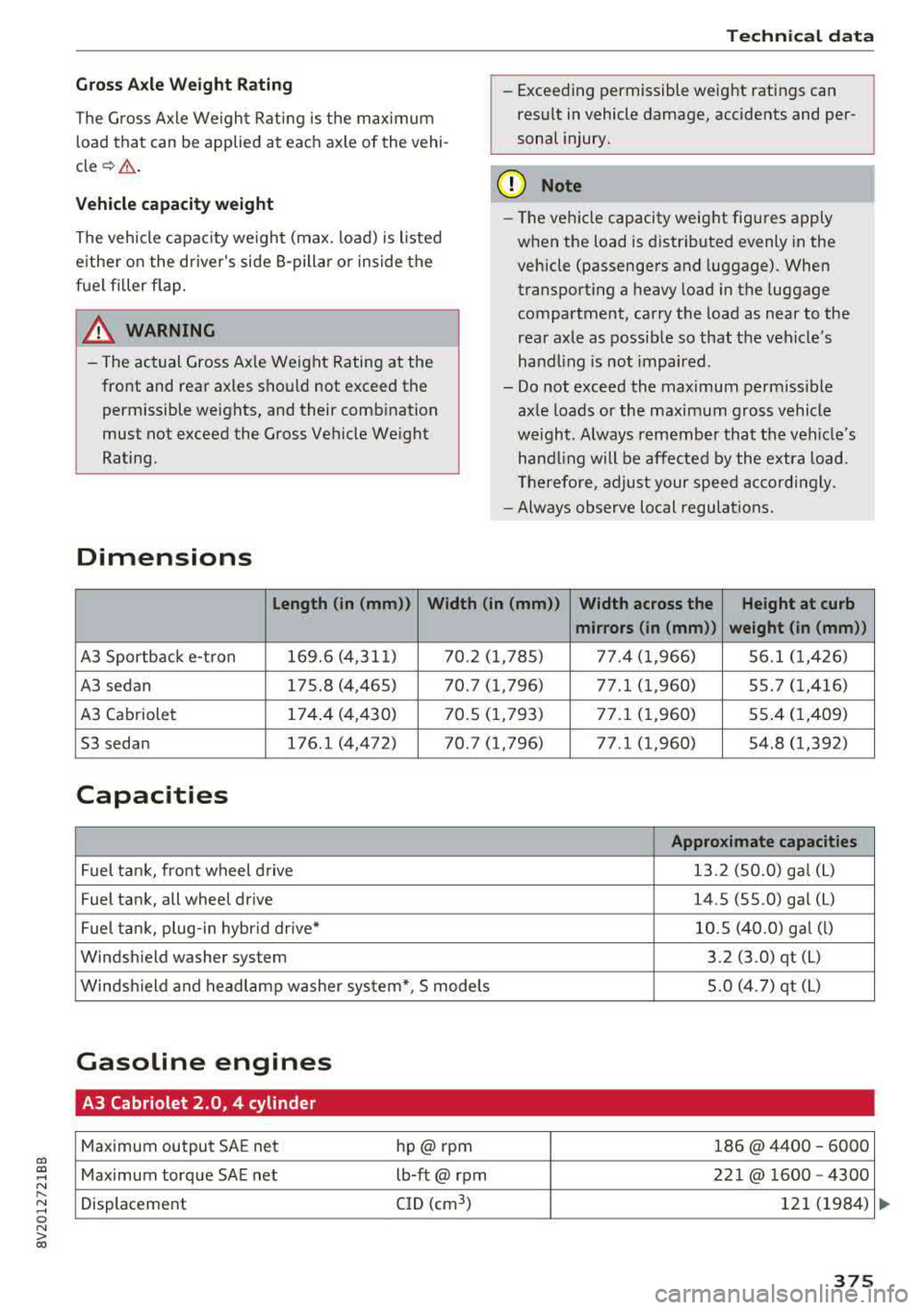
Dimensions
Techn ical data
-Exceeding permissible weight ratings can
res ult in vehicle damage, accidents and per
sonal injury.
(D Note
-T he vehi cle capacity weig ht figu res apply
when the load is d istributed evenly in the
vehicle (passengers and luggage). When
transport ing a heavy load in the luggage
compartment, ca rry the load as near to the
rear axle as possib le so that t he veh icle's
hand ling is no t impaired .
-Do not exceed the maximum perm iss ible
ax le loads or the maximum gross vehicle
we igh t. Always remember that the veh icle's
han dling will be affe cted by the extra load.
Th erefore, adjust your spee d accordingly.
-Always observe local regulations.
Length (in (mm)) Width (in (mm )) Width across the Height at curb
mirrors (in (mm )) weight (in (mm))
A3 Sportback e-t ron 169.6 (4,31
1) 7 0.2 ( 1,785) 77.4 ( 1,966) 56.1 (1, 426)
A3 sedan 175.8 (4,465) 70.7 (1,796) 77.1 (1,960) 55.7 (1,416)
A3 Cabriole t 174
.4 (4,430) 7 0.5 ( 1,793) 77 .1 ( 1,960) 55.4 ( 1,409)
53 seda n 176.1 (4,472) 70.7 (1,796) 77.1 (1,960) 54 .8 (1,392)
Capacities
Appro ximate capacities
Fuel ta nk, front w heel d rive 13
.2 (50.0) ga l (L )
Fuel tank, all wheel drive 14.S (55.0) gal
(L)
Fuel tank, plug -in hybr id drive* 10
.5 (40.0) g al (l)
Windshield washer system 3.2 (3.0) qt (L)
Winds hield and headlamp washer sys tem*, S mode ls 5.0 (4.7) qt
(L)
Gasoline engines
A3 Cabriolet 2.0, 4 cylinder
Maximum output SA
E net hp@rpnn 186@ 4400 -6000
Maximum torque SAE net lb-ft@ rpm 221@ 1600
-4300
Displacement C
ID (cm
3
) 12 1 (1984)
375
Page 387 of 400
CXl CXl .... N r--N .... 0 N > 00
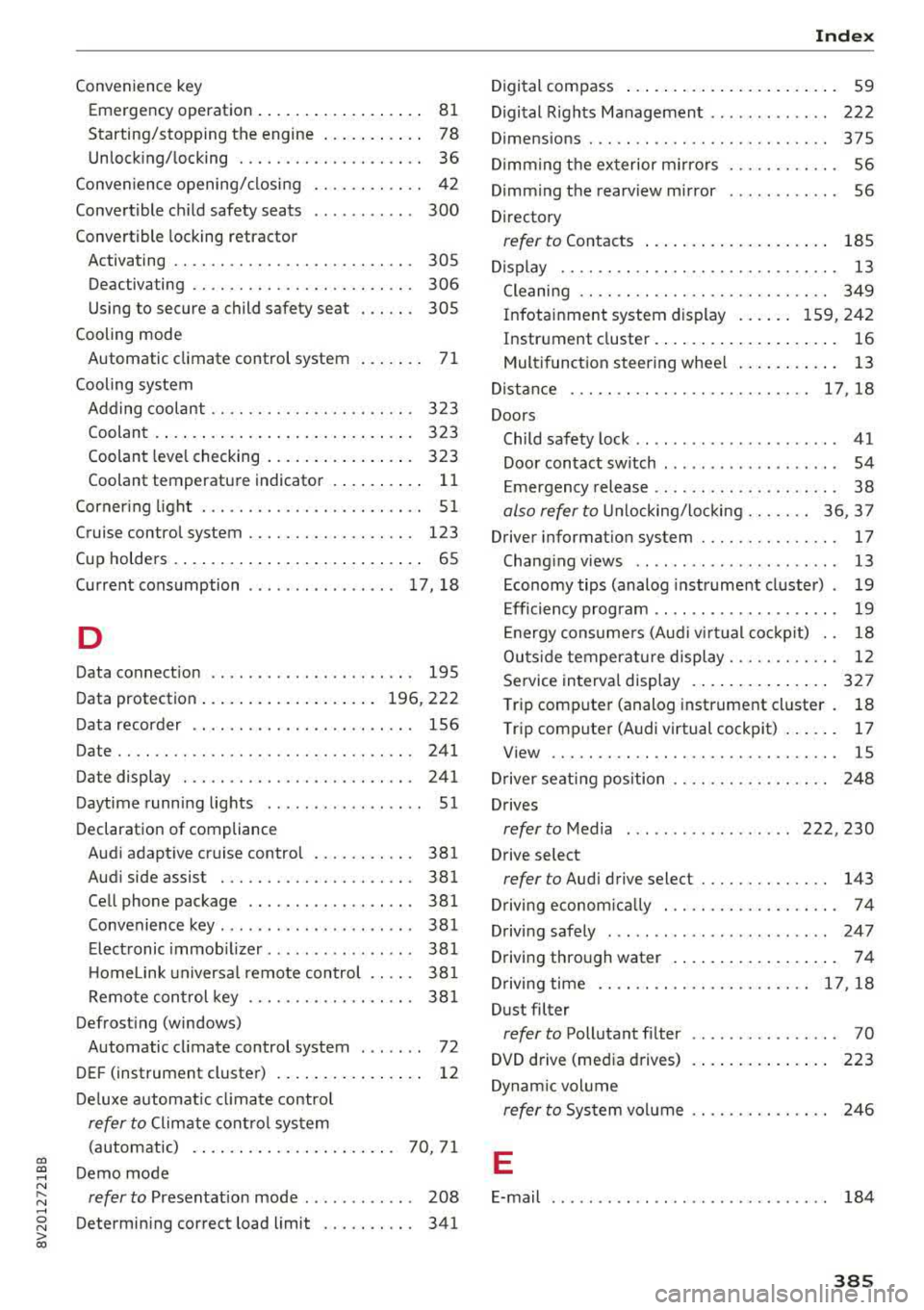
Convenience key Em ergency operation . . . . . . . . . . . . . . . . . . 81
Starting/stopping the engine . . . . . . . . . . . 78
Unlocking/locking . . . . . . . . . . . . . . . . . . . . 36
Convenience opening/closing . . . . . . . . . . . . 42
Convertible child safety seats . . . . . . . . . . . 300
Convertible locking retracto r
Activating . . . . . . . . . . . . . . . . . . . . . . . . . . 305
Deactiva ting . . . . . . . . . . . . . . . . . . . . . . . . 306
Using to secure a child safety seat . . . . . . 305
Cooling mode Automatic climate control system . . . . . . . 71
Cooling system Adding coolant . . . . . . . . . . . . . . . . . . . . . . 323
Coolant . . . . . . . . . . . . . . . . . . . . . . . . . . . . 323
Coolant level checking . . . . . . . . . . . . . . . . 323
Coolant temperature indicator . . . . . . . . . . 11
Corner ing light . . . . . . . . . . . . . . . . . . . . . . . . 51
Cruise control system . . . . . . . . . . . . . . . . . . 123
Cup holders . . . . . . . . . . . . . . . . . . . . . . . . . . . 65
Current consumption . . . . . . . . . . . . . . . . 17, 18
D
Data connection . . . . . . . . . . . . . . . . . . . . . . 195
Data protection . . . . . . . . . . . . . . . . . . . 196, 222
Data recorder . . . . . . . . . . . . . . . . . . . . . . . . 156
Date .. .. .. .. .. ............... .. .. .. . 241
Date display . . . . . . . . . . . . . . . . . . . . . . . . . 241
Daytime running lights . . . . . . . . . . . . . . . . . 51
Declaration of compliance Audi adaptive cruise control . . . . . . . . . . . 381
Audi side assist . . . . . . . . . . . . . . . . . . . . . 381
Cell phone package . . . . . . . . . . . . . . . . . . 381
Convenience key . . . . . . . . . . . . . . . . . . . . . 381
Electronic immobilizer. . . . . . . . . . . . . . . . 381
H omelink universal remote control . . . . . 381
Remote control key . . . . . . . . . . . . . . . . . . 381
Defrosting (windows) Automatic climate control system . . . . . . . 72
DEF (instrument cluster) . . . . . . . . . . . . . . . . 12
Deluxe automatic climate control
refer to Climate control system
(automatic) . . . . . . . . . . . . . . . . . . . . . . 70, 71
Demo mode
refer to Presentation mode . . . . . . . . . . . . 208
Determining correct load limit . . . . . . . . . . 341
Index
Digital compass . . . . . . . . . . . . . . . . . . . . . . . 59
Digital Rights Management . . . . . . . . . . . . . 222
Dimensions . . . . . . . . . . . . . . . . . . . . . . . . . . 375
Dimming the exterior mirrors . . . . . . . . . . . . 56
Dimming the rearview mirror . . . . . . . . . . . . 56
Directory
refer to Contacts . . . . . . . . . . . . . . . . . . . . 185
Display . . . . . . . . . . . . . . . . . . . . . . . . . . . . . . 13
Cleaning . . . . . . . . . . . . . . . . . . . . . . . . . . . 349
Infotainment system display . . . . . . 159, 242
Instrument cluster. . . . . . . . . . . . . . . . . . . . 16
Multifunction steering wheel . . . . . . . . . . . 13
Distance ... ....................... 17,18
Doors Child safety lock . . . . . . . . . . . . . . . . . . . . . . 41
Door contact switch . . . . . . . . . . . . . . . . . . . 54
Emergency release . . . . . . . . . . . . . . . . . . . . 38
also refer to Unlocking/locking ....... 36, 37
Driver information system . . . . . . . . . . . . . . . 17
Changing views . . . . . . . . . . . . . . . . . . . . . . 13
Economy tips (analog instrument cluster) . 19
Efficiency program . . . . . . . . . . . . . . . . . . . . 19
Energy consumers (Audi virtual cockp it) . . 18
Outs ide temperature display. . . . . . . . . . . . 12
Service interval display . . . . . . . . . . . . . . . 327
Trip computer (analog instrument cluster . 18
Trip computer (Audi virtual cockpit) . . . . . . 17
View . . . . . . . . . . . . . . . . . . . . . . . . . . . . . . . 15
Driver seating position . . . . . . . . . . . . . . . . . 248
Drives
refer to Media . . . . . . . . . . . . . . . . . . 222, 230
Drive select
refer to Audi drive select . . . . . . . . . . . . . . 143
Driving econom ically . . . . . . . . . . . . . . . . . . . 74
Driving safely . . . . . . . . . . . . . . . . . . . . . . . . 247
Driving through water . . . . . . . . . . . . . . . . . . 74
Driving time . . . . . . . . . . . . . . . . . . . . . . . 17, 18
Dust filter
refer to Pollutant filter . . . . . . . . . . . . . . . . 70
DVD drive (media drives)
223
Dynamic volume
refer to System volume . . . . . . . . . . . . . . . 246
E
E-mail . . . . . . . . . . . . . . . . . . . . . . . . . . . . . . 184
385
Page 388 of 400
Index
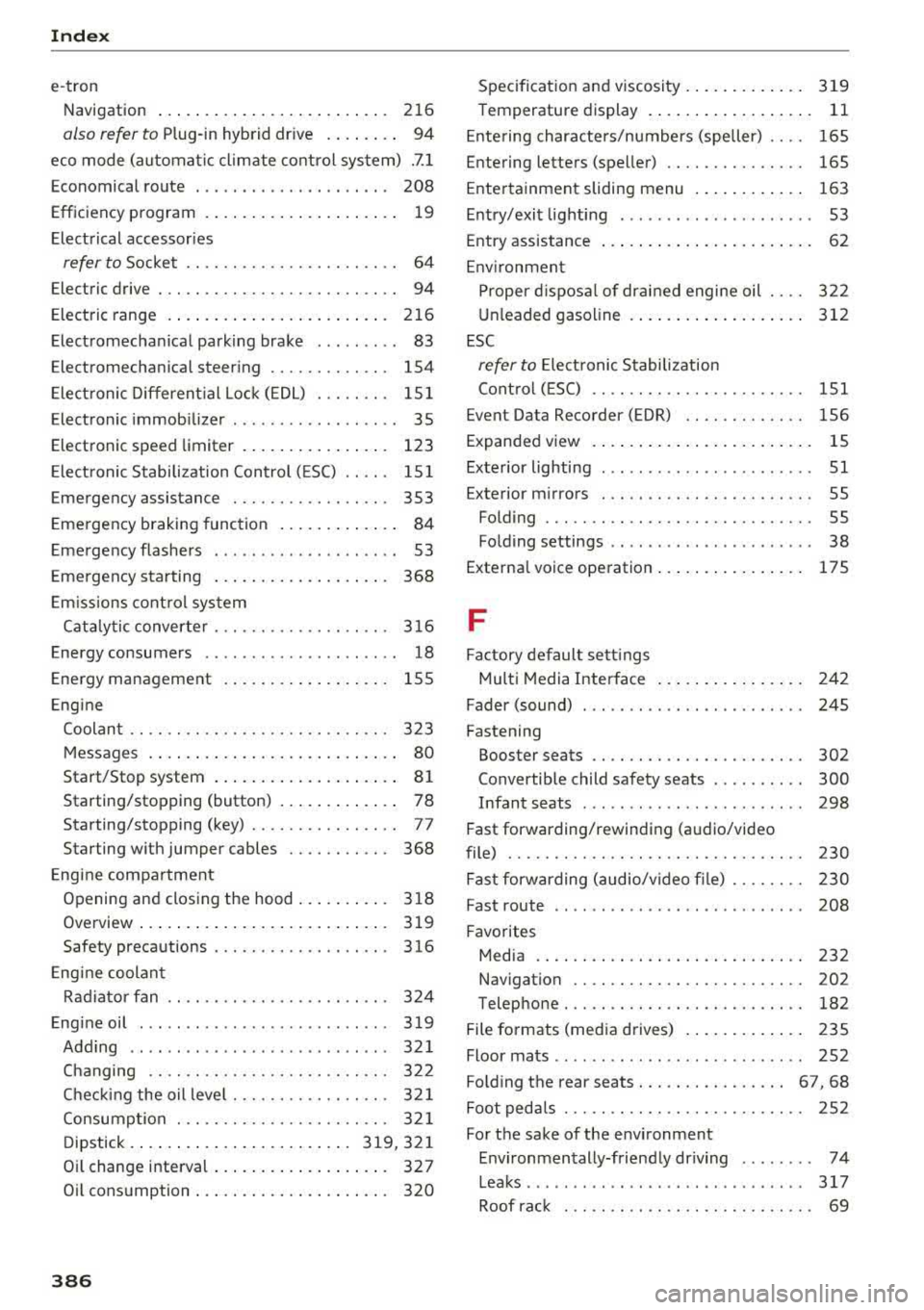
e-tron Navigation . . . . . . . . . . . . . . . . . . . . . . . . . 216
also refer to Plug-in hybrid drive . . . . . . . . 94
eco mode (automatic climate control system) .7.1
Economical route . . . . . . . . . . . . . . . . . . . . . 208
Efficiency program . . . . . . . . . . . . . . . . . . . . . 19
Electrical accessories
refer to Socket . . . . . . . . . . . . . . . . . . . . . . . 64
Electric drive . . . . . . . . . . . . . . . . . . . . . . . . . . 94
Electric range . . . . . . . . . . . . . . . . . . . . . . . . 216
Electromechanical parking brake . . . . . . . . . 83
E lectromechanica l steering . . . . . . . . . . . . . 154
Electronic Differential Lock (EDL) . . . . . . . . 151
El ectronic immobili zer . . . . . . . . . . . . . . . . . . 35
Electronic speed limiter . . . . . . . . . . . . . . . . 123
Electronic Stabilization Control ( ESC) . . . . . 151
Emergency assistance . . . . . . . . . . . . . . . . . 353
Emergency braking function . . . . . . . . . . . . . 84
Emergency flashers . . . . . . . . . . . . . . . . . . . . 53
Eme rgency starting . . . . . . . . . . . . . . . . . . . 368
Emissions control system
Cata lytic converter . . . . . . . . . . . . . . . . . . . 316
Energy consumers . . . . . . . . . . . . . . . . . . . . . 18
Energy management . . . . . . . . . . . . . . . . . . 155
Engine Coolant . . . . . . . . . . . . . . . . . . . . . . . . . . . . 323
Messages . . . . . . . . . . . . . . . . . . . . . . . . . . . 80
Start/Stop system . . . . . . . . . . . . . . . . . . . . 81
Starting/stopping (button) . . . . . . . . . . . . . 78
Starting/stopping (key) . . . . . . . . . . . . . . . . 77
Starting with jumper cables . . . . . . . . . . . 368
Engine compartment
Opening and closing the hood...... ... . 318
Overview ..... .................. .... 319
Safety precautions . . . . . . . . . . . . . . . . . . . 316
Engine coolant
Radiator fan . . . . . . . . . . . . . . . . . . . . . . . . 324
Engine oil . . . . . . . . . . . . . . . . . . . . . . . . . . . 319
Adding . . . . . . . . . . . . . . . . . . . . . . . . . . . . 321
Changing . . . . . . . . . . . . . . . . . . . . . . . . . . 322
Checking the oil level................. 321
Consumption . . . . . . . . . . . . . . . . . . . . . . . 321
D ipstick .. .. .... ................ 319,321
Oil change interval . . . . . . . . . . . . . . . . . . . 327
O il consumption . . . . . . . . . . . . . . . . . . . . . 320
386
Specification and viscosity............. 319
Temperature display . . . . . . . . . . . . . . . . . .
11
Ent ering characters/numbers (speller) . . . . 165
Entering lette rs (speller) . . . . . . . . . . . . . . . 165
Ente rtainment sliding menu . . . . . . . . . . . . 163
Entry/exit lighting . . . . . . . . . . . . . . . . . . . . . 53
Entry assistance . . . . . . . . . . . . . . . . . . . . . . . 62
Environment Proper disposal of drained engine oil . . . . 322
Unlead ed gasoline . . . . . . . . . . . . . . . . . . . 312
ESC
refer to Electronic Stabilization
Control (ESC) . . . . . . . . . . . . . . . . . . . . . . . 151
Event Data Recorder (EDR) . . . . . . . . . . . . . 156
Expanded view . . . . . . . . . . . . . . . . . . . . . . . . 15
Exterior lighting . . . . . . . . . . . . . . . . . . . . . . . S 1
Exterior mirrors . . . . . . . . . . . . . . . . . . . . . . . 55
Fo lding . . . . . . . . . . . . . . . . . . . . . . . . . . . . . 55
Folding settings . . . . . . . . . . . . . . . . . . . . . . 38
Externa l voice operation . . . . . . . . . . . . . . . . 175
F
Factory default settings
Multi Media Interface . . . . . . . . . . . . . . . . 242
Fader (sound) . . . . . . . . . . . . . . . . . . . . . . . . 245
Fastening Booster seats . . . . . . . . . . . . . . . . . . . . . . . 302
Convertible child safety seats . . . . . . . . . . 300
Infant seats . . . . . . . . . . . . . . . . . . . . . . . . 298
Fast forwarding/rewindi ng (audio/video
file) . . . . . . . . . . . . . . . . . . . . . . . . . . . . . . . . 230
Fast forwarding (audio/video file) . . . . . . . . 230
Fast route . . . . . . . . . . . . . . . . . . . . . . . . . . . 208
Favorites Media ....... ..... .. ............... 232
Navigation . . . . . . . . . . . . . . . . . . . . . . . . . 202
Telephone. . . . . . . . . . . . . . . . . . . . . . . . . . 182
File formats (media drives) . . . . . . . . . . . . . 235
Floor mats . . . . . . . . . . . . . . . . . . . . . . . . . . . 252
Fo lding the rear seats . . . . . . . . . . . . . . . . 67, 68
Foot pedals . . . . . . . . . . . . . . . . . . . . . . . . . . 252
Fo r the sake of the environment
Environmentally-friendly driving . . . . . . . . 74
Leaks ........ ... ... .............. .. 317
Roof rack . . . . . . . . . . . . . . . . . . . . . . . . . . . 69