window AUDI A3 SEDAN 2017 User Guide
[x] Cancel search | Manufacturer: AUDI, Model Year: 2017, Model line: A3 SEDAN, Model: AUDI A3 SEDAN 2017Pages: 400, PDF Size: 67.32 MB
Page 61 of 400
a, co .... N
" N .... 0 N > 00
_& WARNING
For safety reasons, the windshield wiper
blades should be replaced once or twice each
year .
(D Note
-The windshield wiper blades must only be
folded away when in the service position!
Otherwise, you risk damaging the paint on
the hood or the windshield wiper motor .
- You should not drive your vehicle or press
the windshield wiper lever when the wiper
arms are folded away from the windshield.
The windshield wipers would move back in
to their original position and could damage
the hood and windshield .
@ Tips
- You can also use the service position, for ex
ample, if you want to protect the windshield
from icing by using a cover.
- You cannot activate the service position
when the hood is open .
Replacing rear wiper blade
Applies to: vehicles with rear window wiper
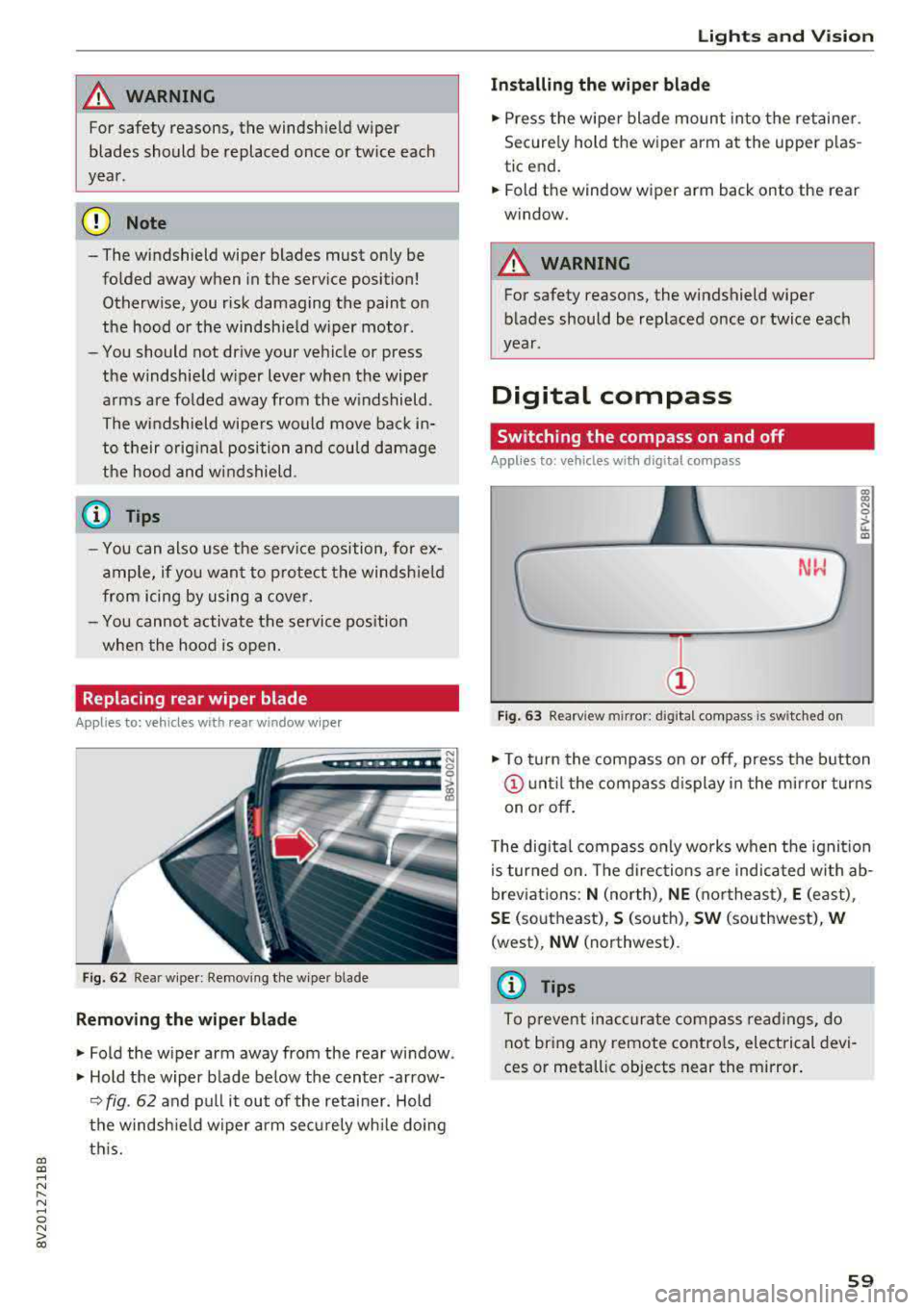
Fig. 62 Rear wiper : Removing the wiper bla de
Removing the wiper blade
"Fold the wiper arm away from the rear window .
" Hold the wiper blade below the center -arrow-
¢ fig. 62 and pull it out of the retainer . Hold
the windshield wiper arm securely while doing
this.
Lights and Vision
Installing the wiper blade
"Press the wiper blade mount into the retainer.
Securely hold th e wiper arm at the upper plas
tic end.
"Fold th e window wiper arm back onto the r ear
window.
_& WARNING
= -
For safety reasons, the windshield wiper
blades should be replaced once or twice each
year .
Digital compass
Switching the compass on and off
Applies to: vehicles with digital compass
Fig. 63 Rearview mir ror : digi tal compa ss is s wit c hed on
gi N 0
> u. m
"To turn the compass on or off, press the button
@until the compass display in the mirror turns
on or off.
The digital compass only works when the ignition
is turned on. The directions are indicated with ab
breviations:
N (north), NE (northeast), E (east) ,
SE (southeast), S (south), SW (southwest), W
(west) , NW (northwest) .
(D Tips
To prevent inaccurate compass readings, do
not bring any remote controls, electrical devi
ces or metallic objects near the mirror.
59
Page 72 of 400
Warm and cold
Warm and cold Climate control system
Description
The climate control system circulates, warms or
cools, and removes humid ity from the air in the
veh icle inter ior .
It is the most effective when the
windows and panorama glass roof* or power top*
are closed. If there is a build-up of heat inside
the vehicle, ventilation can help to speed up the
cooling process.
Pollutant filter
The pollutant filter removes pollutants such as
dust and pollen from the a ir.
Key recognition
Various settings are stored and assigned to the
remote control key be ing used .
These settings are different when the power top* is open or closed .
Presetting
Several functions can be preset in the Infotain
ment system.
Select in the Infotainment system:
I MENU I but
ton
> Vehicle > left control button > Air condi
tioning
A WARNING
Poor visibility can lead to accidents .
- For safer driving, keep all windows free of
ice, snow and fog.
- Become familiar with the correct use and
function of the climate control system as
quickly as possible, especially with the de
frosting and defogging functions.
- When the temperature is below freezing, only use the windshield washer system after
70
the windshield has been warmed by the cli
mate control system. The washer fluid could
freeze on the windshield and impair visibili
ty .
Cl) Note
-If you suspect that the climate control sys
tem is damaged, switch the system off to
prevent further damage and have it checked
by an authorized Audi dealer or authorized
Audi Service Facility.
- Repairs to the Audi climate control system
require special technical knowledge and
special tools . See an authorized Aud i dealer
or authorized Aud i Service Facility .
@ For the sake of the environment
-To save fuel, turn off the climate control
system cooling mode by press ing the A/C
button. This will also reduce emissions . The
climate control system is off when the LED
in the button turns off.
- In vehicl es w ith the efficiency prog ram*,
you can find other consumption information
and more economy tips <=? page 19.
(D Tips
- T o prevent interference with the heating
and cooling output and to prevent the win
dows from fogging over, the a ir intake in
front of the windshie ld must be free of ice,
snow or leaves.
- Condensation from the cooling system* can
drip and form a pudd le of water under the
vehicle. This is norma l and does not mean
there is a leak.
- The energy management system may tem
porarily switch off certain functions, such as
the seat heating* or rear window defogger.
These systems are available again as soon
as the energy supply has been restored.
Page 73 of 400
Warm and cold
Automatic climate control system
App lies to: ve hicles with a utomat ic clima te contro l syste m
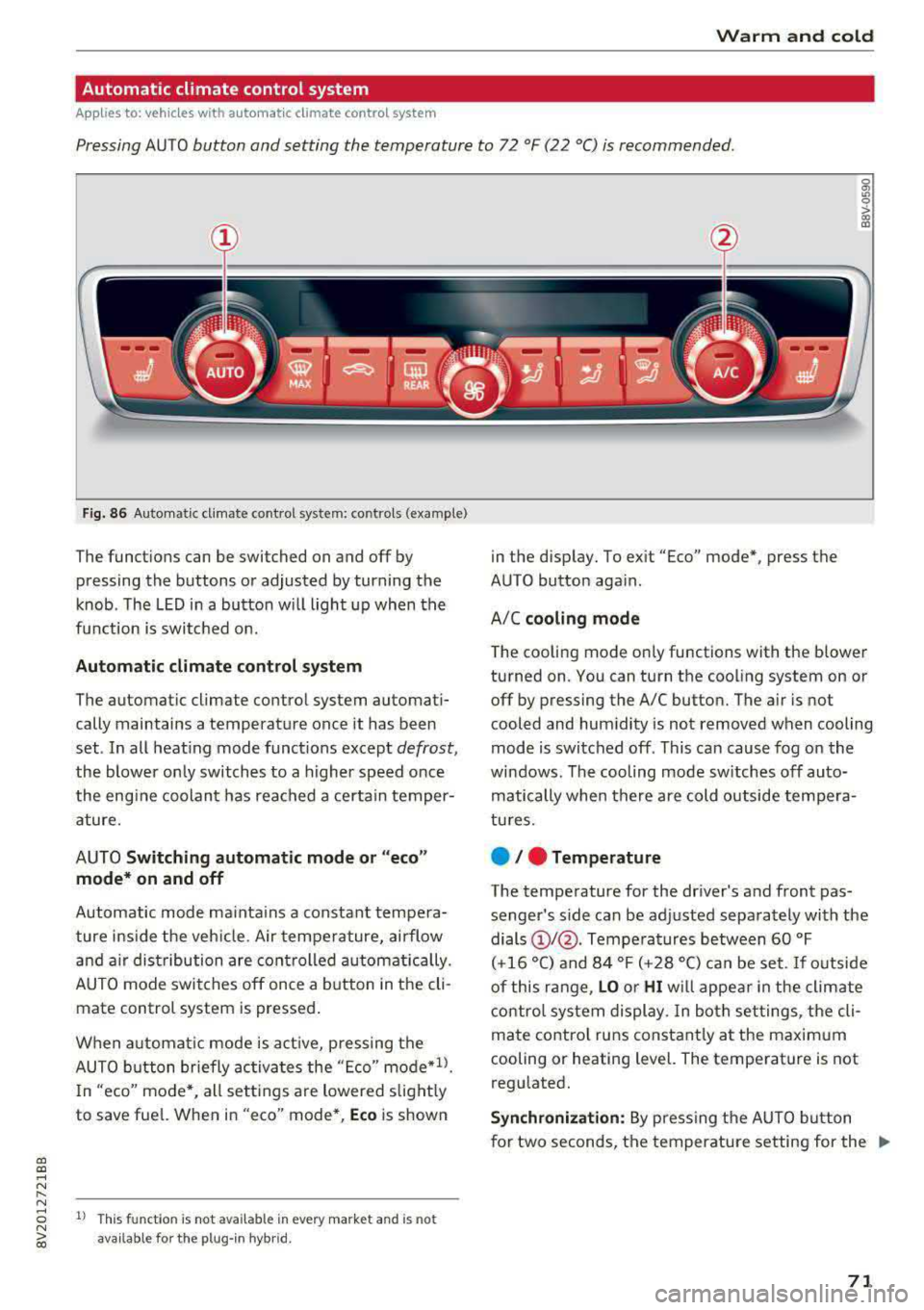
Pressing AUTO button and setting the temperature to 72 °F (22 °C) is recommended.
a, a, ..... N
" N
Fig. 86 Automatic cl imate con trol system: controls (exa mple)
The funct io ns can be switched on and off by
pressing the buttons or adjusted by turning the
k n ob. The LED i n a butto n w ill light up wh en the
f u nction is switched o n.
Automatic climate control system
The automat ic climate control system automati
cally maintains a temperatu re once it has been
set . In all heat ing mode funct ions e xcep t
defrost,
the blower on ly switches to a higher speed once
the eng ine coolan t has reached a cer ta in temper
ature.
AUTO
Switching automatic mode or "eco "
mode* on and off
Automatic mode ma inta ins a constant tempera
ture ins ide the veh icle. Air tempe rature, airflow
and a ir dist ribution are cont rolled automat ically.
AUTO mode switches off once a b utton in t he cli
mate control system is pressed .
When a utomat ic mode is a ct ive, pressing the
AUTO b utton briefly activa tes the "E co"
mode*ll.
In "eco" mode'<-, all sett ings are lowered slight ly
to save fue l. When in "eco" mode*,
Eco is shown
8 1l Thi s funct ion is not available in every market and is not N ~ availab le fo r the plug- in hyb rid.
in the disp lay. To ex it "Eco" mode*, press the
AUTO button aga in.
A/C
cooling mode
T he cooling mode on ly functions with the blower
turned on. You can turn the cooling system on or
off by pressing the A/C button. The air is not
cooled and humidity is not removed when cooling
mode is switched off. This can cause fog on the
windows . The cooling mode sw itches off auto
matically when there are cold outside tempera
tu res.
e / e Temperature
The temperature for the driver's and front pas
senger's side can be ad justed separately with the
dials
(D I@ . Tempe ra tures between 60 °F
(+16 °() and 84 °F (+ 28 °() ca n be set. If o utside
of this range,
LO o r HI w ill appe ar in the climate
contro l system display. In bot h set tings, the cli
mate contro l runs constant ly a t the maxim um
cooling or heating level. The temperature is not
regu lated.
Synchronization: By pressing t he AUTO b utton
for two seconds, the temperature setting for the
.,..
71
Page 74 of 400
Warm and cold
driver is transferred to the front passenger's
side . This applies a t emperature change to the
front passenger's side .
8/r Blower
Using the regulator 8£?, you can manually adjust
the volume of air generated by the blower to your
p reference . The blower shou ld always run at a
low setting to prevent the windows from fogging
and to ensure a continuous exchange of air inside
the vehicle . To have the blower regulated auto
mat ically , press the AUTO button.
~/ :,0/ ~ Air distribution
The air distribution can adjusted with the but
tons. To have the air distribution regulated auto mat ically, press the AUTO button.
The round air vents in the cockpit are adjustable
qpage 73.
To keep the front s ide windows from fogging up
in damp weathe r, we recommend opening the
side air vents and tilting them to the side .
Foot vents are located under the front seats and
adjustable vents on the end of the center console
to heat the rear of the vehicle .
::!_ Defrosting
The windsh ield and s ide windows are defrosted
or cleared of condensation as qu ickly as possible .
The max imum amount of air flows ma inly from
the vents below the windshield. Recirculation
mode switches off. The temperature shou ld be
set at +72°F (22°() o r higher. The temperature is
controlled automatica lly. In the
;Ix setting, the
A/C cooling mode switches on automatically , d e
pending on the outside air temperature.
The AUTO button switches the defroster off.
cE) Recirculation mode
The recirculation mode can be turned on manua l
ly or automatically*.
- Switching manual recirculation mode on and
off: Press
the~ button.
72
- Automatic * reci rculation mode: auto recircula
tion needs to be activated in the Infotainment
system. Select in the Infotainment system:
I MENU I but ton > Vehicle > left control button >
Air conditioning > Auto recirculation
The air
quality sensor that is designed for diesel and
gasoline exhaust automatically sw itches the re
circulation mode on or off depending on the
level of pollutants in the outside air.
In rec irculat ion mode, the air inside the vehicle is
c ir culated and filtered. This prevents the unfil
tered air outs ide the veh icle from entering the
vehicle inte rior. Switching rec irculation mode on
whe n driving through a tunnel or when sitting in
traffic is recommended
q .&..
Pressing the~ button, AUTO or the ;fx button
switches recircula tion mode off.
T he system switches to recirculation mode when
driv ing in reverse when the engine is cold .
SP. Rear window defogger
If the rear window defogger is activated when
the igni tion is switched on, the battery manage
ment determines based on the battery charge if
i t is possible to turn on . Otherwise, the rear w in
dow defogger functions with the engine running
and switches off automatically after approxi
mately 10 -20 minutes, depending on the out
side temperature .
To prevent the rear window defogger from
switching off automat ica lly, press and hold the
!fP. button for more than two seconds. This re
mains stored up to approximate ly 15 minutes af
te r turning off the ignition.
J Seat heating*
Pressing the J button switches the seat heat ing
on at the highest setting (level 3) . The LEDs indi
cate the temperat ure level. To reduce the tem
perature , press the button again. T o switc h the
seat heating off, press the button repeatedly un
ti l the LED turns off .
After approximately 10 minutes, the seat heating
a utomat ically switches from level 3 to level 2.
.,..
Page 75 of 400
a, a, ..... N
" N ..... 0 N > 00
_& WARNING
-You should not use the recirculation mode
for an extended period of time, because no
fresh a ir is drawn in and the windows can
fog when coo ling mode* is switched off .
T his increases the r is k of an accide nt.
- Individuals with reduced sensitivity to pain
o r temperat ure cou ld develop burns when
using the seat heating fu nction . To reduce
the risk of injury, these ind iv iduals should
not use seat heating.
(D Note
To avoid damage to the heat ing elements in
the seats, do not kneel on the sea ts or place
heavy loads on a small area of the seat.
@ Tips
-The setting for the seat heating on the driv
er's side is ass igned to the key that is in use.
-If the front passenger's seat heat ing is
turned on, it will not turn on again automat
i ca lly if more than 10 m inutes have passed
between sw itching the ign ition off and
switching it on again .
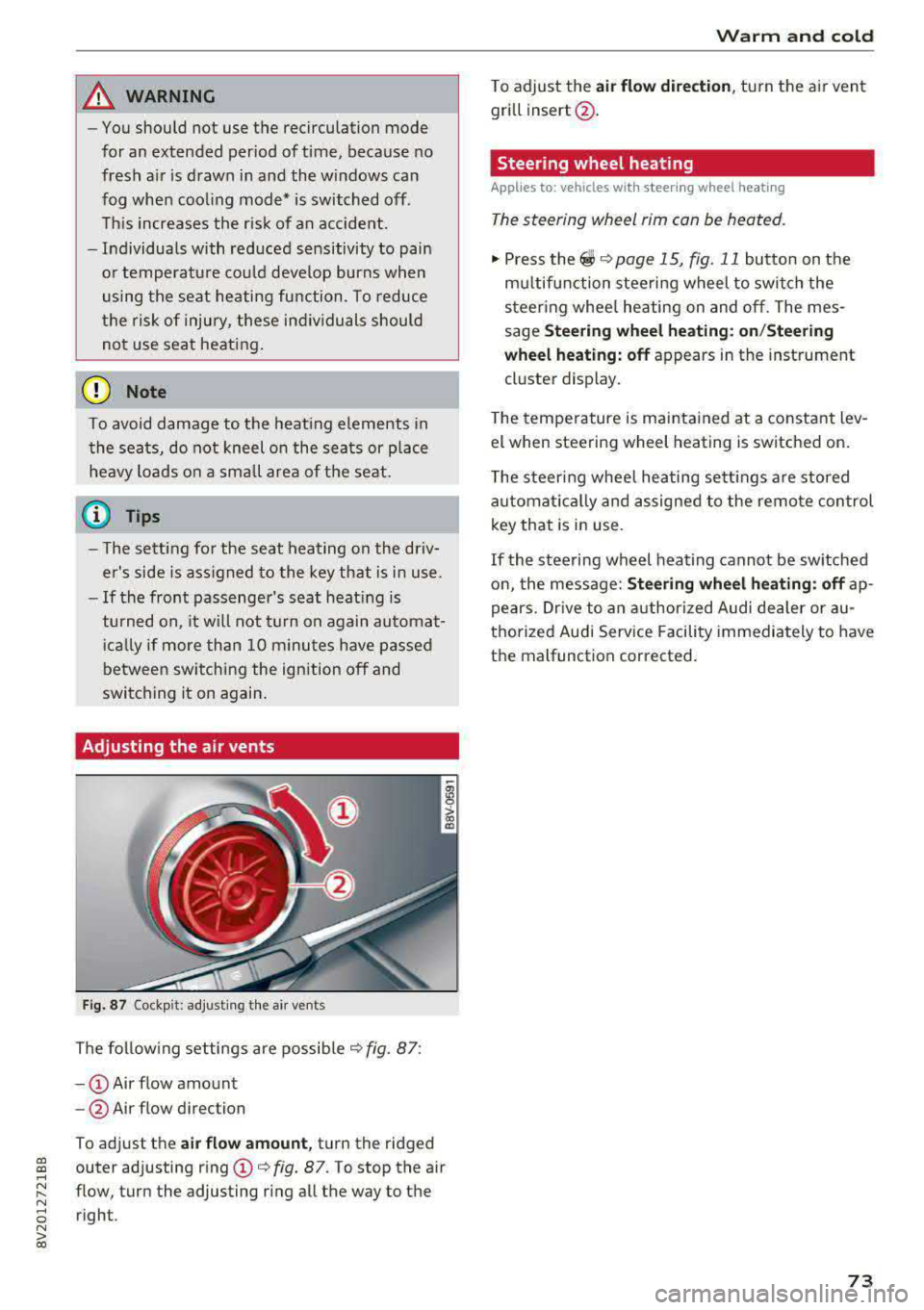
Adjusting the air vents
Fig. 87 Cockp it: adjust ing the air vents
The fol low ing settings are possib le ¢fig. 87:
- CD Air flow amount
-@ Air flow direction
To adjust the
air fl ow a mount , turn the ridged
outer adjusting ring
CD ¢ fig. 87. To stop the air
flow, turn the adjusting ring all the way to the right .
Warm and cold
To adjust the air fl ow directio n, turn the air vent
gri ll insert @.
Steering wheel heating
Applies to: vehicles with steering wheel heating
The steering wheel rim can be heated.
"' Press the ~ ¢ page 15, fig. 11 button on the
mu ltifunction steering wheel to switch the
steering whee l heating on and off. The mes
sage
St ee ring wheel h eatin g: on/St eering
w hee l heating: off
appears in the instrument
cluster display.
T he temperature is mainta ined at a constant lev
el when steering wheel heating is switched on.
T he s teering wheel heating settings a re stored
automat ica lly and assigned to the remote control
key that is in use .
If the steering wheel heating cannot be sw itched
on, the message:
S te e ring wh eel h eating : off ap
pears. Dr ive to an authorized Audi dea ler or au
thorized Audi Service Facility immediately to have
the malfunction corrected.
73
Page 77 of 400
CXl CXl .... N ,.__
N .... 0 N > 00
next traffic light is red. This produces an engine
braking effect, which helps to protect the brakes
and tires and reduces the emissions and fuel con
sumption to zero (fuel shut-off during decelera
tion).
Shift efficiently
An effective way to save fuel is to upshift earlier.
Staying in a gear too long uses fuel unnecessari
ly .
Press down on the accelerator pedal slowly and
avoid "kick-down".
Avoid full acceleration
You should rarely travel at the maximum vehicle
speed. High speeds cause a disproportionately
high increase in fuel consumption, emissions and
traffic noise. Slower driving saves fuel.
Reduce idling time
The Start/Stop system* helps to reduce the idling
time automatically. In vehicles without the Start/
Stop system, it is efficient to switch the engine
off when stopped
at railroad crossings and long
red lights. Depending on the version of the en
gine, stopping the engine for as little as five sec
onds once it has reached operating temperature
still saves more fuel than leaving the engine run ning
-even when taking into account the amount
of extra fuel that is used to restart the engine.
It takes a very long time in idle to warm the en
gine up to operating temperature. Wear and
emissions are especially high in the warm-up
phase. Therefore, you should begin driving im
mediately after starting the engine. Avoid high
RPMs while doing this.
Have maintenance performed regularly
By having maintenance performed regularly on
your vehicle, you can help to reduce fuel con
sumption before you even start to drive. The maintenance condition of your vehicle not only
affects traffic safety and long-term value but al
so impacts
fuel consumption. A poorly main
tained engine can lead to fuel consumption that
is 10% higher than normal.
Driving
Avoid short trips
The engine and emissions control system must
reach their optimal
operating temperature to ef
fectively reduce consumption and emissions.
A cold engine uses a disproportionately high
amount of fuel. The engine reaches operating
temperature and consumption normalizes only
after approximately 2.5 miles (4 km).
Check the tire pressure
To save fuel, make sure the tires are always in
flated to the correct pressure
r=;, page 33 5. The
fuel consumption can increase by S% if the pres
sure is only 0.5 bar too low. Due to the increased
rolling resistance, low tire pressures will also
lead to greater tire
wear and will affect driving
behavior.
Do not drive on
winter tires year-round, as this
will consume up to 10% more fuel.
Eliminate unnecessary weight
Since every kilogram of extra weight increases
fuel consumption, a quick inspection of the lug
gage compartment may be worth it to avoid un
necessary weight.
When not being used, a roof rack should be re
moved to decrease the wind resistance of the ve
hicle. You will save approximately 12% of your
fuel when at speeds from 62-75 mph
(100-120 km/h).
Save energy
The engine drives the generator, which generates
electricity; the fuel consumption also increases
with the demand for electricity. Therefore, switch
electrical equipment off when you no longer
need it. Examples of equipment that uses a lot of
energy are air blowers at a high setting, the rear
window defogger and seat heating*.
(D Note
- Do not leave engine idling unattended after
starting. If warning lights should come on
to indicate improper operation, they would go unheeded. Extended idling also produces
heat, which could result in overheating or
IJ,-
75
Page 80 of 400
Driving
_& WARNING
-Never turn off the engine before the vehicle
has come to a complete stop. The full func
t ion of the brake booster and the power
steering is not guaranteed. Yo u must use
more force to turn or brake. Because you
cannot steer and brake as you usually
would, this could lead to accidents and ser i
ous injuries.
- Never remove the ignit ion key from the ign i
tion lock while the vehicle is moving. Other
wise, the steering lock cou ld sudden ly en
gage and you would not be able to steer the
vehicle.
- Always take the key with you whenever you
leave your vehicle. Otherw ise, the engine
could be started or electrical equipment
suc h as the power windows could be operat
ed . This can lead to serious injury.
- For safety reasons, always park the vehicle
with the selector lever in the P position .
Otherwise, there is the r isk that the vehicle
could roll unintentionally.
(D Note
If the engine has been under heavy load for
an extended per iod of t ime, heat builds up in
the engine compartment after the engine is
sw itched off and there is a risk of damaging
the engine. For this reason, let the engine run
for at idle for approximately two minutes be
fore shut ting it off.
(0 Tips
For up to 10 minutes after stopping the en
gine, the rad iator fan may turn on again auto
matically or it may continue to run (even if
the is ignition switched off) due to the follow
ing reasons:
- The coolant temperature is increasing due
to trapped heat.
- If the engine is warm and the engine com
partment also heats up from strong sun
light.
78
Starting and stopping
the engine (vehicles with
convenience key)
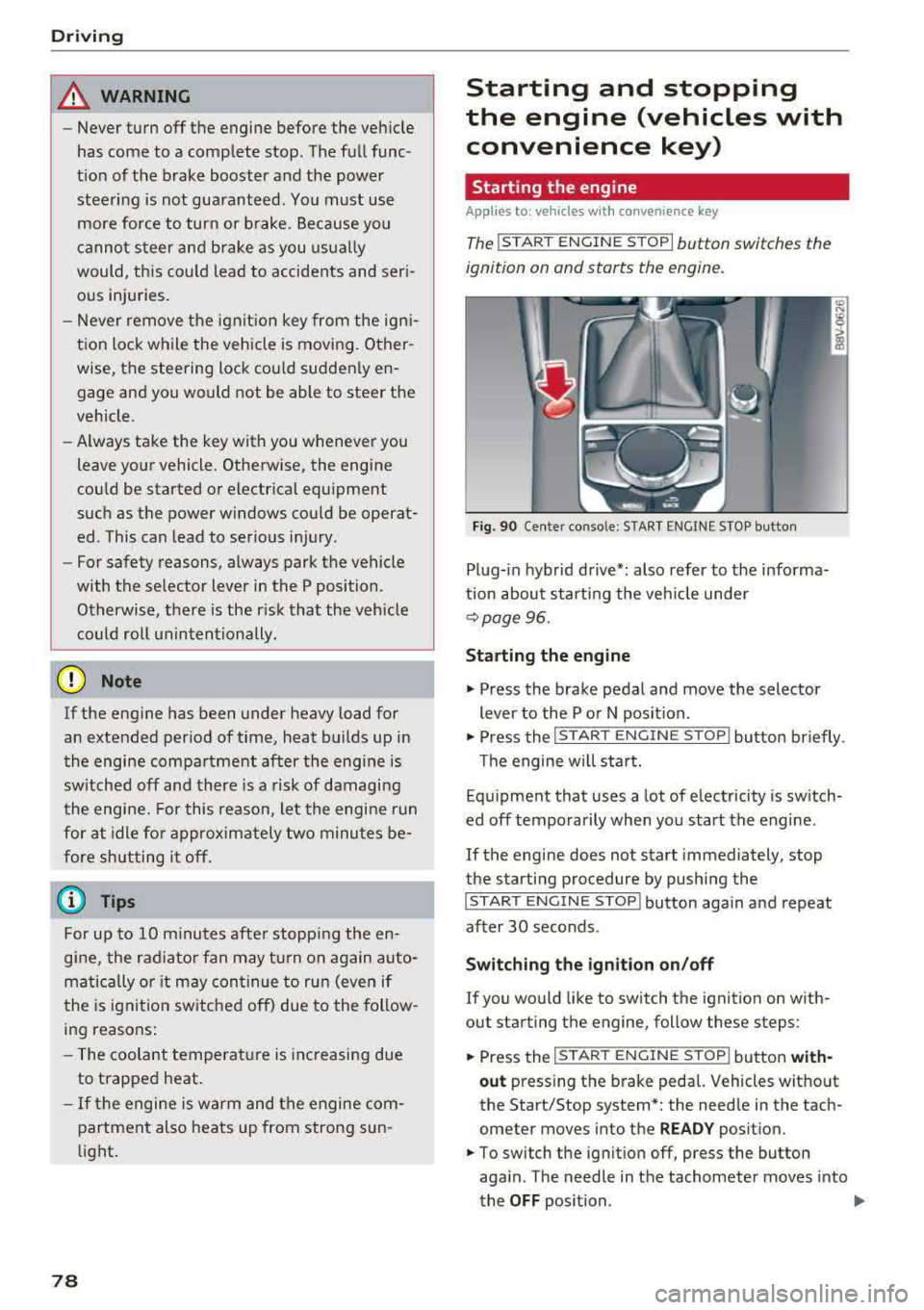
Starting the engine
App lies to : vehicles with co nvenience key
The I ST ART ENGINE STOP I button switches the
ignition on and starts the engine.
Fig. 90 Center conso le: STAR T ENGINE S TOP button
Plug-in hybrid drive*: also refer to the informa
t ion about starting the veh icle under
r::!v page 96.
Starting the engine
"'Press the brake pedal and move the selector
lever to the P or N position .
"'Press the I START ENGINE STOP ! button briefly .
Th e engine will start.
Equipment that uses a lot of electricity is switch
ed off temporarily when you start the engine .
If the engine does not start immediately, stop
the starting procedure by pushing the
I START ENGINE STOP ! button again and repeat
after 30 seconds .
Switching the ignition on/off
If you would like to switch the ignition on with
out starting the engine, follow these steps:
"' Press the I S TAR T ENGINE ST OP I button with-
out press ing the brake pedal. Vehicles without
the Start/Stop system *: the need le in the tach
ometer moves into the
READY position.
"'To switch the ignition off, press the button
aga in . The needle in the tachometer moves into
the
OFF position . .,..
Page 81 of 400
If the 'Tj indicator light blinks and the message
Please turn steering wheel appears when switch
ing the ign ition on, the steer ing lock is locking
the steering wheel. In this case, turn the steering
wheel slight ly to the left/right.
Start /Stop system*
See the information in¢ page Bl, Start/Stop
system .
A WARNING
To reduce the risk of poisoning, never allow
the engine to run in confined spaces.
@ Note
Avoid high engine speed, full throttle, and
heavy engine load if the engine has not
reached operating temperature yet. You could
damage the engine.
@ For the sake of the environment
Do not let the engine run while parked to
warm up. Begin driving immediately. This
re
duces unnecessary emissions.
(D Tips
-Some noise after starting the engine is nor
mal and is no cause for concern.
- If you leave your vehicle with the ignition
switched on, the ignition will switch off
af
ter a certa in amount of t ime. Make sure that
electr ica l equ ipment such as the exter ior
lights are switched off.
Stopping the engine
Applies to: veh icles with conve nience key
-
Plug-in hybrid dr ive*: refer to the informat ion un
der ¢ page 96.
.. Bring the vehicle to a full stop.
.. Move the selector lever into the P pos ition.
.. Press the I STAR T ENGINE ST OPI button
¢ page 78, fig. 90 .
CXl CXl .... N r--N .... 0 N > l) This func tion is not avai lable in all countries. 00
D riving
Steering
lock1 )
T he steering locks when yo u turn the engine off
using the
I STA RT ENG INE S TOPI* button, move
the selector lever into the P position and open
the driver's door. The locked steering hel ps pre
vent vehicle theft.
Emergency off function
If it is absolutely necessary, the eng ine can also
be turned off whi le driving at speeds starting at
4 mph (7 km/h). To switch the engine off, press
the
I START ENGINE STOPI button twice in a row
briefly or press and ho ld for longer than two sec
onds.
A WARNING
-- Never turn off the engine before the vehicle
has come to a complete stop. The full func
tion of the brake booster and the power
steer ing is not guaranteed. You must use
mo re force to turn or brake. Because you
cannot steer and brake as you usually
wou ld, this could lead to accidents and seri
ous injuries.
-Always take the key with you whenever yo u
leave your vehicle. Otherwise, the engine
could be started or electrical equipment
such as the power windows could be operat
ed. This can lead to ser ious injury.
- For safety reasons, always park the vehicle
with the selector lever in the P pos ition.
Otherw ise, there is the risk that the vehicle
could roll unintentionally .
(D Note
If the engine has been under heavy load for
an extended period of time, heat builds up in
the engine compartment after the engine is
switched off and there is a r isk of damaging
the engine. For th is reason, let the engine run
for at id le for approximately two minutes
be-
fore shutting it off . ..,.
79
Page 86 of 400
Driving
"'To start driving and release the parking brake
automatically, press the accelerator pedal as
usual.
In addition to releasing the parking brake auto
matically, other convenience and safety functions
are available when you start driving
¢ page 85,
Starting from a stop.
Preventing the automatic parking brake
release
The vehicle could begin rolling unintentionally,
dep ending on the hill or if towing a trailer.
"'To prevent the parking brake from releasing au
tomatically, pull and hold
the®> switch and
press the accelerator pedal. The parking brake
remains set and prevents the vehicle from roll
ing backward.
"'You can release the(®) switch again once you
are sure that you are giving enough driving
force to the wheels by pressing the accelerator pedal.
Emergency braking function
You can use the emergency braking function in an emergency situation, or if the standard brake op
eration malfunctions or is disabled .
"'Pull and hold the(®) switch.
"' As soon as you release the ®> switch or acceler-
ate, the braking stops .
Pulling and holding
the®> switch while driving
the vehicle activates the emergency braking func
tion . The vehicle is braked at all four wheels by
activating the hydraulic brake system. The brak ing effect is similar to heavy
braking ¢,&. .
To reduce the risk of activating the emergency
braking by mistake, a warning tone (bu zzer)
sounds when
the(®) switch is pulled. Emergency
braking stops as soon as
the(®) switch is released
or the accelerator pedal is pressed .
Parking
"' Press the brake pedal to stop the vehicle.
"'Pull the®> switch to set the parking brake.
"'Place the selector lever in the P position.
"'Turn the engine off ¢,&. .
84
"'Turn the steering wheel when parking on in
clines so that the wheels will roll into the curb
if the vehicle starts moving.
A WARNING
- Do not press the accelerator pedal inadver
tently if a gear is selected when the vehicle
is stationary and the engine is running . Oth
erwise, the vehicle will start to move imme
diately and this could result in an accident.
- Emergency braking should only be used in
an emergency, when the normal brake pedal has failed or the brake pedal is obstructed.
During emergency braking, your vehicle will
brake similar to heavy braking. ESC and the
associated components (ABS, ASR, EDL)
cannot overcome the laws of physics. In cor
ners and when road or weather conditions
are bad, a full brake application can cause
the vehicle to skid or the rear end to swerve,
which increases the risk of an accident.
- If the power supply fails, you cannot set the
parking brake if it is released . In this case,
park the vehicle on level ground and secure
it by placing the selector lever in the P posi
tion. See an authorized Audi dealer or au
thorized Audi Service Facility for assistance.
-Always take the vehicle key with you when
leaving your vehicle, even for a short period
of time . This applies particularly when chil
dren remain in the vehicle. Otherwise chil
dren could start the engine, release the
parking brake or operate electrical equip
ment such as power windows, which in
creases the risk of an accident.
- No one should remain in the vehicle when it
is locked - especially children. Locked doors
make it more difficult for emergency work
ers to get into the vehicle, which puts lives
at risk .
(D Tips
When stopping at a traffic signal or stopping
in city traffic, you can set the parking brake
manually . The vehicle does not have to be
held with the brake pedal. The parking brake
eliminates the tendency to creep when a se lector lever position is engaged . As soon as
Page 102 of 400
e-tron
Setting plug -in hybrid drive modes
Applies to: vehicles with plug -in hybrid drive
You con select between one electric mode and
two hybrid modes .
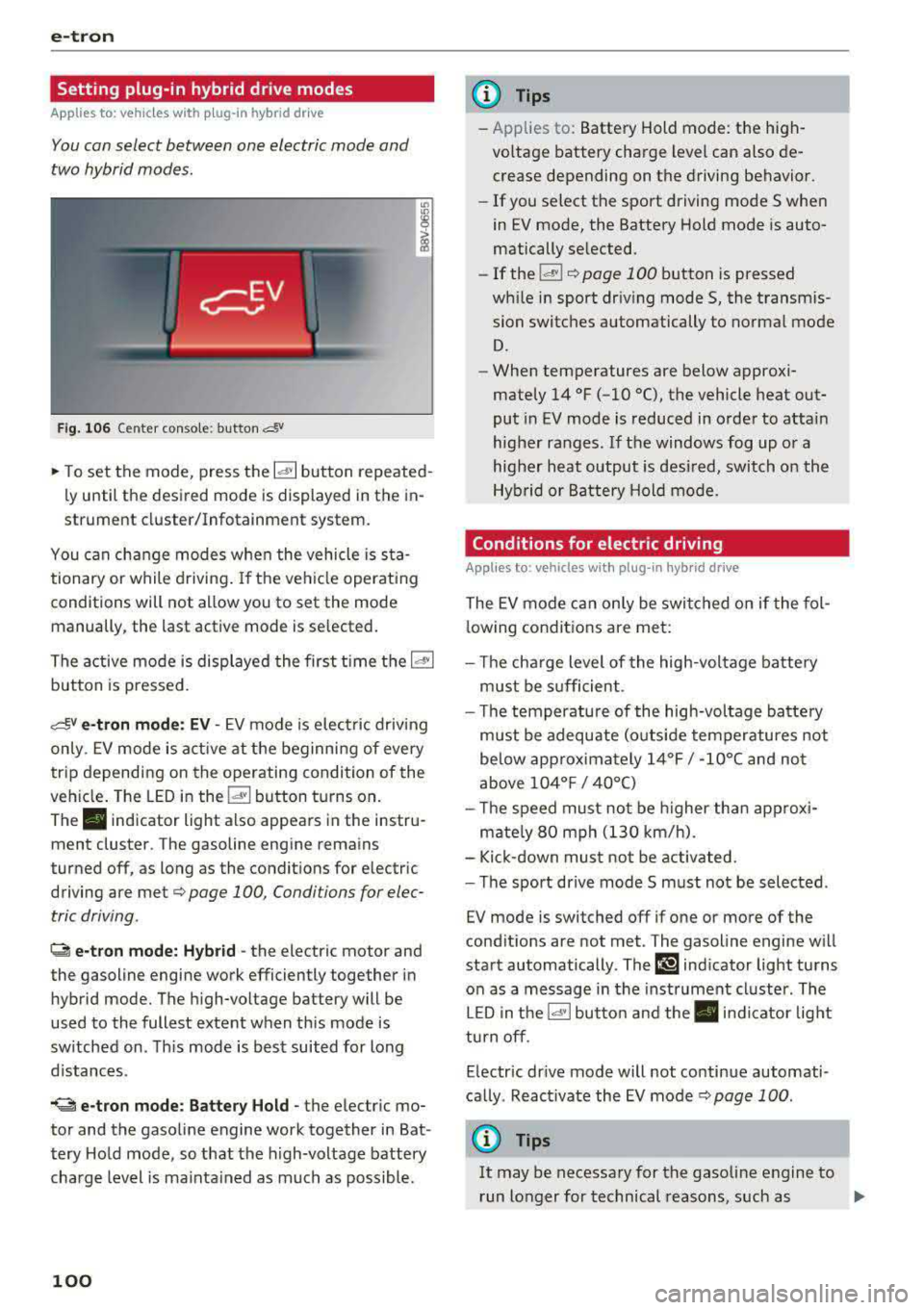
Fig. 10 6 Center conso le: button &
"' "'
i (0
~ To set the mode, press the ld' I button repeated
ly until the desired mode is displayed in the in
strument cluster/Infotainment system.
You can change modes whe n the vehicle is s ta
tionary or while driving . If the ve hicle operat ing
conditions will not allow you to set the mode
manually, the last active mode is selected.
The active mode is displayed the first t ime t he
ld• I
button is pressed.
av e -tron mode : EV -EV mode is elec tric dr iv ing
only. EV mode is active at the beginning of every
tr ip depending on the operating condition of the
veh icle . The LED in the
lal button turns on.
The . indicator light also appears in the instru
ment cluster. The gasoline engine remains
turned off, as long as the condit ions for electric
driving are met
c:;, page 100 , Conditions for elec
tric driving .
~ e-tron mode: Hybrid -the electric motor and
the gasoline engine work efficiently together in
hybrid mode. The high-voltage battery will be
used to the fullest extent when th is mode is
sw itched on . Th is mode is bes t suited for long
d istances .
.. ~ e-tron mode : Battery Hold -the electric mo
tor and the gasoli ne engine work together in Bat
tery Hold mode, so that the high-voltage battery
charg e level is ma inta ined as much as possible .
100
@ Tips
-Applies to: Battery Hold mode : the high
voltage battery charge level can also de crease depending on the driving behavior.
- If you select the sport driving mode S whe n
in EV mode, the Battery Hold mode is auto
matically se lected.
- If
the !& ! c:;, page 100 button is pressed
wh ile i n sport driv ing mode S, the transm is
sion switches automatically to normal mode
D.
- When temperatures are below approxi
mately
14 °F ( -10 °(), the vehicle heat out
put in EV mode is reduced in orde r to attai n
highe r ra nges. If the windows fog up o r a
highe r heat output is desi red, switch on the
Hyb rid or Battery Hold mode.
Conditions for electric driving
Applies to : vehicles with plug-in hybrid drive
The EV mode c an only be swi tc h ed o n if the fol
l owing condit ions are met:
- T he cha rge level of the high-vol tage batte ry
m ust be sufficient .
- Th e temperature of the hig h-vol tag e batte ry
m ust be adequate (o utside temper atures not
below app roxima tely
1 4 °F / -10°( an d no t
above
1 04° F / 40°()
- Th e speed must not be higher th an approxi-
mate ly
80 mph (13 0 km/h).
- Kick-down must no t be a ctivated.
- Th e sport drive mode S m ust no t be selected .
EV mode is switched off if one or more of the
cond it ions are not met . The gasoline engine w ill
start automatically . The
111 ind icator light turns
o n as a message in the instrument cl uster . The
L ED in t he
l.c! 'I bu tto n and the . in dicator lig ht
tu rn off.
E lectric dr ive mode will not co ntinue automati
ca lly . React ivate the EV mode
¢ pag e 100 .
(D Tips
It may be necessary for the gaso line e ngine to
r un lo nger for technical reasons, such as
..,.