light AUDI A4 2015 Owner's Manual
[x] Cancel search | Manufacturer: AUDI, Model Year: 2015, Model line: A4, Model: AUDI A4 2015Pages: 304, PDF Size: 74.86 MB
Page 32 of 304
30 Driver in formation d isplay
In o rder to connect the special diagnostic
equipment, push the plug i nto the Data Link
Connector (DLC) . The DLC is located to the
right of the hood release¢
fig. 18.
Your authorized A udi dealer or qualified work
shop can interpret the code and perform the necessary repa ir .
.&_ WARNING
Do not use the diagnostic connector for
personal use. Incorrect usage can cause
ma lfunctions, which can increase the risk
of a coll is ion!
Electronic speed limiter -
Your veh
icle may be factory equipped with
tires that are rated for a maximum speed of 130 mph (210 km/h) . Thi s is m ay be less than
the maxim um speed of your ve hicle. To red uce
the r isk of sudden tire fail ure and loss of con
trol if the vehicle is operated at excessive
speeds, yo ur vehicle has an e lectronic speed
limiter. The electronic speed limiter prevents
your ve hicle from going faster than the tire
speed rat ing. For more information
c::> page
248 .
If the engine control unit rece ives fa ulty vehi
cle roadspeed signa ls, the Ma lfunction Indica
tor Light (MIL)
¢4 will illuminate . If this oc
curs, co ntact the nearest author ized Audi
dealer for assistance .
.&_ WARNING
-
Always observe the pos ted speed limits
a n d adj ust yo ur speed to sui t prevailing
road, traffic and wea ther conditions . Never
drive you r vehicle faster than the maxi
m um speed rating of the tires insta lled .
Page 35 of 304
keys. Unguarded access to the keys pro
vides children the opportunity to start
the engine and/or activate veh icle sys
tems such as the power windows etc. Un supervised operation of any vehicle sys
tem by ch ildren can result in serious in
jury.
- Do not remove the key from the ignition
lock until the vehicle has come to a com
plete stop. Otherw ise the steering col
umn lock cou ld suddenly engage -caus
ing the risk of an accident.
(D Tips
- The operation of the remote contro l key
can be temporarily disrupted by interfer
ence from transmit ters in the vici nity of
the vehicle working in the same frequen
cy range (e .g . a ce ll phone, radio equip
ment).
- Fo r security reasons, replacement keys
are on ly available from authorized A udi
dealer.
- For Declaration of Compliance to United
States FCC and Industry Canada regula
tions¢
page 286.
Removing the mechanical key
Fi g. 20 Remote master key: removing the mechanical
key
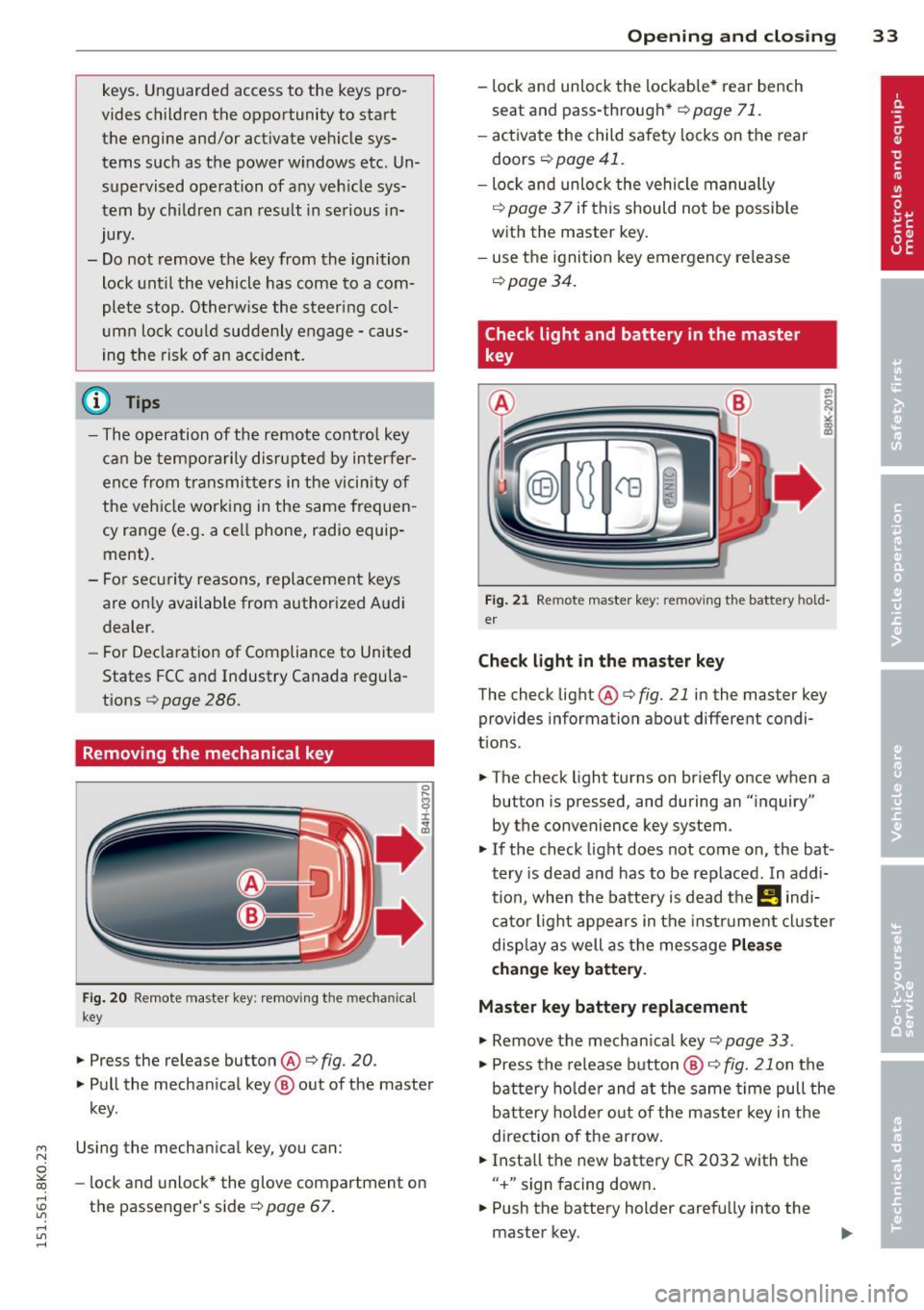
.,. Press the release button@¢ fig. 20.
.,. Pull the mechan ical key @ out of the master
key.
~ Using the mechanical key, you can:
~ co -lock and unlock* the glove compartment on
rl :5: the passenger's side 9 page 67.
rl l/1 rl
Op enin g an d clos ing 33
- lock and unlock the lockable * rear bench
seat and pass-through*
r=;, page 71.
- activate the child safety locks on the rear
doors
r=;, page 41.
- lock and unlock the vehicle manua lly
r=;, page 3 7 if this should not be possible
with the master key.
- use the ignition key emergency release
r=:> page 34.
Check light and battery in the master
key
Fig . 21 Remote master key: removing the battery hold
er
Che ck light in the ma ster ke y
The check light @ r=:> fig. 21 in the master key
provides information about different condi
t ions .
.,. The check light turns on briefly once when a
button is pressed, and during an "inquiry"
by the convenience key system .
.,. If the check light does not come on, the bat
tery is dead and has to be replaced. In addi
tion, when the battery is dead the
!I indi
cator light appears in the instrument cluster
disp lay as well as the message
Plea se
c hange k ey batt ery.
Master key battery replacement
"'Remove the mechan ical key r=;, page 33 .
"' Press the release button @ i=:> fig. 21 on the
battery ho lder and at the same time pull the
bat tery ho lder out o f the maste r key in the
direction of the arrow.
.,. Insta ll the new battery CR 2032 with the
" + " sign facing down .
.,. Push the battery holder carefu lly into the
master key.
Page 38 of 304
36 Openin g and clo sing
- You cannot open the doors or the rear lid
from the
outside (increased security, for ex
amp le when you are stopped at a red light).
- The diodes in the power locking switch illu
minate when all the doors are closed and
locked.
- Front doors: you can un lock and open the
doors from the inside by pu lling on the door
hand le.
- Rear doors: pu ll the door handle
once to re
lease the lock. Pull the hand le
again to open
the door.
- If you hav e a crash and the airbag is activat
ed, the doors automatically un lock.
A WARNING
- The power locking sw itch works w ith the
ignition off and automatically locks the
entire vehicle when it is actuated .
- On a vehicle locked from the outs ide the
power locking system switch is inopera
t ive .
- Locked doors make it more difficult for
emergency workers to get into the vehi
cle, which puts lives at risk . Do not leave
anyone beh ind in the vehicle, especially
children.
(D Tips
Your vehicle is locked automatically at a speed of
9 mph (15 km/h) (Auto Lock)
r:::;, page 31. You can un lock the veh icle
aga in using the opening f unction in the
power locking sys tem switch
@I .
Setting power locking
In the radio/MM!* , you can set which doors
t he central locking system will unlock.
~ Select : I CAR! funct ion button > Central lock
ing .
Or
~ Select : ~I C-A-R~ ! fu nct ion but ton > Car sys tem s*
control b utton > Vehicle setting s > (Central
loc king )*.
Single door un locking/Unl ock door s* -
you
can specify which doo rs un lock when you open
the veh icle. -
Selecting
off /All and pressing the Iii button
on the remote control key unlocks the entire
veh icle.
- Selecting
on/Dri ver and pressing the Iii but
ton on the remote control key once un locks
only the driver's door. In vehicles with a con
ven ience key*, only the door whose handle
you pull w ill unlock. I f you press the
Iii but
ton tw ice, the entire vehicle will unlock . If
you press the [@] button, the enti re vehicle
w ill always lock .
Luggage com p. loc k/Lock ext erior tr unk han
dl e -
If you select On , you can no longer open
the luggage compartment using the rear lid
hand le
r:::;, page 38, fig. 2 7. In this case, the
r ear lid can be opened with the
l=I bu tton on
the master key
r:::;, page 34, fig. 22 or w ith the
l= I* button in the driver 's doo r r:::;,page 39,
fig .
29.
Fold mirrors * if you selec t On , the outs ide
mirrors will fo ld in au tomati cally when yo u
press the
Iii button on the remote cont ro l key
r:::;, page 52.
To ne when lo cking -if you selec t On, a tone
will sound when yo u lock t he vehicle.
Auto Lo ck /Loc k when dri ving -if you select
On, the enti re vehicle w ill lock automatically
whe n the speed reaches
9 mph (1 5 km/h).
Page 40 of 304
38 Openin g and clo sing
& WARNING
Always take the key with you when you
leave the vehicle . The key can disarm the
electronic engine immobilizer and perm it
an unauthor ized person to start the engine
and enable ope rat ion of the vehi cle sys
tems such as powe r window or power sun
roof leading to ser ious personal in jury .
- The vehicle cannot be started if an unau
thorized key is used. The vehi cle may not
star t if another radio device such as a key
for another vehicle o r a tra nsponder is
l ocated on the key ring.
- For De clarat ion of Compli ance to Uni ted
States FCC and Indus try Canada regu la
tions¢
page 286.
Rear lid
Opening/closing rear lid
Fig . 27 Rear lid : hand le
F ig. 2 8 Sedan drive r's door: remote rear lid release •
Opening the rear lid
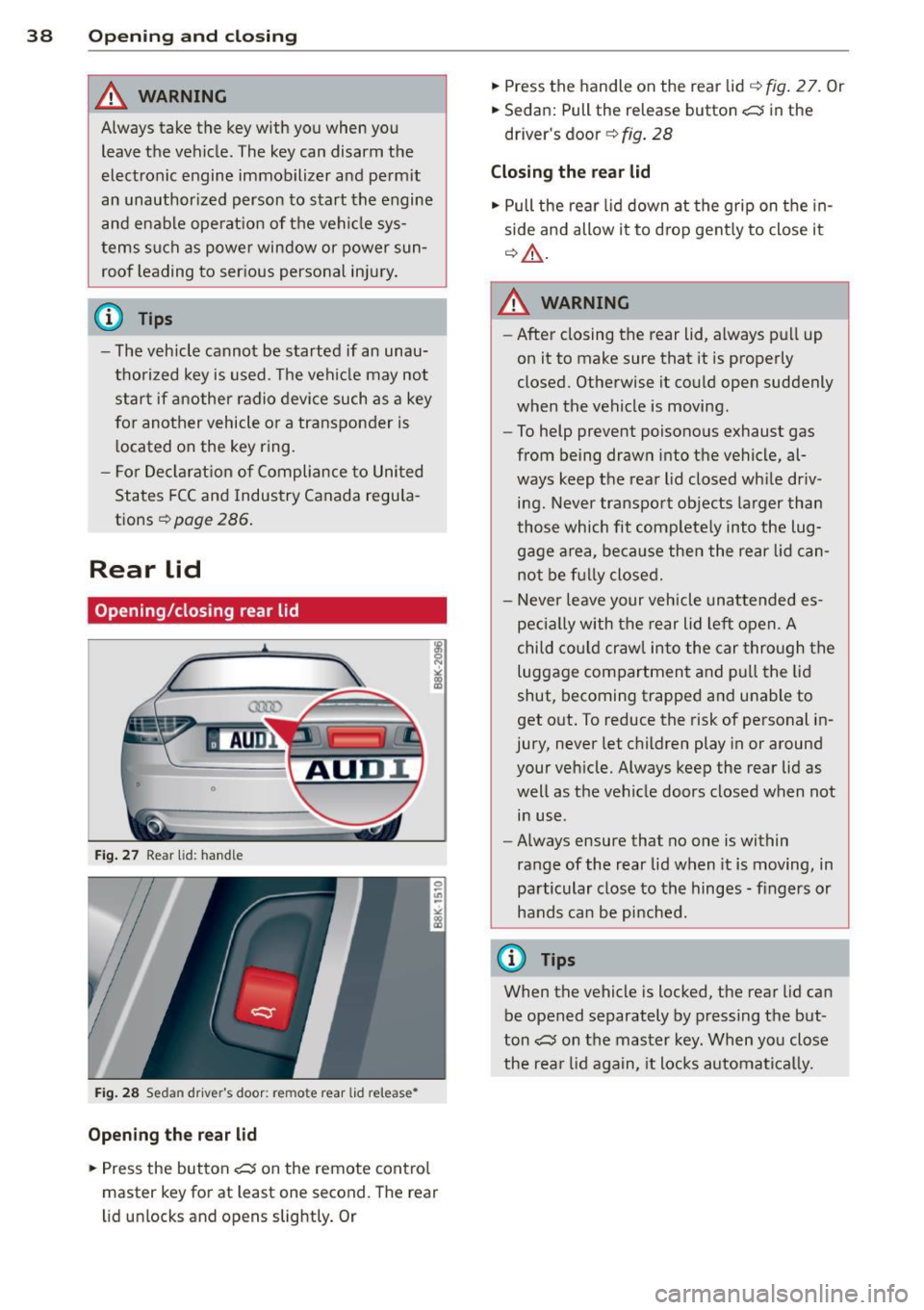
.,. Press the but ton c:s on the remote cont ro l
master key for at least one second. The rear
l id unlocks and opens slightly. Or .,.
Press the handle on the rear lid
q fig . 2 7. Or
.,. Sedan: Pull the release button
c:s in the
driver's door ¢
fig. 28
Closing the rear lid
.,. Pull the rear lid down at the grip on t he in
side and allow it to drop gent ly to close it
q _&. .
A WARNING
-After closing the rear lid, a lways p ull up
on it to make sure that it is properly
closed. Otherwise it could open suddenly
when the vehicle is moving.
- To help prevent poisono us exhaust gas
from being drawn into t he vehicle, al
ways keep t he rear lid closed wh ile driv
ing. Never transport objects la rger than
those which fit complete ly into the lug
gage a rea, beca use then the rear lid can
no t be f ully closed.
- Never leave your vehicle unattended es
peci ally with the rear lid left open. A
chi ld cou ld craw l into the car through the
luggage compartment and p ull the lid
shut, becoming trapped a nd u nable to
get o ut. To reduce the risk of personal in
jury, never let c hildren play in or around
your veh icle. Always keep the rear lid as
well as the vehicle doors closed when not
in use.
- Always ensure that no one is within
range of the rear lid when it is moving, in
particular close to th e hinges -fingers or
hands can be pi nched.
@ Tips
When the vehicle is locked, the rear lid can
be opened separately by pressing the but
ton
c:s on the master key. When yo u close
the rea r lid again, it locks automatica lly.
Page 41 of 304
M N
~ co
rl I.O
"' rl
"' rl
Power opening/closing rear lid
App lies to vehicles: with a utom atic rear li d operatio n
The open position can be adjusted.
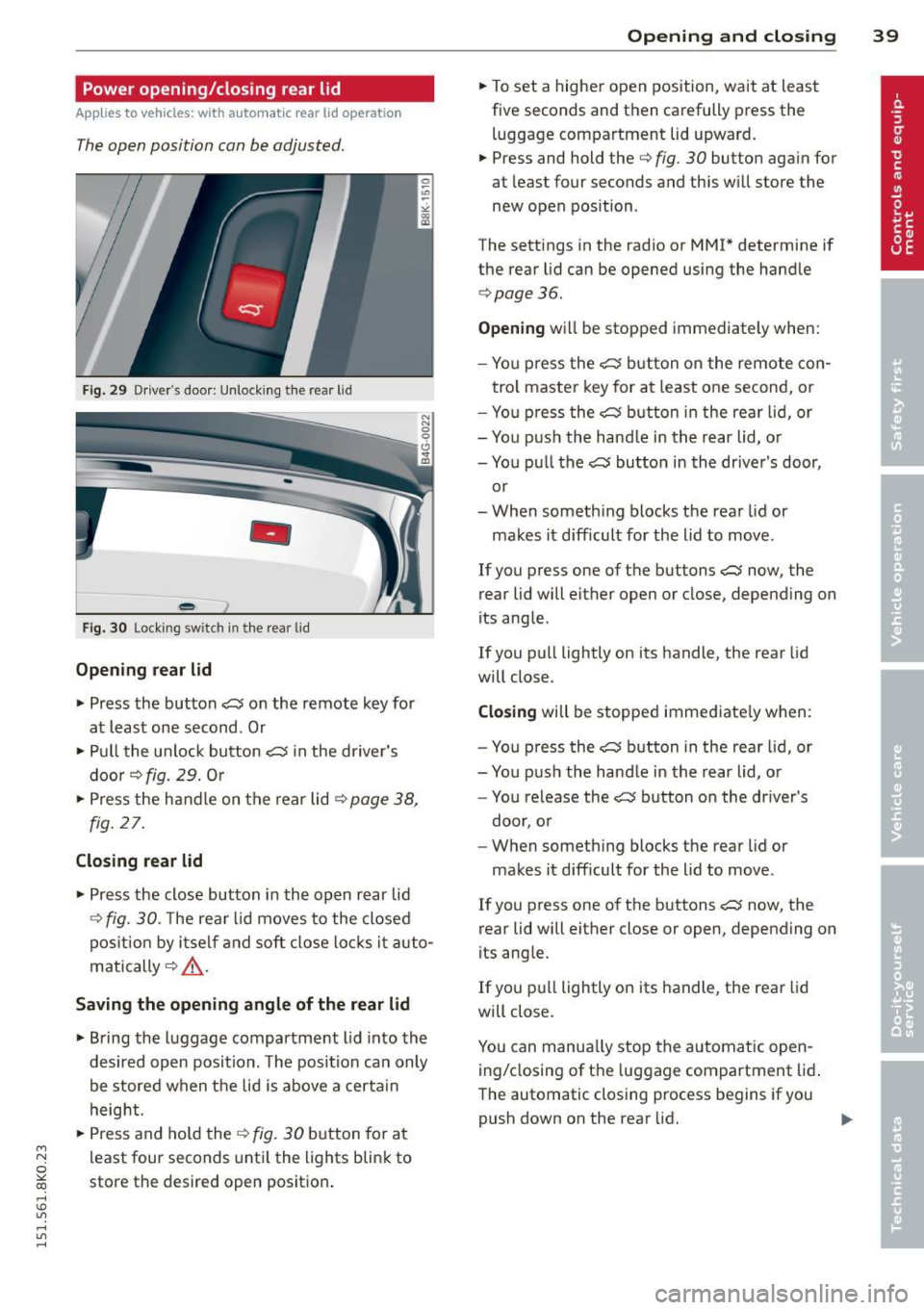
Fig. 29 Dr iver's door: Unlock ing the rear lid
-
Fig. 30 Lock ing switch in t he rear lid
Opening rear lid
"" Press the button ~ on the remote key for
at least one second . Or
""Pu ll the unlock button~ in the driver's
door¢
fig. 29. Or
"" Press the handle on the rear lid¢
page 38,
fig . 27.
Closing rear lid
""P ress the close button in the open rear lid
¢
fig. 30. T he rear lid moves to the closed
pos ition by itself and soft close locks it auto
matically ¢
,&...
Saving the opening angle of the rear lid
""Bring the luggage compartment lid into the
desired open position. The position can only
be stored when the lid is above a certain
height.
""P ress and hold the
¢fig. 30 button for at
l east four seconds until the lights blink to
store the desired open position .
Opening and closing 39
""To set a higher open position, wait at least
five seconds and then carefully press the
luggage compartment lid upward.
"" Press and hold the¢
fig. 30 button again for
at leas t four seconds and this will store the
new open position .
The settings in the radio or MMI* determine if
the rear lid can be opened using the handle
¢page 36.
Opening will be stopped immediately when:
- You press the
~ button on the remote con -
trol master key for at least one second, or
- You press the
e:5 button in the rear lid, or
- You push the handle in the rear lid, or
- You pull the~ button in the driver's door,
or
- When someth ing blocks the rea r lid or
makes it difficult for the lid to move .
If you press one of the buttons
~ now, the
rear lid will either open or close, depending on
its angle.
If you pull lightly on its handle, the rear lid
will close.
Closing will be stopped immediate ly when :
- You press the
e:5 button in the rear lid, or
- You push the hand le in the rear lid, or
- You release the~ button on the driver's
door, or
- When something blocks the rear lid or
makes it difficult for the lid to move .
If you press one of the buttons~ now, the
rear lid will either close or open, depending on
its angle.
If you pull lightly on its handl e, the rear lid
will close.
You can manua lly stop the automatic open
ing/closing of the luggage compartment lid.
The automatic closing process begins if you
push down on the rear lid.
Page 47 of 304
M N
~ co
rl I.O
"' rl
"' rl
Valet parking
Applies to vehicles: with fold ing and lockable rear seat
backs
The valet parking feature protects the lug
gage comportment from unauthorized ac
cess.
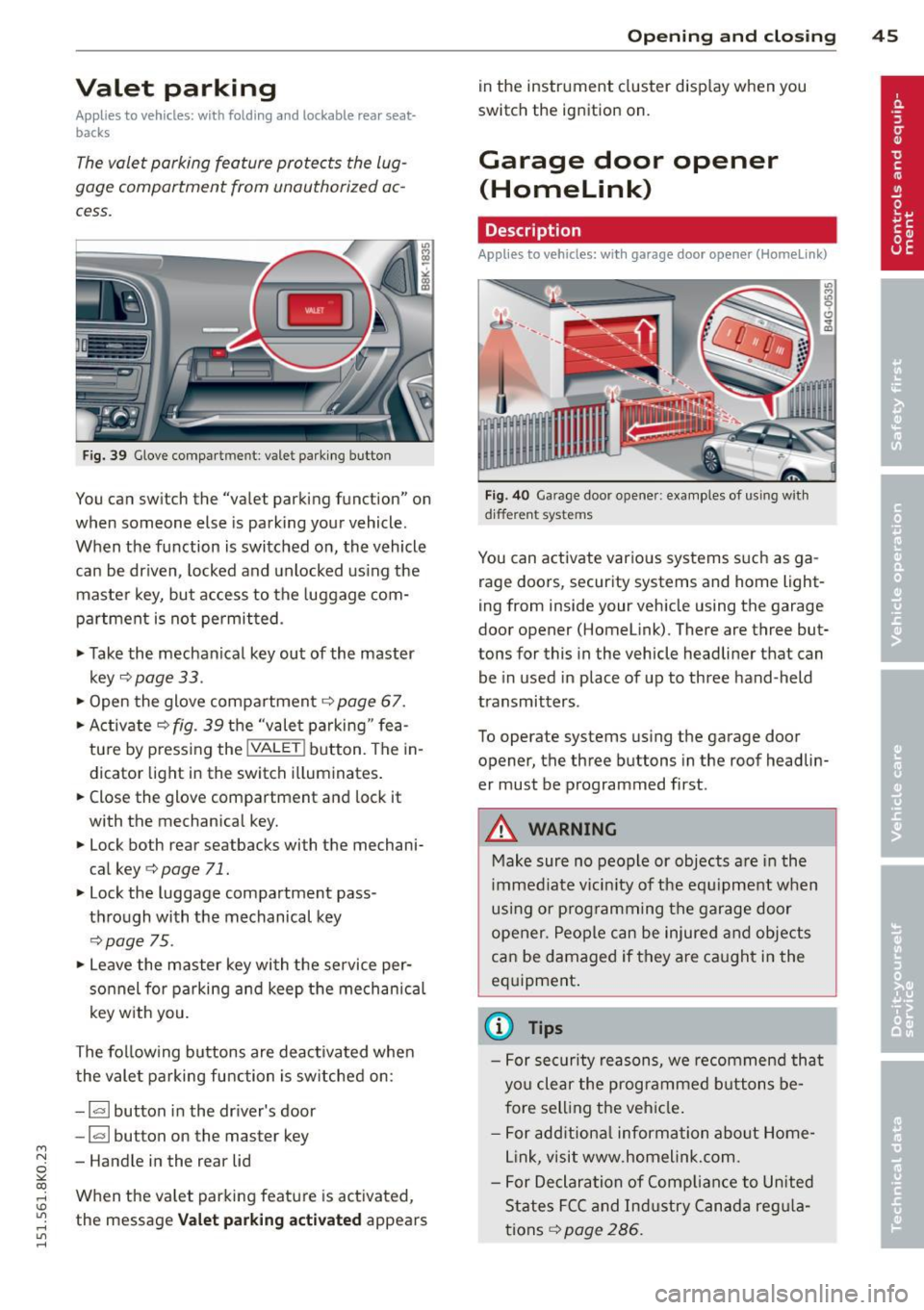
Fig. 39 Glove compa rtment: valet parking button
You can switch the "valet parking function" on
when someone else is parking your vehicle.
When the function is switched on, the vehicle
can be driven, locked and unlocked us ing the
maste r key, but access to the luggage com
partment is not permitted .
• Take the mechanical key out of the master
key
c;, page 33 .
• Open the glove compartment c;, page 67.
• Activate
c;, fig. 39 the "valet parking " fea
tu re by press ing the
! VALET ! button. The in
dicator light in the switch i lluminates.
• Close the glove compartment and lock it
with the mechanical key.
• Lock both rear seatbacks with the mechani
cal key
c;, page 71.
• Lock the luggage compartment pass
through with the mechanical key
c;, poge 75.
• Leave the master key with the service per
sonnel for parking and keep the mechanica l
key w ith you.
The fol low ing buttons are deac tivated when
the valet parking function is sw itched on:
- I a I button in the driver's door
-la l button on the master key
- Handle in the rear lid
When the va let parking feature is activated ,
the message
Vale t p arking act ivat ed appears
Op enin g an d clos ing 45
in the instrument cluster display when you
switch the ignition on.
Garage door opener
(Homelink)
Description
App lies to vehicles: wit h garage door opener (Homelink)
Fig. 40 Garage door opener: examples of using with
d ifferent systems
You can activate various systems s uch as ga
rage doors, security systems and home light
ing from inside your vehicle using the garage
door opener (Homelink). There are three but
tons for this in the vehicle headliner that can
be in used in place of up to three hand-held
transmitters .
To operate systems using the garage door
opener, the three buttons in the roof headlin
er must be programmed first.
A WARNING
Make sure no people or objects are in the
i mmediate vicin ity of the equ ipment when
using or p rogramming the garage door
opener. People can be injured and objects
can be damaged if they are ca ught in the
eq uipment .
(D Tips
-For security reasons, we recommend that
you clear the programmed b uttons be
fore sell ing the vehicle .
- For add itiona l information about Home
L ink, visit www.homelink.com.
- For Declaration of Comp lian ce to United
States FCC and Ind ustry Canada reg ula
tions
c;, page 286.
Page 51 of 304
M N
~ co
Clear vision Lights
Switching the lights on and off
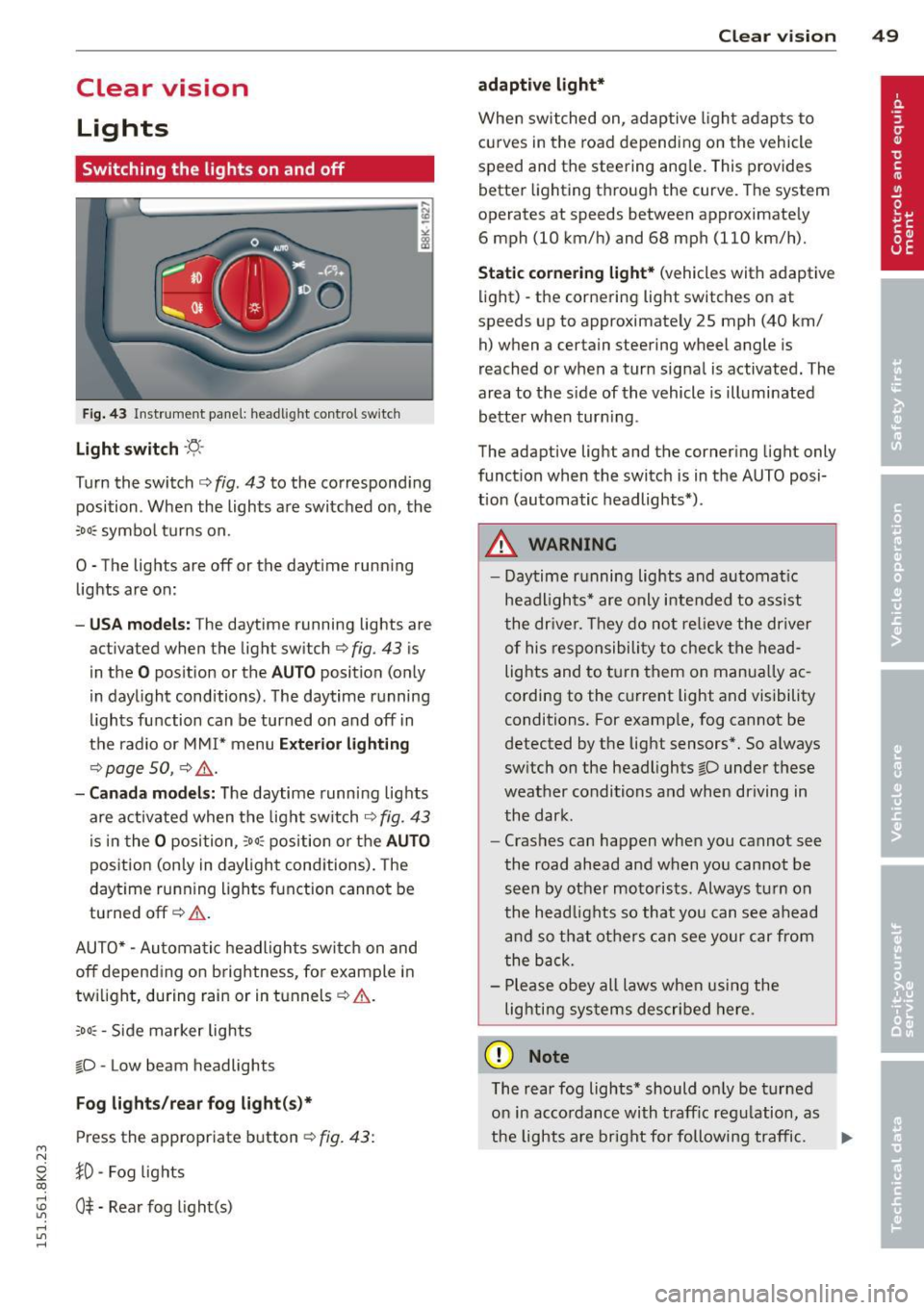
F ig . 43 Instrument pane l: headlight control switch
Light switch ·'t/,·
Turn the switch c> fig . 43 to the correspond ing
position . When the lights are switched on, the
:oo: symbol turns on.
0 • The lights are off or the dayt ime running
lights are on:
- USA mod els : The daytime running lights are
activated when the light sw itch
c> fig . 43 is
in the
O position or the AUTO position (only
in daylight conditions) . The daytime running
lights function can be turned on and off in
the radio or MMI* menu
E xteri or li ghtin g
¢ page SO, c> &_ .
-Ca nad a mod els: The daytime runn ing lights
are activated when the light sw itch
¢ fig . 43
is in the O position, :oo: position or the AUTO
posit ion (only in daylight conditions). The
daytime running lights function cannot be
turned off¢&. .
AUTO* -Automatic headlights switch on and
off depending on b rightness, for example in
tw ilight, during rain or in tunnels¢,& .
:oo: -Side marker lights
~D -Low beam headlights
Fog light s/rea r fog ligh t(s)*
Press the appropriate button c> fig. 43:
1D -Fog lights
; 0$ -Rear fog light(s)
,...., l/1 ,....,
Clear vi sion 49
adaptive light *
When switched on, adaptive ligh t adap ts to
curves in the road depend ing on the vehicle
speed and the steering ang le. This provides
better lighting through the curve. The system
operates at speeds between approximately 6 mph (10 km/h) and 68 mph (110 km/h).
St atic corner ing light * (vehicles with adaptive
light) -the cornering light switches on at
speeds up to approximately 25 mph (40 km/ h) when a certain steering wheel angle is
reached or when a turn signal is activated. The
area to the s ide of the vehicle is illuminated
better whe n turn ing .
The adaptive light and the cornering light only
function when the switch is in the AUTO posi
tion (automatic headlights*) .
A WARNING
-Daytime running lights and automatic
headlights* are only intended to ass ist
the driver . T hey do no t re lieve the driver
of his responsibility to chec k the head
lights and to t urn them on manua lly ac
cording to the current light and visibility
conditions. For examp le, fog cannot be
detected by the light sensors*. So a lways
switch on the headlights
~D under these
weather conditions and when driving in
the dark .
- Crashes can happen when you cannot see
the road ahead and when you cannot be
seen by other motorists. Always turn on
the head lights so that you can see ahead
and so that others can see your car from
the back.
- Please obey all laws when using the
lig hting sys tems described here.
(D Note
The rear fog lights* should on ly be turned
on in accordance with t raff ic regulation, as
the lights are bright for following traffic. ..,.
Page 52 of 304
50 Clear vis ion
@ Tips
- The light sensor* for headlight control is
located in the rear view m irror mount.
You should therefore not apply any st ick
ers to the windsh ield in this area in order
to prevent malfunctions or failures.
- Some exterior lighting functions can be
adjusted
c> page 50.
- When you remove your key from the igni
tion while the vehicle's lights are turned
on, a buzzer sounds as long as the driv
er's door is open .
- In cool or damp weather, the ins ide of
the headlights, turn signals and tail lights can fog over due to the tempera
ture difference between the inside and
outside. They will clea r shor tly after
switching them on. This does not affect
the service life of the lighting.
- In the even t of a light sensor malfunc
tion, the driver is no tified in the instru
ment cluster disp lay¢
page 22.
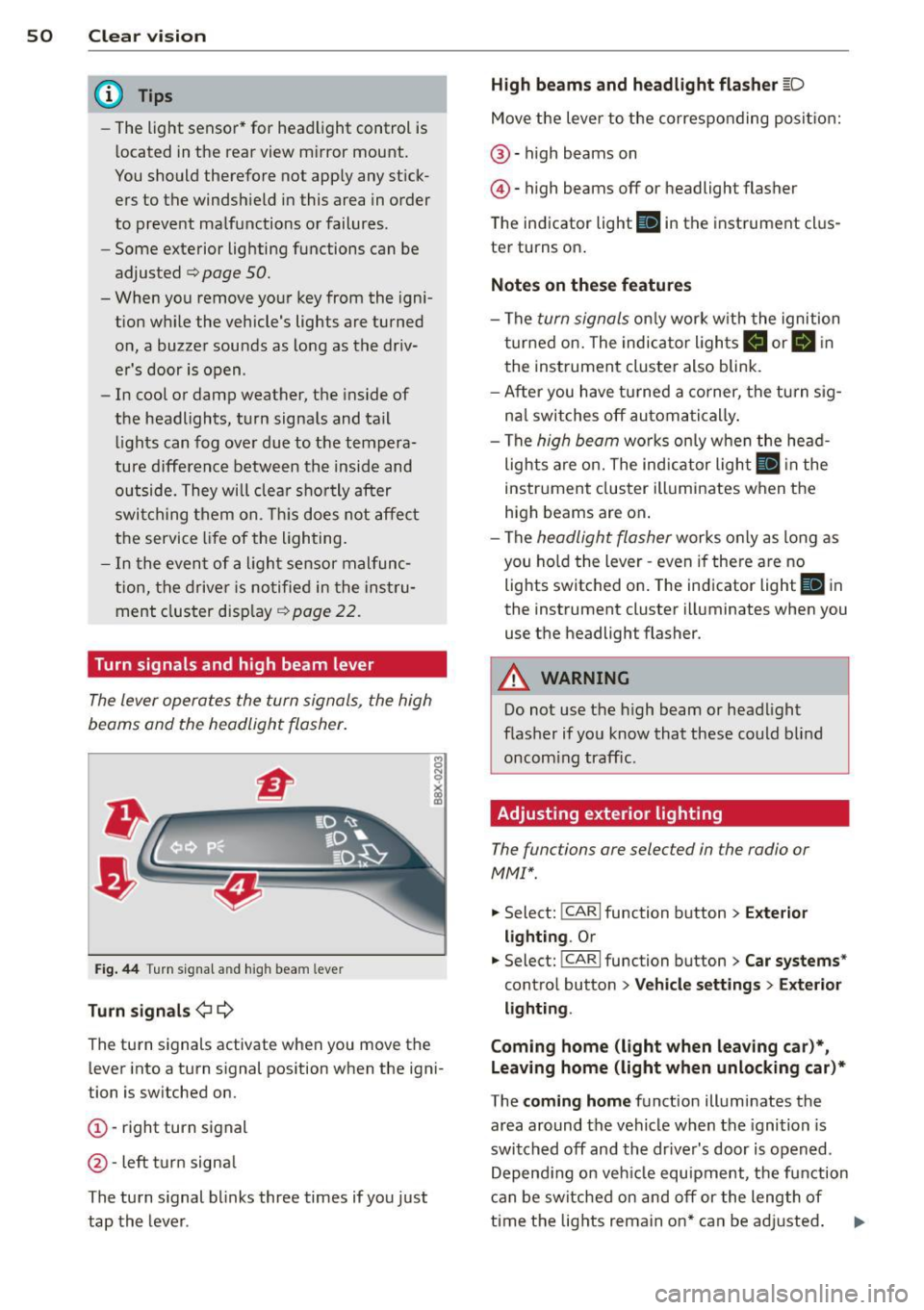
Turn signals and high beam lever
The lever operates the turn signals, the high
beams and the headlight flasher .
Fig. 44 Tu rn s ig na l and hig h beam lever
Turn sign als ¢i ¢
The turn signals activate when you move the
l ever into a turn s ignal pos ition when the ign i
tion is switched on.
(D -right turn signal
@-left tur n signa l
The turn s ignal blinks three times if you just
tap the lever .
High be ams and headlight flasher [D
Move the lever to the correspon ding posit io n:
@ -high beams on
@ -high beams off or headlight flasher
The indicator light
ii in the instrument cl us
te r turns on .
Notes on thes e features
-The turn signals on ly wor k w ith the ignition
t ur ned on. The indicator ligh ts
Ct or a in
the instrument cluster also blink.
- After you have turned a co rner, the turn s ig
na l switches off au toma tically .
- The
high beam works on ly w hen the head
lights a re on. The ind icator ligh t
II in the
instrument cluster illuminates when the
high beams are on .
- The
headlight flasher works o nly as long as
you ho ld the lever -even if there a re no
lights switched on . The indicator light
II in
the instrument cluster illuminates when you
use the headlight flasher.
A WARNING
--
Do not use the h igh beam or headlight
flasher if you know that these could blind
oncom ing traffic.
Adjusting exterior lighting
The functions ore selected in the radio or
MMI" .
.,. Select: !CARI function button> Exte rior
light ing .
Or
.,. Select: !CARI function button > Car systems *
control button > Vehicle s etting s> Exterior
lighting .
Coming home (light when leav ing car }*,
Leav ing home (light when unlocking car )*
The coming home function illuminates the
area around the vehicle when the ignition is
switched off and th e dr ive r's door is open ed.
Depend ing on veh icle equ ipment, the function
can be switched on and off or the length of
time the lig hts remain on* can be ad justed . ..,.
Page 53 of 304
M N
~ co
rl I.O
"' rl
"' rl
The leavin g home function i lluminates the
area around the vehicle when unlock ing it.
T his function can be switched on and off.
The
c o ming h om e and lea ving home func
tions on ly operate when it is dark and the
light switch is in the AUTO posit ion
¢ page 49 , fig. 43 .
Auto headlight s*
When the light switch is in the A UTO
¢ page 49 position, the switch-on po int of the
lights can be changed in the automatic driving
light function.
Daytime running lights
USA m odel s:
You can switch the dayt ime run
ni ng lights
on and o ff .
Canada mod els:
The function cannot be
turned off .
It is activated a utomat ica lly each
time the ignition is switched on.
Travel mode*
T he headlight beam is asymmetrical. This pro
v ides stronger illum ination on the s ide of the
road on wh ich you are driving .
If you are driv
i ng in a count ry that d rives on the opposite
side of the road from your own country, th is
will cau se glare for on coming dr ivers. To pre
vent glare:
- Trave l mode must be selected in vehicles
with Xenon headlights*.
- In veh icles with halogen headlights, ce rtain
areas of the head light lenses must be cov
ered w ith wate rproof adhesive covers that
prevent light from passing thro ugh. Fo r
more informat ion, please see your author
i z ed Audi dea ler or author ized repa ir faci lity .
(D Tips
When trave l mode is activated, a display in
the dr iver information system indicates
this each time you switch the ignit io n on.
Clear vi sion 51
Emergency flashers
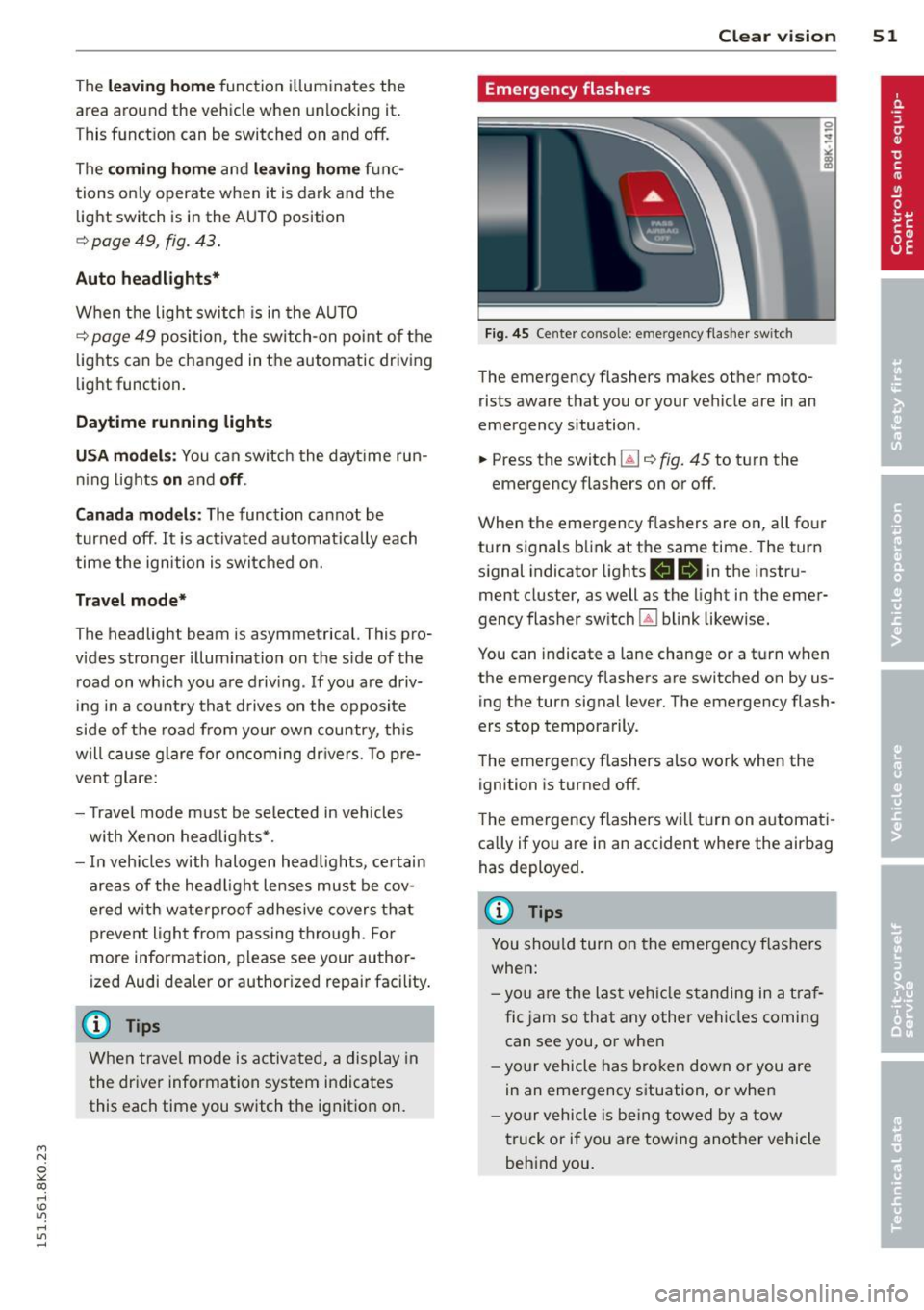
Fig. 45 Center co n sole : em erge ncy flasher sw itc h
The emergency flashers makes other moto
rists aware that you or your vehicle are in an
emergency situation .
.. Press the switch
Gil ¢ fig. 45 to turn the
emergency flashers on or off .
When the emergency f las hers are on, all four
turn s ignals b link at the same time. The turn
s ignal indicator lights .
1B in the instru
ment cluster, as well as the light in the emer
gency flasher switch ~ blink likewise.
You can indicate a lane change or a tu rn w hen
the emergency flashers are switched on by us
ing the turn signal lever. The emergency flash
ers stop temporarily .
T he emergency flashers also work when the
ign ition is turned off .
T he emergency flashers w ill turn on a utomat i
ca lly if yo u are in an accident where the airbag
has deployed.
(D Tips
You sho uld turn on the emergency f las hers
when:
- yo u are the last veh icle standing in a t raf
fic jam so that any other vehi cles coming
can see you, or whe n
- yo ur vehicle has bro ken down or you are
in an eme rgency s ituation, or when
- yo ur vehicle is be ing towed by a tow
truck or if you are tow ing another vehicle
beh ind you.
Page 54 of 304
52 Clear vis ion
Interior lights
Front /rear interior lights
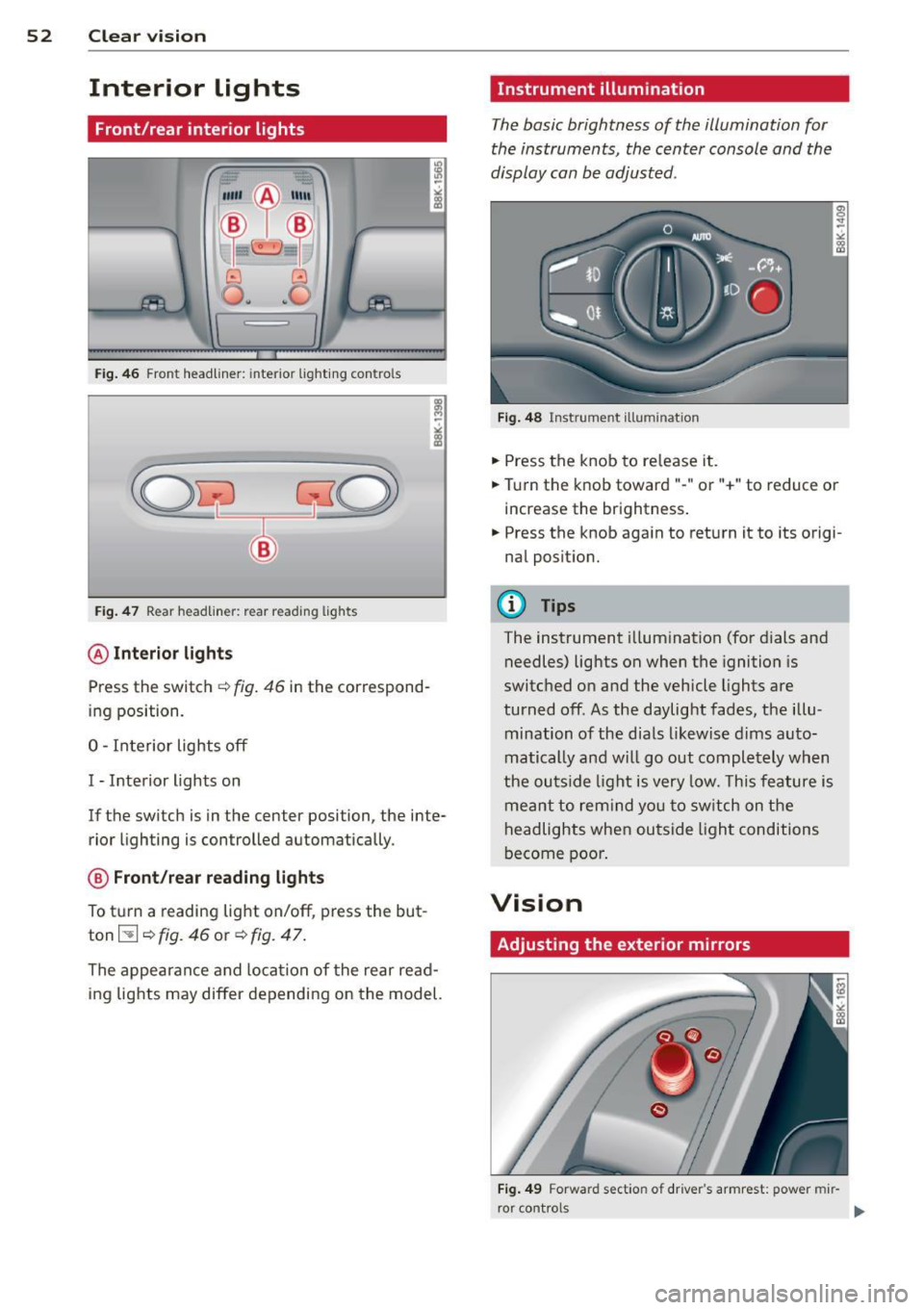
Fig . 46 Front headliner: inte rior lighting controls
Fig. 47 Rear headliner: rear reading lights
@Interio r ligh ts
Press the switch ~ fig. 46 in the correspond
ing position.
0 -Interior lights off
I -Interior lights on
If the switch is in the center position, the inte
rior l ighting is controlled automatically.
@ Front/re a r re ading li ghts
To turn a reading light on/off, press the but
ton~~
fig. 46 or ~ fig. 47.
The appearance and location of the rear read
ing lights may differ depending on the model.
Instrument illumination
The basic brightness of the illumination for
the instruments, the center console and the
display can be adjusted .
Fig . 48 Inst rume nt illu mination
.,. Press the knob to release it .
.,. Turn the knob toward"-" or"+" to reduce or
increase the brightness .
.,. Press the knob again to return it to its origi
nal posit ion.
(!') Tips
The instrument i llumination (for dials and
needles) lights on when the ignition is
switched on and the vehicle lights are
turned off . As the daylight fades, the illu
mination of the dia ls likewise dims auto
matically and wi ll go out completely when
the ou tside light is very low. This feature is
meant to rem ind you to sw itch on the
headlights when outside light conditions
become poor .
Vision
Adjusting the exterior mirrors
Fig . 4 9 Forward section of driver's armrest: power mir
r or controls