check AUDI A4 2018 User Guide
[x] Cancel search | Manufacturer: AUDI, Model Year: 2018, Model line: A4, Model: AUDI A4 2018Pages: 403, PDF Size: 66.81 MB
Page 41 of 403
in the same frequency range (s uch as a ce ll
phone or radio equipment) . A lways check if
your vehicle is locked!
- For an explanation on conformity with t he
FCC regulations in the United States and the
Ind ustry Canada regu lations, see
<::> page 386.
Removing the mechanical key
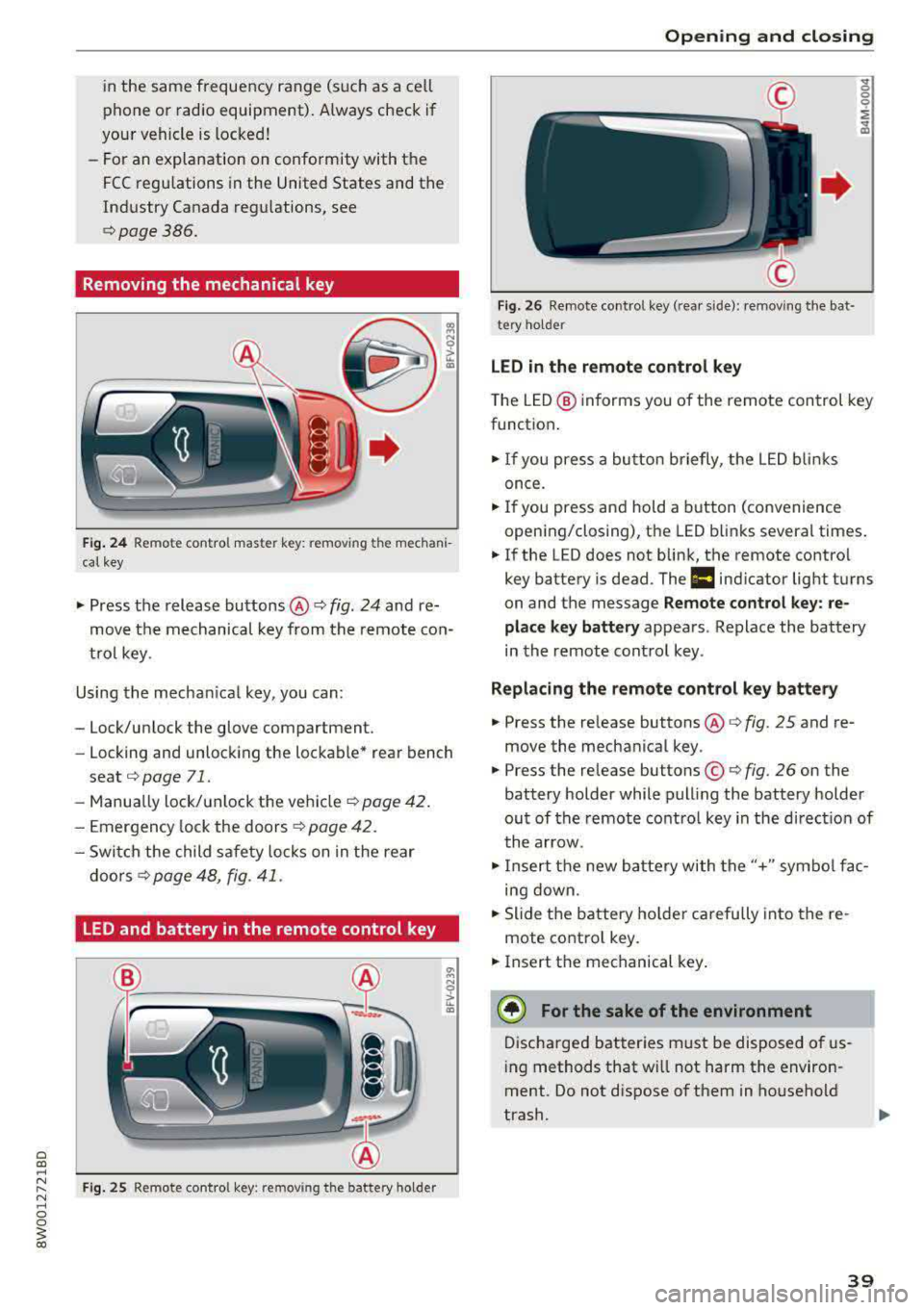
Fig. 24 Re mote control maste r key: remov ing t he mechani
ca l key
• Press the release buttons @¢ fig. 24 and re
move t he mechanical key from the remote co n
t ro l key .
Using the mecha nica l key, you can :
- Lock/un lock the glove compartment.
- Locking and unlock ing the lockable* rea r bench
seat
<::> page 71.
- Manua lly lock/ un lock the vehicle ¢
page 42.
- Emergency lock the doors ¢ page 4 2 .
- Swi tch the child safety locks on in t he rear
doo rs
¢ page 48, fig . 41 .
LED and battery in the remote control key
Fig. 25 Remote co ntro l key : re m ov ing the battery holder
Open ing and closing
F ig . 2 6 Re mote co ntrol key (rea r side) : re m ovi ng t he bat ·
tery ho lde r
LED in the remote control key
" 0 0 0
i
~
T he L ED @ in forms you of the remote control key
funct ion .
• If you press a bu tto n briefly, the LE D blinks
once.
• If you press and hold a button (convenience
opening/closing), the LED b links severa l times .
• If the LED does not blink, the remote contro l
key battery is dead . The
1:1 ind icator light turns
on and the message
Remote control key : re
place key battery
appears . Replace the battery
in the remote cont ro l key .
Replacing the remote control key battery
• Press the re lease buttons @¢ fig. 25 and re
move the mechanica l key .
• Press the re lease buttons ©¢ fig. 26 on the
battery holder while pulling the battery holder
ou t of the remote contro l key in the d irect io n of
t he arrow .
• Inse rt t he new b attery with the "+" sym bol fa c
ing down.
• Slide t he battery holde r car efully into the re
mote contro l key .
• Insert t he mechanical key .
® For the sake of the environment
Discha rged bat teries m ust be disposed o f us
in g methods that w ill not harm the env iron
ment. Do not d ispose o f them in ho useho ld
trash.
39
Page 43 of 403

.. To lock the vehicle, close the door and touch
the sensor in the door handle
on ce c::> fig. 28 . Do
not hold the door handle while doing this .
You can u nlock/ lock the vehicle at every door.
The remote control key cannot be more than ap
proximately 4 feet (1.5 m) away from the door
handle. It makes no difference whether the mas
ter key is in your jacket pocket or in your brief
case, for example .
If you hold the door handle while locking, this
can impair the locking function.
The doo r cannot be opened for a br ief period di
rect ly after locking it. This way you have the op
portunity to check if the doors locked correctly.
The settings in the Infotainment system deter
mine if the entire vehicle or on ly one of the doors
is unlocked when unlocking the vehicle
c::> pag e 41.
A WARNING
Read and following all WARNINGS c::> &. in De
scription on page 3
7.
@ Tips
If your vehicle is left standing for a long peri
od of time, note the following:
-The energy management system grad ually
turns off unnecessary convenience functions
to prevent the vehicle battery from draining
and to mainta in the vehicle's ab ility to start
for as long as possible. You may not be able
to unlock your vehicle us ing the convenience
key .
Central locking switch
Fig. 29 Drive r's door : central loc king switch
Openin g an d clos ing
.. To lock the vehicle, press the l'.D button c::> &_ .
.. To unlock the vehicle, press the @ button.
When locki ng the vehicle with the central lock ing
switch, the following applies:
-Opening the door and the luggage compart
ment lid from the
outside is not poss ible (for
secur ity reaso ns, such as when stopped at a
light) .
-The LED in the centra l locking sw itch t urns on
when all doors are closed and locked .
- You ca n open the doors individua lly from the
inside by pu lling the doo r handle.
- In the event of a crash with a irbag deploymen t,
the doo rs unlock automat ica lly to allow access
t o the vehicle .
~~ WARNING
-
- The central locking switch a lso works when
the ignition is switched off and automatica l
ly locks the entire vehicle when the
l'.D but
ton is pressed.
-The central locking switch is inope rative
when the vehicle is locked from the outs ide.
-Locked doors make it more difficult for
emergency workers to get into the vehicle,
which puts lives at r isk. Do not leave anyone
behind in the vehicle, especially children.
-Read and fo llowing a ll WARNINGS c::> &. in
Description on page 3
7.
(D Tips
Your vehicle locks automatically when it reaches a speed of 9 mph (15 km/h) (Auto
Lock)
c::> page 37. You can unlock the vehicle
again using the
ca button in the central lock
i ng switch.
Setting the central locking system
In the Infotainment system, you can set which
doors the central locking system will unlock .
.. Select in the Infotainment system: I MENU! but
ton
> V ehicle > left control b utton > Vehicle
settings > Central lock ing .
Door unlo cking
-you can decide if All doors or
only the
Dri ver 's door shou ld unlock. The
41
Page 56 of 403
Lights and Vision
Lights and Vision
Exterior lighting
Switching the lights on and off
--- --------...... ~
I
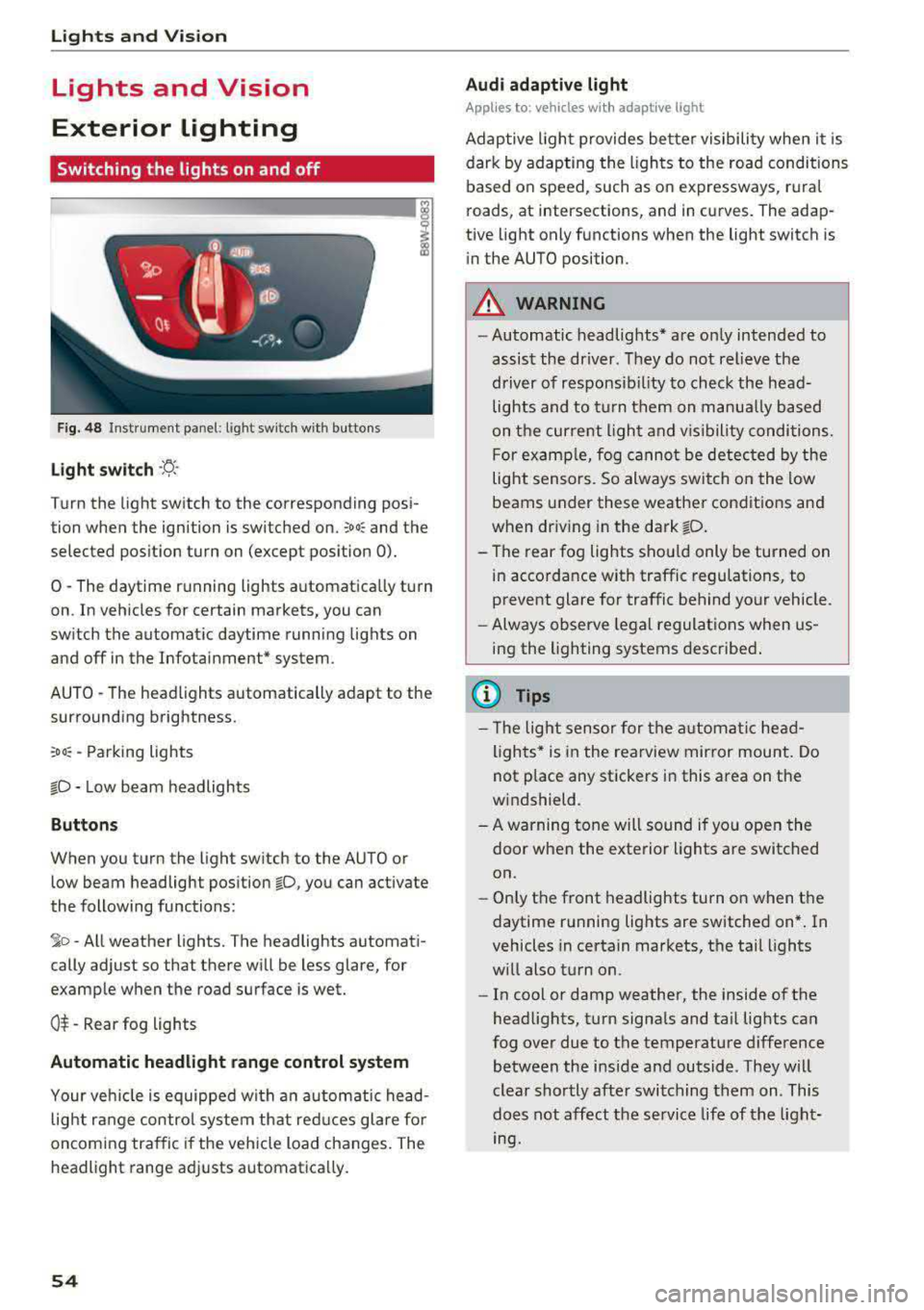
Fig. 48 Instrument panel: light sw itch w ith buttons
Light switch ·ti :
Turn the light switch to the corresponding posi
tion when the ignition is switched on.
;oo: and the
selected pos ition turn on (except pos ition 0).
0 -The daytime r unning lights a utomat ica lly turn
on . In veh icles for certain markets, you can
switch the automatic daytime runn ing lights on
and off in the Infotai nment* system.
AUTO -T he head lights automatically adapt to the
surrounding brightness.
:oo: -Parking lights
io -Low beam headlights
Buttons
When you turn the light sw itch to the AUTO or
low beam headlight position
io, you can activate
the following functions:
jo -All weather lights. The headlights automati
cally adjust so that there will be less glare, for
examp le when th e road surface is wet.
0$ -Rear fog lights
Automatic headlight range control system
Your veh icle is equipped wi th a n automatic head
light r ange control system th at red uces glare fo r
oncoming tra ffic if the vehicle load changes. The
headlight range ad justs automatica lly.
54
Audi adaptive light
App lies to: vehicles wi th adaptive light
Adap tive ligh t provides be tter visibility when it i s
dark by adapting the ligh ts to the road conditions
based on speed, such as on expressways, r ura l
roads, at intersections, and in curves. The adap
tive light only functions when the light switch is
i n the AUTO position.
A WARNING
-Automatic headlig hts* are on ly intended to
assist the driver. They do not relieve the
driver of responsib il ity to check the head
lights and to t urn them on manua lly ba sed
on t he curre nt ligh t and v is ibility conditions.
F or examp le, fog cannot be detec ted by the
light sensors. So always switch on the low
beams under these weather condit ions and
when dr iv ing in the dark
fD .
- The rear fog lights shou ld only be turned on
in accordance w ith traffic regulations, to
prevent glare for traffic behind your vehicle.
- Always observe legal regulat ions when us
ing the lighting systems desc ribe d.
{l) Tips
- Th e light sensor for the a utomat ic he ad
lights * is in the rearview mir ror mount. Do
not p lace any stickers in this area on the
w indshield.
- A warning tone will sound if yo u ope n the
door when the exte rior lights a re switched
on.
- On ly the front headlights turn on when t he
daytime running lights are switched on* . In
vehicles in certain markets, t he tail lights
w ill also t urn on.
- In cool or damp weather, the inside of the
head lights, t urn signa ls and ta il lig hts can
fog over due to the temperature difference between the inside and outside. They w ill
clear shortly afte r switching them on. This
does not affect the service life of t he light
mg.
Page 63 of 403

a co .... N ..... N .... 0 0
3 co
®-Clean the windshield . The wipers wipe one
time after severa l seconds of driving to remove
water drop lets. You can switch this function off
by moving the lever to position ® within 10 sec
onds of the afterwipe. The afterwipe function is
reactivated the next time you switch the ignition
on .
C lean the headlights*. The headlight washer sys
tem" operates only when the low beam head
lights are on . If you move the lever into position
@, the headlights will be cleaned at fixed inter
va ls .
Applies to: allroad:
@ -Wiping the rear window.
T he number of wipes depends on the windsh ield
wiper movement .
The rear wiper automatically switches on when
the reverse gear is selected and the front wind
shield wipers are on and running .
Applies to: allroad:
0 -Clean ing the rear win
dow. The number of wipes depends on how long
the lever is held in position
(J).
A WARNING
-The rain sensor is only intended to assist the
dr iver . The driver may still be responsible
for manually sw itching the w ipers on based
on v is ibi lity conditions.
- The windshie ld may not be treated with wa
ter-repelling windshield coating agents . Un
favorable conditions, such as wetness, dark
ness or low sun, can result in increased
glare, which increases the risk of an acc i
dent . Wiper blade chatter is also possible.
- Properly functioning windsh ield wiper
blades are required for a clear view and safe
driving
¢ page 62, Replacing wiper
blades.
(D Note
- If there is frost, make sure the windshie ld
wiper blades are not frozen to the wind
shield. Switching on the windshield wipers
when the blades are frozen to the wind
shield can damage the wiper blades .
- The windshield wiper system must be
switched off ( lever in position 0) before us-
Lights and Vision
ing a car wash. This prevents the wipers
from switching on unintentionally and caus ing damage to the windsh ield wiper system .
(D Tips
- The windshie ld wipers switch off when the
ignition is switched off . You can activate the
windshield wipers after the ignition is
switched back on by moving the w indshield
wiper lever to any position.
- Worn or dirty windshie ld wiper blades resu lt
in streaking. Th is can affect the rain sensor
function . Check your windshield w iper
blades regularly .
- The washer fluid nozzles for the windshield
washer system are heated at low tempera
tures when the ign ition is on .
- When stopping temporarily, such as
at a
traffic light, the speed of the windshield
w ipers automatically reduces by one level.
Cleaning the wiper blades
Clean the wiper b lades when you see w iper
streaks. Use a soft cloth and a glass cleaner.
Windshield wiper
.,. Place the windshield wiper arms in the service
position
¢ page 62.
.,. Fold the windsh ie ld wiper arms away from the
w indshie ld.
Rear window wiper
Applies to : all road
.,. Fold the wiper arm away from the rear window.
A WARNING
D irt y windshield wiper blades can impa ir vi
sion, wh ich i ncreases the risk of an accident .
-
61
Page 64 of 403
Lights and Vi sion
Replacing wiper blades
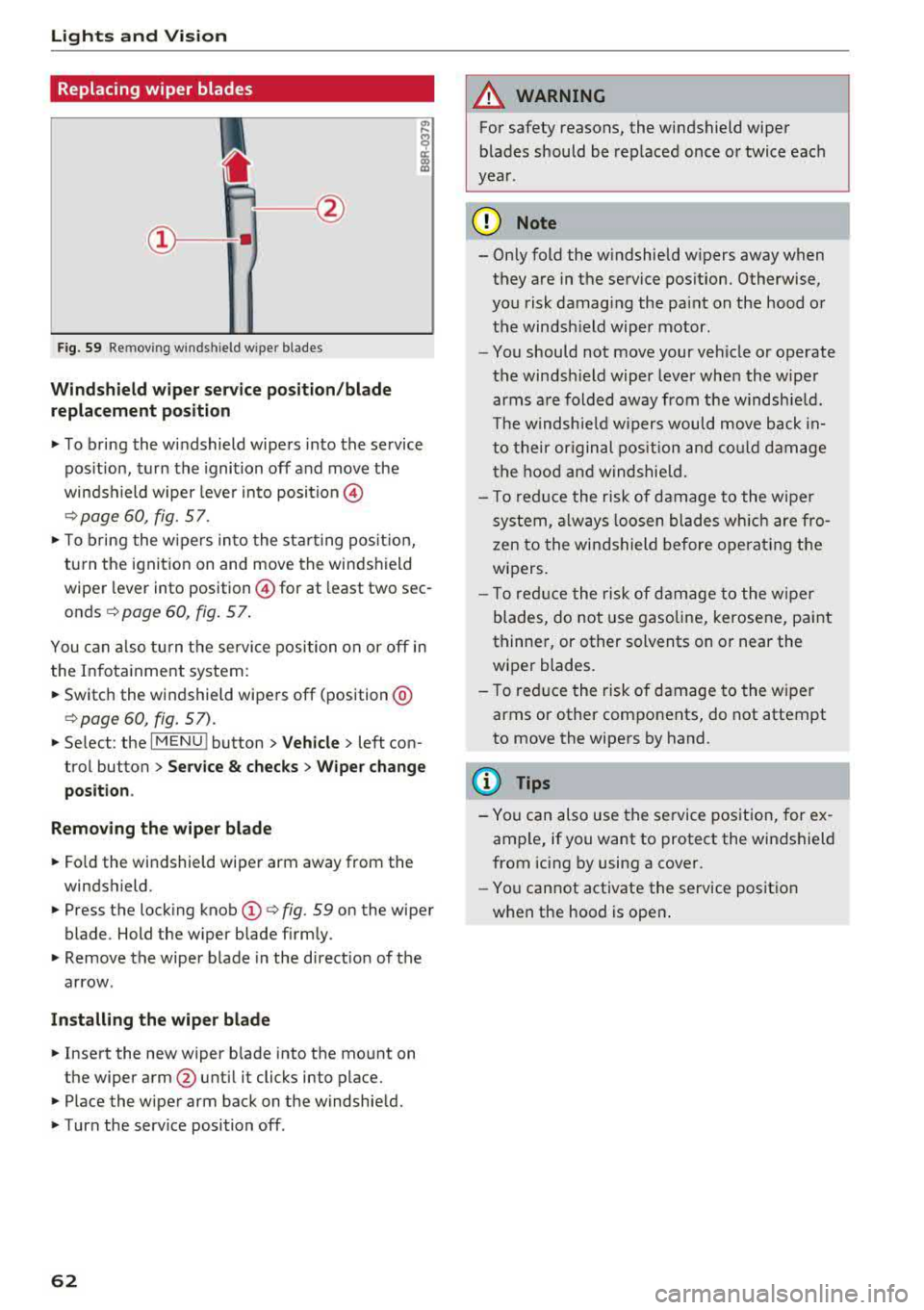
Fig. 59 Re mov ing w indshi eld w iper blades
Windshield wiper service position/blade
replacement position
.,. To bring the windshield wipers into the service
pos ition, turn the ignition off and move the
winds hield wiper leve r into position @
¢page 60, fig. 57 .
.,. To bring the wipers into the starting pos it io n,
tu rn the ignition on and move the windshield
wiper lever into position @for at least two sec
onds
¢ page 60, fig. 57 .
You can also turn the service position on o r off in
the Infota inment system :
... Switch the windshield wipers off (position @
¢page 60, fig. 57) .
.,. Select : the IMENU ! button> Vehicle> left con
trol button >
Service & checks > Wiper change
position .
Removing the wiper blade
... Fo ld the windshield wiper arm away from the
windshield .
.,. Press the locking knob (D ¢ fig. 59 on the wiper
blade . Hold the wiper blade firmly .
.,. Remove the wiper blade in the d irection of the
arrow .
Installing the wiper blade
.,. Insert the new wiper b lade into the mount on
the wiper arm
@ until it clicks into place .
.,. Place the wiper arm back on the windshield .
.,. Turn the serv ice position off .
62
A WARNING
,--
For safety reasons, the windshield wiper
blades should be replaced once or twice each
year .
(]) Note
- Only fold the w indshield w ipers away when
they are in the service pos ition. Otherwise,
you risk damaging the paint on the hood or
the windsh ield wiper motor.
- You should not move your veh icle or operate
the windsh ield wiper lever when the wiper
arms are folded away from the windshie ld.
Th e windshie ld wipers would move back
in
to their original position and could damage
the hood and windshie ld.
- To reduce the risk of damage to the wiper
system, always loosen blades which are fro
zen to the windshield before operating the
wipers.
- T o reduce the risk of damage to the wiper
blades, do not use gasoline, kerosene, pa int
thinner, or other solvents on or near the
wiper blades.
- To reduce the risk of damage to the wiper
arms or other components, do not attempt
to move the wipers by hand .
(D Tips
- You can also use the service position, for ex
ample, if you want to protect the windshield
from icing by using a cover .
- You cannot activate the service position
when the hood is open .
Page 83 of 403
a co .... N ,....
N .... 0 0
3 co
engaged, for example when you notice that the next traffic light is red . This produces an engine
braking effect, which helps to protect the brakes
and tires and reduces the emissions and fuel con
sumpt ion to zero (fuel shut-off dur ing decelera
tion) .
Shift efficiently
Upshifting earlier is an effective way to save fuel.
Staying in a gear too long uses fuel unnecessari
ly.
Applies to: vehicles with manual transmission
Shift as soon as possible from first to second
gear. S hifting to the next highest gear at approxi
mately 2,000 RPMs if poss ible is recommended.
Applies to: vehicles with automatic transmissions
Press down on the acce le rator peda l slowly and
avoid "kick -down".
Avoid full acceleration
You should rarely travel at the maximum vehicle
speed. High speeds cause a disproportionately
high increase in fuel consumption, emissions and
traffic noise. Driving more slowly saves fuel.
Reduce idling time
The Start/Stop system* he lps to reduce the idling
time automatically. In vehicles without the Start/
Stop system*, it is efficient to switch the engine
off when stopped at railroad cross ings and long
r ed lights. Stopping the engine for 30-40 sec
onds already saves more fuel than the amount of
extra fuel needed to restart the eng ine.
It takes a very long time in idle to warm the en
g ine up to operating temperature. Wear and
emissions are especially h igh in the wa rm-up
phase . Therefore, you should begi n driving im
mediately a fter starting the engine . Avoid high
RPMs while do ing this .
Have maintenance performed regularly
By having maintenance performed regu larly on
your veh icle, yo u ca n he lp to reduce f uel con
sumption before yo u even start to drive. The
maintenance condition of your vehicle not only
affects traffic safety and long-term value but a l-
Driving
so impacts fuel consumption . A poorly main
tained engine can lead to fuel consumption that is 10% higher than norma l.
Avoid short trips
The eng ine and exhaust cleaning system must
reach their optimal operat ing temperatu re to ef
f ectively reduce consumption and emissions.
A cold engine uses a disproportionately high
amount of fue l. The engine reaches operating
temperat ure and consumption normalizes on ly
after approximate ly 2.5 miles (4 km).
Check the tire pressure
To save fuel, make sure the tires are always in
flated to the correct press ure
~ page 344. The
fuel consumption can increase by 5% if the pres
s u re is only 0.5 bar too low. Due to the increased
rolling resistance, low tire pressures wi ll also
l ead to greater tire wear and will affect driving
behavior.
Do not drive on winter tires year-round, as this
will consume up to 10% more fuel.
Eliminate unnecessary weight
S in ce eve ry po und of ext ra weight increases f uel
consumption , a quick inspection of the luggage
compartment may be worth it to avoid unneces
sary weight .
When not be ing used , a roof rack should be re
moved to decrease the wind resistance of the ve
hicle. This will save you approximately 12% fuel
at speeds from 62 -75 mph (100 - 120 km/h) .
Save energy
The eng ine drives the generator, which generates
electric ity; the fuel consumpt io n also incr eases
with the demand for electr icity. The refore, switch
electrical eq uipment off when you no longer
need it . Examples of equipment that uses a lo t of
energy are air blowers at a high setting, the rear
window defogger and seat heating* .
@ Note
Do not leave engine idling unattended after
starting. If warning lights shou ld come on to
indicate improper operation, they would go
81
Page 88 of 403
Driving
-The driver's door must be closed, the driver's
safety belt must be fastened, and the brake peda l (automat ic transmission) or the clutch
pedal (manua l transmission) must be pressed.
Or:
-The driver's door must be closed, the brake
pedal (automat ic transmission) or the clutch
pedal (manua l transmission) must be pressed,
and a gear must be engaged.
(D Note
Always sw itch the Start/Stop system off when
driving through water
q page 85.
@ Tips
The engine stops shortly before the vehicle
comes to a stop
1) .
Stopping/starting the engine
Appl ies to: ve hicl es w ith Sta rt/Stop system
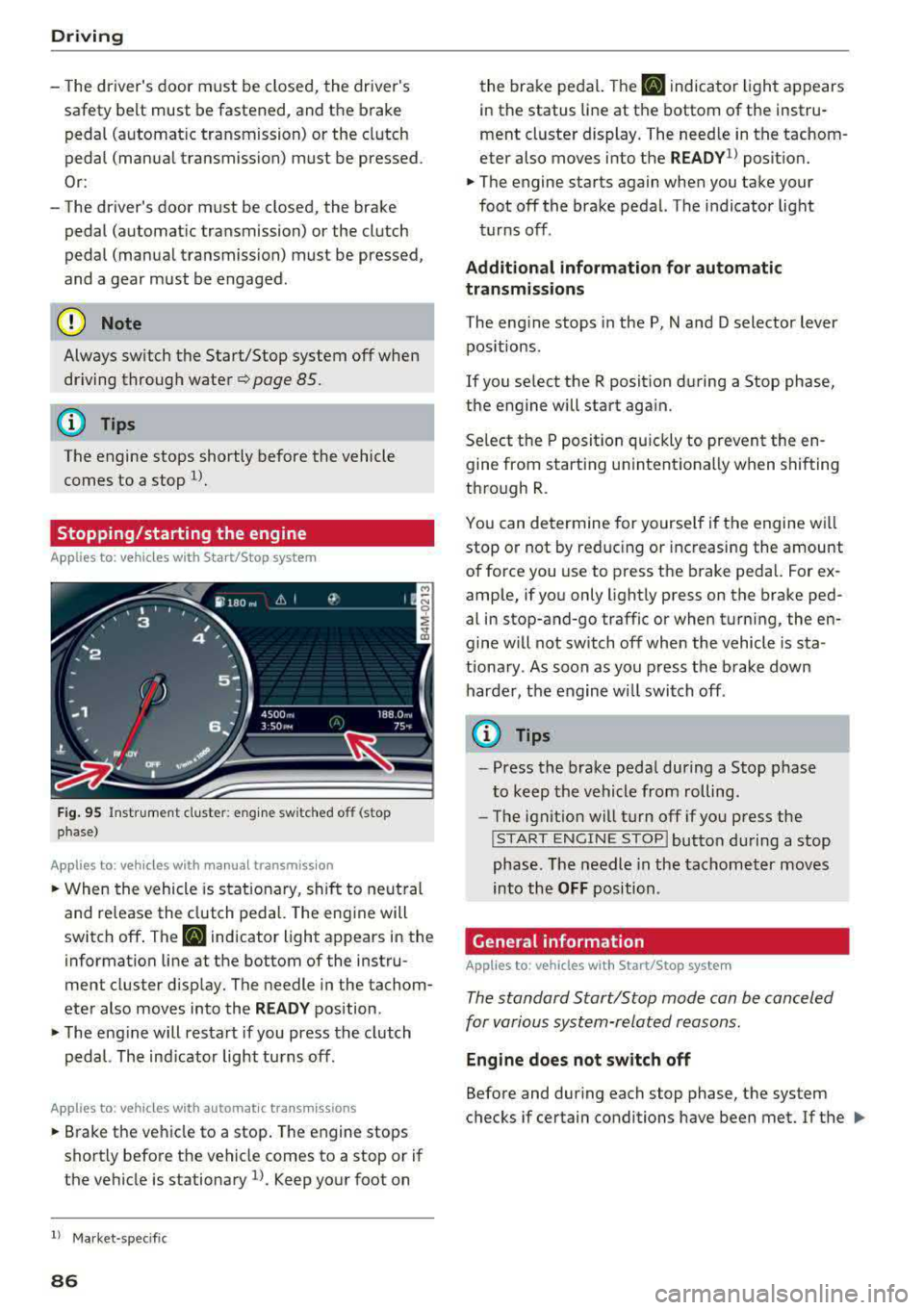
F ig . 95 Instrument cluste r: e ng ine sw itched off (stop
phase)
A ppl ies to: ve hicles w ith manu al transmiss ion
• When the vehicle is stat ionary, shift to neut ral
and release the clutch pedal. The eng ine will
switch off . The
II indicator light appears in the
information line at the bottom of the instru
ment cluster d isp lay. The needle in the tachom
eter also moves into the
R EADY position .
• The engine will resta rt if you press the clutch
pedal. The ind icator light turns off.
A ppl ies to: ve hicles w ith a uto mat ic t ra nsmi ssio ns
• B rake the vehicle to a stop . The engine stops
shortly before the vehicle comes to a stop or if
the ve hicle is stationary
l). Keep yo ur foot on
l) Ma rket -spe cifi c
86
the brake peda l. The II indica tor light appears
in the status line at the bottom of the instru
ment cluste r display. The need le in the tachom
eter also moves into the
READY1> posit ion.
• The engine starts again when you take your
foot off the brake pedal. The indicator light
turns off .
Additional information for automatic
transmissions
The eng ine stops in the P, N and D selector lever
pos itions.
If you se lect the R posit ion du ring a Stop phase,
the engine will start aga in.
Se lect the P position quickly to prevent the e n
gine from starting u nintent ionally when shifting
through R .
You can determine for yourse lf if the engine wi ll
stop o r not by red ucing or inc reasing the amount
of force you use to press t he brake peda l. For ex
amp le, if yo u only lightly press on the brake ped
al in stop-and-go traffic or when turning, the en
gine w ill not switch off when the vehicle is sta
tiona ry . A s soon as you press the b rake down
harde r, the engine wi ll swi tch off .
(0 Tips
-Press the brake peda l during a Stop phase
to keep the vehicle from rolling .
-The ignitio n will turn off if yo u press the
! S TART ENGINE STOPI butto n du ring a stop
phase. The needle in the tachomet er moves
into the
OFF position.
General information
App lies to: vehicles wi th Start/S top sys te m
The standard Start/Stop mode can be canceled
for various system-related reasons.
Engine does not switch off
Before and dur ing each stop phase, the system
checks if certain conditions have been met. If the
lilJ.
Page 101 of 403

a co .... N ,....
N .... 0 0
3 co
Trailer towing Driving with a trailer
General information
Your Audi was designed primarily for passenger
transportation .
If you plan to tow a trailer, please remember that
the additional load will affect durability, econo my and performance.
Trailer towing not only places more stress on the
vehicle, it also calls for more concentration from
the driver.
For this reason, always follow the operating and
driving instructions provided and use common
sense.
Technical requirements
Trailer hitch
Use a weight-carrying hitch conforming to the
gross trailer weight. The hitch must be suitable
for your vehicle and trailer and must be mounted
securely on the vehicle's chassis at a technically
sound
location . Use only a trailer hitch with a re
movable ball mount . Always check with the trail
er hitch manufacturer to make sure that you are
using the correct hitch.
Do not use a bumper hitch.
The hitch must be installed in such a way that it
does not interfere with the impact -absorbing
bumper system. No modifications should be
made to the vehicle exhaust and brake systems .
From time to time, check that all hitch mounting
bo lts remain securely fastened.
When you are not towing a trailer,
remove the
tra iler hitch ball mount . This prevents the hitch
from causing damage shou ld your vehicle be
struck from beh ind ¢
,&. .
Trailer brakes
If your trailer is equipped with a braking system,
check to be sure that it conforms to all regula
tions .
Trailer towing
The trailer hydraulic brake system must not be
directly connected to the vehicle's hydraulic
brake
system ¢.&. .
Safety chains
Always use safety chains between your vehicle
and the trailer.
Trailer lights
T ra iler lights must meet all regulations . Be sure
to check w ith your author ized Audi dealer for cor
rect wiring, switches and relays.
Mirrors
If you are unable to see the traffic behind you us
ing the regular outside mirrors, then you
must in
stall extended mirrors. It is important that you
always have clear vision to the rear.
,8. WARNING
After removing the traile r hitch, do not store
it in your vehicle. In case of sudden braking,
the hitch could fly forward and injure you or
your passengers.
Operating instructions
Maximum trailer weight
A trailer for your vehicle is limited to a typical
class 1 or class 2 trailer.
Trailer load distribution
Be sure the load in the trailer is held securely in
place to prevent it from shifting forward, back
ward or sideways.
Never allow a passenger to ride in a trailer ¢.&.
in Driver messages on page 100 .
Engine cooling system
Towing a trailer makes the engine work harder. It
is important that the cooling system's perform
ance is up to the additional load. Make sure that
the cooling system has enough fluid.
Tire pressure
When towing a trailer, inflate the tires of your
vehicle to the tire pressure listed under "Full
load" on the label ¢ page 344. Inflate trailer
99
Page 102 of 403

Trailer towing
tires to tra iler and tire manufacturers ' specifica
tions.
Lights
The headlig ht settings should be chec ked with
the t railer at tached before d riving off. Check to
make su re both vehicle and trailer lights are
wo rking properly.
Safety chains
Be sure t railer safety chains are properly connect
ed from the trai le r to the h itch on the veh icle.
L eave enough sla ck in the c ha ins to permi t turn
ing corners . When you install safety chains, ma ke
sure they wi ll not drag on the road when yo u are
driv ing .
The cha ins shou ld cross u nder the trailer tongue
to prevent it from dropp ing in case of separation
from the h itch .
Driver messages
Driving with a trailer requires extra caution.
Weight d istribution
Towing a loaded trailer w ith an empty car resu lts
in a hig hly unstable dist ribution of weight . If this
cannot be avo ided, drive at very low speeds on ly
to avoid the risk of losing s teering con trol.
A "balanced " rig is eas ier to operate and control.
This means that the tow vehicle should be loaded
to the extent possible and permissible , while
keep ing the tra ile r as lig ht as possib le under t he
circumstances . Whenever possible, t ransfer
some cargo to the l uggage compartment of the
tow vehicle whi le observ ing tongue load req uire
ments and ve hicle loading conside rat ions.
Speed
The h igher the speed, the more d ifficult i t be
comes for the drive r to contro l the rig. Do not
d rive at the maximum permissible speed. Reduce
your speed even more if load, weath er or w ind
conditions are unfavorable
-part icularly when
going downhill.
100
Reduce vehicle speed immediately if the trailer
shows the slightest sign of swaying.
Do not try
to stop the swa ying by a ccelerating.
Observe speed limits. In some a reas, speeds fo r
vehicles towing tra ilers are lower than for regular
vehicles .
Always apply bra kes early. Whe n driving down
hill, shift in to a lower gea r to use the eng ine
b raking effect to slow the vehicle . Use of the
bra kes alone can cause them to overheat and fai l.
Coolant temperature
The coo lant tempe rat ure gauge 9 page 11 must
be obse rved caref ully. The coolant temperature
can increase i f you drive o n long inclines in a low
gear at high engine speeds . Reduce your speed
immediately if the LEDs in th e top part of the dis
play turn on.
For more info rmation abou t indicator lig hts, re
fer
to . ~page 30 .
A WARNING
Anyone not prope rly restrained in a moving
vehicle is at a much greater risk in an acci
dent. Never let anyone ride in your car who is
not properly wear ing the restraints provided
by Aud i.
Trailer towing
information
' Important to know
-
Your vehicle handles differently when towing a
trailer because of the addit ional weight and dif
ferent weight distribution . Safety, performance
and economy will greatly depend on how ca refu l
l y you load your tra ile r and ope rate yo ur rig.
Before you actually tow your trailer, pract ice
turning, stopping and backing up in an area away
from traffic . Keep pract icing u ntil you have be
come complete ly familiar w ith the way yo ur vehi
cl e- tra ile r combination behaves and respo nds.
Page 111 of 403

General information
Appl ies to: ve hicles with Audi adaptive cruise contro l
Fig. 108 Fro nt of the vehicle: sensors and video camera
The areas with the radar and ultrasonic sensors
and the video camera
c:> fig . 108 must not be cov
ered by stickers, deposits or any other objects, because this can inte rfere with the adaptive
cr uise control funct ion. For information on clean
ing, see
c:> page 354 . The same app lies for any
modifications made in the front area.
In some d riving situations, the adaptive cru ise
control funct ion is restr icted:
- Vehicles can only be detected when they are within the sensor detection zones
c:> page 108,
fig. 107.
- The system has a limited abil ity to detect
vehicles that are a short distance ahead, off to
the side of your vehicle or moving into your
lane .
- Objects that are difficult to detect such as mo
torcycles, vehicles with high ground clearan ce
or an overhanging load are detected late or not dete cted at all.
- When driving through curves
c:> page 110 .
-When the vehicle is stat ionary c:> page 110.
..&, WARNING
Always pay attent ion to the traffic aro und you
when adap tive cruise contro l is swi tched o n.
As the driver, you are s till responsible for your
own speed and the distance to other vehicles .
The adaptive cruise control is used to assist
you. The driver must a lways take action to
avoid a collision. The driver is a lways responsi
ble for brak ing at the correct time.
A ss is ta nce syst ems
-For safety reasons, do not use adaptive
cru ise control when the road surface is in
poor condition and/or in bad weather condi
tions (such as ice, fog, gravel, heavy rain and
hydroplaning). Using the system under
these conditions increases the r isk of an ac
cident.
- Sw itch adaptive cruise control off tempora
rily when dr iv ing in turning lanes, on ex
p ressway ex its (except if predictive con trol
is switched on) or in const ruct ion zones.
This prevents the vehicle from acce lerating
to the stored speed when in these situa
tions.
- The adaptive cruise contro l system will not
brake by itself if you put your foot on the ac
celerator pedal. Doing so can override the
speed and distance regulation.
- When approaching stationary obstacles
such as stopped traffic, adaptive cruise con
trol will respond with limited function.
- Adaptive cr uise control does not respond to
peop le, animals, or crossing or oncoming
objects.
- The funct ion of the radar sensors can be af
fected by reflective objects such as guard rails, the entrance to a tunnel, heavy rain or
ice.
(D Note
The sensors can be displaced by impacts or
damage to the bumper, wheel housing and underbody. This can impair the adaptive
cruise control. Have an authorized Audi dealer
or authorized Audi Service Facility check
the ir
f u nct ion.
(D Tips
For an explanation on conformity with the
FCC regulations in the United States and the
Industry Canada regu lations, see
c:> page 38 6.
109