climate control AUDI A5 COUPE 2011 User Guide
[x] Cancel search | Manufacturer: AUDI, Model Year: 2011, Model line: A5 COUPE, Model: AUDI A5 COUPE 2011Pages: 362, PDF Size: 84.88 MB
Page 105 of 362

_________________________________________________ W_ a_ r_m _ a_ n_d_ c_ o_ ld _ ___.lfll
App lies to veh icles : wi th Delu xe aut omat ic climate contro l plus
Controls
This overview will help you to familiarize yourself with the
climate controls .
Fig. 10 0 Clima te co ntrols
T he d isp lay shows the selected temperature for the driver 's s ide on
the left and the s elected temperature for the front passenger's side
on the right .
Functions are set by rotating the cont rol or are sw itched on and off by
tapping the bu ttons. The LED in the buttons ill uminates when the
function is active .
Contro ls a nd e quip
m en t Vehicle
OP-eration
Button(s) Meaning Page
(OFFJ Turns on and off :> page 104
Automatic operation -
(AUTO] driver's side / front pas-=> page 104
senger's side
- --
Temperature regu-
Temperature select ion -
lator
1 a) driver's side
:> page 104 Temperature regu- Temperature select ion -
lator
2a ) front passenger 's s ide
@
F an -driver's side/ front => page 105
passenger's side
I ~ lb' Recirculat ion mode
=> page 105
Air distribution -driver's
(§) side / front passenger's => page 106
side
~ Defrost => page 106
~ Rear window defogger =>page 106
(AC] Turns cooling system on => page 107 and off
~ :>page 109
a) The re gula tor is a lso used to set the fan speed, a ir dist ribut ion and sea t
hea ting .
bl The sy mbol m ay appear slightly differe nt in some mo dels .
(I) Tips
• The grille on the controls=> fig. 100 must remain unobstructed
and must not be taped over . Measuring senso rs a re located behind
it . •
Vehicle care Do-it-yourselt service iTechnical data
Page 106 of 362

llll..__w __ a _r _m __ a_n _ d_ c_ o_ ld ________________________________________________ _
Applies to veh icles : w ith Deluxe automatic climate contro l p lus
Turn ing the climate control on and off
- Briefly press [ OFF ], or press [AUTO) to turn the climate
control
on .
Press the [ OFF] button for at least 2 seconds to turn the
climate control
off and to block the air supply from the
outside. "OFF" appears in the display.
Climate control turns on again when you press the tem per atur e
re gulator •
Applies to veh ic les: with Deluxe automatic climate contro l plus
Automatic mode !AUTO]
The standard operating mode for all times of the year.
Turning on autom atic mode
- Set the temperature between 60 ° F (+16 °C) and 84 °F
(+28 °().
- Press the [AUTO I button.
Automatic mode ensures constant temperatu res in the interior and
dehumidifies the air inside the vehicle. Air temperature, volume and
distribution are controlled automatically to reach or maintain the
desired interior temperature as q uickly as possib le . Fluctuations in
exterior temperature and the effects of temperature from the posi
tion of the sun are compensated for automatically.
Th is operating mode works only in an adjustable temperature range
of 60° F (+16°() to 84°F (+ 28°C) . If a temperature below 60° F
(+ 16°() is selec ted, LO appears in the display . At temperatures above
84°F (+28°(), HI is disp layed . At both extreme settings, climate
control runs continuously at maximum cooling or heat ing power .
T he re is no temperature regulation .•
Applies to veh icles: w ith De luxe automat ic climate control p lus
Setting the temperature
The temperature can be set separately for the driver's
side and front passenger's side.
Fig . 1 0 1 T emperat ure
s etti ng regu lator
- Rotate the regulator ~ fig. 101 to the left to reduce the
temperature, or to the right to increase the temperature .
The selected temperature appears on the climate control display.
When the MMI d isp lay is turned on, the temperature setting appears
for a few seconds on the screen. •
Page 107 of 362

_________________________________________________ W_ a_ r_m _ a_ n_d_ c_ o_ ld _ ___.llfflll
App lies to veh icles : wi th Delu xe aut omat ic climate contro l plus
Fan ~
The automatically preset fan speed can be reduced or
increased .
-Press the[~] button=> fig . 102.
Fi g. 102 Fa n but ton
and re g ul ator
- Rotate the regulator to set the des ired fan speed (air
volume) .
The clima te control system automatically regula tes fan speed based
on the interior temperature . You can adjust the volume of a ir
produced by the fan to your own requirements.
W hen the MMI display is tur ned on, t he fan speed setting appears for
a few seconds on the screen .
[ i J Tips
• It is possible that the fan speed may change automatically . This
occurs to ens ure that the desired temperature set ting is reached as
quickly as possible.
• T he fan speed cannot be reg ulated separately for the dr ive r and
front passenger .•
Con tro ls a nd e quip
m en t Vehicle
OP-eration
Applies to vehicles : with Deluxe au tomat ic clima te cont ro l plus
Recirculation mode[~)
The recirculation mode prevents polluted outside air
from entering the vehicle interior.
Turning on recirculation mode
- Press the [a;:, ]=> & button .
Turning off recirculation mode
-Press the~ button again, or
press the
[AU TO] button.
In recirculation mode, ai r is drawn from the vehicle interior, filtered
and rec irc ulated . We recommend selecting rec irculation mode under
the following conditions:
Whe n driving throug h a tunnel or i n a t raffic jam so that exhaust
fumes and odors cannot enter the veh icle interior.
& WARNING
You should not u se the recirculation mode f or an exte nded period
sinc e no fre sh a ir i s drawn in . With the air- conditioning switch ed
off, the windows can fog up , which increase s the risk of an
a cci dent! •
Vehicle care Do-it-yourselt service iTechnical data
Page 108 of 362
![AUDI A5 COUPE 2011 User Guide ffl..__w __ a _r _m __ a_n _ d_ c_ o_ ld ________________________________________________ _
Applies to veh icles : w ith Deluxe automatic climate contro l p lus
Air distribution [~]
The au](/img/6/57583/w960_57583-107.png "AUDI A5 COUPE 2011 User Guide ffl..__w __ a _r _m __ a_n _ d_ c_ o_ ld ________________________________________________ _
Applies to veh icles : w ith Deluxe automatic climate contro l p lus
Air distribution [~]
The au")
ffl..__w __ a _r _m __ a_n _ d_ c_ o_ ld ________________________________________________ _
Applies to veh icles : w ith Deluxe automatic climate contro l p lus
Air distribution [~]
The automatically preset air distribution can be changed.
- Press the[~] button=> fig. 103.
Fig. 103 Air distribu
tion button and regu
lator
- Rotate the regulator to the desired setting.
You can adjust the air distribution so that air flows from specific
vents . In position
;J air flows only to the windows, in position :J, it
flows to the driver or passenger, and in position
!,O it flows to the
footwell. There are additional combinations availab le to adjust air
distribution as needed.
To regulate air distribution automatically , switch to
[AUTO] .
When the MMI display is turned on, the air distribution setting
appears for a few seconds on the screen. •
Applies to vehicles: w ith De luxe automatic climate control plus
Defrost [@]
The windshield and side windows are defrosted or cleared
of condensation as quickly as possible.
- Press the[@] button to turn on the defroster. -
Press the[@] button again, or press the (AUTO
I button to
turn it off.
T emperat ure is controlled automatically. The maximum amount of
air flows mainly from the vents below the windshield.
Pressing the
I@ ] button switches off recirculation mode. •
Applies to vehicl es: w ith Deluxe automat ic clima te control plus
Rear window defogger [ Qiil ]
The rear window defogger clears the rear window of
condensation.
- Press the [lllil] button to turn the rear window defogger on
and off .
The rear window defogger works only when the engine is running. The
indicator light in the button illuminates when the rear wind ow
defogger is on.
The rear window defogger is switched off automatically after 10 to
20 minutes, depending on the outside temperature.
The rear window defogger can be turned on permanently by pressing
the
[Qlil] button for more than two seconds. This remains stored until
the ign it ion is switched off. A rear window defogger that was
switched on also remains stored for 15 minutes after the ignition is
switched off.
If the engine is restarted within these 15 minutes, the rear window
defogger is activated for 10 to 20 minutes, depending on outside
temperature. When a vehicle is parked for a short time, the rear
window defogger does not need to be manually activated again. •
Page 110 of 362
![AUDI A5 COUPE 2011 User Guide 1111....__w __ a _r_ m __ a_n_ d_ c_ o _ l_d _______________________________________________ _
(I] Tips
If the climate control is running in cooling mode, air flows mainly
from vents @ and @. T](/img/6/57583/w960_57583-109.png "AUDI A5 COUPE 2011 User Guide 1111....__w __ a _r_ m __ a_n_ d_ c_ o _ l_d _______________________________________________ _
(I] Tips
If the climate control is running in cooling mode, air flows mainly
from vents @ and @. T")
1111....__w __ a _r_ m __ a_n_ d_ c_ o _ l_d _______________________________________________ _
(I] Tips
If the climate control is running in cooling mode, air flows mainly
from vents @ and @. To achieve adequate cooling, you should never
close these vents completely. •
Applies to vehicles: with Deluxe automatic cl imate control plus
Rear air vents
The rear air vents are located in the center console.
- Rotate the thumbwheel to open and close the vents .
- To adjust the direction of the airflow from the outlet,
move the tab in the center of the outlet in the desired
direction . The direction of the air delivered from the vents
can be adjusted horizontally and vertically.
The air vents are actuated either automatically or manually
depending on the operating mode selected. Heated or unheated
fresh air, or cooled air flows from the vents .
The air vents to heat the rear footwell are located under the front
seats.
(I] Tips
If the climate control is operating in cooling mode, air flows primarily
from the vents in the center console. To achieve adequate cooling,
you should never close these vents completely. •
Applies to vehicles: with De luxe automatic climate contro l p lus
Economical use of the climate control
system
Economical use of the climate control system helps save
fuel.
When the climate control system is working in cooling mode,
engine performance is reduced and fuel consumption is
affected. To keep the time the climate control system is on as
short as possible, you should do the following:
- To save fuel, turn off cooling mode by pressing the AC
button (indicator light goes out).
- In addition, if you open the window or the panoramic
sliding/tilting sunroof* while driving, turn off cooling
mode by pressing the AC button (indicator light goes out).
- If the vehicle is extremely hot due to the heat of the sun,
briefly open doors and windows.
~ For the sake of the environment
When you save fuel, you reduce emissions from the vehicle. •
Deluxe automatic climate control
plus - basic settings
Applies to veh icles: with De luxe automatic climate control plus
General information
The basic climate control settings can be adjusted in the
radio or f\1/\11*.
-Select: Function button I CAR] > Control button AC. ~
Page 111 of 362

_______________________________________________ W_ a _r_m _ a_ n_d _ c_o _l_ d _ __.ffl'I
The following functions can be selected :
• Auto recirculat.
~ page 109
• Synchronization~
page 109 •
Applies to vehicles: with D eluxe automatic climate con trol plus
Automatic recirculation
An air quality sensor detects increased concentrations of
pollutants in the outside air and automatically switches to recirculation mode.
We recommend that you always keep automatic recirculation ON to
prevent polluted outside air from entering the vehicle interior .
If the
air quality sensor located in the climate control system detects
polluted outside air, the sensor decides whether the air pollution can
be reduced by the factory-installed pollutant filter or whether it is
necessary to switch to recirculation. With heavy concentrations of
pollutants, the climate control system is switched automatically to
recirculation mode and the supply of outside air is blocked . As soon
as the concentration of pollutants in the outside air drops, fresh air is
supplied to the vehicle interior again.
I n the event that the windows fog up during automatic recirculation ,
press the
l<:wl button immediately.
Under certain operating conditions, automatic recirculation is
switched off automatically. When outside temperatures are below
about
50 °F ( +10 °C), automatic recirculation is limited to
30 seconds. When outside temperatures are below about 30 °F (-
1 °C),
automatic recirculation is limited to 15 seconds.•
Con tro ls a nd e quip
m en t Vehicle
OP-eration
Applies to vehicles: with Deluxe automatic climate control plus
Synchronization
One climate control setting for all seats .
After Synchronization is set to On, all of the subsequent climate
control settings (except for seat heating*) for the driver are trans
ferred to the front passenger .
Synchronization is canceled when settings are adjusted on the front
passenger's side .•
Seat heating
App lies to v ehicl es: w ith front se at heati ng
Front seat heating~
The seat cushion and the seatback of the front seats can
be heated electrically.
- Press the (g button.
Fig. 105 Seat heating
button and regulator
-Rotate the regulator to the desired setting.
In position 0, seat heating is turned off. The control range is from 1
to 6 . .,,
Vehicle care Do-it-yourselt service iTechnical data
Page 326 of 362
-Fuses and bulbs
~-;,_;__:_:_;..:..:.:....::~=---------------------------
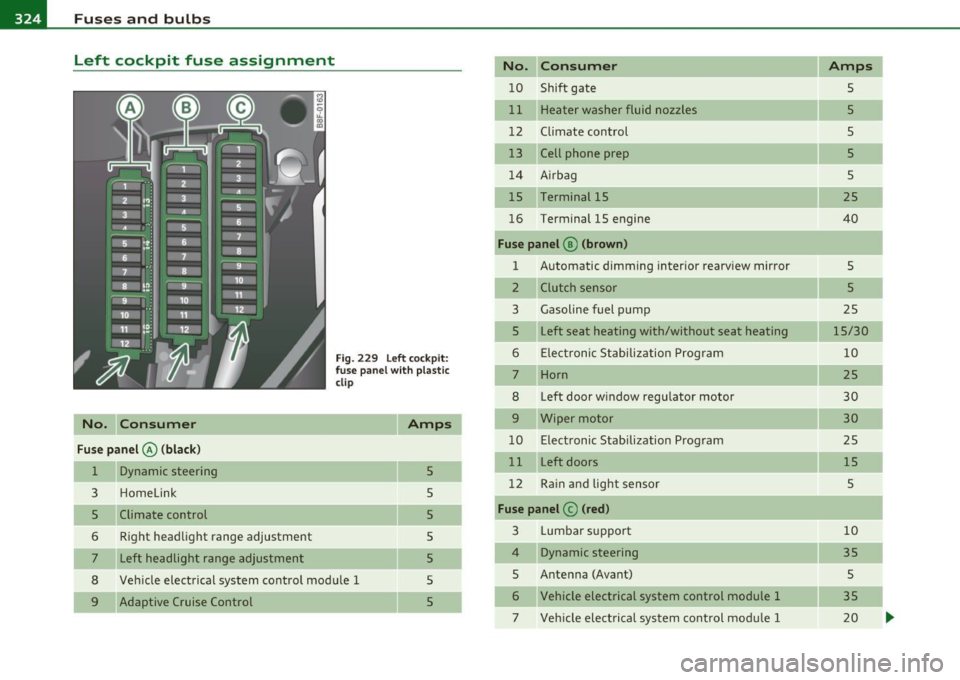
Left cockpit fuse assignment
No. C onsumer
Fu se p anel@ (bla ck )
1 Dynamic steering
3 Homelink
5 Climate control
6 Right headlight range adjustment
7 Left headlight range adjustment
F ig. 229 Left cockpit:
f use panel w ith p lastic
clip
Amps
5
5
5
8 Vehicle electrical system control module 1
5
5
5
5 9 Adaptive Cruise Control No. Con
sumer Amps
10 Shift gate 5
11 Heater washer fluid nozzles 5
12 Climate control 5
13 Cell phone prep 5
14 A irbag 5
15 Terminal 15 25
16 Terminal 15 engine
40
Fuse panel ® (brow n)
1 Automatic dimming interior rearv
iew mirror
5
2 Clutch sensor 5
3 Gasoline fuel pump
25
5 Left
seat heating with/without seat heating
15/30
6 Elect ronic Stabilization Program 10
7 Horn
25
8 Left door w
indow regulator motor
30
9 Wiper motor 30
10 Electronic Stabilization Program 25
11 Left doors 15
12 Ra in and light sensor 5
Fuse p an el © (red )
3 Lumbar support 10
4 Dynamic steering 35
5 Antenna (Avant)
5
6 Vehicle electrical system control module 1 35
7 Vehicle electrical system control modu le 1 20
Page 327 of 362
Fuses and bulbs -----------------------=---==-=-=--=.:..:..:::...:....:.:..:....-EWII
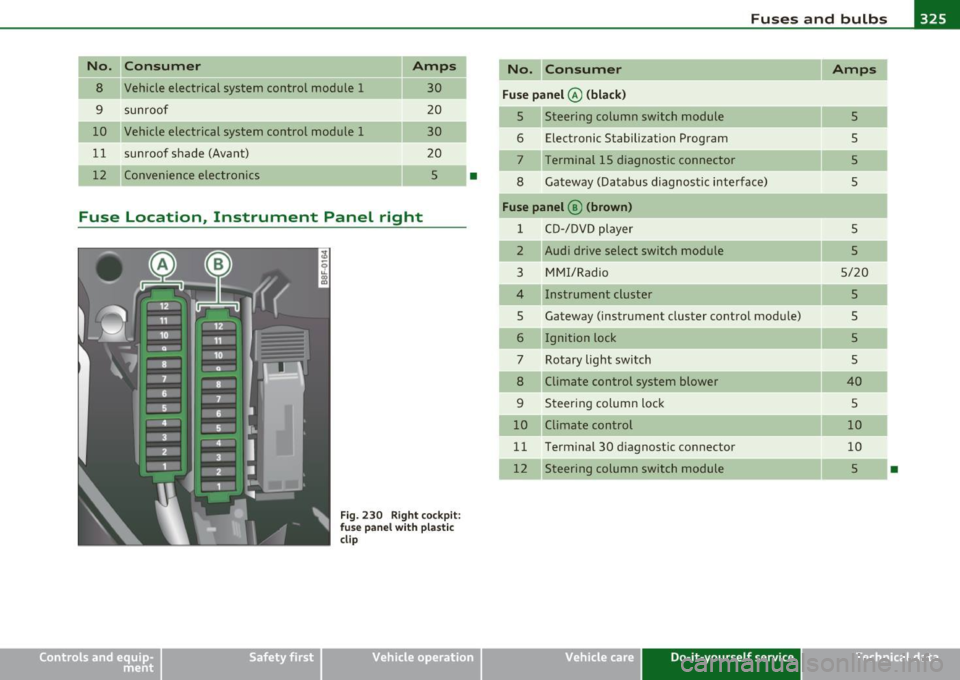
No. Consumer Amps
8 Vehicle electrical system control module 1
30
--
9 sunroof 20
10 Vehicle electrical system control module 1 30
11 sunroof shade (Avant)
20
12 Convenience electronics 5
•
Fuse Location, Instrument Panel right
Fig. 230 Right cockpit:
f use panel with plastic
clip
Vehicle OP-eration
No. Consumer Amps
Fuse panel @ (black)
5 Steering column switch module
5
6 Electronic Stabilization Program
5
7 Terminal 15 diagnostic connector 5
8 Gateway (Databus diagnostic interface)
5
Fuse panel @ (brown)
1 CD-/DVD player
5
2 Audi drive select switch module 5
3 MMI/Radio 5/20
4 Instrument cluster 5
5 Gateway (instrument cluster control module)
5
6 Ignition lock 5
7 Rotary light switch 5
8 Climate control system blower 40
9 Steering column lock
5
10 Climate control 10
11 Terminal 30 d
iagnostic connector
10
12 Steering column switch module 5
•
Vehicle care Do-it-yourself service iTechnical data
Page 349 of 362
___________________________________________ A_ l::.. p _h _a_ b_ e_t _ic _a_ l_ in_ d _ e_x __ fflll
Audi drive select .. .. .. ...... .. .. . .. . 147
Adaptive dampers ................ 147
Description ............. .. ....... 147
Dynamic steer ing ... ....... ..... .. 147
Sett ing the driv ing mode . .. .. .. .. . 148
Audi Serv ice Repai r Manuals and Litera ture .
340
Auto Lock .. .. ... ..... ... ... ... .. .. .. 46
Auto Safety Hotline ... ... ... . .. ..... 179
Auto-Check Control .... .. ... ...... .. .. 31
Automatic belt retractor .......... .. . 185
Automatic car wash
See Washing ....... .. .... .. .... . 257
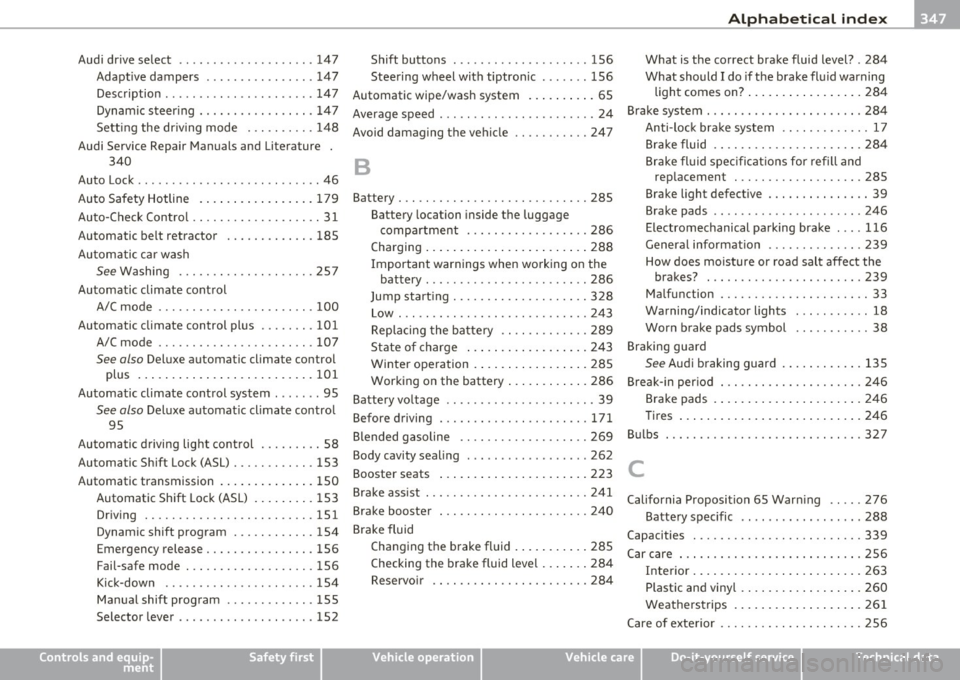
Automatic climate control
A/C mode .......... .... .. .... .. .
100
Automatic climate control plus ..... .. . 101
A/C mode .... .......... ...... .. . 107
See also Deluxe automa tic clima te cont rol
plus ..........................
101
Automatic climate control system . ...... 95
See also Deluxe automat ic climate contro l
95
Automatic driving light control ......... 58
Automatic Shift Lo ck (ASL) ......... .. .
153
Automatic transmission .............. 150
Automatic Shift Lock (ASL) ..... .... 153
Driving ...... ...... .. .. .. .. .... . 151
Dynamic shift p rogram . .. .. ... . .. . 154
Eme rgency release ......... .... .. . 156
Fail-safe mode . .. ................ 156
Kick -down ........ .. .... ... .. .. . 154
Manual shift program ..... .... .... 155
Selector lever ............ ... ..... 152
Controls and equip
ment Safety first
Shift buttons
... ...... .. .... ..... 156
Steering wheel with tiptronic ...... . 156
Automatic wipe/wash system .......... 65
Average speed ......... .. .. .......... 24
Avoid damaging the vehicle .... .... ... 247
B
Battery . .. .. .. .. .... ...... ......... 285
Bat tery location inside the luggage
compartment . ........ .... .....
286
Charging ........................ 288
Important warnings when working on the
battery ... .. .. ... ..... .... ... ..
286
Jump start ing . ........... ...... .. 328
Low ... .. .. .. .... .... ........... 243
Replacing the battery .. .. .. ....... 289
State of charge ..... .............
243
Winter operation ... ..... ......... 285
Work ing on the battery .... ... .. .. .
286
Battery voltage .. .... .... .. .. .... ... . 39
Befo re driving ..... .... .. .. .. .. .... .
171
Blended gasoline .. ......... ...... .. 269
Body cavity sealing ..... ....... ...... 262
Booster seats ... .. .... .. ........... 223
Brake assist ... .. ........... ........ 241
Brake booster ... .. ... ... .. ......... 240
Brake fluid
Changing the brake fluid ...........
285
Checking the brake fluid level ....... 284
Reservoir .. .. .. ...... .. .... ..... 284
What is the correct brake fluid level? . 284
What should I do if the brake fluid warning
light comes on? ... .. .. .. ........
284
Brake system . .... .. .. ... .... ... ... . 284
Anti-lock brake system .......... ... 17
Brake fluid .. ...... ............. . 284
Brake fluid specificat ions for refill and
replacement . .... ............. .
285
Brake light defective .... ... .. .. .. .. 39
Brake pads .. .. .... ..... .... .... .
246
Electromechanical parking brake . ... 116
General information ............ .. 239
How does moisture or road salt affect the
brakes? ... .... .. ............. . 239
Malfunction .............. ...... .. 33
Warning/indicator lights ... .. .. .. ..
18
Worn brake pads symbol ........... 38
Braking guard
See Audi braking guard .......... .. 135
Break-in period . .. .. .. .... .......... 246
Brake pads . ... ................ .. 246
Tir es ... ........................ 246
Bulbs . ................ ... .. .. .. ... 327
C
California Proposition 65 Warning .. ... 276
Battery specific .. .. .... ... .... ... 288
Capacities . ......... ... . .... .. .. .. . 339
Car care ... ................ ...... .. 256
Interior ............ .. .... .... .. .
263
Plastic and vinyl ................ .. 260
Weatherstrips ...... ...... .. .. .. . 261
Care of exterior ...... .. .. .. .. .. .. ... 256
Vehicle operation Vehicle care Do-it-yourself service Technical data
Page 351 of 362
___________________________________________ A_ l::.. p _h _a_ b_ e_t _ic _a_ l_ in_ d _ e_x __ _
Cup holders .. .. ....... ......... ... .. 90
D
Data .................. .... ........ 339
Da ta recorde r .. ...... .. . .... .. .. .. . 236
Date display ............. ... ......... 12
Daytime ru nning lights ................ 60
Declaration of compl iance
Adaptive cruise cont rol . .... .. .... . 3 4 3
Audi side ass ist . ... .. .. ...... .. .. 343
Cell phone package ....... .. .. . .. . 343
Convenience key . ... .. .. .. .... .. .. 343
E lectronic immobilizer ......... .. . 343
Homel ink ® un iversal remote control . 343
Remote control key ............... 343
Tire pressure monitoring system .... 343
Defective light bu lb warning ..... .. .. .. 39
Defrost ing t he w indows .......... 99, 106
Defrost ing windows ............. 99, 106
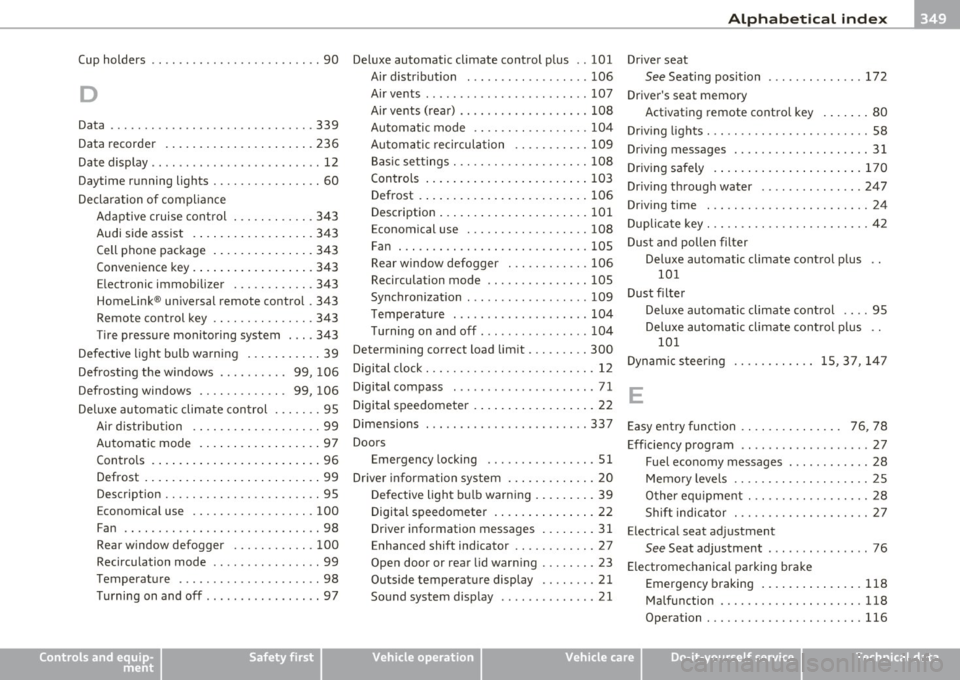
Deluxe au tomatic climate con trol ... .... 95
Air d istr ibution ................... 99
Au toma tic mode . ... .. .... .. .. .. .. 97
Con tro ls . ... .. .. .. ...... .. .. . .. .. 96
Defrost . ... .. .... .. .. .. .. .. .. .. .. 99
Description ....................... 95
Economical use .................. 100
Fan .. ....................... .... 98
Rear window defogger ............ 100
Recircu lation mode ... ... .. .. .. .. .. 99
T emperatu re ............ ........ . 98
Turning on and off ................ . 97
Controls and equip
ment Safety first
Deluxe automatic
climate control p lus .. 101
Air d istr ibut ion . ................. 106
Air ve nts ........................ 107
Air ve nts (rear) .. ........ ......... 108
Automatic mode .... .. .. ... ...... 104
Au toma tic recircul ation ........... 109
B asi c set tings . ................... 108
Contro ls .... ... .... .. .. .. ... .. .. 1 03
Defrost . ... .. ..... ....... .. ... . . 1 06
Description .. ..... .. .. .. .. .. .. ... 101
Economical use ....... .. ..... .... 108
Fan . .. .. .. .. .. ........ ......... 105
Rear window defogger . .. .. .. ..... 106
Recirculation mode ............... 105
Synchron izat io n .. ... .. .. ......... 109
T emperat ure .................... 104
T urning on and off ... .. ... .... .... 104
Determining correct load lim it ... .... .. 300
Digital clock ..... ........ ... .. .. .. .. . 12
Digital compass ..................... 71
Digital speedometer . ... .. .. ...... ... . 22
Dimensions . .................. ..... 337
Doo rs
Emergency locking ................ 51
Dr ive r informa tion system ... .. .. ... .. . 20
Defective ligh t bulb warn ing .. ... .. . . 39
Digital speedometer . .. .. ... .. .. ... 22
Drive r information messages .... .. . . 31
Enhanced shift indicator ........... . 27
Open door or rear lid warn ing ........ 23
Outside temperature display ........ 21
Sound system disp lay ....... ....... 21 Driver
seat
See Seating position ........... ... 172
Driver's seat memory Activating remote control key .... ... 80
Dr iv ing lig hts . .. .. .. .. ............... 58
Driv ing messages .................... 31
Driv ing safely ..... . .. ..... ..... ... . 1 70
Driv ing through water ............... 247
Driv ing time . ........ ............... 24
Dupli cate key . .. .. .. .. .. .. ........... 42
Dust and pollen filter
Deluxe automatic climate control p lus
10 1
Dust f ilte r
Deluxe automati c climate cont rol .. .. 95
Deluxe au toma tic climate con trol p lus ..
101
Dyn amic s teer ing ............ 15, 37, 147
E
Easy e ntry func tion . . . . . . . . . . . . . . . 76, 78
E ff ic ie n cy program ................... 27
Fuel economy messages . ... ... .. .. . 28
Memo ry leve ls .................... 25
O ther e quipm ent ... .. .. ........... 28
Shift indica tor .................... 27
Electrica l seat adjustment
See Seat adjustment ...... ... ...... 76
Electromechanical parking brake Emergency braking ... ... .. ... . .. . 118
Malfunction .............. ...... . 118
Operation . .. ................... . 116
Vehicle operation Vehicle care Do-it-yourself service Technical data