ECU AUDI A5 COUPE 2013 User Guide
[x] Cancel search | Manufacturer: AUDI, Model Year: 2013, Model line: A5 COUPE, Model: AUDI A5 COUPE 2013Pages: 294, PDF Size: 73.84 MB
Page 85 of 294
Rocking back and forth to become
un stuck
~ Shi ft on ly between D/S and R when the ve
hicle is at a full stop and the engine is
runn ing at idle speed.
Stopp ing
~ Press and ho ld the brake pedal unti l the ve
hicle has come to a complete stop .
~ Keep the brake pedal depressed so that the
vehicle cannot roll forward or backward
while it is idling¢ .&_.
~ Once stopped, do not depress the accelera-
tor pedal to rev up the engine ¢.&_ .
Pa rking
If the selector lever is not in the P position
when you open the dr iver's door, the vehicle
could ro ll. The message
T ra nsmi ssion: C ar
may roll! Shift to park!
appears.
~ Press and ho ld the brake pedal unti l the ve
hicle has come to a complete stop.
~ Set the parking brake firmly¢ page 77,
Parking.
~ Press and ho ld the release button in these
l ector lever handle, move the selector lever
into P and then let go of the release button
¢ .&_ .
The engine can only be
s tart ed when these
l ecto r lever is in the P o r N posit ions .
On slopes , activate the parking brake first and
the n move the selector lever to the P pos it ion .
This prevents too much stress from being
p laced on the lock ing mecha nism .
_& WARNING
-Unin tended veh icle movement ca n cause
serious injury .
- When the selector lever is in a dr iving
position, the veh icle may creep, even at
id le speed. Therefore do not release
the park ing brake or foo t brake until
you are ready to move, because powe r
is t ransmitted to the whee ls as soon as
a dr iving posit ion is engaged.
Tran sm iss ion 83
-Do not accelerate wh ile selecting a
driv ing position. At this time the en
gine must be at idle speed so that un due stress is not placed on the clutches
i n the transmiss ion.
- Remember: Even when stopped br iefly
with the automatic t ransmission in D/S
o r R, eng ine power is being transmit
ted to the wheels. Your veh icle cou ld
"creep" forward or backwa rd. Whe n
stopped, keep the brake pe dal fu lly de
pressed and use the pa rking brake if
necessary to keep the vehicle from ro ll
ing.
- If the selec to r l ever is unintentionally
moved into N while you are driving, take
your foot off the accelerator peda l and
wait for the eng ine to ret urn to idle
speed before se lecting a dr iv ing pos ition.
- Never sh ift into R or P when the vehicle is
in motion.
- Never get out of the d river's seat when
the eng ine is running.
- If you m ust get out of the vehicle, move
the selector lever secure ly into the P po
sition and apply the parking brake firmly.
- If the engine must remain r unning, neve r
have any driving position engaged when
checking under the hood . Make sure the
selector lever has securely engaged and
is locked in P w it h the par king brake
fi rm ly set¢
page 209, Engine compart
ment.
Othe rwise, any in cr ease in engine
speed may set t he vehi cle in motion,
even with the park ing brake applied .
(D Tips
For safety reasons, the pa rking brake is re
l eased a utomatically o nly when the d riv
er's safety belt is engaged in the buckle.
Page 104 of 294
102 Audi adapti ve cruise control and br aking guard
- If a co llision is imminent, the system will
first provide an
acute warning by bri efly and
sharp ly app ly ing the brakes .
- If you do not react to the ac ute warning ,
braking guard can brake within the limits of
the system. This reduces the veh icle speed
in the event of a collis ion.
- At speeds under 20 mph (30 km/h), the sys
tem can in it iate a complete deceleration
s hortly before a collision .
1>.
- If the Audi braking guard senses that you
are not braking hard enough when a colli
sion is imminent, it can increase the braking
force .
Which functions can be contr oll ed ?
You can sw itch Audi braking g uard and the
distance/approach warning on or off in the ra
d io or MMI Qpage 102, Set tings in the ra
dio/MM!.
A WARNING
Lack of attention can cause col lisions, oth
er accidents and serious persona l injuries.
The Audi b raking guard is an assist system
and cannot prevent a collis ion by itself.
The driver must always intervene. The dr iv
er is always responsible for braking at the
correct time.
- Always pay close attention to traffic,
even when the Audi braking guard is
switched on. Be ready to intervene and
be ready to take comp lete control when
ever necessary. Always keep the safe and
legal distance between your vehicle and
vehicles up ahead .
- Audi braking guard works within limits
and w ill not respond outs ide the system
limits, for examp le when approaching a
stopped vehicle or stationary obstacle
(end of a traff ic jam or veh icle that has
broken down in traffic).
- Always remember that the radar s ensor
for the A udi braking guard works only
within defined detect ion and range limits
l ) Th is is not available in some c oun tries .
that may prevent the proper detection of
other veh icles.
- The radar sensor's function and range
can be reduced by rain, snow and heavy
spray. Moving veh icles up ahead may not
be prompt ly detected or may not be de
tected at all .
- Reflective surfaces including crash barri
ers or tunne l entrances may impair the
function of the radar sensor .
(D Tips
- You can cancel the braking that is in it iat
ed by the system by braking yourse lf, by
accelerating not iceably or by swerving .
- Audi braking guard error messages
Qpage 103.
- Keep in mind that brak ing guard can
brake unexpectedly. Always secure any
cargo or objects that you are transport
ing to reduce the risk of damage or in
jury .
Settings in the radio/MMI
Applies to vehicles: with Audi adaptive cruise control
., Sele ct: I CAR I func tion button > Car system s
contro l but ton > Driver a ssist> Audi brak
ing guard .
Or
., Select: !CAR ! function b utton > Aud i brak-
ing guard .
S ys tem -
Switch A udi braking guard On and
Off . When you switch the ignition on, the
message
Audi b raking guard off appears if
the system is switch ed off .
Ea rl y warnin g -The distance and approach
warnings in the display can be switched
O n/
Off .
(D Tips
-Yo ur settings are automatically stored
and assigned to the remote contro l key
being used at the times the settings are
made.
Page 121 of 294
Homelink®
Universal remote
control
Description
Appl ies to vehicles: with Horne Link
The Homelink universal remote control can
be programmed with the remote control for
devices that are already present.
With Home Link, you can control devices such
as the garage door, security systems, house
l ights, etc. comfortab ly from the inside of you
vehicle .
H ome Link makes it possible for you to rep lace
three differen t remote controls from dev ices
in your home with one universal remote. This
feature works for most garage door and exte
rior door motor signals. Programming the in
dividual remote control for your remote con
trol takes p lace near the center of the radiator
grille. There is a control module attached at
this location.
A one-t ime programming of the sensor must
be performed before you are able to use sys
tems with Homelink. If the system does not
activate after performing the one-t ime pro
gramming, check whether the system uses a rolling codec:>
page 122 for veh icles without
the MMI*.
_& WARNING
- Never use the Homelink ® transmitter
with any garage door opener that does
have not the safety stop and reverse fea
ture as requ ired by federa l safety stand
ards. This includes any garage door open
er model manufactured before April 1,
1982.
- A garage door opener which cannot de
tect an object, signaling the door to stop
and reverse does not meet current feder
al safety standards. Us ing a garage door
opener without these features increases
risk of serious injury or death.
Homelink ® 119
-For safety reasons never release the
parking brake or start the engine while
anyone is standing in front of the vehicle.
- A garage door or an estate gate may
sometimes be set in motion when the
Homelink ® remote control is being pro
grammed. If the device is repeatedly ac
tivated, th is can overstrain motor and
damage its e lectrical components -an
overheated motor is a fire hazard!
- To avo id possible injuries or property
damage, please always make abso lutely
certain that no persons or objects are lo
cated in the range of motion of any
equipment being ope rated .
(D Tips
-If you would like more information on
Homelink ®, where to purchase the
Homel ink ® compatible products, or
would like to purchase the Homelink ®
Home Lighting Package, please call to ll
free: 1-800-355-3515.
- For Declaration of Compliance to United
States FCC and Industry Canada regu la
tions c:>
page 276.
Page 123 of 294
-For security reasons, we recommend that
you clear the programmed buttons be
fore se lling the vehicle .
Programming the transmitter (version
B)
Applies to vehicles: with Home Link
,,,,, r ,o :O·,) ,,;;~
®
Fig. 125 Hea dli ner: c o n tro ls
Fig. 126 Dis ta n ce betw een th e radiato r gri lle a nd the
hand t rans mitte r
Programming: phase 1 on the control unit
l. Switch on the ignition (do not start the
engine) .
2 . Press and hold both of the outer Home
Link buttons ¢
fig. 125 unti l the LED @
turns off completely (about 20 seconds).
This procedure clears the standard codes
that were set at the factory and does
not
need to be repeated again to program the
other buttons .
3 . Briefly press the Homelink button that
you would like to program .
4. Wait until the LED @beg ins to blink
quickly . The Homelink module will now
remain in learning mode for 5 minutes.
5 . Now stand in front of your vehicle with
the original hand transmitter for the ga
rage door opener or for the device that
Homelink ® 121
you wou ld like to allocate to the Home
Link button .
Programming: phase 2 on the radiator
grille
6. Hold the or iginal hand transmitter some
what towards the center of your vehicle's radiator grille ¢
fig. 126.
7. Now activate (press) the hand transm it
ter.
8. Pay attention to the turn sig nals for your
vehicle when activating the hand trans
mitter .
If the emergency flashers blink
three times, the programm ing was suc
cessful. If the emergency flasher only
blinks one time, the 5 minute time lim it
for the adaptation has expired or the pro
gramming was unsuccessful. Repeat the
programming from step 3 on the controls
or se lect another distance from the radia
tor grille.
9. If the garage door or other devices still
fail to be activated with the Homelink control buttons after programming is
completed, it is possible that these sys
tems might be working with a roll ing code
instead of the normal fixed code . A
Roll
ing code programming must be per
formed
¢ page 122 .
Program the remaining two buttons according
to the instructions ment ioned above . Begin
similarly with the 3rd step if the program
ming connection was successful for the f irst
button .
Remote contro l units for garage door openers
in Canada are set to stop transmitting radio
frequency signa ls after two seconds . This time
may not be sufficient for the Homelink sys
tem to learn the radio frequency sign al. Per
form all other steps as described above.
Pressing a button
.,. To open the garage door, press the pro
grammed b utton. The LED @ will light up or
flash .
.,. To close the garage door, press the button
aga in.
Page 124 of 294
122 Homelink®
Erasing the button s
.. Switch on the igni tion (do not start the en
gine) .
.. Press and ho ld both of the o uter buttons
until the LED @ turns off complete ly (about
20 seconds) to erase all of the buttons si
multaneously .
.. Programmed buttons cannot be erased indi
vidually . Reprogram the buttons if necessa
ry.
Reprog ramming the button s
.. Switch on the ignition (do not start the en
gine).
.. To reprogram an ind ividual button, press
and hold the des ired button unt il the L ED @
begins to blink (about 10 seconds) . Re lease
the button .
.. Wait until the L ED@ begins to blink quic k
ly . T he Homelink module will now remain in
l earning mode for 5 minutes .
.. Cont in u e with step 5 .
(D Tips
-The requ ired distance between the hand
transmitter and the Homelin k module in
the radiator grille¢
fig. 126 depends on
the system that you are programming.
- Depending on the mode l of the garage
door opener, you may need to release the
button on the remote and press it again
when programming. When program ming a new dev ice, keep the button
pressed for at least 15 seco nds befo re
trying again with the transmitte r in a dif
ferent pos it ion. Watch out fo r the emer
gency flasher duri ng t hat time.
- Fo r secu rity reaso ns, we recommend that
you clear the programmed but tons be
fore se lling the vehicle.
Programming the rolling code
Applies to veh icles: w ith Homelink
Additionally, a rolling code programming for
the Homelink universal remote control is re
quired for some systems .
Identifying the rolling code
.. Press the previously programmed HomeLink
button again and hold it down .
.. Look at the LED@¢
page 121, fig . 125 . If
the L ED blinks q uickly, the feat ures, such as
the garage door opene r, a re eq uipped w ith
t he rol ling code.
.. Program the rolling code as follows:
Activating the garage door opener motor
unit
.. Locate the setting but ton on the garage
door opene r motor un it. The exac t loca tion
and colo r of the bu tton may vary depending
on the garage door opener manufacturer .
.. Press the setting button on the garage door
opener motor unit ( usua lly this will activate
a "setting light display" on the motor unit).
Now you will have about
3 0 seconds time to
pe rform the Homelink button programm ing
on the controls .
Programming on the controls
.. Quickly press the p rev iously programmed
Homelink b utton .
.. Press the Home link button once more to
end the roll ing code programm ing .
After the controls have been programmed, the garage door opener s hou ld recognize the
Homelink signa l and operate when the Home
Li nk button is pressed. Now you may program
the other buttons as needed .
(D Tips
-Programming the rolling code can be
performed quicke r and more easily with
th e help of a second person. The Home
Li nk button may need to be pressed a
t hird t ime to en d the adjus tment pro ce
dure for some garage door openers.
Page 126 of 294
124 Driving Safely
Driving Safely
General notes
Safe driving habits
Please remember -safety first!
This chapter contains important information,
tips, instructions and warnings that you need
to read and observe for your own safety, the
safety of your passengers and others. We have
summarized here what you need to know
about safety belts, airbags, child restraints as
well as child safety. Your safety is for us
priori
ty number 1.
Always observe the information
and warnings in this section -for your own
safety as well as that of your passengers.
The information in this section applies to all
model versions of your vehicle. Some of the
features described in this sections may be
standard equipment on some models, or may
be optional equipment on others. If you are
not sure, ask your authorized Audi dealer.
A WARNING
-Always make sure that you follow the in
structions and heed the WARNINGS in
this Manual. It is in your interest and in
the interest of your passengers.
- Always keep the complete Owner's Liter
ature in your Audi when you lend or sell
your vehicle so that this important infor
mation will always be available to the
driver and passengers.
- Always keep the Owner's literature handy
so that you can find it easily if you have
questions.
Safety equipment
The safety features are part of the occupant
restraint system and work together to help
reduce the risk of injury in a wide variety of
accident situations.
Your safety and the safety of your passengers
should not be left to chance. Advances in
technology have made a variety of features
available to help reduce the risk of injury in an accident.
The following is a list of just a few of
the safety features in your Audi:
- sophisticated safety belts for driver and all
passenger seating positions,
- belt force limiters for the seats,
- belt pretensioners for the seats,
- head restraints for each seating position,
- front airbags,
- side airbags in the front seats,
- side curtain airbags,
- special LATCH anchorages for child re-
straints,
- adjustable steering column.
These individual safety features, can work to gether as a system to help protect you and
your passengers in a wide range of accidents.
These features cannot work as a system if
they are not always correctly adjusted and cor
rectly used.
Safety is everybody's responsibility!
Important things to do before driving
Safety is everybody's job! Vehicle and occu
pant safety always depends on the informed and careful driver.
For your safety and the safety of your passen
gers,
before driving always:
.,. Make sure that all lights and signals a re op
erating correctly.
.,. Make sure that the tire pressure is correct.
.,. Make sure that all windows are clean and
afford good visibility to the outside.
.,. Secure all luggage and other items carefully
qpage59 .
.,. Make sure that nothing can interfere with
the pedals.
.,. Adjust front seat, head restraint and mir
rors correctly for your height.
.,. Instruct rear seat passengers to adjust the
head restraints according to their height.
.,. Make sure to use the right child restraint
correctly to protect children¢
page 166,
Child Safety. "'
Page 129 of 294
-Passengers must always sit in an upright
posit ion and never lean against or place
any part of their body too close to the
area where the airbags are located .
- Passengers who are unbelted, out of po
sition or too close to the airbag can be
seriously injured by an airbag as it un
folds with great force in the blink of an
eye .
- Always make sure that there are at least 10 inches (25 cm) between the front
passenge r's breastbone and the instru
ment pane l.
- Each passenger must always sit on a seat
of the ir own and properly fasten and
wear the safety bel t belong ing to that
seat .
- Before driv ing, a lways adj ust the front
passenger seat and head restra int prop
er ly .
- Always keep your feet on the f loor in
front of the seat . Never rest them on the
seat, instrument panel, out of the win
dow, etc . The airbag system and safety
belt w ill not be ab le to protect you prop
erly and can even increase the risk of in
jury in a crash .
- Never drive with the backrest reclined or tilted far back! The farther the backrests
are tilted back, the greater the risk of in
jury due to incorrect positioning of the
safety belt and improper seating posi
t ion.
- Children must always ride in child safety
seats
c::> page 166. Spec ial precautions
apply when installing a child safety seat
on the front passenge r seat
c::> page 142.
Proper seating positions for passengers
in rear seats
Rear seat passengers must sit upright with
both feet on the floor consistent with their
physical size and be properly restrained whenever the vehicle is in use.
To reduce the risk of injury caused by an incor
rect seat ing pos ition in the event of a sudden
braking maneuver or an accident, your pas-
Dr ivin g Sa fely 12 7
sengers on the rear bench seat must always
observe the following:
1-Make s ure th at the seatback is secure ly
la tched in the upright position
c::> page 63 .
.,. Keep both feet flat in the footwell in front
of the rear seat.
.,. Fasten and wear safety be lts properly
c::> page 13 7 .
.,. Make sure that children are always properly
restrai ned in a child restraint that is appro
p riate for the ir s ize and age
c::> page 166.
.&, WARNING
P assengers who are imp roperly seated on
the rea r seat can be seriously i njured in a
crash.
- Each passenger must always si t on a seat
of their own and pr operly fasten and
wear the safety belt belonging to that
seat.
- Safety belts only offer maximum protec
tion when the sea tback is sec urely latch
ed in the upright position and the safety
be lts are properly positioned on the
body. By not s itting upright, a rear seat
passenger increases the risk of personal
inju ry from improperly positioned safety
belts!
- Always adjust the head restraint properly
so that it can give maximum protection .
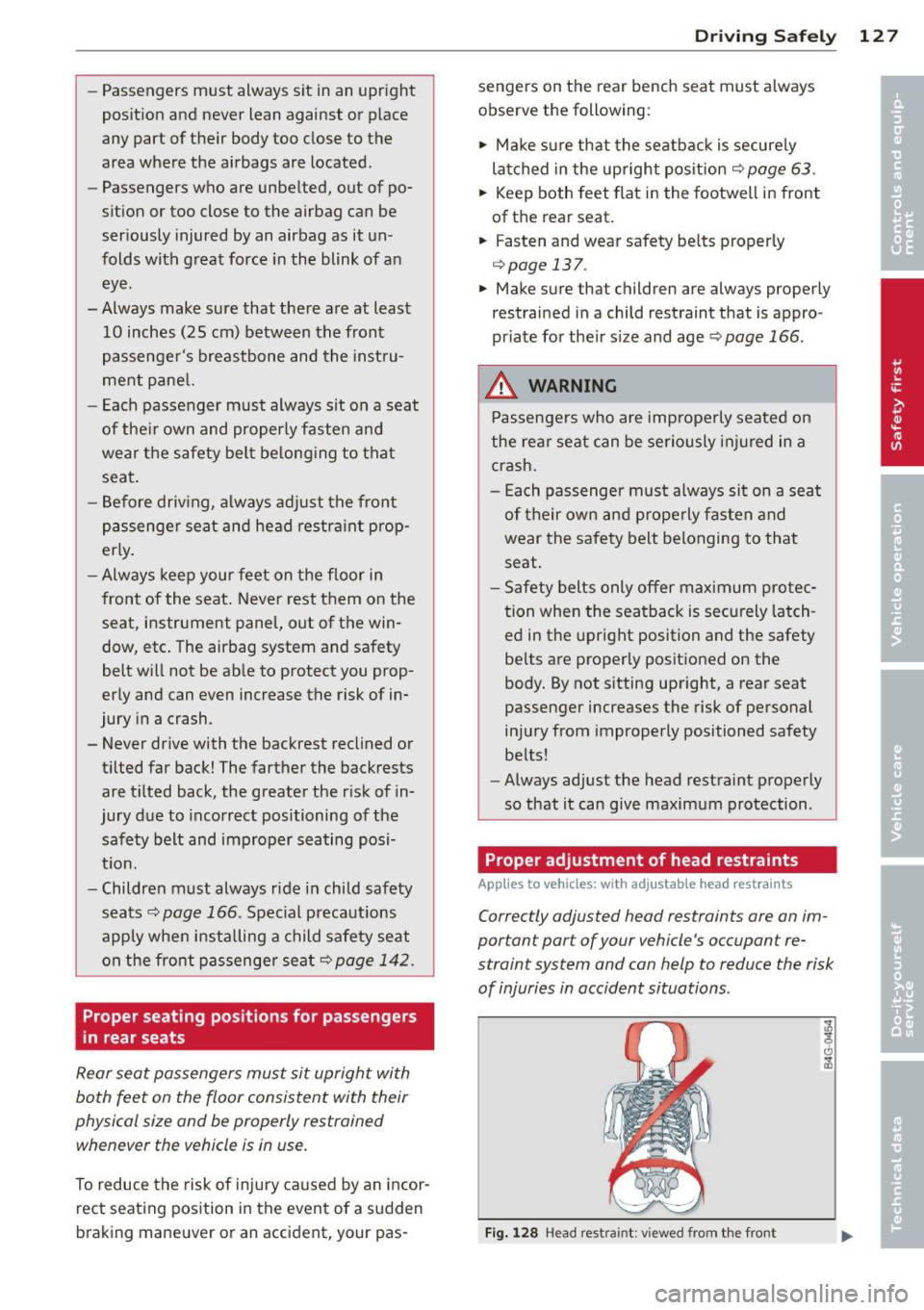
Proper adjustment of head restraints
Applies to vehicles: wit h adjustab le hea d r est ra in ts
Correctly adjusted head restraints are an im
portant part of your vehicle 's occupant re
straint system and can help to reduce the risk
of injuries in accident situations .
Fig. 1 28 Head restra int: v iewed fro m th e front
Page 131 of 294
Driver and passenger
side footwell
Important safety instructions
Applies to vehicles: with knee airbags
A WARNING
Always make sure that the knee a irbag can
inflate without interference . Objects be
tween yourself and the airbag can increase
the risk of inju ry in an acc ident by interfer
ing w ith the way the a irbag deploys or by
be ing p ush ed into you as the airbag de
ploys .
- No persons (ch ild ren) or animals should
ride in the footwell in front of the pas
senger seat. If the airbag deploys, this
can result in serious or fata l injuries .
- No objec ts of any k ind sho uld be car ried
in t he footwell area in front of the driv
er's or passenger's seat . B ulky objects
(shopping bags, for example) can ham
per or prevent proper deployment of the
airbag . Small objects can be thrown
through the vehicle if the airbag deploys and injure you o r your passengers .
Pedal area
Pedals
The pedals must always be free to move and
must never be interfered with by a floor mat
or any other object.
M ake sure t hat all pedals move freely witho ut
in te rference and th at nothing prevents them
from returning to the ir origina l positions.
Only use floo r mats that leave the peda l area
free and can be secured w it h floor mat fas ten
e rs.
If a b rake circuit fails, increased b rake pedal
travel is req uired to br ing the vehi cle to a full
stop.
Dr iving S afel y 129
A WARNING
Pedals that cannot move free ly can cause
loss of vehicle control and increase the risk
of ser ious inju ry .
- Never p lace any objects in the drive r's
footwell . An ob ject cou ld get into the
pedal area and inte rfe re with pedal func
tion . In case of sudde n bra ki ng o r an ac
cident, yo u wo uld not be a ble to brake or
ac celer ate!
- Always ma ke su re tha t no thing can fall
or m ove into the driver's footwel l.
Floor mats on the driver side
Always use floor mats that can be securely
attached to the floor mat fasteners and do
not interfere with the free movement of the
pedals .
"' Ma ke s ure that the floor mats are prope rly
secured and cannot move and inte rfe re with
t he ped als~ ,&. .
U se on ly floor mats that leave the pedal area
unobst ructed and that are firmly secu red so
that they cannot slip o ut of posi tion . You ca n
obt ain suitab le floo r mats from yo ur aut ho r
ized Audi dea ler .
Floor mat fastene rs a re insta lled in your Aud i.
Floor mats used in your vehicle must be at
tac hed to these fastene rs . Prope rly secur ing
the floor mats will prevent them from sliding
i nto positions that could interfere with the
peda ls o r impa ir safe ope rat io n of yo ur vehicle
i n othe r ways.
A WARNING
Pedals that cannot move free ly can result
in a loss of vehicle control and inc rease the
risk of serious persona l injury.
- Always ma ke s ure that floo r mats a re
properly secu red.
- Never p lace or ins tall floor mats o r other
f loor coverings in the vehicle that cannot
be properly secured in p lace to prevent
them from slipping and interfer ing with
~
•
•
Page 132 of 294
130 Driving Safel y
the pedals or the ability to control the
vehicle.
- Never place or insta ll floor mats or other
floor coverings on top of already insta l
led floor mats. Additional floor mats and
other coverings will reduce the size of
the pedal area and interfere with the
peda ls.
- Always proper ly reinstall and secure floor
mats that have been taken out fo r clean
ing.
- Always make sure that objects cannot
fall into the driver footwell while the vehicle is moving. Objects can become
trapped unde r the b rake pedal and accel
erator peda l causing a loss of veh icle
contro l.
Stowing luggage
Loading the luggage compartment
All luggage and other objects must be prop
erly stowed and secured in the luggage com
partment.
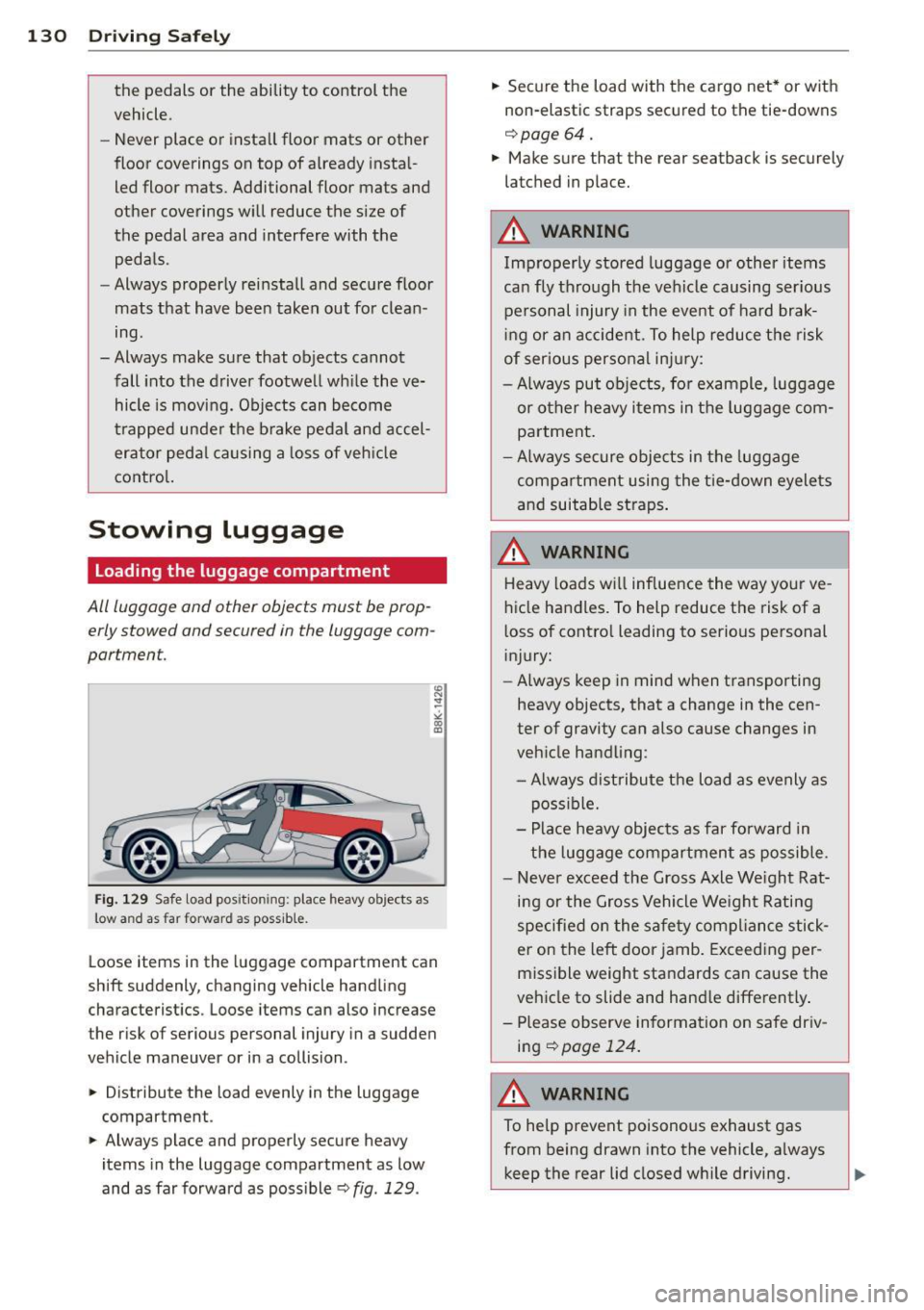
Fig. 12 9 Safe load pos it io nin g: place heavy objects as
low a nd as fa r forward as possible .
Loose items in the luggage compartment can
shift suddenly, changing vehicle hand ling
characteristics . Loose items can also increase
the risk o f serious personal injury in a sudden
vehicle maneuver or in a collision .
.,. Distribute the load evenly in the luggage
compartment .
.,. Always place and properly secure heavy
items in the luggage compartment as low
and as far forward as poss ible
Q fig . 129 .
.,. Secure the load with the cargo net* or with
non-elastic straps secured to the tie-downs
¢ page 64.
.,. Make sure that the rear seatback is securely
latched in place.
A WARNING
Improperly stored luggage or other items
ca n fly through the vehicle causing ser ious
personal injury in the event of hard brak
i ng or an accident. To help reduce t he risk
of ser ious personal inj ury:
- Always put objects, for example, luggage or other heavy items in the luggage com
pa rtment.
- Always secure objects in the luggage
compa rtment using the t ie-down eyelets
and suitab le straps .
A WARNING
-
Heavy loads wi ll influence the way yo ur ve-
hicle handles. To help reduce the risk of a
l oss of contro l leading to serious personal
i njury:
- Always keep in mind when transporting
heavy objects, that a change in the cen
ter of gravity can also cause changes in
veh icle handling:
- Always distribute the load as evenly as poss ible.
- Place heavy objects as far forward in
the luggage compartment as possible.
- Never exceed the Gross Axle We ight Rat
ing or the Gross Vehicle We igh t Rating
specified on the safe ty compl iance stick
er on the left door jamb . Exceeding per
missible weight standards can cause the
vehicle to slide and hand le differently .
- Please observe information on safe driv ing¢
page 124.
A WARNING
-To he lp prevent poisonous exhaust gas
from being drawn into the vehicle, a lways
keep the rear lid closed w hile driving.
Page 133 of 294
-Never transport objects larger than
those fitting completely into the luggage
area because the rear lid cannot be fully
closed.
- If you absolutely must drive with the rear
lid open, observe the following notes to
reduce the risk of poisoning:
- Close all windows,
- Close the sunroof,
- Open all air outlets in the instrument
panel,
- Switch off the air recirculation,
- Set the fresh air fan to the highest
speed .
A WARNING
Always make sure that the doors, all win
dows, the sunroof and the rear lid are se
curely closed and locked to reduce the risk
of injury when the vehicle is not being
used.
- After closing the rear lid, always make
sure that it is properly closed and locked.
- Never leave your vehicle unattended es
pecially with the rear lid left open. A
child could crawl into the vehicle through
the luggage compartment and close the
rear lid becoming trapped and unable to
get out. Being trapped in a vehicle can
lead to serious personal injury.
- Never let children play in or around the
vehicle.
- Never let passengers ride in the luggage
compartment . Vehicle occupants must
always be properly restrained in one of
the vehicle's seating positions.
@ Tips
- Air circulation helps to reduce window fogging. Stale air escapes to the outside
through vents in the trim panel. Be sure
to keep these slots free and open.
- The tire pressure must correspond to the
load. The tire pressure is shown on the
tire pressure label. The tire pressure la bel is located on the driver's side B-pillar.
The tire pressure label lists the recom-
-
Driving Safely 131
mended cold tire inflation pressures for
the vehicle at its maximum capacity
weight and the tires that were on your
vehicle at the time it was manufactured.
For recommended tire pressures for nor
mal load conditions, please see chapter
r::> page235 .
Tie-downs
The luggage compartmen t is equipped with
four tie -downs to secure luggage and other
items .
Use the tie-downs to secure your cargo prop
erly
r::> page 130, Loading the luggage com
partment .
In a collision, the laws of physics mean that
even smaller items that are loose in the vehi
cle will become heavy missiles that can cause
serious injury. Items in the vehicle possess en
ergy which vary with vehicle speed and the
weight of the item. Vehicle speed is the most
significant factor.
For example, in a frontal collision at a speed
of 30 mph (48 km/h), the forces acting on a
10-lb (4.5 kg) object are about 20 times the
normal weight of the item . This means that
the weight of the item would suddenly be about 200 lbs . (90 kg). You can imagine the
injuries that a 200 lbs. (90 kg) item flying
freely through the passenger compartment
could cause in a collision like this.
A WARNING
Weak, damaged or improper straps used
to secure items to tie-downs can fail dur
ing hard braking or in a collision and cause
serious personal injury.
-Always use suitable mounting straps and
properly secure items to the tie-downs in
the luggage compartment to help pre
vent items from shifting or flying for
ward as dangerous missiles.
- When the rear seat backrest is folded
down , always use suitable mounting
straps and properly secure items to the
tie-downs in the luggage compartment
•
•