steering AUDI A5 COUPE 2016 User Guide
[x] Cancel search | Manufacturer: AUDI, Model Year: 2016, Model line: A5 COUPE, Model: AUDI A5 COUPE 2016Pages: 264, PDF Size: 66.92 MB
Page 80 of 264
Driving
- Occasional noises when the parking brake is
applied and released are normal and are not
a cause for concern.
- When the vehicle is parked, the parking
brake goes through a self-test cycle at regu
lar intervals. Any associated noises are nor
mal.
Parking
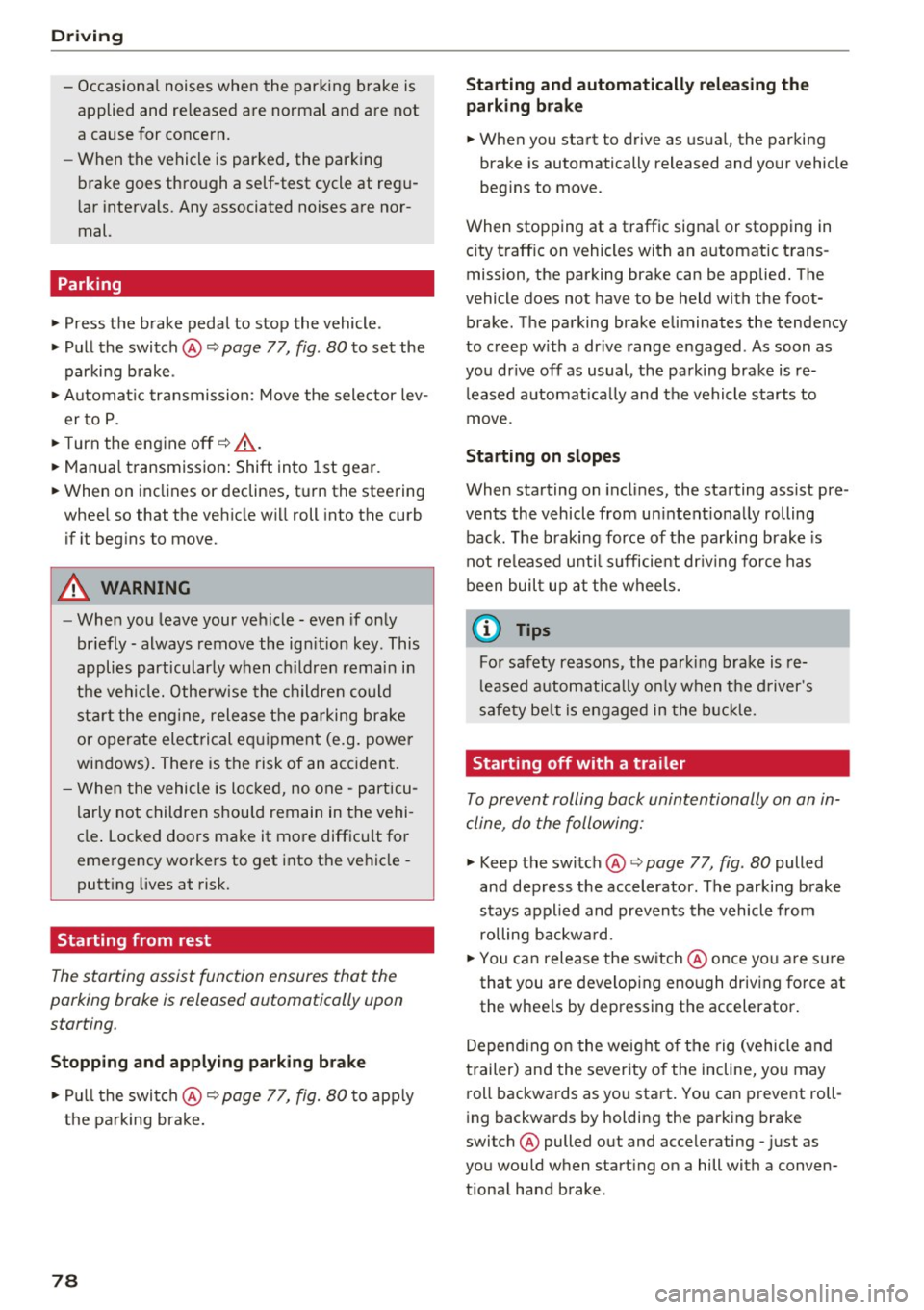
.,. Press the brake pedal to stop the vehicle .
.,. Pull the switch @¢
page 77, fig. 80 to set the
parking brake .
.,. Automatic transmission: Move the selector lev-
er to P.
.. Turn the engine off¢.&, .
.. Manual transmission: Shift into 1st gear.
.. When on inclines or declines, turn the steering
wheel so that the vehicle will roll into the curb
if it begins to move.
A WARNING
-
-When you leave your vehicle -even if only
briefly -always remove the ignition key. This
applies particularly when children remain in
the vehicle. Otherwise the children could
start the engine, release the parking brake
or operate electrical equipment (e.g. power
windows). There is the risk of an accident.
- When the vehicle is locked, no one -particu
larly not children should remain in the vehi
cle. Locked doors make it more difficult for
emergency workers to get into the vehicle -
putting lives at risk.
Starting from rest
The starting assist function ensures that the
parking broke is released automatically upon
starting .
Stopping and applying parking brake
.. Pull the switch @¢ page 77, fig. 80 to apply
the parking brake.
78
Starting and automatically releasing the parking brake
.. When you start to drive as usual, the parking
brake is automatically released and your vehicle
begins to move.
When stopping at a traffic signal or stopping in city traffic on vehicles with an automatic trans
mission, the parking brake can be applied. The
vehicle does not have to be held with the foot brake. The parking brake eliminates the tendency
to creep with a drive range engaged . As soon as
you drive off as usual, the parking brake is re leased automatically and the vehicle starts to
move .
Starting on slopes
When starting on inclines, the starting assist pre
vents the vehicle from unintentionally rolling back. The braking force of the parking brake is
not released until sufficient driving force has
been built up at the wheels.
(D Tips
For safety reasons, the parking brake is re
leased automatically only when the driver's
safety belt is engaged in the buckle.
Starting off with a trailer
To prevent rolling back unintentionally on an in
cline, do the following:
.. Keep the switch @¢ page 77, fig. 80 pulled
and depress the accelerator. The parking brake
stays applied and prevents the vehicle from
rolling backward.
.,. You can release the switch @once you are sure
that you are developing enough driving force at
the wheels by depressing the accelerator.
Depending on the weight of the rig (vehicle and
trailer) and the severity of the incline, you may
roll backwards as you start. You can prevent roll
ing backwards by holding the parking brake
switch @pulled out and accelerating -just as
you would when starting on a hill with a conven
tional hand brake .
Page 88 of 264
Automatic transmission
¢ page 191. Otherwise, any increase in en
gine speed may set the vehicle in motion,
even with the parking brake applied.
(D Note
-When stopping on an incline, do not try to
hold the vehicle in place by pressing the ac
celerator pedal while a driving gear is se lected . This can cause the transmission to
overheat and can damage it. Activate the
parking brake or press the brake pedal to
prevent the vehicle from rolling .
- Allowing the vehicle to roll when the eng ine
i s stopped and the selector lever is in N w ill
damage the transmission because it is not
l ub ricated under those circumstances .
@ Tips
For safety reasons, the parking brake is re
leased automatically only when the dr iver's
safety belt is engaged in the buckle.
Hill descent control
Applies to veh icles: w ith S tronic/tiptron ic
The hill descent control system assists the driver
when driving down declines.
Hill descent contro l is activated when the selec
tor lever is in D/S and you press the brake pedal.
The transm ission automatically selects a gear
that is suitable for the incline. Hill descent con
trol tries to mainta in the speed achieved at the
time of braking, within physical and technical
limitations.
It may still be necessary to adjust the
speed with the brakes .
Hill descent control switches off once the decline
levels out or you press the accelerator peda l.
On veh icles w ith the cruise contro l system*
¢ page 80, hill descent control is also activated
when the speed is set.
& WARNING
Hill descent control cannot overcome physica l
limitations, so it may not be able to maintain
a constant speed under all condit ions . Always
be ready to apply the brakes.
86
Manual sh ift program
App lies to vehicles: with S tronic/tiptronic
Using the manual shift program you can man
ually select gears.
'
Fig. 88 Center console: shift ing the gears manua lly
Fig. 89 Steering whee l: sh ift paddles•
Gear selection with selector lever
The tiptronic mode can be selected either w ith
the vehicle stationary or on the move.
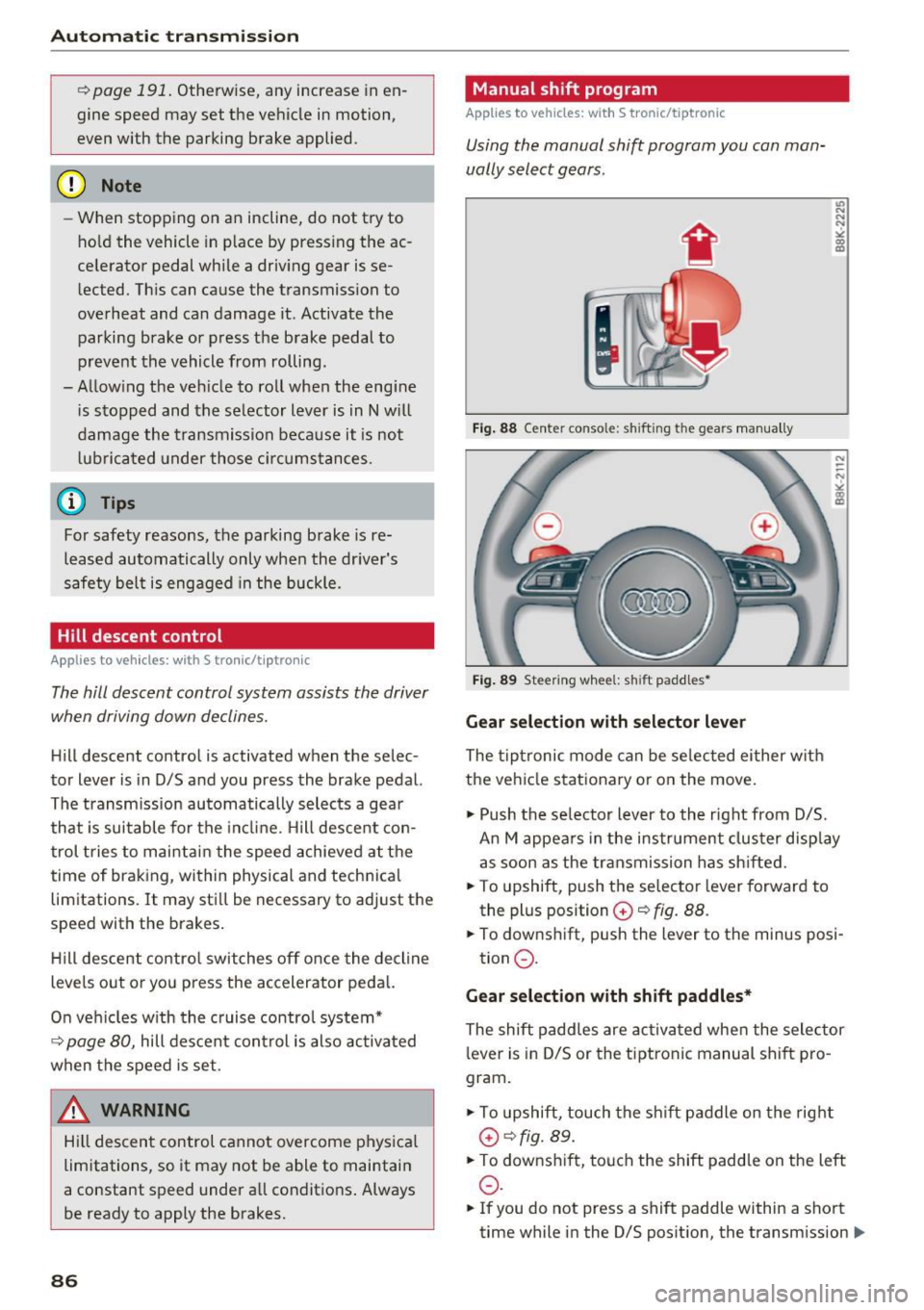
.,. Push the se lector lever to the right from D/5.
An M appea rs in the instrument clus ter disp lay
as soon as the transmission has shifted.
.. To upshift, push the selector lever forward to
the plus position
G) ~ fig. 88.
.. To downshift, push the lever to the minus posi-
tion
0 .
Gear selection with shift paddles*
The shift paddles are activated when the selector
lever is in D/S or the tiptronic manual shift pro
gram.
.,. To upshift, touch the shift paddle on the right
G)¢fig. 89.
.. To downsh ift, touch the shift paddle on the left
0 .
.. If you do not press a shift paddle within a short
time while in the 0/5 position, the transmission
II>
Page 89 of 264

.... N
0 Ico ....
using the shift paddles, move the selector lever
to the right out of the 0/5 position.
The transmission automatically shifts up or down before critical engine speed is reached .
The transm ission only a llows manual sh ift ing
when the engine speed is within the permitted range.
@ Tips
- When you sh ift into the next lower gear, the
transm ission w ill downsh ift only when there
i s no poss ibility of over -rew ing the engine.
- When the kick-down comes on, the t rans
mission will sh ift down to a lowe r gear, de
pending on vehicle and engine speeds .
- Tiptron ic is inoperative when the transmis
s ion is in the fa il-safe mode .
Kick-down
Applies to vehicles: with S tronic/tiptronic
Kick-down enables maximum acceleration.
When you depress the accelerator pedal beyond
the resistance point, the automatic transm ission
downshifts into a lower gea r, depend ing on veh i
cle speed and engine speed. The upshift in to the
nex t higher gear ta kes place once the maximum
specified engine speed is reached.
A WARNING
Please note that the drive whee ls can spin if
kick-down is used on a smooth s lippery road -
there is a risk of skidding.
Launch Control Program
Applies to vehicles: with S tronic
The Launch Control Program provides the best
acceleration possible when starting from a stop .
Requirement: The engine must be at operating
temperature and the steering whee l must not be
turned .
.,. Press the
I~ OFF ! button¢ page 171 wh ile the
engine is running. The
II indicator light illumi
nates in the instrument cluster and
Stabiliza-
Autom atic tran sm iss ion
tion control (ESC ): Sport . Warning! R estricted
s tabilit y
appears in the driver information sys
tem disp lay .
.,. Move the selector lever to the 0/5 posit ion to
select sport mode (5) or select the
dynamic
driving mode in drive select*¢ page 103 .
.,. Press the brake pedal strongly w ith your left
foot and hold it down fo r at least 1 second.
.,. At the same time, p ress the accelerator pedal
down comp lete ly with yo ur right foo t unti l th e
eng ine reaches and ma intains a h igh RPM .
.,. Remove your foot from the brake peda l w ithin
5 seconds
¢ ,&. .
A WARNING
-Always adapt your driving to the traff ic flow.
- On ly use t he Launch Control Program when
road and traffic condit ions allow it and oth
er d rivers will not be endangered or an
noyed by your dr iving and the vehicle's ac
celerat io n.
- Please note that the d riving wheels can spin
and the vehicle can break away when sport
mode is switched on, especially when the
road is slippery.
- O nce you have acce lerated, you should
sw itch sport mode off by pressing the
I~ OFF ! button.
(D Tips
-The transmission temperature may increase
signif icant ly after using the Launch Contro l
Prog ram . If that happens, the program may
not be ava ilable for a few minutes. It will be
availab le aga in afte r a cool-down period.
- Whe n accelerating using the Launch Cont rol
prog ram, all vehicle parts a re subject to
heavy loads. This can res ult in increased
wear.
Transmission malfunction
Applies to vehicles: with S tronic/tip tron ic
[i] Transmi ss ion: Pre ss brake pedal and select
gear again . .,.
87
Page 104 of 264
Audi drive select
Audi drive select
Driving settings
Introduction
Applies to vehicles: with Audi drive select
Drive select provides the poss ibility to experience
d ifferent types of vehicle settings in one veh icle.
F or instance, using the three
Comfort, Auto and
Dynamic modes, the driver can switch from a
sporty to a comfortable driving mode with the
press of a button.
Addit ional ly, in vehicles with MM I*, the vehicle
setup for
Individual* mode can be customized by
you. This makes it possible to combine settings such as a sporty engine tuning with comfortable
steering .
A WARNING
-
Improper use of the Audi drive select can
cause collisions, other accidents and serious
personal injury .
Description
Applies to vehicles: with Audi drive select
The vehicle setup in each mode depends on the
veh icle's features . However, the engine, auto
mat ic transmission* and steering are always in
volved.
Engine and automatic transmission*
Depending on the mode, the engine and the au
tomatic transmission respond quicker or in a
more balanced manner to accelerator pedal
movements . In the sporty dynamic mode, the au
tomatic transmission shifts at higher RPMs.
Steering
The steering adapts in terms of steering effort
and steering ratios. Indirect steer ing that moves
easi ly, like the steering in comfort mode, is best
suited to long drives on a highway. In contrast,
dynamic mode provides sporty, direct steering.
The follow ing applies to vehicles with dynam ic
steer ing*: the stee ring rat io changes based on
veh icle speed in orde r to ma inta in optim um
steer ing effort for the driver at all times. This
102
sets the steering to be less sensitive at higher
speeds in order to provide improved vehicle con
tro l. At reduced speeds, however, steering is
more direct in order to keep the steering effort as
minimal as possible when the driver is maneuver
ing the vehicle . At low and average speeds, dy
nam ic steering addit ionally prov ides more re
spons ive steering perfo rmance .
Adaptive dampers*
The adaptive dampers* use sensors to record in
formation regarding steering movements, brak
ing and acceleration operations by the driver,
road surface, driving speed, and load . This makes
i t possible to adapt damping to the driving situa
tion virtua lly in real time . Drive select also makes
i t possible to satisfy the desire for spor ty suspen
sion (Dynamic) and comfortable suspension
(Comfort) without giving up balanced tuning (Au
to).
Sport differential*
As a component of the all wheel dr ive system
(quattro)
r=;, page 174, the sport differential* dis
tributes the driving power to the rear axle de
pending on the situation. The distribution of
power varies depending on the mode selected.
The goal is a high level of ag ility and ability to ac
ce lerate on curves. The vehicle is very respons ive
to steering.
Audi adaptive cruise control*
The behavior when accelerating can be adjusted
from comfortable to sporty, depending on the
drive select mode. Adaptive cruise control also responds to the driving behavior of the vehicle
ahead in a more conservative or sporty manner .
Engine sound*
The sound of the engine is adapted to the select
ed mode and ranges from subtle to sporty.
@ Tips
- In some models, the maximum vehicle
speed can only be reached in the
Auto and
Dynamic modes.
- For vehicles with an automatic transmis-
sion, se lecting the
Dynamic mode resu lts in ..,_
Page 105 of 264
,-1 N
0 1-CX)
rl I.Cl U"I
,-1 I.Cl ......
sporty shifting characteristics. The S gear
position engages automatically.
- In vehicles that have dynamic steering*, op
erating noise is heard when starting or stop ping the engine. This does not indicate a
problem.
Selecting the driving mode
Applies to vehicles: with Audi drive select
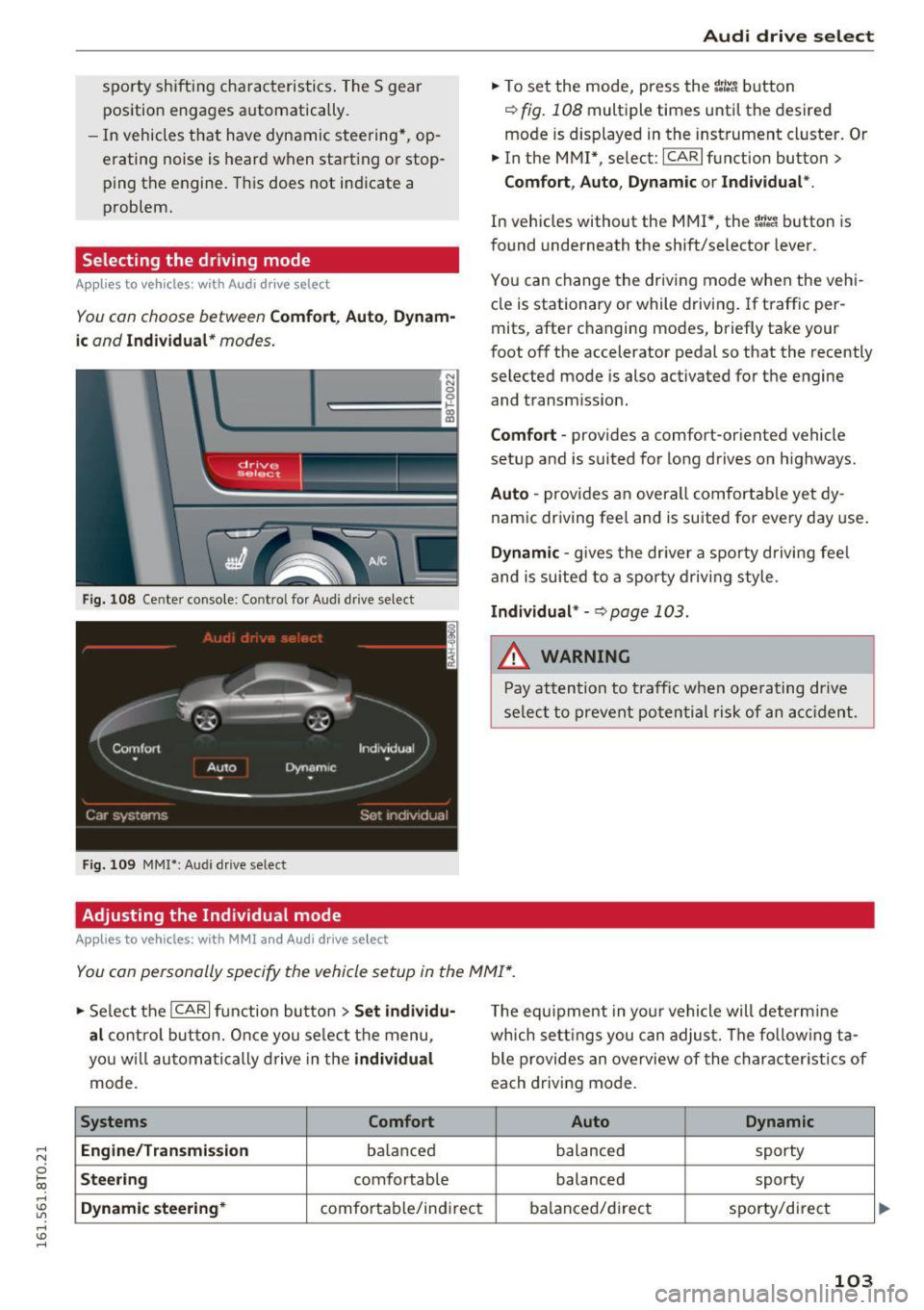
You con choose between Comfort , Auto , Dynam
ic
and Individual* modes.
N N 0
~====:::: ~ ~
drive I se lect _ ~ -~-
Fig. 108 Center console : Co ntro l fo r Audi d rive select
Fig. 109 MMI*: Aud i drive select
Adjusting the Individual mode
Applies to vehicles: with MMI and Audi drive select
Audi drive select
.,. To set the mode, press the r:/tc'i button
~ fig. 108 multiple times until the desired
mode is displayed in the instrument cluster. Or
.,. In the MMI* , select: ICARlfunction button>
Comfort, Auto, Dynamic or Individual *.
In vehicles without the MMI*, the r:l:c'i button is
found underneath the shift/selector lever.
You can change the driving mode when the vehi
cle is stationary or while driving . If traffic per
mits, after changing modes, briefly take your
foot off the accelerator pedal so that the recently
selected mode is also activated for the engine and transm ission.
Comfort -provides a comfort-or iented vehicle
setup and is suited for long drives on highways.
Auto -provides an overa ll comfortable yet dy
namic driving feel and is suited for every day use.
Dynamic -gives the driver a sporty driving feel
and is suited to a sporty driving style .
Individual* -Qpoge 103 .
.&, WARNING
-Pay attention to traffic when operating drive
select to prevent potential risk of an accident.
You con personally specify the vehicle setup in the MMI* .
.,. Select the I CAR I function button > Set individu·
al
control button. Once you select the menu,
you w ill automatically drive in the
individual
mode.
Systems Comfort
Engine/Transmi ssion
ba lanc ed
Steering comfortable
Dynamic steering* comfortable/indi rect T
he equipment in your vehicle will determine
which settings you can adjust. The fo llowing ta
ble provides an overview of the characteristics of
each driving mode.
Auto Dynamic
balanced sporty
balanced sporty
balanced/d irect
sporty/direct
103
Page 111 of 264
,-1 N
0 1-CX)
,-1 I.Cl U"I
,-1 I.Cl ......
-You can change the volume and pitch of the
signals as well as the display
c::, page 111.
- What appears in the display is time-de
layed.
Reverse Parking
Applies to vehicles: with parking system (rear, with rear view
camera)
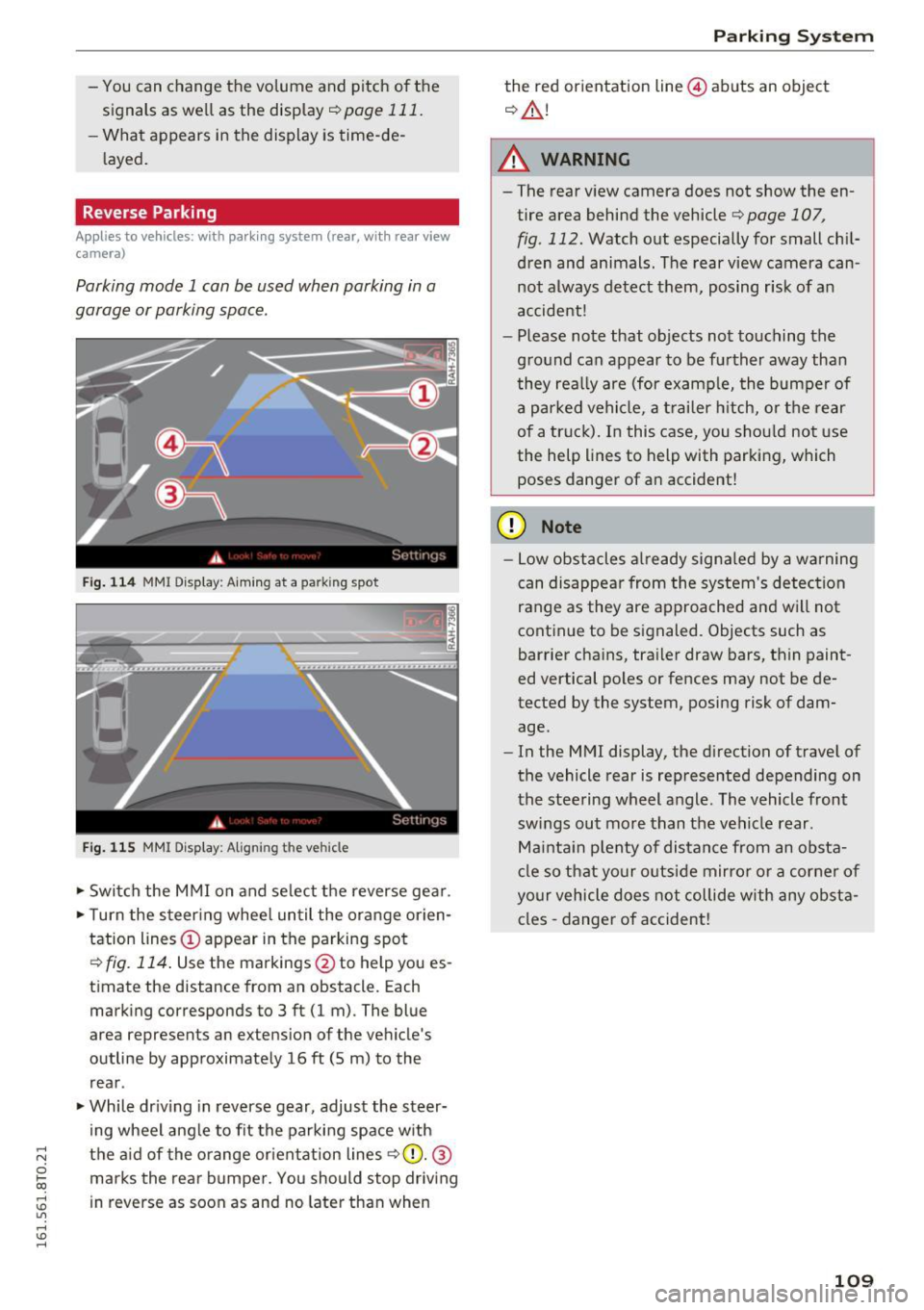
Parking mode 1 can be used when parking in a
garage or parking space .
Fig. 114 MM I Di splay : Aiming at a park in g spot
Fig. 115 MMI Display: Aligning t he ve hicle
• Switch the MMI on and select the reverse gear .
• Turn the steering wheel until the orange orien
tation lines © appear in the parking spot
c::> fig. 114. Use the markings @to help you es
timate the distance from an obstacle. Each marking corresponds to 3 ft (1 m) . The blue
area represents an extension of the vehicle 's
outline by approximately 16
ft (5 m) to the
rear .
• While driving in reverse gear, adjust the steer
ing wheel angle to fit the parking space with
the aid of the orange orientation lines
r=> (D. @
marks the rear bumper. You should stop driving
in reverse as soon as and no later than when
Parking System
the red orientation line@) abuts an object
c::, &.!
A WARNING
-The rear view camera does not show the en
tire area behind the vehicle r=>page 107 ,
fig . 112. Watch out especially for small chil
dren and animals. The rear view camera can
not always detect them, posing r isk of an
accident!
- Please note that objects not touching the
ground can appear to be further away than
they really are (for example, the bumper of
a parked vehicle, a trailer hitch, or the rear
of a truck). In this case, you should not use
the help lines to help with parking, which
poses danger of an accident!
(D Note
- Low obstacles already signaled by a warning
can disappear from the system's detection
range as they are approached and will not
continue to be signaled. Objects such as
barrier chains, trailer draw bars, thin paint
ed vertical poles or fences may not be de
tected by the system, posing risk of dam
age.
- In the MMI display, the direction of travel of
the vehicle rear is represented depending on
the steering wheel angle . The vehicle front
swings out more than the vehicle rear .
Maintain plenty of distance from an obsta
cle so that your outside mirror or a corner of
your vehicle does not collide with any obsta
cles -danger of accident!
109
Page 112 of 264
Parking System
Parallel Parking
Applies to vehicles: with park ing system (rear, with rear view
camera)
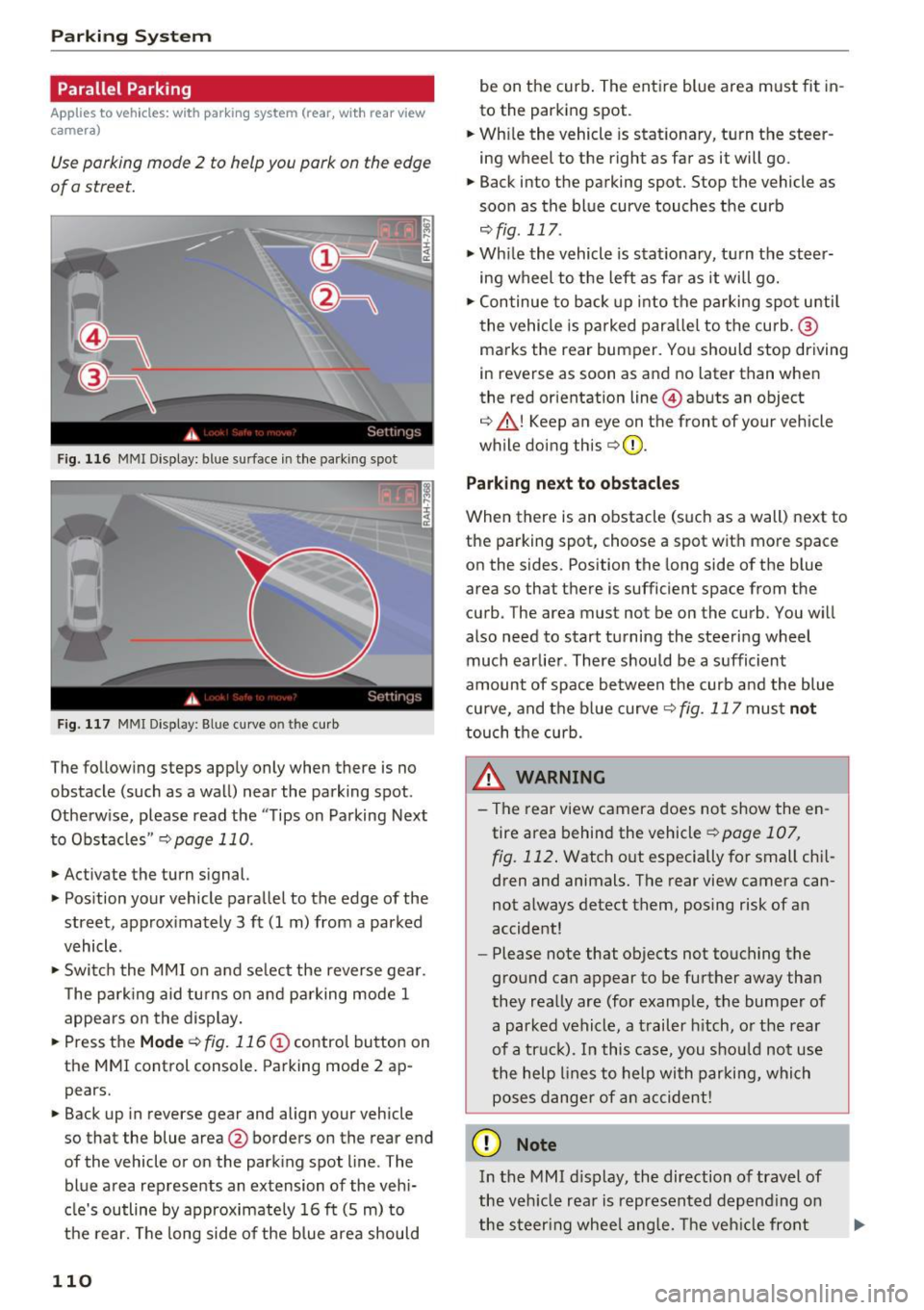
Use parking mode 2 to help you park on the edge
of a street.
Fig. 116 MMI Display: blue s urface in the park ing spot
Fig. 117 MMI Displ ay : Blue curve o n th e curb
The following steps apply only when there is no
obstacle (such as a wall) near the parking spot .
Otherw ise, please read the "Tips on Parking Next
to Obstacles "
r::;, page 110 .
.,. Activate the turn signal.
.,. Position your vehicle parallel to the edge of the
street, approx imately 3 ft (1 m) from a parked
vehicle.
.,. Switc h the MMI on and se lect the reverse gear .
The park ing aid tu rns on and pa rking mode 1
appears on the display.
... Press the
M ode r::;, fig. 116 (!) control button on
the MMI control console. Parking mode 2 ap pears.
... Back up in reverse gear and align your vehicle
so that the blue area@ borders on the rear end
of the vehicle or on the park ing spot line . The
blue area rep resents an extension of the vehi
cle's outline by approximately 16 ft (S m) to
the rear. The long side of the blue area should
110
be on the curb . The ent ire blue area m ust fit in
to the parking spot .
... Wh ile the vehicle is stationary, turn the steer
ing wheel to the right as far as it will go.
.,. Back into the parking spot. Stop the vehicle as
soon as the bl ue curve touches the curb
r::;, fig . 117 .
.,. While the vehicle is stationa ry, tu rn the steer
ing wheel to the left as fa r as it will go .
.,. Continue to back up into the parking spot u ntil
the vehicle is parked para llel to the curb. @
ma rks the rear bumper. You should stop driving
in reverse as soon as and no later than when
the red orientation line @abuts an object
r::;, ,& ! Keep an eye on the front of your vehicle
while doing th is
r::;, Q) .
Park ing n ext to obstacle s
When there is an obstacle (such as a wall) next to
the parking spot, choose a spot with more space
on the sides. Position the long side of the b lue
area so that there is sufficient space from the
curb . The area must not be on the curb . You w ill
also need to start turning the steering wheel
much earlier . There should be a sufficient
amount of space between the curb and the blue cu rve, and the blue curve
r::;, fig. 117 must not
touch the curb.
&_ WARNING
- The rear view camera does not show the en
tire area behind the vehicle
r::;, page 107 ,
fig. 112 .
Watch out especially for small chi l
dren and animals. The rear view camera can
not a lways detect them, posing risk of an
accident!
- Please note that objects not touching the
ground can appear to be further away than
they really are (for examp le, the bumper of
a parked vehicle, a trailer h itch, o r the rear
of a tr uc k). In this case, you shou ld not use
the help lines to help with parking, which poses dange r of an accident!
(D Note
In the M MI d is play, the direction of travel of
the veh icle rea r is represented depend ing on
the s teer ing whee l ang le. The veh icle front
Page 115 of 264
..... N
0 1-CX)
rl I.Cl U"I
..... I.Cl ......
.. Fasten your safety be lt and wea r it properly. Al
so instruct your passengers to fasten their safe
ty belts properly ¢
page 121.
What impairs driving safety?
Safe driving is directly related to the condition of
the vehicle, the driver as well as the driver's abili
ty to concentrate on the road without being dis
tracted.
The driver is responsible for the safety of the ve
h icle and all of its occupants . If your ability to
drive is impaired, safety risks for everybody in the
veh icle increase and you also become a hazard to
eve ryone else on the road ¢,&. .Therefore :
.. Do not let yourself be distracted by passengers
or by using a cellular te lephone .
.. NEVER drive when your driv ing ability is im
paired (by medications, alcohol, drugs, etc .).
.. Observe a ll traffic laws, ru les of the road and
speed limits and plain common sense.
.. ALWAYS adjust you r speed to road, traffic and
weather cond itions.
.. Take frequent breaks on long trips. Do not drive
for more than two hours at a stretch .
.. Do NOT drive when you are tired, under pres
sure or when you are stressed.
A WARNING
Impaired dr iv ing safety increases the risk of
ser ious personal injury and death whenever a
vehicle is being used.
Dr iving safety
Correct passenger
seating positions
Proper seating position for the driver
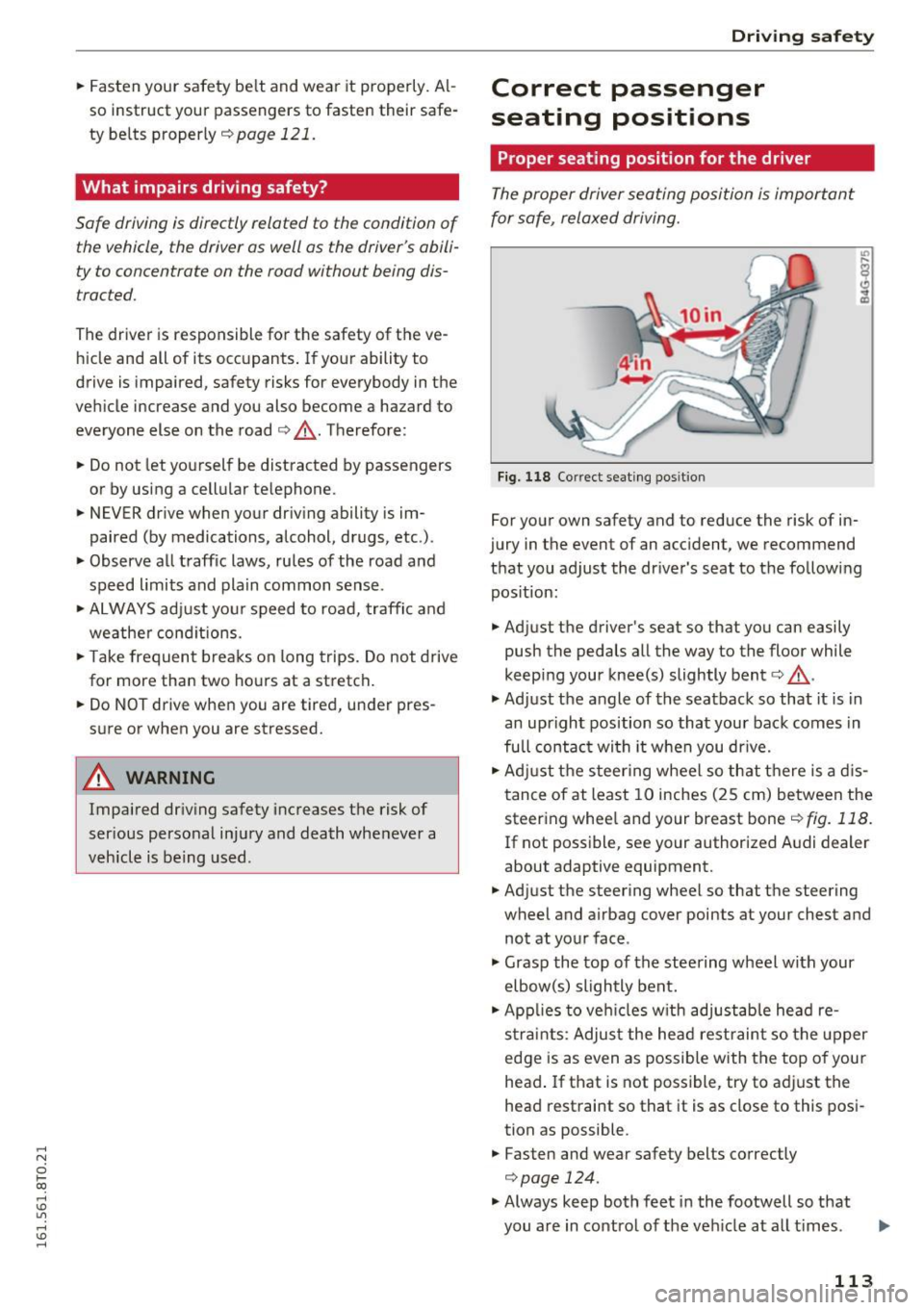
The proper driver seating position is important
for safe, relaxed driving.
F ig. 118 Co rrect seating pos it ion
For your own safety and to reduce the risk of in
jury in the event of an accident, we recommend
that you adjust the driver 's seat to the following
pos ition:
.. Adjust the driver's seat so that you can easily
push the pedals all the way to the floor while
keep ing your knee(s) slightly bent¢,&. .
.,. Adjust the angle of the seatback so that it is in
an upright position so that your back comes in
full contac t wi th it when you dr ive.
.. Adj ust the steer ing wheel so that there is a d is
tance of at least 10 inches (25 cm) between the
steering whee l and your breast bone¢
fig. 118.
If not poss ible, see your author ized A udi dealer
about adaptive equipment .
.. Adjust the steering wheel so that the steering
wheel and airbag cover points at your chest and
not at your face .
.,. Grasp the top of the steering wheel with your
elbow(s) slightly bent .
.. App lies to veh icles w ith adjustable head re
s tra ints : Adjus t the head rest raint so the upper
edge is as even as possible with the top of your
head . If that is not possible, try to adjust the
head restraint so that it is as close to this posi
tion as possible .
.. Fasten and wear safety belts correctly
¢page 124.
.,. Always keep both feet in the footwell so that
you are in control of the veh icle at a ll times .
113
Page 116 of 264
Driving safety
For detailed information on how to adjust the
driver's seat, see
~ page 55.
A WARNING
Drivers who are unbelted, out of position or
too close to the airbag can be seriously in
jured by an airbag as it unfolds. To help re
duce the risk of serious personal injury:
- Always adjust the driver's seat and the
steering wheel so that there are at least
10 inches (25 cm) between your breastbone
and the steering wheel.
- Always hold the steering wheel on the out
side of the steering wheel rim with your
hands at the 9 o'clock and 3 o'clock posi
tions to help reduce the risk of personal in
jury if the driver's airbag inflates.
- Never hold the steering wheel at the
12 o'clock position or with your hands at
other positions inside the steering wheel
rim or on the steering wheel hub. Holding
the steering wheel the wrong way can cause serious injuries to the hands, arms and head
if the driver's airbag deploys.
- Pointing the steering wheel toward your
face decreases the ability of the su pplemen
tal driver's airbag to protect you in a colli
sion.
- Always sit in an upright position and never lean against or place any part of your body
too close to the area where the airbags are
located.
- Before driving, always adjust the front seats
and head restraints properly and make sure
that all passengers are properly restrained.
- Never adjust the seats while the vehicle is
moving . Your seat may move unexpectedly
and you could lose control of the vehicle.
- Never drive with the backrest reclined or
tilted far back! The farther the backrests are
tilted back, the greater the risk of injury due
to incorrect positioning of the safety belt
and improper seating position.
- Children must always ride in child safety
seats~
page 151. Special precautions ap
ply when installing a child safety seat on the
front passenger seat
q page 129.
114
-
Proper seating position for the front
passenger
The proper front passenger seating position is
important for safe, relaxed driving.
For your own safety and to reduce the risk of in
jury in the event of an accident, we recommend
that you adjust the seat for the front passenger
to the following position :
.,. Move the front passenger seat back as far as
possible . There must be a minimum of 10 in
ches (25 cm) between the breastbone and the
instrument panel~.&-
.,. Adjust the angle of the seatback so that it is in
an upright position and your back comes in full
contact with it whenever the vehicle is moving.
.,. Applies to vehicles with adjustable head re
straints: Adjust the head restraint so the upper
edge is as even as possible with the top of your
head. If that is not possible, try to adjust the
head restraint so that it is as close to this posi
tion as possible .
.,. Keep both feet flat on the floor in front of the
front passenger seat.
.,. Fasten and wear safety belts correctly
~ page 124.
For detailed information on how to adjust the
front passenger's seat, see
~ page 54.
A WARNING
Front seat passengers who are unbelted, out
of position or too close to the airbag can be
seriously injured or killed by the airbag as it unfolds. To help reduce the risk of serious
personal injury:
- Passengers must always sit in an upright po sition and never lean against or place any part of their body too close to the area
where the airbags are located.
- Passengers who are unbelted, out of posi
tion or too close to the airbag can be seri
ously injured by an airbag as it unfolds with
great force in the blink of an eye.
-Always make sure that there are at least 10 inches (25 cm) between the front passen
ger's breastbone and the instrument panel.
Page 124 of 264
Safety belts
Why use safety belts?
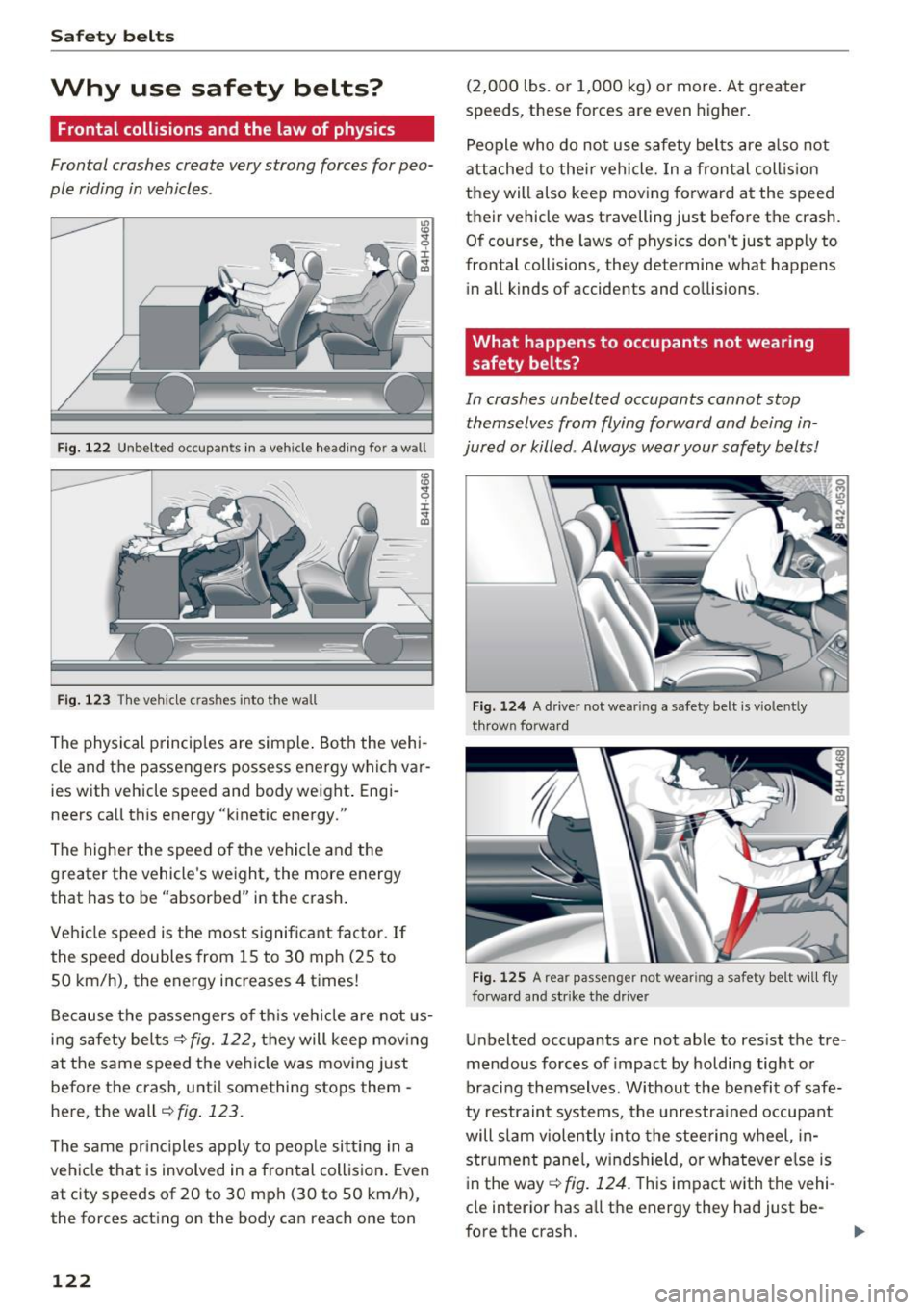
Frontal collisions and the law of physics
Frontal crashes create very strong forces for peo
ple riding in vehicles .
Fig. 122 Unbelted occupants in a veh icle headi ng fo r a wall
Fig. 123 T he vehicle c rashes into the wall
The physical principles are simple. Both the vehi
cle and the passengers possess energy which var ies w ith vehicle speed and body weight . Engi
neers call this energy "k inetic energy."
The higher the speed of the vehicle and the
greater the vehicle's weight, the more energy
that has to be "absorbed" in the crash.
Vehicle speed is the most significant factor .
If
the speed doubles from 15 to 30 mph (25 to
50 km/h), the energy increases 4 times!
Because the passengers of this vehicle are not us
ing safety belts~
fig. 122, they will keep moving
at the same speed the vehicle was moving just
before the crash, unti l something stops them -
here, the wall~
fig. 123.
The same principles apply to people sitting in a
vehicle that is involved in a frontal collision . Even
at c ity speeds of 20 to 30 mph (30 to 50 km/h),
the forces acting on the body can reach one ton
122
(2,000 lbs. or 1,000 kg) or more . At greater
speeds, these forces are even higher.
People who do not use safety belts are also not
attached to their vehicle. In a frontal collision
they will also keep moving forward at the speed
their vehicle was travelling just before the crash.
Of course, the laws of physics don't just apply to
frontal collisions, they determine what happens in all kinds of accidents and collisions .
What happens to occupants not wearing
safety belts?
In crashes unbelted occupants cannot stop
themselves from flying forward and being in
jured or killed . Always wear your safety belts!
Fig. 124 A drive r not wea ring a safety belt is vio len tly
t hrow n fo rward
Fig. 125 A rear passe nge r not wear ing a sa fety belt will f ly
forward an d str ike t he drive r
Unbelted occupants a re not able to res ist the tre
mendous forces of impact by holding tight or
bracing themselves. Without the benefit of safe
ty restraint systems, the unrestra ined occupant
will slam violently into the steering wheel, in
strument pane l, windshield, or whatever e lse is
in the way ~
fig. 124. T his impact with the vehi
cle interior has all the energy they had just be-
fore the crash.
liJJ,-