brake AUDI A8 2012 Repair Manual
[x] Cancel search | Manufacturer: AUDI, Model Year: 2012, Model line: A8, Model: AUDI A8 2012Pages: 300, PDF Size: 75.06 MB
Page 261 of 300

Spare wheel
Applies to vehicles: with spare wheel
The spare wheel is stored in the wheel well
underneath the floor panel in the luggage
compartment.
F ig. 1 95 Luggag e compartment: spare wheel
Taking out the sp are whee l
• Lift the cargo floor by the plast ic handle
c:> fig . 195.
• Hook the hand le into the luggage compart
ment weather strip .
• Turn the large screw
c:> fig. 195 counter
clockwise.
• Take out the spare tire.
• Always store the vehicle tool kit, the jack*
and the replaced tire i n the luggage com
partment
c:> page 130 .
• Unhook the ca rgo floor before closing the
rear lid.
& WARNING
Loose items in the passenger compa rt
ment can cause serious pe rsonal in jury
during hard braking or in an accident.
- Never store the spare wheel or jack and
tools in the passenger compartment.
@ Tips
Check the inflat io n press ure of the spare
tire periodically to keep the tire ready for
use.
-
What do I d o now ? 259
Changing a wheel
Before changing a wheel
Observe the following precautions for your
own and your passenger's safety when chang
ing a wheel.
• After you experience a tire failure, pull the
car well away from mov ing traffic and try to
reach
le vel ground before you stop c:> ,&.
• All passengers should leave the car and
move to a safe location (for ins tance, behind
t he guardra il)
c:> ,& .
• Engage the parking brak e to prevent your
vehicle from rolling unintentionally
c:> ,& .
• Move sele ctor lever to po sit ion Pc:> &_ .
• If you are towing a trailer, unhitch the trail
er from your vehicle.
• Take the
jack and the spare tire out of the
luggage compartment
c:> page 257,
c:> page258 .
& WARNING
You or you r passengers could be i njured
while changing a wheel if you do not fo l
low these safe ty pre caut ions :
-I f you have a flat tire, move a safe d is
tance off the road. Turn off the e ngine,
turn the emergency flashers on and use
other warning devices to a lert other mo
torists .
- Make sure that passengers wait in a safe
place away from the vehicle and well
away from the road and traffic.
- To help prevent the vehicle from moving
suddenly and possib ly slipping off the
jack, always full y set the parking brake
a nd b lock the wheel d iagonally opposite
the wheel be ing changed. When one
front wheel is lifted off the ground, plac ing the Au tomatic Transmission in "P"
( P ar k) will
not prevent the vehicle from
mov ing .
- Before you chang e a whee l, be s ure the
g round is level and firm. If necessary,
use a sturdy board un der the jac k.
- After insta lling the spare wheel , make
sure that you replace t he f lat t ire/wheel
-
Page 264 of 300

262 What do I do now ?
ho ld on to the car to keep your ba lance
and take care not to slip .
Raising the vehicle
The vehicle must be lifted with the jack first
before the wheel can be removed .
Fig. 199 Sill panels: markings
Fig. 200 Sill: posit ion ing t he veh icle jack
.. Activate the vehicle jack mode in the MMI:
I CAR ! function button > Ca r sys te m s control
button>
S ervic ing & c h ecks > Air susp .:
jack mod e > On .
.. Engage the par king brake to prevent your
vehicle from ro lling u ninten tionally.
.. Move the
se lector l ever to po siti on P .
.. Find the marking (imprint) on the sill that
is nearest the wheel that will be changed
o fig. 199 . Behind the marking, there is a
lifting point on the s ill for the vehicle jack .
.. Turn the
ve hicle jack located under the lift
ing point on the si ll to raise the jack until its
arm @
o fig. 200 is located under the des
i gnated plastic mount
o ,& o0.
.. Align the jack so that its arm @ o fig. 200
engages in the designated lifting po int in
the door sill and the movable base @ lies
flat on the ground. The base @ must be
ver
tical
under the lifting point @. ..
Wind the jack up fu rther until the f lat tire
comes off the ground
o .&, .
Position t he vehicle jack o nly under the desig
nated lifting points on the si ll
¢fig. 199.
There is exactly one location for each wheel.
The jack must not be positioned at any other location
c:> .&, c:>Q).
An un sta ble surf ace under the jack ca n cause
the vehicle to slip off the jack . Always provide
a firm base for the jack on the ground . If nec
essary place a sturdy board or similar support
under the jack. On
hard, sl ipp ery su rfaces
(such as tiles) use a rubbe r mat or similar to
prevent the jack from slipping
c:> .&, .
A WARNING ~
-You or your passengers could be injured
while changing a wheel if you do not fo l
low these safety preca utio ns:
- Position the vehicle jack on ly at the
designated lifting points and align the
jack. Otherwise, the vehicle jack could slip and cause an injury if it does not
have sufficient hold on the vehicle.
- A soft or unstable surface under the
jack may cause the vehicle to slip off
the jack . Always provide a firm base for
the jack on the ground. If necessa ry,
use a stu rdy board under the jack.
- On hard, s lippery surface (such as t iles)
use a rubber mat or simi lar to prevent
the jack from slipping.
- To help prevent injury to yourself and
your passe ngers:
- Do not raise the vehicle until you are
sure the jack is securely engaged.
- Passengers must not remain in the ve
hicle when it is jacked up.
- Make sure that passengers wait in a
safe place away from the vehicle and
well away from the road and traffic .
- Make sure jack pos ition is correct, ad
just as necessary and then continue to raise the jack.
- Changes in temperature or load can af
fect the height of the vehicle.
Page 268 of 300

266 Fuses and bulbs
Fuse panel @ (brown)
No. Equipment
1 Headlight control switch
2 Emergency start coil (key
identification)
3 Rear door
control module
(driver's side)
5 Horn
6 Interior lights
(headliner)
Steering column lever, mul-
8
tifunction steering wheel
controls, steering wheel
I heating
10 Power steering column ad-
justment
11 Driver door control module
12 Diagnost
ic connector, light/
rain sensor
14 Power steering column ad-
justment
15 Power
steering, AC compres-
sor
16 Brake booster
Fuse panel © (black)
No. Equipment
1 Front seat heating
2 Windshield wiper
3 Front exterior lighting
4 Sun roof
5 Driver power window
6 Driver seat (pneumatic)
7 Panoramic
sunroof
8 Dynamic steering
9 Front exterior lighting
10 Windshield/headlight
wash-
er system
11 Rear power window (driver's
side)
Panoramic sunroof
Amps
5
5
7,5 15
7,5
10/5
5
7,5 10
25
20 15
Amps
30
30
30 20
30 15
20
35
30
35
30
40
Front passenger side cockpit fuse
assignment
Fig. 206 Front passe nger side cockpit: fuse pane l with
plastic bracket
Fuse panel ® (black)
No. Equipment Amps
1 Anti-theft alarm system
5
2 T
ransmission control mod-
15
ule
3 Front climate control fan 40
4 Engine supply 35
6 Engine
control module
5
7 Front passenger door con-
7,5
trol module
8 Front passenger
power win-
30
dow
9 ESC control module 10
10 E5C control modu le 25
11 Right rear power window
30
12 Front
passenger seat (pneu -
15
matics)
Page 269 of 300

Fuse s and bulb s 267
Luggage compartment fuse assignment
Fig. 207 Luggage compartment: fuse pa nel with plastic bracket
Fuse panel @ (black ) Fuse panel @ (b la ck)
No . Equi pment Amps No. Equipment Amps
[ru button, data logger, diag-
11 Dynamic
steering
5
l nostic connector, BCM -1,
5
Selector lever, BCM-2 5
adaptive light ing system
Audi side assist
5
2 Networking gateway 5
Engine control module 5
3 adaptive air suspension
5
Starter 40
4 Parking system 5
Left headlight/Headlight
16 10/5
5 Steer
ing column lever
5
range control system
Suspension control system
6 5 Fuse panel @ (red ) sensor
Belt tensioners, airbag con-
No. Equipment Amps
7
trol module 5 1 Left
reversible be lt tens ione r
25
Heated washer fluid nozzles, 2 Right reversible belt ten-
25
Homelink (garage door sioner
8 opener), night vision system
5 3 Starter diagnosis 5
control module, sport differ- 4 DC/DC converter
7,5
ential, ioni zer
5 Adaptive cruise contro l 7,5
9
Electromechan ica l parking
5 Right headlight (headlight
brake contro l modu le
6 with adaptive light) 10 -
10 Rear seat heating, cooler, in-
5 7 ESC co ntrol modu le 5 ... terior rearview mirror
Page 270 of 300

268 Fuses and bulbs
Fuse panel
® (red)
No. Equipment
=
I a
Sound actuator, AEM control module
9 Adaptive cruise control
Transmission control mod-
10 ule
---11 Climate control system sen-
sors
Fuse panel © (brown)
No. Equipment
1 Electromechanical parking
brake
2 Suspension control system
sensor
3 Right rear door control mod-
ule
4 Smart modul tank
5 Front cl
imate control system
controls
6
Rear climate control system
controls
-
7 Networking gateway
8 Cooler
9
Interface for specia l func-
tions
10 Cell phone adapter, Blue-
tooth handset
11 AEM contro l module
12 Selector lever
13 Ambient
lighting
14 Rear exterior lighting
15 Fue
l pump
1 16 Electromechanical
parking
brake
Fuse panel @ (black )
Equipment
3 Rear sockets adaptive air suspension
115-V socket
Amps
s
10
s
s
=
Amps
5
s
7,5
s
15
10
5
15
5
5
15
10
10
20
25
-
30
Amps
20 15
25
Fuse panel @ (black)
No. Equipment
7
Electromechanical parking
brake
8 Rear seat heating
9 Rear exterior lighting
10 Rear climate control system
blower
Rear sun shade, closing aid,
11 luggage compartment lock,
keyless go/entry, fuel filler
door
12 Luggage compartment
lid
control module
Fuse panel © (red)
No. Equipment
1 Rear seat adjustment but-
tons
3 Left rear seat (pneumatics)
5 Tra
iler hitch control module*
6 Left rear seat
7 Right rear seat
8 Trailer hitch control module *
9 Tra iler hitch control module*
10 Right rear seat (pneumatics)
Fuse panel
® (brown)
No. Equipment
1 Radio
receiver/sound ampli-
fier
2 Sound amplifier
3 Rear Seat
Entertainment, ra -
dio receiver/sound amplifier
Automatic dimming interior
s rearview mirror
6 DVD changer
T V tuner
MMI unit/drives
Instrument cluster, analog
9 clock
10 MMI Display
Amps
30
25
20
20
20
30
Amps
5
7,5
20
30
30
20 15
7,5
Amps
30
30
10
5
s
5
7,5 5
5
Page 273 of 300
@ Tips
- The discharged battery must be properly
connected to the vehicle's electrical sys
tem. When jump start ing or charging the
battery, never connect the negative
ground cable to the battery negative post because the battery manager sys
tem must be able to detect the battery's
state of cha rge. A lways connect the neg
ative g round cab le to the negative
gro und post o f the battery manage r con
trol uni t.
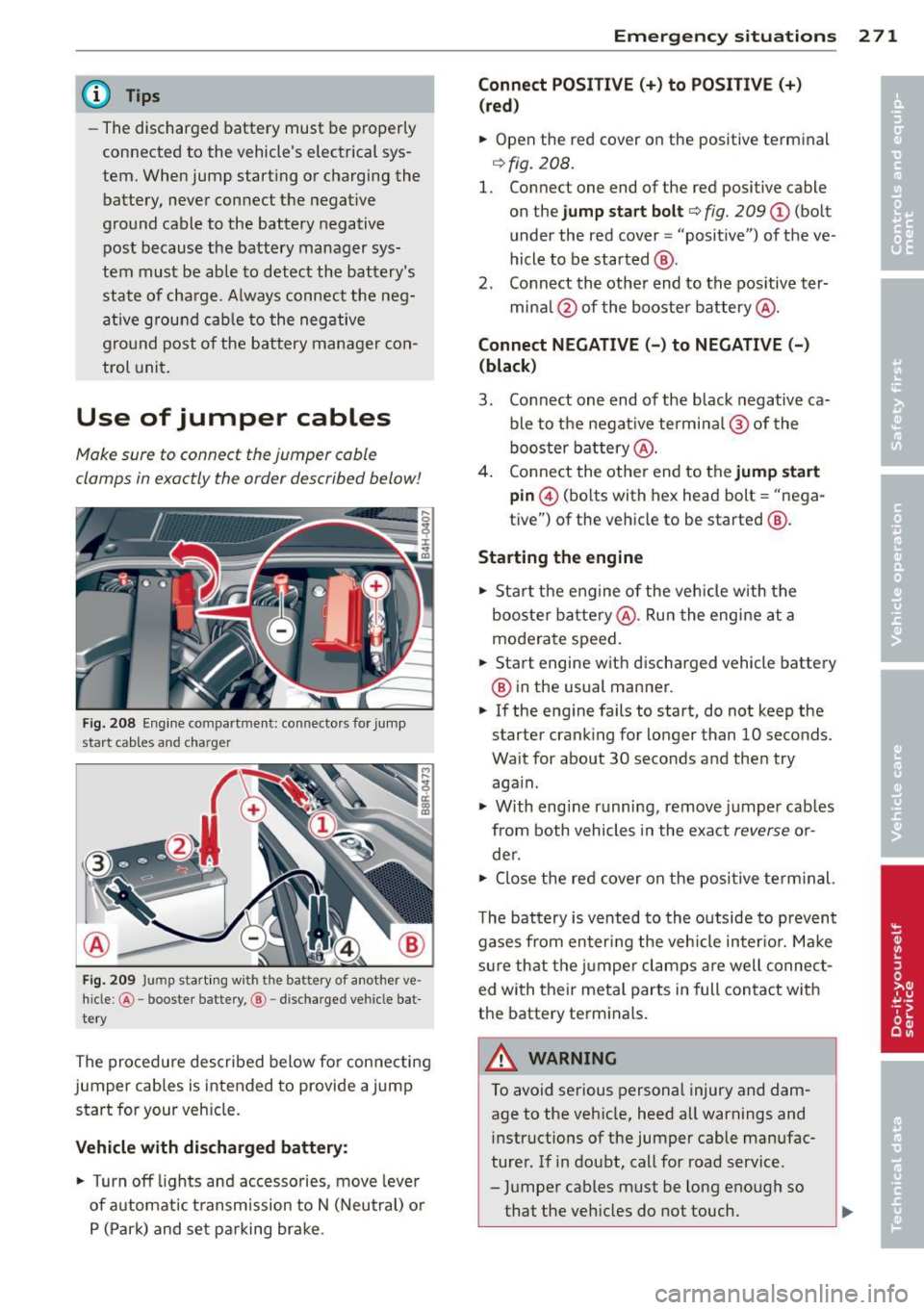
Use of jumper cables
Make sure to connect the jumper coble
clomps in exactly the order described below!
Fig. 2 08 Engine compartment: connecto rs for jump
start cables and charger
Fi g. 209 Jump start ing w ith the battery of another ve
hicle: @-booste r batte ry, @ -discharged vehicle bat
te ry
The procedure described below fo r connecting
jumper cab les is intended to provide a jump
start for your veh icle.
Vehicle with discharged batt ery:
.. Turn off lights and acc esso ries, move leve r
of automat ic t ransm ission to N (Neutral) o r
P (Park) and set pa rking brake .
Emergenc y situ ation s 2 71
Connect POSI TIVE(+) to POSITIVE (+ )
(red )
.. Open the red cover on the positive terminal
¢fig. 208.
1. Connect one end of the red positive cable
on the
jump sta rt bolt ¢ fig. 209 (D (bolt
under the red cover = "positive") of the ve
hicle to be started @.
2. Co nnect th e other end to the pos itive ter-
mina l@ of the booster battery @.
Connect NEGATIVE( -) to NEGATIVE(-)
(black )
3. Connect one end of the black negative ca ble to the negat ive termina l@ of the
booster b attery @.
4 . Connect the othe r end to the
jump start
pin @ (bolts with hex head bolt = "nega
tive") of the vehicle to be started @.
Starting the engine .. Sta rt the engine of the veh icle w ith the
booste r ba ttery @. Ru n the engine at a
moderate speed .
.. Start engine wit h discha rged vehicle battery
@ in the usual manner .
.. If the eng ine fails to start, do not keep the
starter cranking for longer than 10 seconds.
Wait for about 30 seco nds a nd the n try
aga in .
.. With engi ne runni ng, remove j umper cab les
from both vehicles in the exact
reverse o r
de r .
.. Close the red cover on the positive term inal.
T he battery is vented to th e outside to p revent
gases from en ter ing the veh icle in ter io r. Ma ke
s ur e th at the j umper clamps are well connec t
ed with their meta l parts in full con ta ct w ith
the battery term inals.
A WARNING
To avoid se rious personal injury and dam
age to the veh icle, heed all warnings and
instructions of the jumper cable man ufac
turer. If in doubt, call for road service .
- J umper cables m ust be long enough so
that the veh icles d o not touch.
-
Page 274 of 300
272 Emergen cy sit uat ions
-When connecting jumper cables, make
sure that they cannot get caught in any
moving parts in the engine compart
ment.
- Before you check anything in the engine
compartment, always read and heed all
WARNINGS
c:> page 213, Engine com
partment.
(D Note
Improper hook-up of jumper cables can ru in the generator.
-Always connect POSITIVE(+) to POSI TIVE(+), and NEGATIVE( -) to NEGATIVE
( - ) ground post of the battery manager
control unit.
- Check that all screw plugs on the battery
cells are screwed in firmly . If not, tighten
plugs prior to connecting clamp on nega
tive battery term inal.
- Please note that the procedure for con
nect ing a jumper cable as desc ribed
above applies spe cifically to the case of
you r vehicle being j ump started. When
you are giving a jump star t to anothe r ve
hicle, do
not connect the negative (-) ca
ble to the negat ive(-) term inal on the
discharged battery ©
c:> fig. 209. In
stead, securely connect the negative(-)
cable to either a solid metal component
that is firmly bolted to the engine block
or to the engine block itself. If the bat
te ry that is being charged does not vent
to t he outside, es caping battery gas
could ignite and explode!
Emergency towing
with commercial tow
truck
General hints
Your Audi requires special handling for tow
tng.
The follow ing information is to be used by
commercia l tow tr uck operators who know
h ow to operate the ir equipmen t safe ly.
- Never t ow your Audi. Towing will cau se
da mage to the engine and tr ans mi ssion .
- Ne ver wrap th e safet y chain s or winch c a
ble s around the brake lines.
- To prevent unne ce ssa ry damage , your Aud i
must be t ran spo rted with a flat bed truck.
- To load th e vehi cle on to the fl at bed, use
the towing l oop found in the vehicle t ools
and attach to the front o r rear anchorage
c:>page 272 and c:>page 273.
.&_ WARNING
=
A vehicle being towed is not safe for pas-
sengers. Never allow a nyone to ride in a
vehicle be ing towed, for any reason.
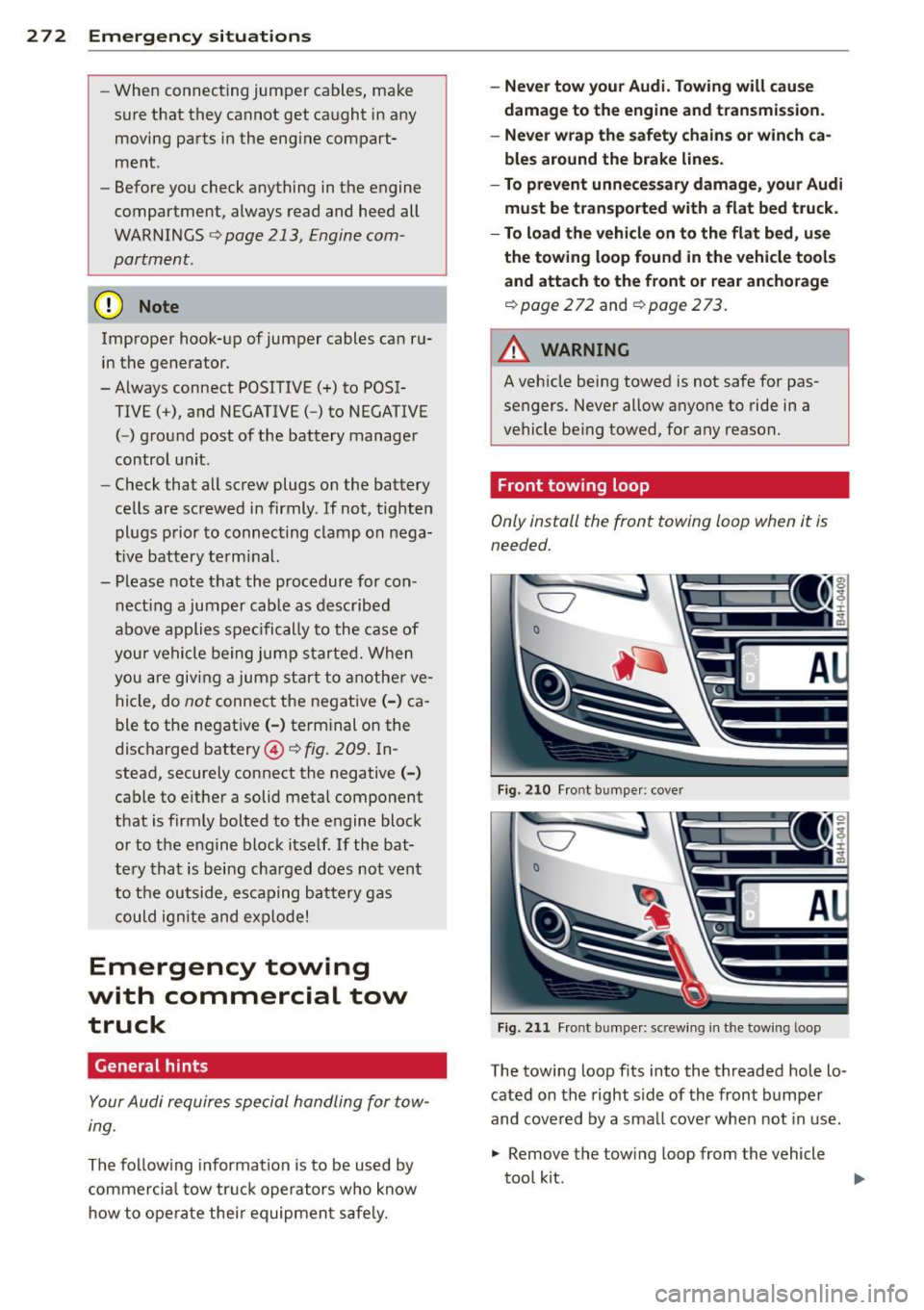
Front towing loop
Only install the front towing loop when it is
needed.
C7
0
F ig. 210 Fr ont bumpe r: cove r
Fig. 211 Fro nt bu mpe r: sc rew ing in the towing loop
-
The towing loop fits into the threaded hole lo
cated on the right s ide of the front b umpe r
and covered by a sma ll cove r when not in use.
.,. Remove the tow ing loop from the vehicle
tool kit.
Page 284 of 300
28 2 Con sum er Inf ormation
-Always make sure the transmission se
lector lever (automatic transmiss ion) is
in "P" (Park position) and the park brake
is f irmly app lied .
@) For the sake of the environment
-Changing the engine settings wi ll ad
versely affect em iss ion levels. This is det
rimental to the environment and increas
es fuel consumption .
- Always observe env ironmental regula
tions when dispos ing of old engine oil,
used brake fluid, dirty engine coolant,
spent batteries or worn out tires.
- Undeployed airbag modules and preten
s ioners might be classified as Perchlo
rate Material -spec ial handling may ap
ply, see www.dtsc.ca .gov/hazardous
was te/perch lorate . When the veh icle or
parts of the res traint system including
airbag modules safety belts wit h preten
sioners are scrapped, all applicable laws
and regulations must be observed. Your
authori zed Aud i dea ler is familiar with
these requirements and we recommend
that you have your dealer perform this
serv ice for you .
Additional accessories,
modifications and
parts replacement
Additional accessories and parts
replacement
Always consult an authorized Audi dealer be
fore purchasing accessories.
Your veh icle incorporates the latest safety de
sig n featu res ensu ring a high standard of a c
tive and passive safety .
This safety could be comp romised by non-ap
proved changes to the ve hicle. For this reason ,
if pa rts have to be replaced , please obse rve
the following points when install ing addition
a l accessories: Approved Audi accessories and genuine Aud
i
parts are available from authorized A udi deal
ers.
T hese dea le rs a lso have the necessary facili
ties, tools and tra ined specialists to install the
parts and acc essories proper ly .
A WARNING
-Using the wrong spare parts or using non-
approved accessories can cause damage to
the veh icle and ser ious persona l injury.
- Use on ly accessories express ly approved
by Audi and ge nuine Audi spare parts
- These parts and accessories have been
specia lly designed to be used on yo ur ve
h icle .
- Never install accessor ies such as tele
phone crad les or beverage ho lders on a ir
bag covers or within the airbag deploy
ment zones . Do ing so will increase the
risk of injury if a irbags are triggered in an
accident!
- Before you check anything in the engine
compa rtment, always read and heed a ll
WARNI NGS
9 page 213 .
(D Note
-If items other than genu ine Audi spare
parts, add-on equipment and accessory
items are used or if repair work is not
performed accord ing to specified meth
ods, this c an resu lt in seve re damage to
your vehicle's eng ine and body (such as
corrosion) and adversely affect yo ur vehi
cle's warranty .
- T he innovative a luminium concept of
your Audi AB means that all servicing, re
pairs or other work on the vehicle body
must be carr ied out exclusive ly by an Au
di workshop .
- If emergency repairs must be performed
elsewhere, have the veh icle examined by
an authorized Audi dealer as soon as
possible .
- The manufacturer cannot be held liable
for damage wh ic h occurs due to failure
to comply with these stipulations .
Page 288 of 300

286 Index .:..:..:..::....::.....:..._ ___________________________ _
Auto Safety Hotline ....... ... .. .... . 132
Average consumption ........... .. .... 24
Ave rage speed . . . . . . . . . . . . . . . . . . . . . . . 24
Avoid damaging the vehicle .. .. .. .... . 195
B
Battery ... .. .. . .. ..... ..... .. .. .. . 230
Charging . .. .. . ... ... .. .. .. .. .. .. . 233
Important warnings .. .... .. .. .... . 231
Location ... ... ............ .. .... . 231
low ..... .. ................ ..... . 192
Replacing the battery ....... ... ... . 234
State of cha rge .... .... ....... .. .. . 192
Winter operat ion .. ... .... .. .. .. .. . 230
Working on the battery .. ... ... .... . 231
Before driving .............. ... .... . 124
Blended gasoline ....... .... ... .. .. . 215
Blower (automatic climate control) . . . . . . 77
Body cavity sealing .. ..... .. .. .. .. .. . 208
Booster seats ................ ... ... 174
Brak e fluid
Ch anging the brake fluid ... .. .. .. .. .
230
Che cking the brake f luid level ... .. .. . 229
What is the correct brake flu id level? ..
229
What should I do if the brake fluid warn -
ing light comes on? ........ .... ....
229
Brake system
Anti-lock b raking sys tem ... .. .. .... ..
19
Brake a ssi st s ystem ...... ..... .. .. . 187
Brake booster ............. ... .. ... 190
Brake fluid .... ... .... ..... .. .. .. . 229
Brake fluid spec ificat ions for refill and re-
p lac ement ....... ....... .. .. .. .. .
230
Brake light defect ive .. .. .. .. .. .. .. . . 21
Brake pads ............... ... .... . 194
Electromechanica l parking brake .... .. 82
Fluid reservoir ............ ... .... . 229
How does moisture or road s alt affect the
br akes? .. ...... .. ... .... .. .. .. .. .
189
Warning/indicator lights .... .... ..... 14
Worn brake pads symbol ....... .. .... 19
braking guard .............. ... .... .. 87
Messages . . . . . . . . . . . . . . . . . . . . . . . . . 94
Se ttings . .. .. . .. ..... ..... .. .. .. .. 94
Break-in period .............. .. .... . 194
Brake pads ............... ... .... . 194
Tires 194
Bulbs ..... ..... .. ............. .... 269
C
Cal iforn ia Proposition 65 Warn ing . .. .. 220
Battery specific . .................. 232
Capacities .. .. .. .. .. ...... ..... .. .. 278
Engine oil ....... ................ . 222
Car care ...... .. .. .. ....... .... .... 203
Exterior ... .. .. .. ...... ..... .. .... 203
Interior .......... .... ........... . 209
Car carrier
Transporting your vehicle .......... .
274
Catalytic converter 195
Center armrest
Cockpit ...... ... .. .............. ..
5 7
Rear .... ... .. .. .. ...... ..... .. .. . 64
Central locking .. .. .... ... .. .. .. .. .. . 30
Eme rgency locking ... ... .... ... .. .. . 34
Certification .. .. . .. ... ..... ... ... .. 283
Chang ing a wheel .. .......... ...... . 259
Changing engine oil ................ . 226
Chassis (undercoating) .. ....... .... .. 208
Checking
Engine coolant level ............... .
227
Tire pressure ... .. ....... ...... .. .. 241
Child restraints
Danger of using child restraint s in the
front sea t . . . . . . . . . . . . . . . . . . . . . . . .
144
Where can I get additional information
about child restraints and the ir use? ..
184
Child restraint system anchors ..... ... 178
Child safety . .. .. .. ...... ..... .. .... 166
Convertib le locking retractor ..... .. .. 175
Guidance fixtures for lower anchorages 180
Important safety instructions for using
child saf ety seats ................. .
169
Important things to know when driving
wi th children .. .. ....... ...... ....
166
Tether anchors ... ....... ...... .. .. 1 82
Tether straps .. .. ................ . 182
Child safety lock
Rear doors (mechanical) . ..... .. .... .
37
Rear doors (power) ...... ..... ..... . 38
Child safety seats . ................. . 171
Booster seats .... ................. 174
Convertib le child sea ts . . . . . . . . . . . . . 172
Page 290 of 300

288 Index
Doors
M echanical child safety lock .. .... .. .. 37
Power child safety lock . . . . . . . . . . . . . . 38
Driver information system
CD/radio display . . . . . . . . . . . . . . . . . . . . 23
Door/r ear lid warning . . . . . . . . . . . . . . . 23
Exterior temperature display ....... .. 23
On-board computer . . . . . . . . . . . . . . . . . 24
Driver seating position ............... 125
drive select .. .. . .......... .. .. .... . 103
adaptive a ir suspension/sport ........ 103
Adaptive dampers ................. 103
Cornering light ........... .. .. .... . 103
Dynamic steering .................. 103
Safety belt tensioner ............... 103
Sport differential .......... ... .... . 103
Driving safely . . . . . . . . . . . . . . . . . . . . . . 124
Driving through water ............... 196
Driving time . . . . . . . . . . . . . . . . . . . . . . . . 24
Duplicate key . . . . . . . . . . . . . . . . . . . . . . . 28
Dynam ic steering . . . . . . . . . . . . . . . 22, 103
E
Easy entry feature .......... .... .... .. 79
Einparkhilfe Sensoren/Kamera reinigen ...... .... 205
Elect rical accessories (sockets) . . . . . 64, 70
E lectromechanical park ing brake
Emergency braking . . . . . . . . . . . . . . . . . 84
Operation . . . . . . . . . . . . . . . . . . . . . . . . . 82
Parking .................... ..... .. 83
Releasing and closing ..... .. .. .. .. . . 82
Starting assist ........... .. .. .... .. 83
Starting from rest .......... .. .... .. 83
Starting
off with a tra iler . . . . . . . . . . . . . 83
Warning/indicator lights ..... .. .. .. . . 15
E lectronic different ial lock ( EDL) .. .... . 187
Warning/indicator lights ... .. .. .. .. . . 19
Electronic immobilizer . . . . . . . . . . . . 25, 29
Electronic power control (EPC)
warning/indicator light ..... .... ..... 20
Electronic speed limiter ......... .... .. 27
Electronic Stability Control (ESC) .. ..... 187
Warn ing/indicator lights ....... .. .. .. 18 Emergency
actuation
Doors ... ..... .. .. .............. .. 34
Parking lock ... .. ................. 113
Power sunroof . .. ............. .... . 40
Rear lid ... .... .. ............. .... . 37
Emerg ency braking ................... 84
Emergency flasher ................. .. 44
Warning/ind icator lights ........ .. .. . 22
Emergency operation Panoramic sunroof ... .......... .. .. . 42
Sun shade (roof) ................... 42
Emergency starting ................ . 270
Emergency towing .. ............ .. .. 272
Emergency warning triangle .......... 256
En ergy management ................ 192
Engine Compartment ..................... 221
Coolant ... .. .. .. .. ... ........ .. .. 227
Data ..... .... .. ............. .... 278
starting ......... .. .............. .. 80
Starting with jumper cables ......... 270
Stopping . ..... .. .. .............. .. 81
Engine compartment ................ 221
Closing the hood . ... .......... .. .. 220
Opening the hood ............. .... 219
Safety instructions ................ . 219
Working in the engine compartment .. 219
Engine coolant ..................... 22 7
Adding coolant . .. ... .......... .. .. 228
Check ing the engine coolant level ..... 227
Expansion tank ... ................. 227
Malfunction symbol ................. 15
Radiator fan ... .. ............. .... 229
Temperature gauge ............ .... . 10
Engine oil ...... .. .. .............. . 222
Adding ......... .. .............. . 225
Additives . ..... .. ............. .... 225
Changing . .. .. .. ............. .. .. 226
Checking oil level .... .......... .. .. 225
Checking the engine oil level ....... .. 224
Consumption .. ................... 225
I ndications and conditions requiring ex-
tra checking . ...... .. ...... ....... 224
Indicator light ... ............. .... . 17
Oil consumpt ion .. ............. .... 223
Oil grad es ..... .. ................ . 222
Oil level symbol . . . . . . . . . . . . . . . . . . . . 20