battery AUDI Q2 2021 Owner´s Manual
[x] Cancel search | Manufacturer: AUDI, Model Year: 2021, Model line: Q2, Model: AUDI Q2 2021Pages: 364, PDF Size: 87.77 MB
Page 47 of 364

Doors and windows
A WARNING
CO
s
rN rN
•-i
00
- After closing the boot lid, always check that
the catch has engaged properly. The boot lid
could otherwise open suddenly when the ve
hicle is moving - this could result in an
acci
dent.
- Always make sure that no-one is in the boot
lid's area of movement (especially near the
hinges) when it is moving. Risk of severe in
juries to fingers or hands!
- The boot lid must always be completely
closed when the vehicle is moving; other
wise toxic exhaust fumes can be drawn into
the interior.
- If
a
luggage rack (e.g. a bicycle carrier) is at
tached to the boot lid, the boot lid may not
open completely or may move downwards
by itself due to the added weight. For this
reason,
make sure you support the boot lid
or
take the luggage off the carrier before
opening the boot lid - risk of injury!
© Note
- When towing a trailer* the automatic open
function can only be operated via the re
lease catch on the boot lid.
- If the battery is low, the boot lid can still be
opened and closed manually; however, this
will require more effort. If
you
move the
boot lid slowly less effort will be required.
- When the vehicle is locked, you can unlock
the boot Lid separately by pressing the
button on the remote control key. The boot
lid will Lock automatically when you close it
again.
Releasing boot lid manually from inside
Applies to: vehicles with manual release on inside
The
boot lid can be released manually from the
inside.
Fig.
32 Detail of inside of boot lid: Access to manual re
lease
•
Fold the rear seat backrest forwards
opoge
63.
*•
Use the blade of the ignition key to prise off the
cover
(Tj^F/'g.
32.
•
Insert the key in the opening behind the cover
(D
and press the key in the direction of the ar
row until the boot is unlocked.
45
Page 51 of 364
Lights and vision
Lights and vision
Exterior lights
Switching lights on and off
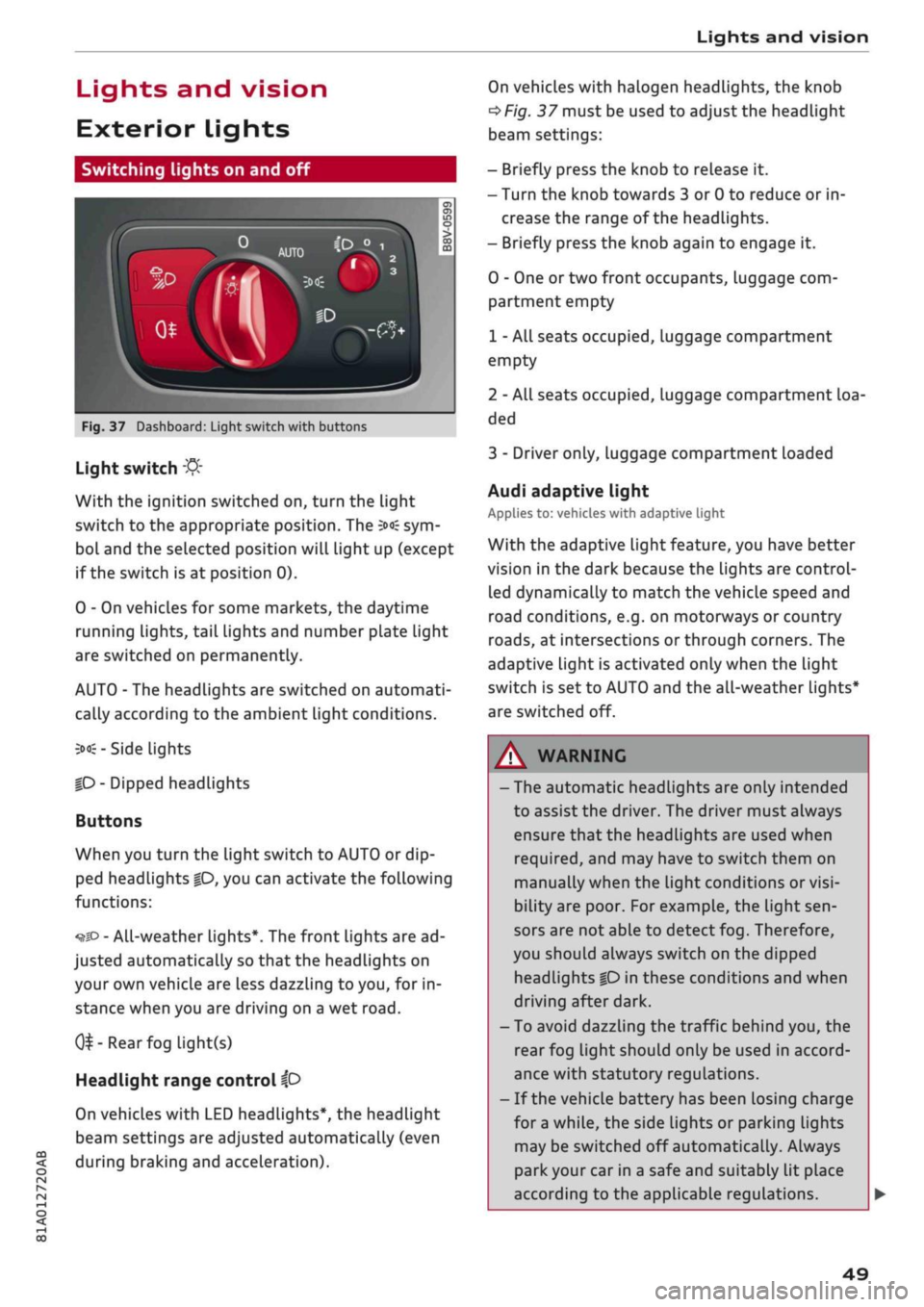
Fig.
37 Dashboard: Light switch with buttons
CO
<
O
rN rN
•-i
00
Light switch
:&
With the ignition switched on, turn the light
switch to the appropriate position. The
3»€
sym
bol and the selected position will light up (except
if the switch is at position 0).
0 - On vehicles for some markets, the daytime
running lights, tail lights and number plate Light
are switched on permanently.
AUTO - The headlights are switched on automati
cally according to the ambient light conditions.
3><£-
Side lights
|D
- Dipped headlights
Buttons
When you turn the light switch to AUTO or dip
ped headlights
|0,
you can activate the following
functions:
•^SD
- All-weather lights*. The front lights are ad
justed automatically so that the headlights on
your own vehicle are less dazzling to
you,
for in
stance when you are driving on a wet
road.
0^-Rear
fog light(s)
Headlight range control
ip
On vehicles with LED headlights*, the headlight
beam settings are adjusted automatically (even
during braking and acceleration).
On vehicles with halogen headlights, the knob
^Fig.
37 must be used to adjust the headlight
beam settings:
- Briefly press the knob to release it.
- Turn the knob towards 3 or 0 to reduce or in
crease the range of the headlights.
- Briefly press the knob again to engage it.
0 - One or two front occupants, luggage com
partment empty
1 - All seats occupied, luggage compartment
empty
2 - All seats occupied, Luggage compartment loa
ded
3 - Driver only, luggage compartment loaded
Audi adaptive light
Applies to: vehicles with adaptive light
With the adaptive light feature, you have better
vision in the dark because the Lights are control
led dynamically to match the vehicle speed and
road conditions, e.g. on motorways or country
roads,
at intersections or through corners. The
adaptive light is activated only when the Light
switch is set to AUTO and the all-weather Lights*
are switched off.
WARNING
- The automatic headlights are only intended
to assist the driver. The driver must always
ensure that the headlights are used when
required,
and may have to switch them on
manually when the light conditions or
visi
bility are poor. For example, the light
sen
sors are not able to detect fog. Therefore,
you should always switch on the dipped
headlights
|0
in these conditions and when
driving after dark.
- To avoid dazzling the traffic behind you, the
rear fog light should only be used in accord
ance with statutory regulations.
- If the vehicle battery has been losing charge
for
a
while, the side lights or parking lights
may be switched off automatically. Always
park your car in a safe and suitably lit place
according to the applicable regulations.
49
Page 63 of 364
Seats and storage
CO
rN
•-i
00
children unsupervised in the vehicle with the
key.
© CAUTION
- To avoid damage, please take care when de
taching connectors from the electrical pow
er sources.
-To avoid damage to the vehicle's electrical
system,
never connect equipment that
gen
erates electrical current, such as a solar
panel or battery charger, to the power sour
ces in order to charge the vehicle's battery.
- Always use the correct type of plugs to
avoid damaging the power sources.
©
USB charging sockets marked "CHARGE ON
LY" cannot transfer data and are intended for
charging only.
Storage
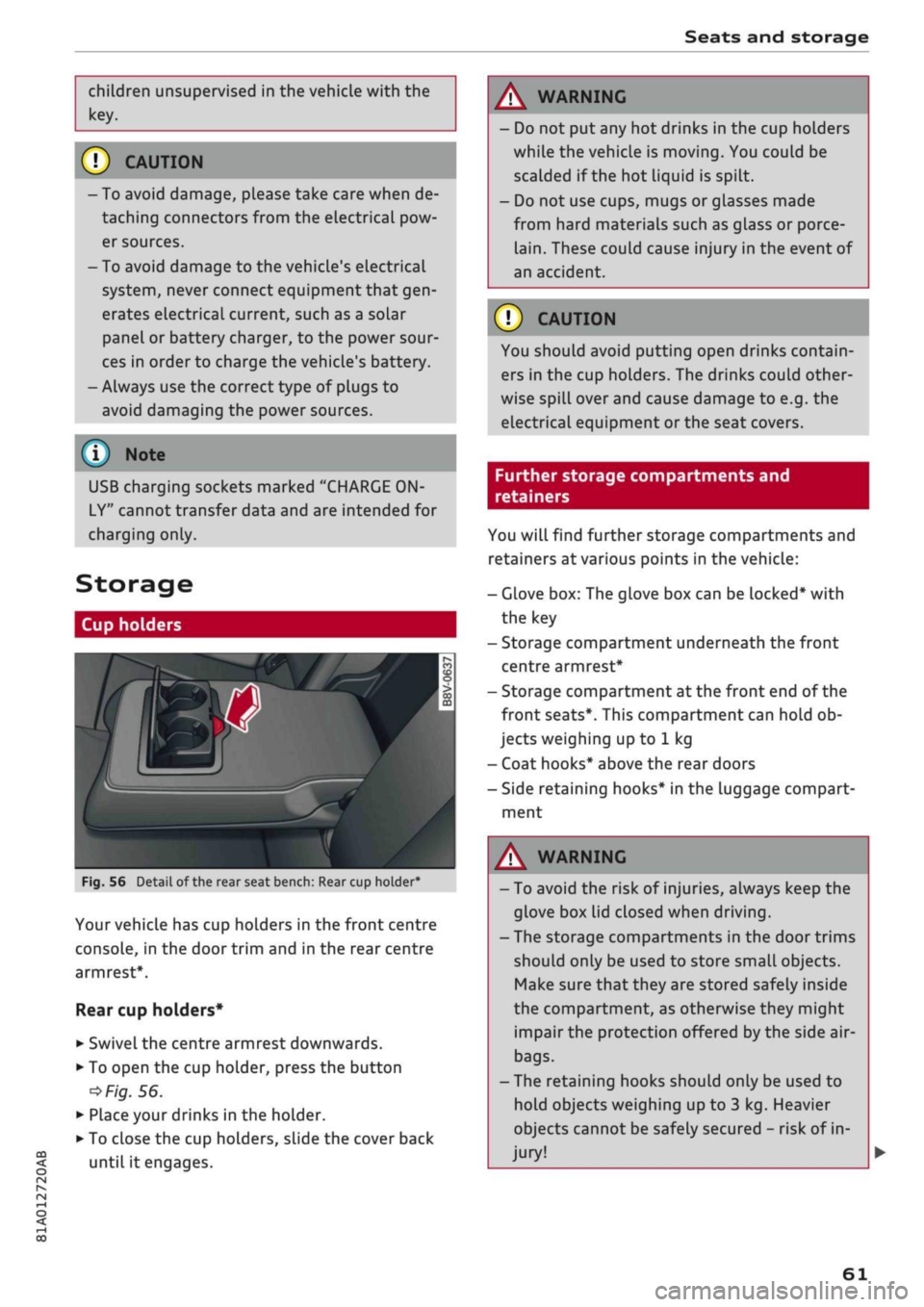
Cup holders
/
Fig.
56
BfT
^^—- j
^^ m /
Detail of the rear seat bench: Rear cup holder*
r^
n
co
3
>
CO
m
A
Your vehicle has cup holders in the front centre
console, in the door trim and in the rear centre
armrest*.
Rear cup holders*
• Swivel the centre armrest downwards.
• To open the cup holder, press the button
•=>
Fig.
56.
• Place your drinks in the holder.
• To close the cup holders, sLide the cover back
until it engages.
A WARNING
- Do not put any hot drinks in the cup holders
while the vehicle is moving. You could be
scalded if the hot liquid is spilt.
- Do not use cups, mugs or glasses made
from hard materials such as glass or porce
lain.
These could cause injury in the event of
an accident.
© CAUTION
You should avoid putting open drinks contain
ers in the cup holders. The drinks could other
wise spill over and cause damage to e.g. the
electrical equipment or the seat covers.
Further storage compartments and
retainers
You will find further storage compartments and
retainers at various points in the vehicle:
- Glove box: The glove box can be Locked* with
the key
- Storage compartment underneath the front
centre armrest*
- Storage compartment at the front end of the
front seats*. This compartment can hold ob
jects weighing up to 1 kg
- Coat hooks* above the rear doors
- Side retaining hooks* in the luggage compart
ment
A WARNING
- To avoid the risk of injuries, always keep the
glove box Lid closed when driving.
- The storage compartments in the door trims
should only be used to store small objects.
Make sure that they are stored safely inside
the compartment, as otherwise they might
impair the protection offered by the side air-
bags.
- The retaining hooks should only be used to
hold objects weighing up to 3 kg. Heavier
objects cannot be safely secured - risk of in
jury!
61
Page 70 of 364
Heating and cooling
cS5
Air recirculation mode
In air recirculation mode, the air from the interi
or of the vehicle is filtered and recirculated. This
setting prevents fumes etc. from entering the in
terior. We recommend switching on the air recir
culation mode when driving through a tunnel or
in traffic queues
•=>
A-
The air recirculation mode is switched off when
the control is in the defrost position
Qjp
Rear window heating
If the rear window heating is activated with the
ignition switched on, the battery management
determines whether or not the vehicle battery
charge level is sufficient for the rear window
heating to be switched on. Otherwise the rear
window heating operates when the engine is
run
ning,
and switches off automatically after about
10 - 20 minutes, depending on the outside
tem
perature.
To switch on the rear window heating perma
nently, press and hold the
CÛJD
button for at least
2 seconds. This setting will be stored for approxi
mately 15 minutes after the ignition is switched
off.
J
Seat heating*
When you press the
«0
button, the seat heating is
switched on at level 3 (the highest level). The
LEDs indicate the temperature level. To reduce
the temperature, press the button again. To
switch off the seat heating, press the button re
peatedly until all the LEDs have gone out.
The seat heating automatically switches from
level 3 to level 2 after about 10 minutes.
(7) CAUTION
To avoid damaging the heating elements of
the seat heating, please do not kneel on the
seat or apply sharp pressure at
a
single
point
© Note
- The setting for the driver's seat heating is
assigned to the key in use.
- If the front passenger's seat heating was on
when you Last switched off the ignition, it
will be switched on automatically only if the
ignition is switched on again within 10 mi
nutes.
/K
WARNING
- For reasons of safety you should not Leave
the air recirculation switched on for too
long.
This mode prevents fresh air from en
tering the vehicle, so the windows can mist
over if the air cooling* is switched off. Bad
visibility can cause an accident.
- People with limited capacity to feel pain or
sense temperature could burn themselves
when using the seat heating. These people
must not use the seat heating - risk of in
jury!
68
Page 72 of 364
Heating and cooling
%
Blower
You can adjust the blower speed manually using
the control
%.
You should leave the blower on at
a low setting to prevent the windows from mist
ing up and to ensure that the vehicle interior is
constantly ventilated. Press the AUTO button for
automatic control of the blower speed.
%£/
%8/
'J Air distribution and air outlets
The buttons can be used to adjust the air distri
bution.
Press the AUTO button for automatic air
distribution.
The round air outlets in the dashboard can be ad
justed
^>page
71.
To prevent the front side windows from misting
up in wet weather, it's a good idea to open the
side air outlets and point them to the side.
Foot-Level
air outlets are provided underneath
the front seats to heat the rear cabin.
1
Defroster
The windscreen and side windows are defrosted
or demisted as quickly as possible. The air output
is increased to maximum and most of the air
comes out of the outlets below the windscreen.
The air recirculation mode is deactivated. The
temperature should be set to 22 °C or higher.
The temperature is regulated automatically. At
setting
$&
the A/C cooling mode is automatically
activated depending on the ambient tempera
ture.
The defroster is switched off when the AUTO but
ton is pressed.
<^>
Air recirculation mode
The air recirculation mode can be switched on
manually or automatically*.
- To switch the manual air recirculation mode
on/off, press the
button.
-The automatic* air recirculation function must
be activated on the infotainment system. Se
lect the following on the infotainment system:
|MENU|
button > Car > left control button > A/C
> Auto recirculation. The air quality sensor,
which is designed for the detection of diesel
and petrol exhaust fumes, automatically
switches the air recirculation mode on or off
depending on the
level
of pollution in the out
side air.
In air recirculation mode, the air from the interi
or of the vehicle is filtered and recirculated. This
setting prevents fumes etc. from entering the in
terior. We recommend switching on the air recir
culation mode when driving through a tunnel or
in traffic queues
•=>
A-
The air recirculation mode is switched off when
the
<^>
or AUTO or
M.
button is pressed.
If the engine is
cold,
the air conditioner will auto
matically switch to air recirculation mode when
the vehicle is reversing.
$tr
Rear window heating
If the rear window heating is activated with the
ignition switched on, the battery management
determines whether or not the battery charge
level is sufficient for the rear window heating to
be switched on. Otherwise the rear window heat
ing operates when the engine is running, and
switches off automatically after about
10 - 20 minutes, depending on the outside
tem
perature.
To switch on the rear window heating perma
nently, press and hold the
S
button for at least
2 seconds. This setting will be stored for approxi
mately 15 minutes after the ignition is switched
off.
^
Seat heating*
When you press the
«r
button, the seat heating is
switched on at level 3 (the highest level). The
LEDs indicate the temperature level. To reduce
the temperature, press the button again. To
switch off the seat heating, press the button re
peatedly until all the LEDs have gone out.
The seat heating automatically switches from
level 3 to level 2 after about 10 minutes.
A WARNING
For reasons of safety you should not leave
the air recirculation switched on for too
long.
This mode prevents fresh air from en
tering the vehicle, so the windows can mist
70
Page 80 of 364

Driving
This message appears
and a
buzzer sounds
if
you
open
the
driver's door while
the
engine
is
run
ning.
Pressing start/stop button again will switch
off
engine.
This message appears
if
you press
the
ISTART
ENGINE
STOPI*
button while
the
vehicle
is moving
<^>page
77,
Emergency
Off
function.
Engine start system: fault. Please contact work
shop
A fault
has
occurred when starting
the
engine
au
tomatically (automatic start function). Drive
to a
qualified workshop soon
and
have
the
fault
recti
fied.
To
start
the
engine, turn
the
ignition
key to
position
@
^>page
74 or
press
the
ISTART
ENGINE
STOPl
button and hold the
key/button until
the
engine starts.
D
Key not
recognised. See owner's manual
This message appears
if
there
is no
convenience
key inside
the
vehicle
or if
the system cannot
de
tect
or
identify
the
key. This
can
happen,
for ex
ample,
if
the radio signal from
the key is
obstruc
ted
by a
metal briefcase
or
similar,
or if the key
battery
is
weak. Electronic equipment, such
as
mobile phones,
can
also interfere with
the
radio
signal from
the key.
The engine
can
still
be
started
or
stopped
if
this
happens (please refer
to
^page
79).
C]
Remote control key: hold back
of key
against marked area.
See
owner's manual
If
the
indicator lamp lights
up and the
message
appears,
a
malfunction
has
occurred
^>page
79.
3
Key not in
vehicle?
3
Remote control key:
key not
recognised.
Is
key still
in
vehicle?
If
the
indicator
lampGB
Lights
up and the
mes
sage appears,
the
convenience
key
was removed
from
the
vehicle while
the
engine
was
running.
If
the convenience
key is not in the
vehicle
you
will
not
be
able
to
switch
on the
ignition
or
restart
the engine after
it has
been switched
off. You
will
also
not be
able
to
lock
the
vehicle from
the
out
side.
Please press brake pedal
This message appears
on
vehicles with
an
auto
matic gearbox
if
you
try to
start
the
engine
with
out first pressing
the
brake pedal.
Please press clutch pedal
This message appears
if
you
try to
start
the en
gine without first pressing
the
clutch pedal.
The
engine will only start
if
you press
the
clutch
ped
al.
Please engage
N or P
This message will appear
if
you
try to
start
or
switch
off the
engine when
the
selector lever
is
not
in N or P. The
engine
can
then
not be
started
or switched
off.
Switch
off
ignition before leaving
car.
Battery
is
being discharged
This message appears
and the
buzzer sounds
if
you open
the
driver's door while
the
ignition
is
switched
on.
Switch
off
the ignition
to
prevent
the vehicle battery from being discharged.
Shift
to P,
vehicle can roll away. Doors can only
be locked
in P
For safety reasons, this message will appear
if
the selector Lever
of the
automatic gearbox
is not
in position P when
you
switch
off the
ignition.
Put
the selector lever
in
position
P;
otherwise
the ve
hicle
can
roll away
and
cannot
be
locked.
78
Page 81 of 364

Driving
CO
<
O
rN
IV
rN
t-H
o <
Starting the engine after
a malfunction
Applies
to: vehicles with convenience key
If the remote control key battery is exhausted or
if radio interference
or
a system malfunction oc
curs, extra steps may be necessary in order to
start the engine.
Fig.
71 Steering column/remote control key: Starting the
engine
after a malfunction
If the message
D
Key not recognised. See
own
er's manual or
|3
Remote control key: hold
back of key against marked area. See owner's
manual is displayed, you can still start the en
gine manually.
•
Manual gearbox: Press the clutch
pedal
• Automatic gearbox: Press the brake pedal.
•
Hold the remote control key against the symbol
fJ)
^>Fig.
71, as shown in the illustration.
• Press the ISTART ENGINE
STOPl
button
^ A in
Starting the engine on page 76. The engine
shouLd start.
•
Drive to a qualified workshop soon and have the
fault rectified.
Note
You can call up the driver message again by
pressing the ISTART ENGINE STOP| button.
Start/stop system
Description
Applies
to: vehicles with start/stop system
The start/stop system can help to save fuel and
reduce
CO2
emissions.
1)
May vary in different countries
In start/stop mode, the engine is switched off
automatically when the vehicle stops, e.g. at
traffic lights. The ignition remains on during this
stop phase. The engine is automatically started
on demand.
The start/stop system is automatically activated
each
time
you switch on the ignition.
Basic conditions for start/stop mode
- The driver's door must be closed.
- The driver's seat belt must be buckled.
- The bonnet must be closed.
- The vehicle must have been moving at over 3
km/h since the Last stop.
CAUTION
Always switch off the start/stop system
^>page
81 before driving through water.
©
The engine is switched
off1)
shortly before the
vehicle comes to a stop. However, the brake
servo and power steering remain fully opera
tional.
Stopping/starting the engine
Applies
to: vehicles with start/stop system
START
(M
STOP
S
Fig.
72 Instrument cluster: Engine switched off (stop
phase)
Applies
to: vehicles with manual gearbox
•
When the vehicle stops, put the gear Lever in
neutral and
take your
foot
off
the clutch pedal.
The engine will switch off. An indicator lamp
I
will light up in the instrument cluster •
79
Page 82 of 364

Driving
display.
The rev
counter needle will also move
to
the
READY position.
•
The engine will start again automatically when
you press
the
clutch pedal.
The
indicator lamp
will
go out.
Applies to: vehicles with automatic gearbox
•
Brake
the
vehicle
to a
stop.
The
engine will
be
switched
off
shortly before
the
vehicle comes
to
a
standstill
or
when
the
vehicle
is
station-
aryx).
Keep your foot
on the
brake pedal.
The
indicator
lamp
@/
@
will appear
on the
dis
play.
The rev
counter needle will also move
to
the READY position.
•
The engine will start again automatically when
you take your foot
off
the brake pedal.
If the
parking brake
is
applied
or
hold assist*
is
switched on,
the
engine will only restart when
you press
the
accelerator pedal1).
The
indicator
lamp
will
go out.
Further information
for
automatic gearboxes
The engine will stop
if
the selector lever
is in po
sition
P, N or D.
The engine will start again
if
you move
the
selec
tor lever
to
R during
a
stop phase.
If you
do not
want
the
engine
to
start when mov
ing
the
selector Lever through
R,
move
the
lever
to P quickly.
You
can
control whether
or not the
engine
is
switched
off by
varying
the
amount
of
pressure
on
the
brake pedal.
For
instance,
if
you brake
gently
in
stop-and-go traffic
or
before turning
off
at a junction,
the
engine will remain
on
while
the
vehicle
is at
a standstill.
As
soon as you press
the
brake pedal harder,
the
engine will
be
switched
off.
be switched
off. The rev
counter needle will
move
to the
OFF position.
- Keep your foot
on the
brake pedal during
a
stop phase
to
prevent
the
vehicle from mov
ing.
-
If you press the
ISTART ENGINE STOP|
but
ton*
during
a
stop phase,
the
ignition will
Note
Applies to: vehicles with manual gearbox
If the engine stalls, you
can
start
it
again
di
rectly
by
pressing
the
clutch pedal immedi
ately.
General notes
Applies to: vehicles with start/stop system
Engine does
not
switch
off
The system checks that certain conditions
are
met before
and
during each stop phase.
If
the
in
dicator lamp
Ey
appears
on the
instrument clus
ter display,
the
engine will
not be
switched
off in
the following situations:
- The engine
has
not
yet
reached
the
minimum
temperature required
for
start/stop mode.
- The interior temperature selected
on the air
conditioner*
has
not
yet
been reached.
- The exterior temperature
is
very high/low.
- The windscreen
is
being defrosted
W.
-The parking
aid*
is
switched
on.
- The vehicle battery charge
is too low.
- The steering wheel
is
close
to
full lock
or the
vehicle
is
being steered.
- Reverse gear has just been selected.
- The vehicle
is on a
steep gradient.
-At high altitudes.
Engine cuts
in
again automatically
The stop phase
is
interrupted
in the
following sit
uations,
for
example.
The
engine cuts
in
auto
matically without intervention from
the
driver.
- The vehicle starts
to
roll (e.g.
on a
hiLl).
- The interior temperature deviates from
the air
conditioner setting.
- The windscreen
is
being defrosted
*$?.
- The brake pedal
is
pressed several times
in
suc
cession.
- The vehicle battery charge drops
to an
insuffi
cient level.
1'
May vary in different countries
80
Page 83 of 364

Driving
- The power consumption is
high.
The engine switches off again when the condi
tions for start/stop mode are once again
fulfil
led1).
Ignition is switched off automatically
To prevent the vehicle battery from being dis
charged,
the ignition will be switched off auto
matically if certain conditions are met. For in
stance:
- The start/stop system has switched off the en
gine.
- The vehicle is stationary.
- The driver has left the vehicle.
If the dipped beam headlights are switched on in
this case, the side lights will be turned on in
stead.
After approx. 30 minutes, or when you
lock the vehicle, the side Lights will be switched
off.
If the start/stop system has not stopped the en
gine or if
you
have switched off the start/stop
system manually, the engine will continue
run
ning and the ignition will not be switched off au
tomatically
^A-
A WARNING
Never run the engine in confined spaces. The
exhaust gases are toxic - risk of poisoning!
© Note
If
you
select
D
or
N
after selecting reverse
gear on a vehicle with automatic gearbox, the
car must have been moving at over 10 km/h
before the system can switch off the engine
again.
Switching the start/stop system on/off
manually
Applies to: vehicles with start/stop system
You
can switch the system off manually if you
don't want to use it.
_.
rA^OFF
un
S
o
>
CO CO
Fig.
73 Centre console: Switch for start/stop system
•
To switch the start/stop system off or on
man
ually, press the
\OE1
button. The LED in the but
ton will light up when the system is switched
off.
© Note
If
you
switch off the system during a stop
phase,
the engine will start again automati
cally.
Driver messages in the instrument cluster
display
Applies to: vehicles with start/stop system
H
Automatic
start/stop
deactivated: Please re
start engine manually
This message appears if certain conditions have
not been met during the stop phase and the
start/stop system cannot start the engine again
automatically. In this case, the engine must be
started manually.
2]
Automatic
start/stop:
system fault! Func
tion unavailable
There is a malfunction in the start/stop system.
Drive to a workshop soon and have the fault
recti
fied.
CO
rN
IV
rN
t-H
o <
1)
May vary in different countries
81
Page 133 of 364
Driver assist systems
CO
< o rN
r>
rN
t-H
o < 00
-The automatic brake application with in
creasing brake force can be cancelled by ap
plying the brakes yourself or by pressing the
accelerator firmly.
- In certain situations, a warning may be giv
en by the rear cross-traffic assist even if
there is no traffic in the critical zone, for in
stance when parking or manoeuvring the ve
hicle in reverse.
- The rear cross-traffic assist is deactivated
automatically if you deactivate the
ESC.
-The rear cross-traffic assist is switched on/
off via the parking aid
^>page
134.
-The system is not available in towing mode.
Driver messages
Applies to: vehicles with Audi side assist
Should the side assist be deactivated automati
cally, a driver message will appear in the instru
ment cluster display.
O
Audi side assist: system fault!
The system cannot detect vehicles reliably and
will be deactivated. The sensors are out of align
ment or defective. Have the system checked by a
qualified workshop soon.
O
Audi side assist: currently unavailable. No
sensor vision
O
Audi side assist: currently unavailable.
Sen
sor view restricted due to surroundings. See
owner's manual
The radar sensors are blocked. The area in front
of the sensors must not be obstructed by bicycle
racks,
stickers, deposits or any other substances.
If necessary, clean the area in front of the
sen
sors
^>page
128, Fig. 120.
O
Audi side assist: currently unavailable
The side assist is temporarily inoperative and
cannot be switched on (for instance if the battery
is not sufficiently charged).
O
Audi side assist: unavailable in towing mode
2
Audi side assist: unavailable in towing mode
The side assist function will be switched off auto
matically after a short time when the electrical
connector for the trailer socket is plugged in on
vehicles with a factory-fitted towing bracket. If
the towing bracket is not factory-fitted the side
assist function may not be switched off automat
ically. The side assist must not be used when
towing a trailer.
O Rear
parking aid: obstacle detection limited
The rear cross-traffic assist is not available. Ei
ther the ESC is switched off or the radar sensors
may be obstructed by a bicycle rack, stickers,
leaves, snow or similar objects. Switch on the ESC
or, if necessary, clean the area in front of the
sen
sors
<3page
128, Fig. 120. If this message re
mains displayed, drive to a qualified workshop
soon and have the fault rectified.
Audi drive select
Introduction
Applies to: vehicles with Audi drive select
Audi drive select alLows you to use different set
ups on your vehicle. The modes efficiency*, com
fort, auto and dynamic allow the driver, for ex
ample,
to change from a sporty mode to a more
comfortable one via the
&&
button in the centre
console or via the infotainment system. In
addi
tion,
the individual* mode allows you to adapt
the vehicle set-up to
suit
your personal driving
style.
For example, you might choose to combine
a more dynamic engine set-up with a lighter
steering response.
Description
Applies to: vehicles with Audi drive select
The possible vehicle set-up in each mode de
pends on which equipment is installed on your
vehicle. The engine and steering are basic parts
of your vehicle which are always included in the
set-up.
Engine and automatic gearbox*
The response of the engine and automatic
gear
box* to accelerator pedal movements will be
more spontaneous or balanced, depending on
131