Brake AUDI Q5 2021 Owner´s Manual
[x] Cancel search | Manufacturer: AUDI, Model Year: 2021, Model line: Q5, Model: AUDI Q5 2021Pages: 332, PDF Size: 118.86 MB
Page 292 of 332
Emergency assistance
> Switch the ignition on.
Inflating a tire
> Move the switch (8) > fig. 185 on the compres-
sor into position I.
> Inflate the tire to between 29 psi (200 kPA)
and 36 psi (250 kPA) and read the pressure on
the gauge.
> If this tire pressure is not reached, remove the
filler hose. Drive slowly approximately 33 feet
(10 m) forward or in reverse so that the sealant
can be distributed in the tire. Inflate the tire
again > A\.
ZA\ WARNING
— Read and follow the manufacturer's safety
precautions on the compressor and in the in-
structions on the bottle of sealant.
— Ifa tire pressure of 29 psi (200 kPA) cannot
reached after inflating for 6 minutes, then
the tire is too severely damaged. Do not con-
tinue driving.
— If the tire cannot be repaired with the tire
sealant, see an authorized Audi dealer or au-
thorized Audi Service Facility for assistance.
G@) Tips
Do not operate the compressor for more than
six minutes continuously, or it can overheat.
Once the compressor has cooled, you can con-
tinue to use it.
eet als}
Applies to: vehicles with tire mobility kit
> Affix the sticker that says "max. 50 mph (max.
80 km/h)" that is provided with the tire mobili-
ty kit within the driver's field of vision.
>» Stop the vehicle after driving for about 10 mi-
nutes and check the tire pressure.
> If the tire pressure is lower than 19 psi (130
kPA), then the tire is too severely damaged. Do
not continue driving.
Z\ WARNING
Pay attention to the following after repairing
the tire:
290
— Do not drive faster than 50 mph (80 km/h).
— Avoid hard acceleration or braking and driv-
ing fast around curves.
— The vehicle may become more difficult to
control.
— If the tire is too severely damaged, see an
authorized Audi dealer or authorized Audi
Service Facility for assistance.
(@) For the sake of the environment
You can give the used tire sealant bottle to an
authorized Audi dealer or authorized Audi
Service Facility for disposal.
Gi) Tips
Remember to obtain a new bottle of sealant
from an authorized Audi dealer or authorized
Audi Service Facility after repairing a tire.
Changing a tire
You must complete the preparation before
changing a tire.
> Read and follow the important safety precau-
tions > page 288.
> Set the parking brake.
> Select the “P” position.
» When towing a trailer: disconnect the trailer
from your vehicle.
> Lay out the vehicle tool kit > page 288 and the
spare tire > page 293.
> Applies to: vehicles with air suspension: Select
on the home screen: VEHICLE > Settings &
Service > Air suspension: wheel change.
> Switch the ignition off.
ZA\ WARNING
The vehicle must also be secured to prevent it
from rolling when using the vehicle jack*. Use
suitable objects to block the front and back of
the wheel that is diagonal from the wheel
with the flat tire.
Page 295 of 332
80B012721BA
Emergency assistance
because you will not be able to achieve the
correct tightening specification.
() Note
When removing or installing the wheel, the
rim could hit the brake rotor and damage the
rotor. Work carefully and have a second per-
son help you.
Unidirectional tires
A unidirectional tire profile is identified by arrows
on the tire sidewall that point in the running di-
rection. You must always maintain the specified
running direction. This is necessary to ensure the
tire's optimal performance in regard to adhesion,
running noise, and friction, and to reduce the risk
of
hydroplaning.
To benefit fully from the advantages of the uni-
directional tire design, you should replace faulty
tires as soon as possible and restore the correct
running direction on all of the tires.
> Reinstall the caps on the wheel bolts if necessa-
ry.
> Store the vehicle tool kit in its designated
place.
> If the removed wheel does not fit in the spare
wheel well, store it securely in the luggage
compartment > page 84.
> Check the tire pressure on the installed wheel
as soon as possible.
> Correct the tire pressure and store it in the MMI
=> page 280.
> The wheel bolt tightening specification must be
100 ft lbs (140 Nm). Have it checked as soon as
possible with a torque wrench. Drive carefully
until then.
> Have the faulty wheel replaced as quickly as
possible.
Collapsible spare tire
Applies to: vehicles with collapsible spare tire
The collapsible spare tire is intended for short-
term use only. Have the damaged tire checked
and replaced if necessary by an authorized Audi
dealer or authorized Audi Service Facility as soon
as possible.
There are some restrictions on the use of the col-
lapsible spare tire. The collapsible spare tire has
been designed specifically for your type of vehi-
cle. Do not replace it with the collapsible spare
tire from another type of vehicle.
The collapsible spare tire is located in the lug-
gage compartment under the cargo floor cover.
Requirement: the vehicle tool kit > page 288 and
the compressor must be laid out.
Removing
> Lift the cargo floor using the handle.
> Turn the handwheel counter-clockwise and re-
move it.
> Remove the collapsible spare tire.
You must inflate the collapsible spare tire before-
hand in order to use it.
Inflating
> Remove the valve cap from the collapsible
spare tire.
> Tighten the compressor hose on the collapsible
spare tire valve.
> Connect the compressor hose to a vehicle sock-
et and switch it on.
» Let the compressor run until the specified value
on the tire pressure sticker is reached
> page 271, fig. 180 >©.
> Screw the valve cap back onto the valve.
Returning to storage
> To release air, turn the valve insert. See an au-
thorized Audi dealer or authorized Audi Service
Facility.
> Turn the valve insert back once the air has been
released.
> Wait several hours before placing the collapsi-
ble spare tire in the spare wheel well. Only then
will it fold down completely so that you can
store it securely.
> Then screw the valve cap back onto the valve.
> Secure the collapsible spare tire with the hand-
wheel.
> Fold the cargo floor cover back into place.
293
>
Page 298 of 332
Emergency assistance
— Keep ignition sources (such as open flames,
burning cigarettes, etc.) away from the vehi-
cle batteries to reduce the risk of an explo-
sion.
— Route the jump start cables so they cannot
get caught in the moving parts in the other
vehicle's engine compartment.
©) Note
Please note that the connecting process previ-
ously described for the jump start cables is in-
tended for when your vehicle is being jump
started.
G) Tips
Make sure that the connected jump start ca-
bles have sufficient contact with metal.
Towing
ere eeeurisela)
You should only perform the steps that follow if
you have the necessary tools and technical ex-
pertise.
Towing requires a certain amount of practice.
Audi recommends contacting a towing company
to have the vehicle transported.
You should only have your vehicle towed by an-
other vehicle when disabled in exceptional cir-
cumstances. Inexperienced drivers should not
tow.
Notes on towing
When the engine is stopped, the transmission
will not be sufficiently lubricated if traveling at
high speeds and long distances:
— The maximum permitted towing speed is 30
mph (50 km/h).
— The maximum permitted towing distance is 30
miles (50 km).
Additional information on towing with a tow
truck
The vehicle may only be towed with the front axle
raised. Do not wrap any chains or cables around
the brake lines.
296
Tow bar and towing cable
The vehicle can be towed with a tow bar or tow-
ing cable. Both drivers should be familiar with
the special considerations when towing, especial-
ly when using a towing cable.
Always make sure the traction force does not ex-
ceed the permitted level and there are no shock
loading conditions. There is always the risk of the
coupling becoming overloaded when driving off-
road.
For the most safety and security, drive with a tow
bar. You should use a towing cable only if a tow
bar is not available. Use a towing cable made of
synthetic elastic cable similar elastic material.
ZA WARNING
— Towing highly increases the risk of an acci-
dent, for example from colliding with the
towing vehicle.
— To reduce the risk of an accident, do not al-
low anyone to remain inside the vehicle
when it is being transported by a tow truck
or a special transporter.
@) Note
— If normal towing is not possible, for exam-
ple if the transmission is faulty or if the
towing distance is greater than 30 miles
(50 km), then transport the vehicle on a
special carrier.
— If the vehicle is towed by a tow truck at the
axle that is not permitted, this can cause se-
vere damage to the transmission.
— The vehicle must not be tow started for
technical reasons.
G) Tips
— If the power supply is interrupted, then it
will not be possible to move the selector
lever out of the "P" position. The parking
lock must be released using the emergency
release before towing the vehicle
=> page 103.
— Switch Audi pre sense* off > page 170 when
loading the vehicle onto a vehicle carrier,
train, ship,
or other type of transportation, >
Page 299 of 332
80B012721BA
Emergency assistance
or when towing the vehicle. This can prevent
an undesired intervention from the pre
sense* system.
— Follow the local legal regulations for tow-
ing.
Read and follow the important information under
=> page 296.
Preparations
> Only secure the towing cable or tow bar at the
designated towing loops > page 297,
=> page 298.
> Make sure the towing cable is not twisted. Oth-
erwise it could disconnect from the towing loop
while towing.
> Switch the emergency flashers on in both
vehicles > page 52. However, do not do this if it
prohibited by law.
Towing vehicle (front)
> Only start to drive when the towing cable is
taut.
> Press the brake pedal very carefully.
> Avoid sudden braking or driving maneuvers.
Vehicle being towed (rear)
> Make sure the ignition is switched on so that
the steering wheel is not locked and so that you
can use the turn signals, the horn, and the
windshield wipers if needed > A\.
> Switching it off before the vehicle has stopped
may impair the function of the brake booster
and power steering. You would then need to
use more force to steer and brake the vehicle.
> Release the parking brake > page 111.
> Select the “N” selector lever position.
> Make sure the towing cable is always taut.
ZA WARNING
— Never tow a vehicle using a tow bar or tow-
ing cable if the vehicle does not have electri-
cal power.
— If the vehicle runs out of power while it is
being towed, stop towing the vehicle imme-
diately and consult an authorized Audi deal-
er or qualified repair facility.
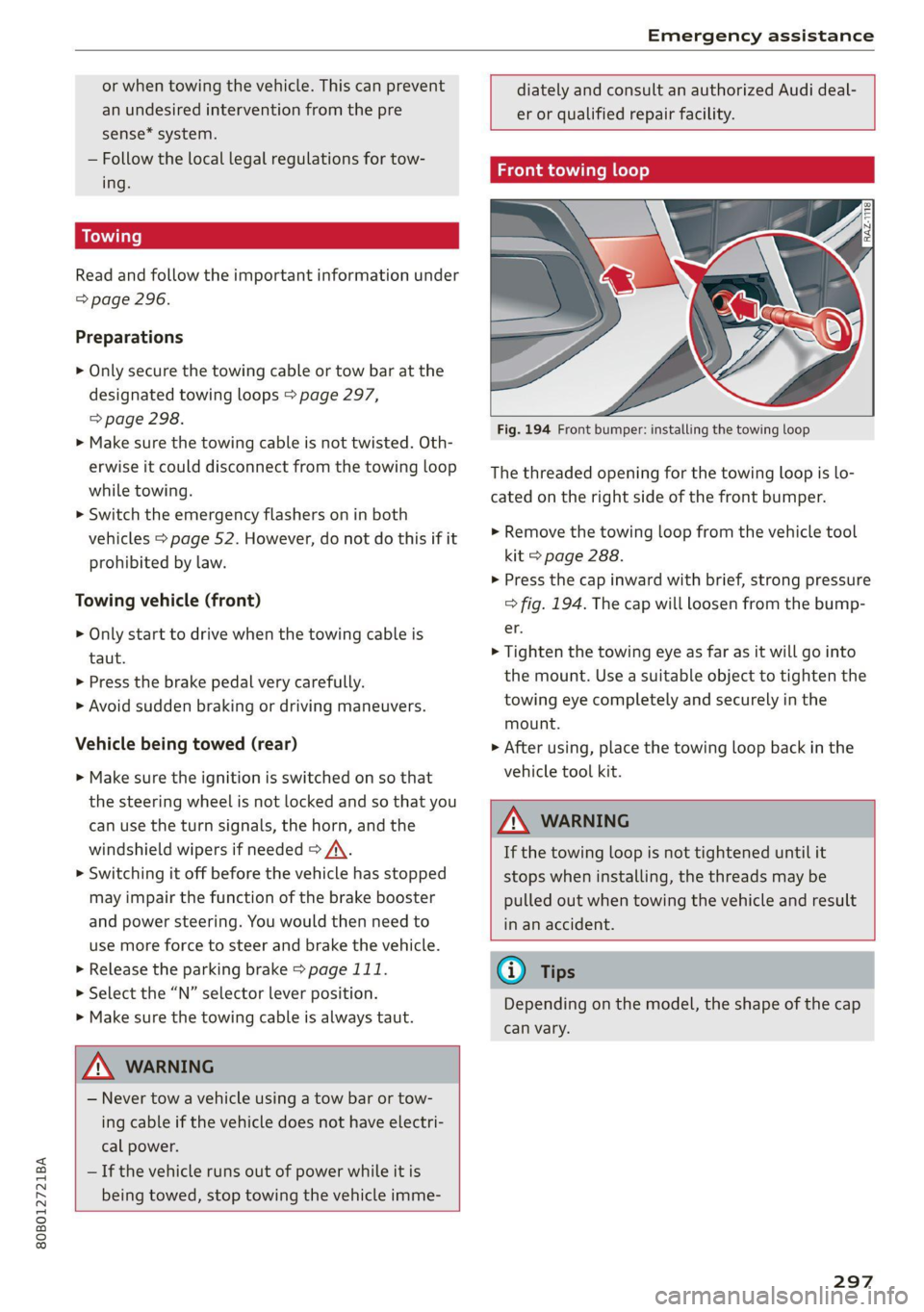
Front towing loop
BX
Fig. 194 Front bumper: installing the towing loop
The threaded opening for the towing loop is lo-
cated on the right side of the front bumper.
> Remove the towing loop from the vehicle tool
kit > page 288.
> Press the cap inward with brief, strong pressure
=> fig. 194. The cap will loosen from the bump-
er.
> Tighten the towing eye as far as it will go into
the mount. Use a suitable object to tighten the
towing eye completely and securely in the
mount.
> After using, place the towing loop back in the
vehicle tool kit.
Z\ WARNING
If the towing loop is not tightened until it
stops when installing, the threads may be
pulled out when towing the vehicle and result
in an accident.
@ Tips
Depending on the model, the shape of the cap
can vary.
297
Page 302 of 332
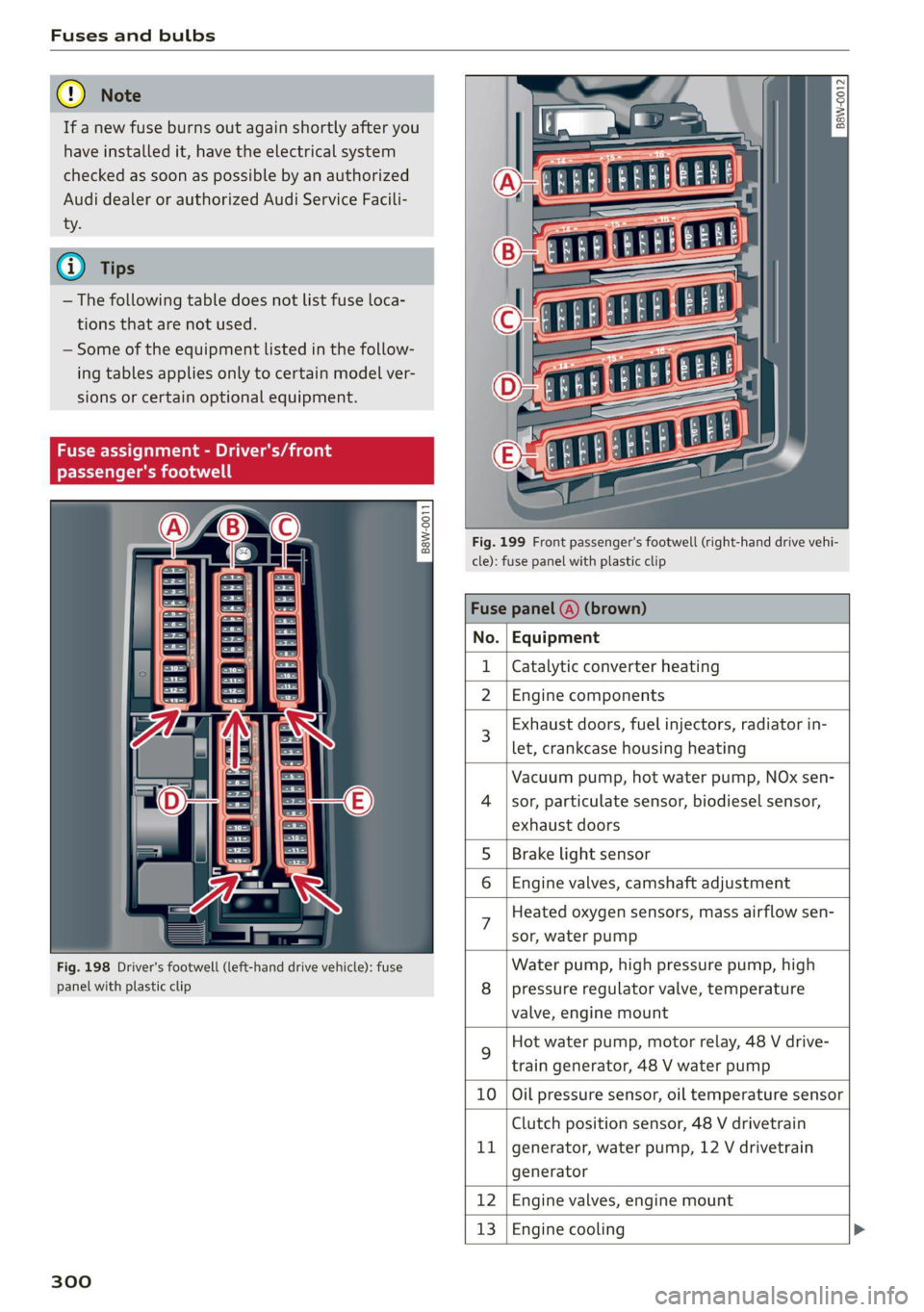
Fuses and bulbs
@) Note
If a new fuse burns out again shortly after you
have installed it, have the electrical system
checked as soon as possible by an authorized
Audi dealer or authorized Audi Service Facili-
ty.
G@) Tips
— The following table does not list fuse loca-
tions that are not used.
— Some of the equipment listed in the follow-
ing tables applies only to certain model ver-
sions or certain optional equipment.
Fig. 198 Driver's footwell (left-hand drive vehicle): fuse
panel with plastic clip
300
3 2
= & a
a
Ss $
2 8
Fig. 199 Front passenger's footwell (right-hand drive vehi-
cle): fuse panel with plastic clip
Fuse panel
No. | Equipment
Catalytic converter heating
2 |Engine components
Exhaust doors, fuel injectors, radiator in-
let, crankcase housing heating
Vacuum pump, hot water pump, NOx sen-
4 |sor, particulate sensor, biodiesel sensor,
exhaust doors
Brake light sensor
6 | Engine valves, camshaft adjustment
Heated oxygen sensors, mass airflow sen-
sor, water pump
Water pump, high pressure pump, high
8 | pressure regulator valve, temperature
valve, engine mount
Hot water pump, motor relay, 48 V drive-
train generator, 48 V water pump
10 | Oil pressure sensor, oil temperature sensor
Clutch position sensor, 48 V drivetrain
11 | generator, water pump, 12 V drivetrain
generator
12 | Engine valves, engine mount
13 | Engine cooling
Page 303 of 332
80B012721BA
Fuses and bulbs
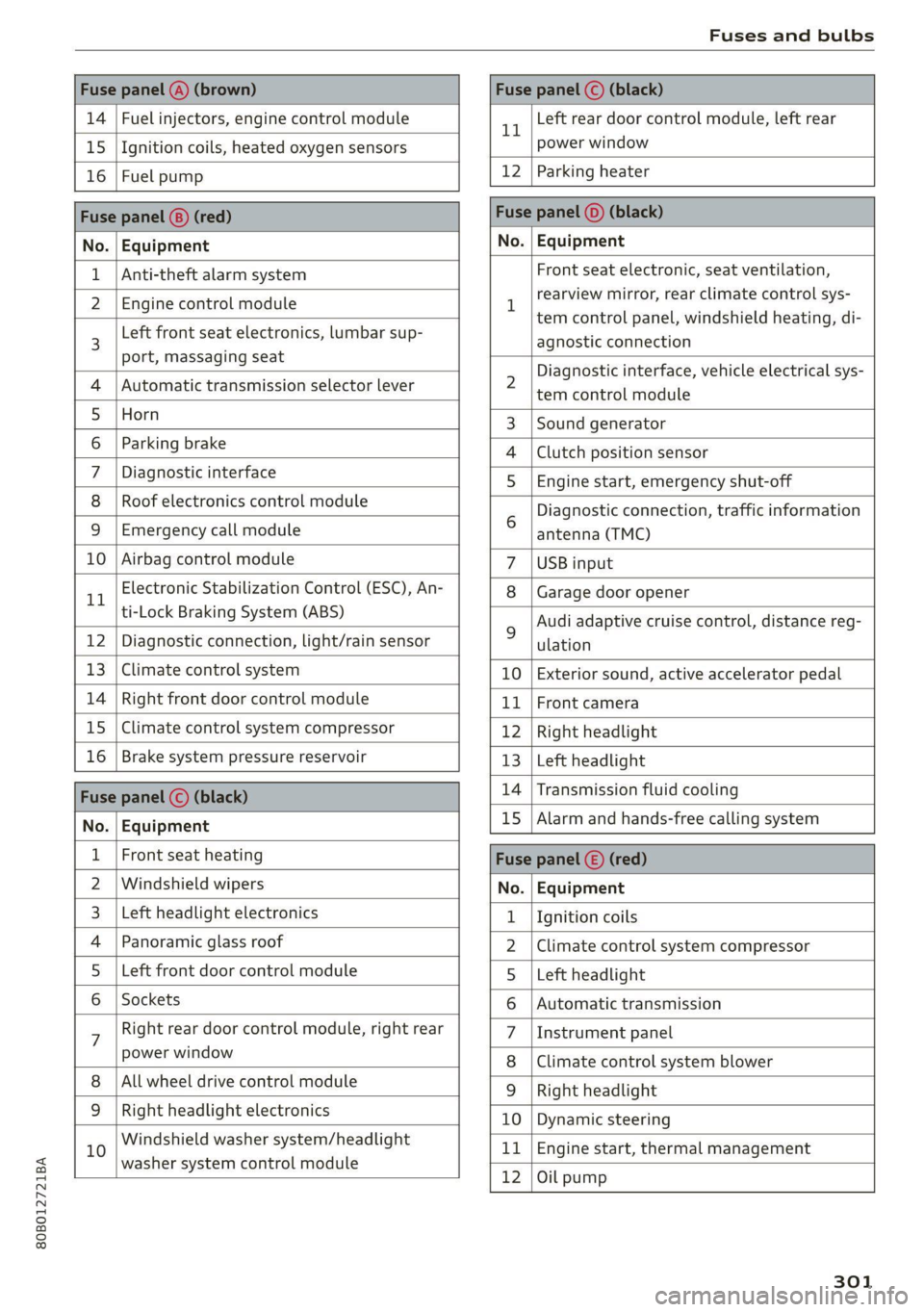
Fuse panel (4) (brown) Fuse panel © (black)
14 | Fuel injectors, engine control module 1 Left rear door control module, left rear
15 | Ignition coils, heated oxygen sensors power window
16 | Fuel pump 12 | Parking heater
Fuse panel (8) (red) Fuse panel (©) (black)
No. | Equipment No. | Equipment
Anti-theft alarm system Front seat electronic, seat ventilation,
2. [Engine control module 1 rearview mirror, testclimate control sys-
tem control panel, windshield heating, di-
3 Left front
seat electronics, lumbar sup- agnostic connection
port, massaging seat a A 7
Diagnostic interface, vehicle electrical sys-
4 |Automatic transmission selector lever 2 tem-control module
5 [Horn 3 |Sound generator
6 | Parking brake 4 |Clutch position sensor
7 | Diagnostic interface 5 | Engine start, emergency shut-off
8 | Roof electronics control module Diagnostic connection, traffic information
9 |Emergency call module 6 antenna (TMC)
10 | Airbag control module 7 |USB input
11 Electronic Stabilization Control (ESC), An- 8 | Garage door opener
ti-Lock Braking System (ABS) Audi adaptive cruise control, distance reg-
12 | Diagnostic connection, light/rain sensor 2 ulation
13 | Climate control system 10 | Exterior sound, active accelerator pedal
14 | Right front door control module 11 | Front camera
15 | Climate control system compressor 12 | Right headlight
16 | Brake system pressure reservoir 13 | Left headlight
Fuze panel © (black) 14 |Transmission fluid cooling
No. | Equipment 15 |Alarm and hands-free calling system
1 | Front seat heating Fuse panel (©) (red)
2 |Windshield wipers No. | Equipment
3 |Left headlight electronics 1 {Ignition coils
4 | Panoramic glass roof 2 |Climate control system compressor
5 |Left front door control module 5 |Left headlight
6 | Sockets 6 |Automatic transmission
7 Right rear door control module, right rear 7 |Instrument panel
power window 8 |Climate control system blower
All wheel drive control module 9 | Right headlight
9 |Right headlight electronics 10 | Dynamic steering
10 Windshield washer system/headlight 11 | Engine start, thermal management
washer system control module 7
12 |Oil pump
301
Page 306 of 332
Data privacy
Data privacy
Privacy notice
You can find information about responsibility for
data protection in the MMI.
Applies to: MMI: Select on the home screen: SET-
TINGS > General > Legal notes > About Audi
connect.
Image recording
See aye Le MUL ea La)
Applies to: vehicles with surrounding area monitoring
Some vehicle functions require the vehicle’s path
to be detected and evaluated. This is done by
cameras installed permanently on the vehicle
that detect objects in the vehicle's surroundings
(such as obstacles or guard rails). The live images
from the cameras are transmitted to the applica-
ble control module.
The camera images are transmitted to the appli-
cable control module and stored for processing.
The control module analyzes the current camera
image using image evaluation software. This im-
age evaluation software detects anonymized
technical measurements, such as distances to ob-
jects. The control module evaluates these techni-
cal measurements and makes it possible for the
assist systems to control the vehicle, if necessary.
Data memories
~ 1p o
S| =z
x a.
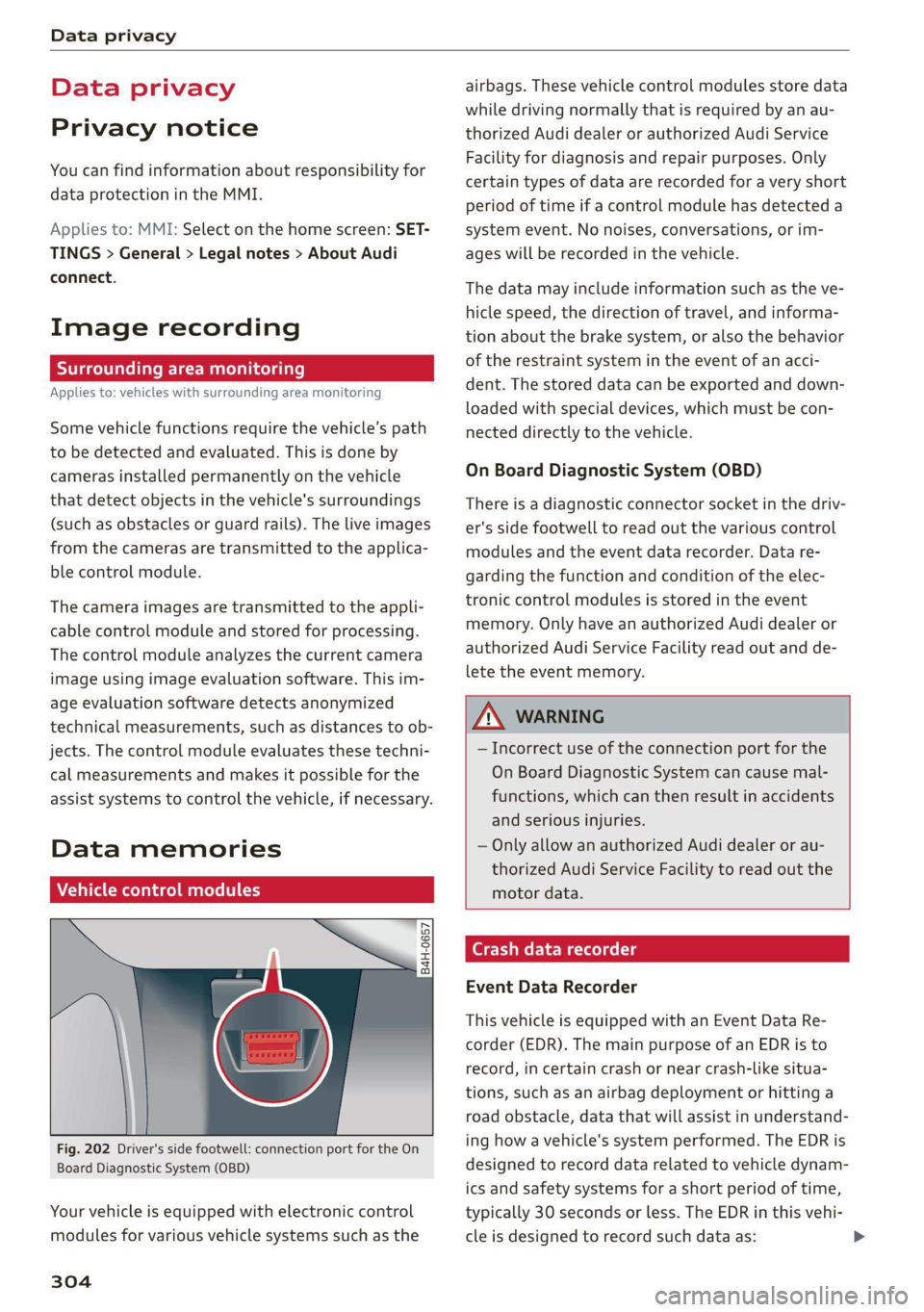
Fig. 202 Driver's side footwell: connection port for the On
Board Diagnostic System (OBD)
Your vehicle is equipped with electronic control
modules for various vehicle systems such as the
304
airbags. These vehicle control modules store data
while driving normally that is required by an au-
thorized Audi dealer or authorized Audi Service
Facility for diagnosis and repair purposes. Only
certain types of data are recorded for a very short
period of time if a control module has detected a
system event. No noises, conversations, or im-
ages will be recorded in the vehicle.
The data may include information such as the ve-
hicle speed, the direction of travel, and informa-
tion about the brake system, or also the behavior
of the restraint system in the event of an acci-
dent. The stored data can be exported and down-
loaded with special devices, which must be con-
nected directly to the vehicle.
On Board Diagnostic System (OBD)
There is a diagnostic connector socket in the driv-
er's side footwell to read out the various control
modules and the event data recorder. Data re-
garding the function and condition of the elec-
tronic control modules is stored in the event
memory. Only have an authorized Audi dealer or
authorized Audi Service Facility read out and de-
lete the event memory.
ZA WARNING
— Incorrect use of the connection port for the
On Board Diagnostic System can cause mal-
functions, which can then result in accidents
and serious injuries.
— Only allow an authorized Audi dealer or au-
thorized Audi Service Facility to read out the
motor data.
rash data recorder
Event Data Recorder
This vehicle is equipped with an Event Data Re-
corder (EDR). The main purpose of an EDR is to
record, in certain crash or near crash-like situa-
tions,
such as an airbag deployment or hitting a
road obstacle, data that will assist in understand-
ing how a vehicle's system performed. The EDR is
designed to record data related to vehicle dynam-
ics and safety systems for a short period of time,
typically 30 seconds or less. The EDR in this vehi-
cle is designed to record such data as:
Page 307 of 332
80B012721BA
Data privacy
— How various systems in your vehicle were oper-
ating;
— Whether or not the driver and passenger safety
belts were buckled/fastened;
— How far (if at all) the driver was depressing the
accelerator and/or brake pedal; and,
— How fast the vehicle was traveling.
These data can help provide a better understand-
ing of the circumstances in which crashes and in-
juries occur. NOTE: EDR data are recorded by your
vehicle only if a non-trivial crash situation occurs;
no data are recorded by the EDR under normal
driving conditions and no personal data (e.g.
name, gender, age, and crash location) are re-
corded. However, other parties, such as law en-
forcement, could combine the EDR data with the
type of personally identifying data routinely ac-
quired during a crash investigation.
To read data recorded by an EDR, special equip-
ment is required, and access to the vehicle or the
EDR is needed. In addition to the vehicle manu-
facturer, other parties, such as law enforcement,
that have the special equipment, can read the in-
formation if they have access to the vehicle or the
EDR.
Data usage
Audi can read out the information stored in the
data memories or similar data, or give this infor-
mation to third parties, especially in the follow-
ing situations:
— If the vehicle owner or lessee agrees
— If there is an official request from the police
— Ifa court or authorities request it
If legally permitted, Audi can also use the data
for analysis of vehicle operation and safety per-
formance or provide this data to third parties for
research purposes.
Transmitted information
Data collection
Applies to: vehicles with data collection
Depending on the country, Audi may collect data
for the following purposes, for example: offer
and product optimization, public safety, provision
of Audi connect remote vehicle services, and
adaptation to customer expectations. For exam-
ple, various technical function data, environmen-
tal data, driving data, and usage data will be col-
lected for a specific purpose and forwarded to
Audi. The data will be sent from the vehicle at
the time the data was collected.
Applies to: MMI: You can find additional informa-
tion about data collection in the MMI. Select on
the home screen: SETTINGS > General > Legal
notes > About Audi connect.
If you would like to deny data transmission to
Audi, contact an authorized Audi dealer or au-
thorized Audi Service Facility for more informa-
tion. You also have the option to deactivate data
transmission within the privacy settings.
Privacy settings
Applies to: vehicles with Audi connect
> Applies to MMI: Select on the home screen:
SETTINGS > Privacy settings.
When using Audi connect services or during data
collection, data will be transmitted from the ve-
hicle.
> To display additional information about the pri-
vacy settings and the associated symbols in the
status bar, press @ in the MMI.
Requirement: the ignition must be switched on.
Setting the maximum privacy settings
When the Activate privacy mode function is
switched on, the data connection is deactivated
or sending of data is restricted, but all safety-re-
lated, legal, or contractually required Audi con-
nect services remain activated. The majority of
the Audi connect services are deactivated.
When the function is switched off, the data con-
nection will be available in order to use Audi con-
nect
services.
Adjusting individual privacy settings
In the MMI, you can adjust individually which da-
ta should be transmitted from the vehicle. If you
switch on a data category, the data will be trans-
mitted.
305
>
Page 318 of 332
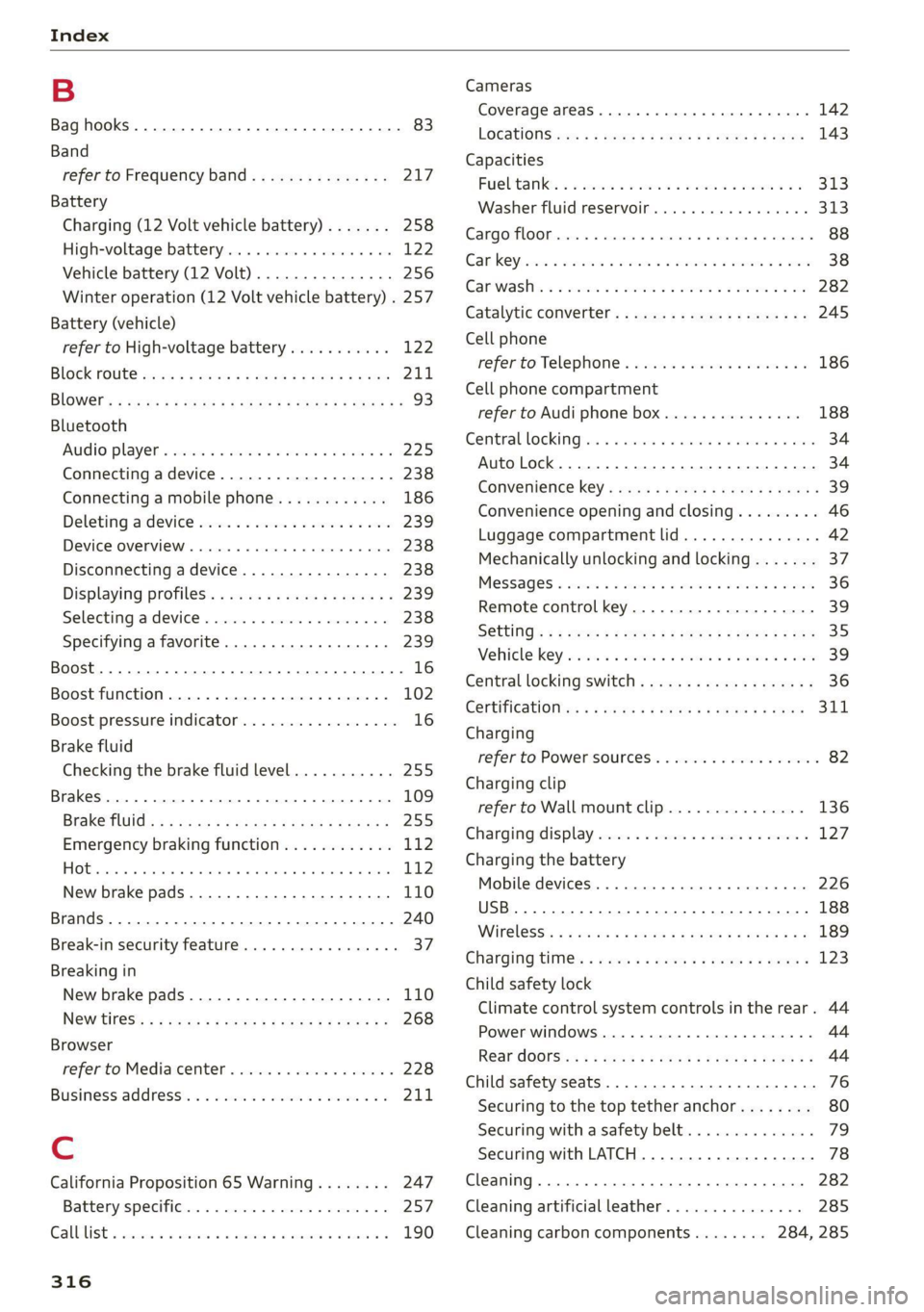
Index
B
Bag hooks .......... 0... c eee eee eee ee 83
Band
refer to Frequency band............... 217
Battery
Charging (12 Volt vehicle battery)....... 258
High-voltage battery...............0.. 122
Vehicle battery (12 Volt)............0.8. 256
Winter operation (12 Volt vehicle battery) . 257
Battery (vehicle)
refer to High-voltage battery........... 122
BLOCK FOULS caus + & eau o » Rees ov REwW 3 eR 211
BlOWEP's = sours = © egups 3 ¥ saws 7 e Seon ze pees ze 93
Bluetooth
‘Audio player « sii 3 6 wes ao nese ee wenn o 225
Connecting adevice...............00-. 238
Connecting a mobile phone............ 186
Deleting
adevice................0000- 239
Device overview... . 6... 00. eee eee eee 238
Disconnecting a device................ 238
Displaying Profiles « caves x « xayre a 2 waurs a « 239
Selecting adevice.................00. 238
Specifying a favorite.............0000- 239
Boost... 2... cece 16
Boost function.................000000. 102
Boost pressure indicator................. 16
Brake fluid
Checking the brake fluid level........... 255
Brakes... 2... eee 109
Brake tluidis « « mays ¢ gave © saan ¢ 8 meres F 255
Emergency braking function............ 112
HOt. cece eee eee eee 112
New brake pads..............----000-- 110
Brands............2..02. 000 e cece ee 240
Break-in security feature..............00- 37
Breaking in
New brake pads..............---000-- 110
New tires’: « + soe « + cagme 5 2 eeuwe oe ae oo 268
Browser
refer to Mediacenter.................. 228
Business. addressii. : viii 6 < aes eo soaom oo 211,
Cc
California Proposition 65 Warning........ 247
Battery specific.................-000. 257
CALGUISE & cciwass so cusetie oo examen sa avawans & @ wesw a 190
Cameras
Coverage areaS.... 6... eee eee eee 142
LOGALIONS ccm s 2 wom « § aoe 5s REE 3s eee 143
Capacities
Fuel tant. so wesc oo seems o wand ov sae 2 2 313
Washer fluid reservoir.............0005 313
Carg@Plembiscns x x cscacn wx rans we re oe Moa 88
Cat KO Ybiwiue © sveveware o seam @ 6 anccoms a 8 asuwone ww vomeT 38
Gar WaShiy 2 aicscs ss swcna © & swam wo orem © oe 282
Catalytic converter.............--00000- 245
Cell phone
refer to Telephone............00eee eae 186
Cell phone compartment
refer to Audi phone box............... 188
Central lockingeins «+ ccs + 2 ances 0 comsens « & ose 34
Auto Lock... 0... cece eee eee eee eee 34
Convenience key...... 0... eseee eevee 39
Convenience opening and closing......... 46
Luggage compartment lid.............0. 42
Mechanically unlocking and locking....... 37
Messages « anise «seas 3 3 mara @ wavimin © wave 36
Remote control key.............--.00-- 39
SECUG: o x sure x = swe & a eR Fe ee 2 5 ee 35
Vehicle key sais xs cers se namie 6 ceri wo rete 39
Central locking switch.............000005 36
COrtifiCatienins « « waws « « eews 4 e cows 9 o eee 311
Charging
refer to Power sourceS..............00-- 82
Charging clip
referto Wall mount clip............... 136
Charging display ccc. «eves ao eases oo oes x 127,
Charging the battery
Mobile devices. ..........00 cece eee 226
USB... eee 188
Wirelessi: = » aeons « 2 waves x 5 wayne 4 & Haus 8 = 189
GharGiniG titties: « sass = 2 neue x = neem & o weer 2 123
Child safety lock
Climate control system controls in the rear. 44
Power windows............00000e eee ee 44
Rear dOGrsion x s anan ¢ a ecwe i Kamen ¢ BORE Ee 44
Child safety seats........ 0... cece eee eee 76
Securing to the top tether anchor........ 80
Securing with a safety belt.............. 79
Securing with LATCH.............000005 78
Cleaning... 0... . cece eee 282
Cleaning artificial leather............... 285
Cleaning carbon components........ 284, 285
Page 320 of 332
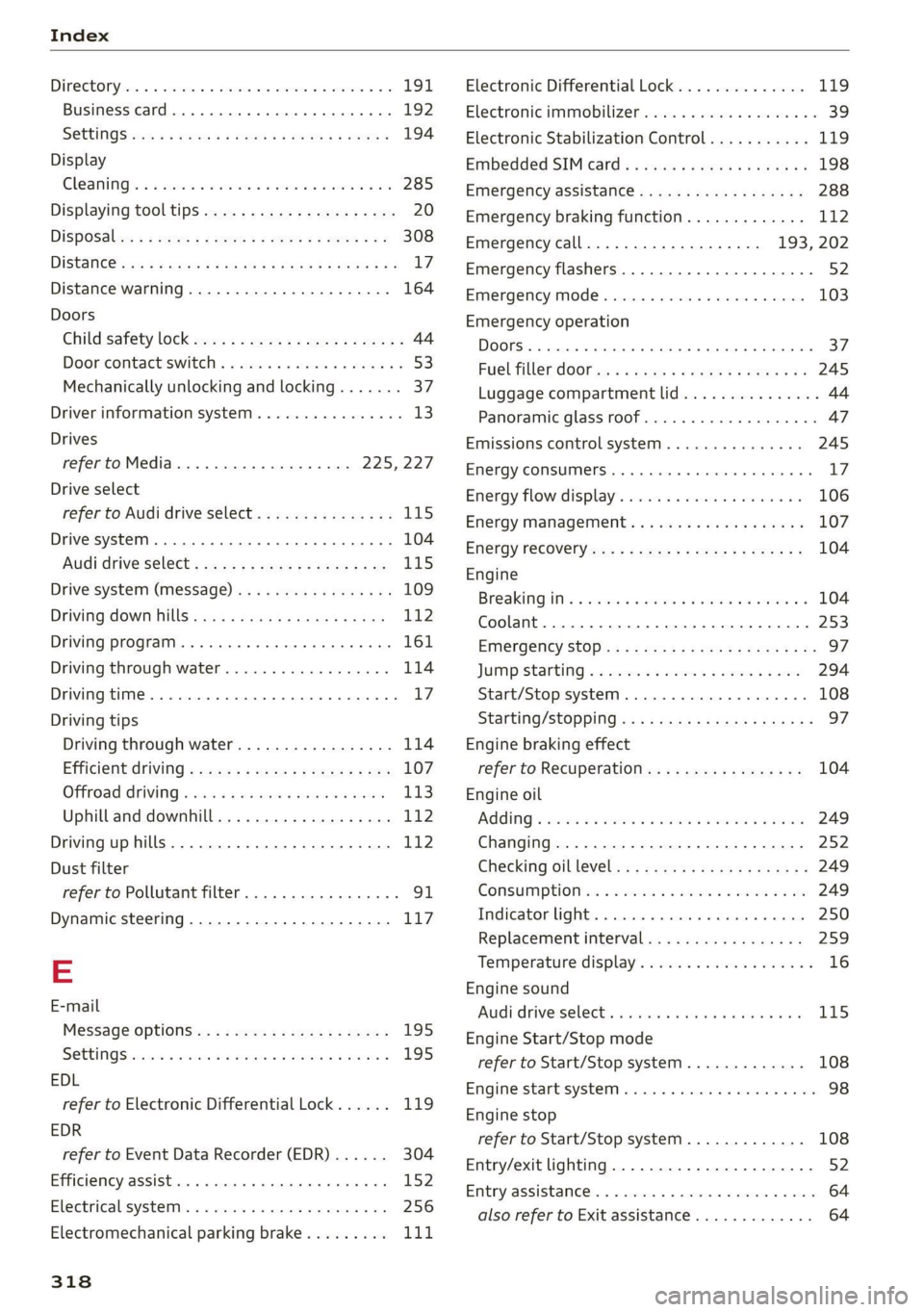
Index
Diteetor yess 6 s cscaves ws sacewes v6 aneims v © sxeams 6 0 191
Business card... 6... eee eee eee 192
SCttinGSanww + wuwn x 3 mee ee ReUeE SE eee & 194
Display
Cleaning’s « «sew 2s seas © 2 eww vo ene woe 285
Displaying tooltips..................0.. 20
DispoSaliv: ss seus s ¢ sees av wees vv teen swe 308
DIStaHCO sas = » saeas + ¢ sacee @ 2 Sacee 7 a Hae Ya: 17
Distance warning............0.see ee eee 164
Doors
Child safety lock 22s ¢ 2 eee es geen ss eees 44
Doorcontactiswiteh « « sisi ss wes «6 mewn 2 6 53
Mechanically unlocking and locking....... 37
Driver information system................ 13
Drives
refer to Media................-4- 225,227
Drive select
refer to Audi drive select............... 115
Drive systeM... 0... cee eee eee 104
(Audi drive’select s coac 2 ¢ cawe ¢ s gence so ae LIS
Drive system (message)...............-. 109
Driving down hills............0.--00 ee 112
Driving program... .. 6... cee ee eee eee eee 161
Driving through water................5. 114
DGiVIMNG BIER. « » exesene « 0 ssinsocie © of emetinze © ovation» « 17
Driving tips
Driving through water.............00-- 114
Efficient driving » sxc. x» see: ss eee se eee 107
GFRrOAGNARIVING 2 cxcwie & wromenow » aresum « ¥ anaie 113)
Uphill and downhill................... 112
Drivinguphills................0...005. 112
Dust filter
refer to Pollutant filter..............00. 91
Dynamic steering...............0..000. 117
=
E-mail
Message Options: « < seas 5 = was 5 v ween s 195
SettinQSwasiess + wen ee aaron so meena & @ eae 8 195
EDL
refer to Electronic Differential Lock...... 119
EDR
refer to Event Data Recorder (EDR)...... 304
Efficiency assist... 0... eee ee 152
Electrical system. .........-.0 02 e ee eee 256
Electromechanical parking brake......... 111
318
Electronic Differential Lock.............. 119
Electronic immobilizer cvs. 6. ow sa sia ves 39
Electronic Stabilization Control........... 119
Embedded SIM: card « « secu + 2 gaye 4 2 ese « ¢ 198
Emergency assistance..............-.-. 288
Emergency braking function............. 112
Emergency call..............000.. 193, 202
Emergency flashers.............--..00-- 52
Emergency mode.............--.000005 103
Emergency operation
Doors... 2. eee eee B7
FUG TINLERAGOr ss « 2 wows x o yawn a a wows 4 ee 245
Luggage compartment lid............... 44
Panoramic glass roof...............000. 47
Emissions control system.............05 245
ENergy CONSUMENS i 6 6 ess © reseeee e eiee e o 8 17
Energy flowdisplay’s seas: o 6 cscs 2 6 eevee s vv 106
Energy management............--.00ee 107
Energy TECOVErYcews 5 s eave + o ewig + 5 ewe & 104
Engine
Breakingiinis « csv. + 2 ewe 2 6 wwe a 6 aes a 104
Coolant............... 00. cece 253
Emergency Stop ss « s ee.8 se ees s sees es we 97
JUMP Starting « = sce 5 x secre © 2 seweEe vo sore 294
Start/Stop system ........ eee eee ee eee 108
Starting/stopping.................0 ae 97
Engine braking effect
refer to Recuperation................. 104
Engine oil
AGING « seswies «vere © & oxaners a o Sensis ve oTIEENs 249
Changing.............. eee ee eee eee 252
Checking GILlEVEl: x = sase ys sae a 3 Beam 3 249
CONSUMPTION & & swe « 0 ors = 5 semen wo ome 249
Indicator light... 2... cece eee eee eee 250
Replacement interval................. 259
Temperature display................... 16
Engine sound
Audi driverselecti, «sisi s+ iusiest a a samen a LI5
Engine Start/Stop mode
refer to Start/Stop system............. 108
Engine Start:syStei vceca « cose o 6 econ @ x anon 98
Engine stop
refer to Start/Stop system............. 108
Entry/exit lighting................-.000- 52
EMtry ASSiStamGes. « « sesess 6 « samme © a samme oo mace 64
also refer to Exit assistance............. 64