Socket AUDI Q5 2021 Owner´s Manual
[x] Cancel search | Manufacturer: AUDI, Model Year: 2021, Model line: Q5, Model: AUDI Q5 2021Pages: 332, PDF Size: 118.86 MB
Page 8 of 332
Quick access
Quick access
Cockpit
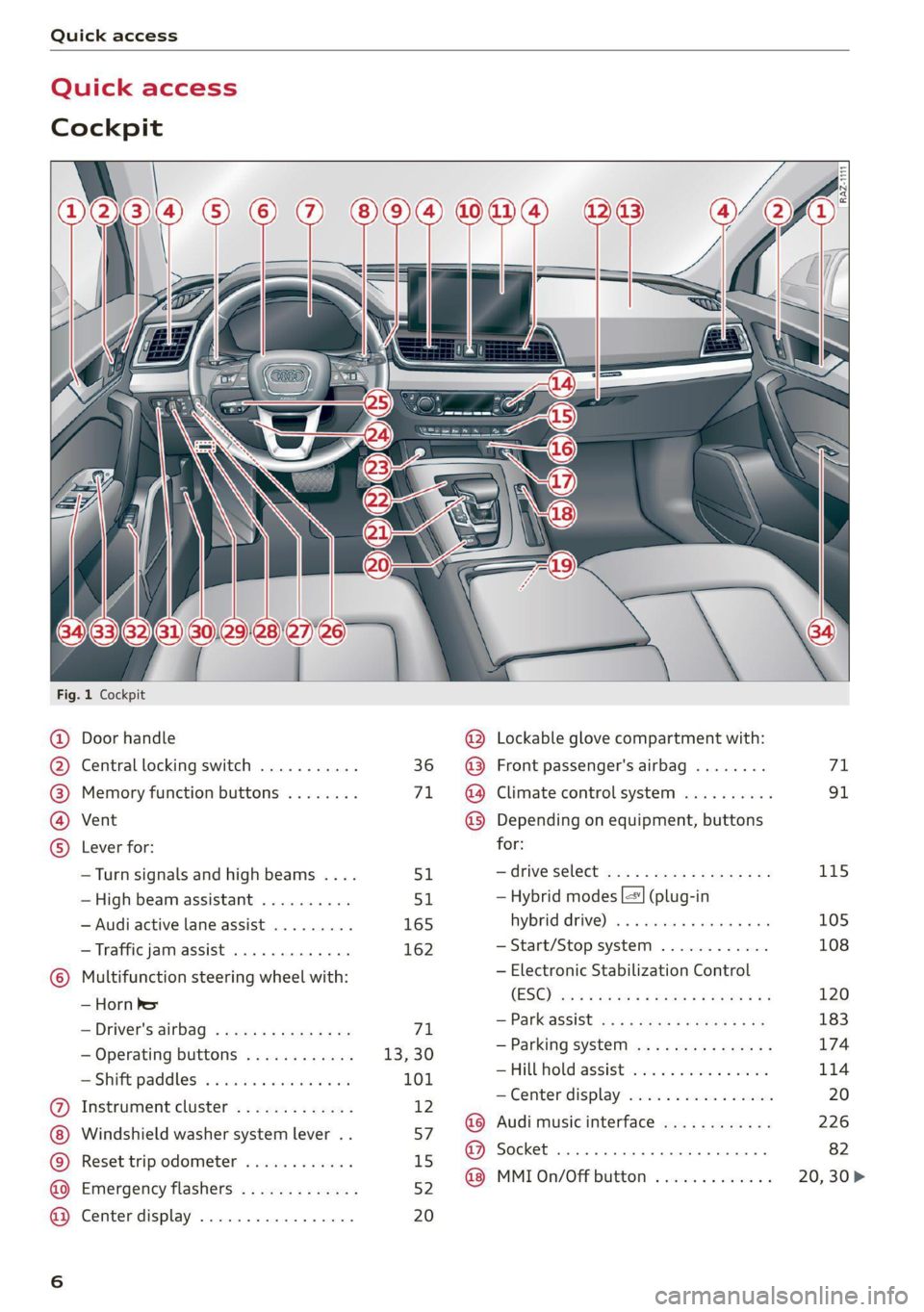
Fig. 1 Cockpit
@ @ @ @ ©
©
OOOO
Door handle
Central locking switch ...........
Memory function buttons ........
Vent
Lever for:
—Turn signals and high beams ....
—High beam assistant ..........
— Audi active lane assist .........
— Traffic jam assist .............
Multifunction steering wheel with:
— Horn be
— Driver's airbag ...............
— Operating buttons ............
= Shift paddles: « « coi e ewes sv ove
Instrument cluster .............
Windshield washer system lever ..
Reset trip odometer ............
Emergency flashers .............
Center display .................
51
165 162
71
13,30
101
12
57
15
52
20
@ Lockable glove compartment with:
@ Front passenger's airbag ........
@ Climate control system ..........
@ Depending on equipment, buttons
for:
—drive select ...............0..
— Hybrid modes |=] (plug-in
hybrid drive) ss i scsi ov sven 6 oa
— Start/Stop system ............
— Electronic Stabilization Control
(ESO) ca ss wuss 5 4 Hema a i eos a ee
— Parkeassist ws 3 ¢ avo » x eeay a y me
— Parking system ...............
Hill Hold assist ves: es sseose. 2 animes
—Center display .............00.
@ Audi music interface ............
@ Socket ......... 0... c eee eee
@ MMI On/Off button .............
115 105 108 120
183
174
114
Page 84 of 332
Storage and convenience
Storage and convenience
Power sources
When the ignition is switched on, you may be
able to use multiple power sources for external
devices, depending on the vehicle equipment.
12 volt sockets
You can connect electrical accessories to the 12
volt sockets. The power usage from the sockets
must not exceed a total of 120 watts. Do not
connect multiple devices to the sockets in the ve-
hicle at the same time.
The 12 volt sockets are labeled with the 12V
symbol. They are located in the front center con-
sole, in the rear* and on the side trim panel in the
luggage compartment”*.
USB ports
Applies to: vehicles with USB port
You can charge mobile devices using the USB
ports. The USB ports are labeled with the «> or
[4 symbol or CHARGE ONLY.
Z\ WARNING
— To reduce the risk of fatal injury, store all
connected devices securely when driving so
that they do not move around inside the ve-
hicle when braking or in the event of an acci-
dent.
— Incorrect usage can lead to serious injuries
or burns. To reduce the risk of injuries, never
leave children unattended in the vehicle
with the vehicle key.
@® Note
— Read the operating manuals for the con-
nected devices.
—To reduce the risk of damage to the vehicle
electrical system, never attempt to charge
the vehicle battery by connecting accesso-
ries that provide power to the power sour-
ces.
— Do not connect any device whose network
class (voltage) does not match the network
class designed for the socket.
82
— Disconnect the connectors from the power
sources carefully to reduce the risk of dam-
aging them.
G) Tips
Do not connect any other devices to the sock-
ets when using the compressor* provided by
the factory > page 288. The power consump-
tion in the sockets may be temporarily ex-
ceeded when using the compressor*.
Cup holders
Applies to: vehicles with cup holders
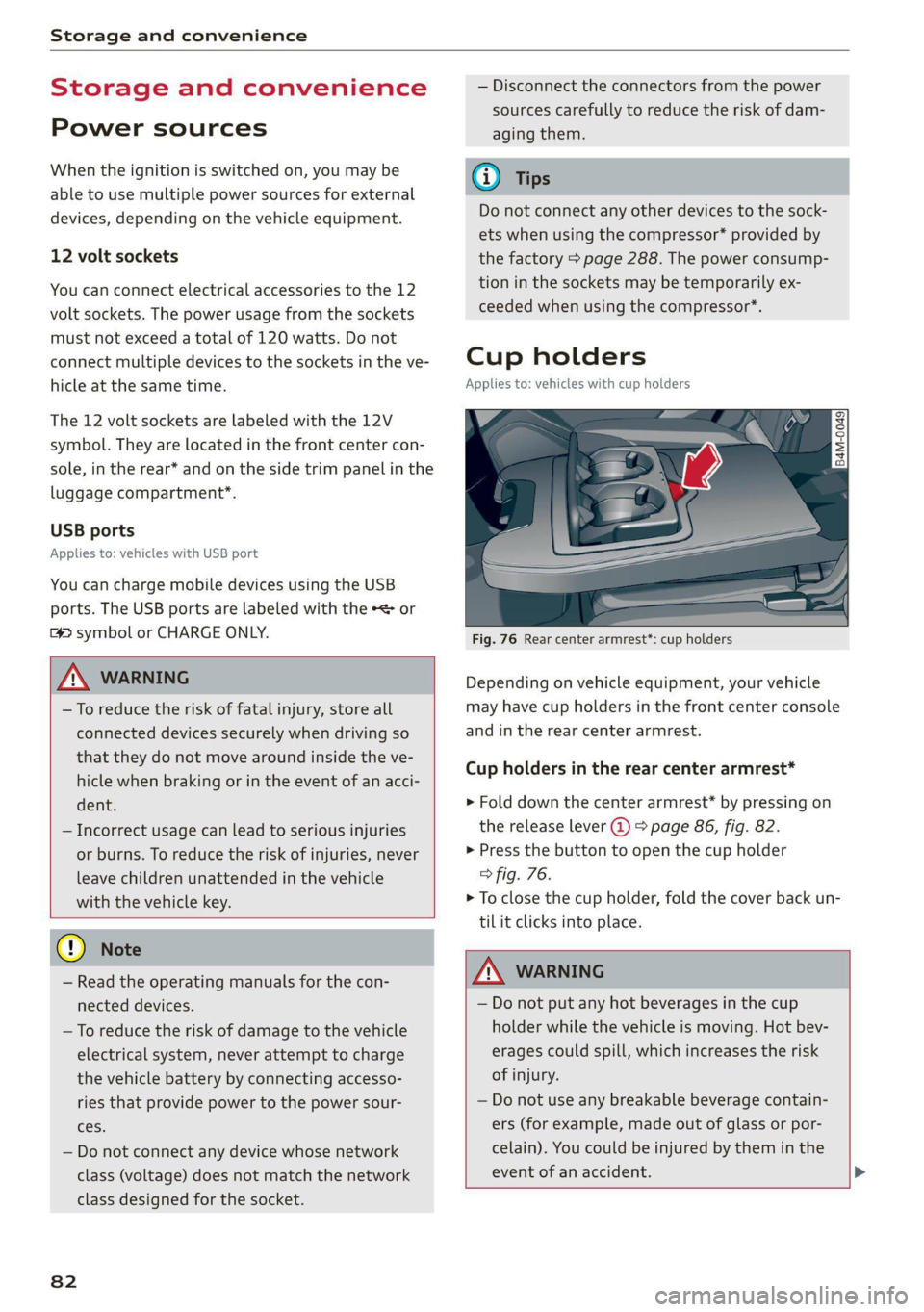
Fig. 76 Rear center armrest*: cup holders
Depending on vehicle equipment, your vehicle
may have cup holders in the front center console
and in the rear center armrest.
Cup holders in the rear center armrest*
> Fold down the center armrest* by pressing on
the release lever @) > page 86, fig. 82.
> Press the button to open the cup holder
> fig. 76.
> To close the cup holder, fold the cover back un-
til it clicks into place.
A WARNING
— Do not put any hot beverages in the cup
holder while the vehicle is moving. Hot bev-
erages could spill, which increases the risk
of injury.
— Do not use any breakable beverage contain-
ers (for example, made out of glass or por-
celain). You could be injured by them in the
event of an accident. >
Page 91 of 332

80B012721BA
Storage and convenience
weight of the roof rack, the attachments and
the cargo you are carrying. However, you must
also note the permitted load of the carrier sys-
tem being used.
ZA WARNING
— Follow the installation instructions provided
with the roof rack system. If you do not se-
cure the roof rack system and objects on the
roof correctly, they could come loose from
the vehicle and cause an accident.
— The risk of an accident increases when using
a roof rack system, because it changes the
driving characteristics by shifting the center
of gravity and/or the increasing the surface
area exposed to wind. You may need to
adapt your driving style and speed to the
current conditions. Audi recommends that
you do not drive faster than 80 mph (130
km/h).
— Distribute the cargo evenly on the roof rack
and do not exceed the maximum width or
the maximum total roof load weight.
— Before every trip, all bolts and connections
on the roof rack must be checked. Tighten
them if necessary and recheck them regular-
ly. If you do not do this, there is a higher risk
of
the roof rack or the attachments loosen-
ing or falling off.
@) Note
— If you use other roof luggage rack systems
or do not install the roof racks as specified,
then any damage to the vehicle is not cov-
ered by the warranty. Carefully follow the
assembly and installation instructions in-
cluded with the roof rack carrier system.
—To reduce the risk of damage, you must re-
move the roof rack and attachment before
taking your vehicle through an automatic
car wash.
— Make sure that the luggage compartment
lid and the panoramic glass roof* do not
come into contact with objects on the roof
when they are open.
(@) For the sake of the environment
Energy usage will increase because of the in-
creased wind resistance. Remove the roof rack
when you are no longer using it.
Installing the roof rack
Applies to: vehicles with roof racks supplied by the factory
BFY-0041
Fig. 90 Roof rail: installing a roof rack
The roof rack set consists of a front and rear roof
rack, the cover profile and a socket wrench. On
the inner side of the roof rail, there are two holes
for the rear roof rack. To prevent the front and
rear roof racks from being switched during instal-
lation, there are three holes on the inner side of
the left front roof fail, and two holes on the inner
side of the right roof rail > page 88, fig. 89.
> Before mounting the roof rack, open the cap (@)
upward.
» Use the socket wrench (2) to loosen the left and
right screw in the direction of @ until resist-
ance is felt. Make sure the arrow on the socket
wrench and the arrow on the screw line up ex-
actly.
> Clean the rubber washers (4) and the roof rail
around the mounting points.
> Carefully place the roof rack over the holes in
the roof rail. Make sure the sticker is on the left >
89
Page 92 of 332
Storage and convenience
side of the vehicle and the imprinted arrow
points in the direction of travel.
> Place the pins @) into the holes. The claw fas-
tener G) must engage into the edge of the roof
rail. Make sure the rubber washers (4) lie flat on
the roof rail.
> Tighten the screw in the direction of (8) using
the socket wrench. Make sure the arrow on the
socket wrench and the arrow on the screw line
up exactly. The required tightening specifica-
tion is 4.5 ft lbs (6 Nm).
> Repeat these steps for the other mounting
points for the roof rack.
Z\ WARNING
Applies to: vehicles with roof racks supplied
by the factory: when installing the roof rack
supplied by the factory on the roof rail, sensor
technology is used to adjust the ESC to any
possible change in the vehicle's center of
gravity resulting from the load. This does not
occur when using other roof rack systems, so
the risk of an accident will increase.
Installing the attachments
Applies to: vehicles with roof racks supplied by the factory
> Remove the cap ©) to mount attachments on
the roof rack > page 89, fig. 90.
> Slide the attachment into the T-groove (7).
> Tighten the attachment according to the roof
rack installation instructions.
> Close the cap ©.
Installing the cover profile
Applies to: vehicles with roof racks supplied by the factory
> After you have mounted the attachments, seal
the openings in the T-groove (7) > page 89,
fig. 90 with the cover profile (8). The cover pro-
file must not be installed under the caps.
> If you do not want to use the attachment, seal
the whole T-groove (%) with the cover profile @).
> If necessary, shorten the cover profile (8) so
that it matches the length of the open sections
of the T-groove. The caps © must be closed.
Page 105 of 332
80B012721BA
Driving
Manually releasing the parking lock
@
B4M-0189
@
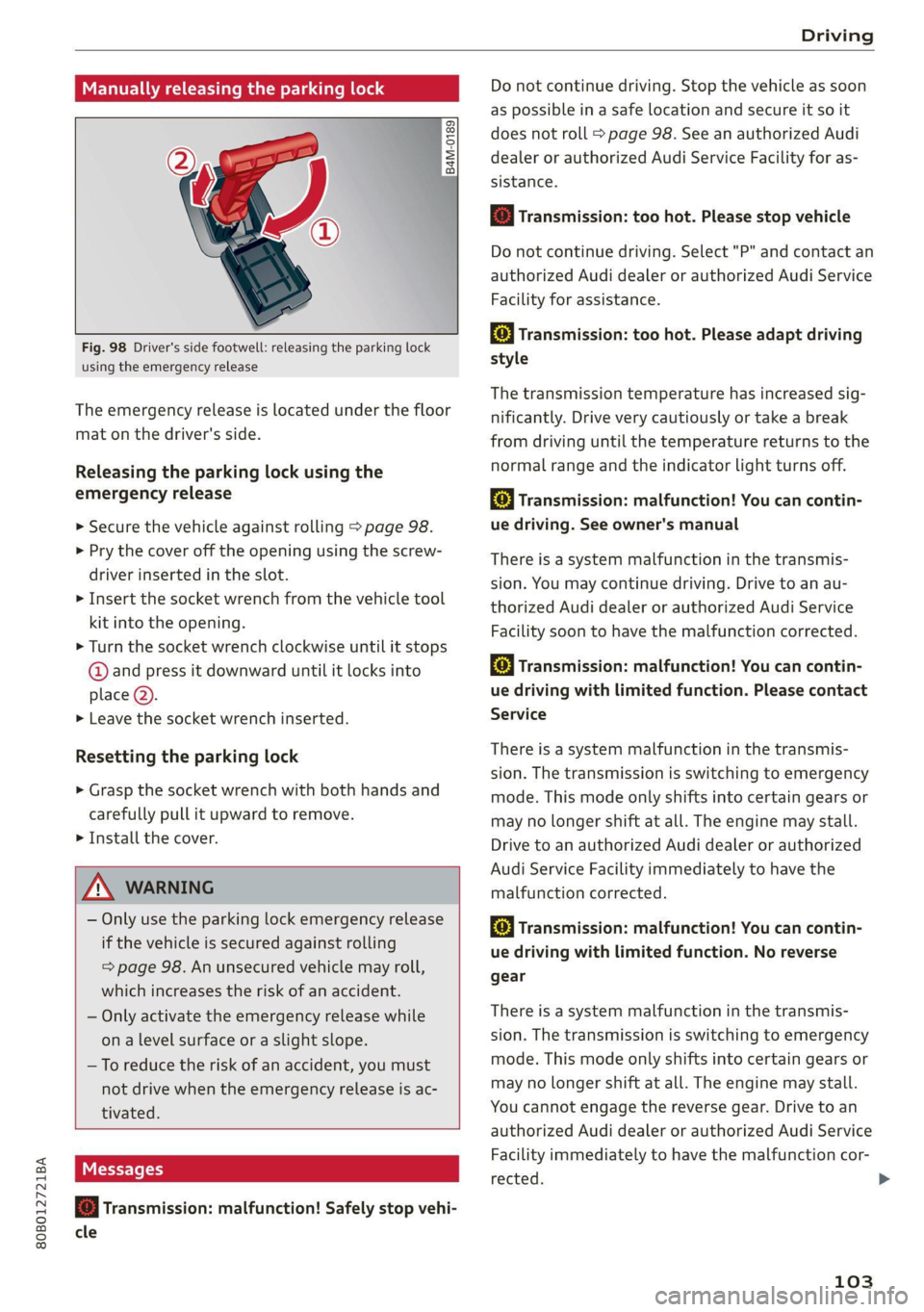
Fig. 98 Driver's side footwell: releasing the parking lock
using the emergency release
The emergency release is located under the floor
mat on the driver's side.
Releasing the parking lock using the
emergency release
> Secure the vehicle against rolling > page 98.
> Pry the cover off the opening using the screw-
driver inserted in the slot.
> Insert the socket wrench from the vehicle tool
kit into the opening.
> Turn the socket wrench clockwise until it stops
@ and press it downward until it locks into
place @).
> Leave the socket wrench inserted.
Resetting the parking lock
> Grasp the socket wrench with both hands and
carefully pull it upward to remove.
> Install the cover.
ZA WARNING
— Only use the parking lock emergency release
if the vehicle is secured against rolling
= page 98. An unsecured vehicle may roll,
which increases the risk of an accident.
— Only activate the emergency release while
on a level surface or a slight slope.
—To reduce the risk of an accident, you must
not drive when the emergency release is ac-
tivated.
i] Transmission: malfunction! Safely stop vehi-
cle
Do not continue driving. Stop the vehicle as soon
as possible in a safe location and secure it so it
does not roll > page 98. See an authorized Audi
dealer or authorized Audi Service Facility for as-
sistance.
[Gi Transmission: too hot. Please stop vehicle
Do not continue driving. Select "P" and contact an
authorized Audi dealer or authorized Audi Service
Facility for assistance.
fs] Transmission: too hot. Please adapt driving
style
The transmission temperature has increased sig-
nificantly. Drive very cautiously or take a break
from driving until the temperature returns to the
normal range and the indicator light turns off.
[&] Transmission: malfunction! You can contin-
ue driving. See owner's manual
There is a system malfunction in the transmis-
sion. You may continue driving. Drive to an au-
thorized Audi dealer or authorized Audi Service
Facility soon to have the malfunction corrected.
[@] Transmission: malfunction! You can contin-
ue driving with limited function. Please contact
Service
There is a system malfunction in the transmis-
sion. The transmission is switching to emergency
mode. This mode only shifts into certain gears or
may no longer shift at all. The engine may stall.
Drive to an authorized Audi dealer or authorized
Audi Service Facility immediately to have the
malfunction corrected.
[@] Transmission: malfunction! You can contin-
ue driving with limited function. No reverse
gear
There is a system malfunction in the transmis-
sion. The transmission is switching to emergency
mode. This mode only shifts into certain gears or
may no longer shift at all. The engine may stall.
You cannot engage the reverse gear. Drive to an
authorized Audi dealer or authorized Audi Service
Facility immediately to have the malfunction cor-
rected.
103
>
Page 125 of 332
80B012721BA
High-voltage system
Charging the high-voltage battery
Introduction
Applies to: vehicles with plug-in hybrid drive
The following options are available to charge the
high-voltage battery:
Charging method Charging cable
Charge with household and industrial alternat-
ing current (AC) sockets
Audi e-tron compact charging system > page 131
Charge at public alternating current (AC) charg-
ing stations
Charging station cable
Audi recommends using alternating current (AC)
to charge the high-voltage battery at industrial
sockets, charging stations, or a wallbox. This will
allow you to achieve higher efficiency and a con-
siderably shorter charging time when compared
to charging with a household socket.
Only charge at household sockets with the
Audi e-tron compact charging system under spe-
cial circumstances when it is not possible to
charge at an industrial alternating current (AC)
socket or at a public alternating current (AC)
charging station.
High-voltage batteries age over time, which re-
duces the available range. High-voltage batteries
can also age because of how they are used: fre-
quently charging the high-voltage battery com-
pletely accelerates the aging of the battery and
reduces the available range.
Charging time
The duration of the charging process may vary
based on the following factors:
— Sockets being used (household or industrial
sockets)
— Country-specific system voltage, current
strength and number of available phases
— Household connection
—The value set for the charging power level on
the Audi charging system control unit
— Fluctuations in the system voltage
— The temperature outside the vehicle
— The temperature of the high-voltage battery
and the Audi charging system control unit.
— Settings for the climate control inside the vehi-
cle
— Current capacity of the charging connector
— Whether the ignition is on or off
Important safety precautions
Applies to: vehicles with plug-in hybrid drive
Z\ WARNING
Short circuiting, electric shock, explosions,
fire, and severe burns can result from charg-
ing the battery incorrectly (for example by
disregarding general safety precautions, using
unsuitable or damaged sockets and charging
cables, or charging with unsuitable electrical
equipment) and can lead to serious and fatal
injuries.
— Do not charge using sockets/electrical
equipment that is clearly damaged or instal-
led incorrectly.
— Never use charging equipment that is clearly
damaged and/or dirty. Check the charging
equipment for damage before every use.
— Never modify or repair any electrical compo-
nents, especially the high-voltage system.
— Never charge in areas at risk for explosions.
The components in the charging equipment
can trigger sparks, which can cause flamma-
ble or explosive fumes to ignite. To reduce
the risk of explosions, especially in garages,
make sure the Audi e-tron charging system
control unit is at least 19 inches (50 cm)
above the floor when charging.
— Never use the charging equipment with an
extension cord, a cable reel, a power strip,
123
Page 126 of 332
High-voltage system
or an adapter, for example, a travel adapter
or timer.
— Do not touch the contacts on the vehicle
charging port or charging equipment.
— Do not insert any objects in the vehicle
charging port or in the charging equipment.
— Always protect the sockets and connections
from water, moisture and other fluids.
— Only use the charging equipment provided
by the factory or the charging station cable.
ZA\ WARNING
Applies to: Audi charging systems
Sockets that are installed incorrectly can
cause electric shock or fire when charging the
high-voltage battery using the vehicle charg-
ing connection.
— Read all information and safety precautions
for Audi charging systems before using
them.
— Monitor the Audi charging system if it is be-
ing used near children.
— Installation and setup of the household con-
nection for Audi charging systems may only
be performed by a qualified electrician. The
qualified electrician is thereby responsible
for adhering to applicable standards and
regulations.
— Make sure that the household socket is
grounded and shielded from water.
— If Audi charging systems do not function ac-
cording to the specifications in the operat-
ing manual, they must not be used. Contact
an authorized Audi dealer or authorized
Audi Service Facility.
— Audi charging systems are intended for use
in private and semi-private areas (for exam-
ple, private property and company parking
lots). Depending on the country where the
vehicle is operated, charging with a mode 2
charging cable (meaning charging with the
Audi charging system) may be prohibited in
public areas. Contact an authorized Audi
dealer or authorized Audi Service Facility for
more information.
— Operate the Audi charging systems in power
networks that are properly grounded. It can-
not be used with non-grounded power net-
works (such as IT networks).
— When charging the high-voltage battery us-
ing household/industrial sockets, the elec-
trical installation can be used at full capaci-
ty. Having a qualified electrician regularly in-
spect the electrical installations that are
used for charging is recommended.
- If possible, disconnect Audi charging sys-
tems from the power network during a
thunderstorm.
— Never submerge the Audi charging systems
or the connectors in water.
— Audi charging systems must only be cleaned
when the control unit is completely discon-
nected from the power supply and from the
vehicle. Use a dry towel to clean.
— Audi charging systems are only intended for
use on Audi vehicles and vehicles within the
Volkswagen Group. Using the devices on
vehicles made by another manufacturer is
not authorized.
124
@) Note
— Severely draining the high-voltage battery
can damage it. Once a O mi (0 km) electric
range is displayed, charge the high-voltage
battery within two months. If the stationary
time is unknown with the electric range at 0
mi (0 km), charge the high-voltage battery
immediately. Even if the vehicle is not used,
the high-voltage battery charge level will
naturally reduce over time. To avoid a total
battery drain during long periods without
use (more than one year), charge the high-
voltage battery to the highest level possible
before discontinuing driving it.
— Make sure that you always use the correct
charging equipment for the country in
which it is being used. Contact an author-
ized Audi dealer or authorized Audi Service
Facility for more information.
(i) Tips
— Your vehicle can only be charged at charging
stations that meet the requirements in the
respective country and meet the following
standards, at a minimum:
Page 127 of 332
80B012721BA
High-voltage system
— GB/T 18487.1 and GB/T 20234 (China)
— IEC 61851 and IEC 62196 (Europe)
— SAE J1772 (North America, Japan)
— You can use your Audi charging system if
there is a household or industrial connec-
tion available at the charging station.
@ Tips
Applies to: Audi charging systems
— For an uninterrupted charging process, we
recommend only charging using sockets
that are connected to a separately protected
circuit.
— It is recommended to use Audi charging sys-
tems in the wall mount clip* during opera-
tion. If this is not possible, always position
Audi charging systems on a secure surface
during the charging process > A\.
—To reduce the risk of overheating during op-
eration, do not place Audi charging systems
in direct sunlight for long periods of time. If
the control unit is overheated, the charging
process is automatically paused until the
temperature has lowered back within the
normal range.
Charging
Applies to: vehicles with plug-in hybrid drive
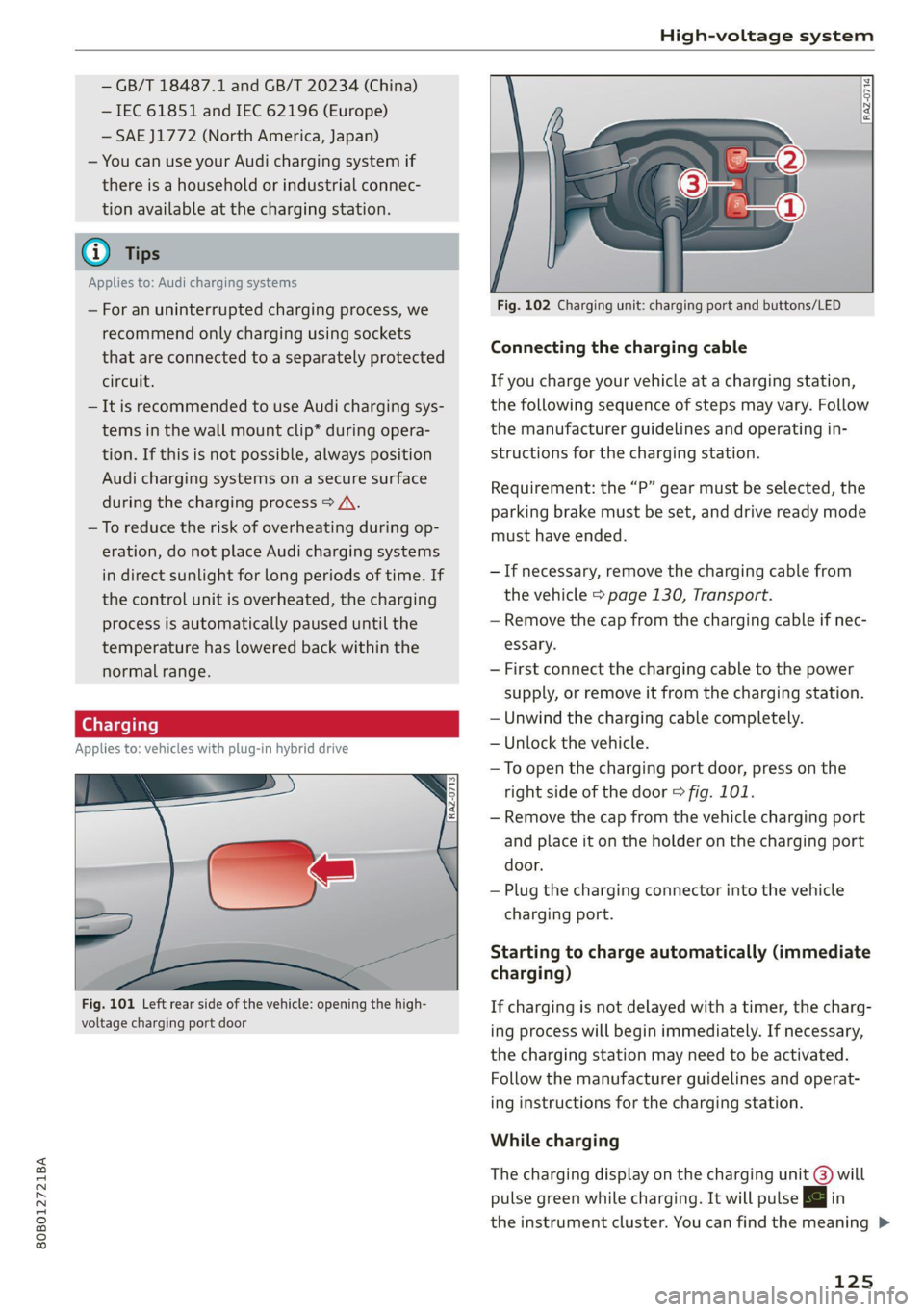
Fig. 101 Left rear side of the vehicle: opening the high-
voltage charging port door
Fig. 102 Charging unit: charging port and buttons/LED
Connecting the charging cable
If you charge your vehicle at a charging station,
the following sequence of steps may vary. Follow
the manufacturer guidelines and operating in-
structions for the charging station.
Requirement: the “P” gear must be selected, the
parking brake must be set, and drive ready mode
must have ended.
— If necessary, remove the charging cable from
the vehicle > page 130, Transport.
— Remove the cap from the charging cable if nec-
essary.
— First connect the charging cable to the power
supply, or remove it from the charging station.
— Unwind the charging cable completely.
— Unlock the vehicle.
— To open the charging port door, press on the
right
side of the door > fig. 101.
— Remove the cap from the vehicle charging port
and place it on the holder on the charging port
door.
— Plug the charging connector into the vehicle
charging port.
Starting to charge automatically (immediate
charging)
If charging is not delayed with a timer, the charg-
ing process will begin immediately. If necessary,
the charging station may need to be activated.
Follow the manufacturer guidelines and operat-
ing instructions for the charging station.
While charging
The charging display on the charging unit @) will
pulse green while charging. It will pulse |<} in
the instrument cluster. You can find the meaning >
125
Page 128 of 332
High-voltage system
of the possible charging display colors under
=> page 127.
The charging connector is locked while charging
and cannot be removed.
If the driver's door is opened while the ignition is
switched off, the current battery charge level and
the high-voltage battery range will be displayed
in the instrument cluster. If charging is in prog-
ress, the remaining charging time will also be
displayed.
Immediate charging and timer charging
You can switch between the immediate charging
@ and charging timer @ options during the
charging process if a charging timer is set
= page 127. Press the corresponding button to
do this.
Ending the charging process
You can interrupt the charging process at any
time.
— Unlock the vehicle or press the @/@) button
when the vehicle is unlocked, and the LED will
turn on.
— Remove the charging connector. If the charging
connector is not removed within 30 seconds, it
will automatically relock and the charging proc-
ess may continue.
— Put the cap back on the charging port.
— Close the charging port door.
— Disconnect the charging cable from the power
supply if necessary or return it securely to the
charging station.
— Install the protective caps on the charging ca-
ble again.
— Ifyou are transporting the charging cable in
the vehicle, store it securely > page 130.
If the charging connector cannot be removed,
you must unlock it manually > page 128.
If you cannot disconnect the charging connector
from the charging station, authenticate yourself
126
again at the charging station and then try again
to disconnect the charging connector. If you still
cannot disconnect the charging connector from
the charging station, contact the charging sta-
tion operator.
ZA WARNING
— Do not disconnect the charging cable from
the socket or the vehicle charging port while
the vehicle is charging. End the charging
process before removing the charging cable
from the socket in order to reduce the risk of
damaging the connector contacts from
sparks.
—If the charging unit is damaged, do not
charge using the charging port to reduce the
risk of injury.
— If the charging unit is damaged or the
charging port door cannot close or is miss-
ing, drive immediately to an authorized Audi
dealer or authorized Audi Service Facility
and have the malfunction corrected to re-
duce the risk of injury.
C) Note
If you drive with the charging unit open, both
the charging port door and the electronics in-
stalled behind it could be damaged. Check
each time after charging if the port door is
locked before you start driving the vehicle.
@ Tips
— If the parking brake is set, it could create
noises
when the charging connector is con-
nected.
— Remove ice and snow in the charging unit
using a hand brush and solvent-free deicing
spray.
— The vehicle radio and TV systems may have
limited reception when charging the vehicle.
Page 129 of 332
80B012721BA
High-voltage system
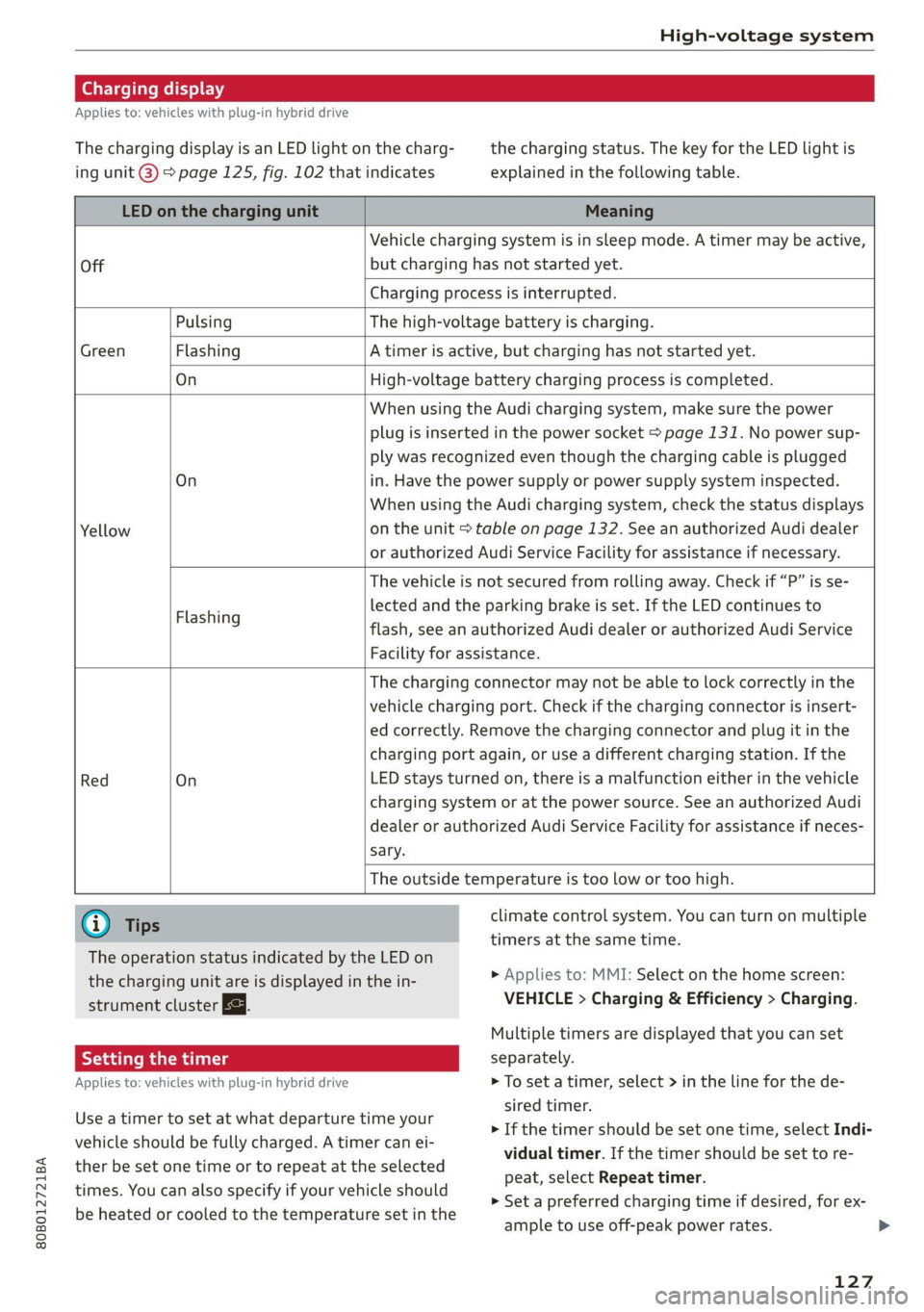
Charging display
Applies to: vehicles with plug-in hybrid drive
The charging display is an LED light on the charg- the charging status. The key for the LED light is
ing unit @) page 125, fig. 102 that indicates explained in the following table.
LED on the charging unit Meaning
Vehicle charging system is in sleep mode. A timer may be active,
Off but charging has not started yet.
Charging process is interrupted.
Pulsing The high-voltage battery is charging.
Green Flashing A timer is active, but charging has not started yet.
On High-voltage battery charging process is completed.
When using the Audi charging system, make sure the power
plug is inserted in the power socket > page 131. No power sup-
ply was recognized even though the charging cable is plugged
On in. Have the power supply or power supply system inspected.
When using the Audi charging system, check the status displays
Yellow on the unit > table on page 132. See an authorized Audi dealer
or authorized Audi Service Facility for assistance if necessary.
The vehicle is not secured from rolling away. Check if “P” is se-
lected and the parking brake is set. If the LED continues to
flash, see an authorized Audi dealer or authorized Audi Service
Facility for assistance.
Flashing
The charging connector may not be able to lock correctly in the
vehicle charging port. Check if the charging connector is insert-
ed correctly. Remove the charging connector and plug it in the
charging port again, or use a different charging station. If the
Red On LED stays turned on, there is a malfunction either in the vehicle
charging system or at the power source. See an authorized Audi
dealer or authorized Audi Service Facility for assistance if neces-
sary.
The outside temperature is too low or too high.
@ Tips climate control system. You can turn on multiple
timers at the same time.
The operation status indicated by the LED on
the charging unit are is displayed in the in-
strument cluster Eg.
> Applies to: MMI: Select on the home screen:
VEHICLE > Charging & Efficiency > Charging.
Multiple timers are displayed that you can set
Applies to: vehicles with plug-in hybrid drive > To set a timer, select > in the line for the de-
sired timer.
> If the timer should be set one time, select Indi-
vidual timer. If the timer should be set to re-
peat, select Repeat timer.
> Set a preferred charging time if desired, for ex-
ample to use off-peak power rates. >
Use a timer to set at what departure time your
vehicle should be fully charged. A timer can ei-
ther be set one time or to repeat at the selected
times. You can also specify if your vehicle should
be heated or cooled to the temperature set in the
127