brakes AUDI Q7 2011 Owner´s Manual
[x] Cancel search | Manufacturer: AUDI, Model Year: 2011, Model line: Q7, Model: AUDI Q7 2011Pages: 392, PDF Size: 93.29 MB
Page 146 of 392

1111..__A_ d_a_ p,__ t_iv _ e_ C_r _u _ i_ s _e _ C_ o_ n_t _ r_ o _ L ___________________________________________ _
& WARNING
Following other v ehicles too clo sely increases the risk of a crash
and serious per sonal injury.
• Following other vehicles too closely, particularly at higher
speeds in crea ses the ri sk of collisions and seriou s personal injury.
• Setting short distances to the traffic ahe ad reduces the time
and distance avail able to bring your vehicl e to a safe stop and
makes it even more necessary to pay close attent io n to t raffic.
• Always select a speed and distance to traffic ahead that is safe
and appropriate under the pre vailing traffic, road , weathe r and
lighting conditions.
• Never rely on the distance control feature of ACC alone to
prevent rear-end collisions . Always be pr epared to brake and take
evasive action to a void collisions and other accident situations.
• Never allow the closing sp eed b etween you and other vehicles
to be so high that the Adapti ve Cruise Control may not be able to
s low your vehicle safely . If closing speed is too high, you must
apply the brakes yourself to reduce the r isk of a rear -end crash.
• Always select a greater following di stance to the vehicle ahead
on wet roads than on dry roads.
• Always read and h eed the information and WARNINGS=>
& in
"Description" on page 136.
(I] Tips
The distance setting is reset to the factory de fault DIS TANCE 3 the
next time the igni tion is t urn ed on .•
Driver information
Applies to veh icles: with Adapt ive Cruise Control
Displays in the instrument cluster
Depending on the driving situation, driver info rmation is
displayed in the instrument cluster.
@ Speedometer an d indicator lig ht disp lay
@ Display in the instrument cluster
Fig . 1 39 Ove rvi ew
in strum ent clu ster
@ Speedometer and indicator Light d isplay
Important information concerning vehicle operation w ith Adaptive
Cru ise Control is shown in d isp lay area @. The des ired speed yo u set
is indicated in the speedometer (LED lights around the edge).
T he in dicator lights show whe ther the system has detec ted a veh icle
traveli ng ahead .
@ Display in the instrument cluster
In display area ® informat ion from the navigation system * and the
t rip compu ter i s displayed in a dditio n t o info rmation abou t Ad aptive
Cru ise Contro l.
You ca n sele ct among the dif ferent informatio n by repeated brief
t aps on the!RESET)button on the windsh ield w ipe r leve r=>
page 27,
"Operation". .,.
Page 147 of 392
__________________________________________ A_ d_a""" p:....- t_iv _ e_ C_ r_ u _is _ e_C_ o_n_ t_ r_ o_ L_....J_
Certa in pieces of information in the bottom part of the display are not
shown permanent ly. Information is displayed only if you set or
change the speed setting, change the t ime interval, when messages
are displayed or if the Adapt ive Cruise Control is turned off for safety
reasons. •
Applies to veh icles: with Adaptiv e Cruise Contro l
Display in the speedometer
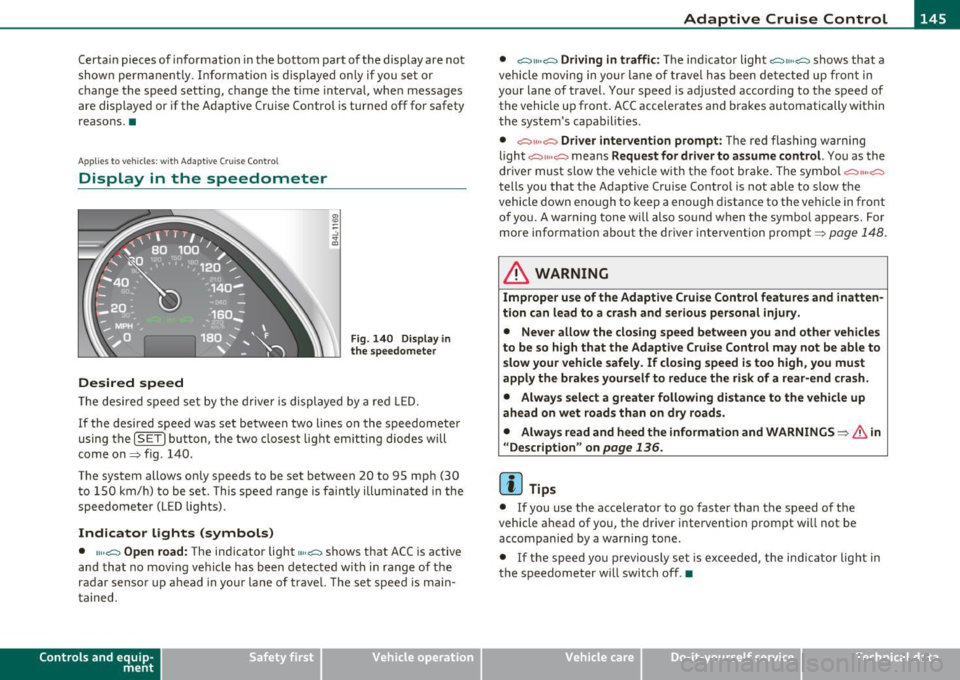
Desired speed
Fig . 140 Display in
the speedometer
Th e desired speed set by the driver is displayed by a red LED.
If the desired speed was set between two lines on the speedometer
using the
[SET) bu tton, the two closest light emitting diodes w ill
come on=> fig. 140.
The system allows only speeds to be set between 20 to 95 mph (30 t o 150 km/h) to be set. This speed range is fa int ly illumina ted in the
speedometer (LED lights).
Indicator lights (symbols)
• ""~ Open road: The indicator light""~ shows that ACC is active
and that no mov ing vehicle has been detected with in range of the
radar sensor up ahead in your lane of travel. The set speed is main
ta ined.
Con tro ls a nd e quip
m en t Vehicle
OP-eration •
~" "~ Driving in traffic:
The indicator light ~11 .. c::::., shows that a
vehicle moving in yo ur lane of travel has been detected up front in
your lane of travel. Your speed is adjusted accord ing to the speed of
the vehicle up front. ACC accelerates and brakes automatically within
the system's capabilit ies .
• ~" "~ Driver intervention prompt: The red flashing warning
light
c::::., 11 .. o::::::) means Request for driver to assume control. You as the
driver must slow the veh icle with the foot brake . T he symbol
~""o::::::)
tells you that the Adaptive Cruise Control is not able to slow the
vehicle down enough to keep a enough distance to the vehicle in front
of you. A warning tone will also sound when the symbol appears. For
more information about the driver intervention prompt=>
page 148.
& WARNING
Improper use of the Adaptive Cruise Control features and inatten
tion can lead to a crash and serious personal injury.
• Never allow the closing speed between you and other vehicles
to be so high that the Adaptive Cruise Control may not be able to
slow your vehicle safely. If closing speed is too high, you must
apply the brakes yourself to reduce the risk of a rear-end crash.
• Always select a greater following distance to the vehicle up
ahead on wet roads than on dry roads.
• Alway s read and heed the information and WARNINGS=>
& in
" Description" on
page 136.
[ i ] Tips
• If you use the accelerator to go faster than the speed of the
vehicle ahead of you, the driver intervention prompt will not be
accompanied by a warn ing to ne.
• If the speed yo u previously set is exceeded, the indica tor light in
the speedometer will switch off .•
Vehicle care Do-it-yourselt service iTechnical data
Page 149 of 392

Adaptive Cruise Control I'll __________________________ ...:....:..;:_....;_,,!,_ ______ _
App lies to vehicl es: wi th Adaptive Cru ise Con trol
System status indicator
The text messages and symbols shown in this area of the
displ ay are not displayed permanently .
Time intervals (such as e::::, ____ e::::,)
Fig. 142 Sy stem
st atu s indicator
The d ifferent symbols for the time interva ls (distance) appear if you
change the settings~ fig . 142.
Thr ee wh ite dots .. . ap pear if a set ting c annot be made w ith the o pe r
ating lever . The following are possible reasons
• If you pull the control lever towa rds you to resume speed but no
requested speed was set .
• If you push the lever up to increase (or down to re d uce) speed
when no speed has been set previo usly .
• If yo u push the lever up to increase (o r down to red uce) spee d and
this speed is outside the 20 to 95 mph (30 to 150 km/h) speed ra nge .
ACC not available
The text message ACC not ava ilable appears, for examp le, if the
t empe ra tu re o f the brakes is excessive. Adap tive Cru ise Con trol is
temporar ily not avai lab le. A warning tone sounds as a reminder .
Controls and equip
ment Safety first
ACC not available !
Th
e text message ACC not available! appears in the event o f a
ma lfunction . Adaptive Cru ise Contro l is tur ned off .
A warn in g tone
so unds as a reminder. Have the system inspected by a q ualified dea l
ersh ip .
ACC sensor blocked !
The text message ACC sensor blocked ! appears w hen the ACC System
can no longer acc urately detect vehi cles movi ng up ahead in your lane
o f travel. Adaptive C ruise Cont rol is tu rned off. A wa rning tone a lso
so unds as a reminder .
T o decide w hethe r it is ne cess ary to switch off the ACC (ACC senso r
blocked
!) or if it is only a temporary condition (ACC Functionally
limited), the sys tem w ill also takes into considera tion the outside
temperature and/or the w indshield wiper operation .
T he ACC sensor is d irty or b locked (e .g . leaves, snow).
Th e ACC senso r is lo ca ted be hind t he a rea to the right o f th e front
license plate.
If the ACC sensor is dirty or blocked, clean the area to
restore sy stem o per ation.
ESP activation
T he text message ESP activation appears if the Electro nic St abil iz a
tion Program (ESP) has intervened. In this case the Adaptive Cruise
Con trol is au tomat ica lly tu rned off. This is accompan ied by a warn ing
tone.
Speed
The set speed in mph (Canada km/h) always appears when saving or
c hangi ng the speed in Ad aptive C ruise Cont rol~
page 14 0, "How is
the speed stored?" and~
page 140, "Changing stored speed" .
ACC functionality Limited
The message ACC functionality limited appears when the ACC
System does no t detec t any moving vehicles up a head in your lane of
trave l for a longer period of time. Dur ing t his time, the d istance to
movi ng ve hicles in you r lan e of tra ve l up ahead i s not being m ain-
~
Vehicle care Technical data
Page 152 of 392

ffl..__A_ d_a_ p,__ t_iv _ e_ C_r _u _ i_ s _e _ C_ o_ n_t _ r_ o _ L ___________________________________________ _
Applies to veh icles : with Adapt ive C ruise Contro l
When driving around curves
Entering a curve
Fig. 144 Vehicle
entering a curve
Fig. 145 Vehicle
leaving a curve
When entering a curve, the Adaptive Cruise Control may react to a
vehicle in the next lane and apply the brakes in your vehicle
::;, fig. 144. The braking action can be overridden by depressing the
accelerator pedal.
Leaving a curve
At the end of very long curves, AC C's predictive lane reading can cause
ACC to react to another vehicle in the next lane and apply the brakes
on your vehicle::;, fig. 145. The braking action can be overridden by
depressing the accelerator pedal. •
Applies to veh icles : with Adaptive Cruise Control
Vehicles offset to one side
i
----------------- .. i
Fig. 146 Vehicle trav
eling ahead outside
the detection range of
the radar sensor
Vehicles moving up ahead but offset in the lane cannot be detected
by ACC until they are in sensor range.•
Applies to veh icl es: with Adapt ive Cruis e Contro l
Lane changes by other vehicles
Fig. 147 A vehicle
changes lanes
Vehicles that cut into your lane a short distance in front of you cannot
be detected by ACC until they are in sensor range .•
Page 154 of 392

-Adaptive Cruise Control •m.____...,__ _____________ _
The Audi braking guard is active from a speed of approx. 20 mph
(30 km/h) and works within the system limits=>
page 149 even when
the Adaptive Cruise Control is deactivated.
A radar sensor is built into the front of the vehicle=>
page 138,
fig. 132. The system is intended to measure the distance to reflective
surfaces. If a measurement is not possible, the system does not
respond.
When the measurement has been taken, the system can recognize a
possibly hazardous situation, for example, when a vehicle up ahead in
your lane of travel suddenly brakes or when your own vehicle is moving at high speed towards a much s lower vehicle up ahead . As
soon as the system senses that a possible collision w ith the vehicle up
ahead can only be avoided by immediate full brake application or by
an avoidance maneuver, a warning appears.
The system has a default response time to be able to signal before a
collision occurs. This system response time is automatically reduced
if you accelerate actively, for example to join a highway . Braking,
transverse acceleration and the steering ang le can lead to a reduced
system response time . The warning is deactivated if you begin to
overtake with full acceleration.
Th e system can make you aware of two different hazardous situa
tions:
Distance
T he distance warning is given if the system calculates that there is not
enough distance to the vehicle up ahead a period of more than 5
seconds. If the distance is less than 30 feet (9 meters) at 50 mph (80
km/h) , fo r example, an optic al disp lay comes on in the inst rument
cluster=> fig. 151.
If the vehicle ahead brakes sharply, Audi braking guard cannot he lp
you to avoid a coll is ion, even in the case of an immed iate response.
T ake immediate action to avoid the collision and increase the
distance to the vehicle up ahead.
Speed
If there is a much s lower vehicle moving up ahead in your lane, or if
the vehicle a head brakes sharply, the Audi braking guard calculates
the point from which a collision can only be avo ided by full braking or
by an avo idance maneuver. If a warn ing does sound, a possible co lli
sion with the vehicle in front can only be avoided through an evasive
maneuver or by braking.
The warn ing is given in two stages:
• Pre-warning : A visual display appears in the instrument cluste r
and a warning tone sounds .
• Acute warning: If you do not respond to the pre-warning, the
second stage warni ng is given . A quick brake application helps to
direct your attention to the road and traffic situation .
Under heavy braking, the brake assistant=>
page 138 also helps you
benefit from maximum braking effic iency.
& WARNING
Inattention can cause collisions, other accidents and serious
personal injuries.
• Always pay close attention to the traffic , even when the Audi
braking guard is switched on. The Audi braking guard provides a
warning but does not brake the car for you. You must apply the
brakes yourself!
• Always keep the safe and legal distance between your vehicle
and vehicles up ahead.
• Audi braking guard works within limits and will not respond
outside the system limits, for example when approaching a
stopped vehicle or stationary obstacle (end of a traffic jam or
vehicle that has broken down in traffic).
• Always remember that the radar sensor for the Audi braking
guard works within defined detection and range limits that may
prevent the proper detection of other vehicles. _,.,
Page 167 of 392

______________________________________________ A_ u_ t.:.. o_;__ m_ a_ t_;__ ic.......; t_r_a _ n_:.. s_m _:_: i.:: s ..:s:....: i..:o :....: n_;____,J-
When the ignition is on, the backup lights illuminate when the
selector lever is moved into
R.
N -Neutral
The transmission is in neutral in th is posi tion . Sh ift to this posit ion
for standing with the brakes applied~
page 165.
When the vehicle is stationary or at speeds below 3 mph (5 km/h),
you must always apply the footbrake before and wh ile moving the
lever out of
N .
D -Normal position for driving forward
Position D is for normal city and highway driving. It ranges from zero
to top speed and all gears shift automatically, depending on engine
load, driving speed and automatically selected shift programs.
When the vehicle is stat ionary or at speeds below 3 mph (5 km/h),
you must always app ly the foot brake before and while moving the
lever to
D out of N.
In certain circumstances it may be advantageous to temporarily
switch to the manual shift program to manua lly select gear rat ios to
match specific driving conditions~
page 167.
S -Sport position
Select this position for sportier performance. In this position, the
transmission will not upshift as soon, allowing the vehicle to use the
increased power available at higher engine speeds to ach ieve livelier
acceleration.
When the vehicle is stat ionary or at speeds below 3 mph (5 km/h),
you must always apply the foot brake before and while moving the
lever to
S out of N.
& WARNING
Read and follow all WARNINGS ~ & in "Driving the automatic
transmission " on page
163 .
Contro ls a nd e quip
m en t Vehicle
OP-eration
0 Note
Coasting downh ill with the transmission in N and the engine not
running will result in damage to the automatic transmission and
poss ibly the catalytic converter .•
Automatic Shift Lock (ASL)
The Automatic Shift Lock safeguards you against acci
dentally shifting into a forward or the reverse gear and
causing the vehicle to move unintentionally .
Fig. 164 Shift gate:
selector lever lock posi
tions and interlock
button highlighted
The selector lever lock is released as follows:
- Turn the ignition on.
- Step on the brake pedal.
At the same time press and hold
the interlock button on the side of the gear selector knob
=> fig . 164 with your thumb un til you have moved the
selector lever to the desired position.
Automatic selector lever lock
The selector lever is locked in the P and N positions when the ignition
is turned on. To move the lever from these positions the driver must
depress the brake pedal. As a reminder to the driver, the following
~
Vehicle care Do-it-yourselt service iTechnical data
Page 259 of 392

_________________________________________ I_ n_ t_ e_ ll_,igent technology ,__E~-
fore-and-aft and lateral directions, the brake pressure and the
steering angle are all measured.
The direction in which the driver wishes to travel is determined with
the aid of the steering angle and vehicle speed and is continually
compared with the actual behavior of the vehicle. If the two do not
match, for example, when the vehicle starts hydroplaning on a wet
road, ESP will automatically brake the appropriate whee l to correct
the problem.
The vehicle is then stabi lized by the forces acting on the whee l during
braking. If the vehicle is
oversteering (rear tends to skid out of the
turn), the brakes are main ly applied on the wheel that is on the
outs ide of the curve. In the case of a vehicle that is
understeering
(tendency to slide out of the curve), the brakes are applied as needed
on the wheel that is on the inside of the curve or additionally on the
other wheels. An acoustic s ignal indicates when ESP brake application
cuts in=> &.
The system operates across the entire speed range in combination
with the ABS system ~
page 260 . If the Anti -Lock Brake System
(ABS) ma lfunctions, the ESP wi ll be out of action as well.
Activating
When you turn on the engine, ESP will automatically be activated and
wi ll perform a self-test. As soon as the test is comp leted, the system
is in normal operating mode .
Offroad mode
ESP should normally be operated in normal mode because this
ensures maximum vehicle stability. If necessary, you can activate the
ESP offroad mode by pressing the button=>
page 256, fig. 222 to
obtain maximum traction and braking ability when driving off paved
roads at low speeds. In ESP offroad mode, the indicator light illu
minates and the message
ESP Offroad Caution! Limited driving
stability
appears briefly in the d isp lay.
The ESP offroad mode can be useful in the following exceptiona l situ
ations when slip or a highly effe ctive different ial loc king funct ion is
desirable. Examples:
Controls and equip ment Safety first Vehicle operation
•
when driving w ith tire chains,
• when driving in deep snow or on loose ground,
• when driving on uneven surfaces with the wheels severely
unloaded (articulation), and
• when rocking the vehicle loose a fter it has become stuck.
When the unusual situation is past, you should sh ift back to the
normal ESP operating mode by pushing the button again. The
message
ESP/ ASR on then appears briefly in the display.
Hill descent control
The hill descent control is switched on in ESP offroad mode. When
slowly descending steep gradients on loose ground or when the axles
are art iculated, hill descent control provides assistance by automati
cally applying the brakes to keep vehicle speed constant. The vehicle
is also rende red easier to steer by select ive distribution of braking
force. Hill descent control intervenes when:
• the accelerator pedal is not pressed,
• the vehicle is travelling less than 12 mph (20 km/h),
• a steep gradient is detected,
• wheel behavior indicates loose ground or conditions with poor
adhesion (e.g. also axle articulat ion).
Hill descent control operates both dr iving forward and in reverse.
Active hi ll descent control is deactivated by pressing the accelerator
pedal until the conditions for activation already listed are met aga in.
& WARNING
• The Electronic Stabilization Program is nevertheless subject to
the laws of physics . It is particularly important to pay attention to
this fact on wet and slippery roads. It is therefore important that
you always adapt your driving to the condition of the road and
traffic conditions. Do not allow the increased safety provided by
the Electronic Stabilization Program system to lull you into
accepting additional safety risks. ..
Vehicle care Do-it-yourself service Technical data
Page 260 of 392

Intelligent technology
'-----------------------------------------------
& WA RNING (conti nu ed )
• Plea se be aware th at in ESP offroad mode , particularly on a
s mooth and slippery road, the wheels may have an incr eased
tendency to spin and the vehicle may break awa y -danger of skid
ding!
• Stabilit y is limited in the ESP offroad mode. •
Electronic differential lock (EDL)
The electronic differential lock monitors the rotational
speed of the drive wheels.
General notes
The electronic differe ntia l lock (EDL) helps the ca r to sta rt moving,
acce lerate and climb a gradient on surfaces provi ding poor or almost
no grip. W ithout ED L, th is would be d iff ic ul t, if not impossible .
How the system works
The EDL operates automatically . It mo nitors the rotational speed of
w heels wi th the help of the ABS sensors ==>
page 260. If a not iceab le
slip is detected at the wheels (e .g . o n slippery g round on one side),
the spin ning whee ls are braked and power is transferred to the other
wheels. This is done up to a speed of about 60 mph ( 100 km/h) .
Noises from the brake system signa l that wheel spin is being
cont rolled.
Driv ing off
W hen d rivi ng off, always be sure to keep road conditions in mind as
you acce lerate. If one drive wheel spins because it is on a surface with
less grip, apply
plenty of th rottle until t he car starts to move .
Overheating of brakes
To prevent the disc b rake of the bra ked wheel from overhea ting if
subjected to excessive loads on this whee l, t he EDL cuts out tempo
ra rily. The vehicle rema ins operat iona l and behaves in the same way
as a veh icle without EDL. As soon as the brake has coo
led down, EDL sw itches on again auto
m atically.
& WARNING
• When accelerating on slippery surfaces, such as on ice or snow,
always be careful when depressing the accele rator pedal. Even
with the EDL working , the drive wheels c an spin and reduce your
ability to control your car . Risk of crash!
• The increased safety afforded by EDL does not mean that you
can take safety risks . Always adapt your d riv ing style to the road
c ondition s and traffic situation.
[ i ] Tips
If a fa ult occurs in the A BS, the ED L is also no t fu nct io ni ng. This is
ind icated by the ABS warn ing light==>
page 19. •
Anti-Slip Regulation System (ASR)
The Anti- S lip Re gula tion System preven ts the drive n
w heels from spin ning wh en the car is acc ele rating .
General notes
The Anti-S lip Reg ulation Sys tem (ASR) is in tegr ated in the ele ctroni c
stabilization program (ESP) . When the ve hicle starts up and acceler
a tes, the whee ls are p reven ted from sp inning by adjust ing t he engine
power to match the amoun t of grip ava ilable from the road surface.
How the system works
ASR performs automatica lly, i.e. witho ut the driver 's intervent ion.
With the aid o f th e ABS sensors ==>
page 260, ASR moni to rs the speed
of the driven wheels. If the whee ls start to spin, engine torque is
reduced automatically unt il the tires find enough gri p to lock onto
the road s urface. The system is active ac ross the en tire speed range .
'1>
Page 261 of 392

_________________________________________ I_ n_ t_ e_ ll_,igent technology ,__E~-
The ASR works in conjunction with the ABS. If a malfunction should
occur in the ABS, the ASR w ill also be out of action.
& WARNING
The increased safety afforded by ASR does not mean that you can
take safety risks. Always adapt your driving style to the road
conditions and traffic situation.
[ i] Tips
To ensure that the ASR works properly, all four whee ls must be fitted
with ident ical tires. Any differences in rolling radius of the tires can
cause the system to reduce engine power when th is is not desired.
See also=>
page 330, "New tires and replacing tires and whee ls" .•
Braking
General information
What affects braking efficiency?
Operating conditions and driving habits
The brakes on today's automobiles are still subject to wear,
depending large ly on operating conditions and driving habits=>& .
On vehicles that are either driven mostly in stop -and -go city traffic or
are driven hard, the brake pads should be checked by your authorized
Audi dealer more often than specified in the
Warranty & Mainte
nance booklet.
Failure to have your brake pads inspected can result
in reduced brake pe rformance .
On steep slopes, you should use the brak ing effect of the engine . This
way, you prevent unnecessary wear on the brake system. If you must
use your brakes, do not hold the brakes down continuously. Pump the
brakes at intervals.
Noises may occur when braking depending on the speed , braking
force and outside conditions such as temperature and humidity.
Safety first
Moisture or road salt
If you are driving faster than 31 mph (SO km/h) and the windshield
wipers are on, the brake pads wi ll briefly touch the brake discs in
regular interva ls so as to improve reaction time when braking on wet
surfaces . You, the driver, will not not ice anything.
Under certain cond itions, for example, when driving through wa ter or
very heavy rain, or even after washing yo ur vehicle , the braking effect
can be reduced due to moisture (or in free zing conditions ice) on the
brake pads. A few careful brake applications should dry off the brake
pads or remove any ice coatings .
The effect iveness of the brakes can be reduced when the vehicle is
dr iven on a sa lt-covered road and the brakes are not used. Here too,
you should clean off accumu lated salt coating from brake discs and
pads with a few careful applications of the brake=> & -
Corrosion
There may be a tendency for dirt to build up o n the brake pads and
corrosion to form on the dis cs if the car is no t driven regularly or only
for short trips with little use of the brakes.
If the brakes are not used frequently, or if corrosion has formed on
the discs, it is advisable to clean off the pads and discs by braking
firmly a few times from a moderately high speed=> &.
Faults in the brake system
If you should notice a sudden increase in brake pedal travel, then one
o f the two brake circuits may have failed==>& .
Low brake fluid level
Malfunctions can occur in the brake system if the brake fluid level is
too low. The brake fluid level is monitored e lectron ically .
Brake lining wear status
Brake lining wear may be checked by visual inspection of the condi
tion of the brake pads through the openings in the wheel. If neces
sary, the wheel may be removed for this inspection =>
page 343,
"Changing a wheel". ._.
Vehicle care Technical data
Page 262 of 392
Intelligent technology
'-----------------------------------------------
in. WARNING
• You should perform braking maneuvers for the purpose of
cleaning the brake system only if road condition s permit. Other
road u sers must not b e put at r isk - you may cau se an ac cident!
• Before d esc ending a steep gr ade , redu ce speed and shift tran s
mission into a lower gear or lower driving range. Do not ride the
brakes or hold the pedal down too long or too often . This could
cause the brake s to get hot and diminish braking efficiency.
• Do not "ride the brakes " by re sting your foot on the pedal when
you do not intend to brake. Thi s may caus e the brakes to overheat ,
premature wear and increa sed stopping di stance.
• Under certain climatic and operating conditions such as
pas sing through water, driving in heavy rain or after washing the
vehicle, the effectiveness of the brake s can be reduced . In winter,
ice can accumulate on the brake pads , linings , disc s and drums .
Carefully apply brakes for a test. Brake s will dry and ice coatings
will be cleaned off after a few careful brake applications.
• Driving for an extended period of time on salt -cov ered roads
without using your brakes can al so affect braking efficiency. Clean
off accumulated salt coating from brake d iscs and pads with a few
careful brake applications.
• If you damage the front spoiler , or if you install a different
s poiler , be sure the air flow to the front brakes is not obstructed.
Otherwise the brake system could overheat reducing the effective
ness of the entire brake system.
• Failure of one brake circuit will impair the braking capability
resulting in an increased stopping distance. Avoid driving the
vehicle and have it towed to the nearest authorized Audi dealer or
qualified wo rkshop. •
Brake booster
The brake booster adds e xtra brakin g pow er .
The brake booster works with vacuum pressure which is created only
w hen the en gine is ru nning =>& .
in. WARNING
• Never let the vehicle roll to a stop with the engine shut off .
• If the brake booster i s not working , for example when towing
your vehicle , or because the brake booster has somehow been
damaged , the brake pedal must be p ressed considerably harder to
make up for the lack of booster assistan ce.
Functioning of Anti-Lock Brake System
(ABS)
AB S prevents the wheels from locki ng up under braking.
T he ABS co ntribu tes effectively to vehicle co ntrol s ince it prevents t he
w hee ls from
locking when the b rakes are a pplied. This means t hat t he
veh icle rema ins steerable and is less likely to s kid .
W ith ABS you do not need to
pump the brake. Just hold the brake
pedal down .
However, do not expect the ABS to shorten braking distance u nder
oil
circums tances. When driving on grave l or on newly fa llen snow on top
of icy su rfaces, braking dis tance may be even longer, therefore, under
these c irc umstances, it is especially important that you dr ive slowly
and w it h great care .
How the ABS system works
An automatic check is made when a speed of about 12 mph (20 km/h)
is reached . Whe n this happens, a p umping noise can be hea rd. ._