ignition AUDI Q7 2011 Owner´s Manual
[x] Cancel search | Manufacturer: AUDI, Model Year: 2011, Model line: Q7, Model: AUDI Q7 2011Pages: 392, PDF Size: 93.29 MB
Page 63 of 392

& WARNING
• Be careful when closing the windows . Check to see that no one
is in the way , or seriou s injury could re sult!
• Always read and heed WARNING~
& in "General description "
on
page 46. •
Reactivating the system after battery
disconnection
If the vehicle batt ery is disco nnec ted and then reconnec ted,
the automat ic closing and open ing f unction will not wor k
unt il it is react ivated . To reactivate th is feature , perform the
fo llow ing steps :
Reactivating close/open feature
-Pu ll an d ho ld t he power window switc h until t he window is
com pletely clo sed .
- Release the swi tch.
- Pull t he switch again for one second . The a utomat ic
closi ng/opening is now reactivated .•
Panoramic sliding sunroof
Ap plies to ve hicle s: w ith Panor am ic s lidin g sunr oof
Description
The Pano ram ic sli ding sunroof of two individual glas s roof segments,
w hich can be adjusted e lec trically independen tly of each ot he r.
T he front segmen t can be tilted and s lid open . The rear segmen t ca n
be tilted, but it cannot be slid open .
Contro ls a nd e quip
m en t Vehicle
OP-eration
Opening and closing
The Panoramic slid ing sunroof is operated by the driver or pa ssen ger
w hen the ig nitio n is o n with a rot ary switch ( for the fro nt roof
segment) and a rocker switch (rear roof segment) .
After the ignition has b een switch ed off , the Panoramic slid ing
s u nroof can still be ope ned o r closed for abo ut 10 minu tes. Howeve r,
as soon as the d rive r's o r pa ssenger's door is opened, the sw itches for
t he Panoram ic sliding s unroof are i noperative .
0 Note
You should always close the Pa n oramic slid ing su nroo f whe n you
leave your vehicle. Sudden ra in can drench the in terior equ ipmen t and
damage the electronic conven ience feat ures in your vehicle .
[ i ] Tips
If you park your ve hicle in the s un, we recommen d that you clo se both
s u n blinds ~
page 63. •
App lies to v ehicl es: w ith P anoramic sl id in g sun roof
Tilting/sliding open Panoramic sliding
sunroof
Vehicle care
F ig . 4 8 Se ction of
fr ont headliner : Switch
for Pa no ram ic sl id ing
sunroof ...
Do-it-yourselt service iTechnical data
Page 65 of 392

-To set an intermediate position manually, press the rocker
switch in the front area
e:> until the roof segment has
reached the desired tilt position==>& .
& WARNING
Improper use of the Panoramic sliding sunroof can cause serious
personal injury.
• Be careful when closing the Panoramic sliding sunroof. Not
paying attention could cause you or others to be trapped and
injured as the Panoramic sliding sunroof closes.
• Always take the key with you when you leave the vehicle to
prevent injuries caused by the Panoramic sliding sunroof closing
• Never leave children or persons requiring assistance alone in
the vehicle, especially when they could access the vehicle keys.
Unsupervised use of the keys can result in the engine being started
or use of vehicle systems such as the power windows, etc. which
could result in serious injury. The doors could be locked with the
remote key, delaying help in an emergency.
• The Panoramic sliding sunroof will continue to operate until
the ignition key has been removed and one of the front doors has
been opened. •
Applies to vehicles : w ith Panoram ic sliding sunroof
Convenience closing feature
The Panoramic sliding sunroof can be closed from outside
with the key in the driver's door lock .
-Insert the key into the driver's door lock.
- Turn and hold the key in the lock position ®==>
page 48,
fig. 32 until the Panoramic sliding sunroof is completely
closed ==> & in "Closing Panoramic sliding sunroof" on
page 62. The power sun blind is also closed.
Con tro ls a nd e quip
m en t Vehicle
OP-eration
Opening and closing
& WARNING
Be careful when closing the Panoramic sliding sunroof. Not paying
attention could cause you or others to be trapped and injured as
the Panoramic sliding sunroof closes. •
Applies to v ehicl es: w ith Panoramic slid in g sunroof
Opening and closing sunshade
I .~ "'
r~ 1~· I
0 g
"I ..!J
"' a,
' ~
G
{(e)
B
0
0 ..
~ ~ ffl ""'
[f 'd 11 -I
t _, $
b l•,:,,,;; =·:::"' == ;'·== ··.••,:::-= ·•,::: ::::= ·•=·· = ·=· ======· •=··•·•-,· =,~=·,., .. c":::'• .. ·= '·"•' :::· ,=••,•s ::::::::: j ~
Fig. SO Section of
front headliner: Switch
for sunshade
Fig. 51 Section of
headliner in rear:
I>· .. ,.:._::;::-_·;r .,;:;, :::;>:,: -:-·. _::: ;:::'·;-}.- .::,.:.-: ::::: :~ ,.:.·-:- -":-· Switch for sunshade
The two segments of the Panoramic sliding sunroof are each
equipped with a sunshade for protection against the sun's
rays. The front shade is power operated, the rear shade is
opened and closed manually . To prevent the vehicle interior _.,
Vehicle care Do-it-yourselt service iTechnical data
Page 67 of 392
& WARNING (continued)
• The Panoramic sliding sunroof will continue to operate until
the ignition key has been removed and one of the front doors has
been opened .•
A pp lies to vehicles : w ith Panoram ic sl iding sunroof
Mechanical emergency closing for front
roof segment (Step 1)
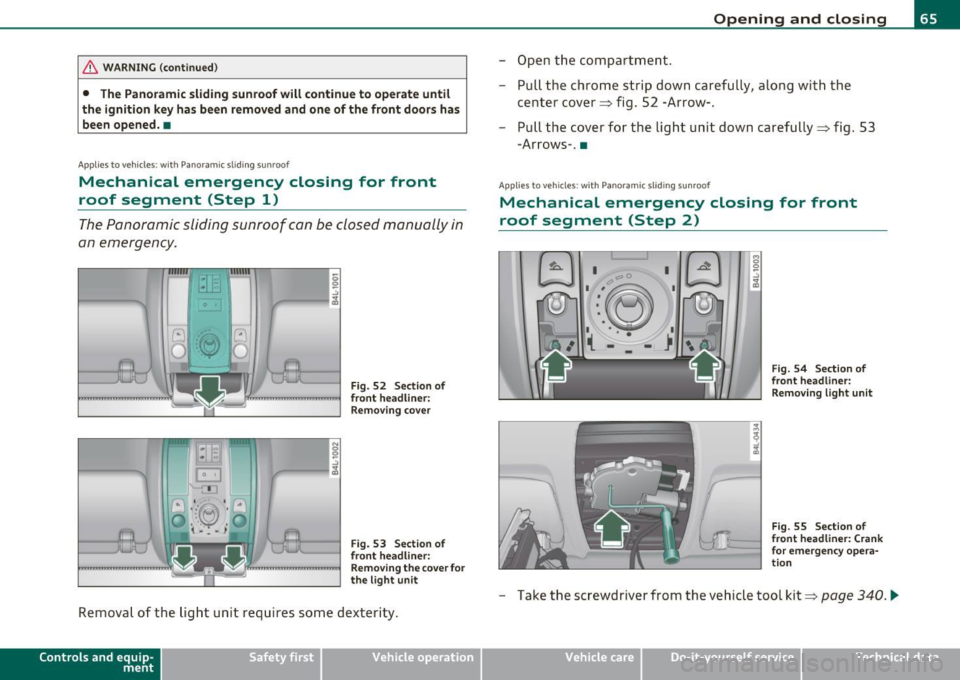
The Panoramic sliding sunroof can be closed manually in
an emergency.
Fig. 52 Section of
front headliner: Removing cover
Fig. 53 Section of
front headliner:
Removing the cover for
the light unit
Removal of the light unit requires some dexterity.
Contro ls a nd e quip
m en t Vehicle
OP-eration
Opening and closing
-Open the compartment.
- Pull the chrome strip down carefully, along with the
center cover~ fig. 52 -Arrow-.
- Pull the cover for the light unit down carefully~ fig. 53
-Arrows-. •
Applies to v ehicles: w ith Pano ramic slid ing sun roof
Mechanical emergency closing for front
roof segment (Step 2)
I 0
'-:'~
-~ •-- 1 I • • •
( -
I
I I
Fig. 54 Section of
front headliner:
Removing light unit
Fig. 55 Section of
front headliner: Crank
for emergency opera
tion
- Take the screwdriver from the vehicle tool kit~ page 340 . .,_
Vehicle care Do-it-yourselt service iTechnical data
Page 69 of 392
Clear vision
Lights
Switching the headlights on and off -'t!-
In the "AUTO" position, a light sensor automatically
swit ches the head- and tai llights on and off in response
to light condition s.
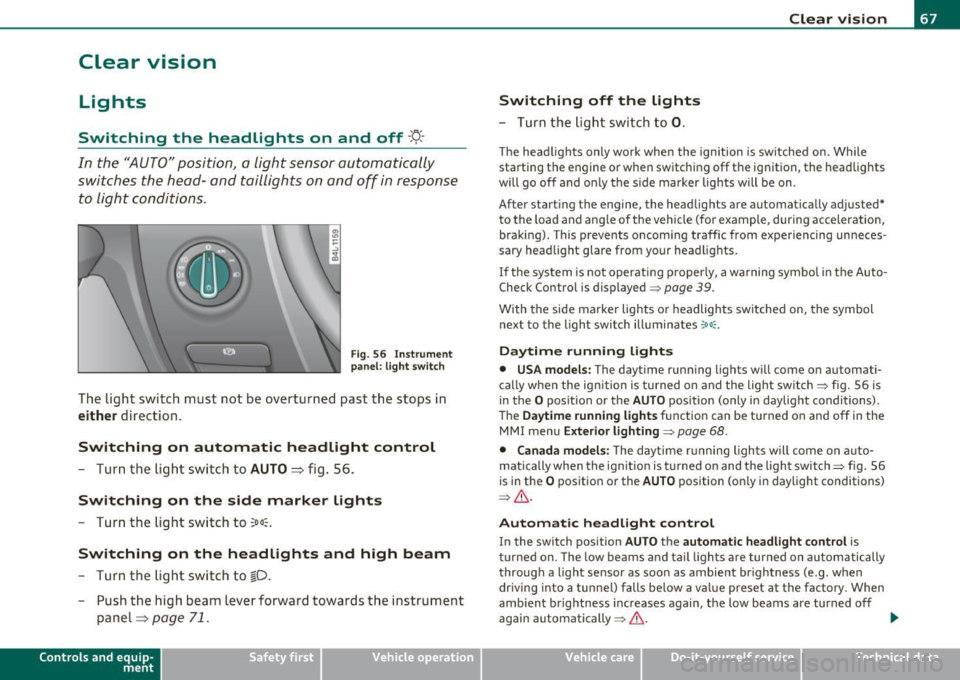
F ig . 56 Inst rum ent
pan el: li ght swit ch
The light switch must not be overturned past the stops in
either direction .
Switching on automatic headlight control
-Turn th e light swi tch to AUTO ::::, fig. 56.
Switching on the side marker lights
-Tur n the light sw itch to 300~.
Switching on the headlights and high beam
- Turn the light swi tch to ~D.
- Push the high beam lever forward towards the instrume nt
panel=>
page 71.
Con tro ls a nd e quip
m en t Vehicle
OP-eration
Switching off the lights
-Turn the lig ht swit ch to 0.
Clear vision
The headligh ts only work when the ignition is switched on. Whi le
sta rting the engine or when switchi ng off the ignition, the headlights
will go off and o nly the s ide marker lights will be on.
After start ing t he engine, the headlights are automatically adjusted*
to the load and a ng le of the vehicle (fo r example, during acceleration,
braking) . This prevents oncoming traffic from experiencing unneces
sary head light glare from your head lig hts.
If the system is not operati ng p roperly, a warning symbol in t he Auto
Check Control is displayed=>
page 39.
With the side marker lights o r headlights switched on, the symbol
next to the light switch illuminates
coo: .
Daytime running lights
• USA models: The daytime runn ing lights w ill come o n automati
ca lly when the ign ition is turned on and the light switch => fig. 56 is
in the
O position or the AUTO position (only i n daylight conditions) .
Th e
Daytime running light s function can be tu rned on and off in the
MMI menu
Exterior lighting=> page 68.
• Canada model s: The d ay time r unning ligh ts w ill come on a uto
matically when the ig nitio n is turned on and the light switch=> fig. 56
is in the
O pos itio n or the AUTO position (on ly in daylight conditions)
=> & .
Automatic headlight control
In the switch pos ition AUTO t h e automatic headlight control is
tu rned on. The low beams and tail lights a re turned on au tomatically
throug h a light sensor as soon as ambient br ightness (e .g . when
driving into a tunnel) falls be low a va lue preset at the factory . When
amb ient b rightness increases again, the low beams are turned off
again automatically =>& . ..,_
Vehicle care Do-it-yourselt service iTechnical data
Page 70 of 392

Clear vision
In the AUTO positio n the low beams are switched off automatically
w hen the ign it ion is turned o ff.
Light Sensor Malfunction
In the event of a light senso r m alfun ction, the driver is not ified in the
instrument cluster display:
~ Automatic headlight s/ automatic wipers defective
For safety reasons the low beams a re turned on permane ntly with the
switch in
AUTO . However, you can contin ue to turn the lights on and
off using the light sw itch. Have the light sensor checked as soon as
possible at an autho rized Audi dealer or q ua lified workshop.
& WARNING
• Never u se daytime running lights to see where you are going .
They are not bright enough and w ill not let you see far enough
ahead for safety, especially at dusk o r when it i s dark . Always
s witch on the low beams at du sk or when it i s dark.
• Automati c headlights are only intended to as sist the dri ver.
They do n ot relieve the driver of h is re spon sibility to check the
headlights and to turn them on manually according to the current
light and visibility condition s. For example, fog and rain cannot be
detected by the light sensors. So alw ays sw it c h on the headl ights
under the se weather condition s and when driving in th e dark
io.
• Crashes can happen when you cannot see the road ahead and
when you cannot be seen by other motori sts.
- Always tu rn on the headlights so that you can see ahead and
so that others can se e your car from the back.
(I) Tips
• With the swit ch in AUTO front fog lig hts a nd rea r fog l ights ca nnot
be t urned on in addition. •
The light sensor for headlight control is located in the rear view
mi rror moun t. D o no t apply any stickers to the w indshield in this area
to prevent malfunctions or failures .
• If you remove the ign ition from t he ignit ion lock wh ile the head
lights are still on, a buzzer wi ll sound as long as the driver's door is
open to remind you to t urn off the lights.
• Always observe the spec ific local regulations for your area as to
when to use your lig hts .•
Adjusting exterior lighting
T he functions are set in the f\1f\1J.
- Select: Function button [CAR ]> Systems *> Exterior
lighting .
Coming home
The Corning hom e function ensures tha t a fter turning off the igni
tion and open ing the driver 's door
the veh icle per iphery is illum i
nated in the dark. I n addition, the front fog lights, the ta il lights and
the license plate l ight are turned on . On-time can be set for a period
from O (o ff) to 60 seconds .
Leaving home
The Leaving home function ens ures tha t when unlocking the vehicle
periphery is illuminated in the dark. In add ition, the front fog lights,
the tai l lights and the license p late light are turned on . This funct ion
can be turned on and off .
Daytime running ligh ts
U SA models : The daytime running lights can be turned on or off using
this funct ion .
Canada model s: The function cannot be t urned off. It is activated
automatically each time the ignition is t urned on. This men u item is
shown "greyed out". •
Page 73 of 392
![AUDI Q7 2011 Owner´s Manual (]] Tips
You shou ld turn on t he emergency flashers when :
• you are the last vehicle stand ing in a traffic jam so that any other
vehicles com ing can see you , or w hen](/img/6/40276/w960_40276-72.png "AUDI Q7 2011 Owner´s Manual (]] Tips
You shou ld turn on t he emergency flashers when :
• you are the last vehicle stand ing in a traffic jam so that any other
vehicles com ing can see you , or w hen")
(]] Tips
You shou ld turn on t he emergency flashers when :
• you are the last vehicle stand ing in a traffic jam so that any other
vehicles com ing can see you , or w hen
• your vehicle has broken down o r yo u are in an eme rgency s itua
tion, or when
• your vehicle is be ing towed by a tow tr uck o r if you are tow ing
another vehicle behind you .•
Turn signal ¢¢ and high beam ~D Lever
The lever on the le~ side of the s teering column is used to
operate the turn signals and the high beam as well a s the
headlight flasher .
-"' M
-w ... m
Fig. 61 Tu rn signal
and hi gh bea m l ever
The tu rn s ignal and high beam lever has the follow ing func
tions:
Turn signals ¢ ¢
- Lift the lever up all the way~ fig. 61 (D to use the right
turn signals, or push the lever down all the way@ to use
the left turn signals.
Con tro ls a nd e quip
m en t Vehicle
OP-eration
Clear vision
Auto -blink
- Move the lever (up or down) just to the point of resistance
to use the turn signa ls for as long as you need them, for
examp le when chang ing lanes.
- M ove the lever (up or down) just to the poi nt of res istance
and t hen re lease it right away to make the turn signa ls
blink
three times . You can use this feature for examp le
w hen changing lanes on highways.
High beam ~D
- Push the lever forward @ to switch on the high beam .
- Pull the lever back towa rds you to switc h off the high
beam .
Headlight flasher ~D
Pull the lever toward the steering wheel© to use the
head light flasher .
Notes on these features
• The turn signals only work with the ignition t urned on. The indi
cato r lights ¢ or¢ in the instrument cluster=>
page 14 a lso blink.
• After you have t urned a co rner, the tu rn signal switches off auto
matically .
• Th e
high beam works only when the hea dlights are o n. Th e ind i
ca tor light
aD in the instrumen t cluster illuminates when the high
beams are on.
• The
headligh t flasher works only as long as you ho ld the lever -
even if there are no l igh ts turned o n. Th e indic ator lig ht
aD in the
instrument clus ter illuminates when you use the headlight flasher. .,,_
Vehicle care Do-it-yourselt service iTechnical data
Page 75 of 392
r ,:le,
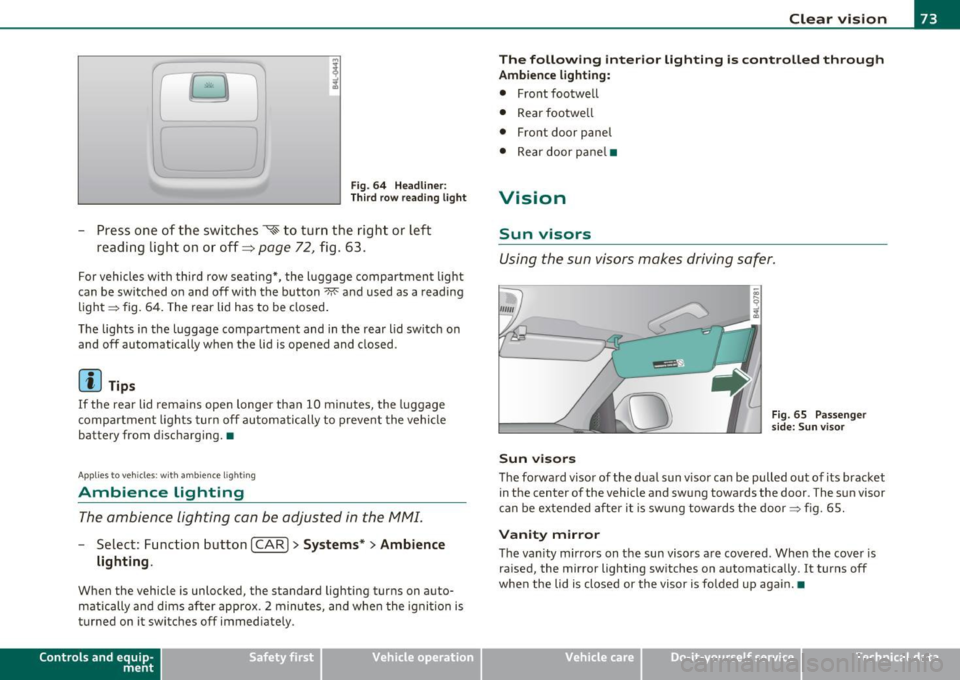
Fig. 64 Headliner :
Third row reading light
-Press one of the switches ~ to turn the right or left
reading light on or off~
page 72, fig . 63.
For vehicles with third row seating*, the l uggage compartment light
can be switched on and off with the button~ and used as a reading
light => fig. 64. The rear lid has to be closed.
The lights in the luggage compartment and in the rear lid switch on
and off automatically when the lid is opened and closed.
[ i ) Tips
If the rear lid remain s open longer than 10 minutes, the luggage
compartment lights turn off automatically to prevent the vehicle
battery from discharging. •
Applies to veh icles: with ambience light ing
Ambience Lighting
The ambience lighting can be adjusted in the MMI.
-Select: Function button I CAR]> Systems *> Ambience
lighting .
When the vehicle is unlocked, the standard lighting turns on auto
matically and dims after approx. 2 minutes, and when the ignition is
turned on it switches off immediately.
Con tro ls a nd e quip
m en t Vehicle
OP-eration
Clear vision
The following interior lighting is controlled through
Ambience lighting:
• Front footwell
• Rear footwe ll
• Front door panel
• Rear door pane l•
Vision
Sun visors
Using the sun visors makes driving safer.
Sun visors
Fig. 65 Passenge r
side: Sun v isor
The forward visor of the dua l sun v isor can be pulled out of its bracket
in the center of the vehicle and swung towards the door. The sun visor
can be extended after it is swung towards the door=> fig. 65.
Vanity mirror
The vanity mirrors on the sun visors are covered. When the cover is
ra ised, the mirror lighting switches on automatically . It turns off
when the lid is closed or the visor is fo lded up aga in.•
Vehicle care Do-it-yourselt service iTechnical data
Page 77 of 392

One-touch wiping
- Move the lever to position@, when you want to wipe the
windshield
briefly.
Automatic wiper /washer
- Pull the lever to position © (toward the steeri ng w heel)
and hold .
- Re lease the lever. The washer stop s and t he wip ers keep
going for about four seconds . Depending on how long the
lever is held, d ifferent numbers of was h cyc les are
performed.
Turning off the wipers
- Move the lever back to positio n@ .
Gen eral information
The windshield wipers and the windshield washer system operate
only with the ign it ion on .
Dur ing a temporary stop, e.g. at a traff ic signa l, the set wipe speed is
automatica lly red uced by one stage.
Th e windshie ld washer noz zles a re heated at low tempe ratures when
the ignition is on .
Removing water droplets
About 5 seconds afte r the was h cycle is complete, the wipe r system
performs a single automat ic wipe cycle to remove any water droplets
that remain on the windshie ld w hile driving.
If you would like to deact ivate this delayed wipe cy cle w hile d riving,
you have to pull the lever to position ® aga in w it hi n 10 seconds after
this wipe cycle.
Water droplet removal is react ivated after the ign ition is sw itched off
and then on again.
Controls and equip
ment Safety first
Clear v
ision
W int er pos ition
T o speed up de -icing of the windshield wipers, they move to the
w inter position when the ig nitio n is switched off and at an outs ide
temperature below 39 °F (4 °C). In this position, the windshield
wipers a re in an a rea on the g lass which is reached by the air vents
below the g lass. It is also easier to remove snow and ice from the
windshield wipers in this position.
The w ipers leave the w inter pos it ion, when the ign it ion is switched
on, if the windshield wiper lever is oper ated or the active ra in sensor
reacts to moisture .
Rain sensor
The rain sensor operates on ly in the interval wiper position. When it
sta rts to rai n, the in terv al wiper mode is a ctivated a utomat ic al ly.
If the w indshield wipe r leve r is in the inte rval wipe position with the
ignition switched off, the rain sensor is not act ivated until vehicle
speed is above 4 mph (6 km/h) .
To reduce the sens itivity of the rain sensor, the switch © must be
moved down. To i ncrease t he se nsitivi ty of the ra in se nso r, the sw itch
must be moved up.
Th e higher the sensitivity setting, the sooner the windshie ld wipers
react to mo isture on the windshie ld . Increased sensit ivity is signa led
by the windshie ld wipers making a s ingle pass over the windshie ld.
Th e rain se nsor wiper inte rvals de pend on the se nsi tivity se tt ing as
well as veh icle speed . During br ief stops, w iper motion will ad just in
re lation to the amoun t of rain on the w indshield.
& WARNING
• Wiper blade s are crucial for safe dr iving! Only wh en they are in
good condition are the y able to clear the windows properly to
provide uncompromi sed vi sibility. Worn or damaged wiper blades
are a safety hazard~
page 78, "Replacing windshield wiper
blade s"! _..
Vehicle care Technical data
Page 78 of 392

Clear vision
& WARNING (conti nued)
• The ra in se nsor i s on ly d esigned to assist and suppo rt the
driv er. It remain s entire ly the dri ver's res ponsibilit y to monitor
out side wea ther cond itions and to m anua lly ac tivate the wipe rs as
s oon as rain or dr izzle reduces visibil ity throu gh the wind sh ie ld.
0 Note
In freezing or nea r freezing condi tions:
• Always check that the wiper blades are not frozen to the glass
before you turn the wipers on. Loosen a w iper blade wh ich is frozen in
place before operating the wipers to prevent damage to the w iper
blade or the wiper motor.
• Do not use the wipers to clear a frosted window. Using the wipers
as a convenient ice scraper will destroy the w iper blades .
• Prior to using a car wash, the windshield wiper system mus t be
switched off (lever in position 0) , This helps to prevent unintentional
switching on and damage to the windshield wiper system .
(I) Tips
• The windshield wipers are switched off when the ignition is turned
off. Activate the winds hield wipers after the ignition is sw itched back
on by moving the windshield wiper lever to any position.
• Worn or d irty windshie ld w iper blades cause smear ing which can
affect the operation of the rain sensor . Check the condition of your
w indshield wiper b lades regularly .
• T he rain sensor is part of the interval wiping system. Turning off
the ignition will also deact ivate the ra in sensor. To reactivate the
sensor, switch off the interval wiping function, then switch it back on
again.
• Make sure the washer fluid reservoir in the engine compartment is
topped off before going on a long trip . Look up=> page
316 for
checking and filling the washer container. •
,,._. ..
Rear window wiper~
The wiper lever is also used to operate the rear window
wiper and the automatic wiper/washer function .
Fig. 69 Wipe r leve r:
ac tiva tin g th e rear
w indow w ip er an d
wa sh er
The rear window wipe r and the automatic wipe r/washe r func
tions are activate d as follows:
Intermittent wiping
- Push the wiper lever forward to the first position ©
=> fig. 69. The rear window wiper will wipe the window
approx. every four seconds.
Automatic wiper /washer function
- Push the wiper lever forward to the second stop, position
0 , and hold it there for as long as you want the rear
wiper/was her to operate .
- Re lease the lever aga in. the w iper wi ll keep running for
approx . four seconds .
Switching intermittent wiper action off
- Pull the lever all the way back to the original position.
Page 82 of 392
Clear vision
Applies to veh icles : w ith automat ically dimm ing inside mirror
Automatically dimming inside mirror
The automatic dimming function can be turned on and
off if required .
Disabling auto dimming
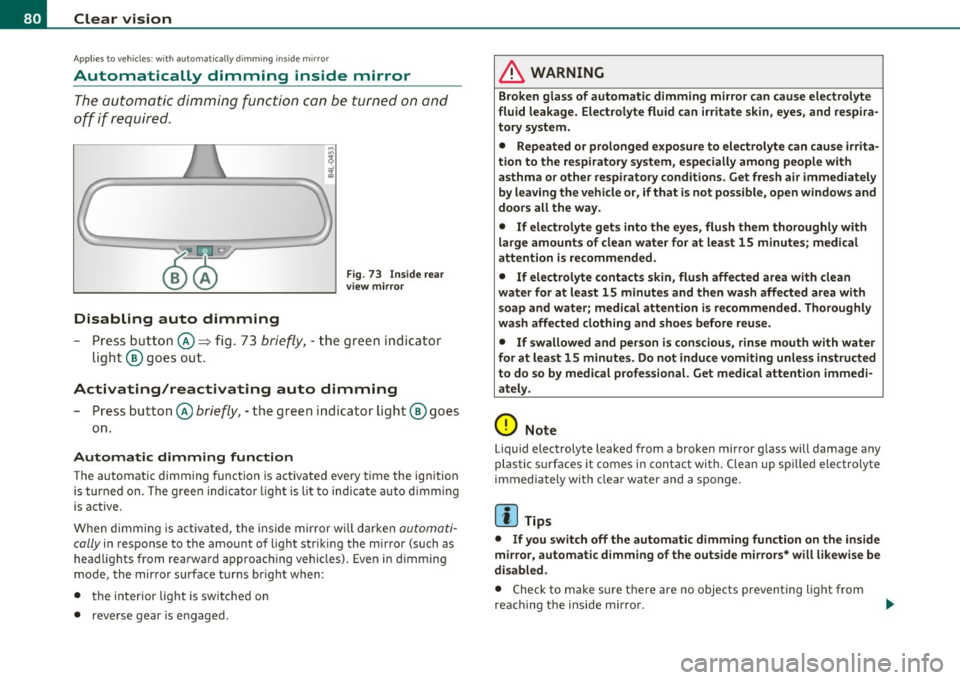
Fig . 7 3 I nside rea r
v ie w mirror
- Pre ss butt on @ ~ fig . 73 brie fly, -the green indic ator
light ® goes out.
Activating/reactivating auto dimming
- Press button @ briefly, -the green i ndicator ligh t® goes
on.
Automat ic dimming function
The automatic dimming function is activated every time the ignition
is turned on. The g ree n indicator light is lit to indica te auto d imming
is active.
W hen dimm ing is act iv a ted, the inside mir ror w ill darke n
automati
cally
in response to the amou nt of light striking the mirror (such as
head lights from rearward approaching vehicles). Even in d imming
mode, the mirror surface turns br ight when:
• the interior light is switched on
• reverse gear is engaged.
& WARNING
Broken glass of automatic dimming mirror can cause electrolyte
fluid leakage . Electrolyte fluid can irritate skin , eyes, and respira
tory system .
• Repeated or p rolonged expo sur e to electrolyte can cau se irrita
tion to the resp iratory system, esp ecially among people with
asthma or other respiratory conditions. Get fre sh air immediately
by leaving the vehicl e or, if that is not po ssible , open window s and
doors all the way.
• If ele ctrolyte gets into the eyes, flush them thoroughly with
large am ount s of clean water for at lea st 15 minute s; medical
attention is re commended.
• If electrolyte contacts skin , flush affected area with clean
water for at l east 15 minutes and then wash aff ected area with
s oap and water; medical attention is rec ommended. Thoroughly
wash affected clothing and shoe s before reu se.
• If swallowed and person is con sciou s, rinse mouth with water
for at least 15 minutes. Do not induce vomit ing unle ss instru cted
to do so by medical profe ssional. Get medical attenti on immedi
ate ly .
0 Note
Liquid e lectrolyte leaked from a broken mir ror g lass will damage any
plastic surfaces it comes in contact with. Clean up spi lled electrolyte
immedia tely with clear wate r and a spo nge.
[I) Tips
• If you switch off the automatic dimming function on the inside
mirror, automatic dimming of the outside mi rro rs* will l ikewise be
di sabled .
• Check to make s ure there are no objects preventing light from
reac hing t he i nside m irro r.