instrument cluster AUDI Q7 2012 Owner´s Manual
[x] Cancel search | Manufacturer: AUDI, Model Year: 2012, Model line: Q7, Model: AUDI Q7 2012Pages: 342, PDF Size: 86.42 MB
Page 39 of 342
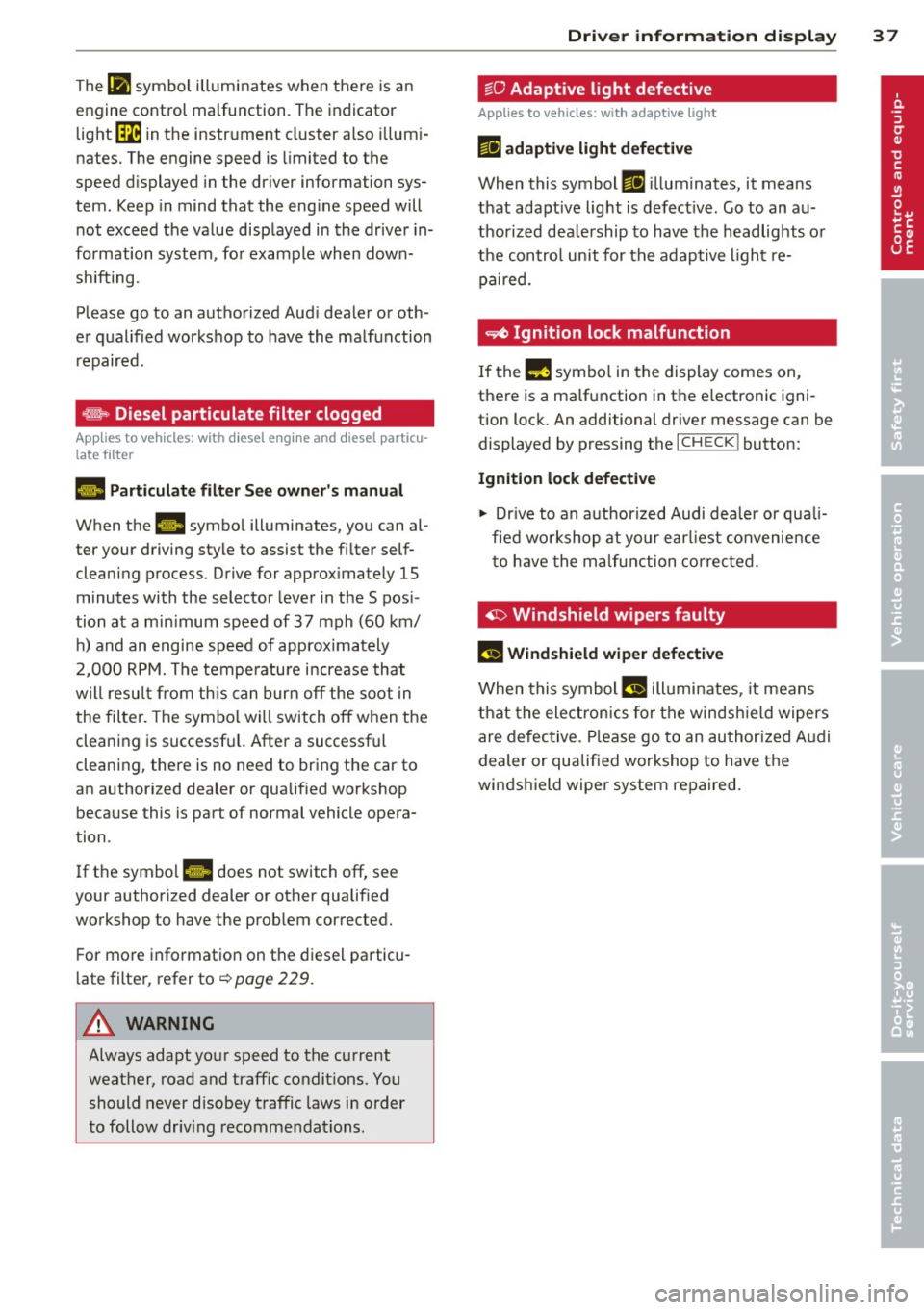
The IPJ symbol illuminates when there is an
engine control malfunction. The indicator
light ~ in the instrument cluster also illum i
nates. The engine speed is limited to the
speed d isplayed in the driver information sys
tem. Keep in mind that the eng ine speed will
not exceed the value displayed in the drive r in
formation system, for example when down
shifting.
Please go to an authorized Aud i dealer or oth
e r qualified workshop to have the malfunction
repaired.
~ Diesel particulate filter clogged
Applies to vehicles: with diesel engine and diesel part icu
late filter
1,1 Particulate filter See owner's manual
When the. symbo l illuminates, you can al
ter your driving style to assist the filter self
cleaning process. Drive for approx imately
15
minutes with the selector lever in the S pos i
tion at a min imum speed of 37 mph (60 km/
h) and an engine speed of approx imately
2,000 RPM. The temperature increase that
w ill result from this can burn
off the soot in
the filter. The symbol wi ll switch
off when the
cleaning is successf ul. After a successful
cleaning, there is no need to bring the car to
an author ized dealer or qualified workshop
because this is part of normal vehicle opera
tion .
If the symbo l
II does not switch off, see
your authorized dealer or other qualified
workshop to have the prob lem corrected.
F or more information on the diesel particu
late filter, refer to¢
page 229.
A WARNING
Always adapt yo ur speed to the current
weather, road and traffic condit ions. You
should never disobey traffic laws in order
to follow driv ing recommendations.
-
Driver information display 37
~O Adapt ive light defective
Applies to vehicles: with adaptive light
ml adaptive light defective
When this symbol ml ill uminates, it means
that adaptive light is defective. Go to an au
thorized deale rship to have the headlights or
the control unit for the adaptive light re
paired.
~ Ignition lock malfunction
If the!! symbol in the display comes on,
there is a ma lfunction in the e lectronic igni
tion lock. An additional driver message can be
displayed by pressing the
I CHECK! button:
Ignition lock defective
11> Drive to an authorized Audi dealer or quali
fied workshop at your earl iest convenience
t o have the malfunction corrected .
~ Windshield wipers faulty
fl Windshield wiper defective
When this symbo1 (.j illuminates, it means
that the electronics for the windsh ield wipers
are defective. Please go to an authorized Audi
dealer or qualified workshop to have the
winds hield wiper system repaired.
Page 49 of 342
Clos ing re ar lid /trunk lid
"' Press the close button in the open rear lid
~ fig. 40. T he trunk lid moves to the closed
posit ion by itself and soft close locks it auto
matically ~&_ .
"' The closing process
is stopped immedi atel y
if the clo se button in the rear lid is pressed
again.
"' By pushing the button again, the rear lid is
opened again .
Saving the open ing a ngle of the rear lid
"' Bring the rear lid manua lly or automatic ally
to the desired opening posi tion and leave it
i n th is position .
"' Press the button in the rear lid
~ fig . 40 for
at least four seconds in order to save the de
s ired opening position. The position ca n only
be saved start ing at a certain level.
A WARNING
- Never close the rear lid inattentively or
without checking fi rst . Altho ugh the
closing force of the rear lid is lim ited,
yo u can st ill ser iously injure yourself or
others.
- Always ensure that no one is w ith in
range of the rear lid when it is moving, in
part icu lar close to the hinges and the up
per and lower edges -fingers or hands
can be p inched .
- To help prevent po isonous exhaust gas
from being d rawn into the vehicle, al
ways keep the rear lid closed while driv ing. Never transport objects larger than
those which fit completely into the lug
gage area, because then the rear lid can
not be fully closed.
- Never leave you r vehicle unattended es
pecially with the rea r lid left open . A
child could crawl into the car through the
l u ggage compa rtment and pull the lid
shut, becom ing trapped and unab le to
get out. To reduce the risk of persona l in
jury , never let children p lay in or around
your vehicle . A lways keep the rear lid as
-
Opening and clo sin g 47
well as the vehicle doors closed when not
in use .
- If there is a l uggage rack or bicycle rack
mounted on the rear lid, it may not be
ab le to open completely or an opened
rear lid may close by itself because of the
added weight . So the open rear lid must
be supported or the weight must be re
moved from the luggage rac k first.
@ Tips
- If the rear lid is open or not properly
locked when the ign ition is turned on,
the door and rear lid warning ~
page 22
appears in the instrument cluster dis-
play .
- T he automatic rear lid opening/clos ing
process can be stopped by ho ld in g the
re ar lid w ith your hand. The lid can then
be f urther opened/closed by h and.
- I f there is a mechan ica l problem wit h the
automatic rear lid
opening proces s or
there is an obstruction, the process is
stop ped immediately.
- I f there is a mechan ica l problem wit h au
tomatic closing for the rea r lid or there
is an obstr uction, it opens again slightly
r ight away . Chec k to see why the rear lid
cou ld not be closed before attempting to
close it again .
- If the rear lid on a locked vehicle is un
locked with the midd le button~ on the
remote key, the rear lid is automat ically
locked again immed iate ly after closing .
T his is indicated by the turn signals
blinking.
- The followi ng applies to vehicles equ ip
ped w ith the Convenience key* feature: if
the remote control key is left in the lug
gage compa rtment, l uggage compa rt
ment w ill autom atic ally unlo ck itsel f af
ter yo u lock the vehicle. This preven ts
you from unintentionally locking you r
key in the luggage compartment.
- If the vehicle battery charge drops be low
a certain level, yo u can sti ll open o r close
the rear lid manually, however, you w ill
need to apply more force to close it. ..,.
Page 59 of 342
Clear vision Lights
Switching the headlights on and off
In the "AUTO" position, a light sensor auto·
matically switch es t he head· and taillights on
and off in r espons e to light conditions .
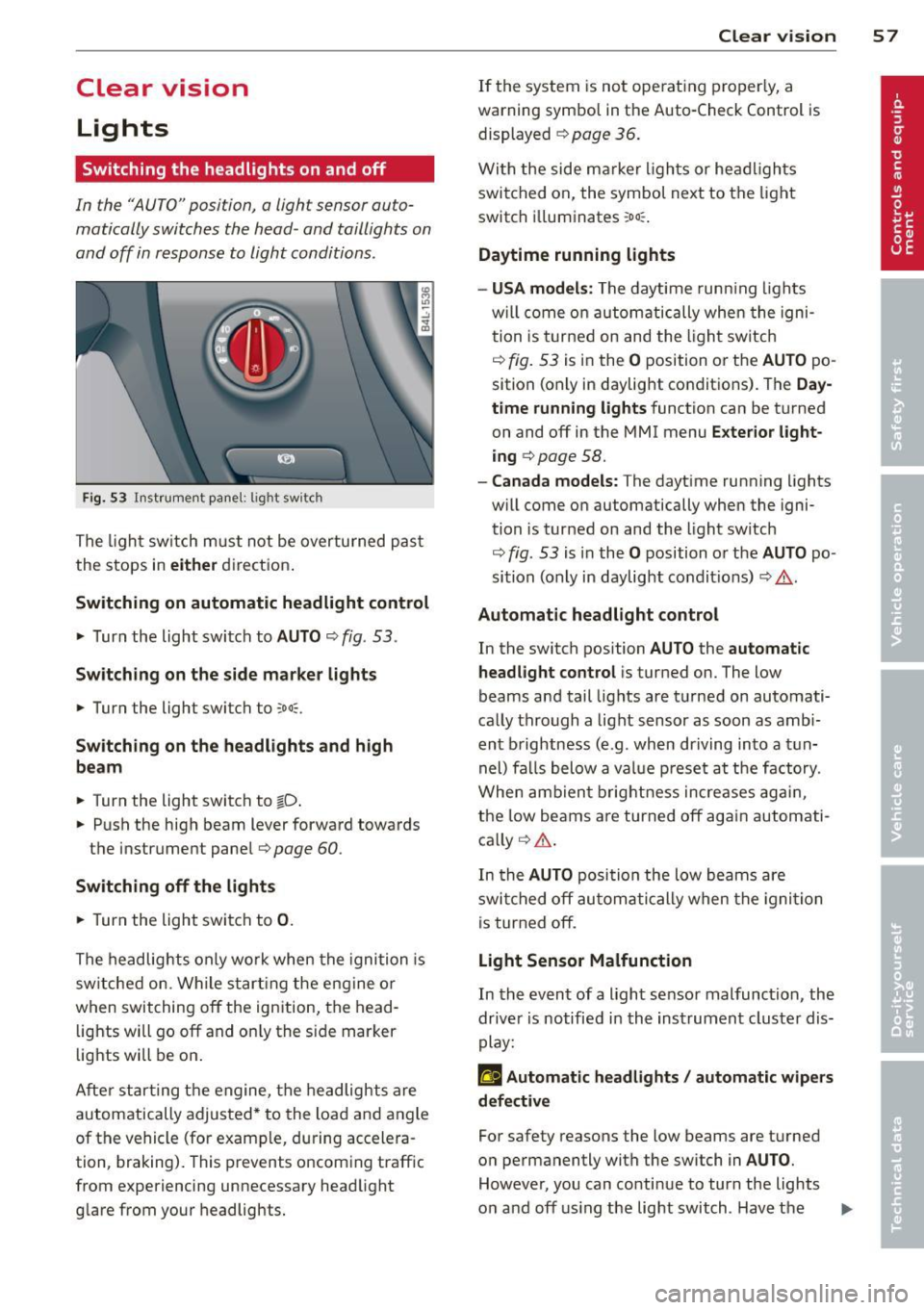
Fig. 53 Instrument pane l: lig ht sw itch
The ligh t sw itch m ust not be overturned pas t
the stops in
eit her direct ion .
Sw itching on automatic headlight control
,.. Turn the light switch to AUTO ¢ fig . 53 .
Swi tching on the side m ark e r lights
,.. Turn the light switch to :;oo:;.
Sw itching on the headlights and high
be am
,.. Turn the light switch to io .
,.. Push the high beam lever forward towards
the instrument panel
9 page 60 .
Switching off the light s
,.. Turn the light switch to 0.
The headlights only wo rk when the ignition is
sw itched on. While s tart ing the engine or
when switching
off the ignition, the head ·
lights will go
off and on ly the s ide marker
lights will be on .
Afte r star ting t he engine, the headlights are
automatically adjusted* to the load and angle
of the vehicle (for example, during accelera ·
tion, braking). This prevents oncoming traffic
from experiencing unnecessary headlight glare from your headlights.
Clear vi sion 5 7
If the system is not ope rat ing properly, a
warning symbol in the Auto-Check Control is displayed ¢
page 36.
With the side ma rker ligh ts or he ad ligh ts
switched on, the symbol next to the light
switch i lluminates
:oo :.
Daytime running lights
- USA model s:
The daytime runn ing lights
w il l come on automatically whe n the igni
tion is t urne d on and the l ight sw itch
¢
fig. 53 is in the O position or the AUTO po
sition (only in daylight conditions). The
Day
time running lights
function can be turned
on and
off in the MMI menu E xter ior l ight ·
ing
¢ page 58.
- Canada models: The dayt ime running lights
w ill come on automatically when the igni·
tion is turned on and the light switch
¢
fig. 53 is in the O position o r the AUTO po ·
sition (only in daylight condit ions) ¢ .&. .
Automatic headlight control
In the switch position AUTO the automatic
headlight control
i s turned on. The low
beams and tail lights are turned on automati·
ca lly through a light sensor as soon as amb i
ent b rightness (e.g . when driving into a t un
nel) fa lls below a value p reset a t the factory.
When ambien t brightn ess increases ag ain ,
the low beams are turned
off ag ain automati
ca lly ¢ .&. .
In the
AUTO posi tion the low beams a re
swi tched
off au tom ati cally when the igni tion
is tur ned
off.
Light Sensor Malfunction
In the event of a light sensor malfunction, the
dr ive r is notified in the instrument cluster dis
play:
f'gl Automatic head lights / automatic wip ers
defective
For safety reasons the low beams are turned
o n permanently with the switch in
AUTO .
However, you can conti nue to turn the lights
o n and
off using the light switch . Hav e the II>
Page 62 of 342
60 Clear vis ion
Emergency flasher
The emergency flasher makes other motorists
aware that you or your vehicle are in an emer
gency situation .
. ..----.,
------------------
Fig. 57 Cen te r conso le : em ergenc y flas her switch
.. Press the switch ~ c:> fig. 57 to turn the
emergency flashers on or off.
When the emergency flasher is on, a ll four
turn signals b link a t the same time. The turn
signal indicator lights
liliN in the instrument
cluster, as we ll as the light in the emergency
f lasher switch ~ blink likewise .
The emergency f lashers will turn on automati
cally if you are in an accident where the airbag
has dep loyed .
(D} Tips
You shou ld tu rn on the emergency flashers
when :
- you are the last vehicle st anding in a tr af
fic jam so that any o ther veh icles coming
can see you , or when
- you r vehicle has broken down or yo u are
i n an emergency situation, or when
- you r vehicle is being towe d by a tow
truck or if yo u are towing a nothe r vehicle
behind you .
Turn signal and high beam lever
The lever on the left side of the steering col
umn is used to operate the turn s ignals and
the high beam as well as the headlight flash
er.
t
'
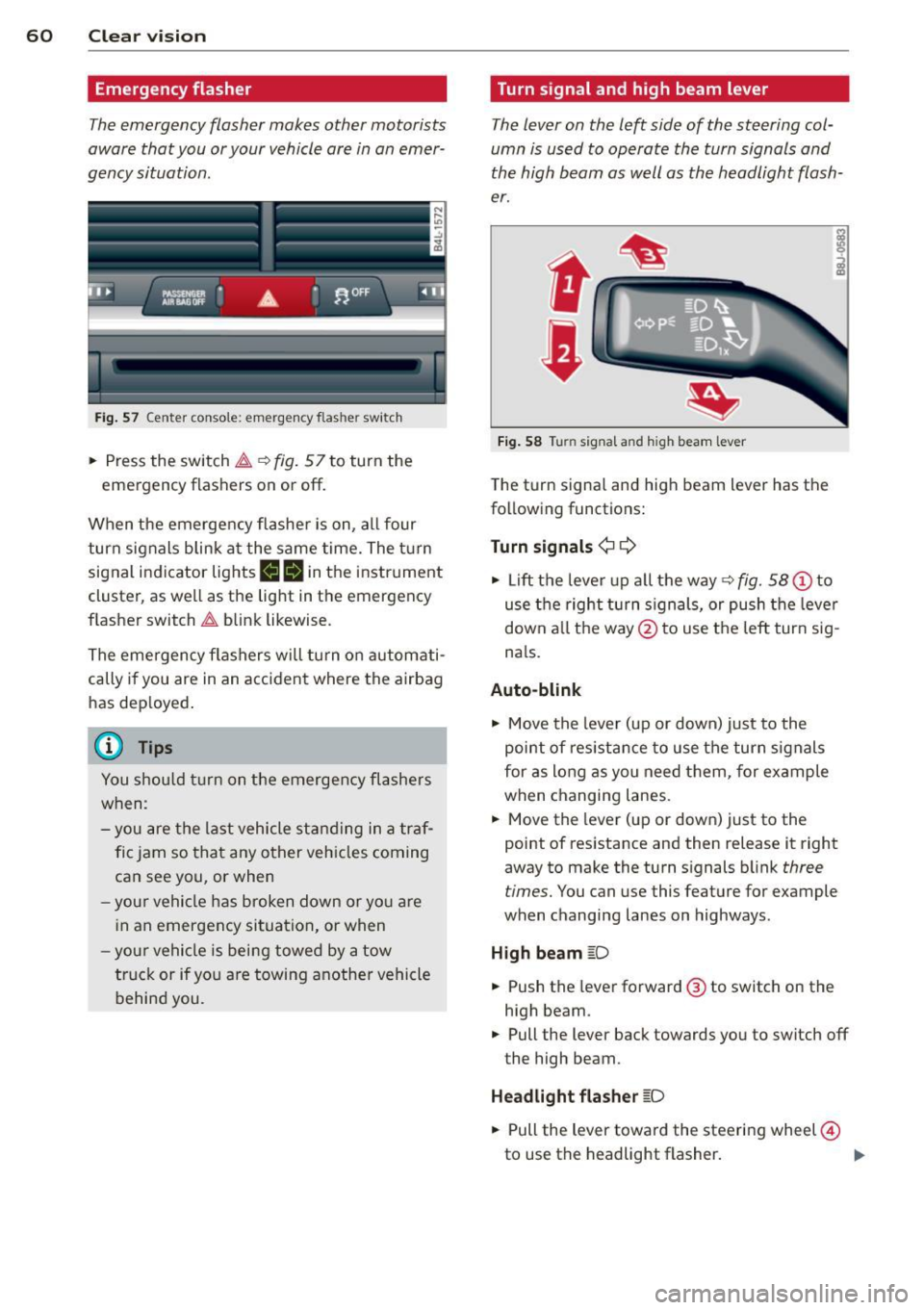
Fi g. 5 8 Turn signal and high b eam lever
The turn signal and high beam lever has the
following functions:
Turn signals ¢¢
.. Lift the lever up a ll the way c:> fig. 58 (!) to
use t he right turn s ignals, or push the lever
down a ll th e way @ to use the left turn sig
n a ls.
Auto-blink
"" Move the lever (up or down) just to the
point of res ista nce to use the turn signals
for as long as you need them, for ex ample
when changing lanes.
"" Move the lever (up or down) just to the
point of res istance and then release it right
away to make the turn s ignals b link
three
t imes.
You can use this feature for example
when changing lanes on highway s.
High beam [D
"" Push the lever forward ® to switch on the
high beam .
"" Pull the lever back towards you to switch off
the high beam.
Headlight fla sher [D
"" Pull the lever toward the steeri ng wheel @
to use the headlight flasher .
IJJ>
Page 63 of 342
Notes o n these featur es
- The turn signals only work with t he ignition
turned on . T he indicator light s
B or LI in
the instrument cluster¢
page 14 also blink.
- After yo u have turned a corner, the turn sig-
nal switches off automatica lly.
- The
high beam works only when the head
lights are on. The indicator light
II in the
instrument cluster i lluminates when the
high beams a re on.
- The
headlight flasher wo rks only as long as
you hold the lever -even if there are no
lights turned on . The indicator light
II in
the ins trument clus ter illuminates when you
use the headlight flasher .
A WARNING
-
Do not use the high beam or headlight
flasher if you know that these cou ld blind
oncoming traffic.
Interior lights
Front interior lights
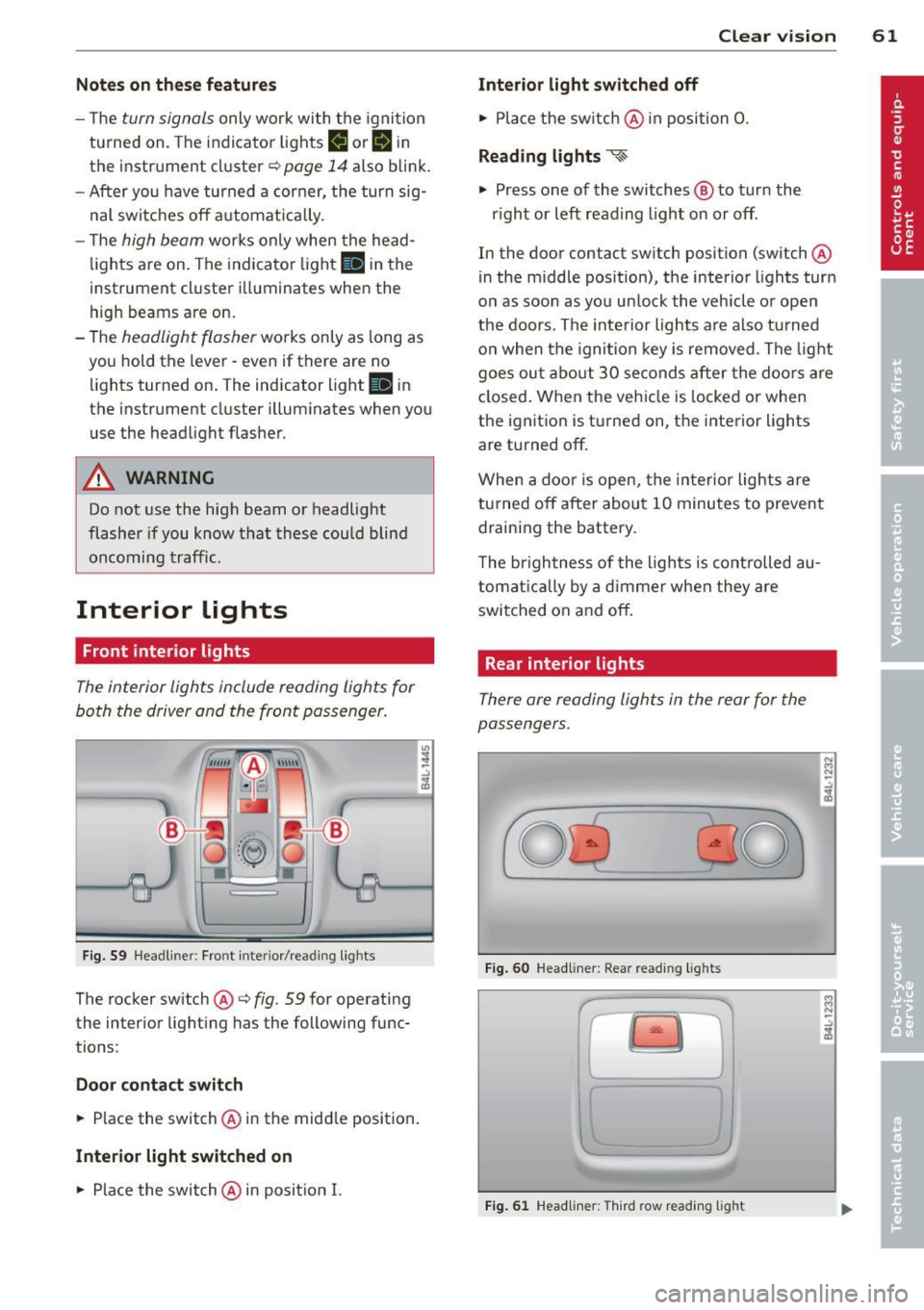
The interior lights include reading lights for
both the driver and the front passenger .
Fig. 59 Headlin er: Fro nt in te rior /re adi ng light s
The rocker switch @¢ fig. 59 for ope rating
the inter ior lighting has the follow ing func
tions :
Door cont act switch
.,. Place the switch @ in the midd le position.
Interior light switched on
.,. Place the switch @ in posit ion I.
.,,
:! .:,
1A
Clear vision 61
Interior light switch ed off
.,. Place the sw itch @ in position 0.
Re ading light s ~
.,. Press one of the switches @ to turn the
r ight or left reading light on or off .
In the door contact swi tch position (switch @
in the m iddle position), the interior l ights tur n
o n as soon as you unlock the vehicle o r open
the doors . The inte rior lights are also turned
o n when the igni tion key is removed . The light
goes ou t about 30 seconds after the doo rs are
closed. When the veh icle is locked or when
the igni tion is turned on, the i nterior lights
are turned off .
When a door is open, the interior lights are
tu rned off after about 10 minutes to prevent
draining the battery.
T he brigh tness of the lights is cont rolled au
tomat ic all y by a dimme r when they are
switched on and off.
Rear interior lights
There are reading lights in the rear for the
passengers .
0
...
Fig . 60 Headli ner: Rear read ing lig h ts
>l!i:.
r -
' \,
Fi g. 61 Headlin er: Third row r eading light
N .., N
.:,
1A
:::i N
-.:,
1A
Page 103 of 342
When the regulator is in the O position, the
seat ventilation is switched off. The range of
adjustment is between 1 and 6.
Heated rear seats~
Applies to vehicles: with heated rear seats
The seat cushions and seatbacks of the two
outer rear seats can be heated electrically.
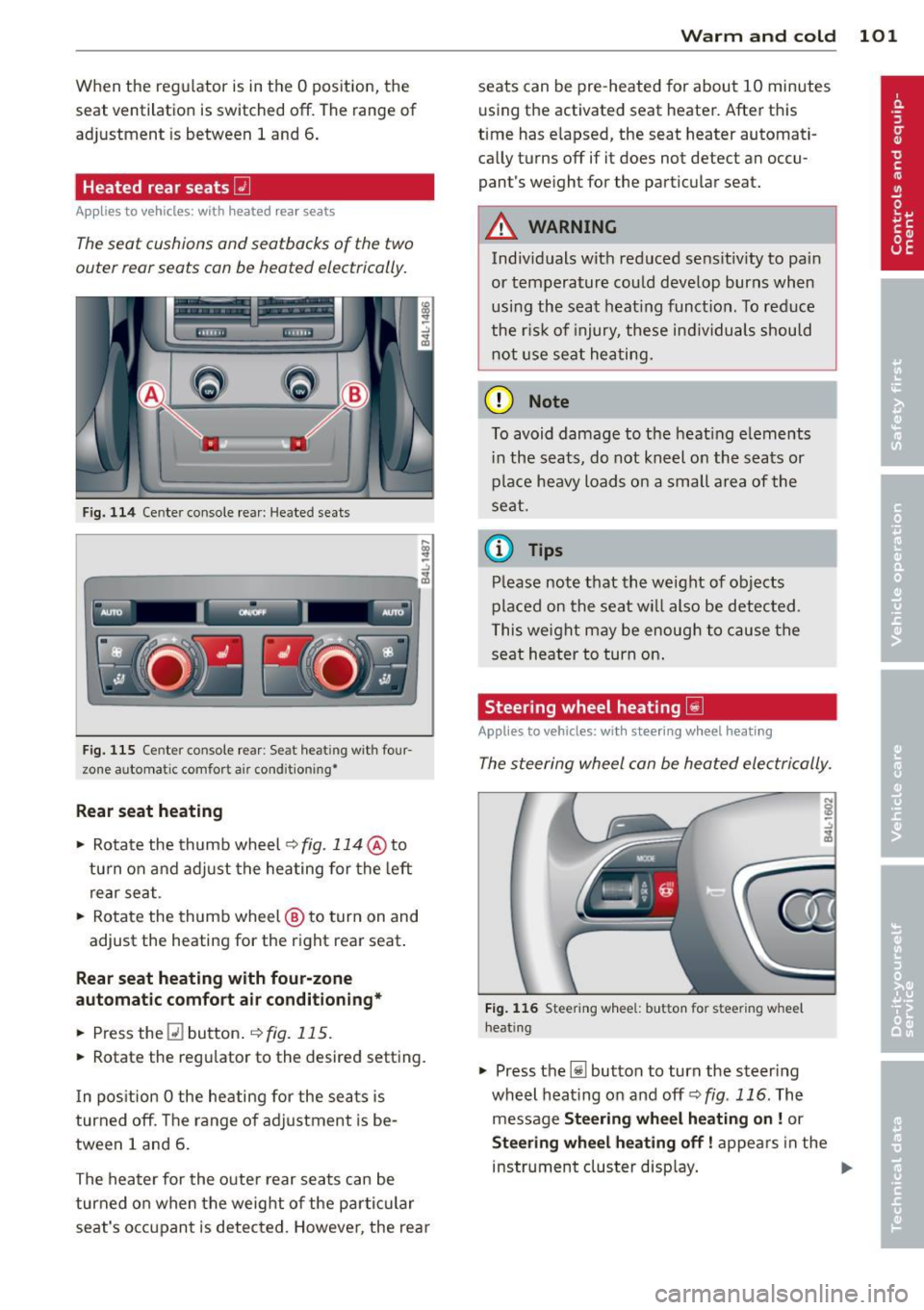
F ig. 114 Ce nter console rea r: Heated sea ts
i
-..:,
---------------<%
F ig. 1 15 Ce nter console rear : Se at heat ing with four
zone automat ic comfort a ir cond it ion ing•
Rear seat he ating
• Rotate the thumb wheel ~fig. 114 @to
turn on and adjust the heating for the left
rear seat .
• Rotate the thumb wheel @ to turn on and
adjust the heating for the right rear seat.
Rear seat heating w ith four-zone
automatic comfo rt air conditioning *
• Press the Q] button . ~ fig. 115.
• Rotate the regu lator to the desired setting .
I n pos ition O the heating for the seats is
turned off . T he range of ad justment is be
tween 1 and 6 .
The heater for the outer rear seats can be
turned on when the weight of the parti cular
seat's occ upant is detected. Howeve r, the rea r
Warm and cold 101
seats can be pre-heated for about 10 minutes
using the activated seat heater. After this
time has e lapsed, the seat heater automati
ca lly turns off if it does not detect an occu
pant's weight for the particular seat.
A WARNING
Individuals wit h reduced se ns itiv ity to pa in
or temperature could develop burns when
usi ng the seat heat ing funct ion . To reduce
the r isk of injury, these ind ividuals shou ld
not use se at hea ting.
(D Note
To avoid damage to the heat ing e lements
i n the seats, do not kneel on the seats or
place heavy loads o n a sma ll a rea of the
seat.
© Tips
P lease not e that the weight of objects
placed on the seat wi ll also be detected .
This weight may be enough to cause the
seat heater to turn on .
Steering wheel heating~
Applies to vehicles: with steering wheel heating
The steering wheel can be heated electrically.
F ig . 1 16 Steer ing wheel: button for steering whee l
heat ing
• Press the [j] button to turn the steer ing
whe el heat ing on and
off <=>fig . 116. The
message
Steering wheel h eating on! or
Steering wheel heating off! appears in the
instrument cluster disp lay. ..,.
Page 107 of 342

Ignition lock and ignition switch
Ignition key positions
The engine con be started or turned off with
the ignition key.
Fig. 119 Igni tion switch pos it io n s
Position @
The ignition key can be inserted into the igni
tion switch in this position . This automatically
unlocks the steering column lock . When the
ignition key is removed, the steering column
lock is automatically locked
Q .&. .
Switching the ignition on/preheating (D
Turn the ignition key to this position and re
lease it. On vehicles with a d iesel engine*, the
system can preheat in this position .
Starting the engine@
The engine starts with the key in this position.
Major electrical loads are temporarily turned
off.
Ignition off@
Turn the ignition key to this position and re
lease it.
A WARNING ,~ ~
- Never remove the key from the ign ition
lock whi le the vehicle is moving. The
steering wheel will lock, causing loss of
control.
- If you have to leave your vehicle, even for
just a minute, always remove the ignition key and take it with you. This is especially
important if you are going to leave chil-
On the road 105
dren unattended in the vehicle. The chil
dren could start the engine or use other
vehicle controls. Unsupervised use of ve
hicle controls (for example, power win
dows) can cause ser ious personal inju
ries.
(D Note
- If the I symbol in the display blinks,
there is a malfunction in the electronic
steering column lock . Follow the instruc
tions in
Q page 33, i Steering malfunc
tion .
-If the . symbol in the display blinks,
there is a malfunction in the electronic
ignition lock . Fol low the instructions in
Q page 34, .Pe Ignition lock malfunction.
a) Tips
-If you release the ignition key in position
@, the key automatically returns to posi
tion (!).
- If you open the driver's door when the ig
nition is sw itched on, a buzzer sounds
and the message
Ignition is on appears
in the instrument cluster display. Please
switch the ignition off.
- T o prevent malfunctions in the ign ition
lock, remove any dirt or deposits from
the key bit so that they do not enter the
ignition lock.
Ignition key safety lock
The ignition key con only be removed when
the selector lever is in the "P" (Pork) position.
After turning off the ignition, the ignition key
can only be removed from the ignition lock
when the selector lever is in the "P" (Park) po
sition. After you have removed the key, these lector lever is locked and cannot be moved.
Page 110 of 342

108 On the road
reached operating temperat ure -other
wise yo u risk engine damage.
- The eng ine cannot be sta rted by pushing
or towing the vehicle.
@ For the sake of the environment
Do not allow the engine to warm up with
t he vehicle stationary. Start driving righ t
away . In th is way you avoid unnecessa ry
emissio ns.
@ Tips
If you open the drive r's door when the ig
nition is switched o n, a buzze r sounds and
the message
Ignition is on appears i n the
instrument cluster disp lay. Please switch
the ignition off.
Switching engine off with the~
button
App lies to vehicles: with Convenience key
Fig. 122 Convenience key: ENGINE STOP butto n
.. Bring your vehicle to a complete stop.
.. Move the selector lever to the P or N posi-
t ion.
.. Pressthe !STOP !button
¢fig.122.
Press ing the I STOP I button once switches off
the engine and the ignition. If you press the
ISTOPI button again for more than 1 second,
the steering is locked, provided that the selec
tor lever is in t he P pos it ion
¢ & .
Emergency OFF function
If necessary, the engine can be switched off
with the selector lever in the
R, Dor S posi
tions . To do so, step on the brake peda l and press and ho
ld the !STOP ! b utton (vehicle
speed must be less than 6 mph/ 10 km/ h.
.&_ WARNING
-
-Never turn off the engine until the vehi-
cle has come to a complete stop.
- The brake booster and servotronic only
work when the engine is running. With
the ignition turned off, you have to apply mo re force when steeri ng or brak ing.
Since you cannot steer and stop normal
ly, t his can lead to acc idents and se rious
. . . in Juries.
- For safety reasons, you sho uld a lways
pa rk your vehi cle wit h the selector lever
i n P. O therwise, the vehicle could inad
ver ten tly roll aw ay.
- Afte r the eng ine has been switch ed off,
t he r adi at or f an can co ntinu e to run f or
up to 10 minu tes -even with the igni tion
switched off . It can also switch on again
after some t ime if the coolant tem pera
ture rises as the resu lt of a heat b uildup
or if the engine is hot and the engine
compa rtment is additionally heated by
the sun's rays.
(D Note
If the engine has been under heavy load
for an extended pe rio d, heat b uilds up in
the engine compartment after the engi ne
i s sw itched off -there is a r isk of damag ing
the e ng in e. A llow th e engi ne to run a t id le
fo r abo ut 2 minutes befor e switching it
off .
Driver messages in the instrument
cluster display
Applies to vehicles: with Co nvenience key
If a func tion is not present, a driver message
appears .
No key identified
This message appears when t he I STAR T I but-
ton is pr essed if there is no master key ins id e
the vehi cle or if t he system does not recogn ize
IJ,-
Page 113 of 342

The system is activated when the brake pedal
is depressed
for a few seconds. For this, the
veh icle must be standing in uphill driving di
rection .
After releasing the brake pedal, the brake
power is held for a
brief moment to prevent
the vehicle from rolling back when starting. At
this time, you can easily begin to move your
vehicle.
A WARNING
- If you did not begin moving immediately
after releasing the brake pedal, under
certain circumstances, the vehicle would
begin to roll backward. Depress the
brake pedal immediately or engage the
parking brake.
- Should the engine stall, depress the
brake pedal immediately or engage the
parking brake.
- In order to prevent the vehicle from roll ing back unintentionally when starting in
stop-and -go traffic, keep the brake pedal
depressed for a few seconds before driv
ing
off.
- When you leave the vehicle -even if only
briefly -, switch
off the ignition and
make sure to remove the ignition key. Al
so engage the
parking brake to prevent
your vehicle from rolling unintentionally. This particularly applies if ch ildren are
left in the veh icle -danger of acc ident!
On the road 111
Cruise control
Switching the system on
The cruise control system makes it possible to
drive at a constant speed starting at 20 mph (30 km/h) .
®-
Fig. 124 Co ntro l l ever w ith set bu tton
Fig. 125 Disp lay : Se lected speed
.. Pull the lever to position @<=:> fig. 124 to
sw itch the system on .
.. Drive at the speed you wish to set.
.. Press button @to set that speed.
T he display
c::> fig . 125 will show the set speed.
The display may vary depending on the type of
display in your vehicle. The indicator light
tB;m~1~ (US model)/ . (Canadian model) will
also light up in the instrument cluster .
A WARNING
-Always pay attention to traffic even when
the cruise control is switched on . You are
always responsible for your speed and
the distance between your vehicle and
other veh icles.
- For safety reasons, the cruise control
should not be used in the city, in stop
and-go traffic, on twisting roads and
when road conditions are poor (such as
Page 121 of 342

Redu cing distance
"' Push the slider sw itch onc e to the left Q.
The distance currently set is shown for 3
seconds in the instrument cluster display.
"' Push the slider switch
again to the left 0
to decrease the distance by one step.
The distance at which the adaptive cruise con trol follows a vehicle in front is determined by
time interva ls. A time interval to a vehicle in
front is estab lished and maintained. Th is pro
duces a speed-dependent interval. The higher
the speed, the greater the safety interva l in
feet (meters)
¢ ,&. .
DISTANCE 1 Ada
pti ve crui se control 119
For example, if the interval DISTANCE 3 is
set, a vehicle in front is fo llowed at a
time in
terval
of 1.8 seconds.
For a speed of
50 mph (80 km /h ) this wo uld
be equivalent to a distance of
131 feet
( 4 0 meter s)
to the vehicle in front.
T he distances given here are nom inal va lues .
T he vehicle speed may exceed or fall shor t of
these target speeds, depending on the driving situation and the driving style of the vehicle
ahead .
DISTANCE 2 DISTANCE 3 DISTANCE4
Symbol c;:::::::, _ c;:::::::,_ - - c;:::::::, _ - c;:::::::, _ - c;:::::::, _ - - c;:::::::, _ c;:::::::,_ - - _c;:::::::,
T ime interval
Dynamics
I Distance at 25 mph
(40 km /h )
Di st a nce at 50 mph
(80 km /h)
Distance at 75 mph
(120 km /h)
1 second 1.3 seconds
Sporting Standard
36 Feet (11 Me-
JI 46 Feet (14 Me-
ters) ters)
-.
72 Feet (2 2 Me- 95 Feet (29 Me-
t ers) ters)
108 Feet (33 144 Feet (44 Meters) Meters) 1.8 seconds
Standard
66 Feet (20 Me ters)
-
131 Feet (40 Me ters)
197 Feet (60 Meters) 2.3 seconds
Comfortab le
82 Feet (25 Me- ·
ters)
1 67 Feet (51
Meters)
249 Feet (76 ·
Meters)
H ow your vehicle responds when accelerating
and following other vehicles w ith ACC operat
i ng can be adapted to your personal wishes
through diffe rent driving programs. Depend
ing on w hich driving p rog ram and wh ic h dis- tance you choose, your vehicle will respond
more dynamically or more comfortably when
acce lerat ing and braking . The setting is se
lected through the MM I menu
adapt ive cruise
contro l¢ page 124, MMI settings.
Settings DISTANCE 1
Symbol for time inter·
val ~-
c;:::::::,_ -
Support fo r: Bumper-to-
Re sponse in "dynam
ic " driving program
Respon se in "stand
ard " driving program
Response in "comfort "
driving program
bumper traffic,
b risk driving
1
2
3
DIS TANCE 2
~ __ c;:::::::,_
Bumper-to-
bumper traffic,
"keep ing pace"
comfortably
2
3
4
(dynamic) 1 -- ---2 ----- 3 --- -- 4 ----- 5 (comfortable)
DISTANCE 3 DISTANCE4
- - -c;:::::::, ~----c;:::::::,
Bumper-to- Secondary roads,
bumper traffic, trailer operation
"keeping pace"
comfortably
2 3
3
4
4
5