central locking AUDI Q7 2013 Owner´s Manual
[x] Cancel search | Manufacturer: AUDI, Model Year: 2013, Model line: Q7, Model: AUDI Q7 2013Pages: 348, PDF Size: 87.72 MB
Page 43 of 348
Valet key function
The valet key function prevents unauthorized
persons from opening the glove compart
ment.
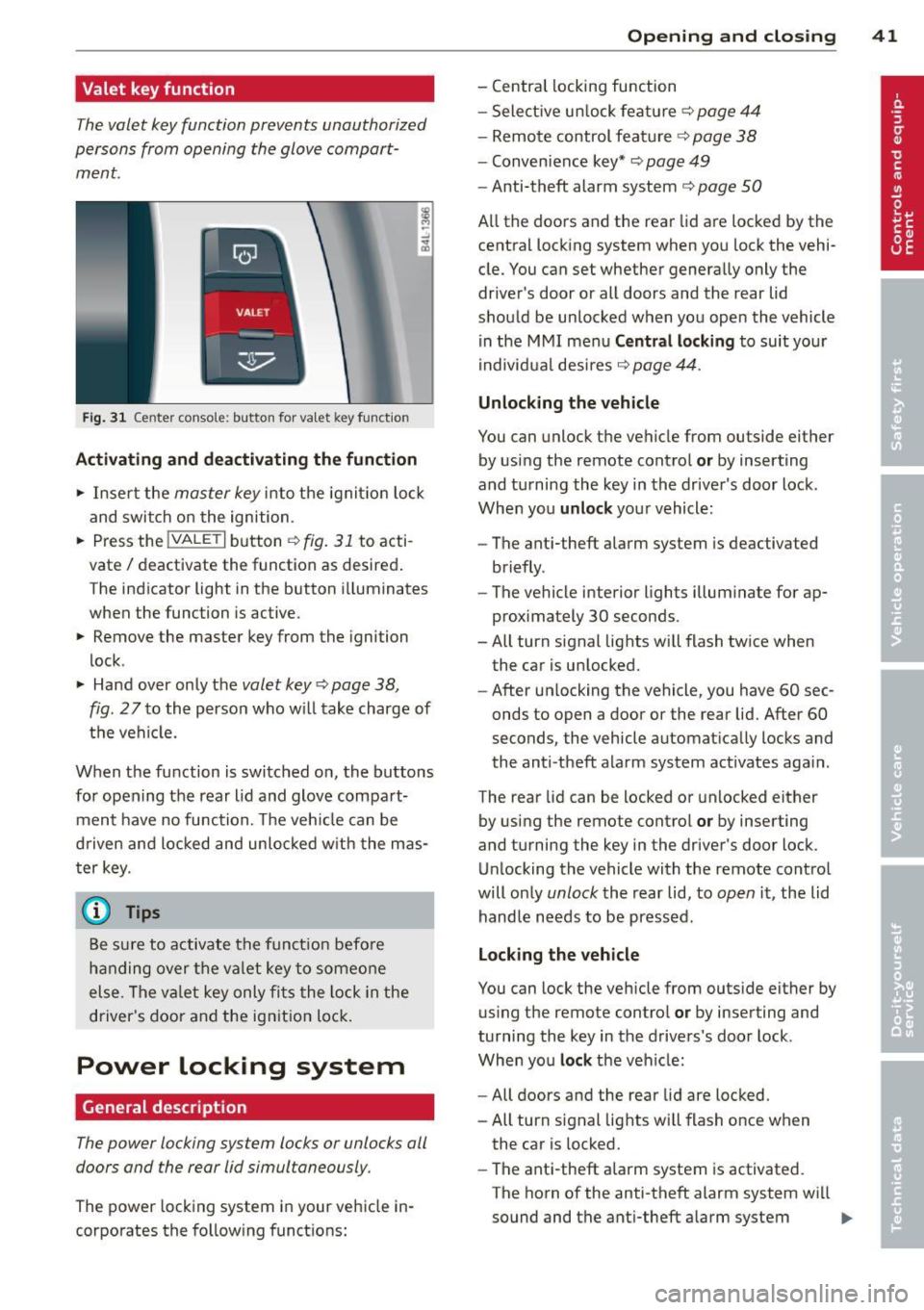
Fig. 31 Center conso le: button for va let key funct ion
Activating and deactivating the function
.,. Insert the master key into the ignit io n lock
and switch on the ignition .
.,. Press the
!VALET I button c:::;, fig. 31 to acti
vate/ deactivate the function as desired .
The indicator light in the button i lluminates
when the function is active.
.,. Remove the master key from the ignition
lock .
.,. Hand over only the
valet key c:::;, page 38,
fig .
27 to the person who will take charge of
the vehicle.
When the function is switched on, the buttons for opening the rear lid and glove compart
ment have no function. The vehicle can be
d riven and locked and unloc ked w ith the mas
ter key.
(j) Tips
Be sure to activate the funct ion befo re
handing over the valet key to someone
else . The va let key only fits the lock in the
driver's door and the ignition lock.
Power locking system
General description
The power locking system locks or unlocks all
doors and the rear lid simultaneously.
The power locking system in your vehicle in
corporates the fo llowing functions:
Opening and closing 41
- Central locking function
- Select ive un lock feature ¢
page 44
-Remote control feature ¢ page 38
-Convenience key*¢ page 49
-Anti-theft alarm system ¢ page 50
All the doors and the rear lid are locked by the
central locking system when you lock the vehi
cle. You can set whether generally only the
driver 's door or all doors and the rear lid
should be unlocked when you open the vehicle
in the MMI menu
Central locking to suit your
individual desires
c:::;, page 44.
Unlocking the vehicle
You can unlock the vehicle from outside either
by using the remote control
or by inserting
and turning the key in the driver's door lock .
When you
unlock your vehicle :
- The anti-theft alarm system is deactivated
briefly .
- The vehicle interior lights illuminate for ap
proximately 30 seconds .
- All turn signal lights will flash twice when
the car is unlocked .
- After un locking the vehicle, you have 60 sec
onds to open a door or the rear lid. After 60
seconds, the vehicle automatically locks and
the anti-theft alarm system act ivates aga in .
The rear lid can be locked or unlocked either
by using the remote control
or by inserting
and turning the key in the driver's door lock.
Unlocking the vehicle with the remote control
will on ly
unlock the rear lid, to open it, the lid
handle needs to be pressed .
Locking the vehicle
You can lock the vehicle from outside either by
using the remote control
or by inserting and
turning the key in the drivers's door lock .
When you
lock the veh icle:
- All doors and the rear lid are locked.
- All turn signal lights will flash once when
the car is locked.
- The ant i-theft alarm system is activated.
The horn of the anti-theft alarm system wi ll
sound and the anti-theft alarm system
IJJ,-
Page 45 of 348
Unlocking and locking the vehicle with
the remote control
How the remote control works.
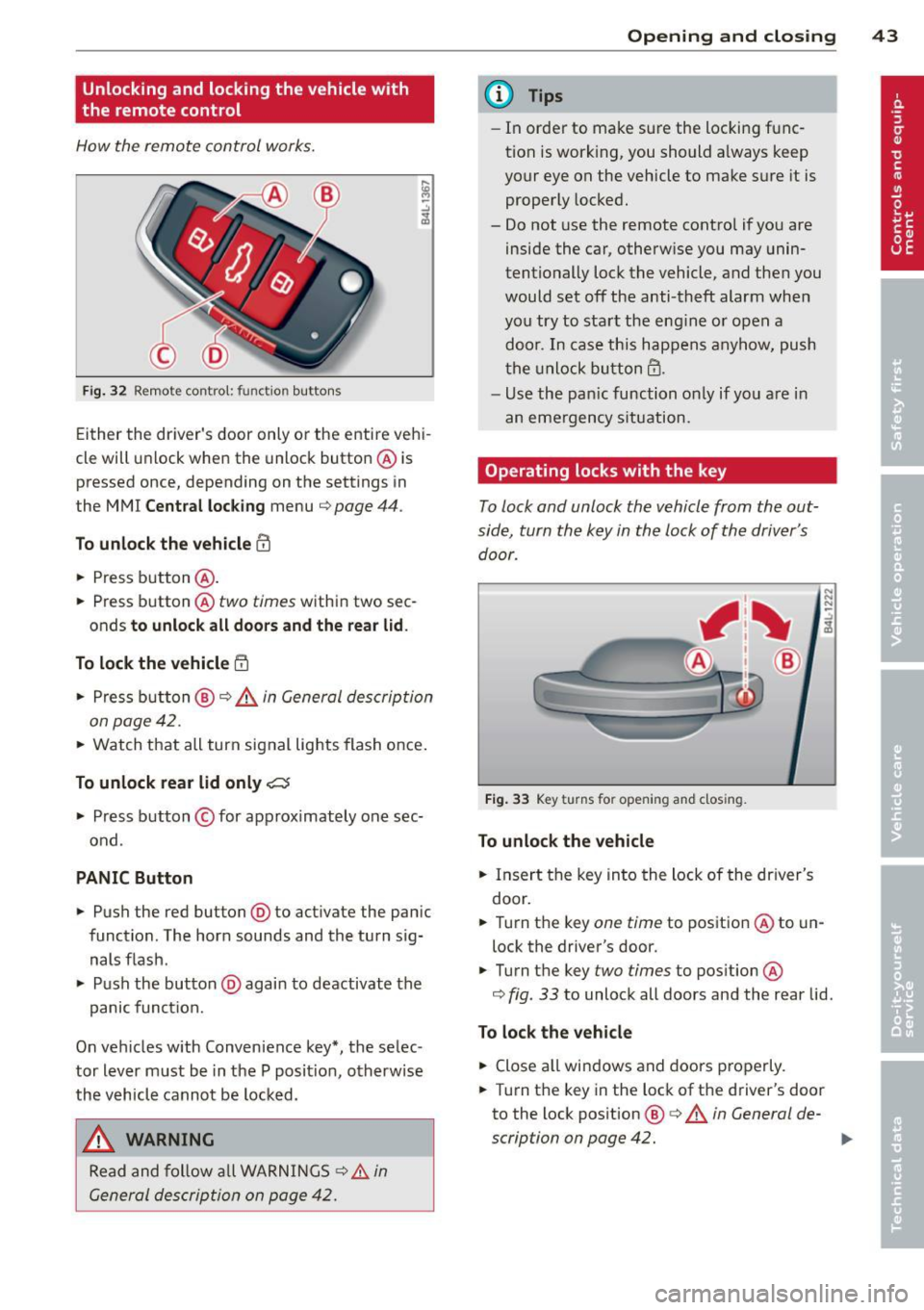
Fig. 32 Remot e contr ol: fun ctio n but ton s
Either the driver 's door only or the entire vehi
cle will unlock when the unlock button @ is
pressed once, depending on the settings in
the MMI
Central locking menu ¢ page 44 .
To unlock the vehicle CD
.. Press button @.
.. Press button @two
times within two sec
onds
to unlock all doors and the rear lid .
To lock the vehicle 5'.l
.. Press button @¢.&. in General description
on page 42 .
.. Watch that all turn signal lights flash once.
To unlock rear lid only~
.. Press button © for app roximately one sec
ond .
PANIC Button
.. Push the red button@) to act ivate the panic
function. The horn sounds and the turn sig nals flash .
.. Push the button @again to deactivate the
panic function.
On vehicles w ith Convenience key*, the selec
tor lever must be in the P posit ion, otherwise
the vehicle cannot be locked.
_& WARNING
Read and follow all WARNINGS ¢&. in
General description on page 42.
-
Opening and closing 43
@ Tips
-In order to make sure the locking func
tion is working, you should a lways keep
your eye on the vehicle to make s ure it is
properly locked.
- Do not use the remote control if you are
inside the car, otherwise you may unin
tentionally lock the vehicle, and then you
would set off the anti-theft alarm when
you try to start the eng ine or open a
door . In case this happens anyhow, push
the unlock button@.
- Use the pan ic function on ly if you are in
an emergency s ituation.
Operating locks with the key
To lock and unlock the vehicle from the out
side, turn the key in the lock of the driver's door .
Fig. 33 Key turns fo r open in g and clos ing .
To unlock the vehicle
.. Insert the key into the lock of the driver's
door .
N N N :;
~
.. Turn the key one time to position @to un
lock the driver's door.
.. Turn the key
two times to position @
¢
fig . 33 to unlock all doors and the rear lid .
To lock the vehicle
.. Close all windows and doors properly.
.. Turn the key in the lock of the driver's door
to the lock pos ition @ ¢
A in General de-
scription on page 42. ..,.
Page 46 of 348
44 Opening and clo sing
& WARNING
Read and follow all WARNINGS c> .&. in
General description on page 42.
Settings in the MMI
The driver can determine the functions for
power locking in the MMI.
• Se lect : ICARI funct ion button> S ystem s*
control button > Cent ral locking . Or
• Se lect :
ICARI function button > Ca r sys
tems *
control button > Vehicle setting s >
(Central lo ck ing) *.
Pa ssenger 's door *, Left rea r door *, Right re ar
door *, Trunk lid /tailgate * -
You can specify
which doors should unlock when you unlock
the vehicle .
- If you se lect
On and then press the [@) but
ton on the remote control key, the corre
sponding door w ill unlock .
- If you se lect
Off and then press the[@] but
ton on the remote control key , the corre
sponding door w ill not unlock. If you press
the
Im button twice, all doors and the lug
gage compartment will unlock . When lock
ing the vehicle, all of the doors and the lug
gage compar tme nt lock a utoma tica lly.
Unlock doors * -You can spec ify if all doors o r
only the d river's doo r shou ld un lock wh en un
l oc king t he ve hicle.
- If you select All and press the
l@J button o n
the remote control key, a ll of the doors and
the luggag e compartment will un lock .
- If you select
Driv er and then press the Im
button on the remote control key, only the
dr ive r's door w ill unlock. If you press the
l@J
button twice, all doors and the luggage
compar tment will u nlock. When lo cking the
vehicle, a ll of the doors and the luggage
compartment lock a utomatically. In vehicles
with a convenience key*, on ly t he door
whose hand le you pu ll w ill unlock.
Auto l ocking /Lo ck when d riv in g -If you se
lect
On , the doors and the luggage compart
ment will lock automatically .
(D Tips
The central locking settings are stored in
the remote contro l key .
Locking and unlocking the vehicle from
inside
The vehicle can be locked or unlocked from
the inside using the power locking switches .
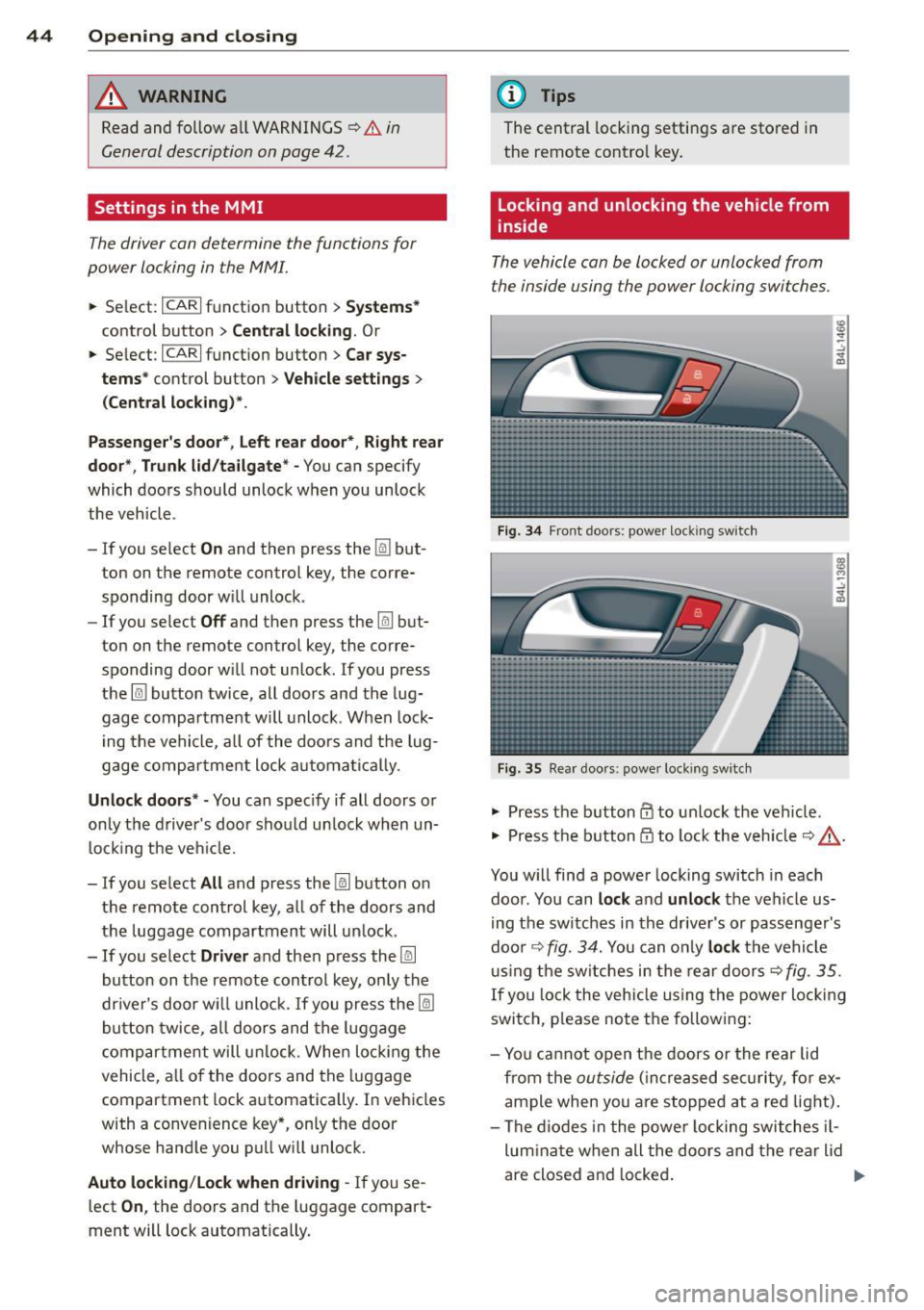
Fig. 34 Front doors : powe r lock ing swit ch
Fig. 35 Rear doors : powe r locking sw itc h
• Press the b utton CD to unlock the veh icle .
• Press the b utton
tfJ to lock the veh icle c> & -
You w ill find a power locking switch in eac h
doo r. You can
lock and unlock the vehicle us
i ng the switches in the drive r's or passenger's
doo r¢
fig. 3 4. You can o nly lock the vehicle
u sing the sw itches in the rear doors
c>fig . 35.
If you lock the veh icle using the power locking
switch, p lease note the following:
- Yo u ca nnot open the doors or the rear lid
from the
outside ( in cr eased se cur it y, for ex
ample when you are stopped at a red light).
- The diodes in the powe r locking switches il-
lum ina te when all the doors and the rear lid
are close d and locked .
Page 47 of 348
-Front doors: you can un lock and open the
doors from the inside by pulling on the door
handle.
- Rear doors: pu ll the door handle
once to re
lease the lock. Pull the hand le
again to open
the doo r.
- If the driver's door is opened (after you have
locked the vehicle from the inside using the
power locking switch), the door will remain
unlocked to prevent you from locking your
self out of your vehicle . After you close the
door, you have to lock the driver 's door
again .
- If you have a crash and the airbag is act ivat
ed, the doors automatically unlock.
A WARNING
- If you use the powe r locking switch with
the doors closed, remember that all the
vehicle doors will lock.
- Locked doors make it more difficult for
emergency workers to get into the vehi
cle, which puts lives at risk. Do not leave
anyone behind in the vehicle, especially
children.
Emergency locking
If the central locking system fails (power sup
ply), each door has to be locked separately.
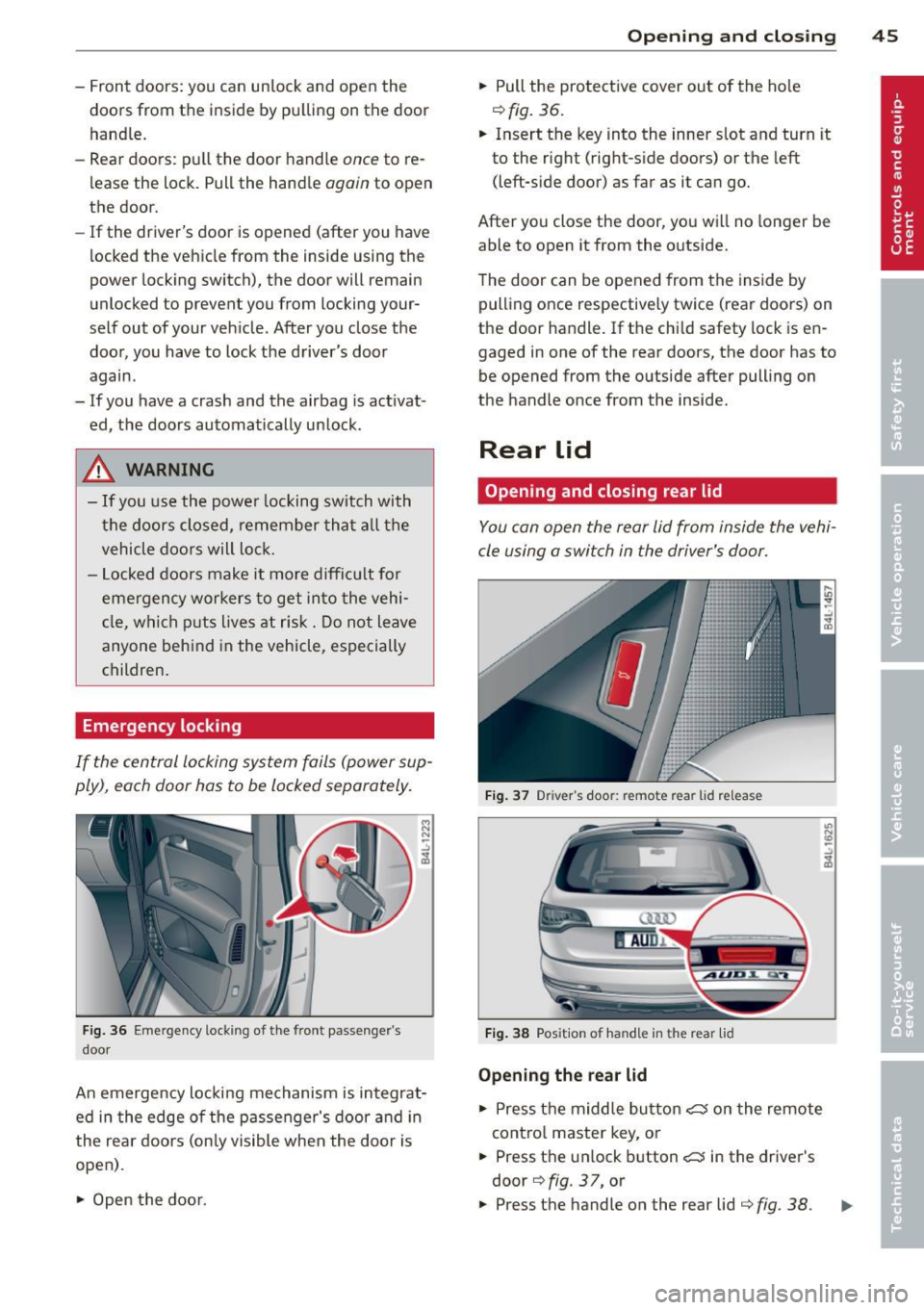
Fig. 36 Em ergency lockin g o f the front passe nger's
doo r
i:i N
-..:,
~
An emergency locking mechanism is integrat
ed in the edge of the passenger's door and in
the rear doors (only visible when the doo r is
open) .
~ Open the door.
Opening and closing 45
~ Pull the protective cover out of the hole
¢fig. 36.
~ Insert the key into the inner slot and turn it
to the right (right-s ide doors) or the left
(left-s ide door) as far as it can go.
After you close the door, you will no longer be
able to open it from the outside.
T he door can be opened from the inside by
pulling once respectively twice (rear doors) on
the door handle . If the chi ld safety lock is en
gaged in one of the rear doors, the door has to
be opened from the outside after pull ing on
the handle once from the inside.
Rear lid
Opening and closing rear lid
You can open the rear lid from inside the vehi
cle using a switch in the driver's door.
Fig. 37 Driver 's doo r: remote rear lid release
Fig. 38 Posit io n of ha ndle in t he re ar lid
Opening the rear lid
~ Press the middle button C::5 on the remote
cont rol master key, or
~ Press the un lock button C::5 in the driver's
door
¢ fig . 37, or
U) N
"' -..:,
i3
~ Press the handle on the rear lid ¢ fig. 38 . .,.
Page 52 of 348
50 Openin g and clo sing
When a door is unlocked, the driver 's door is
a lways unlocked as we ll.
It depends on the
settings in the central locking menu in the
MMI whether the entire vehicle is unlocked or
only certain doors ¢
page 44.
{O) Tips
If your vehicle has been stand ing for an ex
tended period, please note the following:
- The proximity sensors are deactivated af-
ter a few days to save power. You then
have to pull on the door handle once to
unlock the vehicle and a second time to
open the veh icle.
- To prevent the battery from being dis
charged and to preserve your veh icle's
ability to start for as long as possible,
the energy management system gradu
a lly switches off unnecessary co nven
i ence f unct io ns.
It is possible that you
will not be able to unlock your vehicle us
ing these convenience f unctions.
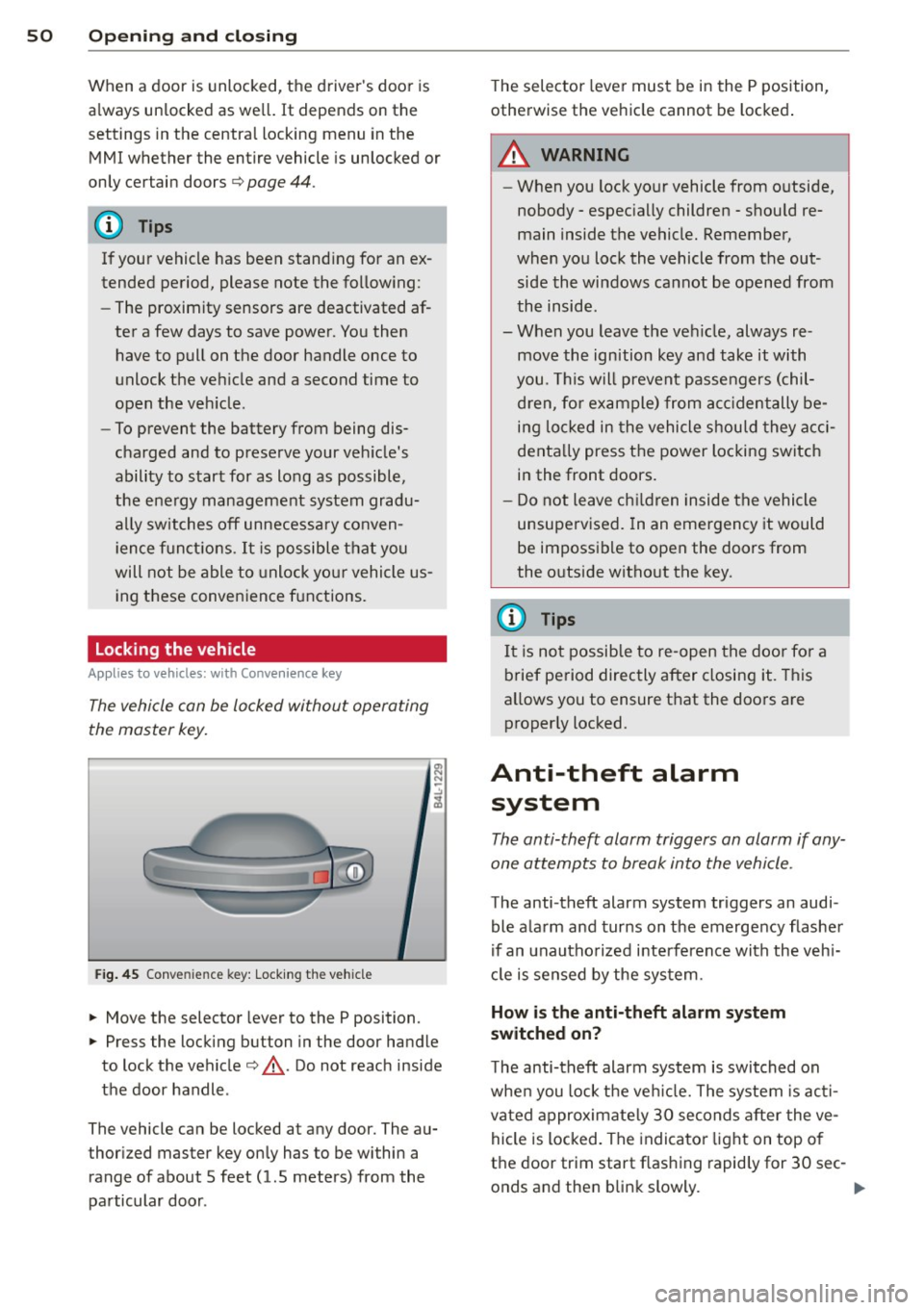
Locking the vehicle
Applies to vehicles: with Conve nience key
The vehicle can be locked without operating
the master key.
Fig . 45 Conve nience key: Lock ing th e ve hicle
.. Move the selector lever to the P position.
.. Press the locking button in the door handle
to lock the vehicle¢,&.. Do not reach inside
the door handle .
The vehicle can be locked at any door. The au
thor ized master key on ly has to be within a
range of about 5 feet (1.5 meters) from the
pa rticular door . T
he selec tor lever must be in the P position,
otherwise the ve hicle cannot be locked .
A WARNING
--When you lock yo ur vehicle from o utside,
nobody - espec ia lly children - shou ld re
main inside the vehicle. Remember,
when you lock the vehicle from the out
side the wi ndows cannot be opened from
the inside.
- When you leave the veh icle, always re
move the ign ition key and take it with
you. This will prevent passengers (chil
d ren, fo r ex ample) from acci dentally be
i n g lo cked in the vehicle shou ld they acci
denta lly press the power locking switch
in the front doors.
- Do not leave ch ildren inside the vehicle
unsupervised. In an emergency it would
be impossible to open the doors from
the o utside witho ut the key.
(J} Tips
It i s no t possible to re -open the doo r fo r a
brief pe riod directly after closing it. This
allows you to ensure that the doo rs are
properly locked.
Anti-theft alarm system
The anti-theft alarm triggers an alarm if any
one attempts to break into the vehicle.
The anti-theft alarm system triggers an audi
ble ala rm and turns on the emergency flashe r
if an unautho rized interfe rence with the veh i
cl e is sensed by the sys tem.
How is the anti-theft alarm system
switched on?
T he anti-theft alarm system is switched on
whe n you lock the ve hicle. The system is ac ti
vated approximate ly 30 seconds after the ve
hicle is locked. The indicato r ligh t on top o f
the door trim start flashing rapid ly for 30 sec -
onds and then blink slowly. ..,.
Page 261 of 348
container meets industry standards (ANSI/
ASTM F852 -86).
(D Note
Never drive yo ur vehicle unt il the fuel tank
is complete ly empty. The irregular supply
of fuel can cause misfiring . Gasoline could
enter the exhaust system and damage the
catalyt ic converter.
Refuelling
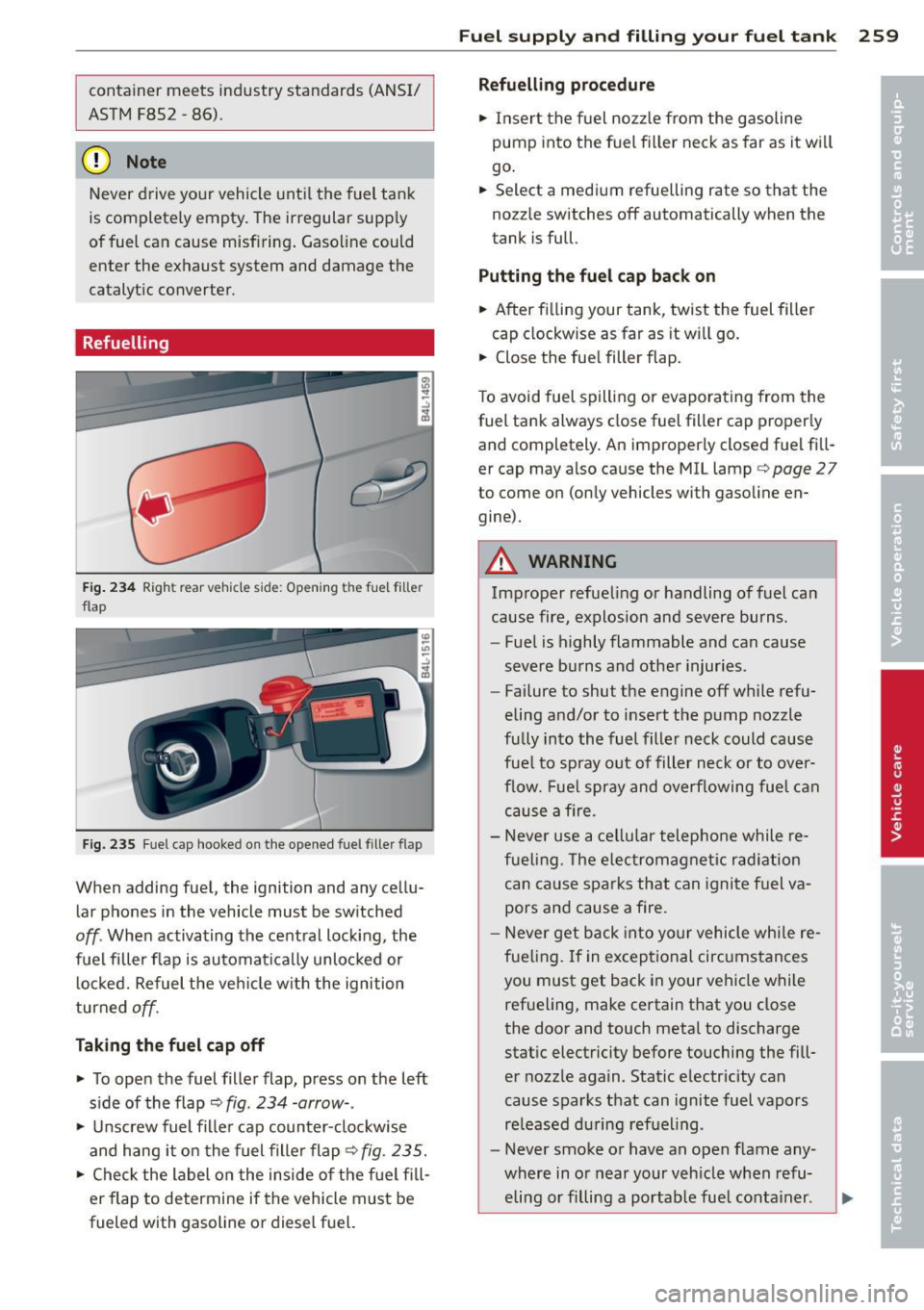
F ig. 234 Righ t rear vehicle side: Opening th e fue l fill er
flap
F ig. 235 Fu el cap hooked on the opened fuel filler flap
When adding fuel, the ignition and any cellu
lar phones in the vehicle must be sw itched
off. When activating the central locking, the
fuel filler flap is automatica lly unlocked or
locked. Refuel the ve hicle w ith the ignition
turned
off.
Tak ing th e fu el cap off
• To open the fuel filler flap, press on the left
s ide of the flap¢
fig. 234 -arrow- .
• Unscrew fuel fil ler cap counter-clockwise
and hang it on the fuel fille r flap ¢
fig. 235.
• Check the label on the inside o f the f uel fill
er flap to determine if the vehicle must be
fueled with gasoline or diesel fuel.
Fuel suppl y and filli ng your fuel t ank 259
Refuelling p ro cedur e
• Insert the fuel nozz le from the gasoline
pump into the fuel fi ller neck as far as it wi ll
go .
• Select a medi um refue lling rate so that the
nozz le switches off automatically when the
tank is full.
Pu tting th e fuel cap bac k on
• After fi lling your tank, twist the fuel filler
cap clockwise as far as it wi ll go.
• Close the fue l filler flap.
T o avoid fuel spill ing or evaporating from the
fuel tank always close fuel filler cap proper ly
and completely. An improperly closed fuel fill
er cap may also cause the MIL lamp¢
page 2 7
to come on (only vehicles with gasoline en
gine).
A WARNING
Improper refueling or handling of fuel can
cause fire, explosion and severe burns.
- Fuel is highly flammable and can cause
severe burns and other injur ies.
- Failure to shut the engine off wh ile refu
eling and/or to insert the pump nozzle
fully into the fuel filler neck could cause
fue l to spray out of filler neck or to over
f low. Fue l spray and overflowing fue l can
cause a fi re.
- Never use a cel lu lar telephone while re
fueling. The electromagnetic rad iation
can cause sparks that can ignite f uel va
pors and cause a fire.
- Never get back into your vehicle whi le re
fueling. If in exceptional circumstances
you must get back in your vehicle while
refueling, make certain that you close
the door and touch metal to discharge
stat ic electricity before touching the fill
er nozzle again. Static e lectricity can
cause sparks that can ignite fuel vapors re leased du ring refuel ing .
- Never smoke or have an open flame any
where in or near your veh icle when refu-
eling or filling a portab le fue l conta iner.
ll>
Page 334 of 348
332 Index
How does moisture or road salt affect the
brakes? .................... ..... . 228
Malfunction .............. ... .... .. 32
Parking brake ............ .. .. .... . 109
Warning/indicator lights ... .. .. .... .. 19
Worn brake pads symbol ....... .. .... 36
Braking guard
refer to Audi braking guard .......... 127
Break-in period ............ .. .. .... . 234
Brake pads ............ .. .... .. .. . 234
Tires .... .. ................ ..... . 234
Breakover angle .. .. ........ ... .. .. . 238
Bulbs ... .. .. ..................... . 312
Bumper cover Caution when parking near a parking bar-rier or curb ............... ... .... . 110
C
California Proposition 65 Warning .. .. . 265
Battery specific .............. .... . 277
Capacities ... ... .... ...... .. .. .. .. . 322
Car -Systems
Ambience lighting . . . . . . . . . . . . . . . . . . 62
Lighting profiles ............ .. .... .. 62
Car care ..... ................ ..... . 245
Interior . . . . . . . . . . . . . . . . . . . . . . . . . . 251
Plastic and vinyl ................ .. . 248
Care of exterior ............ .. .. .. .. . 245
Cargo area
refer to Loading the luggage compart-
ment .. .. .. ... .... ...... .. .. .. .. . 171
Cargo floor .. ............. .. .. .. .. .. 82
Cargo net .... ... .......... .. .. .. .. .. 80
Catalytic converter ... ...... .. .. .. .. . 235
Center armrest Cup holder . . . . . . . . . . . . . . . . . . . . . . . . 77
Storage compartment . . . . . . . . . . . . . . . 77
Center console in rear ..... .. .. .. .. .. . . 78
Central locking Emergency locking .. ...... .. .. .. .. . . 45
Panoramic slid ing sunroof .. .. .. .. .. . . 55
Certification .............. .. .. .. .. . 328
Changing a flat tire .......... ... .... . 304
Changing a wheel .............. .. ... 304
Changing engine oil ......... .... ... . 270 Chassis
Undercoating
also refer to Adaptive Air Suspen- 250
sion . . . . . . . . . . . . . . . . . . . . . . . . 155, 157
CHECK button ..... ................. . 12
Checking Engine coolant level . ............ ... 272
Checking tire pressure ........... .... 286
Child restraints
Danger of using child restraints in the
front seat . . . . . . . . . . . . . . . . . . . . . . . . 186
Where can I get additional information
about child restraints and their use? .. 224
Child restraint system anchors .... .. .. 218
Child safety ..... .. .......... ... .. .. 205
Convertible locking retractor ... .. .. .. 215
Guidance fixtures for lower anchorages 220
Important safety instructions for using
child safety seats . ............. .. .. 208
Important things to know when driving
with children .... ................ . 205
Installing a child restraint using the
LATCH system .. .. ............. .. .. 221
Mounting and releasing the anchorage
hook . .... .... ................... 221
Tether anchors . .. .......... ... .. .. 222
Tether straps . ... ....... ...... .. .. 222
Child safety lock
rear doors (power) .. ........... .... . 48
Child safety seat Unused safety belts on the rear seat . . 210
Child safety seats .. ..... ..... ... .. .. 211
Booster seats ................. .... 213
Convertib le child seats ............. 212
Convertible locking retractor ......... 215
Danger of using child restraints in the
front seat ..... .. ................ . 186
How do I properly install a child safety
seat in my vehicle? ............... .. 208
Infant seats .................. .... 211
Installing ... .. .. ....... ...... .. .. 215
LATCH system .. .. ... ......... ... .. 221
Safety instructions ... .. ..... ... .. .. 208
Child seats Lower anchorages ............. .... 219