power steering AUDI Q7 2021 Owner´s Manual
[x] Cancel search | Manufacturer: AUDI, Model Year: 2021, Model line: Q7, Model: AUDI Q7 2021Pages: 332, PDF Size: 117.99 MB
Page 118 of 332

Driving dynamic
speeds, the rear wheels are steered in the oppo-
site direction from the front wheels to reduce the
turning radius. At high speeds, steering the rear
wheels in the same direction as the front wheels
improves the vehicle response and driving stabili-
ty.
Ba Steering: malfunction! Please stop vehicle
The power steering may have failed. Adapt your
driving style immediately to compensate for the
fact that it may be more difficult to turn the
steering wheel, and stop your vehicle in a safe lo-
cation as soon as possible. Do not continue driv-
ing. See an authorized Audi dealer or authorized
Audi Service Facility for assistance.
a Steering: malfunction! Please stop vehicle.
Pay attention to distance at side
The rear axle steering may have failed. More
space on the road may be needed at the side of
the vehicle, and the turning radius may be much
larger. Slow down immediately, and stop your ve-
hicle as soon as possible in a safe location with
enough space at the sides of the vehicle. Do not
continue driving. See an authorized Audi dealer
or authorized Audi Service Facility for assistance.
BS Steering: malfunction! Please stop vehicle
There is a malfunction in the electronic steering
lock. You cannot turn the ignition on. Secure the
vehicle against rolling before exiting the vehicle
= page 99. Do not tow your vehicle because it
cannot be steered. See an authorized Audi dealer
or authorized Audi Service Facility for assistance.
& Steering: malfunction! You can continue
driving
There is a malfunction in the steering system.
Steering may be more difficult or more sensitive.
Adapt your driving style. Have the steering sys-
tem checked immediately by an authorized Audi
dealer or authorized Audi Service Facility. Please
note that the red indicator light may turn on af-
ter restarting the engine. Do not continue driving
if it does.
116
a Steering: malfunction! Adapt driving style.
Larger turning radius
The rear axle steering may have failed. The vehi-
cle will have a larger turning radius, and the sta-
bility when driving around curves will be compa-
rable to a vehicle without rear axle steering. Drive
carefully to an authorized Audi dealer or author-
ized Audi Service Facility to have the malfunction
corrected.
& Steering lock: malfunction! Please contact
Service
There is a malfunction in the electronic steering
lock. Drive immediately to an authorized Audi
dealer or authorized Audi Service Facility to have
the malfunction repaired.
ZA\ WARNING
Do not tow your vehicle if there is a malfunc-
tion in the electronic steering lock because
this increases the risk of an accident.
@ Tips
— If there is a malfunction, the steering wheel
may be crooked when driving straight.
—Ifthe a or el indicator light only stays on
for a short time, you may continue driving.
ALL wheel drive (quattro)
Applies to: vehicles with all wheel drive
The all-wheel drive system distributes the driving
power variably to the front and rear axle to im-
prove the driving characteristics. It works togeth-
er with selective wheel torque control, which can
activate when driving through curves
=> page 117.
The all-wheel drive system is designed for high
engine power. Your vehicle is exceptionally pow-
erful and has excellent driving characteristics
both under normal driving conditions and on
snow and ice. Always read and follow safety pre-
cautions > A\.
Page 119 of 332
4M1012721BC
Driving dynamic
ZA WARNING
— Even in vehicles with all wheel drive, you
should adapt your driving style to the cur-
rent road and traffic conditions to reduce
the risk of an accident.
— The braking ability of your vehicle is limited
to the traction of the wheels. In this way, it
is not different from a two wheel drive vehi-
cle. Do not drive too fast because this in-
creases the risk of an accident.
— Note that on wet streets, the front wheels
can “hydroplane’” if driving at speeds that
are too high. Unlike front wheel drive
vehicles, the engine RPM does not increase
suddenly when the vehicle begins hydro-
planing. Adapt your speed to the road condi-
tions to reduce the risk of an accident.
Sy olea me tarelatl |
Applies to: vehicles with sport differential
The sport differential distributes the drive power
to the rear axle based on the situation. The goal
is a high level of agility and ability to accelerate
on curves. The vehicle is very responsive to steer-
ing. The settings depend on the selected Audi
drive select* mode.
Messages
iT-3| Sport differential: malfunction! Please con-
tact Service
Drive immediately to an authorized Audi dealer
or authorized Audi Service Facility to have the
malfunction repaired.
T-3| Sport differential: temperature too high.
Please adapt driving style
The transmission temperature has increased sig-
nificantly due to the sporty driving manner. Drive
in a less sporty manner until the temperature re-
turns to the normal range and the indicator light
switches of.
Z\ WARNING
Contact an authorized Audi dealer or author-
ized Audi Service Facility if the sport differen-
tial is faulty or malfunctioning. The repair
must be performed by trained personnel us-
ing the correct oil in order to ensure safety.
Electronic Stabilization
Control
Electronic Stabilization Control (ESC) supports
driver safety. It reduces the risk of slipping and
improves driving stability. ESC detects critical sit-
uations, such oversteering and understeering of
the vehicle, the drive wheels spinning, or the risk
of the vehicle tipping.
The brakes are applied or the engine torque is re-
duced in order to stabilize the vehicle.
The following stabilization functions are integrat-
ed into the ESC, among others:
Anti-lock braking system (ABS)
ABS prevents the wheels from locking when brak-
ing. The vehicle can still be steered even during
hard braking. Apply steady pressure to the brake
pedal. Do not pump the pedal.
A pulsing in the brake pedal indicates that the
system is acting to stabilize the vehicle.
Anti-Slip Regulation (ASR)
ASR reduces drive power when the wheels begin
spinning and adapts the power to the road condi-
tions. This will increase the driving stability.
Electronic Differential Lock (EDL)
The EDL applies the brakes to wheels that are
slipping and transfers the drive power to the oth-
er wheels. This function is not available at higher
speeds.
In extreme cases, EDL automatically switches off
to keep the brake on the braked wheel from over-
heating. The vehicle is still functioning correctly.
EDL will switch on again automatically when con-
ditions have returned to normal.
Selective wheel torque control
Selective wheel torque control is used when driv-
ing on curves. Braking is targeted toward the
117
>
Page 120 of 332

Driving dynamic
wheels on the inside of the curve as needed. This
allows more precise driving in curves.
Power steering
The ESC can also support vehicle stability
through steering.
ZA WARNING
— The ESC and its integrated systems cannot
overcome the limits imposed by natural
physical laws. This is especially important on
slippery or wet roads. If the systems begin
acting to stabilize your vehicle, you should
immediately alter your speed to match the
road and traffic conditions. Do not let the in-
creased safety provided tempt you into tak-
ing risks. This could increase your risk of a
collision.
— Please note the risk of a collision increases
when driving fast, especially through curves
and on slippery or wet roads, and when driv-
ing too close to objects ahead. There is still
a risk of accidents because the ESC and its
integrated systems cannot always prevent
collisions.
— Accelerate carefully when driving on
smooth, slippery surfaces such as ice and
snow. The drive wheels can spin even when
these control systems are installed and this
can affect driving stability and increase the
risk of a collision.
— As the vehicle load increases, especially the
roof load, the vehicle's center of gravity also
increases along with the risk of the vehicle
tipping. To reduce the risk of an accident, al-
ways adapt your driving style to the current
conditions and avoid sudden driving maneu-
vers.
G) Tips
— The ABS and ASR only function correctly
when all four wheels have a similar wear
condition. Different tire sizes can lead toa
reduction in engine power.
— You may hear noises when the systems de-
scribed are working.
118
The So button (or #, depending on the model)
for controlling the ESC is located in the center
console, in front of the selector lever. The ESC is
automatically switched on when the ignition is
switched on.
Limiting ESC
In some situations, it may make sense to limit
the stabilizing function of the ESC so that the
wheels can spin, for example to rock a vehicle to
free it when it is stuck or to drive with snow
chains. The ESC can also be limited to provide
more sporty driving characteristics with fewer
stabilizing corrective actions.
—To limit the ESC, press the oF button briefly.
The B indicator light will turn on.
— To completely reactivate the ESC stabilization
function, press the button again. The indicator
light turns off.
Depending on the Audi drive select mode that is
selected, one of the following ESC modes will be
selected automatically:
— sport - this mode is designed for driving ona
level surface. It is used in all Audi drive select
modes except offroad.
— offroad - this mode is suited for driving offroad
and is designed for uneven terrain or loose
ground. If you select the offroad Audi drive se-
lect mode, the offroad ESC mode will be auto-
matically used.
Switching off ESC
For a more active control of the vehicle where the
stabilizing functions of the ESC cannot intervene,
the ESC can be switched off.
— To switch off the ESC, press and hold the Sor
button for more than three seconds. The B
and aa indicator lights turn on.
— To completely reactivate the ESC stabilization
function, press the button again. The indicator
lights turn off.
Page 167 of 332
4M1012721BC
Parking and maneuvering
> Move the window wiper lever S7 into the posi-
tion for cleaning the rear window & & page 58.
ZA WARNING
Observe the safety precautions and note the
limits of the assist systems, sensors, and
cameras > page 123.
Warnings
Applies to: vehicles with rearview camera/peripheral cameras
Applies to: vehicles with trailer view
Fig. 127 Upper display: trailer view
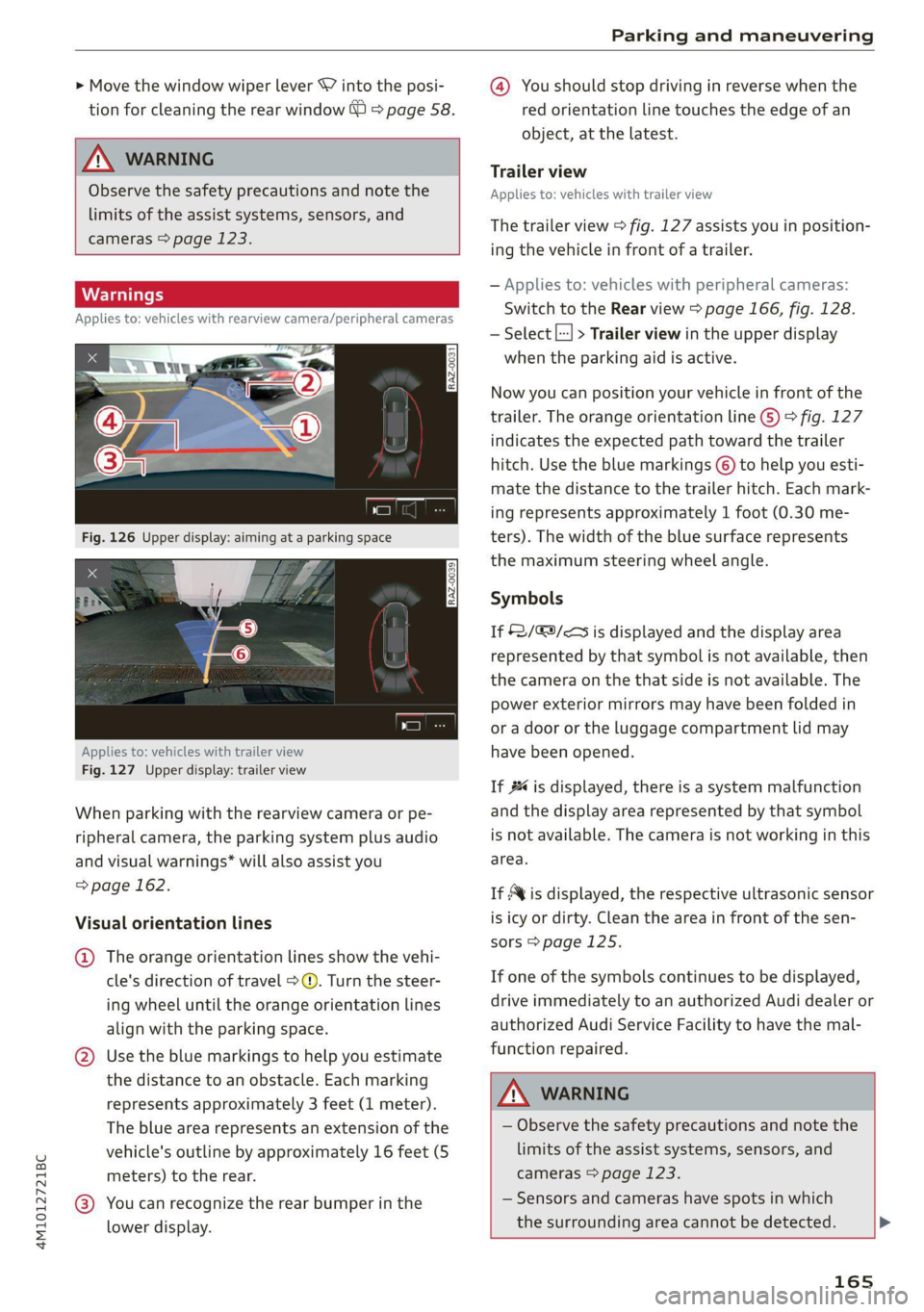
When parking with the rearview camera or pe-
ripheral camera, the parking system plus audio
and visual warnings* will also assist you
=> page 162.
Visual orientation lines
@ The orange orientation lines show the vehi-
cle's direction of travel >@. Turn the steer-
ing wheel until the orange orientation lines
align with the parking space.
@ Use the blue markings to help you estimate
the distance to an obstacle. Each marking
represents approximately 3 feet (1 meter).
The blue area represents an extension of the
vehicle's outline by approximately 16 feet (5
meters) to the rear.
@® You can recognize the rear bumper in the
lower display.
@ You should stop driving in reverse when the
red orientation line touches the edge of an
object, at the latest.
Trailer view
Applies to: vehicles with trailer view
The trailer view > fig. 127 assists you in position-
ing the vehicle in front of a trailer.
— Applies to: vehicles with peripheral cameras:
Switch to the Rear view > page 166, fig. 128.
— Select |---| > Trailer view in the upper display
when the parking aid is active.
Now you can position your vehicle in front of the
trailer. The orange orientation line G) ° fig. 127
indicates the expected path toward the trailer
hitch. Use the blue markings © to help you esti-
mate the distance to the trailer hitch. Each mark-
ing represents approximately 1 foot (0.30 me-
ters). The width of the blue surface represents
the maximum steering wheel angle.
Symbols
If $2/&9/< is displayed and the display area
represented by that symbol is not available, then
the camera on the that side is not available. The
power exterior mirrors may have been folded in
or a door or the luggage compartment lid may
have been opened.
If # is displayed, there is a system malfunction
and the display area represented by that symbol
is not available. The camera is not working in this
area.
If Avis displayed, the respective ultrasonic sensor
is icy or dirty. Clean the area in front of the sen-
sors > page 125.
If one of the symbols continues to be displayed,
drive immediately to an authorized Audi dealer or
authorized Audi Service Facility to have the mal-
function repaired.
A WARNING
— Observe the safety precautions and note the
limits of the assist systems, sensors, and
cameras > page 123.
— Sensors and cameras have spots in which
the surrounding area cannot be detected. >
165
Page 297 of 332
4M1012721BC
Emergency assistance
Preparations
> Only secure the towing cable or tow bar at the
designated towing loops > page 295,
=> page 296.
> Make sure the towing cable is not twisted. Oth-
erwise it could disconnect from the towing loop
while towing.
> Switch the emergency flashers on in both
vehicles > page 53. However, do not do this if it
prohibited by law.
Towing vehicle (front)
> Only start to drive when the towing cable is
taut.
> Press the brake pedal very carefully.
> Avoid sudden braking or driving maneuvers.
Vehicle being towed (rear)
> Make sure the ignition is switched on so that
the steering wheel is not locked and so that you
can use the turn signals, the horn, and the
windshield wipers if needed > A\.
> Switching it off before the vehicle has stopped
may impair the function of the brake booster
and power steering. You would then need to
use more force to steer and brake the vehicle.
> Release the parking brake > page 108.
> Select the “N” selector lever position.
> Make sure the towing cable is always taut.
ZA WARNING
— Never tow a vehicle using a tow bar or tow-
ing cable if the vehicle does not have electri-
cal power.
— If the vehicle runs out of power while it is
being towed, stop towing the vehicle imme-
diately and consult an authorized Audi deal-
er or qualified repair facility.
ing loop
Fig. 192 Front bumper: installing the towing loop (version
2)
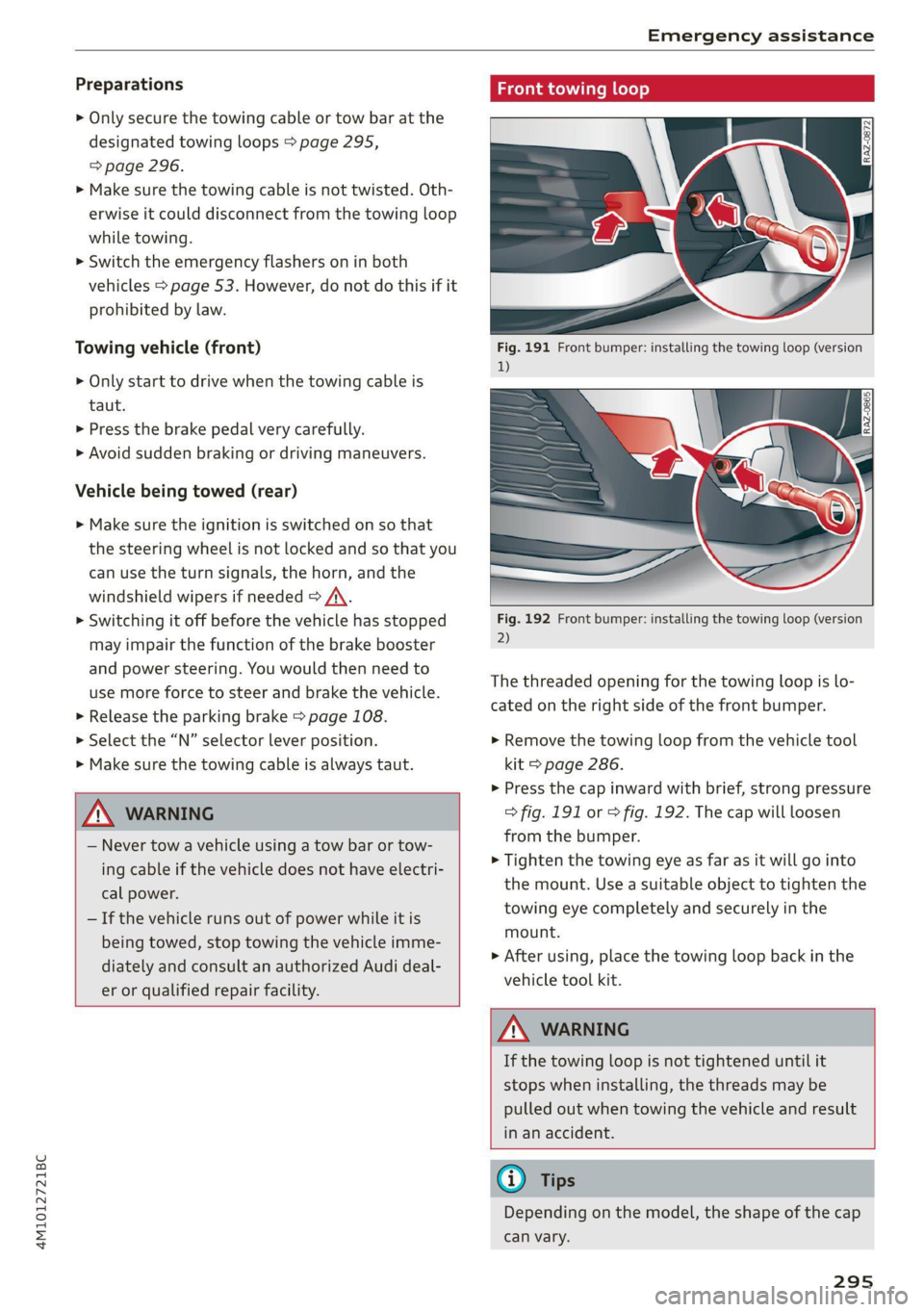
The threaded opening for the towing loop is lo-
cated on the right side of the front bumper.
> Remove the towing loop from the vehicle tool
kit > page 286.
>» Press the cap inward with brief, strong pressure
> fig. 191 or > fig. 192. The cap will loosen
from the bumper.
> Tighten the towing eye as far as it will go into
the mount. Use a suitable object to tighten the
towing eye completely and securely in the
mount.
> After using, place the towing loop back in the
vehicle tool kit.
Z\ WARNING
If the towing loop is not tightened until it
stops when installing, the threads may be
pulled out when towing the vehicle and result
in an accident.
G) Tips
Depending on the model, the shape of the cap
can vary.
295
Page 323 of 332
4M1012721BC
Index
Software:licensesi. « seins ss asros v0 ania © a 239
Version information.............-.00- 239
License plate bracket................0.. 310
Lifting points (vehicle jack).............. 290
Light/rain sensor
Headlights ............. 0.0 e eee eee ee 50
Intermittent mode (windshield wipers).... 58
Lighting
EXteriO?'s sees oo neem oo een 2 2 eon 2 ee 50
TAGE HOR so scans o 6 siaenve © wn sunctne ew axenene 6 0 « 54
LIQWES sscssia es seem ao waver 2 2 aeesiue @ ¥ arenie © ore 50
Listening to music
referto Media..................- 222,226
LOAM) scssaree 1 « senor sc « saute st m seviwen mo stenoses 314
Localiusensss + + sean 2 0 ncawaws a o sesvew s avanawe ov ite 31,
Locking and unlocking
By remote control..............-.00005 39
Using the lock cylinder; sass s saan a 2 nea 37
With the convenience key............... 39
Low beam headlights.................... 50
Lowering the rear of the vehicle........... 89
LTE
refer to Exterior antenna.............. 186
Luggage compartment.................. 87
Came Flea ensians x « escacn a «cnc we remo 6 ro 91
Cover... eee eee eee eee 89
Increasing the size’. 5 « ewes se exes ce caw xe 90
POWEPSOUNGCES ican oo tsseins v0 soars vu seen & woe 86
also refer to Luggage compartment...... 87
Luggage compartment lid
Closing BULtONS s « aces 4 < seen x s Rees BERR 42
General informations: 3 6 sowie so saws ov coe 41
Mechanically unlocking..............45. 44
Opening and closing : 42
Opening and closing with foot motion..... 43
Power opening and closing.............. 42
Lumbar‘Support scseve ws svessoe «6 anesnie a 6 aos 2 64
M
Maintenantee « ssw: «x wen oe nasi ov snes 2 Bo 308
Maintenance intervals............0.0005 257
Malfunction Indicator Lamp (MIL)........ 244
Maneuver assist sows « s sguc : 2 sees as wees t 180
Manual shifting.................2-.00. 102
Map
Changing the scale.............0-0005 205
Display’: wasn x 2 warn s ¢ mews se BewE s 2 OS 207
Operating’. « & ssw ¥ sncasan ¥ wawens av memes a x 2 206
Setting the destination................ 205
MAP
refer to Message Access Profile......... 191
Map preview............0..0..0 eee eee 205
Map update............ cece ee eee eee 210
MYAUGLAPD = newer = : saws s 2 eam 2g gee x = 210
ONLINE & arises 2s sewre8e swans ao eRe ow imaUNm 210
USB connection............-..000005- 210
Massage function................000000e 64
Front... 2... ec ee 65
Mechanical key..... 0.00.00. 0c eee eee ee 38
Media... .... 0... cece eee eee ee eee 222,226
DrivVGSiss ¢ = ness ¢ # Beas ¢ 8 HHS + AER at Bee 222
Supported formats..................- 231
Media-center’. « = sew » ¢ swas x seme 2 x sete 227
Memory functiones: « s sees = ees ve een ce 75
Menu language
refer to Setting the language........... 236
Menu Pathisies « » sows x 2 wees © y eae 2 e emi es 18
Message Access Profile...........-....- 191
MessageS....... 22.00. ce eee eee eee eee 191
Mild hybrid drive system..........-...0- 104
Mirror compasS..... 02.00. .e eee eee eee eee 61
Mirrors
Adjusting exterior mirrors............... 56
DIMMING « = ews & 2 cows xo cen + ees + Bere 56
NAINTEYEIMITIOR®.. susie 2 <
refer to Multi Media Interface........... 19
Mobile device
referto Telephone ...........--eeeeee: 183
Mobile device reminder signal............ 187
Mountain passes......... 0. c ee eee aes 110
Mountain roads..............0 0000000 110
Multifunction steering wheel
Buttons ....... 2... eee eee 13,30
Operating’: = « sees = ssw so pee ae deem oe we 13
Programming buttons.................. 30
Voice recognition system............... 27
321
Page 327 of 332

4M1012721BC
Shortcut
refer to Shortcuts........... cece eee 23
Shortcuts ............. 000002 e eee 23
Shuffle....... 0.0.0... 228
Side assists: © a aciwess w siemens w vucue wo eweneMe a 155
Cleaning the sensors.............00055 281
SIM card... . eee eee eee ee 195
Sliding/tilting sunroof
refer to Panoramic glass roof............ 46
Smart Favorites
refer to PresetS............ 0s eee eee 217
Smartphone
refer to Telephone...........-.00e000 183
SNOW CHAINS’: + seas « = sees ye ews +e we ee 275
Socket
refer to Power sources...........--0e 00s 86
Software information
Legalinformation..................0. 239
Software version (MMI)
Version information............+-.00- 239
Sound
refer to Adjusting the sound............ 236
Speed limit information
refer to Traffic sign recognition......... 128
Speed limits
refer to Traffic sign recognition......... 128
SPECCOMETER s sci 2 usan a 2 sen wo one so ae 12
Speed warning system.............-.4.- 128
Sport differential...................0.. U7:
Start/Stop system............0--0000- 105
MEOSSaQEStass « ¢ neeay 5 5 seeves « 2 nerR xe Mew 106
Switching offandon.............00 eee 105
Starting to drives. « «ccc ¢ sansue o wrasene @ 6 ssesoun 99
Starting (Engine) « macs sc wave sa eoewiwe 2 ¥ ae 106
SESHING's « 5 xaesu & & weuns 4 » emer x = HaWE 2 © oe 115
AUdidrive SCL@GE csarice «= sswene 2 + soomane ie « suse 113
also refer to Steering............-+055 115
Steering lock. ......... cee e eee eee 98,116
Steering wheel
AGJUStING as ¢ = esas + = oem x Hees te Rees z= 69
Shift:paddles wares: 2 v wes a somes oe cere os 102
Steering wheel heating.............0005 96
also refer to Multifunction steering wheel. . 13
Steps for determining correct load limit... 273
Stopover (navigation) ................6. 206
Stopping...... 0... cece eects 99
Stopping the vehicle..............--.005 99
SCOPPINGAENGINE) wei. ss sow 6 a eve 6 6 some 106
StOrag@ ies « x swe +o eae yo ewe ye tes 2 ves 87
Storage compartment............eeee eee 87
Stored stations
refer'to PreSetsias. ss seon oe ewe ew ews ve 217
Subtitles
MD crace 2 = eacmime = cinerens 6 2 seeing wo sens ot 230
Sunshade
Rear doors ..... 6. eee cece eee eee eee 58
Rear WitdOWise 2 » ec ss ween 2 » eee sv ee 58
[lol0) Se ee 46
also refer to Panoramic glass roof........ 46
SUP:VISONS « sscco 6 6 ccewnn a sete a mene 8 ese 57
SUSPENSION « cers « 6 sesuaw « wanes 4 & sretene a ¥ anaes 114
Audi drive select..................00. 113
Swapping calls.............-.0002- 00 ee 189
SWEPVEFASSISE « caseese os wesrers ow waeen ow eaten 6s 154
Symbols
Navigation ........ 0... cece eee eee eee 206
TrattiGewe sy some a gown as BeeE gE aE ae Be 211
also refer to Indicator lights.............. 7
SYNC (climate control system)............ 94
Syst@m Settings « cess ss weg s coves « pews s 236
T
Tachometer sy s x wawe 2 y ween 2 wow x Yom 12,14
Tail lights
Cleanings « = snes 2s wien 2s mewn a ewe Fo 281
Technical data): : s scee : x wigs : seme a 2 cee 313
Technical modifications................. 308
Telephone: « « cas zs sea ¢ s eees ta eRe eG 183
Accepting/ending acall................ 189
Audi phone box........ 0... cee eee eee 185
Charging the battery (USB)............. 186
Charging the battery (wireless) ......... 186
Connecting a mobile phone............ 183
Dialing anumber.................2005 189
Exterior antenna.......... 0. eee eee 186
Mobile device reminder signal.......... 187
Options during aphonecall............ 189
Playing mUSi¢ ssc. se segs x ¥ eee se eee ee 223
Temperature display (outside temperature) .. 15
Temperature gauge