cooling AUDI R8 SPYDER 2015 Owners Manual
[x] Cancel search | Manufacturer: AUDI, Model Year: 2015, Model line: R8 SPYDER, Model: AUDI R8 SPYDER 2015Pages: 232, PDF Size: 58.36 MB
Page 5 of 232
..... N
r-N "': ..... \!) 1.1'1
N 1.1'1 .....
Kneeairbags .. ........... .. .. .. .. ... 116
Side airbags . . . . . . . . . . . . . . . . . . . . . . . . 118
Ch ild Safety . . . . . . . . . . . . . . . . . . . . . . 122
Important things to know . . . . . . . . . . . . . 122
C hild safety seats . . . . . . . . . . . . . . . . . . . . 127
Instal ling a chi ld safety seat . . . . . . . . . . . 130
Additional Information . . . . . . . . . . . . . . . 132
Vehicle operation . . . . . . . . . . . . . . . . 134
Intelligent technology . . . . . . . . . . . 134
Notice about data recorded by vehicle
control modules . . . . . . . . . . . . . . . . . . . . . 134
Electronic Stabilization Control (ESC) . . . . 134
Braking . . . . . . . . . . . . . . . . . . . . . . . . . . . . 136
Rear spoiler . . . . . . . . . . . . . . . . . . . . . . . . 138
Power steering . . . . . . . . . . . . . . . . . . . . . . 139
D ry s ump lubr ication . . . . . . . . . . . . . . . . . 139
Driving with your quattro . . . . . . . . . . . . . 139
Energy management . . . . . . . . . . . . . . . . . 140
Driving and environment . . . . . . . . 142
Break-in period . . . . . . . . . . . . . . . . . . . . . . 142
Avoid damaging the vehicle . . . . . . . . . . . . 142
Driving through water on roads . . . . . . . . 142
Catalytic converter . . . . . . . . . . . . . . . . . . . 142
Shutting down vehicle . . . . . . . . . . . . . . . . 143
Operation and maintenance . . . . . . . . . . . 143
Trailer towing . . . . . . . . . . . . . . . . . . . . . . . 144
Vehicle care . . . . . . . . . . . . . . . . . . . . . . 145
Vehicle c are and cleaning . . . . . . . . 145
General information . . . . . . . . . . . . . . . . . 145
Car washes . . . . . . . . . . . . . . . . . . . . . . . . . 145
Cleaning and care information . . . . . . . . . 146
Fuel supply and filling your fuel
tank ... .. .. .... ............. .. .. .. .
151
Gasoline . . . . . . . . . . . . . . . . . . . . . . . . . . . 151
Fu el tank . . . . . . . . . . . . . . . . . . . . . . . . . . . 152
Checking and filling . . . . . . . . . . . . . . 155
Engine compartment lid . . . . . . . . . . . . . . 155
Engine oil . . . . . . . . . . . . . . . . . . . . . . . . . . 158
Eng ine cooling system . . . . . . . . . . . . . . . . 161
Brake fl uid . . . . . . . . . . . . . . . . . . . . . . . . . 164
Table of contents
Battery . . . . . . . . . . . . . . . . . . . . . . . . . . . . 164
Windshield washer container . . . . . . . . . . 168
Tires and wheel s . . . . . . . . . . . . . . . . . 169
Tires . . . . . . . . . . . . . . . . . . . . . . . . . . . . . . 169
Tire pressure monitoring system . . . . . . . 196
Do-it-yourself service . . . . . . . . . . . . 199
What do I do now? . . . . . . . . . . . . . . . 199
Trunk escape handle . . . . . . . . . . . . . . . . . 199
Vehicle tool kit . . . . . . . . . . . . . . . . . . . . . . 199
Tire repair . . . . . . . . . . . . . . . . . . . . . . . . . . 199
What should I be aware of when changing
a tire? . . . . . . . . . . . . . . . . . . . . . . . . . . . . . 203
Jump-starting . . . . . . . . . . . . . . . . . . . . . . . 206
Emergency towing with commercial tow
truck . . . . . . . . . . . . . . . . . . . . . . . . . . . . . . 208
Fu ses and bulb s . . . . . . . . . . . . . . . . . . 210
El ectr ical fuses . . . . . . . . . . . . . . . . . . . . . . 210
Bulbs......... .. .. ........... .. .. .. 211
Technical data . . . . . . . . . . . . . . . . . . . . 212
Technical Data . . . . . . . . . . . . . . . . . . . . 212
Vehicle identification . . . . . . . . . . . . . . . . . 2 12
Weights . . . . . . . . . . . . . . . . . . . . . . . . . . . 212
Dimensions......................... 213
Capacities . . . . . . . . . . . . . . . . . . . . . . . . . . 213
Gasoline engines . . . . . . . . . . . . . . . . . . . . 214
Consumer Information . . . . . . . . . . 215
Warranty coverages . . . . . . . . . . . . . . . . . . 21S
Operating your vehicle outside the U.S.A .
o r Canada . . . . . . . . . . . . . . . . . . . . . . . . . . 21S
Audi Servi ce Repair Manuals and
Literature . . . . . . . . . . . . . . . . . . . . . . . . . . 215
Maintenance. .. .. ... .......... .. .. .. 215
Additional accessor ies, modifications and
parts replacement 217
Index . . . . . . . . . . . . . . . . . . . . . . . . . . . . . 219
3
Page 12 of 232
Instrum ent s a nd w arn ing /indi cator lights
-Never open the engine compartment lid if
you see or hear steam, or if you see engine coolant dripping from the engine compart
ment. You could burn yourself. Let the en
gine cool off first until you can no longer see
or hear steam or coo lant escaping .
CD Note
- Mount ing additional lights or accessories in
front of the a ir inlets reduces the cooling ef
fect of the rad iator. At h igh outside temper
atures or high engine load, the engine could
ove rheat.
- The front spo ile r has been designed to prop
erly distribute the cooling air when the veh i
cle is mov ing. If the spo iler is damaged, this
could reduce the cooling effect and the en
gine could then overheat. Ask your author
ized Audi dealer for assistance.
Fuel gauge
The fuel gauge works only when the ignition is
on. When the needle reaches the red area, the
warning light in the instrument cluster will illu
minate
c:> page 17 Ill Time to ref uel!
CD Note
Never run the tank completely dry! An irregu
lar supply of fuel can cause engine m isfiring
and fuel could enter into the exhaust system .
The catalytic converter cou ld then overheat
and be damaged.
10
Speedometer with odometer
The speedometer shows you the vehicle speed,
and the odometer shows you how many miles
(kilometers) you have driven.
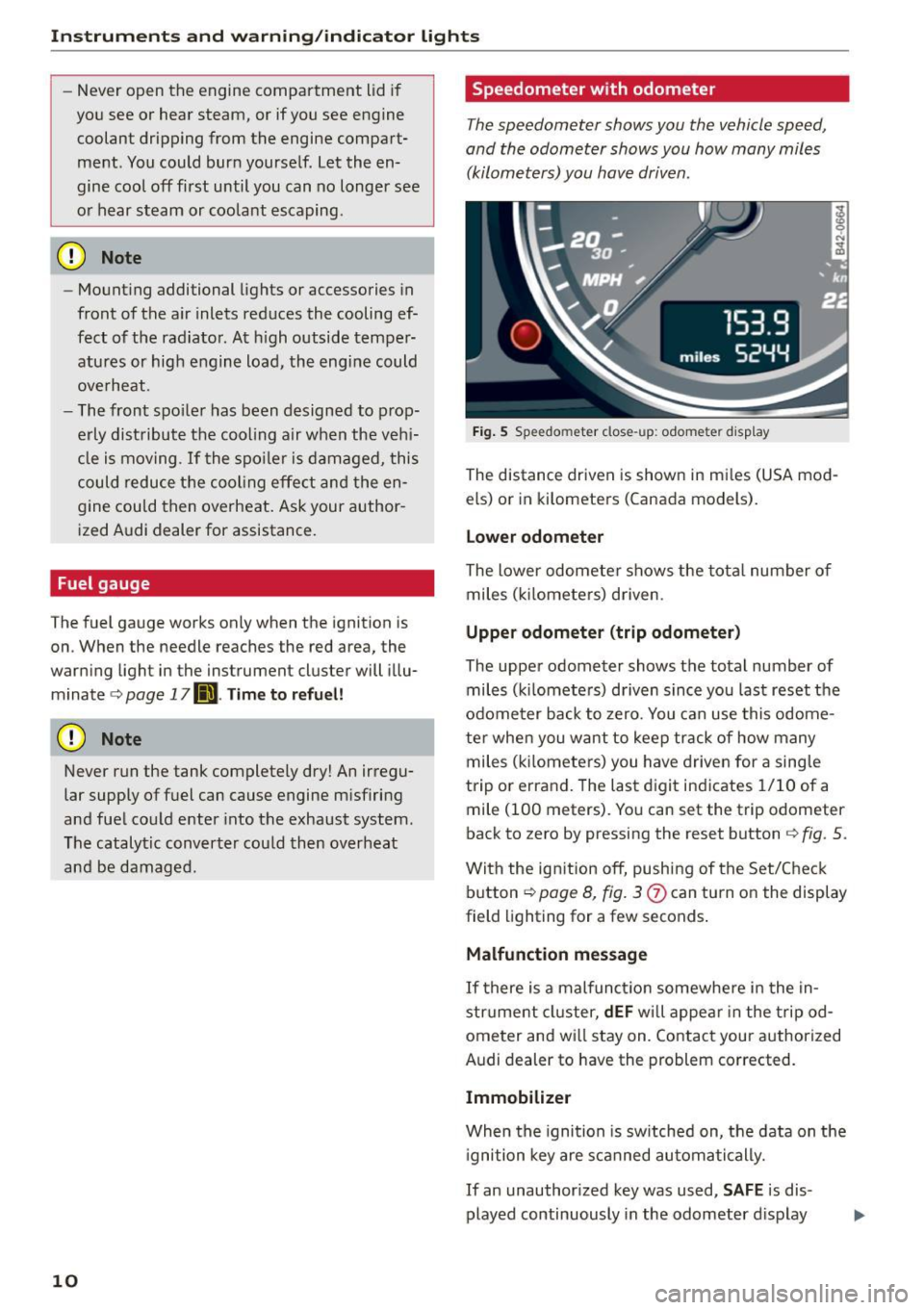
Fig. 5 Speedo meter close-up: odometer disp lay
The distance driven is shown in mi les (USA mod
els) or in kilometers (Canada models).
Lower odomet er
The lower odometer shows the tota l number of
miles ( kilometers) driven .
Upper odometer (trip odometer )
The upper odometer shows the total number of miles (k ilometers) driven since you last reset the
odome ter back to zero. You can use this odome
te r when you want to keep track of how many
miles (k ilomete rs) you have driven for a sing le
trip or errand. The last digit ind icates 1/10 of a
mile (100 meters). You can set the trip odometer
back to zero by pressing the reset button
c:> fig . 5 .
With the ig nition off, push ing of the Set/Check
button
c:> page 8, fig. 3
Malfunction messag e
If there is a malfunction somewhere in the in
strument cluster,
dEF wi ll appea r in the tripod
ometer and wi ll stay on. Contact your authorized
Audi dealer to have the problem corrected.
Immobilizer
When the ignition is sw itched on, the data on the
i gnition key are s canned automatically.
If an unauthor ized key was used,
S AF E is dis
played continuously in the odometer d isplay
Page 16 of 232
Instruments and warning/indicator lights
4 Safety belt warning light
Applies to vehicles: with safety belt warning light
The warning light is a reminder to fasten safety
belts.
The warning light . comes on for a few seconds
after the ignition is sw itched on as a reminder to
fasten your safety belt.
Additiona l information on safety be lts
¢page 95.
D Battery
This warning/indicator light detects a malfunc
tion in the generator or in the vehicle's electrical
system.
The. warning/indicator light ill uminates when
you switch on the ignition and must go out after
the engine has started.
• Alternator fault: Battery is not being charg
ed
If the indicator light turns on and the message
appears, there is a malfunction in the generator
or vehicle electrical system .
D riv e to you r aut horized Aud i dea le r or qualified
wo rkshop immediately. Because the vehicle bat
tery is discharging, turn off all unnecessary elec
trica l equipment suc h as the radio. Seek profes
siona l assistance if the battery charge level is too
low.
(•) Low battery: battery will be charged while
driving
If the indicator light turns on and the message
appears, there may be limited star ting ability.
If th is message turns off after a little wh ile, the
battery charged enough wh ile driving .
If the message does not turn off, have your au
thor ized Audi dealer or qualified workshop cor
rect the malfunct ion.
14
·~Engine oil pressure
The red engine oil pressure warning symbol re
quires immediate service or repair .
If the . symbol appears in the display and
flashes, the o il pressure is too low. In add ition to
the symbol, the following message also appears i n the d isp lay:
Switch off engine! Oil pressure is too low
.. Pull off the road and stop the vehicle .
.. Shut the engine down.
.. Check the engine oil level¢
page 159 .
.. Contact your authorized Audi dealer for assis-
tance if necessary.
Engine oil level too low
If the engine oil leve l is too low, top off oil to the
proper level
¢page 160.
Engine oil level OK
If the. symbol starts flashing again even
though the engine oi l level checks OK on the dip
stick,
do not sta rt driving again and do not let
the engine run at idle .
Instead, contact your au
thorized Audi dealer for assistance .
(D Tips
- The engine oil pressure symbol. is not
an indicator for a low engine oil level. Do
not rely on it. Instead, check the oil level in
your engine at regular intervals, preferably each time you refuel, and always before
going on a long trip.
- The yellow oil level warning indication
II
requires oil refill or workshop service with
out delay. Do not wait until the red oil
pressure warning symbol. starts to flash
before you respond to the low oil level
warning
Ill. By then, your engine may al
ready have suffered serious damage.
-L Engine cooling system
A malfunction in the engine cooling system must
be repaired as soon as possible.
When the. symbol in the display flashes, then
either the engine coo lant
temperature is too IJ,,
Page 17 of 232
..... N
r-N "': ..... \!) 1.1'1
N 1.1'1 .....
Instrument s and warning /indicator ligh ts
high, or the coolant level is too low. In addition
to the symbo l, the following message also ap
pears in the disp lay:
S w itc h off en gin e and ch ec k coo lant l ev e l
.. Pull off the road and stop the vehicle .
.. Turn off the engine .
.. Check coolant level~
page 162.
.. Add coolant if ne cessary ~ page 163 .
.. Continue d riving only after the engine coolant
warning/indicator light goes out .
.. Contact your authorized Audi dea ler for ass is-
tance if necessary.
I f the engine coolant level is correct, then the ra
diator fan may be the cause of the malfunction.
If the generator wa rning/ind icator light shou ld
a lso i lluminate
~ page 14, then the fan belt may
be damaged .
A WARNING
-If your vehicle should break down for me
chanical or other reasons, park at a safe dis
tance from moving traffic, turn off the en
gine and turn on the hazard warning lights
~ page 48, Emergency flasher.
- Never open the engine compartment lid if
you see or hear steam or coo lant escaping
from the engine compartment - you risk be
ing scalded . Wa it until you can no longer
see or hear steam or coolant escaping .
- The engine compartment of any veh icle is a
dange rous area. Before you perform any
wor k in the engine compa rtment, t urn off
the engine and allow it to coo l. Follow the
warning stic kers
~ page 155, Working in
the engine compartment .
(D Note
Do not co nti nu e d riving if the. symbo l ill u
m inates. There is a mal function in the engine
cooling system -you could damage your en
gine .
dS Convertible top operation
The ind icator light tu rns on II!
- When the convertib le top opens or closes or -
If the convert ible top did not open or close
comp letely .
T he ind icator light blinks if the convertib le top
cannot open or close
~ page 39.
;;./ !'r, Electronic Stabilization Control (ESC)
Ifthc DJ indicator lamp blinks while driving, the
ESC or ASR (Anti-Slip Regulation) is actively regu
lating.
If the
DJ indicator lamp illum inates, the system
has switched the ESC off. In this case, you can
switch the ignition off and then on to switch the
ESC on aga in. The system is functioning com
ple tely when the indicator lamp switches off.
If the
II indicator lamp illuminates, the ESC was
switched off with the
[ru button .
Stabilizati on progr am and ABS fault! S ee ow n
e r's manual
If the Bl ind icator lamp and the [i] ABS indica
tor lamp illum inate and the d river message ap
pears, the ABS or e lectronic differentia l lock is
malfunctioning . This also interrupts the ESC. The
brakes still function with their normal power, but
ABS is not active .
Drive to your authorized A udi dealer immed iate ly
to have the mal func tion corrected .
Fo r more information about the ESC
~ page 134.
ABS/ (0 ) Anti-lock brake system
This warning/indicator light monitors the ABS
and the electronic differential lock (EDL).
The warning/indicator light Ill (USA models)/
¢ ~)
will go out after an automa tic check sequence is
completed.
There is a malfunction in the ABS when:
- The warning/indicator light does not illum inate
when you sw itch the ignition on .
- The warning/indicator light does not go out af -
ter a few seconds . ..,
15
Page 63 of 232
.... N
l'
N "1: rl I.O
"' N
"' ....
Warm and cold Climate controls
Controls
Warm and cold
The climate controls automatically maintain the selected temperature in the vehicle interior through
out each season .
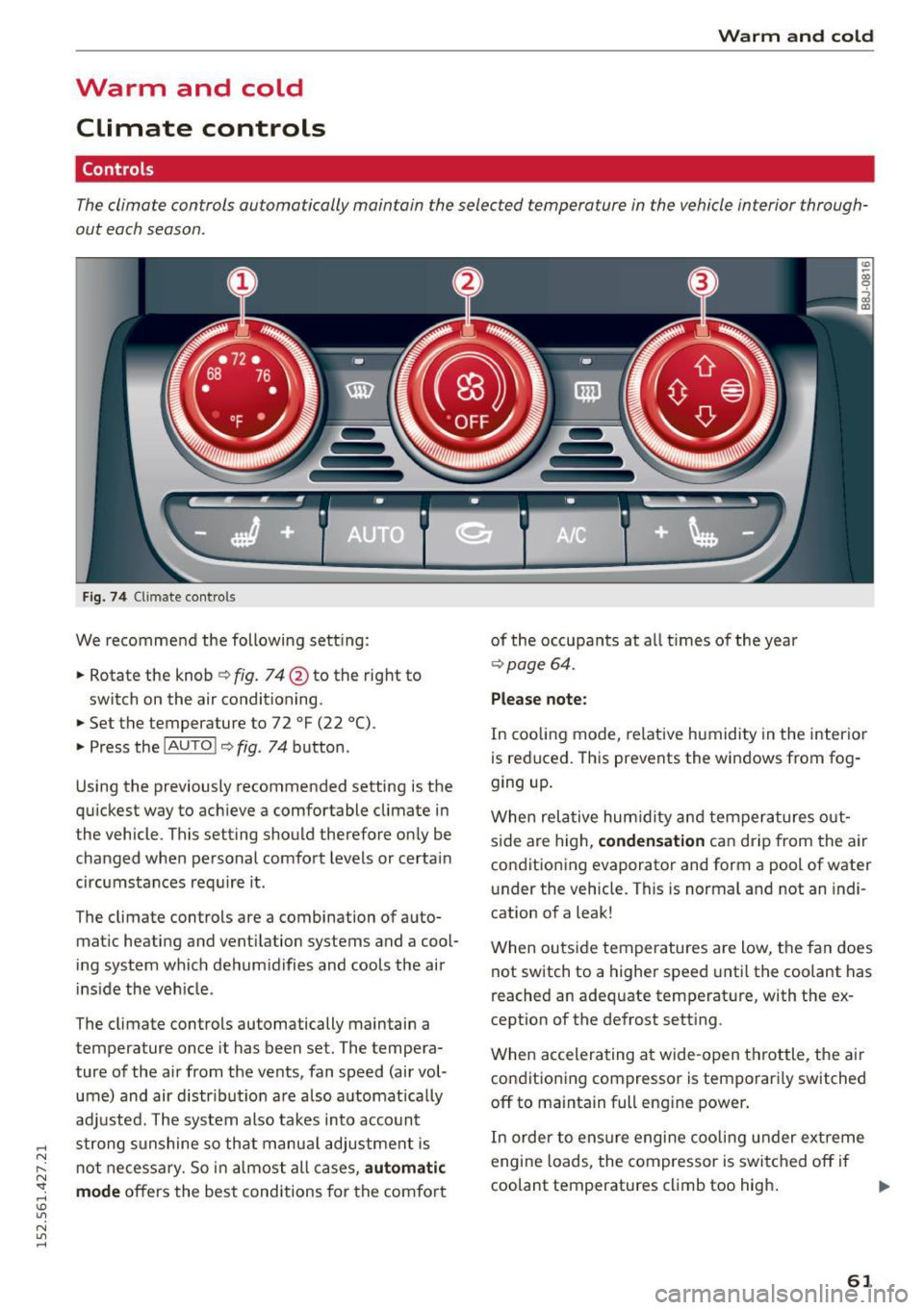
Fig . 74 Cl imate co ntrols
We recommend the following sett ing :
.. Rotate the knob
Q fig. 74 @ to the right to
switch on the air conditioning .
.,. Set the temperature to 72
°F (22 °() .
.. Press the !AU TO ! Q fig . 74 button .
Using the previously recommended setting is the
qu ickest way to ach ieve a comfortable climate in
the vehicle . This setting should therefore on ly be
changed when personal comfort levels or certain
circumstances req uire it .
The climate controls are a combination of a uto
mat ic heating and vent ilation systems and a cool
ing system which dehum idifies and cools the air
ins ide the veh icle .
The climate controls automatically maintain a
temperature once it has been set. The tempera ture of the air from the ve nts, fan speed (air vol
ume) and air d istr ibut ion are also a utomat ically
adj usted. The system also takes into account
strong sunshine so that manua l adjustment is
n o t necessary. So in almost all ca ses,
automatic
mode
offers the best conditions for the comfo rt of the occupants at a
ll times of the year
Q page 64 .
Please note :
In cooling mode , relative humidity in the interior
is reduced. This prevents the windows from fog
ging up .
When relative hum idity a nd temperatures o ut
s ide are high,
condensation can drip from the air
condit ioning evaporator and form a pool of water
under the vehicle . This is normal and not an indi
cation of a leak!
When outs ide temperatures are low, the fan does
not switch to a higher speed unti l the coolant has
reached an adequate temperat ure, with the ex
cept ion of the defrost setting .
When accelerating a t wide-open throttle, the ai r
condit ioning compressor is temporari ly switched
off to ma intain full eng ine power .
In order to ensure engine coo ling under ext reme
engine loads, the compressor is switched off if
coolant temperatures climb too high .
IJl>
61
Page 64 of 232
Warm and cold
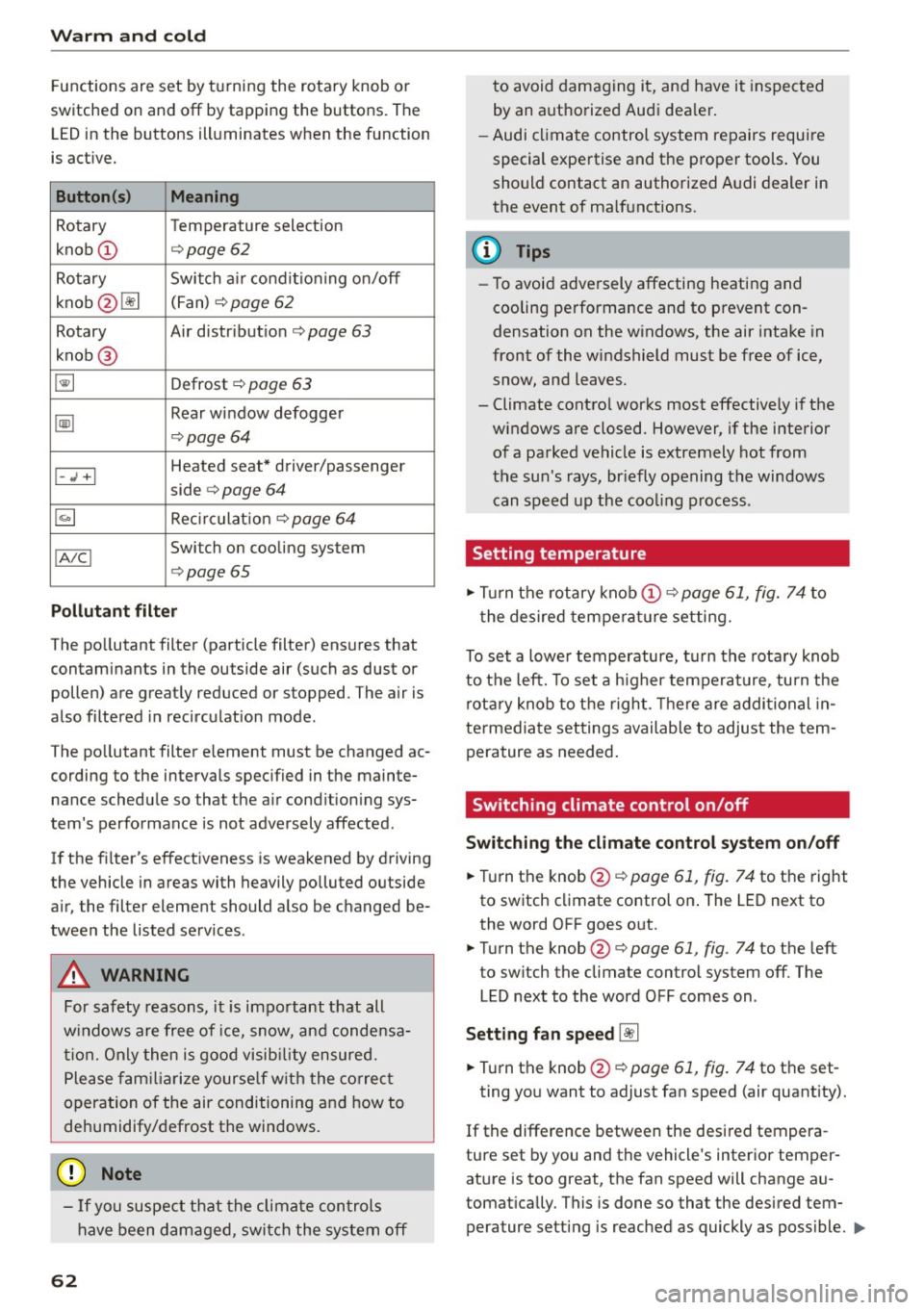
Functions are set by turning the ro tary knob or
switched on and
off by tappin g the buttons. The
L ED in the buttons illuminates w hen the function
is act ive.
Button(s)
Meaning
Rotary Temperature selection
knob
(D ¢ page 62
Rotary Switch a ir condit io ni ng on/off
knob @~ (Fan)
¢
page 62
Rotary Air distribut ion¢ page 63
knob @
~ Defrost ¢ page 63
~
Rear window defogger
¢page 64
Heated seat* driver/passenger I-.; +I
side ¢ page 64
~ Recirculat ion¢ page 64
IA!CI Switch on cooling system
¢ page 65
Pollutant filter
The pollutant filter (particle filter) ensures that
contaminants in the outside air (such as dust or
pollen) are great ly reduced or stopped. The air is
also filtered i n recirculation mode.
The pollutant filter e lement must be changed ac
cording to the intervals spec ified in the mainte
nance schedu le so that the a ir cond ition ing sys
tem's performance is not adversely affected.
If the f ilter's effect iveness is weakened by driving
the vehicle in areas with heavily polluted outside
air, the filter eleme nt should also be changed be
tween the listed serv ices .
A WARNING
For safety reasons, it is impo rtant that all
w indows are free o f ice, snow, and conde nsa
ti on. Only then is good visib ility ensured.
P lease fam iliarize yourse lf with the co rrec t
operation of the air conditioning an d how to
dehumidify/defrost the windows.
([) Note
-If yo u suspect that the climate controls
have been dam aged, swi tch the system
off
62
-
to avoid damaging it, and have it inspected
by an aut ho rize d Audi dea le r.
- Audi cl imate control system repairs requ ire
special expe rtise and the p roper tools . You
should contact an authorized A udi dealer in
the event of ma lf u nctions.
(D Tips
- To avoid adve rsely affecting heati ng and
cooling pe rformance and to prevent con
densation on the w indows , the air intake in
front of the windshield must be free of ice,
snow , and leaves.
- Climate contro l works most effectively if the
windows are closed. However, if the interior
of a parked vehicle is extremely hot from
t h e su n's rays, br iefly opening the windows
can speed up the coo ling p rocess.
Setting temperature
.,. Tu rn the rotary knob (D ¢ page 61, fig. 74 to
t he desired tempera ture setting.
To set a lowe r temperature, tu rn the rotary knob
to t he left. To set a h igher tempera ture, tu rn t he
rota ry knob to t he righ t. Th ere are addi tional in
te rme diate set tings available to adjust the tem
pera ture as needed .
' Switching climate control on/off
Switching the climate control sy stem on/off
.,. Tu rn the knob@¢ page 61, fig. 74 to th e right
to switch climate control on . The LED next to
the word OFF goes out.
.,. Turn the knob @¢
page 61, fig. 74 to the left
to sw itch the climate control system
off. The
LED next to the word OFF comes on .
Setting fan speed~
.,. Turn the knob @¢ page 61, fig. 74 to th e set-
ting yo u want to adjust fan speed (air quantity).
If the difference between the desi red tempera -
ture set by you and the vehicle's inter ior temper
ature is too great, the fan speed will change au
tomat ically. This is done so that the desired tem
perature setting is reached as quickly as poss ible . .,,.
Page 65 of 232
.... N
l'
N "1: .... I.O
"' N
"' ....
@ Tips
If the difference between the desired temper
ature you have set and the vehicle's interior
Air distribution
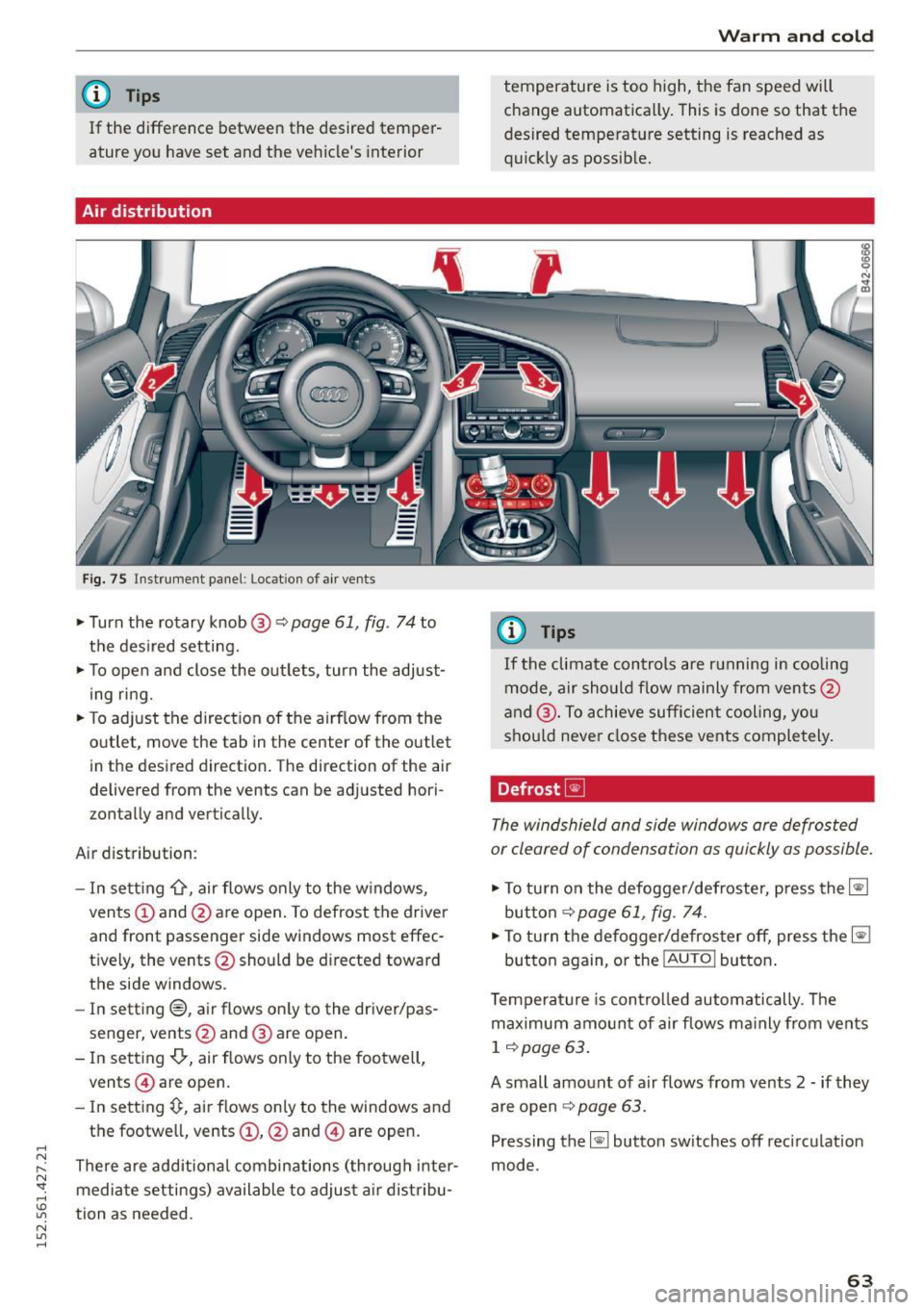
Fig. 75 Instrument panel: Location of air vents
,.. Turn the rotary knob @ q page 61, fig. 74 to
the desired setting.
,.. To open and close the outlets, turn the adjust
ing ring.
,.. To adjust the direction of the airflow from the
outlet, move the tab in the center of the outlet
in the desired direction. The direction of the air
delivered from the vents can be adjusted hori
zontally and vertically.
Air distribution:
- In setting
-0, air flows only to the windows,
vents
(D and @are open. To defrost the driver
and front passenger side windows most effec
t iv ely, the vents @should be directed toward
the side windows .
- In setting®, air flows only to the driver/pas
senger, vents@and @ are open.
- In setting
-0-, air flows only to the footwell,
vents @ are open.
- In setting~. air flows only to the windows and
the footwe ll, vents
(D , @ and @ are open.
There are additional combinations (through inter mediate settings) available to adjust air distribu
tion as needed.
Warm and cold
temperature is too high, the fan speed will
change automatically. This is done so that the
desired temperature setting is reached as
quickly as possible.
(0 Tips
If
the climate controls are running in cooling
mode, air should flow mainly from vents@
and @. To achieve sufficient cooling, you
should never close these vents completely.
Defrost ~
The windshield and side windows are defrosted
or cleared of condensation as quickly as possible.
,.. To turn on the defogger/defroster, press the~
button
~page 61, fig. 74.
,.. To turn the defogger/defroster off, press the~
button again, or the
! AUTO ! button.
Temperature is controlled automatically. The
maximum amount of air flows mainly from vents
1 ~page 63.
A small amount of air flows from vents 2 -if they
are open
~ page 63.
Pressing the~ button switches off recircul ation
mode.
63
Page 67 of 232
..... N
r-N "': ..... \!) 1.1"1
N 1.1"1 .....
A/C operation ~
Switching on A /C
~ Press the !AIC ! button~ page 61, fig . 74.
Switching A /C off
~ Press the !AIC ! button again.
The cooling system is switched on during A/Cop
eration - the heating and venti lation system is
contro lled automatically.
(D Tips
If the LED in the switch stays on after A/Cop
eration has been switched off(= switching the
A/C off), there is a fault in an air conditioning
component. Please consult an author ized
Aud i dea ler when there is an operating prob
lem.
Using the climate controls economically
Economical use of the climate controls helps to
save fuel.
When climate control is working in coo ling mode,
engine performance is red uced and fuel con
sumpt ion is affected. To keep the time the air
conditioning is on as short as possible, you
should do the following:
~ If you would like to save f uel, switch the air
condit ion ing
off.
~ If you open the w indows wh ile driving, switch
the a ir cond it ion ing
off .
~ If the vehicle is ext remely hot due to the heat
of the sun, briefly open doors and w indows.
@ For the sake of the environment
When you save fuel, you reduce em iss ions
from the vehicle .
Warm and cold
65
Page 75 of 232
throug h im perce ptib le contro l processes . The
damping provides individua l modulation of
damping forces. For example, with damping
characterist ics set to prov ide greater comfort,
damping is set somewhat harder for a brief peri
od only as requ ired, when round ing a curve and
when braking .
Standard setting
Select the standard sett ing if you prefer a sus
pension setting emphasi zing comfort.
Sport s etting
Select the sport setting if you prefe r a spor ty sus
pension setting. The LED in the button
[l] comes
on to indicate sport setting .
@ Tips
The warning/indicato r ligh t R in the instr u
ment cluster comes on in the event of a mal
function. Drive to the closest a uthorized Audi
dea ler as soon as possible and have the mal
function repaired.
Sporty driving
Warming up and cooling down
B y care fully warming up and cooling down you r
veh icle, you can he lp ensure tha t it is not over
stressed unnecessarily du ring sporty driving.
W hen warming up , the veh icle is driven a t a max
i mum eng ine speed of 6 000 R PM
(Vl O engine) or
70 00 RPM (V8 engine) in order to raise the en
g ine oi l tempe ratu re to a minimum of 140 °F
(60 °() . The tires also only reach the ir full road
h olding capability once they have warmed up.
The cooling fan can continue to run in you r vehi
cle after the engine is switched off . However,
d riving the vehicle to cool it down is part icu larly
important. During sporty driving, the engine and
brakes, the exhaust system, and the transmission
all become extremely hot . Before you park the
ve hicle, you should dr ive it for a few m iles/kilo-
~ mete rs a t light load in the low rpm range to al-
~ low i t to cool down. "': ,...., \!) 1.1'1
N 1.1'1 ,....,
On th e road
Driving on a track
Befo re you take your veh icle o ut on a track, en
s u re th at i t is in perfe ct condi tion. Fo r ex ample ,
yo u should chec k the tire trea d an d the bra ke
pads . It is bes t to inc rease tire pressu re by about
0 .3 bar.
W hen dr iving on a track , oil consump tion may be
somewhat higher than in "norma l" ope rat ion
¢ page 159 .
You should definitely inspec t your ve hicle afte r
s u bje cting it to seve re condi tions. Are the br ake
pads OK? Is there any thing unusua l about the
t ir es, including the inner and outer sidewalls (e .g.
tread , blistering)? A re the air intakes free of
l eaves and tire dust? Is the o il level OK?
Your a uth orized Audi dea ler or q ua lified wor k
sho p will be happy to underta ke an inspection be
fore and after use on the race track .
A WARNING ._
Some race tracks (e.g. steeply banked turns)
may affect the response of t he ESC.
(D Tips
- Review the t rack requ irements and condi
tions befo re you sta rt driv ing.
- W hen d riven on a race track, all vehicle
parts are severe ly stressed. This can result
in increased wear .
73
Page 163 of 232
-If your skin has come in contact with the en
gine oil, you must subsequently cleanse it
thoroughly.
0 Note
- The oil level must not be above range
¢ page 159, fig. 137 0-danger of convert
er or engine damage! Contact an authorized
Audi dealer to draw off oil, if necessary.
- Audi does not recommend the use of oil ad
ditives. They may damage the engine and
adversely affect your New Vehicle Warranty.
@ For the sake of the environment
- Under no circumstances can the oil come in
contact with the sewage network or the soil.
- Observe and follow legal regu lations when
disposing of empty oil containers.
Adding engine oil~
Applies to vehicles: with S tron ic
0 N
-N
~
"' a,
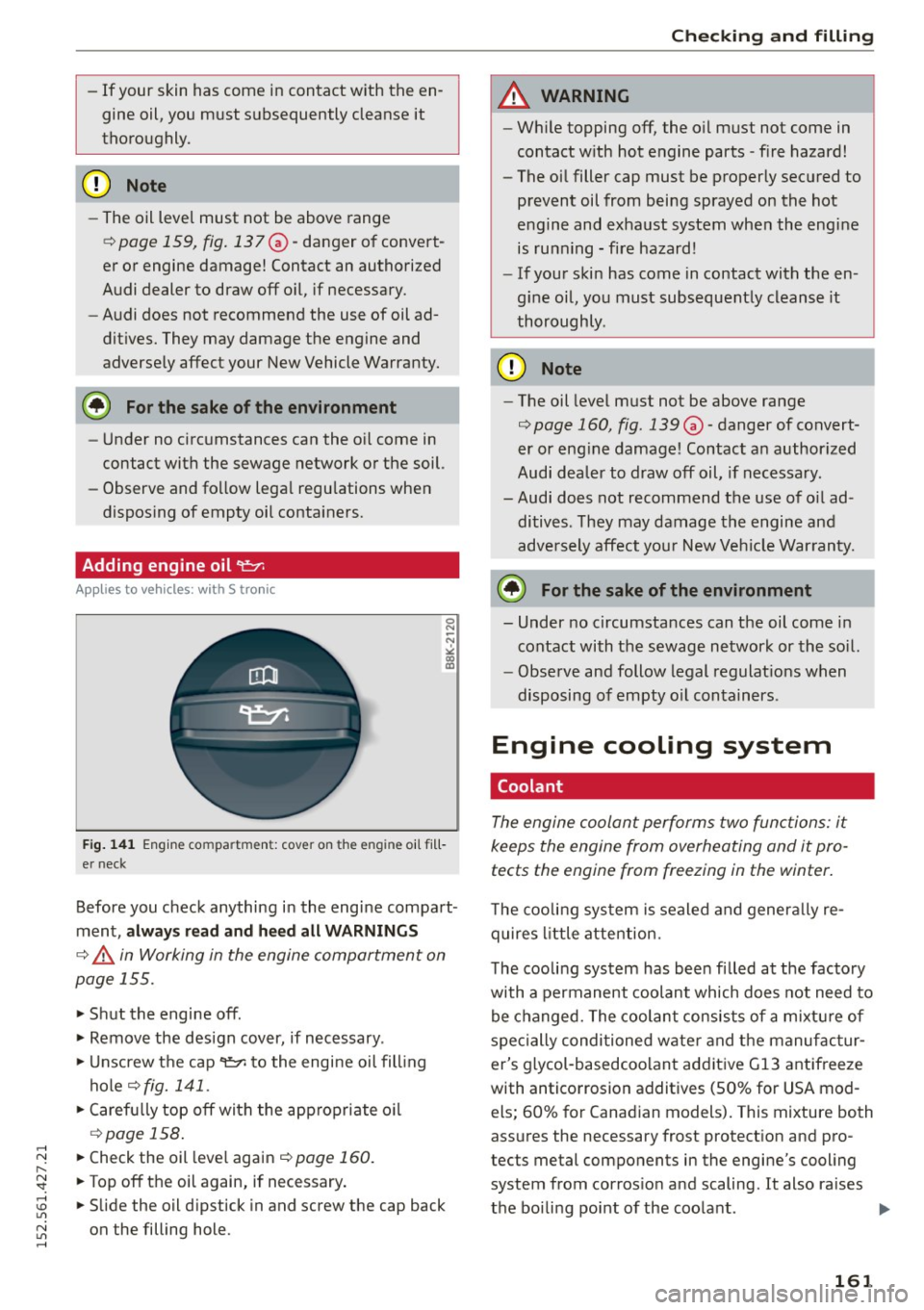
F ig . 141 Engin e co mp artm en t: cove r on t he engin e oil fi ll
er neck
Before you check anything in the engine compart
ment,
always read and heed all WARNINGS
¢.&. in Working in the engine compartment on
page 155.
.,. Shut the engine off .
.. Remove the design cover, if necessary .
.,. Unscrew the cap
'l=?1 to the engine oil fill ing
hole ¢
fig. 141 .
.. Carefully top off with the appropriate o il
¢page 158.
.. Check the oil level again ¢ page 160.
.. Top off the oil again, if necessary .
.. Slide the oil dipstick in and screw the cap back
on the filling hole.
Chec king and filling
A WARNING
- While topping off, the oil must not come in
contact with hot engine parts -fire hazard!
- The oil filler cap must be properly secured to
prevent oil from being sprayed on the hot
engine and exhaust system when the engine
is running -fire hazard!
- If your skin has come in contact with the en
g ine oil, you must subsequently cleanse it
thoroughly .
(D Note
-The oil level must not be above range
¢ page 160, fig . 139 0 -danger of convert
er or eng ine damage! Contact an author ized
Audi dea ler to draw off oil, if necessary.
- Audi does not recommend the use of oil ad
ditives . They may damage the engine and
adversely affect you r New Vehicle Warranty.
@ For the sake of the environment
- Under no circumstances can the oil come in
contact with the sewage network or the soil.
- Observe and follow legal regulations when
disposing of empty o il containers .
Engine cooling system
Coolant
The engine coolant performs two functions: it
keeps the engine from overheating and it pro
tects the engine from freezing in the winter.
T he coo ling system is sealed and genera lly re
quires little attention.
The cooling system has been filled at the factory
with a permanent coolant which does not need to
be changed. The coolant consists of a mixtu re of
specially conditioned wate r and the manufactur
er's glycol-basedcoolant additive Gl3 antifreeze
with anticorrosion additives (50% for USA mod els; 60% for Canadian models). This mixture both
assures the necessary frost protection and pro
tects metal components in the engine's cooling
system from corrosio n and scaling. It also ra ises
the boiling point of the coolant .
1111-
161