lock AUDI S3 2015 User Guide
[x] Cancel search | Manufacturer: AUDI, Model Year: 2015, Model line: S3, Model: AUDI S3 2015Pages: 310, PDF Size: 76.15 MB
Page 40 of 310
38 Openin g and clo sing
• To open the luggage compartment lid, press
and hold the~ button © for at least one
second .
• To tr igger the alarm , press the red
iPANICI
button @. The vehicle horn and emergency
flashers turn on .
• To turn off the alarm, press the red
IPANICI
button @again .
If the vehicle is unlocked and a door or the luggage compartment lid are not opened
within 45 seconds, the vehicle locks aga in au
tomatically. This feature prevents the vehicle
from being ac cidentally left un locked over a
l ong period of time. This does not apply if you
p ress the
i""' I but ton © button for at least one
second.
F o r vehi cles with
sa fet y c entr al loc king (selec
tive unlocking) ¢
page 41, only the driver's
door and the fue l filler door are opened by
pressing the~ button @ once, and the ent ire
vehicle unlocks when the button is pressed
twice.
A WARNING
Read and following all WARNINGS. ¢ Lo_ in
Key set on page 35
@ Tips
- Only use the remote control key or con
venience key w ith in v iew of the veh icle.
- Do not use the remote control when you
are inside the vehicle. Otherwise, you
could unintentionally lock the veh icle. If
you then tried to start the engine or
open a door, the a la rm would be trig
gered. If this happens, press the un lock
button@.
- The vehicle can on ly be locked whe n the
se lector lever is in the P posit ion .
- Only use the panic function in an emer
gency .
- For information on add itiona l remote
control key o r convenience key functions,
r efer to¢
page 43, Convenience open
ing/closing.
Locking and unlocking with the
convenience key
Applies to vehicles: with convenience key
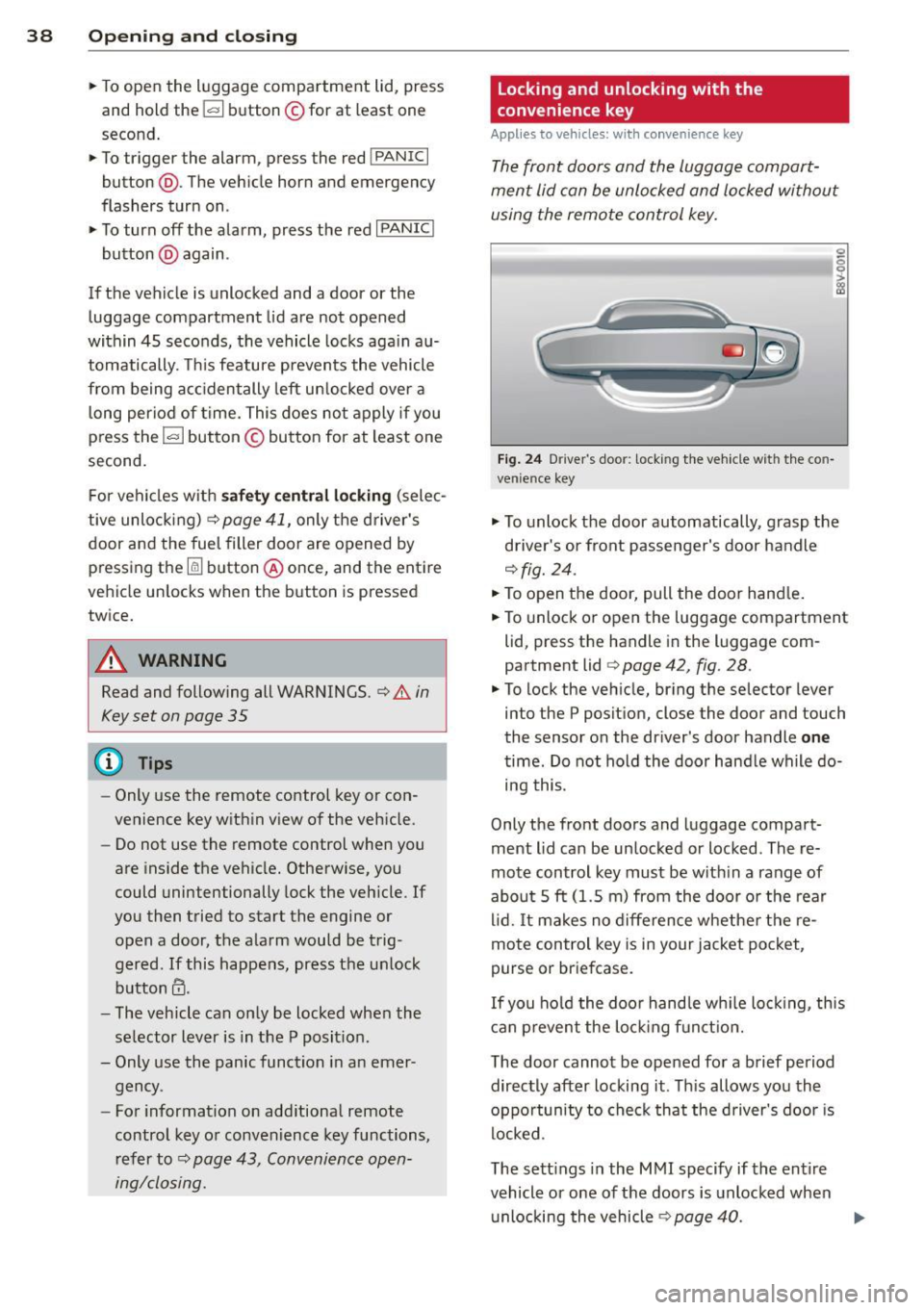
The front doors and the luggage compart
ment lid can be unlocked and locked without using the remote control key.
F ig . 24 Driver 's doo r: locking the vehicle w it h the co n
ven ience key
0 0
I
• To unlock the door automatically, grasp the
driver's or front passenger's door handle
¢ fig. 24.
• To open the door, pull the door hand le .
• To unlock or open the luggage compartment
lid, press the handle in the luggage com
partment lid
¢ page 42, fig. 28 .
• To lock the veh icle, br ing the selector lever
into the P position, close the door and touch
the sensor on the dr iver 's door handle
one
time. Do not hold the door hand le while do
ing this.
Only the front doors and luggage compart
ment lid can be unlocked or locked . The re
mote control key must be w ith in a range of
abo ut 5
ft (1.5 m) from the door o r the rear
li d. It ma kes no d ifference whethe r the re
mote control key is in your jacket pocket,
purse or briefcase.
If you ho ld the doo r hand le wh ile loc king, th is
c a n p revent the lo ck ing f unct ion.
The door cannot be opened for a brief period directly after locking it . Th is allows you the
oppo rtun ity to check that the driver's door is
locked.
The sett ings in the MMI specify if the entire
vehicle or one of the doors is unlocked when
unlocking the vehicle ¢
page 40.
Page 41 of 310
....,
N
0 > co
rl I.O
"' ....,
"' rl
WARNING
----Read and following all WARNINGS. ¢ & in
Key set on page 35
@ Tips
If your vehicle is left standing for a long
period of time, note the following:
- The proximity sensor switches off after a
few days to save energy. You then have
to pull once on the door handle to unlock
the vehicle and a second time to open it.
- To prevent the battery from draining and
to retain the starting ability of yo ur vehi
cle as long as possible, the energy man
agement system gradua lly tuns off un
necessary convenience functions You
may not be able to unlock your vehicle
using the convenience key .
- For an explanation on conformity with
the FCC regulations in the United States
and the Industry Canada regulations, re
fer to ¢page
292 .
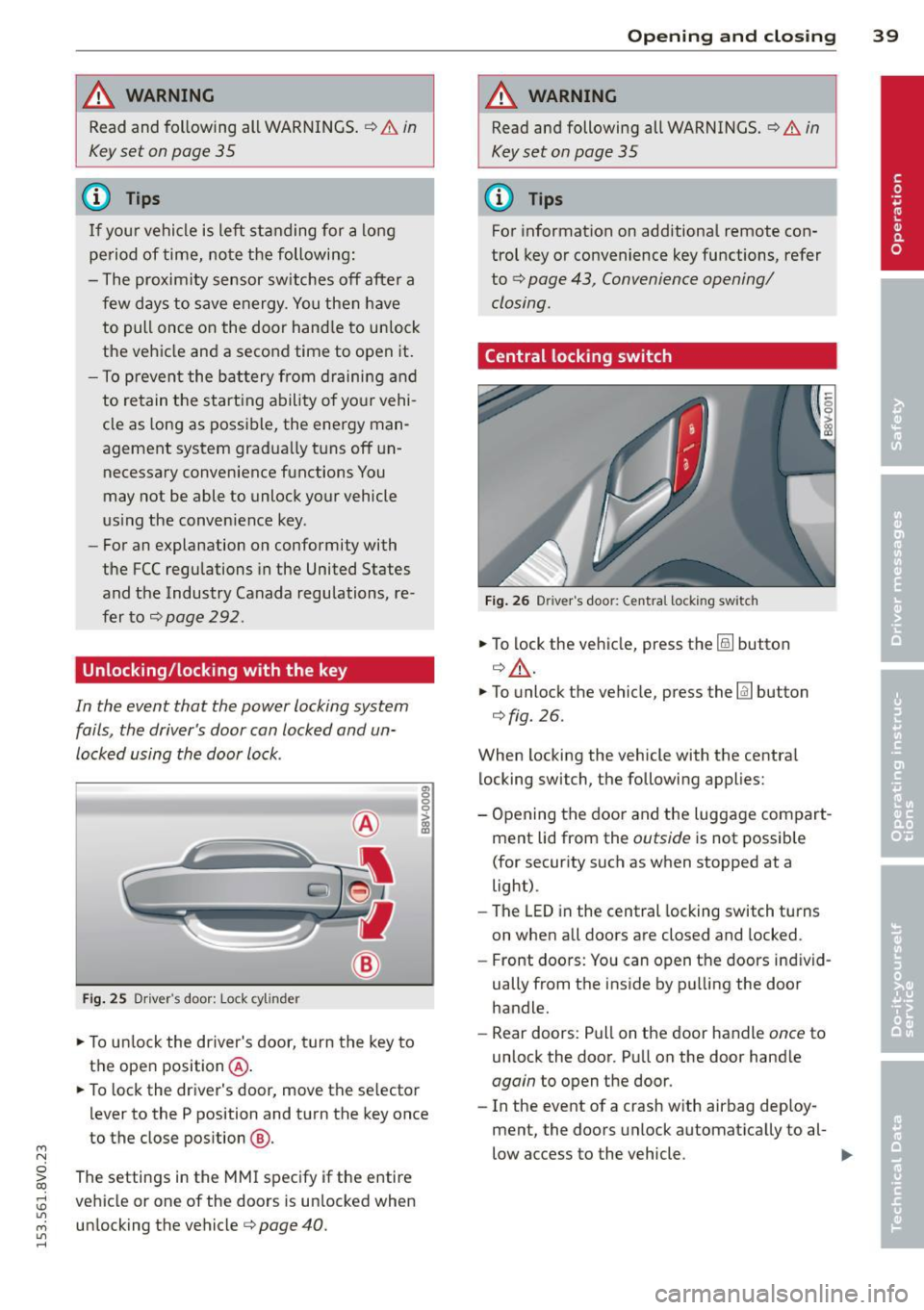
Unlocking/locking with the key
In the event that the power locking system
fails, the driver's door can locked and un
locked using the door lock .
Fig. 25 Driver 's door: Lock cy linder
.,. To unlock the driver's door, turn the key to
the ope n position @.
en 0 g
~
.,. To lock the driver's door, move the se lector
lever to the P position and turn the key once
to the close position
@ .
The settings in the MMI specify if the entire
vehicle or one of the doors is un locked when
unlocking the vehicle¢ page 40 .
Opening and closing 39
A WARNING
Read and following all WARNINGS. ¢ & in
Key set on page 35
(D Tips
For information on additional remote con
trol key or convenience key functions, refer
to
¢ page 43, Convenience opening/
closing.
Central locking switch
Fig. 26 Drive r's doo r: Centra l locki ng sw itch
.,. To lock the vehicle, press the@! button
¢.&, .
.,. To unlo ck the vehicle, press the @J button
¢fig.
26.
When locking the vehicle with the central locking switch, the following applies:
- Opening the door and the Luggage compart
ment lid from the outside is not possible
(for security such as when stopped at a
light).
- The
LED in the central locking switch turns
on when all doors are closed and locked .
- Front doors: You can open the doors ind iv id
ually from the inside by pulling the door
handle.
- Rear doors: Pull on the door handle once to
unlock the door. Pull on the door hand le
again to open the door .
- In the event of a crash w ith airbag deploy·
ment, the doors unlock automatically to al-
low access to the vehicle. ..,.
Page 42 of 310
![AUDI S3 2015 User Guide 40 Openin g and clo sing
&_ WARNING
- The power locking switch works with the
ignition off and automatically locks the
entire vehicle when the
[ij] button is
pressed.
- The central lo](/img/6/57541/w960_57541-41.png "AUDI S3 2015 User Guide 40 Openin g and clo sing
&_ WARNING
- The power locking switch works with the
ignition off and automatically locks the
entire vehicle when the
[ij] button is
pressed.
- The central lo")
40 Openin g and clo sing
&_ WARNING
- The power locking switch works with the
ignition off and automatically locks the
entire vehicle when the
[ij] button is
pressed.
- The central locking sw itch is inoperative
when the veh icle is locked from the out
side .
- Locked doors make it more difficult for
emergency workers to get into the vehi cle, which p uts lives at risk . Do not leave
anyone beh ind in the vehicle, especially
children .
(D Tips
Your vehicle will lock automatically at a
speed of 9 mph (15 km/h)
Q page 35 . You
can unloc k the vehicle again us ing the cen
tral locking opening function.
Setting central locking
Applies to vehicles: with d river informat ion system
Various sett ings can be adjusted in the M MI:
Adjusting door unlockin g
You can determ ine which doo rs shou ld unloc k
when opening the vehicle .
.,. Select : the
I MENU ! button >Car > Syst ems *
control button > Vehicl e setting s > Central
locking > Door unl ocking .
Selecting All and pressing the l:ru button on
the remote control key unlocks the entire ve
h icle.
If you select
D river and then press the [ru but
ton on the remote control key, only the driv
e r's door will unlock . In vehicles with a con
venience key, only the front doo r whose han
d le you pu ll w ill unloc k.
If you press the
[ru button twice, the enti re ve hicl e w ill unloc k.
If yo u press the
[ru button, the entire vehicle
will always lock.
l ) Thi s fun ction is not a vailable in a ll coun tri es.
Adjusting Auto Lock
.,. Select: the I MENU I button > Ca r > Sys tems*
contro l button > Vehicle setting s > Lock
when d riv ing.
If you se lect On , the e nti re ve hicle w ill lock
a utomat ic all y when the speed reaches 9 mph
(15 km/h).
If the opening function is tr iggered by the
powe r lock ing system or a door hand le, the
vehicle unlocks again .
Folding* the exterior mirrors
.,. Select: the I MENU I button> Car > Sy stems *
contro l button > Vehicle setting s > Central
locking > Fold mirror s.
For mo re informa
tion , refer to
Q page 52, Adjusting the ex
terior mirrors.
If you se lect On , the outside mirro rs will fo ld
i n a utomat ica lly when you press t he
[ru button
o n the remote cont ro l key
Q page 52.
Tone when locking
.,. Select: the I MENU I button> Car > Systems *
control button > Vehicle setting s> Cent ral
loc king > Tone when l ocking .
When checked off./, a tone will sound when
you lock the vehicle .
If you press the [ru button twice, the entire ve
hicle will lock. There is a lock ing tone at the
same t ime
l) _
Electronic immobilizer
The immobili zer prevents unauthori zed use of
your vehicle .
A microchip in the key automatically deacti
vates the electron ic immobili zer when the key
is located in the vehicle . If you remove the key
from the vehicle, the electro nic immobilize r
activates again automatically .
Ill>
Page 43 of 310
....,
N
0 > co
rl I.O
"' ....,
"' rl
_& WARNING
Always take the key with you whenever you
leave your vehicle. The electronic immobil
izer can be deactivated w ith the key, so
this could make it possible for unauthor
ized persons to star t the engine and oper
ate vehicle systems such as the power win
dows or sunroo f. This can increase the risk
of serious injury.
(D Tips
-The vehicle cannot be started if an unau
thorized key is used .
It may not be poss i
ble to start the vehicle under certain cir
cumstances, for example if there is an
other radio module like the key from an
other vehicle or a transponder on the
same keychain.
- For an explanation on conformity with
the FCC regu lations in the United States
and the Industry Canada regulations, re
fer to
q page 292.
Safety central locking
App lies to vehicles: with safety central locking
Safety central locking provides the possibility,
to only unlock the driver's door and the fuel
filler door. The rest of the vehicle remains
l oc ked.
Unlocking the driver's door and the fuel
filler door
~ Press the remote control key or convenience
key~ button
once or turn the key onc e in
the opening direction.
Unlocking all doors , the luggage
compartment lid and the fuel filler door
~ Press the remote contro l key or convenience
key ~ button
twice within five seconds or
turn the key
twice within five seconds in the
opening direction.
When unlocking just the driver's door, the an
ti-theft alarm system* is also immediately de
activated.
Opening and closing 41
In vehicles with an MM I, you can directly ad
just the safety centra l locking
Q page 40.
Front passenger 's door and rear doors
emergency locking
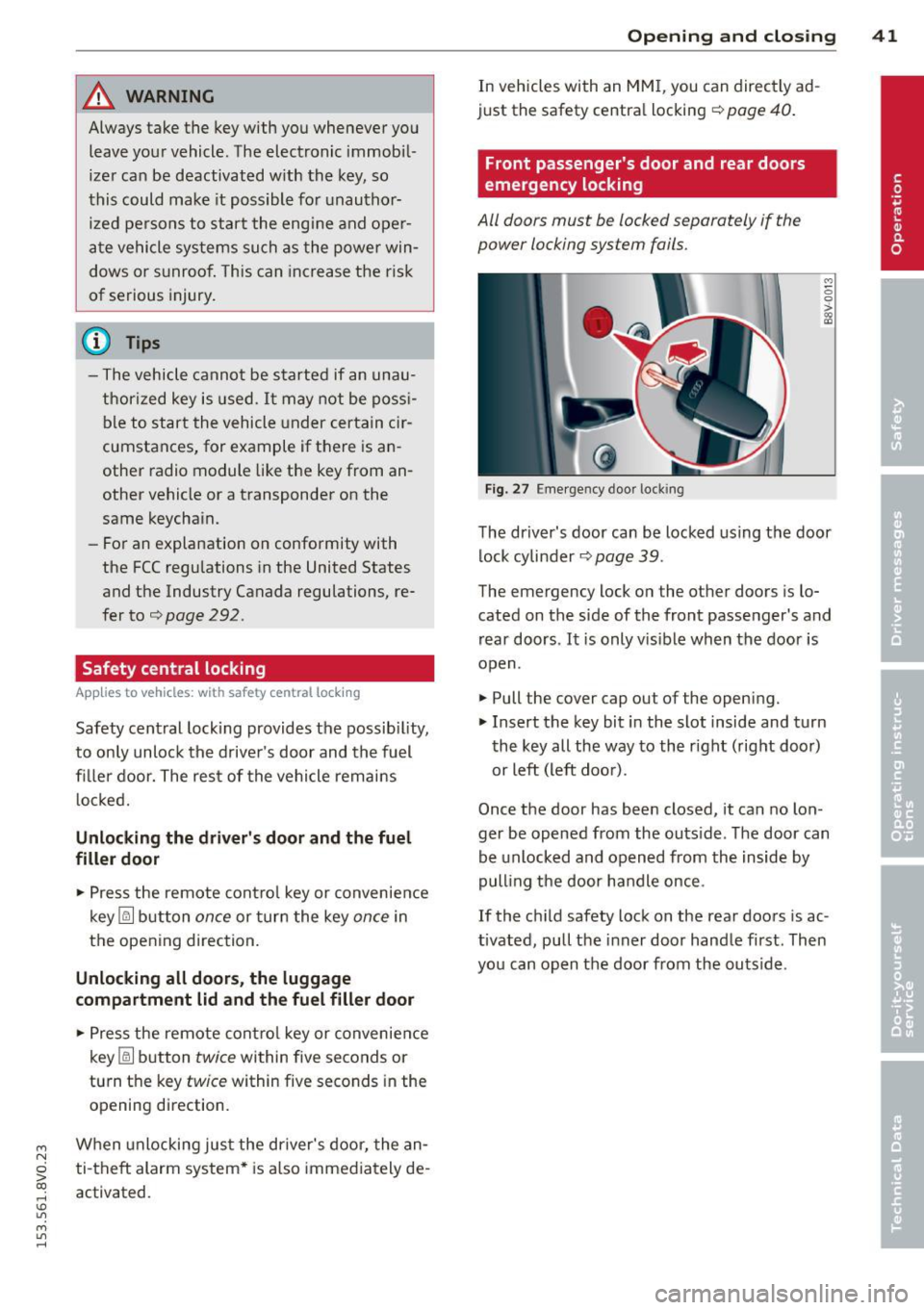
All doors must be locked separately if the
power locking system fails.
Fig. 2 7 Eme rgency door locking
M 0 0 > :ls
The driver's door can be locked using the door
lock cylinder
q page 39.
The emergency lock on the other doors is lo
cated on the side of the front passenger's and
rear doors.
It is only vis ible when the door is
open.
~ Pull the cover cap out of the opening.
~ Insert the key bit in the slot inside and turn
the key all the way to the right (right door)
or left (left doo r).
Once the door has been closed, it can no lon
ger be opened from the outs ide. The door can
be unlocked and opened from the inside by
pulling the door ha ndle once .
If the child safety lock on the rear doors is ac
tivated, pull the inner door handle first. Then
you can open the door from the outs ide .
Page 44 of 310
42 Opening and closing
Luggage compartment
lid
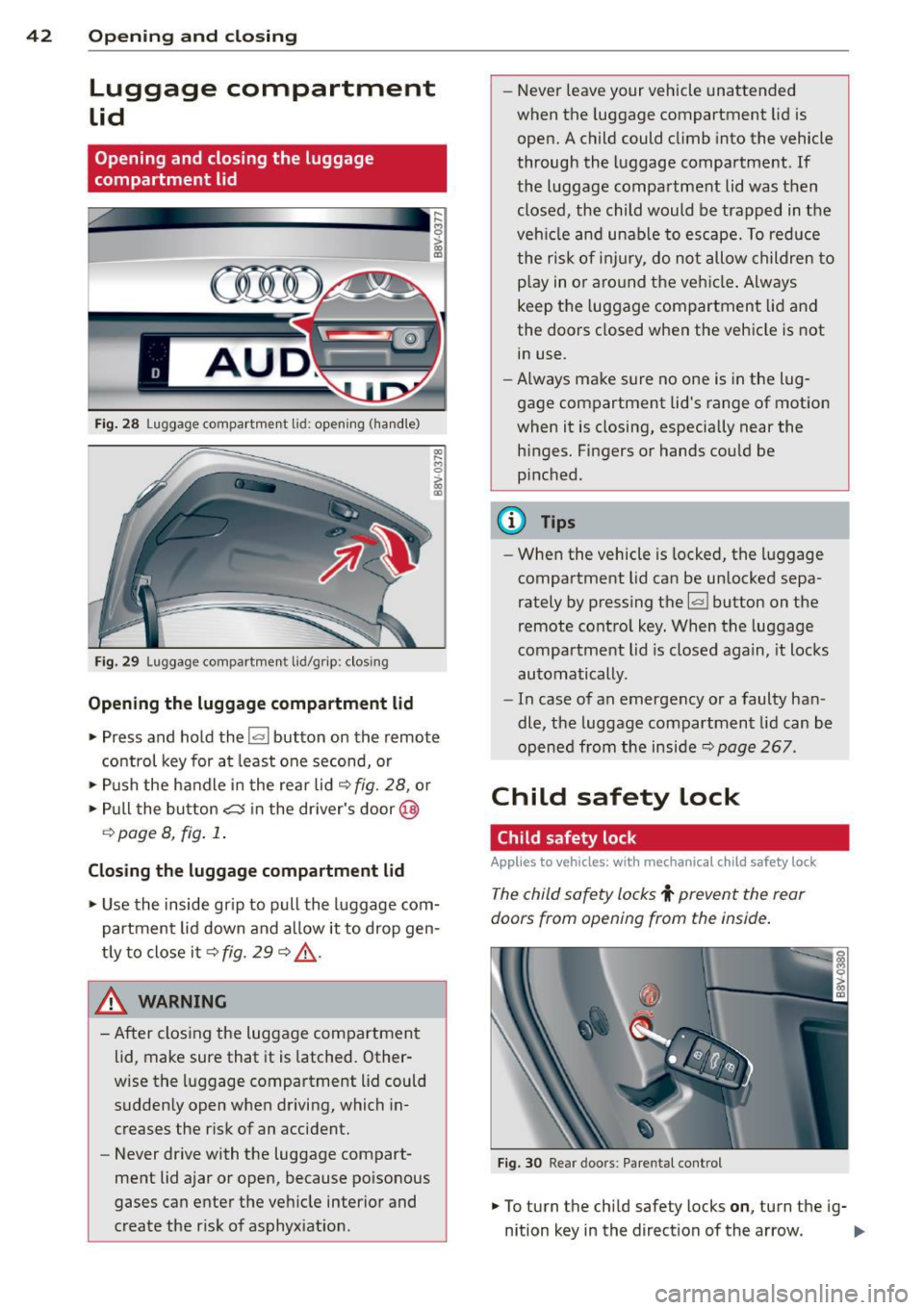
Opening and closing the luggage
compartment lid
Fig. 28 Luggage compartment lid: opening (ha ndle)
Fig. 29 Luggage compartment lid/grip: clos ing
Opening the luggage compartment lid
M 0
~ m
.,. Press and hold the !a l button on the remote
control key for at least one second, or
.,. Pus h the handle in the rear lid
c::> fig. 28, or
.,. Pull the button
cs in the dr iver's door@
¢ page 8, fig . 1 .
Closing the luggage compartment lid
.,. Use the inside gr ip to pull the luggage com
partment lid down and allow it to drop gen
tly to close it
c::> fig. 29 c::> &_.
~ ARNING
- After closing the luggage compartment
lid, make sure that it is latched. Other
wise the luggage compartment lid could
sudden ly open when driving, which in
creases the risk of an accident.
- Never drive with the luggage compart
ment lid ajar or open, because poisonous
gases can enter the vehicle interior and
create the risk of asphyx iation . -
Never leave your vehicle unattended
when the luggage compartment lid is
open. A child could climb into the vehicle
through the luggage compartment. If
the luggage compartment lid was then closed, the child would be trapped in the
veh icle and unable to escape. To reduce
the risk of injury, do not allow children to
p la y in o r aro und the vehicle. Always
keep the luggage compartment lid and
the doors closed when the veh icle is not
in use.
- Always make sure no one is in the lug
gage compartment lid's range of motion
when it is closing, especia lly near the
h inges. Fingers or hands could be
p inched.
{!) Tips
- When the vehicle is locked; the luggage
compartment lid can be unlocked sepa
rately by pressing the~ button on the
remote control key. When the luggage
compartment lid is closed again, it locks
automatically.
- In case of an emergency or a faulty han
dle, the luggage compartment lid can be
opened from the inside
c::> page 267.
Child safety lock
Child safety lock
Applies to vehicles: with mechanical c hild safety lock
The child safety locks t prevent the rear
doors from opening from the inside.
Fig. 30 Rear doors: Pare ntal control
.,. To turn the chi ld safety locks on , turn the ig-
nition key in the direction of the arrow . ..,.
Page 45 of 310
....,
N
0 > co
rl I.O
"' ....,
"' rl
.. To turn off, turn the ignition key opposite
the direction of the arrow .
When the child safety locks are activated, the
inside door handles do not work and the doors
can only be opened from the outside.
The ch ild safety lock only f unctions on the
door in whi ch it was act ivated.
Power windows
Controls
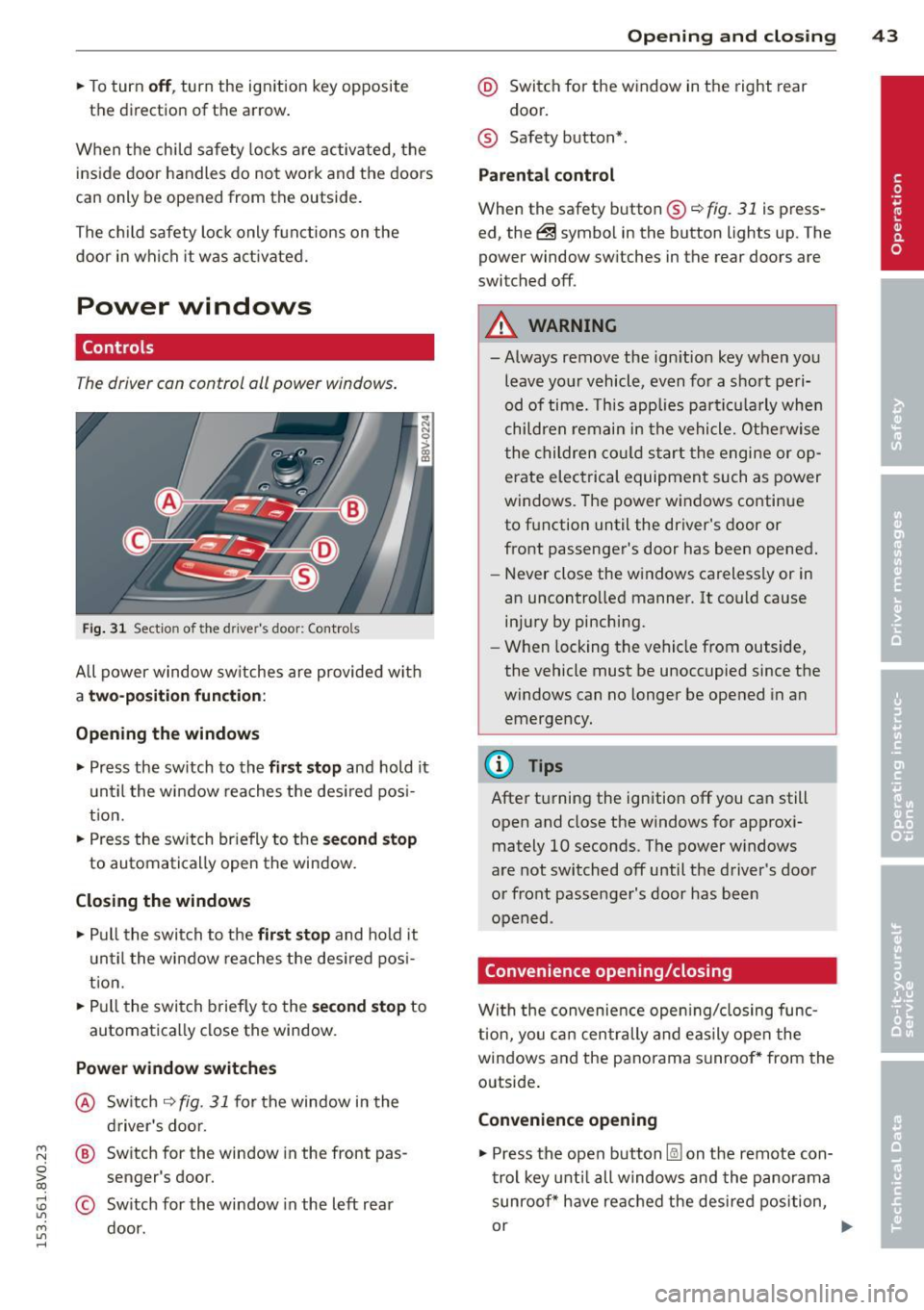
T he driver can control oil power windows .
Fig. 31 Sectio n of the drive r's d oor: Control s
All power window sw itches are provided with
a two-position function :
Opening the windows
.. Press the sw itch to the fir st stop and hold it
until the window reaches the desired pos i
tion.
.. Press the sw itch br iefly to the
second stop
to automatically open the window.
Closing the windows
.. Pull the switch to the first stop and hold it
until the window reaches the des ired posi
t ion .
.. Pull the switch briefly to the
second stop to
automatically close the window.
Power window switches
@ Switch ~ fig. 31 for the window in the
driver's door.
@ Switch for the window in the front pas
senger 's door.
© Sw itch for the window in the left rear
door.
Opening and closing 43
@ Switch for the window in the right rear
door.
® Safety button* .
Parental control
When the safety button®~ fig. 31 is press
ed, the@symbol in the button lights up. The
power window sw itches in the rear doors are
switched off.
A WARNING
-Always remove the ign ition key when you
leave your vehicle, even for a short peri
od of time. This applies particula rly when
children remain in the vehicle. Otherwise
the children could sta rt the engine or op
erate electrical equipment such as power
windows. The power windows continue
to function until the driver's door or
front passenger's door has been opened.
- Never close the windows carelessly or in
an uncontrolled manner. It could cause injury by pinching.
- When locking the vehicle from outside,
the vehicle must be unoccupied since the
windows can no longer be opened in an
emergency.
(D Tips
After turning the ignition off you can still
open and close the windows for approxi
mately 10 seconds. The power windows
are not switched off until the driver's door
or front passenger's door has been
opened .
Convenience opening/closing
With the convenience opening/closing func
t ion, you can centrally and easily open the
windows and the panorama sunroof* from the
outside.
Convenience opening
.. Press the open button l@J on the remote con
trol key until all windows and the panorama
sunroof* have reached the desired position,
or .,,.
Page 46 of 310
44 Opening and clo sing
• Hold the key in the driver's door lock until all
windows and the panorama sunroof* have
reached the desired position .
Conveni ence closing
• Hold the key in the d river's door lock i n the
lock pos ition until a ll wi ndows and the pan
o rama sunroo f* are closed .
Convenience closing with the convenience
key*
• To uch the sensor* on one of the front door
h and les and cont in u e touching it unt il all of
the windows and the panorama s unroof* are
closed . Do not place your hand in the door
hand le when doing th is.
Adjusting the convenience opening in the
MMI
• Se lect : the I MENU ! button> Car> Systems *
control button > Vehicle sett ings > Central
locking > Long -press to open windows
To enab le convenience opening of the win -
dows and the roo f*, the
Front windows , Rear
w indows *
and Roof* functions must be
sw itched
On .
A WARNING
-Never close the windows or pano rama
sunroof* carel essly or in an uncontro lled
m ann er, be cause th is increases the risk
o f i njury.
- Fo r se curity reasons, the windows can
only be opened with the remote c ontro l
k ey at a maxim um dis tance of ap proxi
ma tely 6 feet ( 2 meters) from the ve hi
cle .
- Pa y att ention when using the lock cyli n
der to close the windows and t he panora
ma sunroof* so that no one is pinche d.
Clos ing stops whe n the key is moved into
the start ing pos ition.
Correcting power window malfunctions
After disconnecting the vehicle battery , the
one-touch up and down feature must be acti vated again .
• Pull the power window switch u ntil the win
dow is completely ra ised .
• Release the sw itch and pull it agai n for at
l e ast one s econd .
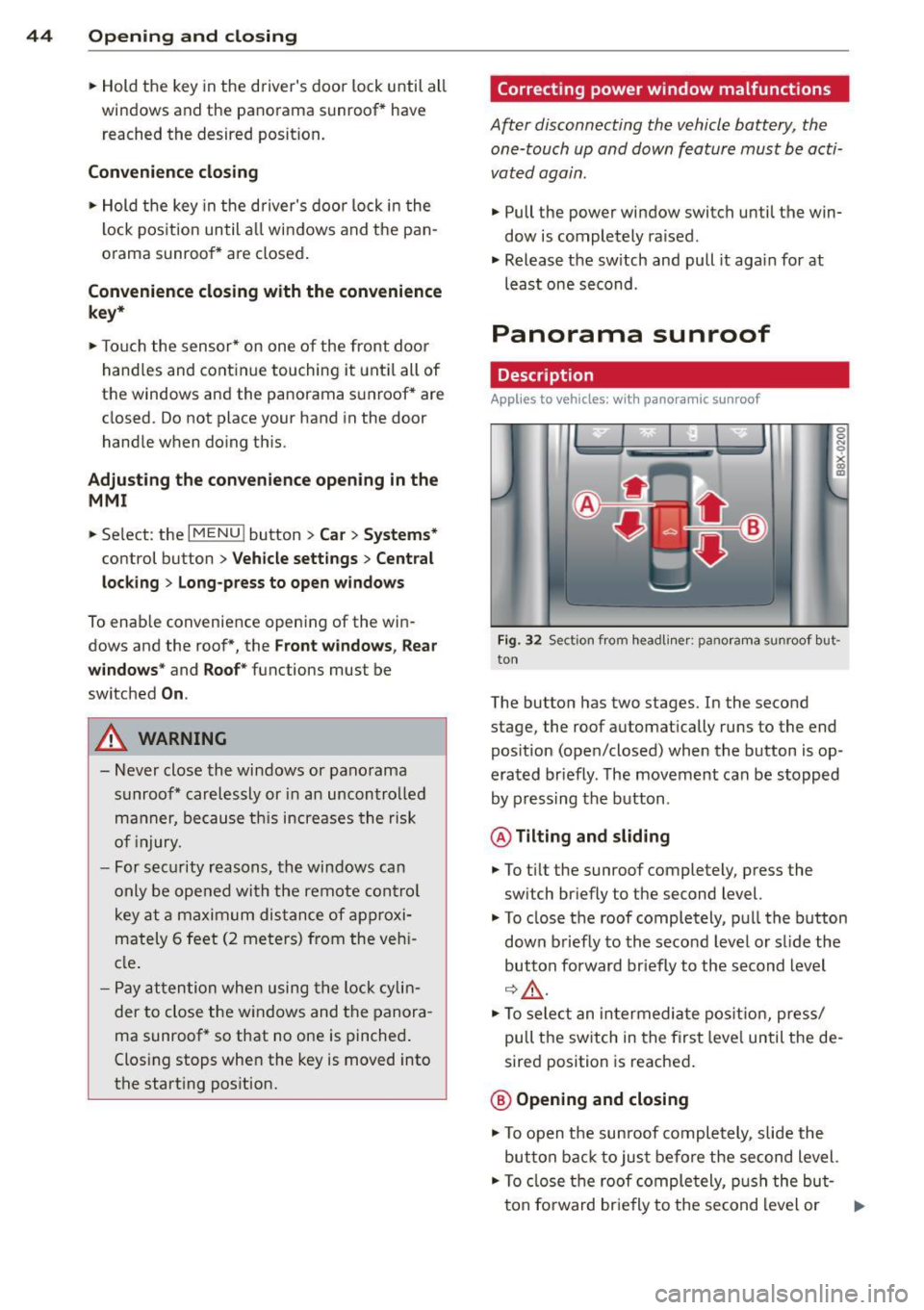
Panorama sunroof
Description
Applies to vehicles: with panoramic sunroof
Fig. 32 Sect io n fr om headli ner: pano ra m a s unroof but
to n
The butto n has two stages . In the second
stage, the roof automat ically runs to the end
pos ition (open/closed) when the button is op
era ted br iefly . T he movement ca n be s topped
by pressing the b utton .
@Tilting and sliding
• To t ilt the sunroof completely , press the
sw itch br iefly to the second level.
• To close t he roof completely, pu ll the button
down b riefly to the seco nd leve l or s lide the
button forward br iefly to the s econd level
~~-
.. To se le ct an in termedia te pos it ion , press/
pull t he sw itch in the firs t leve l until the de
sired position is reached .
@ Opening and closing
• To open t he su nroof completely, sli de the
button bac k to ju st befo re the second level.
• To close t he roof comple tely, p ush the but-
t on fo rward br ie fly to the se cond level or .,..
Page 48 of 310
46 Lights and Vi sion
Lights and Vision
Exterior lighting
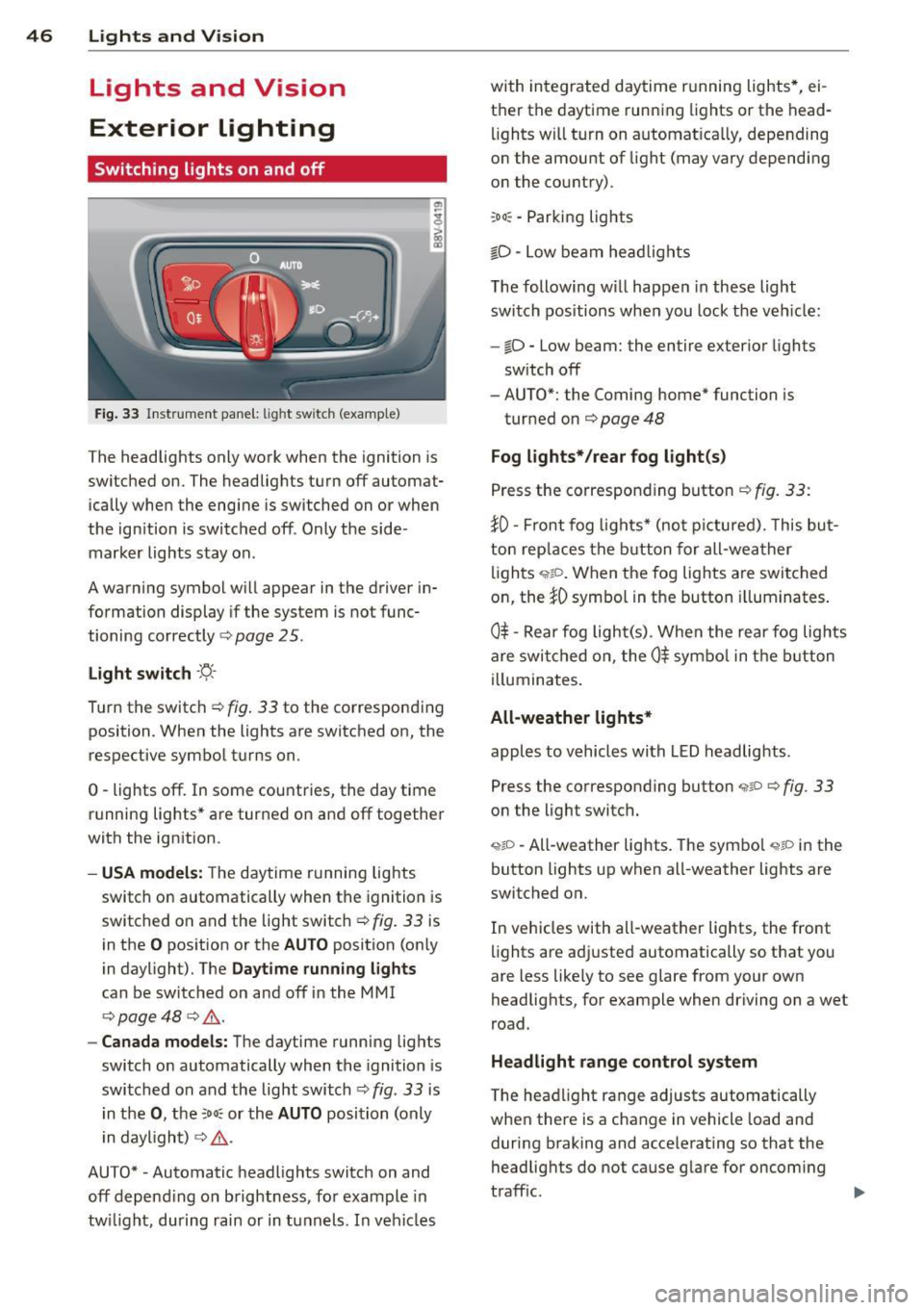
Switching lights on and off
Fig . 33 Instr ument pane l: lig ht sw itc h (example)
The headlights only work when the ignition is
switched on. The headlig hts turn
off automat
ically when the engine is switched on or when
the ign ition is switc hed off . Only the side·
marker lights stay on .
A warning symbol w ill appear in the driver in
formation display if the system is no t func
tioning correctly
c:> page 25 .
Light switch ·'ti-·
T u rn the switch c:> fig . 33 to the corresponding
position . When the lights are switched on, the
respective symbol t urns on.
0 -lights off. In some countries, the day time
running lights* are turned on and
off together
with the ign ition.
- USA models: The daytime r unnin g lights
switch on automatically when the ignition is
switched on and the light switch
c:> fig. 33 is
in the
O pos ition or the AUTO position (on ly
in daylight). The
Daytime running lights
can be switched on and off in the MMI
c:> page 48 c:> ,& .
-Canada models: The daytime running lig hts
switch on automatically when the ignition is
switched on and the light switch
c:> fig . 33 is
i n t he
0 , the :oo : or th e AUTO position (only
i n daylight)
c:> ,& .
AUTO* -Automatic headlights switch on and
off depend ing on b rightness, fo r example in
tw ilight, during rain or in tunnels . In veh icles with in
tegrated daytime r unning lights*, ei
t h e r the daytime running lights or the head
lights wi ll tu rn on automat ica lly, depending
on the amount of light (may vary depending
o n the country).
:oo : -Parking lights
iD · Low beam he ad lights
T he following w il l happen in these light
switch pos itions whe n you lock the ve hicle:
-iD -Low beam: the entire exterior lights
sw itch
off
- AUTO*: the Coming home* function is
turned on
c:> page 48
Fog lights* /rear fog light(s)
P ress the correspon ding button c:> fig. 33 :
}0-Front fog lig ht s* (no t picture d). Thi s bu t
ton rep laces the button for all-wea ther
li gh ts ,;,rto . When the fog lights are swi tched
on, the
iD symbo l in the button illuminates .
0$ -Re ar fog ligh t(s) . When the rea r fog lig hts
are swi tched on, the
0$ sym bo l in t he bu tton
i ll uminates .
All-weather lights*
apples to vehicles with LED headlig hts.
Press the corresponding button
,;;iP c:> fig. 33
on the light switch .
<,t;O -All-weather lights . The sym bo l <,tP in the
button lights up when all-weather lights are
switched on.
In veh icles with all-weather lights, the front
li ghts are ad justed automatically so that you
are less like ly to see glare from your own
headlights, for example when driving on a wet
r oad.
Headlight range control system
T he hea dlight range adjusts automatically
when there is a change in vehicle load and
during b raking and accele rating so that the
headlig hts do not cause g lare for oncom ing
t raff ic.
Page 50 of 310
48 Lights and Vision
The emergency flashers ma kes other drivers
aware of your ve hicle in dangero us situations .
... Press the~ button to sw itch the e mergency
flashers on o r off.
You can indicate a lane change or a tu rn whe n
the eme rgency flashers are sw itched on by us
ing the turn sign al lever. The eme rgency flash
e rs stop temporarily .
The emergency flashers also work when the ignit io n is tu rned off.
(D Tips
You should switch the em ergency f lashe rs
on if:
- You are the last ca r in a traffic jam so
that all o ther veh icles app roach ing from
behind can see you, or if
- Your vehicle has broken down o r you are
having an eme rgency, or if
- Your vehicle is being towed or if you a re
tow ing another vehicl e.
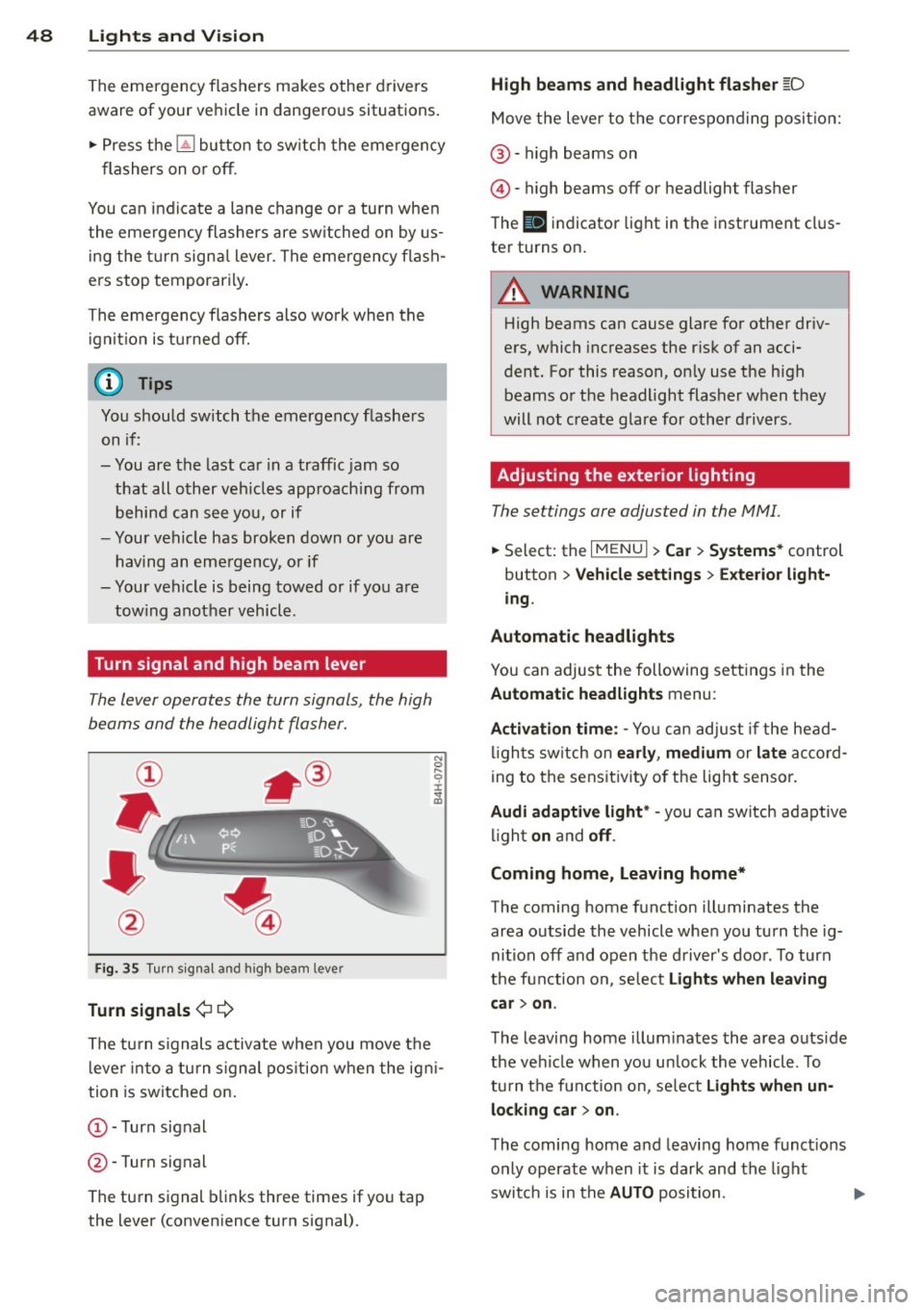
Turn signal and high beam lever
The lever operates the turn signals, the high
beams and the headlight flasher .
Fig. 35 Turn sig na l an d high beam leve r
Turn signals ¢¢
The tu rn s ignals activate when you move the
l eve r into a turn s ignal pos ition when the ign i
tion is switche d on.
@ -Turn sig nal
@ -Turn signal
The turn s ignal blinks three times if yo u tap
the lever (conven ience turn signal).
High beams and headlight flasher [D
Move the lever to t he corres po nding po sitio n:
@ -high b eams on
© -high beams off or headlight flasher
The
II indicator light in t he inst rument cl us
te r turns on .
A WARNING
High beams can cause glare for other driv
e rs, which increases the r isk of an acci
dent. For this reason, on ly use the h igh
beams o r the headlight flasher when they
will not create glare for o ther drivers .
Adjusting the exterior lighting
The settings are adjusted in the MMI.
... Select: the I MENU I> Car > Systems * control
button
> Vehicle sett ings > Exterior light
ing .
Automatic headlights
You can adjus t the following se tt ings in the
Automatic headlights menu :
Activation time : -Yo u can ad just if the head
li gh ts sw itch on
early , medium or la te ac co rd
ing to the sens it iv ity o f the lig ht senso r.
Audi adaptive light * -you can switch adaptive
li gh t
on and off .
Coming home, Leaving home*
The coming home function illuminates the
area o utside the vehicle whe n you tu rn the ig
nition off and open the d river 's doo r. T o turn
t h e fun ction on , se lect
Lights when leaving
car > on .
The leaving home illum inates the area outs ide
the ve hicl e when you un lock the vehicl e. T o
tu rn t he fun ct ion on, se lect
Light s when un
locking car > on.
The coming home a nd leav ing home funct ions
only operate when it is dark and the light
swit ch is in the
AUTO posi tion.
Page 54 of 310
52 Lights an d Vi sion
Removing the wip er blad e
.,. Fold the w indshield wiper arm away from
the windshie ld .
.,. Press the locking knob
(D ¢ fig. 41 on the
wip er blade . Hold th e wiper blade f irm ly.
.,. Remove the wipe r blade in the direction of
t he arrow.
In stall ing t he wip er blade
.,. Inse rt the new wipe r blade into the mount
on the w iper arm @ until you hear it latch
into place .
.,. Place the wiper arm back on the windshie ld.
.,. Tu rn the serv ice position off.
_& WARNING
For safety reasons, the windshield wiper
blades should be replaced once or twice
each year.
Q) Note
- The w indshield wiper blades must only
be folded away when in the serv ice posi
tion . Otherw ise, you risk damag ing the
paint on the hood or the windshield wip
er motor.
- You should not drive your veh icle or
press the w indshield w iper lever when
the wiper arms are folded away from the
winds hield. The w indshie ld w ipers would
move back into their original position
and could damage the hood and wind
shield.
- To prevent damage to the windshield
washer system, always loosen wiper
blades that have frozen to the wind
s h ield before turning the wipers on.
- To prevent damage to the wiper blades,
do not apply gasoline, petroleum, thin
ning agents or other solvents on the wip
er blades or near them.
- To prevent damage to the wipe r arms or
other components, do not try to move
the windshie ld w ipers by hand .
-
(D Tips
-Commercial hot wax such as the types
used by car washes make it more d ifficult
to clean the windshie ld.
- You can also use the service position, for
example, if you want to protect the
w indshield from icing by using a cover.
- Yo u cannot activate the serv ice position
when the hood is open .
Outside mirror
Adjusting the exterior mirrors
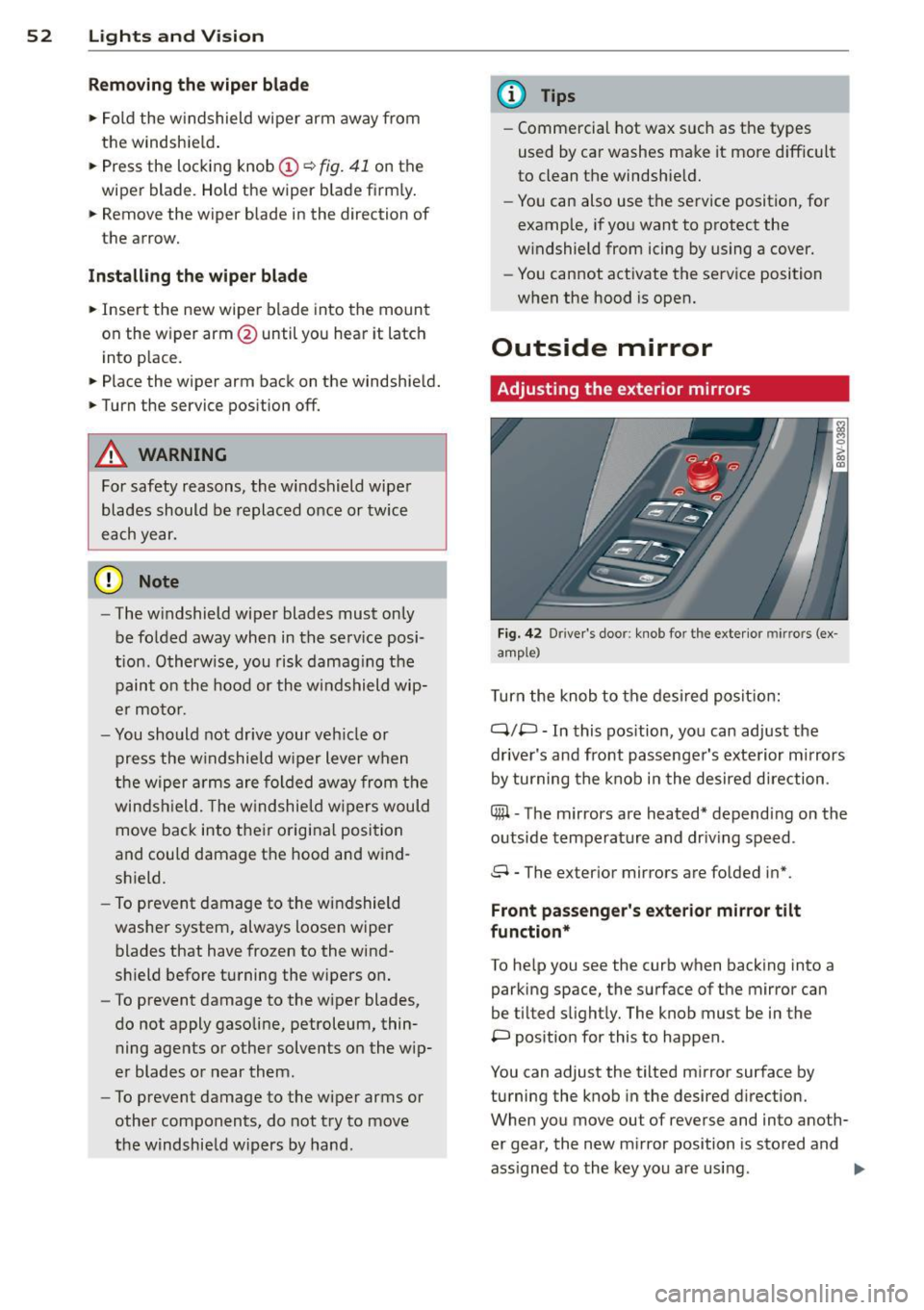
F ig. 42 Drive r's doo r: kno b fo r th e exte rior mir rors (ex
amp le)
T urn the knob to the des ired posit ion:
q;p -In this pos ition, yo u can adjust the
dr iver's and front passenger's exterior m irrors
by turning the knob in the desired direction .
Cffil -The mirrors are heated* depend ing on the
outside temperature and dr iv ing speed .
8 - The ex ter ior m irrors are folded in*.
Front passenge r's ex terior mirror tilt
function*
To he lp you see the curb when backing into a
parking space , the surfa ce of the mirror can
be tilted s light ly. The knob mus t be in the
P pos ition for this to happen .
You can adjust the tilted mir ror surface by
turning the knob in the desired direction.
When you move ou t of reverse and into ano th
er gear, the new m irror position is stored and
ass igned to the key you are using. .,.