service AUDI S3 2016 Workshop Manual
[x] Cancel search | Manufacturer: AUDI, Model Year: 2016, Model line: S3, Model: AUDI S3 2016Pages: 328, PDF Size: 81.78 MB
Page 136 of 328
Assist
(D Note
The sensor can be displaced by impacts or
damage to the bumper , whee l housing and
underbody. The adaptive cruise control and
pre sense front may become impaired as a re
sult . Have an authorized Audi dealer or au
thorized Audi Service Fac ility check their func
tion .
In curves
Applies to veh icles: w ith Aud i adapt ive cru ise co ntro l and Audi
pre se nse front
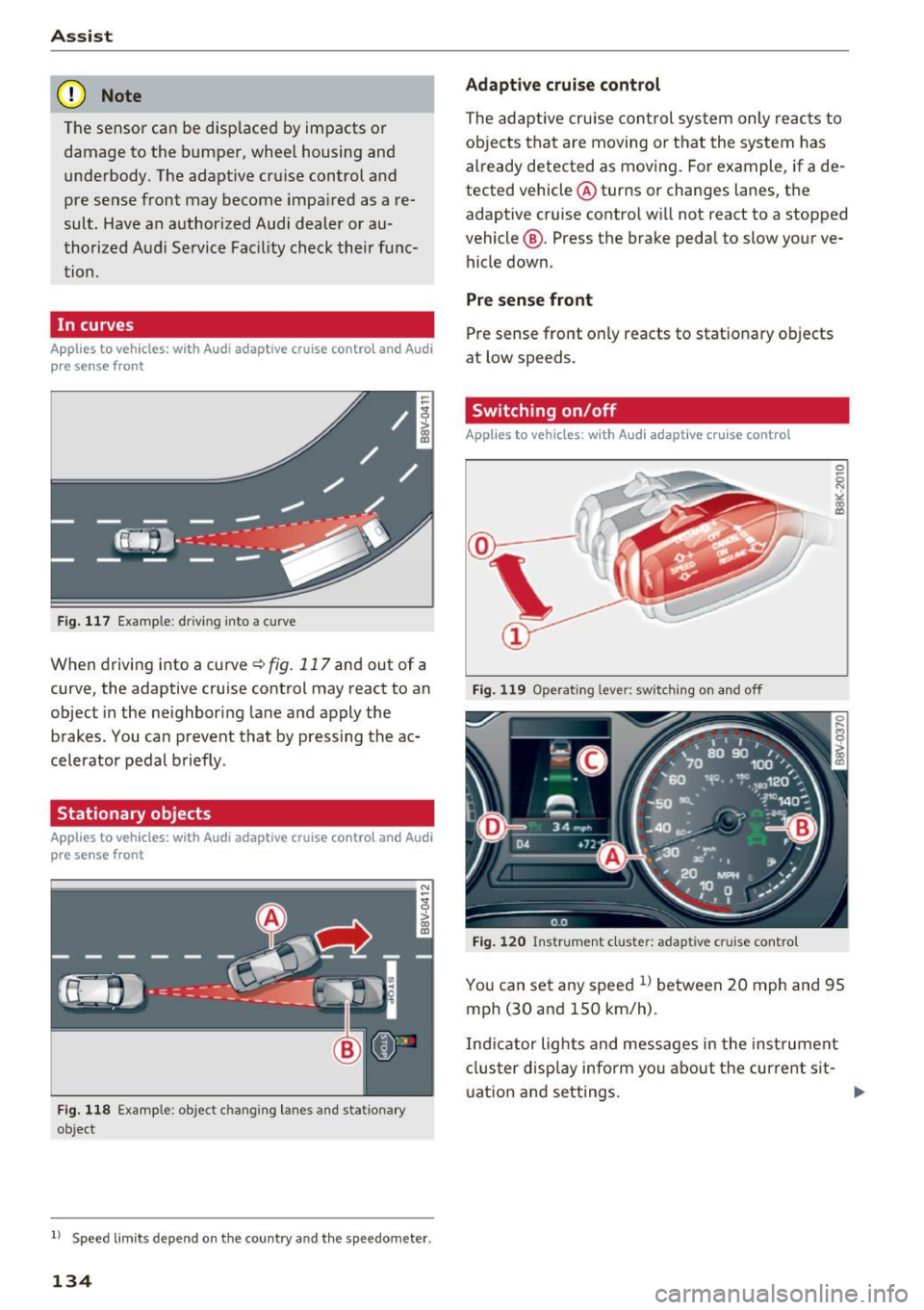
Fig. 117 Example: driving into a curve
When driving into a curve ¢fig. 117 and out of a
curve, the adaptive cruise control may react to an
objec t in the neighboring lane and apply the
brakes. You can prevent that by pressing the ac
celerator pedal briefly .
Stationary objects
App lies to veh icles: with Aud i adapt ive cruise co ntro l an d Audi
p re se nse front
Fig . 118 Examp le: object changing lanes and stat ionary
object
l) Speed limits de pend on t he country and th e s pee domet er.
134
Adaptive cruise control
The adaptive cruise control system only reac ts to
objects that are moving or that the system has
already detected as moving. For example, if a de
tected vehicle @turns or changes lanes, the
adaptive cruise contro l will not react to a stopped
vehicle @. Press the brake pedal to slow your ve
hicle down.
Pre sense front
Pre sense front only reacts to stationary objects
at low speeds.
Switching on/off
App lies to vehicles: wit h Audi adapt ive c ru ise control
Fig . 11 9 Operat ing lever: swi tching on and off
Fig. 120 Instrument cluster: adapt ive cruise contro l
You can set any speed l) between 20 mph and 95
mph (30 and 150 km/h).
Indicator lights and messages in the instrument
cluster display inform you about the current sit-
u ation and settings .
1JJ,-
Page 140 of 328
Ass is t
- Always follow applicable traffic laws, use
common sense and select a distance to
vehicles ahead that takes the current traffic,
road and weather conditions into account .
(D Tips
Distan ce 3
is set automatically each time you
switch the ignition on. If you would like to set
another d istance as the standard setting, you
can have the
Ad apti ve cruis e control menu
added or enabled by an authorized Aud i dea l
er or author ized Audi Se rvice Facility.
Setting the driving program
Applies to vehicles: with Audi adaptive cruise control
A adaptive cru ise cont rol d riving program is ad
justable on veh icles w ithout A udi drive selec t*.
• In the MMI, se lect: the
I MENU I b utton > C ar >
Sy stem s*
cont rol button > Drive r assi stance >
Adaptiv e crui se c ontrol > Driving program >
Comfort /S tandard /Dynami c.
Selecting the driving mode
Applies to veh icles: with Audi adaptive cruise control
The adaptive cruise contro l dr iving program is ad
justable for vehicles with Audi drive select usi ng
the driving mode.
• Se lect the des ired dr iving mode
C o mfort , Auto ,
Dynamic
o r Indi vidual * with the knob
Qpoge 148 .
Request for driver intervention
Applies to vehicles: with Audi adaptive cruise control
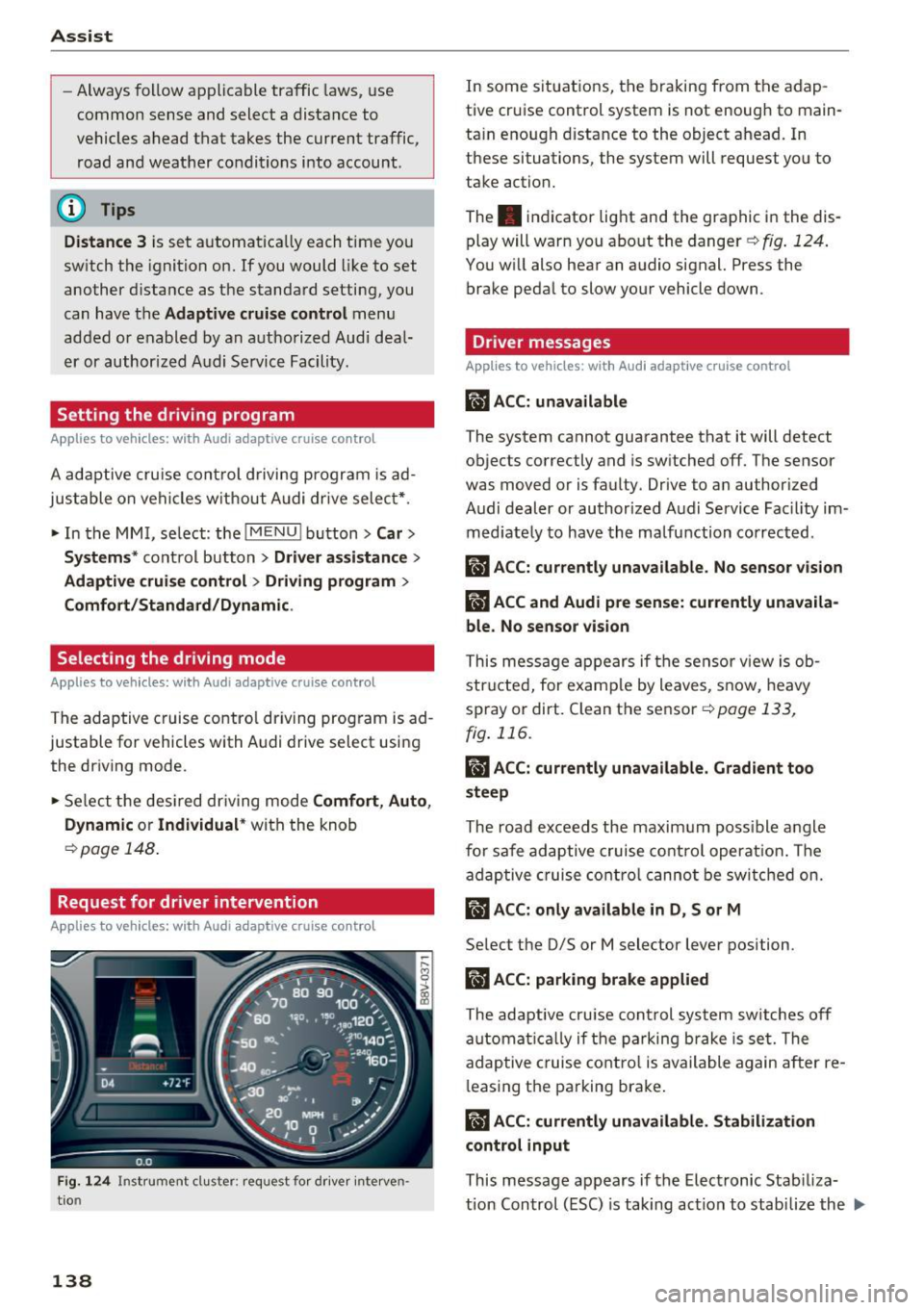
Fig. 1 24 Ins trument cluster: request fo r drive r interven
tio n
138
In some situat ions, the braking from the adap
tive cruise control system is not enough to main
ta in enough distance to the object ahead. In
these situations, the system will request you to
take action.
The . indicator light and the graphic in the dis
play will warn you abo ut the danger
Q fig . 124.
You w ill also hear an audio signal. Press the
brake pedal to slow your vehicle down.
Driver messages
App lies to vehicles: with Audi adaptive cruise control
ill ACC: unavailable
The system cannot guarantee that it will detect
objects correctly and is sw itched
off. The sensor
was moved or is faulty . Drive to an author ized
Audi dealer or authorized Audi Service Fac ility im
med iate ly to have the ma lfunction corrected .
ill ACC: currently una vailable. No sensor v is ion
IIJ ACC and Audi pre sen se: currently una vaila
ble. No sensor vis ion
This message appears if the sensor v iew is ob
structed, for e xamp le by leaves, snow, heavy
spray or dirt. Clean the sensor
c:>page 133,
fig . 116 .
II ACC: currently unavailable . Gradient too
steep
The road exceeds the maxim um poss ible angle
fo r safe adaptive cruise control operat ion. The
adaptive cruise co ntro l canno t be switched on.
ill ACC: only a vailable in D, Sor M
Select the 0/5 or M selector lever position.
IIJ ACC: pa rking brake applied
The adaptive cru ise control system sw itches off
a utomat ica lly if the parking brake is set. The
adaptive c ruise cont ro l is available again after re
l easing the parking brake .
II ACC: currently unavailable . Stabilization
control input
This message appears if the Electronic Stab iliza
tion Con trol (ESC) is taking action to stab ilize the ..,.
Page 143 of 328
,....,
N
0 > co ,....,
detect all objects. This increases the risk of
a collision.
- Pre sense front does not react to people or
animals or objects that are crossing the ve
hicle's path or are difficult to detect
¢ page 133.
-Reflective objects such as guard rails or the
entrance to a tunnel, heavy rain and ice can
affect the function of the radar sensor and
the system's ability to detect a collision risk.
- Lack of attention can lead to collisions, oth
er accidents and serious injuries. pre sense
front is an assistance system and cannot
prevent a collision by itself. The driver must
always intervene. The driver is always re
sponsible for braking at the right time.
- Always pay attention to traffic, even when
pre sense front is switched on. Always be
ready to intervene and take over complete
control of the vehicle whenever it is neces
sary. Always follow traffic laws regarding
maintaining a safe distance between your
vehicle and vehicles ahead.
- pre sense front works within certain limits
and cannot react to situations that are out
side of the system limits, such as when ap
proaching a stationary vehicle or a station
ary obstacle (the end of a traffic jam or ave
hicle that has broken down).
- Always keep in mind that the radar sensor
for pre sense front only works within de
fined detection zones, which means other
vehicles may not always be detected cor
rectly.
- The function and range of the radar sensor
can be impaired by rain, snow and heavy
mist. Vehicles ahead may not be detected
right away, or not detected at all.
- Reflective surfaces such as guard rails or en
trances to tunnels may impair the function
of the radar sensor.
(D Note
The sensor can be disp laced by impacts or
damage to the bumper, wheel housing and
underbody. Pre sense front can be impaired
by this. Have an authorized Audi dea ler or au-
Assist
thorized Audi Service Facility check their func
tion.
(D Tips
- You can cancel the bra king with increas ing
force that is initiated by the system by brak
ing yourself, by acce lerating noticeably or
by swerving.
- For information on driver messages about
pre sense, refer to¢
page 142.
- Keep in mind that pre sense front can brake
unexpectedly. Always secure any cargo or
objects that you are transporting to reduce
the risk of damage or injury.
- Certain pre sense front functions switch off
when ESC is switched off (sport mode) or
when driving in reverse.
- The pre sense front functions are not availa
ble if there is a malfunction in the adaptive
cruise control* system¢
page 138 or
¢page 142.
-Keep in mind that pre sense front can brake
abruptly. Always secure cargo or objects
that you transport to reduce the risk of
damage or injury .
Settings in the Infotainment system
Applies to vehicles: with Audi pre sense front or Audi adaptive
cruise control
.,. In the MMI, select: the I MENU I button >Car>
Systems*
control button > Driver assistance >
Audi pre sense .
Switching the system on and off
Audi pre sense (Syste m): if the system is turned
off, it automatically turns on again once the igni
tion is switched on.
System -switch Audi pre sense On/Off. With
this, you can switch the prewarning and the brak
ing intervention from Audi pre sense on or off.
Early warning -the distance and approach warn
ings can be switched
On /Off .
(D Tips
-If you restrict or switch off the ESC, the pre
sense also switches itse lf off¢
page 160.
141
Page 144 of 328
Ass is t
- Switch the pre sense off when you are load
ing the vehicle onto a vehicle carrier, train,
sh ip or other type of transportation. This
can prevent undesired warnings from the pre sense system.
Driver messages
A pp lies to ve hicles: w ith Audi p re se nse or A ud i adapt ive
cr uise con trol
Audi p re sense cu rre ntly una va ilable. N o sensor
visi on
This message appears if the sensor view is ob
structed, fo r example by leaves, snow, heavy
spray or dirt. C lean the sensor~
page 133,
fig. 116.
Audi pre se nse : o ff
This message appears when the ESC is switched
to sport mode, for example
~ page 160 .
Audi pre sen se: sys te m f ault!
This message appears when the pre sense func
tion is aff ected. For example, this could be
caused by a faulty sensor.
If the message stays on , drive to an authorized
Audi dealer or authorized Aud i Service Facility to
have the ma lfunction corrected .
Audi active lane assist
Description
App lies to veh icles: w ith Aud i active lane assis t
Active lane assist detects lane marker lines with
in the l imits of the system us ing a came ra in the
windshie ld. If you are approaching a detected
lane marker line and it appears likely that you
will leave the lane, the system will warn you with
corr ective steering. You can overrid e this st eering
at any time . If you pass over a line, the steering
wheel will vibrate lightly. In order for this warn ing vibration to occur, it must first be switched
on in the MMI. Active lane assist is operable
when the lane marker line is detected on at least
one side of the veh icle.
l) Th is fun ction is not avail able in al l countrie s.
142
The system will not warn you before crossing a
l ane marker line if you have activated the turn
s ignal. In this case, it assumes that you are
changing lanes intentionally.
The system is designed for driving on express
ways and highways and therefore on ly activates
at speeds above approximately 40 mph (65 km/
h).
A WARNING
-
- The system warns the driver that the vehicle
is leaving the lane using correct ive steering .
The driver is always responsible for keeping
the vehicle within the lane .
- The system can help you keep the vehicle in the lane, but it does not drive by itself . Al
ways keep your hands on the steering wheel.
- Corrective steering may not occur in certain
situations, such as du ring heavy braking.
- There may be cases where the camera does
not recognize all lane marker lines. Correc
tive stee ring can only take place on the s ide
of the vehicle where lane marker lines are
detected.
- Other road structures or objects could poss i
bly be identified un intent ionally as lane
marker lines . As a result, corrective steering
may be unexpected or may not occur.
- The camera view can be restricted, for ex
ample by vehicles driving ahead or by rain,
snow, heavy spray light shining into the
camera or by dirt on the window . This can
result in active lane assist not detecting the
lane marker lines or detect ing them incor
rectly .
- In certain situations where visibility is low,
the vehicle may switch from "early" to "late"
corrective steer ing
1> .
- Under certain cond it ions such as ruts in the
road, an inclined roadway or crosswinds, the
corrective steer ing alone may not be enough
to keep the vehicle in the m iddle of the lane .
~
Page 146 of 328
Assist
The lane assist display can be called up using the
buttons in the
multifunction steering wheel
c::>page29 .
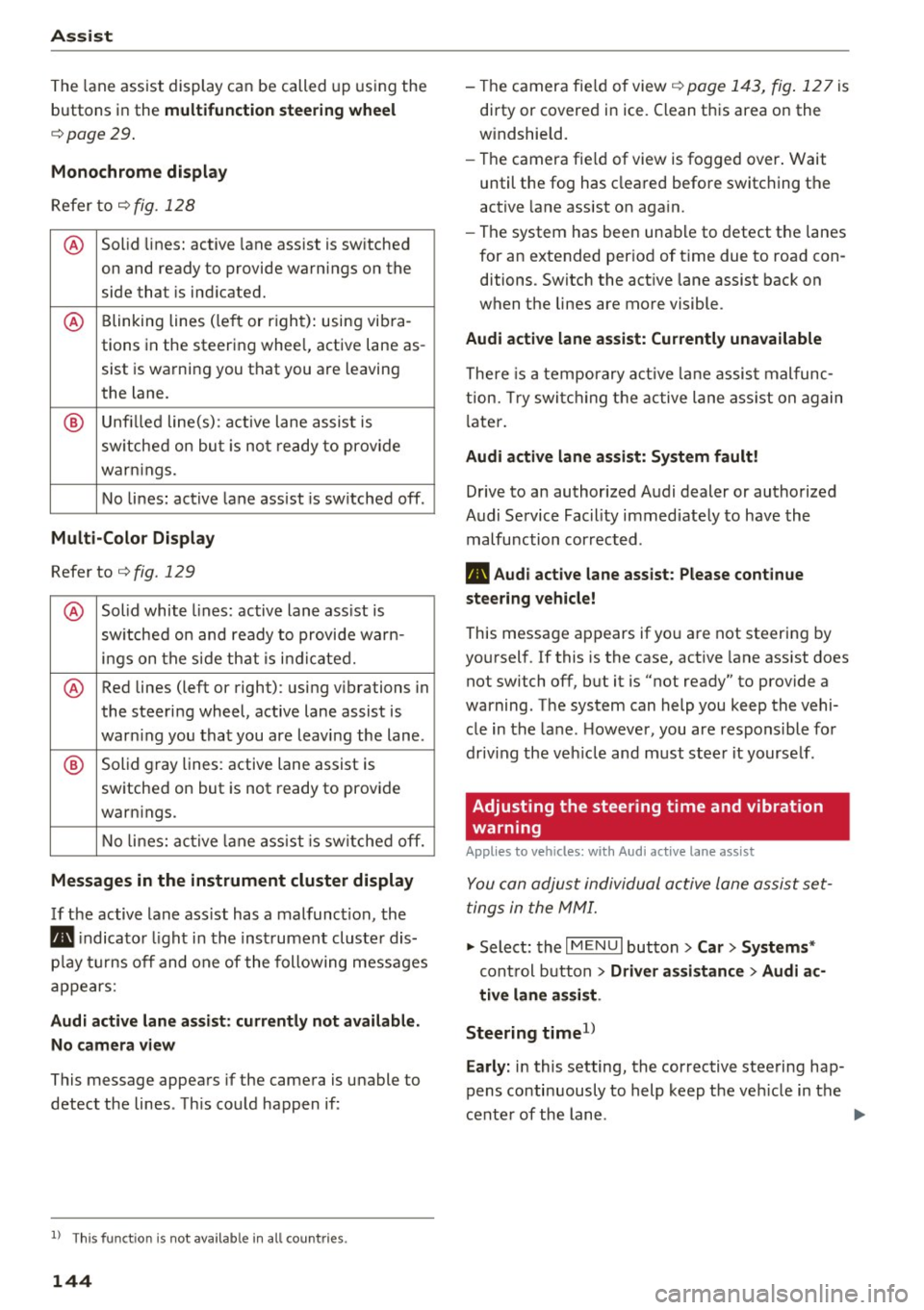
Monochrome display
Refer to c::> fig. 128
® Solid lines: active lane assist is switched
on and ready to provide warnings on the
side that is ind icated.
® Blinking lines (left or right): using vi bra-
tions in the steering whee l, active lane as-
sist is warning you that you are leaving
the lane.
® Unfilled line(s): active lane assist is
switched on but is not ready to provide
warn ings.
No lines: active lane assist is sw itched off.
Multi-Color Display
Refer to q fig. 129
® Solid white lines: active lane ass ist is
sw itched on and ready to provide warn-
ings on the side that is indicated.
® Red lines (left or right) : using vibrations in
the steering wheel, active lane assist is
warn ing you that you are leaving the lane.
® Solid gray lines: active lane assist is
switched on but is not ready to provide
warn ings.
No lines: active lane assist is switched off.
Messages in the instrument cluster display
If the active lane ass ist has a malfunction , the
rm indicator light in the instrument cluster dis
p la y turns off and one of the following messages
appears:
Audi active lane assist: currently not available.
No camera view
This message appears if the camera is unable to
detect the lines . Th is could happen if :
l) This fun ction is not availab le in all coun tries.
144
-The camera fie ld of view c;,page 143, fig . 127 is
dirty or covered in ice. Clean this area on the
w indshield.
- The camera fie ld of view is fogged over . Wait
until the fog has cleared before switching the
active lane assist on again.
- The system has been unable to detect the lanes
for an extended period of time due to road con
ditions . Switch the act ive lane assist back on
when the lines are more visible .
Audi active lane assist: Currently unavailable
There is a temporary active lane assist malfunc
tion. Try switching the active lane ass ist on again
l ater.
Audi active lane assist: System fault!
Drive to an authorized Audi dealer or authorized
Audi Service Fac ility immed iately to have the
malfunction corrected.
rm Audi active lane assist: Please continue
steering vehicle!
This message appears if you are not steering by
yourself .
If this is the case, active lane assist does
not switch off, but it is "not ready" to provide a
warning . The system can help you keep the vehi
cle in the lane. However, you are responsible for
driv ing the veh icle and must steer it yourse lf .
Adjusting the steering time and vibration
warning
Applies to vehicles: with Audi active lane assist
You can adjust individual active lane assist set
tings in the MMI.
.,. Select: the I MENU I button> Car> Systems *
control button > Driver assistance > Audi ac
tive lane assist .
Steering time
1 >
Early: in this setting, the corrective steering hap
pens continuously to help keep the veh icle in the
center of the lane .
IJII>
Page 150 of 328
Ass is t
Driver messages
Applies to vehicles: with Audi side assist
If the side assist switches off automatically, a
message appears i n the ins trument cluster dis
p lay .
@j Audi side assist : cur rentl y unav ailable No
s en so r vi sion
The radar senso rs ' vision is affected. Do not cover
the area in front of the sensors with b ike wheels,
stickers, dirt or other objects. Clean the area in
front of the sensors, if necessary~
page 146,
fig. 133.
@j Audi side a ssi st : cur rentl y una vailable
Side assist cannot be switched on tempo rar ily be
cause there is a malfunction (for example, the
battery charge level may be too low).
@j Audi side a ssist: System fault!
The system cannot guarantee that it wi ll detect
ve hicles co rrectly and it is switched off. The sen
sors have been d isp laced or are faulty. Have the
system checked by an authorized Audi dea ler or
authorized Audi Service Facility soon.
Audi drive select (drive settings)
Introduction
Applies to vehicles: with Audi drive select
Audi drive select makes it possible to experience
different types of vehicle settings in one vehicle .
The driver can select from three
C omfort , Auto
and Dynamic modes using the r.1:a button in the
center console or the MMI to switch between a
sporty and a comfortable dr iving mode, for ex
ample . In the
In div idual * mode, the vehicle set
tings can be adjusted to your personal preferen
ces. This makes it possible to combine settings
such as a sporty eng ine set ting with smooth
s teer ing .
A WARNING
Using Audi drive select incorrectly can lead to
collisions, othe r accidents and serious inju
ries .
148
· Description
Applies to vehicles: with Audi drive select
The vehicle setup in each mode depends on the
vehicle's features. However, the eng ine and
steering are a lways affected.
Engine and automatic tr ansmiss ion
Depend ing on the mode, the engine and auto
matic transmission* respond more qu ickly or in a
more ba lanced manner to acce lerato r pedal
movements.
Adaptive damper s (Audi magnetic ride )*
The adaptive dampers use sensors to record in
formation regarding steering movements, brak
i ng and acce le ration operations by the dr iver,
r oad su rface, driving speed, and load. W it h Aud i
drive select you can adjust the adaptive dampers
spo rty (dynamic), comfortable (comfort) or ba l
anced (auto).
Steering
The steering adapts in terms of steering ass is
tance. There are d ifferent modes
c;;:> page 149.
Ind irect steering that moves easi ly as in comfort
mode is especia lly suited to long drives on a high
way. The dynamic mode provides sporty, direct
steering .
For vehicles with progress ive steering* the steer
ing performance is more agi le .
Corn ering light *
The cornering light adjusts when driv ing on
cu rves at speeds between 6 mph (10 km/h) and
68 mp h (110 km/h). The pivoting act ion and the
li gh ting are also adapted to the mode.
Adaptive cruise control*
The behavio r whe n accelerating can be adjusted
from comfortable to sporty, depending on the
Audi drive select mode. Adaptive cr uise control
also responds to the dr iving beh avior of the vehi
cle ahead in a more conservative or sporty man-
ner .
1111>
Page 153 of 328
.... N
0 > co ....
General information
Applies to vehicles: with rear pa rk in g systems/pa rk in g system
p lus/rearv iew camera
Depending on your vehicle's equipment, various
parking aids will help you when parking and ma
neuvering.
The
rear parking system is an audible parking aid
that warns you of obstacles
behind the vehicle
¢page 152.
The parking system plus assists you when park
ing by audibly and visually indicating objects de
tected
in front of and behind the vehicle
¢ page 152.
The rearview camera shows the area behind the
vehicle in the MMI display . This display assists
you when you are cross or parallel parking. The
parking system plus functions are also available
¢ page 153.
A WARNING ,--
- Always look for traffic and check the area
around your vehicle by looking at it directly
as well. The parking system cannot replace
the driver's attention. The driver is always
responsible when entering or leaving a park
ing space and during similar maneuvers.
- Please note that some surfaces, such as
clothing, are not detected by the system .
- Sensors and cameras have blind spots in
which people and objects cannot be detect
ed . Be especially cautious of small children
and animals .
- Always pay attention to the area around the
vehicle -using the rearview mirror, too .
- The sensors can be displaced by impacts or
damage to the radiator grille, bumper,
wheel housing and the underbody . The park
ing system may become impaired as a re
sult. Have an authorized Audi dealer or au
thorized Audi Service Facility check their
function.
- Make sure the sensors are not obstructed by
stickers, deposits or other materials. If they
are the sensor function could be impaired .
I
Parking systems
For additional information on cleaning, re
fer to¢
page 274.
@ Note
-Some objects are not detected or displayed
by the system under certain circumstances:
- Objects such as barrier chains, trailer draw
bars, vertical poles or fences
- Objects above the sensors such as wall ex
tensions
- Objects with specific surfaces or struc
tures such as chain link fences or powder
snow
- If you continue driving closer to a low-lying
object, it may disappear from the sensor
range . Note that you will no longer be
warned about this obstacle.
- The sensors can be displaced by impacts or
damage to the radiator grille, bumper,
wheel housing and the underbody . The
parking system may become impaired as a
result . Have an authorized Audi dealer or
authorized Audi Service Facility check their
function.
(D Tips
- The system may provide a warning even
though there are no obstacles in the cover
age area in some situations, such as:
- certain road surfaces or for long grass .
- external ultrasonic sources e.g. from
cleaning vehicles.
- heavy rain, snow, or thick vehicle exhaust .
- We recommend that you practice parking in
a traffic-free location or parking lot to be
come familiar with the system. When doing
this, there should be good light and weath
er conditions .
- You can change the volume and pitch of the
signals as well as the display¢
page 157.
-What appears in the MMI display is some
what time-delayed.
- The sensors must be kept clean and free of
snow and ice for the park assist to operate .
151
Page 156 of 328
Parking system s
General information
Applies to veh icles: w ith park ing system p lus with rearview
camera
F ig . 14 1 Area covered © and area not covered @by the
r earv iew came ra (example)
Fig. 142 Rear lid : locat io n of the rearview camera (exam ·
ple)
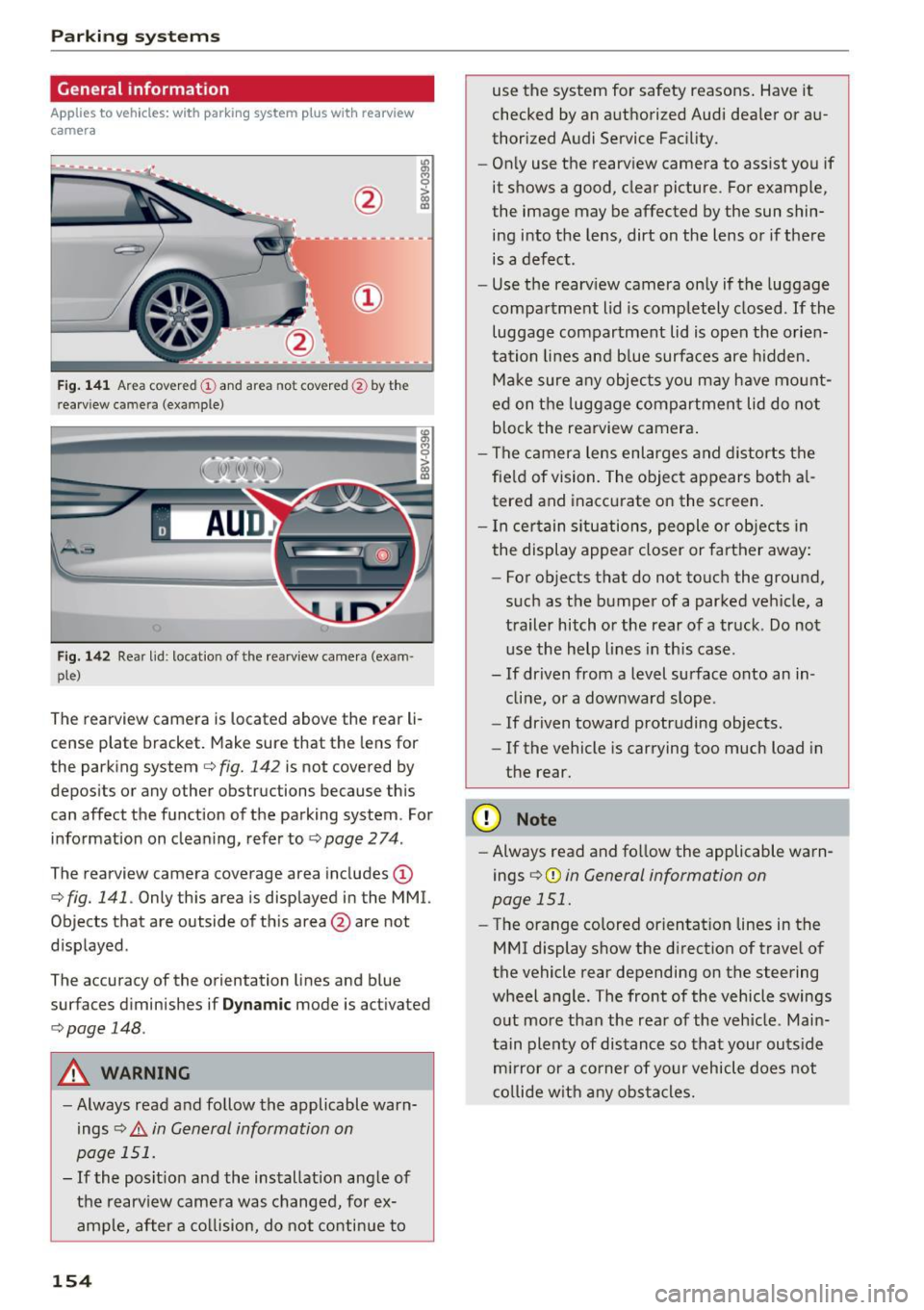
The rearview camera is located above the rear li
cense plate bracket. Make sure that the lens for
the parking system
c.:> fig. 142 is not covered by
depos its or any other obstructions because th is
can affect the function of the parking system . For
information on cleaning, refer to
c.:> page 2 74 .
The rearview camera coverage area includes(!)
c.:> fig. 141. Only this area is displayed in the MMI.
Objects that are outside of th is area @are not
displayed .
The accuracy of the orientation lines and b lue
surfaces d iminishes if
D ynamic mode is activated
¢ page 148.
A WARNING
-Always read and follow the applicable warn
ings
c.:> .&. in General information on
page 151.
- If the posit ion and the installation ang le of
the rearv iew camera was changed, for ex
ample, after a co llision, do not continue to
154
use the system for safety reasons . Have it
checked by an a uthorized Audi dea ler or au
thorized Audi Service Fac ility.
- Only use the rearv iew camera to assist you if
it shows a good, clear picture . For example,
the image may be affected by the sun shin
ing into the lens, dirt on the lens or if there is a defect.
- Use the rearv iew camera on ly if the luggage
compa rtment lid is completely closed.
If the
luggage compartment lid is open the orien
tation lines and b lue surfaces are hidden.
Ma ke sure a ny objec ts you may h ave mo unt
ed on t he luggage compartmen t lid do not
b lock the rearview camera .
- The camera lens enlarges and distorts the
fie ld of vision. The object appears both a l
tered and inaccurate on the screen .
- I n cer tain s itu ations, people or objects in
the display appea r closer or farther away:
- For objects that do not touch the ground,
such as the bumper of a parked vehicle, a
trailer hitch or the rear of a truck . Do not
use the help lines in th is case.
- If dr iven from a level surface onto an in
cline, or a downward slope .
- If driven toward protruding objects.
- If the vehicle is carrying too much load in
the rear .
(D Note
-Always read and fo llow the applicable warn
ings
c.:> (D in General information on
page 151.
- The orange colored orientat ion lines in the
MMI display show the direction of trave l of
the vehicle rear depending on the steering
wheel a ng le . The front of the vehicle swings
o ut more than the rea r of the veh icle. Main
tain plenty of dis tance so that your outs ide
m ir ror or a co rner of your vehicle does not
c o llide w it h any obstacle s.
Page 159 of 328
,....,
N
0 > co ,....,
A ppl ies to vehicles: with parkin g system plus/rearview cam·
era
The display and warning tones con be adjusted in
the MMI.
~ Select: the I MENU ! button >Car > Systems *
control button > Driver assistance > Parking
aid .
Display
On * -
an op tic al d isp lay is shown for the parking
system plus, a rearview camera image is s hown
for parking system plus with rearv iew camera* .
Off -Whe n the par king system is switched off,
only audib le sign als are give n.
Signal tones
Front volume -
volume for the front and side*
a rea
Rear volume -volume for t he rear area
Front frequenc y-frequency for the front and
side * area
Rear frequency -frequency fo r the rear area
Music volume during nav . prompts -the volume
of the a udio/v ideo so urce is lowe red when t he
pa rking system is turned o n.
The new ly selected leve l is demons trated briefly
by the sound generator.
- The warning tones ca n also be adjusted d i
r ec tly from the visua l display or t he rearv iew
cam era image *. Simply pr ess the
Settings
co ntrol bu tton.
- The setti ngs a re auto mat ica lly stored and
ass igned to the remote co ntro l key t hat is in
u se .
Error messages
App lies to vehicles: with par kin g system plus/rearview cam
era
There is an erro r in the system if the LED in the
P111A. button is b linking and you hear a continuous
Parking systems
alarm for a few seconds after sw itch ing on the
par king system or w hen the pa rking system is a l
ready activated. If the error is not cor rected be
fo re you switch off the ignition, the LED in the
Pw ,
button w ill blink the next time you switch on the
park ing system by shifting into reverse.
Parking sy stem plus*
If a sensor is fa ulty, the~ symbol will appear i n
f ront of/behind the vehicle in the MMI display. If
a rear sensor is faulty, only obstacles that are in
areas @and @are shown <=>
page 152, fig. 136.
If a front sensor is fa ulty, only obstacles that are
i n a reas © and @are shown .
Drive to an authorized Audi dealer or authorized
Audi Service Facility immed iate ly to have the
malfu nction corrected.
157
Page 160 of 328
Intelligent Technology
Intelligent Technology
Notice about data
recorded by the Event
Data Recorder and
vehicle control modules
Event Data Re corder
This vehicle is equipped wi th an Event Data Re
corder (EDR) . The main purpose of an E DR is to
record, in certain crash or near crash -like situa
tions, such as an airbag deploym ent or h itting a
road obstacle, data that will assist in understand
ing how a veh icle 's systems performed . The EDR
is designed to record data related to veh icle dy
namics a nd safety systems for a sho rt period of
time, typically 30 seconds or less . The E DR in this
veh icle is designed to reco rd s uch data as :
- How various systems in your vehicle were oper
at ing;
- Whether or not the driver and passenger safety
belts were buckled/fastened;
- How far ( if at all) the driver was depressing the
acce lerator and/or brake peda l; and,
- How fast the ve hicle was trave ling.
These data can help provide a better understand ing of the ci rc u mstances in which c rashes and in
juries occur. NOT E: EDR data are recorded by yo ur
veh icle only if a non-trivia l crash situat ion occurs;
no data are recorded by the EDR under normal
driving conditions and no personal data (e .g .,
name, gender, age, and crash location) a re re
corded . H owever , other pa rties , such as law en
forcement, cou ld combine the EDR data w it h the
type o f person ally identifyi ng dat a routine ly ac
qu ired dur ing a crash invest igat ion .
To read data reco rded by an EDR, specia l equip
men t is req uire d, and access to the veh icle or the
E DR is needed. In ad dition to the vehicle manu
facturer, other parties, s uch a s law enforcement,
that have t he specia l equipment, can read the in
formation if they have access to the vehicle or the E DR.
Some s tate laws restrict the re trieva l or down
loading of data stored by ED Rs insta lled in a vehi
cle fo r the express purpose of retrieving data af -
158
ter an accident or crash event withou t the own
er 's consent.
Audi will not access the EDR and /or sim ilar data
o r g ive it to others -
- unless t he ve hicle ow ner (o r lessee if the vehi
cle has been leased) ag rees; o r
- upon the offic ial request by the police; or
- upon the order of a court of law or a govern-
ment agency; or
- for the defense of a lawsuit through the jud icia l
discovery process.
- Audi may also use the data for research about
veh icle operation and safety perfo rmance or
prov ide the data to a th ird party for research
purposes w itho ut identify ing t he specific vehi
cle or info rmat ion about the ident ity of its own
er or lessee and only afte r th e re co rded vehicle
d ata has been a ccessed.
Vehicle control modules
You r vehicle is also equ ipped with a number of
e lectronic cont rol modules for va rious vehicle
syste ms, such as engine ma nagement, em iss io n
contro l, air bag s, a nd safety be lts.
These electronic control modules record data
dur ing norma l vehicle operation t hat may be
n eeded by tra ined techn ic ians for d iagnost ic and
r ep air pur poses. The re cording capab ility of these
modules is lim ited to dat a (no sou nd is recor d
ed). Only a sma ll amount of data is actually re
corded over a very limited period of time, or stor
ed when a system fault is detected by a contro l
module . Some of the data stored may relate to
vehicle speed, direction, or braking, as well as re
straint system use and performance in the event
of a crash . Stored data can also only be read a nd
down loaded w it h specia l equipment that is d i
r ec tly connec ted to the vehicle.
(D Tips
Your vehicle may be e quipped w it h Aud i con
n ect . Yo ur use of certain Aud i connect fea
tures requires wire less services that are p ro
v ided by a third party wireless telecomm uni
cations provider. Fo r de tails regarding how in
fo rmation obtained through Aud i connect is
collecte d, processe d, transmitted, use d, an d ..,.