park assist AUDI S3 SEDAN 2018 User Guide
[x] Cancel search | Manufacturer: AUDI, Model Year: 2018, Model line: S3 SEDAN, Model: AUDI S3 SEDAN 2018Pages: 404, PDF Size: 62.3 MB
Page 89 of 404
u. 00 .-< N l' N .-< 0 N > 00
-Power is still transferred to the wheels
when the engine is running at idle. To pre
vent the vehicle from "creeping", you must keep your foot on the brake when the en
gine is running and the selector lever is in
the "D", "S" or "R" position or "tiptronic"
mode is selected.
- Do not inadvertently press the accelerator
peda l when the vehicle is stopped if a gear is
engaged. Otherwise the risk of an accident
increases because the vehicle will start to
move immediately, even if the parking brake
is set.
- To reduce the risk of an accident, do not
press the acce lerator pedal when changing
the selector lever position while the vehicle is stationary and the engine is running.
- Never engage the "R" or "P" selector leve l
positions while driving. It could cause a
crash.
- Before driving down a steep slope, reduce
your speed and shift into a lower gear with
"ti ptron i c".
- Do not ride the brakes or press the brake
pedal too often or too long when driving
downhill. Constant braking causes the
brakes to overheat and substantially re
duces braking performance, increases brak
ing distance or causes complete failure of
the brake system.
- If you must stop on an incline, always hold
the vehicle in p lace with the foot brake or
park ing brake to prevent it from rolling
back.
- Never hold the veh icle on an incline with a
sl ip ping clutch. The clutch opens automati
cally when it becomes too hot from the
overload. The
ml indicator light turns on
and a message appears
¢ page 89 when
the clutch is over loaded .
{LlJ) Note
- When stopping on an incline, do not try to
ho ld the vehicle in place by pressing the ac
ce lerator pedal while a driving gear is se
l ected. This can cause the automatic trans
mission to overheat and can damage it. Set
Driving
the parking brake or press the brake pedal
to prevent the vehicle from rolling.
- Allowing the vehicle to roll when the engine
is stopped while the selector lever is in the
"N" position will damage the automatic
transmission, because it is not lubricated
under those circumstances
¢ page 3 78,
Towing with a tow truck.
- The transmission can overheat and be dam
aged under certain driving and traffic condi
tions such as frequent starts, creeping for a
long time, or stop-and-go traffic. When the
ml or. indicator light turns on, stop the
vehicle at the next opportunity and let the
transmission cool¢
page 89.
(D Tips
For safety reasons, the park ing brake only re
l eases automatically when the driver's door is
closed.
Hill descent control
App lies to : vehicles wi th automatic transmiss ions
The hill descent control system assists the driver
when driving down hills.
Hill descent control is act ivated when the selec
tor lever is in the "D" or "S" posit ion and you
press the b rake pedal. The transmission auto
matically se lects a gear that is suitab le for the
hill. Hill descent contro l tries to ma inta in the
speed achieved at the time of braking, within
physical and technica l limitations. If may still be
necessary to adjust the speed with the brakes.
Because hill descent control cannot shift down
farther than 3rd gear, it may be necessary to
shift into tiptronic mode in very steep areas . In
th is case, shift into 2nd or 1st gear in t iptronic
mode to use the engine's braking force to rel ieve
the brakes.
Hill descent control switches
off once the hill lev
els out or you press the accelerator pedal.
On vehicles with a cruise control system*
¢ page 120, hill descent control is also activated
when the speed is set .
.,,.
87
Page 91 of 404
u. co ... N l' N
A WARNING
Please note that the wheels could spin on
slick or slippery roads when kick-down is ac
tive .
Launch control program
App lies to: ve hicles with S tro nic tra nsm issio n an d La unch
Co ntrol P rogram
-
The launch control program provides the best
possible acceleration when starting from a stop .
Requirement: the eng ine must be at operating
temperature and t he steer ing whee l must not be
turned.
.,. Deact ivate l) the S tart/Stop system*
~ page 81. The L ED in the ~ button turns on .
.,. Wi th the engine runn ing, p ress the I.!, O FF ! but
ton briefly one time . The
11 indicator light
turns on and the message
Stabili zation control
( ESC ): s port. W arning! Rest ricted st a bilit y
ap
pears in the instrument cluster display.
.,. Pull the selector lever back out of the "D/S" po
s it ion br iefly to select the S pos it ion, or press it
toward the right into the t iptronic pos ition or
select the
Dynamic d riving mode in d rive se
lect* ~ page 140.
.,. Press t he b rake peda l firmly with you r left foot
and hold it all the way down for at least one
second .
.,. At the same time, press the gas pedal a ll the
way down with your right foot unt il the engine
reaches and stays at a high RPM level.
.,. Remove your left foot from the brake pedal
within five
seconds ~,&. .
A WARNING
-Always adapt yo ur driv ing to the traffic flow.
- Only use Launch Control when road and traf-
fic cond itions allow it and other dr ivers will
not be endangered or impacted by you r driv
ing and the vehicle 's accele ration.
- Please note tha t the drive whee ls can sp in
and the vehicle can break away when sport
8 l ) It is n ot poss ib le to deac tiv ate t he system wit h all ve rs io n s N &j of th e tran sm iss ion.
Driving
mode is switched on, especially when the
road is slippery.
- Once the vehicle has started moving, press
the !.!> OFF I button briefly to turn the sport
mode off.
(D Tips
- The transmission temperat ure may increase
significant ly after using the launch control
program. If that happens, the program may
not be ava ilable for a few minutes. It will be
availab le aga in after a cool-down period.
- When accelerating using the launch contro l
program, all vehicle parts are subject to
heavy loads . This can lead to increased
wear .
Transmission malfunction
Applies to: vehicles wit h automatic transmissions
• Transmis sion : malfunction! Pl eas e s top ve
hicle and shift to P
There is a malfunction in the transmission . Park
the vehicle securely and do not cont inue driv ing .
See an author ized Audi dealer or author ized Audi
Se rvice Facility for assistance .
• Transmission o verhe ating! Plea se stop th e
vehicle!
The transmission is too hot and can become dam
aged. Stop and let the transmiss ion cool w ith the
engine running (at idle) i n the "P" selector lever
pos ition . T hen the ind icator light and the mes
sage turn off, d rive to an authorized Aud i dealer
o r auth o rized Aud i Serv ice Facility immediately to
have t he malfunct ion cor rected . If the indicato r
light and the driver message do not turn off, do
not continue driving . See an authorized Audi
dealer or authorized Audi Service Facility for as
s istance.
[O] Tran smission: malfunction! You can contin-
u e dri ving. See owne r's manual
.,.
89
Page 92 of 404
Driving
Drive to an authorized Audi dealer or authorized
Audi Service Facility immediately to have the
malfunct ion corrected .
[i1 Transmission: malfunction! You can contin
ue driving with limited function. No reverse
gear
There is a system malfunction in the transm is
sion. The transmission is switching to emergency
mode. This mode only shifts into certain gears or
will no longer shift at all. The engine may stall.
You cannot engage the reverse gear. Drive to an
authorized Audi dealer or author ized Audi Service
Facility immediately to have the malfunction cor
rected .
[i1 Transmission: malfunction! You can contin
ue driving in
D until engine is off
Drive the vehicle away from movi ng traffic and
park. See an authorized Audi dealer or authorized
Aud i Serv ice Facility for assistance.
[i1 Transmission: too hot . Please adapt driving
style
The transmission tempe rature has increased s ig
n ificant ly. Dr ive very cautiously or take a break
from driving unt il the temperature returns to the
normal range and the indicator light turns off.
[O] Transmis sion: please press brake pedal and
select gear again
If the transmission malfu nctions because the
temperature is too high, a message appears
when the transmission is cooled .
90
Selector lever emergency release
Applies to : vehicles wi th automatic transmissions
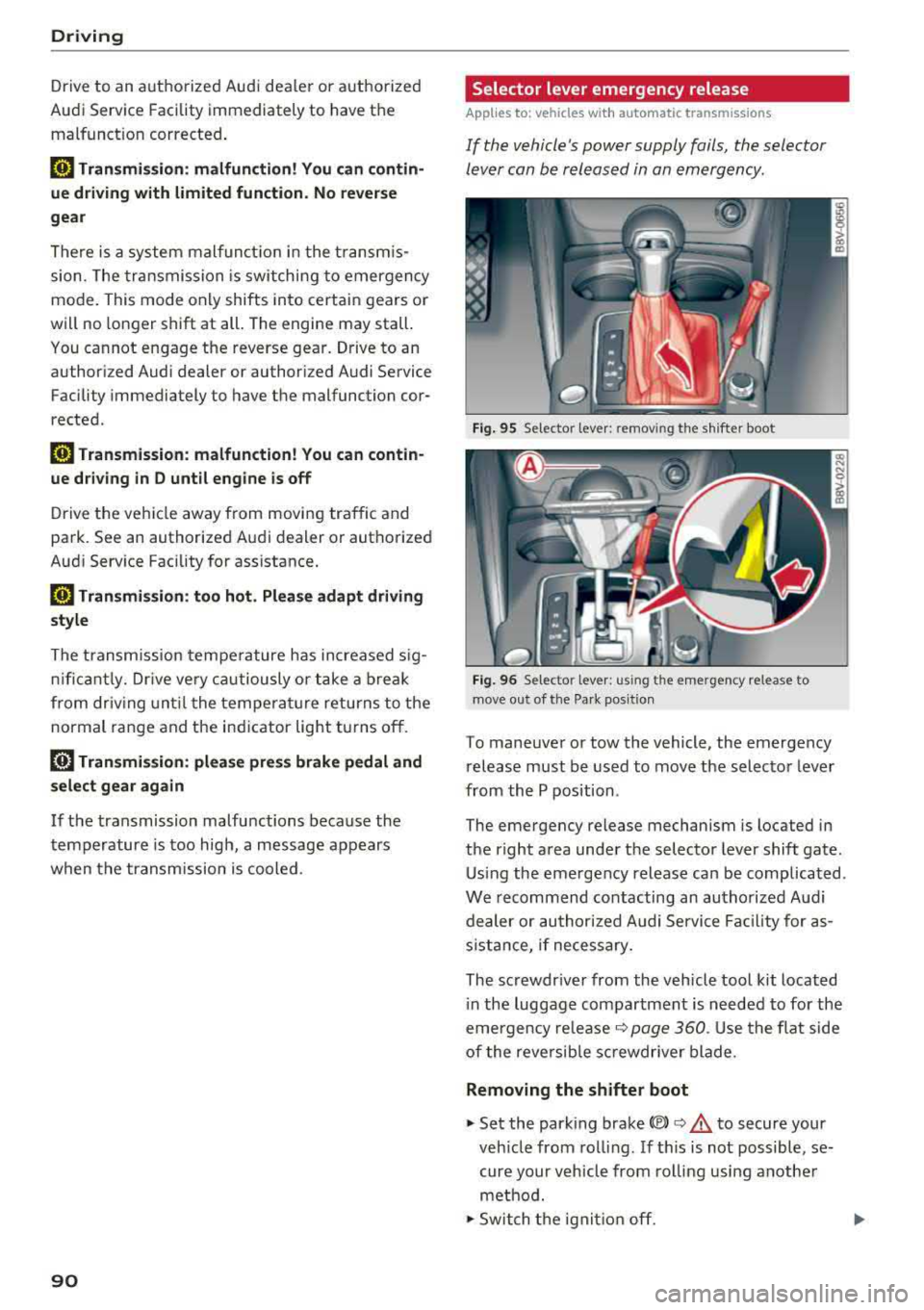
If the vehicle's power supply fails, the selector
lever can be released in an emergency .
Fig. 95 Selector leve r: remov ing the shifter boot
Fig. 96 Selector lever: using the emergency release to
move out of the Pa rk posit ion
To maneuver or tow the vehicle, the emergency
release must be used to move the selector lever
from the P position .
The emergency release mechanism is located in
the right area under the selector lever shift gate .
Using the emergency release can be complicated .
We recommend contacting an authorized Audi
dealer or authorized Aud i Service Facility for as
s is tance, if necessary.
The screwdr iver from the vehicle tool kit located
i n the luggage compartment is needed to for the
emergency re lease
c::> page 360 . Use the flat side
of the reversible screwdriver blade.
Removing the shifter boot
.,. Set the park ing brake(®) ¢.& to secure your
veh icle from rolling. If this is not possible, se
cure your vehicle from rolling using another
method .
.,. Switch the ignit ion off.
Page 107 of 404
u. 00 .-< N l' N .-< 0 N > 00
condition. If necessary, get expert assistance
from a qualified electrical installation special
ist.
A WARN ING
Incorrect handling of the connector contacts
can cause electric shock or fire.
- Do not touch the contacts for vehicle charg
ing port and for the Audi e-tron charging
system .
- Do not insert any objects in the vehicle
charging port or in the Audi e-tron charging
system .
- Protect the sockets and connectors against
any moisture, water and other fluids .
A WARNING
Using a damaged or incorrect charging cable
or a damaged or incorrect socket, using the
Audi e-tron charg ing system incorrectly or
disregarding the safety precaut ions could
cause short circu iting, electric shock, explo
sions, fires and burns .
- Do not use the Audi e-tron charging system
if it is damaged and/or dirty . Check the ca
ble and connector for damage and dirt be
fore using.
- T he Audi e-tron charging system must only
be connected to sockets that are installed
correctly and that are not damaged as well
as to electrical installations that have no
faults.
- Do not use any extension cords, cable reels,
power strips or (travel) adapters.
- Disconnect the Audi e-tron charging system
from the power network during a thunder storm.
- Do not modify or repair any electrical com
ponents.
- Never immerse the Audi e-tron charging
system and connectors in water.
- The Audi e-tron charging system must only
be cleaned when the control unit is com
pletely disconnected from the power supply
and from the vehicle. Use a dry towel to
clean .
e-t ron
-If a 110 volt household socket is used for
charging, only connect one vehicle at a time
to the same circuit. Use a different circuit if
an additional vehicle needs to be charged at
the same time. Note the maximum permit
ted current draw for the circuit . Contact a
qualified electrical technician if there is any
doubt .
A WARNING
The components in the Audi e -tron charg ing
system can trigger sparks which can cause
flammable or explosive fumes to ignite.
- To reduce the r isk of exp losions, espec ially
in garages, make sure the contro l unit is at
least 19 inches (SO cm) above the floor
when charging.
- Do not use the Audi e-tron charging system in areas at risk for exp losions .
- The Audi e-tron charging system is only suit ed for use on Audi vehicles and vehicles
within the Volkswagen Group . Using the de
vice on vehicles made by another manufac
turer is not authori zed.
@ Note
Make sure that you always use the suitable
power plug provided with the Audi e-tron
charging system for the corresponding mar
ket. Contact an authori zed Audi dealer or au
thorized Audi Service Facility for more infor mation .
(D Tips
-Only use the factory-provided charging ca
ble from Audi or the Volkswagen Group to
charge your vehicle .
- For an uninterrupted charging process, we
recommend only charging using sockets
that are connected to a separately protect
ed circuit .
- Using either NEMA sockets with a current
rating of at least 30 A or industrial sockets
in accordance with IEC 60309 when charg
ing is recommended.
1 05
Page 121 of 404
Outside mirrors
If yo u cannot see the traffic behind the tra iler
with the standard exterior mirrors, then you
must attach additiona l exterior mirrors . Adj ust
them so you have a sufficient visibility behind
you .
Exterior lighting
Follow the legal regulat ions regard ing the light
ing equipment on your trailer . Contact an author
ized Audi dealer or authorized Audi Service Facili
ty for more information.
Before starting to drive, check all lighti ng equip
ment on the hitched trailer.
The headlight range contro l adjusts automatical
l y to the light range of the headl ights.
Safety chains
Make sure the safety chains are correctly applied
when pull ing a trailer . The chains should hang
enough so that the trailer can dr ive around
curves. However, they must not touch the
g ro und .
(D Tips
-Use chocks whe n parking on incl ines if the
trailer is load ed.
- We recommend also hav ing the veh icle in
spected between the inspect ion intervals if
you are towing a trailer frequently.
- Avo id driving with a trailer during the vehi
cle break- in period .
Driving with a trailer
Driving with a trailer requires extra caution.
Speed
Adhere to the legal speed limits. Follow the legal
regulations specific to the country.
As the speed increases, the driving stability of
the trai ler decreases. Therefore you should not
exceed the maximum legal speed limit when
u. there are unfavorable road, weather and/or wind 00
~ conditions . This especially applies when driving
~ downhill.
0 N > 00
Trailer towing
You m ust always reduce your speed as soon as
you notice even the slightest swinging motion of
the tra iler. Never try to "stra ighten out" the tra il
er by acce lerating.
T he weight distribution is very poor if the vehicle
is empty and the trai ler is loaded . However if you
must drive under these circumstances, then dr ive
especially slowly .
Brakes
Brake in a timely manner. Downshift before driv
ing down hill so that t he engine can assist with
braking ~.&. .
When using a trailer w it h overrun brakes, first
brake gently then quickly. This reduces the r isk of
jerking while braking if the trailer wheels lock up .
Engine coolant temperature
Pay attention specifically to the coo lant tempera
ture display when there are high outside temper
a tur es, and when driving on long inclines
~page 11. Shift to a hig her gear in a timely man
ner .
A WARNING
= -
Constant braking causes the brakes to over-
heat and substantially reduces braking per
formance, increases braking distance or caus
es complete failure of the brake system.
119
Page 132 of 404
Assistance systems
fal l below the warn ing th reshold for an ex
tende d pe rio d of time .
Messages
Applies to: veh icles w ith Audi adaptive cruise control
II ACC: unavailable
T he system cannot guar antee that it w ill detec t
ve hicl es co rrectly and it has switched
off. T he
sensor was moved or is fau lty . D rive to an aut hor
ized A udi dealer or autho rized Au di Service Faci li
ty immediately to have the malfunct ion correct
ed .
IIJ ACC: currently unavailable. No sensor view
II ACC: currently unavailable . Sensor vision re
stricted due to surroundings. See owner's man
ual
T his message appea rs if the sensor view is ob
s truc ted, fo r ex am ple by le aves, snow, he avy
sp ray o r dir t. C le a n the sensor
q page 12 4,
fig. 123 .
II ACC: currently unavailable . Incline too steep
The road exceeds the ma ximum possib le ang le
for safe a dapt ive cr uise control o peration . T he
a d ap tive cr uise con trol cannot be switched on .
II ACC: only available in D, Sor M
Select the "D/S" o r "M" selector leve r position .
II ACC: parking brake applied
The adaptive c ruise contro l sys tem swi tches off
automatically if the park ing bra ke is set . Th e
a da pti ve cr uise co ntrol is av ailab le ag ain a fter re
le asi ng t he p arki ng brak e.
II ACC: currently unavailable . Stabilization
control input
This message appea rs if the elect ronic stab iliza
tion contro l (ESC) is taki ng action to stab ilize t he
ve hicle. In this case, a dap tive cr uise control
sw itch es off au toma tically.
II ACC: Please take over!
This message appea rs if the veh icle rolls bac k
when sta rting on a slight incl ine, even thoug h
130
ACC i s active. Press t he b rake pedal to preven t
t h e ve hicle from rol ling o r start ing to move.
Distance warning: malfunction! Please contact
Service
The sys tem canno t gua ran tee that it will detect
vehicles corre ctly an d it h as sw itched off . T he ra
d ar sen sor w as mo ved or is faulty . D rive to a n au
th ori ze d Aud i de aler o r aut horized Audi Se rvice
F aci lity imme diate ly to h ave the mal function co r
r ected .
Distance warning: currently unavailable. Sensor
view limited due to surroundings .
This message appears if the sensor v iew is ob
str uct ed , for e xam ple by leaves, s now , heavy
s pra y or dirt. C lean t he se nsor
q poge 124 ,
fig. 12 3 .
Distance warning: currently unavailable. See
owner's manual
This message appears if the system has a tempo
r ary fa ilure. If this occurs m ultip le times, drive to
an a uthorized Au di dea le r or a uthor ized Audi
Se rvice Fa cility i mmediat ely to ha ve the malf unc
t ion co rre cted.
Fasten seat belt
The system is not com plete ly ava ila bl e if the dr iv
e r's seat belt is unfastened .
Stat. obj. ahead
T his mes sage app ears if yo u w ould like to swi tch
th e sys tem on a nd th ere is a station ary objec t di
r ec tly in front o f yo ur vehicle .
Door open
The system is not available whe n the vehicle is
stationary a nd the driver's door is open .
Audi pre sense
Introduction
Applies to: vehicles with Aud i pre sense
Wit hin t he limits o f th e system , th e pr e sense
funct ions can initiate measures i n pa rtic ularly
dange rous situations to p rotect the vehicle pas-
sengers and other road users.
IJIJ,
Page 141 of 404
LL co ..... N
" N ..... 0 N > co
(D Tips
-Side assist is not active w hile you are mak
i ng the ad justment.
- Your settings are automatically stored and
ass igned to the remote control key being
used.
Rear cross-traffic assist
App lies to: vehicles with rear cross-traff ic assist
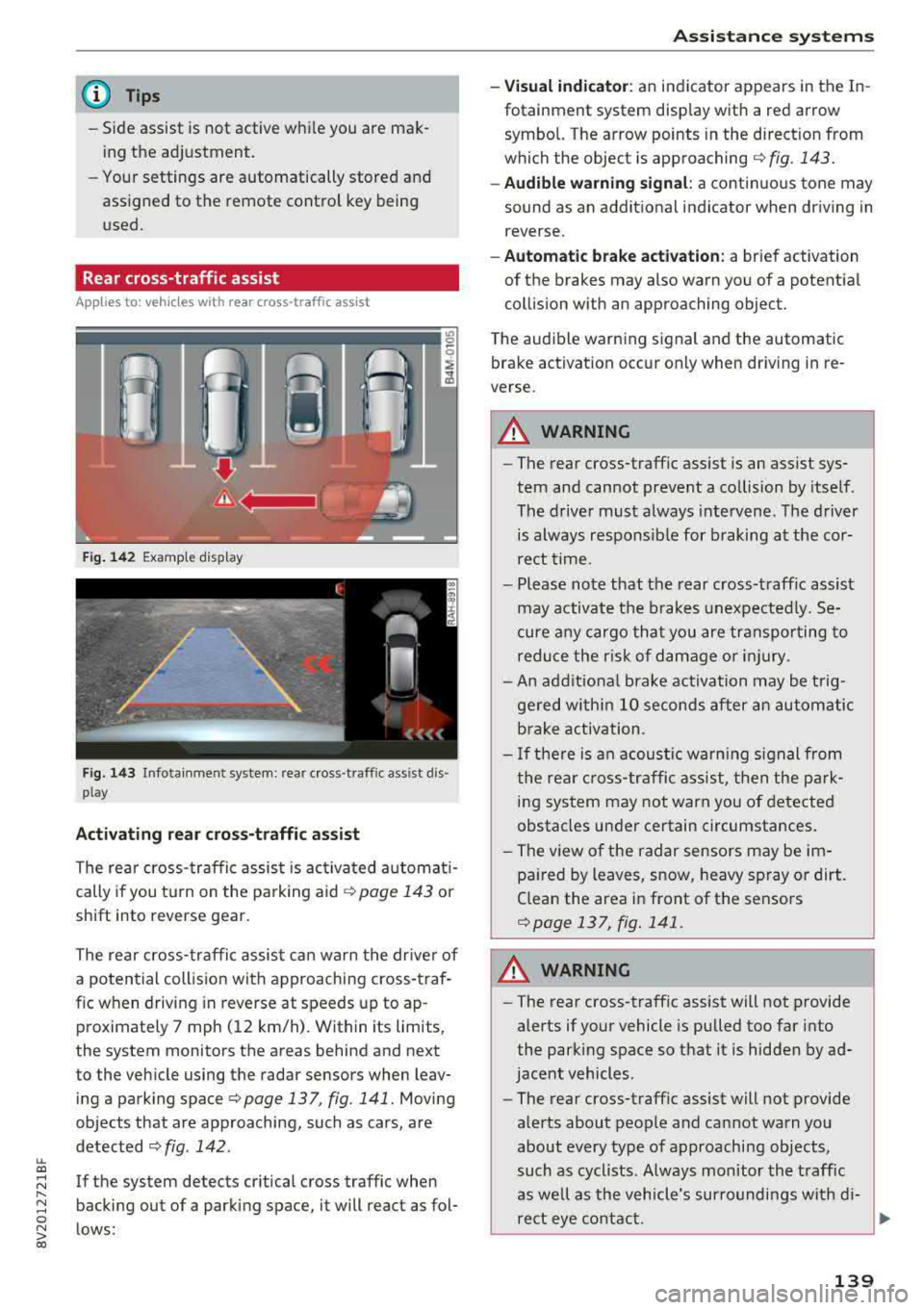
Fig. 14 2 Example display
Fig. 143 Infotainment system: rear cross -traffic ass ist dis
play
Activating rear cros s-traffic assist
The rear cross- traffic assist is ac tivated a utomat i
cally if you t urn on the pa rking aid
¢ page 143 or
shift into reverse gear.
The rea r cross- traffic assist can warn t he drive r of
a potential collis ion with approaching cross-traf
f ic when driving in reverse at speeds up to ap
proximately 7 mph ( 12 km/h). Within its limits,
the system monitors the areas behind and next
to the veh icle using the radar sensors when leav
ing a parking space
c:> page 137, fig . 141. Moving
objects that are approaching, such as cars, are
detected
c:> fig . 142.
If the system detects cr itical cross traffic when
backing out of a parking space, it will react as fol
lows:
A ssi st a nce systems
- Visual indicator : an indicator appears in the In
fotainment system disp lay with a red arrow
symbo l. The arrow points in the d irect ion from
which the object is
approaching ¢ fig. 143.
-Audible warning signal : a continuous tone may
sound as an addit ional indicator when dr iving in
reverse.
- Automat ic brake acti vation : a brief activation
of the brakes may also warn you of a potent ial
collision w ith an approaching object.
The audib le warning signal and the automatic
bra ke activation occur only when driv ing in re
verse.
A WARNING
-- The rear cross-traffic assist is an assist sys
tem and cannot prevent a co llision by itself .
The drive r must always intervene . T he d river
is always respons ible for b raking at the cor
rect t ime.
- Please note that the rear cross-traff ic assist
may activate the b rakes unexpe cted ly. Se
cure a ny cargo th at you are transpor ting to
redu ce t he risk of damage or i njury.
- An add itiona l brake activation may be t rig
ge red w ith in 10 seconds after an automatic
b rake activation.
- I f the re is an acoustic wa rn ing s ignal from
the rea r cross-traffic ass ist, t hen the p ark
ing sys tem may not warn you of detected
obstacles under certain circumstances.
- The v iew o f the radar sensors may be im
pa ired by leaves, s now, heavy sp ray or dirt.
Clean the area i n front of the sensors
c:>page 137, fig. 141 .
A WARNING
-
-The rear cross -traffic assist will not provide
alerts if your vehicle is pulled too far into
the parking space so that it is hidden by ad
jacent vehicles.
- The rear cross-traffic assist will not provide
alerts about people a nd can not warn you
about every type of approaching objects,
such as cyclists. Always monitor the t raff ic
as we ll as the vehicle's sur roundi ngs wit h di-
re ct eye contact .
~
139
Page 142 of 404
Assistance systems
-The rear cross-traffic assist will not provide
alerts if the veh icle is in a paralle l parking
space or an angled parking space.
(LlJ Note
Also read the information in <=:>@ in General
information on page 138 .
(D Tips
-You can cancel the automa tic brake activa
tion with increasing braking force if you ap
ply the brakes yourse lf or accelerate consid
erab ly.
- In some situations, rear cross-traffic assist
may warn you even if there is no cross traffic
i n a critical area, for example when backing
i nto a parking space or maneuver ing.
- The rear cross-traffic assist also switches off when you switch off the ESC.
- The system is not available when towing a
trailer.
Messages
A pp lies to: ve hicles w ith Audi side assis t
If the side assist sw itches off automatically, a
message appears in the instrument cluster dis
play.
@j Aud i side assist: malfunction! Please contact
Service
The system cannot guarantee that it wi ll detect
veh icles correctly and it has switched off. The
sensors have been moved or are faulty. Have the
system checked by an authorized Audi dealer or
author ized Audi Service Facility soon .
(ij Audi side assist: currently unavailable. No
sensor view
(ij Audi side assist: currently unavailable. Sen
sor vision restricted due to surroundings. See
owner 's manual
The radar sensor vis ion is impaired . Do not cover
the area in front of the sensors with bike wheels,
stickers, dirt or other objects. C lean the area in
front of the sensors, if necessary
c> page 13 7,
fig . 141.
140
(ij Audi side assist: currently unavailable
Sid e assist cannot be switched on at this time be
cause there is a malfunction (for ex am ple, the
battery charge level may be too low).
@j Audi side assist: unavailable in towing mode
(ij Audi side assist: unavailable in towing mode
Side assist switches off automatically after a
short time when a factory-insta lled trai ler hitch
i s connected to the electr ica l connector on the
trailer. There is no guarantee the system will
switch off when using a retrofitted trailer hitch .
Do not use side assist when tow ing a tra iler .
[I! Rear parking aid : obstacle detection restrict
ed
The rear cross-traffic assist is not available . Ei
ther t he ESC is switched off, or the radar sensors
may be covered by a bike rack, stickers, leaves,
snow or other objects. Switc h the ESC on, or
clean the area in front of the sensors if necessary
<=:>page 137 , fig . 141. If th is message continues
to be displayed, dr ive immed iate ly to an author
iz ed Audi dealer or authorized Audi Se rvice Facili
ty to have the malfunction repaired.
Audi drive select
Introduction
App lies to : vehicles wi th Audi drive se lec t
Audi drive select makes it poss ible to experience
different types of vehicle settings in one vehicle.
The dr iver can select from three modes,
Comfort ,
Auto
and Dynamic , using the ~.'/:.1 button in the
center console or by using the Infotainment sys
tem. This allo ws you to switch between a sporty
and a comfo rtable driving mode, for example. In
the
Individual* mode, the settings can be adjust
ed to your personal preferences . This makes it
possible to comb ine settings such as a sporty en
gine setting with light steering.
Description
Applies to: vehicles wit h Audi drive se lect
The vehicle setup in each mode depends on the
vehicle 's features. However, the engine and
steering are a lways affected .
Page 145 of 404
LL co .... N
" N .... 0 N > co
Parking aid
General information
Ap plies to: vehicles with pa rk in g system plus/rearview cam
era
Depending on your vehicle's equipment, various
parking aids will help you when parking and ma
neuvering.
The
parking system plus assists you when park
in g by aud ibly and visua lly indicating objects de
tected
in front of and behind the veh icle
¢ page 143.
The rearview camera shows the area beh ind the
veh icle in the Infotainment system d isplay. The
l ines in the rearview camera image help you to
park or
maneuver ¢ page 145.
& WARNING
-Always look for traffic and check the area
around your vehicle by looking at it directly
as well. The parking system cannot replace
the driver's attent ion. The driver is always
responsible when enter ing or leaving a park
ing space and during similar maneuvers.
-Please note that some surfaces, such as
clothing, are not detected by the system.
-Sensors and cameras have blind spots in
which people and objects cannot be detect
ed . Be especially cautious of small children
and animals.
- Always pay attention to the area around the
vehicle -using the rearview mirror, too .
-The sensors can be displaced by impacts or
damage to the radiator gr ille, bumper,
wheel housing and the underbody . The park
ing system may be impa ired as a result.
Have an authorized Audi dealer or author
ized Audi Serv ice Facility check their func
tion.
(D Note
-Some objects are not detected or displayed by the system under certain circumstances:
-objects such as barrier chains, trailer draw
bars, vert ical poles or fences
-objects above the sensors such as wall ex
tensions
Parking aid
-objects with certain s urfaces or structures
such as chain link fences or powder snow
-If you continue driving closer to a low ob
ject, it may disappear from the sensor
range . Note that you will no longer be
warned about th is obstacle.
-Keep enough distance from the curb to re
duce the risk of damage to th e rims.
(I} Tips
-The system may provide a warning even
though there are no obstacles in the cover
age area in some situations, such as:
-certa in road surfaces or when there is tall
grass
- external ultrasonic sources such as from clean ing vehicles
-in heavy rain, snow, or thick vehicle ex
haust
-We recommend that you practice parking in
a traff ic -free location or parking lot to be
come fam iliar with the system . When doing
this , there shou ld be good light and weath
er conditions .
-You can change the volume and pitch of the
signa ls as well as the display ¢
page 147.
-What appears in the infotainment display is
somewhat time-delayed .
-The sensors must be kept clean and free of
snow and ice for the parking aid to operate .
Parking system plus
Description
Applies to : vehicles wit h parking system plus
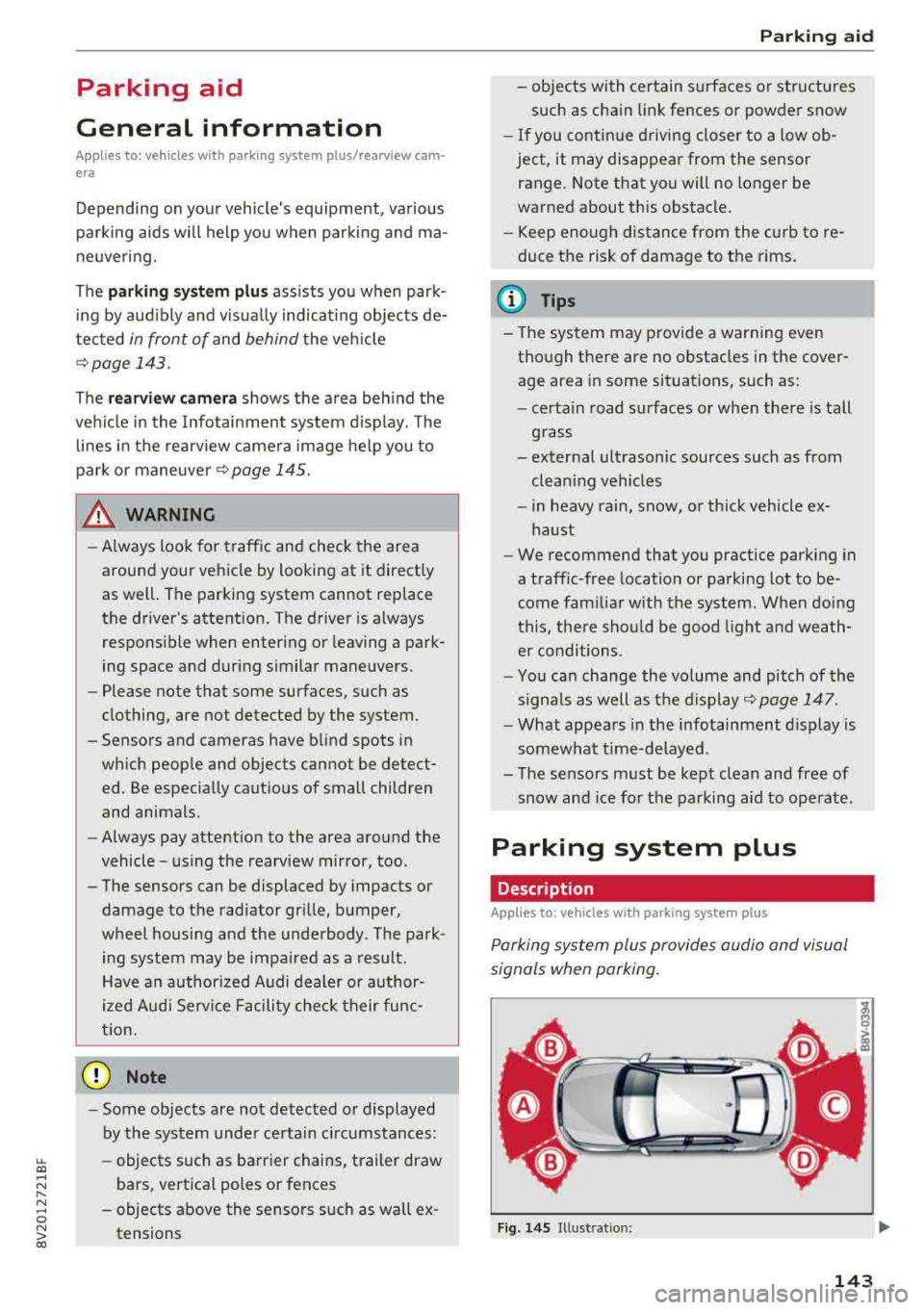
Parking system plus provides audio and visual
s ignals when parking .
Fig. 14S Illust ratio n:
143
Page 148 of 404
Parking aid
-Only use the rearview camera to assist you if
it shows a good, clear picture. For example,
the image may be affected by the sun shin
ing into the lens, d irt on the lens, or if there
is a malfunction .
- Use the rearview camera only if the luggage
compartment lid is completely closed . If the
luggage compartment lid is open the orien
tation lines and blue surfaces are hidden .
Make su re any objects you may have mount
ed on the luggage compa rtment lid do not
block the rearview camera.
- T he came ra lens enlarges and distorts the
field of v is ion. Th e object appears both al
tered and inaccurate on the screen.
- In certai n situations, people or objects in
the d isplay appear closer or farthe r away:
- For objects that do not touch the ground,
such as the bumper of a parked vehicle, a
trailer hitch or the rear of a truck . Do not
use the orientation lines in this case .
- If driven from a level surface onto an in
cline, o r a downward slope.
- If driven toward protrud ing objects.
- If the veh icle is carry ing too much load in
the rear.
- Always read and follow the applicable warn
ings ¢(!) in General information on
page 143 .
-The orange-colored orientation lines in the
Infotainment display show the vehicle path
based on the steering wheel angle . The
front of the vehicle swings out more than
the rear of the veh icle. Mainta in plenty of
distance so that an exterio r mirror or a cor
ner of the vehicle does not co llide w ith any
obstacles.
Switching on/off
Applies to : veh icles with rearview camera
Switching on/off
Requirement: the veh icle speed must be under
approximately 6 mph (10 km/h) .
146
.,. Press the p, .//~ button in the center console. A
short confirmation tone sounds and the LED in the button turns on.
Switching on automatically
The system switches on automatically when re
verse gear is engaged wh ile the engine is run
ning.
Switching off automatically
The system switches off automatically when driv i ng fo rward faster than 6 mph ( 10 km/h).
(0 Tips
- The visua l display* in the right sect ion of the
display should help you de tect the critical
vehicle area.
- You can change the volume of the signa ls
and the
display ¢ page 147.
Perpendicular parking
Applies to: vehicles with rearview camera
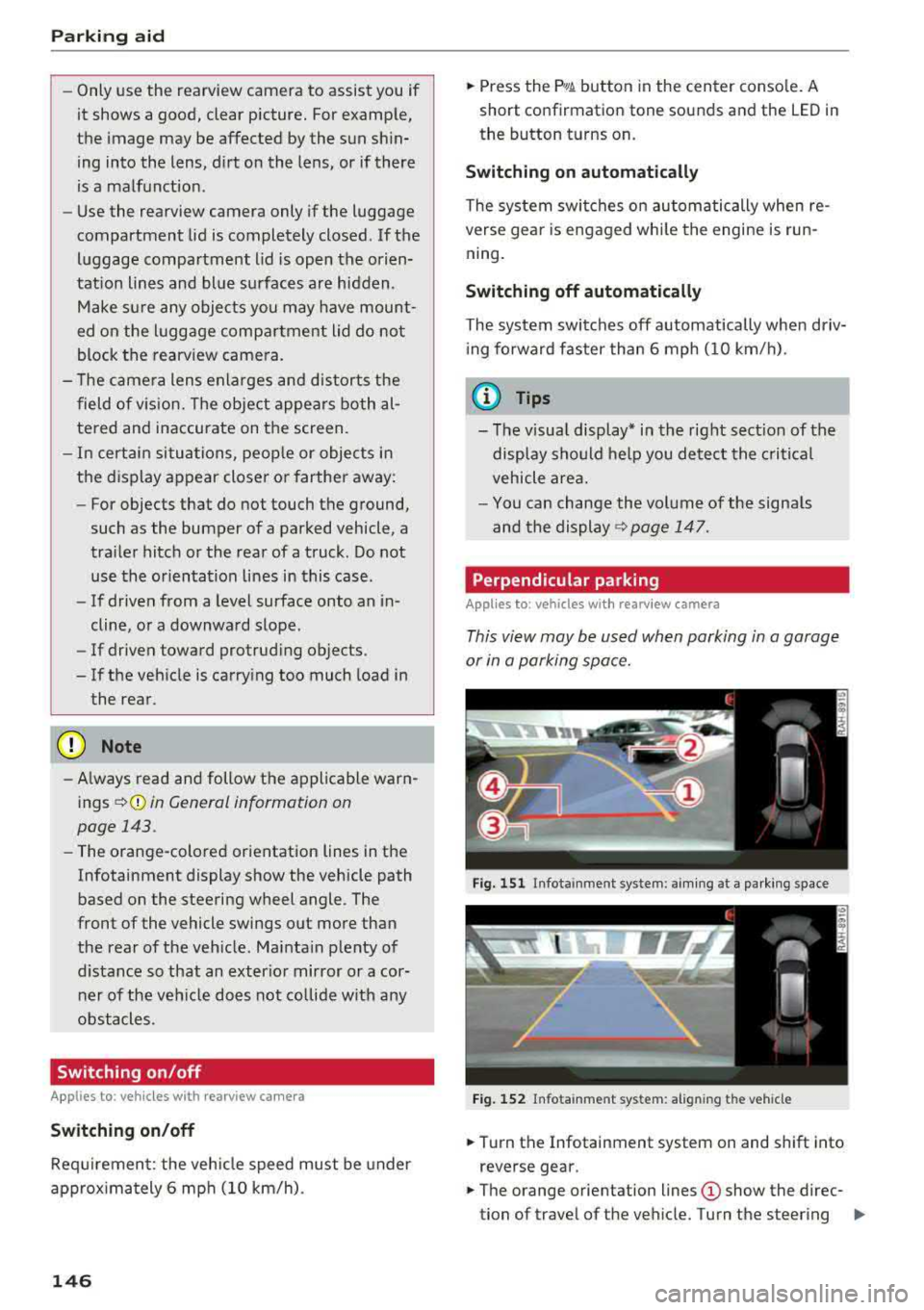
This view may be used when parking in a garage
or in a parking space.
Fig. 151 Infota inment system: aim ing at a parki ng space
Fig. 152 Infota inm ent sys tem: al ign ing the vehicle
.,. Turn the Infotainment system on and shift into
reverse gear.
.,. The orange orientation lines (D show the direc
tion of travel of the vehicle. Turn the steering
..,.