buttons AUDI S6 2010 User Guide
[x] Cancel search | Manufacturer: AUDI, Model Year: 2010, Model line: S6, Model: AUDI S6 2010Pages: 368, PDF Size: 86.82 MB
Page 172 of 368
ffl..__H_ o_m_ e_ L_ i _n_ k_ ® _______________________________________________ _
Applies to veh icles : w ith Homelin k® un iversa l remote control
Programming the Homel ink ® transmitter
The transmitter is programmed in two phases . For rolling
code transmitters, a third phase is also necessary .
illUl~~ . l
~-1 II I Ill
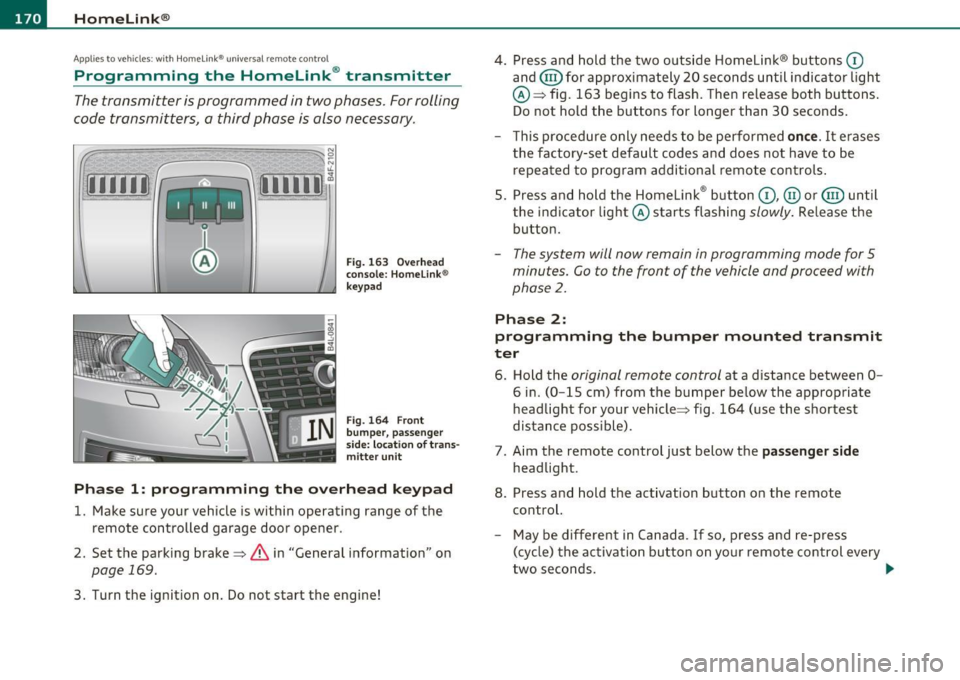
Fig. 163 Over head
conso le: Homelink ®
keypad
Fig. 164 F ront
bumper, passenger
s ide: loc ation of trans
mitter unit
Phase 1: progr amming th e overhead k eypad
1. Make sure your vehicle is within operating range of the
remote controlled garage door opener .
2. Set the parking brake~
& in "General information " on
page 169.
3. Turn the ignition on . Do not start the engine! 4
. Press and hold the two outside Homelink ® buttons
(D
and (@)for approximately 20 seconds until indicator l ight
@ ~ fig. 163 begins to flash . Then release both buttons .
Do not hold the buttons for longer than 30 seconds .
- This procedure only needs to be performed
on ce . It erases
the factory-set default codes and does not have to be repeated to program additional remote controls .
5. Press and hold the Homelink ® button
(D , @ or@ until
the indicator light © starts flashing
slowly . Release the
button .
-The system will now rema in in programming mode for 5
minutes.
Co to the front of the vehicle and proceed with
phase
2 .
Phase 2:
programming the bumper mounted tr ansmit
ter
6 . Hold the original r emote control at a distance between 0-
6 in. (0 -15 cm) from the bumper below the appropriate
headlight for your vehicle~ fig . 164 (use the shortest
distance possible) .
7 . Aim the remote control just below the
pa ss e nger sid e
headlight .
8. Press and hold the activation button on the remote control.
- May be d ifferent in Canada . If so, press and re-press
(cycle) the activation button on your remote control every
two seconds. .-,,
Page 174 of 368
-HomeLin k® •m ___________________ _
-Press th e ap pro priate programmed button G) , @ or@
to activate the desired remote control function ::::>
& in
"Genera l informat io n" on
page 169. •
Applies to ve hicles : w ith Hom eli nk® univer sa l rem ote c ont rol
Reprogramming a single button
A Homelink ® button can be reprogrammed individually
without affecting the other button allocations.
Programming the ov erh ead keypad
- Press the appropriate Homelink ® button until the indi-
cator light begins flashing slowly .
Programming the bumper mounted transmit
ter
1. Hold the original remote control at a distance between 0 -
5 in . (0-13 cm) from the bumper below the appropriate
headlight for your vehicle (use the shortest distance
possible).
2. Aim the remote control just below the
pas senger side
headlight .
3 . Press and hold the ac tivation button on the remote
control.
4 . The emergency flashers will flash
three times (after about
15 -60 seconds) when the programm ing is successful.
N ow release the b utton on the remote control.
- If the device utilizes a rolling code , please follow phase 3
of =>
page 170 , "Programming the Homelink ® trans
mitter" for rolling code programming.
This pr ocedur e will caus e th e ex is ting pr ogramming on th e
Homelink ® button to be era sed !•
Ap plies to veh icles: w ith Ho meli nk® un ive rsa l rem ote c ont rol
Erasing the programming of the
Homelink ® tr ansmitter
When you erase the programming, the programming on
all three of the transmitter channels with be lost!
- Perform steps 1 to 4 as described on::::> page 170, "Phase
1 : programming the overhead keypad".
When completed , the Homel ink ® system will be in the programm ing
mode and is then ready to learn the codes for remote controlled
devices .
[I) Tips
• Programmed buttons cannot be erased individually.
• For security reasons you are advised to erase the programming of
the Homelink ® system before you sell your veh icle .•
Page 234 of 368
-Child Safety P:frt __ .,.___ ____________ _
Description
The lower anchorage positions are marked for quick
locating.
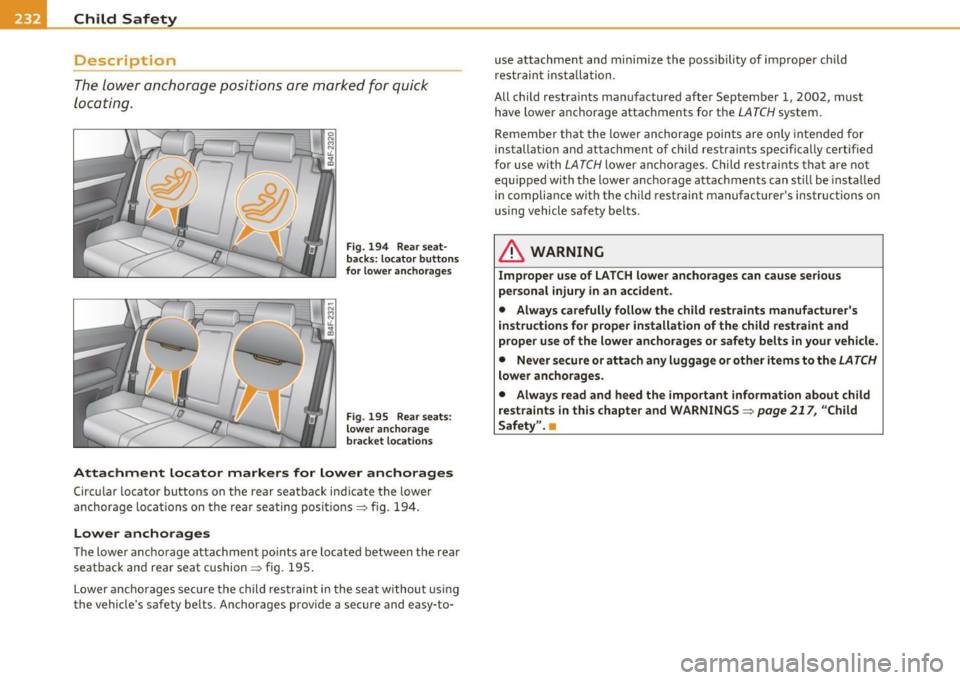
Fig. 194 Rear seat
backs: locator buttons
fo r lower anchorages
Fig . 195 Rear seats:
lower anchorage
bracket locations
Attachment locator markers for lower anchorages
Circu lar locator buttons on the rear seatback indicate the lower
anchorage locations on the rear seating positions:::;, fig. 194 .
Lower anchorages
The lower anchorage attachment points are located between the rear
seatback and rear seat cushion:::;, fig . 195.
Lower anchorages secure the child restraint in the seat without using
the vehicle's safety belts. Anchorages prov ide a secure and easy-to- use attachme
nt and minimize the possibility of improper child
restrain t installat ion.
All ch ild restraints manufactured after September 1, 2002, must
have lower anchorage attachments for the
LATCH system.
Remember that the lower anchorage points are only intended for
installat ion and attachment of ch ild restraints specifically certif ied
for use with
LATCH lower anchorages . Child restraints that are not
equ ipped with the lower anchorage attachments can st ill be installed
in compliance with the ch ild restraint manufact urer's instructions on
using vehicle safety belts .
& WARNING
Improper use of LATCH lower anchorages can cause serious
per sonal injury in an accident.
• Always carefully follow the child restraints manufacturer 's
instructions for proper installation of the child restraint and
proper use of the lower anchorages or safety belts in your vehicle.
• Never secure or attach any luggage or other items to the
LATCH
lower anchorages.
• Always read and heed the important information about child
restraints in this chapter and WARNINGS :::;,
page 217, "Child
Safety". •
Page 267 of 368
____________________________________________ C_l_e _a_ n_ in--= g=-- a_n_ d_ p ,__r_o _t_ e_ c_ t _ io_ n __ _
Your authorized Audi dealer can provide cleaning products that have
bee n tested and approved for your veh icle. •
Care of interior
MMI display
- Clean the MMI display with a soft clean cloth and an LCD
cleaner .
The MMI display can be cleaned with a professionally available "LCD
cleaner". The cloth should be slightly dampened with the cleaning
fluid to clean the d isp lay .
0 Not e
To avoid scratching the MMI display, you should never clean it dry. •
MMI control console
- First clean the MMI control console with a brush to
remove dust from the housing.
- Then wipe the MMI control console with a clean, soft,
slightly damp cloth.
T he MM I control console sho uld be cleaned w ith a brush first so that
no dirt is trapped between the buttons and the housing. We recom
mend g iving the MMI contro l conso le a final w ipe with a cloth mois t
ened w ith water and dish washing detergent.
0 Note
To prevent damage, make sure that no fluid ever gets into the MMI
control console .•
Safety first
Aluminum trim
Use only neut ral-pH products to remove spots and deposits from
al uminum surfaces. Ch rome care prod ucts and al kaline cleaners w ill
attack aluminum surfaces and can damage them over t ime .
& WARNING
Alw ay s re ad and heed all WARNING S and other information
~ page 258 . •
Fabrics and fabric coverings
Fabrics and fabr ic coverings (e .g . seats, door trim panels, etc.) should
be clean ed at regular interva ls with a vacuum cl eaner . T his removes
surfa ce di rt pa rt icl es which co uld become embedded in the fabr ic
through use . Steam cleaners should not be used, because the steam
tends to push the d irt deeper into the f abric and lock it there.
Norm al clean ing
Genera lly, we recommend using a soft sponge or a li nt-free
microfiber cloth to the clean fabric. Brushes should on ly be used for
ca rpets and floor mats , since other fab ric surfaces could be ha rmed
by brushes.
No rma l sur face sta ins can be cleaned us ing a commercially avai lab le
foam cleaner. Spread the foam on the surface of the fabr ic with a soft
sponge and work it in gently . Do not saturate the fabric. Then pat the
foam dry using absorbent , dry cloths (e .g. microfiber cloth) and
vacuum it after it has dried comp letely.
Clean ing stains
Sta ins caused by beverages (e .g. coffee, fruit juice, etc.) can be
treated with a mild detergent solut ion. Apply the detergent solut ion
with a sponge . In the case of stubborn stains, a detergent paste can
be applied directly to the stai n and worked into the fabric . After
wards, use copious amo unts of clean water to remove the remaining .,.
Vehicle care Technical data
Page 353 of 368

Alphabetical index -________________ f!:VII
Anti-Slip Regulation System (ASR)
How the system works ....... .. .. . 242
Anti-theft systems Anti-theft alarm system ....... ... .. 49
Electronic immobilizer ............. 40
Ashtray Front .............. ...... .. .. .. .. 91
Rea r ........ .... .. .. ... ......... 91
ASR How the Anti-Slip Regulation System works . ...... .. ... .. .. ......... 242
Asterisk What does it mean when something is
marked with an asterisk? ........... S
Audi Service Repair Manuals and Literature
344
AUTO mode AC climate controls ...... .... .. .. .. 99
Auto Safety Hotline .... .. .. .. ....... 183
Auto-Check Control .. ........ .... ... .. 24
Automatic belt retractor ............. 189
Automatic car wash
See Washing ....... .. .... .. .. .. . 259
Automatic Shift Lock (ASL) ..... .. 148, 155
Automatic transmission 6-speed automatic transmission ... . 146
Automatic Shift Lock (ASL) .... 148, 155 Driving ............ .. .. .. .. .... . 146
Dynamic shift program ... .. .. .. .. . 149
Emergency release for selector lever . 152
Emergency release for selector lever
(mu ltitron ic®) .............. .... 159
Fail-safe mode .............. 151, 158
Controls and equip
ment Safety first
Ignition key safety lock
.... ... .. .. . 109
Kick -down . ........ .. .. .. ....... 149
Manual shift program .. ... ... ..... 150
multitronic ® ....... ...... .. .. ... 152
Selector lever .... .. .. .. .. .. . 147, 154
Shift buttons . ........... ... 151, 158
Steering wheel with tiptron ic® . 151, 158
Average speed .. ... .... .. .. .. .... .... 34
Avoid damaging the vehicle ........... 250
B
Battery ... ..... .................... 288
Battery location ins.ide the luggage
compartment . ........ ......... 289
Charging ................ .... .. .. 290
Important warnings when wo rk ing on the
battery . .. .. ..... ....... ... .. .. 289
Jump starting ..... ...... ..... .. .. 331
Low ..... .. ... ..... .. ....... .... 247
Replacing the battery .. .. ......... 292
State of charge .... ... ........... 247
Voltage ................. .. .. .. .. . 31
Winter operation ...... .. .. .. ..... 288
Working on the battery .... ... .. .. . 289
Before driving .. ... ... ... .. .. .. .. .. . 175
Blended gasoline ................... 271
Body cavity seal ing . ...... .. ......... 264
Booster seats . .. .. ........ ......... 225
Brake assistant ...... ............... 245
Brake booster . ........ ... ... .. .. ... 244 Brake fluid
Changing the brake fluid ....... .... 287
Checking the brake fluid level ....... 287
Reservoir . .... .. .. .... ...... ... . 287
What is the correct brake fluid level? . 287
What should I do if the brake fluid warning
light comes on? . ................ 287
Brake light Defective ... .. ................... 21
Brake system . .. .. ... ... ... ..... .. .. 287
Anti-lock brake system ............. 17
Brake fluid ........ ............. . 287
Brake fluid spec ificat ions for refil l and
replacement . .... ....... ... ... . 287
Brake pads .. .. .. .. ...... .. .. .. .. 250
Electromechanical parking brake ... . 113
General informat ion ..... ...... .. . 243
How does moisture or road salt affect the
brakes? ... .................. .. 243
Malfunction ...................... 26
Warning/indicator lights ... .. .. .. .. 18
Worn brake pads symbol ........... 31
Break -in period ... .. .. .............. 249
Brake pads . ... ................ .. 250
Tires ... .... .................... 249
Bulbs ............ .... .. .. .. .. .. ... 329
Bumper cover Caution when parking near a parking barri-er or curb . ................... .. 114
C
California Proposition 65 Warning ..... 278
Battery specific .... .............. 290
Vehicle operation Vehicle care Do-it-yourself service Technical data
Page 362 of 368

-Alphabetical inde x __ __,_ ______________________________________________ _
Front seats . . . . . . . . . . . . . . . . . . . . . . 7 5
Head restraints . .. .. .. .. .. ....
81, 179
Lumbar support .. .. ... ....... .... 78
Seat belts
See Safety belts ................. 185
Seat memory . . . . . . . . . . . . . . . . . . . . . . . 79
Seating capacity ... .. .. .......... .. . 185
Seating position
Driver ............. ...... .... .. .
Front passenger .. .. .. .. .... .... .
How to adjust the front seats .. .... .
176
177
177
Incorrect seat position ... ......... 179
Occupants . .... .. .. .. ........ ... 176
Rear passengers
Seats 178
Number of seats ................. 185
Selective unlock feature ............... 44
Selector lever . .. ...................
147
Selector lever multitronic ® .... ... .... 154
Service and disposal
Safety belt pretensioner .. .........
194
Service interva l display ................ 22
Informational and alert stage signals 139
Messages in instrument cluster display . .
144
Operation .................... .. 139
Safety tips ................ ..... . 144
Sensor detection area ...... .. .... . 138
Settings ....... .. .. .... .... ..... 142
Locking the steering . ...... ... .. .. 108
Malfunction ...... ................ 28
Manually adjust ing the steering wheel
106
Steering wheel column
Adjusting electrically ........... ..
107
Adjusting manually ......... ...... 106
Side cu rtain airbags ................. 214 Steering wheel heating .. .. .. .. .. .. .. 104
Description ... ...... · · · · · · · · · · · · 214 Steps for determining correct load limit 302
How they work ...... ...... ..... . 215 Stopp,·n th · 110 g e engine .... .. .. ........ .
Safety instructions .... ...... .....
216 Storage ...... .. ...... ............. . 93
Side marker lights ........... .. .. .. .. 58 (upholder . .. ...... .............. 89
Ski sack . .. .... ............. ...... .. 86
Snow chains ....................... 310
Sockets ....... .................. 92, 93
Sound system display
Driver information display ...... .. .. 20
Sources of informat ion about child restraints
and their use . ........... .. .. .. .
23 7
Spare wheel .................. .... .
317
Speed control system
See Adaptive Cruise Control . .. .. .. .
Speed rating letter code ...... .. .. .. . 119
307
(upholder rear center armrest ....... 90
Glove compartment .......... ... .. 94
Luggage compartment . .. .. .. ...... 86
Sk i sack ....... ... .... .. .. .. .. .. . 86
Storage compartment
Expanding . .. .. .. .. ..............
83
Sun shade . ................. ... .. .. . 65
Sun visors .................. ... .. ... 64
Suspension
See Adaptive Air Suspension ....... 166
Switches
Service pos ition
Windshield wipe rs
68 Speed warning system ......... ..... .. 32 Emergency flashers .. .... .. .. .. ... 61
Servotronic
Power steering . .. .. .. .. .........
245
Shift buttons . .. ............... 151, 158
Side airbags
Description .. .. .................
211
How they work .................. 212
S ide assist
Activating and deactivating .... .. . .
137
Description .. .. .. .. .... ..... ... . 137
Speedometer ....... ....... ...... ... 10
Starting off with a trailer . ... .. .. .. ... 115
Starting the engine .......... .. . 108, 109
What should I do if the engine does not
start? ... .... .. .. ........ .....
109
Steering ................... .. ... .. 106
Easy entry feature . ... ............ 108
Electrically adjusting the steering wheel ..
107
Power sunroof . ........... ... .. .. . 53
Rear window defogger ..... ... .. .. 101
Symbols
Red .. .. ....................... .
25
Yellow .. ........... .... .. ... . .. . 29
Synchronization
Climate controls .. ...............
105
Synchronizing climate control .......... 98