tow AUDI S8 2008 User Guide
[x] Cancel search | Manufacturer: AUDI, Model Year: 2008, Model line: S8, Model: AUDI S8 2008Pages: 404, PDF Size: 52.7 MB
Page 83 of 404
ture on the windshield. The rain sensor wiper intervals depend on
t he sensitivi ty setting as well as vehic le speed . Dur ing brief s tops,
wiper motion wil l adjust in re lation to the amount of rain on the
windshield .
During br ief stops, e.g. at a red light, wiper mot ion wil l auto mati
ca lly be reduced to the next lower speed . Wipers a lready turning at
low speed. change to i nterm ittent w ip ing.
When the ignition is turned on, the washer jets are heated .
With the low beam headlights switched on, p ull the wiper lever
towards you only briefly to clean the windshield. Ho ld ing the w iper
lever wou ld a lso engage the headlight washer system each time you
clean the w inds hie ld and wou ld dra in t he washer flu id reservoir
pr ematurely .
& WARNING
• Wiper bl ade s are cruc ial for safe driving! Only when they are in
good condition are they able to clear the window s properly to
provide uncompromising visibilit y. Worn or damaged wiper blades
are a safety hazard
::::> page 82 , "In stalling new wiper blade s"!
• The rain sensor is only designed to a ssist and support the
driver . It r em ains entirely th e driver' s respon sibility to monitor
outside weather condit ions and to manually activate the wipers as
s oon a s rain or drizzle reduces visibility through the windshield.
• The windshield mu st not be treated with water-repellent mate
rials . They c an in crea se gl are under poor visibility condition s such
as wetness , darkness , or when the sun is low on the horizon. In
addition , they can cau se the wind shield wipers to chatter.
0 Note
In free zing or near freezing conditions:
• Always check that the wiper b lades are not frozen to the glass
be fore you turn the w ipe rs on. Loosen a wiper b lade w hich is frozen
Controls and equip ment
Clea r vision
in place before operating the wipers to prevent damage to the wiper
bl ade or the wiper motor.
• Do not use the wipers to clear a frosted window. Using the
wipers as a conve nien t ice scraper will des troy the wiper blades .
• Before you take your vehic le to an automatic car wash, make sure
you have the w inds hield w iper system switched o ff (lever in p osition
O), otherwise the windshield wiper system could get damaged in the
car was h if it should suddenly come o n.
[ i ] Tips
• Make sure the washer flu id reservo ir in the engine compartmen t
is topped off before going on a long trip . Look
up:::> page 323 for
check ing and f illing the washer conta iner.
• I f you sw itch off the ignition with the windshield wiper lever st ill
in the inte rval wi pe pos ition and t hen com e back a wh ile la ter a nd
drive off, the rain sensor wil l reactivate itself after the vehicle speed
has e xceeded 4 mph (6 km/h) .
• Worn or dirty windshie ld wiper b lades cause smearing which
ca n affect t he opera tion of the ra in senso r. Check the condi tion of
your windshield wiper b lades regu lar ly . •
Headlight washer system
The he adlight washer sy stem cle ans the he adlig h ts.
-Oper ate the win dshiel d w ip er/was her sy stem G) wit h th e
hea dlights t urned o n by ho ld ing th e l ever fo r lo nge r than
on e seco nd ::::.,
page 80, fig. 76.
The washe r jets extend f orward out of the fron t bumper dr iven by
water pressure to spray the front head lights with water .
You should inspect the head lights regu lar ly (for examp le when refu -
e ling) a nd c lean o ff any sol id dirt or i nsects from the lenses.
~
Page 94 of 404
Seats a nd sto ra g e
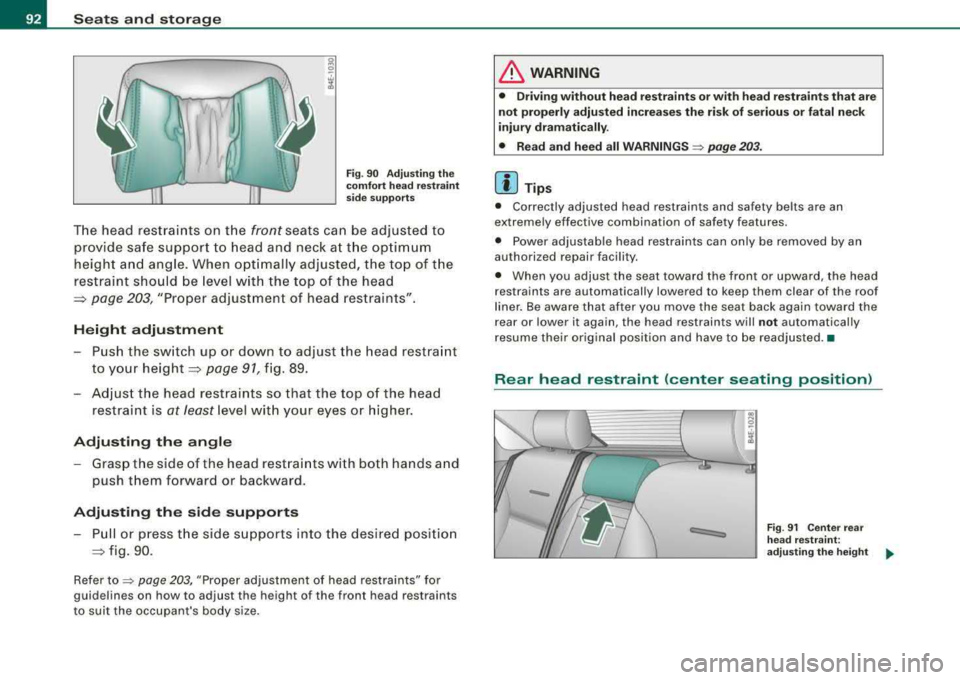
Fig . 90 A djust ing t he
co mfort h ead re str ain t
s id e su pports
The head restrai nts on the front seats ca n be adjusted to
provide safe support to head and neck a t th e op timum
height and angle. When opt imally adjusted, the top of t he
restraint shou ld be level w ith the top of the head
~ page 203, "Proper adjustment of head restraints" .
Height adju stm ent
-Pus h the sw itch up or down to adjust the head restra int
to your
height ~ page 91, fig. 89 .
-Adjust the head restraints so that the top of the head
restraint is
at least level with your eyes or higher.
Adjust ing the angl e
-Grasp the side of the head restra ints with both hands a nd
push them forward or backward.
Adjusting the side supports
-Pull or press t he side supports into the desired positio n
~ fig. 90.
Refer to => page 203, "Proper adjustment of head restraints" for
guidelines on how to ad just the height of the front head restraints
t o suit the occupant's body s ize .
& WARNING
• Drivin g w ithout he ad r estraint s or with head re straint s th at are
not properly adju ste d incr eases the ri sk of serio us or f atal ne ck
i nj ury dram atically .
• Read and heed all WARNING S
:::> page 203.
[ i] Tips
• Correctly adjusted head restraints and safety belts are an
extremely effective combination of safety features .
• Power adjustable head restraints can only be removed by an
authorized repair faci lity.
• When you adjust the seat toward the front or upward, the head
restraints are automatically lowered to keep them clear of the roof
l iner. Be aware that after you move the seat back again toward the
rear or lower it again, the head restraints will
not automatical ly
resume their orig inal position and have to be readjusted. •
Rear head restraint (center seating position)
Fig . 9 1 Cente r rear
hea d re str aint:
a dju st ing t he h eight
Page 102 of 404
___ S_ e
_ a_t_s _ a_n_ d
__ s _t _o _r _a ...::g:::.... e ________________________________________________ _
Applies to ve hicles : wi th indi vid ual r ear se ats
Settings in the MMI
The easy entry function can be turned on and off in the
MM/ .
) ' '' ' ' I
Seat adjustment
'
• Drive r·s seat ...
I I
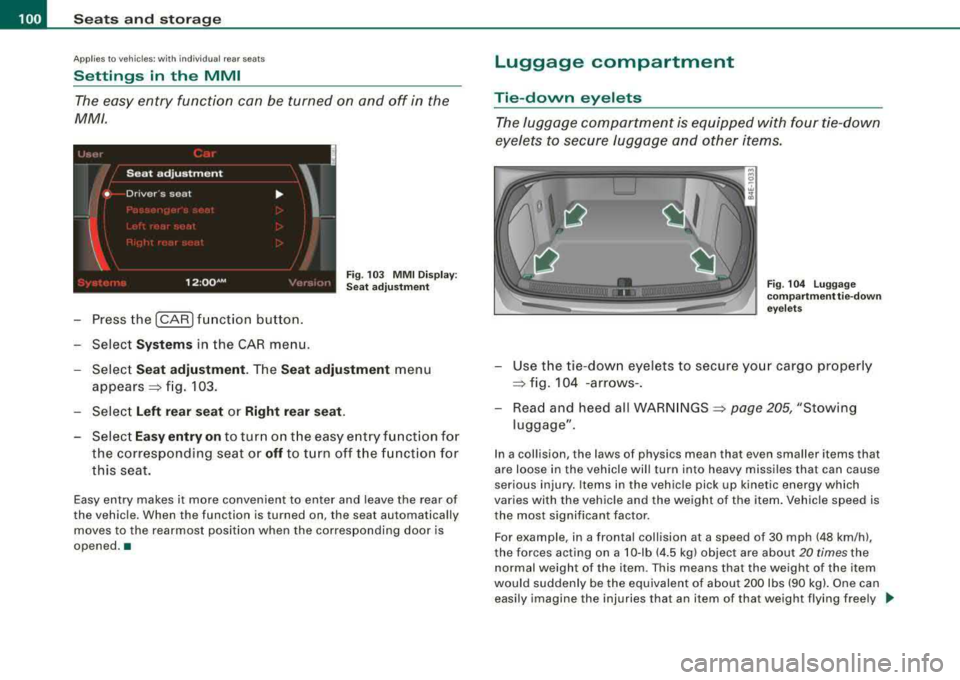
12 :QQ AM F ig . 103 MMI Display:
Sea t ad justment
-Press the I CAR I fun ction button .
-Select Systems in the CAR menu.
Select
Seat adjustment . Th e Seat adju stment menu
appears =:> fig. 103.
Select
Left rear seat or Right r ear seat .
-Select Eas y entry on to turn on t he easy e ntry function for
the corresponding seat or
off to turn off t he f unction for
this seat.
Easy entry makes it more convenient to enter and leave the rear of
the vehicle. When th e function is turned on, the seat automatically
moves to the rearmost position when the corresponding door is
opened. •
Luggage compartment
Tie-down eyelets
The luggage c ompartment is equipped with four tie -down
eyelets to secure luggage and other items.
F ig . 104 Lu ggage
co mp artm ent tie- dow n
eye le ts
-Use the tie-dow n eyelets to secure yo ur cargo properly
=:> fig . 104 -arrows- .
-Read and heed all WARNINGS =:> page 205, "Stowing
luggage" .
In a collision , the laws of physics mean that even smaller items that
are loose in the vehicle will turn into heavy missiles that can cause
serious injury. Items in the vehicle pick up kinetic energy which
varies with the vehic le and the weight of the item . Vehicle speed is
the most significant factor.
For example , in a frontal collision at a speed of 30 mph (48 km /h) ,
the forces acting on a 10-lb (4 .5 kg) object are about
20 times the
normal weight of the i tem . This means that the weight of the item
would suddenly be the equivalent of about 200 lbs (90 kg). One can
easily imagine the injuries that an i tem of tha t weight flying free ly _,,,
Page 104 of 404
___ S_ e_ a_t _s _a_ n_d _ s_t _o _r_ a...; g::::.... e ______________________________________________ _
The mounting hooks are spring-loaded and will return to their
normal position when not in use.
& WARNING
For strength-related reasons, the mounting hooks can only be
used to secure objects weighing up to 10 lb .
15 kgl. Heavier objects
will not be adequately secured -there is a risk of injury. •
Applies to ve hicles : w ith ski sack
Ski sack
Use the ski sack to transport and protect skis and other
long, light items in the passenger compartment.
0 •------0
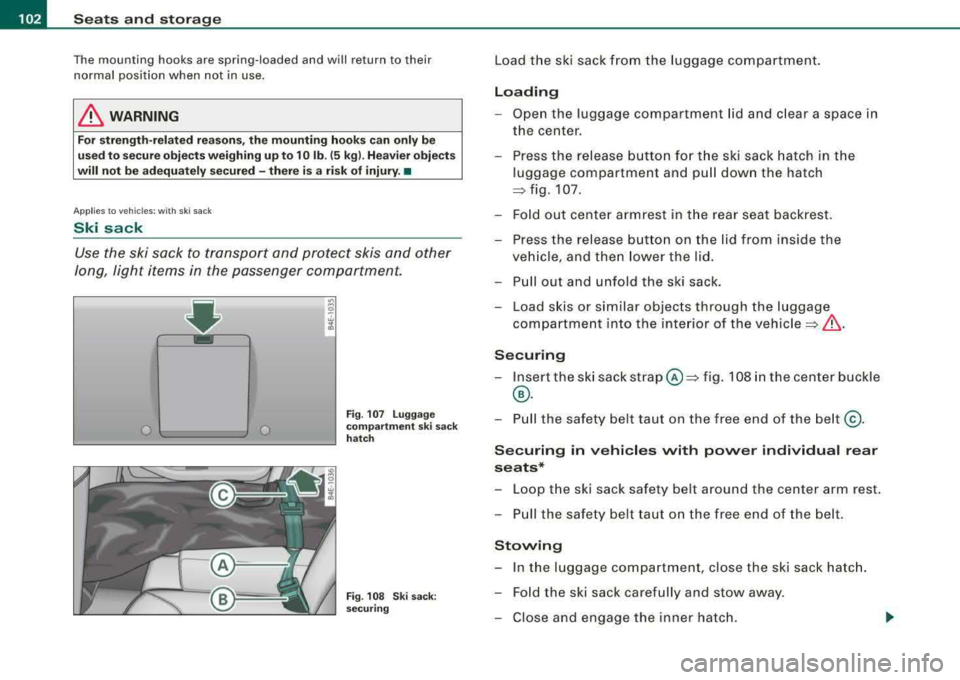
Fig . 107 Luggage
compartment ski sack
hatch
Fig . 108 Ski sack:
securing
Load the ski sack from the luggage compartment.
Loading
- Open the luggage compartment lid and clear a space in
the center.
- Press the release button for the ski sack hatch in the
luggage compartment and pull down the hatch
~ fig. 107.
- Fold out center armrest in the rear seat backrest.
- Press the release button on the lid from inside the vehicle, and then lower the lid.
- Pull out and unfold the ski sack.
- Load skis or similar objects through the luggage
compartment into the interior of the
vehicle=}& .
Securing
-Insert the ski sack strap@=} fig. 108 in the center buckle
®·
- Pull the safety belt taut on the free end of the belt@.
Securing in vehicles with power individual rear
seats*
Loop the ski sack safety belt around the center arm rest.
- Pull the safety belt taut on the free end of the belt.
Stowing
-In the luggage compartment, close the ski sack hatch.
- Fold the ski sack carefully and stow away.
- Close and engage the inner hatch.
Page 105 of 404
________________________________________________ S_ e_ a_t _
s _a_ n_d _ s_t _o _ r_ a_ g~ e __ _
& WARNING
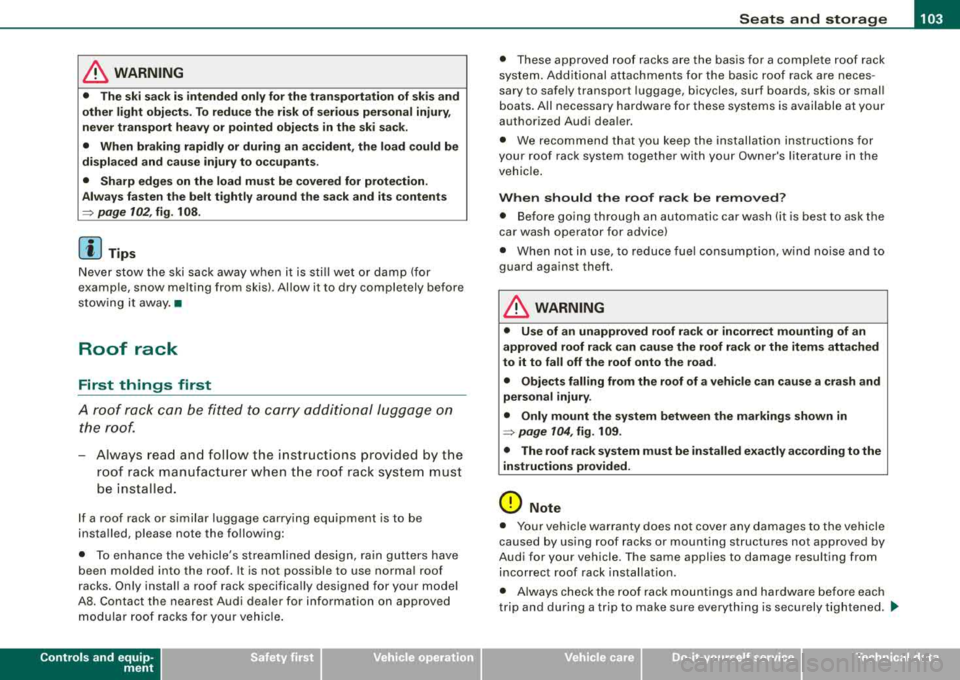
• The ski sack is intended only for the transportation of skis and
other light objects. To reduce the risk of serious personal injury,
never transport heavy or pointed objects in the ski sack.
• When braking rapidly or during an accident, the load could be
displaced and cause injury to occupants.
• Sharp edges on the load must be covered for protection.
Always fasten the belt tightly around the sack and its contents
=:> page 102, fig. 108.
[ i] Tips
Never stow the ski sack away when it is still wet or damp (for
example, snow melting from skis). Allow i t to dry completely before
stowing it away. •
Roof rack
First things first
A roof rack can be fitted to carry additional luggage on
the roof.
- Always read and follow the instructions provided by the
roof rack manufacturer when the roof rack system must
be installed.
If a roof rack or similar luggage carrying equipment is to be
installed, please note the following:
• To enhance the vehicle's streamlined design, rain gutters have
been molded into the roof. It is not possible to use normal roof
racks. Only install a roof rack specifically designed for your model
A8. Contact the nearest Audi dealer for information on approved modular roof racks for your vehicle.
Controls and equip
ment
• These approved roof racks are the basis for a complete roof rack
system. Additional attachments for the basic roof rack are neces
sary to safely transport luggage, bicycles, surf boards, skis or small
boats. All necessary hardware for these systems is available at your
authorized Audi dealer.
• We recommend that you keep the installation instructions for
your roof rack system together with your Owner's l iterature in the
vehicle.
When should the roof rack be removed?
• Before going through an automatic car wash (it is best to ask the
car wash operator for advice)
• When not in use, to reduce fuel consumption, wind noise and to
guard against theft.
& WARNING
• Use of an unapproved roof rack or incorrect mounting of an
approved roof rack can cause the roof rack or the items attached
to it to fall off the roof onto the road.
• Objects falling from the roof of a vehicle can cause a crash and
personal injury.
• Only mount the system between the markings shown in
~ page 104, fig. 109.
• The roof rack system must be installed exactly according to the
instructions provided.
(D Note
• Your vehicle warranty does not cover any damages to the vehicle
caused by using roof racks or mounting struc tures not approved by
Audi for your vehicle. The same applies to damage resulting from
incorrect roof rack installation.
• Always check the roof rack mountings and hardware before each
trip and during a trip to make sure everything is securely tightened.
~
Page 113 of 404
Seats and storage -______________ ___,;.____.
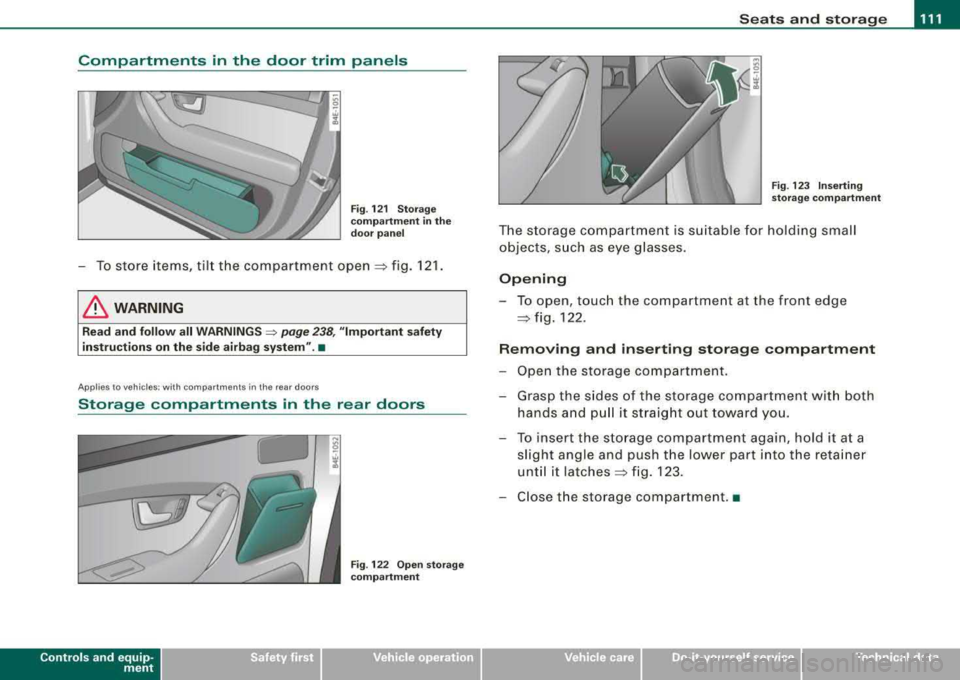
Compartments in the door trim panels
Fig. 121 Storage
compartment in the
door panel
-To store items, tilt the compartment open => fig. 121.
& WARNING
Read and follow all WARNINGS => page 238, "Important safety
instructions on the side airbag system" .•
Appl ies to vehicles: with compartments in the rea r doors
Storage compartments in the rear doors
Contro ls a nd eq uip
ment
Fig . 122 Open storage
compartment Fig. 123 Inserting
storage compartment
The storage compartment is suitable for holding small
objects, such as eye glasses.
Opening
-To open, touch the compartment at the front edge
=> fig. 122.
Removing and inserting storage compartment
-Open the storage compartment.
-Grasp the sides of the storage compartment with both
hands and pull it straight out toward you.
-To insert the storage compartment again, hold it at a
slight angle and push the lower part into the retainer
until it
latches => fig. 123.
-Close the storage compartment. •
Vehicle care I I irechnical data
Page 132 of 404
___ O_ n_ t_h _e_ r_o _ a_ d ____________________________________________________ _
[ i J Tips
• If you release the ignition key in positions G) ,@ or G) , the key
automatically returns to pos ition @.
• If you open the driver 's door when the ignition is switched on , a
buzzer sounds and the message
Ignition is on appears in the instru
ment cluster display. Please switch the ignition off .•
Ignition key safety lock
The igni tio n key can only be re move d when the selector
lever is in the
"P" (P ark) posi tion.
After turning off the ignition , the igni tion key can only be removed
from the ignition lock when the selec tor lever is in the
"P" (Park)
position . Af ter you have removed the key , the selector lever is locked
and cannot be moved .•
Starting and stopping the engine
Starting the engine
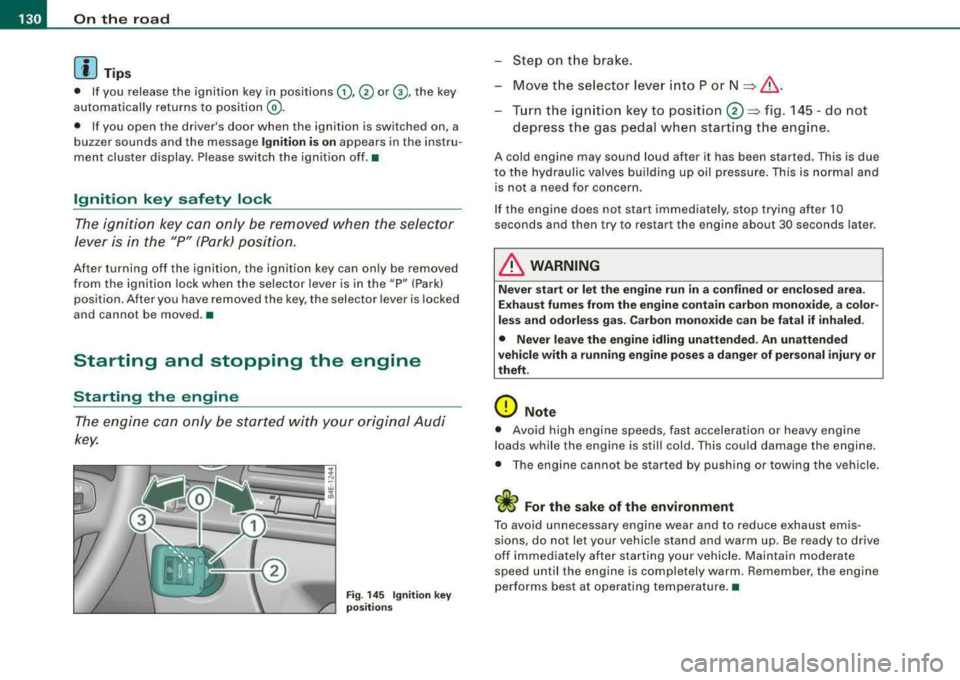
The engine ca n only be st arted with y our or iginal A udi
key.
Fig . 14 5 Ignit ion key
po sitions
-St ep o n the brake.
- Move t he selector lever into P or
N => &, .
-Turn the ign ition key to position 0 => fig . 14 5 -do not
depress the gas pedal when start ing t he engine .
A cold engine may sound loud after it has be en started. This is due
to the hydrau lic valves building up oil pressure. This is normal and
is not a n eed fo r concern .
I f the engine does not start immediately, stop trying after 10
seconds and then try to restart the engine about 30 seconds later .
& WARNING
Never start or let the engine run in a confined or en clo sed are a.
Exhaust fumes from the engine contain carbon monoxide, a color
less and odorle ss gas . Carbon mono xide can be fatal if inhaled.
• Never leave the engine idling unattended. An unattended
vehicle with a running engine po ses a dange r of person al injury or
theft.
0 Note
• Avo id high e ngine speeds, fast accelerati on or heavy eng ine
loads while the engine is still cold. This could damage the engine.
• The eng ine ca nnot be s tarted by push ing or towi ng the ve hicle.
sions, do not let your vehic le stand and warm up. Be ready to drive
off im mediately afte r starting your vehicle . Maintain modera te
speed until the engine is completely warm . Remember , the engine
performs best at operating temperature. •
Page 137 of 404
On the road -----------------
Parking
To prevent a parked vehicle from rolling away, there are a
few things you should do.
When you park your vehicle, do the following
- Stop the vehicle using the brake pedal.
- Pull the switch to apply the electromechanical parking
brake.
- Move the selector lever into the
P position => &.
- Switch off the engine and remove the ignition key from
the ignition lock.
When you park your vehicle on hills, do the
following
- Stop the vehicle using the brake pedal.
- Pull the switch to apply the electromechanical parking
brake.
- If you are parking headed
downhill, turn the front wheels
toward the curb.
- If you are parking headed
uphill, turn the front wheels
awayfrom the curb.
- Move the selector lever into the
P position.
- Switch off the engine and remove the ignition key from
the ignition lock.
& WARNING
This is how you can reduce the risk of injury when leaving your
vehicle.
Controls and equip ment
&, WARNING (continued)
• Never park the vehicle where it can come in contact with dry
grass, spilled fuel or any other flammable materials.
• When parking on hills, always turn the wheels so that the front
wheels will first roll into the curb, if the vehicle should start to roll.
• Never allow anyone -especially small children -to remain
in the
vehicle when it is locked. Locked doors make it more difficult for
rescuers to access the passenger compartment in the event of an
emergency. Danger to life!
• Never leave children unsupervised in the vehicle. Children
could release the parking brake or move the gearshift lever out of
gear. The vehicle could start to roll away and cause an accident.
• No matter what the season is, the temperature in a parked
vehicle can reach dangerous levels.
0 Note
• Please exercise care when you park your vehicle in parking areas
with parking barriers or curbs . Parking barriers and curbs vary in
height and could damage your bumper and related components as
the front of your vehicle moves over a barrier or curb that is too high, as you park or as you back out of a parking spot. In order to be
sure that no such damage can occur, you may wish to stop short of
having the front tires of your car touch the parking barrier or curb.
• Please also exercise exceptional care when you drive up or down
steep ramps or drive over curbs or other obstacles, for which the
vehicle is not designed , because components of the vehicle close to
the ground, such as bumper covers, spoilers and suspension and
exhaust system components, may become damaged. •
Page 140 of 404
___ o_ n_ t_
h _e _ ro_ a_d __________________________________________________ _
&, WARNING (continued)
• Please note that inadvertently "resting" your foot on the accel
erator pedal causes the cruise control not to brake . This is because
the cruise control is overridden by the driver's acceleration.
[ i] Tips
The brake lights illumin ate as soon as the brakes decelerate
automatically. •
Changing speed
-Press lever@in the 0 or Q direction=> page 137,
fig. 149 to increase or decrease your speed.
-Release the lever to save that speed.
Change speed in increments of 1 mph (1 km/h) by lightly pressing
the lever . If you keep the lever pressed down, you will alter your
speed in 5 mph (10 km/h) increments.
You can also press the accelerator pedal down to increase your
speed, e.g. if you want to pass someone. The speed you saved
earlier will resume as soon as you release the accelerator pedal.
If, however, you exceed your saved speed by 5 mph (10 km/h) for
longer than 5 minutes, the cruise control will turn off temporarily.
The green symbol in the
display=> page 137, fig . 150 is replaced
with a white symbol. The saved speed remains the same. •
Presetting your speed
You can preset your desired speed while the vehicle is not
moving.
-Turn on the ignition .
-Pull lever@ into position G) => page 137, fig. 149 .
-Press the lever in the 0 or Q direction to increase or
decrease your speed.
-Release the lever to save that speed.
This function makes it possible, for example, to save the speed you
want before driving on the highway. Once on the highway, activate
the cruise contro l by pulling the lever toward
G). •
Switching the system off
Temporary deactivation
-Press the brake pedal, or
-Press the lever @into position ® (not clicked into place)
=> page 137, fig. 149, or
-Drive for longer than 5 minutes at more than 5 mph
(10 km/h) above the stored speed.
Switching off completely
-Press lever@ into position ® (clicked into place), or
-Switch the ignition off.
The system retains the saved speed if you deactivate the cruise
control temporarily . To resume the saved speed , release the brake
pedal and pull the lever to position
G) .
Switching the ignition off erases the saved speed.
& WARNING
You should only return to the saved speed if it is not too fast for
the current traffic conditions -risk of an accident!
•
Page 142 of 404

___ A_ d_a_ p_ ti_v _ e_ C_ ru_ is_ e_ C_ o_n_ t_ r_ o _ l ___________________________________________ _
&, WARNING (continued )
appl ied b y the s ystem when it det ects a situation when the brakes
mu st be applied.
• Alway s remember th at Ad aptive Cru ise Control has limits - it
doe s not rea ct when you dri ve toward s an ob stac le or something
e lse on or near the road th at is not mov ing , such as ve hic le s
s topped in a traffic jam , a sta lled or di sabled vehicle.
• Alway s remember th at the Ad aptive Cru ise Control cannot
detect a vehicle that i s driving to wards you in your tr affi c la ne and
that it cannot det ect narrow veh icles su ch a s motor cycles and
bicycle s.
[ i] Tips
• For sa fety reasons, the stored speed is deleted when the ign it ion
is turned off .
• When Adaptive Cru ise Control is switched on, the Electronic
Stabilization Program (ESP) is also automatically activated.
• Damage caused by accidents (e.g . if the vehic le is damaged
when parking) can affect the radar sensor settings. This can cause
the system to malfunct ion or switch off completely.
• In winter conditions, you should check the radar sensor cover
before driving to make sure it is free of ice and snow. If necessary ,
clean the area near the radar sensor
carefully => page 139, fig. 151.
• To ensure that the radar sensor is not blocked, foreign objects
(e.g. stickers, larger license plate mounts, add -on parts) must not
cover the area near the radar
sensor=> page 139, fig . 151. The area
near the radar sensor must not be painted, either .•
Ap plies to vehicles: with Ad aptive Crui se Co nt rol
How does Adaptive Cruise Control work?
Vehicles traveling ahead are detected with the aid of the
radar sensor.
Fi g. 152 Ra dar sens or
me asuremen t range
A forward -look ing radar sens or in the fro nt b umper monitors the
traffic situation ahead . Vehicles moving in your direction can be
de tec ted up to a distance of a bout 140 yards ( 130 meters) but the
Adaptive Cruise Contro l cannot detect vehicles that are stopped or
stal led, obstac les that do not move or narrow vehic les like motorcy
cles and
bicycles.=> fig. 152 .
Open road
When the road is clear, Adaptive Cruise Contro l works like cruise
co ntrol. The stored speed requested is main tained .
Driving in tr affi c
If you start to catch up with a vehic le in front of you, Adap tive Cruise
Control automatically slows your vehic le to a speed that will he lp
you stay a safe distance back .
If the vehicle in front acce lerates, Adaptive Cruise Control a lso accel -
erates up to the speed that you have set . .,_