seats AUDI S8 2008 Owner's Manual
[x] Cancel search | Manufacturer: AUDI, Model Year: 2008, Model line: S8, Model: AUDI S8 2008Pages: 404, PDF Size: 52.7 MB
Page 114 of 404
-
Seats and storage
----=---------------
Coat hooks
Fig. 124 Coat hook
above left rear seat
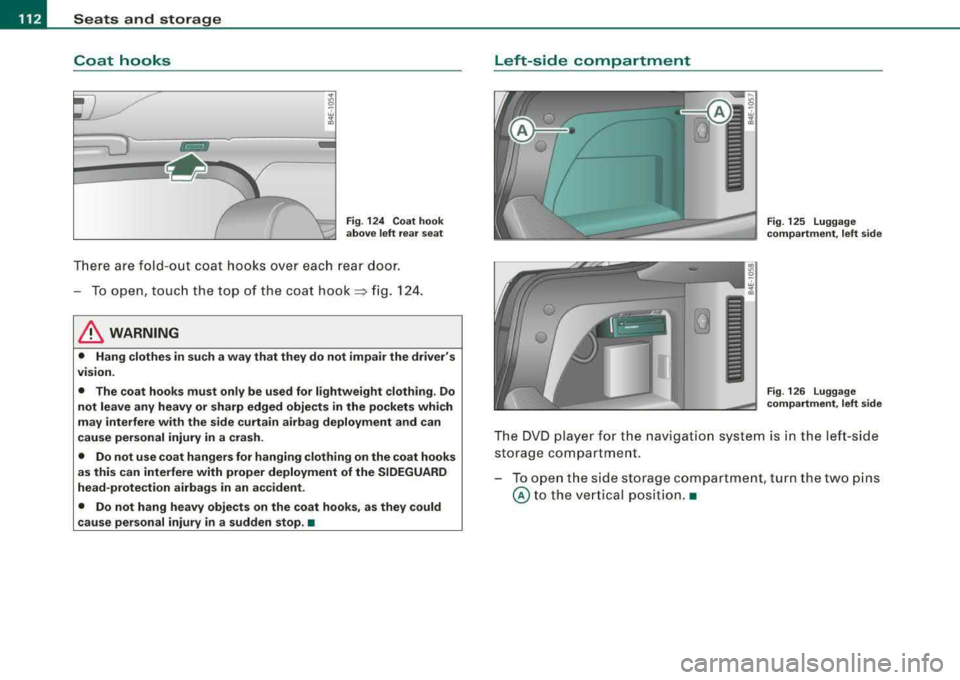
There are fold -out coat hooks over each rear door.
-To open, touch the top of the coat hook=> fig. 124.
& WARNING
• Hang clothes in such a way that they do not impair the driver's
v1s1on.
• The coat hooks must only be used for lightweight clothing. Do
not leave any heavy or sharp edged objects in the pockets which
may interfere with the side curtain airbag deployment and can
cause personal injury in a crash.
• Do not use coat hangers for hanging clothing on the coat hooks
as this can interfere with proper deployment of the SIDEGUARD
head-protection airbags in an accident.
• Do not hang heavy objects on the coat hooks, as they could
cause personal injury
in a sudden stop. •
Left-sid e compartment
Fig. 125 Luggage
compartment, left side
Fig . 126 Luggage
compartment, left side
The DVD player for the nav igation system is in the left-side
storage compartment .
- To open the side storage compartment, turn the two pins
© to the vertical position.•
Page 115 of 404
Seats and storage -______________ ___,;.____.
Right-side c omp artm ent
Fig . 127 Right-side
storage compartment
Fig . 128 Right-side
storage compartment:
Battery
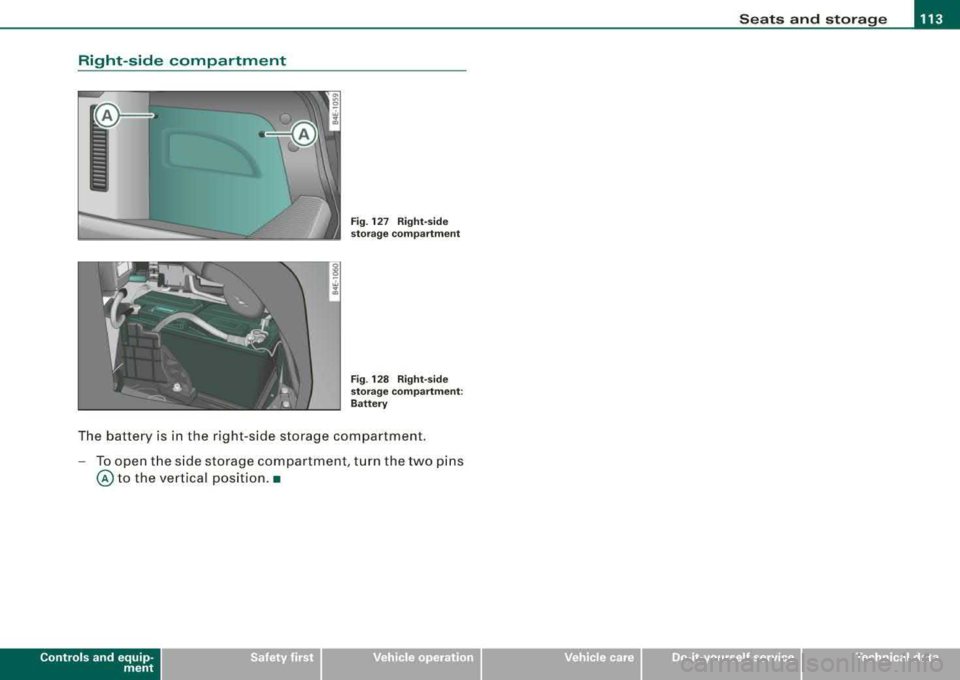
The battery is in the right -side storage compartment.
- To open the side storage compartment , turn the two pins
@ to the vertical positio n.•
Contro ls a nd eq uip
ment Vehicle care I I irechnical data
Page 118 of 404
___ w_ a_ rm __ a_ n_ d_ c_ o_ ld __________________________________________________ _
Controls
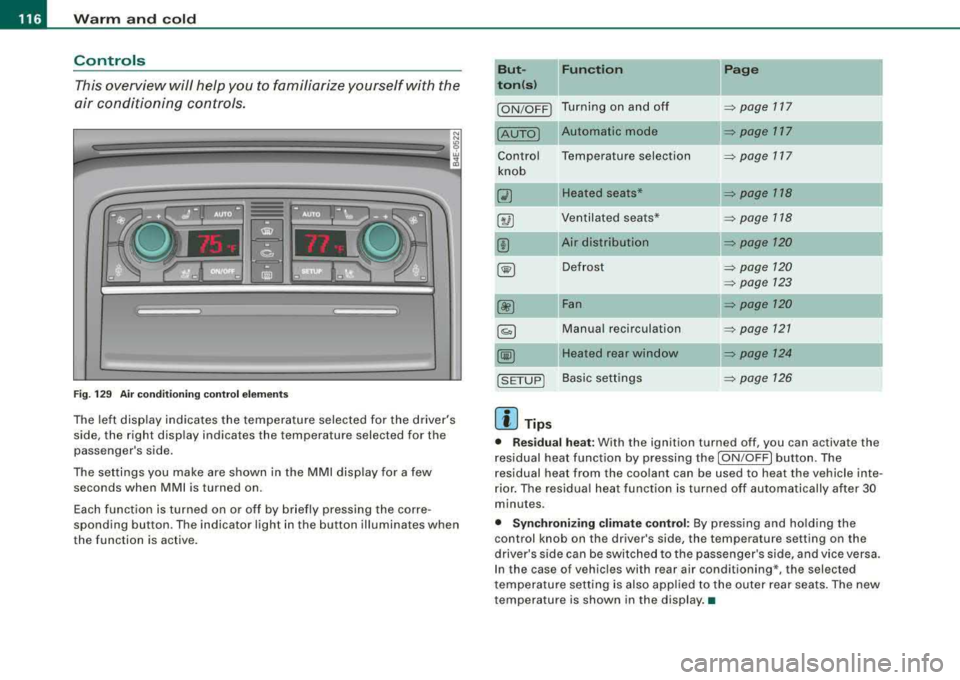
This overview will help you to familiarize yourself with the
air conditioning controls.
Fi g. 1 29 Air cond it io ning co ntrol e lements
The left display indicates the temperature selected for the driver's
side, the right display indicates the temperature selected for the
passenger 's side.
The settings you make are shown in the MMI disp lay for a few
seconds when
MMI is turned on.
Each function is turned on or off by briefly pressing the corre
sponding button . The indicator light in the button illuminates when
the function is active. But- Fun
ction
II Page
ton (s )
ION/OFF) Turning on and off ~ page 117
Automatic mode ~ page 117
Contro l Temperature selection ~ page 717
knob
Q) Heated seats* ~ page 118
8 @ Ventilated sea ts* => page 118
00 Air distribution => page 120
~ Defrost ~ page 120
=> page 723
00 Fan => page 120
~ Manual recirculation ~ page 721
@@ Heated rear window ~ page 124
!SETUP) Basic settings => page 126
[ i ] Tip s
• Residual h eat : With the ignition turned off, you can activate the
residual heat function by pressing the
I ON/OFF ) button. The
residual heat from the coo lant can be used to heat the vehicle inte
rior. The residua l heat function is turned off automatically after 30
minutes.
• Synchroniz ing clim ate control: By press ing and ho lding the
control knob on the driver's side, the temperature setting on the
driver's side can be switched to the passenger's side , and vice versa.
In the case of vehicles with rear air conditioning*, the selected
t emperature setting is also app lied to the o uter rear seats. The new
temperature is shown in the display. •
Page 120 of 404
___ w_ a_ rm __ a_ n_ d_ c_ o_ ld __________________________________________________ _
driver's s ide can be sw it c hed to the passenger's side, and v ice versa.
In the case of vehic les with rear air conditioning *, the selected
temperature setting is also applied to the outer rear sea ts. The new
temperature is shown in the display .•
Ap plie s to veh ic les: w ith e le ct ric a lly he ated seat s
Heated seats ~
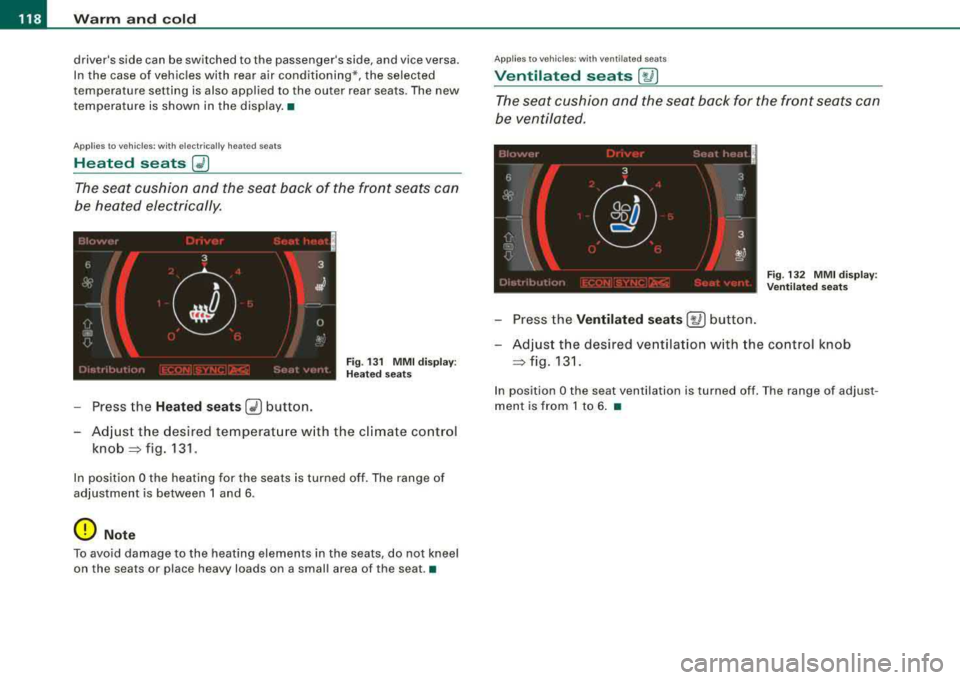
The seat cushion and the seat back of the front seats can
be heated electrically.
F ig . 13 1 M MI disp lay:
H eated s eats
- Press the Heated seats G2) button.
- Adjust the desired temperat ure w ith the climate control
knob =:> fig. 131 .
In position O the heating for the seats is turned off . The range of
adjustment is between 1 and 6 .
0 Note
To avoid damage to the heating elements in the seats , do not kneel
on the seats or place h eavy loads on a small area of th e se at .•
App lies to veh ic les : wit h venti lated seats
Ventilated seats [~ I
The seat cushion and the seat back for the front seats can
be ventilated .
Fig. 132 MM I d isplay :
Ve nti lated sea ts
- Press the Ventilated se ats [~ ] button.
- Adjust the des ired ventilation w ith the control knob
=:> fig . 131.
In position O the seat ven tilation is turned off . T he range of adjus t
ment is from 1 to 6 . •
Page 121 of 404
_________________________________________________ W_ a_ r_ m __ a_n_ d_ c_ o_ld _ ___.ffllll
Ap plies to vehicles : w ith heated rear seats
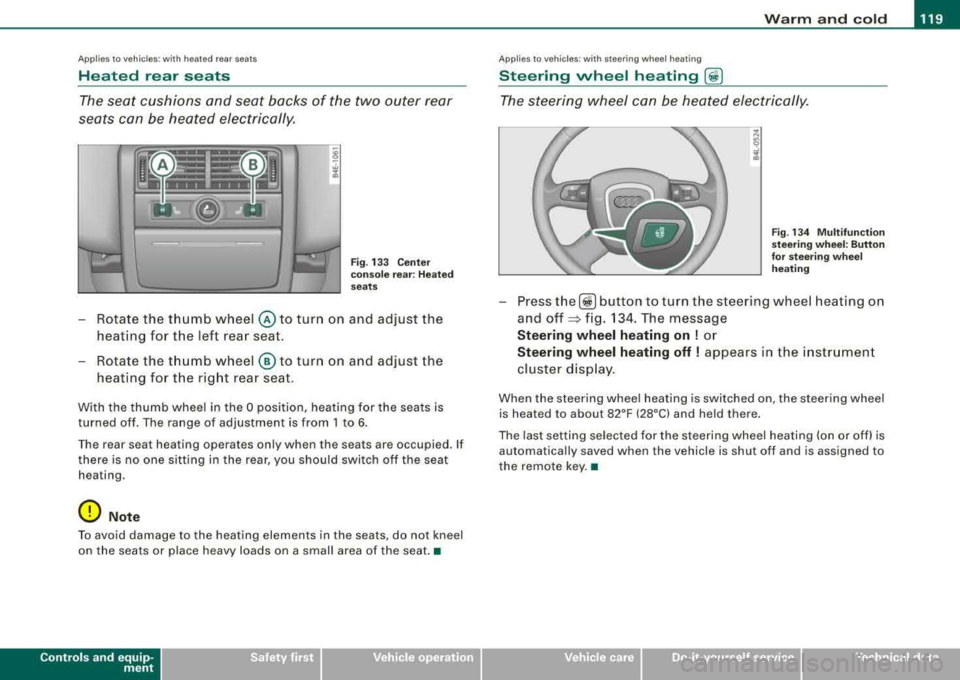
Heated rear seats
The seat cushions and seat backs of the two outer rear
seats can be heated electrically.
Fig . 133 C ente r
co nso le rea r: H ea ted
seats
- Rotate the thumb wheel © to turn on and adjust the
heating for the left rear seat.
- Rotate the thumb wheel
® to turn on and adjust the
heating for the right rear seat .
With the thumb wheel in the O position, heating for the seats is
turned off . The range of adjustment is from 1 to 6 .
Th e rear sea t hea ting operat es on ly wh en th e seats ar e occupied. If
there is no one s itting in the rear , you should swi tch off the seat
hea ting .
0 Not e
To avoid damage to the heating elements in the seats , do not kneel
on the seats or place heavy loads on a small area of the seat .•
Contro ls a nd eq uip
ment
Ap plies to vehi cles: with steer in g w heel heatin g
Steering wheel heating (j)
The steering wheel can be heated electrically.
F ig . 1 34 M ultifun cti on
st eeri ng w heel: Button
for stee ring w hee l
he ating
- Press the[ ~] button to turn the steer ing wheel heat ing on
and
off ~ fig. 134. The message
Steering wheel heating on ! or
Steering wheel heating off ! appears in the i nstrument
cluster d isp lay .
When the steering whee l heating is switched on , the steering wheel
is heat ed to about 82°F (28°C) and held th ere.
The last setting se lected for the steering wheel heating (on or off) is
automatically saved when the vehicle is shut of f and is assigned to
the remote key. •
Vehicle care I I irechnical data
Page 124 of 404
--~W~ a~r~m ~ a~ n
~ d~ c:!:o ~l~d :._ _____________________________________________ _
Air outlets
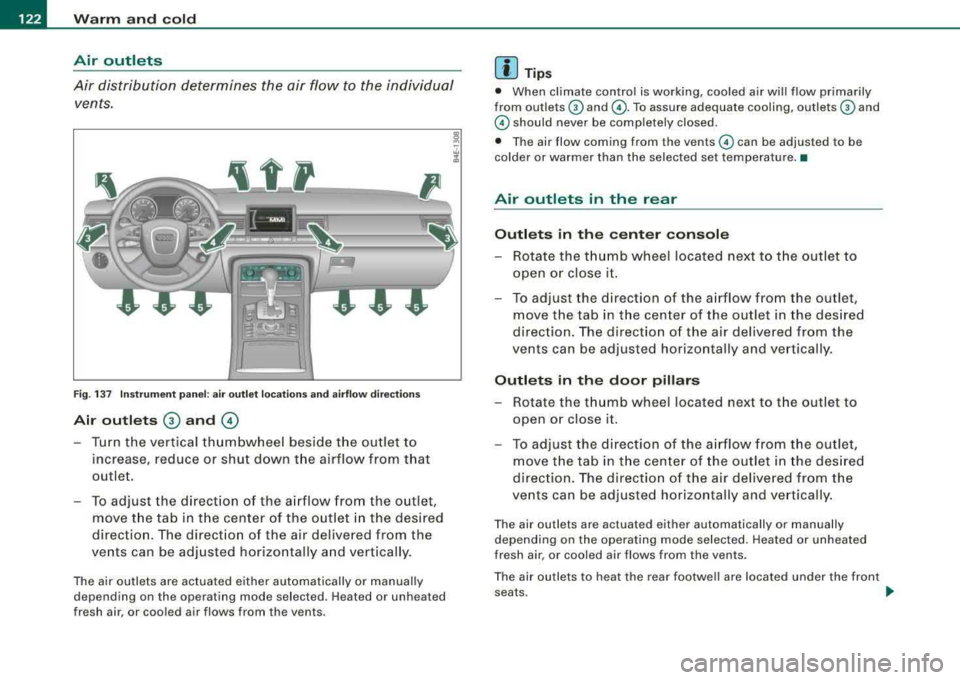
Air distribution determines the air flow to the individual
vents .
---- P
Fig. 1 37 Ins tru me nt pa nel: a ir o utlet loca tions a nd ai rf low di rectio ns
Air outl ets G) and ©
- Turn the vertical thumbwheel beside the outlet to
increase , reduce or shut down t he airflow from that
outlet .
- To adjust the direct ion of the a irflow from the outlet,
move the tab in t he center of the outlet in the desired
direction . The direct ion of the air delivered from the
vents can be adjusted horizontally and vertically .
The air outlets are actuated either automatically or manual ly
depending on the operating mode selected. Heated or unheated
fresh air, or cooled air flows from the vents.
[ i ] Tip s
• When climate contro l is working, coo led air wi ll flow primarily
from outlets
G) and ©-To assure adequate cooling, outlets G) and
© should never be completely closed.
• The air flow coming from the vents © can be adjusted to be
colder or warmer than the selected set temperature. •
Air outlets in the rear
Outl ets in the c ente r con sol e
- Rotate the thumb wheel located next to the outlet to
open or close it.
- To adjust the direction of the airflow from the outlet,
move the tab in t he center of the outlet in the des ired
direction. The direction of the air delivered from the
vents can be adjusted horizontally and vertically .
Outl ets in th e door pillars
- Rotate the t humb wheel located next to t he out let to
open or close it.
- To adjust the d irection of the a irflow from the outlet,
move the tab in t he center of the outlet in the des ired
direction . The direction o f the air delive red from the
vents can be adjusted hor izontally and vertically .
The air outlets are actuated either automatically or manually
depending on the operating mode selected. Heated or unheated
fresh air, or cooled air flows from the vents .
The air outlets to heat the rear footwel l are located under the front
seats . _,,,
Page 127 of 404
Warm and cold -
-----------------'
Rear climate controls
Ap plies to vehic les: with rear a ir co ndition ing
Controls
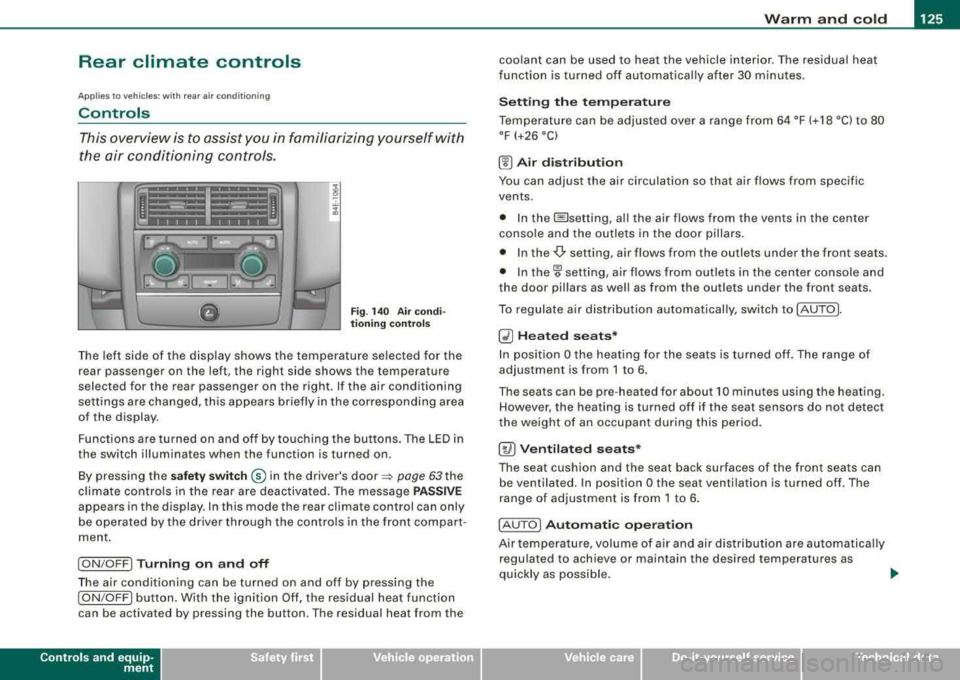
This overview is to assist you in familiarizing yourself with
the air conditioning controls .
Fig . 140 Air co ndi
t io ning contr ols
The left side of the display shows the temperature selected for the
rear passenger on the left, the right side shows the temperature
selected for the rear passenger on the right . If the air conditioning
settings are changed, this appears briefly in the corresponding area
of the display.
Functions are turned on and off by to uching the buttons . The LED in
the switch illuminates when the function is turned on .
By pressing the
sa fet y swi tc h ® in the driver's door ~ page 63 the
climate controls in the rear are deactiva ted. The message
P AS SIV E
appears in the display. In this mode the rear climate control can only
be operated by the driver through the contro ls in the front compar t
ment.
I ON /OFF] Tu rni ng o n and off
The air conditioning can be turned on and off by pressing the
I ON /OFF] button. With the ignit ion Off, the residual heat function
can be activated by pressing the button . The residual heat from the
Contro ls a nd eq uip
ment
coolant can be used to heat the vehicle interior. The residual heat
f unction is turned off au tomatica lly after 30 minu tes .
Se tting th e te mp era tu re
Temperature can be adjus ted over a range from 64 °F (+ 18 °C) to 80
°F (+26 °C)
(!) A ir di st ribu tion
You can adjust the air circulation so that air flows from specific
vents.
• In the @setting, al l the air flows from the v ents in the center
conso le and the outlets in the door pillars.
• In the
-Or setting, air flows from the outlets under the front seats.
• In
the~ setting, air flows from ou tlets in the center console and
the door pil lars as we ll as from the outlets under the front seats .
To regulate air distribution automatical ly, swi tch to !AUTO].
~ H ea ted se ats*
In posit ion O the heating for the seats is turned off. The range of
adjustment is from 1 to 6 .
The seats can be pre -heated for about 10 minutes us ing the heating.
However , the heating is turned off if the seat sensors do not detect
the weight of an occupant during this period .
[ty) Ventil ate d seats*
The seat cushion and the seat back surfaces of the fron t seats can
be ventilated. In position
O the seat ventilation is turned off. The
range of adjustment is from 1 to 6 .
! AU TO
I Autom ati c o pera tion
Air tempe rature, volume of air and air dis tribu tion are automatically
regulated to achieve or maintain the desired temperatures as
quickly as possible .
.,
Vehicle care I I irechnical data
Page 128 of 404
___ w_ a_ r_ m __ a_n_ d_ c_ o_ld ________________________________________________ _
0 Note
To avoid damage to the heating elements in the seats, do not kneel
on the seats or place heavy loads on a small area of the seat. •
Basic settings [SETUP]
General
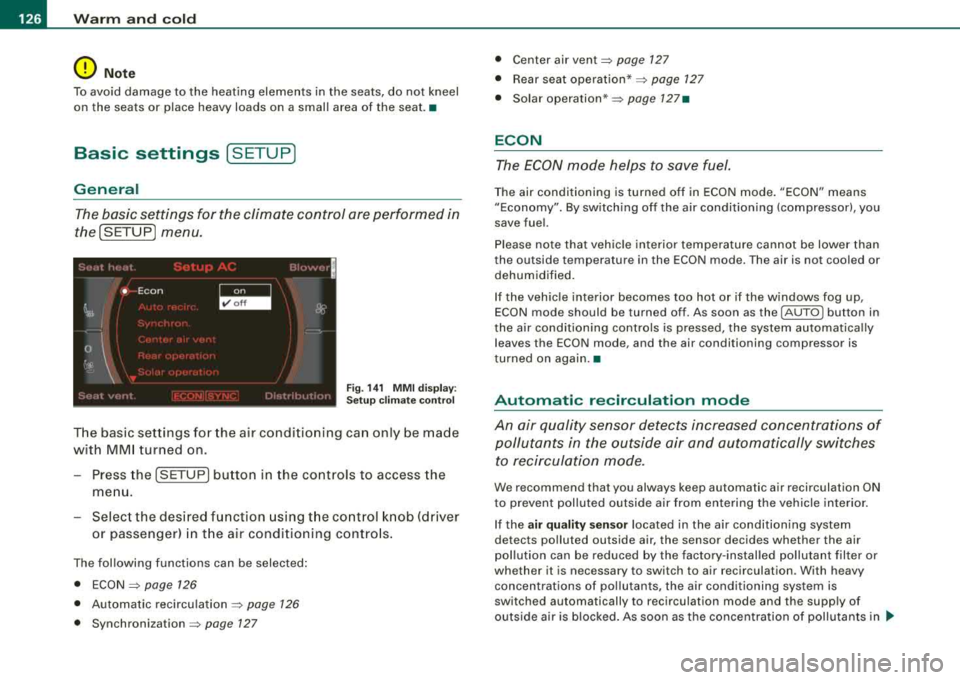
The basic settings for the climate control are performed in
the[SETUP] menu.
Fig . 141 MMI display:
Setup climate control
The basic settings for the air conditioning can only be made
with MMI turned on.
- Press the !SETUP] button in the controls to access the
menu.
- Select the desired function using the control knob (driver
or passenger) in the air conditioning controls.
The following functions can be selected:
• ECON
=> page 126
• Automatic recirculation => page 126
• Synchronization => page 127
• Center air vent=> page 127
• Rear seat operation* => page 127
• Solar operation* => page 127•
ECON
The ECON mode helps to save fuel.
The air conditioning is turned off in ECON mode. "ECON" means
"Economy". By switching off the air conditioning (compressor), you
save fuel.
Please note that vehicle interior temperature cannot be lower than
the outside temperature in the ECON mode. The air is not cooled or
dehumidified.
If the vehicle interior becomes too hot or if the windows fog up,
ECON mode should be turned off. As soon as the
(AUTO ] button in
the air conditioning controls is pressed, the system automatically leaves the ECON mode, and the air conditioning compressor is
tu rned on again. •
Automatic recirculation mode
An air quality sensor detects increased concentrations of pollutants in the outside air and automatically switches
to recirculation mode.
We recommend that you always keep automatic air recirculation ON
to prevent polluted outside air from entering the vehicle interior.
If the
air quality sensor located in the air conditioning system
detects polluted outside air, the sensor decides whether the air
pollution can be reduced by the factory-installed pollutant filter or
whether it is necessary to switch to air recirculation . W ith heavy
concentrations of pollutants, the air conditioning system is
switched automatically to recirculation mode and the supply of
outside air is blocked. As soon as the concentration of pollutants in
~
Page 129 of 404
Warm and cold -
----------------
the outside air drops, fresh air is supplied to the vehicle interior
again .
In the event that the windows fog up during automatic air recircula
tion, you must press
the® button immediately.
Under certa in operat ing cond it ions, automatic a ir rec ircu lation is
switched off automatically . With outside temperatures below about
-8 °C and in the ECON mode, automatic air rec ircula tion is limited to
15 seconds. •
Synchronization
One climate control setting for all seats.
With synchronization active, the driver's or the passenger's settings
are adopted for the other seats . Al l the other set tings that were
made are transferred to the other seats. This includes all the c limate
control settings right down to the heated seats .
If
a d ifferent setting is selected at a "synchron ized seat", synchroni
zation is cancelled.
•
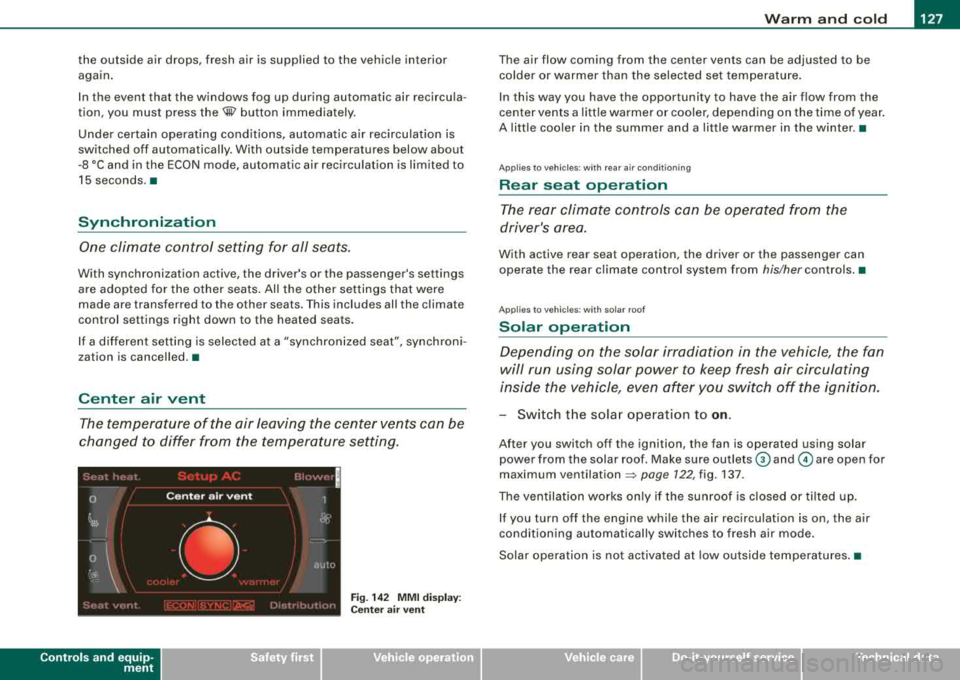
Center air vent
The temperature of the air leaving the center vents can be
changed to differ from the temperature setting.
Controls and equip ment
Fig. 14 2 MMI di spla y:
Ce nter a ir ve nt
The air flow coming from the center vents can be adjusted to be
colder or warmer t han the selected set temperatu re.
In this way you have the opportunity to have the a ir flow from the
center vents a litt le warmer or coo ler, depending on the time of year .
A litt le cooler in the summer and a little warmer in the winter. •
Applies to vehic les : with rear air condition in g
Rear seat operation
The rear climate con trols can be o perated fr om the
driver's area.
With active rear seat operation, the driver or the passenger can
operate the rear climate control system from
his/her contro ls. •
Ap plies to vehicles : w ith so lar roof
Solar operation
Depending on the solar irradiation in the vehicle, the fan
will run using solar power to keep fresh air circulating
inside the vehicle, even af ter you switch off the ignition.
- Switch the solar operation to on .
After you switch off the ignition, the fan is operated using solar
power from the solar roof. Make sure outlets
G) and © are open for
maximum
ventilation => page 722, fig. 137.
The vent ilation works on ly if t he sunroof is closed or t ilted up.
If you turn off the engine whi le the air rec irculation is on, the air
conditioning automatically switches to fresh air mode.
Solar operation is not activated at low outside temperatures .•
Page 200 of 404
___ D_ r
_ i_v _i_n ..;::g :;_ S_ a_ f_ e_, ly'----------------------------------------------------
Driving Safely
General notes
Safe driving habits
Please remember -safety first!
This chapter conta ins important informat ion, tips, instructions and
warnings that you need to read and observe for your own safety, the safety of your passenge rs and othe rs. We have summarized here
what you need to know about safety be lts, airbags, child restraints
as wel l as chi ld safety . Y o ur safety is for us
priority number 1 . Always
observe the information and warnings in this section
-for your own
safety as we ll as that of your passengers .
The information in this sect ion appl ies to al l model vers ions of your
vehic le. Some of the features described in this sections may be
standard equ ipmen t on some mode ls, or may be op tiona l equip
ment on others. If you are not sure, ask your authorized Audi dealer .
& WARNING
• Always mak e sure that you follo w the instru ctions and heed
the WARNINGS in this Manual. It is in your interest and in the interest of your passengers .
• Alway s keep the complete Owner' s Liter ature in your Audi
when you lend or sell your vehi cle so that th is important informa
tion will always be available to the driver and pas seng ers.
• Always keep the Owner's literature handy so that you can find
it e asily if you have question s. •
Safety equipment
The s afe ty featur es are par t of the occu pant restraint
system an d wor k together t o help red uce the risk of injury
in a wide variety of accident situati ons.
Your safety and the safety of your passengers should not be left to
chance . Advances in technology have made a variety of features
avai lable to help reduce the risk of injury in an accident. The
fo llo w ing is a l ist of just a few of the sa fe ty feat ures in your A udi :
• sophisticated safety belts for driver and a ll passenger seating
posit ions,
• safety be lt pretensioners,
• safety be lt force l imiters for the fr ont seats,
• safety be lt height adjustment systems for the front seats,
• front airbags,
• knee airbags for the front seats
• side airbags in the front seats and outer rear seats,
• side curtain a irbags (SIDEGUARD),
• special LATCH anchorages for chi ld restra ints,
• head restraints for each seating position,
• adjus table steer ing colum n.
T hese individua l safety features, can work together as a system to
help protect you and you r passengers in a wide ra nge of acc idents .
T hese features cannot work as a system if they are not always
correctly adjusted and correct ly used .
Safety i s everybody' s responsibility! •