tow AUDI S8 2008 Owner's Manual
[x] Cancel search | Manufacturer: AUDI, Model Year: 2008, Model line: S8, Model: AUDI S8 2008Pages: 404, PDF Size: 52.7 MB
Page 144 of 404
___ A_ d
_ a__,p_ t_ i_ v _e_ C_ r_ u_ is_e_ C_ o_n _ t_ r_o _l ___________________________________________ _
-Drive at the speed you want. The speed must be between
20 and 95 mph (30 and 150 km/h).
Press the SET button to store the desired speed .
Release the SET button to store mainta in the current speed . The
instrument cluster display shows the stored speed with a red indi
cator ligh t. •
Applies to vehi cles: wit h Ada ptiv e C rui se C ont rol
Changing stored speed
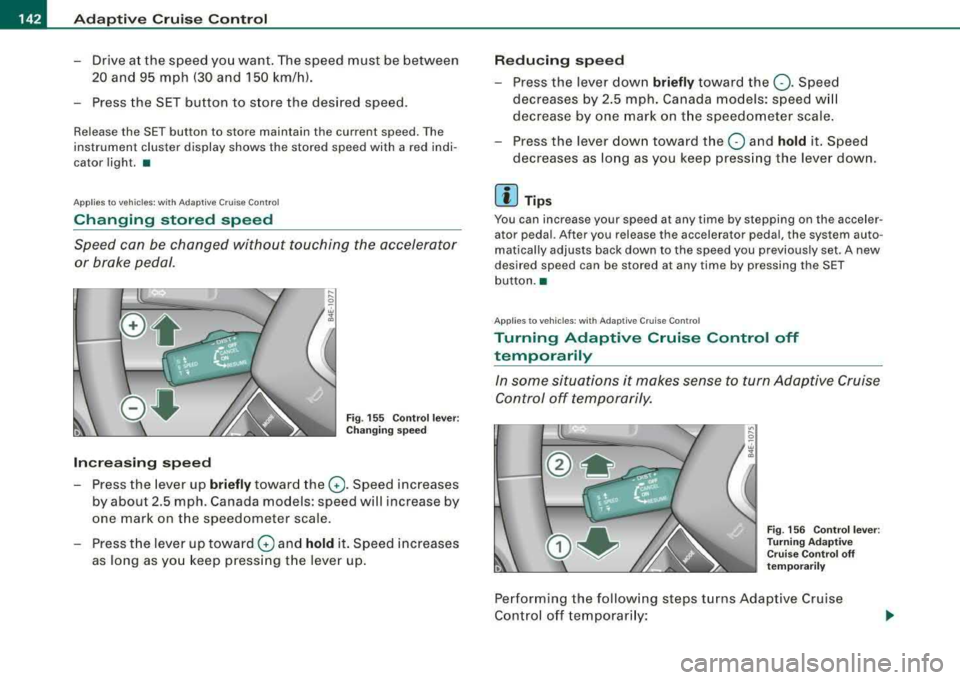
Speed can be changed without touching the accelerator
or brake pedal.
Fig . 155 Control lever:
Changing speed
Increasing speed
Press the lever up briefly toward the G). Speed increases
by about 2.5 mph. Canada models: speed will increase by
one mark on the speedometer scale .
-Press the lever up toward 0 and hold it. Speed increases
as long as you keep pressing the lever up.
Reducing speed
-Press the lever down briefly toward the Q . Speed
decreases by 2.5 mph. Canada models: speed will
decrease by one mark on the speedometer scale.
-Press the lever down toward the O and hold it. Speed
decreases as long as you keep pressing the lever down.
[ i] Tips
You can increase your speed at any time by stepping on the acceler
a tor pedal. After you release the accelerator pedal, the system auto
matically adjusts back down to the speed you previously set . A new
desired speed can be stored at any time by pressing the SET
button. •
App lies to vehicl es : w ith Ada ptive Cru ise Co ntro l
Turning Adaptive Cruise Control off
temporarily
In some situations it makes sense to turn Adaptive Cruise Control off temporarily.
Fig . 156 Control lever:
Turning Adaptive
Cruise Control off
temporarily
Performing the following steps turns Adaptive Cruise
Control off temporarily:
Page 145 of 404
_____________________________________________ A_ d_a ....: p_ t_ i_ v _e_ C_ ru_ is_ e_ C_ o_n_ t_ r_o _ l _ __.11111
-Step on the brake pedal or
-Press the control lever to the rear (not latched)
~ page 142, fig . 156.
When the system is turned off temporarily , the speed sto red a t the
time is retained.
To resume the stored speed, remove your foot from the brake peda l
and pull the control l ever forward.
Ap plies to vehicles: with Ad apt ive Cru ise Contro l
How is distance set?
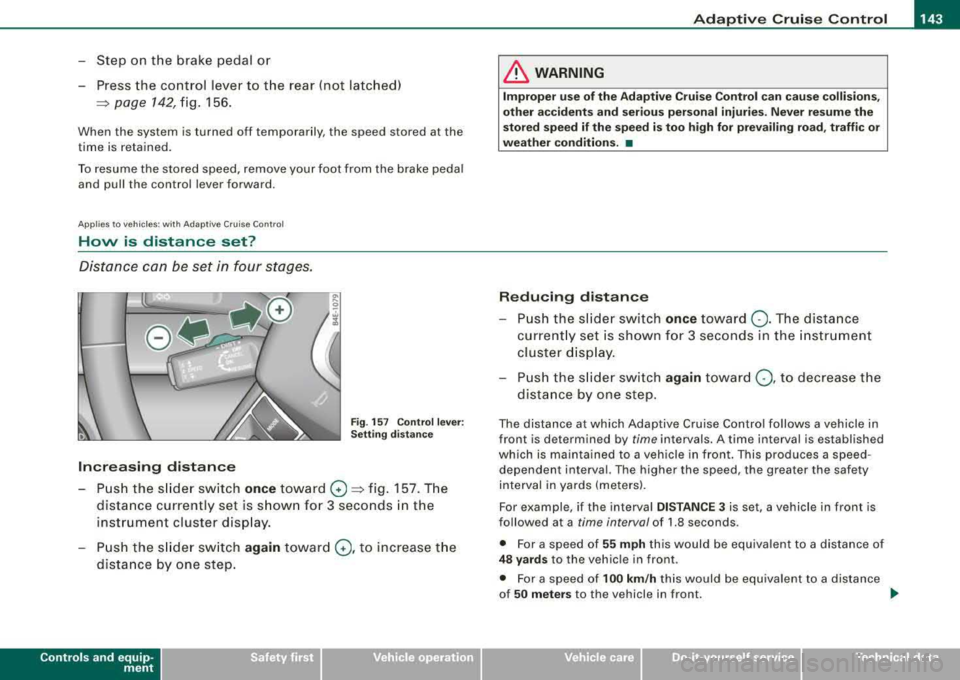
Distance can be set in four stages.
Fig . 157 Co ntrol l ever:
Settin g distance
Increasing distance
-Push the s lide r switch once toward G) ~ fig . 157. The
distance currently set is s hown for 3 seconds in the
instrument cluster disp lay.
-Push the s lider sw itch again towar d G), to increase the
dista nce by one step.
Contro ls a nd eq uip
ment
& WARNING
Improper use of the Ad apti ve C ruise Control can caus e colli sio ns,
other a ccident s and seri ou s per sona l injurie s. Never re sume the
s to red sp ee d if th e speed i s to o high for pr evailin g road , traff ic or
wea th er condition s. •
Reducing distanc e
Push the slider switch once toward Q . The dista nce
current ly set is shown f or 3 seconds in the instrument
cluster d isp lay .
P u sh the s lider switch
again towar d Q, to decrease the
dist ance by one step.
The distance at which Adaptive Cruise Contro l fo llows a vehicle in
front is determined by
time in tervals. A time interval is established
which is mainta ined to a vehicle in front . This produces a speed
dependen t interval. The higher the speed , the greater the safe ty
interval in yards (meters) .
For example , if the interval
DIST AN CE 3 is set , a vehicle in front is
followed at a
time interval of 1.8 seconds .
• For a speed of
55 mph th is would be equiva lent to a distance of
4 8 y ard s to the vehic le in front .
• For a speed of
100 km /h this would be equivalent to a distance
of
5 0 m eter s to the vehicle in front. _.
Vehicle care I I irechnical data
Page 171 of 404
_______________________________________________ A_ u_t _o _m_ a_ t_ i_ c _ t_r _
a _n _s_ m_ i_ s _ s_ i_ o _ n _ ___.ltllll
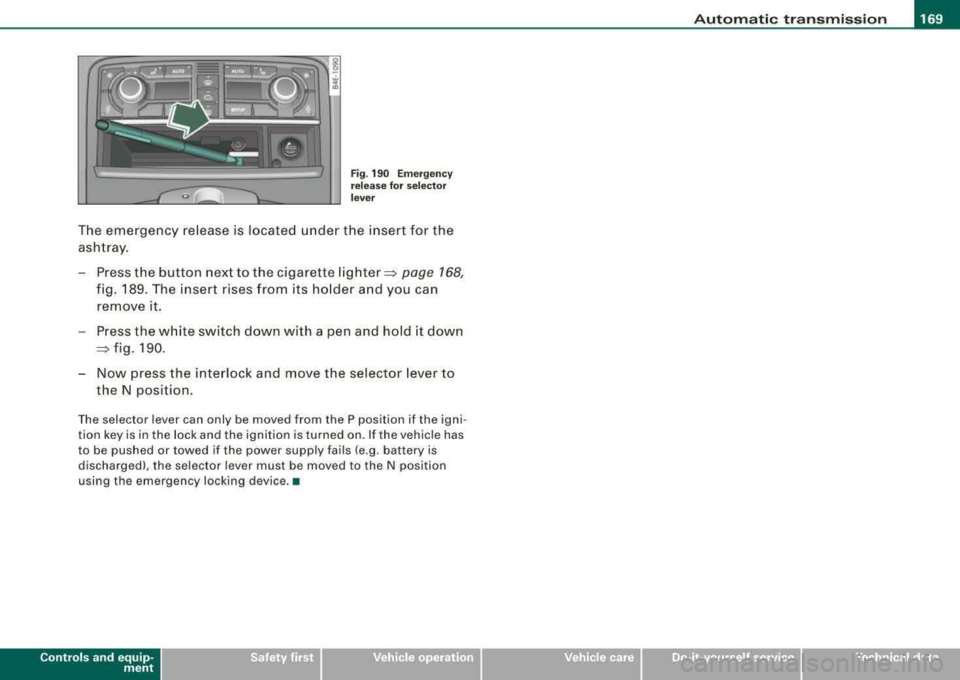
Fig . 190 Emergency
release for selector
lever
The emergency release is located under the insert for the
ashtray.
- Press the button next to the cigarette
lighter~ page 168,
fig. 189. The insert rises from its holder and you can
remove it.
- Press the white switch down with a pen and hold it down
~ fig. 190.
- Now press the interlock and move the selector lever to
the N position.
The selector lever can only be moved from the P position if the igni
tion key is in the lock and the ignition is turned on. If the vehicle has
to be pushed or towed if the power supply fails (e .g . battery is
discharged), the selector lever must be moved to the N position
using the emergency locking device. •
Controls a nd eq uip
ment Vehicle care I I irechnical data
Page 176 of 404

___ A_ d_v _a_ n_ c_e _ d_ P_ a
_ r_k _in -= g'-- S...,_y _s_ t_ e_ m ___________________________________________ _
& WARNING
• The rear-view camera has blind spots , in whi ch objects cannot
be detected. Be especially careful to check for small children and
an imals before ba ck ing up . Small children and animals will not
always be detected by the sensors.
• The Audi parking system is not a substitute for being careful
and alert when backing up. Be especially careful during parking
and similar maneu vers . Always watch where you are driving and
make sure that nothing is in the way .
• Remember that low obsta cles which have already been
signaled may pass below the system's sensing zone when the
vehicle is ba cking up . The fact that the signal stops does not mean
that you have cleared the obstacle . When the signal stops , impact
is imminent . Objects such as trailer hit ches , chains , narrow posts
or fences covered by a thin layer of paint may not always be
detected by the system. They can still damage your vehicle
without warning .
• Always make sure that the volume and frequency of the chimes
is adjusted so that you can easily hear the acoustic distance signal
even if the radio is playing, the air -conditioner blower is on High or
there is a high level of outside noise .
- Check the settings whenever someone else has driven the
vehicle before you.
• Improper reliance on the Audi parking system can cause colli
sions and serious personal injury .
- Never rely only on parking assist when chang ing backing up .
- Always check rear view mirrors to make sure it is safe to back
up .
[ i J Tips
• Before parking with the rear -view camera, the Adaptive Air
S us pe nsi on sta ndard or automatic mo de mus t be switch ed on
=> page 27.
• T he rear -view camera pictur e is avai lable as soon as the MMI
Display or the M MI is sw itche d on, o r the start -up pha se is
completed.
• In order fo r th e re ar-v iew camera to func tion prop erly, the
camera
lens=> page 170, fig. 191 must be kept clean, and free of
sn ow a nd i ce. Please follo w the ad ditio nal no tes
on => page 783 .
• T he camera coverage angle changes when the trunk lid is open.
Theref ore, the r ear-view camera picture is d isplaye d w ithout ori en
tation lines and without blue surfaces.
• Observe an d follow t he no tes on towing mo de
on => pag e 180. •
App lies to veh icles : w ith Advanced Parking System with rear view came ra
Rear-view camera coverage area
0
.. - --
®
F ig . 196 Top vi ew :
Re ar- vie w ca mera
coverage a rea
F ig . 197 Side vi ew:
Covered ar ea
G) and
uncover ed area
0 of
the rear-v iew camera
~
Page 181 of 404
___________________________________________ A_ d_ v_ a_n _ c_ e_ d_ P_a _ r_ k_ i_n --=g=-- S_ y=--- s_t _
e _m _ ___.ffllll
fl::. WARNING (continued )
• The Audi parking system is not a substitute for being careful
and alert when backing up. Be especially careful during parking
and similar maneuvers . Always watch where you are driving and
make sure that nothing is in the way.
• When maneuvering or parking, do not only use the MMI Display
for orientation. Certain objects
· depending on the screen resolu
tion
· may not, or not entirely , be displayed; for example trailer
hitches , chains, narrow posts , or fences .
• Improper reliance on the Audi parking system can cause colli
sions and serious personal injury .
- Never rely only on parking assist when changing backing up.
- Always check rear view mirrors to make sure it is safe to back
up. •
App lies to vehic les: w ith Adva nced Pa rk ing Sys tem with re ar view c ame ra
Notes on distance information
Contro ls a nd eq uip
ment
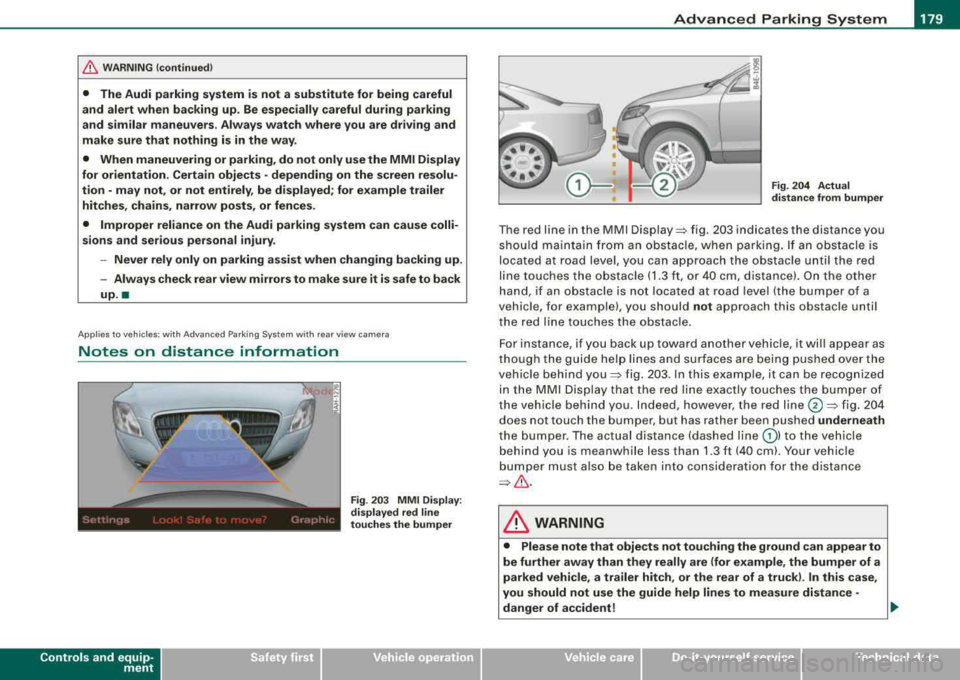
Fig . 20 3 MMI Display:
displayed red l ine
touche s the bumper Fig
. 204 Actual
di stance from bumper
T he red line in the MMI Disp lay~ fig . 20 3 indicates th e distance you
shou ld ma inta in fro m a n ob stacle , when park ing . If an obst acle is
located at road leve l, y ou can approach the o bstacle u nti l th e red
li ne to uche s the obs tacle ( 1.3 ft, o r 40 cm, dis tance). On the othe r
han d, if an obstac le is no t locat ed at roa d leve l (the b umper of a
vehic le, for examp le), you should not approach this obstac le unti l
t he red lin e touch es t he obstac le.
F or instance, if you back up toward another vehic le, it will appea r as
t ho ug h th e gu ide hel p lines and su rfaces are bei ng pu shed ov er the
vehic le b ehind
you~ fig. 2 03 . In t his e xample, it can be reco gnized
i n th e MM I D is pl ay t hat t he red line e xactly touc hes the b um per o f
th e veh icle behind you . In de ed , however, t he red
line @~ fig. 20 4
does not touch the b umper, but ha s rather been pushed underneath
t h e b umper. The ac tual dista nce (dashe d line
G) ) to the vehi cle
beh ind yo u is meanwhile less than 1.3 ft ( 40 cm). Your vehicle
bum per must also be take n in to consi dera ti on for the d istanc e
~& .
& WARNING
• Please note that objects not touching the ground can appear to
be further away than they really are (for example , the bumper of a
parked vehicle, a trailer hitch , or the rear of a truck ). In this case ,
you should not use the guide help lines to measure distance
·
danger of accident! ..
Vehicle care I I irechnical data
Page 182 of 404
___ A_ d_v _ a_ n_c _e _ d_ P_ a_r _k _in ~ g_ S_y _ s_ t_ e_ m ___________________________________________ _
&, WARNING (continued)
• Maintain plenty of distance from an obstacle, so that your
outside mirror or a corner of your vehicle does not collide with any
obstacles -danger of accident!
• The Audi parking system is not a substitute for being careful
and alert when backing up. Be especially careful during parking
and similar maneuvers. Always watch where you are driving and
make sure that nothing is in the way.
• When maneuvering or parking, do not only use the MMI Display
for orientation. Certain objects -depending on the screen resolu
tion -may not, or not entirely, be displayed; for example trailer
hitches, chains, narrow posts, or fences .
•
Applies to vehicles: with Advanced Parking System with rear view camera and a trailer hitch
i nstalled according to factory spec ifications
Towing hitch
For vehicles with a trailer hitch installed according to factory speci
fications, the rear acoustic parking sensors are not activated when
the vehicle is put in reverse gear while an electrical connection to
the trailer socket* is established . No distance alert occurs in the rear
=> page 170. The rear -view camera picture => page 173 is displayed
without orientation lines and without blue surfaces. •
Settings in the MMI
Applies to vehicles : w ith Advanced Par king Sys tem with rear vie w camera
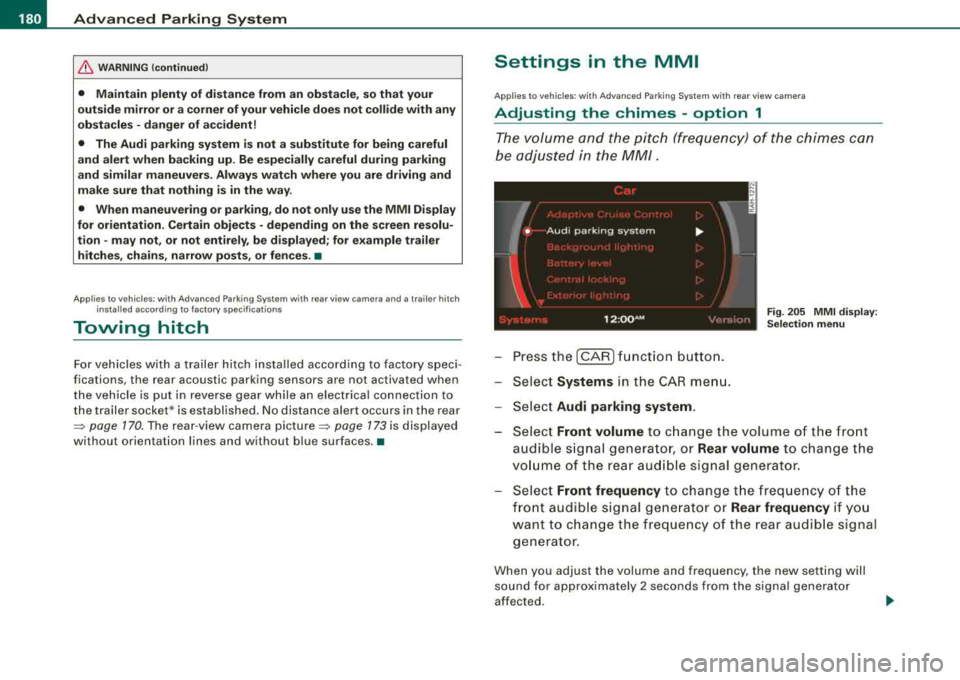
Adjusting the chimes -option 1
The volume and the pitch (frequency) of the chimes can
be adjusted in the MM/.
Fig. 205 MMI display:
Selection menu
- Press the [CAR] function button.
- Select
Systems in the CAR menu.
- Select
Audi parking system .
-Select Front volume to change the volume of the front
audible signal generator, or
Rear volume to change the
volume of the rear audible signal generator.
- Select
Front frequency to change the frequency of the
front audible signal generator or
Rear frequency if you
want to change the frequency of the rear audible signal
generator.
When you adjust the volume and frequency, the new setting will
sound for approximately 2 seconds from the signal generator
affected.
Page 185 of 404
__________________________________________ A_ d_v _a_ n_ c_e _d _ P_a_ r_ k_ i_n ~g _ S_y_ s_ t_ e_ m
___ ffllll
"O ff" se tting
If yo u have set t he off function, both the rear -view camera and the
visual disp lay wi ll be deactivated. The acoustic parking assist
rema ins active .
[ i] Tip s
If you change the settings in the MM I, the new settings do not
become active unti l the parking assis t is sw itched on again .•
Safety tips
Ap plies to vehi cles : w ith Ad vance d Par king Sys tem with re a r view c ame ra
Acoustic parking system error message
If you hear a continuous tone for several seconds while the front
and back parking ass ist w ith visual d isplay is activated and the LED
in the switch
P wA flashes when you engage the reverse gear, there is
a malfunction in the acoustic parking assist.
This system error is immed iate ly output after:
• Every manua l activation via the switch
Pw.o. => page 170,
• Reverse gear is engaged for t he first t ime during an ign it ion
cycle, or
• An error is detected dur ing operation.
[ i ] Tip s
If the system reports an error, have an Audi dealer or an authorized
dea lership correct this system error .•
Controls and equip ment
Applies to vehi cles: w it h Ad vanced Par king Sy stem wit h rea r vie w camera
Rear-view camera tips
We recommend that you pract ice parking with t he rear -v iew ca mera
in a traffic-free location, or parking
lot, to become familiar with the
system, the orien tation lines, and their fu nction . When do ing th is,
there should be good light and weather conditions .
I n the MMI Disp lay, objects or vehicles appear closer or further away
if:
• you are driving in reverse gear from a level surface onto an
inc lin e, or a downward slope,
• you are dr iving in reverse gear toward protruding objects,
• the vehicle is carrying too much load in the rear .
The accuracy of the orientation lines and b lue surfaces diminishes
if :
• the Adaptive Air Suspension is defec tive, or the dynamic or lift
mode is switched on,
• the rear -view camera does not provide a re liable image, for
examp le, in poor vis ibility conditions or if the lens is dirty,
• the image on the screen is not visib le due to sun glare and reflec
t ion.
Caring for the re ar-v iew c amer a len s:
• Dampen the lens with a household a lcoho l- based g lass c leaner,
and c lean the lens with a dry cloth.
• Remove snow with a hand brush.
• Remove ice, preferably with de -icing
spray=> 0.
& WARNING
• The rear -view c amera does not r epla ce the vie w to the re ar a nd
the rear view mirror s.
• The rear-view camer a - be cause of t echn ical lim itations -doe s
not show the entire are a behind the
vehicle => page 174, fig. 197. ~
Page 187 of 404
Adaptiv e Air Su spension 11!11
-------------------------------------=------=-------
Ad apt iv e Air Suspension
Adaptive Air Suspension and
Damping
Description
Adaptive Air Suspension and damping can be regulated
and they adapt automatically to a request from the driver
and the driving situation at the time.
Adaptive Air Suspension is an electronica lly contro lled springing
and damping system. T his chassis system makes it eas ier on the
driver by adapting to the particu lar situation through imperceptible
control processes.
The
Ad apti ve Air Suspen sion component regu lates ground c lear
ance depending on vehicle speed, load condition and driver input .
Acce lerat ing to a speed above a predetermined limit wil l make the
vehic le lower i tself. On the other hand, driving more slowly results
in the vehic le rais ing again at specific speeds .
T he
d amp in g component provides individual contro l of the
damping forces. For examp le, with damping characteristics set to
provide greater comfort, damping is set somewhat harder for a brief
period only as required, for example, when going around a curve or
over rough road surfaces as well as when brak ing.
S ett ing s
Adaptive Air Suspension provides the driver with the opportunity to
set the chassis characteristics a lso to their individua l preference .
With the driving modes
standard, automatic and dynamic the driver
has three chassis settings availab le, ranging from comfort to sporty.
In addition,
lift provides a fourth mode wh ich can be selecting for
driving over poor stretches of
road~ page 186, "Chassis Contro ls" .
The modes are se t in MMI
~ page 188.
Controls and equip ment
On vehicles equipped with the sport su sp en sion Adaptive Air
Suspension -Sport *, there is genera lly more emphasis on a sporty
chassis sett ing. Settings range from comfortable to firm
~ page 187, "Sport Chassis Contro ls".
0 Note
• Whenever you park your vehicle, always make sure there is
adequate c learance above and be low the vehicle . The height of the
parked vehicle can change as the result of temperature fluctuations,
changes in l oad condition and c hanges in the driv ing m ode (ground
c learance).
• Mount the tie -down cha ins/cab les over the running surface
(circumference) of the tires . Never secure the vehicle by the axle, the
suspens ion stru ts or the front or rear towline eye . For tec hn ica l
reasons , the pressure in the suspension struts may change during
the transport and this wil l adversely affect vehicle handling.
• To prevent damage to the vehic le underbody, remember that
your vehicle is not a n off -road vehicle, even in the lift mode . The
ground clearance is insufficient for this type of operation .
• If you are going to tow a tra iler, you mus t activate the trailer oper
ation
mode~ page 189 .
[ i ] Tip s
Before you can raise your vehic le using the vehicle jack (for
examp le, when changing a flat tire) you must activate the jacking
mode
~ page 188 . •
Page 191 of 404
![AUDI S8 2008 Owners Manual ____________________________________________ A_ d_ a_ p
=--- t_iv _ e_ A_ ir_ S_ u_ s
-=- p_e_ n_ s_io _ n __ fflll
[ i ] Tips
The veh ic le jack mode is switched off automatica lly at speeds](/img/6/57619/w960_57619-190.png "AUDI S8 2008 Owners Manual ____________________________________________ A_ d_ a_ p
=--- t_iv _ e_ A_ ir_ S_ u_ s
-=- p_e_ n_ s_io _ n __ fflll
[ i ] Tips
The veh ic le jack mode is switched off automatica lly at speeds")
____________________________________________ A_ d_ a_ p
=--- t_iv _ e_ A_ ir_ S_ u_ s
-=- p_e_ n_ s_io _ n __ fflll
[ i ] Tips
The veh ic le jack mode is switched off automatica lly at speeds above
9 mph (15 km/h) .•
Towing a Trailer
Automatic lowering is not desirable when towing a trailer.
Fig . 212 MMI displ ay:
Activate towing opera·
tion
If you are going to tow a trailer, you must activate the trailer
towing mode .
Switching the trailer towing mode on and off
manually
-Pressthe(CAR] function button. The main menu
Adaptive Air Suspension appears .
-Press the I SETUP] function button. The menu Adaptive
Air Suspension
appears => fig. 212.
-Select Trailer towing mode on or off as desired.
Level Adjustment when Towing a Trailer
The following applies to veh ic les wi th Adaptive Air Suspension:
Controls and equip
ment
• Before hitching up the trai ler and before adjusting the tongue
weight at the trailer, the automat ic or standard mode
must be
selected, so that the vehicle is at normal leve l
~ page 188, "Setting
the Driving Modes".
• If driving in dynamic mode is desired, this mode
must be
se lected before hitching up the trailer and before adjusting the
tongue weight . However, note that your vehic le is lowered and
ground c learance is reduced.
• If you have to drive under difficult road conditions, you can
select lift mode after hitching up the trailer or after adjusting the
tongue weight .
The following applies to vehicles with
sport suspension Adaptive Air
Suspension
· Sport*:
• Before hitching up the trai ler
and before adjusting the tongue
weight at the trailer, the automatic, standard or dynamic mode
must
be selected, so that the vehic le is at normal level~ page 188,
"Setting the Driving Modes".
• If you have to drive under difficult road conditions, you can
select lift mode after hitching up the trailer or after adjusting the
tongue weight .
Restrictions when Operating with a Trailer
When operating with a trailer, the lift mode can on ly be se lected up
to about 25 mph (40 km/h). The system automatical ly goes out of lift
mode when speed exceeds about 31 mph (50 km/h).
I f the vehic le is in automatic, standard or lift mode before the trai ler
towing mode is activated, the dynamic mode cannot be activated ·
except on vehicles with
sport suspension Adaptive Air Suspension -
Sport*.
If the vehic le is in dynamic mode before towing operation is acti·
vated, it can be driven in this mode. If the suspension is shifted from
this mode to automatic mode, dynamic mode cannot be
re-selected .~
Page 192 of 404
![AUDI S8 2008 Owners Manual ___ A_ d_a_ p_ ti_v _ e_ A_ ir_ S_u_ s_ p_e _n_ s_ io_n ___________________________________________ _
[ i ] Tips
T he veh ic le wil l no t lower to t he dyna mic level w hen ope rat in g i n t](/img/6/57619/w960_57619-191.png "AUDI S8 2008 Owners Manual ___ A_ d_a_ p_ ti_v _ e_ A_ ir_ S_u_ s_ p_e _n_ s_ io_n ___________________________________________ _
[ i ] Tips
T he veh ic le wil l no t lower to t he dyna mic level w hen ope rat in g i n t")
___ A_ d_a_ p_ ti_v _ e_ A_ ir_ S_u_ s_ p_e _n_ s_ io_n ___________________________________________ _
[ i ] Tips
T he veh ic le wil l no t lower to t he dyna mic level w hen ope rat in g i n t he
trai le r towing mode .•