gearbox AUDI TT ROADSTER 2016 Owner's Guide
[x] Cancel search | Manufacturer: AUDI, Model Year: 2016, Model line: TT ROADSTER, Model: AUDI TT ROADSTER 2016Pages: 306, PDF Size: 31.82 MB
Page 107 of 306
Downloaded from www.Manualslib.com manuals search engine 0
N
,.....
N
....
0
,.....
Vl
CX) (D}
Note
Zone ®
* is detected and analysed as the vehi
cle is moving past. When you switch on the ig
nition or after the vehicle has been stationary
for a while or a door is opened, the ambient
surroundings may have changed. Zone®
* is
displayed in black on the infotainment system
for this reason.
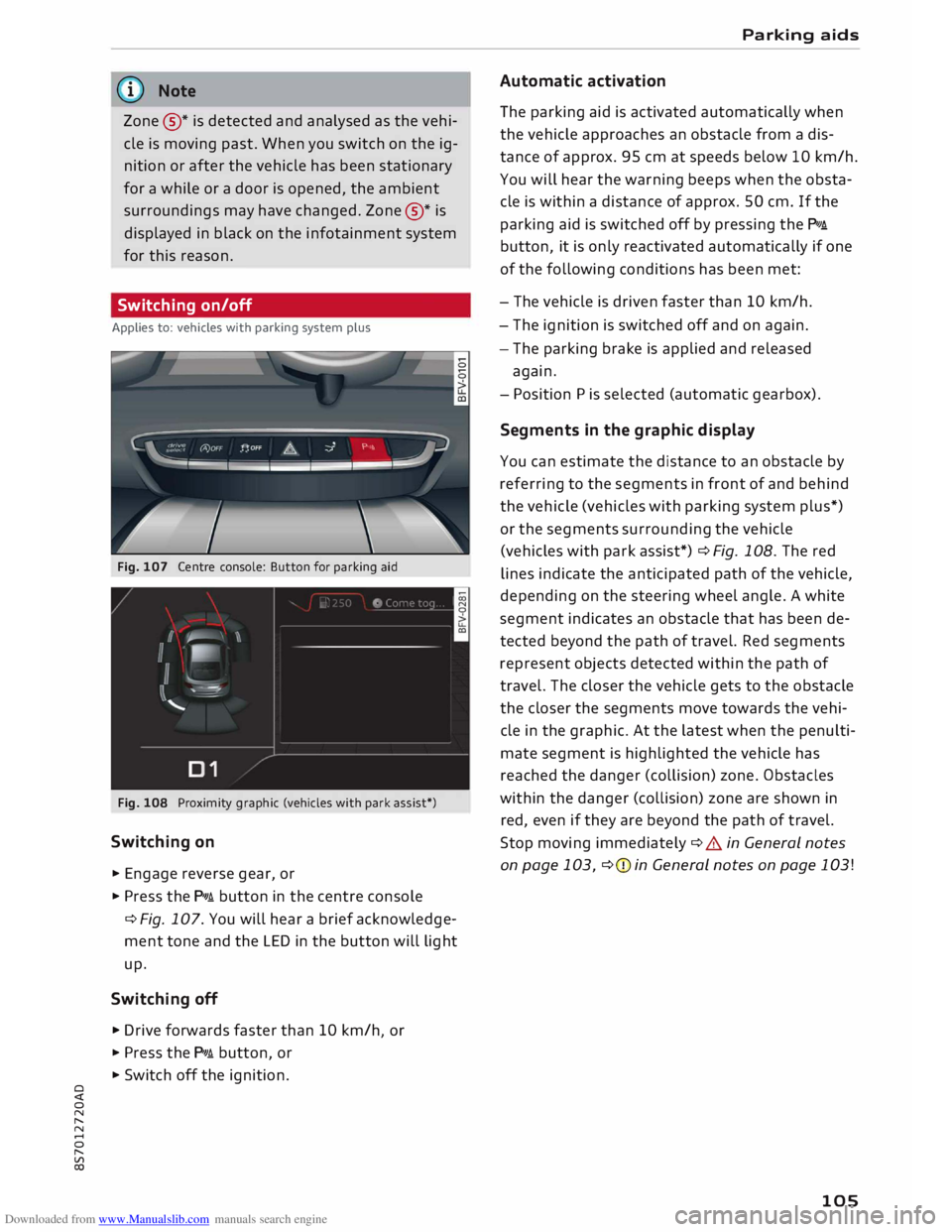
Switching on/off
Applies to: vehicles with parking system plus
Fig. 107 Centre console: Button for parking aid
Fig. 108 Proximity graphic (vehicles with park assist*)
Switching on
... Engage reverse gear, or
... Press the p,,,i button in the centre console
¢ Fig. 107. You will hear a brief acknowledge
ment tone and the LED in the button will light
up.
Switching off
.,. Drive forwards faster than 10 km/h or
I
... Press the p,,,i button, or
... Switch off the ignition. Parking
aids
Automatic activation
The parking aid is activated automatically when
the vehicle approaches an obstacle from a dis
tance of approx. 95 cm at speeds below 10 km/h.
You will hear the warning beeps when the obsta
cle is within a distance of approx. 50 cm. If the
parking aid is switched off by pressing the P,#A.
button, it is only reactivated automatically if one
of the following conditions has been met:
- The vehicle is driven faster than 10 km/h.
- The ignition is switched off and on again.
- The parking brake is applied and released
again.
- Position Pis selected (automatic gearbox).
Segments in the graphic display
You can estimate the distance to an obstacle by
referring to the segments in front of and behind
the vehicle (vehicles with parking system plus*)
or the segments surrounding the vehicle
(vehicles with park assist*) ¢Fig. 108. The red
lines indicate the anticipated path of the vehicle,
depending on the steering wheel angle. A white
segment indicates an obstacle that has been de
tected beyond the path of travel. Red segments
represent objects detected within the path of
travel. The closer the vehicle gets to the obstacle
the closer the segments move towards the vehi
cle in the graphic. At the latest when the penulti
mate segment is highlighted the vehicle has
reached the danger (collision) zone. Obstacles
within the danger (collision) zone are shown in
red, even if they are beyond the path of travel.
Stop moving immediately ¢ A in General notes
on page 103, ¢(Din General notes on page 103!
105
Page 121 of 306
Downloaded from www.Manualslib.com manuals search engine 0
N
,.....
N
......
0
,.....
Vl
CX) consumed,
but only a small amount is supplied.
The situation is also critical if electrical equip
ment is in use when the engine is not running. In
this case power is consumed when none is being
generated.
In these situations you will be aware that the
power management system is intervening to con
trol the distribution of electrical power.
When the vehicle is parked for long periods
If you do not drive your vehicle for a period of
several days or weeks, the power management
will gradually shut off the on-board systems one
by one, or reduce the amount of current they are
using. This limits the amount of power consumed
and helps to ensure reliable starting even after a
long period. Certain convenience features, such
as remote control unlocking, may not be availa
ble. These functions will be restored when you
switch on the ignition and start the engine.
With the engine switched off
If you listen to the radio or use the other info
tainment functions when the engine is not run
ning, this will discharge the vehicle battery.
The infotainment display will show a warning
message before the battery power drops to a lev
el where the starting ability is impaired. This
message warns you that the system you are using
will soon be switched off automatically. You
should therefore start the engine if you wish to
continue using the system.
When the engine is running
Although the alternator generates electrical
power, the vehicle battery can still become dis
charged while the vehicle is being driven. This can
occur when a lot of power is being consumed but
only a small amount supplied, especially if the
vehicle battery is not fully charged initially.
To restore the necessary energy balance, the sys
tem will then temporarily shut off the electrical
components that are using a lot of power, or re
duce the current they are consuming. Heating
systems in particular use a large amount of elec
trical power. If you notice, for instance, that the
seat heating* or the rear window heater is not Intelligent
technology
working, they may have been temporarily switch
ed off or regulated to a lower heat output. These
systems will be available again as soon as suffi
cient electrical power is available.
You may also notice that the engine runs at a
slightly faster idling speed. This is quite normal,
and no cause for concern. The increased idling
speed allows the alternator to meet the greater
power requirement and charge the vehicle bat
tery at the same time.
Information saved in the
control units
The vehicle is fitted in the factory with electronic
control units that, among other things, control
the engine and the gearbox. The control units al
so monitor the exhaust system and the airbags.
The control units continually analyse data rele
vant to the vehicle while you are driving. In the
event of faults or anomalies in the vehicle data,
only these data are saved. As a rule, faults are
shown by the warning lamps in the instrument
cluster.
Data saved in the control units can only be read
and analysed with special equipment.
A qualified workshop is only able to recognise
and deal with faults by using the relevant saved
data. Among other things, the saved data may
contain the following information:
- Data relating to the engine and the gearbox
-Speed
- Direction of travel
- Braking force
- Seat belt warning system data
The control units installed will not under any cir
cumstances record conversations in the vehicle.
Event data recorder
Your vehicle is not equipped with an event data
recorder.
In an event data recorder, information about
the
vehicle is temporarily saved. In the event of an
accident, you can therefore obtain detailed infor-
mation about the course of events. On vehicles ...,.
119
Page 247 of 306
Downloaded from www.Manualslib.com manuals search engine 0
N
,.....
N
......
0
,.....
Vl
CX) -
Never spill fluids on a hot engine. These flu
ids can cause a fire (e.g. radiator anti
freeze).
- Take care not to cause short circuits in the
electrical system, especially when working
on the battery.
- When working in the engine compartment
be aware that the radiator fan may start
running suddenly, even if the ignition is
switched off -risk of injury!
- Do not unscrew the cap on the expansion
tank when the engine is hot. The cooling
system is under pressure.
- Protect face, hands and arms by covering
the cap with a large, thick rag to protect
against escaping coolant and steam.
- Never remove the engine cover panel -risk
of burns!
- If any tests have to be performed with the
engine running, there is an extra safety risk
from the rotating parts, such as the drive
belts, alternator and radiator fan, etc., and
from the high-voltage ignition system.
- Vehicles with automatic gearbox: Never
open the throttle inadvertently (for instance
by hand from the engine compartment) if a
gear is engaged while the vehicle is station
ary with the engine running. The vehicle will
otherwise start moving immediately and
could cause an accident.
- Observe the following additional warnings if
work on the fuel system or the electrical
system is necessary:
- Do not smoke.
- Never work near naked flames.
- Always keep an approved fire extinguisher
immediately available.
- Any work on the batteries and electrical sys
tem in your vehicle entails a risk of injury
and chemical burns in addition to danger of
accident or fire. For this reason, you must
have the work carried out by a qualified
workshop.
CD CAUTION
When topping up fluids make sure the correct
fluid is put into the correct filler opening. This Checking
and topping up fluids
can otherwise cause serious malfunctions or
engine damage.
@ For the sake of the environment
Inspect the ground underneath your vehicle
regularly so that any leaks are detected at an
early stage. If you find spots of oil or other
fluids, have your vehicle inspected in the
workshop.
i Note
On right-hand drive vehicles* some of the
containers/ reservoirs mentioned below are
located on the other side of the engine com
partment.
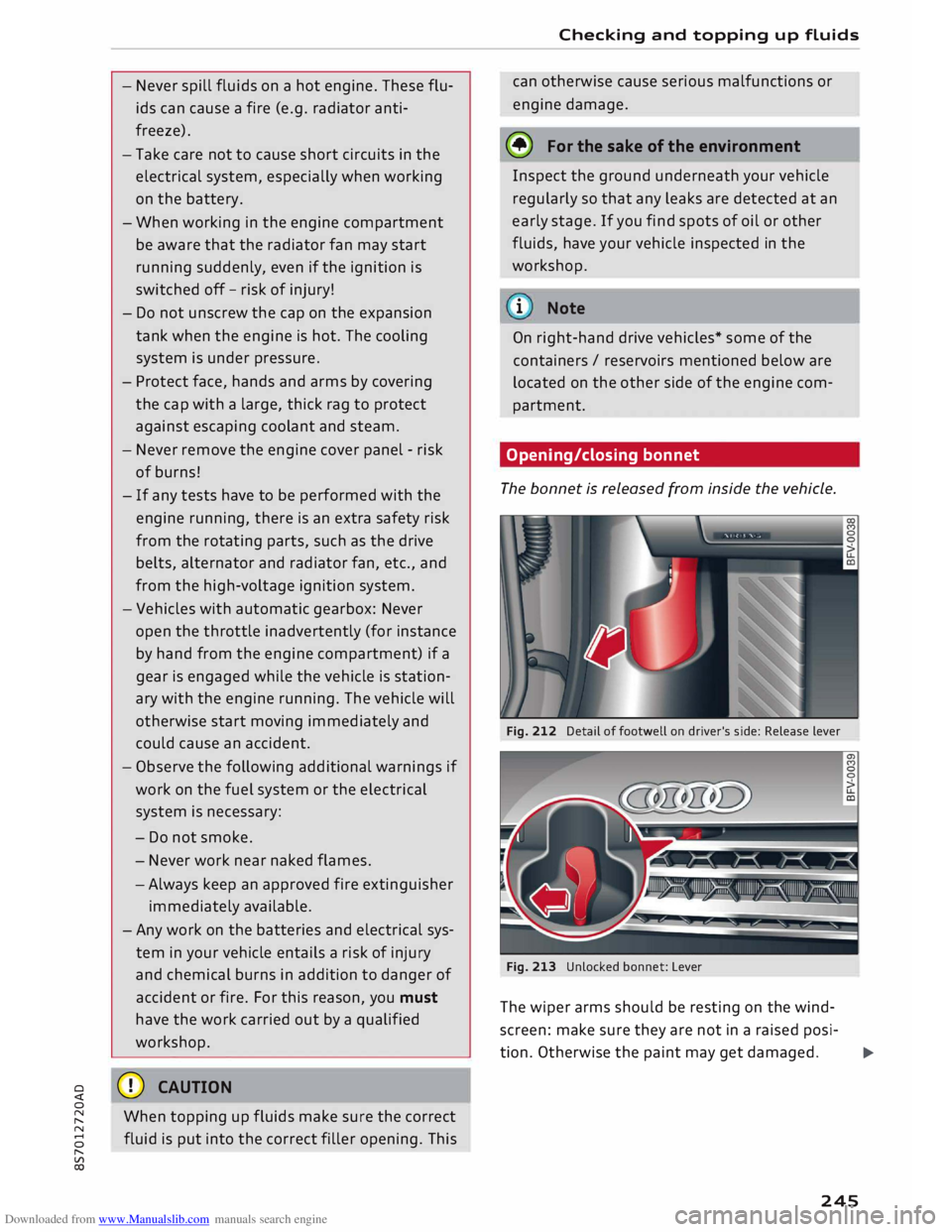
Opening/closing bonnet
The bonnet is released from inside the vehicle.
Fig. 212 Detail of footwell on driver's side: Release lever
Fig. 213 Unlocked bonnet: Lever
The wiper arms should be resting on the wind
screen: make sure they are not in a raised posi-
tion. Otherwise the paint may get damaged.
..,..
245
Page 272 of 306
Downloaded from www.Manualslib.com manuals search engine Mobility
Check how the fire extinguisher works before you
need to use it. The instructions for use are shown
on the fire extinguisher.
A WARNING
If the fire extinguisher is not secured properly
it could be catapulted through the vehicle
during driving and braking manoeuvres or in
the event of an accident. This poses a risk of
injury to occupants.
(D Note
- The fire extinguisher must be replaced with
a new one after use or once it has reached
its expiry date.
- The fire extinguisher must comply with le
gal requirements.
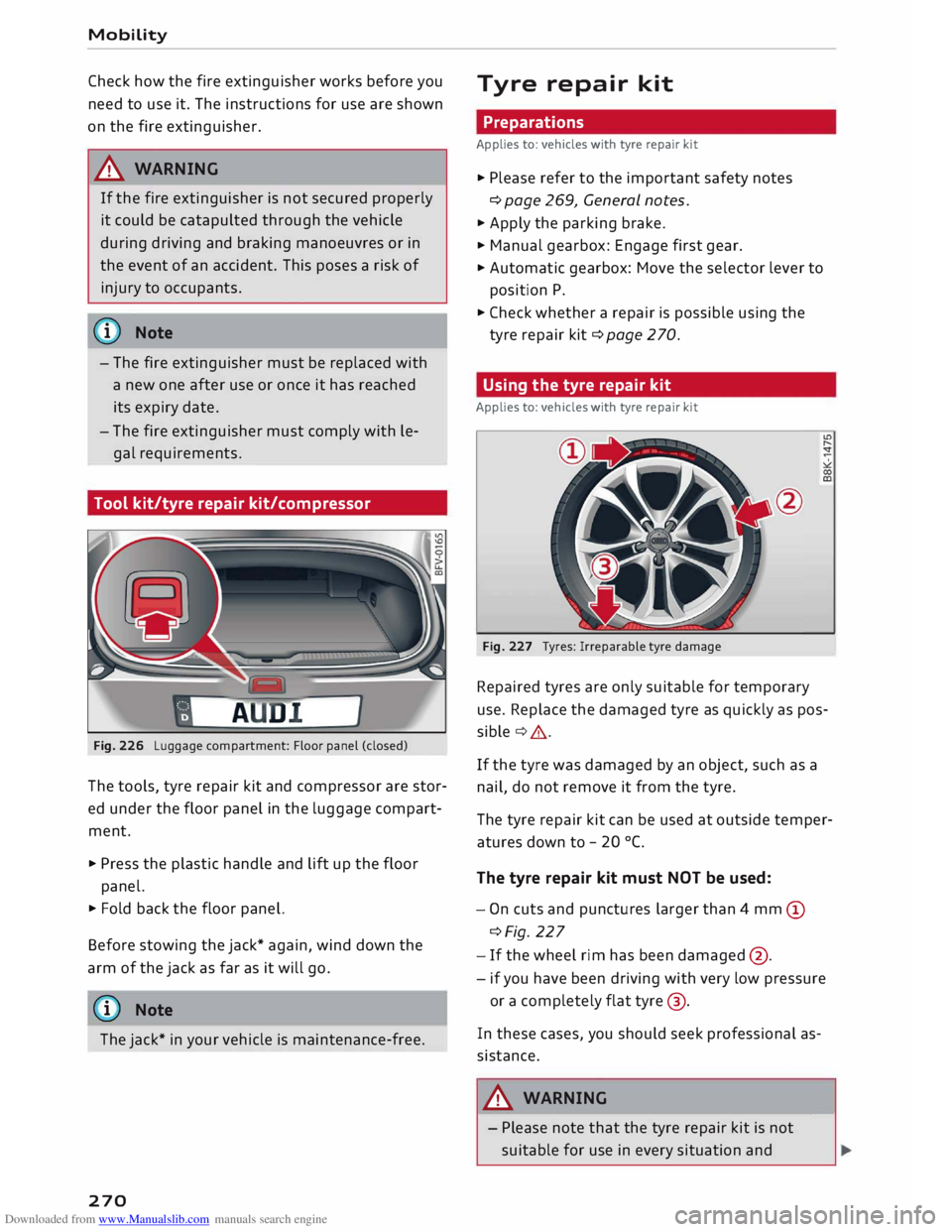
Tool kit/tyre repair kit/compressor
Fig. 226 Luggage compartment: Floor panel (closed)
The tools, tyre repair kit and compressor are stor
ed under the floor panel in the luggage compart
ment.
.., Press the plastic handle and lift up the floor
panel.
.., Fold back the floor panel.
Before stowing the jack* again, wind down the
arm of the jack as far as it will go.
ij} Note
The jack* in your vehicle is maintenance-free.
270 Tyre
repair kit
Preparations
Applies to: vehicles with tyre repair kit
.., Please refer to the important safety notes
¢ page 269, General notes.
.., Apply the parking brake.
.., Manual gearbox: Engage first gear.
.., Automatic gearbox: Move the selector lever to
position P .
.., Check whether a repair is possible using the
tyre repair kit¢ page 270.
Using the tyre repair kit
Applies to: vehicles with tyre repair kit
Fig. 227 Tyres: Irreparable tyre damage
Repaired tyres are only suitable for temporary
use. Replace the damaged tyre as quickly as pos
sible ¢& .
If the tyre was damaged by an object, such as a
nail, do not remove it from the tyre.
The tyre repair kit can be used at outside temper
atures down to -20 °(.
The tyre repair kit must NOT be used:
- On cuts and punctures larger than 4 mm (D
¢Fig. 227
- If the wheel rim has been damaged @.
- if you have been driving with very low pressure
or a completely flat tyre@.
In these cases, you should seek professional as
sistance.
A WARNING
- Please note that the tyre repair kit is not
suitable for use in every situation and-
Page 274 of 306
Downloaded from www.Manualslib.com manuals search engine Mobility
- If it was not possible to build up a tyre pres
sure of 2.0 bar within 6 minutes this means
that the tyre is too badly damaged. Do not
drive on.
- Seek professional assistance if the repair of
a tyre puncture is not possible with the seal
ing compound.
{D Note
Do not use the compressor for longer than
6 minutes at a time, as it could overheat.
When the compressor has cooled down, you
can use it again.
After repairing a tyre
Applies to: vehicles with tyre repair kit
.,. Affix the sticker "max. 80 km/h", which is inclu
ded in the tyre repair kit, to the dashboard
where the driver will see it.
.,. After about 10 minutes, stop to check the tyre
pressure .
.,. If
tyre pressure is less than 1.3 bar, the tyre is
too badly damaged. Do not drive on.
A WARNING
After repairing a tyre please note the follow
ing points:
- Do not drive faster than 80 km/h.
-Avoid heavy acceleration, hard braking and
fast cornering.
- Vehicle handling could be impaired.
- If the tyre is too badly damaged, you should
seek professional assistance.
® For the sake of the environment
A used can of sealing compound can be re
turned to your qualified workshop for dispos
al.
@ Note
After repairing a tyre, remember to buy a new
tyre sealant can at a qualified workshop.
272 Changing
a wheel
Preparations
Certain preparations must be made before you
change the wheel.
.,. Please refer to the important safety notes
¢ page 269, General notes.
.,. Apply the
parking brake .
.,. Manual gearbox: Engage first gear.
.,. Automatic gearbox: Move the selector lever to
position P.
.,. Take out the
tools ¢ page 2 70 and spare wheel
¢page 276.
A WARNING
If you have to use the jack* on a gradient or
off-road track, block the wheel diagonally op
posite the wheel being changed by placing
suitable objects underneath both the front
and rear of the wheel to prevent the vehicle
from rolling away.
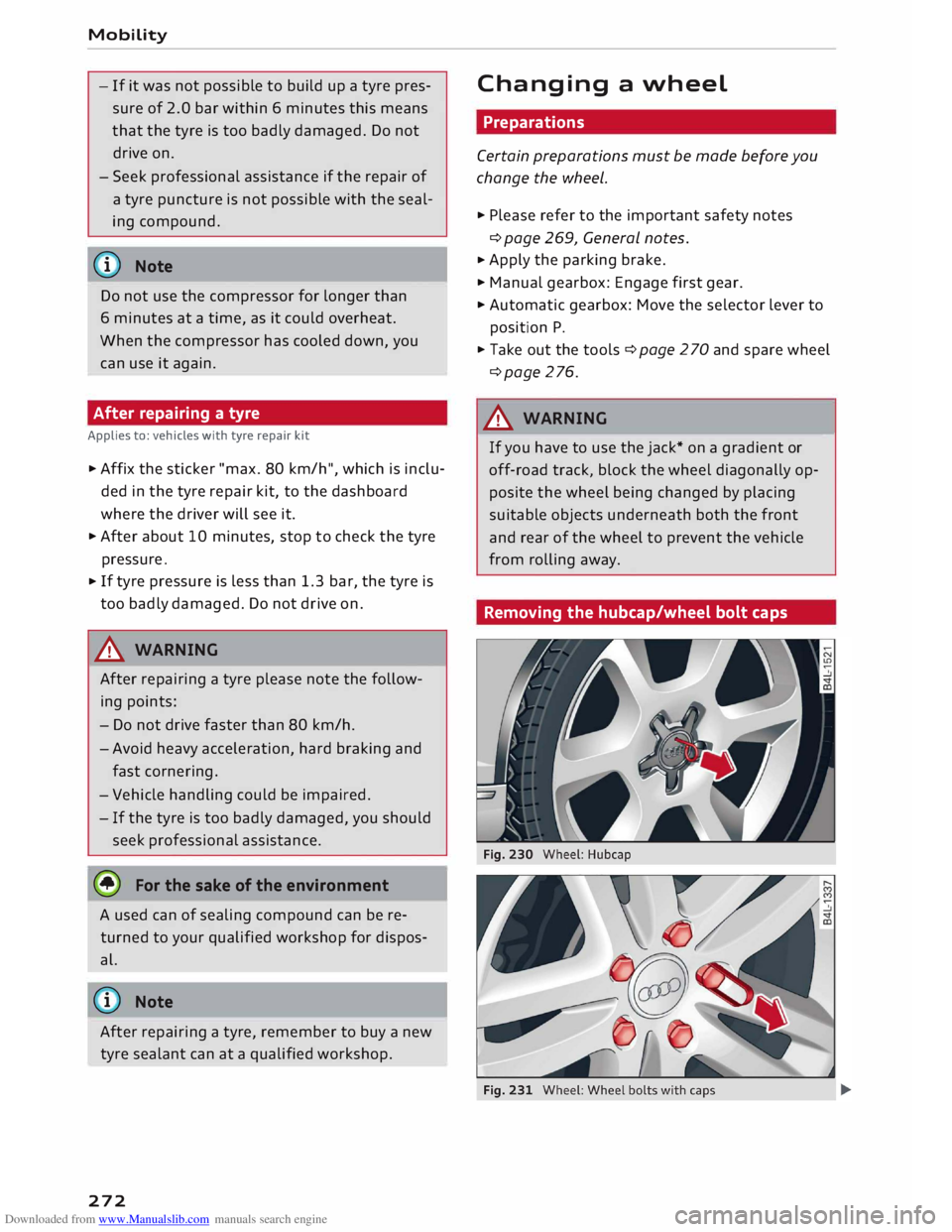
Removing the hubcap/wheel bolt caps -
Page 279 of 306
![AUDI TT ROADSTER 2016 Owners Guide Downloaded from www.Manualslib.com manuals search engine 0
<t
0
N
,.....
N
......
0
,.....
Vl
CX) ]ump-starting
Before starting the engine
If necessary, the engine can be started by](/img/6/57670/w960_57670-278.png "AUDI TT ROADSTER 2016 Owners Guide Downloaded from www.Manualslib.com manuals search engine 0
<t
0
N
,.....
N
......
0
,.....
Vl
CX) ]ump-starting
Before starting the engine
If necessary, the engine can be started by")
Downloaded from www.Manualslib.com manuals search engine 0
N
,.....
N
......
0
,.....
Vl
CX) ]ump-starting
Before starting the engine
If necessary, the engine can be started by con
necting it to the battery of another vehicle.
If the engine fails to start because of a dis
charged battery, the vehicle battery can be con
nected to the battery of another vehicle to start
the engine. Suitable jump leads are required.
Both vehicle batteries must be rated at 12 Volts.
The capacity (Ah) of the booster battery should
not be significantly lower than that of the dis
charged battery.
Jump leads
The jump leads must be heavy enough to carry
the starter current. Refer to the details given by
the manufacturer.
Only use jump leads with insulated battery
clamps.
Positive cable -usually red.
Negative cable -usually black.
A WARNING
- When it is discharged the battery can freeze
at temperatures around 0°
(. A frozen bat
tery must first be thawed out before con
necting the jump leads -risk of explosion
and chemical burns! After jump-starting the
vehicle, drive to a qualified workshop with
out delay and have the vehicle battery
checked.
- Note the safety warnings referring to work
ing in the engine compartment ¢ page 244.
ij}) Note
- There must be no contact between the two
vehicles as otherwise current could flow as
soon as the positive terminals are connec
ted. This would discharge the boosting bat
tery.
- The discharged vehicle battery must be
properly connected to the vehicle's electri
cal system. Mobility
- Switch off the car telephone if necessary.
Details will be given in the manufacturer's
instructions for the car telephone.
Starting the engine
The two jump Leads must be connected in the
correct sequence.
Fig. 240 Engine compartment: Terminals for jump leads
and battery charger
Fig. 241 Jump-starting with the battery of another vehi
cle: A -Discharged battery, B -Boosting battery
Preparations
... Apply the parking brake and move the gear lev
er to neutral (manual gearbox) or move these
lector lever to P (automatic gearbox).
... Switch off all electrical equipment and the igni-
tion on both vehicles.
Connecting and disconnecting the jump
leads
... Before jump-starting the vehicle you must open
the cap on the positive terminal.
... Connect one end of the red jump lead to the
positive terminal (!) ¢Fig. 241 ofthejump
start connection @ in your vehicle.
... Connect the other end of the red jump lead to
the positive terminal @of the boosting battery
® · �
277
Page 281 of 306
Downloaded from www.Manualslib.com manuals search engine 0
N
,.....
N
......
0
,.....
Vl
CX) Notes
on towing vehicles
The vehicle can be towed with a tow-bar or tow
rope. When the engine is not running, the gear
box will not be adequately lubricated if the fol
lowing speed/distance restrictions are not ob
served:
- The vehicle must not be towed faster than
SO km/h.
- The vehicle must not be towed further than
SO km.
Additional notes on towing by breakdown
truck
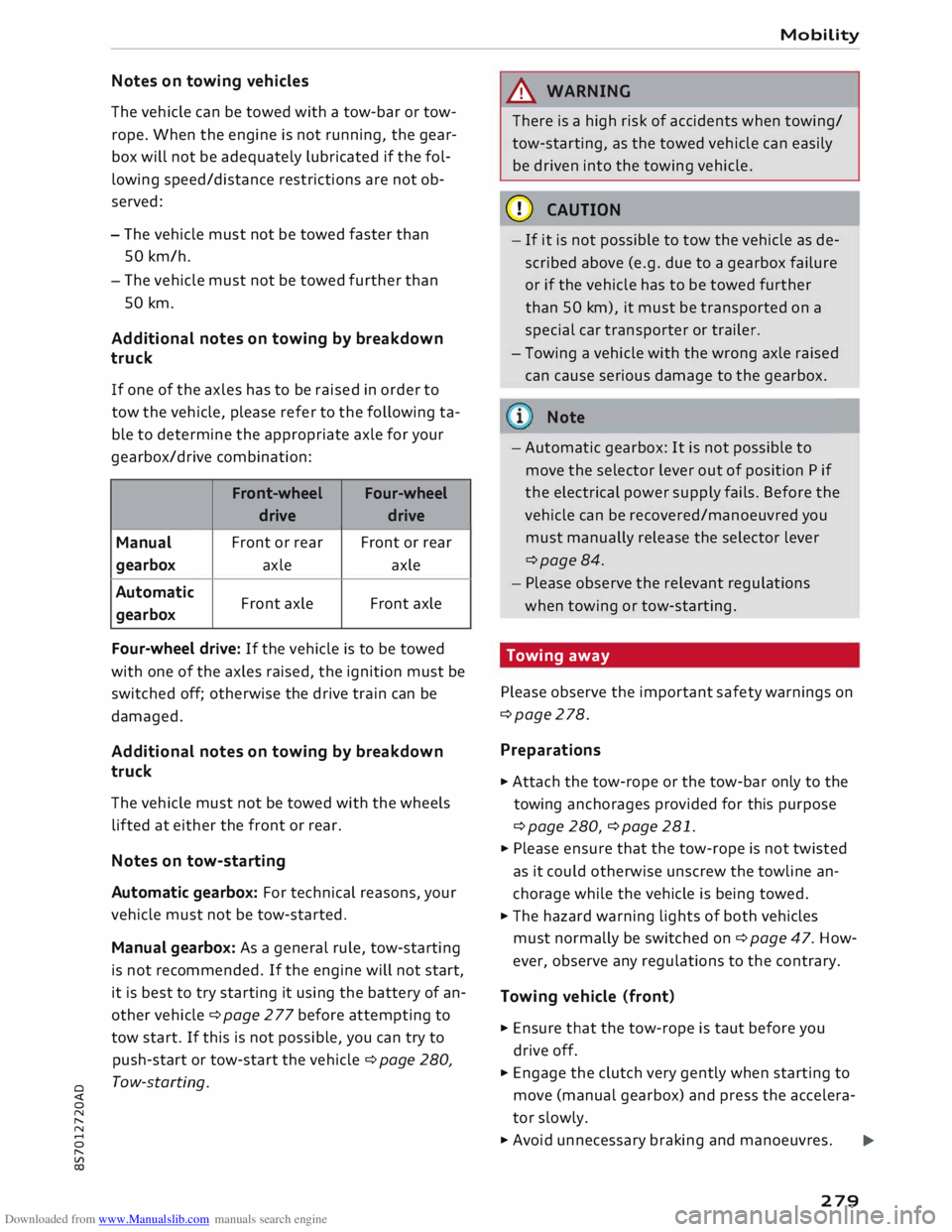
If one of the axles has to be raised in order to
tow the vehicle, please refer to the following ta
ble to determine the appropriate axle for your
gearbox/drive combination:
Front -wheel
Four-wheel
drive drive
Manual Front
or rear Front or rear
gearbox axle
axle
Automatic Front axle Front
axle
gearbox
Four-wheel drive: If the vehicle is to be towed
with one of the axles raised, the ignition must be
switched off; otherwise the drive train can be
damaged.
Additional notes on towing by breakdown
truck
The vehicle must not be towed with the wheels
lifted at either the front or rear.
Notes on tow-starting
Automatic gearbox: For technical reasons, your
vehicle must not be tow-started.
Manual gearbox: As a general rule, tow-starting
is not recommended. If the engine will not start,
it is best to try starting it using the battery of an
other vehicle ¢ page 2 77 before attempting to
tow start. If this is not possible, you can try to
push-start or tow-start the vehicle ¢ page 280,
Tow-starting. Mobility
& WARNING
There is a high risk of accidents when towing/
tow-starting, as the towed vehicle can easily
be driven into the towing vehicle.
CD CAUTION
- If it is not possible to tow the vehicle as de
scribed above (e.g. due to a gearbox failure
or if the vehicle has to be towed further
than SO km), it must be transported on a
special car transporter or trailer.
- Towing a vehicle with the wrong axle raised
can cause serious damage to the gearbox.
Note
- Automatic gearbox: It is not possible to
move the selector lever out of position P if
the electrical power supply fails. Before the
vehicle can be recovered/manoeuvred you
must manually release the selector lever
¢page 84.
- Please observe the relevant regulations
when towing or tow-starting.
Towing away
Please observe the important safety warnings on
¢page 278.
Preparat ions
.,. Attach the tow-rope or the tow-bar only to the
towing anchorages provided for this purpose
¢page 280, ¢page 281 .
.,. Please ensure that the tow-rope is not twisted
as it could otherwise unscrew the towline an
chorage while the vehicle is being towed.
.,. The hazard warning lights of both vehicles
must normally be switched on¢ page 47. How
ever, observe any regulations to the contrary.
Towing vehicle (front}
.,. Ensure that the tow-rope is taut before you
drive off.
.,. Engage the clutch very gently when starting to
move (manual gearbox) and press the accelera
tor slowly.
.,. Avoid unnecessary braking and manoeuvres.
..,.
279
Page 282 of 306
Downloaded from www.Manualslib.com manuals search engine Mobility
Vehicle being towed (rear)
� Ensure that the ignition is switched on, the
steering wheel is not locked, and that you can
operate the turn signals, horn or windscreen
wipers if necessary ¢ A-
� The brake servo only works when the engine is
running. The power steering only works when
the ignition is on and the vehicle is moving 1
).
Otherwise you will need to press the brake ped
al significantly harder and apply more force to
move the steering wheel.
� Please ensure that the steering wheel is un-
locked and that it moves freely.
� Release the parking brake¢ page 74.
� Manual gearbox: Put the gear lever in neutral.
� Automatic gearbox: Move the selector lever to
position N.
� Ensure that the tow-rope remains taut at all
times when towing.
A WARNING
If the vehicle has no electrical power, do NOT
use a tow-bar or tow-rope to tow the vehicle
(D Note
You can use the turn signals to indicate a
change of direction (or lane) even when the
hazard warning lights are on. The hazard
warning lights will be interrupted temporari
ly.
Tow-starting
Please observe the important safety warnings on
¢page 278.
Important: Your vehicle must be fitted with a
manual gearbox. If your vehicle has a petrol en
gine, it must not be towed further than SO me
tres ¢(D.
� Attach the tow-rope or the tow-bar only to the
towing anchorages provided for this purpose
¢page 280, ¢page 281.
� Engage second or third gear before moving off.
� Press the clutch and hold the pedal down.
l l
Important: The vehicle battery must be adequately charg
ed.
280 �
Switch on the ignition.
� Once both vehicles are moving, release the
clutch.
� As soon as the engine starts, press the clutch
pedal and put the gear lever in neutral.
CD CAUTION
When tow-starting the vehicle, do not tow it
further than 50 metres; otherwise the cata
lytic converter could be damaged.
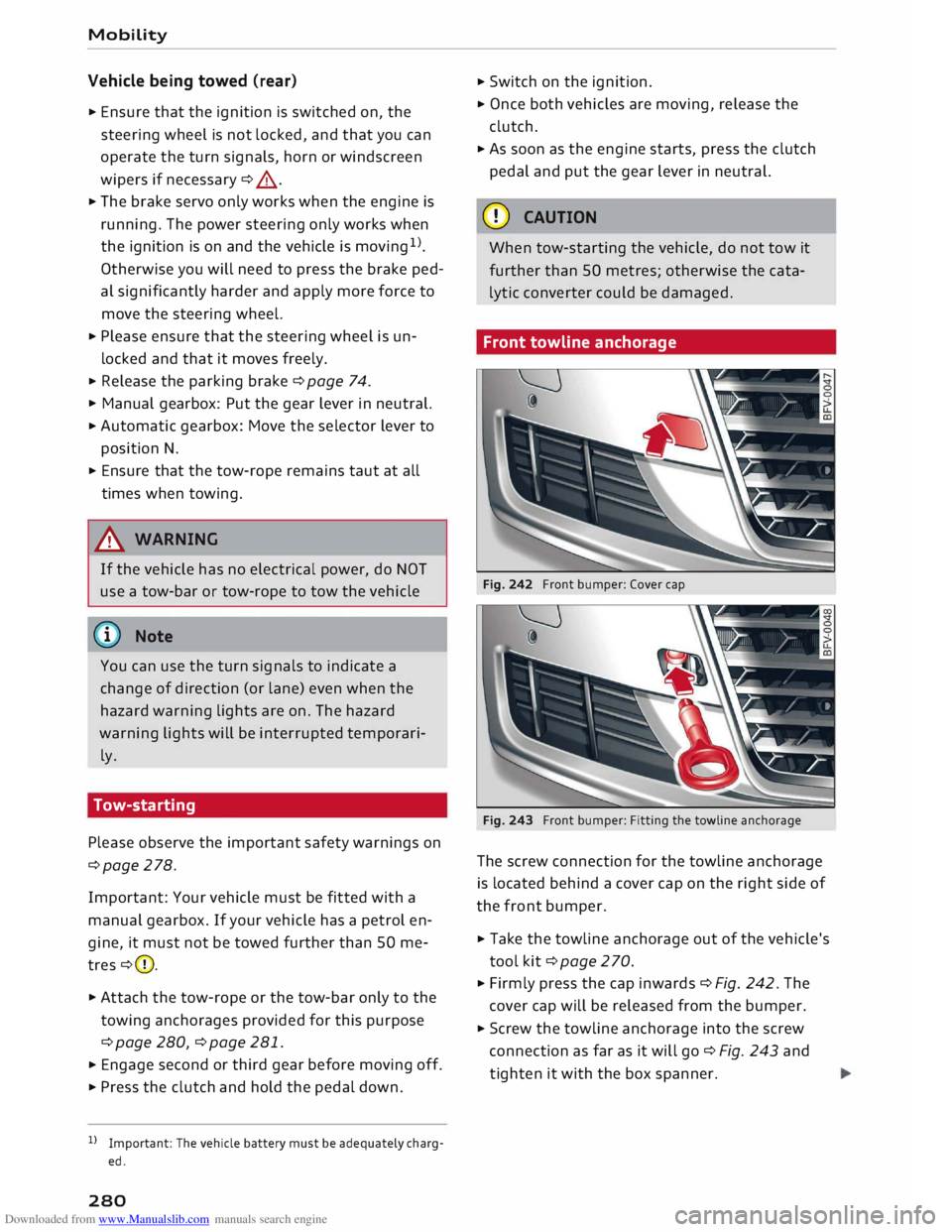
Front towline anchorage
Fig. 242 Front bumper: Cover cap
Fig. 243 Front bumper: Fitting the towline anchorage
The screw connection for the towline anchorage
is located behind a cover cap on the right side of
the front bumper.
� Take the towline anchorage out of the vehicle's
tool kit¢ page 2 70.
� Firmly press the cap inwards ¢ Fig. 242. The
cover cap will be released from the bumper.
� Screw the towline anchorage into the screw
connection as far as it will go¢ Fig. 243 and
tighten it with the box spanner.
Page 285 of 306
Downloaded from www.Manualslib.com manuals search engine 0
N
,.....
N
......
0
,.....
Vl
CX) &,
WARNING
Never attempt to repair a fuse or replace a
blown fuse by fitting a fuse with a higher am
pere rating. This could damage the electrical
system -risk of fire!
CD CAUTION
If a newly replaced fuse blows again after a
short time, the electrical system must be
checked by a qualified workshop as soon as
possible.
@ Note
- Unassigned fuse locations are not shown in
the tables below.
- Some of the items of equipment listed in
the tables below are only fitted on certain
models or are optional extras.
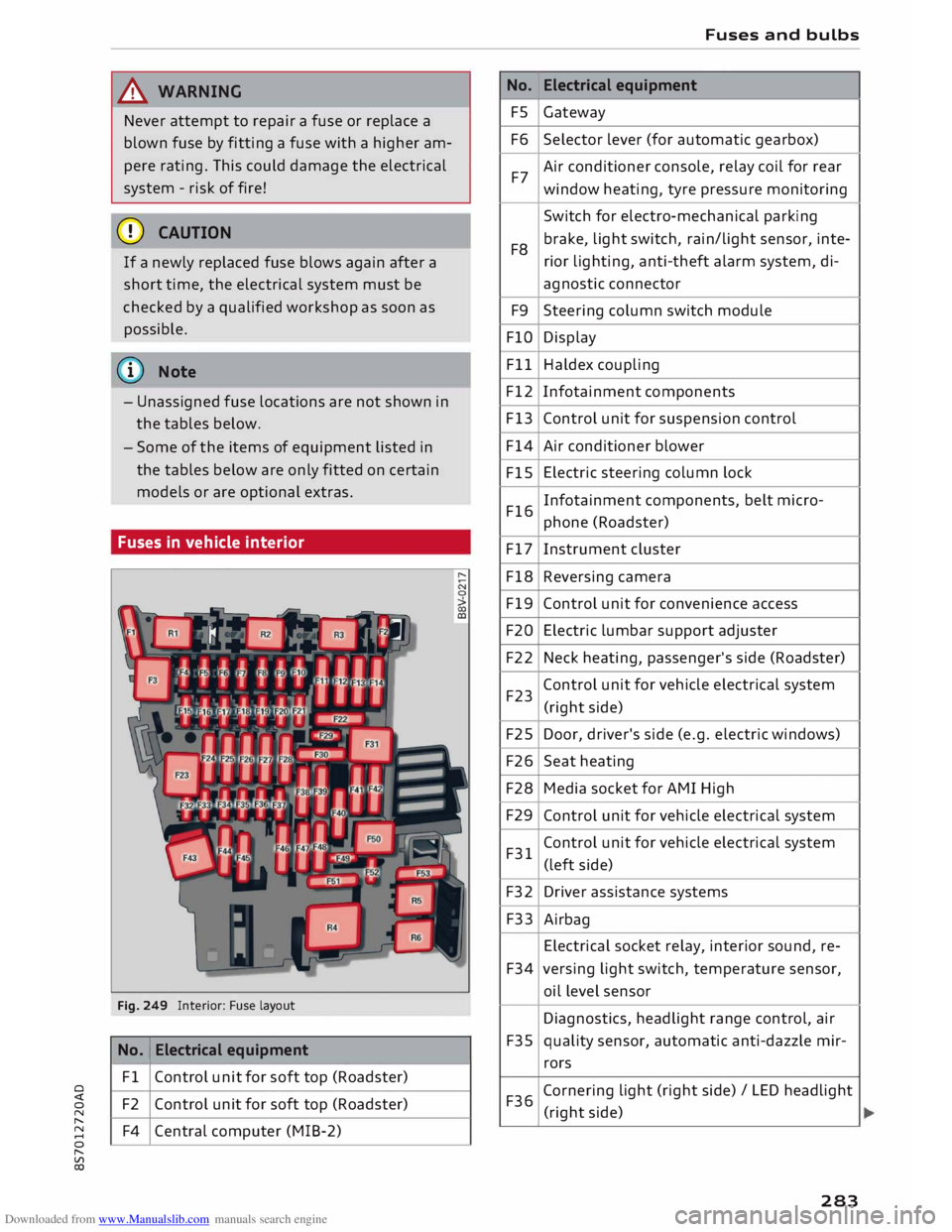
Fuses in vehicle interior
Fig. 249 Interior: Fuse layout
No. 1
Electrical equipment
Fl Control unit for soft top (Roadster)
F2 Control unit for soft top (Roadster)
F4 Central computer (MIB-2) No.
FS
F6
F7
F8 F9
FlO
Fll
F12
F13
F14
FlS
F16
F17
F18
F19
F20
F22
F23
F25
F26
F28
F29
F31
F32
F33
F34
F35
F36 Fuses
and bulbs
Electrical equipment
Gateway
Selector lever (for automatic gearbox)
Air conditioner console, relay coil for rear
window heating, tyre pressure monitoring
Switch for electro-mechanical parking
brake, light switch, rain/light sensor, inte-
rior lighting, anti-theft alarm system, di-
agnostic connector
Steering column switch module
Display
Haldex coupling
Infotainment components
Control unit for suspension control
Air conditioner blower
Electric steering column lock
Infotainment components, belt micro-
phone (Roadster)
Instrument cluster
Reversing camera
Control unit for convenience access
Electric lumbar support adjuster
Neck heating, passenger's side (Roadster)
Control unit for vehicle electrical system
(right side)
Door, driver's side (e.g. electric windows)
Seat heating
Media socket for AMI High
Control unit for vehicle electrical system
Control unit for vehicle electrical system
(left side)
Driver assistance systems
Airbag
Electrical socket relay, interior sound, re-
versing light switch, temperature sensor,
oil level sensor
Diagnostics, headlight range control, air
quality sensor, automatic anti-dazzle mir-
rors
Cornering light (right side)/ LED headlight
(right side)
283
Page 286 of 306
Downloaded from www.Manualslib.com manuals search engine Fuses
and bulbs
No. Electrical
equipment
F37 Cornering
light (left side) / LED headlight
(left side)
F38 Engine control unit, ESC control unit
F39 Door,
passenger's side (e.g. electric win-
dows)
F40 Cigarette lighter, electrical sockets
F41 SCR relay and delivery unit
F42 Central locking system
F43 On-board computer
F45 Electrically adjustable seat (driver's side)
F46 Neck heating, driver's side (Roadster)
F49 Starter, clutch sensor
F53 Rear window heating
The seats with electric adjustment* are protected
by circuit breakers. These reset automatically af
ter a few seconds when the overload has been
corrected.
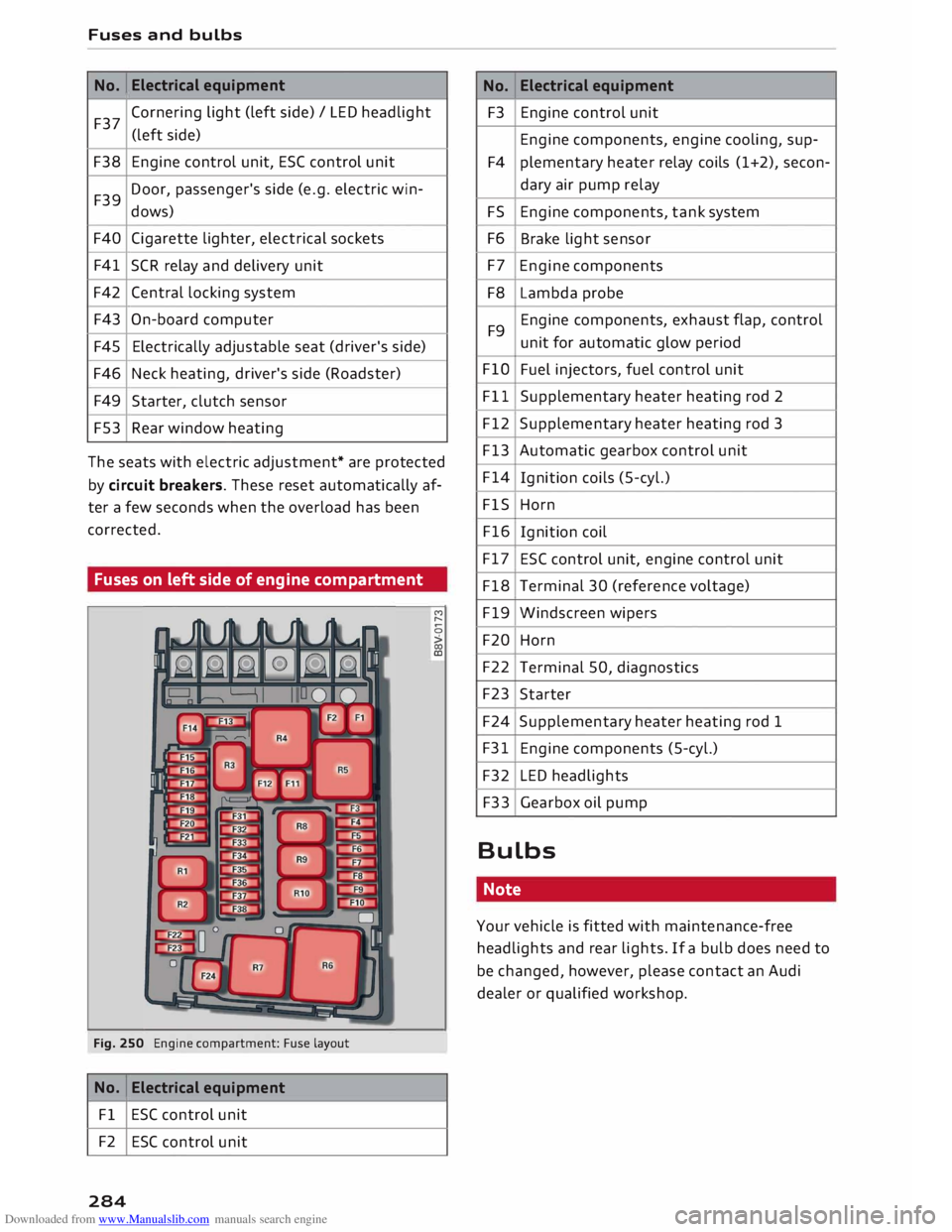
Fuses on left side of engine compartment
Fig. 250 Engine compartment: Fuse layout
No. Electrical
equipment
Fl ESC control unit
F2 ESC control unit
284 M
r--
0
> 00
ID No.
Electrical
equipment
F3 Engine control unit
Engine components, engine cooling, sup-
F4 plementary
heater relay coils (1+2), secon-
dary air pump relay
FS Engine components, tank system
F6 Brake light sensor
F7 Engine components
F8 Lambda probe
F9 Engine components,
exhaust flap, control
unit for automatic glow period
FlO Fuel injectors, fuel control unit
Fll Supplementary heater heating rod 2
F12 Supplementary heater heating rod 3
F13 Automatic gearbox control unit
F14 Ignition coils (5-cyl.)
FlS Horn
F16 Ignition coil
F17 ESC control unit, engine control unit
F18 Terminal 30 (reference voltage)
F19 Windscreen wipers
F20 Horn
F22 Terminal 50, diagnostics
F23 Starter
F24 Supplementary heater heating rod 1
F31 Engine components (5-cyl.)
F32 LED headlights
F33 Gearbox oil pump
Bulbs Note
Your vehicle is fitted with maintenance-free
headlights and rear lights. If a bulb does need to
be changed, however, please contact an Audi
dealer or qualified workshop.