park assist AUDI TT ROADSTER 2018 Owners Manual
[x] Cancel search | Manufacturer: AUDI, Model Year: 2018, Model line: TT ROADSTER, Model: AUDI TT ROADSTER 2018Pages: 310, PDF Size: 46.95 MB
Page 4 of 310
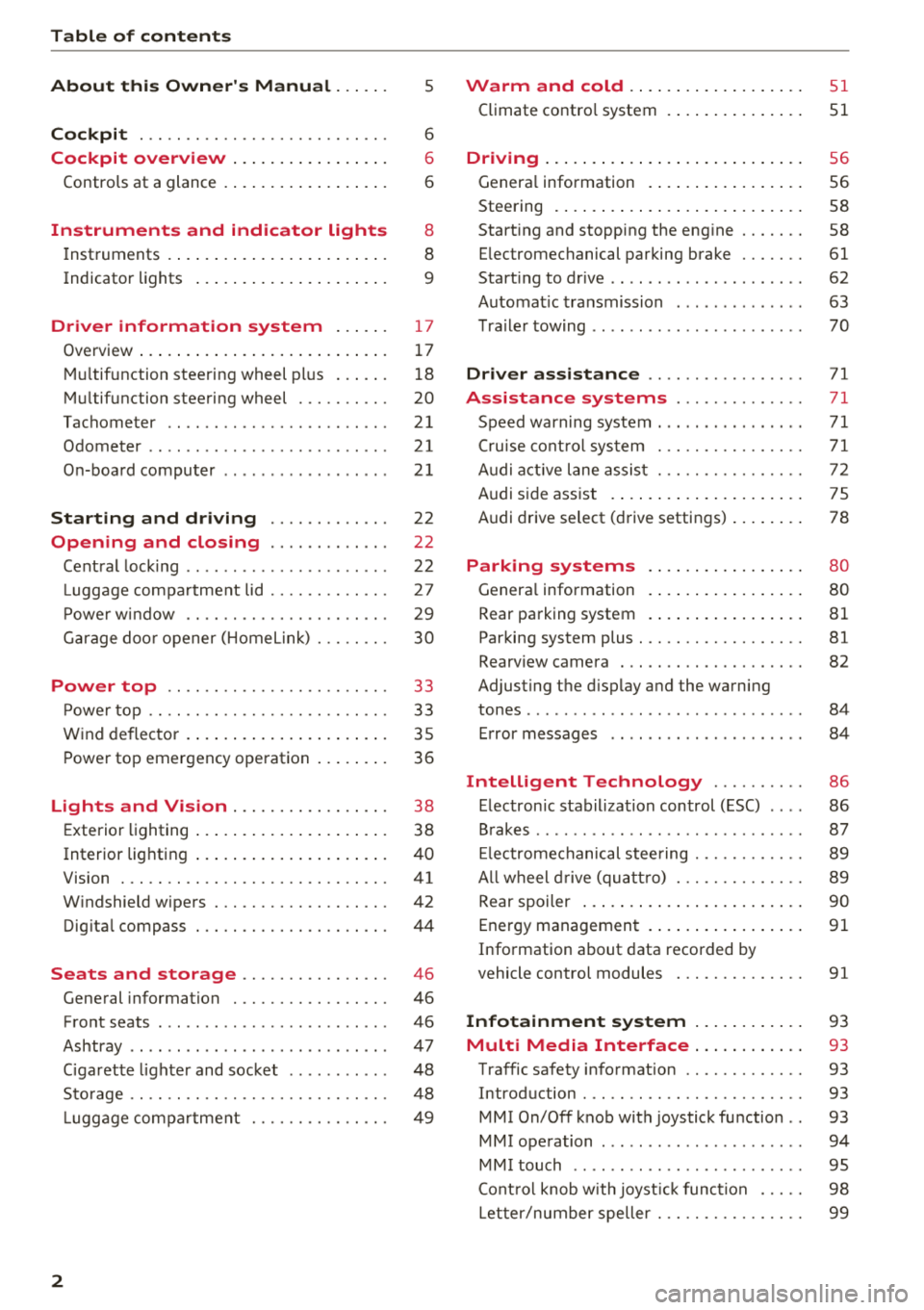
Table of contents
About this Owner's Manual. . . . . .
5
Cockpit . . . . . . . . . . . . . . . . . . . . . . . . . . . 6
Cockpit overview . . . . . . . . . . . . . . . . . 6
Controls at a glance . . . . . . . . . . . . . . . . . . 6
Instruments and indicator lights 8
Instruments . . . . . . . . . . . . . . . . . . . . . . . . 8
Indicato r lights . . . . . . . . . . . . . . . . . . . . . 9
Driver information system . . . . . . 17
Ove rview . . . . . . . . . . . . . . . . . . . . . . . . . . . 1 7
Mul tifunction stee ring wheel pl us . . . . . . 1 8
M ultifunction steering wheel . . . . . . . . . . 20
Tachometer . . . . . . . . . . . . . . . . . . . . . . . .
21
Odometer . . . . . . . . . . . . . . . . . . . . . . . . . . 21
On-boa rd computer . . . . . . . . . . . . . . . . . . 2 1
Starting and driving . . . . . . . . . . . . . 22
Opening and closing . . . . . . . . . . . . . 22
Cent ral lock ing . . . . . . . . . . . . . . . . . . . . . .
22
Luggage compa rtment lid . . . . . . . . . . . . . 27
P owe r w indow . . . . . . . . . . . . . . . . . . . . . . 29
G arage doo r opener (Home link) . . . . . . . . 30
Power top . . . . . . . . . . . . . . . . . . . . . . . . 3 3
P owe r top . . . . . . . . . . . . . . . . . . . . . . . . . . 33
W ind deflector . . . . . . . . . . . . . . . . . . . . . . 35
P ower top emergency ope ration . . . . . . . . 36
Lights and Vision . . . . . . . . . . . . . . . . . 3 8
E xte rior lighting . . . . . . . . . . . . . . . . . . . . . 38
Interior lighting . . . . . . . . . . . . . . . . . . . . . 40
V1s1on . . . . . . . . . . . . . . . . . . . . . . . . . . . . .
41
W indshield wipers . . . . . . . . . . . . . . . . . . . 42
Dig ita l compass . . . . . . . . . . . . . . . . . . . . . 44
Seats and storage . . . . . . . . . . . . . . . . 46
General information . . . . . . . . . . . . . . . . . 46
Front seats . . . . . . . . . . . . . . . . . . . . . . . . . 46
Ashtray . . . . . . . . . . . . . . . . . . . . . . . . . . . . 47
Ciga rette lighte r and socket . . . . . . . . . . . 48
Sto rage . . . . . . . . . . . . . . . . . . . . . . . . . . . . 48
L ugg age compa rtment . . . . . . . . . . . . . . . 49
2
Warm and cold .... ... .. ..... ... . .
Climate contro l system . .. .. ..... ... . .
Driving . .. .. .. .... .. ... .. ..... ... . .
Genera l information . .... .. ..... ... . .
Steering . ... .. .... .. ... .. ..... ... . .
Start ing and stopping the eng ine ..... . .
E lectromechanical par king brake ..... . .
Start ing to drive .. .. .. ... .. ..... ... . .
Automat ic transmission ............. .
T ra ile r towing .. .. .. .. .............. .
Driver assi stance .. .............. .
Assistance systems ............. .
Speed warning system .... .. ..... ... . .
Cru ise cont ro l sys tem
A udi active l ane assist . ............. . .
Audi s ide ass ist . ..... ... .. ..... ... . .
Audi drive select (drive settings) ... ... . .
Parking systems
Genera l information
Rear parking system
Par king system plus . .. ............. . .
Rearv iew camera . .. .. ............. . .
Adjusting the d isplay and the warning
51
51
56
56
58
58
61
62
63
70
71
71
71
71
72
75
78
80
80
81
81
82
tones ........ ... .. .. ............... 84
Error messages . . . . . . . . . . . . . . . . . . . . . 84
Intelligent Technology . . . . . . . . . . 86
E lectron ic stabilization control (ESC) . . . . 86
B rakes . . . . . . . . . . . . . . . . . . . . . . . . . . . . . 87
El ec tromechanical steering . . . . . . . . . . . . 89
A ll w heel drive (quatt ro) . . . . . . . . . . . . . . 89
Rear spoiler . . . . . . . . . . . . . . . . . . . . . . . . 90
Energy management . . . . . . . . . . . . . . . . .
91
Information about data recorded by
vehicle control modules . . . . . . . . . . . . . .
91
Infotainment system . . . . . . . . . . . . 93
Multi Media Interface . . . . . . . . . . . . 93
Traffic safety info rmation . . . . . . . . . . . . . 93
Introduction . . . . . . . . . . . . . . . . . . . . . . . . 93
MMI On/Off knob with joystick function . . 93
MMI operation . . . . . . . . . . . . . . . . . . . . . . 94
MM I touch . . . . . . . . . . . . . . . . . . . . . . . . . 95
Cont ro l knob w ith joyst ick function . . . . . 98
Letter/number speller . . . . . . . . . . . . . . . . 99
Page 9 of 310
Cl 00 .-< N r-N .-< 0 r-Vl 00
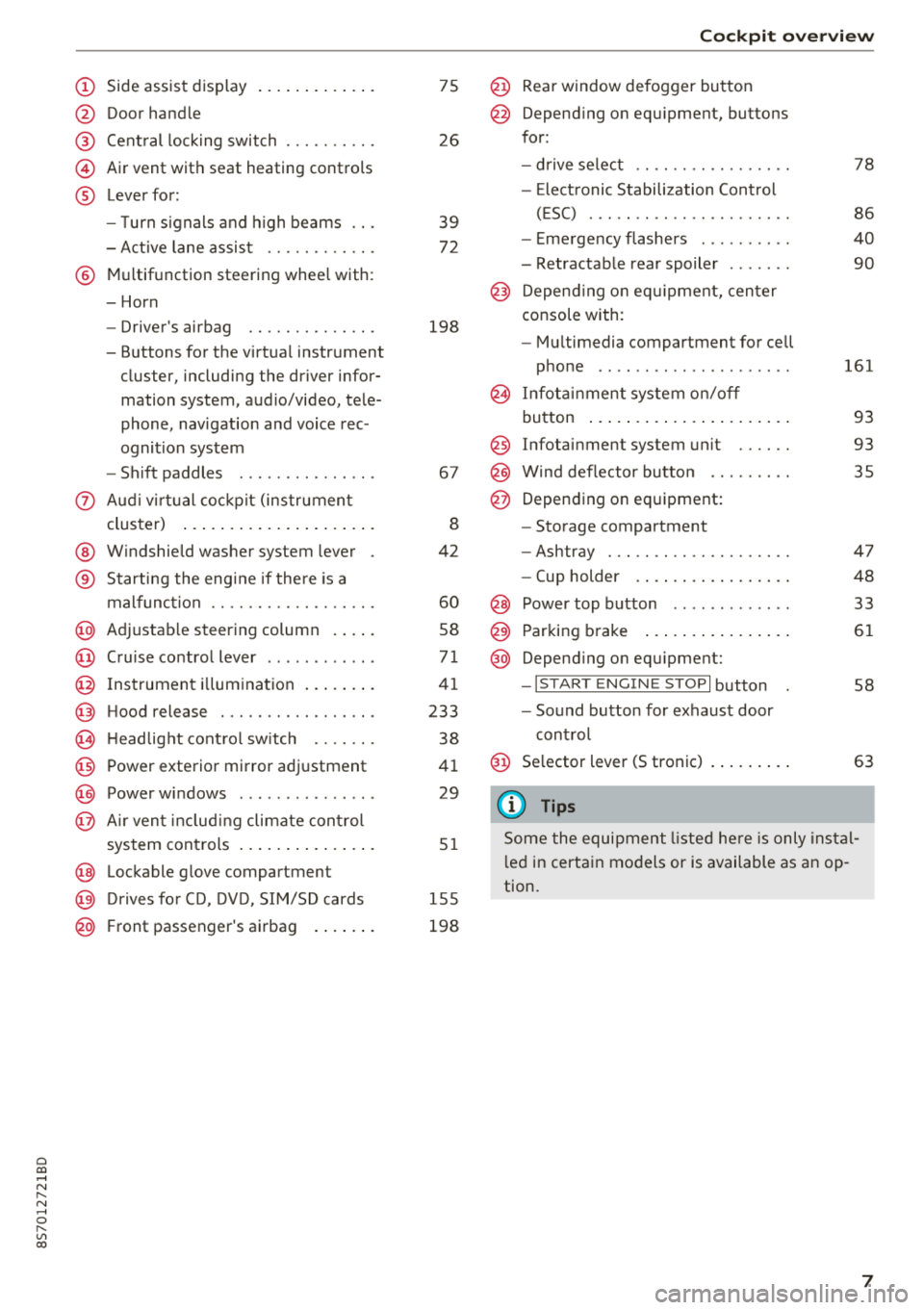
(D Side assist disp lay ..... ... .. .. .
@ Door handle
@ Cent ral locking swit ch ..... .. .. .
@ Air vent with seat heating controls
® Lever for:
- T urn s ignals and high beams
- Act ive lane assist ....... .. .. .
® M ultifunction steering whee l with :
- Horn
- Driver's airbag ........... .. .
- Buttons for the virtua l instr ument
cluster, including the dr iver infor
mation system, audio/video, tele
phone, navigation and voice rec
ognit ion system
- Shift paddles ............. . .
(J) A ud i v irtu al coc kp it (instrument
cluster) ... ... .. ..... ... .. .. .
@ W indshield washer system lever
® Starting the eng ine if the re is a
malfunc tion ............... .. .
@ Ad justable steer ing column . ... .
@ Cruise contro l lever .......... . .
@ Ins trumen t il lum ination ... .. .. .
@ Hood release .............. .. .
€3) H eadlight cont ro l sw itch .... .. .
@ Power exterio r mirror adj ustment
@) Power windows .............. .
@ A ir ven t incl uding climate con trol
system controls .. ..... ... .. .. .
@ Lockable g love compartment
@) D rives fo r CD, DV D, SIM/SD cards
@ Front passenger's ai rbag . ... .. .
75
26
39
7 2
198
67
8
42
60
58
71
41
233
38
4 1
29
5 1
1 55
198
Coc kpit o ver view
@ Rear window defogger button
@ Depend ing on equ ipment, buttons
for:
- drive select .. .............. .
- Elect ronic Stabili zation Cont rol
( E SC) . .. .. .. .............. .
- E me rge ncy flashers ......... .
- Retractable rear spoiler ...... .
@ Depending o n eq uipment, cen ter
console with:
- Mu ltimedia compartment for cell
p hone .. .. .. .. ............ .
@ In fota inment system o n/off
bu tton ... .... .. ... .. ..... .. .
@ Infotai nment system unit ..... .
@ Wind deflector butto n ........ .
@ Depending on eq uipment:
- Storage compartment
- Ashtray . .. .. .............. .
- Cup holder .... ... .. ..... .. .
@ Power top b utton ............ .
@ Parking b rake ... ... .. ..... .. .
@ Depend ing on eq uipment:
-I S TAR T ENGI NE STOP I button
- So und button for exhaust door
cont rol
@ Se lector lever (S tronic)
(D Tips
78
86
40
90
161
93
93 35
47
48
33
61
58
63
Some the equi pment listed he re is only ins tal
l e d in certa in models or is available as an op
tion.
7
Page 12 of 310
Instruments and indicator lights
10
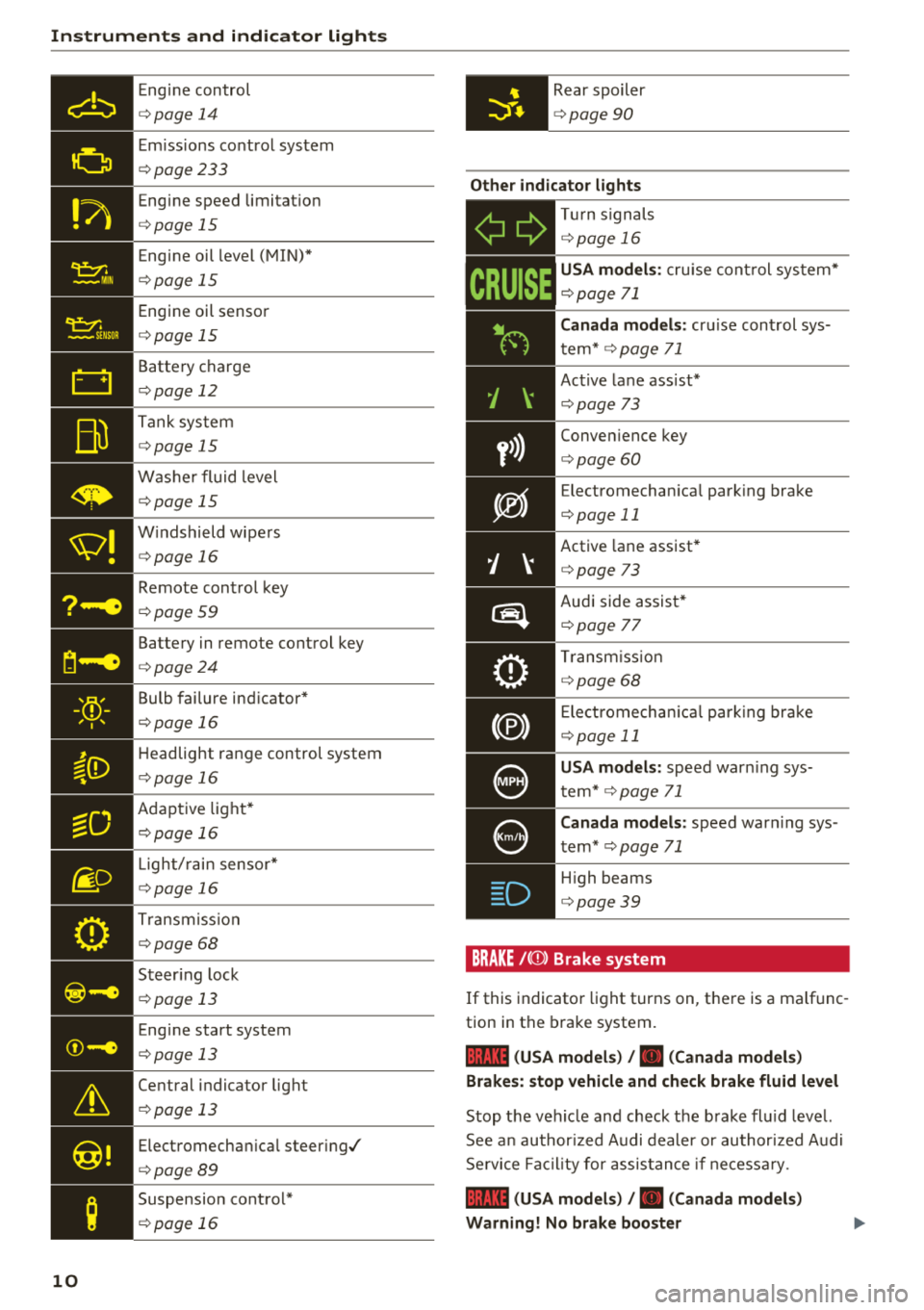
Eng ine con trol
¢ page 14
Em iss ions co ntrol system
¢ page233
Eng ine speed limitat io n
¢ page 15
Eng ine oil level ( MIN) *
¢page 15
Engi ne oil senso r
¢page 15
Batte ry charge
¢ page 12
Tank sys tem
¢page 15
W ash er fluid level
¢page 15
W indshield wipe rs
¢ page 16
Remote con trol key
¢ page 59
Batte ry in remote control key
¢ page 24
Bulb failure ind icator*
¢page 1 6
H eadlight range control system
¢ pag e 16
Adaptive lig ht*
¢ page 16
Light/ rain sensor *
¢page 16
Trans miss io n
¢page 68
S teer ing lock
¢ page 13
Eng ine start system
¢ page 13
Ce ntral indicator light
¢ page 13
Elect romecha nica l steer ing/
¢ page8 9
Suspension cont rol*
¢ page 16
Rear spoiler
¢page 90
Other indicator lights
-Ii
ii T
ur n sign als
¢ page 16
CRUISE
USA models : cru ise co ntrol system*
¢ page 71
Canada models: cr uise con trol sys
t em*
¢ page 71
- Ac
tive lane ass ist*
¢ page 73
Conve nience key
¢ page 60
Electromechan ica l park ing bra ke
¢page 11
Active lane assist *
¢page 73
Audi side assist *
r=;, page 7 7
Tra nsm iss io n
c:::> page 68
Ele ct romecha nical par king brak e
¢page 11
USA models: speed war ning sys
t em *
¢page 71
Canada models: speed war ning sys
t em *
¢page 71
- H
igh beams
. ¢ page 39
BRAKE/{©) Brake system
If this indicato r light turns on, t here is a malf unc
tion in the brake system.
1111 (USA models) / . (Canada models)
Brakes : stop vehicle and check brake fluid level
Stop t he veh icle and check t he b rake fl uid leve l.
See a n au thor ized Audi de aler or au thor ized A udi
Se rvi ce Faci lity for assis tan ce if n ecess ary.
1111 (USA models) / . (Canada models)
Warning! No brake booster
Page 13 of 310
Cl 00 .-< N r-N .-< 0 r-Vl 00
If brake assist (brake booster) is not working, you
have to use much more force when braking the
vehicle. See an authorized Audi dealer or author
i zed Audi Service Facility for assistance.
1111 (USA models) /. (Canada models)
Brakes: malfunction! Please stop vehicle safely
If the ABS indicator light rJ]) (USA models) /
¢e'A (Canada models), the ESC indicator light GJ.
and the brake system indicator light 1111 (USA
models)/ . (Canada models) turn on and this
message appears, then the ABS, ESC and braking
distribution are
malfunctioning¢ &.
Drive to an authorized Audi dealer or authorized
Audi Service Facility immediately to have the
malfunction corrected
¢ & .
1111 (USA models) /. (Canada models)
Parking brake: malfunction! Safely stop vehicle.
See owner's manual
- If the indicator light and the message appear
when the vehicle is stationary or after switch
ing the ignition on,
check if you can release the
parking brake. If you cannot release the park
ing brake, see an authorized Audi dealer or au
thorized Audi Service Facility. If you can release
the parking brake and the message still ap pears, see an authorized Audi dealer or author
ized Audi Service Facility immediately to have
the malfunction corrected.
- If the indicator light and message appear
while
driving,
the hill start assist or emergency brak
ing function may be malfunctioning. It may not
be possible to set the parking brake or release
it once it has been set. Do not park your vehicle
on hills. See an authorized Audi dealer or au
thorized Audi Service Facility for assistance.
(USA models): if the
1111 and Ei] indicator
lights turn on together, have the brake system
checked immediately by an authorized Audi deal
er or authorized Audi Service Facility
¢page 14.
There is also a warning tone when the lights turn
on.
Instruments and indicator lights
A WARNING
-- Read and follow the warnings in
¢ page 233, Working in the engine com
partment
before opening the hood and
checking the brake fluid level.
- If the brake system indicator light does not
turn off or it turns on while driving, the
brake fluid level in the reservoir is too low,
and this increases the risk of an accident .
Stop the vehicle and do not continue driv
ing. See an authorized Audi dealer or au
thorized Audi Service Facility for assistance.
- If the brake system indicator light turns on
together with the ABS and ESC indicator
lights, the ABS/ESC regulating function may
be malfunctioning. Functions that stabilize
the vehicle are no longer available. This
could cause the rear of the vehicle to
swerve, which increases the risk that the ve
hicle will slide. Drive carefully to the nearest
authorized Audi dealer or authorized Audi
Service Facility and have the malfunction
corrected.
PARK/(®)f 'i®5, Electromechanical parking
brake
If the -(USA models) / . (Canada models)
indicator light turns on, the parking brake was
set.
-(USA models) / . (Canada models) Park
ing brake: caution! Vehicle parked too steep
If the indicator light blinks and the message ap
pears, there is not enough braking power to se
cure the vehicle. The brakes have overheated. The
vehicle could roll away even on a small incline.
fcdA Parking brake: malfunction! Please contact
Service
There is a malfunction in the parking brake. Drive
to an authorized Audi dealer or authorized Audi
Service Facility immediately to have the malfunc
tion corrected.
!il];!J:l;H3~ (USA models) / [iJ (Canada models)
Parking brake: caution! Vehicle parked too
steep
11
Page 14 of 310
Instruments and indicator lights
If th e indicator lig ht blinks and t he message ap
pea rs, there is not eno ugh bra king power to se
cure the vehicle . The brakes have overheated. The
ve hicle co uld ro ll away eve n on a small incline .
llJ;l:l:);J;H~ (USA models) / Ii] (Canada models)
Parking brake: applied
If thi s m essage appears, p re ss the bra ke peda l
fir st and t hen release the p arking br ake if neces
sary .
(D Tips
For additional in format io n on t he parkin g
bra ke, see
q page 61.
_}_ Cooling system
• Turn off engine and check coolant level.
Th e co olan t leve l is too low .
Do not cont inue drivi ng a nd switch the eng ine
off. Check the coolan t leve l
q page 239 .
-If the coolant leve l is too low, add coo lant
q poge 240 . Onl y cont inue driv ing once the in
dicator light t urns off .
• Coolant temperature: too high. Let engine
run with vehicle stationary
L et the eng ine run at id le for a few minutes to
coo l off, unt il the indicator light turns off .
- I f th e indic ator li ght d oes no t turn off, do no t
contin ue d riving the vehicle . See an au thori zed
Audi dealer or authorized A udi Se rvi ce Fac ility
fo r assistance .
A WARNING
-Never open t he hood if you can see o r hear
steam o r co olant esca ping from the eng ine
compartment. This inc reases t he risk of
bur ns. Wa it unti l you no long er see or h ea r
st eam o r coolan t esca ping .
- The eng ine compartmen t in any ve hicle can
b e a dangero us area. S to p the eng ine and
allow it to coo l before wo rking in the e ngine
compa rtm ent. A lw ays f ollow the in for ma
tion fo un d in
q page 233, Wo rking in the
engine comportment .
12
@ Note
Do not conti nue driv ing if the . indicato r
ligh t tu rn s on as this increases the risk of en
g ine damage.
9=7: Engine oil pressure
• Turn off engine. Oil pressure too low
Stop t he e ngine and do not co nti nu e d riving .
Check the eng ine oi l level
q page 237.
- If the en gine o il level is too low, add engi ne oil
q poge 237. Only continue driving once the in
dicator light turns off .
- If the eng ine o il level is co rre ct an d t he indic a
t o r lig ht still bli nks, t urn the engine o ff and do
not continue dr iving. See a n author ized A udi
dea le r or a uth orized Audi Serv ice Facility fo r as
sistance.
(D Tips
The o il press ure wa rning is not an oil leve l in
d icator . A lways check t he oil leve l regula rly.
E::3 Generator/vehicle battery
• Electric system : malfunction! Battery is not
being charged
There is a ma lf u nction in the a lternato r o r the ve
hicle e lectrica l system.
Dr ive to an au thor ized A udi d ealer or au tho rize d
Audi Se rvice Fac ility immed iate ly . T urn off a ll un
necessary e lect rical eq uipment because it will
dra in the battery. See an a uthorized Audi dea ler
or a uthori zed Aud i Serv ice Facility if the battery
c h arge level is too low.
(•) Electrical system: low battery charge. Bat
tery will be charged while driving
The s ta rting ability may be imp aired.
If this m essage turns off af ter a litt le whi le, t he
vehicle battery ch arge d enoug h while d riv in g.
If the message does not t urn off , have an autho r
i zed Audi dealer or author ized A udi Se rvice Facili
ty repair the ma lfu nction .
Page 25 of 310
Replacing a key
If a key is lost, see an authorized Audi dealer or
authorized Audi Service Facility. Have
this key de
activated.
It is important to bring all keys with
you. If a key is lost, you should report it to your
insurance company.
Number of keys
You can check the number of keys ass igned to
your vehicle in the Infotainment system . To do
this, select the
I MENU I button > Vehicle > left
control button
> Service & checks > Vehicle in ·
formation .
This way, you can make sure that you
have all the keys when purchasing a used vehicle .
Electronic immobilizer
The immobilizer prevents unautho rized use of
the vehicle .
Unde r certain circumstances, the vehicle may not
be able to start if there is a remote contro l key
from a different vehicle manufacturer on the key
chain .
Data in the master key
When driving , service and maintenance- relevant
data is continuously stored in your remote con
trol key . Your Audi service adviso r can read out
this data and te ll you about the work your vehicle
needs. This applies also to veh icles with a con
venience key *.
Personal convenience settings
If two people use one vehicle, it is recommended
that each person always uses "their own" master
key. When the ignition is turned
off or when the
ve hicle is locked, persona l convenience settings
for the following systems are stored and as
signed to the remote master key .
- Climate control system
- Parking aid*
- Active lane assist*
- Side ass ist*
- Drive select
a The stored settings are automatically recalled co
;:::: when you unlock the vehicle, open the doors or ,....
~ turn on the ignition. 0 ,....
Vl co
Opening and closing
A WARNING
If you leave the vehicle, switch the ignition off
and take the vehicle key w ith you. This applies
particularly when children remain in the vehi
cle . Otherwise the child ren cou ld start the en
g ine or operate electrical equ ipment such as
power windows.
(D Note
Protect the remote control key against high
temperatures and direct sunl ight.
(D Tips
- The operation of the remote control key can
be temporarily disrupted by interference
from transmitters near the vehicle working
in the same frequency range (such as a cell
phone or radio equipment). Always check if
yo ur vehicle is locked!
- For an explanat ion on conformity with the
FCC regulatio ns in the United States and the
Industry Canada regulations, see
¢page 293.
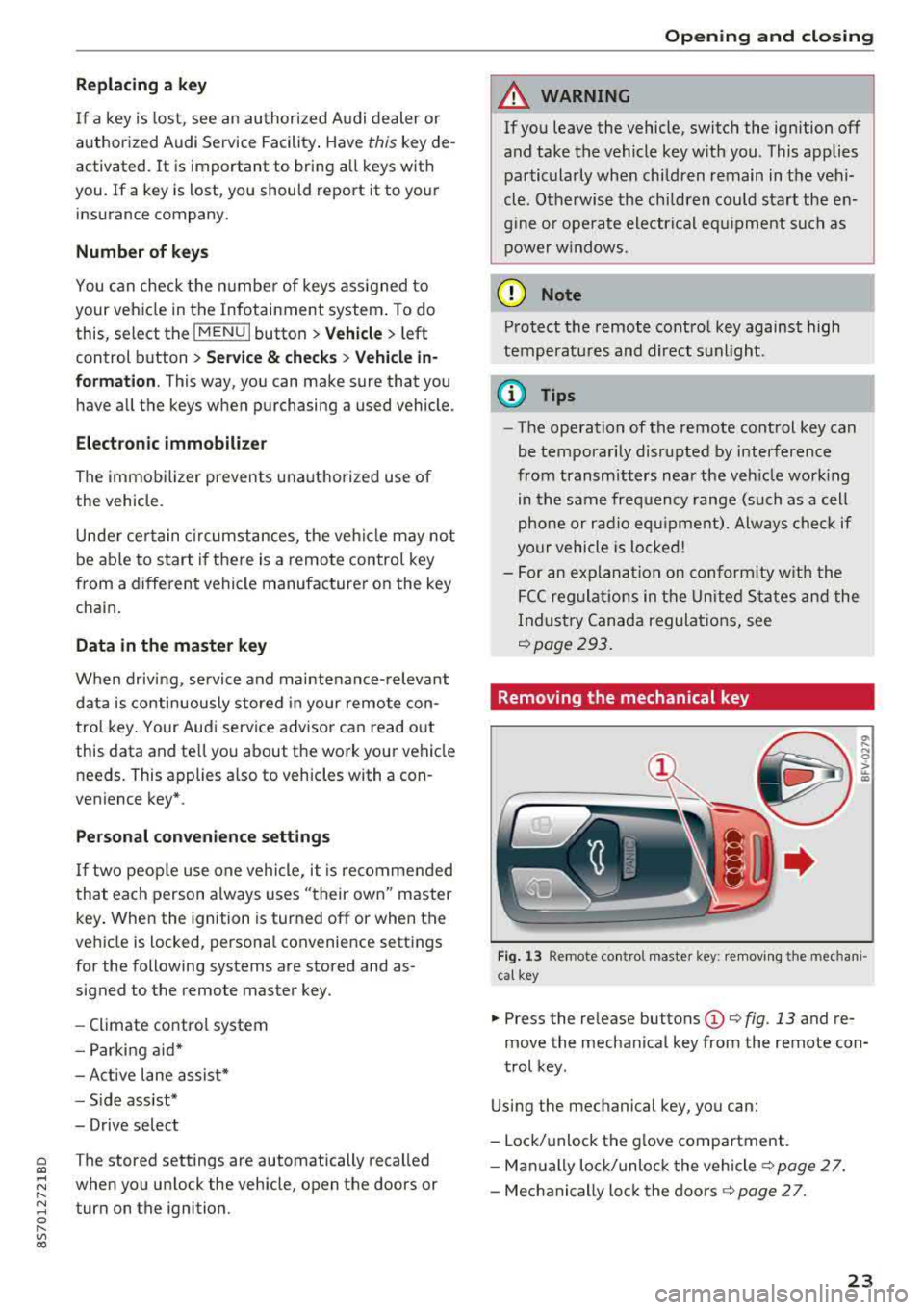
Removing the mechanical key
Fig. 13 Remote co ntro l master key : removing the mechan i
cal key
.,. Press the re lease buttons (D ¢ fig . 13 and re
move the mechanical key from the remote con
trol key.
Using the mechanical key, you can:
- Lock/unlock the glove compartment.
- Manually lock/unloc k the vehicle s>
page 2 7.
- Mechanically loc k the doors s>
page 2 7.
23
Page 38 of 310
Power top
Power top emergency
operation
General information
The power top con be closed manually if there is
a malfunction .
• Set the parking brake .
• Open all windows.
• Switch the ignition off .
Only close the power top manual ly in an emer
gency. Have a second person assist. Drive to an
author ized Audi dealer or author ized Audi Se rvice
F aci lity immediately to have the malfunction cor
rected .
A WARNING
-There is a risk of pinching the hands or other
people during all of the power top emergen
cy operation steps.
- Make sure all windows a re lowered during
emergency ope ration.
- Do not reach into the power top supports
or other moving components.
- Never drive when the power top is not locked co rrectly. The wind from driving
cou ld cause the power top to open. This can
result in inj uries and damage to the vehicle.
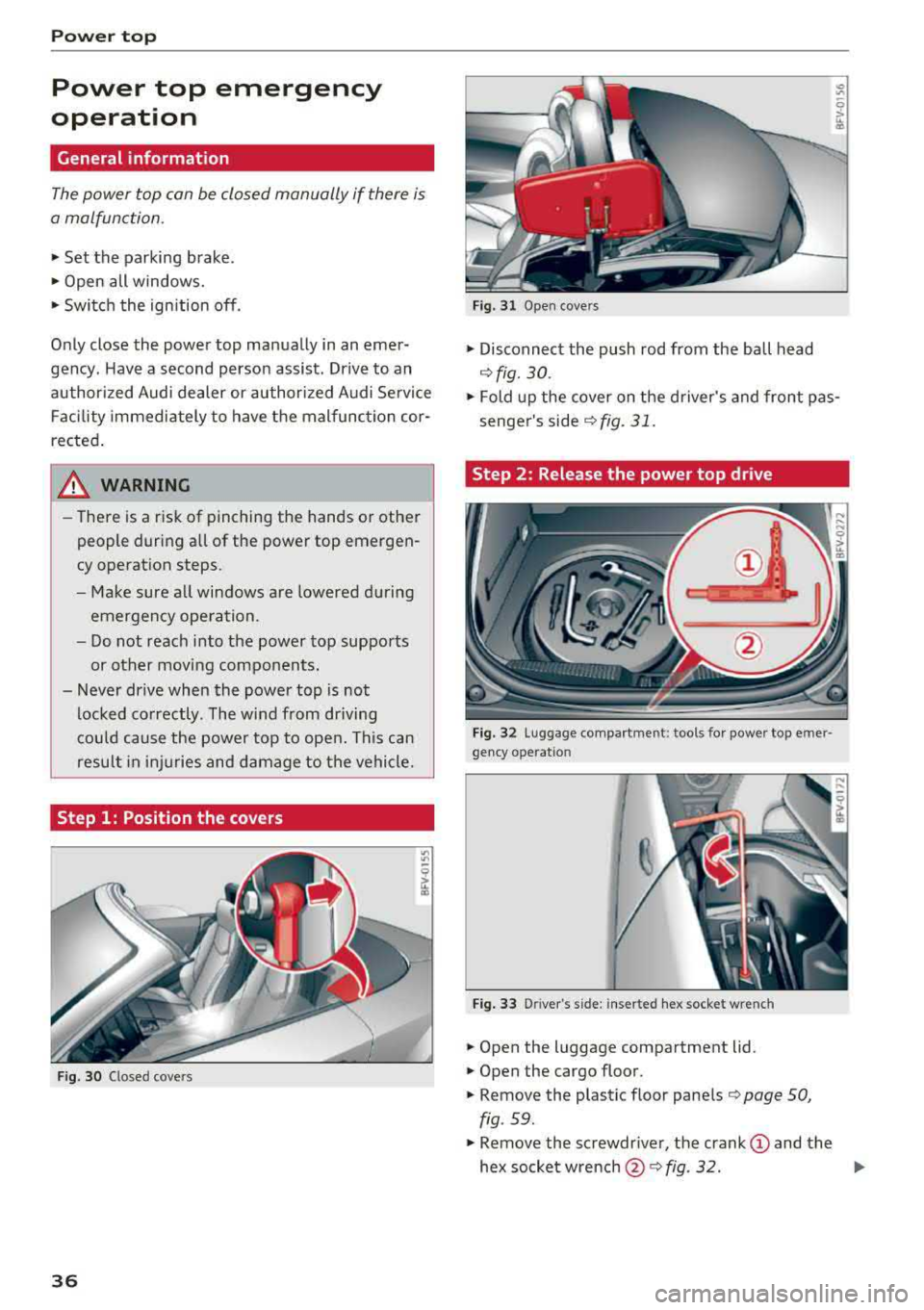
Step 1: Position the covers
Fig. 30 C losed covers
36
Fig. 31 Open cove rs
• Disconnect the push rod from the ball head
~ fig. 30 .
• Fold up the cover on the driver's and front pas
senger's
side ~ fig. 31.
Step 2 : Release the power top drive
Fig. 32 Luggage compar tment: tools for power top e mer ·
gency ope ratio n
Fig. 33 D river 's s ide: inserted hex socket w re nch
• Open the luggage compartment lid.
• Open the cargo floor.
• Remove the plastic floor panels ¢ page 50,
fig . 59.
• Remove the screwdr iver, the crank (D and the
hex socket
w rench @~ fig. 32. IJI>
Page 64 of 310
Drivin g
- If the power sup ply fai ls, you cannot set the
parking brake if it is release d. In this case,
park the vehicle on level ground an d secure
it by placing the selector lever in the P posi
t ion . See an authorized Aud i d ealer or au
thorized Aud i Serv ice Facility for ass istance.
- If you leave the veh icle, switch the ignit ion
off and take the vehicle key w ith you . This
applies particularly when children remain in
the vehicle. Othe rwise children could sta rt
the engine, re lease the par king brake o r op
erate electrical equipment such as power
windows, which increases the risk of an acci
dent.
- No one shou ld remain in the vehicle when it
is locked - especially chi ldren . Locked doors
make it more diff icu lt for emergency work
ers to get into the vehicle, which puts lives
at risk.
(D Tips
When stopping at a traffic signal or stopping in city traffic, you can set the parking brake
manually. The vehicle does not have to be
he ld w ith the brake pedal. The parking brake
elim inates the tendency to creep when a se
lector lever pos ition is engaged. As soon as
you press the accelerator pedal, the park ing
brake releases automat ica lly and your vehicle
s tarts to move
~ page 62.
(D Tips
- Occasiona l noises when the par king b rake is
set and re leased a re normal and a re not a
cause for con cern.
- T he par king brake goes th ro ugh a se lf-test
cycle at regular intervals when the veh icle is
stoppe d. Any noises associated w ith this a re
no rma l.
- If there is a power fa ilure, the p arking bra ke
will not set if it is re leased, and it will not
release if it is
set~ &.. See an authorized
A udi dealer or authorized Audi Service Fa
cility for ass istance.
62
Starting to drive
Va rious convenience and sa fe ty f unctions may be
available when the vehicle begins driving, de pending on vehicle equipment.
Starting on hills with th e parking brake set
Requireme nt: the d rive r's doo r mus t be closed.
"'To sta rt drivi ng comfortably when on a h ill, set
the parking b rake and beg in driving as usual.
The b raking force of the pa rking brake does not
release automat ic a lly until t he whee ls build up
enoug h driving force .
Starting on hills with hill hold assist
Hill hold assist makes it easier to start on hills .
Requirement: the driver 's door must be closed
and t he engine must be running.
"' To activate hi ll hold assist, press and hold the
brake pedal for severa l seconds. The vehicle
must be in an uphill direct ion of travel.
After re leasing the brake pedal, the braking pow
er is maintained for a brief
moment~ A to pre ·
vent the vehicle from ro lling back when starting.
D ur ing this time, you can easily begin to move
your vehicle.
A WARNING
Applies to: vehicles with hill hold assist
-If you do not beg in dr iving immed iate ly or
t he engine stalls after releasing the bra ke
pedal, your veh icle may beg in to roll back
ward . Press the bra ke peda l or set the park
ing brake immediately.
- The inte lligent technology of hill ho ld assist
cannot ove rcome the limitat ions imposed by
natural phys ica l laws. The increased com fort
offered by hill hold assist should not cause
you to take safety risks .
- Hill hold ass ist cannot hold the vehicle in
place on all hills (for examp le, if the ground
is s lippery or icy).
- To reduce the r is k of an accident, always
make sure the veh icle is situated safely
while stationary .
Page 67 of 310
Cl co .... N ,....
N ...... 0 ,....
Vl co
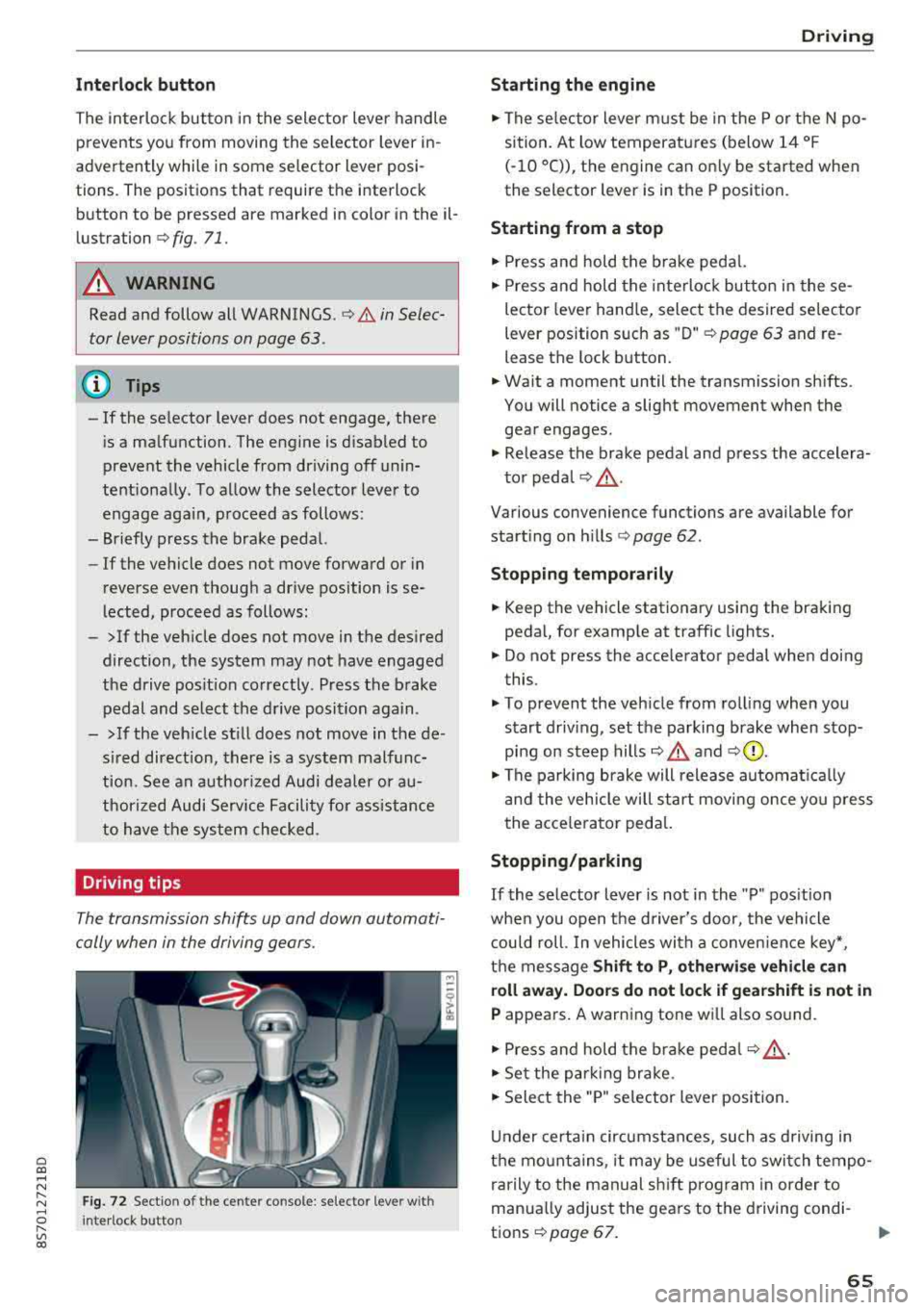
Inte rlock button
The in terlock button in the selector lever handle
prevents you from moving the selector lever in
advertently while in some selector lever posi
tions. The positions that require the interlock
button to be pressed are marked in color in the il
lustration
c:;, fig . 71.
A WARNING
Read and follow all WARNINGS . c;, .&. in Selec
tor lever positions on page 63.
@ Tips
-If the se lector lever does not engage, there
i s a malfunction. The engine is d isabled to
prevent the vehicle from driving off unin
tentiona lly . To allow the selector lever to
engage aga in , proceed as follows:
-Briefly press the brake pedal.
-If the vehicle does not move forward or in
reverse even thoug h a drive position is se
lected, proceed as follows:
-> If the veh icle does not move in the desired
direction, the system may not have engaged
the drive pos it ion correctly. Press the brake
pedal and select the drive position again.
->If the veh icle st ill does not move in the de
s ired direction, there is a system malfunc
tion. See an authorized Audi dea ler or au
thorized Audi Service Facility for assistance
to have the system checked .
Driving tips
The transmission shifts up and down automati
cally when in the driving gears.
F ig. 72 Sectio n of the cente r console: se lecto r leve r w ith
I nte rlock button
D rivi ng
Starting the engine
.,. The se lector lever must be in the P or t he N po
sition. At low temperatures (below 14 °F
(-10 °C)), the engine can on ly be started when
the selector lever is in the P position.
Starting from a stop
.,. Press and hold the brake pedal.
.,. Press and hold the interloc k butto n in these
lector lever hand le, select the desired selecto r
lever position s uch as " D"
c;, page 63 and re
lease the lock b utton.
.,. Wa it a moment until the transmission sh ifts.
You will notice a slight movement when the
gear engages .
.,. Release the brake pedal and press the accelera-
to r peda l
c;, _&..
Various convenience functions are available for
start ing o n hills
¢ page 62.
Stopping t emporarily
.,. Keep the vehicle stationary using the braking
pedal, for examp le at traffic lights.
.,. Do not press the acce lerator pedal when doing
this.
.,. To prevent the veh icle from rolling when you
s tart driv ing, set the parking brake when stop
ping on steep
hills¢ .&. and c;,0.
.,. The pa rking brake will release automat ica lly
and the vehicle will star t movi ng once yo u press
the acce le rator ped al.
Stopping /parking
If
the selector lever is not in the "P" pos ition
whe n you open the d river's door, the vehicle
c ou ld roll. In vehicles wi th a conven ien ce key*,
t h e message
Shift to P, otherwi se vehicle can
roll away. Door s do not lock if gearshift is not in
P appears. A warning tone wi ll also so und .
.,. Press and hold the brake peda l c;, _&. .
.,. Set the park ing br ake .
.,. Sele ct the "P" selector lever position.
U nder certain circumstances, such as d riving in
the mo unta ins, i t may be useful to switch tempo
rarily to the manual sh ift prog ram in order to
manua lly adjust the gears to the d riving condi-
t ions
c;, page 67. .,.
65
Page 70 of 310
Drivin g
The transmission only a llows manual shifting
w hen t he engine spee d is within t he permitted
range.
(D Tips
tiptronic does not work if the transmission is
running in emergency mode .
Kick-down
Kick-down enables maximum acc ele ration .
When you press the accele rato r peda l dow n be
yond the resistance po int, the automatic trans
miss io n downshifts into a lower gea r and the
en
gine utilizes its f ull power, depending on veh icle
speed and engine RPM . It shifts up into the next
h igher gear once the maximum spec ified engine
RPM is reached.
A WARNING
Please note that the wheels could spin on
slick or slippery roads when kick -down is
ac
t ive .
Launch Control Program
-
The Launch Control Program enables maximum
acceleration .
Requirement: the eng ine must be at operating
temperature and the steer ing whee l must not be
turned.
.. With the engine running, p ress th e l~ O FF ! but
ton b riefly one time
ll .
.. Pu ll the selector lever back out of the "D/S" po
s ition briefly to select the "S" position, or press
i t toward the r ight into the tiptron ic posit ion or
select the
D ynamic d riving mode in d rive se
lect* ~ page 78 .
.,. Press t he b rake peda l firmly with you r left foot
and hold it all the way dow n fo r a t least 1 sec
ond.
1 > T he ESC lig ht t urns on con tinuous ly and the mess age S ta
bil iza tio n con trol ( ESC ): sp ort. Warni ng! Reduced sta bil
ity appe ars te m porar ily in the Infota inment sy st em t o in
dic ate th at t he s yst em w as d eactivate d.
68
.. At the same time, press the gas peda l all the
way down with your rig ht foot until the engine
reaches and stays at a hig h RPM leve l.
.. Remove your left foot from the brake.
A WARNING
-Always adapt your driving to the traff ic flow.
- On ly use Launch Control when road and traf-
fic conditions allow it and other drivers w ill
not be endange red or impacted by your dr iv
ing and the vehicle's acceleration .
- Please note that the d rive wheels can spin
and the vehicle can b reak away when spo rt
mode is switched on, especially when the
road is slippery.
- Once the vehicle has started mov ing, press
the
IB OFF I button b riefly to turn the spor t
mode
off.
(D Tips
- The transmission temperat ure may increase
significant ly after using the launch control
prog ram . If that happens, the prog ram may
not be ava ilab le for a few minutes. I t will be
avail able ag ain afte r a coo l-down period.
- Whe n accelerating using the launch contro l
prog ram, all vehicle pa rts a re subje ct to
he avy loads. This c an le ad t o incre ased
wea r.
Transmission malfunction
• Tran smiss ion: malfunction! Plea se stop ve
hicle and shift to P
There is a ma lf u nction in the transm ission. Park
t h e ve hicle secure ly and do not continue driving .
See an authorized Audi dealer or authorized A udi
Service Facility for assistance .
• Transmission : too hot . Ple ase stop vehicle
The t ra nsmission is too hot and can become dam
aged. Stop and let the t ransmiss io n coo l w it h t he
engine r unning (a t idle) in t he "P" se lector lever
.,.