brake light BMW 328I TOURING 2010 E91 User Guide
[x] Cancel search | Manufacturer: BMW, Model Year: 2010, Model line: 328I TOURING, Model: BMW 328I TOURING 2010 E91Pages: 274, PDF Size: 8.69 MB
Page 91 of 274
Controls
89Reference
At a glance
Driving tips
Communications
Navigation
Entertainment
Mobility
In critical situations, the system can make tar-
geted corrections to the steering angle pro-
vided by the driver and thus stabilize the vehicle
before the driver intervenes. This stabilizing
intervention is simultaneously deactivated
when DSC is switched off, refer to page82.
Malfunction
The warning lamps light up and a
message is displayed on the Control
Display. Active steering is malfunc-
tioning or is temporarily deactivated.
At low speeds, greater steering wheel move-
ments are required, whereas at higher speeds
the vehicle reacts more sensitively to steering
wheel movements. The stability-enhancing
feature may also be deactivated. Drive cau-
tiously and think well ahead.
Deactivation
Active steering is deactivated to perform an ini-
tialization. A message indicates that the feature
is deactivated. Initialization may take several
minutes.
If the message does not disappear during the
current trip, have the system checked.
Defect
If there is a defect, a corresponding text mes-
sage appears. Have the system checked.
Servotronic*
The concept
The Servotronic varies the steering force
required to turn the wheels relative to the vehi-
cle speed.
At low speeds, the steering force is strongly
assisted, i.e. less force is needed for steering.
As the vehicle speed increases, the steering
assisting power is reduced.
Malfunction
Malfunctions are displayed via Check Control,
refer to page77.
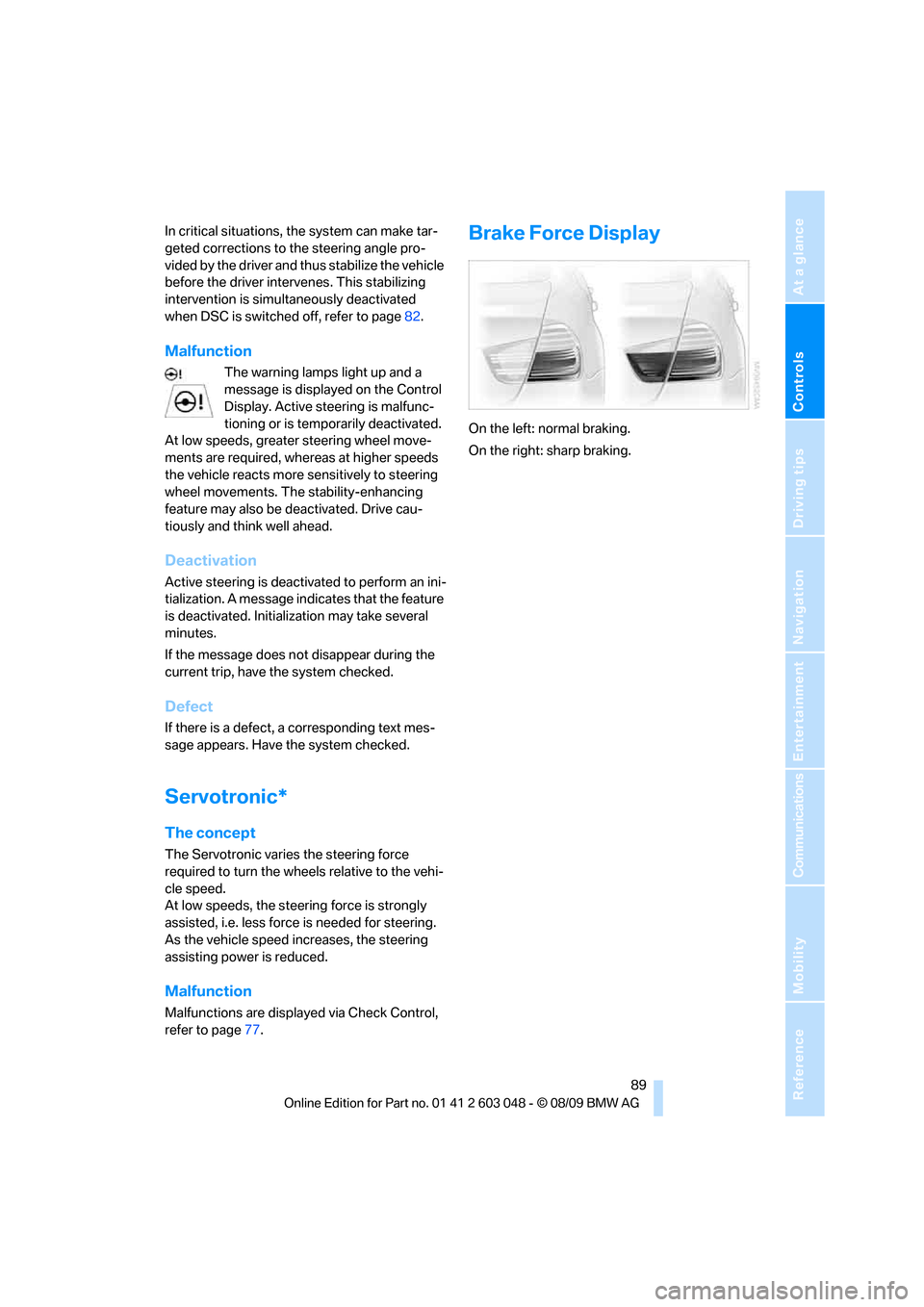
Brake Force Display
On the left: normal braking.
On the right: sharp braking.
Page 120 of 274
Things to remember when driving
118 for a short period after the engine is switched
off.
Hydroplaning
When driving on wet or slushy roads,
reduce road speed. If you do not, a wedge
of water can form between tires and road sur-
face. This situation, known as hydroplaning,
means that the tire can completely lose contact
with the road surface, so that neither the car can
be steered nor the brake be properly applied.<
The risk of hydroplaning increases with declin-
ing tread depth on the tires, refer also to Mini-
mum tread depth on page215.
Driving through water
Drive through water on the road only if it is
not deeper than 1 ft/30 cm, and then only
at walking speed at the most. Otherwise, the
vehicle's engine, the electrical systems and the
transmission may be damaged.<
Use the parking brake on inclines
On inclines, do not hold the vehicle for a
lengthy period using the clutch; use the
parking brake instead. Otherwise, greater
clutch wear will result.<
For more information about the drive-off assis-
tant, refer to page84.
Braking safely
Your BMW is equipped with ABS as a standard
feature. Applying the brakes fully is the most
effective way of braking in situations in which
this is necessary. Since the vehicle maintains
steering responsiveness, you can still avoid
possible obstacles with a minimum of steering
effort.
Pulsation of the brake pedal, combined with
sounds from the hydraulic circuits, indicate that
ABS is in its active mode.
Driving in wet conditions
When roads are wet or there is heavy rain,
briefly exert gentle pressure on the brake pedal
every few miles. Monitor traffic conditions to
ensure that this maneuver does not endanger other road users. The heat generated in this
process helps dry the pads and rotors to ensure
that full braking efficiency will then be available
when you need it.
Hills
To prevent overheating and the resulting
reduced efficiency of the brake system,
drive long or steep downhill gradients in the
gear in which the least braking is required. Even
light but consistent brake pressure can lead to
high temperatures, brake wear and possibly
even brake failure.<
You can increase the engine's braking effect by
shifting down, all the way to first gear if neces-
sary. This strategy helps you avoid placing
excessive loads on the brake system. Down-
shifting in manual mode of the automatic trans-
mission, refer to page57.
Never drive with the clutch held down,
with the transmission in neutral or with
the engine switched off; otherwise, engine
braking action will not be present or there will be
no power assistance to the brakes or steering.
Never allow floor mats, carpets or any other
objects to protrude into the area around the
pedals; otherwise, pedal function could be
impaired.<
Corrosion on brake rotors
When the vehicle is driven only occasionally,
during extended periods when the vehicle is not
used at all, and in operating conditions where
brake applications are less frequent, there is an
increased tendency for corrosion to form on
rotors, while contaminants accumulate on the
brake pads. This occurs because the minimum
pressure which must be exerted by the pads
during brake applications to clean the rotors is
not reached.
Should corrosion form on the brake rotors, the
brakes will tend to respond with a pulsating
effect that even extended application will fail to
cure.
Page 228 of 274
Care
226 water penetration. Follow the operating instruc-
tions of the high-pressure washer.<
When using high-pressure washers, do
not spray against the sensors and cam-
eras, e.g. of the Park Distance Control or Rear
View Camera, for an extended period and main-
tain a distance of at least 1 ft/30 cm.<
Manual car wash
When washing the vehicle by hand, use large
quantities of water and car shampoo if neces-
sary. Clean the vehicle with a sponge or wash-
ing brush, applying light pressure only.
Before cleaning the windshield, deacti-
vate the rain sensor or switch off the igni-
tion to prevent unintentional activation of the
wipers.<
Observe local regulations pertaining to
washing vehicles by hand.<
Headlamps
Do not rub them dry and do not use abrasive or
corrosive cleaning agents.
Loosen dirt, e.g. insects, with shampoo or
insect remover and wash away with copious
quantities of water.
Thaw ice with a windshield deicer and do not
use an ice scraper.
Windows
Clean the inside and outside surfaces of the
windows and the mirrors with window cleaner.
Do not clean the mirrors with cleaners
containing quartz.<
Paintwork care
Regular care contributes to value retention and
protects the paintwork against the long-term
effects of damaging substances.
Region-specific environmental influences can
damage the vehicle paintwork. Therefore, it is
important to adapt the frequency and scope of
car care accordingly.
Immediately remove aggressive materials such
as spilled fuel, oil, grease, brake fluid, tree sap or bird droppings to prevent damage to the paint-
work.
Repairing paintwork damage
Immediately repair scratches or similar
damage, such as that caused by stones
hitting the vehicle, where necessary to prevent
rusting.<
BMW recommends having paintwork damage
repaired by a professional paint repair work-
shop according to BMW specifications using
original BMW paint materials.
Preservation
A preservation treatment is necessary when
water no longer beads off the clean paintwork
surface. Only use products for paintwork pres-
ervation that contain carnauba or synthetic
waxes.
Rubber seals
Treat only with water or rubber care products.
Do not use silicon-containing care prod-
ucts on rubber seals; otherwise, noise
and damage could occur.<
Chrome parts
Carefully clean vehicle parts such as the radia-
tor grill, door handles or window frames with
copious quantities of water and a shampoo
additive, especially when roads are treated with
deicing salt. For additional treatment, use a
chrome polish.
Light-alloy wheels
For technical reasons, dust is generated during
braking that is deposited on the light-alloy
wheels. Remove the dust regularly using acid-
free rim cleaner.
Do not use aggressive, acidic, strongly
alkaline and abrasive cleaning agents or
steam jets over 1407/606; otherwise, dam-
age may occur.<
Page 256 of 274
Everything from A - Z
254
Everything from A - Z
Index
A
ABS Antilock Brake
System82
ACC, refer to Active cruise
control62
Accident, refer to Sending an
Emergency Request237
Activated-charcoal filter for
automatic climate
control100
Active cruise control62
– indicator lamps65
– malfunction66
– selecting distance64
– sensor66
Active steering88
Adaptive brake light
– Brake Force Display89
Adaptive light control93
Additives
– coolant222
Address, entering125,131
Address for navigation
– entering125
Adjusting temperature inside
the car, refer to Automatic
climate control98
Adjusting the thigh support42
Airbags90
– indicator/warning lamp91
– sitting safely41
Air conditioning mode
– automatic climate control98
– ventilation100
Air distribution
– automatic98
Airing, refer to Ventilation100
Air pressure, refer to Tire
inflation pressure201
Air recirculation, refer to
Recirculated-air mode99Air supply
– automatic climate control98
– ventilation100
Air vents97
Air volume98
AKI, refer to Fuel
specifications197
Alarm system33
– avoiding unintentional
alarms34
– interior motion sensor33
– switching off an alarm33
– tilt alarm sensor33
Albums of music
collection164
ALL program99
All-season tires, refer to
Winter tires217
All-wheel drive, refer to
xDrive83
AM, waveband147
Ambient air, refer to
Recirculated-air mode99
Antenna for mobile phone174
Antifreeze
– coolant222
– washer fluid60
Antilock Brake System
ABS82
Anti-theft alarm system, refer
to Alarm system33
Anti-theft system27
Approved axle loads, refer to
Weights247
Approved gross vehicle
weight, refer to Weights247
Armrest, refer to Center
armrest106
Arrival time, refer to
Computer71
Ashtray107Assistance systems, refer to
Driving stability control
systems82
AUC Automatic recirculated-
air control99
Audio144
– controls144
– switching on/off144
– tone control144
– volume144
Audio device, external106
Automatic
– air distribution98
– air volume98
– cruise control61,62
– headlamp control92
Automatic car washes225
Automatic climate control97
– automatic air distribution98
Automatic curb monitor48
Automatic high beams and
low beams, refer to High-
beam assistant94
Automatic recirculated-air
control AUC99
Automatic Service
Request192
Automatic transmission with
Steptronic56
– interlock56,57
– overriding selector lever
lock58
– shiftlock, refer to Changing
selector lever position57
– sport program57
– towing239
– tow-starting239
AUTO program for automatic
climate control
98
AUX-IN
– port106
AUX-IN port167
Available services192
Page 258 of 274
Everything from A - Z
256 Care225
– automatic car washes225
– care products225
– carpets227
– CD/DVD drives228
– chrome parts226
– displays227
– exterior225
– fine wood parts227
– headlamps226
– high-pressure washer225
– interior227
– leather227
– light-alloy wheels226
– paintwork226
– plastic parts227
– rubber seals226
– safety belts227
– sensors and cameras227
– upholstery and cloth
trim227
– washing the car
manually226
– windows226
Cargo, securing120
Cargo area110
– capacity247
– Comfort Access35
– folding up the floor
panel112
– lamp, refer to Interior
lamps96
– opening from inside30
– opening from outside31
– partition net111
– roller cover110
Cargo area lid, refer to Trunk
lid/tailgate30
Cargo area net, refer to
Partition net111
Cargo loading119
– securing cargo120
– stowing cargo119
– vehicle119
Car jack
– jacking points235
Car key, refer to Integrated
key/remote control26Car phone
– installation location, refer to
Center armrest106
– refer to separate Owner's
Manual
Car phone, refer to
Telephone174
Car radio, refer to Radio147
Car shampoo
227
Catalytic converter, refer to
Hot exhaust system117
CD, audio playback155
CD changer155,159
– controls144
– fast forward/reverse157
– filling or emptying the
magazine160
– random play sequence156
– selecting a track155
– switching on/off144
– tone control144
– volume144
CD player155
– controls144
– fast forward/reverse157
– random play sequence156
– selecting a track155
– switching on/off144
– tone control144
– volume144
Center armrest106
Center brake lamp
– replacing bulb235
Center console, refer to
Around the center
console14
Central locking
– from inside30
– from outside27
Central locking system27
– Comfort Access34
– hotel function31
– setting unlocking
characteristics27
Changes, technical, refer to
For your own safety5
Changing bulbs, refer to
Lamps and bulbs229Changing the language on the
Control Display79
Changing the measurement
units on the Control
Display73
Changing wheels235
Chassis number, refer to
Engine compartment219
Check Control77
Check Gas Cap196
Child restraint fixing system
LATCH51
Child restraint systems50
Child safety locks53
Child seats, refer to
Transporting children
safely50
Chrome parts227
Chrome polish227
Cigarette lighter, refer to
Lighter108
Cleaning headlamps60
– washer fluid60
Cleaning your BMW, refer to
Care225
Clock69
– 12h/24h mode76
– setting the time and date76
– setting time75
Closing
– from inside30
– from outside27
Clothes hooks107
Cockpit10
Cold start, refer to Starting the
engine55
Combined instrument, refer to
Instrument cluster12
Comfort Access34
– replacing the battery35
Comfort access, refer to
Comfort Access34
Comfort area, refer to Around
the center console14
Compartment for remote
control, refer to Ignition
lock54
Compass104
Page 259 of 274
Reference 257
At a glance
Controls
Driving tips
Communications
Navigation
Entertainment
Mobility
Computer71
– displays on Control
Display71
Computer, refer to iDrive16
Concierge service189
Condensation, refer to When
the vehicle is parked119
Condition Based Service
CBS223
Configuring settings, refer to
Personal Profile26
Confirmation signals for
locking/unlocking the
vehicle28
Congestion
– refer to Route, bypassing
sections135
Connecting vacuum cleaner,
refer to Connecting
electrical appliances108
Consumption, refer to
Average consumption71
Consumption display
– average consumption71
– Energy Control70
Contacts
– creating186
Control Center, refer to
iDrive16
Control Display, refer to
iDrive16
– adjusting brightness80
– switching on/off19
Controller, refer to iDrive16
Controls and displays10
Control unit, refer to iDrive16
Convenient operation
– glass roof28
– windows28
Coolant222
– checking level222
Coolant temperature70
Cooling, maximum98
Cooling fluid, refer to
Coolant222
Cooling system, refer to
Coolant222
Copyright2Corner-illuminating lamps
– replacing bulbs231
Corner-illuminating lamps,
refer to Adaptive light
control93
Cornering lamps, refer to
Adaptive light control93
Correct tires216
Country codes DVD157
Courtesy lamps, refer to
Interior lamps96
Criteria for route134
Cross-hairs in navigation130
Cruise control61
– active62
– malfunction62
Cruising range71
Cupholders107
Curb weight, refer to
Weights247
Current fuel consumption,
refer to Energy Control70
Current playback
– external devices169
– of music collection164
Customer Relations191
D
Dashboard, refer to
Cockpit10
Dashboard, refer to
Instrument cluster12
Dashboard lighting, refer to
Instrument lighting95
Data, technical244
– capacities248
– dimensions245
– engine244
– weights247
Data transfer192
Date
– date format77
– setting76
Daytime running lights93
– replacing bulbs230
DBC Dynamic Brake
Control82Deactivating front passenger
airbags90
Deadlocking, refer to
Locking28
Defect
– door lock29
– fuel filler flap196
– glass roof37
– panorama glass roof39
Destination, entering by town/
city name125
Destination address
– entering125,131
Destination entry via BMW
Assist129
Destination for navigation
– entering by voice131
– entering via map130
– entry125
– home address128
– manual entry125
Destination guidance134
– bypassing a route
section135
– changing specified
route134
– continuing134
– starting134
– voice instructions135
– volume of voice
instructions136
Diesel exhaust fluid199
Diesel fuel197
Diesel particulate filter117
Digital clock69
Digital compass104
Digital radio, refer to HD
Radio148
Dimensions245
Dipstick, engine oil219
Directional indicators, refer to
Turn signals58
Direction instructions, refer to
Voice instructions135
Directory for navigation, refer
to Address book127
Displacement, refer to Engine
data244
Page 260 of 274
Everything from A - Z
258 Display, refer to iDrive
controls16
Display lighting, refer to
Instrument lighting95
Displays
– on the Control Display16
Displays, refer to Instrument
cluster12
Displays and controls10
Disposal
– coolant222
– remote control battery35
– vehicle battery236
Distance control, refer to
Active cruise control62
Distance remaining to service,
refer to Service
requirements73
Distance warning, refer to
Park Distance Control
PDC81
Door key, refer to Remote
control with integrated
key26
Door lock29
Doors, emergency
operation29
DOT Quality Grades214
Draft-free ventilation100
Drinks holders, refer to
Cupholders107
Drive-off assistance, refer to
Dynamic Stability Control
DSC82
Drive-off assistant84
Driving lamps, refer to Parking
lamps/low beams92
Driving notes116
Driving off on hills, refer to
Drive-off assistant84
Driving stability control
systems82
Driving through water118
Driving tips, refer to Driving
notes116
Dry air, refer to Cooling
function99
DSC Dynamic Stability
Control82DTC Dynamic Traction
Control82
– indicator/warning lamp82
DVD
– country codes157
– settings158
– video playback157
DVD menu158
DVD player, refer to CD
player155
DVD video157
Dynamic Brake Control
DBC82
Dynamic destination
guidance135
Dynamic Stability Control
DSC82
– indicator/warning lamp82
Dynamic Traction Control
DTC
– indicator/warning lamp83
E
EBV Electronic brake-force
distribution82
Eject button, refer to Buttons
on the CD/DVD player144
Electrical malfunction
– door lock29
– driver's door29
– fuel filler flap196
– glass roof37
– panorama glass roof39
– trunk lid31
Electric seat adjustment42
Electric steering wheel lock
– with Comfort Access34
Electronic brake-force
distribution EBV82
Electronic oil level check220
Electronic Stability Program
ESP, refer to Dynamic
Stability Control DSC82
Emergency actuation,
automatic transmission,
refer to Overriding selector
lever lock58Emergency operation
– fuel filler flap, manual
release196
Emergency operation, refer to
Closing manually
– glass roof37
– panorama glass roof39
Emergency operation, refer to
Manual operation
– door lock29
Emergency release
– trunk lid from inside32
Emergency Request237
Emergency services, refer to
Roadside Assistance237
Energy, saving
– saving fuel116
Energy-conscious driving,
refer to Energy Control70
Energy Control70
Engine
– breaking in116
– data244
– overheated, refer to Coolant
temperature70
– speed244
– starting55
– starting, Comfort Access34
– switching off55
Engine compartment219
Engine coolant, refer to
Coolant222
Engine oil
– adding221
– alternative oil types222
– BMW Maintenance
System223
– capacity248
– checking level219
– dipstick219
– intervals between changes,
refer to Service
requirements73
Engine output, refer to Engine
data244
Engine speed, refer to Engine
data244
Engine starting, refer to
Starting the engine55
Page 265 of 274
Reference 263
At a glance
Controls
Driving tips
Communications
Navigation
Entertainment
Mobility
New tires216
North-facing map136
Nozzles97
Number of cylinders, refer to
Engine data244
Nylon rope, refer to Tow
rope240
O
OBD socket, refer to Socket
for Onboard Diagnosis224
Octane ratings, refer to Fuel
specifications197
Odometer69
Oil, refer to Engine oil219
Oil consumption219
Oil level219
Old batteries, refer to
Disposal236
Onboard vehicle tool kit229
Opening and closing
– Comfort Access34
– from inside30
– from outside27
– using the door lock29
– via the remote control27
Options, selecting for
navigation134
Orientation menu, refer to
Start menu17
Outlets
– refer to Ventilation100
Output, refer to Engine
data244
Outside-air mode
– automatic climate control99
Outside temperature
display69
– changing units of
measure73
– in computer73
Outside temperature
warning69
Overheated engine, refer to
Coolant temperature70
Overriding selector lever
lock58Overview
– radio control144
P
Paintwork care226
Panorama glass roof38
– closing after electrical
malfunction39
– comfort position39
– Convenient operation28
– initializing39
– opening, closing38
– pinch protection system39
– power failure39
– raising38
– remote control28
Park assistant, refer to Park
Distance Control81
Park Distance Control PDC81
Parked car ventilation100
– preselecting switch-on
times101
– switching on and off
directly101
Parking
– vehicle55
Parking aid, refer to Park
Distance Control PDC81
Parking brake56
– indicator lamp56
Parking lamps92
– replacing bulbs230,232
Parking lamps/low beams92
Particulate filter, refer to
Diesel particulate filter117
Partition net111
Passenger side mirror tilt
function48
Pathway lighting93
Personal Profile26
Phone book177
Phone numbers
– dialing178
Pinch protection system
– glass roof, electric37
– panorama glass roof39
– windows36Placing a call, refer to
telephone owner's manual
Playing music163
Polish227
Pollen
– refer to Microfilter/activated-
charcoal filter for automatic
climate control100
Postal code, entering for
navigation126
Power failure236
Power windows36
– safety switch36
Power windows, refer to
Windows36
Preheating, refer to Diesel
engine
55
Pressure, tires201
Pressure monitoring, tires84
– Flat Tire Monitor84
Pressure monitoring of tires,
refer to Tire Pressure
Monitor TPM86
Programmable buttons on the
steering wheel11
Protection function, refer to
Pinch protection system
– glass roof, electric37
– panorama glass roof39
– windows36
Providing medical assistance,
refer to First aid pouch237
Puncture
– Flat Tire Monitor84
R
Radio
– controls144
– HD Radio148
– satellite radio150
– selecting a waveband147
– storing stations147
– switching on/off144
– tone control144
– volume144
Radio position, refer to Radio
readiness54