heater BMW 525I 2007 Owners Manual
[x] Cancel search | Manufacturer: BMW, Model Year: 2007, Model line: 525I, Model: BMW 525I 2007Pages: 273, PDF Size: 8.96 MB
Page 13 of 273
At a glance
11Reference
Controls
Driving tips
Communications
Navigation
Entertainment
Mobility
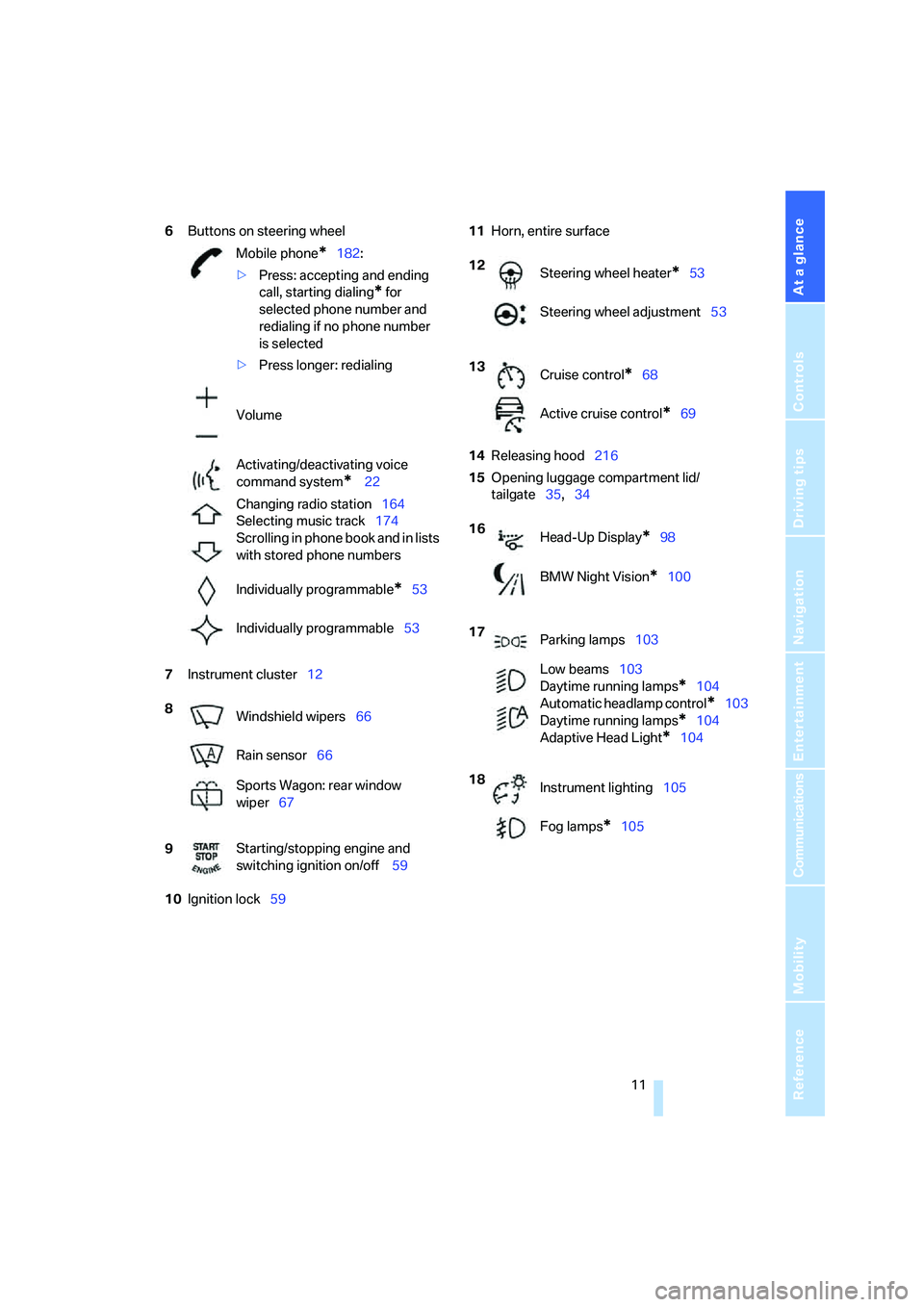
6Buttons on steering wheel
7Instrument cluster12
10Ignition lock5911Horn, entire surface
14Releasing hood216
15Opening luggage compartment lid/
tailgate35,34 Mobile phone
*182:
>Press: accepting and ending
call, starting dialing
* for
selected phone number and
redialing if no phone number
is selected
>Press longer: redialing
Volume
Activating/deactivating voice
command system
* 22
Changing radio station164
Selecting music track174
Scrolling in phone book and in lists
with stored phone numbers
Individually programmable
*53
Individually programmable53
8
Windshield wipers66
Rain sensor66
Sports Wagon: rear window
wiper67
9Starting/stopping engine and
switching ignition on/off 59
12
Steering wheel heater*53
Steering wheel adjustment53
13
Cruise control
*68
Active cruise control
*69
16
Head-Up Display
*98
BMW Night Vision
*100
17
Parking lamps103
Low beams103
Daytime running lamps
*104
Automatic headlamp control
*103
Daytime running lamps
*104
Adaptive Head Light
*104
18
Instrument lighting105
Fog lamps
*105
Page 19 of 273
At a glance
17Reference
Controls
Driving tips
Communications
Navigation
Entertainment
Mobility
Menu overview
Communication
>Telephone*
>BMW Assist* or TeleService*
Navigation or onboard information
>Navigation system*
>Onboard information, e.g. for displaying
the average fuel consumption
Entertainment
>Radio
>CD player and CD changer
*
>External audio device
Climate
>Vent settings
>Automatic programs
>Seat heater distribution
*
>Parked car operation*
menu
>Switching off Control Display
>Tone and display settings
>Settings for your vehicle, e.g. for the central
locking system
>Display of maintenance intervals and dead-
lines for legally mandated inspections
>Settings for telephone
Operating principle
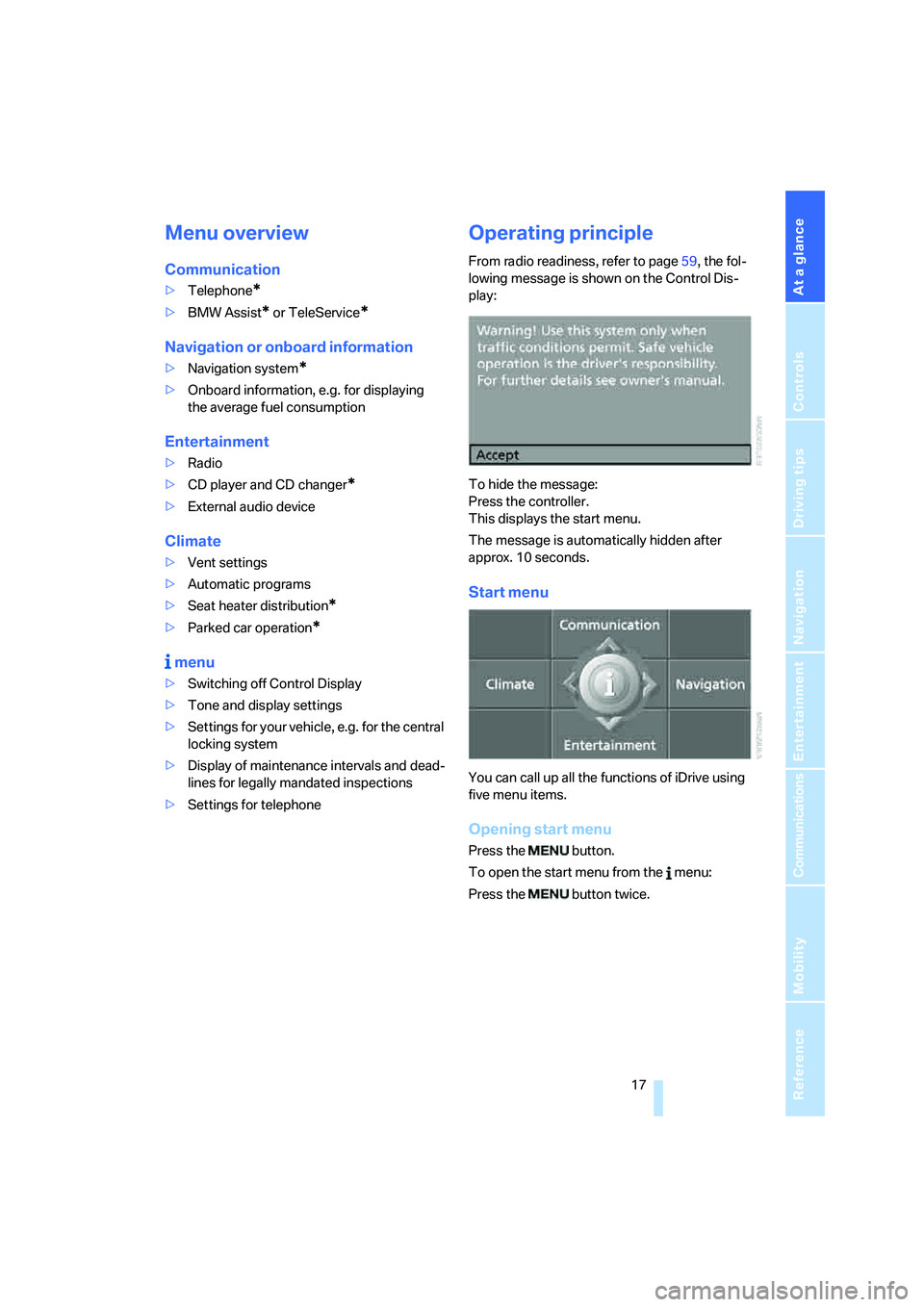
From radio readiness, refer to page59, the fol-
lowing message is shown on the Control Dis-
play:
To hide the message:
Press the controller.
This displays the start menu.
The message is automatically hidden after
approx. 10 seconds.
Start menu
You can call up all the functions of iDrive using
five menu items.
Opening start menu
Press the button.
To open the start menu from the menu:
Press the button twice.
Page 53 of 273
Controls
51Reference
At a glance
Driving tips
Communications
Navigation
Entertainment
Mobility
press the button. The maximum temperature is
supplied when three LEDs are lit.
To switch off: press the button longer.
Temperature distribution
The heat output can be distributed variously in
the seat cushion and the backrest.
iDrive, for explanation of principle, refer to
page16.
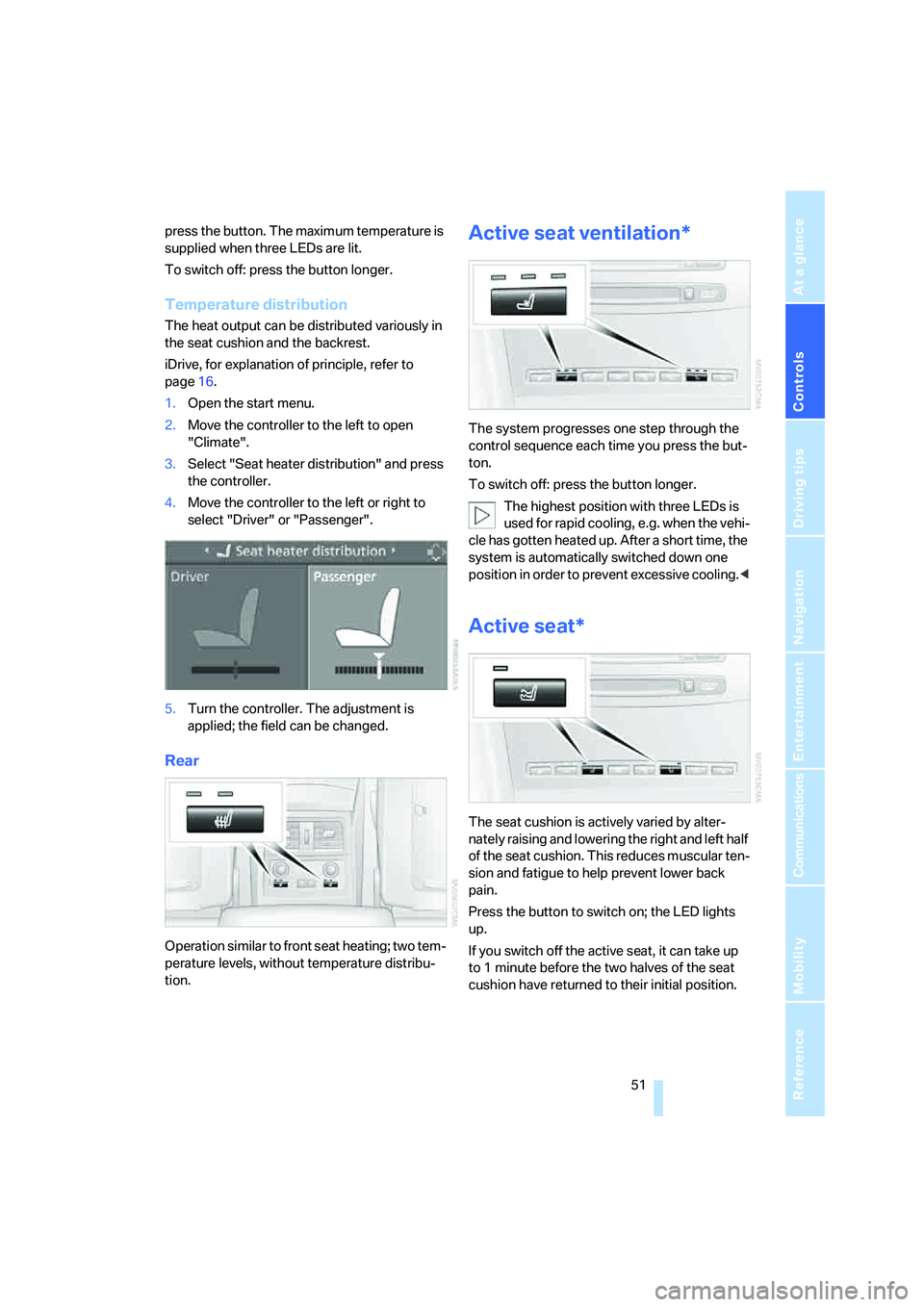
1.Open the start menu.
2.Move the controller to the left to open
"Climate".
3.Select "Seat heater distribution" and press
the controller.
4.Move the controller to the left or right to
select "Driver" or "Passenger".
5.Turn the controller. The adjustment is
applied; the field can be changed.
Rear
Operation similar to front seat heating; two tem-
perature levels, without temperature distribu-
tion.
Active seat ventilation*
The system progresses one step through the
control sequence each time you press the but-
ton.
To switch off: press the button longer.
The highest position with three LEDs is
used for rapid cooling, e.g. when the vehi-
cle has gotten heated up. After a short time, the
system is automatically switched down one
position in order to prevent excessive cooling.<
Active seat*
The seat cushion is actively varied by alter-
nately raising and lowering the right and left half
of the seat cushion. This reduces muscular ten-
sion and fatigue to help prevent lower back
pain.
Press the button to switch on; the LED lights
up.
If you switch off the active seat, it can take up
to 1 minute before the two halves of the seat
cushion have returned to their initial position.
Page 55 of 273
Controls
53Reference
At a glance
Driving tips
Communications
Navigation
Entertainment
Mobility
Interior and exterior mirrors,
automatic dimming feature*
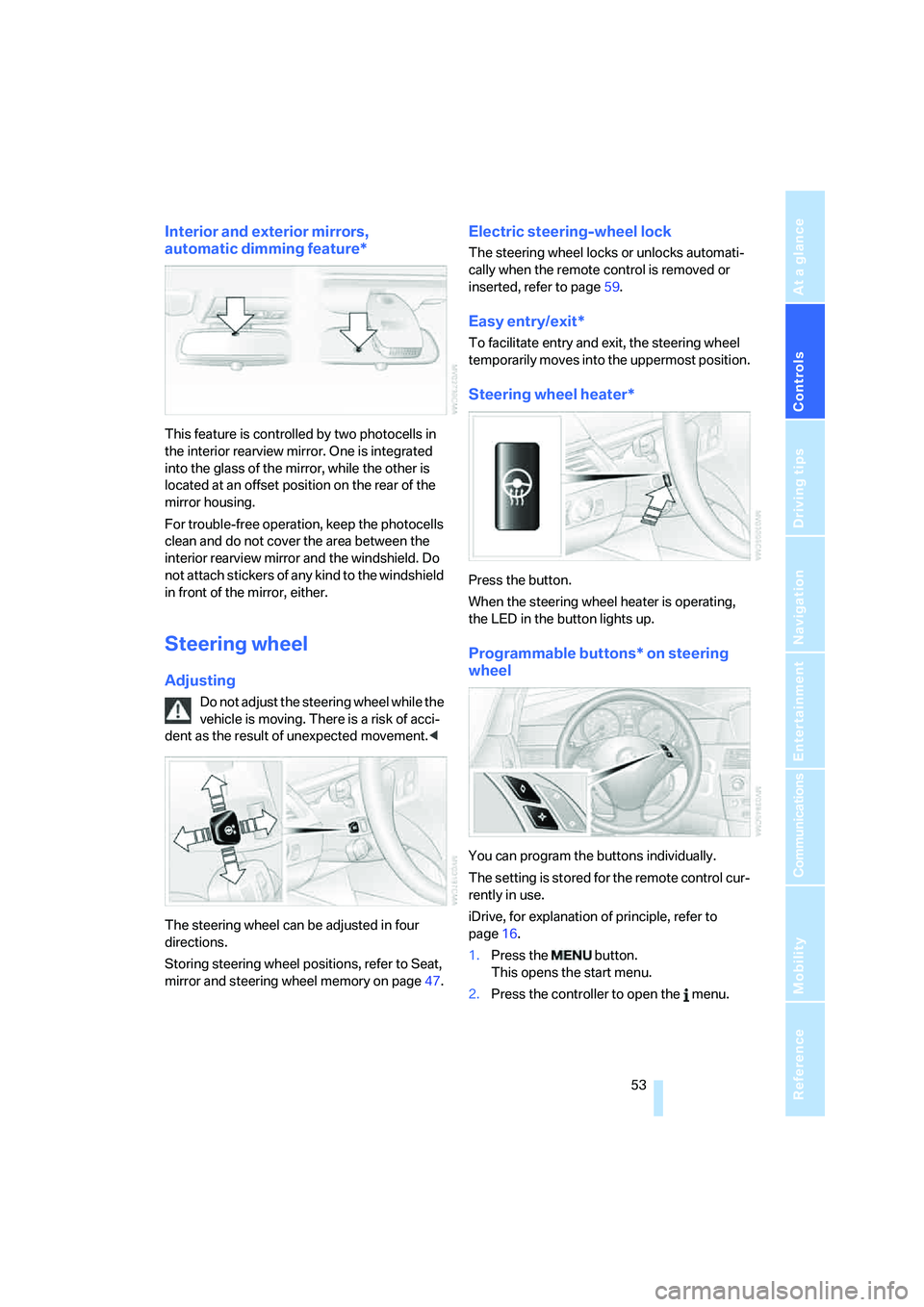
This feature is controlled by two photocells in
the interior rearview mirror. One is integrated
into the glass of the mirror, while the other is
located at an offset position on the rear of the
mirror housing.
For trouble-free operation, keep the photocells
clean and do not cover the area between the
interior rearview mirror and the windshield. Do
not attach stickers of any kind to the windshield
in front of the mirror, either.
Steering wheel
Adjusting
Do not adjust the steering wheel while the
vehicle is moving. There is a risk of acci-
dent as the result of unexpected movement.<
The steering wheel can be adjusted in four
directions.
Storing steering wheel positions, refer to Seat,
mirror and steering wheel memory on page47.
Electric steering-wheel lock
The steering wheel locks or unlocks automati-
cally when the remote control is removed or
inserted, refer to page59.
Easy entry/exit*
To facilitate entry and exit, the steering wheel
temporarily moves into the uppermost position.
Steering wheel heater*
Press the button.
When the steering wheel heater is operating,
the LED in the button lights up.
Programmable buttons* on steering
wheel
You can program the buttons individually.
The setting is stored for the remote control cur-
rently in use.
iDrive, for explanation of principle, refer to
page16.
1.Press the button.
This opens the start menu.
2.Press the controller to open the menu.
Page 112 of 273

Climate
110 body. Therefore, open these vents for maxi-
mum cooling.
AUC Automatic recirculated-air
control/recirculated-air mode
You can respond to pollutants or
unpleasant odors in the immediate
environment by suspending the
supply of outside air. The system then recircu-
lates the air currently within the vehicle. During
AUC operation, a sensor detects pollutants in
the outside air and controls the shut-off auto-
matically.
By pressing the button repeatedly, you can
request three operating modes:
>LED off: outside air flows in continuously.
>Right LED on, AUC mode: the system
detects pollutants in the outside air and
shuts off the supply as needed.
>Left LED on, recirculated-air mode: the
supply of outside air is permanently shut off.
If condensation starts to form on the
inside window surfaces during operation
in the recirculated-air mode, you should switch
it off while also increasing the air volume as
required.
The recirculated-air mode should not be used
over an extended period of time, as the air qual-
ity inside the vehicle deteriorates continu-
ously.<
Residual heat
The heat stored in the engine is
used to heat the passenger com-
partment, e.g. while stopped at a
school to pick up a child.
The function can be switched on when the fol-
lowing conditions are met:
>up to 15 minutes after switching off the
engine
>with engine at operating temperature
>with sufficient battery voltage
>at an outside temperature below 777/
256The LED lights up when the function is
switched on.
From radio readiness the interior temperature,
the air volume and the air distribution can be
set.
Switching automatic climate control on
and off
The air volume, the heater and the
cooling function are all switched
off.
You can restart the automatic cli-
mate control by pressing any of its buttons
except the REST button.
Front ventilation
1Knurled wheels to smoothly open and close
vent outlets
2Levers to change the vent outlet direction
Do not drop any foreign objects into the
vent outlets, otherwise these could be
catapulted outwards and lead to injuries.<
Ventilation for cooling
Adjust the vent outlets to direct the flow of cool
air in your direction, for instance, if the interior
has become too warm, etc.
Draft-free ventilation
Set the vent outlets so that the air flows past
you and is not directed straight at you.
Page 165 of 273
Navigation
Entertainment
Driving tips
163Reference
At a glance
Controls
Communications
Mobility
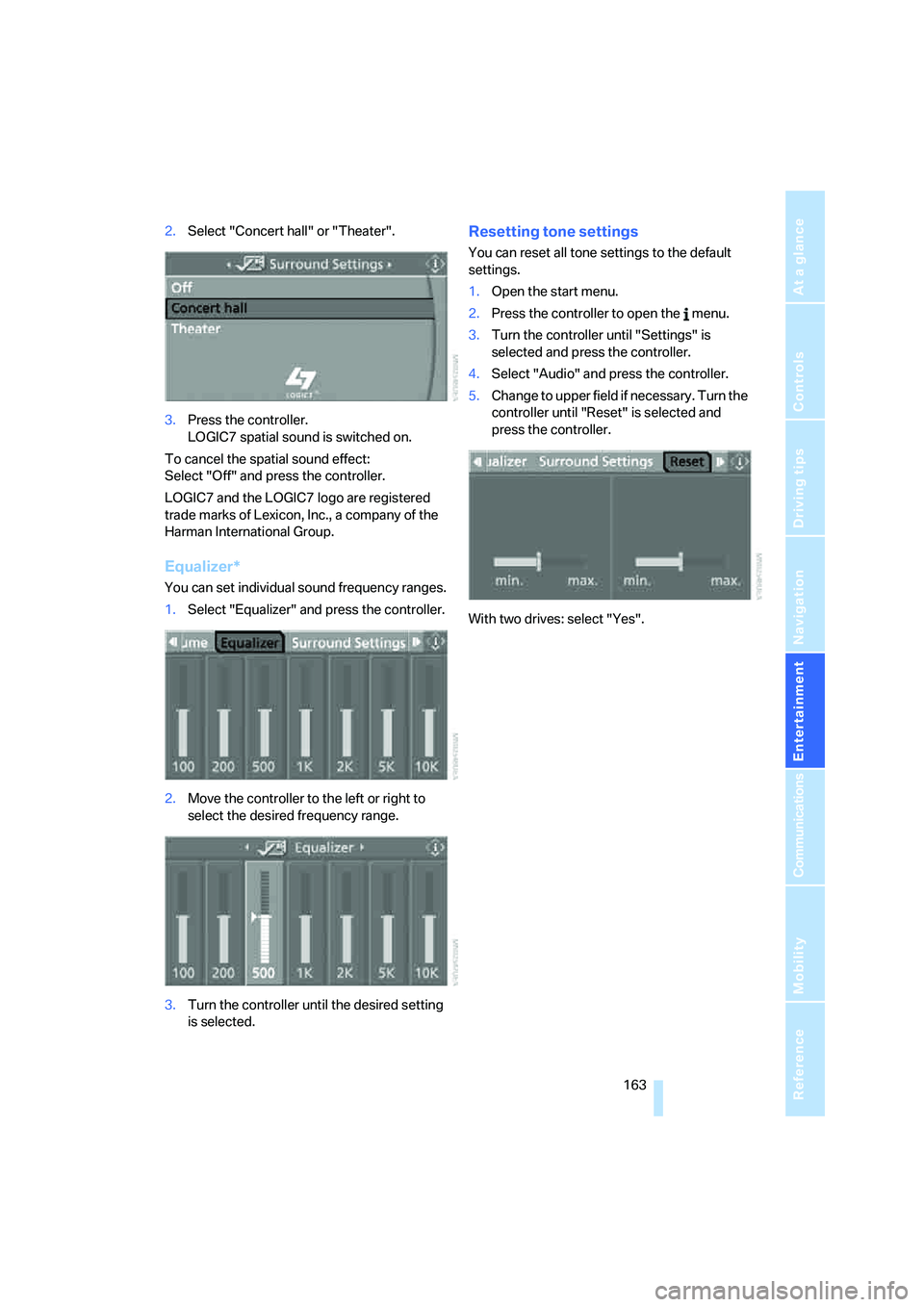
2.Select "Concert hall" or "Theater".
3.Press the controller.
LOGIC7 spatial sound is switched on.
To cancel the spatial sound effect:
Select "Off" and press the controller.
LOGIC7 and the LOGIC7 logo are registered
trade marks of Lexicon, Inc., a company of the
Harman International Group.
Equalizer*
You can set individual sound frequency ranges.
1.Select "Equalizer" and press the controller.
2.Move the controller to the left or right to
select the desired frequency range.
3.Turn the controller until the desired setting
is selected.
Resetting tone settings
You can reset all tone settings to the default
settings.
1.Open the start menu.
2.Press the controller to open the menu.
3.Turn the controller until "Settings" is
selected and press the controller.
4.Select "Audio" and press the controller.
5.Change to upper field if necessary. Turn the
controller until "Reset" is selected and
press the controller.
With two drives: select "Yes".
Page 248 of 273
Short commands of voice command system
246
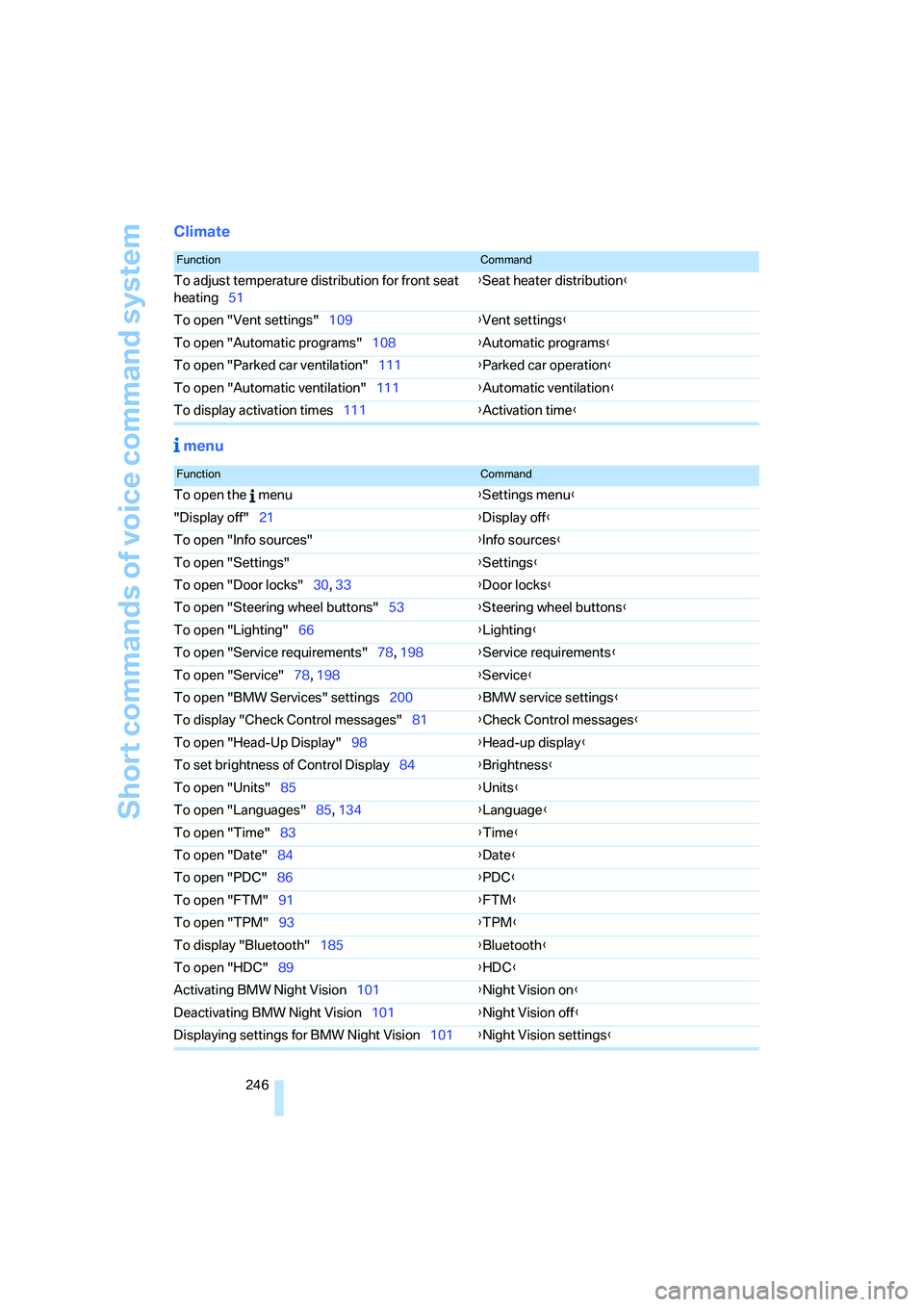
Climate
menu
FunctionCommand
To adjust temperature distribution for front seat
heating51{Seat heater distribution}
To open "Vent settings"109{Vent settings}
To open "Automatic programs"108{Automatic programs}
To open "Parked car ventilation"111{Parked car operation}
To open "Automatic ventilation"111{Automatic ventilation}
To display activation times111{Activation time}
FunctionCommand
To open the menu{Settings menu}
"Display off"21{Display off}
To open "Info sources"{Info sources}
To open "Settings"{Settings}
To open "Door locks"30, 33{Door locks}
To open "Steering wheel buttons"53{Steering wheel buttons}
To open "Lighting"66{Lighting}
To open "Service requirements"78, 198{Service requirements}
To open "Service"78, 198{Service}
To open "BMW Services" settings200{BMW service settings}
To display "Check Control messages"81{Check Control messages}
To open "Head-Up Display"98{Head-up display}
To set brightness of Control Display84{Brightness}
To open "Units"85{Units}
To open "Languages"85, 134{Language}
To open "Time"83{Time}
To open "Date"84{Date}
To open "PDC"86{PDC}
To open "FTM"91{FTM}
To open "TPM"
93{TPM}
To display "Bluetooth"185{Bluetooth}
To open "HDC"89{HDC}
Activating BMW Night Vision101{Night Vision on}
Deactivating BMW Night Vision101{Night Vision off}
Displaying settings for BMW Night Vision101{Night Vision settings}
Page 264 of 273
Everything from A to Z
262 Replacing wheels/tires, refer
to New wheels and tires214
Reporting safety defects7
Reserve
– warning, refer to Fuel
gauge76
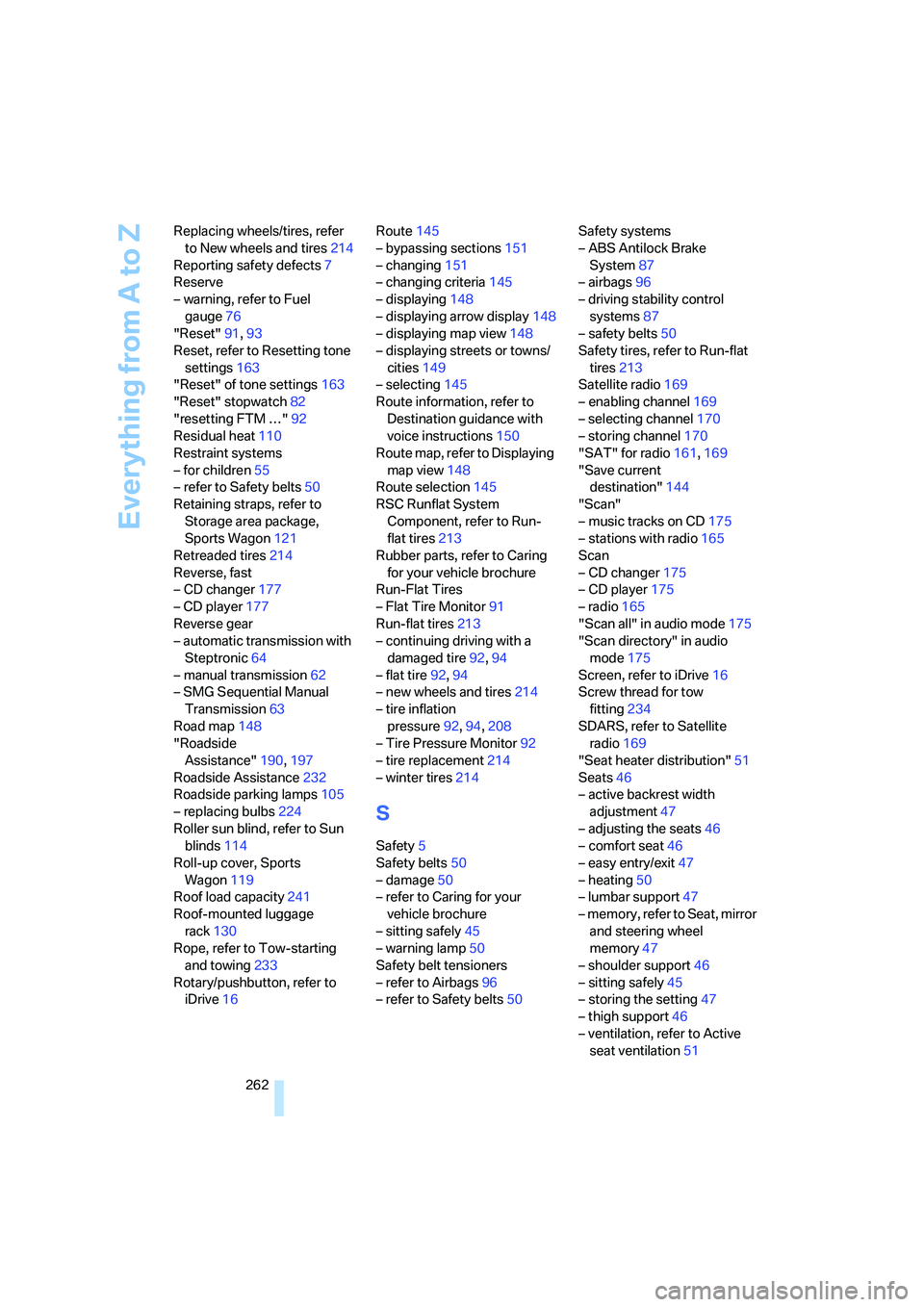
"Reset"91,93
Reset, refer to Resetting tone
settings163
"Reset" of tone settings163
"Reset" stopwatch82
"resetting FTM …"92
Residual heat110
Restraint systems
– for children55
– refer to Safety belts50
Retaining straps, refer to
Storage area package,
Sports Wagon121
Retreaded tires214
Reverse, fast
– CD changer177
– CD player177
Reverse gear
– automatic transmission with
Steptronic64
– manual transmission62
– SMG Sequential Manual
Transmission63
Road map148
"Roadside
Assistance"190,197
Roadside Assistance232
Roadside parking lamps105
– replacing bulbs224
Roller sun blind, refer to Sun
blinds114
Roll-up cover, Sports
Wagon119
Roof load capacity241
Roof-mounted luggage
rack130
Rope, refer to Tow-starting
and towing233
Rotary/pushbutton, refer to
iDrive16Route145
– bypassing sections151
– changing151
– changing criteria145
– displaying148
– displaying arrow display148
– displaying map view148
– displaying streets or towns/
cities149
– selecting145
Route information, refer to
Destination guidance with
voice instructions
150
Route map, refer to Displaying
map view148
Route selection145
RSC Runflat System
Component, refer to Run-
flat tires213
Rubber parts, refer to Caring
for your vehicle brochure
Run-Flat Tires
– Flat Tire Monitor91
Run-flat tires213
– continuing driving with a
damaged tire92,94
– flat tire92,94
– new wheels and tires214
– tire inflation
pressure92,94,208
– Tire Pressure Monitor92
– tire replacement214
– winter tires214
S
Safety5
Safety belts50
– damage50
– refer to Caring for your
vehicle brochure
– sitting safely45
– warning lamp50
Safety belt tensioners
– refer to Airbags96
– refer to Safety belts50Safety systems
– ABS Antilock Brake
System87
– airbags96
– driving stability control
systems87
– safety belts50
Safety tires, refer to Run-flat
tires213
Satellite radio169
– enabling channel169
– selecting channel170
– storing channel170
"SAT" for radio161,169
"Save current
destination"144
"Scan"
– music tracks on CD175
– stations with radio165
Scan
– CD changer175
– CD player175
– radio165
"Scan all" in audio mode175
"Scan directory" in audio
mode175
Screen, refer to iDrive16
Screw thread for tow
fitting234
SDARS, refer to Satellite
radio169
"Seat heater distribution"51
Seats46
– active backrest width
adjustment47
– adjusting the seats46
– comfort seat46
– easy entry/exit47
– heating50
– lumbar support47
– memory, refer to Seat, mirror
and steering wheel
memory47
– shoulder support46
– sitting safely45
– storing the setting47
– thigh support46
– ventilation, refer to Active
seat ventilation51
Page 267 of 273
Reference 265
At a glance
Controls
Driving tips
Communications
Navigation
Entertainment
Mobility
Storing current position143
Storing radio stations166
Storing sitting position, refer
to Seat, mirror and steering
wheel memory47
Storing tires215
"Street" for destination
entry137
Summer tires, refer to Wheels
and tires208
Sun blinds114
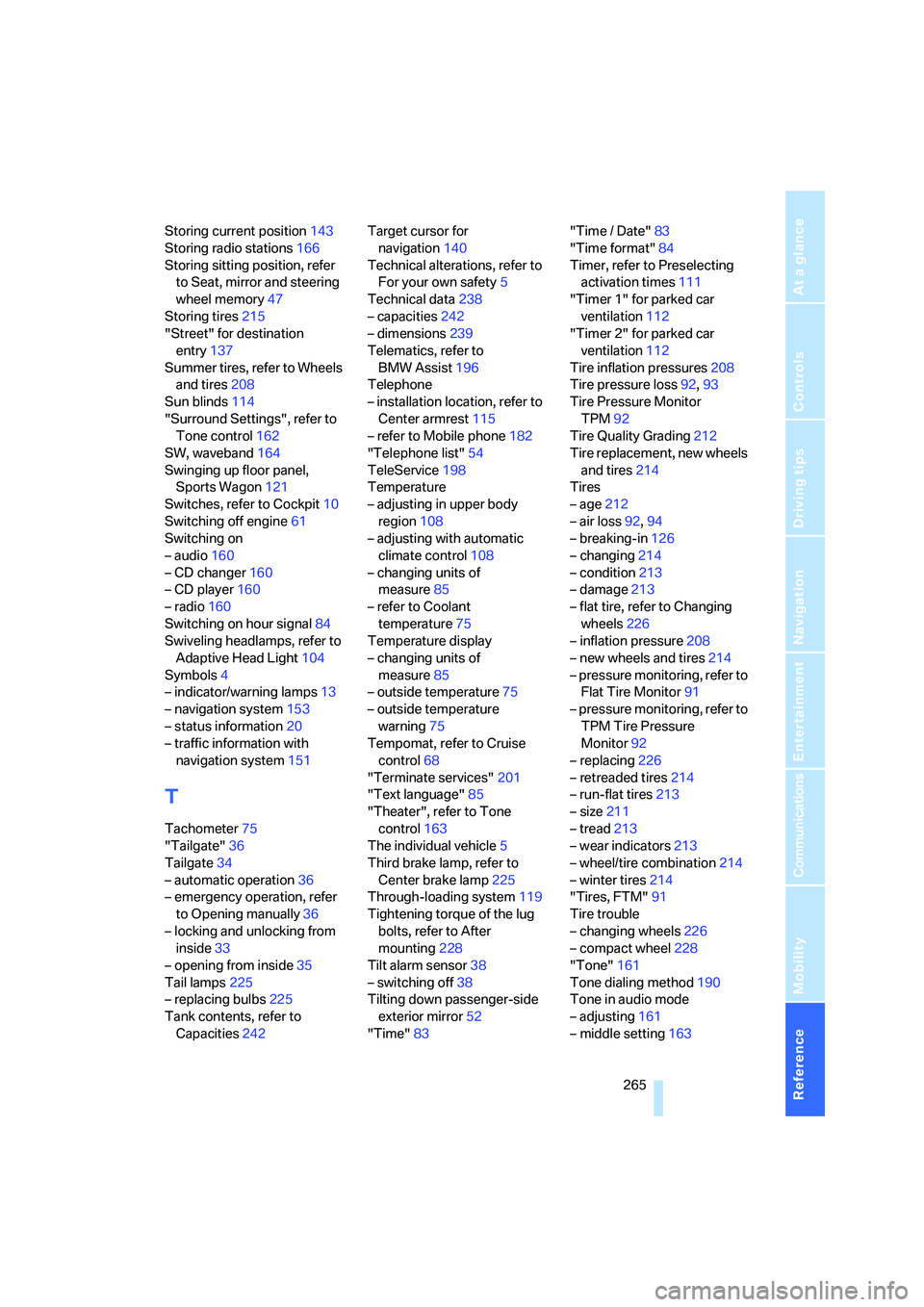
"Surround Settings", refer to
Tone control162
SW, waveband164
Swinging up floor panel,
Sports Wagon121
Switches, refer to Cockpit10
Switching off engine61
Switching on
– audio160
– CD changer160
– CD player160
– radio160
Switching on hour signal84
Swiveling headlamps, refer to
Adaptive Head Light104
Symbols4
– indicator/warning lamps13
– navigation system153
– status information20
– traffic information with
navigation system151
T
Tachometer75
"Tailgate"36
Tailgate34
– automatic operation36
– emergency operation, refer
to Opening manually36
– locking and unlocking from
inside33
– opening from inside35
Tail lamps225
– replacing bulbs225
Tank contents, refer to
Capacities242Target cursor for
navigation140
Technical alterations, refer to
For your own safety5
Technical data238
– capacities242
– dimensions239
Telematics, refer to
BMW Assist196
Telephone
– installation location, refer to
Center armrest115
– refer to Mobile phone182
"Telephone list"54
TeleService198
Temperature
– adjusting in upper body
region108
– adjusting with automatic
climate control108
– changing units of
measure85
– refer to Coolant
temperature75
Temperature display
– changing units of
measure85
– outside temperature75
– outside temperature
warning75
Tempomat, refer to Cruise
control68
"Terminate services"201
"Text language"85
"Theater", refer to Tone
control163
The individual vehicle5
Third brake lamp, refer to
Center brake lamp225
Through-loading system119
Tightening torque of the lug
bolts, refer to After
mounting228
Tilt alarm sensor38
– switching off38
Tilting down passenger-side
exterior mirror52
"Time"83"Time / Date"
83
"Time format"84
Timer, refer to Preselecting
activation times111
"Timer 1" for parked car
ventilation112
"Timer 2" for parked car
ventilation112
Tire inflation pressures208
Tire pressure loss92,93
Tire Pressure Monitor
TPM92
Tire Quality Grading212
Tire replacement, new wheels
and tires214
Tires
– age212
– air loss92,94
– breaking-in126
– changing214
– condition213
– damage213
– flat tire, refer to Changing
wheels226
– inflation pressure208
– new wheels and tires214
– pressure monitoring, refer to
Flat Tire Monitor91
– pressure monitoring, refer to
TPM Tire Pressure
Monitor92
– replacing226
– retreaded tires214
– run-flat tires213
– size211
– tread213
– wear indicators213
– wheel/tire combination214
– winter tires214
"Tires, FTM"91
Tire trouble
– changing wheels226
– compact wheel228
"Tone"161
Tone dialing method190
Tone in audio mode
– adjusting161
– middle setting163