brake BMW 650I COUPE&CONVERTIBLE 2007 Owner's Manual
[x] Cancel search | Manufacturer: BMW, Model Year: 2007, Model line: 650I COUPE&CONVERTIBLE, Model: BMW 650I COUPE&CONVERTIBLE 2007Pages: 256, PDF Size: 8.58 MB
Page 125 of 256
Driving tips
123Reference
At a glance
Controls
Communications
Navigation
Entertainment
Mobility
Mobile communications devices in
vehicle
BMW advises against using mobile com-
munications devices, e.g. mobile phones,
inside the vehicle without a direct connection to
an external antenna. Otherwise, the vehicle
electronics and mobile communications device
can interfere with each other. In addition, there
is no assurance that the radiation emitted dur-
ing transmission will be conveyed out of the
vehicle interior.<
Hydroplaning
When driving on wet or slushy roads,
reduce road speed. If you do not, a wedge
of water can form between tires and road sur-
face. This phenomenon is referred to as hydro-
planing, and is characterized by a partial or
complete loss of contact between the tires and
the road surface, ultimately undermining your
ability to steer and brake the vehicle.<
The risk of hydroplaning increases as the tread
depth of the tires decreases, also refer to Mini-
mum tire tread on page205.
Driving through water
Do not drive through water on the road if it
is deeper than 1 ft/30 cm, and then only at
walking speed at the most. Otherwise, the vehi-
cle's engine, the electrical systems and the
transmission may be damaged.<
Using handbrake on inclines
On inclines, do not hold the vehicle with
the clutch; use the handbrake. Otherwise,
greater clutch wear will result.<
SMG Sequential Manual Transmission
Start off quickly on slopes. Do not hold
the vehicle on a hill by applying the throt-
tle, but engage the handbrake instead. Other-
wise, overheating can occur in the transmission
region.<
Starting assistant
The starting assistant enables you to start off
conveniently on slopes. The handbrake is not
required for this purpose.
1.Hold the vehicle with the footbrake.
2.Release the footbrake and drive off quickly.
The starting assistant holds the vehicle
for approx. 2 seconds after releasing the
footbrake. Depending on the load, the vehicle
may also roll back slightly during this time.
After releasing the footbrake, drive off quickly,
otherwise the starting assistant no longer holds
the vehicle after approx. 2 seconds and it
begins to roll back.<
Braking safely
Your BMW is equipped with ABS as a standard
feature. In situations that require it, it is best to
brake with full force. Since the vehicle maintains
steering responsiveness, you can still avoid
possible obstacles with a minimum of steering
effort.
Pulsation at the brake pedal combines with
sounds from the hydraulic circuits to indicate to
the driver that ABS is in its active mode.
Do not drive with your foot resting on the
brake pedal. Even light but consistent
pedal pressure can lead to high temperatures,
brake wear and possibly even brake failure.<
Driving in wet conditions
When driving on wet roads or in heavy rain, it is
a good idea to apply light pressure to the brake
pedal every few miles. Monitor traffic conditions
to ensure that this maneuver does not endan-
ger other road users. The heat generated in this
process helps dry the pads and rotors to ensure
that full braking efficiency will then be available
when you need it.
Hills
To prevent overheating and thus reduced
efficiency of the brake system, downshift
to a gear in which only minimal brake applica-
tions are needed when descending long or
steep downhill stretches. Even light but consis-
Page 126 of 256
Things to remember when driving
124 tent pressure on the brake pedal can lead to
high temperatures, brake wear and possibly
even brake failure.<
The braking effect of the engine can be further
increased by downshifting, if necessary all the
way down into first gear. This strategy helps
you avoid placing excessive loads on the brake
system. For information on downshifting in the
manual mode of the automatic transmission,
refer to page64.
Do not drive with the clutch depressed, in
idle or with the engine switched off, other-
wise there will be no engine braking action or
support of the braking force and steering.
Never allow floor mats, carpets or any other
objects to protrude into the area of movement
of the pedals and impair their operation.<
Corrosion on brake rotors
When the vehicle is driven only occasionally,
during extended periods when the vehicle is not
used at all, and in operating conditions where
brake applications are less frequent, there is an
increased tendency for corrosion to form on
rotors, while contaminants accumulate on the
brake pads. This occurs because the minimum
pressure which must be exerted by the pads
during brake applications to clean the rotors is
not reached.
Should corrosion form on the brake rotors, the
brakes will tend to respond with a pulsating
effect that even extended application will fail to
cure.
When vehicle is parked
Condensation forms in the automatic climate
control during operation, and then exits under
the vehicle. Traces of condensed water under
the vehicle are therefore normal.
Before driving into a car wash
To prevent the exterior mirrors on this vehicle
from being damaged, always fold them in by
hand before entering an automatic car wash.
General information on the care and mainte-
nance of your BMW is contained in the Caring
for your vehicle brochure.
With comfort access and automatic
transmission
Insert the remote control into the ignition lock.
The engine can be switched off in selector lever
position N. Also refer to page38.
Cargo loading
To avoid loading the tires beyond their
approved carrying capacity, never over-
load the vehicle. Overloading can lead to over-
heating and increases the rate at which damage
develops inside the tires. The ultimate result
can assume the form of a sudden blow-out.<
Determining loading limit
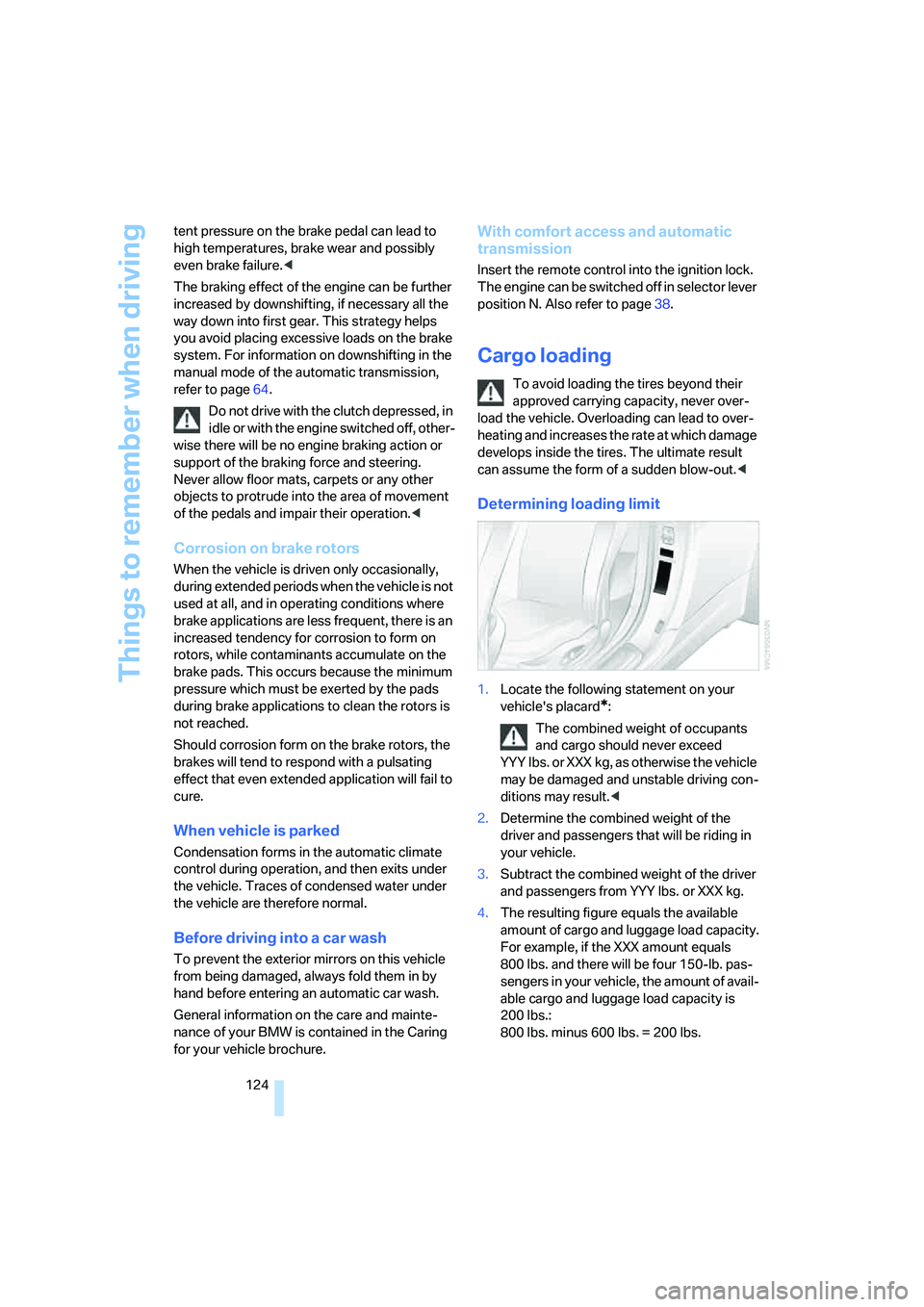
1.Locate the following statement on your
vehicle's placard
*:
The combined weight of occupants
and cargo should never exceed
YYY lbs. or XXX kg, as otherwise the vehicle
may be damaged and unstable driving con-
ditions may result.<
2.Determine the combined weight of the
driver and passengers that will be riding in
your vehicle.
3.Subtract the combined weight of the driver
and passengers from YYY lbs. or XXX kg.
4.The resulting figure equals the available
amount of cargo and luggage load capacity.
For example, if the XXX amount equals
800 lbs. and there will be four 150-lb. pas-
sengers in your vehicle, the amount of avail-
able cargo and luggage load capacity is
200 lbs.:
800 lbs. minus 600 lbs. = 200 lbs.
Page 179 of 256
177
Entertainment
Reference
At a glance
Controls
Driving tips Communications
Navigation
Mobility
Placing phone calls with BMW Assist
system*: BMW Assist calls
You can use the BMW Assist system via the
hands-free unit for BMW Assist calls.
When the status information "BMW Assist" or
"BMW Service" is displayed in "Communica-
tion", only BMW Assist calls are possible.
It may not be possible to establish a telephone
connection using the mobile phone while a con-
nection is being established to BMW Assist
or while a call to BMW Assist is already in
progress. If this happens, you must unpair the
mobile phone and the vehicle if you wish to
place a call with the mobile phone.
Initial operation
Logging on mobile phone on vehicle
The following prerequisites must be met:
>Suitable mobile phone: the mobile phone is
supported by the full mobile phone prepara-
tion package.
>The mobile phone is ready to operate.
>The Bluetooth links of the vehicle, refer to
page180, and the mobile phone are active.
>Depending on the mobile phone, presets in
the mobile phone are required: e.g. acti-
vated via the menu item Bluetooth or the
menu item Connection not with confirma-
tion.
>Depending on the mobile phone model, the
setting energy saving mode can, for exam-
ple, result in vehicle failing to detect the
logged-on mobile phone.
>To log on, specify any desired number as
the Bluetooth passkey, e.g. 1. This Blue-
tooth passkey is no longer required follow-
ing successful logon.
>The ignition is switched on.
Only log on the mobile phone with the
vehicle stopped; otherwise you may
become distracted and inadvertently endanger
your passengers and other road users.<
Switching on ignition
1.Insert the remote control as far as possible
into the ignition lock.
2.Switch on the ignition by pressing the Start/
Stop button without depressing the brake
or clutch pedal.
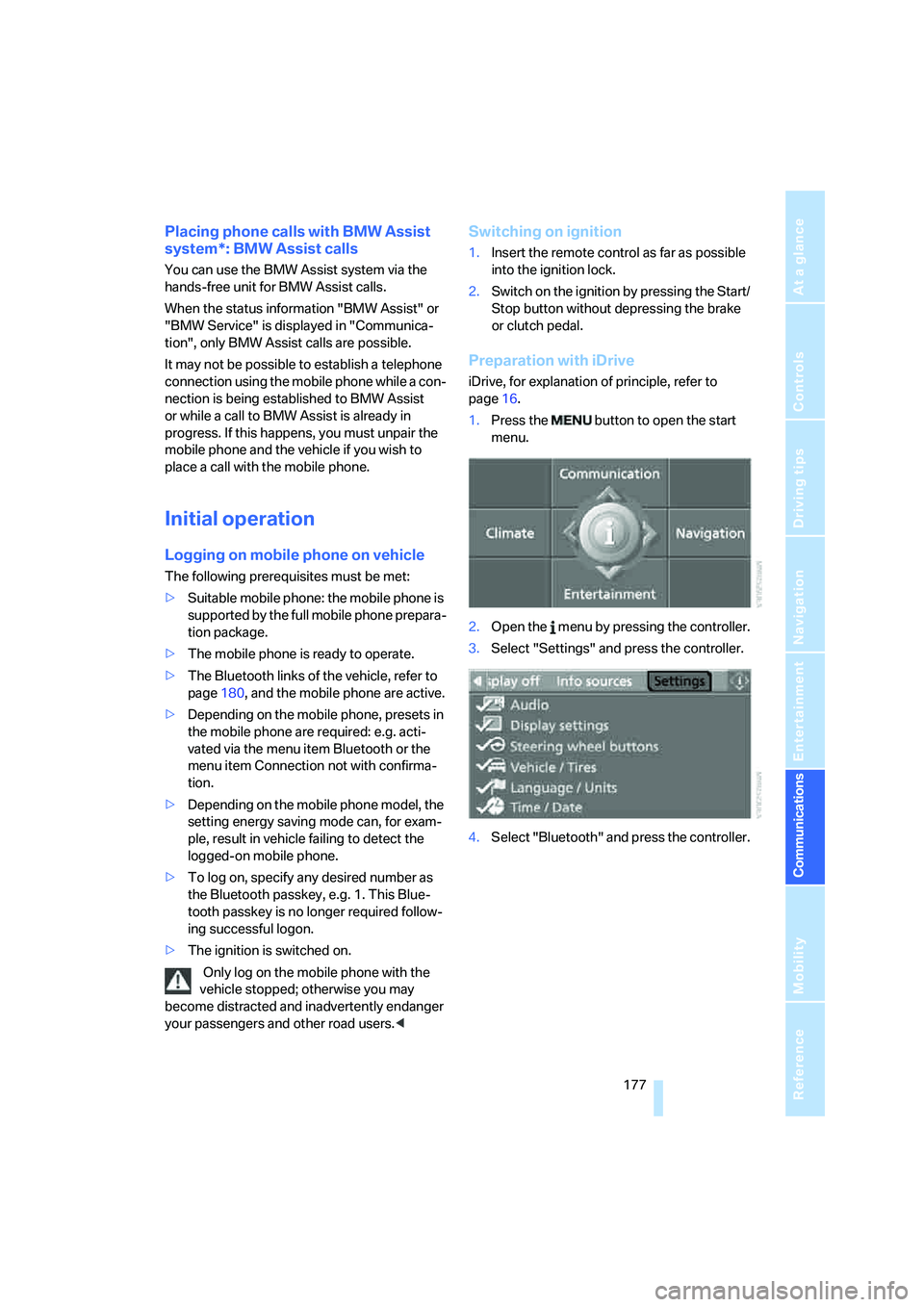
Preparation with iDrive
iDrive, for explanation of principle, refer to
page16.
1.Press the button to open the start
menu.
2.Open the menu by pressing the controller.
3.Select "Settings" and press the controller.
4.Select "Bluetooth" and press the controller.
Page 214 of 256
Maintenance
212
Maintenance
BMW Maintenance System
The BMW Maintenance System supports the
preservation of the traffic and operating safety
of your BMW. The service schedule also
includes operations related to the vehicle's
comfort and convenience features, such as
replacement of the filters for the inside air.
The ultimate objective is to ensure economical
maintenance by providing the ideal service for
your vehicle.
Should the day come when you decide to sell
your BMW, you will find that a complete dealer
service history is an asset of inestimable value.
CBS Condition Based Service
Sensors and special algorithms take the differ-
ent driving conditions of your BMW into
account. Condition Based Service uses this to
determine the current and future service
requirements. By letting you define a service
and maintenance regimen that reflects your
own individual requirements, the system builds
the basis for trouble-free driving.
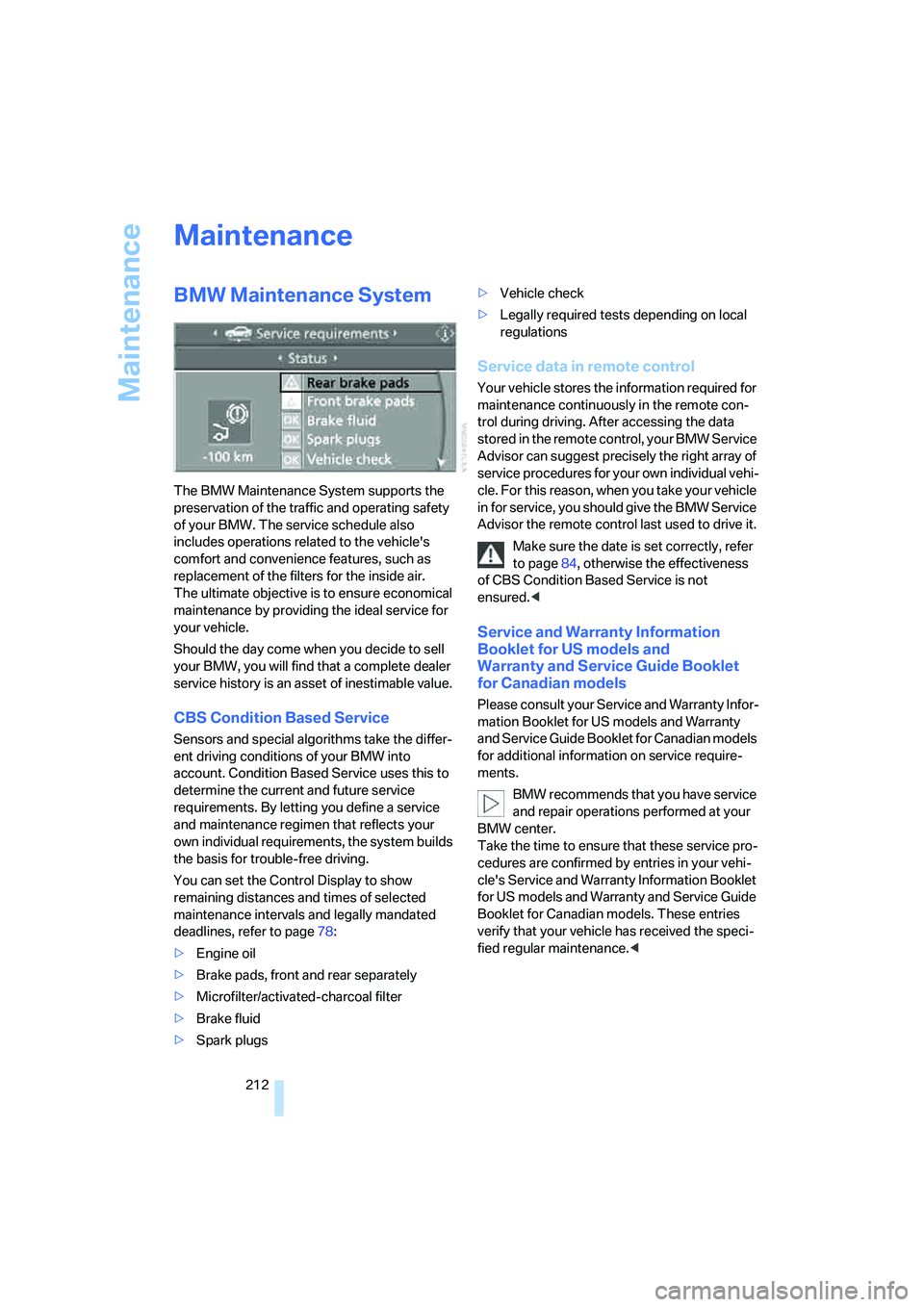
You can set the Control Display to show
remaining distances and times of selected
maintenance intervals and legally mandated
deadlines, refer to page78:
>Engine oil
>Brake pads, front and rear separately
>Microfilter/activated-charcoal filter
>Brake fluid
>Spark plugs>Vehicle check
>Legally required tests depending on local
regulations
Service data in remote control
Your vehicle stores the information required for
maintenance continuously in the remote con-
trol during driving. After accessing the data
stored in the remote control, your BMW Service
Advisor can suggest precisely the right array of
service procedures for your own individual vehi-
cle. For this reason, when you take your vehicle
in for service, you should give the BMW Service
Advisor the remote control last used to drive it.
Make sure the date is set correctly, refer
to page84, otherwise the effectiveness
of CBS Condition Based Service is not
ensured.<
Service and Warranty Information
Booklet for US models and
Warranty and Service Guide Booklet
for Canadian models
Please consult your Service and Warranty Infor-
mation Booklet for US models and Warranty
and Service Guide Booklet for Canadian models
for additional information on service require-
ments.
BMW recommends that you have service
and repair operations performed at your
BMW center.
Take the time to ensure that these service pro-
cedures are confirmed by entries in your vehi-
cle's Service and Warranty Information Booklet
for US models and Warranty and Service Guide
Booklet for Canadian models. These entries
verify that your vehicle has received the speci-
fied regular maintenance.<
Page 218 of 256
Replacing components
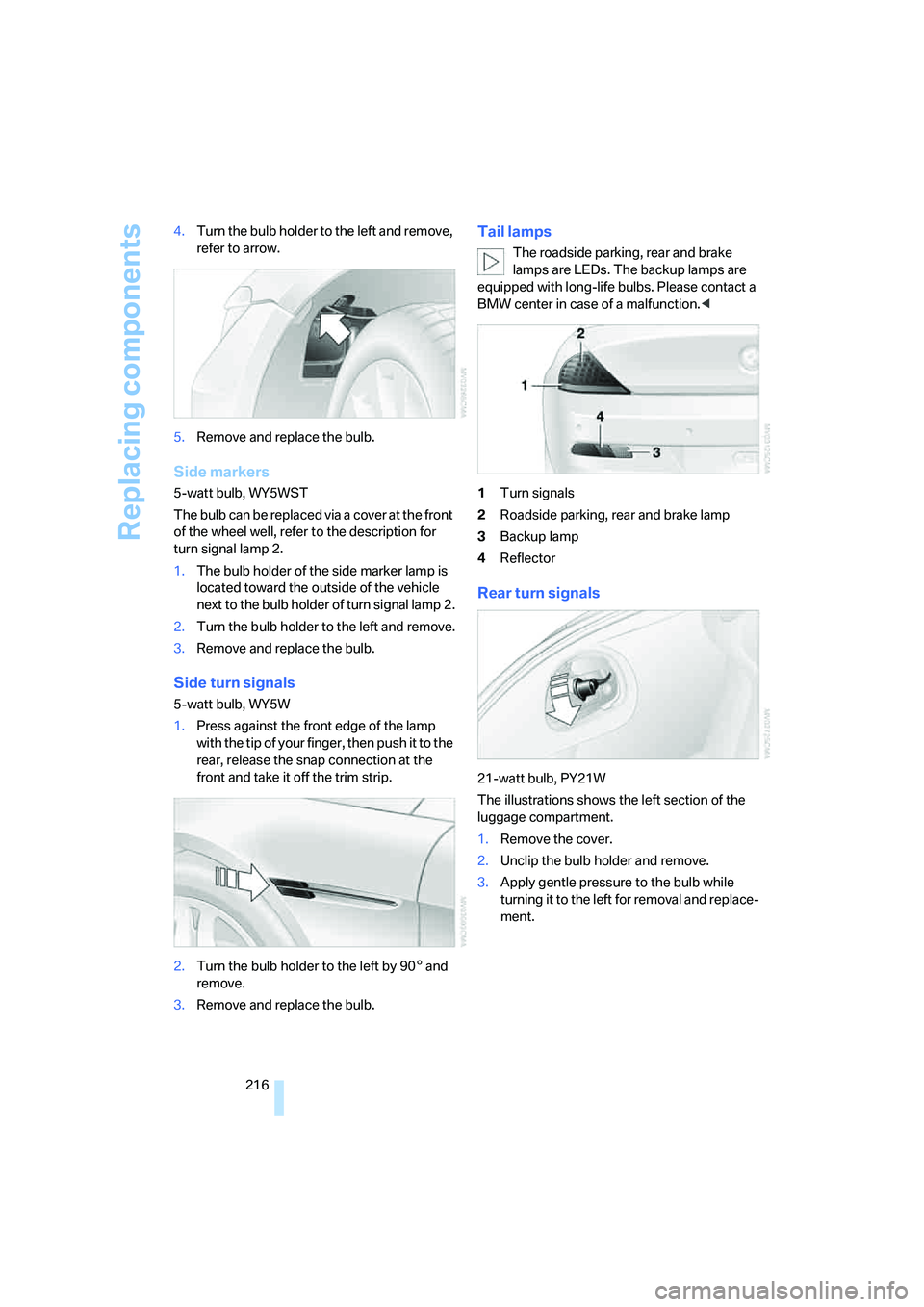
216 4.Turn the bulb holder to the left and remove,
refer to arrow.
5.Remove and replace the bulb.
Side markers
5-watt bulb, WY5WST
The bulb can be replaced via a cover at the front
of the wheel well, refer to the description for
turn signal lamp 2.
1.The bulb holder of the side marker lamp is
located toward the outside of the vehicle
next to the bulb holder of turn signal lamp 2.
2.Turn the bulb holder to the left and remove.
3.Remove and replace the bulb.
Side turn signals
5-watt bulb, WY5W
1.Press against the front edge of the lamp
with the tip of your finger, then push it to the
rear, release the snap connection at the
front and take it off the trim strip.
2.Turn the bulb holder to the left by 905 and
remove.
3.Remove and replace the bulb.
Tail lamps
The roadside parking, rear and brake
lamps are LEDs. The backup lamps are
equipped with long-life bulbs. Please contact a
BMW center in case of a malfunction.<
1Turn signals
2Roadside parking, rear and brake lamp
3Backup lamp
4Reflector
Rear turn signals
21-watt bulb, PY21W
The illustrations shows the left section of the
luggage compartment.
1.Remove the cover.
2.Unclip the bulb holder and remove.
3.Apply gentle pressure to the bulb while
turning it to the left for removal and replace-
ment.
Page 236 of 256
Everything from A to Z
234
Everything from A to Z
Index
"..." Identifies Control Display
texts used to select
individual functions, and
indicates where to find them
in the text.
A
ABS Antilock Brake
System88
– indicator/warning lamp90
ACC, refer to Active cruise
control68
Acceleration assistant with
SMG65
Accepted calls182
Accessories6
Accident, refer to Emergency
call219
Activated-charcoal filter for
automatic climate
control111
Activating hour signal84
"Activation time" for parked
car ventilation111
Active cruise control68
– indicator lamp71
– radar sensor72
– selecting distance70
– warning lamps71
Active steering95
– warning lamp95
Adapter for spare key28
Adaptive brake lamps, refer to
Brake force display95
Adaptive Head Light104
"Add digits" for mobile
phone183
Additives
– coolant211
– engine oil, refer to Approved
engine oils210"Address book" for
navigation136
Address for navigation
– deleting138
– entering129,132
– selecting137
– storing137
– storing current position137
"Add to address book"136
"Add to destination
list"132,134
Adjusting interior
temperature108
Adjusting the thigh support49
Adjusting tone in audio mode,
refer to Tone control155
"After opening door"51
"After unlocking"51
Airbags95
– deactivating, refer to
Exception for front
passenger seat57
– indicator/warning lamp97
– indicator lamp for front
passenger airbags97
– sitting safely48
Air distribution
– automatic108
– manual109
Airing, refer to Ventilation110
Air outlets, refer to
Ventilation110
Air recirculation, refer to AUC
Automatic recirculated-air
control110
"Air recirculation on / off"56
Air supply, automatic climate
control107
Air volume109
AKI, refer to Fuel
specifications201Alarm system36
– avoiding unintentional
alarms37
– interior motion sensor36
– switching off alarm36
– switching off tilt alarm
sensor and interior motion
sensor37
– tilt alarm sensor36
"All channels"164
"All doors"31
All-season tires, refer to
Winter tires207
"All stations" on the radio,
selecting158,161
Alterations, technical, refer to
For your own safety6
Alternate route, refer to
Bypassing traffic
congestion148
"AM", reception
range155,158
Antenna, refer to Caring for
your vehicle brochure
Antenna for mobile phone176
Antifreeze
– coolant211
– washer fluid67
Antilock Brake System
ABS88
– indicator/warning lamp90
Anti-theft alarm system, refer
to Alarm system36
Anti-theft system, refer to
Central locking system30
Approved axle loads, refer to
Weights229
Approved engine oils210
Approved gross vehicle
weight, refer to Weights229
Armrest, refer to Center
armrest115
Page 238 of 256
Everything from A to Z
236 BMW Assist190
– activating195
– breakdown assistance191
– contacting BMW
Hotline193
– displaying vehicle data196
– information service193
– services offered190
– TeleService192
– updating194
"BMW Contact"184
"BMW Contact
Numbers"184
BMW homepage4
BMW Maintenance
System212
BMW Night Vision100
– activating101
– cleaning camera102
– cleaning camera, refer to
Wiper system67
– deactivating102
– making settings102
"BMW Services"194
BMW website4
Bottle holder, refer to Cup
holders116
Bracket for telephone or
mobile phone
– refer to Snap-in adapter188
Brake Assistant, refer to DBC
Dynamic Brake Control88
Brake force display95
Brake lamps
– replacing bulbs, refer to Tail
lamps216
– two-stage95
Brake rotors
– breaking in122
– refer to Braking safely123
Brakes
– ABS Antilock Brake
System88
– brake force display95
– breaking-in122
– CBC Cornering Brake
Control88
– handbrake61Brake system122
– brake pads122
– brake rotors124
– breaking-in122
– warning lamp13,90
Braking
– electronic brake-force
distribution88
– refer to Braking safely123
Braking safely123
Breakdown assistance191
Breakdown services, refer to
Roadside Assistance220
Breaking-in122
Breaking in brake pads122
Breaking-in the clutch122
Breaking in the differential,
refer to Engine and
differential122
"Brightness"85,99
Brightness of Control
Display85
"Brightness" with BMW Night
Vision102
Button for starting engine,
refer to Start/Stop button59
Buttons on steering wheel11
Bypassing route sections145
C
California Proposition 65
Warning6
"Call"183,194
Call
– accepting181
– displaying accepted183
– ending182
– in absence183
– rejecting181
– starting181
Calling
– by entering phone
number181
– from phone book182
– from Top 8 list183
– redialing183
Can holder, refer to Cup
holders116Capacities229
Car battery, refer to Vehicle
battery217
Car care, refer to Caring for
your vehicle brochure
Car-care products, refer to
Caring for your vehicle
brochure
"Car data"77
Care213
– refer to Caring for your
vehicle brochure
Cargo loading
– securing cargo125
– stowing cargo125
– vehicle124
Caring for artificial leather,
refer to Caring for your
vehicle brochure
Caring for leather, refer to
Caring for your vehicle
brochure
Caring for light-alloy wheels,
refer to Caring for your
vehicle brochure
Caring for plastic, refer to
Caring for your vehicle
brochure
Caring for the carpet, refer to
Caring for your vehicle
brochure
Caring for the vehicle finish,
refer to Caring for your
vehicle brochure
Car key, refer to Keys/remote
control28
Car phone176
– installation location, refer to
Center armrest115
– refer to Mobile phone176
– refer to separate operating
instructions
Car radio, refer to Radio158
Car wash124
– refer to Before driving into a
car wash124
– refer to Caring for your
vehicle brochure
– with comfort access38
Page 239 of 256
Reference 237
At a glance
Controls
Driving tips
Communications
Navigation
Entertainment
Mobility
Catalytic converter, refer to
Hot exhaust system122
"Categories"164
CBC Cornering Brake
Control88
CBS Condition Based
Service212
"CD"155,167
CD changer167
– controls154
– fast forward/reverse171
– installation location171
– random play sequence170
– repeating a track170
– sampling a track169
– selecting a CD167
– selecting a track168
– switching on/off154
– tone control155
– volume155
CD player167
– controls154
– fast forward/reverse171
– random play sequence170
– repeating a track170
– sampling a track169
– selecting a track168
– switching on/off154
– tone control155
– volume155
Center armrest, adjusting
height115
Center console14
"Central locking"30
Central locking
– from inside33
– from outside30
Central locking system30
– comfort access37
– hotel function33
Changes, technical, refer to
For your own safety6
Changing a wheel217
Changing language on
Control Display85
Changing scale for navigation
system display143
Changing units of measure on
Control Display85Changing wheels206
CHECK button81
Check Control80
"Check Control
messages"81
Check Gas Cap200
Checking air pressure, refer to
Tire inflation pressure202
Child-restraint fixing system
LATCH58
Child restraint systems57
Child seats, refer to
Transporting children
safely57
Chrome parts, refer to Caring
for your vehicle brochure
Cigarette lighter116
Cigarette lighter socket, refer
to Connecting electrical
devices117
Cleaning, refer to Caring for
your vehicle brochure
"Climate"108
Clock75
– 12h/24h mode84
– hour signal84
– setting time and date83
Closing
– from inside33
– from outside30
Closing fuel filler cap200
Clothes hooks, Coupe116
Cockpit10
Cold start, refer to Starting
engine60
Comfort access37
– observe in car wash38
– replacing battery, remote
control38
Comfort closing
– windows, with comfort
access with Coupe38
– with comfort access38
Comfort operation
– convertible top31,32
– glass sunroof31,32
– windows31,32
"Communication"181,191Compact disc
– refer to CD changer167
– refer to CD player167
Compartment for remote
control, refer to Ignition
lock59
Compartments, refer to
Storage compartments115
Compressed audio files167
Computer76
– displays on Control
Display77
– hour signal84
"Concert hall", refer to Tone
control156
"Concierge"193
Condensation, refer to When
vehicle is parked124
Condition Based Service
CBS212
"Confirmation"31
Confirmation signals for
locking and unlocking31
Connecting car vacuum
cleaner, refer to Connecting
electrical devices117
Consumption display, refer to
Average fuel
consumption76
Consumption statistics, refer
to Average fuel
consumption76
"Continue guidance to
destination?"141
"Contrast" with BMW Night
Vision102
Control Center, refer to
iDrive16
Control Display, refer to
iDrive16
– setting brightness85
Control Display, refer to
Switching iDrive
– off/on21
Controller, refer to iDrive16
Controls, refer to Cockpit10
Page 240 of 256
Everything from A to Z
238 Convertible
– convertible program for
automatic climate
control108
– opening and closing
windows39
– rollover protection
system97
– top42
– wind deflector46
– window and convertible top
operation with comfort
access38
Convertible top
– care, refer to Caring for your
vehicle brochure
– closing manually44
– comfort operation32
– emergency closing44
– opening and closing43
Coolant211
– checking level211
– temperature75
Cooling, maximum110
Cooling function, automatic
climate control109
Cooling system, refer to
Coolant211
Copyright2
Cornering Brake Control
CBC88
Country of destination for
navigation130
Courtesy lamps, refer to
Interior lamps105
Cradle for telephone or mobile
phone115
Cruise control67,68
– active cruise control68
Cruising range76
Cup holders116
Curb weight, refer to
Weights229
"Current position"149
Current position
– displaying149
– entering137
– storing137"Curve mode" with
BMW Night Vision102
"Customer
Relations"184,193
Cylinders, refer to Engine
data226
D
Dashboard, refer to
Cockpit10
Data, technical226
– capacities229
– dimensions227
– engine226
– measurements227
– weights229
"Date"84
Date75
– display format84
Date, setting84
"Date format"84
"Daytime running lamps"104
Daytime running lamps104
DBC Dynamic Brake
Control88
– warning lamp90
"Deactivated"51
Deactivating selector lever
interlock64
Decommissioning the vehicle
– refer to Caring for your
vehicle brochure
Defect
– tires, refer to Flat Tire
Monitor90
– tires, refer to Tire Pressure
Monitor92
Defrosting windows109
Defrosting windows and
removing condensation109
Defrosting windshield, refer to
Defrosting windows109
Defrost position, refer to
Defrosting windows109
"Delete address book" for
navigation138"Delete all numbers" on the
mobile phone184
"Delete data" for
navigation138
"Delete" for mobile
phone184
Destination address
– deleting138
– entering129,132
Destination for navigation
– destination list136
– entering via voice132
– entry129
– home address138
– selecting from address
book137
– selecting using
information135
– storing137
Destination guidance141
– bypassing route
sections145
– canceling voice
instructions56
– changing specified
route139
– displaying route142
– distance and arrival141
– interrupting141
– starting141
– terminating/continuing141
– voice instructions144
– volume of voice
instructions145
Destination list for
navigation136
Destinations recently driven
to136
"Details" in audio mode169
"Detour" for navigation148
"Dial" for mobile phone181
"Dial number"182
"Diamond button"56
Digital clock75
Digital radio, refer to High
Definition Radio162
Page 241 of 256
Reference 239
At a glance
Controls
Driving tips
Communications
Navigation
Entertainment
Mobility
Dimensions
– Convertible228
– Coupe227
Directional indicators, refer to
Turn signals65
Direction announcements,
refer to Voice
instructions144
Direction instructions, refer to
Voice instructions144
Directory, refer to Phone
book182
Directory for navigation, refer
to Address book136
Displacement, refer to Engine
data226
"Display"85
Display, refer to iDrive
controls16
Display elements, refer to
Instrument cluster12
Displaying vehicle data196
Display lighting, refer to
Instrument lighting105
"Display off"21
Displays
– on Control Display, refer to
iDrive16
– refer to Instrument
cluster12
"Display settings"85,99
Displays on the windshield,
refer to Head-Up Display98
Disposal
– battery of remote control
with comfort access39
– coolant211
– vehicle battery217
Distance, refer to
Computer77
Distance control, refer to
Active cruise control68
"Distance to dest."77
Distance to destination, refer
to Computer77Distance warning, refer to
PDC Park Distance
Control87
Door entry lighting, refer to
Interior lamps105
Door key, refer to Keys/
remote control28
Door lock32
"Door locks"30,79
Doors
– manual operation32
– remote control31
DOT Quality Grades204
Draft-free ventilation111
"Driver's door only"31
Driving lamps, refer to Parking
lamps/low beams103
Driving route, refer to
Displaying route142
Driving stability control
systems88
Driving through water123
Driving tips, refer to General
driving notes122
Drying the air, refer to Cooling
function109
DSC Dynamic Stability
Control89
– indicator lamp13,89
– malfunction90
DTC Dynamic Traction
Control89
– activating89
– indicator lamp13,89
DVD for navigation128
Dynamic Brake Control
DBC88
Dynamic Drive90
Dynamic Driving Control65
"Dynamic route" for
navigation140
Dynamic Stability Control
DSC89
Dynamic Traction Control
DTC89
E
Easy entry, refer to Entering
rear52
Easy entry/exit55
Eject button, refer to Buttons
on CD player154
Electrical malfunction
– convertible top44
– door lock32
– driver's door32
– fuel filler door200
– glass sunroof42
– luggage compartment lid35
– storage compartment, hotel
function34
Electric convertible top42
Electric steering wheel
adjustment55
Electronic brake-force
distribution88
Electronic oil level check209
Emergency assistance, refer
to Roadside Assistance220
Emergency call219
Emergency operation, refer to
Manual operation
– convertible top44
– door lock32
– driver's door32
– fuel filler door200
– glass sunroof42
– hotel function34
– luggage compartment lid35
– selector lever interlock,
automatic transmission64
Emergency release for
luggage compartment lid in
luggage compartment35
Emergency services, refer to
Roadside Assistance220
"Enable services"196
"End call"182