ESP BMW M4 2016 Owner's Manual
[x] Cancel search | Manufacturer: BMW, Model Year: 2016, Model line: M4, Model: BMW M4 2016Pages: 228, PDF Size: 4.88 MB
Page 79 of 228
DisplaysVehicle equipmentThis chapter describes all standard, national
and special equipment provided in the model
series. Equipment not available in the vehicle is
therefore also described, for example the se‐lected special equipment or national version.
This also applies to safety-relevant functions
and systems. Comply with the relevant na‐
tional regulations when using the correspond‐
ing functions and systems.
Overview, Instrument cluster
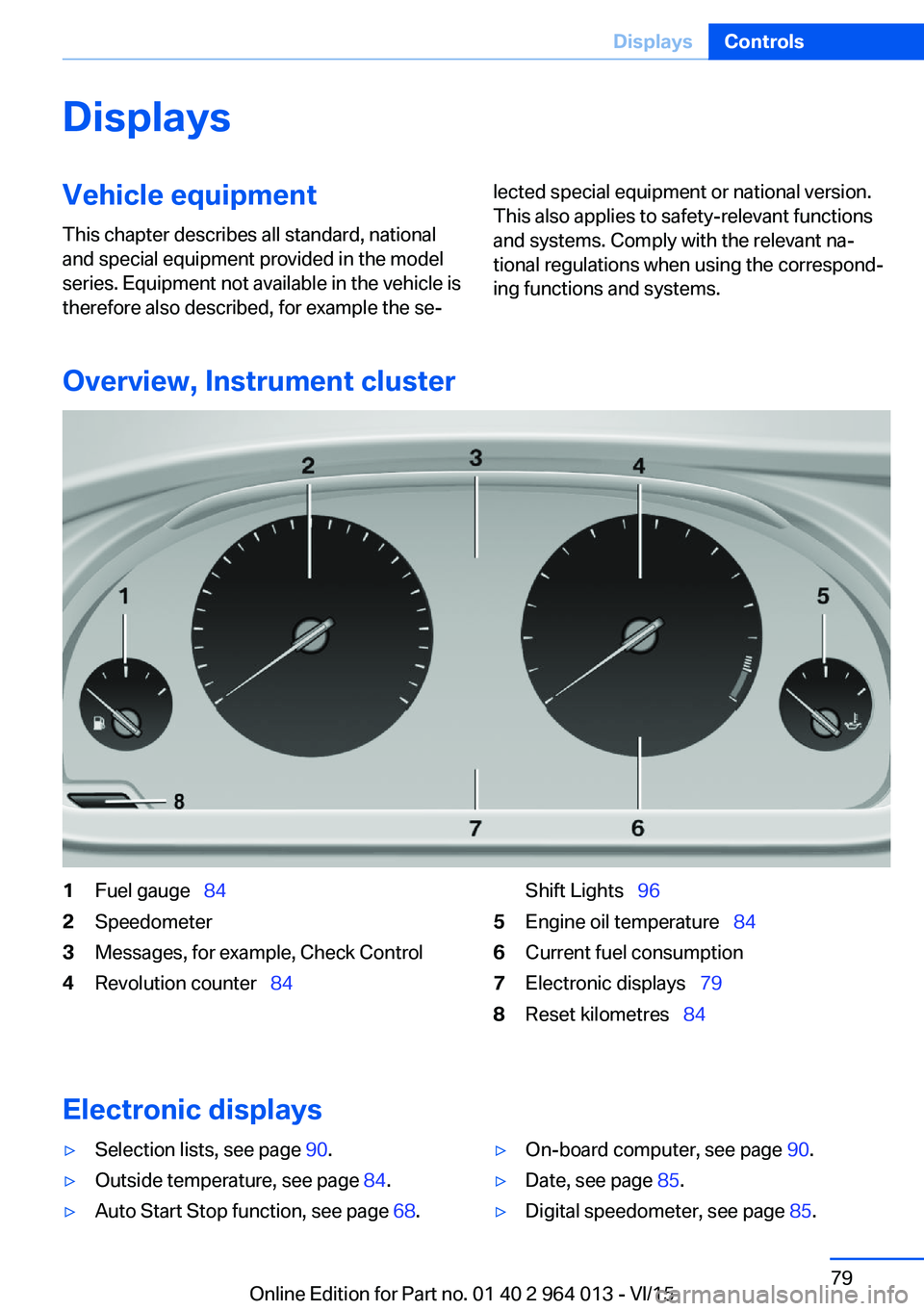
1Fuel gauge 842Speedometer3Messages, for example, Check Control4Revolution counter 84Shift Lights 965Engine oil temperature 846Current fuel consumption7Electronic displays 798Reset kilometres 84
Electronic displays
▷Selection lists, see page 90.▷Outside temperature, see page 84.▷Auto Start Stop function, see page 68.▷On-board computer, see page 90.▷Date, see page 85.▷Digital speedometer, see page 85.Seite 79DisplaysControls79
Online Edition for Part no. 01 40 2 964 013 - VI/15
Page 80 of 228
▷Energy recuperation, see page 86.▷Gear display with Drivelogic, see
page 85.▷Seat belt reminder for rear seats, see
page 53.▷Kilometres/trip odometer, see page 84.▷Messages, for example Check Control, see
page 80.▷Current fuel consumption, see page 86.▷Navigation display, see Owner's Handbook
for Navigation, Entertainment, Communi‐
cation.▷Range, see page 85.▷Service requirements, see page 87.▷Speed Limit Information, see page 88.▷System states of the driving dynamics, see
page 86.▷Time, see page 85.
Check control
Principle The check control monitors vehicle functionsand alerts you to any faults in the monitored
systems.
A check control message is displayed as a
combination of indicator or warning lights and
text messages in the instrument cluster and
the Head-Up Display.
If applicable, the text message shown in the
Control Display is accompanied by an addi‐
tional acoustic sound.
Indicator and warning lamps
General Indicator and warning lights in the instrument
cluster can illuminate in a variety of combina‐
tions and colours.
When the engine starts or the ignition is
switched on, the functionality of some lights is
briefly checked.
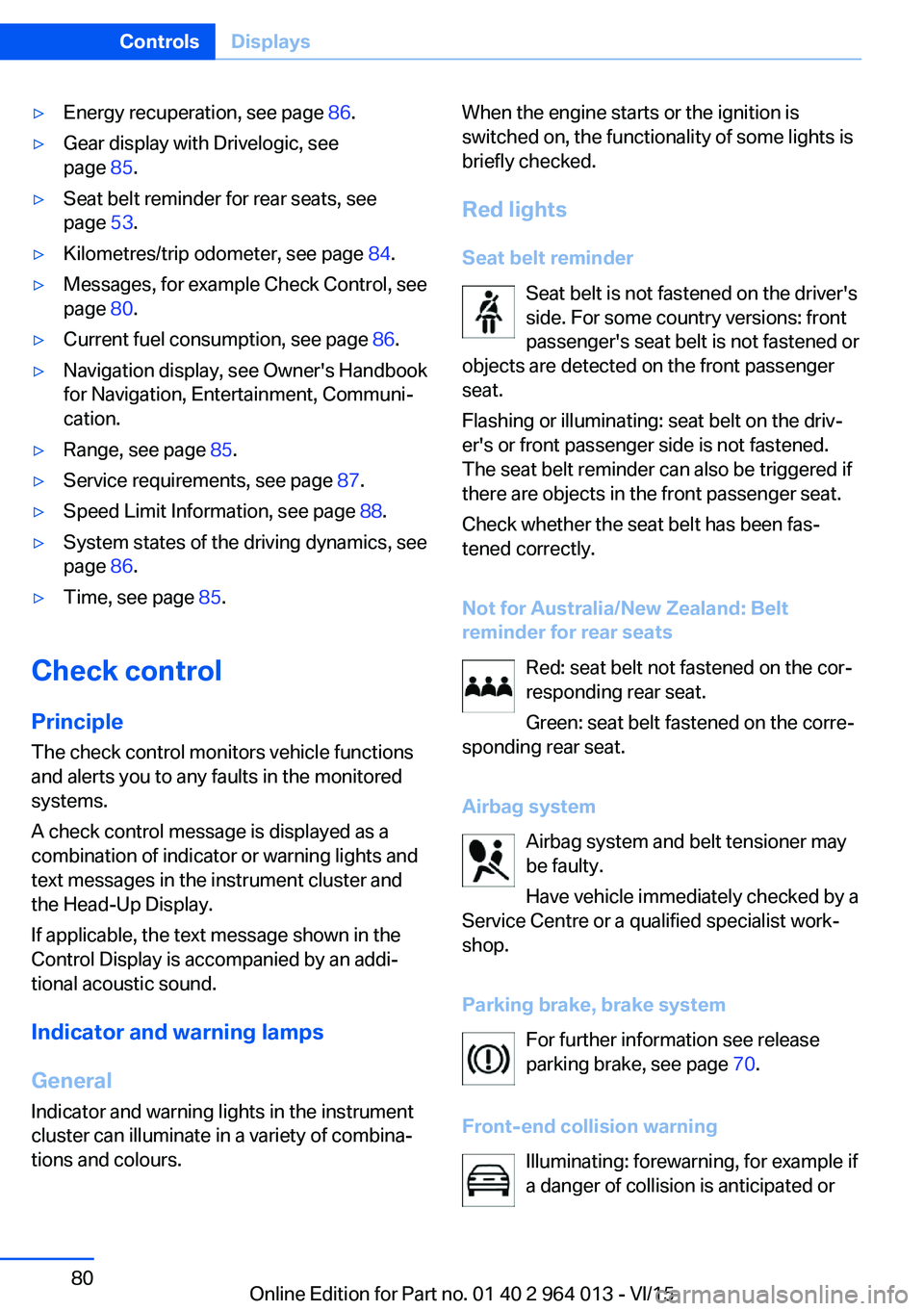
Red lights
Seat belt reminder Seat belt is not fastened on the driver's
side. For some country versions: front
passenger's seat belt is not fastened or
objects are detected on the front passenger
seat.
Flashing or illuminating: seat belt on the driv‐
er's or front passenger side is not fastened.
The seat belt reminder can also be triggered if
there are objects in the front passenger seat.
Check whether the seat belt has been fas‐
tened correctly.
Not for Australia/New Zealand: Belt
reminder for rear seats
Red: seat belt not fastened on the cor‐
responding rear seat.
Green: seat belt fastened on the corre‐
sponding rear seat.
Airbag system Airbag system and belt tensioner may
be faulty.
Have vehicle immediately checked by a
Service Centre or a qualified specialist work‐
shop.
Parking brake, brake system For further information see release
parking brake, see page 70.
Front-end collision warning Illuminating: forewarning, for example if
a danger of collision is anticipated orSeite 80ControlsDisplays80
Online Edition for Part no. 01 40 2 964 013 - VI/15
Page 89 of 228
speed limits present on unmarked sections of
road.
No Passing Information No Passing Information displays with corre‐
sponding symbols in the instrument cluster no
passing restrictions and their removal detected
by the camera. The system only considers no passing restrictions and lifting the restriction
made known by signage.
Nothing will be displayed in the following situa‐
tions:▷In countries in which no passing is primar‐
ily shown by road markings.▷On routes without signage.▷On railway crossings, lane markings or in
other situations which would not indicate
an unsigned no passing restriction.
Notes
WARNING
The system does not take your personal
responsibility from you when you are estimat‐
ing the visibility conditions and traffic situation.
Danger of accidents. Adapt driving style to the driving conditions. Observe the traffic situation
and intervene actively if the situation warrants
it.◀
Overview
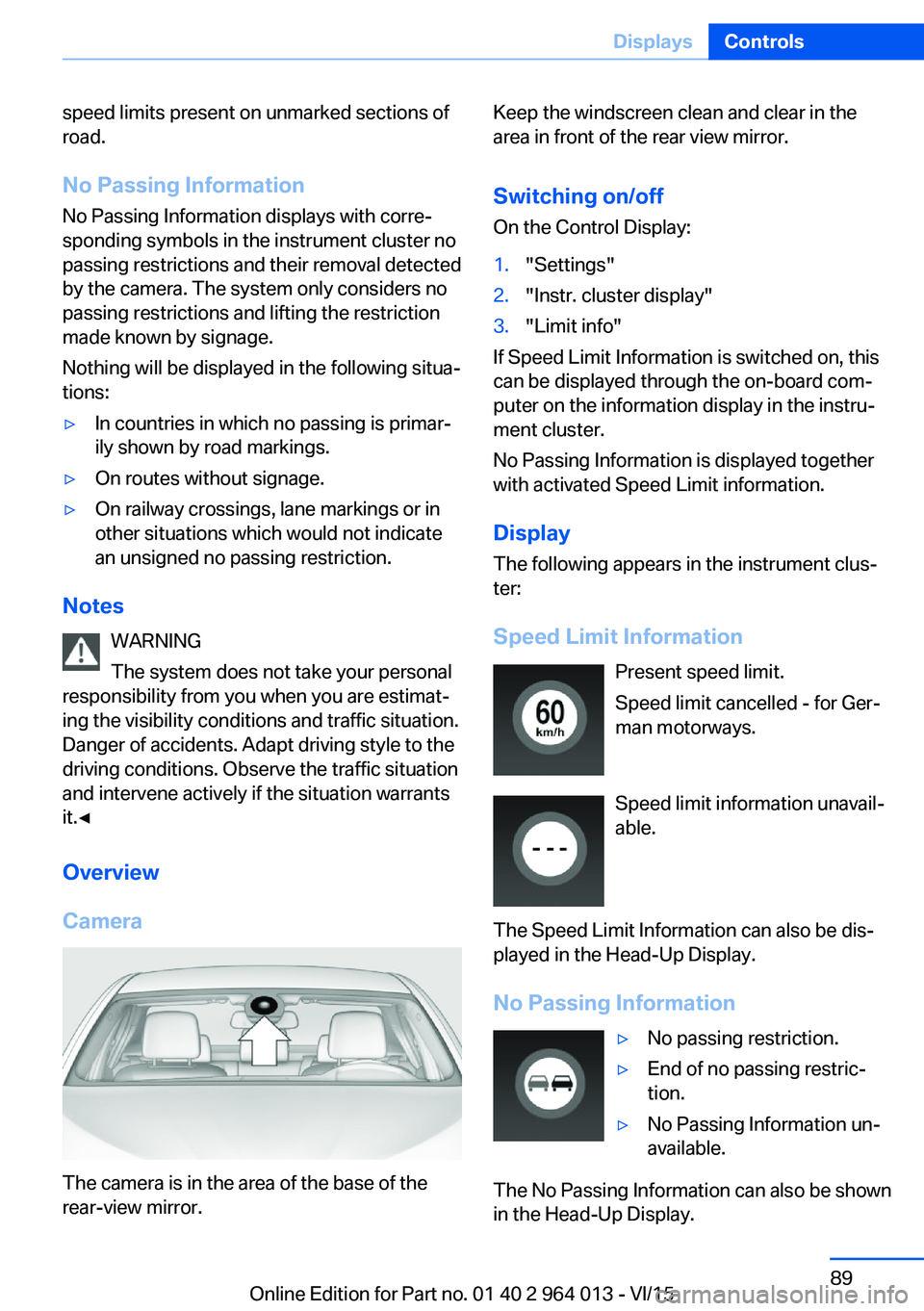
Camera
The camera is in the area of the base of the
rear-view mirror.
Keep the windscreen clean and clear in the
area in front of the rear view mirror.
Switching on/offOn the Control Display:1."Settings"2."Instr. cluster display"3."Limit info"
If Speed Limit Information is switched on, this
can be displayed through the on-board com‐
puter on the information display in the instru‐
ment cluster.
No Passing Information is displayed together
with activated Speed Limit information.
Display
The following appears in the instrument clus‐
ter:
Speed Limit Information Present speed limit.
Speed limit cancelled - for Ger‐
man motorways.
Speed limit information unavail‐
able.
The Speed Limit Information can also be dis‐
played in the Head-Up Display.
No Passing Information
▷No passing restriction.▷End of no passing restric‐
tion.▷No Passing Information un‐
available.
The No Passing Information can also be shown
in the Head-Up Display.
Seite 89DisplaysControls89
Online Edition for Part no. 01 40 2 964 013 - VI/15
Page 90 of 228
System limits
The function may be disabled or inaccurate
under certain conditions, for example:▷In thick fog and heavy rain or snow.▷If road signs are obscured by objects.▷If the vehicle is moving too close to the ve‐
hicle ahead.▷With bright oncoming light.▷When the windscreen in front of the rear-
view mirror is covered with condensation,
dirt, stickers, etc.▷Due to possible wrong detections of the
camera.▷If the speed limits saved in the navigation
system are wrong.▷In areas not covered by the navigation sys‐
tem.▷If there are deviations in relation to the nav‐
igation, for example due to changes in the
road routing.▷On overtaking buses or trucks with speed
stickers.▷If traffic signs do not correspond to the
standard.▷During the calibration process of the cam‐
era immediately after the vehicle is sup‐
plied.
Selection lists in the
instrument cluster
Principle Depending on equipment, the following can be
displayed or operated via the buttons and the
knurled wheel on the steering wheel and using
the displays in the instrument cluster and
Head-Up Display:
▷Current audio source.▷Repeat dialling for telephone.▷Activating the voice control system.Display
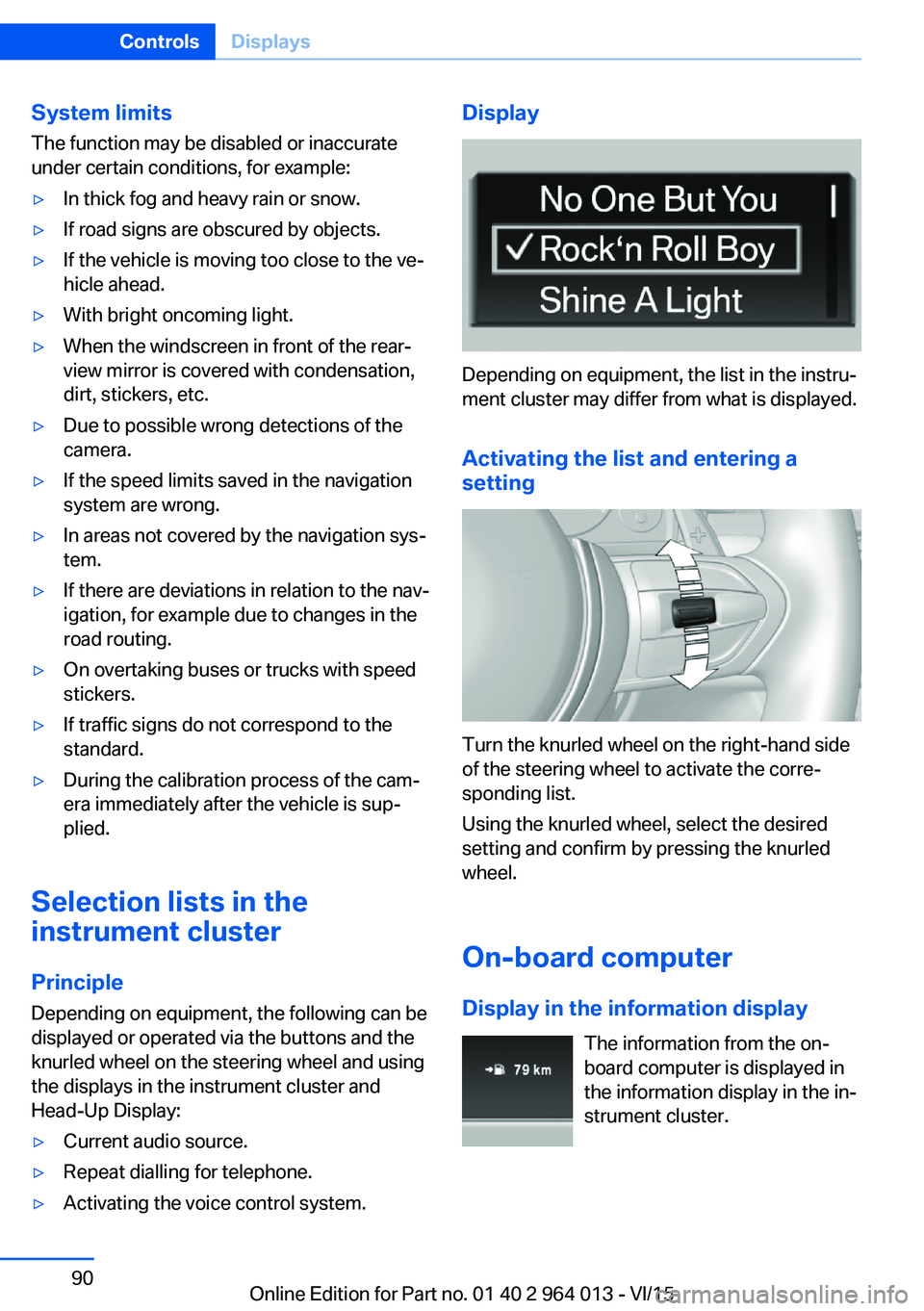
Depending on equipment, the list in the instru‐
ment cluster may differ from what is displayed.
Activating the list and entering a
setting
Turn the knurled wheel on the right-hand side
of the steering wheel to activate the corre‐
sponding list.
Using the knurled wheel, select the desired
setting and confirm by pressing the knurled
wheel.
On-board computer
Display in the information display The information from the on-
board computer is displayed in
the information display in the in‐
strument cluster.
Seite 90ControlsDisplays90
Online Edition for Part no. 01 40 2 964 013 - VI/15
Page 98 of 228
LightsVehicle equipmentThis chapter describes all standard, national
and special equipment provided in the model
series. Equipment not available in the vehicle is
therefore also described, for example the se‐
lected special equipment or national version.
This also applies to safety-relevant functions
and systems. Comply with the relevant na‐
tional regulations when using the correspond‐
ing functions and systems.
Overview Switch in the vehicle
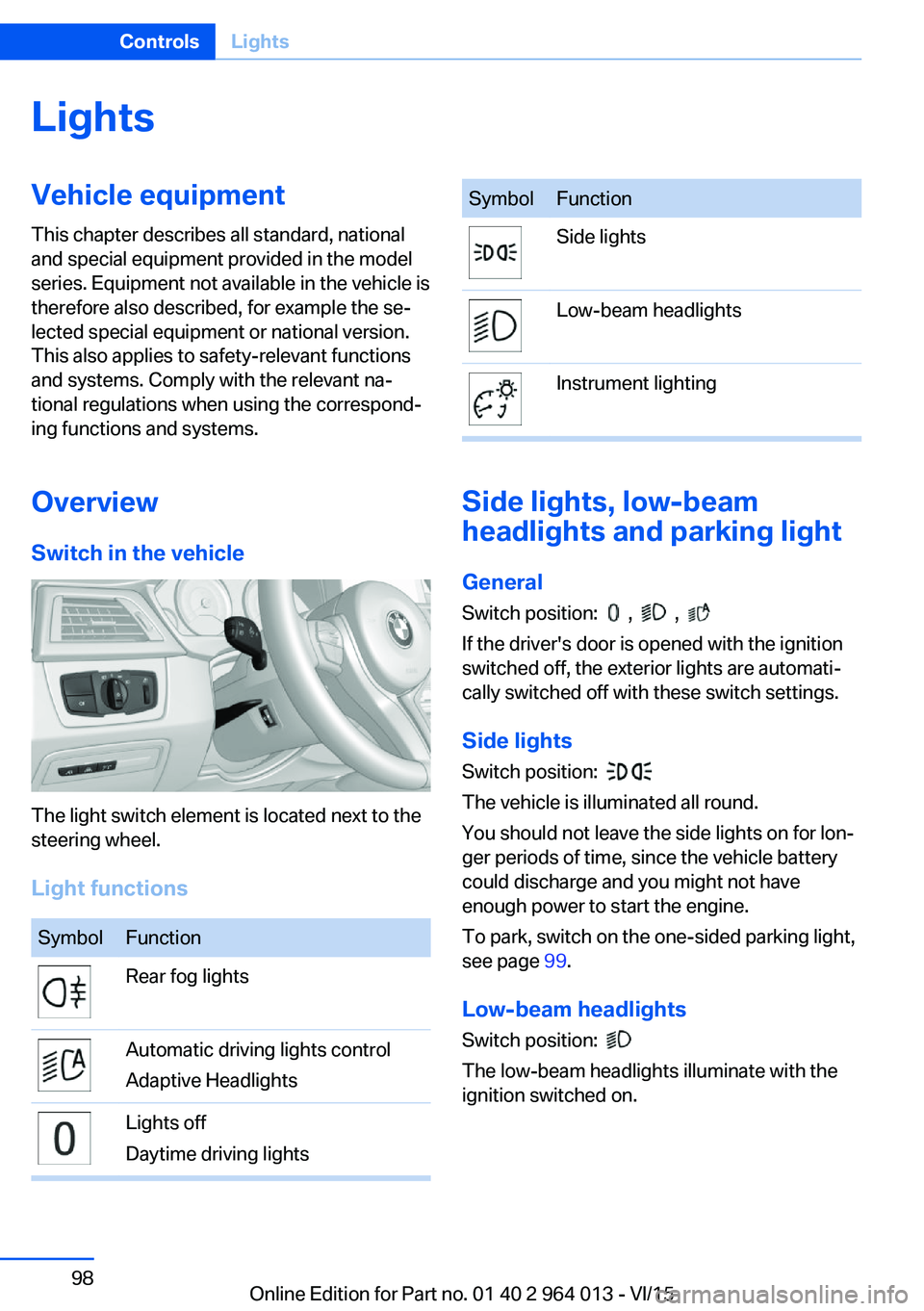
The light switch element is located next to the
steering wheel.
Light functions
SymbolFunctionRear fog lightsAutomatic driving lights control
Adaptive HeadlightsLights off
Daytime driving lightsSymbolFunctionSide lightsLow-beam headlightsInstrument lighting
Side lights, low-beam
headlights and parking light
General
Switch position:
, ,
If the driver's door is opened with the ignition
switched off, the exterior lights are automati‐
cally switched off with these switch settings.
Side lights
Switch position:
The vehicle is illuminated all round.
You should not leave the side lights on for lon‐
ger periods of time, since the vehicle battery
could discharge and you might not have
enough power to start the engine.
To park, switch on the one-sided parking light,
see page 99.
Low-beam headlights Switch position:
The low-beam headlights illuminate with the
ignition switched on.
Seite 98ControlsLights98
Online Edition for Part no. 01 40 2 964 013 - VI/15
Page 100 of 228
System limits
The automatic driving lights control is no sub‐
stitute for your individual judgement of when it
is necessary to switch on the lights.
The sensors are unable, for instance, to recog‐
nise fog or hazy weather. In such situations,
switch on the lights manually to avoid any
safety risk.
Daytime driving lights Switch position:
,
The daytime driving lights illuminate with the
ignition switched on.
Activating/deactivating
In some countries daytime driving lights are
compulsory, which is why the daytime driving
lights cannot be deactivated.
On the Control Display:
1."Settings"2."Lights"3."Daytime driving lights"
The setting is saved for the currently used pro‐
file.
Adaptive HeadlightsPrinciple
Adaptive Headlights is a variable headlight
control system that makes it possible to illumi‐
nate the road surface responsively.
The beams from the headlights follow the road
ahead on the basis of the steering angle and
other parameters.
Depending on the speed, the variable light dis‐
tribution ensures even better illumination of
the roadway.
The light distribution is automatically adapted
to the speed. The city light is switched on if the
speed of 50 km/h, approx. 30 mph is not ex‐
ceeded while accelerating or if the speed of
40 km/h, approx. 25 mph is undercut while
braking. The motorway light is switched on at a speed higher than 110 km/h, 68 mph after ap‐
proximately 30 seconds or as of a speed of
140 km/h, 87 mph.
Activating Switch position
with the ignition switched
on.
So as not to dazzle oncoming vehicles, the
adaptive cornering light does not swivel to the
driver's side when stationary.
A cornering light is activated automatically de‐
pending on the steering angle or use of the
turn indicators.
The cornering light may be switched on when
driving in reverse, irrespective of the steering
angle.
Malfunction
A Check Control message is displayed.
Adaptive Headlights are faulty or have failed.
Have the system checked as soon as possible.
High-beam assistance
Principle When low-beam headlights are switched on,this system automatically switches the high-
beam headlights on and off or fades out the
areas which dazzle oncoming vehicles. This
process is controlled by a camera on the front
of the rear-view mirror. It ensures that the
high-beam headlights are switched on when‐
ever the traffic situation allows. You can also
control the lights yourself at any time and
switch them on and off as usual. The high-
beam headlights are not switched on by the
system in the low speed range.
Seite 100ControlsLights100
Online Edition for Part no. 01 40 2 964 013 - VI/15
Page 101 of 228
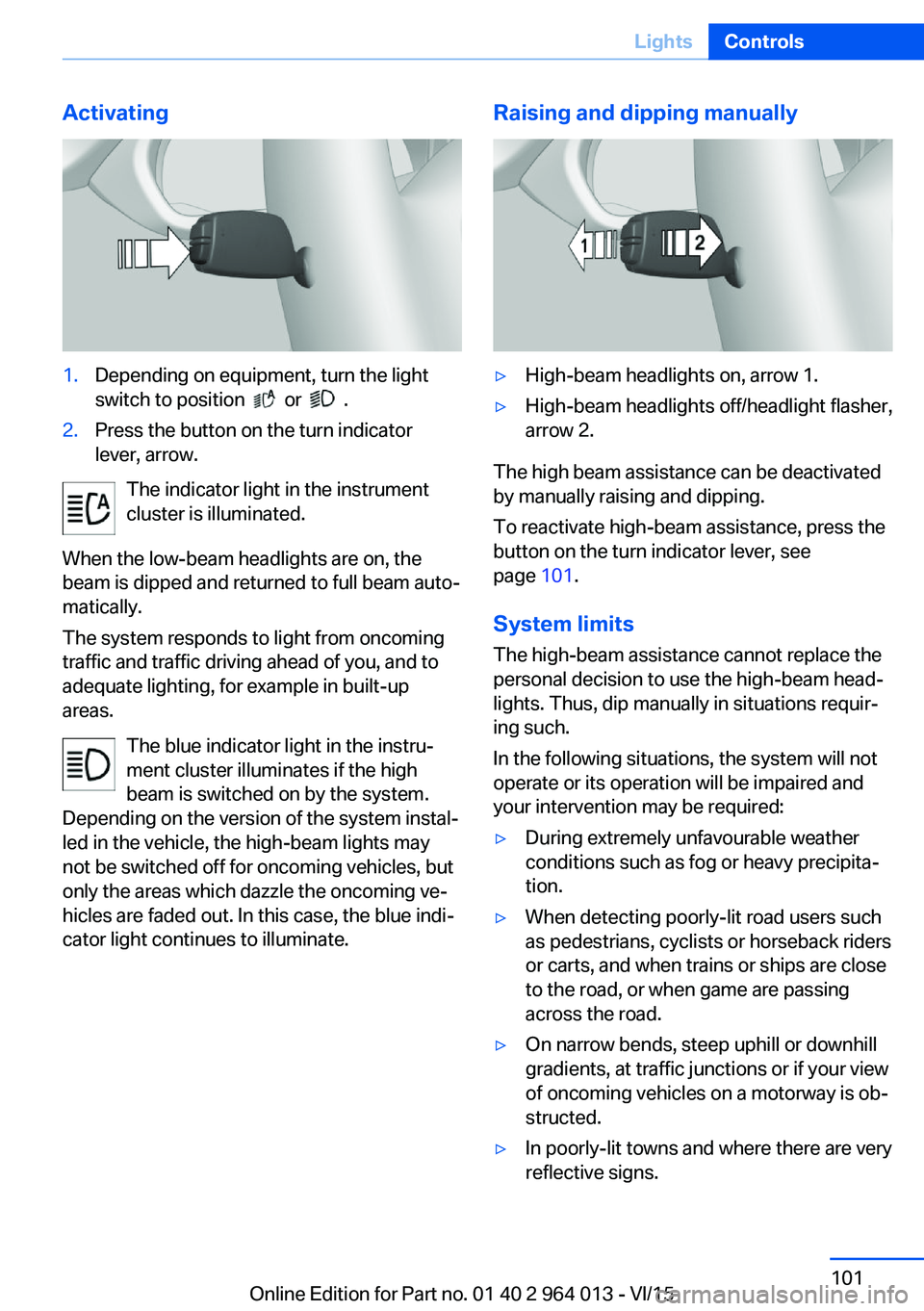
Activating1.Depending on equipment, turn the light
switch to position
or .
2.Press the button on the turn indicator
lever, arrow.
The indicator light in the instrument
cluster is illuminated.
When the low-beam headlights are on, the
beam is dipped and returned to full beam auto‐
matically.
The system responds to light from oncoming
traffic and traffic driving ahead of you, and to
adequate lighting, for example in built-up
areas.
The blue indicator light in the instru‐
ment cluster illuminates if the high
beam is switched on by the system.
Depending on the version of the system instal‐
led in the vehicle, the high-beam lights may
not be switched off for oncoming vehicles, but
only the areas which dazzle the oncoming ve‐
hicles are faded out. In this case, the blue indi‐
cator light continues to illuminate.
Raising and dipping manually▷High-beam headlights on, arrow 1.▷High-beam headlights off/headlight flasher,
arrow 2.
The high beam assistance can be deactivated
by manually raising and dipping.
To reactivate high-beam assistance, press the
button on the turn indicator lever, see
page 101.
System limits
The high-beam assistance cannot replace the
personal decision to use the high-beam head‐
lights. Thus, dip manually in situations requir‐
ing such.
In the following situations, the system will not
operate or its operation will be impaired and
your intervention may be required:
▷During extremely unfavourable weather
conditions such as fog or heavy precipita‐
tion.▷When detecting poorly-lit road users such
as pedestrians, cyclists or horseback riders
or carts, and when trains or ships are close
to the road, or when game are passing
across the road.▷On narrow bends, steep uphill or downhill
gradients, at traffic junctions or if your view
of oncoming vehicles on a motorway is ob‐
structed.▷In poorly-lit towns and where there are very
reflective signs.Seite 101LightsControls101
Online Edition for Part no. 01 40 2 964 013 - VI/15
Page 104 of 228
SecurityVehicle equipment
This chapter describes all standard, national
and special equipment provided in the model
series. Equipment not available in the vehicle is
therefore also described, for example the se‐lected special equipment or national version.
This also applies to safety-relevant functions
and systems. Comply with the relevant na‐
tional regulations when using the correspond‐
ing functions and systems.
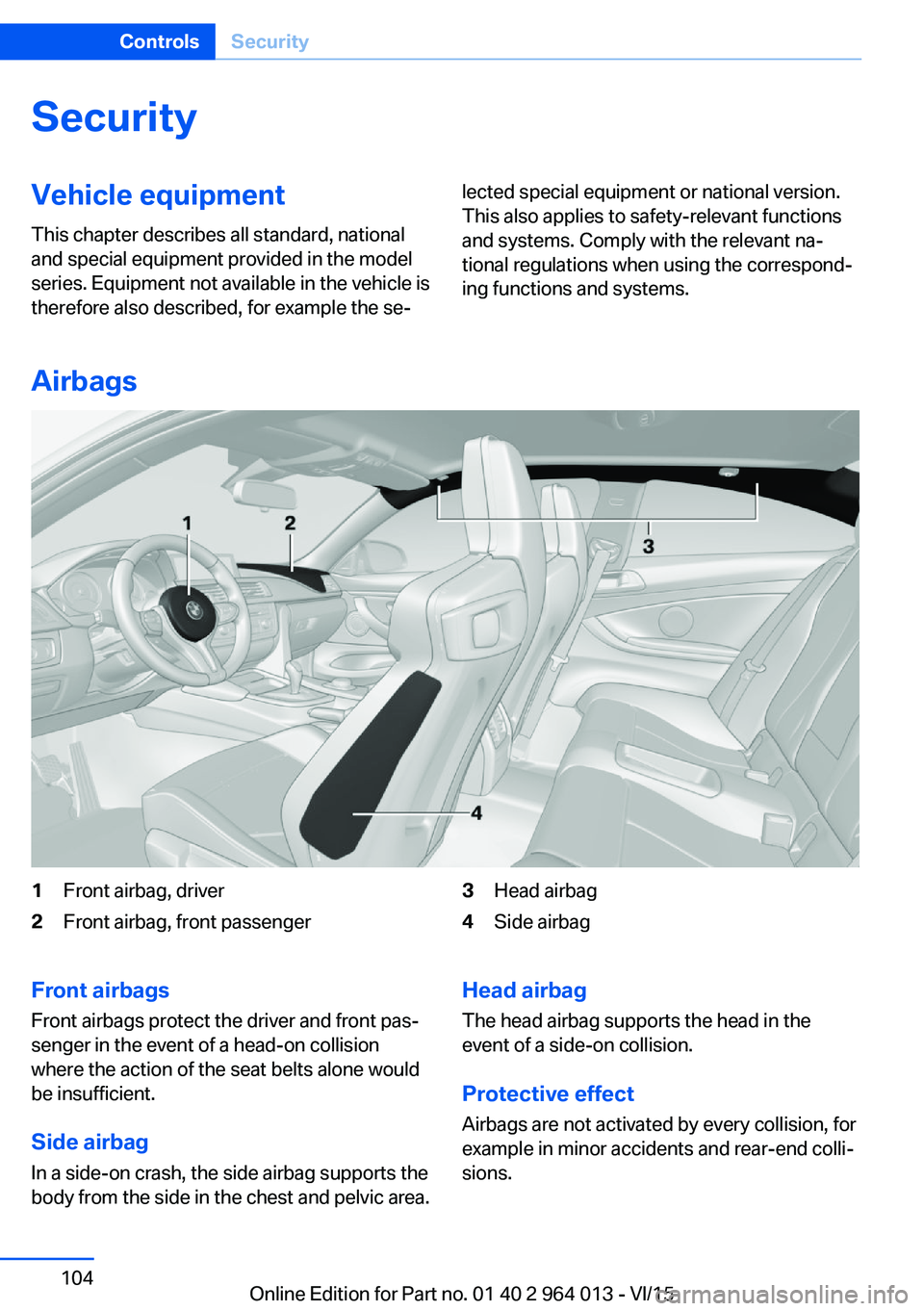
Airbags
1Front airbag, driver2Front airbag, front passenger3Head airbag4Side airbagFront airbags
Front airbags protect the driver and front pas‐
senger in the event of a head-on collision
where the action of the seat belts alone would
be insufficient.
Side airbag In a side-on crash, the side airbag supports the
body from the side in the chest and pelvic area.Head airbag
The head airbag supports the head in the
event of a side-on collision.
Protective effect Airbags are not activated by every collision, for
example in minor accidents and rear-end colli‐
sions.Seite 104ControlsSecurity104
Online Edition for Part no. 01 40 2 964 013 - VI/15
Page 106 of 228
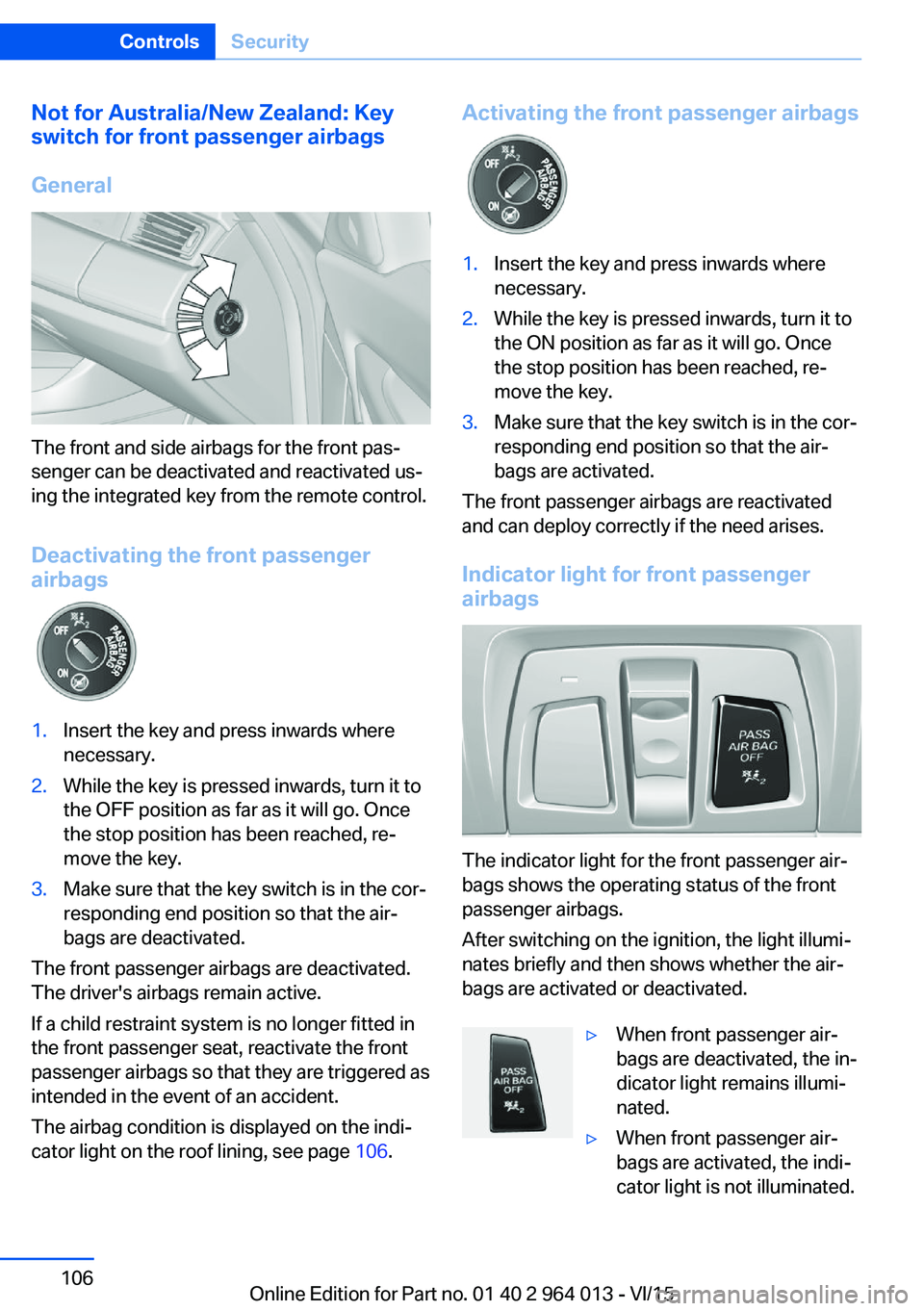
Not for Australia/New Zealand: Key
switch for front passenger airbags
General
The front and side airbags for the front pas‐
senger can be deactivated and reactivated us‐
ing the integrated key from the remote control.
Deactivating the front passenger
airbags
1.Insert the key and press inwards where
necessary.2.While the key is pressed inwards, turn it to
the OFF position as far as it will go. Once
the stop position has been reached, re‐
move the key.3.Make sure that the key switch is in the cor‐
responding end position so that the air‐
bags are deactivated.
The front passenger airbags are deactivated.
The driver's airbags remain active.
If a child restraint system is no longer fitted in
the front passenger seat, reactivate the front
passenger airbags so that they are triggered as
intended in the event of an accident.
The airbag condition is displayed on the indi‐
cator light on the roof lining, see page 106.
Activating the front passenger airbags1.Insert the key and press inwards where
necessary.2.While the key is pressed inwards, turn it to
the ON position as far as it will go. Once
the stop position has been reached, re‐
move the key.3.Make sure that the key switch is in the cor‐
responding end position so that the air‐
bags are activated.
The front passenger airbags are reactivated
and can deploy correctly if the need arises.
Indicator light for front passenger airbags
The indicator light for the front passenger air‐
bags shows the operating status of the front
passenger airbags.
After switching on the ignition, the light illumi‐
nates briefly and then shows whether the air‐
bags are activated or deactivated.
▷When front passenger air‐
bags are deactivated, the in‐
dicator light remains illumi‐
nated.▷When front passenger air‐
bags are activated, the indi‐
cator light is not illuminated.Seite 106ControlsSecurity106
Online Edition for Part no. 01 40 2 964 013 - VI/15
Page 109 of 228
Runflat indicator RPA
Principle The system identifies a loss of tyre pressure
by comparing the speeds of rotation of the in‐
dividual wheels while the vehicle is in motion.
If a tyre loses pressure, its diameter changes.
This in turn alters the rotational speed of the
corresponding wheel. This is detected and re‐
ported as a flat tyre.
The system does not measure the tyre pres‐
sures as such.
Operating requirements
The system must have been initialised with
correct tyre inflation pressure, otherwise relia‐
ble signalling of a flat tyre cannot be assured.
Each time the tyre pressure is adjusted or a
tyre or wheel is changed, initialise the system
again.
Status display The current status of the runflat indicator can
be shown on the Control Display, for example
whether the runflat indicator is active.
On the Control Display:1."Vehicle information"2."Vehicle status"3. "Flat Tyre Monitor (RPA)"
The status is displayed.
Initialising
On initialisation, the current tyre pressures are
stored as a reference for detection of a flat tyre. The initialisation is started by confirming
the correct tyre inflation pressures.
When driving with snow chains fitted, do not
initialise the system.
On the Control Display:
1."Vehicle information"2."Vehicle status"3. "Perform reset"4.Start the engine – do not drive off.5.Start the initialisation with "Perform reset".6.Drive off.
Initialising is completed while the vehicle is in
motion; this process can be interrupted at any
time.
Initialising resumes automatically when you
continue your journey.
Message of a flat tyre The yellow warning lamp is illuminated.
A Check Control message is shown.
There is a flat tyre or substantial loss of
tyre pressure.
1.Reduce your speed and carefully stop the
vehicle. Avoid violent or sudden braking
and steering manoeuvres.2.Determine which wheel is damaged. Do
this by checking the tyre inflation pres‐
sures with the aid of the Mobility System. If
all tyres are inflated to the correct pres‐
sures, the runflat indicator might not have
been initialised. In this case initialise the
system.3.Remedy the flat tyre with the Mobility Sys‐
tem or replace the damaged wheel.
System limits
A natural, even loss of tyre pressurein all four
tyres that occurs over time is not detected.
Consequently, check the tyre inflation pres‐
sure at regular intervals.
No warning can be given in the event of sud‐
den tyre failure caused by external factors.
In the following situations, the system could be
slow to respond or operate incorrectly:
▷If the system has not been initialised.▷Journey on snow-covered or slippery sur‐
faces.Seite 109SecurityControls109
Online Edition for Part no. 01 40 2 964 013 - VI/15