center console BUICK ENCLAVE 2011 Owner's Manual
[x] Cancel search | Manufacturer: BUICK, Model Year: 2011, Model line: ENCLAVE, Model: BUICK ENCLAVE 2011Pages: 388, PDF Size: 5.26 MB
Page 17 of 388
Black plate (11,1)Buick Verano Owner Manual - 2012 - CRC - 1/10/12
In Brief 1-11
Interior Mirrors
Adjustment
Hold the rearview mirror in the
center and move it to view the area
behind the vehicle.
Manual Rearview Mirror
For vehicles with a manual rearview
mirror, push the tab forward for
daytime use and pull it for nighttime
use to avoid glare from the
headlamps from behind. See
Manual Rearview Mirror on
page 2‑17.
Automatic Dimming Rearview
Mirror
For vehicles with an automatic
dimming rearview mirror, the mirror
will automatically reduce the glare
from the headlamps from behind.
The dimming feature comes on
when the vehicle is started.
SeeAutomatic Dimming Rearview
Mirror on page 2‑17.
Steering Wheel
Adjustment
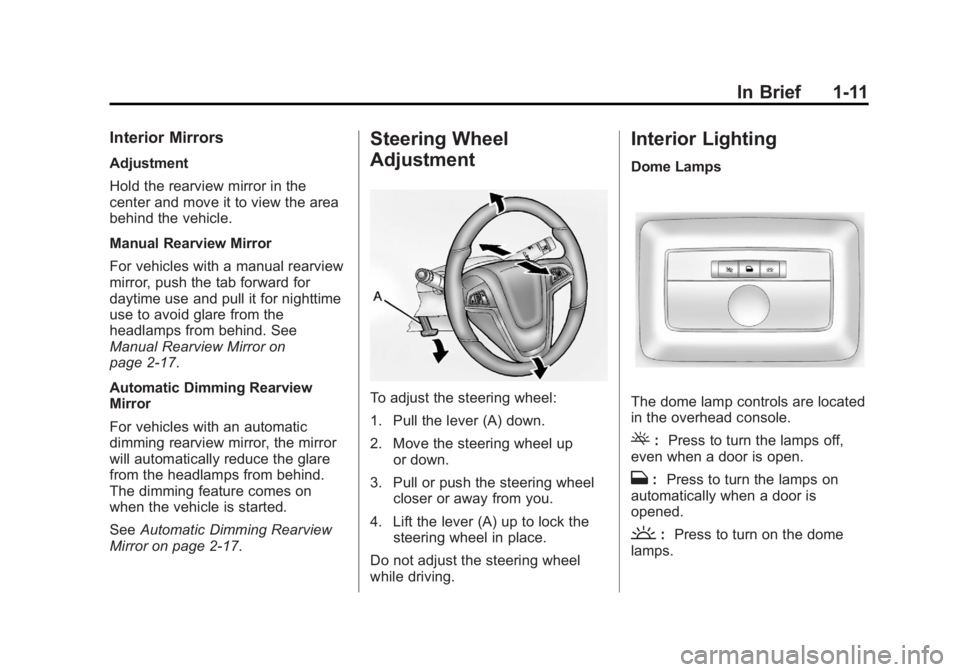
To adjust the steering wheel:
1. Pull the lever (A) down.
2. Move the steering wheel up or down.
3. Pull or push the steering wheel closer or away from you.
4. Lift the lever (A) up to lock the steering wheel in place.
Do not adjust the steering wheel
while driving.
Interior Lighting
Dome Lamps
The dome lamp controls are located
in the overhead console.
(: Press to turn the lamps off,
even when a door is open.
H: Press to turn the lamps on
automatically when a door is
opened.
': Press to turn on the dome
lamps.
Page 23 of 388
Black plate (17,1)Buick Verano Owner Manual - 2012 - CRC - 1/10/12
In Brief 1-17
To set the time:
1. Press the CONFIG button toenter the menu options or
press
H. Turn the TUNE/MENU
knob to scroll through the
available setup features. Press
TUNE/MENU or press the Time
screen button to display other
options within that feature.
2. Press + or −to increase or
decrease the Hours and Minutes
displayed on the clock.
12/24 HR Format: Press the 12 HR
screen button for standard time;
press the 24 HR screen button for
military time.
Day + or Day −:Press the Day +
or Day −display buttons to increase
or decrease the day.
Display: Press Display to turn the
display of the time on the screen on
or off.
See Clock on page 5‑5 for more
information.
Satellite Radio
Vehicles with an XM™ satellite radio
tuner and a valid XM satellite radio
subscription can receive XM
programming.
XM Satellite Radio Service
XM is a satellite radio service based
in the 48 contiguous United States
and 10 Canadian provinces. XM
satellite radio has a wide variety of
programming and commercial-free
music, coast to coast, and in
digital-quality sound. A fee is
required to receive the XM service.
Refer to:
.www.xmradio.com or call
1-800-929-2100 (U.S.).
.www.xmradio.ca or call
1-877-438-9677 (Canada).
See Satellite Radio on page 7‑17.
Portable Audio Devices
Some vehicles have a 3.5 mm
(1/8 in) auxiliary input and a USB
port located in the center console.
External devices such as iPods®,
laptop computers, MP3 players,
CD changers, and USB drives may
be connected, depending on the
audio system.
SeeAuxiliary Devices on page 7‑26.
Bluetooth®
The Bluetooth system allows users
with a Bluetooth-enabled cell phone
to make and receive hands-free
calls using the vehicle audio system
and controls.
The Bluetooth-enabled cell phone
must be paired with the in-vehicle
Bluetooth system before it can be
used in the vehicle. Not all phones
will support all functions.
Page 26 of 388
Black plate (20,1)Buick Verano Owner Manual - 2012 - CRC - 1/10/12
1-20 In Brief
Power Outlets
The accessory power outlets can be
used to plug in electrical equipment,
such as a cell phone or MP3 player.
There is one accessory power outlet
located on the instrument panel
below the climate control and one
on the rear of the center floor
console. These outlets are powered
when the key is in ON/RUN or ACC/
ACCESSORY, or until the driver
door is opened within 10 minutes
of turning off the vehicle. See
Retained Accessory Power (RAP)
on page 9‑22.
SeePower Outlets on page 5‑6.
Sunroof
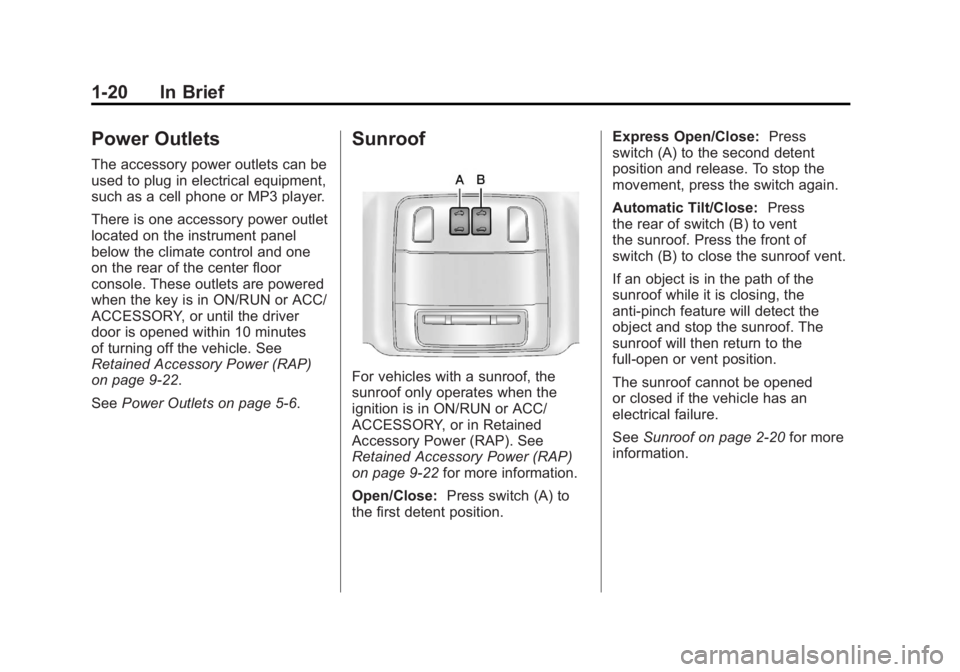
For vehicles with a sunroof, the
sunroof only operates when the
ignition is in ON/RUN or ACC/
ACCESSORY, or in Retained
Accessory Power (RAP). See
Retained Accessory Power (RAP)
on page 9‑22 for more information.
Open/Close: Press switch (A) to
the first detent position. Express Open/Close:
Press
switch (A) to the second detent
position and release. To stop the
movement, press the switch again.
Automatic Tilt/Close: Press
the rear of switch (B) to vent
the sunroof. Press the front of
switch (B) to close the sunroof vent.
If an object is in the path of the
sunroof while it is closing, the
anti-pinch feature will detect the
object and stop the sunroof. The
sunroof will then return to the
full-open or vent position.
The sunroof cannot be opened
or closed if the vehicle has an
electrical failure.
See Sunroof on page 2‑20 for more
information.
Page 36 of 388
Black plate (6,1)Buick Verano Owner Manual - 2012 - CRC - 1/10/12
2-6 Keys, Doors, and Windows
The Driver Information Center
(DIC) displays READY FOR
REMOTE #2, 3, 4 or 5.
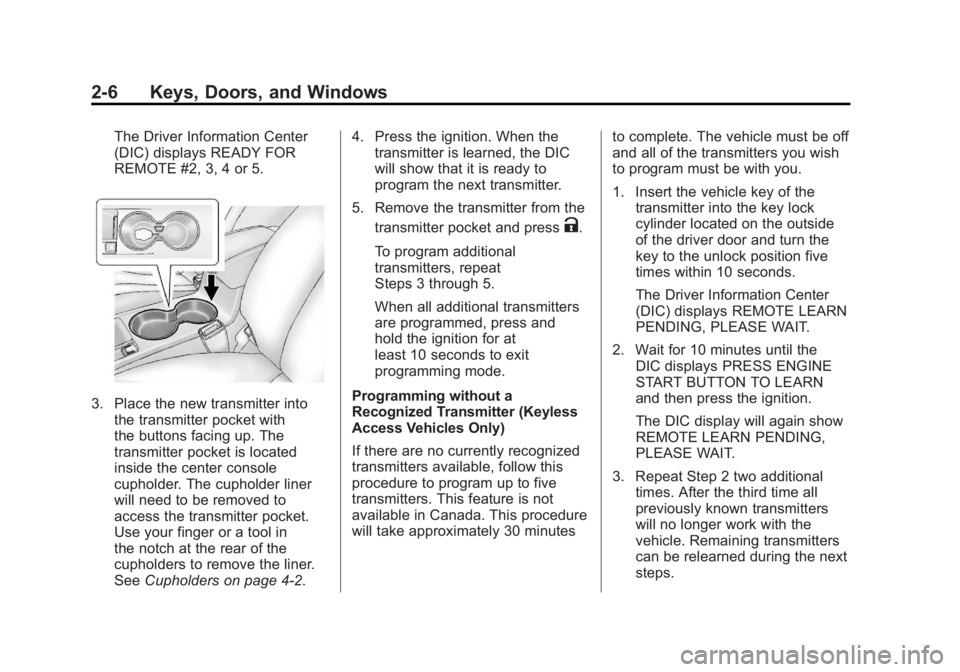
3. Place the new transmitter intothe transmitter pocket with
the buttons facing up. The
transmitter pocket is located
inside the center console
cupholder. The cupholder liner
will need to be removed to
access the transmitter pocket.
Use your finger or a tool in
the notch at the rear of the
cupholders to remove the liner.
See Cupholders on page 4‑2. 4. Press the ignition. When the
transmitter is learned, the DIC
will show that it is ready to
program the next transmitter.
5. Remove the transmitter from the transmitter pocket and press
K.
To program additional
transmitters, repeat
Steps 3 through 5.
When all additional transmitters
are programmed, press and
hold the ignition for at
least 10 seconds to exit
programming mode.
Programming without a
Recognized Transmitter (Keyless
Access Vehicles Only)
If there are no currently recognized
transmitters available, follow this
procedure to program up to five
transmitters. This feature is not
available in Canada. This procedure
will take approximately 30 minutes to complete. The vehicle must be off
and all of the transmitters you wish
to program must be with you.
1. Insert the vehicle key of the
transmitter into the key lock
cylinder located on the outside
of the driver door and turn the
key to the unlock position five
times within 10 seconds.
The Driver Information Center
(DIC) displays REMOTE LEARN
PENDING, PLEASE WAIT.
2. Wait for 10 minutes until the DIC displays PRESS ENGINE
START BUTTON TO LEARN
and then press the ignition.
The DIC display will again show
REMOTE LEARN PENDING,
PLEASE WAIT.
3. Repeat Step 2 two additional times. After the third time all
previously known transmitters
will no longer work with the
vehicle. Remaining transmitters
can be relearned during the next
steps.
Page 37 of 388
Black plate (7,1)Buick Verano Owner Manual - 2012 - CRC - 1/10/12
Keys, Doors, and Windows 2-7
The DIC display should
now show READY FOR
REMOTE # 1.
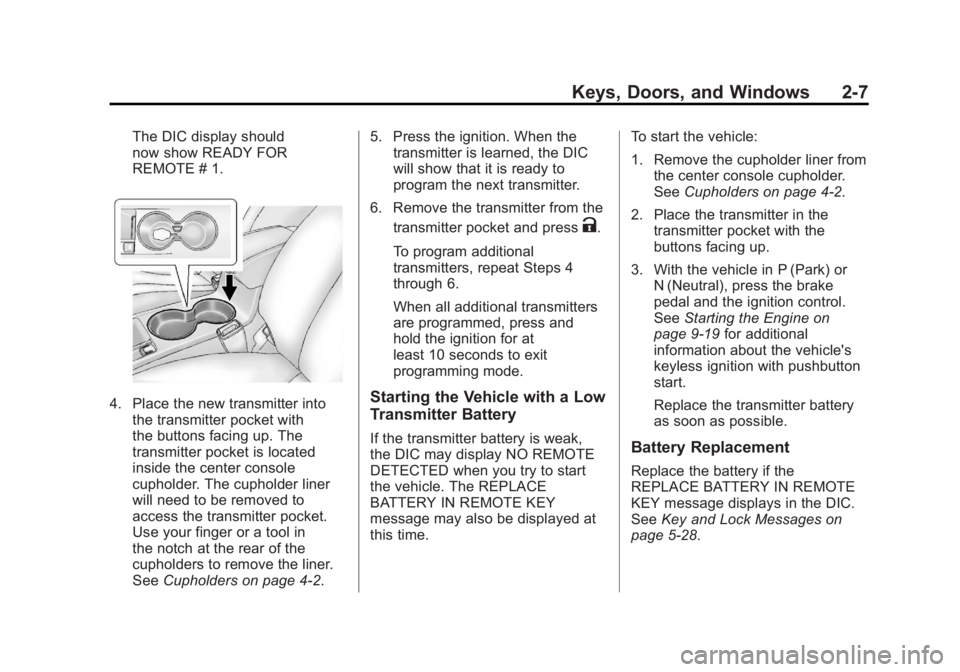
4. Place the new transmitter intothe transmitter pocket with
the buttons facing up. The
transmitter pocket is located
inside the center console
cupholder. The cupholder liner
will need to be removed to
access the transmitter pocket.
Use your finger or a tool in
the notch at the rear of the
cupholders to remove the liner.
See Cupholders on page 4‑2. 5. Press the ignition. When the
transmitter is learned, the DIC
will show that it is ready to
program the next transmitter.
6. Remove the transmitter from the transmitter pocket and press
K.
To program additional
transmitters, repeat Steps 4
through 6.
When all additional transmitters
are programmed, press and
hold the ignition for at
least 10 seconds to exit
programming mode.
Starting the Vehicle with a Low
Transmitter Battery
If the transmitter battery is weak,
the DIC may display NO REMOTE
DETECTED when you try to start
the vehicle. The REPLACE
BATTERY IN REMOTE KEY
message may also be displayed at
this time. To start the vehicle:
1. Remove the cupholder liner from
the center console cupholder.
See Cupholders on page 4‑2.
2. Place the transmitter in the transmitter pocket with the
buttons facing up.
3. With the vehicle in P (Park) or N (Neutral), press the brake
pedal and the ignition control.
See Starting the Engine on
page 9‑19 for additional
information about the vehicle's
keyless ignition with pushbutton
start.
Replace the transmitter battery
as soon as possible.Battery Replacement
Replace the battery if the
REPLACE BATTERY IN REMOTE
KEY message displays in the DIC.
See Key and Lock Messages on
page 5‑28.
Page 46 of 388
Black plate (16,1)Buick Verano Owner Manual - 2012 - CRC - 1/10/12
2-16 Keys, Doors, and Windows
When trying to start the vehicle, the
security light comes on briefly when
the ignition is turned on.
If the engine does not start and the
security light stays on, there is a
problem with the system. Turn the
ignition off and try again.
If the RKE transmitter appears
to be undamaged, try another
transmitter. Or, you may try placing
the transmitter in the transmitter
pocket located in the center
console. See“Starting the Vehicle
with a Low Transmitter Battery”
under Remote Keyless Entry (RKE)
System Operation on page 2‑4.
If the engine does not start with
the other transmitter or when the
transmitter is in the pocket in the
center console, your vehicle needs
service. See your dealer who can
service the theft-deterrent system
and have a new transmitter
programmed to the vehicle.
Do not leave the key or device
that disarms or deactivates the
theft-deterrent system in the vehicle.Exterior Mirrors
Convex Mirrors
{WARNING
A convex mirror can make things,
like other vehicles, look farther
away than they really are. If you
cut too sharply into the right lane,
you could hit a vehicle on the
right. Check the inside mirror or
glance over your shoulder before
changing lanes.
The passenger side mirror is convex
shaped. A convex mirror's surface is
curved so more can be seen from
the driver seat.
Power Mirrors
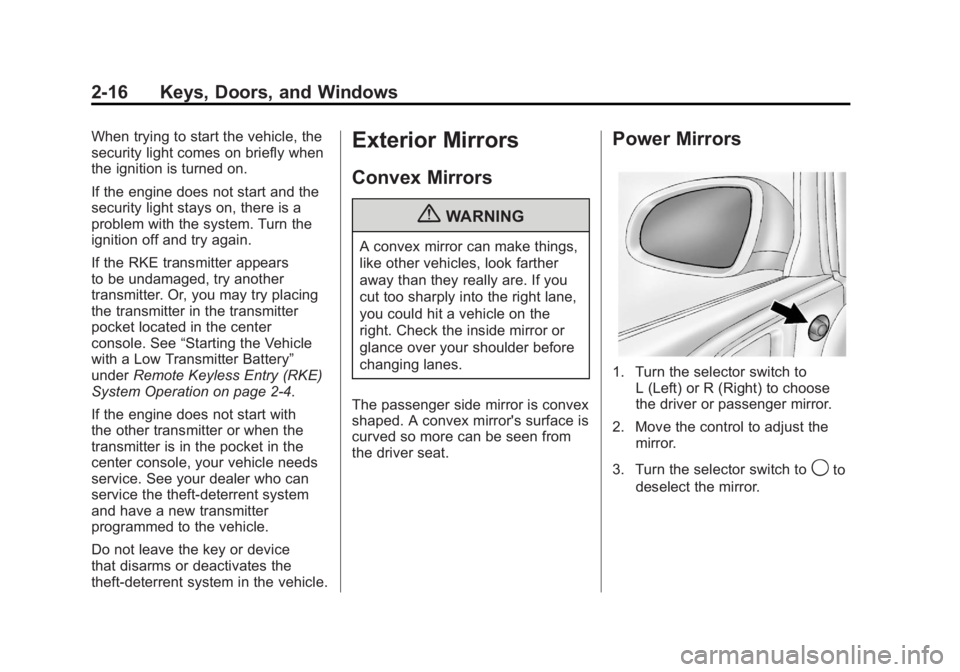
1. Turn the selector switch to L (Left) or R (Right) to choose
the driver or passenger mirror.
2. Move the control to adjust the mirror.
3. Turn the selector switch to
9to
deselect the mirror.
Page 107 of 388
Black plate (1,1)Buick Verano Owner Manual - 2012 - CRC - 1/10/12
Storage 4-1
Storage
Storage Compartments
Instrument Panel Storage . . . . . 4-1
Glove Box . . . . . . . . . . . . . . . . . . . . 4-1
Cupholders . . . . . . . . . . . . . . . . . . . 4-2
Center Console Storage . . . . . . 4-2
Storage
Compartments
Instrument Panel Storage
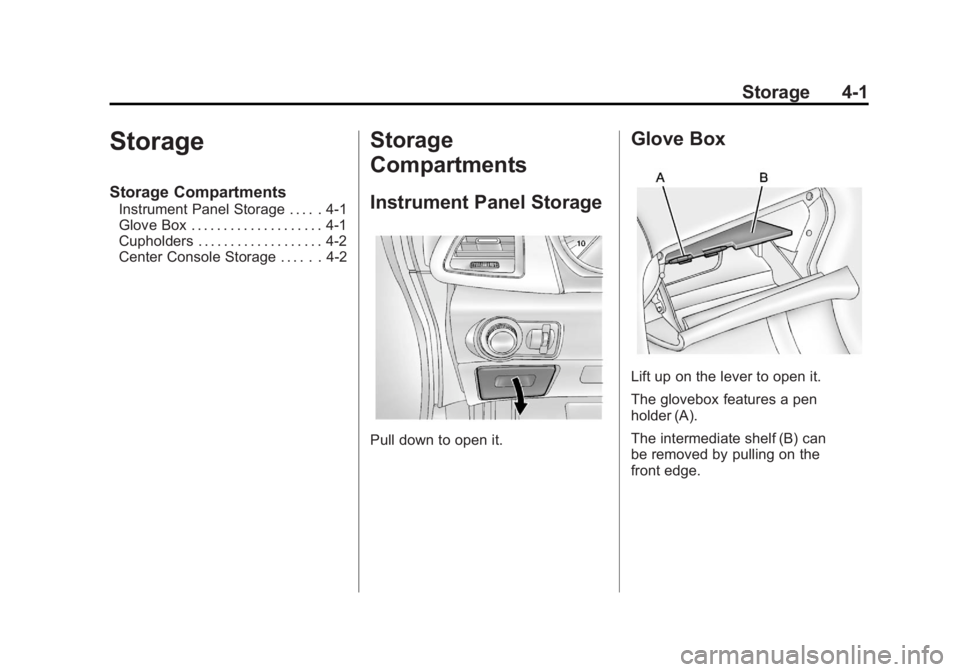
Pull down to open it.
Glove Box
Lift up on the lever to open it.
The glovebox features a pen
holder (A).
The intermediate shelf (B) can
be removed by pulling on the
front edge.
Page 108 of 388
Black plate (2,1)Buick Verano Owner Manual - 2012 - CRC - 1/10/12
4-2 Storage
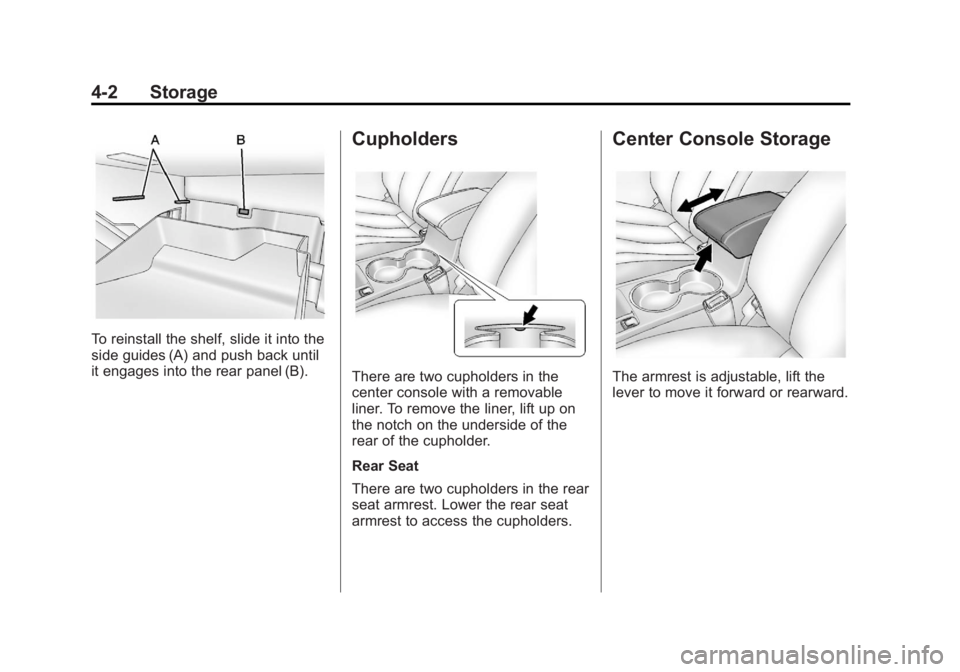
To reinstall the shelf, slide it into the
side guides (A) and push back until
it engages into the rear panel (B).
Cupholders
There are two cupholders in the
center console with a removable
liner. To remove the liner, lift up on
the notch on the underside of the
rear of the cupholder.
Rear Seat
There are two cupholders in the rear
seat armrest. Lower the rear seat
armrest to access the cupholders.
Center Console Storage
The armrest is adjustable, lift the
lever to move it forward or rearward.
Page 116 of 388
Black plate (6,1)Buick Verano Owner Manual - 2012 - CRC - 1/10/12
5-6 Instruments and Controls
Press TUNE/MENU or press the
Time screen button to display
other options within that feature.
2. Press + or −to increase or
decrease the Hours and Minutes
displayed on the clock.
12/24 HR Format: Press the 12 HR
screen button for standard time;
press the 24 HR screen button for
military time.
Day + or Day −:Press the Day +
or Day −display buttons to increase
or decrease the day.
Display: Press Display to turn the
display of the time on the screen on
or off.
Power Outlets
The accessory power outlets can be
used to plug in electrical equipment,
such as a cell phone or MP3 player.
There is one accessory power outlet
located on the instrument panel
below the climate control and one
on the rear of the center floor
console. These outlets are powered when the key is in ON/RUN or ACC/
ACCESSORY, or until the driver
door is opened within 10 minutes of
turning off the vehicle. See
Retained
Accessory Power (RAP) on
page 9‑22.
Notice: Leaving electrical
equipment plugged in for an
extended period of time while the
vehicle is off will drain the
battery. Always unplug electrical
equipment when not in use and
do not plug in equipment that
exceeds the maximum 20 ampere
rating.
Certain electrical accessories
may not be compatible with the
accessory power outlet and could
overload vehicle or adapter fuses.
If a problem is experienced, see
your dealer.
When adding electrical equipment,
be sure to follow the installation
instructions included with the
equipment. See Add-On Electrical
Equipment on page 9‑52. Notice:
Hanging heavy
equipment from the power outlet
can cause damage not covered
by the vehicle warranty. The
power outlets are designed for
accessory power plugs only, such
as cell phone charge cords.
Cigarette Lighter
For vehicles with a cigarette lighter,
it is located on the instrument panel
below the climate control system.
To activate the cigarette lighter,
push it into the heating element and
let go. When the lighter is ready it
will pop back out.
Notice: Holding a cigarette lighter
in while it is heating does not let
the lighter back away from the
heating element when it is hot.
Damage from overheating can
occur to the lighter or heating
element, or a fuse could be
blown. Do not hold a cigarette
lighter in while it is heating.
Page 176 of 388
Black plate (26,1)Buick Verano Owner Manual - 2012 - CRC - 1/10/12
7-26 Infotainment System
Artists:Press to view the list of
artists stored on the disc. Select an
artist name to view a list of all songs
by the artist. There might be a delay
before the list displays. Select a
song from the list to begin playback.
Albums: Press to view the albums
on the disc. Select the album to
view a list of all songs on the album.
There might be a delay before the
list displays. Select a song from the
list to begin playback.
Song Titles: Press to display a list
of all songs on the disc. Songs are
displayed as stored on the disc.
There might be a delay before the
list displays. To begin playback,
select a song from the list.
Genres: Press to view the genres.
Select a genre to view a list of all
songs of that genre. Select a song
from the list to begin playback.
Folders: Press to open a folder list
to access the files within the folder
structure. Root Directory
The root directory is treated as a
folder. All files contained directly
under the root directory are
accessed prior to any root directory
folders.
Empty Folders
If a root directory or folder is empty
or contains only folders, the player
advances to the next folder in the
file structure that contains a
compressed audio file. The empty
folder(s) are not displayed or
numbered.
No Folder
When the CD only contains
compressed audio files without any
folders or playlists, all files are
under the root folder.
File System and Naming
The song titles, artists, albums, and
genres are taken from the file's ID3
tag and are only displayed if present
in the tag. If a song title is notpresent in the ID3 tag, the radio
displays the file name as the
track name.
Preprogrammed Playlists
The radio recognizes
preprogrammed playlists; however,
there is no editing capability. These
playlists are treated as special
folders containing compressed
audio song files.
Auxiliary Devices
For vehicles equipped with the
MyLink or IntelliLink infotainment
system, see the separate MyLink/
IntelliLink Features and Functions
Guide for more information.
The optional AUX input allows
portable devices to connect to the
vehicle using the 3.5 mm (1/8 in)
auxiliary jack or USB port.
Portable devices are controlled by
using the menu system described in
Operation on page 7‑9.
The AUX input/USB port is located
in the center console.