window BUICK LESABRE 2003 User Guide
[x] Cancel search | Manufacturer: BUICK, Model Year: 2003, Model line: LESABRE, Model: BUICK LESABRE 2003Pages: 380, PDF Size: 2.75 MB
Page 84 of 380

Ignition Positions
With the key in the ignition switch, you can turn it to ®ve
different positions.
(A) ACCESSORY:This position lets you use your
electrical accessories such as power windows, power
sunroof (if equipped), radio and the windshield wipers.
To use, push in the ignition key and turn it toward
you. Your steering wheel will remain locked, just as it
was before you inserted the key.
(B) LOCK:This is the only position in which you can
remove the key. This position locks your ignition,
steering wheel and transaxle. It's a theft-deterrent
feature.
Notice:If your key seems stuck in LOCK and you
can't turn it, be sure you are using the correct key; if
so, is it all the way in? If it is, then turn the steering
wheel left and right while you turn the key hard.
Turn the key only with your hand. Using a tool
to force it could break the key or the ignition switch.
If none of these works, then your vehicle needs
service.
(C) OFF:This position lets you turn off the engine but
still turn the steering wheel. It doesn't lock the
steering wheel like LOCK and it doesn't send any
electrical power to the accessories. The instrument
panel cluster will remain powered in LOCK to illuminate
the gear shift indicator. The cluster will also activate
the parking brake light when the parking brake is
set. Use OFF if you must have your vehicle in motion
while the engine is not running.
(D) RUN:This is the position the switch returns to after
you start your engine and release the switch. This is
also the position for normal driving. Even when the
engine is not running, you can use RUN to operate your
electrical accessories and to display some instrument
panel warning lights.
(E) START:This position starts your engine. When the
engine starts, release the key. The ignition switch
will return to RUN for normal driving.
2-22
Page 85 of 380
Key Reminder Warning
If you leave your key in OFF, you will hear a warning
chime when you open the driver's door.
Always leave your key in LOCK while the engine is off.
If you leave it in any other position, you will drain
your battery power.
Retained Accessory Power (RAP)
After you turn the ignition off and remove the key, you
will still have power to such accessories as the
power windows, audio steering wheel controls (if
equipped), clock, sunroof (if equipped) and the radio for
up to 10 minutes. The instrument panel cluster lights
will stay on for a few seconds, then will go out. Once you
open a door, the power will shut off.
Starting Your Engine
Move your shift lever to PARK (P) or NEUTRAL (N).
Your engine won't start in any other position ± that's a
safety feature. To restart when you're already moving,
use NEUTRAL (N) only.
Notice:Don't try to shift to PARK (P) if your
vehicle is moving. If you do, you could damage the
transaxle. Shift to PARK (P) only when your
vehicle is stopped.
1. With your foot off the accelerator pedal, turn your
ignition key to START. When the engine starts, let
go of the key. The idle speed will go down as
your engine gets warm.
Notice:Holding your key in START for longer than
15 seconds at a time will cause your battery to
be drained much sooner. And the excessive heat
can damage your starter motor. Wait about 15
seconds between each try to help avoid draining
your battery or damaging your starter.
2. If it doesn't start within 10 seconds, hold your key in
START for about 10 seconds at a time until your
engine starts. Wait about 15 seconds between
each try.
3. If your engine still won't start (or starts but then
stops), it could be ¯ooded with too much gasoline.
Try pushing your accelerator pedal all the way to the
¯oor and holding it there as you hold the key in
START for about three seconds. If the vehicle starts
brie¯y but then stops again, do the same thing.
This time keep the pedal down for ®ve or six
seconds to clear the extra gasoline from the engine.
After waiting about 15 seconds, repeat the normal
starting procedure.
2-23
Page 93 of 380

Parking Over Things That Burn
{CAUTION:
Things that can burn could touch hot exhaust
parts under your vehicle and ignite. Do not
park over papers, leaves, dry grass or other
things that can burn.
Engine Exhaust
{CAUTION:
Engine exhaust can kill. It contains the gas
carbon monoxide (CO), which you can not see
or smell. It can cause unconsciousness and
death.
You might have exhaust coming in if:
·Your exhaust system sounds strange or
different.
·Your vehicle gets rusty underneath.
·Your vehicle was damaged in a collision.
·Your vehicle was damaged when driving
over high points on the road or over road
debris.
·Repairs were not done correctly.
·Your vehicle or exhaust system had been
modi®ed improperly.
If you ever suspect exhaust is coming into your
vehicle:
·Drive it only with all the windows down to
blow out any CO; and
·Have your vehicle ®xed immediately.
2-31
Page 96 of 380

Mirror Operation
MIRROR:Press this button to turn on the automatic
dimming feature. Press it again to turn off the automatic
dimming feature.
O(On/Off):For mirrors equipped with OnStarž
controls, press and hold this button for several seconds
to turn on the automatic dimming feature. Press and
hold it again to turn the automatic dimming feature off.
The green indicator light will come on when this
feature is active. The automatic dimming feature will be
active each time the vehicle is started.
Compass Operation
COMPASS:Press this button once to turn the compass
on or off.
O(On/Off):For mirrors equipped with OnStarž
controls, press this button once to turn the compass on
or off.
When the ignition and the compass feature are on, the
compass will show two character boxes for
approximately two seconds. After two seconds, the
mirror will display the compass heading.
Compass Calibration
When on, the compass automatically calibrates as the
vehicle is driven. If, after two seconds, the display
does not show a compass heading (N for North, forexample), there may be a strong magnetic ®eld
interfering with the compass. Such interference may be
caused by a magnetic antenna mount, magnetic
note pad holder or a similar magnetic item. If the letter
C should ever appear in the compass window, the
compass may need calibration.
The mirror can be calibrated by driving the vehicle in
circles at 5 mph (8 km/h) or less until the display reads a
direction.
Mirrors equipped with OnStar
žcontrols can be placed
in calibration mode by pressing and holding the
on/off button untilaCisshown in the compass display.
Compass Variance
Compass variance is the difference between earth's
magnetic north and true geographic north. The mirror is
set in zone eight upon leaving the factory. It will be
necessary to adjust the compass to compensate
for compass variance if you live outside zone eight.
Under certain circumstances, as during a long distance
cross-country trip, it will be necessary to adjust for
compass variance. If not adjusted to account for
compass variance, your compass could give false
readings.
To adjust for compass variance, do the following:
1. Find your current location and variance zone
number on the following zone map.
2-34
Page 97 of 380

2. Press and hold COMPASS (or the on/off button for
mirrors equipped with OnStaržcontrols) until a
zone number appears in the display.
3. Once a zone number appears in the display, press
the COMPASS button (or the on/off button for
mirrors equipped with OnStar
žcontrols) quickly until
the correct zone number appears in the display.
Stop pressing the button and the mirror will return to
normal operation. If C appears in the compass
window, the compass may need calibration. See
ªCompass Calibrationº explained previously.
Outside Power Mirrors
The controls for the
outside power mirrors are
located on the driver's
door armrest.
Press the left or right side of the L/R selector switch
located beneath the control pad to choose the left
or right mirror.
To adjust the mirror, press one of the four arrows
located on the control pad to move the mirror in the
direction you want it to go. When ®nished adjusting the
mirrors, leave the L/R selector switch in the center
position, to prevent unwanted mirror movement in case
the control pad is accidentally bumped while driving.
Adjust each outside mirror so that you can see a little of
your vehicle, and the area behind your vehicle.
2-35
Page 98 of 380
The mirrors may also have an arrow that ¯ashes when
the turn signal is used. SeeTurn Signal/Multifunction
Lever on page 3-7.
Outside Curb View Assist Mirror
If you have the Memory Seat and Mirrors feature, the
passenger's outside rearview mirror includes a tilt-down
feature that operates when the shift lever is in
REVERSE (R). This feature assists the driver, improving
rear obstacle detection. When the vehicle is shifted
out of REVERSE (R), the passenger mirror will return to
its original position after a ®ve-second delay. This
delay prevents movement of the mirror if multiple gear
transitions (REVERSE (R) to AUTOMATIC
OVERDRIVE (
X) to REVERSE (R)) occur during a
parallel parking maneuver. This feature can be
programmed on or off through the personal choice
selection menu. See
DIC Vehicle Personalization on
page 3-50for programming instructions.
Outside Convex Mirror
Your passenger's side mirror is convex. A convex
mirror's surface is curved so you can see more from the
driver's seat.
{CAUTION:
A convex mirror can make things (like other
vehicles) look farther away than they really are.
If you cut too sharply into the right lane, you
could hit a vehicle on your right. Check your
inside mirror or glance over your shoulder
before changing lanes.
Outside Automatic Dimming
Heated Mirror
If you have this feature, the outside driver's mirror will
adjust for the glare of headlamps behind you. This
feature is controlled using the on and off settings on the
automatic dimming rearview mirror. See
Automatic
Dimming Rearview Mirror on page 2-33.
When you operate the rear window defogger, the
heated driver's and passenger's outside rearview mirrors
are warmed to help clear them of ice and snow. See
ªRear Window Defoggerº under
Climate Control System
on page 3-24orDual Automatic Climate Control
System on page 3-26for more information.
2-36
Page 119 of 380
Windshield Washer
At the top of the turn signal/multifunction lever, there's a
paddle with the word PUSH on it. To spray washer
¯uid on the windshield, push the paddle. The wipers will
clear the window and either stop or return to your
preset speed. For more washer cycles, push and hold
the paddle.
{CAUTION:
In freezing weather, don't use your washer
until the windshield is warmed. Otherwise the
washer ¯uid can form ice on the windshield,
blocking your vision.
Ice build up can block washer nozzles. Remove ice for
proper operation.
See
Windshield Washer Fluid on page 5-36for more
information.
Cruise Control
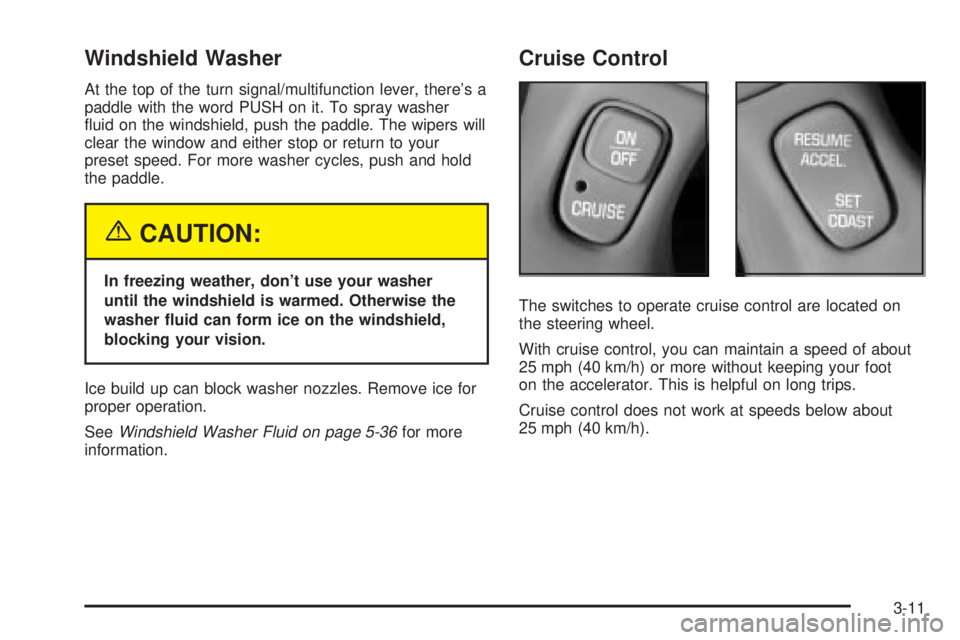
The switches to operate cruise control are located on
the steering wheel.
With cruise control, you can maintain a speed of about
25 mph (40 km/h) or more without keeping your foot
on the accelerator. This is helpful on long trips.
Cruise control does not work at speeds below about
25 mph (40 km/h).
3-11
Page 128 of 380
Battery Load Management
The battery load management feature is designed to
monitor the vehicle's electrical load and determine when
the battery is in a heavy discharge condition. During
times of high electrical loading, the engine may idle at a
higher rpm setting than normal to make sure the
battery charges. High electrical loads may occur when
several of the following are on: headlamps, high beams,
rear window defogger, fan at high speed, heated
seats (if equipped) and engine cooling fans.
If your vehicle's battery remains in a heavy discharge
condition for a long period of time, the fan, rear
defogger, heated seats and heated mirrors will be
disabled and the DIC will display BATTERY SAVER
ACTIVE. This can happen either under long periods of
idling or low speed driving with high electrical loading,
or in the event of a charging system fault.
Head-Up Display (HUD)
{CAUTION:
If the HUD image is too bright, or too high in
your ®eld of view, it may take you more time to
see things you need to see when it's dark
outside. Be sure to keep the HUD image dim
and placed low in your ®eld of view.
If your vehicle is equipped with the Head-Up Display
(HUD), you can see some of the driver information that
appears on your instrument panel cluster.
The information may be displayed in English or metric
units and appears as a re¯ection in the windshield.
The HUD consists of the following information:
·Speedometer Reading
·Turn Signal Indicators
·High-Beam Headlamp Indicator
·Check Gages Message
3-20
Page 132 of 380

Climate Controls
Climate Control System
With this system you can control the heating, cooling
and ventilation for your vehicle.
TEMPERATURE:This lever is used to adjust the
temperature of the air coming through the system.
Moving the lever between COOL and WARM will change
the temperature of the air coming through your outlets.
9FAN:Move this lever to select the speed of
the fan. Moving the lever between LOW and HIGH will
decrease or increase the fan speed. The fan will be
off when the system is off.To change the current mode, select one of the following:
RECIRC (Recirculation):This mode keeps outside
air from coming in the vehicle. It can be used to prevent
outside air and odors from entering your vehicle or to
help heat or cool the air inside your vehicle more quickly.
Press this button to turn the recirculation mode on or
off. When the button is pressed, an indicator light
will come on. You may not use RECIRC with FRONT
defrost or BLEND.
VENT:This mode directs air to the instrument panel
outlets.
HTR (Heater):This mode directs most of the air to the
¯oor outlets with some air directed to the outboard
outlets (for the side windows) and some air directed to
the windshield.
BLEND:This mode splits the air¯ow between the
windshield and the ¯oor outlets. The air conditioning
compressor will be operating.
OFF:The ventilation system always allows fresh air to
¯ow through your vehicle when it is moving. The
system will try to keep the air at a previously chosen
temperature. When the system is off, the blower fan is
also off.
MAX (Maximum Air Conditioning):This mode directs
air¯ow through the instrument panel outlets. The
amount of outside air entering your vehicle is limited.
3-24
Page 133 of 380
Also in this mode, the RECIRC function is activated to
create the maximum cooling effect in the vehicle. If
RECIRC was activated before selecting MAX, the light
in the RECIRC button will go off. If RECIRC is
selected after MAX, the light in the RECIRC button will
not come on.
NORM (Normal Air Conditioning):This mode cools
the outside air entering your vehicle and directs it
through the instrument panel outlets.
BI-LEV (Bi-Level Air Conditioning):This mode directs
approximately half of the air to the instrument panel
outlets, and then directs most of the remaining air to the
¯oor outlets. Some air may be directed toward the
windshield. Cooler air is directed to the upper outlets
and warmer air to the ¯oor outlets. The air conditioning
compressor is on in this mode.
On hot days, open the windows to let hot inside air
escape; then close them. This helps to reduce the time
it takes for your vehicle to cool down. It also helps
the system to operate more efficiently.
For quick cool down on hot days, do the following:
1. Select the vent mode.
2. Select the recirculation mode.
3. Select MAX.
4. Select the coolest temperature.
5. Select the highest fan speed.Using these settings together for long periods of time
may cause the air inside of your vehicle to become too
dry. To prevent this from happening, after the air in
your vehicle has cooled, turn the recirculation mode off.
The air conditioning system removes moisture from
the air, so you may sometimes notice a small amount of
water dripping underneath your vehicle while idling or
after turning off the engine. This is normal.
Sensors
The solar sensor on your vehicle monitors the solar
radiation and the air inside of your vehicle, then uses the
information to maintain the selected temperature by
initiating needed adjustments to the temperature, the fan
speed and the air delivery system. The system may
also supply cooler air to the side of the vehicle facing the
sun. The recirculation mode will also be activated, as
necessary. Do not cover the solar sensor located in the
center of the instrument panel, near the windshield,
or the system will not work properly.
Defogging and Defrosting
Fog on the inside of windows is a result of high humidity
(moisture) condensing on the cool window glass. This
can be minimized if the climate control system is
used properly. This mode allows you to clear fog or
frost from your windshield.
3-25