turn signal CADILLAC ATS 2019 User Guide
[x] Cancel search | Manufacturer: CADILLAC, Model Year: 2019, Model line: ATS, Model: CADILLAC ATS 2019Pages: 384, PDF Size: 6.11 MB
Page 145 of 384
Cadillac ATS/ATS-V Owner Manual (GMNA-Localizing-U.S./Canada/Mexico-
12460272) - 2019 - crc - 5/8/18
144 LIGHTING
Lighting
Exterior Lighting
Exterior Lamp Controls . . . . . . . . . . 144
Exterior Lamps Off Reminder . . . 146
Headlamp High/Low-BeamChanger . . . . . . . . . . . . . . . . . . . . . . . . . . 146
Flash-to-Pass . . . . . . . . . . . . . . . . . . . . . 146
Daytime Running Lamps (DRL) . . . . . . . . . . . . . . . . . . . . 146
Automatic Headlamp System . . . 147
Adaptive Forward Lighting (AFL) . . . . . . . . . . . . . . . . . . 148
Hazard Warning Flashers . . . . . . . . 148
Turn and Lane-Change Signals . . . . . . . . . . . . . . . . . . . . . . . . . . . 148
Interior Lighting
Instrument Panel IlluminationControl . . . . . . . . . . . . . . . . . . . . . . . . . . 149
Courtesy Lamps . . . . . . . . . . . . . . . . . . 149
Dome Lamps . . . . . . . . . . . . . . . . . . . . . 149
Reading Lamps . . . . . . . . . . . . . . . . . . . 150
Lighting Features
Entry Lighting . . . . . . . . . . . . . . . . . . . . 150
Exit Lighting . . . . . . . . . . . . . . . . . . . . . . 151
Battery Power Protection . . . . . . . . 151
Exterior Lighting Battery Saver . . . . . . . . . . . . . . . . . . . . . . . . . . . . . 151Exterior Lighting
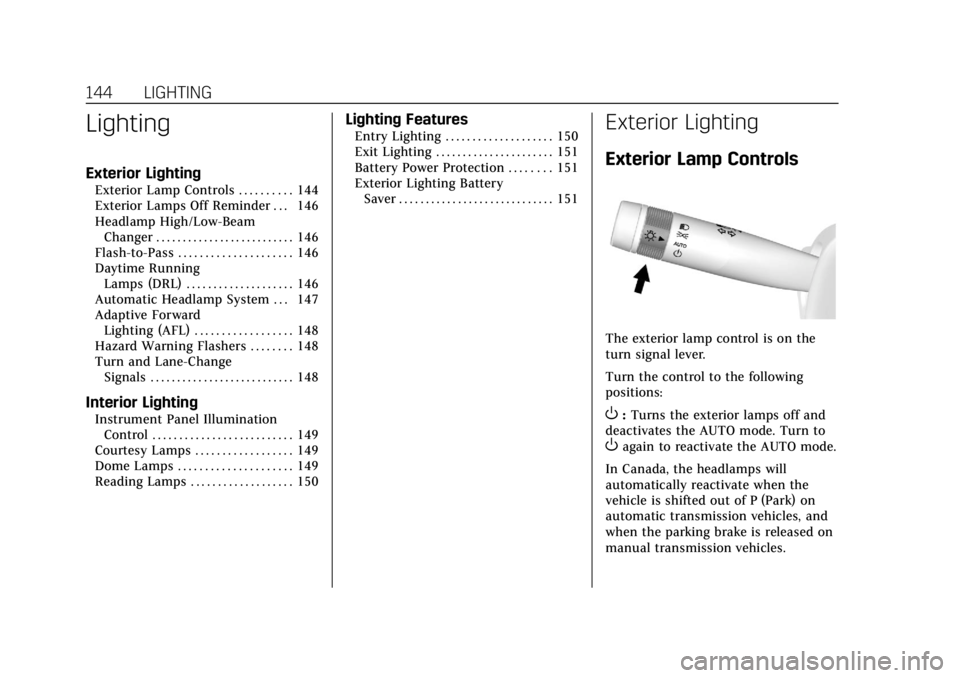
Exterior Lamp Controls
The exterior lamp control is on the
turn signal lever.
Turn the control to the following
positions:
O:Turns the exterior lamps off and
deactivates the AUTO mode. Turn to
Oagain to reactivate the AUTO mode.
In Canada, the headlamps will
automatically reactivate when the
vehicle is shifted out of P (Park) on
automatic transmission vehicles, and
when the parking brake is released on
manual transmission vehicles.
Page 146 of 384
Cadillac ATS/ATS-V Owner Manual (GMNA-Localizing-U.S./Canada/Mexico-
12460272) - 2019 - crc - 5/8/18
LIGHTING 145
AUTO :Automatically turns the
exterior lamps on and off, depending
on outside lighting.
;: Turns on the parking lamps
including all lamps, except the
headlamps.
2: Turns on the headlamps together
with the parking lamps and
instrument panel lights.
IntelliBeam System
If equipped, this system turns the
vehicle's high-beam headlamps on and
off according to surrounding traffic
conditions.
The system turns the high-beam
headlamps on when it is dark enough
and there is no other traffic present.
An indicator light
b(Cluster with
Auto Stop) or
2(V-Series Cluster)
comes on in the instrument cluster
when the IntelliBeam system is
enabled.
Turning On and Enabling IntelliBeam
To enable the automatic high-beam
system, with the turn signal lever in
the neutral position, turn the exterior lamp control to AUTO. The blue
high-beam on light appears on the
instrument cluster when the high
beams are on.
Driving with IntelliBeam
The system only activates the high
beams when driving over 40 km/h
(25 mph).
There is a sensor near the top center
of the windshield, which automatically
controls the system. Keep this area of
the windshield clear of debris to allow
for best system performance.
The high-beam headlamps remain on,
under the automatic control, until one
of the following situations occurs:
.
The system detects an
approaching vehicle's headlamps.
. The system detects a preceding
vehicle's taillamps.
. The outside light is bright enough
that high-beam headlamps are not
required.
. The vehicle's speed drops below
20 km/h (12 mph). .
The Intellibeam system is disabled
by the high/low-beam changer or
the flash-to-pass feature. If this
happens, the high/low-beam
changer must be activated two
times within two seconds to
reactivate the Intellibeam system.
The instrument cluster light will
come on to indicate the
Intellibeam system is reactivated.
See Headlamp High/Low-Beam
Changer 0146 and Flash-to-Pass
0 146.
The high beams may not turn off
automatically if the system cannot
detect other vehicle's lamps because
of any of the following:
. The other vehicle's lamp(s) are
missing, damaged, obstructed from
view, or otherwise undetected.
. The other vehicle's lamp(s) are
covered with dirt, snow, and/or
road spray.
. The other vehicle's lamp(s) cannot
be detected due to dense exhaust,
smoke, fog, snow, road spray, mist,
or other airborne obstructions.
Page 147 of 384
Cadillac ATS/ATS-V Owner Manual (GMNA-Localizing-U.S./Canada/Mexico-
12460272) - 2019 - crc - 5/8/18
146 LIGHTING
.Your vehicle's windshield is dirty,
cracked, or obstructed by
something that blocks the view of
the light sensor.
. Your vehicle is loaded such that
the front end points upward,
causing the light sensor to aim
high and not detect headlamps
and taillamps.
. You are driving on winding or hilly
roads.
You may need to manually disable or
cancel the high-beam headlamps by
turning the low-beam headlamps on,
if any of the above conditions exist.
Exterior Lamps Off
Reminder
A warning chime will sound if the
exterior lamp control is left on in
either the headlamp or parking lamp
position and the driver door is opened
with the ignition off.
Headlamp High/Low-Beam
Changer
Push the turn signal lever away from
you and release, to turn the high
beams on. To return to low beams,
push the lever again or pull it toward
you and release.
This indicator light turns on in the
instrument cluster when the
high-beam headlamps are on.
Flash-to-Pass
This feature allows the high-beam
headlamps to be used to signal the
driver in front of you that you want
to pass.
Pull and hold the turn signal lever
toward you to use this feature. When
this is done the following will occur: .
If the headlamps are off or in
low-beam mode, the high-beam
headlamps will turn on. They will
stay on as long as the lever is held
there. Release the lever to turn
them off.
. If the headlamps are in high-beam
mode, they will go to low beam.
Daytime Running
Lamps (DRL)
DRL can make it easier for others to
see the front of your vehicle during
the day. Fully functional DRL are
required on all vehicles first sold in
Canada.
The DRL system turns on the
low-beam headlamps at a reduced
brightness. For vehicles with High
Intensity Discharge (HID) headlamps,
there is a dedicated DRL. The DRL will
come on when all of the following
conditions are met:
.The ignition is on.
. The exterior lamp control is
in AUTO.
Page 149 of 384

Cadillac ATS/ATS-V Owner Manual (GMNA-Localizing-U.S./Canada/Mexico-
12460272) - 2019 - crc - 5/8/18
148 LIGHTING
Adaptive Forward
Lighting (AFL)
On vehicles with the AFL system, the
headlamps pivot horizontally to
provide greater road illumination
while turning. To enable AFL, set the
exterior lamp control on the turn
signal lever to the AUTO position. To
adjust the AFL setting, seeVehicle
Personalization 0135. Moving the
control out of the AUTO position will
deactivate the system. AFL will
operate when the vehicle speed is
greater than 3 km/h (2 mph). AFL will
not operate when the transmission is
in R (Reverse). AFL is not immediately
operable after starting the vehicle;
driving a short distance is required to
calibrate the AFL. See Exterior Lamp
Controls 0144.
This feature can be changed, see
Vehicle Personalization 0135.
Hazard Warning Flashers
|:Press to make the front and rear
turn signal lamps flash on and off.
Press again to turn the flashers off.
The hazard warning flashers turn on
automatically if the airbags deploy.
Turn and Lane-Change
Signals
Move the lever all the way up or down
to signal a turn.
An arrow on the instrument cluster
flashes in the direction of the turn or
lane change.
Raise or lower the lever until the
arrow starts to flash to signal a lane
change. Hold it there until the lane
change is completed. If the lever is
briefly pressed and released, the turn
signal flashes three times.
The turn and lane-change signal can
be turned off manually by moving the
lever back to its original position.
Page 150 of 384
Cadillac ATS/ATS-V Owner Manual (GMNA-Localizing-U.S./Canada/Mexico-
12460272) - 2019 - crc - 5/8/18
LIGHTING 149
If after signaling a turn or lane
change, the arrow flashes rapidly or
does not come on, a signal bulb might
be burned out.
Replace any burned out bulbs. If a
bulb is not burned out, check the fuse.
SeeFuses and Circuit Breakers 0274.Interior Lighting
Instrument Panel
Illumination Control
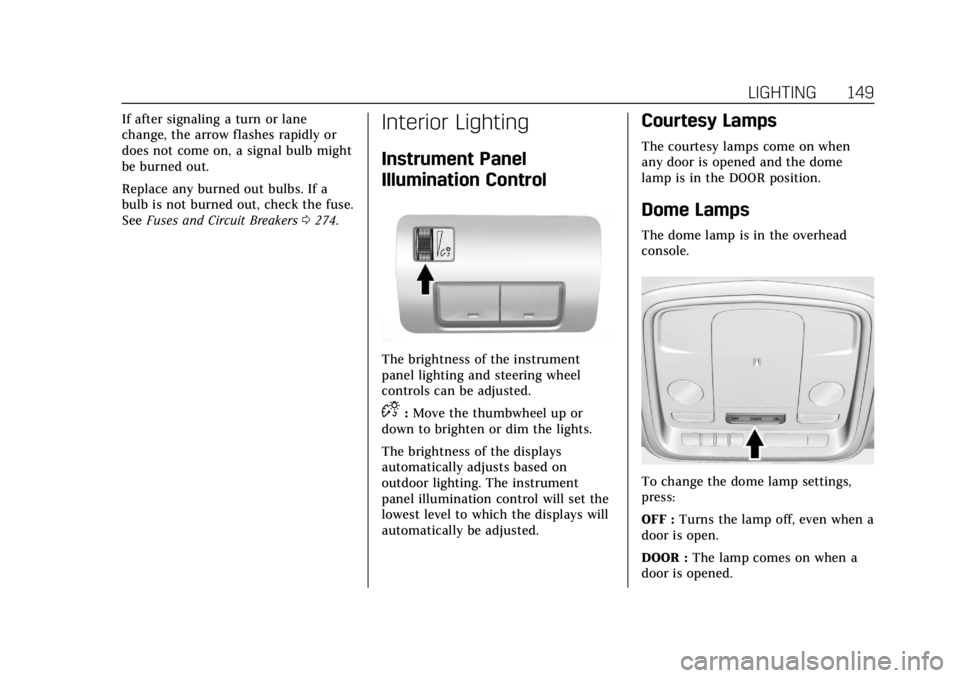
The brightness of the instrument
panel lighting and steering wheel
controls can be adjusted.
D:Move the thumbwheel up or
down to brighten or dim the lights.
The brightness of the displays
automatically adjusts based on
outdoor lighting. The instrument
panel illumination control will set the
lowest level to which the displays will
automatically be adjusted.
Courtesy Lamps
The courtesy lamps come on when
any door is opened and the dome
lamp is in the DOOR position.
Dome Lamps
The dome lamp is in the overhead
console.
To change the dome lamp settings,
press:
OFF : Turns the lamp off, even when a
door is open.
DOOR : The lamp comes on when a
door is opened.
Page 181 of 384
Cadillac ATS/ATS-V Owner Manual (GMNA-Localizing-U.S./Canada/Mexico-
12460272) - 2019 - crc - 5/8/18
180 DRIVING AND OPERATING
be applied sooner than when on
dry pavement. SeeAntilock Brake
System (ABS) 0200.
. Allow greater following distance
and watch for slippery spots. Icy
patches can occur on otherwise
clear roads in shaded areas. The
surface of a curve or an overpass
can remain icy when the
surrounding roads are clear. Avoid
sudden steering maneuvers and
braking while on ice.
. Turn off cruise control.
Blizzard Conditions
Stay with the vehicle unless there is
help nearby. If possible, use Roadside
Assistance. See Roadside Service 0350.
To get help and keep everyone in the
vehicle safe:
. Turn on the hazard warning
flashers.
. Tie a red cloth to an outside
mirror.
{Warning
Snow can trap engine exhaust
under the vehicle. This may cause
exhaust gases to get inside. Engine
exhaust contains carbon monoxide
(CO), which cannot be seen or
smelled. It can cause
unconsciousness and even death.
If the vehicle is stuck in snow:
. Clear snow from the base of
the vehicle, especially any
blocking the exhaust pipe.
. Open a window about 5 cm
(2 in) on the vehicle side that
is away from the wind, to
bring in fresh air.
. Fully open the air outlets on
or under the instrument
panel.
. Adjust the climate control
system to circulate the air
inside the vehicle and set the
(Continued)
Warning (Continued)
fan speed to the highest
setting. See“Climate Control
Systems.”
For more information about CO, see
Engine Exhaust 0193.
To save fuel, run the engine for short
periods to warm the vehicle and then
shut the engine off and partially close
the window. Moving about to keep
warm also helps.
If it takes time for help to arrive,
when running the engine, push the
accelerator pedal slightly so the
engine runs faster than the idle speed.
This keeps the battery charged to
restart the vehicle and to signal for
help with the headlamps. Do this as
little as possible, to save fuel.
Page 233 of 384
Cadillac ATS/ATS-V Owner Manual (GMNA-Localizing-U.S./Canada/Mexico-
12460272) - 2019 - crc - 5/8/18
232 DRIVING AND OPERATING
Minor brake pedal pulsations or pedal
movement during this time is normal
and the brake pedal should continue
to be applied as needed. IBA will
automatically disengage only when
the brake pedal is released.
{Warning
IBA may increase vehicle braking in
situations when it may not be
necessary. You could block the flow
of traffic. If this occurs, take your
foot off the brake pedal and then
apply the brakes as needed.
FAB and IBA can be disabled through
vehicle personalization. See “Collision/
Detection Systems” underVehicle
Personalization 0135.
{Warning
Using FAB or IBA while towing a
trailer could cause you to lose
control of the vehicle and crash.
Turn the system to Off when
towing a trailer.
Side Blind Zone
Alert (SBZA)
If equipped, the SBZA system is a
lane-changing aid that assists drivers
with avoiding crashes that occur with
moving vehicles in the side blind zone
(or spot) areas. When the vehicle is in
a forward gear, the left or right side
mirror display will light up if a moving
vehicle is detected in that blind zone.
If the turn signal is activated and a
vehicle is also detected on the same
side, the display will flash as an extra
warning not to change lanes. Since
this system is part of the Lane Change
Alert (LCA) system, read the entire
LCA section before using this feature.
Lane Change Alert (LCA)
If equipped, the LCA system is a
lane-changing aid that assists drivers
with avoiding lane change crashes
that occur with moving vehicles in the
side blind zone (or spot) areas or with
vehicles rapidly approaching these
areas from behind. The LCA warning display will light up in the
corresponding outside side mirror and
will flash if the turn signal is on.
{Warning
LCA does not alert the driver to
vehicles outside of the system
detection zones, pedestrians,
bicyclists, or animals. It may not
provide alerts when changing lanes
under all driving conditions. Failure
to use proper care when changing
lanes may result in injury, death,
or vehicle damage. Before making a
lane change, always check mirrors,
glance over your shoulder, and use
the turn signals.
Page 234 of 384

Cadillac ATS/ATS-V Owner Manual (GMNA-Localizing-U.S./Canada/Mexico-
12460272) - 2019 - crc - 5/8/18
DRIVING AND OPERATING 233
LCA Detection Zones
1. SBZA Detection Zone
2. LCA Detection Zone
The LCA sensor covers a zone of
approximately one lane over from
both sides of the vehicle, or 3.5 m
(11 ft). The height of the zone is
approximately between 0.5 m (1.5 ft)
and 2 m (6 ft) off the ground. The Side
Blind Zone Alert (SBZA) warning area
starts at approximately the middle of
the vehicle and goes back 5 m (16 ft).
Drivers are also warned of vehicles
rapidly approaching from up to 25 m
(82 ft) behind the vehicle.
How the System Works
The LCA symbol lights up in the side
mirrors when the system detects a
moving vehicle in the next lane over
that is in the side blind zone or
rapidly approaching that zone from
behind. A lit LCA symbol indicates it
may be unsafe to change lanes. Before
making a lane change, check the LCA
display, check mirrors, glance over
your shoulder, and use the turn
signals.
Left Side MirrorDisplayRight Side Mirror Display
When the vehicle is started, both
outside mirror LCA displays will
briefly come on to indicate the system
is operating. When the vehicle is in a
forward gear, the left or right side
mirror display will light up if a moving
vehicle is detected in the next lane
over in that blind zone or rapidly
approaching that zone. If the turn signal is activated in the same
direction as a detected vehicle, this
display will flash as an extra warning
not to change lanes.
LCA can be disabled through vehicle
personalization. See
“Collision/
Detection Systems” underVehicle
Personalization 0135. If LCA is
disabled by the driver, the LCA mirror
displays will not light up.
When the System Does Not
Seem to Work Properly
The LCA system requires some driving
for the system to calibrate to
maximum performance. This
calibration may occur more quickly if
the vehicle is driven on a straight
highway road with traffic and roadside
objects (e.g., guardrails, barriers).
During a trip, the LCA system is not
operational until the vehicle first
reaches a speed of 24 km/h (15 mph).
LCA displays may not come on when
passing a vehicle quickly, for a
stopped vehicle, or when towing a
trailer. The LCA detection zones that
extend back from the side of the
vehicle do not move further back
Page 235 of 384
Cadillac ATS/ATS-V Owner Manual (GMNA-Localizing-U.S./Canada/Mexico-
12460272) - 2019 - crc - 5/8/18
234 DRIVING AND OPERATING
when a trailer is towed. Use caution
while changing lanes when towing a
trailer. LCA may alert to objects
attached to the vehicle, such as a
trailer, bicycle, or object extending out
to either side of the vehicle. Attached
objects may also interfere with the
detection of vehicles. This is normal
system operation; the vehicle does not
need service.
LCA may not always alert the driver to
vehicles in the next lane over,
especially in wet conditions or when
driving on sharp curves. The system
does not need to be serviced. The
system may light up due to guardrails,
signs, trees, shrubs, and other
non-moving objects. This is normal
system operation; the vehicle does not
need service.
LCA may not operate when the LCA
sensors in the left or right corners of
the rear bumper are covered with
mud, dirt, snow, ice, or slush, or in
heavy rainstorms. For cleaning
instructions, see "Washing the
Vehicle" underExterior Care0318.
If the DIC still displays the system
unavailable message after cleaning both sides of the vehicle toward the
rear corners of the vehicle, see your
dealer.
If the LCA displays do not light up
when moving vehicles are in the side
blind zone or rapidly approaching this
zone and the system is clean, the
system may need service. Take the
vehicle to your dealer.
Radio Frequency Information
See
Radio Frequency Statement 0356.
Lane Departure
Warning (LDW)
If equipped, LDW may help avoid
crashes due to unintentional lane
departures. It may provide a warning
if the vehicle is crossing a detected
lane marking without using a turn
signal in the lane departure direction.
Since this system is part of the Lane
Keep Assist (LKA) system, read the
entire LKA section before using this
feature.
Lane Keep Assist (LKA)
If equipped, LKA may help avoid
crashes due to unintentional lane
departures. It may assist by gently
turning the steering wheel if the
vehicle approaches a detected lane
marking without using a turn signal in
that direction. It may also provide a
Lane Departure Warning (LDW)
system alert as the lane marking is
crossed. The LKA system will not
assist or provide an LDW alert if it
detects that you are actively steering.
Override LKA by turning the steering
wheel. LKA uses a camera to detect
lane markings between 60 km/h (37
mph) and 180 km/h (112 mph).
{Warning
The LKA system does not
continuously steer the vehicle.
It may not keep the vehicle in the
lane or give a Lane Departure
Warning (LDW) alert, even if a lane
marking is detected.
(Continued)
Page 236 of 384
Cadillac ATS/ATS-V Owner Manual (GMNA-Localizing-U.S./Canada/Mexico-
12460272) - 2019 - crc - 5/8/18
DRIVING AND OPERATING 235
Warning (Continued)
The LKA and LDW systems
may not:. Provide an alert or enough
steering assist to avoid a lane
departure or crash.
. Detect lane markings under
poor weather or visibility
conditions. This can occur if
the windshield or headlamps
are blocked by dirt, snow,
or ice, if they are not in
proper condition, or if the sun
shines directly into the
camera.
. Detect road edges.
. Detect lanes on winding or
hilly roads.
If LKA only detects lane markings
on one side of the road, it will only
assist or provide an LDW alert
when approaching the lane on the
side where it has detected a lane
marking. Even with LKA and LDW, (Continued)
Warning (Continued)
you must steer the vehicle. Always
keep your attention on the road and
maintain proper vehicle position
within the lane, or vehicle damage,
injury, or death could occur. Always
keep the windshield, headlamps,
and camera sensors clean and in
good repair. Do not use LKA in bad
weather conditions.
{Warning
Using LKA while towing a trailer or
on slippery roads could cause loss
of control of the vehicle and a
crash. Turn the system off.
How the System Works
The LKA camera sensor is on the
windshield ahead of the rearview
mirror.
To turn LKA on and off, press
Ato
the left of the steering wheel. When on,
Ais green if LKA is
available to assist and provide LDW
alerts. It may assist by gently turning
the steering wheel and display
A
as amber if the vehicle approaches a
detected lane marking without using a
turn signal in that direction. It may
also provide an LDW alert by flashing
Aamber as the lane marking is
crossed. Additionally, there may be
three beeps, or the driver seat may
pulse three times, on the right or left,
depending on the lane departure
direction.
Take Steering
The LKA system does not
continuously steer the vehicle. If LKA
does not detect active driver steering,
an alert, chime, or DIC message may
be provided. Steer the vehicle to
dismiss.