manual transmission CADILLAC ATS 2019 Owner's Guide
[x] Cancel search | Manufacturer: CADILLAC, Model Year: 2019, Model line: ATS, Model: CADILLAC ATS 2019Pages: 384, PDF Size: 6.11 MB
Page 196 of 384

Cadillac ATS/ATS-V Owner Manual (GMNA-Localizing-U.S./Canada/Mexico-
12460272) - 2019 - crc - 5/8/18
DRIVING AND OPERATING 195
Caution
Shifting to R (Reverse) while the
vehicle is moving forward could
damage the transmission. The
repairs would not be covered by the
vehicle warranty. Shift to
R (Reverse) only after the vehicle is
stopped.
R : Use this gear to back up.
At low vehicle speeds, R (Reverse) can
be used to rock the vehicle back and
forth to get out of snow, ice, or sand
without damaging the transmission.
See If the Vehicle Is Stuck 0181.
N : In this position, the engine does
not connect with the wheels. To
restart the engine when the vehicle is
already moving, use N (Neutral) only.
{Warning
Shifting into a drive gear while the
engine is running at high speed is
dangerous. Unless your foot is
firmly on the brake pedal, the
vehicle could move very rapidly.
You could lose control and hit
people or objects. Do not shift into
a drive gear while the engine is
running at high speed.
Caution
Shifting out of P (Park) or
N (Neutral) with the engine running
at high speed may damage the
transmission. The repairs would not
be covered by the vehicle warranty.
Be sure the engine is not running at
high speed when shifting the
vehicle.
Caution
A transmission hot message may
display if the automatic
transmission fluid is too hot.
Driving under this condition can
damage the vehicle. Stop and idle
the engine to cool the automatic
transmission fluid. This message
clears when the transmission fluid
has cooled sufficiently.
D : This position is for normal driving.
If more power is needed for passing,
press the accelerator pedal down.
Downshifting the transmission in
slippery road conditions could result
in skidding; see “Skidding”underLoss
of Control 0173.
Page 197 of 384

Cadillac ATS/ATS-V Owner Manual (GMNA-Localizing-U.S./Canada/Mexico-
12460272) - 2019 - crc - 5/8/18
196 DRIVING AND OPERATING
Caution
Spinning the tires or holding the
vehicle in one place on a hill using
only the accelerator pedal may
damage the transmission. The
repair will not be covered by the
vehicle warranty. If the vehicle is
stuck, do not spin the tires. When
stopping on a hill, use the brakes to
hold the vehicle in place.
While in Sport or Track Mode, the
vehicle monitors driving behavior, and
automatically enables Performance
Shift Features when spirited driving is
detected. These features maintain
lower transmission gears to increase
available engine braking and improve
acceleration response. The vehicle will
exit these features and return to
normal operation after a short period
when no spirited driving is detected.
See Driver Mode Control 0205. The transmission will shift down a
gear to help hold vehicle speed and
reduce brake wear when:
.
Driving on a steep descent.
. The shift lever is in D (Drive).
. Frequent braking is required.
If the brake remains applied, the
transmission will downshift until
3 (Third) gear is reached. If the brake
is released for some time, the
transmission will upshift a gear. If the
road levels out and the accelerator
pedal is pressed, the transmission will
upshift until the appropriate gear is
reached.
Manual Mode
Driver Shift Control (DSC)
Caution
Driving with the engine at a high
rpm without upshifting while using
Driver Shift Control (DSC), could
damage the vehicle. Always upshift
when necessary while using DSC.
Vehicles with DSC may either use the
shift lever or the tap shift controls on
the back of the steering wheel (if
equipped) to manually shift the
automatic transmission.
To use DSC using the shift lever: 1. Move the shift lever to the left from D (Drive) to M (Manual
Mode). The transmission will be
in Manual Mode and will hold
the current gear.
2. Move the shift lever forward to upshift or rearward to downshift.
3. To cancel DSC, move the shift lever back to D (Drive).
Page 198 of 384

Cadillac ATS/ATS-V Owner Manual (GMNA-Localizing-U.S./Canada/Mexico-
12460272) - 2019 - crc - 5/8/18
DRIVING AND OPERATING 197
Tap Shift
If equipped, the tap shift controls are
on the back of the steering wheel.
To use DSC using the tap shift
controls:1. Move the shift lever to the left from D (Drive) to M (Manual
Mode). The transmission will be
in Manual Mode and will hold
the current gear.
2. Pull the control toward you to shift. Pull the left control to
(−) downshift, and the right control to (+) upshift. To shift to
the lowest available gear, press
and hold the left control (−).
3. To cancel DSC, move the shift lever back to D (Drive).
Tap Shift Mode can also be used
temporarily while driving in D (Drive).
Pull either the (+) upshift or
(−) downshift control.
To cancel Tap Shift Mode, hold
the (+) upshift control for two seconds.
If no action is taken, the vehicle
returns to automatic shifting after a
brief period of driving at a steady
speed, or when the vehicle comes to
a stop.
While using the DSC feature, the
vehicle will have firmer, quicker
shifting. This can be used for sport
driving, climbing or descending hills,
staying in gear longer, downshifting
for more power, or engine braking. The transmission will only allow
shifting into gears appropriate for the
vehicle speed and engine revolutions
per minute (rpm). The transmission
will not automatically shift to the next
higher gear if the engine rpm is
too high.
If shifting is prevented for any reason,
a DIC message will appear.
When accelerating the vehicle from a
stop in snowy and icy conditions, it is
suggested to shift into second gear,
or third gear as available. A higher
gear allows the vehicle to gain more
traction on slippery surfaces. See
Driver Mode Control
0205.
Page 199 of 384

Cadillac ATS/ATS-V Owner Manual (GMNA-Localizing-U.S./Canada/Mexico-
12460272) - 2019 - crc - 5/8/18
198 DRIVING AND OPERATING
Manual Transmission
If equipped, this is the shift pattern
for the manual transmission.
ATS
ATS-V
Caution
A transmission hot message may
display if the manual transmission
fluid is too hot. Driving at high
speed under this condition can
damage the vehicle. Drive at a
slower speed, or stop and idle the
engine to cool the manual
transmission fluid. The message
clears when the vehicle has slowed
and the transmission fluid has
cooled sufficiently.1 (First) :
Press the clutch pedal and
shift into 1 (First). Slowly let up on
the clutch pedal while pressing on the
accelerator pedal.
After a complete stop, if it is hard to
shift into 1 (First), let up on the clutch
pedal, then press it back down and
shift into 1 (First).
2 (Second) : Press the clutch pedal
and let up on the accelerator pedal,
then shift into 2 (Second). Then,
slowly let up on the clutch pedal while
accelerating.
3 (Third), 4 (Fourth), 5 (Fifth), and
6 (Sixth) : Shift into 3 (Third),
4 (Fourth), 5 (Fifth), and 6 (Sixth) the
same as 2 (Second).
To stop, let up on the accelerator
pedal and press the brake pedal. Just
before the vehicle stops, press the
clutch pedal and the brake pedal, and
shift to Neutral.
Neutral : Use this position when you
start or idle the engine. The shift lever
is in Neutral when it is centered in the
shift pattern, not in any gear.
Page 200 of 384

Cadillac ATS/ATS-V Owner Manual (GMNA-Localizing-U.S./Canada/Mexico-
12460272) - 2019 - crc - 5/8/18
DRIVING AND OPERATING 199
R (Reverse) :To back up, press down
the clutch pedal, completely stop the
vehicle, and shift into R (Reverse). On
ATS models, apply additional pressure
to get the lever past 1 (First) and
2 (Second) into R (Reverse). Let up on
the clutch pedal slowly while pressing
the accelerator pedal.
{Warning
If you skip a gear when
downshifting, you could lose
control of the vehicle. You could
injure yourself or others. Do not
shift down more than one gear at a
time when downshifting.
Caution
When downshifting, if more than
one gear is skipped, or the engine is
racing when the clutch pedal is
released, the engine, clutch,
driveshaft or transmission could be
damaged.
No Lift-Shift
On ATS-V vehicles equipped with a
manual transmission, the vehicle can
be shifted up a gear when the
accelerator pedal is pressed to the
floor without being released. This
allows for less power interruption and
will improve acceleration times. This
feature is available in all vehicle
modes and is only active when the
engine speed is greater than 2500 rpm.
Active Rev Match
ATS-V vehicles equipped with a
manual transmission have Active Rev
Match (ARM). ARM aids in smoother
shifting by matching the engine speed
to the next selected gear. By
monitoring shift lever and clutch
operation, ARM adjusts engine speed
to match a calibrated value based on
gear selection. On upshifts and
downshifts, engine speed will be
increased and decreased to match
vehicle road speed and transmission
gear position. ARM is maintained
while the clutch pedal is pressed, but
will deactivate if the shift lever is left
in the Neutral position.
The system is activated and
deactivated by pressing either of the
paddles on the steering wheel. The
system must be activated with each
new ignition cycle.
A gear indicator in the instrument
cluster displays the current gear
selected. ARM is also shown in the
Performance View of the HUD:
. When ARM is activated, the gear
number is amber.
. When ARM is deactivated, the
gear number is white.
Page 201 of 384
Cadillac ATS/ATS-V Owner Manual (GMNA-Localizing-U.S./Canada/Mexico-
12460272) - 2019 - crc - 5/8/18
200 DRIVING AND OPERATING
.If no gear number is displayed
while the shift lever is in gear,
service is required. ARM will be
disabled, and the malfunction
indicator lamp will be on. See
Malfunction Indicator Lamp (Check
Engine Light) 0120. The clutch and
manual transmission will continue
to operate normally.
ARM will also:
. Be active above 14 km/h (9 mph).
. Match engine speed up to
6100 rpm.
. Not operate when the accelerator
pedal is applied.
. Be disabled when the coolant
temperature is below 0 °C (32 °F).Drive Systems
All-Wheel Drive
Vehicles with this feature always send
engine power to all four wheels. It is
fully automatic, and adjusts itself as
needed for road conditions.
Brakes
Antilock Brake
System (ABS)
This vehicle has an Antilock Brake
System (ABS), an advanced electronic
braking system that helps prevent a
braking skid.
When the vehicle begins to drive
away, ABS checks itself. A momentary
motor or clicking noise may be heard
while this test is going on, and it may
even be noticed that the brake pedal
moves a little. This is normal.
If there is a problem with ABS, this
warning light stays on. See Antilock
Brake System (ABS) Warning Light
0 123.
Page 202 of 384

Cadillac ATS/ATS-V Owner Manual (GMNA-Localizing-U.S./Canada/Mexico-
12460272) - 2019 - crc - 5/8/18
DRIVING AND OPERATING 201
If driving safely on a wet road and it
becomes necessary to slam on the
brakes and continue braking to avoid
a sudden obstacle, a computer senses
the wheels are slowing down. If one of
the wheels is about to stop rolling, the
computer will separately work the
brakes at each wheel.
ABS can change the brake pressure to
each wheel, as required, faster than
any driver could. This can help you
steer around the obstacle while
braking hard.
As the brakes are applied, the
computer keeps receiving updates on
wheel speed and controls braking
pressure accordingly.
Remember: ABS does not change the
time needed to get a foot up to the
brake pedal or always decrease
stopping distance. If you get too close
to the vehicle in front of you, there
will not be enough time to apply the
brakes if that vehicle suddenly slows
or stops. Always leave enough room
up ahead to stop, even with ABS.Using ABS
Do not pump the brakes. Just hold the
brake pedal down firmly and let ABS
work. You may hear the ABS pump or
motor operating and feel the brake
pedal pulsate. This is normal.
Braking in Emergencies
ABS allows you to steer and brake at
the same time. In many emergencies,
steering can help more than even the
very best braking.
Parking Brake (Electric)
Automatic Transmission
Manual Transmission
If equipped with an Electric Parking
Brake (EPB), the switch is on the
center console for manual
transmission vehicles, or on the left
side of the instrument panel for
automatic transmission vehicles. The
EPB can always be activated, even if
the ignition is off. To prevent draining
the battery, avoid repeated cycles of
the EPB when the engine is not
running.
Page 204 of 384
Cadillac ATS/ATS-V Owner Manual (GMNA-Localizing-U.S./Canada/Mexico-
12460272) - 2019 - crc - 5/8/18
DRIVING AND OPERATING 203
away. Avoid rapid acceleration when
the EPB is applied, to preserve parking
brake lining life.
The EPB can also be used to prevent
roll back for vehicles with a manual
transmission taking off on a hill.
When no roll back is desired, an
applied EPB will allow both feet to be
used for the clutch and accelerator
pedals in preparation for starting the
vehicle moving in the intended
direction. In this case, there is no
need to press the switch to release
the EPB.
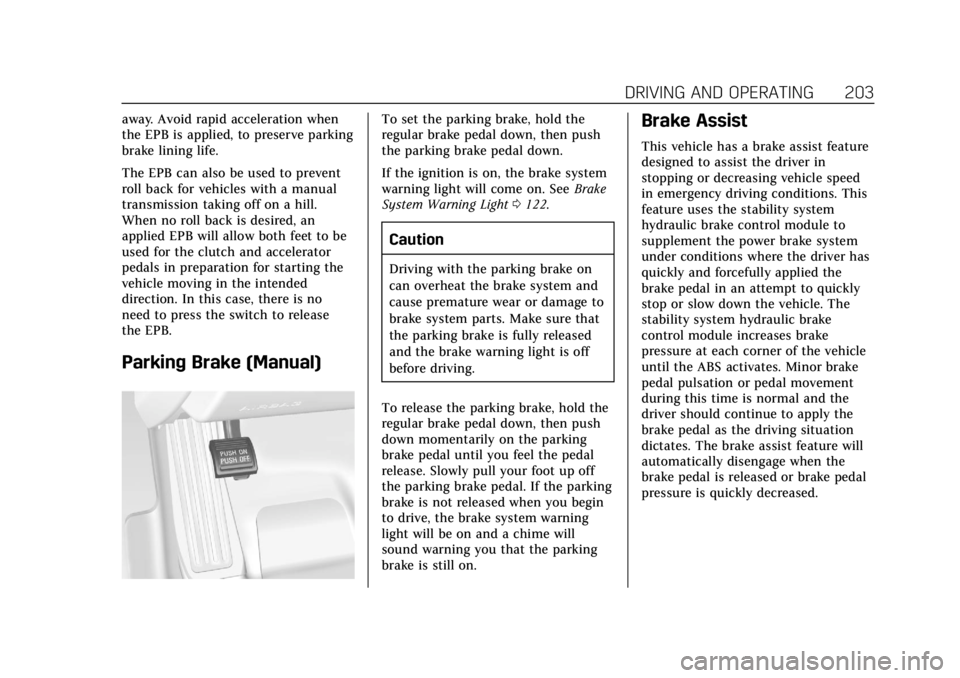
Parking Brake (Manual)
To set the parking brake, hold the
regular brake pedal down, then push
the parking brake pedal down.
If the ignition is on, the brake system
warning light will come on. SeeBrake
System Warning Light 0122.
Caution
Driving with the parking brake on
can overheat the brake system and
cause premature wear or damage to
brake system parts. Make sure that
the parking brake is fully released
and the brake warning light is off
before driving.
To release the parking brake, hold the
regular brake pedal down, then push
down momentarily on the parking
brake pedal until you feel the pedal
release. Slowly pull your foot up off
the parking brake pedal. If the parking
brake is not released when you begin
to drive, the brake system warning
light will be on and a chime will
sound warning you that the parking
brake is still on.
Brake Assist
This vehicle has a brake assist feature
designed to assist the driver in
stopping or decreasing vehicle speed
in emergency driving conditions. This
feature uses the stability system
hydraulic brake control module to
supplement the power brake system
under conditions where the driver has
quickly and forcefully applied the
brake pedal in an attempt to quickly
stop or slow down the vehicle. The
stability system hydraulic brake
control module increases brake
pressure at each corner of the vehicle
until the ABS activates. Minor brake
pedal pulsation or pedal movement
during this time is normal and the
driver should continue to apply the
brake pedal as the driving situation
dictates. The brake assist feature will
automatically disengage when the
brake pedal is released or brake pedal
pressure is quickly decreased.
Page 207 of 384

Cadillac ATS/ATS-V Owner Manual (GMNA-Localizing-U.S./Canada/Mexico-
12460272) - 2019 - crc - 5/8/18
206 DRIVING AND OPERATING
package, available features, and mode
selected, the suspension, steering, and
powertrain will change settings to
achieve the desired mode
characteristics. If the vehicle is
equipped with Magnetic Ride Control,
selecting the various Driver Modes
adjusts the ride of the vehicle to
enhance the ride performance for the
road conditions and the
selected mode.
The Driver Mode Control has three or
four modes: Tour, Sport, Snow/Ice,
and Track (V-Series Only). Snow/Ice
mode is only available on automatic
transmission vehicles. Press and
release the MODE button (ATS) or
press the
yorzbutton (ATS-V) on
the center console to activate the
mode menu in the cluster. The first
press of the button will show the
current mode. Subsequent presses will
scroll though the available modes. The
Tour and Sport modes will feel similar
on a smooth road. Select a new
setting whenever driving conditions
change.
Tour Mode
Use for normal city and highway
driving to provide a smooth, soft ride.
Sport Mode
Use where road conditions or personal
preference demand a more controlled
response.
When selected, the Sport mode
indicator will display in the Driver
Information Center (DIC).
When in Sport or Track mode, the
vehicle will shift automatically but
may hold a lower gear longer than it
would in the normal driving mode
based on braking, throttle input, and
vehicle lateral acceleration. See
Automatic Transmission 0194. The
steering will change to provide more
precise control. If the vehicle has
Magnetic Ride Control, the suspension
will change to provide better
cornering performance.
Competitive Driving Mode can be
accessed through this mode.
Snow/Ice Mode
Use when more traction is needed
during slippery conditions.
Snow/Ice mode will use a different
accelerator pedal map to optimize
traction on a slippery surface. The
accelerator pedal will reduce engine
torque at small pedal inputs. The
transmission will also shift differently
to assist in maintaining traction.
When selected, the Snow/Ice mode
indicator will display in the DIC.
This feature is not intended for use
when the vehicle is stuck in sand,
mud, ice, snow, or gravel. If the
vehicle becomes stuck, see If the
Vehicle Is Stuck 0181.
Page 208 of 384

Cadillac ATS/ATS-V Owner Manual (GMNA-Localizing-U.S./Canada/Mexico-
12460272) - 2019 - crc - 5/8/18
DRIVING AND OPERATING 207
Track Mode (V-Series Only)
Use when maximum vehicle handling
is desired. When selected, the Track
mode indicator will display in the DIC.
The accelerator pedal is adjusted to
give maximum control during the
highest level of spirited driving.The automatic transmission and
steering will function similar to
Sport Mode.
The Magnetic Ride Control will be set
to the optimum level for vehicle
responsiveness.
Competitive Driving Mode can be
accessed through this mode.Use when driving on a closed race
course or drag strip.
Vehicle systems are optimized for
maximum track performance.
This mode allows entry to
Performance Traction Management
(PTM) in the Competitive
Driving Mode.