fuel CADILLAC DEVILLE 1994 7.G User Guide
[x] Cancel search | Manufacturer: CADILLAC, Model Year: 1994, Model line: DEVILLE, Model: CADILLAC DEVILLE 1994 7.GPages: 399, PDF Size: 20.97 MB
Page 151 of 399

Downloaded from www.Manualslib.com manuals search engine If the fuel level is between 1 and 2 gallons (3.9 and 7.6 liters) from being
empty the letter
“E” is shown. If the fuel supply gets down to
approximately
1. gallon (3.9 liter) the “E” will flash, and the “ FUEL
LEVEL VERY LOW” message will appear in the Driver Information
Center (DIC).
Here are a few concerns some owners have had about the fuel gage. All
these situations are normal and indicate nothing wrong with the fuel
gage-
@ At the gas station, the gas pump shuts off before the gage reads “F”.
It takes more (or less) gas to fill up than the gage said. For example,
the gage said
“8 Gallons”, but it took more -- or less -- than the tank’s
remaining capacity to
fill it.
The gage may change when you turn, stop, or speed up is normal.
Fuel Data Panel
Your Fuel Data Panel tells you all you want to know about your fuel
economy and
how far you can travel with the fuel remaining. Here’s how
it works.
AVG Button Push this button to display the “AVG MPG” (average mile
per gallon).
You can also display it in metric units by pressing the “ENG
MET” button.
Page 152 of 399

Downloaded from www.Manualslib.com manuals search engine When “AVG MPG” (average mile per gallon) is selected, the total
- distance is divided by the total fuel used.
INST Button When “INST MPG”(1nstantaneous Fuel Economy) is
selected, you will see what your fuel economy is at that instant. The
computer takes
a new reading twice every second. It will show economy
up to
70 miles per gallon (or 2 liters per 100 Kilometers).
AVG MPG Reset Press the INFORMATION button until the AVG MPG
is displayed on the Driver Information Center. Press and hold the
RESET button until both the Fuel Data Center and Driver Information
Center display reads
0.0 Another method to reset the AVG MPG is to
press the AVG button on the Fuel Data Panel.
--
-
--
RANGE Display This display shows how far the computer thinks you can
go with the fuel that is in your tank. The computer does not know what
driving conditions will be like for the rest
of your trip, so the range is
estimated based on your recent fuel economy. Therefore, your range
reading may change
as your driving habits change (going from city to
If the range display shows “Lo”, you should stop for fuel as soon as
possible.
Your computer needs enough data for the “RANGE” reading to work. It
will read
“Lo” for a while when your vehicle is brand new (under 25
miles). Also, it may show “Lo” for a while if your battery has been
disconnected.
__
-- highway driving may increase the range reading).
--
139
Page 154 of 399
Downloaded from www.Manualslib.com manuals search engine L
Driver Information Center Control Buttons
INFORMATION Button
Pressing this button successively will display the AVG MPH, MPG AVG,
FUEL USED, OIL LIFE LEFT, and TIMER.
RESET Button
Pressing this button will reset the AVG MPH, MPG AVG, FUEL USED,
OIL LIFE LEFT, and TIMER when each function is displayed
TIMER Button
The TIMER feature is like a stop watch, in that you can clock the time it
takes to get from one point to another.
To operate, press either the TIMER button or successively press the
INFORMATION button until “TIMER
0O:OO:OO” is displayed on the
Driver Information Center. Each of the fields for the HOURS,
MINUTES, and SECONDS are
two numeric digits.
Once the “TIMER
0O:OO:OO:” is displayed, press the TIMER button to start
the timing feature. Press the TIMER button again to stop it. To reset it, press
and hold the RESET button until
the display reads “TIMER OO:OO:OO:”.
Press the INFORMATION button to exit from the TIMER function.
AVG MPH (Average Speed) Reset
Press successively the INFORMATION button to display the “AVG MPH”,
then press and hold the RESET button
until “0.0 AVG MPH” is displayed.
MPG AVG (Average Fuel Economy) Reset
Press successively the INFORMATION button to display the “MPG AVG ”,
then press and hold the RESET button until “0.0 AVG MPG” is displayed.
If the “AVG MPG” is displayed on the fuel Data Panel, another method
to reset both AVG MPG
is to press the AVG button on the Fuel Data
Panel
until 0.0 AVG MPG is shown in both displays.
Fuel Used Reset
Press successively the INFORMATION button to display the “FUEL
USED”on the Driver Information Center, then press and hold the
RESET button until “FUEL USED
8.0” is displayed.
Page 155 of 399
Downloaded from www.Manualslib.com manuals search engine Oil Life Left Reset
Press successively the INFORMATION button to display the “OIL LIFE
LEFT ”) then press and hold the RESET button until “100 OIL LIFE
LEFT ” is displayed.
DISPLAY ON/OFF Button
Pressing this button will turn off the Driver Information Center, Trip and
Odometer, Electronic Climate Control and Fuel Data Center displays.
While displays are off, pressing the INFORMATION button will turn on
only the Driver Information Center. If any other button is pressed or a
driving warning message needs to be displayed, or
fuel level falls below
4 gallons, all the displays will come back on.
TRIP SET Button
Press and hold this button to set the Trip Odometer back to zero.
ENG/MET (English/Metric Button)
Press this button to switch from English (miles) and Degrees
(Fahrenheit), to Metric (kilometers) and Degrees (Celsius).
Driver Information Center Messages
These messages will appear if there is a problem sensed in one of your
vehicle’s systems. Vehicles that are first sold
in Canada or are export
vehicles will have a number after each message. This number helps to
identify that message, which is only displayed in English.
APPLY BRAKE TO SHIFT - 46
This message will appear if your vehicle is in “P” (Park) for about 15 seconds
and the brake
is not depressed. If you do not want this message to appear,
you
can cancel this message by holding the “OFF” and the Blue (cooler)
button on the Electronic Climate
Control panel for about 5 seconds. Hold the
same
two buttons again to have this message displayed again.
BATTERY NO CHARGE - 07
This message will appear
if your battery is not being charged. Have your
electrical system checked
by your Cadillac dealership at your earliest
convenience.
142
I
1
Page 156 of 399

Downloaded from www.Manualslib.com manuals search engine BATTERY VOLTS HIGH - 08
This message shows that the electrical charging system is overcharging,
(more than 16 volts).
To avoid being stranded have the electrical system
checked by your Cadillac dealership at your earliest convenience.
You can
reduce the charging overload by using the accessories. Turn on the lights,
radio, set the Climate Control
on “AUTO” and the fan speed on “HI”
and turn the rear window defogger on.
You can monitor battery voltage
on the Driver Information Center by toggling the “INFORMATION’’
button. When the engine is running, the normal range is 11.5 to 15.5
volts.
BATTERY VOLTS LOW - 06
This message will appear when the electrical system is charging less than
10 volts, or
if the battery has been drained. If this message appears
immediately after starting it is possible that the generator can still
recharge the battery.
The battery should recharge after driving a few
miles and the message should go out. If this message appears while
driving or after starting your vehicle and stays on, have
it checked
immediately to determinethe cause of this problem. To help the
generator recharge the battery quickly,
you can reduce the load on the
electrical system by turning
off your accessories. You can monitor battery
voltage on the Driver Information Center by toggling
the
“INFORMXTION” button. The normal range is 11.5 to 15.5 volts.
CHECK BRAKE FLUID - 37
This message is displayed to inform the driver that the brake reservoir
fluid level is low. Check the brake reservoir
level and add as needed.
Have the brake system serviced by a Cadillac technician as soon as
possible. If the brake warning light is on, follow the directions in that
section.
CHECK FUEL GAGE,- 39
This message will appear when your fuel supply is less than 4 gallons and
your display is turned off.
143
Page 158 of 399
Downloaded from www.Manualslib.com manuals search engine FUEL LEVEL VERY LOW - 11
This message serves as a warning that the fuel level in your tank is
critically low.
It means you should stop for fuel immediately.
7 SERVICE NC SYSTEM A/C COMPRESSOR OFF - 14
This message appears when the electronic sensors that control the A/C
and heating system are no longer working. You may notice a drop in
Climate Control system serviced if this message appears.
- heating and A/C efficiency when this message appears. Have your
STARTING DISABLED DUE TO THEFT SYSTEM REMOVE
IGNITION KEY - 33
This message will a ear when the Personalized Automotive Security
System (PASS-Key
gp 11) senses that an improper ignition key is being used
to
try to start the vehicle. Check the ignition key for damage. If it is
damaged,
it may need to be replaced. If you see no damage, clean the
pellet contacts with a soft cloth or napkin. Remove the ignition key and
The Instrument Panel Cluster will then run a timer and change the
messages to “WAIT
2 MINUTES ”, “WAIT 1 MINUTE”, and then
“START CAR”. When the
“START CAR’ message is displayed, try again
to start the engine.
- wait for the Driver Information Center to display “WAIT 3 MINUTES ”.
SERVICE NOW - REFER TO OWNERS MANUAL - 02
This message appears if you have a problem with the Powertrain Control
Module (PCM).
To correct this problem have your vehicle serviced at
your Cadillac dealership.
-
SERVICE RIDE CONTROL - 84
This message is displayed to indicate that the Suspension System is not
your Cadillac dealership at your earliest convenience.
I_ operating properly. To correct this problem have your vehicle serviced at
STOP ENGINE ENGINE OVERHEATED - 42
--- This message will appear when your engine has overheated. Stop and
turn your engine
off immediately to avoid severe engine damage. See
“Engine Overheating” in the Index.
Page 165 of 399
Downloaded from www.Manualslib.com manuals search engine Temperature
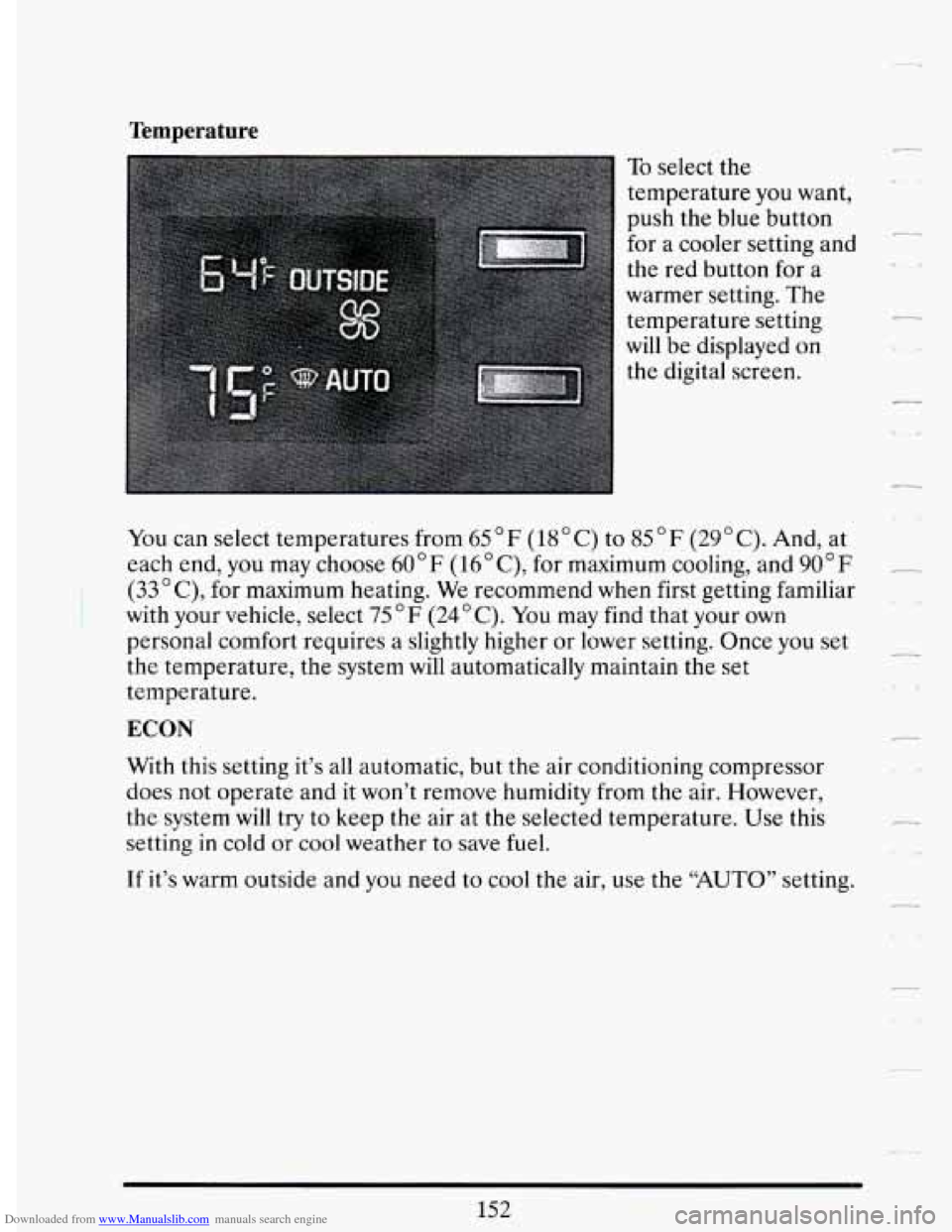
To select the
temperature
you want,
push the blue button
for a cooler setting and
the red button for a
warmer setting. The
temperature setting
will be displayed on
the digital screen.
You can select temperatures from
65’F (18°C) to 85°F (29’C). And, at
each end,
you may choose 60” F (16’C), for maximum cooling, and 90 ” F
(33 ’ C), for maximum heating. We recommend when first getting familiar
with your vehicle, select
75°F (24’C). You may find that your own
personal comfort requires a slightly higher or lower setting. Once you set
the temperature, the system will automatically maintain the
set
temperature.
ECON
With this setting it’s all automatic, but the air conditioning compressor
does not operate and it won’t remove humidity from the air. However,
the system will try to keep the air at the selected temperature. Use this
setting
in cold or cool weather to save fuel.
r
If it’s warm outside and you need to cool the air, use the “AUTO” setting.
Page 197 of 399
Downloaded from www.Manualslib.com manuals search engine As you brake, your computer keeps receiving updates on wheel speed and
controls braking pressure accordingly.
Remember: Anti-lock doesn’t change the time you need to get your foot
up to the brake pedal. If you get too close to the vehicle in front
of you,
you won’t have time to apply your brakes
if that vehicle suddenly slows or
stops. Always leave enough room up ahead to stop, even though you have
anti-lock brakes.
To Use Anti-Lock
Don’t pump the brakes. Just hold the brake pedal down and let anti-lock
work for you. You may hear the anti-lock pump or motor operate, and
feel the brake pedal pulsate, but this is normal.
Traction Control System (Option)
Your vehicle may have a traction control system that limits wheel spin.
This is especially useful
in slippery road conditions. The system operates
only
if it senses that one or both of the front wheels are spinning or
beginning to lose traction. When this happens, the system works the front
brakes and reduces engine power (by shutting
off fuel injectors) to limit
wheel spin.
The “TRACTION ACTIVE” message will display on the Driver
Information Center when
the traction control system is limiting wheel
spin. See “Driver Information Center Messages” in the Index.
You may
feel the system working, or you may notice some noise, but this is normal.
If your vehicle is in cruise control when the traction control system begins
to limit wheel spin, the cruise control will automatically disengage. When
road conditions allow you
to safely use it again, you may re-engage the
cruise control. (See “Cruise Control”
in the Index.)
The “TRACTION DISABLED” message will display on the Driver
Information Center if there’s a problem with your traction control system.
See “Driver Information Center Messages” in the Index. When this
message is displayed, the system will not limit wheel spin. Adjust your
driving accordingly.
184
Page 211 of 399

Downloaded from www.Manualslib.com manuals search engine .-
Once you are moving on the freeway, make certain you allow a
reasonable following distance. Expect to move slightly slower at night.
When you want
to leave the freeway, move to the proper lane well in
advance.
If you miss your exit do not, under any circumstances, stop and
back up. Drive on to the next exit.
The exit ramp can be curved, sometimes quite sharply.
The exit speed is usually posted.
Reduce your speed according to your speedometer, not to your sense of
motion. After driving for any distance at higher speeds, you may tend to
think you are going slower than you actually are.
BEFORE LEAVTNG ONA LONG THP
Make sure you’re ready. Try to be well rested. If you must start when
you’re not fresh
-- such as after a day’s work -- don’t plan to make too
many miles that first part
of the journey. Wear comfortable clothing and
shoes you can easily drive in.
Is your vehicle ready for a long trip? If you keep it serviced and
maintained, it’s ready to
go. If it needs service, have it done before
starting out.
Of course, you’ll find experienced and able service experts in
Cadillac dealerships all across North America. They’ll be ready and
willing to help if
you need it.
Here are some things you can check before a trip:
0 Windshield Washer Fluid: Is the reservoir full? Are all windows clean
inside and outside?
Wiper Blades: Are they in good shape?
0 Fuel, Engine Oil. Other Fluids: Have you checked all levels?
Lights: Are they all working? Are the lenses clean?
198
Page 219 of 399

Downloaded from www.Manualslib.com manuals search engine Run your engine only as long as you must. This saves fuel. When you run
the engine, make it go a little faster than just idle. That is, push the
accelerator slightly. This uses less fuel for the heat that
you get and it
keeps the battery charged. You will need a well-charged battery to restart
the vehicle, and possibly for signaling later on with your headlights. Let
the heater run for awhile.
Then, shut the engine
off and close the window almost all the way to
preserve the heat. Start the engine again and repeat this
only when you
feel really uncomfortable from the cold. But do it as little as possible.
Preserve the fuel as long as you can.
To help keep warm, you can get out
206