light CADILLAC DEVILLE 1997 7.G Workshop Manual
[x] Cancel search | Manufacturer: CADILLAC, Model Year: 1997, Model line: DEVILLE, Model: CADILLAC DEVILLE 1997 7.GPages: 386, PDF Size: 21.61 MB
Page 181 of 386

Downloaded from www.Manualslib.com manuals search engine SOURCE: Press this button to switch from radio to
cassette tape play. If no cassette tape is in the tape
player,
CASS appears on the display and then the radio
station appears briefly. The display then reverts back to
showing the time
of day. Press this button again or
BAND to switch back to’the radio.
A EJECT Press the upward triangle button to
remove a tape. The radio will play. Eject may be
activated with the radio
off. Cassette tapes may be
loaded with the radio off but they will not start playing
until the PWR button is pressed. Press
PWR or turn the
ignition key
off to stop the cassette tape player. The tape
will stay in the player and resume play at the point
where it stopped.
If you leave a cassette tape in the
player while listening to the radio,
it may become warm.
CLN: If this message appears on the display, the
cassette tape player needs to be cleaned. It will still play
tapes, but you should clean it as soon as possible to
prevent damage to the tapes and player. See “Care of
Your Cassette Tape Player” in the Index. After you clean
the player, press and hold
EJECT for five seconds to
reset the CLN indicator. The radio will display
--- to
show the indicator was reset.
Dolby@ Noise Reduction is manufactured under
a
license from Dolby Laboratories Licensing Corporation.
Dolby and the double-D symbol are trademarks
of
Dolby Laboratories Licensing Corporation.
Active Audio AM-FM Stereo with Cassette
Tape and Compact Disc Player
(If Equipped)
For information on the compact disc player, see “Trunk
Mounted CD Changer” later in this section.
Playing the Radio
PWRNOL: Press this knob lightly to release it from its
stored position. The system will turn on. Press the knob
again to turn the system off. To increase volume, turn the
knob clockwise.
Turn it counterclockwise to decrease
volume. The volume level will appear on the display.
Page 183 of 386

Downloaded from www.Manualslib.com manuals search engine Setting the Tone
BASS:
Press this knob lightly so it extends. Turn the
knob clockwise to increase and counterclockwise to
decrease bass.
TREB: Press this knob lightly so it extends. Turn the
knob clockwise to increase and counterclockwise to
decrease treble.
If a station is weak or noisy, you may
want to decrease the treble.
Push these knobs back into their stored positions when
you’re not using them.
Adjusting the Speakers
BAL:
Press this knob lightly so it extends. Turn the
knob clockwise to adjust sound to the right speakers and
counterclockwise for the left speakers. The middle
position balances the sound between the speakers.
FADE: Press this knob lightly so it extends. Turn the
knob clockwise to adjust the sound to the front speakers
and counterclockwise for the rear speakers. The middle
position balances the sound between the speakers.
Push these knobs back into their stored positions when
you’re not using them.
Playing a Cassette Tape
With the radio on, insert a cassette tape. The tape will
begin playing as soon as it is inserted.
While the tape is playing, use the
VOL, FADE, BAL,
BASS and TREB controls just as you do for the radio.
Other controls may have different functions when
a tape
is inserted. The display will show TAPE with an arrow
to indicate which side of the tape is playing. PLAY will
appear on the display temporarily when
a tape is
playing. The display will then revert back to showing
the time.
If an error occurs while trying to play
a cassette tape, it
could be that:
e
The cassette tape is tight and the cassette player
cannot turn the hubs of the tape. Hold the cassette
tape with the open end down and try turning the right
hub counterclockwise with a pencil. Flip the tape
over and repeat. If the hubs do not turn easily, your
cassette tape may be damaged and should not be
used in the player.
Try a new tape to be sure your
player is working properly.
The cassette tape
is broken. (Check to see if your
tape
is broken. Try a new tape.)
Page 185 of 386

Downloaded from www.Manualslib.com manuals search engine Active Audio AM-FM Stereo with Cassette
Tape and Compact Disc Player with Digital
Signal Processing
(If Equipped)
For information on the compact disc player, see “Trunk
Mounted
CD Changer” later in this section.
Playing the Radio Finding a Station
BAND:
Press this button to select AM, FM1 or FM2
and preset stations.
SEEK-TUNE: Press and release this button to seek to the
next higher or lower radio station. Pressing and holding
this button until a chime sounds puts the radio in a tune
mode.
In this mode, higher or lower radio stations are
advanced to in small increments until the
SEEK-TUNE
button is released. Tuning stops when you release this
button. If you press and hold the
SEEK-TUNE button
again within five seconds of being in the tune mode,
tuning will continue. Waiting longer than five seconds
places the radio back in the seek mode.
SCAN: Press this button and SCAN will appear on the
display. Use
SCAN to listen to stations for a few
seconds. The radio will go to
a station, stop for a few
seconds, then
go on to the next station. Press this button
again to stop scanning.
PUSHBUTTONS: The six numbered pushbuttons let
you return to your favorite stations. You can set up to
18 stations (six AM, six EM1 and six FM2). Just:
PWRNOL: Press this knob lightly to release it from its
stored position. The system will
turn on. Press the knob
again to turn the system off. To increase volume, turn the
knob clockwise. Turn it counterclockwise to decrease
volume.
The volume level will appear on the display.
3-22
1. Turn the radio on.
2. Press BAND to select AM, FM1 or FM2.
3. Tune in the desired station.
Page 186 of 386

Downloaded from www.Manualslib.com manuals search engine 4. Press and hold one of the six numbered buttons until
youhear a chime. A preset number will appear on
the display. The sound will mute. When it returns,
release the button. Whenever you press that
numbered button, the station you set will return.
5. Repeat the steps for each pushbutton.
PRESET SCAN: Press and hold SCAN for two to three
seconds until PRESET
SCAN appears on the display to
listen to each of your preset stations for a few seconds
(factory presets which have not been reprogrammed with
your stations will be ignored). The radio will go to the fir\
st
preset station stored on your pushbuttons, stop for a few
seconds, then go on to the next preset station. Press
SCAN
again to stop scanning. If a preset station has weak
reception, the radio will not stop at the preset station.
Setting the Tone
BASS: Press this knob lightly so it extends. Turn the
knob clockwise to increase and counterclockwise to
decrease bass.
TREB: Press this knob lightly so it extends. Turn the
knob clockwise to increase and counterclockwise to
decrease treble.
If a station is weak or noisy, you may
want to decrease the treble. Push
these knobs back into their stored positions when
you’re not using them.
DSP: The Digital Signal Processing (DSP) feature is
used to produce four audio effects. These include
TALK, DRIVER SEAT,
LIVE and AUDITORIUM.
DSP can be used while listening to the radio, the
cassette tape player or the CD player. To activate DSP,
press the DSP button. Press this button again to go
through the four effects.
To turn the DSP feature off,
press
OFF.
0 TALK: This setting is used when listening to
non-musical material such as baseball games, talk
shows or news. TALK gives the best clarity of
spoken words. The high and low frequencies are
lowered, the mid-range is increased and the audio is
moved more toward the front speakers.
DRIVER SEAT This setting adjusts the audio to
give the driver the best possible sound qualities.
This
has been done by tailoring the sound arrival times
and equalization for the driver seat. DRIVER SEAT
can be used at any time for any material. Other
passengers in the vehicle may not perceive the
same effect.
0 LIVE: This setting is used to imitate the sound of a
live performance.
3-23
Page 187 of 386

Downloaded from www.Manualslib.com manuals search engine 0 AUDITORIUM: This setting is similar to LIVE,
however, more echo is present. The LIVE and
AUDITORIUM settings are best used for music.
LEVEL: Press the plus or minus symbol on this button
to adjust the amount
of effect desired when in DSP
mode. Some experimenting with this button will help you determine the best sound.
Adjusting the Speakers
BAL: Press this knob lightly so it extends. Turn the
knob clockwise to adjust sound to the right speakers and
counterclockwise for the left speakers. The middle
position balances the sound between the speakers.
FADE: Press this knob lightly so it extends. Turn the
knob clockwise to adjust the sound to the front speakers
and counterclockwise for the rear speakers. The middle
position balances the sound between the speakers.
Push these
knobs back into their stored positions when
you’re not using them.
Playing a Cassette Tape
With the radio on, insert a cassette tape. The tape will
begin playing as soon as it is inserted.
While the tape is playing, use the VOL, FADE, BAL,
BASS and TREB controls just as you do for the radio.
Other controls may have different functions when a tape
is inserted. The display will show TAPE with an arrow
to indicate which side
of the tape is playing. PLAY will
appear on the display temporarily when a tape
is
playing. The display will then revert back to showing
the time.
If an error occurs while trying to play a cassette tape, it
could be that:
0
0
The cassette tape is tight and the cassette player
cannot turn the hubs of the tape. Hold the cassette
tape with the open end down and try turning the right
hub counterclockwise with a pencil. Flip the tape
over and repeat. If the hubs do not turn easily, your
cassette tape may be damaged and should not be
used in the player. Try a new tape to be sure your
player is working properly.
The cassette tape is broken. (Check to see if your
tape
is broken. Try a new tape.)
3-24
Page 194 of 386

Downloaded from www.Manualslib.com manuals search engine To help avoid hearing loss or damage:
Adjust the volume control to the lowest setting.
Increase volume slowly until you hear comfortably
and clearly.
NOTICE:
Before you add any sound equipment to your
vehicle
-- like a tape player, CB radio, mobile
telephone or
two-way radio -- be sure you can add
what you want.
If you can, it’s very important to
do it properly. Added sound equipment may
interfere with the operation
of your vehicle’s
engine, Cadillac
radio or other systems, and even
damage them. Your vehicle’s
systems may interfere
with the operation
of sound equipment that has
been added improperly.
So, before adding sound equipment, check with
your dealer and be sure to check Federal rules
covering mobile radio and telephone units.
Care of Your Cassette Tape Player
A tape player that is not cleaned regularly can cause
reduced sound quality, ruined cassettes or a damaged mechanism. Cassette tapes should be stored in their
cases away from contaminants, direct sunlight and
extreme heat. If they aren’t, they may not operate
properly or may cause failure of the tape player.
Your tape player should be cleaned regularly after every
50 hours of use. Your radio may display CLN or CLEAN
TAPE to indicate that you have used your tape player for
50 hours without resetting the tape clean timer. Each time
the cassette is cleaned, the
50 hour cassette timer should
be reset.
This is done by holding down the eject button
for three seconds until the
TAPE CLEAN message is
displayed. If you notice a reduction in sound quality,
try a
known good cassette to see if
it is the tape or the tape
player at fault.
If this other cassette has no improvement
in sound quality, clean the tape player.
Cleaning may be done with a scrubbing action,
non-abrasive cleaning cassette with pads which scrub the
tape head as the hubs of the cleaner cassette turn. It is normal for the cassette to eject while cleaning.
Insert the
cassette at least six times to ensure thorough cleaning.
Page 195 of 386

Downloaded from www.Manualslib.com manuals search engine Some cleaning cassettes or CD adapter kits may appear
as a broken tape. If the cleaning cassette is ejected
immediately from the tape player, follow these steps for
the TAPE CLEAN OVERRIDE feature:
1. Turn the ignition to RUN or ACC.
2. Turn the radio off.
3. Press and hold the SOURCE button for three
seconds. After three seconds, the tape icon will flash
indicating the cut tape feature is now turned
off.
4.
Turn the radio on and insert the cleaning cassette (or
the CD adapter
kit).
5. Eject the tape after the tape player has been cleaned.
When the cleaning cassette has been ejected, the broken
tape detection feature is active again.
You may also choose a non-scrubbing action, wet-type
cleaner which uses a cassette with a fabric belt to clean
the tape head.
This type of cleaning cassette will not
eject and, it may not clean as thoroughly as the
scrubbing type cleaner.
Cassettes
are subject to wear and the sound quality
may degrade over time. Always make sure the cassette
tape is
in good condition before you have your tape
player serviced.
Care of Your Compact Discs
Handle discs carefully. Store them in their original cases
or other protective cases and away from direct sunlight
and dust. If the surface of a disc
is soiled, dampen a
clean, soft cloth in a mild, neutral detergent solution and
clean it, wiping from the center to the edge.
Be sure never to touch the signal surface when handling
discs. Pick up discs by grasping the outer edges or the
edge of the hole and the outer edge.
Power Antenna Mast Care
Your power antenna will look its best and work well
if it’s cleaned from time to time. To clean the
antenna mast:
1. Turn on the ignition and radio to raise the antenna.
2. Dampen a clean cloth with mineral spirits or
equivalent solvent.
3. Wipe the cloth over the mast sections, removing any dirt.
Page 208 of 386

Downloaded from www.Manualslib.com manuals search engine Avoid needless heavy braking. Some people drive in
spurts
-- heavy acceleration followed by heavy
braking
-- rather than keeping pace with traffic. This is a
mistake. Your brakes may not have time to cool between
hard stops. Your brakes will wear out much faster if you
do a lot
of heavy braking. If you keep pace with the
traffic and allow realistic following distances, you will
eliminate a lot of unnecessary braking. That means
better braking and longer brake life.
If your engine ever stops while you’re driving, brake
normally but don’t pump your brakes. If you do, the
pedal may get harder to push down.
If your engine
stops, you will still have some power brake assist. But
you will use
it when you brake. Once the power assist is
used up, it may take longer to stop and the brake pedal
will be harder to push.
Anti-Lock Brakes (ABS)
Your vehicle has anti-lock brakes (ABS). ABS is an
advanced electronic braking system that will help
prevent a braking skid.
When you start your engine and begin to drive away,
your anti-lock brake system will check itself. You may
hear a momentary motor or clicking noise while this test
is going
on, and you may even notice that your brake
pedal moves a little. This is normal.
ANTI -
LOCK
If there’s a problem with the
anti-lock brake system, this
warning light will stay on. See “Anti-Lock Brake
System Warning Light”
in
the Index.
Page 210 of 386

Downloaded from www.Manualslib.com manuals search engine Remember: Anti-lock doesn’t change the time you need
to get your foot up to the brake pedal or always decrease
stopping distance.
If you get too close to the vehicle in
front of you, you won’t have time to apply your brakes
if that vehicle suddenly slows or stops. Always leave
enough room up ahead to stop,
even though you have
anti-lock brakes.
Using
Anti-Lock
Don’t pump the brakes. Just hold the brake pedal down
and let anti-lock work for you. You may hear the
anti-lock pump or motor operate, and feel
the brake
pedal pulsate, but this is normal.
Traction Control System
Your vehicle has a traction control system that limits wheel
spin.
This is especially useful in slippery road conditions.
The system operates only
if it senses that one or both of
the front wheels are spinning or beginning to lose traction.
When
this happens, the system works the front brakes and
reduces engine power to limit wheel spin.
The TRACTION ENGAGED message will display on
the Driver Information Center when the traction control
system is limiting wheel spin. See “Driver Information
Center Messages” in the Index. You may feel or hear the
system working, but this
is normal. If
your vehicle is in cruise control when the traction
control system begins to limit wheel spin, the cruise
control will automatically disengage. When road
conditions allow you to safely use it again, you may
reengage the cruise control. (See “Cruise Control” in the
Index.)
TRACTION CONTROL
This warning light will
come on to let you know if
there’s a problem with your
traction control system.
See “Traction Control System Warning Light”
in the
Index. When this warning light is on, the system will not
limit wheel spin. Adjust your driving accordingly.
The traction control system automatically comes on
whenever you start your vehicle. To limit wheel spin,
especially in slippery road conditions,
you should
always leave the system on. But you can turn the
traction control system off if
you ever need to. (You
should turn the system off
if your vehicle ever gets stuck
4-9
Page 214 of 386
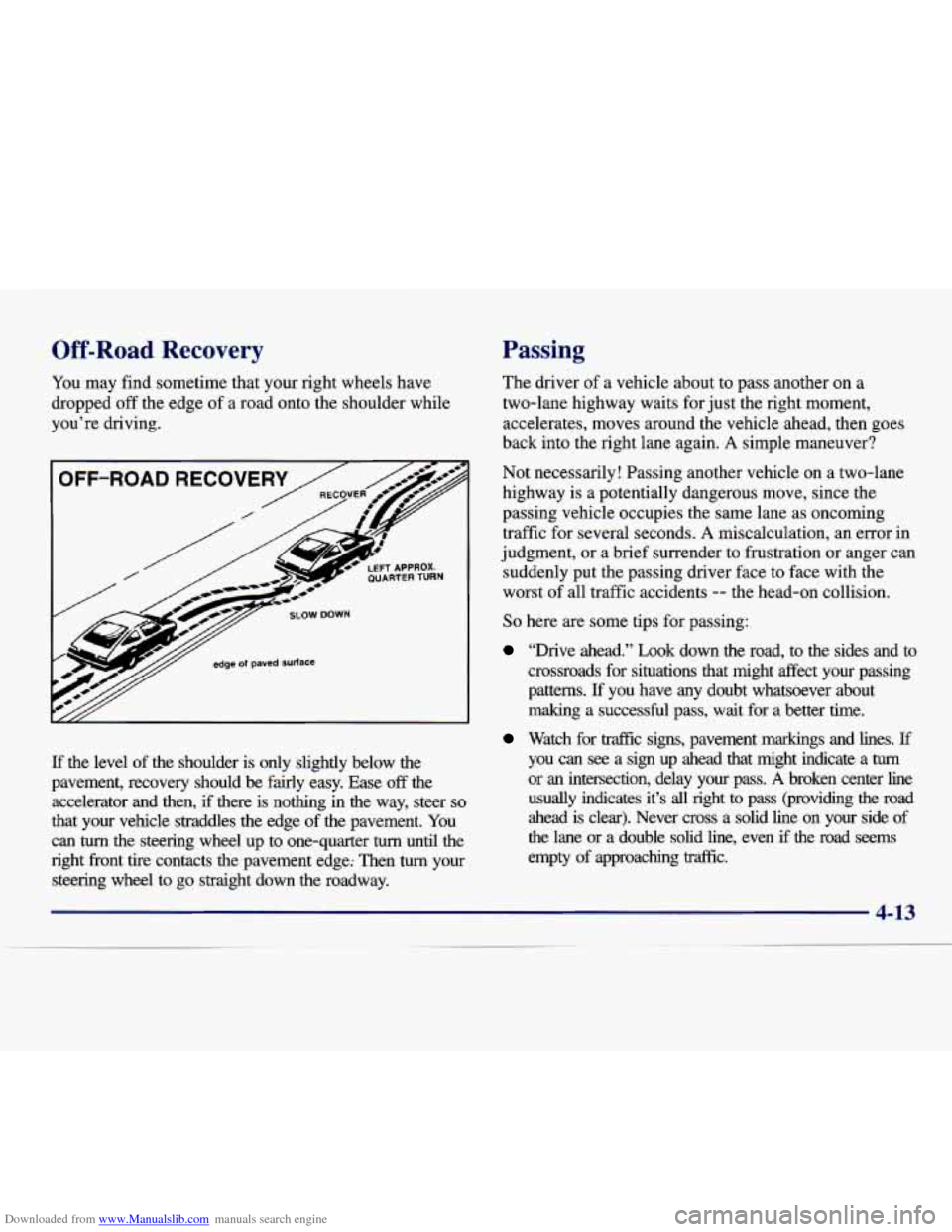
Downloaded from www.Manualslib.com manuals search engine Off-Road Recovery
You may find sometime that your right wheels have
dropped off the edge of a road onto the shoulder while
you’re driving.
If the level of the shoulder is only slightly below the
pavement, recovery should be fairly easy.
Ease off the
accelerator and then,
if there is nothing in the way, steer so
that your vehicle straddles the edge of the pavement. You
can
turn the steering wheel up to one-quarter turn until the
right front tire contacts the pavement edge: Then
turn your
steering wheel to go straight down the roadway.
Passing
The driver of a vehicle about to pass another on a
two-lane highway waits for just the right moment,
accelerates, moves around the vehicle ahead, then goes
back into the right lane again.
A simple maneuver?
Not necessarily! Passing another vehicle on a two-lane
highway is a potentially dangerous move, since the
passing vehicle occupies the same lane
as oncoming
traffic for several seconds.
A miscalculation, an error in
judgment, or a brief surrender to frustration or anger can
suddenly put the passing driver face to face with the
worst of all traffic accidents
-- the head-on collision.
So here are some tips for passing:
“Drive ahead.” Look down the road, to the sides ana to
crossroads for situations that might affect your passing
patterns. If you have any doubt whatsoever about
making a successful pass,
wait for a better time.
Watch for traffic signs, pavement markings and lines. If
you can see a sign up ahead that might indicate a turn
or an intersection, delay your pass. A broken center line
usually indicates it’s all right to pass (providing the roa\
d
ahead is clear). Never cross a solid line on your side of
the lane or a double solid line, even
if the road seems
empty of approaching traffic.
4-13