instrument panel CADILLAC DEVILLE 2003 8.G Service Manual
[x] Cancel search | Manufacturer: CADILLAC, Model Year: 2003, Model line: DEVILLE, Model: CADILLAC DEVILLE 2003 8.GPages: 423, PDF Size: 2.91 MB
Page 180 of 423
Driver Information Center (DIC)
This display gives you the status of many of your
vehicle's systems. The DIC is also used to display driver
personalization features and warning/status messages.
All messages will appear in the DIC display, located
at the bottom of the instrument panel cluster.
DIC Controls and Displays
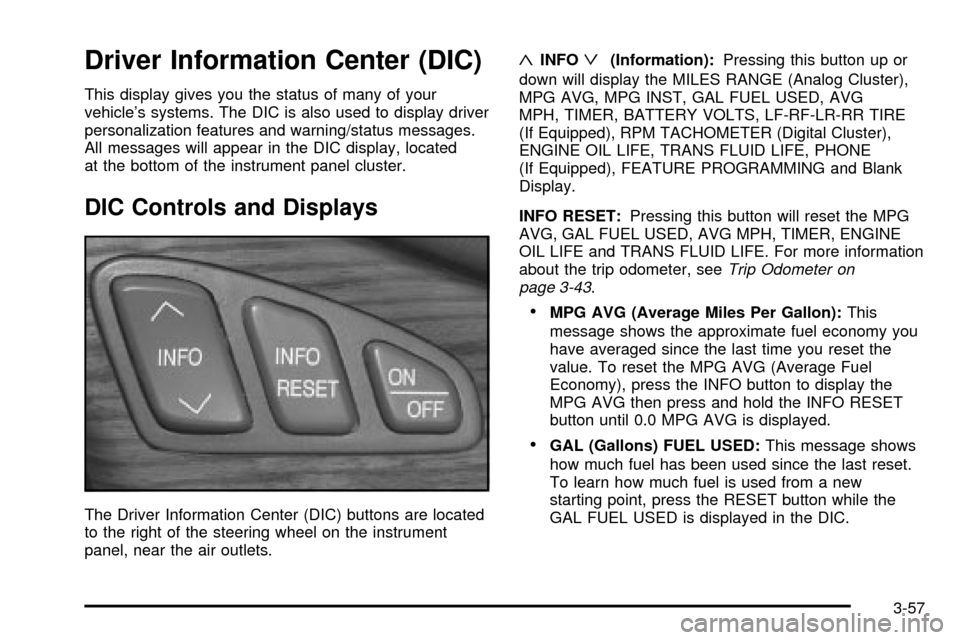
The Driver Information Center (DIC) buttons are located
to the right of the steering wheel on the instrument
panel, near the air outlets.
«INFOª(Information):Pressing this button up or
down will display the MILES RANGE (Analog Cluster),
MPG AVG, MPG INST, GAL FUEL USED, AVG
MPH, TIMER, BATTERY VOLTS, LF-RF-LR-RR TIRE
(If Equipped), RPM TACHOMETER (Digital Cluster),
ENGINE OIL LIFE, TRANS FLUID LIFE, PHONE
(If Equipped), FEATURE PROGRAMMING and Blank
Display.
INFO RESET:Pressing this button will reset the MPG
AVG, GAL FUEL USED, AVG MPH, TIMER, ENGINE
OIL LIFE and TRANS FLUID LIFE. For more information
about the trip odometer, see
Trip Odometer on
page 3-43.
·MPG AVG (Average Miles Per Gallon):This
message shows the approximate fuel economy you
have averaged since the last time you reset the
value. To reset the MPG AVG (Average Fuel
Economy), press the INFO button to display the
MPG AVG then press and hold the INFO RESET
button until 0.0 MPG AVG is displayed.
·GAL (Gallons) FUEL USED:This message shows
how much fuel has been used since the last reset.
To learn how much fuel is used from a new
starting point, press the RESET button while the
GAL FUEL USED is displayed in the DIC.
3-57
Page 182 of 423

MPG INST (Instantaneous Miles per Gallon):This
message shows the instantaneous fuel economy which
varies with your driving conditions, such as acceleration,
braking and the grade of the road being traveled.
The INFO RESET button does not function in this mode.
BATTERY VOLTS:This message shows the current
battery voltage. If the voltage is normal the display
will show BATTERY VOLTS OK. If the voltage drops
below 10.5 volts, the display will show BATTERY
VOLTS LOW. If the voltage is above 16 volts, the
display will show BATTERY VOLTS HIGH. If the display
shows the high or low message, you will need to
have your battery checked. See
DIC Warnings and
Messages on page 3-60for more information.
LF-RF-LR-RR TIRE:On vehicles equipped with the tire
pressure monitor, this message shows the tire pressure
for each tire (left front, right front, left rear and right rear).
Pressing the INFO button will scroll through the tire
pressure for each of the four tires, such as:
·34 PSI LF TIRE OK or
·234 kPa LF TIRE OKIf a tire pressure is below 25 PSI (172 kPa) or above
38 PSI (265 kPa), the message will appear as shown
above except it will show TIRE LOW or TIRE HIGH as
appropriate. If desired, the tire pressure information
can be programmed not to appear when using the INFO
button to scroll through the DIC displays. See
DIC
Vehicle Personalization on page 3-67.
If a low or high tire pressure is detected by the system
while driving, a CHECK TIRE PRESSURE message
will appear in the display. If this occurs, press the INFO
button to scroll to the tire(s) with a low or high
pressure condition. See
DIC Warnings and Messages
on page 3-60later in this section for more information.
ENG/MET (English/Metric):Press this button,
located to the left of the steering wheel on the instrument
panel, to display information in the English (miles) or
metric (kilometers) system.
3-59
Page 223 of 423
Navigation/Radio System
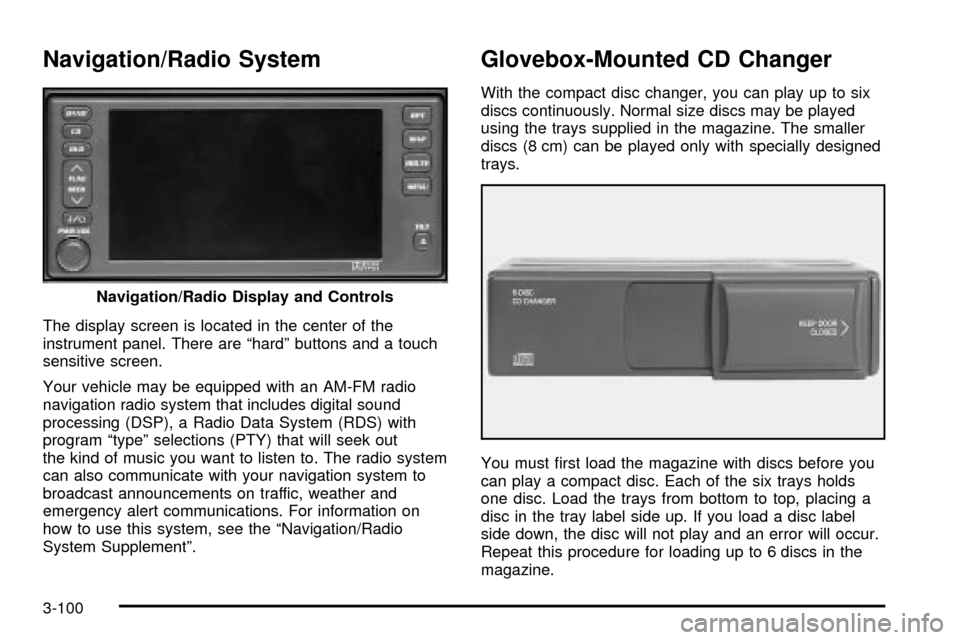
The display screen is located in the center of the
instrument panel. There are ªhardº buttons and a touch
sensitive screen.
Your vehicle may be equipped with an AM-FM radio
navigation radio system that includes digital sound
processing (DSP), a Radio Data System (RDS) with
program ªtypeº selections (PTY) that will seek out
the kind of music you want to listen to. The radio system
can also communicate with your navigation system to
broadcast announcements on traffic, weather and
emergency alert communications. For information on
how to use this system, see the ªNavigation/Radio
System Supplementº.
Glovebox-Mounted CD Changer
With the compact disc changer, you can play up to six
discs continuously. Normal size discs may be played
using the trays supplied in the magazine. The smaller
discs (8 cm) can be played only with specially designed
trays.
You must ®rst load the magazine with discs before you
can play a compact disc. Each of the six trays holds
one disc. Load the trays from bottom to top, placing a
disc in the tray label side up. If you load a disc label
side down, the disc will not play and an error will occur.
Repeat this procedure for loading up to 6 discs in the
magazine. Navigation/Radio Display and Controls
3-100
Page 270 of 423
Turn Signals When Towing a Trailer
When you tow a trailer, your vehicle may need a
different turn signal ¯asher and/or extra wiring. Check
with your dealer. The arrows on your instrument
panel will ¯ash whenever you signal a turn or lane
change. Properly hooked up, the trailer lamps will also
¯ash, telling other drivers you're about to turn,
change lanes or stop.
When towing a trailer, the arrows on your instrument
panel will ¯ash for turns even if the bulbs on the trailer
are burned out. Thus, you may think drivers behind
you are seeing your signal when they are not. It's
important to check occasionally to be sure the trailer
bulbs are still working.
Driving on Grades
Reduce speed and shift to a lower gearbeforeyou start
down a long or steep downgrade. If you don't shift
down, you might have to use your brakes so much that
they would get hot and no longer work well.
On long uphill grades, reduce speed to 45 to 50 mph
(70 to 90 km/h) and avoid prolonged use of SECOND (2)
gear and engine speeds above 3800 rpm.
Climbing grades steeper than four percent at
temperatures above 90É F (32É C) with a loaded vehicle
and trailer is not recommended. The cooling system
may temporarily overheat. See
Engine Overheating on
page 5-27.
Parking on Hills
{CAUTION:
You really should not park your vehicle, with a
trailer attached, on a hill. If something goes
wrong, your rig could start to move. People
can be injured, and both your vehicle and the
trailer can be damaged.
But if you ever have to park your rig on a hill, here's
how to do it:
1. Apply your regular brakes, but do not shift into
PARK (P).
2. Have someone place chocks behind the trailer
wheels.
3. When the wheel chocks are in place, release the
regular brakes until the chocks absorb the load.
4. Reapply the regular brakes. Then shift into PARK
(P) ®rmly and apply your parking brake.
5. Release the regular brakes.
4-39
Page 282 of 423

Hood Release
To lift the hood, use the following steps:
1. Pull the lever inside the
vehicle to open the
hood. It is located on
the lower left side of the
instrument panel.
2. Then go to the front of the vehicle and ®nd the
secondary hood release lever. The lever is
located under the bottom edge of the grille.
Move the release lever and raise the hood.
Before closing the hood, be sure all ®ller caps are on
properly. Then pull the hood down and close it ®rmly.
Vehicle without Night Vision shown
5-11
Page 298 of 423

Adding Coolant
If you need more coolant, add the proper DEX-COOLž
coolant mixtureat the surge tank,but only when the
engine is cool.
{CAUTION:
You can be burned if you spill coolant on hot
engine parts. Coolant contains ethylene glycol,
and it will burn if the engine parts are hot
enough. Don't spill coolant on a hot engine.
When replacing the pressure cap, make sure the arrow
lines up with the tube.
Coolant Surge Tank Pressure Cap
Notice:Your pressure cap is a pressure-type
cap and must be tightly installed to prevent coolant
loss and possible engine damage from overheating.
See ªCapacities and Speci®cationsº for more
information.
Engine Overheating
You will ®nd an ENGINE COOLANT HOT, IDLE
ENGINE message or an ENGINE OVERHEATED,
STOP ENGINE message displayed in the Driver
Information Center (DIC). You will also hear a chime.
There is also an engine temperature warning light and/or
gage on the instrument panel cluster. See
Engine
Coolant Temperature Warning Light on page 3-49andEngine Coolant Temperature Gage on page 3-50.
Overheated Engine Protection
Operating Mode
If an overheated engine condition exists and the
message ENGINE OVERHEATED, STOP ENGINE is
displayed, an overheat protection mode which alternates
®ring groups of cylinders helps prevent engine damage.
In this mode, you will notice a loss in power and
engine performance. This operating mode allows your
vehicle to be driven to a safe place in an emergency;
you may drive up to 50 miles (80 km). Driving extended
miles (km) and/or towing a trailer in the overheat
protection mode should be avoided.
Notice:After driving in the overheated engine
protection operating mode, to avoid engine damage,
allow the engine to cool before attempting any repair.
The engine oil will be severely degraded. Repair the
cause of coolant loss, change the oil and reset the oil
life system. See ªEngine Oilº in the Index.
5-27
Page 357 of 423

Cleaning Vinyl
Use warm water and a clean cloth.
·Rub with a clean, damp cloth to remove dirt. You
may have to do this more than once.
·Things like tar, asphalt and shoe polish will stain if
you don't get them off quickly. Use a clean cloth
and vinyl cleaner. See your dealer for this product.
Cleaning Leather
Use a soft cloth with lukewarm water and a mild soap or
saddle soap and wipe dry with a soft cloth. Then, let
the leather dry naturally. Do not use heat to dry.
·For stubborn stains, use a leather cleaner.
·Neveruse oils, varnishes, solvent-based or abrasive
cleaners, furniture polish or shoe polish on leather.
·Soiled or stained leather should be cleaned
immediately. If dirt is allowed to work into the ®nish,
it can harm the leather.
Cleaning the Top of the
Instrument Panel
Use only mild soap and water to clean the top surfaces
of the instrument panel. Sprays containing silicones
or waxes may cause annoying re¯ections in the
windshield and even make it difficult to see through the
windshield under certain conditions.
Cleaning the Interior Plastic
Components
Use only a mild soap and water solution on a soft cloth
or sponge. Commercial cleaners may affect the
surface ®nish.
5-86
Page 363 of 423

Vehicle Care/Appearance Materials
(cont'd)
Description Usage
Wash Wax ConcentrateMedium foaming
shampoo. Cleans and
lightly waxes.
Biodegradable and
phosphate free.
Spot LifterQuickly and easily
removes spots and stains
from carpets, vinyl and
cloth upholstery.
Odor EliminatorOdorless spray odor
eliminator used on
fabrics, vinyl, leather
and carpet.
See your General Motors parts department for these
products. See
Part D: Recommended Fluids and
Lubricants on page 6-15.
Vehicle Identi®cation
Vehicle Identi®cation Number (VIN)
This is the legal identi®er for your vehicle. It appears on
a plate in the front corner of the instrument panel, on
the driver's side. You can see it if you look through the
windshield from outside your vehicle. The VIN also
appears on the Vehicle Certi®cation and Service Parts
labels and the certi®cates of title and registration.
Engine Identi®cation
The 8th character in your VIN is the engine code. This
code will help you identify your engine, speci®cations
and replacement parts.
5-92
Page 366 of 423
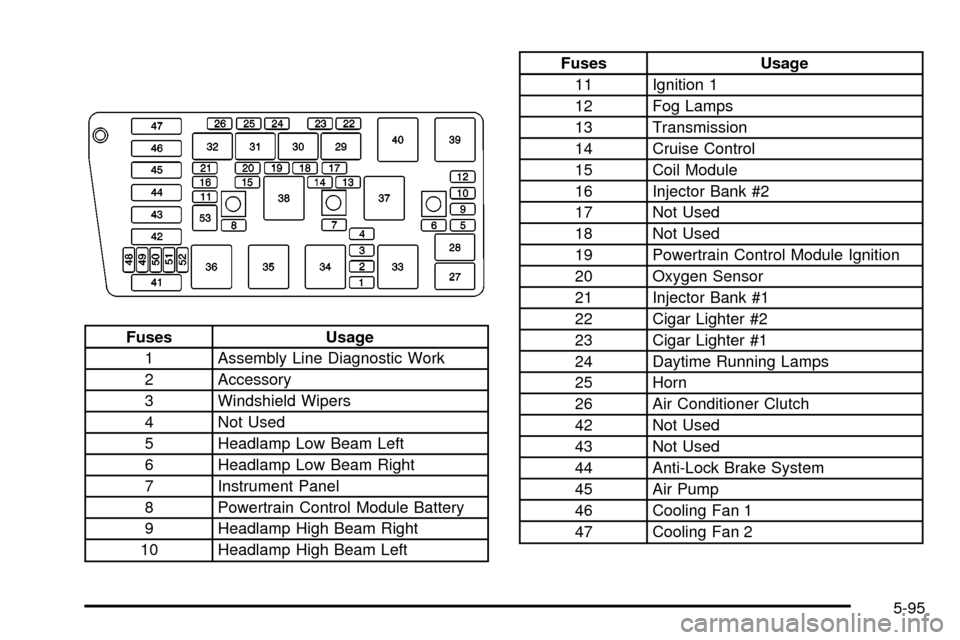
Fuses Usage
1 Assembly Line Diagnostic Work
2 Accessory
3 Windshield Wipers
4 Not Used
5 Headlamp Low Beam Left
6 Headlamp Low Beam Right
7 Instrument Panel
8 Powertrain Control Module Battery
9 Headlamp High Beam Right
10 Headlamp High Beam Left
Fuses Usage
11 Ignition 1
12 Fog Lamps
13 Transmission
14 Cruise Control
15 Coil Module
16 Injector Bank #2
17 Not Used
18 Not Used
19 Powertrain Control Module Ignition
20 Oxygen Sensor
21 Injector Bank #1
22 Cigar Lighter #2
23 Cigar Lighter #1
24 Daytime Running Lamps
25 Horn
26 Air Conditioner Clutch
42 Not Used
43 Not Used
44 Anti-Lock Brake System
45 Air Pump
46 Cooling Fan 1
47 Cooling Fan 2
5-95
Page 395 of 423

Customer Assistance
Information
Customer Satisfaction Procedure
Your satisfaction and goodwill are important to
your dealer and to Cadillac. Normally, any concerns
with the sales transaction or the operation of your
vehicle will be resolved by your dealer's sales or service
departments. Sometimes, however, despite the best
intentions of all concerned, misunderstandings can
occur. If your concern has not been resolved to your
satisfaction, the following steps should be taken:
STEP ONE:Discuss your concern with a member of
dealership management. Normally, concerns can
be quickly resolved at that level. If the matter has
already been reviewed with the sales, service or parts
manager, contact the owner of the dealership or
the general manager.STEP TWO:If after contacting a member of dealership
management, it appears your concern cannot be
resolved by the dealership without further help, contact
the Cadillac Customer Assistance Center, 24 hours
a day, by calling 1-800-458-8006. In Canada, contact
GM of Canada Customer Communication Centre
in Oshawa by calling 1-800-263-3777 (English) or
1-800-263-7854 (French).
We encourage you to call the toll-free number in order
to give your inquiry prompt attention. Please have
the following information available to give the Customer
Assistance Representative:
·Vehicle Identi®cation Number (This is available from
the vehicle registration or title, or the plate at the
top left of the instrument panel and visible through
the windshield.)
·Dealership name and location
·Vehicle delivery date and present mileage
When contacting Cadillac, please remember that your
concern will likely be resolved at a dealer's facility. That
is why we suggest you follow Step One ®rst if you
have a concern.
7-2