steering wheel CADILLAC DTS 2008 1.G Owner's Manual
[x] Cancel search | Manufacturer: CADILLAC, Model Year: 2008, Model line: DTS, Model: CADILLAC DTS 2008 1.GPages: 454, PDF Size: 2.48 MB
Page 155 of 454
Setting Cruise Control
{CAUTION:
If you leave your cruise control on when you
are not using cruise, you might hit a button
and go into cruise when you do not want to.
You could be startled and even lose control.
Keep the cruise control switch off until you
want to use cruise control.
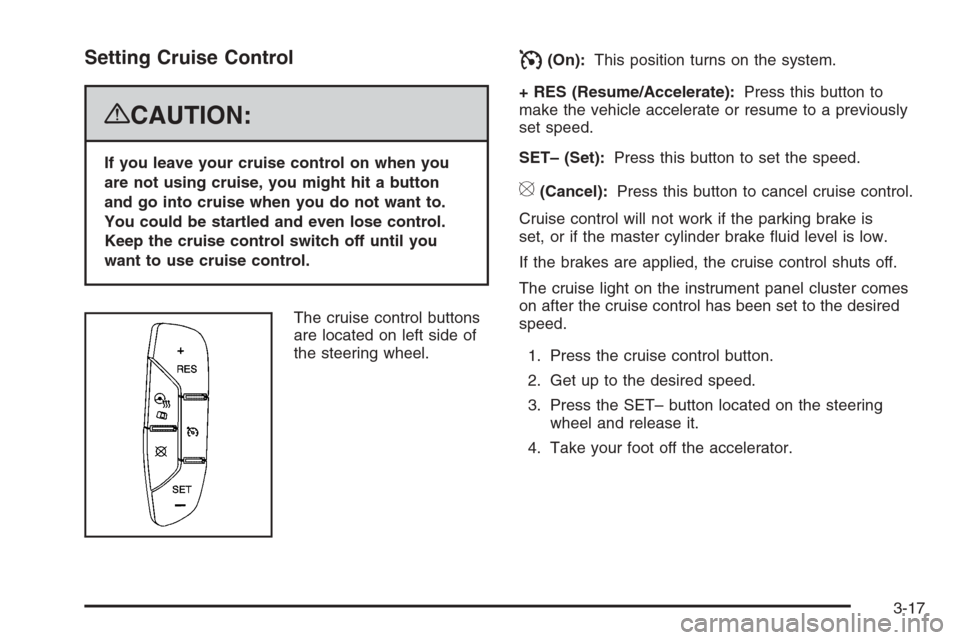
The cruise control buttons
are located on left side of
the steering wheel.
I(On):This position turns on the system.
+ RES (Resume/Accelerate):Press this button to
make the vehicle accelerate or resume to a previously
set speed.
SET– (Set):Press this button to set the speed.
[(Cancel):Press this button to cancel cruise control.
Cruise control will not work if the parking brake is
set, or if the master cylinder brake uid level is low.
If the brakes are applied, the cruise control shuts off.
The cruise light on the instrument panel cluster comes
on after the cruise control has been set to the desired
speed.
1. Press the cruise control button.
2. Get up to the desired speed.
3. Press the SET– button located on the steering
wheel and release it.
4. Take your foot off the accelerator.
3-17
Page 157 of 454
Using Cruise Control on Hills
How well your cruise control works on hills depends
upon the vehicle speed, load, and the steepness of the
hills. When going up steep hills, you might have to
step on the accelerator pedal to maintain the vehicle’s
speed. When going downhill, you might have to brake or
shift to a lower gear to keep the vehicle’s speed
down. Applying the brake or shifting into a lower gear
ends cruise control. If you need to apply the brake
or shift to a lower gear due to the grade of the downhill
slope, you might not want to attempt to use the
cruise control feature.
Ending Cruise Control
To turn off the cruise control, step lightly on the brake
pedal, or press the cancel button on the steering wheel.
Erasing Speed Memory
When you turn off the cruise control or the ignition, your
cruise control set speed memory is erased.
Adaptive Cruise Control
If your vehicle has this feature, be sure to read this
entire section before using it.
The system operates on a radio frequency subject to
Federal Communications Commission (FCC) Rules and
with Industry Canada.This device complies with Part 15 of the FCC Rules.
Operation is subject to the following two conditions:
1. This device may not cause interference.
2. This device must accept any interference received,
including interference that may cause undesired
operation of the device.
This device complies with RSS-210 of Industry Canada.
Operation is subject to the following two conditions:
1. This device may not cause interference.
2. This device must accept any interference received,
including interference that may cause undesired
operation of the device.
Changes or modications to this system by other than
an authorized service facility could void authorization to
use this equipment.
Adaptive Cruise Control is an enhancement to traditional
cruise control. It allows you to keep cruise control
engaged in moderate traffic conditions without having to
constantly reset your cruise control. Adaptive Cruise
Control uses radar to detect a vehicle directly ahead in
your path, within a distance of 330 ft (100 m), and
operates at speeds above 25 mph (40 km/h). When it is
engaged by the driver, the system can apply limited
braking or acceleration of the vehicle automatically to
maintain a selected follow distance to the vehicle ahead.
3-19
Page 159 of 454

CAUTION: (Continued)
On slippery roads, fast changes in tire
traction can cause needless wheel
spinning, and you could lose control.
Do not use cruise control on slippery
roads.
When weather limits visibility, such as
when in fog, rain, or snow conditions,
Adaptive Cruise Control performance is
limited. There may not be enough distance
to adapt to the changing traffic conditions.
Do not use cruise control when visibility
is low.The Adaptive Cruise
controls are located on
the steering wheel.
The cruise control buttons are located on outboard side
of the steering wheel.
](On):This position turns on the system.
+ Res (Resume/Accelerate):Press this button to
make the vehicle resume to a previously set speed or to
increase the set speed when Adaptive Cruise Control
is already active.
3-21
Page 162 of 454

Decreasing Set Speed While Using
Adaptive Cruise Control
Press the SET– button until you reach the lower speed
desired, then release it.
To slow down in very small amounts, briey press the
SET– button. Each time this is done, your set speed
decreases by 1 mph (1 km/h) slower.
Resuming a Set Speed
Suppose the Adaptive Cruise Control is set at a desired
speed and then the brakes are applied. This will turn
off the Adaptive Cruise Control. But it does not need to
be reset.
Once you are going about 25 mph (40 km/h) or more,
press the +RES button. Adaptive Cruise Control
will be engaged with the previously chosen set speed.
Selecting the Follow Distance (GAP)
When the system detects a slower moving vehicle, it will
adjust your vehicle’s speed and maintain the follow
distance (gap) you select.
Use the plus and minus buttons on the steering wheel
to adjust the follow distance.
Press the plus button to increase the distance or the
minus button to decrease the distance. The rst button
press shows the current follow distance setting on
the DIC. The current follow distance setting will
be maintained until you change it.
There are six follow distances to choose from. The
follow distance selection ranges from near to far
(one second to two seconds follow time). The distance
maintained for a selected follow distance will vary
based on vehicle speed. The faster the vehicle speed
the further back your vehicle will follow. Consider
traffic and weather conditions when selecting the follow
distance. The range of selectable distances may not
be appropriate for all drivers and driving conditions.
If you prefer to travel at a follow distance farther than
Adaptive Cruise Control allows, disengage the
system and drive manually.
3-24
Page 170 of 454

Exterior Lamps
The exterior lamps
control is located on
the instrument panel
to the left of the
steering wheel.
It controls the following systems:
Headlamps
Taillamps
Parking Lamps
License Plate Lamps
Instrument Panel Lights
Fog Lamps
The exterior lamps control has four positions:
O(Off):Turns off the exterior lamps except for
Daytime Running Lamps (DRL).AUTO (Automatic):Automatically turns on the
headlamps at normal brightness, together with the
following:
Parking Lamps
Instrument Panel Lights
IntelliBeam™
;(Parking Lamps):Turns on the parking lamps
together with the following:
Instrument Panel Lights
License Plate Lamps
Taillamps
Side Marker Lamps
The parking brake indicator light comes on and stays on
while the parking lamps are on with the engine off
and the ignition in ACC/ACCESSORY or ON/RUN.
2(Headlamps):Turns on the headlamps together
with the previously listed lamps. A warning chime
sounds if the driver’s door is opened while the ignition
switch is off and the headlamps are on.
-(Fog Lamps):Press the exterior lamps control to
turn on the fog lamps. SeeFog Lamps on page 3-36.
3-32
Page 184 of 454

Sensors
The solar sensor, located in the defrost grille, middle
of the instrument panel, monitors the solar radiation.
Do not cover the solar sensor or the system will
not work properly.There is also an interior
temperature sensor
located next to the steering
wheel that measures the
temperature of the air
inside your vehicle.
There is also an exterior temperature sensor located
behind the front grille. This sensor reads the outside
air temperature and helps maintain the temperature
inside the vehicle. Any cover on the front of the
vehicle could cause a false reading in the displayed
temperature.
3-46
Page 208 of 454

Driver Information Center (DIC)
The Driver Information Center (DIC) gives you the
status of many of your vehicle’s systems. The DIC is
also used to display warning/status messages. All
messages will appear in the DIC display located at the
bottom of the instrument panel cluster, below the
tachometer and speedometer. The DIC buttons are
located on the instrument panel, to the left of the
steering wheel.
The DIC comes on when the ignition is on. After a short
delay, the DIC will display the information that was
last displayed before the engine was turned off.
The top line of the DIC display shows the vehicle system
information and the warning/status messages. The
bottom line of the DIC display shows the odometer on
the left side. The bottom line of the DIC display also
shows a digital speedometer on the right side.
If a problem is detected, a warning message will appear
on the display. Be sure to take any message that
appears on the display seriously and remember that
clearing the message will only make the message
disappear, not correct the problem.
DIC Operation and Displays
The Driver Information
Center (DIC) has different
displays which can be
accessed by pressing the
DIC buttons located on
the instrument panel, to the
left of the steering wheel.
3Trip/Fuel:Press this button to scroll through the
trip and fuel displays. See “Trip/Fuel Display Menu
Items” following for more information on these displays.
TVehicle Information:Press this button to scroll
through the vehicle information displays. See “Vehicle
Information Display Menu Items” following for more
information on these displays.
UCustomization:Press this button to scroll through
each of the customization features. SeeDIC Vehicle
Customization on page 3-87for more information on the
customization features.
3-70
Page 230 of 454
CHIME VOLUME
This feature allows you to select the volume level of
the chime.
Press the customization button until CHIME VOLUME
appears on the DIC display. Press the set/reset
button once to access the settings for this feature. Then
press the menu up/down button to scroll through the
following settings:
NORMAL:The chime volume will be set to a
normal level.
LOUD:The chime volume will be set to a loud level.
NO CHANGE:No change will be made to this feature.
The current setting will remain.
There is no default for chime volume. The volume will
stay at the last known setting.
To select a setting, press the set/reset button while the
desired setting is displayed on the DIC.
PARK TILT MIRRORS
If your vehicle has this feature, it allows you to select
whether or not the outside mirror(s) will automatically tilt
down when the vehicle is shifted into REVERSE (R).
SeePark Tilt Mirrors on page 2-39for more information.Press the customization button until PARK TILT
MIRRORS appears on the DIC display. Press the
set/reset button once to access the settings for
this feature. Then press the menu up/down button to
scroll through the following settings:
OFF (default):Neither outside mirror will be tilted down
when the vehicle is shifted into REVERSE (R).
DRIVER MIRROR:The driver’s outside mirror will be
tilted down when the vehicle is shifted into
REVERSE (R).
PASSENGER MIRROR:The passenger’s outside
mirror will be tilted down when the vehicle is shifted into
REVERSE (R).
BOTH MIRRORS:The driver’s and passenger’s outside
mirrors will be tilted down when the vehicle is shifted
into REVERSE (R).
NO CHANGE:No change will be made to this feature.
The current setting will remain.
To select a setting, press the set/reset button while the
desired setting is displayed on the DIC.
EASY EXIT RECALL
If your vehicle has this feature, it allows you to select
your preference for the automatic easy exit seat feature.
SeeMemory Seat, Mirrors and Steering Wheel on
page 1-4for more information.
3-92
Page 231 of 454

Press the customization button until EASY EXIT
RECALL appears on the DIC display. Press the set/reset
button once to access the settings for this feature.
Then press the menu up/down button to scroll through
the following settings:
DOOR BUTTON ONLY:No automatic seat exit recall
will occur. The recall will only occur after pressing
the easy exit seat button.
BUTTON AND KEY OUT (default):If the features are
enabled through the EASY EXIT SETUP menu, the
driver’s seat will move back, and if the vehicle has the
power tilt wheel and telescopic steering feature, the
power steering column will move up and forward when
the key is removed from the ignition or after pressing
the easy exit seat button.
The automatic easy exit seat movement will only occur
one time after the key is removed from the ignition.
If the automatic movement has already occurred, and
you put the key back in the ignition and remove it again,
the seat and steering column will stay in the original
exit position, unless a memory recall took place prior to
removing the key again.
NO CHANGE:No change will be made to this feature.
The current setting will remain.
To select a setting, press the set/reset button while the
desired setting is displayed on the DIC.EASY EXIT SETUP
If your vehicle has this feature, it allows you to select
which areas will recall with the automatic easy exit seat
feature. It also allows you to turn off the automatic
easy exit feature. SeeMemory Seat, Mirrors and
Steering Wheel on page 1-4and “EASY EXIT RECALL”
earlier for more information.
Press the customization button until EASY EXIT SETUP
appears on the DIC display. Press the set/reset button
once to access the settings for this feature. Then
press the menu up/down button to scroll through the
following settings:
OFF:No automatic seat exit will recall.
SEAT ONLY:The driver’s seat will recall.
TILT ONLY:The steering wheel tilt feature will recall.
TELESCOPE ONLY:The steering column telescope
feature will recall.
SEAT/TILT:The driver’s seat and the steering wheel tilt
feature will recall.
SEAT/TELESCOPE:The driver’s seat and the steering
column telescope feature will recall.
TILT/TELESCOPE:The steering wheel tilt and steering
column telescope features will recall.
3-93
Page 232 of 454

ALL (default):The driver’s seat and the steering wheel
tilt and steering column telescope features will recall,
if your vehicle has this option.
NO CHANGE:No change will be made to this feature.
The current setting will remain.
To select a setting, press the set/reset button while the
desired setting is displayed on the DIC.
MEMORY SEAT RECALL
If your vehicle has this feature, it allows you to select
your preference for the remote memory seat recall
feature. SeeMemory Seat, Mirrors and Steering Wheel
on page 1-4for more information.
Press the customization button until MEMORY SEAT
RECALL appears on the DIC display. Press the set/reset
button once to access the settings for this feature.
Then press the menu up/down button to scroll through
the following settings:
OFF (default):No remote memory seat recall will occur.
ON:The driver’s seat and outside mirrors will
automatically move to the stored driving position when
the unlock button on the Remote Keyless Entry
(RKE) transmitter is pressed. The steering column will
also move on vehicles with the power tilt and telescopic
steering feature. SeePower Tilt Wheel and Telescopic
Steering Column on page 3-7for more information.See “RELEARN REMOTE KEY” underDIC Operation
and Displays on page 3-70for more information on
matching transmitters to driver ID numbers.
NO CHANGE:No change will be made to this feature.
The current setting will remain.
To select a setting, press the set/reset button while the
desired setting is displayed on the DIC.
REMOTE START
If your vehicle has this feature, it allows you to turn the
remote start off or on. The remote start feature allows
you to start the engine from outside of the vehicle using
the Remote Keyless Entry (RKE) transmitter. See
Remote Vehicle Start on page 2-8for more information.
Press the customization button until REMOTE START
appears on the DIC display. Press the set/reset
button once to access the settings for this feature. Then
press the menu up/down button to scroll through the
following settings:
OFF:The remote start feature will be disabled.
ON (default):The remote start feature will be enabled.
NO CHANGE:No change will be made to this
feature. The current setting will remain.
To select a setting, press the set/reset button while the
desired setting is displayed on the DIC.
3-94